1
Cubase LE Installation Guide/ Control Surface Operation Guide
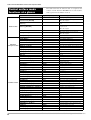
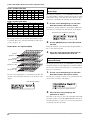
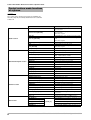
HD8/HD16 key
[TRACK PARAMETER] key
[INPUT SOURCE] key
[BOUNCE] key
[SCENE] key
[AUTO PUNCH IN/OUT] key
[A-B REPEAT] key
Display indication
Cubase LE parameter
Parameters accessible through repeated
keypresses
SEND1 – SEND4
PAN
EQ1
EQ2
EQ3
EQ4
SEND1 – SEND4
SEND1 – 4 On/Off status and level are shown in turn.
PAN
--
EQ:LOW
EQ1 OnOff status, Gain, Freq and Q are shown in turn
EQ:LO MID
EQ1 OnOff status, Gain, Freq and Q are shown in turn
EQ:HI MID
EQ1 OnOff status, Gain, Freq, and Q are shown in turn
EQ:HI
EQ1 OnOff status, Gain, Freq, and Q are shown in turn
For example, pressing the [TRACK PARAMETER] key
repeatedly cycles through the following parameters for
control: SEND1: OnOff → SEND1: Level → SEND2: OnOff
→ SEND2: Level.
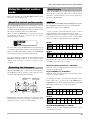
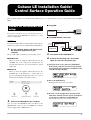
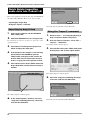
You can adjust the volume that is produced according to the
force with which you hit the pads (pad sensitivity).
3.
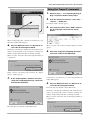
1.
Turn the parameter knob for the target track
to adjust the parameter.
Changing the pad sensitivity
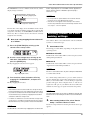
Hold down the [SHIFT] key and press pad 1
(CD-R/RW).
The display indication changes as follows.
Using the pads
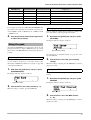
Pad Sense
Normal
Also while the HD8/HD16 is in control surface mode, the pad
playing information is output as MIDI messages. In control
surface mode of the HD8/HD16, the following pad settings are
possible.
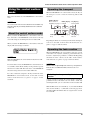
Switching the pad bank
When you switch the pad bank in control surface mode, the set
of note numbers assigned to each bank changes. (For
information on MIDI note numbers for each pad, see page 205
of the Operation Manual.)
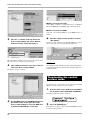
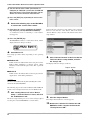
1.
Hold down the [SHIFT] key and press pad 5
(CHORUS/DELAY).
The display indication changes as follows.
Pad Bank
1
Pad bank number
2.
Pad sensitivity setting
For information on available settings, see page 125 of the
Operation Manual.
2.
Turn the dial to select the pad sensitivity
settings.
When the setting is complete, press the [EXIT] key to return to
the previous screen.
Setting the MIDI channel
To set the channel for sending MIDI messages, proceed as
follows.
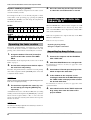
1.
Hold down the [SHIFT] key and press pad 6
(REVERB).
The display indication changes as follows.
MIDI Pad Channel
10ch
Turn the dial to select the pad bank (1 - 3).
When the setting is complete, press the [EXIT] key.
MIDI channel
2.
Turn the dial to select the MIDI channel
(1 - 16).
When the setting is complete, press the [EXIT] key to return to
the previous screen.
Cubase LE Installation Guide/Control Surface Operation Guide
7