1
Cubase LE Installation Guide/
Control Surface Operation Guide
This document explains how to install the Cubase LE software on a computer and how to use the control surface mode of the HD8/
HD16.
Cubase LE installation and
setup
■ Using USB
HD8/HD16
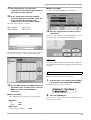
Perform the following steps to install Cubase LE on a
computer and set up the HD8/HD16 to function as a control
surface for Cubase LE.
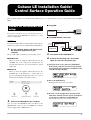
USB port
USB port
USB cable
Computer
■ Using MIDI IN/OUT connectors
NOTE
For the following procedure, you will need the "Cubase LE" CD
and the "Factory Recover CD" supplied with the HD8/HD16.
1.
Use the supplied "Cubase LE" CD to install
the Cubase LE application on your
computer.
MIDI IN
connector
MIDI OUT
connector
MIDI IN
connector
MIDI OUT
connector
HD8/HD16
MIDI interface
Computer
The procedure differs, depending on the operating system.
3.
Turn power to the HD8/HD16 on.
■ Windows XP
4.
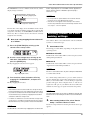
Perform the following steps at the HD8/
HD16 to select the connection type.
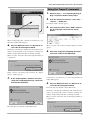
When you insert the supplied "Cubase LE" CD into the
CD-ROM drive of the computer, the Installer starts up
automatically. Follow the on-screen instructions to install
Cubase LE.
■ MacOS X
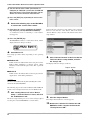
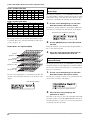
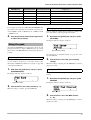
(1) From the main screen, press the [PROJECT/
UTILITY] key and then use the cursor left/right
keys to bring up the indication "SYSTEM" on the
second line of the display.
When you insert the supplied "Cubase LE" CD into the
CD-ROM drive of the Macintosh, a "Cubase LE" icon
appears on the desktop. Double-click on the icon to open it
and then use the Installer to install the software.
REC UTILITY 4/10
>SYSTEM
(2) Press the [ENTER] key.
The display indication changes as follows.
SYSTEM
1/7
>FOOT SWITCH
(3) Use the cursor left/right keys to bring up the
indication "Control Surface" on the second line
of the display, and press the [ENTER] key.
The currently selected connection type is shown.
2.
Connect the HD8/HD16 to the computer.
You can connect the HD8/HD16 either via USB or via the
MIDI IN/OUT connectors. (If you use MIDI, the computer
must be equipped with a MIDI interface.)
Cubase LE Installation Guide/Control Surface Operation Guide
Control Surface
USB
1