1
Table of Contents
Thank you for your purchase
of a Masterclock Digital Display.
Here you’ll find instructions for unpacking
and installing your Masterclock Display(s),
including suggestions for proper care and
configuration.
Introduction ............................................................................. 3
Features ................................................................................... 4
Power, Accessories and Software ........................................... 5
Mounting ................................................................................. 6
Configuration Checklist ............................................................ 7
Configuration ......................................................................... 10
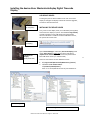
Installing Device Driver for Timecode USB Configuration .... 11
WinDiscovery - Installation and Configuration ..................... 12
Specifications Timecode .......................................................... 17
We are here to help.
Troubleshooting TIMECODE ................................................... 19
You can reach us using various contact
methods (phone, email, etc.) found at our
website: www.Masterclock.com
Care and Cleaning .................................................................. 22
Limited Warranty ................................................................... 24
Service and Return Information .............................................. 25
Health and Safety .................................................................... 26
Compliance .............................................................................. 27
Disclaimer
The material in this document is for
information only and subject to change
without notice. While reasonable efforts
have been made in the preparation of this
document to assure its accuracy,
Masterclock, Inc. assumes no liability
resulting from errors or omissions in this
document, or from the use of the
information contained herein. Masterclock,
Inc. reserves the right to make changes or
revisions in the product design or the
product manual without reservation and
without obligation to notify any person of
such revisions and changes
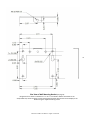
Mounting Diagram ................................................................... 30
Contact Information ................................................................ 31
Operating Parameters
The Masterclock Display contains microprocessor control
electronics designed to operate indoors between 32˚ to 140°F
(0˚ to 60˚C) with 0-90% relative humidity, non-condensing.
The Masterclock Display is not water- or moisture-proof.
Treat it as you would any other delicate electronic device and
do not expose it to water, excessive heat or physical abuse
Masterclock TCDS-A User Manual – Original – 2013-04-19
2