1
Table of Contents
Introduction....................................................................3
Welcome! .........................................................................................................3
About the Bitrman.........................................................................4
Important features of your Bitrman...........................................................4
Bitrman Key Features....................................................................................5
How to Use This Manual.............................................................6
Safety Instructions/Notices .....................................7
Important Safety Instructions (English)............................7
CE Declaration Of Conformity................................................9
FCC Compliance Statement......................................................9
Instructions de Sécurité Importantes (French) .........................................10
Lesen Sie bitte die folgende Sicherheitshinweise
(German) ..................................................................................................12
Quick Start Guide ........................................................15
If you can’t wait to get started......................................................................15
Hook it up to a synthesizer...........................................................................15
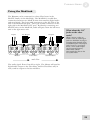
A quick overview of the controls ...........................................16
Rear Panel ........................................................................................................16
Connections ....................................................................17
Unpacking and Inspection............................................................................17
Installing in a Rack .........................................................................................17
Power................................................................................................................17
Connecting to the Channel Inserts of a mixing console: ........................19
Connecting to the Main Outputs of a mixing console: ...........................20
Connecting to the Effect Send/Return of a mixing
console: .....................................................................................................20
Connecting to the inserts on an instrument amplifier: ............................21
Connecting to equipment with XLR inputs and outputs:.......................22
About audio cables.........................................................................................22
Using the ModLink........................................................................23
Using the Bitrman........................................................25
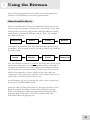
About multieffects .........................................................................25
About the effects ............................................................................26
What is Compression? ...................................................................................26
What is Distortion? ........................................................................................26
What is a Dual Phasor? .................................................................................26
Bitrness Effects...............................................................................................27
Description of Controls...............................................................30
Compress [1] ...................................................................................................30
Distort [2].........................................................................................................30
Dual Phasor [3] ...............................................................................................30
Bitrness Knob .................................................................................................30
BITRNESS select switch ..............................................................................31
CONFIGURE switch....................................................................................31
1