1
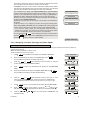
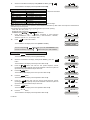
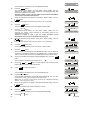
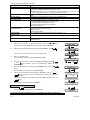
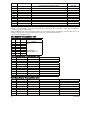
Available options are: 00s (default in USA), 15s, 30s (default), 45s, 60s, 2m, 3m and 4m.
Note: To comply with CP-01 requirements, "60s", "3m" and "4m" options are not available.
Note: To comply with UL requirements, the abort time must not exceed 45 sec.
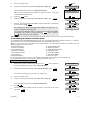
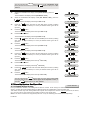
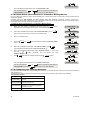
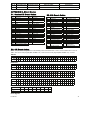
To Configure the Abort Time
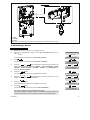
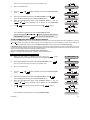
1.
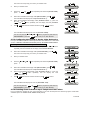
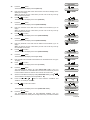
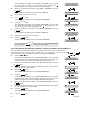
Make sure the system is disarmed and then press the
button
repeatedly until the PowerMax10-G2 display reads "INSTALLER MODE".
2.
When the PowerMax10-G2 display reads [INSTALLER MODE], press
I OK
.
The screen will now prompt you to enter your installer code.
3.
READY 00:00
INSTALLER MODE
I OK
Enter your Installer Code.
ENTER CODE:
CODE
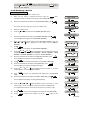
4.
5.
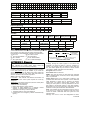
Press the
PANEL] option.
or
buttons repeatedly and select the [DEFINE
DEFINE PANEL
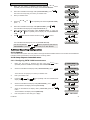
When the PowerMax10-G2 display reads [DEFINE PANEL], press
I OK
I OK
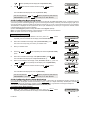
The PowerMax10-G2 display will read [01:ENTRY DELAY 1].
01:ENTRY DELAY 1
6.
When the PowerMax10-G2 display reads [01:ENTRY DELAY 1], press the
or
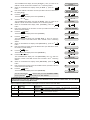
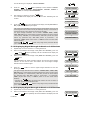
button repeatedly until the display will read [05:ABORT TIME].
7.
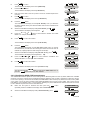
Press
I OK
or
and make the selection and then press
I OK
to confirm.
or
05:ABORT TIME
I OK
SELECT OPTION
I OK
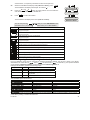
The PowerMax10-G2 display will revert to [05:ABORT TIME].
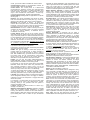
You can now press the
"DEFINE PANEL" or press the
or
05:ABORT TIME
button to program any other menu in
button to take you to "<OK> TO EXIT".
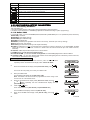
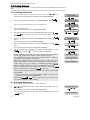
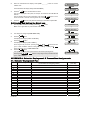
4.7.7 Configuring a Confirmed Alarm
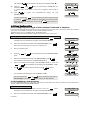
Here you determine that if 2 successive alarms will occur during a specific period, the second alarm will be considered as a
confirmed alarm for confirmed alarm reporting, (see par. 4.6.3.2 "Configuring the Event Types to be Reported").
Options: disable (default in USA), 30 min., 45 min., 60 min. (default), or 90 min.
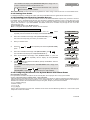
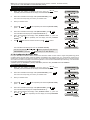
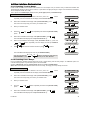
To Configure a Confirmed Alarm
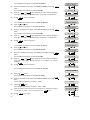
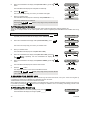
1.
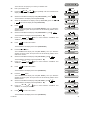
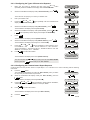
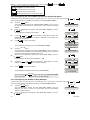
Make sure the system is disarmed and then press the
button
repeatedly until the PowerMax10-G2 display reads "INSTALLER MODE".
2.
When the PowerMax10-G2 display reads [INSTALLER MODE], press
I OK
.
The screen will now prompt you to enter your installer code.
3.
READY 00:00
INSTALLER MODE
I OK
Enter your Installer Code.
ENTER CODE:
CODE
4.
5.
Press the
option.
or
button repeatedly and select the [DEFINE PANEL]
DEFINE PANEL
When the PowerMax10-G2 display reads [DEFINE PANEL], press
I OK
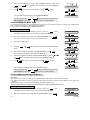
The PowerMax10-G2 display will read [01:ENTRY DELAY 1].
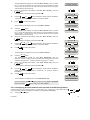
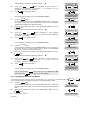
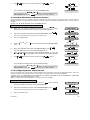
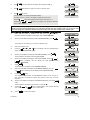
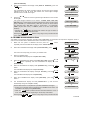
When the PowerMax10-G2 display reads [01:ENTRY DELAY 1], press the
or
button repeatedly until the display will read [33:CONFIRM TIME].
7.
Press
and make the selection and then press
I OK
I OK
01:ENTRY DELAY 1
6.
I OK
or
to confirm.
or
33:CONFIRM TIME
I OK
SELECT OPTION
D-302756
41