1
6.
7.
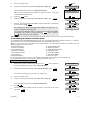
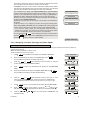
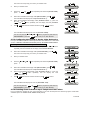
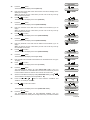
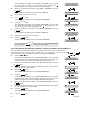
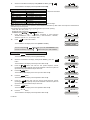
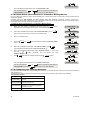
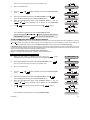
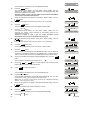
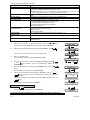
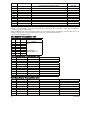
When the PowerMax10-G2 display reads [01:ENTRY DELAY 1], click the
or
button repeatedly until the display will read [10:PIEZO
BEEPS].
Press
I OK
and make the selection and then press
I OK
to confirm.
or
10:PIEZO BEEPS
I OK
SELECT OPTION
I OK
The PowerMax10-G2 display will revert to [10:PIEZO BEEPS].
You can now press the
"DEFINE PANEL" or press the
or
10:PIEZO BEEPS
button to program any other menu in
button to take you to "<OK> TO EXIT".
4.9.3 Enabling the Back Light
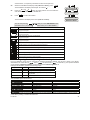
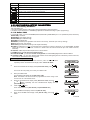
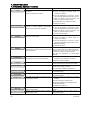
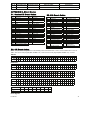
Here you determine whether the keypad back lighting will remain on at all times or will turn on when a key is pressed and
turn off within 10 seconds if no further keystrokes are sensed.
The two options are: always on and off after 10 s (default).
To Enable the Back Light
1.
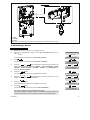
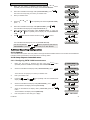
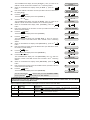
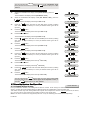
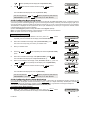
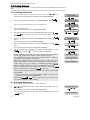
Make sure the system is disarmed and then press the
button
repeatedly until the PowerMax10-G2 display reads "INSTALLER MODE".
2.
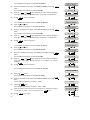
When the PowerMax10-G2 display reads [INSTALLER MODE], press
I OK
.
The screen will now prompt you to enter your installer code.
3.
READY 00:00
INSTALLER MODE
I OK
Enter your Installer Code.
ENTER CODE:
CODE
4.
5.
Click the
option.
or
button repeatedly and select the [DEFINE PANEL]
or
DEFINE PANEL
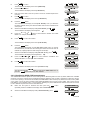
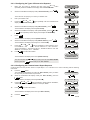
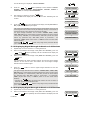
When the PowerMax10-G2 display reads [DEFINE PANEL], press
I OK
I OK
The PowerMax10-G2 display will read [01:ENTRY DELAY 1].
01:ENTRY DELAY 1
6.
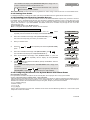
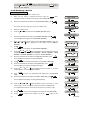
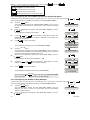
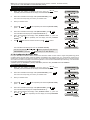
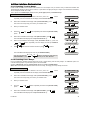
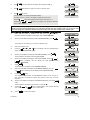
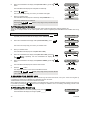
When the PowerMax10-G2 display reads [01:ENTRY DELAY 1], click the
or
buttons repeatedly until the display will read [22:BACK LIGHT].
7.
Press
I OK
and make the selection and then press
I OK
or
22:BACK LIGHT
to confirm.
I OK
SELECT OPTION
I OK
The PowerMax10-G2 display will revert to [22:BACK LIGHT].
You can now press the
"DEFINE PANEL" or press the
or
22:BACK LIGHT
button to program any other menu in
button to take you to "<OK> TO EXIT".
4.9.4 Configuring the Disarm Option
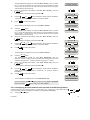
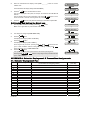
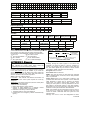
Here you determine when it is possible to disarm the system:
A. Any time.
B. In AWAY mode, during entry delay, by using the PowerMax10-G2 keypad or wireless sensor (keyfob).
C. In AWAY mode, during entry delay, by using a wireless device (keyfob) only (this is set as a default in UK to comply with
DD243).
D. During entry delay, or by using the PowerMax10-G2 keypad in AWAY mode.
Options: any time (default), on entry all, on entry wireless, or entry + away kp (default in UK).
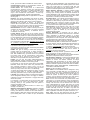
To Configure the Disarm Option
1.
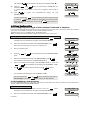
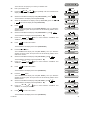
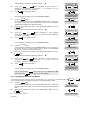
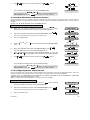
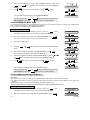
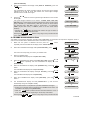
Make sure the system is disarmed and then press the
button
repeatedly until the PowerMax10-G2 display reads "INSTALLER MODE".
2.
When the PowerMax10-G2 display reads [INSTALLER MODE], press
50
I OK
.
READY 00:00
INSTALLER MODE
D-302756