1
statements are preloaded into the cache at system
startup time and are not accessed later).
Remember that comment lines add to the
parsing time, because each line is processed
individually.
Change Administrator Password
The MaxAttach comes with a set of default accounts.
Only the Administrator account has administrative
privileges. The default User Name is: Admnistrator,
and the Password is blank (none).
Note: If an administrator adds a domain account to
the local Administrators group, the domain
user may access and administer the
MaxAttach. However, the administrator
cannot use the Change Administrator
Password page to change his or her (domain
account) password. This page can only be
used to change the local administrator's
account password.
WARNING: If you change the user name and
password, be certain that you keep a
record of the changes. If you forget
and cannot locate the new user name
or password, neither you nor Maxtor
Technical Support will be able to
administer your MaxAttach.
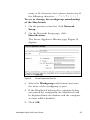
To change the Administrator password for the
MaxAttach
1. On the primary menu bar, click Network
Setup.
MaxAttach NAS 4100 User Guide
43