1
7–2
Pulse Catch Input
Mode 50
Pulse Catch Input
Using the Pulse Catch Inputs, Mode 50
It is recommended that you read Chapter 1, Getting Started, which introduces the six
different modes of operation of the D2–CTRINT module, before selecting a mode.
Even though several features can be mixed from several modes, you must select
one of the modes as your primary mode. Pulse Catch Input, Mode 50 will be the only
mode covered in this chapter.
It is also important to read Chapter 2, concerning the general guidelines for field
wiring your device to the module. You may want to refer to Chapter 2 as you learn to
make use of the D2-CTRINT’s Pulse Catch Inputs. A good place to begin is to learn
what each channel of the module represents when it is being used in the Pulse Catch
Input mode.
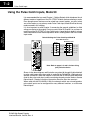
Default Settings for Pulse Catch Input Mode 50
D2–CTRINT Terminals
CW
CCW
DL240/250–1/260
DL230
00
00
Pulse Catch
01
D2
Dis. Input
02
03
Dis. Input
Dis. Input
04
Pulse Catch
01
02
03
Pulse Catch
Pulse Catch
Pulse Catch
04
Not Used
UP Counters
Not Used
Installation and
Safety Guidelines
Note: Refer to pages 2–4 and 2–5 when wiring
your particular device.
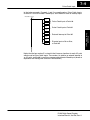
Shown in the above diagram and illustration are points 00 through 03 which default
to pulse catch inputs when the module is used with the DL240/250–1/260 and set to
operate in Mode 50. When the module is used with the DL230 only point 00 can be
used for the pulse catch input, and the remaining channels can be used as discrete
filtered inputs. Chapter 8 contains information about the filter time constant.
When used with the DL240/250–1/260, the channels which are not configured as
pulse catch inputs can be configured for many different functions, or as discrete
filtered inputs.
DL205 High Speed Counter
Interface Manual, 2nd Ed, Rev. A