1
USB-80 Mixer Amplifier
Owners Manual
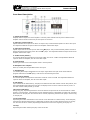
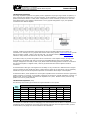
13. Play/Pause
Depressing this button will start playing the current file displayed on the screen from the beginning.
Depressing this button while a song is playing will pause that song at its current point. Depressing again
will resume play from the paused point. Repeatedly depressing the Play/Pause button will toggle the
player between Pause and Play action.
14. SD/MMC Card Slot
This slot accepts standard SD or MMC flash memory, readily available from MCM Electronics or any
computer retailer. The player will read MP3 and WMA files directly from the flash memory, regardless of
whether the file is in the root directory or sub folders. Other files (music or otherwise) that reside on the
flash memory will be ignored.
15. IR Sensor
Receives remote control commands from the included IR remote control.
16. USB Flash Memory Interface
This slot accepts standard USB thumb drives, readily available from MCM Electronics or any computer
retailer. The player will read MP3 and WMA files directly from the thumb drive, regardless if the file is in
the root directory or sub folders. Other files (music or otherwise) on the drive will be ignored.
17. Repeat
Selects the repeat function for the MP3 player. Depressing this button will toggle the player between three
Repeat modes; OFF, Repeat Current File, Repeat All Files.
Rear Panel Description
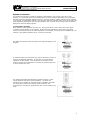
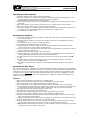
18. DC Fuse Holder
Holder contains fuse that provides protection when amplifier is powered by 12VDC. This fuse should be
replaced only with a 7A / 250V fast blow type fuse.
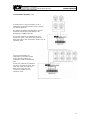
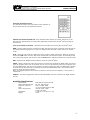
19. Speaker Output Terminal Strip
Provides screw terminal speaker connection. Note that taps exist for 4, 8 and 16 ohm speakers, as well as
for distributed 70V systems. It is critical that only one tap be used when connecting speakers.
Note: Improper speaker connection can lead to permanent damage to the amplifier.
20. Record Output
1/4" female jack provides line level output, intended to drive the input of a tape or similar recorder. It
may also be used to drive a separate amplifiers line level input for additional zones.
21. DC Power Input Terminal Strip
Provides screw terminal power connection when unit is powered by 12VDC. Note connections are labeled
(+) and (–). It is critical that correct polarity is observed.
Note: Incorrect polarity will result in permanent damage to the amplifier.
22. AC Fuse Holder
Holder contains fuse that provides protection when amplifier is powered by 120VAC. This fuse should be
replaced only with a 2A / 250V fast blow type fuse.
23. AC Power Cord Inlet
AC power cord is permanently attached to this amplifier and may not be removed.
4