1
Connections
Balanced +4 dBu line level sources: Professional recording and
processing equipment typically provides a balanced, 3-conductor
signal output that is a higher voltage (1.24 volts nominal level) than
most synthesizers and stereo equipment. The Multimix 12R’s [LINE
IN] jacks are designed to handle these balanced inputs.
Connections
TAPE IN jacks
The [TAPE IN] jacks on the rear panel are designed for playback of a
stereo tape deck (or any other -10 dBV level signal) through the
[MONITOR OUT] and [PHONES] jacks only. A signal at the [TAPE IN]
jacks cannot be heard from the [MAIN OUT] jacks.
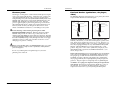
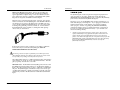
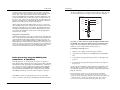
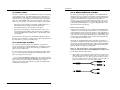
Balanced sources often feature XLR outputs. However, they should
NOT be connected to the XLR [MIC] inputs of the Multimix 12R unless
absolutely necessary, because the higher gain of the MIC jacks gives
you less headroom than the LINE IN jacks do (also, the source could
be damaged by phantom power if it's turned on). Connect them to
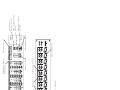
the [LINE IN] jacks using an XLR-to-1/4 inch phone TRS (tip-ringsleeve) cable, as shown below:
This allows you to use the Multimix 12R to monitor a mixdown to a 2track deck through your headphones. (If you plugged your mixdown
deck into the line inputs on the channels, it would cause feedback
when you press “record”.) By placing the [PHONES/MONITOR]
switch in the TAPE position, you will hear the mixer's output after it
has been passed through the mixdown deck, so you can make sure
that it is recording correctly.
•
If the proper connector cable or adapter is not available, +4 dBu line
level sources may be connected to the [MIC] jacks ONLY IF
PHANTOM POWER WILL NOT BE USED!!
Connecting a line-level output to a phantom-powered XLR input on the
Alesis Multimix 12R may cause damage to the external unit. Alesis cannot
be responsible for any damages caused by this kind of misuse.
The nominal trim setting for a +4 dBu signal plugged into a line input is
approximately 11 o'clock (12 o'clock on the stereo channels). This will
give you plenty of headroom to start with.
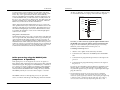
Maximum levels: The maximum level the [MIC] jack can receive with
the [TRIM] control full counter-clockwise is +12 dBu before clipping, so
there’s only 8 dB of headroom if you plug a +4 dBu line source into the
mic jack. The [LINE IN] jack on channels 1-8 may receive levels up to
+32 dBu without clipping, a headroom advantage of 20 dB. The stereo
channels may receive a +22 dBu (balanced or unbalanced) maximum
input.
Multimix 12R Reference Manual
11
Another use for the [TAPE IN] jacks is to play a CD or tape into a PA
system, automatically turning off all the microphones into the main PA
system when the front panel MSTR/TAPE switch is set to the TAPE
position. Note that in this application, the PA system must be fed from the
MONITOR OUT instead of the MAIN OUT jacks, and will be affected by
the level of the [PHONES/MONITOR] control as well as by the
[MASTER] control fader.