1
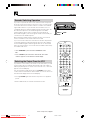
Basic Connection
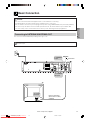
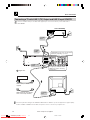
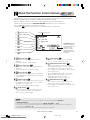
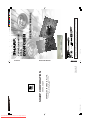
Connecting a TV Equipped with VIDEO/AUDIO Input Jacks
To VIDEO/AUDIO
OUT jacks
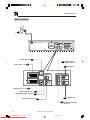
This Unit
S-VIDEO
LINE 2
VIDEO
RGB
DVD OUT
OUTPUT
SELECTOR
VCR/DVD OUT
DIGITAL
AUDIO
ANTENNA
(Red)
R
LINE 1 (TV)
IN
AUDIO
(White)
L
S-VIDEO
(Yellow)
R
AUDIO
VIDEO
OUT
L
VIDEO/AUDIO lead
(commercially available)
Required leads
VIDEO/AUDIO lead
(commercially available)
Yellow
Yellow
White (L)
White (L)
Red (R)
Red (R)
To VIDEO/AUDIO
input jacks
(White) (Red)
(Yellow)
Jack and Plug Colours
Video
: Yellow
Audio Left : White
Audio Right : Red
L
R
AUDIO
IN
VIDEO
IN
TV (with external input jacks)
• You will not be able to hear all of the sound being output by the Unit if you use the VIDEO/AUDIO lead
shown above to a monaural TV that has only one AUDIO input jack.
• Be sure that the colours of the jacks and plugs match up when connecting the lead.
• Connect the Unit directly to the TV. If you attempt to view video on a TV connected via a VCR, the copy protection
function will scramble the picture.
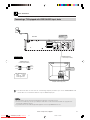
• If you want to listen to the audio through audio equipment, connect only VIDEO lead to the TV.
www.sharp.co.uk/support
DVNC65H019_024.pm6
Downloaded From Disc-Player.com
Sharp Manuals
21
21
30/8/02, 11:14 am