1
Wiring and Device Connections
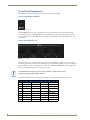
You can use breakout cable CC-HD15M-RCA3M (FG10-2170-03) to connect to 3 x
RCA Phono Sockets.
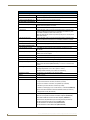
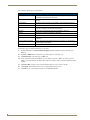
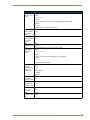
The following table lists the pinout configuration for HD-15 connector to Component connectors:
HD-15 to Component Pinouts
VGA Pin
Component Signal
1
Pr signal
2
Y signal
3
Pb signal
4
5
6
Pr - Return
7
Y - Return
8
Pb - Return
9
10
11
12
13
14
15
Mounting the Presentation Switcher
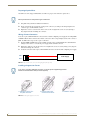
The AVX-400 can be mounted onto a flat surface or mounted under a table. Attach the mounting brackets from
the optional mount kit (KA2250-40) to the sides of the switcher as shown in FIG. 27 to mount the unit to any
flat surface. FIG. 27 displays the mounting brackets set to attach to the underside of a table. To surface-mount
the unit, attach the mounting brackets with the flat side toward the bottom of the unit.
FIG. 27 AVX-400 presentation switcher with optional mounting brackets.
14
Enova AVX-400 Cat5 Presentation Switcher Operation/Reference Guide