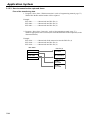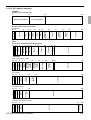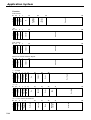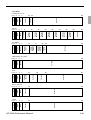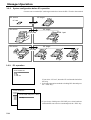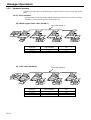
1
QT-2100
Versatile Intelligent Terminal
———————————————————————
Reference Manual
Version 1.0 February 2002
QT-2100
QT-2100
C
7
4
1
0
8
5
2
00
9
6
3
•
QT-2100
C
7
4
1
0
8
5
2
00
9
6
3
•
QT-2100
C
7
4
1
0
8
5
2
00
9
6
3
•
C
7
4
1
0
8
5
2
00
9
6
3
•
c
Preface
This manual is intended to be used as a reference to the QT-2100 system. It provides details
to allow whole understanding of the system capabilities, its operation, and how it can be used
to solve many problems within the retail outlet. This manual does not describe actual
programming, which is covered in the QT-2100 programming manual.
This manual consists of the following chapters:
1. Introduction
This chapter describes the concepts of development of the QT-2100 system.
2. Hardware configuration
This chapter outlines the hardware, optional devices and configurations of QT-2100
system.
3. Application systems
This chapter outlines the application system and overviews the function provided for the
QT-2100 system.
4. Manager operation
This chapter explains the manager operations to use QT-2100 system.
5. Registrations
This chapter explains actual registration operations with example.
6. Refund mode operation
This chapter explains registrations in the RF or REG– mode.
7. Read and reset
This chapter explains detail of the read and reset operations and reports.
8. System down and recovery
This chapter explains actions to take and recovery methods when the system goes down.
9. Appendices
These chapters show the record format and descriptions of individual files, total
calculation method, meaning of error messages, etc.
Note: Casio reserves the right to change equipment and specifications without obligation and
notification. The terms used in this manual may be different from those used in other
manuals of Casio’s product.
Printing history
Manual version
Version 1.0: February 2002
R-2
Software version
First Edition: February 2002
Version 1.0
Introduction
The QT-2100 is a versatile intelligent terminal developed in accordance with the following concepts.
1) System concept
Developing a high performance economical system by adopting the restaurant, bar system.
– Shared check tracking
The QT-2100 system has the capability of check tracking system.
– Shared printer system
All terminals in the cluster can share receipt/journal printer(s) and remote printer(s).
– Collection, consolidation, and auto-program functions
The QT-2100 system is equipped with these functions by utilizing high-speed in-line data
transfer system.
– Versatile terminal
With the QT-2100 system, any terminal has the same function, and can be designated as
the master terminal by programming.
2) Software concept
A flexible application system for development, adopting the following methods:
– Function classified application system
3) Design concept
Compact spill-proof body, multi-line LCD
In addition to the above, the QT-2100 is also a terminal following characteristics:
– Expandability
The QT-2100 system can be connected to various peripheral devices (slip printer, R/J
printer, modem, a personal computer, etc.)
– Reliability
The QT-2100 is provided with a self-diagnosis program so that the terminal can check the
hardware. When a malfunction occurs during processing, an error report is logged into the
system memory so that the error can quickly be corrected.
QT-2100 Reference Manual
R-3
Contents
R-4
1.
Hardware configuration........................................................................ R-10
1-1.
1-2.
1-3.
1-4.
1-5.
1-6.
1-7.
1-8.
1-9.
1-10.
2.
General configuration ............................................................................................ R-10
Hardware diagram .................................................................................................. R-11
Memory layout ....................................................................................................... R-12
Keyboard ............................................................................................................... R-12
Display .................................................................................................................. R-14
Cash drawer .......................................................................................................... R-15
Security locks ........................................................................................................ R-15
Input/output connectors......................................................................................... R-16
Optional peripherals .............................................................................................. R-17
System configuration ............................................................................................. R-18
Application systems ............................................................................. R-23
2-1. General description of application system ........................................ R-23
2-1-1.
2-1-2.
2-1-3.
2-1-4.
2-1-5.
2-1-6.
2-1-7.
File concept ...........................................................................................................
Linkage of totalizers ..............................................................................................
Function keys ........................................................................................................
Keyboard layout ....................................................................................................
Mode control .........................................................................................................
Operation prompt and error messages .................................................................
Printing control system ..........................................................................................
R-23
R-27
R-28
R-30
R-31
R-32
R-37
2-2. General description of individual function keys ................................ R-40
2-2-1. System keys .......................................................................................................... R-40
2-2-2. Finalize keys ......................................................................................................... R-41
2-2-3. Transaction keys ................................................................................................... R-42
2-3. Remote printer control ......................................................................... R-53
2-3-1.
2-3-2.
2-3-3.
2-3-4.
Remote printer system configuration ....................................................................
Remote printer control setting ...............................................................................
Remote printer output control................................................................................
Remote printer backup processes ........................................................................
R-53
R-54
R-55
R-55
2-4. Check tracking system ......................................................................... R-58
2-4-1. Shared check tracking system .............................................................................. R-58
2-4-2. Shared check tracking requirement ...................................................................... R-59
2-4-3. Data backup when the master goes down ............................................................ R-59
2-5. Other check tracking system control .................................................. R-60
2-5-1. The timing to clear check detail and index file after finalization ............................ R-60
2-5-2. Table transfer ........................................................................................................ R-60
2-5-3. Store and Recall .................................................................................................... R-60
2-6. Clerk control function .......................................................................... R-62
2-6-1.
2-6-2.
2-6-3.
2-6-4.
Clerk interrupt........................................................................................................
Clerk detail memory ..............................................................................................
Clerk training .........................................................................................................
Manager mode control ..........................................................................................
QT-2100 Reference Manual
R-62
R-63
R-63
R-63
R-5
Contents
2-7. Arrangement key function and scheduler .......................................... R-65
2-7-1. Arrangement key function ..................................................................................... R-65
2-7-2. Arrangement program example ............................................................................ R-69
2-7-3. Scheduled execution of arrangement key function ............................................... R-69
2-8. Making graphic logo ............................................................................. R-70
2-8-1. About graphic logo ................................................................................................ R-70
2-8-2. Making graphic logo procedure ............................................................................. R-70
2-9. Hourly item ............................................................................................ R-71
2-9-1. Programming necessary files before using hourly item function. .......................... R-71
2-10. Time and attendance ............................................................................ R-72
2-10-1. Corresponding relations of the file ........................................................................ R-73
2-10-2. CLOCK-IN Operation ............................................................................................ R-75
2-10-3. CLOCK-OUT Operation ........................................................................................ R-78
2-11. Sign on control ..................................................................................... R-80
2-11-1.
2-11-2.
2-11-3.
2-11-4.
Sign on ..................................................................................................................
Solution to abnormality of master terminal ............................................................
Solution to abnormality of satellite terminal ...........................................................
Sign on compulsory ...............................................................................................
R-80
R-81
R-81
R-81
2-12. IDC (Item Data Capture) ....................................................................... R-82
2-12-1.
2-12-2.
2-12-3.
2-12-4.
2-12-5.
2-12-6.
3.
Available capturing items ......................................................................................
Set up the IDC start / end ......................................................................................
How to memorize the captured items ....................................................................
IDC data file structure ...........................................................................................
IDC data type ........................................................................................................
Transferring IDC ....................................................................................................
R-82
R-85
R-86
R-87
R-90
R-91
Manager operation................................................................................ R-94
3-1. Machine initialization............................................................................ R-94
3-1-1. INIT ....................................................................................................................... R-94
3-1-2. Flag clear .............................................................................................................. R-94
3-1-3. INIT 2 .................................................................................................................... R-95
3-2. IPL (Initial Program Loading) ............................................................... R-95
3-2-1. IPL ......................................................................................................................... R-95
3-2-3. IPL operation ......................................................................................................... R-96
3-2-2. System configuration before IPL operation ........................................................... R-96
3-3. Manager function .................................................................................. R-98
3-3-1.
3-3-2.
3-3-3.
3-3-4.
R-6
System connection check ..................................................................................... R-98
Remote on ............................................................................................................. R-99
Remote off ............................................................................................................. R-99
Busy reset ........................................................................................................... R-100
3-3-5.
3-3-6.
3-3-7.
3-3-8.
3-3-9.
3-3-10.
3-3-11.
3-3-12.
Stock maintenance ..............................................................................................
Drawer for clerk ...................................................................................................
CHK# (Clerk interrupt) .........................................................................................
Order ID change ..................................................................................................
Error log print ......................................................................................................
System re-configuration ......................................................................................
Item Data Capture ...............................................................................................
Euro change over ................................................................................................
R-101
R-102
R-102
R-103
R-104
R-105
R-106
R-107
3-4. System command execution ............................................................. R-108
3-4-1. X/Z reporting ....................................................................................................... R-108
3-4-2. X/Z collection / consolidation ............................................................................... R-109
3-4-3. Remote power control .......................................................................................... R-110
3-5. Data Communication System ............................................................ R-111
3-5-1. In/online connectors ............................................................................................. R-111
3-5-2. Hardware interface ............................................................................................... R-112
3-5-3. In/Online functions ............................................................................................... R-114
3-6. Collection/Consolidation system ...................................................... R-115
3-6-1. X/Z collection ........................................................................................................ R-117
3-6-2. X/Z consolidation .................................................................................................. R-119
3-6-3. X/Z collection/consolidation ................................................................................. R-121
3-7. Auto-programming function .............................................................. R-124
3-7-1. Auto programming functions ............................................................................... R-124
3-7-2. Auto program operation and CF card utilities ...................................................... R-125
3-8. Collecting Electronic journal data ..................................................... R-128
4.
Registrations ....................................................................................... R-132
4-1.
4-2.
4-3.
4-4.
4-5.
4-6.
4-7.
4-8.
4-9.
4-10.
4-11.
4-12.
5.
Clerk sign on/off operation ..................................................................................
Voiding the last registered item (<VOID> key operation) ....................................
Voiding the previous registered item (<VOID> key operation) ............................
Cancelling of all data registered during the transaction ......................................
Using the LIST function .......................................................................................
Using the Set Menu function and Pulldown group function.................................
Separate check ...................................................................................................
Open check .........................................................................................................
Media Change .....................................................................................................
Eat-in / Takeout ...................................................................................................
Scanning PLU .....................................................................................................
Printing barcode on receipts ...............................................................................
R-132
R-133
R-134
R-134
R-136
R-137
R-140
R-141
R-142
R-143
R-143
R-144
Refund mode operation ..................................................................... R-146
5-1.
Selecting RF or REG– Mode ............................................................................... R-146
QT-2100 Reference Manual
R-7
Contents
6.
Read and reset operations................................................................. R-148
6-1.
6-2.
The procedures of reading or resetting ............................................................... R-148
Report sample ..................................................................................................... R-149
A-1. Function key list ................................................................................. R-166
A-2. File list ................................................................................................. R-168
A-3. File format ........................................................................................... R-173
A-4. Counter and Totalizer calculation method........................................ R-234
A-5. Error messages ................................................................................... R-238
A-6. Memory map....................................................................................... R-246
Index ...............................................................................................................R-250
R-8
1.
Hardware configuration ......................................................................... R-10
1-1.
1-2.
1-3.
1-4.
1-5.
1-6.
1-7.
1-8.
1-9.
1-10.
General configuration.................................................................................... R-10
Hardware diagram ........................................................................................ R-11
Memory layout .............................................................................................. R-12
Keyboard....................................................................................................... R-12
Display .......................................................................................................... R-14
Cash drawer.................................................................................................. R-15
Security locks ................................................................................................ R-15
Input/output connectors ................................................................................ R-16
Optional peripherals ...................................................................................... R-17
System configuration .................................................................................... R-18
QT-2100 Reference Manual
R-9
Hardware Configuration
1.
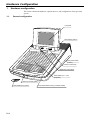
Hardware configuration
This section outlines the hardware, optional devices, and configurations of the QT-2100
system.
1-1.
General configuration
LCD panel
Rear display (option)
QT-2100
Main power switch
(bottom)
C
7
4
1
0
Contrast control knob
8
5
2
00
9
6
3
Brightness control knob
•
Sheet holder (1st. ~ 4th.)
(keyboard)
Clerk key receiver (option)
Clerk (Dallas) key (option)
R-10
CF (compact flash memory) card slot (inside)
1-2.
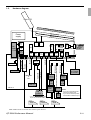
Hardware diagram
Main LCD
Optiona
l Sheet H
older (S
older
Keyboar
d
Rear
disp.
i/f
Drawer
either or
either
or
MODEM
or
PC
Scanner
HHS-15
either or
Slip
printer
RS232C
COM5
RS232C
COM6
MCR
i/f
CF card
QT-2046MC
Remote
printer
UP-350
SA-3015
Power
supply
PS-180
Power
supply
PS-180
Remote
display
Remote
printer
QT-2163D
UP-250
SP-1300
QT2100
Magnetic
card reader
Remote
printer
• If you use scanner and slip printer,
slip can be connected to COM 4 ~ 6 port.
QT2100
RS232C
COM4
PRT-CB-8A/-8B
CASIO
original cable
RS232C
COM3
Signal cable
Power cable
Drawer
CAT5 TUP cable
Inline-2 Inline-1
Power
supply
(SP-1300)
QT-2130RAM
Dallas keys
(Only
for
German
model)
CLK-K22
4MB
4MB
PRT-CB-8A/-8B
Inline
RS232C
COM2
QT-2061S
RS232C
COM1
Clerk
key
i/f
RAM
SA-2162S
2 i/f
RAM
PRT-CB-8A/-8B
4MB
Drawer
MDL-8
Drawer
Flash
Memory
CPU
1 i/f
PRL-CB-2
QT-2160D
)
Sheet H
Power
supply
Rear
display
H-KIT8/9
Power
supply
PS-180
NOTE:
• If you use one remote printer,
connect it to COM 4 port.
• If you use two remote printers,
connect them to COM 4/5 port.
QT2100
Note: Shadowed device and dot line indicate option devices.
QT-2100 Reference Manual
R-11
Hardware Configuration
1-3.
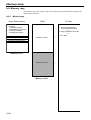
Memory layout
Standard
Option
Memory capacity
RAM 4MB
FROM 4MB
RAM 4MB (Max.)
CF card
(local purchase)
1-4.
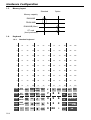
Keyboard
1-4-1.
Standard keyboard
9
18
27
36
45
54
63
72
81
90
99
108
8
17
26
35
44
53
62
71
80
89
98
107
7
16
25
34
43
52
61
70
79
88
97
106
6
15
24
33
42
51
60
69
78
87
96
105
5
14
23
32
41
50
59
68
77
86
85
104
4
13
22
31
40
49
58
67
76
85
94
103
3
12
21
30
39
48
57
66
75
84
93
102
2
11
20
29
38
47
56
65
74
83
92
101
1
10
19
28
37
46
55
64
73
82
91
100
CLK5
CLK4
MENU TABLE NEW/OLD
SHIFT TRANS CHK
c
x
ADD HOUSE SEAT
BON No. COVERS
7
8
9
4
5
1
0
REG
MODE #/NS
X/Z
MODE CHK
PGM
CLK3 MODE SEP
CHK
DISP
CLK2 ON/OFF SUBST.
CLK1
R-12
—
%–
PAGE
UP
NO
HOME
YES
PAGE
DOWN
VAT
ESC/
SKIP
CH
RC
PD
6
CR
SUBTOTAL
2
3
CHK
CASH AMT
00
•
GUEST
RECEIPT
NB
VOID CANCEL
TEND
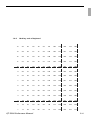
1-4-2.
Hard key code of keyboard
14
30
46
62
78
94
110
126
142
158
174
190
13
29
45
61
77
93
109
125
141
157
173
189
12
28
44
60
76
92
108
124
140
156
172
188
11
27
43
59
75
91
107
123
139
155
171
187
10
26
42
58
74
90
106
122
138
154
170
186
9
25
41
57
73
89
105
121
137
153
169
185
8
24
40
56
72
88
104
120
136
152
168
184
7
23
39
55
71
87
103
119
135
151
167
183
6
22
38
54
70
86
102
118
134
150
166
182
5
21
37
53
69
85
101
117
133
149
165
181
4
20
36
52
68
84
100
116
132
148
164
180
3
19
35
51
67
83
99
115
131
147
163
179
2
18
34
50
66
82
98
114
130
146
162
178
1
17
33
49
65
81
97
113
129
145
161
177
QT-2100 Reference Manual
R-13
Hardware Configuration
1-5.
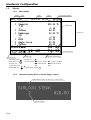
Display
1-5-1.
Main display
Mode
Clerk
Date
Time
Consecutive number
REG C01
10-10-01 12:34
001234
1 Spagetti
$20.00 T1
1 Spagetti
$20.00 T1
7.5%
%-1.50
1 Coffee
$8.00
1 Hamburger
$2.00 T1
15%
%-0.30
1 Milk
$2.00
2 Apple Juice
$5.00
1 Coffee
$8.00
Coffee
1 2nd@ R A
12 ST
$8.00
76.50
Transactions
Scroll area
Last transaction
Item sold
Subtotal/Total/Change
Status Icons
• Communication:
• Receipt on:
R
• Menu sheet No.: 1
• Character shift: A : Capital, double A : Capital, standard
• 2nd unit price 2nd@
a : Small, double a : Small, standard
or shift PLU level: 2 ~ 8
• Master/BM error:
• Cut off Master or BM: !
1-5-2.
Customer display (Rear or remote display: option)
Alphanumeric display (20 digits, 8 × 5 dot, 2 lines)
SIRLOIN STEAK
2
$20.50
Repeat counter
R-14
1-6.
Cash drawer
Medium size drawer is provided for the standard QT-2100.
This type of drawer is a close lock type.
Connect two cables (signal and frame ground) to the drawer.
When you want to set the QT-2100 terminal on the drawer, set and tighten two screws on
the bottom side to fix the terminal on the drawer.
1-7.
Security locks
1-7-1.
1-7-2.
Security lock provided is cash drawer lock key.
Normally, the mode switch and printer cover lock key are included in security locks, but
in QT-2100, the modes are controlled by mode control keys (such as “REG MODE”, “X/
Z MODE”, etc.) and the printers connected to QT-2100 system have no printer cover keys.
Drawer lock key
This key is used to lock the cash drawer.
Clerk switch — Dallas key— (for German model only)
The clerk switch is provided only for German model, and is located on the front side of the
terminal. The clerk keys (for 6 clerks) are used enable/disable the register instead of the
clerk sign on/off operation. The clerk switch and clerk keys are optional items for other
countries.
QT-2100 Reference Manual
R-15
Hardware Configuration
1-8.
Input/output connectors
Power switch
Inline-2 (for CAT5 UTP cable)
Inline-1 (for CASIO original cable)
COM 3 port
COM 2 port
Drawer cables
Inline terminator switch (for Inline-2)
COM 6 port
COM 5 port
COM 4 port
Power supply for SP-1300
Inline selection switch (inside)
Bottom view
R-16
COM 1 port
1-9.
Optional peripherals
The following optional peripherals can be used by plugging them into the appropriate port.
1) Personal computer/MODEM: RS-232C COM 1 port
2) Slip printer: RS-232C COM 2 port
SP-1300
The slip printer is used for validations, detailed slips, endorsements and check prints.
3) Scanner: RS-232C COM 2 port
Hand-held scanner (HHS-15)
4) Remote customer display: RS-232C COM 3 port
QT-2163D
5) Receipt/journal printer: RS-232C COM 4 ~ 6 port
UP-350, UP-250 or SA-3015
The receipt/journal printer is used for receipts/journal/reports/kitchen orders.
If you use one remote printer, connect it to COM 4 port.
If you use two remote printers, connect them to COM 4/5 port.
6) Inline and other QT-2100: Inline port
You can use either CASIO original cable (same as QT-2000) or CAT5 TUP cable.
7) Drawer: drawer port
QT-2100 Reference Manual
R-17
Hardware Configuration
1-10.
System configuration
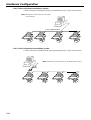
This section represents the system configuration of the QT-2100. The QT-2100 has three
different system configurations, such as shared check tracking/floating clerk interrupt
system, Inline collection/consolidation system and Online collection/consolidation system.
Before detail explanation, we should define the words:
1) Check master:
Check master is the master server of shared check tracking system and floating clerk
interrupt system. This terminal has check index and detail files and controls them.
2) Check backup master:
Check backup master is the backup server of shared check tracking system and floating
clerk interrupt system. This terminal also has check index and detail files and update
them at the same timing of master.
When the check master goes down, the backup master plays the role of check master.
3) Check self master:
Check self master has its check tracking system files and clerk interrupt files for itself.
4) Satellite:
The terminal which is not assigned to 1) ~ 3) above.
5) Remote printer:
Remote printer prints data sent from both its own QT-2100 terminal and other terminal
of the system.
6) Local printer:
Local printer prints data sent from its own QT-2100 terminal.
1-10-1. Shared check tracking system/floating clerk interrupt system
System Recommendation
Up to 8 remote printers
Order
Order
Order
Order
PRN (2) PRN (3)
~
~
PRN (2) PRN (3)
QT2100
QT2100
QT2100
CHK/BM
R/J or
Order
PRN (1)
R/J or
Order
PRN (1)
Up to 8 QT-2100 terminals
R-18
QT2100
CHK/M
R/J or
Order
Slip
R/J or
Order
Up to 8 remote printers
Order
Order
Order
PRN (2) PRN (3)
QT2100
Up to 8 remote printers
Order
Order
PRN (2) PRN (3)
QT2100
CHK/BM
R/J or
Order
QT2100
CHK/M
R/J or
Order
PRN (1)
Order
Order
PRN (2) PRN (3)
Slip
QT2100
QT2100
CHK/BM
R/J or
Order
CHK/M
R/J or
Order
PRN (1)
Order
PRN (2) PRN (3)
Slip
R/J or
Order
PRN (1)
3 terminals/system
2 terminals/system
Available peripherals versus ECR definition
✓: Available
ECR definition
Remote
printer
Check master
Check backup master
Self master
Satellite
✔
✔
✔
✔
Peripherals
Local
Slip
PC/
printer printer MODEM
✔
✔
✔
✔
✔
✔
✔
✔
✔
✔
✔
✔
Available combinations ECR definition
✓: Available
ECR definition
Check master
Check backup master
Self master
Terminal w/ remote printer
Check
master
Check
backup
master
Self
master
Terminal
w/ remote
printer
✔
✔
✔
✔
✔
Note:
1) Please follow the system recommendation above. Otherwise the system performance
may be slow down.
QT-2100 Reference Manual
R-19
Hardware Configuration
1-10-2. Inline collection/consolidation system
• Inline collection/consolidation and auto-programming for up to 32 QT-2100 terminals.
Note: Maximum 8 remote printers in the cluster
can be defined.
PC
In-line (Original in-line)
QT2100-1
QT2100-2
QT2100-3
R/J
R/J
R/J
QT2100-32
R/J
1-10-3. Online collection/consolidation system
• Online collection/consolidation and auto-programming for up to 32 QT-2100 terminals.
Note: Maximum 8 remote printers can be defined in the cluster.
PC
on-line
QT2100-1
R/J
R-20
QT2100-2
R/J
QT2100-3
R/J
QT2100-32
R/J
2.
Application systems ............................................................................ R-23
2-1. General description of application system ....................................... R-23
2-1-1.
2-1-2.
2-1-3.
2-1-4.
2-1-5.
2-1-6.
2-1-7.
File concept................................................................................................... R-23
Linkage of totalizers ...................................................................................... R-27
Function keys ................................................................................................ R-28
Keyboard layout ............................................................................................ R-30
Mode control ................................................................................................. R-31
Operation prompt and error messages ......................................................... R-32
Printing control system.................................................................................. R-37
2-2. General description of individual function keys ............................... R-40
2-2-1.
2-2-2.
2-2-3.
System keys.................................................................................................. R-40
Finalize keys ................................................................................................. R-41
Transaction keys ........................................................................................... R-42
2-3. Remote printer control ........................................................................ R-53
2-3-1.
2-3-2.
2-3-3.
2-3-4.
Remote printer system configuration ............................................................ R-53
Remote printer control setting ....................................................................... R-54
Remote printer output control ....................................................................... R-55
Remote printer backup processes ................................................................ R-55
2-4. Check tracking system ........................................................................ R-58
2-4-1.
2-4-2.
2-4-3.
Shared check tracking system ...................................................................... R-58
Shared check tracking requirement .............................................................. R-59
Data backup when the master goes down .................................................... R-59
2-5. Other check tracking system control ................................................. R-60
2-5-1.
2-5-2.
2-5-3.
The timing to clear check detail and index file after finalization .................... R-60
Table transfer ................................................................................................ R-60
Store and Recall ........................................................................................... R-60
2-6. Clerk control function ......................................................................... R-62
2-6-1.
2-6-2.
2-6-3.
2-6-4.
Clerk interrupt ............................................................................................... R-62
Clerk detail memory ...................................................................................... R-63
Clerk training ................................................................................................. R-63
Manager mode control .................................................................................. R-63
2-7. Arrangement key function and scheduler ......................................... R-65
2-7-1.
2-7-2.
2-7-3.
Arrangement key function ............................................................................. R-65
Arrangement program example .................................................................... R-69
Scheduled execution of arrangement key function ....................................... R-69
2-8. Making graphic logo ............................................................................ R-70
2-8-1.
2-8-2.
About graphic logo ........................................................................................ R-70
Making graphic logo procedure..................................................................... R-70
2-9. Hourly item ........................................................................................... R-71
2-9-1.
Programming necessary files before using hourly item function................... R-71
2-10. Time and attendance ........................................................................... R-72
2-10-1.
2-10-2.
2-10-3.
Corresponding relations of the file ................................................................ R-73
CLOCK-IN Operation .................................................................................... R-75
CLOCK-OUT Operation ................................................................................ R-78
QT-2100 Reference Manual
R-21
Application System
2-11. Sign on control .................................................................................... R-80
2-11-1.
2-11-2.
2-11-3.
2-11-4.
Sign on .......................................................................................................... R-80
Solution to abnormality of master terminal.................................................... R-81
Solution to abnormality of satellite terminal .................................................. R-81
Sign on compulsory ...................................................................................... R-81
2-12. IDC (Item Data Capture) ...................................................................... R-82
2-12-1.
2-12-2.
2-12-3.
2-12-4.
2-12-5.
2-12-6.
R-22
Available capturing items .............................................................................. R-82
Set up the IDC start / end ............................................................................. R-85
How to memorize the captured items ........................................................... R-86
IDC data file structure ................................................................................... R-87
IDC data type ................................................................................................ R-90
Transferring IDC ........................................................................................... R-91
2.
Application systems
This section describes the configuration of application system and their related setting with
the QT-2100. Reading this section provides a general understanding of the overall system
of the QT-2100.
2-1. General description of application system
2-1-1. File concept
Programming data for each function, as well as registration data, are assigned and handled
in the RAM of the QT-2100 in data blocks called files. Each files identified by a 3-digit
file number, and consists of multiple records that affect the length and data format of the
file. The QT-2100 stores the location in RAM for each file in a work area, and specification
of a data location for accessing is accomplished using the file number, record number and
record format.
Memory management on a file basis allows flexibility memory allocation in accordance
with the application of a specific terminal and its memory capacity. The number of records
per file can be programmed, and a file can even be programmed for zero records.
There are three types of files:
– Terminal files:
Terminal files include system work files, daily total files, periodic total 1 and periodic
total 2 files. Periodic total files have only totalizer field, and totalize the same data which
is accumulated to terminal files at the same time. The periodic total 1 files have 100
order file numbers, and the periodic total 2 files have 200 order file numbers.
These files can be reset individually and separately from the terminal files. This
provides access to weekly and monthly total data. The periodic total 1 files and 2 files
have the same functions, and can accumulate data with different periods. The same
number of records as the corresponding terminal file must be reserved for each periodic
total files.
– Consolidation files:
Consolidation files are work files for consolidation of daily total, periodic 1 total and
periodic 2 total data from each terminal, and have 300, 400 and 500 order file numbers,
respectively. The same number of records as the corresponding terminal files must be
reserved for each file, on the master terminal.
– Consolidation work files:
Consolidation work files are work files for collection/consolidation of daily, periodic
1/2 data from each terminal. The files have 600 order file numbers.
The file number of records as the corresponding terminal file must be reserved for each
consolidation file.
Each file requires an internal work area, so calculation of actual file size can be performed
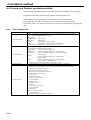
using the following formula:
Record length × Number of records + Work area = Actual file size
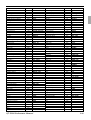
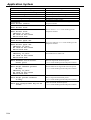
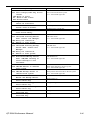
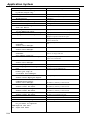
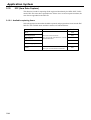
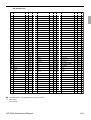
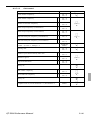
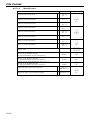
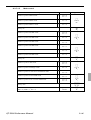
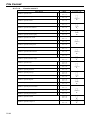
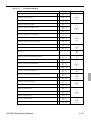
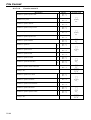
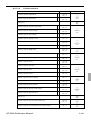
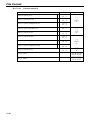
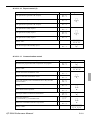
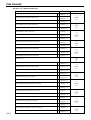
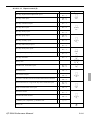
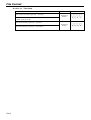
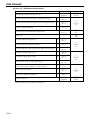
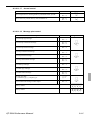
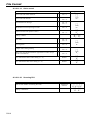
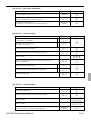
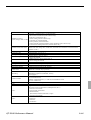
The following table shows all the files available for QT-2100. See the Appendix A-3 of this
manual for detail formats of individual files.
QT-2100 Reference Manual
R-23
Application System
File
File description
No.
System files
901
System connection table
902
I/O parameter
903
Printer connection
904
Consecutive number
999
System error log
Function and total files
001
Fixed totalizer
101
(periodic total 1)
201
(periodic total 2)
301
(daily consolidation)
401
(periodic 1 consolidation)
501
(periodic 2 consolidation)
601
(consolidation work)
002
Free function
102
(periodic total 1)
202
(periodic total 2)
302
(daily consolidation)
402
(periodic 1 consolidation)
502
(periodic 2 consolidation)
602
(consolidation work)
003
Subdepaprtment
103
(periodic total 1)
203
(periodic total 2)
303
(daily consolidation)
403
(periodic 1 consolidation)
503
(periodic 2 consolidation)
603
(consolidation work)
004
PLU
104
(periodic total 1)
204
(periodic total 2)
304
(daily consolidation)
404
(periodic 1 consolidation)
504
(periodic 2 consolidation)
604
(consolidation work)
005
Department
105
(periodic total 1)
205
(periodic total 2)
305
(daily consolidation)
405
(periodic 1 consolidation)
505
(periodic 2 consolidation)
605
(consolidation work)
006
Group
106
(periodic total 1)
206
(periodic total 2)
306
(daily consolidation)
406
(periodic 1 consolidation)
506
(periodic 2 consolidation)
606
(consolidation work)
009
Hourly sales
109
(periodic total 1)
209
(periodic total 2)
309
(daily consolidation)
409
(periodic 1 consolidation)
509
(periodic 2 consolidation)
609
(consolidation work)
010
Monthly sales
110
(periodic total 1)
R-24
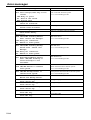
Record Max. No.
length of records
Work
size
Description
Attribution
Allocatable
18
5
27
6
11
33
11
99
5
20
75
69
81
69
75
Program
Program
Program
Buffer
Buffer
No
No
No
No
No
26
10
10
10
10
10
10
38
10
10
10
10
10
10
54
15
15
15
15
15
15
92
30
30
30
30
30
30
54
15
15
15
15
15
15
26
10
10
10
10
10
10
20
20
20
20
20
20
20
20
20
78
78
78
78
78
78
78
999
999
999
999
999
999
999
99
99
99
99
99
99
99
9999
9999
9999
9999
9999
9999
9999
99
99
99
99
99
99
99
99
99
99
99
99
99
99
96
96
96
96
96
96
96
32
32
81
75
75
75
75
75
75
99
75
75
75
75
75
75
135
81
81
81
81
81
81
177
99
99
99
99
99
99
135
81
81
81
81
81
81
81
75
75
75
75
75
75
87
87
87
87
87
87
87
87
87
Pgm/Sales
Sales
Sales
Sales
Sales
Sales
Buffer
Pgm/Sales
Sales
Sales
Sales
Sales
Sales
Buffer
Pgm/Sales
Sales
Sales
Sales
Sales
Sales
Buffer
Pgm/Sales
Sales
Sales
Sales
Sales
Sales
Buffer
Pgm/Sales
Sales
Sales
Sales
Sales
Sales
Buffer
Pgm/Sales
Sales
Sales
Sales
Sales
Sales
Buffer
Sales
Sales
Sales
Sales
Sales
Sales
Buffer
Sales
Sales
No
Yes
Yes
Yes
Yes
Yes
Yes
Yes
Yes
Yes
Yes
Yes
Yes
Yes
Yes
Yes
Yes
Yes
Yes
Yes
Yes
Yes
Yes
Yes
Yes
Yes
Yes
Yes
Yes
Yes
Yes
Yes
Yes
Yes
Yes
Yes
Yes
Yes
Yes
Yes
Yes
Yes
Yes
Yes
Yes
Yes
Yes
Yes
Yes
Yes
Yes
for master
for master
for master
for master
for master
for master
for master
for master
for master
for master
for master
for master
for master
for master
for master
for master
for master
for master
for master
for master
for master
for master
for master
for master
for master
for master
for master
for master
File
File description
No.
210
(periodic total 2)
310
(daily consolidation)
410
(periodic 1 consolidation)
510
(periodic 2 consolidation)
610
(consolidation work)
012
Void reason
112
(periodic total 1)
212
(periodic total 2)
312
(daily consolidation)
412
(periodic 1 consolidation)
512
(periodic 2 consolidation)
612
(consolidation work)
018
Table analysis
118
(periodic total 1)
218
(periodic total 2)
318
(daily consolidation)
418
(periodic 1 consolidation)
518
(periodic 2 consolidation)
618
(consolidation work)
020
Grand total
120
(periodic total 1)
220
(periodic total 2)
320
(daily consolidation)
420
(periodic 1 consolidation)
520
(periodic 2 consolidation)
620
(consolidation work)
055
Shift PLU
155
(periodic total 1)
255
(periodic total 2)
355
(daily consolidation)
455
(periodic 1 consolidation)
555
(periodic 2 consolidation)
655
(consolidation work)
Clerk
007
Clerk
030
Clerk detail link
027
Clerk (Dallas) key ID
011
Clerk detail
111
(periodic total 1)
211
(periodic total 2)
311
(daily consolidation)
411
(periodic 1 consolidation)
511
(periodic 2 consolidation)
611
(consolidation work)
Time & Attendance
014
Hourly / Labor
114
(periodic total 1)
214
(periodic total 2)
314
(daily consolidation)
414
(periodic 1 consolidation)
514
(periodic 2 consolidation)
614
(consolidation work)
019
Work time
319
(daily consolidation)
800
Time zone
801
Employee
802
Job code
QT-2100 Reference Manual
Record Max. No.
length of records
20
32
20
32
20
32
20
32
20
32
29
99
10
99
10
99
10
99
10
99
10
99
10
99
32
99
10
99
10
99
10
99
10
99
10
99
10
99
24
3
8
3
8
3
8
3
8
3
8
3
8
3
91
9999
70
9999
70
9999
70
9999
70
9999
70
9999
70
9999
Work
size
87
87
87
87
87
87
75
75
75
75
75
75
93
75
75
75
75
75
75
75
69
69
69
69
69
69
189
147
147
147
147
147
147
95
4
14
10
10
10
10
10
10
10
99
99
200
9801
9801
9801
9801
9801
9801
9801
165
75
75
75
75
75
75
75
75
75
26
26
26
26
26
26
26
18
18
6
36
22
96
96
96
96
96
96
96
4158
4158
24
99
50
99
99
99
99
99
99
99
111
75
81
135
87
for master
for master
for master
for master
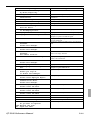
Attribution
Sales
Sales
Sales
Sales
Buffer
Pgm/Sale
Sales
Sales
Sales
Sales
Sales
Buffer
Pgm/Sale
Sales
Sales
Sales
Sales
Sales
Buffer
Pgm/Sale
Sales
Sales
Sales
Sales
Sales
Buffer
Sales
Sales
Sales
Sales
Sales
Sales
Buffer
Allocatable
Yes
Yes
Yes
Yes
Yes
Yes
Yes
Yes
Yes
Yes
Yes
Yes
Yes
Yes
Yes
Yes
Yes
Yes
Yes
No
Yes
Yes
Yes
Yes
Yes
Yes
Yes
Yes
Yes
Yes
Yes
Yes
Yes
for master
for master
for master
for master
Program
Program
Program
Sales
Sales
Sales
Sales
Sales
Sales
Buffer
Yes
Yes
Yes
Yes
Yes
Yes
Yes
Yes
Yes
Yes
Sales
Sales
Sales
Sales
Sales
Sales
Buffer
Sales
Sales
Program
Program
Program
Yes
Yes
Yes
Yes
Yes
Yes
Yes
Yes
Yes
Yes
Yes
Yes
Description
for master
for master
for master
for master
for master
for master
for master
for master
for master
for master
for master
for master
for master
for master
for master
for master
for master
for master
for master
for master
for master
R-25
Application System
File
File description
No.
803
Schedule
806
Time & Attendance work
Check
015
Check Index
060
Check detail
066
Check detail work
Hourly item
021
Hourly item
121
(periodic total 1)
221
(periodic total 2)
321
(daily consolidation)
421
(periodic 1 consolidation)
521
(periodic 2 consolidation)
621
(consolidation work)
031
Hourly item link
IDC
057
IDC (1)
357
(consolidation file)
657
(consolidation work)
058
IDC (2)
358
(consolidation file)
658
(consolidation work)
059
IDC (3)
359
(consolidation file)
659
(consolidation work)
063
IDC buffer
804
IDC link
Program / message / buffer
016
Scanning PLU link
022
General control
023
Special character
024
Report header
025
Tax table
026
Pulldown group
028
Set menu table
029
Batch X/Z
032
Receipt/slip message
033
Endorse message
035
Print buffer
036
Registration buffer
039
Character recall
041
Check print
044
Display buffer
047
Graphic logo
048
Electronic journal memory
648
Electronic journal (collection)
054
PLU 2nd @
062
Scheduler
065
Order character
074
Key table
099
Euro program
905
Auto program control
Arrangement
038
Arrange group (1)
138
Arrange group (2)
238
Arrange group (3)
338
Arrange group (4)
438
Arrange group (5)
R-26
Record Max. No.
length of records
11
2079
99
1
Work
size
111
657
Description
Attribution
Program
Buffer
Allocatable
Yes
Yes
300
80
80
200
9999
2000
69
69
69
Buffer
Buffer
Buffer
Yes
Yes
Yes
10
10
10
10
10
10
10
4
1920
1920
1920
1920
1920
1920
1920
480
75
75
75
75
75
75
75
75
Sales
Sales
Sales
Sales
Sales
Sales
Buffer
Program
Yes
Yes
Yes
Yes
Yes
Yes
Yes
Yes
50
50
50
50
50
50
50
50
50
50
6
9999
9999
9999
9999
9999
9999
9999
9999
9999
9999
999
69
69
69
69
69
69
69
69
69
69
81
Sales
Sales
Sales
Sales
Sales
Sales
Sales
Sales
Sales
Buffer
Program
Yes
Yes
Yes
Yes
Yes
Yes
Yes
Yes
Yes
Yes
Yes
9
6
16
16
74
103
80
9
40
40
80
80
40
3
40
13
41
41
46
14
16
36
4
3
300
37
58
31
10
999
999
10
48
4
999
2000
9999
9
1000
432/864
1000
12336
9999
99
99
192
3
20
75
69
69
69
93
189
183
69
69
69
69
69
69
69
69
69
69
69
99
75
69
171
69
75
Program
Program
Program
Program
Program
Program
Program
Program
Program
Program
Buffer
Buffer
Program
Program
Buffer
Program
Buffer
Buffer
Program
Program
Program
Program
Program
Program
Yes
No
No
No
Yes
Yes
Yes
Yes
Yes
Yes
Yes
Yes
Yes
Yes
Yes
Yes
Yes
Yes
Yes
Yes
Yes
No
Yes
Yes
24
24
24
24
24
9999
9999
9999
9999
9999
69
69
69
69
69
Program
Program
Program
Program
Program
Yes
Yes
Yes
Yes
Yes
for master
for master
for master
for master
for master
for master
for master
for master
for master
for master
for master
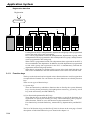
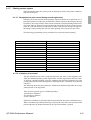
2-1-2. Linkage of totalizers
Registered data is accumulated to totalizers which are reserved for each functions.
The QT-2100 has the following types of totalizers:
1) Fixed totalizers
Registration data is accumulated for individual terminals.
2) Function key totalizers
Data input by finalize or transaction keys is accumulated in totalizers for each key.
Operation types, as well as data used in operation differ depending on the key.
3) Subdepartment totalizers
Registration data is accumulated in totalizers for each subdepartment.
4) Department totalizers
Registration data is accumulated in totalizers for each department.
5) Group totalizers
Registration data is accumulated in totalizers for each group.
6) PLU totalizers
Registration data is accumulated in totalizers for each PLU.
7) Clerk totalizers
Registration data is accumulated for each relevant clerk. A clerk detail totalizer can be
linked to a fix totalizer, finalize key, transaction key, or item totalizer (department/
PLU/subdepartment/group), and accumulate data registered for the destination totalizer for each relevant clerk.
8) Other totalizer
Functions for hourly sales, monthly sales void reason, table analysis, time attendance
and hourly item also have totalizers.
QT-2100 Reference Manual
R-27
Application System
Registration data flow
Registration
Calculation
*2
*1
Fixed totalizer
Function key
totalizer
PLU file
*1
*2
*1
Subdept. file
*1
Dept. file
Group file
Clerk detail file
Other file
Linking between PLUs, subdepartments, departments and groups can be programmed
to meet the needs of the retail environment.
PLUs can be programmed to link with subdepartments, departments or group, while
subdepartment can be programmed to link with department or group, and department
can be programmed to link with group.
When a PLU is programmed to link with a department, data registered for the PLU is
also accumulated to the department. In addition, when the department is programmed
to link with a group, data registered for the PLU is simultaneously reflected the
department totalizer and group totalizer.
When data is registered to a totalizer which is preset in the clerk detail link table, the
data is also accumulated to the clerk detail totalizer reserved for each relevant clerk.
2-1-3. Function keys
The keys on the keyboard can be assigned various functions that are used for registration
as required for the terminal. For convenience sake, these functions are called by function
keys.
There are two types of function keys:
1) System keys
There are function keys which have functions that are fixed by the system (Numeral
keys, clear key, home position key, left/right/up/down cursor key, yes/no key, on/off
key, mode selection key and ESC/SKIP key
2) Free Function/department/flat PLU keys
These function keys are used for finalize a transaction, to specify the functions for a
registration or to specify the meaning of a entry. These function keys have programmable functions, which are set to the function key/department/PLU file.
Free function keys include finalize key, transaction key, department key and flat PLU
key.
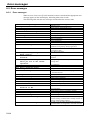
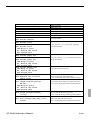
The list of all function keys provided for QT-2100 is shown on the next page. General
descriptions of individual function keys are found in the chapter 2-2.
R-28
Function
Add check
Arrangement
Bill copy
Break-in/out
Cancel
Cash amount tendered
Charge
Check endorsement
Check print
Check tender
Clerk number
Clerk transfer
Clock-in/out
Coupon
Coupon 2
Credit
Cube
Currency exchange
Customer number
Department
Department number
Deposit
Discount
Display mode
Dutch account
Eat-in
Electronic journal Disp
Error correct/Void
First unit price
Flat PLU
House Bon
Ketten Bon
List
List number
Loan
Lock out unused key
Media change
Menu shift
Merchandise subtotal
Minus
Multiplication
New balance
New check
New/Old check
Normal receipt
No sale
Non-add
Non-add/No sale
OBR
Old check
Open
Open2
Open Check
Operator number
Operator read/reset
Paid out
Pick up
Plus
PLU
Code
094
044
047
109
236
001
002
039
012
003
072
013
108
023
036
004
090
045
043
051
135
025
028
219
140
128
207
034
069
063
114
113
136
137
019
000
118
064
080
027
082
006
091
093
016
042
040
041
103
092
067
068
117
078
073
021
022
029
048
Initial character
ADD CHK
ARG
BILL
BREAK-IN/OUT
CANCEL
CASH
CHARGE
CK.E
CHKP
CHECK
CLK#
CLK TRANS
CLOCK-IN/OUT
COUPON
CPN2
CREDIT
XXX
CE
CT
DEPT nn
DEPT#
DEPOSIT
%–
DISP MODE
DUTCH
EAT-IN
EJ DISP
VOID
1st@
PLU nnnn
HOUSE BON
X/KETTEN
LIST
LIST#
LOAN
NOP
MEDIA CHG
MENU
MDST
–
X
NB
NEW CHK
NEW/OLD
NRMRCT
NS
#
#/NS
OBR
OLD CHK
OPEN
OPEN2
OPEN CHK
OPE#
OPE X/Z
PD
P.UP
+
PLU#
QT-2100 Reference Manual
Function
Post Entry
Premium
Price inquiry
Price
Quantity/For
Recall
Receipt
Receipt On/OFF
Received on account
Refund
Reverse Display
Round Repeat
Seat number
Second unit price
Selective item subtotal
Separate check
Shift PLU
Slip back feed/Release
Slip feed/Release
Slip print
Square
Stock inquiry
Store
Subdepartment
Subdepartment number
Substitution
Subtotal
Table number
Table transfer
Take-out
Tax status shift
Taxable amount subtotal
Tax exempt
Text print
Text recall
Tray total
Tip
Validation
VAT
X/Z mode
System keys
Numeric key
Clear
Decimal point
Display On/Off
Escape/Skip
Home position
Page down
Page up
Program mode
Register mode
Three zero
Two zero
Yes
No
Left arrow
Right arrow
Up arrow
Down arrow
Code
115
030
008
049
083
131
038
076
020
033
206
116
119
070
085
095
065
054
056
055
084
009
130
133
134
111
075
058
014
129
057
077
062
011
010
074
015
037
046
122
Initial character
POST ENTRY
%+
PRCINQ
PRC
QT
RECALL
RCT
RCT ON/OFF
RC
RF
REVERSE
R REPEAT
SEAT#
2nd@
SIST
SEP CHK
SFT PLU
SB/R
SF/R
SLIP
XX
STKINQ
STORE
SUBDEPT nn
SDPT#
SUBST.
SUBTOTAL
TBL#
TABLE TRANS
TAKE-OUT
T/S
TAST
EXEMPT
PRT
CHAR
TRAY TTL
TIP
VLD
VAT
X/Z MODE
000n201
202
098
120
211
218
220
221
123
121
097
096
212
213
214
215
216
217
n=1~9, “0”=10
.
DISP ON/OFF
HOME
PAGE DOWN
PAGE UP
PGM MODE
REG MODE
000
00
R-29
Application System
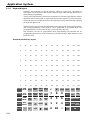
2-1-4. Keyboard layout
Normally, the keyboard is assigned functions which are required for registration of
transactions. The keyboard is also used for character input when entering descriptors or
names during programming.
The QT-2100 automatically switches the keyboard to its character input function when it
determines that character input is required for the operation sequence you are performing.
This means that you can input characters without having to worry about manually changing
the keyboard input mode.
The function key layout is fully programmable to meet the specific needs of each terminal.
The actual programming of key layouts can be performed in the PGM4 mode, and
programmed data is written onto the key conversion table (file 074).
The allocation can also be programmed when programming each function file for
programming function keys such as finalize keys, transaction keys, department keys, and
touch PLU keys.
Standard function key layout
9
18
27
36
45
54
63
72
81
90
99
108
8
17
26
35
44
53
62
71
80
89
98
107
7
16
25
34
43
52
61
70
79
88
97
106
6
15
24
33
42
51
60
69
78
87
96
105
5
14
23
32
41
50
59
68
77
86
85
104
4
13
22
31
40
49
58
67
76
85
94
103
3
12
21
30
39
48
57
66
75
84
93
102
2
11
20
29
38
47
56
65
74
83
92
101
1
10
19
28
37
46
55
64
73
82
91
100
CLK5
CLK4
MENU TABLE NEW/OLD
SHIFT TRANS CHK
c
x
ADD HOUSE SEAT
BON No. COVERS
7
8
9
4
5
1
0
REG
MODE #/NS
X/Z
MODE CHK
PGM
CLK3 MODE SEP
CHK
DISP
CLK2 ON/OFF SUBST.
CLK1
R-30
—
%–
PAGE
UP
NO
HOME
YES
PAGE
DOWN
VAT
ESC/
SKIP
CH
RC
PD
6
CR
SUBTOTAL
2
3
CHK
CASH AMT
TEND
00
•
GUEST
RECEIPT
NB
VOID CANCEL
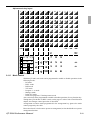
Alphanumeric key layout
Â
Ô
â
Á
À
ò
Ä
Ö
ä
1
Q
W
q
S
a
F
D
X
V
C
z
x
CAP
SHIFT
c
N
B
v
b
j
m
DEL DELETE
ABC
_ → AC
DBL
DOUBLE
LETTER
A
a
→A
CAP CAPITAL A a
LETTER
→ A
small
letter
→ a
SHIFT
A
a
PAGE
UP
NO
HOME
YES
PAGE
DOWN
`
\
~
•
¥
DEL
DBL
ESC/
SKIP
C
AB_ → A_B
}
"
?
INS
INS INSERT
]
'
/
>
+
{
:
l
.
<
[
;
L
=
_
p
o
k
,
M
n
)
P
O
i
K
J
0
(
*
u
h
g
_
'
¤
9
I
U
H
G
f
d
&
y
t
8
7
Y
T
r
e
s
Z
R
E
>>
¢
õ
^
%
±
¬
<<
Õ
6
5
$
#
w
A
4
3
@
¡
ß
y˜
ñ
ë
º
ª
Y˜
Ñ
Ë
¿
ÿ
ã
æ
è
ï
ü
2
!
Ï
Ü
ö
Ã
Æ
È
ƒ
£
ø
å
é
ì
ù
Å
É
Ì
Ù
Ø
ç
ê
í
ú
Ò
à
Í
Ú
ó
Ç
Ê
î
û
Ó
á
Î
Û
ô
7
8
9
4
5
6
#-2
1
2
3
#-1
0
A
B
2-1-5. Mode control
With the QT-2100, each clerk can be programmed to enable or disable operations in the
following modes:
– RF mode
– REG– mode
– REG mode
– X/Z mode
– Program 1 ~ 6 mode
– Manager mode
– Inline X/Z mode
– Inline auto program, CF backup/restore mode
Also, each clerk can be programmed to enable or disable operations of every function key.
Though the QT-2100 has no REG 2 mode, on the page 63 in the Clerk Control function
chapter, the manager control procedure is described.
Arrangement execution mode programmed in the arrangement key ignores the mode
control program by the clerk.
Please note that if a clerk want to operate an arrangement, he/she should allow to operate
arrangement function.
QT-2100 Reference Manual
R-31
Application System
2-1-6. Operation prompt and error messages
The QT-2100 displays or prints messages to indicate the status of the terminal being
operated or programmed. These messages help to determine the status of the terminal or
the required subsequent action.
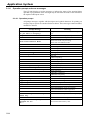
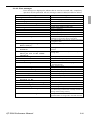
2-1-6-1. Operation prompt
All prompt messages, together with descriptors and symbol characters for printing on
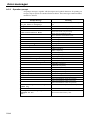
receipts, slips or reports are contained in the list below. These messages cannot be added,
modified or deleted.
Prompt message
Data cannot be printed out.
Do you want to display?
Do you want to clear data?
Cancel OK?
Please wait.
Item Consolidation Mode.
Non Consolidation Mode.
REG Mode
REFUND Mode
REG– Mode
Training
Please Sign on.
Enter Check/Table Number.
Enter Table Number.
Enter Number of covers.
Enter Seat Number.
Perform Slip Printing.
Issue Guest Receipt.
Perform Validation Printing.
Perform Check Printing.
Perform Check Endorsement.
Operation Code?
Copy of not printed data
Re_configuration...
Re_configuration end
Clock-in OK?
Clock-out OK?
Break-in OK?
Break-out OK?
Enter cash tip amount and press
<YES> key.
R-32
Meaning
Request to check the data which cannot be printed
out.
Confirmation to reset displayed report.
Confirmation of all void operation.
Please wait. ECR now processing.
In the item consolidation mode.
Not in the item consolidation mode.
Mode change : REG mode
Mode change : RF mode
Mode change : REG– mode
Training operator
Sign off
CHK# compulsory
TBL# compulsory
Covers compulsory
Seat# compulsory
Slip compulsory
GUEST RCT compulsory
VLD compulsory
CHK-PRT compulsory
CHK-END compulsory
Secret No entry for REG 2 mode.
Display header of non printed data
During system reconfiguration
System reconfugiration ends
Time and attendance clock-in operation
Time and attendance clock-out operation
Time and attendance break-in operation
Time and attendance break-out operation
Time and attendance tip declaration compulsory
Communication Error
Communication error during clock-in
This procedure stops system
maximum 60 sec.
OK ?
Alert before flash memory clear.
2-1-6-2. Error messages
Error messages are displayed to indicate that an error has occurred and a compulsory
operation must be performed. All error messages cannot be added, modified or deleted.
E001
E003
E005
E011
E016
E017
E018
E019
E020
E023
Prompt message
Operator mistake.
Wrong Mode.
Wrong operator.
Insufficient memory.
Close the drawer.
Change back to REG mode.
Enter Check/TBL number.
Enter Table number.
Enter Number of covers.
Enter Seat number.
Stock running short.
E024 No stock is available.
Meaning
Operation error
Check tracking (Open mode error)
Error clerk/Error clerk in CHK tracking
Memory allocation over
Drawer compulsory
Prohibit plural operation in RF mode
Check # compulsory
Table # compulsory
Cover compulsory
Seat number compulsory
Alarm when any item drops below its programmed
minimum stock quantity during registration.
Error when actual stock value for a registration items
is a negative value.
Stay down compulsory
E026 Stay down compulsory ERR.
Enter Item(s).
Scanning PLU is not found or OBR code is misE028 Not found PLU or C/D is
matched.
mismatch.
Attempted registration whilst partial tender operation
E029 No registration is possible
is being done.
while you are in the tender
operation.
E031 Press ST key before Finalization. ST compulsory
Amount tender compulsory
E033 Enter tendered amount.
E035 Change amount exceeds the limit. Change amount exceeds the limit.
Contents of the drawer exceed the programmed limit
E036 Remove money from the drawer.
— Sentinel function.
E037 Digit or Amount Limitation Over. H.D.L., H.A.L.O error
Money declaration compulsory
E038 Perform Money Declaration
Guest receipt compulsory
E040 Issue Guest Receipt.
Validation compulsory
E041 Print Validation.
CHK-PRT compulsory
E044 Print Cheque.
CHK-END compulsory
E045 Print Check-Endorsement.
Registration buffer full
E046 REG Buffer Full. Please
Finalize or NB.
Slip compulsory
E047 Print bill.
Alarm when no paper is inserted in the Slip.
E048 Insert Slip Paper and retry.
CHK tracking index full/near end
E049 CHECK memory full
CHK tracking memory full/near end
E050 Detail memory Full.
Attempt is made to use the New Check key to open a
E051 CHK/TBL No. is occupied.
new check using a number that is already used for an
existing check tracking memory.
Attempt to use the same check number whilst the
E052 CHK/TBL No. is busy.
specified number is being used in the other terminal.
QT-2100 Reference Manual
R-33
Application System
Prompt message
E053 CHK/TBL No. is not opened.
E054 Out of CHK/TBL No. Range
E056 Store range full.
E057 No item exists in detail.
E058 Enter post entry item.
E059 Press Eat-in or Take-out key.
**********
E060 Printer offline.
**********
E061 Printer error
**********
E061 Printer error
YES:Retry to print
NO :Show on the screen
ESC:Discard data
**********
E062 Printer paper end
**********
E062 Printer paper end
YES:Retry to print
NO :Show on the screen
ESC:Discard data
E064 Printer buffer full
YES:Retry to print
NO :Show on the screen
ESC:Discard data
**********
E070 Terminal out of action.
Cannot print.
**********
E071 Target terminal printer
BF full.
YES:Retry to print
NO :Show on the screen
ESC:Discard data
**********
E072 Target printer terminal
is busy.
**********
E073 Your receipt/order may not be
issued.
R-34
Meaning
CHK# not found
CHK# range over
All check # are occupied in range.
Round Repeat cannot be found in detail.
Post Entry item exists in detail.
Press Eat-in or Take-out key.
Printer offline. “****” means ECR logical ID
and priter number.
Printer downed. “****” means ECR logical ID
and printer number.
Paper near-end/end “****” means ECR logical ID
and printer number.
Print buffer full at sender side
Down at target ECR which has printer
“****” means ECR logical ID and printer number.
Printer buffer full at target ECR which has printer
“****” means ECR logical ID and printer number.
Busy at target ECR which has printer
“****” means ECR logical ID and printer number.
Time out at ECR which has printer
“****” means ECR logical ID and printer number.
Prompt message
**********
E073 Your receipt/order may not be
issued.
YES:Retry to print
NO :Show on the screen
ESC:Discard data
E075 Negative Balance.
Cannot be finalized.
E080 Electronic Journal Full
Please clear E-Journal.
E082 ***** Illegal Data *****
E083 Cannot create E-Journal.
Check Flash memory.
**********
E105 Check/TBL Tracking Master
down. Please call Manager.
YES:Retry for connection.
NO :Remove it from system.
**********
E106 Check/TBL Tracking Backup
master down. Please call
Manager.
YES:Retry for connection.
NO :Remove it from system.
**********
E107 Both Master&Backup master
down. CHK/TBL tracking or
Clerk interrupt is not
available.
**********
E108 CHK/TBL Master is removed
from system.
**********
E109 CHK/TBL Backup master is
removed from system.
E110 CHK data mismatch between
Master and Backup master.
E130 Middle of Pick up or Loan
Press Cancel Key.
E131 Middle of <Bill Copy>
Press Cancel key.
E133 Middle of <Media Change>
Press Cancel key.
E134 Middle of Clerk Transfer
Press ESC key.
E136 Middle of <Separate Check>
Press ESC key.
QT-2100 Reference Manual
Meaning
Time out at ECR which has printer
“****” means ECR logical ID.
Attempted finalization when balance is less than zero.
Electronic journal full
Illegal Electronic journal data
Electronic journal file cannot be created.
CHK master down
“****” means ECR logical ID.
CHK BM down
“****” means ECR logical ID.
CHK M/BM down
“****” means ECR logical ID.
Master down then take it off from system
“****” means ECR logical ID.
Backup master down then take it off from system
“****” means ECR logical ID.
Data mismatch has occurred.
During picking up
During Bill copy
During Media CHG
During CLK Trans
During SEP CHK
R-35
Application System
E139
E140
E141
E145
E150
E151
E152
E164
E165
E166
Prompt message
Not allowed to be negative
by Minus/Coupon key.
Wrong menu.
Press <TRAY TOTAL> twice before
finalization.
Arrangement syntax error.
Incorrect value entry.
Incorrect key Pressed.
PGM File or Memory number
does not Exist.
Empoloyee No. is not Found
in the Employee File.
Employee No. is not Clocking-in
Employee No. is Occupied
E167 Incorrect JOB code
E168 Your Operation is out of
Schedule.
Please Call Manager.
E169 Work Hours Exceeded.
Please Call Manager.
E170 No Shift Reminds in the
Schedule.
You cannot Clock-in.
E171 Please Break-out and Retry.
E172 Break Hours Exceeded.
Please Call Manager.
E173 This employee is at work now.
E174 This employee is taking a break
now.
E175 Please Clock-in/Break-out
before you sign on.
or Please Call Manager.
E176 You cannot Clock-in.
Please reset Employee Report.
E177 Time&Attendance Data
Communication Error.
Please Call Manager.
E180 IDC FILE (1) memory full.
Please clear IDC data.
E181 IDC FILE (2) memory full.
Please clear IDC data.
E182 IDC FILE (3) memory full.
Please clear IDC data.
E200 Insert CF card.
E201 Format error.
E203 Insufficient memory.
E205 The file already exists.
Do you want to replace?
YES:Replace the file.
NO :Input new name.
R-36
Meaning
Credit balance error
This sheet holder is prohibited by PGM.
<TRAY TOTAL> key is not pressed twice before
finalization.
Arrangement syntax error
Incorrect entry for PGM
Linking is incorrect.
No such file, no such record
Employee No. is not set in the Employee File.
Employee has not done CLOCK-IN operation yet.
Employee who has done CLOCK-IN operation
attempts to operate CLOCK-IN again.
Employee attempts to operate CLOCK-IN with
incorrect JOB code.
Employees operate CLOCK-OUT in not allowance
time.
Overtime work.
There is no empty shift left.
Employee attempts to operate CLOCK-OUT whilst
he/she is in a break time.
Break hours are exceeded.
Employee is at work without break.
Employee who has not done BREAK-OUT operation
attempts to operate BREAK-IN.
Sign on after you clock-in or break out.
Employee Report.
Time&Attendance Data communication error.
IDC FILE (1) memory is full of items.
IDC FILE (2) memory is full of items.
IDC FILE (3) memory is full of items.
CF card is not inserted to the slot.
CF card data or formats illegal.
Insufficient memory is remained in CF card.
File name duplication error.
2-1-7. Printing control system
The following describes the control system for printing of receipts, the journal, validation,
slips and X/Z reports.
2-1-7-1. Receipt/journal print control during normal registration
Normally, the receipt and journal are printed to reflect the details of a registration as it is
performed, with the receipt being issued with the finalize operation. By using the Receipt
On/Off key, the receipt issuance status can be turned off to suspend printing and issuance
of receipts when so desired. Pressing the Receipt On/Off key turns the receipt issuance
status on or off, and when the receipt issuance status is On, the icon “Receipt On” appears.
Switching receipt printing OFF does not affect printing of the journal (for SA-3015).
The following programming can be performed for receipt and journal printing:
Description
Receipt “Item consolidation”
Receipt “Sort by group, department”
Print consecutive number on the receipt/journal
Print date/time on the receipt/journal
Vertical double character for UP-350
Set menu detail on Guest/Slip
Print PLU number
Print finalized total
Print taxable amount
Print taxable status
Print total number of item sold
Print customer number (number of covers)
One line feed after finalization
Time format (24H/12H)
Program location
PGM3; Machine Control3 in General Feature
PGM3; Machine Control3 in General Feature
PGM3; Machine Control3 in General Feature
PGM3; Machine Control3 in General Feature
PGM3; Machine Control3 in General Feature
PGM3; Print Control in General Feature
PGM3; Print Control in General Feature
PGM3; Print Control in General Feature
PGM3; Print Control in General Feature
PGM3; Print Control in General Feature
PGM3; Print Control in General Feature
PGM3; Print Control in General Feature
PGM3; Print Control in General Feature
PGM3; Print Control in General Feature
2-1-7-2. Validation print control
The QT-2100 allows use of the receipt/journal printer (SA-3015) or the slip printer (SP1300) for validation printing of item registrations, function registrations and sales totals.
To perform validation printing, insert the validation paper into the validation slot of the
receipt/journal printer or into the slip printer, and then press the <Validation> key (function
code 037).
The following shows the print format for validation performed using either the receipt/
journal printer or the slip printer.
There are three general types of validation printing:
1) Finalization validation
2) Transaction validation
3) Item validation
Finalization validation is performed following finalization operations with finalize keys.
When a validation is performed following receipt issuance, the sales total is printed, while
partial tendering, the tendered amount for the specified medium is printed.
QT-2100 Reference Manual
R-37
Application System
Transaction validation is valid for the following function keys:
– Received on account, Paid out, Pick up, Loan, Check cashing, Minus, Plus, Discount,
Premium, Void keys
You can program the allowable number of validation printings or multiple validation
printing status for the above listed keys.
Also some of these keys can be programmed as validation compulsory, this means that
registration is not permitted until the validation of the former registration has been
performed.
Item validation is performed directly following an item registration listed below.
– Departments
– Subdepartments
– PLUs
You can program the multiple validation printing status for above items.
2-1-7-3. Slip print control
Connection of an optional receipt/journal printer (SA-3015) or an optional slip printer (SP1300) to the QT-2100 makes it possible to print transaction details on a slip.
To print a slip, insert a slip paper into the printer, and adjust paper position by pressing the
<Slip feed/release> key (function code 056) or the <Slip back feed/release> key (function
code 054) and then press the <Slip batch print> key (function code 055). Or it is possible
to find the appropriate slip printing start line automatically.
After printing a slip, the paper is automatically released.
If the paper is not released for some reasons, press <Slip feed/release> or <Slip back feed/
release> to release the paper.
Before using slip printer, you should program the maximum lines of slip.
The following sections are the features to control slip printing format:
2-1-7-4. Endorsement message print control
The QT-2100 allows printing of endorsement messages on the slip printer (SA-3015 or SP1300) for check registrations. To perform endorsement message printing, insert the paper
into the slip printer following finalization using the <Check> key or check cashing
transaction using the <Check> key, and press the following key:
– Endorsement key (function code 039)
Check key and check cashing key can be programmed for compulsory endorsement print.
The endorsement message contents should be programmed into the endorsement message
file (file 033).
R-38
2-1-7-5. Check printing print control
The QT-2100 allows printing check tendered amount in letters and numbers on a check
inserted into the slip printer. To perform check printing, insert the paper into the slip printer
following check finalization using the <Check> key or check cashing transaction using the
<Check> key, and press the following key:
– Check print key (function code 012)
Check key can be programmed for compulsory check print. The check printing format is
controlled by the check print message file (file 041).
2-1-7-6. X/Z report print control
The QT-2100 can output a report in the read (X) or reset (Z) mode. The following shows
the programming for X/Z print controls:
Description
Items on the fixed totalizer report
Items zero skip
Average spend/item on monthly report
PLU order (memory/random code)
Print/Non print PLU No. on PLU report
Print/Non print Sales ratio
Print/Non print Z counter
Print/Non print Item discount totalizer
Print GT
QT-2100 Reference Manual
Program location
PGM3; Report Control1 in General Feature
PGM3; Report Control2 in General Feature
PGM3; Report Control2 in General Feature
PGM3; Report Control2 in General Feature
PGM3; Report Control2 in General Feature
PGM3; Report Control2 in General Feature
PGM3; Report Control2 in General Feature
PGM3; Report Control2 in General Feature
PGM3; Report Control2 in General Feature
R-39
Application System
2-2. General description of individual function keys
This section describes individual function key that can be assigned to the keys on the
keyboard of QT-2100.
2-2-1. System keys
The system key consist on a non-programmable function key.
The following system keys are available.
1) Numeric keys (0, 1 ~ 9, 00, 000, decimal point)
These keys are used for inputting numerical data such as PLU codes, amounts, quantities,
etc. These keys must be allocated on the keyboard.
2) Clear key
This key is used for clearing numerical values after they have been input, and after incorrect
function keys have been pressed. This key also can be used to clear errors. This key must
be allocated on the keyboard.
3) Home position key
This key is used for returning cursor to the home position.
4) Left, right, up, down arrow keys
These keys are used for moving the cursor.
5) Yes key
This key is used for consenting the selection and proceeding steps.
6) No key
This key is used for cancelling the selection and proceeding steps.
7) Mode selection keys (REG MODE, X/Z MODE, PGM MODE)
REG MODE key; This key is used for selecting the REG, REF, REG– modes.
X/Z MODE key; This key is used for selecting the X/Z, MGR, Inline X/Z modes
(collection/consolidation), Auto PGM (program upload/download), CF (CF card).
PGM MODE key: This key is used for selecting modes the PGM1, PGM2, PGM3, PGM4,
PGM5, PGM6 modes.
8) ESC/SKIP key
This key is used for terminating a programming sequence, X/Z sequence, and return the
primary status. This key is also used to terminate a report being issued in PGM, X, and Z
mode.
9) Display on/off key
This key is used to turn on/off the QT-2100 terminal.
10) Page up key
This key is used for turning the window forwards.
11) Page down key
This key is used for turning the window backwards.
R-40
2-2-2. Finalize keys
1)
2)
This section covers the general description of each finalize key, with its respective options.
Finalize keys have programmable functions which may be used as required.
Tender key
This key is used for finalizing transactions. Up to four media in drawer totalizers are
reserved in the fixed totalizer file, and cash key is linked to cash in drawer, charge key to
charge in drawer, check key to check in drawer and credit key to credit in drawer.
When this key is pressed, the total amount of the transaction is calculated. Normally, a
receipt is issued and the drawer opens at the same time. The total amount is added to the
appropriate totalizers and counters, with consecutive numbers being increased by one.
When an amount exceeding the sales amount is received, the change is calculated,
displayed and printed on the receipt.
This key can also be used in combination with other finalize keys for partial tender and can
also be used to specify the type of media during loan, pick up or media change operation.
This key has the following programmable functions:
– Key location
– Function code (Cash = 001, Charge = 002, Credit = 003, Check = 004)
– Sixteen character descriptor
– High amount lock out (subtotal/tender)
– Change due to high amount lock out
– Maximum number of validation print
– Compulsory validation status
– Restriction (to 00, 25, 50, 75) on the last two digits for amount tendered (cash only)
– Compulsory batch slip printing
– Compulsory check endorsement (check only)
– Compulsory check print (check only)
– Prohibit entry of a partial payment
– Prohibit the entry of the amount tendered
– Amount tendered compulsory
– Print VAT breakdown
– Check cashing commission (Use an amount/Use a rate)
– Validation amount (Print subtotal amount/Print amount tendered)
New balance key
This key is used for adding the latest registered total amount to the previous balance to
obtain a new balance.
When this key is pressed, the total amount of the transaction is calculated. Normally, a
receipt is issued. The total amount is added to the appropriate totalizers and counters, with
consecutive numbers being increased by one.
This key has the following programmable functions:
– Key location
– Function code (New balance = 006)
– Sixteen character descriptor
– Maximum number of validation print
– Compulsory validation status
– Compulsory batch slip printing
– Open cash drawer
– Print VAT breakdown
– Service charge (Use an amount/Use a rate)
– Barcode printing
QT-2100 Reference Manual
R-41
Application System
2-2-3. Transaction keys
1)
2)
3)
4)
5)
6)
7)
R-42
Each of the transaction keys have programmable functions which may be used as required.
Programmable functions that are common to all transaction keys are listed below.
– Key location
– Sixteen character descriptor
The general description of each transaction key, with individual options, is outlined on the
following pages.
Price inquiry key (Function code 008)
This key is used to confirm the price and descriptors of PLU without registering.
Stock inquiry key (Function code 009)
This key is used to confirm the stock quantity and descriptors of PLU without registering.
Text recall key (Function code 010)
This key is used to recall characters. In addition to the common programming, this key has
the following options:
– Allow mode change after pressing this key as first transaction.
– Print/Non print this registration on post receipt/slip/guest receipt.
– Record No. designation of the text recall file.
– Printing color on order printer (black, normal/red, reverse).
– Output order printer selection.
– Start record No. of displaying “TEXT RECALL WINDOW”.
– Display/Print with quantity
– Staydown “TEXT RECALL WINDOW”.
Text print key (Function code 011)
This key is used to recall characters. In addition to the common programming, this key has
the following options:
– Print/Non print this registration on post receipt/slip/guest receipt.
– Printing color on order printer (black, normal/red, reverse)
– Output order printer selection.
Check print key (Function code 012)
This key is used to print the check on the slip printer (incl. SA-3015). Pressing this key
allows the selection from the following list to print on a check.
1. Check amount in Arabic numerals (normal size/double size)
2. Date (normal size/double size)
3. Check print message
This item noted above can be arranged into a check print format according to the needs
of the store. Check printing using this key is valid only for the following operation of the
check key. In addition to the common programming, this key has the following option:
– Number of back feed lines before check printing.
Clerk transfer key (Function code 013)
This key is used to transfer opened checks to another clerk.
In addition to the common programming, this key has the following option:
– Assigning clerk number (Use memory number/Use clerk secret number)
Table transfer key (Function code 014)
This key is used to transfer the contents of a check to another check.
In addition to the common programming, this key has the following options:
– Allow to add in checks while table transferring
– Transfer the customer number
– Do not transfer the detail transactions (ST transfer)
– Auto check transfer
– Receipt is issued, even if the receipt switch is OFF
– Print receipt
8)
9)
10)
11)
12)
13)
14)
Tip key (Function code 015)
This key is used to register tips. In addition to the common programming, this key has the
following options:
– High digit lock out
– Multiple validation
Normal receipt key (Function code 016)
This key is used to change the order status from Bon to normal and from single item sales
to normal.
Loan key (Function code 019)
This key inputs the amount of money provided for making change. This operation affects
media totals, rather than sales totals.
Loans are made for all types of money which can be specified by finalize keys. In addition
to the common programming, this key has the following options:
– High amount lock out
– Compulsory validation
– Maximum number of printing validation
Received on account key (Function code 020)
This key is used to register amounts received for purposes other than sales transactions.
This transaction affects media totals, rather than sales totals. In addition to the common
programming, this key has the following options:
– High amount lock out
– Compulsory validation
– Maximum number of printing validation
Paid out/Euro key (Function code 021)
This key is used to register amounts of paid outs from the register. This transaction affects
media totals, rather than sales totals. If the terminal has the file 099 (Euro program file),
this key also works as “Euro” key. Euro key has the following features: (1) Converting the
main currency to the sub currency, when registering a subtotal amount. (2) Specifying sub
currency while entering an amount for payment or declaration in drawer. In addition to the
common programming, this key has the following options:
– High amount lock out
– Compulsory validation
– Maximum number of printing validation
Pick up key (Function code 022)
When sales receipts are removed from the drawer or when the amount in-drawer exceeds
the limit value (sentinel function), the manager performs a pick up operation. This key is
used for this function. This operation affects media totals, rather than sales totals.
Pick ups are made for all types of money which can be specified by finalize keys. In
addition to the common programming, this key has the following options:
– High amount lock out
– Compulsory validation
– Maximum number of printing validation
Coupon key (Function code 023)
This key is used for registering coupons. This operation affects the coupon amount in the
coupon totalizers. The registered coupon amounts is not deducted from the department,
PLU or gross totalizers, but from the net totalizers only. (selecting GROSS specification)
In addition to the common programming, this key has the following options:
– Multiple validation
– Taxable status
– Allow credit balance
– Allow key operation after subtotal
– Allow key operation after item registration
– High digit lock out
– Commission status
QT-2100 Reference Manual
R-43
Application System
15) Deposit key (Function code 025)
This key is used to register deposits. In addition to the common programming, this key has
the following options:
– Key attribution (Deposit +/Deposit –)
– Multiple validation
– Compulsory validation
– Open cash drawer
– Media definition (Cash/Charge/Check/Credit)
– High amount lock out
16) Minus key (Function code 027)
This key is used to register subtraction. This operation affects the subtraction amount in the
minus key totalizers. The registered amounts is not deducted from the department, PLU or
gross totalizers, but from the net totalizers only. (selecting GROSS specification)
In addition to the common programming, this key has the following options:
– Multiple validation
– Taxable status
– Allow credit balance
– Allow key operation after subtotal
– Allow key operation after item registration
– High digit lock out
– Commission status
17) Discount key (Function code 028)
This key applies a preset % or manual input % to obtain the discount amount for the last
registered item or subtotal. In addition to the common programming, this key has the
following options:
– Discount rate
– Multiple validation
– Taxable status
– Allow manual rate override
– Allow key operation after subtotal
– Allow key operation after item registration
– Result rounding (Round off/Cut off/Round up)
– Commission status
18) Plus key (Function code 029)
This key is used for registering surcharge. This operation affects the surcharge amount in
the plus key totalizers. The registered amounts is not added to the department, PLU or gross
totalizers, but from the net totalizers only. (selecting GROSS specification)
In addition to the common programming, this key has the following options:
– Multiple validation
– Taxable status
– Allow key operation after subtotal
– Allow key operation after item registration
– High digit lock out
– Commission status
R-44
19) Premium key (Function code 030)
This key applies a preset % or manual input % to obtain the premium amount for the last
registered item or subtotal. In addition to the common programming, this key has the
following options:
– Premium rate
– Multiple validation
– Taxable status
– Allow manual rate override
– Allow key operation after subtotal
– Allow key operation after item registration
– Result rounding (Round off/Cut off/Round up)
– Commission status
20) Refund key (Function code 033)
This key declares next input for a return money.
21) Error correct/Void key (Function code 034)
This key is used to correct the last registered item, discount, premium, amount tendered,
etc. This key also invalidates proceeding data registered for departments, PLUs or set
menus only.
In addition to the common programming, this key has the following option:
– Select void reason
– Item delete
22) Coupon 2 key (Function code 036)
This key is used to register coupons. The registered coupon amounts is deducted from the
department, PLU or gross totalizers and the net totalizers.
23) Validation key (Function code 037)
This key validates item or transaction amounts on slips. Validation can be made compulsory for certain function keys. Multiple validation can be prohibited for certain function
keys.
24) Receipt key (Function code 038)
This key issues a receipt for the last transaction (post-finalization receipt) when the original
receipt is not issued. This key also issues a guest receipt. The guest receipt can be
designated by seat number.
In addition to the common programming, this key has the following options:
– Maximum number of post receipts
– Post/Guest receipt format (Print out/Display)
– Print current time on guest receipt
– Reset the finalized check
– Issue post receipt after clerk interrupt/check tracking
– Order printer number of issuing guest receipts
– Line numbers of the guest bottom message
25) Check endorsement key (Function code 039)
This key is used to print a preset check endorsementusing the slip printer.
In addition to the common programming, this key has the following option:
– Line number of auto back feed before printing
26) Non add key (Function code 040)
This key prints reference numbers (personal check number, card number etc.) In addition
to the common programming, this key has the following options:
– Allow mode change after non add registration as first transaction
– Order character record number
– Printing color on order printer (black, normal/red, reverse)
– Selection of order printer number (1 ~ 7)
QT-2100 Reference Manual
R-45
Application System
27) Non add/No sale key (Function code 041)
This key prints reference numbers (personal check number, card number etc.)
This key also opens the drawer between transaction.
In addition to the common programming, this key has the following options:
– Allow mode change after non add registration as first transaction
– Order character record number
– Printing color on order printer (black, normal/red, reverse)
– Selection of order printer number (1 ~ 7)
28) No sale key (Function code 042)
This key opens the drawer between transaction.
29) Customer number key (Function code 043)
This key registers the number of customers.
In addition to the common programming, this key has the following option:
– Prohibit replacement/Allow replacement/Add enter value
30) Arrangement key (Function code 044)
This key is used to activate an arrangement program programmed in the arrangement
file. Any operation that can be performed from the keyboard, as well as mode, can be
programmed in an arrangement program, and can be performed merely by pressing this
key.
The mode control function of this key can be programmed for all modes except for the
OFF mode.
31) Currency exchange key (Function code 045)
This key converts foreign currency to local currency or vice versa using the exchange rate
preset for the key and displays the result.
This key is used for conversions of a home currency subtotal or merchandise subtotal to
equivalent of another country's currency.
This key is also used for conversion of another country's currency payment to the
equivalent of the home currency.
In addition to the common programming, this key has the following options:
– Amount symbol definition
– Foreign currency totalizer definition
– Result rounding (Round off/Cut off/Round up)
– Monetary mode
– Monetary symbols (decimal, separator)
– Drawer assignment (1, 2)
32) VAT key (Function code 046)
This key is used to print VAT breakdowns.
33) Bill copy key (Function code 047)
This key is used to issue bill copy.
34) PLU key (Function code 048)
This key is used to enter PLU numbers.
35) Price key (Function code 049)
This key is used in the following transactions to enter a unit price.
– Department registration using the department number key
– Subdepartment registration using the subdepartment number key
– Open PLU registration
In case of the department or subdepartment registration mentioned above, the Price key is
pressed after entering the unit price to override a unit price preset to the department or
subdepartment. If the preset price is to be registered as it is, simply press the Price key.
R-46
36) Department key (Function code 051)
This key is used to register items for a department.
In addition to the common programming, department key has the following options:
– Single item, Bon, Taxable, Commission, Hash status
– Multiple validation
– Zero unit price, negative price
– H.A.L.O. (High amount lock out), L.D.L. (Low digit limitation)
– Link group etc. (refer to the Programming manual)
37) Slip back feed/Release key (Function code 054)
This key is used to back feed slips inserted into the slip printer. This is done by specifying
the number of feed lines. This key is also used to release the slip paper holder if numbers
are not entered.
38) Slip print key (Function code 055)
This key is used to execute a slip batch printing on the slip printer. Pressing this key prints
the sales details. Actual printing is performed following receipt issuance.
In addition to the common programming, this key has the following options:
– Compulsory slip printing
– Print time. (effective under compulsory only)
– Clear finalized check.
– Print Euro total line.
39) Slip Feed/Release key (Function code 056)
This key is used to feed slips inserted into the slip printer. This is done by specifying the
number of feed lines. This key is also used to release the slip paper holder if numbers are
not entered.
40) Tax status shift key (Function code 057)
This key activates tax table which is specified by the tax status programmed for this key.
The tax status is programmed for the departments, subdepartments, PLUs, minus, plus,
discount and premium keys. Pressing this key during registration converts taxable item to
non taxable, and non taxable item to taxable. In addition to the common programming, this
key has the following option:
– Tax status
41) Table number key (Function code 058)
This key is used to input table numbers.
42) Tax exempt key (Function code 062)
This key is used to change taxable amounts to nontaxable amounts. This key works adding
on a tax system only. In addition to the common programming, this key has the following
option:
– Tax status
43) Flat PLU key (Function code 063)
This key is used to register items to Flat PLU.
In addition to the common programming, flat PLU key has the following options:
– Single item, Bon, taxable, commission, hash status
– Condiment/Preparation status, Double Bon status
– Random code, Unit/Minimum stock
– Set menu/Order character/Pulldown group link
– Subdepartment link, department link, group link
etc. (refer to the Programming manual)
44) Menu shift key (Function code 064)
This key is used to shift Flat PLU key to the n-th (n = 1 ~ 8) menu.
In addition to the common programming, this key has the following option:
– Menu sheet number to shift
QT-2100 Reference Manual
R-47
Application System
45) Shift PLU key (Function code 065)
This key is used to shift Flat PLU key to the n-th (n = 1 ~ 8) level.
In addition to the common programming, this key has the following option:
– Sheet level number to shift
– Status/Staydown
46) Open key (Function code 067)
This key is used to release the maximum amount limit or low digit limit (programmable)
for an amount which exceeds the limit.
47) Open 2 key (Function code 068)
This key is used to suspend the compulsory specifications listed below.
In addition to the common programming, this key has the following options:
– Release customer number compulsory
– Release table number compulsory
– Release check number compulsory
– Release credit balance (ST < or = 0) error
– Release check endorsement compulsory
– Release check print compulsory
– Release slip auto batch print compulsory
– Release slip manual batch print compulsory
– Release seat number compulsory etc. (refer to the Programming manual)
48) First unit price key (Function code 069)
This key is used to register a specific item at the first unit price.
49) Second unit price key (Function code 070)
This key is used to register a specific item at the second unit price.
50) Clerk number key (Function code 072)
This key is used to assign a clerk’s secret number.
In addition to the common programming, this key has the following options:
– Clerk secret number (Clerk keys for all clerks)
51) Operator read/reset key (Function code 073)
This key is used to issue a clerk’s individual X/Z report.
In addition to the common programming, this key has the following options:
– Issue stand-alone report/Issue consolidation report
– Display report/Print report
52) Tray total key (Function code 074)
This key is used to obtain the range subtotal amount.
In addition to the common programming, this key has the following options:
– Accumulate tray total amount to the key totalizer when the <TRAY TOTAL> key
pressed twice. If this option is selected, finalization operation can be done only the tray
total amount is zero.
53) Subtotal key (Function code 075)
This key is used to obtain subtotal amount with add-on tax and previous balance.
In addition to the common programming, this key has the following options:
– Multiple validation
– Include add-on tax
– Print when key is pressed
– Display subtotal in Euro
54) Receipt On/Off key (Function code 076)
This key is used to change the status “Receipt issue” or “No receipt.”
– Receipt off/Receipt and journal off
R-48
55) Taxable amount subtotal key (Function code 077)
This key is used to obtain taxable amount subtotal. In addition to the common programming, this key has the following option:
– Tax status
56) Operator number key (Function code 078)
This key is used to enter a clerk number during clerk transfer.
57) Merchandise subtotal key (Function code 080)
This key is used to obtain subtotal excluding the add-on tax amount and the previous
balance.
In addition to the common programming, this key has the following options:
– Multiple validation
– Print when key is pressed.
58) Multiplication key (Function code 082)
This key is used to enter quantities for multiplication. The maximum quantity that can be
registered with this key is 4 integer and 3 decimals. An error occurs if the result exceeds
8 digits, including the minus sign.
In addition to the common programming, this key has the following options:
– Rounding the result
– Entering order (quantity × @ or @ × quantity)
59) Quantity/For key (Function code 083)
This key provides the same functions as the multiplication key. In addition, this key also
has a split pricing function. The function is used to calculate the price per unit for particular
items, which are sold in bulk in order to obtain the total amount for the number of units
purchased.
In addition to the common programming, this key has the following option:
– Rounding the result
60) Square key (Function code 084)
This key provides the same functions as the multiplication key. In addition, this key also
has a square multiplication function.
In addition to the common programming, this key has the following option:
– Rounding the result
61) Selective item subtotal key (Function code 085)
This key is used to obtain the selective item 1/2 of the subtotal amount. In addition to the
common programming, this key has the following option:
– Selective item status 1/2
62) Cube key (Function code 090)
This key provides the same functions as the multiplication key. In addition, this key also
has a cube multiplication function.
In addition to the common programming, this key has the following option:
– Rounding the result
63) New check key (Function code 091)
This key is used in a check tracking system to input a new check number in order to open
a new check under that number.
In addition to the common programming, this key has the following option:
– Enable auto check assignment
64) Old check key (Function code 092)
This key is used in a check tracking system to input the number of an existing check
(previously created by the New check key) whose details are stored in the check tracking
memory. Existing checks are reopened to perform further registration or to finalize them.
In addition to the common programming, this key has the following option:
– Enable to open the finalized check
QT-2100 Reference Manual
R-49
Application System
65) New/Old check key (Function code 093)
This key is used in a check tracking system to input check numbers in order to open new
checks and to reopen existing checks. When the clerk inputs a check number, the register
checks to see if that number already exists in the check tracking memory. If there is no
matching number in the memory, a new check is opened under the input number. If the
check number input matches a number already stored in the memory, that check is
reopened for further registration or finalization.
In addition to the common programming, this key has the following option:
– Enable auto check assignment
66) Add check key (Function code 094)
This key is used in a check tracking system to combine the details of more than one check
into a single check.
67) Separate check key (Function code 095)
This key is used in a check tracking system to separate selected items or to separate by seat
number from one check to another check.
68) OBR (Optical Barcode Reader) key (Function code 103)
This key is used to enter scanning PLU code manually.
69) Clock-in/out key (Function code 108)
This key is used to register the time when employees start/finish their job.
In addition to the common programming, this key has the following options:
– The purpose of users
– Print when the key is pressed
70) Break-in/out key (Function code 109)
This key is used to register the starting/finishing time when employees have a recess.
In addition to the common programming, this key has the following options:
– The purpose of users
71) Substitution key (Function code 111)
Replaces group PLU with a PLU not preset in the pulldown menu.
72) Ketten Bon key (Function code 113)
This key is used to enter quantities for multiplication. Multiplication by this key issues
singular order prints.
In addition to the common programming, this key has the following options:
– Result rounding
– Entering order (quantity × @ or @ × quantity)
73) House Bon key (Function code 114)
This key is used to register items for in-store use.
74) Post Entry key (Function code 115)
This key is used to indicate the reserved item of set menu and register it as a fixed item later
on.
– Enter post entry
Press this key while the window is opened, the key descriptor appears on the screen and
it is registered as a reserved item.
– Fix post entry
After finishing the set menu registration, move the cursor on to the reserved item, press
this key again, then the appropriate window will be opened to fix it.
75) Round Repeat key (Function code 116)
This key is used to register the same items which were ordered just before.
In addition to the common programming, this key has the following options:
– Perform new balance after round repeat
– Include plus/minus, premium/discount result to round repeat amount
R-50
76) Open check key (Function code 117)
This key is used to issue an open check report of an assigned clerk.
In addition to the common programming, this key has the following option:
– Print/Display open check
77) Media change key (Function code 118)
This key is used to change media in drawer amounts. Pressing this key enters media change
operation.
78) Seat number key (Function code 119)
This key is used to enter and print seat number.
79) Eat-in key (Function code 128)
This key is used to specify if the customer eats in the restaurant. Before closing a
transaction press this key.
In addition to the common programming, this key has the following options:
– Exempt tax status
– Print when the key is pressed.
80) Take-out key (Function code 129)
This key is used to specify if the customer takes out items. Before total a transaction. Press
this key for the tax exemption.
In addition to the common programming, this key has the following options:
– Exempt tax status
– Print when the key is pressed.
81) Store key (Function code 130)
This key is used for storing the check number of the registered items. Program this key in
the transaction at the drive-through entrance. When this key is pressed, registered item data
will be stored, and then these data will transfer to the youngest check number.
In addition to the common programming, this key has the following options:
– Print VAT breakdown.
– Print receipt.
82) Recall key (Function code 131)
This key is used for recalling the transferred check number by the store key. When you
press this key, the check number will appear in order of the oldest record.
In addition to the common programming, recall key has the following options:
– Enable to open the pre-closed check
83) Subdepartment key (Function code 133)
This key is used to register items for the subdepartment.
In addition to the common programming, subdepartment key has the following options:
– Single item, taxable, commission, hash status
– Multiple validation
– Zero unit price, negative price
– H.A.L.O. (High amount lock out), L.D.L (Low digit limitation)
– Link department, link group etc. (refer to the Programming manual)
84) Subdepartment number key (Function code 134)
This key is used to enter subdepartment numbers.
85) Department number key (Function code 135)
This key is used to enter department numbers.
86) List key (Function code 136)
This key is used to display menu lists.
In addition to the common programming, this key has the following option:
– Record No. of the pull-down group (4 kinds)
QT-2100 Reference Manual
R-51
Application System
87) List number key (Function code 137)
This key is used to designate list number.
88) Dutch account key (Function code 140)
This key is used to share the total payment by customer.
In addition to the common programming, this key has the following options:
– Maximum customer numbers for one Dutch account
89) Reverse display key (Function code 206)
This key is used for changing the LCD as a black line on white ground/white line on black
ground.
90) Electronic journal display key (Function code 207)
This key is used to display the stored journal.
91) Display mode key (Function code 219)
This key is used to change display modes (normal mode/item consolidation mode).
92) Cancel key (Function code 236)
Invalidates all preceding data registered for departments, PLUs and set menus within a
transaction. This key must be pressed before the transaction involving the data to be
invalidated is finalized. It is also effective even after calculation of subtotal amount.
In addition to the common programming, this key has the following options:
– Cancellation range
– Correct set menu/pulldown link while it is registered.
R-52
2-3. Remote printer control
Up to eight printers for printing kitchen orders etc.
2-3-1. Remote printer system configuration
Please refer to page 18 for the system configuration.
Up to 8 remote printers
Order
Order
Order
PRN (2) PRN (3)
~
~
PRN (2) PRN (3)
Order
QT2100
QT2100
QT2100
CHK/BM
R/J or
Order
R/J or
Order
PRN (1)
PRN (1)
QT2100
CHK/M
R/J or
Order
Slip
R/J or
Order
Up to 8 QT-2100 terminals
The printing processing of the remote printer is performed as shown in the figure below.
1
QT-2100
QT-2100
QT-2100
2
Print
buffer
Remote
Printer
3
1 A transaction is made at a terminal.
2 The terminal sends printing data to the terminal with remote printer.
3 The terminal with remote printer sends data to the appropriate remote printer.
QT-2100 Reference Manual
R-53
Application System
2-3-2. Remote printer control setting
Remote printer settings:
After changing the DIP switch configuration, remote printer initialization (power on by
pressing the <LF> key) is necessary.
UP-350
Transmision speed
SW No.
2
ON
Function
1
Busy condition
2
3
4
5
6
7
8
Reserved
OFF
Prints "?"
4k bytes
DTR/DSR
8 bits
No
Odd
See transmission
speed setting
ON
OFF
Buffer full
Buffer full
or Offline
Fixed
Print density
Reserved
Reserved
I/F 6 pin reset signal
I/F 25 pin reset signal
DSW2
Function
Data reception error
Ignored
Receive buffer capacity 45 bytes
Handshaking
XON/XOFF
Data word length
7 bits
Parity check
Yes
Parity selection
Even
DSW1
SW No.
1
2
3
1 4
5
6
7
8
UP-350 Bottom view
Transmission
speed setting
See density setting
bps
2400
4800
9600
19200
Fixed
Enabled
Enabled
Fixed
Disabled
Disabled
Density setting
SW No.
7
8
ON ON
OFF ON
ON OFF
OFF OFF
Light
Dark
SW No.
3
4
ON ON
OFF OFF
ON OFF
OFF ON
UP-250
Dip switch is located at the bottom of the printer.
SW No.
1
2
3
4
1
5
6
7
8
R-54
Function
ON
Data reception error
Ignored
Receive buffer capacity 40 bytes
Handshaking
XON/XOFF
Data word length
7 bits
Parity check
Yes
Parity selection
Even
Baud rate
4800 bps
Busy condition
Buffer full
OFF
SW No.
Prints "?"
1k byte
DTR/DSR
8 bits
No
Odd
9600 bps
Buffer full
or Offline
1
2
2
3
4
Function
No. of digits
(7x9 font / 9x9 font)
Internal use
#6 pin reset signal
#25 pin reset signal
ON
OFF
42 / 35
digits
40 / 33
digits
Enabled
Enabled
Disabled
Disabled
Memory allocation of files required when remote printers are connected
• Registration buffer (file 036)
• Printer buffer (file 035)
Other setting
• General machine features
2-3-3. Remote printer output control
The following print items are controlled by programming.
• 0 to 9 line feed above and below printing
• Dashed line print control
• Paper auto cut
• Data communication speed
• Backup remote printer specification
• Print color (normal/reverse or black/red) control: included in the item programming
• Output remote printer number: included in the item programming
• Remote printer output in training mode
• Item amount printing
• Alert when remote printer is down
2-3-4. Remote printer backup processes
Remote printer error or terminal with remote printer error
In case of the backup printer is assigned, when the terminal which sends printing data to
remote printer detects the remote printer or the terminal with remote printer abnormality,
the remote printer cross backup (see the next section) is made. In case of no backup printer
is assigned or the backup printer is also downed, the data will be able to display on the
terminal LCD.
Remote printer cross backup
When there is more than one remote printer in the system, a setting can be made to enable
remote printer cross backup.
Cross backup (example):
Remote printer 1 backup → Remote printer 2
Remote printer 2 backup → Remote printer 3
or
Remote printer 1 with terminal 1 backup → Remote printer 2 with terminal 2
Remote printer 2 with terminal 2 backup → Remote printer 3 with terminal 3
Note that remote printer backup extends a single level only. If remote printer 1 goes down
in the above example, remote printer 2 performs backup printing. If remote printer 2 now
goes down, remote printer 3 does not take over backup printing.
QT-2100 Reference Manual
R-55
Application System
Remote printer print sample
1)
Order printing (Normal receipt printing with amount)
*Soft Drinks*
— Order character
MC #01 — Check number/Machine ID
Check No.123456
REG C01
15-12-2002 12:34
001234 — Mode/Clerk/Date/Time/Consecutive No.
1 Lemon Tea
2 Coffee
•1.00
•2.00
— Order with amount
---------------------------------------- — Cut or print dot line
2)
Order printing (Single bon/double bon)
*Soft Drinks*
— Single Bon
Check No.123456
MC #01
REG C01
15-12-2002 12:34
001234
1
Lemon
Tea
---------------------------------------- — Cut or print dot line
*Soft Drinks*
— Double Bon
Check No.123456
MC #01
REG C01
15-12-2002 12:34
001234
2
Coffee
---------------------------------------*STUB*
*Soft Drinks*
MC #01
Check No.123456
REG C01
15-12-2002 12:34
001234
2
—
—
—
—
Double Bon message
Order character
Check number/Machine ID
Mode/Clerk/Date/Time/Consecutive No.
Coffee
----------------------------------------
3)
Order printing (Normal receipt printing without amount)
*Soft Drinks*
Check No.123456
MC #01
REG C01
15-12-2002 12:34
001234
1
2
2
Lemon Tea
Coffee
Coffee
----------------------------------------
R-56
4)
Order printing (Set menu/preparation/condiment)
Check No.123456
REG C01
15-12-2002 12:34
MC #01
001234
2
Steak Set
Medium
Salad
— Set menu
— Detail item (without quantity)
2
1
1
Steak Set
Medium
Salad
— Set menu
— Detail item (with quantity)
1
Pizza
Soft
Cheese
Tomato
— Main item
— Preparation (without quantity)
— Condiment (without quantity)
1
Pizza
#123456
Soft
#00001
Cheese
#00002
Tomato
— Main item
— Main item PLU No.
— Preparation (with quantity/PLU No.)
1
1
1
— Condiment (with quantity/PLU No.)
#00003
QT-2100 Reference Manual
R-57
Application System
2-4. Check tracking system
2-4-1. Shared check tracking system
With this shared check tracking system, there is no PC for the master terminal, but a master
and a backup master terminal act shared check tracking master/backup master. Up to 8
terminals can be included in the cluster and check tracking can be performed for multiple
terminals connected to inline. This means that any terminal can be used to recall a
temporary closed check of one’s cluster for additional registration or finalization.
System configuration (1 cluster system)
Up to 8 remote printers
Order
Order
Order
Order
PRN (2) PRN (3)
~
~
PRN (2) PRN (3)
QT2100
QT2100
QT2100
QT2100
CHK/BM
R/J or
Order
CHK/M
R/J or
Order
PRN (1)
Slip
R/J or
Order
R/J or
Order
PRN (1)
Up to 8 QT-2100 terminals
System configuration (multi cluster system)
Up to 8 remote printers/system (all cluster)
Order
Order
QT2100
CHK/BM
~
~
QT2100
QT2100
CHK/M
R/J or
Order
Order
PRN (2) PRN (3)
~
~
PRN (2) PRN (3)
~
~
Order
CHK/BM
Slip
R/J or
Order
PRN (1)
QT2100
CHK/M
R/J or
Order
R/J or
Order
PRN (1)
Up to 8 QT-2100 terminals/cluster
Up to 8 QT-2100 terminals/cluster
Up to 32 QT-2100 terminals/system (all cluster total)
R-58
Slip
1
4
Satellite
Backup
master
Master
Check
tracking
Check
tracking
2 5
3
Shared check tracking processing in one cluster is performed as shown in the figure shown
above.
1 A shared check operation (such as “new check” or “old check” etc.) is made at a
terminal.
2 The terminal sends the check number to the check tracking master and a backup master.
3 The master and backup master sends back the check data (if the check number exists)
or opens a new check number.
4 A shared check transaction is finalized (by “new balance” or other finalize key).
5 The terminal sends the check data to the master and the backup master. And the master/
backup master clears the busy status of the check number.
2-4-2. Shared check tracking requirement
The following definition of memory allocation is required in each terminal before you can
perform shared check tracking.
• Number of check tracking tables:
For satellite, minimum one, for master, more than the number of estimated open checks
should be defined.*
• Number of items/tables (per one item block):
This is not the maximum number of items or functions but the number ordinarily
registered items or functions per one table. If the number of items or functions exceeds
this value during registration, the next block is used automatically for the following
transactions.
*
In case of using the next block, one more check tracking table is consumed.
• Number of item blocks:
Ordinarily, the registration requires oneitem blocks—but in a party for example—more
items are registered per one table. So it is necessary to define how many item blocks can
be used.
The maximum number of items or functions per one check is defined by the formula:
= Number of items/tables × Number of item blocks (1 ~ 10)
When memory near end and memory end happens during registration, an error occurs.
See section A-5. Error messages of this manual.
2-4-3. Data backup when the master goes down
When the system has the backup master for the check tracking system, registered check
tracking data are stored both master and backup master automatically.
As soon as the system detects master down, the backup master roles as master for the check
tracking system.
(It is necessary to switch to backup master manually. See the “System down & Recovery”
chapter on page 16 of QT-2100 Installation & Down Recovery manual.)
When the system has no backup master for the check tracking system or both master and
backup master become down, no more check tracking operation and clerk interrupt
operation can be made.
QT-2100 Reference Manual
R-59
Application System
2-5. Other check tracking system control
2-5-1. The timing to clear check detail and index file after finalization
There are two timings to clear detail and index files.
1. The check is cleared after printing finalized data on slip or guest check receipt, or the
check is also cleared when the new or old check operation is made on the terminal
finalized the transaction.
2. The check is cleared after printing finalized data on slip or guest check receipt, or check
is also cleared when the same finalized check number is assigned in new check
operation.
This option is set on the page 54 of the Programming manual.
2-5-2. Table transfer
This function is used for transferring the contents of a check to another check.
The detail data can be excluded from the transferring check by programming (ST transfer).
There are two cases depends on the status of the transferring check.
1. If the transfer check is not used.
The entered check number is overwritten.
2. The check number is already used.
Add the contents to the existing contents.
This option is set on the page 121 of the Programming manual.
2-5-3. Store and Recall
These functions are used for the driving through purchase.
The check number used in store operation is defined by check No. range programming.
2-5-3-1 Store
This function is used for storing the check No. of the registered items. The Detail/Index at
the drive-through entrance record the registered items and store it’s check No., and then
print out the temporary receipt. A customer receive this temporary receipt, and drive up to
the exit with this to receive the ordered item. The stored data transfer to the check tracking
taster/backup Master.
2-5-3-1 Recall
This function is used for recalling the transferred check No. to total the sum. The totalizer
at the drive-through exit recall transferring check No. in order of the oldest record. A
customer can recieve the ordered items, and pay for them.
R-60
Store
Entrance for order <A>
QT2100
Recall
Exit for payment <B>
QT2100
Temporary receipt
Order receipt
R/J
Receipt
R/J
PRN (1)
PRN (1)
R/J
PRN (2)
KITCHEN
CHK No.100
Press the <Store> key →
Press the <Store> key →
Press the <Recall> key →
Hamburger
French Fries
Hot Coffee
CHK No.101
Cheese Burger
Orange Juice
CHK No.100
Hamburger
French Fries
Hot Coffee
Press the <Recall> key →
CHK No.101
Cheese Burger
Orange Juice
1. Press the <STORE> key at <A> to summarize the registered items. The contents of these
check No. transfer to the check tracking master/backup Master.
2. Press the <RECALL> key to recall.
Important
• A four-digit check No. should be used.
• When Open Check Z (All) report is printed out, the check No. range will be reset. After
this operation, the next check No. by using Store function will be the range start.
• This function works with the option “Clearing CHK/TBL No. by using the same number
again” to “Check number” only. (Refer to page 54 of Programming manual)
QT-2100 Reference Manual
R-61
Application System
2-6. Clerk control function
2-6-1. Clerk interrupt
The register can be programmed to allow the clerk interrupt function, which makes it
possible for multiple clerk to simultaneously use the same register. If a clerk starts
registration of a transaction, another can be interrupt the original registration and begin a
new one. The original clerk can later resume the interrupted original registration. You can
use the clerk interrupt function with the check tracking function.
Clerk 1
Clerk 2
Clerk 3
Registration
Sign on clerk 2 (clerk 1 registration put on hold)
Registration
Sign on clerk 3 (clerk 2 registration put on hold)
Registration
Sign on clerk 1.
Displays subtotal amount without add-on tax for clerk 1.
Registration
Finalization
Sign on clerk 2.
Displays subtotal amount without add-on tax for clerk 2.
Registration
Finalization
Registration
Finalization
Sign on clerk 3.
Displays subtotal amount without add-on tax for clerk 3.
Sign on clerk 1
Guest
receipt issuance
Sign on clerk 2
Guest
receipt issuance
Sign on clerk 3
Guest
receipt issuance
Notes
1) Error correct operation
The error correct operation cannot be performed for registrations made before a clerk
change. The error correct operation should be performed before clerk change.
2) Guest receipt
A guest receipt can be issued following clerk change, and receipts can be issued
separately for each clerk.
3) Cancel operation
The cancel operation can be performed not the all receipt but only the same transaction.
R-62
2-6-2. Clerk detail memory
The register can total any daily total memory (such as fixed totalizer, department PLU, etc.)
clerk by clerk.
After initialization, clerks have 10 detail memories which are assigned to gross, net, and
4 media in drawers. If you want to set more detail memories to clerks, allocate clerk detail
memory and detail link memory at the same time.
Clerk detail memory: File 011/111/211/311/411/511/611
Clerk detail link: File 030
2-6-3. Clerk training
Clerk training can be performed when employing new clerks or retraining clerks.
Training is normally performed during working hours, and the QT-2100 has the following
training functions.
1) It is not necessary to remove one terminal from the system for training purpose during
working hours.
2) Programming options, etc., are controlled exactly the same way as a working clerk.
3) Receipts are different from those normally used. The training receipts are filled with
training filler (“*” default.)
4) Only the REG/RF/REG– mode can be used for training.
2-6-4. Manager mode control
There is no REG 2 mode on the QT-2100, but you can control some functions (you want)
under manager control.
Preparation for this function:
1) Set “NO” to any functions you want to disable for CLERKS in the Allowed function 1
~ 5 list in the clerk programming. (See page 85 ~ 88 of the programming manual.)
2) Set the type of operator to “Manager” for the manager. (See page 81 of the programming
manual.)
Operation for this function:
REG C01
1 PLU0001
1 PLU0002
1 PLU0003
10-10-01 12:34
000001
•10.00
•20.00
•30.00
Operator Error
3
REG C01
1 PLU0001
1 PLU0002
1 PLU0003
ST •60.00
10-10-01 12:34
1. When the transaction is prohibited, the register displays error
message and the clerk calls the manager.
000001
•10.00
•20.00
•30.00
Operator Error
3
---ST •60.00
QT-2100 Reference Manual
2. The manager enters “2” and press the <REG mode> key.
R-63
Application System
REG C01
1 PLU0001
1 PLU0002
1 PLU0003
10-10-01 12:34
000001
•10.00
•20.00
•30.00
REG2 Mode
3
REG C01
1 PLU0001
1 PLU0002
10-10-01 12:34
PLU0003
2
REG C01
1 PLU0001
1 PLU0002
0.00
ST •60.00
000001
•10.00
•20.00
•30.00
ST •30.00
10-10-01 12:34
3. The manager enters his/her secret code and press the <YES>
key. After this operation, the prohibited transaction can be
registered.
4. Perform manager operation (in this example; void operation).
000001
•10.00
•20.00
REG Mode
2
R-64
0.00
ST •30.00
5. Pressing the <REG mode> key is required, when the manager
returns his/her office.
2-7. Arrangement key function and scheduler
The arrangement key function provides a macro command function for the QT-2100
system. Any operation that can be performed using the keyboard of the QT-2100 can be
programmed to the arrangement file (file 038 ~ 438). Any operation programmed to the
arrangement file can be performed by pressing the arrangement key (function code 044).
Multi operations can be programmed into one arrangement program, and also entry of a
numeric parameter can be included anywhere in the arrangement program.
For example, when an arrangement program is programmed for executing fixed totalizer
Z consolidation for all terminal and the program is linked to an arrangement key, that
operation can be executed simply by pressing the arrangement key.
The scheduler function is provided for scheduled execution of arrangement key operation.
Execution of every specified time, as well as scheduled execution, can be performed using
this function.
The scheduler file (file 062) must be reserved to use the scheduler function.
2-7-1. Arrangement key function
1)
The arrangement file and arrangement keys must be reserved for the QT-2100 to use the
arrangement key function.
The arrangement file is used to store the arrangement programs. An arrangement file
record is 24 bytes long, and a maximum of 999 records can be reserved. Arrangement
programs are programmed using character data, and multiple arrangement programs can
be programmed in the arrangement file.
Multiple arrangement keys can be preset on the keyboard, and each key can be linked to
an arrangement program. The linked arrangement program is then called and executed by
pressing the arrangement key.
The following table shows the command parameters of the arrangement key function that
can be interpreted and executed by the QT-2100.
Command parameters can only be separated by spaces.
Note that spaces cannot be included within the command parameter.
Details of command parameters and their functions are explained next.
Number input
There are two methods to enter a number in an arrangement program.
– Constant number input
Preset a fixed number (constant value) enclosed in parentheses in the arrangement
program.
Example: To enter “1234” → preset (1234)
– Input of a single number when the arrangement program is executed
A single number can be entered using the arrangement key. The number entered can be
used at any position and any time in the arrangement program.
Generally, an input number is temporarily stored in the work area (number entry buffer)
reserved for data processing, and is cleared after the processing is performed. With the
arrangement key function, a parameter save buffer is provided for saving the contents
of the number entry buffer. When a “%GET” command is encountered in an
arrangement program during processing, the data in the number entry buffer is saved
to the parameter save buffer. Set “%PUT” command to use the data saved in the
parameter buffer. The “%PUT” command can be used to load the data saved in the
parameter save buffer into the numeric entry buffer. These commands may be included
as often as necessary. The data in the parameter save buffer is changed only when a
“%GET” command is processed.
QT-2100 Reference Manual
R-65
Application System
Note:
• Set a “%GET” command, first, to use the number entered by the arrangement key later.
• When the “%GET” is programmed following constant number input, the constant
number is saved to the parameter save buffer. In case of entering a number is entered
just before the <ARG> key in the REG mode, the number entered is put at the top of the
value programmed in the arrangement.
• Numbers input using a “%PUT” command or by “([number])” are entered to the
number entry buffer in the same way as numbers input using the 10-key pad.
2)
Key function specification
Any function key can be specified for an arrangement key function. :
[function code]:[record number] → Used for ordinary function keys
The numbers can be specified for zero suppression.
Note:
The arrangement key itself, cannot be programmed for in an arrangement program.
3)
Mode setting
Any mode key can be specified for an arrangement key function. :
[function code]:[mode definition]→ Used for mode keys
Note:
121:01
121:02
121:03
122:01
122:02
122:03
122:04
122:05
123:01
123:02
123:03
123:04
123:05
123:06
4)
REG mode
RF mode
REG– mode
X/Z mode:
MGR mode:
Collection/Consolidation mode:
Auto-program mode:
CF card:
PGM1 mode:
PGM2 mode:
PGM3 mode:
PGM4 mode:
PGM5 mode:
PGM6 mode:
Display control
There are four commands for controlling the display:
DON1
DOFF1
ON1
OFF1
R-66
:
:
:
:
:
:
:
:
:
:
:
:
:
:
:
:
:
:
Switch the LCD on.
Switch the LCD off.
Update the LCD.
Not update the LCD.
5)
R/J print control
There are two commands for controlling the R/J printer:
PON
POFF
6)
: Power the R/J switch on.
: Power the R/J switch off.
Controlling the flow of arrangement command execution
There are 24 commands for controlling the flow of arrangement command execution:
:Snnnn
: This is a start mark of an arrangement. “nnnn” (4-digits code) are used for
arrangement table number set to each arrangement key.
:[label]
: Preset the label (name of specific position) to specify the jump destination
point in the arrangement file. The actual data for labels can be freely
designated.
Example: To specify “LABEL-1” as label → :LABEL-1
G:[label]
: This is an absolute jump command. If the system encounters this command,
command execution flow unconditionally jumps and continues from the
point preset by the label.
I > ([number]):[label]
: This is a conditional jump command. If the system
encounters this commands, the value in the number
entry buffer compared with the specific number. If the
value in the buffer is larger than the specified number,
the command execution flow jumps and continues from
the point preset by the label. If a condition is not match
with the above-mentioned condition, the step advances
to the next command.
I < ([number]):[label]
: This is a conditional jump command. If the value in the
number entry buffer is less than the specified number,
the command execution flow jumps to the point preset
by the label. If a condition is not match with the abovementioned condition, the step advances to the next
command.
I – ([number]):[label]
: This is a conditional jump command. If the system
encounters this command, the value in the numeric
entry buffer is compared with the specific number. If the
value in the buffer is equal to the specific number, the
command execution flow jumps and continues from the
point preset by the label. If a condition is not match with
the above-mentioned condition, the step advances the
next command.
KNO1
: This is a command to enter the <#-1> key.
KNO2
: This is a command to enter the <#-2> key.
NE
: This is a command to wait for numeric entry. After entering numerics,
press the <Arrangement> key to continue the arrangement program.
B:nn
: This is a command to sound buzzer for nn (nn = 01 ~ 99) seconds.
QT-2100 Reference Manual
R-67
Application System
?
: Force to execute the arrangement even if an error occurred during the
arrangement.
ANO
AYES
: Disable clerk auto signoff.
: Enable clerk auto signoff.
CFFMT
: Format CF card.
CFSVnnn’mmmm’ : Backup to CF card (nnnn: command code, mmmm: file name).
CFLDnnn’mmmm’ : Restore from CF card (nnnn: command code, mmmm: file name).
JCL
JCLA
: Clear Electronic journal older half data
: Clear all Electronic journal data
CLPn
CLSn
: Set the default @ menu sheet number to “n” (n = 0 ~ 2) and “stay down
@ menu sheet assignment” of all clerk.
: Set the default menu sheet number to “n” (n = 0 ~ 8) and “stay down
menu sheet assignment” of all clerk.
: Set the default shift PLU level number to “n” (n = 0 ~ 8).
211:
212:
213:
: Press the “ESC” key.
: Press the “Yes” key.
: Press the “No” key.
CLMn
7)
R-68
End of the arrangement programs
The end command “E” must be included at the end (exit) point of an arrangement program.
2-7-2. Arrangement program example
This section shows examples of arrangement programs.
The following example shows an arrangement program that executes X consolidation of
the file set in the batch 1 ~ 9 files for all terminals.
Example:
Programming the following operation for the arrangement table 12
– Set the mode to Inline X/Z.
– Enter operation code “1111100000000”.
– Wait for the numeric entries (batch number).
– Enter the <#-2> key.
– Enter the <ESC> key.
:S0012
; Designate the table number (mandatory)
122:03
; Set the mode to Inline X/Z.
NE
; Wait for the batch number
I<(0):ERR1
; If the input number is less than 1, the process jumps to the ERR1.
I>(9):ERR1
; If the input number is larger than 10, the process jumps to the ERR1.
%GET
; Save the entered number to the parameter save area.
202:0031
; Press “Clear” button.
(1111100000000) ; Input the operation code for system command
%PUT
; Pick up the entered number from the parameter save area.
KNO2
; Specify the <#-2> key for entering the operation code.
211:0045
; Specify the <ESC> key to execute this operation.
:ERR1
; When the input number is not 1 to 9, the following commands are
processed.
E
; End the program (mandatory).
2-7-3. Scheduled execution of arrangement key function
An arrangement key function can be executed on a scheduled basis. In order to execute an
arrangement key function on a scheduled basis, it is necessary to make appropriate settings
in the scheduler file (file 062).
There are two functions for execution on a scheduled basis:
1) Execute an arrangement key function at the specified time every other day.
2) Interval execution of an arrangement key function by setting start time, ending time,
and the interval.
See the page 102 of Programming manual for programming details.
QT-2100 Reference Manual
R-69
Application System
2-8. Making graphic logo
A graphic logo can be printed on UP-350 receipt. This graphic logo is stored in the graphic
logo file (file 047), and printed at the top of the receipt instead of a normal logo message.
This graphic logo data cannot be made by the terminal program, it can be made only by PC
and downloaded from PC.
2-8-1. About graphic logo
Graphic logo size: 432 × 104 or 432 × 208 pixels
Printing sample:
**********************************
*
CASIO QT-2100 TERMINAL
*
*
GRAPHIC LOGO AREA
*
**********************************
******COMMERCIAL
******COMMERCIAL
******COMMERCIAL
******COMMERCIAL
MESSAGE
MESSAGE
MESSAGE
MESSAGE
LINE
LINE
LINE
LINE
1*********
2*********
3*********
4*********
2-8-2. Making graphic logo procedure
Before following this procedure please allocate “Graphic logo” file (file 047) on the terminal.
1. Making a bit-map image file (432 × 104 or 432 × 208 pixels; 1-bit color).
2. Convert this bit-map file to the internal file by executing “CV-10.”
3. Send the converted data from the PC to the terminal via online.
4. Select “Print Graphic” option in the message control of the general feature in the PGM
3 mode.
5. Turn off and on the terminal by the <ON/OFF> button.
R-70
2-9. Hourly item
This function enables to memorize the detailed data of quantity and amount/price of each
item dealt hourly.
It is possible to calculate the proceeds and record the hourly item in any totalizer, and also
it is possible to print out as an hourly item report.
2-9-1. Programming necessary files before using hourly item function.
Hourly item function requires the following files to function properly, so they must be
programmed before using it. See the Programming manual for the details on format of
individual files.
– Time zone file
This file is used to specify the time zone for the detail items individually. You can enter
the starting time and the ending time of the time zone, moreover specify the cycle time that
indicates an unit of the appropriate intervals.
– Hourly item link file
This file is used to record the Hourly item which links with the appropriate time zone. You
can also specify the particular totalizer for each time zone.
– Hourly item
This file is used to store the contents of the quantity and amount/price of each item.
Specify a particular totalizer for each hourly item link file. The following seven files enable
to link the data for hourly item link file: fixed totalizer, function, subdepartment, PLU,
department, group, void reason.
Hourly item report example
08:00->09:00
Hamburger
3
$2.00
French Fries
3
$1.50
---------------------------------------6
$3.50
09:00->10:00
Cheese Burger
2
$3.00
Hot Coffee
2
$0.50
---------------------------------------4
$3.50
•
•
11:00->12:00
Apple Pie
1
$1.00
Hot Milk
1
$1.00
---------------------------------------•
13:00->13:15
•
•
•
13:15->13:30
QT-2100 Reference Manual
Time zone file
Start
Time
End
Time
Cycle
Zone 08:00
12:00
01:00
13:00
•
•
•
14:00
•
•
•
00:15
•
•
•
Hourly item link
20 items
20 items
REC No.
0001
0011
•
•
•
•
•
0005
0008
•
•
•
•
File No.
004
001
•
•
•
•
•
012
012
•
•
•
•
A maximum of 20 records
corresponds to each time
zone.
R-71
Application System
2-10.
Time and attendance
This function allows shop owners to control his / her employees’ working condition. Time
& attendance require the following files.
– Employee file
This file is used to regulate the labor conditions.
You can program the type of job, the maximum work of hours in a week or shift schedule
of a day per employee.
– Job code file
This file is used to classify the types of job. You can program the general work pay and
the overtime pay ratio per job file.
If some employees have a common job, divide the job code individually in case their
pay ratio is different.
– Schedule file
This file is used to administrate the employees’ schedule. You can assign a starting and
an ending time, a grace period, break minutes allowed, and the default job code for the
shift. and the grace period. It is possible to record maximum 21 shifts (3 shifts / day
× 7 days) per employee for the schedule file.
Grace period – this is a period of time in minutes which allows an employee to clock-in /
out before their scheduled times. Grace period works in conjunction with the schedule.
If the scheduler is not being utilized then the grace period inputs indicated below
become inactive.
Grace period before start time – this input indicates how many minutes an employee may
clock-in before the scheduled clock-in time.
Grace period after start time – this input indicates how many minutes an employee may
clock-in after the scheduled clock-in time.
Grace period after end time – this input indicates how many minutes an employee may
clock-out after the scheduled clock-out time.
Grace period before end time – this input indicates how many minutes an employee may
clock-out before the scheduled clock-out time.
(See “4-1-15. Programming time & attendance” for Programming manual.)
First day
Second day
•
•
•
•
Seventh day
Job
Code
Start
Time
End
Time
Break
Time
Grace Before
Start
Grace After
Start
Shift
1
9:00
12:00
00:15
10
10
5
15
Shift
5
9:00
12:00
00:15
10
10
5
15
Shift
2
9:00
12:00
00:15
10
10
5
15
Shift
3
9:00
12:00
00:15
10
10
5
15
Shift
2
9:00
12:00
00:15
10
10
5
15
Shift
4
9:00
12:00
00:15
10
10
5
15
•
•
•
•
•
•
•
•
•
•
•
•
•
•
•
•
•
•
•
•
•
•
•
•
•
•
•
•
•
•
•
•
Grace Before Grace After
End
End
Each employee can have 3 shifts per day. The schedule file can hold 7 days schedule. So, totally 21 files
can be registered in this file.
R-72
– Work time file
This file is used to administrate each employees’ weekly hourly wages, work hours, and
proceeds.
– Time zone file
This file is used to administrate the cycle time. You can specify the length of time zone.
2-10-1. Corresponding relations of the file
Employees’ job assign
This function is used to assign a job to each employee. Before assigning the job, be sure
to program the details of the jobs. Every employee file can link to some job code files
(maximum 4 jobs), so some employees may link to the same job code file. But be sure to
make individual job files if the employees work under different hourly wages.
Job code
Employee 1
Job 1
Employee 2
Job 2
Employee 3
Job 3
Employee 4
Job 4
Job 5
Job 6
QT-2100 Reference Manual
R-73
Application System
Employee’s Schedule and total business results per week
Schedule
Employee 1
Employee 1
Monday
Shift 1
Employee 2
Employee 1
Monday
Shift 2
Employee 3
Employee 1
Monday
Shift 3
Employee 4
Employee 1
R-74
Employee 1
First week
Monday
Shift 1
Employee 1
First week
Monday
Shift 2
Employee 1
First week
Monday
Shift 3
Employee 1
First week
Tuesday
Shift 1
Employee 1
First week
Sunday
Shift 3
Employee 1
Second week
Monday
Shift 1
Employee 1
Second week
Monday
Shift 2
Employee 1
Second week
Monday
Shift 3
Employee 1
Second week
Sunday
Shift 3
Employee 2
First week
Monday
Shift 1
Employee 2
First week
Monday
Shift 2
Employee 2
First week
Monday
Shift 3
Employee 2
First week
Tuesday
Shift 1
Employee 2
First week
Sunday
Shift 3
Employee 2
Second week
Monday
Shift 1
Employee 2
Second week
Monday
Shift 2
Employee 2
Second week
Monday
Shift 3
•
•
•
•
•
•
•
•
•
Tuesday Shift 1
Sunday
Shift 3
Employee 2
Monday
Shift 1
Employee 2
Monday
Shift 2
Monday
Shift 3
Employee 1
Work time
•
•
•
Employee 2
•
•
•
Calculating the total wages of the employees per hour
Time zone
Hourly/Labor
Zone 1 Cycle 1
Totalizer 1
Zone 1 Cycle 2
Totalizer 2
Zone 1 Cycle 3
Totalizer 3
Zone 2 Cycle 1
Totalizer 4
Zone 2 Cycle 2
Totalizer 5
Flow of Time & Attendance operation
The following flow shows the order of time & Attendance function by pressing the
specified keys: It is possible to specify one key as both <CLOCK-IN> and <CLOCKOUT> function, or specify two keys separately. ( Refer to “4-3-7-33 Worksheet for clockin/clock-out” in Programming manual for details.)
→
CLOCK-IN
(
BREAK-IN
→
BREAK-OUT
)
→
CLOCK-OUT
2-10-2. CLOCK-IN Operation
This function is used to register the Starting work time.
2-10-2-1. CLOCK-IN operation (1)
Program: Not using the window and impossible to specify job code.
Allow to specify job code = NO, Display job code window = NO
(Refer to Programming manual, page 74.)
Operation
REG
10-10-01 11:59 AM 001234
GLENN DEAL
11:59 AM
Clock-in OK?
0.00
1. XXXXXX <CLOCK-IN>
When this message appears, press the <YES> key to register
the start of working hours.
When you press the <NO> key, previous menu will appear.
XXXXXX
Employee No.
QT-2100 Reference Manual
R-75
Application System
2-10-2-2. CLOCK-IN operation (2)
Program type:
Allow to specify job code = YES, Display job code window = NO
(Refer to Programming manual, page 74.)
Operation
REG
10-10-01 11:59 AM 001234
GLENN DEAL
11:59 AM
Clock-in OK?
0.00
1. XXXXXX . YY <CLOCK-IN>
When this message appears, press the <YES> key to register
the start of working hours.
When you press the <NO> key, previous menu will appear.
Enter the employee No. (within 6 digits), “.”(decimal point),
and the job code (2 digits).
XXXXXX . YY
Employee No. Job code
2-10-2-3. CLOCK-IN operation (3)
Program type:
Display job code window = YES
Allow to clock-in with non-preset job-code = NO
(Refer to Programming manual, page 74.)
Operation
REG
10-10-01 11:59 AM 001234
1. XXXXXX <CLOCK-IN>
2. Choose the appropriate Job Code from the CLOCK-IN menu,
and press the <YES> key to register the start of working
hours.
→ Job codes that are programmed in Employee file are displayed.
CLOCK-IN
1.Cashier
2.Cook
3.Dish Washer
4.Cleaning
0.00
XXXXXX
Employee No.
R-76
2-10-2-4. CLOCK-IN operation (4)
Program type: Display job code window = YES
Allow to clock-in with non-preset job code = YES
(Refer to Programming manual, page 74.)
Operation
REG
10-10-01 11:59 AM 001234
CLOCK-IN
1.Cashier
2.Cook
3.Dish Washer
4.Cleaning
5.JOB A
6.JOB B
7.JOB C
8.JOB D
0.00
1. XXXXXX <CLOCK-IN>
2. Choose the appropriate Job Code from the CLOCK-IN menu,
and press the <YES> key to register the start of working
hours.
→ All job codes that are programmed in job code file are displayed.
XXXXXX
Employee No.
Receipt sample
12-31-2002 11:59 AM 001234 — Header
REG
Harrison
CLOCK-IN
JOB
11:59 AM
Dish Washier
— Employee character (16 digits)
— Special character (REC #29), time
— Special character (REC #33), job character
According to the programming special characters (Programming manual: page 152), a
receipt for each employee is printed out.
QT-2100 Reference Manual
R-77
Application System
2-10-3. CLOCK-OUT Operation
This function is used to register the ending work time.
2-10-3-1. CLOCK-OUT operation (1)
Operation
REG
10-10-01 11:59 AM 001234
GLENN DEAL
11:59 AM
Clock-in OK?
0.00
1. XXXXXX <CLOCK-OUT>.
2. When this message appears, press the <YES> key to register
the end of working hours.
When you press the <NO> key, previous menu will appear.
2-10-3-2. CLOCK-OUT operation (2)
Program: Tip declaration compulsory (refer to Programming manual, page 73.)
Operation
REG
10-10-01 11:59 AM 001234
Enter cash tip amount and
press <YES> key.
0.00
1. XXXXXX <CLOCK-OUT>.
2. When this message appears, the employee should enter the
cash tip amount, if not, it is impossible to close the accounts
When you press the <NO> key, previous menu will appear.
Receipt sample
12-31-97 11:59 AM 001234 — Header
REG
Harrison
CLOCK-IN
JOB
CLOCK-OUT
WORK TIME
BREAK TIME
CASH TIP
11:59 AM
Dish Washier
01:59 PM
02:45
00:45
$12.34
— Employee character (16 digits)
— Special character (REC #29), time
— Special character (REC #33), job character
— Special character (REC #30), time
— Special character (REC #34), working hours
— Special character (REC #35), recess
— Special character (REC #36), cash tip amount
According to the programming special characters (Programming manual: page 152), the
receipt for above operations’ details are printed out.
R-78
2-10-3-3. BREAK-IN Operation
This function is used for the employees to register a recess.
Operation
REG
10-10-01 11:59 AM 001234
GLENN DEAL
11:59 AM
Break-in OK?
0.00
1. XXXXXX <BREAK-IN>.
2. When this message appears, press the <YES> key to register
the recess.
The receipt is not printed out, except electronic journal.
2-10-3-4. BREAK-OUT Operation
This function is used for the employees to register the end of a recess.
Operation
REG
10-10-01 11:59 AM 001234
GLENN DEAL
11:59 AM
Break-out OK?
0.00
1. XXXXXX <BREAK-OUT>.
2. When this message appears, press the <YES> key to register
the end of a recess.
The receipt is not printed out, except electronic journal.
2-10-3-5. Manager Operation
When the manager operate CLOCK-IN after signing on, the manager can operate and
modify any employee’s record despite of corresponding employee number.
Following operations are possible to operate by the manager:
Specify the job code/CLOCK-IN/ CLOCK-OUT/BREAK-IN/BREAK-OUT
Operating Flow
Manager sign on
→
CLOCK-IN/OUT operation, BREAK-IN/OUT operation
QT-2100 Reference Manual
→
Sign off
R-79
Application System
2-11.
Sign on control
This function is used to ban the sign-on operated by an employee who has not CLOCKIN. The following conditions should be fixed.
• Use only one terminal (master terminal) for the CLOCK-IN/OUT operation. This
terminal should be connected inline to the satellite terminals. But the time and
attendance work file (file 806) should be allocated to all terminals.
• The clerk file’s information should be common among all the terminals.
• Be sure there is a clerk who is specified as “Manager” in the clerk file. If no manager,
it may be locked to operate.
2-11-1. Sign on
1. When an employee normally operate CLOCK-IN/OUT, BREAK-IN/OUT, the
employee’s attendance information is sent from the main terminal to the satellite
terminals.
CLK#1 information
CLK#2 information
CLK#3 information
CLK# information
•
•
CLK#99 information
Flow of sign on
CLK#1 information
CLK#2 information
CLK#3 information
CLK# information
•
•
CLK#99 information
Sign on by
Manager
Sign on OK
He/she is NOT in the
middle of BREAK-IN
Sign on OK
CLOCK-IN
He/she is in the
middle of BREAK-IN
Sign on by
Clerk
CLOCK-IN unfinished
R-80
Unable to Sign on
(E175 Error message appears)
Unable to Sign on
(E175 Error message appears)
2-11-2. Solution to abnormality of master terminal
When the satellite terminals cannot receive any information from the master terminal, the
master terminal shows the error message on the window and prints out the receipt with
terminal IDs that failed to communicate the data.
REG
10-10-01 11:59 AM 001234
Harrison
CLOCK-IN
JOB
11:59 AM
Dish Washier
E177 Time&Attendance Data
Communication Error.
Please Call Manager.
0.00
Please sign on.
Receipt image
REG
12-31-2002 11:59 AM 001234 — Header
Communication Error
MC#01
MC#03
— Fixed flash message
XXXX — Machine ID, Error code
XXXX — Machine ID, Error code
• The error message and receipt will appear whenever the sign-in is failed. If you cannot
solve the inline data communication problem, program the system connection again,
and remove the uncommunicative terminal.
2-11-3. Solution to abnormality of satellite terminal
• When the satellite terminal cannot receive any information from the main terminal, the
default CLOCK-IN/OUT information remain.
In this case, only manager can sign on.
• When the satellite terminal could receive the CLOCK-IN/OUT information from the
master terminal a few times, but failed to receive after then, the CLOCK-IN/OUT
information in all the satellite terminals leaves the last received information. In such
case, the last received information control employees’ sign on/off. (Manager can
always sign on.)
2-11-4. Sign on compulsory
When the satellite terminal cannot receive the information in spite of normal CLOCK-IN
operation on the master terminal, an employee may not sign on for some reason.
In such case, the manager needs the following operation.
1. Sign on by the manager (normal sign on operation.)
2. 99 xxxx <CLK#> (xxxx: the secret code of the corresponding employee, 4-digit.)
3. Sign off by the manager or the corresponding employee (normal sign off operation.)
Note:
When the error message appeared under the employee’s CLOCK-IN operation, manager
should operate above steps.
QT-2100 Reference Manual
R-81
Application System
2-12.
IDC (Item Data Capture)
This function is used for capturing all the registered item data by the REG / REF / REG–
modes. IDC file stores these captured items. If there is no record to capture item data, the
new data are appended to the IDC file.
2-12-1. Available capturing items
Select the appropriate items that should be captured, and program these items into the IDC
link file. The available items and their contents are indicated below.
Items
Contents
004
PLU
Subdepartment
Department
• The index of the transaction.
• The report of the items/functions, or all the
detailed statements.
003
005
Function
002
Pulldown group
026
Clerk
R-82
File No.
• The index of the transaction.
• The report of all the detailed statements.
007
IDC function file
●
●
●
●
●
●
●
●
●
●
●
●
●
●
●
●
●
●
●
●
●
●
Function
Code
NOP
CASH
CHARGE
CHECK
CREDIT
NB
PRCINQ
STKINQ
CHAR
PRT
CHKP
CLK TRANS
TBL TRANS
TIP
NRMRCT
LOAN
RC
PD
P.UP
COUPON
DEPOSIT
–
%–
+
%+
RF
VOID
CPN2
VLD
RCT
CK.E
#
#/NS
NS
CT
ARG
CE
VAT
BILL
000
001
002
003
004
006
008
009
010
011
012
013
*10 014
015
*1 016
019
020
021
022
023
025
027
*2 028
029
*2 030
*1 033
*3 034
*1 036
037
038
039
040
*4 041
042
043
*6 044
*1 045
046
047
Function
–
O
O
O
O
O
–
–
O
O
–
–
O
O
O
O
O
O
O
O
O
O
O
O
O
O
O
O
–
–
–
O
O
–
–
O
O
–
–
●
●
●
●
●
PLU#
PRC
DEPT01
SB/R
SLIP
SF/R
T/S
TBL#
EXEMPT
PLU0001
MENU
SFT PLU
OPEN
OPEN2
1st@
2nd@
CLK#
OPE X/Z
TRAY TTL
SUBTOTAL
RCT ON/OFF
TAST
OPE#
MDST
X
QT
XX
SIST
XXX
NEW CHK
OLD CHK
NEW/OLD
ADD CHK
SEP CHK
00
000
Decimal point
CLOCK-IN/OUT
BREAK-IN/OUT
Code
*7
*1
*7
*7
*7
*5
*8
*8
*1
*8
*1
*2
*1
*5
*5
*5
*9
*9
048
049
051
054
055
056
057
058
062
063
064
065
067
068
069
070
072
073
074
075
076
077
078
080
082
083
084
085
090
091
092
093
094
095
096
097
098
108
109
Funtion
O
–
O
–
–
–
O
–
O
O
–
O
–
–
O
O
O
–
O
O
–
–
–
O
O
O
O
O
O
–
–
–
–
–
–
–
–
–
–
●
●
●
●
●
Code
SUBST.
111 –
K/KETTEN
*1 113 O
HOUSE BON
*1 114 O
POST ENTRY
115 –
R REPEAT
116 –
OPEN CHK
117 –
MEDIA CHG
118 O
SEAT#
119 –
DISP ON/OFF
120 –
*5 121 O
REG MODE
X/Z MODE
122 –
PGM MODE
123 –
EAT-IN
128 O
TAKE-OUT
129 O
STORE
130 –
RECALL
131 –
SUBDEPT01
133 O
SDPT#
*7 134 O
DEPT#
*7 135 O
LIST
*7/11 136 O
LIST#
*7/11 137 O
DUTCH
140 –
Numerics (0 ~ 9)
201 –
CLEAR
202 –
REVERSE DSP
206 –
EJ DlSP
207 –
ESC
211 –
YES
212 –
NO
213 –
←
214 –
→
215 –
↑
216 –
↓
217 –
HOME
218 –
DISP MODE
219 –
PAGE DOWN
220 –
PAGE UP
221 –
CANCEL
236 O
● : Available items to be programmed as target for IDC.
❍ : IDC target
– : Out of target
QT-2100 Reference Manual
R-83
Application System
*1 This function itself is not captured. But it is captured with the captured items or
functions.
*2 Subtotal is captured with subtotal discount (%-), premium (%+).
Selective item subtotal is captured with selective item discount or premium.
*3
1. Error correct is not captured.
2. This function itself is not captured. But it is captured with voided items.
3. Void reason is also captured.
*4 Non-add is captured, but not NS.
*5 This function is captured in header record.
*6 This function itself is captured. But the functions that are executed by this function
are captured.
*7 This function is not captured. But item itself might be an IDC target.
*8 When the option (printed when the key is pressed) is selected, it is captured.
*9 Transferred items by the add check and the separate check are not captured.
*10 ST transfer is not captured.
*11 Pulldown group number should be within the range of 001 to 099, in case of using
pulldown group with IDC.
R-84
2-12-2. Set up the IDC start / end
Specify IDC Start or IDC End in manager mode. IDC does not start if you not allocate
necessary files for IDC.
• When IDC function is stopped, you can restart IDC by performing FC or INIT 2
(“1-3 How to flag clear QT-2100 terminal” Programming manual, page 14).
Operation
Item Data Capture
Item Data Capture
NO
0.00
Note:
1. If you stop the IDC when the IDC file is full of items, you can stop the error sound
without clearing any registered data.
2. The necessary files for IDC
• File 036 (Registration buffer)
• File 063 (IDC buffer)
• File 057~ 059 (IDC file)
• File 804 (IDC link file)
QT-2100 Reference Manual
R-85
Application System
2-12-3. How to memorize the captured items
Flow of the transferring data
1. Program: “Store data = Whole transaction” (refer to Programming manual, page 77.)
Whole IDC Buffer and the header will be captured.
Example
PLU 0001———> Memorized into IDC file (1)
PLU 0002———> Memorized into IDC file (2)
PLU 0003———> Memorized into IDC file (2)
2. Program: “Store data = Item only” (refer to Programming manual, page 77.)
When an appropriate item is selected, this item and the header will be captured (see the
illustration below).
Example
PLU 0001———> Memorized all the transaction into the IDC file (1)
PLU 0002———> Memorized into IDC file (2)
PLU 0003———> Memorized into IDC file (2)
IDC Buffer
PLU 0001
PLU 0002
PLU 0003
IDC file (1)
Header
PLU 0001
Header
All transaction
Total
IDC file (2)
Header
PLU 0002
Header
PLU 0003
R-86
Type
5
7
QT-2100 Reference Manual
12
19
24
7
Not Used
Pulldown group
rec-#
36
Not Used
31
Subtotal
with tax
Subtotal
without tax
Net total
Number of
purchsed item
26
Not Used
14
23
Totaling Type
18
Unit price
11 13
Time
19 21
Change
Amount
Amount
Date
Clerk-#
16
Not Used
7
Quantity
11 13
Total Amount
9
Tendering
amount in
local
currency
7
Mode
Consecutive
No.
Allocated record number
Not Used
5
9
Void reason
7
Item status
8
Gross
amount
5
Tax status
Check-#
12
Not Used
01 2 3
Rec-#
Mc ID
01
01 2
Tendering
amount in
foreign
currency
5
Gross
quantity
Type
File-#
Mc ID
03
0
Character
012 3
Rec-#
CE key
Rec-#
File-#
Type
Mc ID
03
5
New balance
fee
0 1 2 3
Rec-#
File-#
Type
Mc ID
03
0 1 2 3
Rec-#
File-#
Type
Mc ID
03
01 2 3
Rec-#
File-#
Mc ID
03
2-12-4. IDC data file structure
Header
Header (Top of the IDC file)
24
50
Used record number
Header (Index of the transaction)
First Record
41
50
Item
Item (PLU / Subdepartment, Department)
28 30
50
Function
Cash, Charge, Check, Credit
29 30
50
New balance
17
50
New balance charge
12
50
Character print/Character recall
47
50
R-87
R-88
Type
16
9
21
16
26
21
26
Not Used
11
Not Used
Price
21
Rate
9
16
Price
7
11
Not Used
7
9
Amount
7
No.
Not used
Amount
7
Discount
amount
5
Not used
Amount
7
Not used
Amount
Rec-#
Type
Not used
New
check-#
Original
check-#
ST
Rec-#
File-#
Mc ID
03
18
Rate
0 1 2 3
7
Amount
5
12
Amount
0 12 3
7
No.
5
Item status
5
Item status
5
Tax status
0 1 2 3
Rec-#
File-#
Type
Mc ID
03
5
Tax status
01 2 3
Rec-#
File-#
Type
Mc ID
03
012 3
Rec-#
File-#
Type
Mc ID
03
01 2 3
Rec-#
File-#
Type
Mc ID
03
5
Not Used
Type
File-#
Mc ID
03
0 1 2 3
Rec-#
Selective item
status-#
FIile-#
Mc ID
03
Application System
Function
Table transfer
24
50
Tip
12
50
Loan / Pickup
12
50
Received on account / Paid out / Deposit
12
50
+ / – / Coupon
26
50
%+ / %–
31
50
%+ / %– after Selective item subtotal
31
50
0 1 23
7
5
7
12
QT-2100 Reference Manual
18
Not Used
12
17
22
12
12
39
24
7
24
Not Used
34
TAxable
amount 7
29
Taxable
amount 6
24
Taxable
amount 5
Taxable
amount 4
Taxable
amount 3
19
Not Used
CE key
rec-#
Subtotal
amount
after CE
Taxable
amount 2
14
Not Used
7
Printed
subtotal
amount
ST / MDST
Taxble
amount 1
7
Not Used
5
9
Check-#
5
Tax status
7
Not Used
5
Subtotal
amount
5
Subtotal
amount
Not used
Figures
Number
Rec-#
File-#
Type
Mc ID
03
7
Not Used
0 1 23
Rec-#
File-#
Type
Mc ID
03
5
Amount
0 123
Rec-#
File-#
Type
Mc ID
03
5
Amount
0 1 23
Rec-#
File-#
Type
Mc ID
03
0 1 23
Rec-#
File-#
Type
Mc ID
03
0 12 3
Rec-#
File-#
Type
MC ID
03
0 1 2 3
Rec-#
File-#
Type
MC ID
03
Function
# Printing of #, # / NS
12 14
50
Exempt
44
50
50
Media change, Tray total
50
Store
50
Eat-in / Take-out
50
Cancel
50
R-89
Application System
2-12-5. IDC data type
Type of data
Amount
Capture item
DTLTYPE_SDEPT
10
Main item : Subdepartment
DTLTYPE_DEPT
15
Main item : Department
DTLTYPE_PLU
20
Main item : PLU
DTLTYPE_SET_FIX
25
Dependent item : Set-menu/child (fixed)
DTLTYPE_SET_SEL
30
Dependent item : Set-menu/child (option)
DTLTYPE_COND
35
Dependent item : Condiment
DTLTYPE_PREP
40
Dependent item : Preparation
DTLTYPE_ITEM_PLUS
60
Dependent item (discount) : item +
DTLTYPE_ITEM_MINUS
61
Dependent item (discount) : item DTLTYPE_ITEM_CPN
62
Dependent item (discount) : item CPN
DTLTYPE_ITEM_P_PLUS
63
Dependent item (discount) : item %+
DTLTYPE_ITEM_P_MINUS
64
Dependent item (discount) : item %DTLTYPE_CASH
71
Finalize : Cash
DTLTYPE_CHARGE
72
Finalize : Charge
DTLTYPE_CHECK
73
Finalize : Check
DTLTYPE_CREDIT
74
Finalize : Credit
DTLTYPE_NBCHKTRC
80
NB (check tracking) operation
DTLTYPE_NBTBLTR
82
NB (table transferring) operation
DTLTYPE_CANCEL
85
Cancel
DTLTYPE_TBLTR
86
Table transfer
DTLTYPE_NBFEE
87
NB charge
DTLTYPE_STORE
88
Store
DTLTYPE_ST_PLUS
100
ST +
DTLTYPE_ST_MINUS
101
ST DTLTYPE_ST_CPN
102
ST CPN
DTLTYPE_ST_P_PLUS
103
ST %+
DTLTYPE_ST_P_MINUS
104
ST %DTLTYPE_SIST_PERCENT_PLUS
105
SIST %+
DTLTYPE_SIST_PERCENT_MINUS
106
SIST %DTLTYPE_ST
111
ST
DTLTYPE_MDST
112
MDST
DTLTYPE_PLT_CHAR
113
PRINT CHAR
DTLTYPE_SHARP
115
# Print
DTLTYPE_TIP
116
Tip
DTLTYPE_DEPO
117
Deposit
DTLTYPE_TXEX
118
Tax exempt
DTLTYPE_EATIN
119
Eat-in
DTLTYPE_TAKEOUT
120
Takeout
DTLTYPE_TRAY_TTL
121
Tray total
DTLTYPE_RC
150
RC
DTLTYPE_PD
151
PD
DTLTYPE_MEDIA_CHG
152
Medial change
DTLTYPE_GET_MONEY
153
Media change (get)
DTLTYPE_PUT_MONEY
154
Media change (put)
DTLTYPE_LOAN
155
Loan
DTLTYPE_PICKUP
156
Pick up
DTLTYPE_FIN_LOANPICKUP
157
Finalize loan/pick up
DTLTYPE_AMOUNT_EXCHANGE
158
Currency exchange
DTLTYPE_CASH_IN_CHECK
159
Cashing a check
R-90
2-12-6. Transferring IDC
It is possible to do collection of IDC files through inline system. Refer to the terminal
structure as below.
PC
online
Inline
Satellite
Collection Master
Satellite
Flow of the IDC
PC sends Z-lock command by using job command to collection master.
1. PC enables to check the Z-lock confirmation.
2. PC sends the consolidation command by using Job command to collect IDC files from
all satellite terminals.
3. Collection master receives the IDC data from each satellite in order.
PC enables to check whether the collection master has finished the job.
4. PC sends the Z-command or X-command to the collection master.
5. PC receives the collection data from consolidation file. If the Z-command has issued
at step 4, consolidation file in the collection master are all reset.
Data transferring flow
IDC data in each terminal totalizer is appended to the consolidation file individually.
Consolidation file (in Collection Master)
Master file
Copy
Data from Master Totalizer
Append
Satellite (1) file
Satellite (2) file
Append
Data from Satellite (1)
Data from Satelite (2)
•
•
•
Notes:
• Just after IDC starts, the total file is cleared to receive new data.
• Just after the receiving is over, the data is remained in the consolidation file. To clear
this data, send the Z-command or the file-clear command to the collection master from
the PC. (Set “No”, to “Reset consolidation total after inline consolidation” in the
programming the communication in the machine feature programming.
• In case of collection Z, all of the IDC files in the satellite terminals are cleared.
QT-2100 Reference Manual
R-91
Application System
R-92
3. Manager operation ................................................................................. R-94
3-1. Machine initialization ............................................................................. R-94
3-1-1.
3-1-2.
3-1-3.
INIT ............................................................................................................... R-94
Flag clear ...................................................................................................... R-94
INIT 2 ............................................................................................................ R-95
3-2. IPL (Initial Program Loading) ................................................................ R-95
3-2-1.
3-2-3.
3-2-2.
IPL................................................................................................................. R-95
IPL operation ................................................................................................. R-96
System configuration before IPL operation ................................................... R-96
3-3. Manager function ................................................................................... R-98
3-3-1.
3-3-2.
3-3-3.
3-3-4.
3-3-5.
3-3-6.
3-3-7.
3-3-8.
3-3-9.
3-3-10.
3-3-11.
3-3-12.
System connection check ............................................................................. R-98
Remote on .................................................................................................... R-99
Remote off .................................................................................................... R-99
Busy reset ................................................................................................... R-100
Stock maintenance ..................................................................................... R-101
Drawer for clerk........................................................................................... R-102
CHK# (Clerk interrupt) ................................................................................ R-102
Order ID change ......................................................................................... R-103
Error log print .............................................................................................. R-104
System re-configuration .............................................................................. R-105
Item Data Capture....................................................................................... R-106
Euro change over........................................................................................ R-107
3-4. System command execution ............................................................... R-108
3-4-1.
3-4-2.
3-4-3.
X/Z reporting ............................................................................................... R-108
X/Z collection / consolidation ...................................................................... R-109
Remote power control ................................................................................. R-110
3-5. Data Communication System ............................................................. R-111
3-5-1.
3-5-2.
3-5-3.
In/online connectors ..................................................................................... R-111
Hardware interface...................................................................................... R-112
In/Online functions ...................................................................................... R-114
3-6. Collection/Consolidation system ....................................................... R-115
3-6-1.
3-6-2.
3-6-3.
X/Z collection .............................................................................................. R-117
X/Z consolidation ........................................................................................ R-119
X/Z collection/consolidation ........................................................................ R-121
3-7. Auto-programming function................................................................ R-124
3-7-1.
3-7-2.
Auto programming functions ....................................................................... R-124
Auto program operation and CF card utilities ............................................. R-125
3-8. Collecting Electronic journal data ...................................................... R-128
QT-2100 Reference Manual
R-93
Manager Operation
3.
Manager operation
This section describes manager operations (such as machine initialization, IPL, manager
functions etc.) of QT-2100.
3-1. Machine initialization
There are three different types of initialization such as INIT, FC, and INIT2.
INIT; Machine initialization, all program and total data are reset.
FC; Flag clear, all program and total data are remained, only the current transaction data
are reset.
INIT2; Machine initialization 2, all program data are remained, only total data are reset.
The procedures of machine initialization are described in the chapter 1 of the QT-2100
programming manual. The required passwords are listed below.
Operation
Normal
operation
Password
20000
10000
No need
8888888888
nn00020000
nn00010000
Init
Flag clear
Init2
Define machine ID
Init
Digit meaning
for the U.S.
for other area
nn = Machine ID (for the U.S.)
nn = Machine ID (for other area)
* See the “INIT code” section to notice the detail information of the last three digits.
3-1-1. INIT
Initialization process is as follows:
Start
Input pass word
(see above)
Hardware reset
All RAM reset
Inline ID definition
File creation 1
Initialization operation
Input date/time, ID etc.
File creation 2
Revise terminal
connection table
Receiving program
from other terminal or
CF card
Initialization result
to E-journal
End
3-1-2. Flag clear
Flag clear process is as follows:
Start
Hardware reset
Initialize work area/
buffers/flags
Menu selection
FC/Init2
Initialization result
to E-journal
Init 2
R-94
End
3-1-3. INIT 2
Initialization 2 process is as follows:
Start
Hardware reset
Initialize work area/
buffers/flags
All totoalizer reset
including E-journal
Menu selection
FC/Init2
End
Flag clear
Description
Choice
Significant
number
Logical ID (01~32)-----Omissible
Program code
::
D10 D9
;;;
Always “000”
D8 D7 D6
Area code:
2: U.S.
1: Other area
Significant
number
:
D5
;
Always “000”
D4
Rear/remote display
0 : default display, 1: with no rear nor remote display,
2 : with rear display, 3: with remote display
COM 2
0 : Use slip printer (SP-1300),
1 : Use hand held scanner (HHS-15)
COM 1
0 : Use XMODEM
Significant
number
Significant
number
Significant
number
:
D3
:
D2
:
D1
3-2. IPL (Initial Program Loading)
IPL should be made before initializing when the application software has been modified.
3-2-1. IPL
Initial program loading process is as follows: IPL code = 44449999
Start
ROM check
Baud rate
selection
Communication
port selection
IPL by CF card
Waiting for
IPL
QT-2100 Reference Manual
Store the receiving
data to Flash
Continue
to INIT
R-95
Manager Operation
3-2-2. System configuration before IPL operation
Connect source terminal (PC) and target terminals or insert the IPL CF card to the terminal.
IPL source
IPL target
CF card
IPL Data
QT2100
IPL target
IPL source
IPL Data
COM 1 port
QT2100
PC
R/J
IPL target
IPL source
IPL Data
R/J
QT2100
QT2100
QT2100
QT2100
Slip
R/J
R/J
R/J
3-2-3. IPL operation
INITIAL PROGRAM LOAD
COM PORT
MODEM
CF CARD
IN LINE PORT
If you select “CF card”, insert the CF card into the slot before
this step.
1. Select the appropriate method to loading IPL data and press
the <YES> key.
INITIAL PROGRAM LOAD (PC —> ECR)
115200
57600
56000
38400
19200
9600
4800
2400
bps
bps
bps INITIAL PROGRAM LOAD (ECR —> ECR)
bps
bps 312 Kbps
bps 156 Kbps
bps
bps
2. If you choose COM port or IN LINE port, select baud rate
which the IPL source device is used and press the <YES> key.
R-96
INITIAL PROGRAM LOAD
START IPL
3. Press the <YES> key to proceed, in case of downloading via
inline, ID definition is made by this timing. So press the
<YES> key terminal by terminal.
Send IPL data from other terminal or PC.
About the operation of the IPL data source device, refer
to the Auto-program section in the Manager Operation
chapter of this manual.
Date
Time
ID Character
Check System
Check Cluster ID
R/J/Order Printer(1)
R/J/Order Printer(2)
R/J/Order Printer(3)
Slip Printer
00-00-00
12:34 00
MC #01
Master
0
UP-350
UP-350
UP-350
SA-3015
OK?
Yes
0.00
4. After finishing IPL, this menu is shown on the screen.
QT-2100 Reference Manual
R-97
Manager Operation
3-3. Manager function
Using the manager function makes it possible to control the terminal conditions. The
contents of the manager function are as follows:
1. System connection check
2. Remote on
3. Remote off
4. Busy reset
5. Stock maintenance
6. Drawer for clerk
7. CHK# (Clerk interrupt)
8. Order ID change
9. Error log print
10. System re-configuration
11. Item Data Capture
12. EURO Change over.
3-3-1. System connection check
This command shows the connection status of terminals, and printers.
MGR C01
10-10-01 12:34
000000
Manager Mode
1.System Connection Check
2.Remote On
3.Remote Off
4.Busy Reset
5.Stock Maintenance
6.Drawer for Clerk
7.CHK#(CLK Interrupt)
8.Order ID Change
v
1. Sign on a clerk (if necessary).
2. Press <X/Z MODE> repeatedly to assign manager mode.
0.00
3. Select “1. System Connection Check” and press the <YES>
key.
INLINE
System Connection Check
156Kbps
#01 MC#01
RS-232C Printer
#02 MC#02
RS-232C Printer
#03 MC#03
RS-232C Printer
Physical ID, Logical ID
RS-232C printer recognition (1: printer (1), 2: printer (2), 3: printer (3)
1 2 3
1 * *
* * *
Un recognized RS-232C printer
0.00
4. After checking the system connection, press the <ESC> key
to return the previous menu.
Note:
If there is unrecognized terminal there it shows “*” as below.
e.g.) #04 ************
R-98
3-3-2. Remote on
This command is used to power on the terminals connected with the same inline.
MGR C01
10-10-01 12:34
000000
Manager Mode
1.System Connection Check
2.Remote On
3.Remote Off
4.Busy Reset
5.Stock Maintenance
6.Drawer for Clerk
7.CHK#(CLK Interrupt)
8.Order ID Change
v
1. Sign on a clerk (if necessary).
2. Press <X/Z MODE> repeatedly to assign manager mode.
0.00
3. Select “2. Remote On” and press the <YES> key.
Remote On
Terminal
All
OK?
YES
0.00
4. Select all terminals or individual terminal, select “YES” to
execute this command.
3-3-3. Remote off
This command is used to power off the terminals connected with the same inline.
MGR C01
10-10-01 12:34
000000
Manager Mode
1.System Connection Check
2.Remote On
3.Remote Off
4.Busy Reset
5.Stock Maintenance
6.Drawer for Clerk
7.CHK#(CLK Interrupt)
8.Order ID Change
v
1. Sign on a clerk (if necessary).
2. Press <X/Z MODE> repeatedly to assign manager mode.
0.00
3. Select “3. Remote Off” and press the <YES> key.
Remote Off
Terminal
OK?
All
YES
0.00
4. Select all terminals or individual terminal, select “YES” to
execute this command.
Note: In case of waking up a terminal manually, enter 9999999999 and press the <YES> key.
QT-2100 Reference Manual
R-99
Manager Operation
3-3-4. Busy reset
This command is used to release the busy flag of the check used by other dead terminal.
Executing this command always releases this flag, so please be careful to perform this
operation.
MGR C01
10-10-01 12:34
000000
1. Sign on a clerk (if necessary).
2. Press <X/Z MODE> repeatedly to assign Manager Mode.
Manager Mode
1.System Connection Check
2.Remote On
3.Remote Off
4.Busy Reset
5.Stock Maintenance
6.Drawer for Clerk
7.CHK#(CLK Interrupt)
8.Order ID Change
v
0.00
3. Select “4. Busy Reset” and press the <YES> key.
Busy Reset
Check No.
12
OK?
YES
0.00
Busy Reset
Check No.
OK?
12
YES
Normal End
0.00
R-100
4. Enter the appropriate check number, and then select “YES”
to execute this command.
3-3-5. Stock maintenance
This command is used to update PLU stock quantities brought by purchasing or inventory
processing.
MGR C01
10-10-01 12:34
000000
Manager Mode
1.System Connection Check
2.Remote On
3.Remote Off
4.Busy Reset
5.Stock Maintenance
6.Drawer for Clerk
7.CHK#(CLK Interrupt)
8.Order ID Change
v
1. Sign on a clerk (if necessary).
2. Press <X/Z MODE> repeatedly to assign manager mode.
0.00
3. Select “5. Stock Maintenance” and press the <YES> key.
Stock Maintenance
PLU
1.PLU0001
2.PLU0002
3.PLU0003
4.PLU0004
5.PLU0005
6.PLU0006
7.PLU0007
8.PLU0008
v
0.00
4. Select the appropriate PLU and press the <YES> key.
No.
Descriptor
1 PLU0001
No.
Descriptor
1 PLU0001
2 PLU0002
Stock
0.000
0.000
Stock
+100.000
100.000
0.000
0.000
Entered stock quantity
Total stock quantity
0.00
PLU0001
+100.00
5. Enter adjustment (adding) stock value and press the <YES>
key. If you want to decrease stock value, press the <RF> key
before entering the stock value.
The next PLU appears on the screen.
6. Press the <ESC> key to return to the previous menu.
QT-2100 Reference Manual
R-101
Manager Operation
3-3-6. Drawer for clerk
This command is used to designate the drawer 1 or 2.
MGR C01
10-10-01 12:34
000000
Manager Mode
1.System Connection Check
2.Remote On
3.Remote Off
4.Busy Reset
5.Stock Maintenance
6.Drawer for Clerk
7.CHK#(CLK Interrupt)
8.Order ID Change
v
1. Sign on a clerk (if necessary).
2. Press <X/Z MODE> repeatedly to assign manager mode.
0.00
3. Select “6. Drawer for Clerk” and press the <YES> key.
Drawer for Clerk
C01
C02
C03
C04
C05
C06
0
0
0
0
0
0
0.00
4. Enter the appropriate drawer number (1 or 2, 0 means drawer
1), and press the <YES> key.
5. Press the <ESC> key to return to the previous menu.
3-3-7. CHK# (Clerk interrupt)
This command is used to designate the check number for clerk interrupt to each clerk.
MGR C01
10-10-01 12:34
000000
Manager Mode
1.System Connection Check
2.Remote On
3.Remote Off
4.Busy Reset
5.Stock Maintenance
6.Drawer for Clerk
7.CHK#(CLK Interrupt)
8.Order ID Change
v
1. Sign on a clerk (if necessary).
2. Press <X/Z MODE> repeatedly to assign Manager Mode.
0.00
3. Select “7. CHK# (CLK Interrupt)” and press the <YES> key.
Drawer for Clerk
C01
C02
C03
C04
C05
C06
000001
000002
000003
000004
000005
000006
0.00
4. Enter the appropriate check number, and press the <YES>
key.
5. Press the <ESC> key to return the previous menu.
R-102
3-3-8. Order ID change
This command is used to change the target printer of order temporarily.
MGR C01
10-10-01 12:34
000000
Manager Mode
1.System Connection Check
2.Remote On
3.Remote Off
4.Busy Reset
5.Stock Maintenance
6.Drawer for Clerk
7.CHK#(CLK Interrupt)
8.Order ID Change
v
1. Sign on a clerk (if necessary).
2. Press <X/Z MODE> repeatedly to assign manager mode.
0.00
3. Select “8. Order ID Change” and press the <YES> key.
Order ID Change
Definition Enable
YES
1.Order1
2.Order2
3.Order3
4.Order4
5.Order5
6.Order6
7.Order7
103
002
003
104
000
000
000
OK?
YES
0.00
D3D2D1
4. Select “YES” of the Definition Enable field, and enter an
appropriate ID number of each order printer and press the
<YES> key. Select “YES” of the last line execute this
command.
5. Press the <ESC> key to return to the previous menu.
Note: D3 D2 D1
In case of D3 = 1, D2 & D1 is ECR physical ID that connect to printer-1.
In case of D3 = 2, D2 & D1 is ECR physical ID that connect to printer-2.
In case of D3 = 3, D2 & D1 is ECR physical ID that connect to printer-3.
QT-2100 Reference Manual
R-103
Manager Operation
3-3-9. Error log print
This command is used to display/print out the error log file.
MGR C01
10-10-01 12:34
000000
Manager Mode
3.Remote off
^
4.Busy Reset
5.Stock Maintenance
6.Drawer for Clerk
7.CHK#(CLK Interrupt)
8.Order ID Change
9.Error Log Print
10.System Re-configuration v
1. Sign on a clerk (if necessary).
2. Press <X/Z MODE> repeatedly to assign manager mode.
0.00
3. Select “9. Error Log Print” and press the <YES> key.
ID
#00
Date Time OPE
0000 0000
0
ERR JOB
0
0
0.00
4. The display shows current error log.
Then press the <ESC> key.
Error Log Print
Do you want to printout?
YES
0.00
5. Press the <YES> key if you want to print error log.
If you do not want to print error log, press the <ESC> key.
R-104
3-3-10. System re-configuration
This command is one procedure of down recovery. It backs the contents of the system
configuration file to the original value.
It should be executed under these conditions:
1) After issuing “Open check report.”
2) All ECRs are connected and work normally (Check by system connection check)
3) No ECRs are during registration, collection, consolidation, sending/receiving programs.
4) Activate “System re-configuration” command at the terminal on which the “System reconfiguration” icon is lit.
MGR C01
10-10-01 12:34
000000
Manager Mode
3.Remote off
^
4.Busy Reset
5.Stock Maintenance
6.Drawer for Clerk
7.CHK#(CLK Interrupt)
8.Order ID Change
9.Error Log Print
10.System Re-configuration v
0.00
1. Sign on a clerk (if necessary).
2. Press <X/Z MODE> repeatedly to assign manager mode.
3. Select “10. System Re-configuration” and press the <YES>
key.
Re-configuration require icon
System Re-configuration
System Re-configuration
OK?
NO
YES
0.00
QT-2100 Reference Manual
4. Choose the option “YES (Perform system re-configuration)/
NO (Abort this procedure)” and press the <YES> key.
R-105
Manager Operation
3-3-11. Item Data Capture
You can change the IDC status (capture transaction data or not) by the operation described
below.
MGR C01
10-10-01 12:34
000000
Manager Mode
5.Stock Maintenance
^
6.Drawer for Clerk
7.CHK#(CLK Interrupt)
8.Order ID Change
9.Error Log Print
10.System Re-configuration
11.Item Data Capture
12.EURO Change over.
1. Sign on a clerk (if necessary).
2. Press <X/Z MODE> repeatedly to assign manager mode.
0.00
3. Select “11. Item Data Capture” and press the <YES> key.
Item Data Capture
Item Data Capture
YES
0.00
4. Choose the option “YES (capture item data)/NO (not capture
item data)” and press the <ESC> key.
R-106
3-3-12. Euro change over
After this operation, the following subjects are made:
(1) The Euro is defined as main currency and the local as sub currency.
(2) All totals and counts are reset.
(3) Unit prices (department, subdepartment, PLU, 2nd @, shift PLU) are converted
in Euro.
Before “change over operation”,
(1) Issue all reset report including open check report, if necessary.
(2) Sign off all cashier/clerk and stop all operations of all terminals of the system.
MGR C01
10-10-01 12:34
000000
Manager Mode
5.Stock Maintenance
^
6.Drawer for Clerk
7.CHK#(CLK Interrupt)
8.Order ID Change
9.Error Log Print
10.System Re-configuration
11.Item Data Capture
12.EURO Change over.
1. Sign on a clerk (if necessary).
2. Press <X/Z MODE> repeatedly to assign manager mode.
0.00
3. Select “12. EURO Change over” and press the <YES> key.
EURO Change over
This operation will clear all
of totalizer and change over
EURO/LOCAL system.
Are you sure want to execute
these job?
YES
0.00
4. If you want to proceed this step, press the <YES> key. To
abort this step, press the <NO> or <ESC> key.
EURO Change over
Operation Code ?
0.00
5. If you want to proceed this step, enter “8888888888” and
press the <YES> key. (It takes a few minutes.)
To abort this step, press the <NO> or <ESC> key.
— Print completion message
EURO Change over.
Done update EURO rate and symbols.
Please check unit price and
fix totalizer euro-in-drawer
title character.
Perform the same operation of all the terminals of the system.
QT-2100 Reference Manual
R-107
Manager Operation
3-4. System command execution
System command functions are provided to perform nonregistration operations, such as
collection/consolidation system control, backup/restore operation of files in the terminals,
and remote power on/off control.
3-4-1. X/Z reporting
X/Z command execution
1. Issuing flash report
X/Z mode → <X> or <X/FOR>, <XX>, <XXX>, <X/KETTEN>
2. Issuing other reports
X/Z mode → D7D6D5D4D3D2D1 <#-1>
Meaning of the command data
Digit
D7
D6
D5
D4
D3
D2D1
R-108
Value
0
1
2
3
4
0
1
4
0
3
4
0
1
0
1
2
3
4
5
00 ~ 09
11
12
14
64
13
15
16
17
19
20
25
28
58
22
81 ~ 88
71
24
29
31
67
68
69
Meaning
No edition
Editing by group
Editing by department
Editing by subdepartment
Editing by order character
No extraction
Inactive (Zero sales)
Out of stock
No classification
CLERK
TOTAL ONLY (open check report / Employee activity)
Execution in X mode
Execution in Z mode
Issuing daily area
Issuing periodic 1 area
Issuing periodic 2 area
Issuing daily consolidation area
Issuing periodic 1 consolidation area
Issuing periodic 2 consolidation area
Batch report 1 ~ 10
Fixed totalizer
Free function
PLU
PLU stock
Subdepartment
Department
Group
Clerk
Time zone
Monthly
Open check
Table analysis
Electronic Journal
Void reason
Menu sheet 1 ~ 8
Flash
Hourly/Labor
Employee or Employee activity
Hourly item
IDC (1) clear
IDC (2) clear
IDC (3) clear
3-4-2. X/Z collection / consolidation
X/Z collection / consolidation execution
Inline X/Z mode → D14D13D12D11D10D9D8D7D6D5D4D3D2D1 <#-2> → <ESC>
Meaning of the command data
Digit
D14~D10
D9D8
D7
D6
D5
D4
D3
D2D1
Value
11110
11111
11112
00
0
1
2
3
4
0
1
4
0
0
1
0
1
2
00 ~ 09
11
12
14
64
13
15
16
17
19
20
22
28
58
31
QT-2100 Reference Manual
Meaning
Collection
Consolidation
Collection and Consolidation
Fixed
No edition
Editing by group
Editing by department
Editing by subdepartment
Editing by order character
No extraction
Inactive (Zero sales)
Out of stock
Always “0”
Execution in X mode
Execution in Z mode
Issuing daily area
Issuing periodic 1 area
Issuing periodic 2 area
Batch report 1 ~ 10
Fixed totalizer
Free function
PLU
PLU stock
Subdepartment
Department
Group
Clerk
Time zone
Monthly
Void reason
Table analysis
Electronic Journal
Hourly item
R-109
Manager Operation
3-4-3. Remote power control
Remote power control execution
Manager mode → D4D3D2D1 <#-2>
Meaning of the command data
Digit
D4D3
D2D1
R-110
Value
00
01 ~ 32
10
11
Meaning
All terminal
Terminal ID of individual terminal
Remote power on
Remote power off
3-5. Data Communication System
The following details the inline and online data communication functions available with
the QT-2100 system.
3-5-1. In/online connectors
With the QT-2100, there are the following in/online connectors in the bottom side and right
side of the body.
Inline
RS-232C COM1
RS-232C COM2
(Standard)
(Standard)
(Standard)
RS-232C COM3
(Standard)
RS-232C COM4 ~ 6 (Standard)
INLINE-1 or INLINE-2
For MODEM or PC direct connection
For Hand held scanner (HHS-15) or
Slip printer (SP-1300)
For Remote customer display (QT-2163D)
For printer (UP-350/SA-3015/UP-250)) or
Slip printer (SP-1300)
Inline-2 (for CAT5 UTP cable)
Inline-1 (for CASIO original cable)
COM 3 port
COM 2 port
Drawer cables
Inline terminator switch (for Inline-2)
COM 6 port
COM 5 port
COM 4 port
COM 1 port
Power supply for SP-1300
Inline selection switch (inside)
Bottom view
QT-2100 Reference Manual
R-111
Manager Operation
3-5-2. Hardware interface
With the QT-2100, there are the following in/online connectors in the bottom side of the
body.
3-5-2-1. Inline interface
The maximum inline cable length and the maximum connection unit will be varied by
the inline communication speed as shown below list.
By CASIO original inline cable (INLINE-1)
Inline cable (INLINE-1)
R/J
R/J
PRN (1) PRN (2)
QT2100-1
Slip
QT2100-2
R/J
QT2100-3
R/J
R/J
PRN (1) PRN (2)
Inline communication
speed (bps)
312 k bps
156 k bps
QT2100-n
R/J
R/J
PRN (1) PRN (2)
Maximum connection
units (terminals)
20
32
R/J
PRN (1) PRN (2)
Maximum cable length
(m)
430
890
By CAT5 cable (INLINE-2)
Inline cable (INLINE-2)
R/J
R/J
PRN (1) PRN (2)
QT2100-1
Slip
QT2100-2
R/J
QT2100-3
R/J
R/J
PRN (1) PRN (2)
Inline communication
speed (bps)
312 k bps
312 k bps
312 k bps
R-112
QT2100-n
R/J
R/J
PRN (1) PRN (2)
Maximum connection
units (terminals)
32
8
4
R/J
PRN (1) PRN (2)
Maximum cable length
(m)
230
420
450
3-5-2-2. Online interface
Only the RS-232C COM 1 port can be connected with a modem or personal computer.
1) Specification of RS-232C COM 1 port
Communication method:
Half duplex communication
Configuration of connection: Point-to point
Line type:
Public lines/exclusive lines
Starting method:
Center (host computer) based start up
Protocol:
Async.
Communication speed:
2400/4800/9600/19200/38400/57600/115200 bps
Error control:
CRC-128 or CRC-1024
Text length:
128 or 1024 bytes
2) The cable diagram between QT-2100 and MODEM
QT-2100 (COM 1)
MODEM
Pin
Signal
Signal
Pin
No.
name
name
No.
3
SD/TDX
SD
2
2
RD/RXD
RD
3
7
RS/RTS
RS
4
8
CS/CTS
CS
5
1
CD/DCD
CD
8
4
ER/DTR
ER
20
6
DR/DSR
DR
6
9
CI/RI
CI
22
5
GND
GND
7
(DSUB25)
3) The cable diagram between QT-2100 and PC
QT-2100 (COM 1)
PC
Pin
Signal
Signal
Pin
Pin
No.
name
name
No.
No.
3
SD/TDX
SD
3
2
2
RD/RXD
RD
2
3
7
RS/RTS
RS
7
4
8
CS/CTS
CS
8
5
1
CD/DCD
CD
1
8
4
ER/DTR
ER
4
20
6
DR/DSR
DR
6
6
9
CI/RI
CI
5
GND
GND
22
5
7
(DSUB9) (DSUB25)
QT-2100 Reference Manual
R-113
Manager Operation
3-5-3. In/Online functions
3-5-3-1. Inline functions
The list below shows the main functions available with the QT-2100 system. Power on/
off is automatically performed for terminals whose mode is in the OFF mode when those
functions are performed.
1) X/Z data collection for each terminal
2) X/Z data consolidation for each terminal
3) X/Z data collection/consolidation for each terminal
4) Program data copy and upload between terminals (auto-program function)
Functions 1), 2) and 3) can only be performed from a terminal that is programmed as master
in which consolidation files are allocated.
3-5-3-2. Online functions
The QT-2100 can be controlled from the personal computer by connecting it to RS-232C
port 1 (COM1).
Power on/off is automatically performed for terminals whose mode is in the OFF mode
when those functions are performed.
R-114
3-6. Collection/Consolidation system
This section provides the general description of the data collection/consolidation system
of the QT-2100. The collection/consolidation system is managed by the master/satellite
system using inline network. Installation of any special hardware devices is not required
for collection/consolidation as inline interfaces are standard feature. Communication is
possible with the connection of inline cable.
In this section, the term “master” means a terminal which collects or consolidates data
registered on each terminal (called “satellite”) connected the inline.
The differences between collection and consolidation are as follows.
– Collection
Outputs the data of the master and individual satellite terminals from the master terminal.
If the master's receipt/journal printer is specified as a report printer, the data is printed out
by each specified terminal. The total values for the data of each terminal are not output.
– Consolidation
Totals data from the master and satellites, and then output it to a specific device. Output
for individual terminals is not performed when consolidation is specified.
Types of totalizer files
There are following seven types of totalizer files:
– Daily total files
Daily total files accumulate registered data.
– Periodic total 1 files
These files accumulate registered data at the point of sale or at the reset point of the daily
files, and can be reset separately from the daily total files. Therefore, the total data within
specific period can be accessed by using these files.
– Periodic total 2 files
These files have same functions as the periodic total 1 files, but can reset separately for
getting the different periodic total data within different period.
– Daily consolidation files
These are files to consolidate the daily data.
– Periodic total 1 consolidation files
These are files to consolidate the periodic 1 data.
– Periodic total 2 consolidation files
These are files to consolidate the periodic 2 data.
– Consolidation work files
These files are work files to collect or consolidate the data of daily total, periodic total 1
or periodic total 2 files.
The daily consolidation files, periodic total 1 consolidation files, periodic total 2 consolidation files and consolidation work files must be reserved as work files at the master
terminal during collection/consolidation operations.
NOTE:
Only a file with the same number of records as the records of corresponding files need to
be reserved. For example, if the number of department is 50, then the same number, 50
records, should be reserved for department of other types.
QT-2100 Reference Manual
R-115
Manager Operation
File description and number list
Terminal files
File
description
Fixed totalizer
Transaction key
Subdepartment
PLU
Department
Group
Clerk detail
Hourly sales
Monthly sales
Void table
Table analysis
Grand total
Hourly item
Hourly labor
R-116
Daily
total
001
002
003
004
005
006
011
009
010
012
018
020
021
014
Periodic 1
total
101
102
103
104
105
106
111
109
110
112
118
120
121
114
Consolidation files
Periodic 2
total
201
202
203
204
205
206
211
209
210
212
218
220
221
214
Daily
consolidation
301
302
303
304
305
306
311
309
310
312
318
320
321
314
Periodic 1
consolidation
401
402
403
404
405
406
411
409
410
412
418
420
421
414
Periodic 2
consolidation
501
502
503
504
505
506
511
509
510
512
518
520
521
514
Consolidation
work
601
602
603
604
605
606
611
609
610
612
618
620
621
614
3-6-1. X/Z collection
This is used when it is desirable to obtain the counters and totals of the individual terminals.
For collection results (normal end or error end), the satellite does not print it out on the
receipt/journal during X collection. But the results of the Z collection are printed out in the
journal during Z collection.
The printer should be connected to the collection master terminal.
3-6-1-1. X collection processing
X collection processing is performed as the figure shown below.
1 An X collection command is started up from the master terminal.
1
Satellite
Master
Terminal
files
Terminal
files
3
2
Consolidation
work
2
2 The terminals send their report data to the consolidation work file of the master.
3 Report data from the satellite's terminal file are printed out on the master's R/J printer.
4 After the master terminal's processing completes, the same processes described in the
item 1 to 3 are executed for the other terminals. Data will be sent without the clerk
noticing, even when the satellite in the process of registering.
3-6-1-2. Z collection processing
Z collection processing is performed as the figure shown below.
1, 4
Satellite
Master
Terminal
files
Terminal
files
3
2
2
Consolidation
work
1 When a Z collection command is started up from the master terminal, the master first
locks an objected terminal.
2 The terminals send their report data to the consolidation work file of the master
terminal.
3 Report data from the satellite's terminal file are printed out on the master's R/J printer.
4 The data of satellite's terminal file are cleared, and then the Z lock of the satellite
terminal is released.
5 After the master terminal's processing completes, the same processes described in the
item 1 to 4 are executed for the other terminal.
NOTE:
• When a Z collection is performed, the consolidation data cannot be output. If output of
consolidation data is desired, perform “collection/consolidation” processing described
later.
• Even if an error is occurred, or if the processing is terminated, the data to be collected
remains as they are, and Z lock statuses are automatically released.
QT-2100 Reference Manual
R-117
Manager Operation
3-6-1-3. X/Z collection command execution
X/Z C01
10-10-01 12:34
000000
1. Sign on a clerk (if necessary).
2. Press <X/Z MODE> repeatedly to assign Inline X/Z.
Inline X/Z
1.Collection
2.Consolidation
3.Collection & Consolidation
0.00
3. Select “1. Collection” and press the <YES> key.
Collection
Collection
1.Daily
X
2.Periodic(1) X
3.Periodic(2) X
Collection Z
4.Daily
5.Periodic(1) Z
6.Periodic(2) Z
Daily X
1.Batch
2.Cashier/Clerk
3.Others
0.00
4. Select the types and kinds you want to collect.
(Please refer to the X/Z report chapter about the report types
and kinds.)
0.00
Collection
Target ECR
1.All
2.Terminal A
3.Terminal B
4.Terminal C
5.Terminal D
6.Terminal E
7.Terminal F
8.Terminal G
#01
#02
--#04
#05
#06
#07
<– Selected terminal
0.00
5. Select the target terminal(s).
In case of selecting individual terminal(s), press the <ESC>
key when you finish to designate terminal(s).
Batch (1)
Inline
Collection
MC #01
MC #02
MC #03
MC #04
11110
0
12:30
12:32
Error End
12:40
0001
0.00
6. Press the <ESC> key twice to terminate this process.
R-118
3-6-2. X/Z consolidation
This is used when it is desirable to obtain the counters and totals of all terminals in the store.
After consolidating data from all specified terminals, the master prints the details on the
receipt/journal printer.
Regardless of whether they are in the process of registration, the satellite terminals send
data and do not print out the reports, when X consolidation is performed. But, during the
Z consolidation, satellites are locked from registrations.
3-6-2-1. X consolidation processing
X consolidation processing is performed as the figure shown below.
1
Satellite
Master
Terminal
files
Terminal
files
5
2
Consolidation
work
2
3
Consolidation
files
1 An X consolidation command is started up from the master terminal.
2 Data of the satellite's terminal file are sent to the master terminal, and are copied to the
consolidation work file.
3 The data in the consolidation work file is added to the consolidation file.
4 The same process described in item 1 to 3 is executed for other terminal.
5 After the above collection processing is completed for all terminals, the data accumulated in the consolidation work file are reported on the master's R/J printer.
3-6-2-2. Z consolidation processing
Z consolidation processing is performed as the figure shown below.
1, 6
Satellite
Master
Terminal
files
Terminal
files
5
2
2
Consolidation
work
3
Consolidation
files
1 A Z consolidation command is started up from the master terminal.
The master first locks an objected terminal.
2 Data of the satellite's terminal files are sent to the master terminal, and are copied to the
consolidation work file.
3 The data in the consolidation work file is added to the consolidation file.
4 After the master terminal's processing completes, the same processes described in item
1 to 3 are executed for all other terminal.
5 The data accumulated in the consolidation file are reported on the master's R/J printer.
6 After the above collection processing completes for all terminals, the files of all satellite
terminals are cleared, and then satellite's Z lock statuses are released.
QT-2100 Reference Manual
R-119
Manager Operation
NOTE:
• Even if an error is occurred, or if the processing is terminated, the data to be collected
remains as they are, and Z lock statuses are automatically released. Therefore, retrying
the same operation can be performed.
3-6-2-3. X/Z consolidation command execution
1. Sign on a clerk (if necessary).
X/Z C01
10-10-01 12:34
000000
2. Press <X/Z MODE> repeatedly to assign Inline X/Z.
Inline X/Z
1.Collection
2.Consolidation
3.Collection & Consolidation
0.00
3. Select “2. Consolidation” and press the <YES> key.
Consolidation
Consolidation
1.Daily
X
2.Periodic(1) X
3.Periodic(2) X
Consolidation Z
4.Daily
5.Periodic(1) Z
6.Periodic(2) Z
Daily X
1.Batch
2.Cashier/Clerk
3.Others
0.00
4. Select the types and kinds you want to collect.
(Please refer to the X/Z report chapter about the report types
and kinds.)
0.00
Consolidation
Target ECR
1.All
2.Terminal A
3.Terminal B
4.Terminal C
5.Terminal D
6.Terminal E
7.Terminal F
8.Terminal G
#01
#02
--#04
#05
#06
#07
<– Selected terminal
0.00
5. Select the target terminal.
In case of selecting individual terminal(s), press the <ESC>
key when you finish to designate terminal(s).
Batch (1)
Inline
Consolidation
MC #01
MC #02
MC #03
MC #04
11111
0
12:30
12:32
Error End
12:40
0001
0.00
6. Press the <ESC> key twice to terminate this process.
R-120
3-6-3. X/Z collection/consolidation
This is used when it is desirable to obtain the counters and totals of the individual terminals
(collection) and of all terminals in the store (consolidation) by one procedure. After
printing reports of all specified terminals on the master's receipt/journal printer, the master
prints the consolidation report. Regardless whether they are in the process of registration,
the satellite terminals are send data and do not print out the reports, when X collection/
consolidation is performed. But, during the Z collection/consolidation, satellites are
locked from registrations.
After consolidating data from all specified terminals, the master prints the details on the
receipt/journal printer.
3-6-2-1. X collection/consolidation processing
X collection/consolidation processing is performed as the figure shown below.
1
Satellite
Master
Terminal
files
Terminal
files
3
2
2
6
Consolidation
work
4
Consolidation
files
1 An X collection/consolidation command is started up from the master terminal.
2 Data of the satellite's terminal file are sent to the master terminal, and are copied to the
consolidation work file.
3 The data in the consolidation work file is reported on the master's R/J printer.
4 The data in the consolidation work file is added to the consolidation file.
5 The same process described in item 1 to 4 is executed for other terminal.
6 After the above collection processing is completed for all terminals, the data accumulated in the consolidation file are reported on the master's R/J printer.
QT-2100 Reference Manual
R-121
Manager Operation
3-6-3-2. Z collection/consolidation processing
Z collection/consolidation processing is performed as the figure shown below.
1, 7
Satellite
Master
Terminal
files
Terminal
files
3
2
2
6
Consolidation
work
4
Consolidation
files
1 A Z collection/consolidation command is started up from the master terminal.
The master first locks an objected terminal.
2 Data of the satellite's terminal file are sent to the master terminal, and are copied to the
consolidation work file.
3 The data in the consolidation work file are reported on the master's R/J printer.
4 The data in the consolidation work file is added to the consolidation file.
5 After the master terminal's processing completes, the same processes described in item
1 to 4 are executed for all other terminal.
6 The data accumulated in the consolidation file are reported on the master's R/J printer.
7 After the above collection processing completes for all terminals, the files of all satellite
terminals are cleared, and then satellite's Z lock statuses are released.
NOTE:
• Even if an error is occurred, or if the processing is terminated, the data to be collected
remains as they are, and Z lock statuses are automatically released. Therefore, retrying
the same operation can be performed.
R-122
3-6-2-3. X/Z collection/consolidation command execution
1. Sign on a clerk (if necessary).
2. Press the <X/Z MODE> key repeatedly to assign Inline
X/Z C01
10-10-01 12:34
000000
X/Z.
Inline X/Z
1.Collection
2.Consolidation
3.Collection & Consolidation
0.00
3. Select “3. Collection & Consolidation” and press the <YES>
key.
Collection&Consolidation
Collection&Consolidation
1.Daily
X
2.Periodic(1) X
3.Periodic(2) X
Collection&Consolidation
4.Daily
Z
5.Periodic(1) Z
6.Periodic(2) Z
Daily X
1.Batch
0.00
2.Cashier/Clerk
3.Others
4. Select the types and kinds you want to collect.
(Please refer to the X/Z report chapter about the report types
and kinds.)
0.00
Collection&Consolidation
Target ECR
1.All
2.Terminal A
3.Terminal B
4.Terminal C
5.Terminal D
6.Terminal E
7.Terminal F
8.Terminal G
#01
#02
--#04
#05
#06
#07
<– Selected terminal
0.00
5. Select the target terminal.
In case of selecting individual terminal(s), press the <ESC>
key when you finish to designate terminal(s).
Batch (1)
Inline
Collection&Consl
MC #01
MC #02
MC #03
MC #04
11112
0
12:30
12:32
Error End
12:40
0001
0.00
QT-2100 Reference Manual
6. Press the <ESC> key twice to terminate this process.
R-123
Manager Operation
3-7. Auto-programming function
Using the auto programming function makes it possible to save and load the terminal
program files. Methods available for saving the terminal program are as follows:
1) Saving another terminal connected through inline.
2) Saving onto a personal computer connected through online.
3) Saving onto a CF card inserted in the CF card slot.
To ensure quick recovery from a corrupted file resulting from user error or system failure,
it is recommended that you maintain back up copies of current terminal programs on a file
basis.
Terminal program files can be loaded using procedures opposite to those used for saving.
Note:
Data except for program data, such as data in totalizers, counters, and work area, cannot
be saved by the auto programming function. (except for copying all terminal files)
Caution:
Do not remove or insert a CF card during sending/receiving data from/to it.
3-7-1. Auto programming functions
The QT-2100 terminal is capable of saving and loading terminal program files. The
terminal program file has the following transfer functions:
1) Copy all terminal files (send/receive)
(send: activation by source terminal/receive: activation by target terminal)
This function copies all terminal files (except system work files and terminal ID) with
counters and totalizers. When a file is not reserved on the target terminal, that file is
created automatically.
2) Copy all terminal program files (send/receive)
This function copies all terminal files (except system work files and terminal ID)
without counters and totalizers. When a file is not reserved on the target terminal, the
processing for that file is skipped.
3) Copy individual terminal program files (send/receive)
This function copies the specific terminal program file (except system work files)
without counters and totalizers.
4) Copy unit price field of particular files (send/receive)
This function copies the unit price field of specific files (i.e. PLU, PLU 2nd@).
5) Copy application programs to flash memory: (IPL by wire)
This function copies the application programs to flash memory.
Even by using this function, you cannot made the CF card for IPL.
Note: The target terminal should be in the IPL mode. (refer to page 95 of this manual)
R-124
3-7-2. Auto program operation and CF card utilities
The procedures of auto program function
1. Sign on a clerk (if necessary)
X/Z C01
10-10-01 12:34
000000
2. Press the <X/Z Mode> key repeatedly to assign “AUTO
PGM.”
AUTO PGM
1.Send
2.Receive
0.00
3. Select the appropriate menu you want by following the
guidance. The hierarchy of the AUTO PGM menus are
described below.
Auto-program menu hierarchy
Send
Copy All
Unit Price only
Range
Individual Files
~
~
IPL
All Data
All PGM
PLU
PLU 2nd@
PLU
PLU 2nd@
Fixed Totalizer
Free Function
Sub Department
PLU
Department
Group Character
Cashier / Clerk
Void
Scanning PLU link
Table Analysis
GT Character
General Feature
Special Character
Report Header
Tax Table
Pulldown Group
Set Menu Table
Clerk key ID
Batch X / Z
Clerk Detail
Receipt / SLIP Msg
Endorse Message
ARG GP1
ARG GP2
ARG GP3
ARG GP4
ARG GP5
Text Recall
Check Print
Graphic Logo
PLU 2nd@
Shift PLU
Scheduler
Order Char Link
Keyboard
System Connection
I / O Parameter
Printer Connection
Hourly/Item Link
Time Zone
Employee
Job Code
Schedule
IDC Link
Euro (Sub Curr)
Auto Pgm control
QT-2100 Reference Manual
Receive
Copy All
Unit Price only
Individual Files
All Data
All PGM
PLU
PLU 2nd@
Fixed Totalizer
Free Function
Sub Department
PLU
Department
Group Character
Cashier / Clerk
Void
Scanning PLU link
Table Analysis
GT Character
General Feature
Special Character
Report Header
Tax Table
Pulldown Group
Set Menu Table
Clerk key ID
Batch X / Z
Clerk Detail
Receipt / SLIP Msg
Endorse Message
ARG GP1
ARG GP2
ARG GP3
ARG GP4
ARG GP5
Text Recall
Check Print
Graphic Logo
PLU 2nd@
Shift PLU
Scheduler
Order Char Link
Keyboard
System Connection
I / O Parameter
Printer Connection
Hourly/Item Link
Time Zone
Employee
Job Code
Schedule
IDC Link
Euro (Sub Curr)
Auto Pgm control
R-125
Manager Operation
The procedure of Data Backup to the CF card
1. Sign on a clerk (if necessary)
X/Z C01
10-10-01 12:34
000000
2. Press the <X/Z Mode> key repeatedly to assign “CF card.”
CF Card
1.Data Backup
2.Data Restore
3.Backup File List
4.CF Card Format
0.00
3. Select the appropriate menu you want by following the
guidance. Insert the CF card to the slot securely.
The hierarchy of the Data Backup is described below.
Data Backup menu hierarchy
Backup
Copy All
Individual Files
All Data
All PGM
Fixed Totalizer
Free Function
Sub Department
PLU
Department
Group Character
Cashier / Clerk
Void
Scanning PLU link
Table Analysis
GT Character
General Feature
Special Character
Report Header
Tax Table
Pulldown Group
Set Menu Table
Clerk Key ID
Batch X / Z
Clerk Detail
Receipt / SLIP Msg
Endorse Message
ARG GP1
ARG GP2
ARG GP3
ARG GP4
ARG GP5
Text Recall
Check Print
Graphic Logo
PLU 2nd@
Shift PLU
Scheduler
Order Char Link
Keyboard
System Connection
I / O Parameter
Printer Connection
Hourly/tem Link
Time Zone
Employee
Job Code
Schedule
IDC Link
Euro (Sub Curr)
Auto Pgm control
The procedure of Data Restore from the CF card
1. Sign on a clerk (if necessary)
X/Z C01
10-10-01 12:34
000000
2. Press the <X/Z Mode> key repeatedly to assign “CF card.”
CF Card
1.Data Backup
2.Data Restore
3.Backup File List
4.CF Card Format
0.00
3. Insert the CF card to the slot securely.
Select “2. Data Restore” and press the <YES> key.
CF Card
Data Restore
1.FILE004P.004
2.FILE090P.090
3.FILE028P.028
0.00
4. Select the appropriate file you want to restore.
R-126
The procedures of taking the file list of the CF card and deleting the file
1. Sign on a clerk (if necessary)
X/Z C01
10-10-01 12:34
000000
2. Press the <X/Z Mode> key repeatedly to assign “CF card.”
CF Card
1.Data Backup
2.Data Restore
3.Backup File List
4.CF Card Format
0.00
3. Insert the CF card to the slot securely.
Select “3. Backup File List” and press the <YES> key.
Backup File List
FILE001P.001
10-10-01 10:00
FILE002P.002
10-10-01 10:01
FILE003P.003
10-10-01 10:02
0.00
4. In case of deleting a file, select the appropriate file and press
the <YES> key.
The procedures of formatting the CF card
1. Sign on a clerk (if necessary)
X/Z C01
10-10-01 12:34
000000
2. Press the <X/Z Mode> key repeatedly to assign “CF card.”
CF Card
1.Data Backup
2.Data Restore
3.Backup File List
4.CF Card Format
0.00
3. Insert the CF card to the slot securely.
Select “4. CF Card Format” and press the <YES> key.
CF Card
This procedure deletes all
data in the CF Card.
Are you sure to format?
0.00
QT-2100 Reference Manual
4. Press the <YES> key to continue formatting, <NO> means
abortion.
R-127
Manager Operation
3-8. Collecting Electronic journal data
It is possible to do collection of electronic journal through inline system.
Refer to the terminal structure as below.
PC
online
Inline
Satellite
Collection Master
Satellite
Flow of the file collection
PC sends Z-lock command by using job command to collection master.
1. PC enables to check the Z-lock confirmation.
2. PC sends the collection command by using job command to collect E-journal files from
one satellite terminal.
3. Collection master receives the E-journal data from one satellite.
PC enables to check whether the collection master has finished the job.
4. PC sends the Z-command or X-command to the collection master.
5. PC receives the collection data from consolidation file. If the Z-command has issued
at step 4, consolidation file in the collection master are all reset.
6. Back to step 2 until all designated terminals are collected.
Data transferring flow
E-journal data in each terminal is copied to the consolidation file individually.
Copy
Copy
Satellite (1) file
Satellite (2) file
Copy
Consolidation file
(in Collection
Master)
Satellite (1)
PC
Satellite (2)
•
•
•
•
•
•
Notes:
• Just after the receiving is over, the data is remained in the consolidation file. To clear
this data, send the Z-command or the file clear command to the collection master from
the PC.
• In case of collection Z, the electronic journal file in the satellite terminals are cleared.
R-128
Operation
REG GLENN
10-10-01 11:59AM 123456
Data Communication
Please Wait.
0.00
Please sign on.
QT-2100 Reference Manual
1. Z-lock window appears on the screen if Z-lock command is
issued.
R-129
Manager Operation
R-130
4.
Registrations ........................................................................................ R-132
4-1.
4-2.
4-3.
4-4.
4-5.
4-6.
4-7.
4-8.
4-9.
4-10.
4-11.
4-12.
Clerk sign on/off operation .............................................................................. R-132
Voiding the last registered item (<VOID> key operation) ................................ R-133
Voiding the previous registered item (<VOID> key operation) ........................ R-134
Cancelling of all data registered during the transaction .................................. R-134
Using the LIST function ................................................................................... R-136
Using the Set Menu function and Pulldown group function............................. R-137
Separate check ............................................................................................... R-140
Open check ..................................................................................................... R-141
Media Change ................................................................................................. R-142
Eat-in / Takeout ............................................................................................... R-143
Scanning PLU ................................................................................................. R-143
Printing barcode on receipts ........................................................................... R-144
QT-2100 Reference Manual
R-131
Registration
4.
Registrations
This section describes characteristic registrations of the QT-2100.
4-1.
Clerk sign on/off operation
1)
The following examples illustrate the clerk sign on/off operation.
• When a clerk (Dallas) key is used, sign on operation can be performed by touching the
clerk key receiver by the appropriate clerk (Dallas) key.
Note: After inititalization, clerk key ID should be set.
• When a clerk ID number is programmed for the clerk key, sign on operation can be
performed by merely pressing the clerk key.
It is the same procedure that even clerks are assigned as “clerk”, “cashier” or “manager.”
Clerk sign on operation (Clerk key has the clerk number setting.)
REG
REG C01
10-10-01 12:34
10-10-01 12:34
000001
000001
1
REG Mode
0.00
Please sign on.
C01
1. Just press the appropriate <CLERK> key.
2)
Clerk sign on operation (Clerk key has no clerk number setting.)
In case of the store has many clerks to control, you need not allocate all clerk keys on the
keyboard but allocate a few clerk key and program no clerk number one of the clerk key.
REG
10-10-01 12:34
CLK#
000001
---Please sign on.
REG
10-10-01 12:34
CLK#
Please sign on.
R-132
1. Press the <CLERK> key, if you want to display no clerk
number entries.
000001
--**
2. Enter the appropriate clerk number and press the <CLERK>
key.
3)
Clerk sign off operation
REG
10-10-01 12:34
000001
0.00
Please sign on.
4-2.
1. Enter “0” and press the <CLERK> key.
Voiding the last registered item (<VOID> key operation)
Use the <VOID> key to cancel a data that has just been registered using a function key. The
<VOID> key can be used to cancel data registered using departments, subdepartments,
PLUs, partial tenders, or the <PRICE>, <+>, <–>, <%+>, <%–>, <LOAN> or <PICKUP>
key. You can only use the <VOID> key to cancel a registration if you have not yet started
registration of the next item.
REG C01
1 PLU0001
10%
%-
10-10-01 12:34
-0.10
%1
REG C01
1 PLU0001
ST
-0.10
•0.90
10-10-01 12:34
VOID
1
000001
•1.00
ST
1. Wrong registration is made.
000001
•1.00
•0.10
•1.00
QT-2100 Reference Manual
2. Press the <VOID> key to cancel the data and reregister the
transaction.
R-133
Registration
4-3.
Voiding the previous registered item (<VOID> key operation)
If data has been registered using a function key and registration of the next item has begun,
use the <VOID> key to cancel previous registered data. Entries using departments,
subdepartments or PLUs can be cancelled using the <VOID> key.
REG C01
1 PLU0001
1 PLU0002
3 PLU0003
1 PLU0004
10-10-01 12:34
PLU0004
6
REG C01
1 PLU0001
1 PLU0002
3 PLU0003
1 PLU0004
ST
ST
1. Wrong registration is made.
000001
•1.00
•2.00
•9.00
•4.00
•4.00
•16.00
10-10-01 12:34
PLU0003
3
4-4.
•4.00
•16.00
10-10-01 12:34
PLU0004
6
REG C01
1 PLU0001
1 PLU0002
1 PLU0004
ST
000001
•1.00
•2.00
•9.00
•4.00
2. Press the upper/lower arrow key to designate the item registration.
000001
•1.00
•2.00
•4.00
•9.00
•7.00
3. Press the <VOID> key to cancel the item and reregister the
transaction.
Cancelling of all data registered during the transaction
Press the <CANCEL> key to cancel all data registered (except partial tendering) during
the transaction. This operation lets you clear registered data and restart from the beginning.
The cancel operation must be performed before the transaction is finalized.
REG
1
1
3
1
C01
PLU0001
PLU0002
PLU0003
PLU0004
10-10-01 12:34
PLU0004
6
R-134
ST
000001
•1.00
•2.00
•9.00
•4.00
•4.00
•16.00
1. Wrong registration is made.
REG
1
1
3
1
C01
PLU0001
PLU0002
PLU0003
10-10-01 12:34
000001
•1.00
•2.00
•9.00
Cancel OK?
PLU0004
6
REG
1
1
3
1
C01
PLU0001
PLU0002
PLU0003
PLU0004
CANCEL
CANCEL
ST
•4.00
•16.00
2. Press the <CANCEL> key.
10-10-01 12:34
000001
•1.00
•2.00
•9.00
•4.00
•••••••••••••
•0.00
Please sign on.
QT-2100 Reference Manual
3. Press the <YES> key to cancel the transaction.
R-135
Registration
4-5.
Using the LIST function
<List> or No. <List-#>
↓
PLU 1
← Select one of these.
←
PLU 2
←
PLU 3
Before using the LIST function, the following programs are necessary to use this function.
1) Allocating the <LIST> key or the <LIST-#> key (page 24 of the Programming manual)
In case of using the <LIST> key, <LIST> key(s) should be allocated on the keyboard
before step 2.
2) Programming pulldown group (page 34 of the Programming manual)
3) Programming item price (page 159 of the Programming manual)
Normal registration by using the <LIST> and <LIST-#> key
REG C01
10-10-01 12:34
000001
LIST01
1.PLU0001
2.PLU0002
3.PLU0003
4.PLU0004
0.01
REG C01
1 PLU0001
10-10-01 12:34
PLU0001
1
1. Press the <LIST> key or enter the list No. and press the
<LIST-#> key.
000001
•10.00
•10.00
•10.00
2. Select the appropriate item and press the <YES> key.
Direct selection by using the <LIST> key
REG C01
1 PLU0001
10-10-01 12:34
PLU0001
1
R-136
000001
•10.00
•10.00
•10.00
1. Press the appropriate record number and press the <LIST>
key brings direct selection of the item.
4-6.
Using the Set Menu function and Pulldown group function
4-6-1.
Using the Set Menu function
Before using the set menu function, the following programs are necessary to use this
function.
1) Programming set menu table (page 36 of the Programming manual)
2) Programming PLU “Set menu table linking” (page 108 of the Programming manual)
3) Programming item prices (page 159 of the Programming manual)
REG C01
10-10-01 12:34
000001
1 PLU0001
•10.00
PLU0002
PLU0003 Set Menu linked to PLU0001
PLU0004
(select “set menu breakdown printing”
}
PLU0001
•10.00
•10.00
1
4-6-2.
1. Registering a PLU linked to a set menu.
Using the Pulldown group function
PLU (Parent) registration
↓
Child PLU 1 ← Select one of these.
Child PLU 2 ←
Child PLU 3 ←
Before using the pulldown group function, the following programs are necessary to use this
function.
1) Programming pulldown group table (page 34 of the Programming manual)
2) Programming PLU “List Link No.” (page 108 of the Programming manual)
3) Programming item prices (page 159 of the Programming manual)
REG C01
1 PLU0001
10-10-01 12:34
000001
•10.00
REG C01
10-10-01 12:34
000001
1 PLU0001
•10.00
PLU0012
•1.00
LIST01
1.PLU0010
2.PLU0011
3.PLU0012
4.PLU0013
PLU0001
1
•10.00
•10.00
REG C01
10-10-01 12:34
000001
1 PLU0001
•10.00
PLU0012
•1.00
PLU0015
PLU0001
2
PLU0001
2
•10.00
•11.00
1. Register the parent (main) PLU. The list linked appears.
2. Select the appropriate (child/grandchild) PLU and press the
<YES> key.
•10.00
•11.00
QT-2100 Reference Manual
R-137
Registration
4-6-3.
Using the Set menu and Pulldown group function
Before using the set menu and pulldown group function, the following programs are
necessary to use this function.
1) Programming set menu table (page 36 of the Programming manual)
2) Programming pulldown group table (page 34 of the Programming manual)
3) Allocate the pulldown menu key, if you want to use. (page 24 of the Programming
manual)
4) Programming PLU “Set menu table linking” and “List Link No.” (page 108 of the
Programming manual)
5) Programming item prices (page 159 of the Programming manual)
REG C01
10-10-01 12:34
000001
1 PLU0001
•10.00
PLU0002 ← Set Menu linked to PLU0001
LIST01
1.PLU0010
2.PLU0011
3.PLU0012
4.PLU0013
PLU0001
1
•10.00
•10.00
1.Registering a PLU linked to a set menu and pulldown group.
REG C01
10-10-01 12:34
000001
1 PLU0001
•10.00
PLU0002
PLU0003 Set Menu linked to PLU0001
PLU0004
PLU0005 ← Condiment/Preparation linked to PLU0004
PLU0010 ← Selected in the LIST01
}
PLU0001
2
4-6-4.
•10.00
•11.00
2. Select the appropriate item and press the <YES> key.
If there are more pulldown groups linked to the PLU, next
pulldown group or a PLU appears on the screen.
You can also select items directly by using the pulldown key.
Using the Substitution key
Normally, you can select item(s) in a pulldown group. If the customer requires to take an
item from another set menu/pulldown group, the <SUBSTITUTION> key should be used.
REG C01
1 PLU0020
1 PLU0021
10-10-01 12:34
000001
•10.00
•20.00
LIST01
1.PLU0001
2.PLU0002
3.PLU0003
4.PLU0004
PLU0021
2
R-138
•10.00
•30.00
1. A PLU linked to a pulldown group is registered, but no items
in the list cannot be selected.
REG C01
1 PLU0020
1 PLU0021
10-10-01 12:34
000001
•10.00
•20.00
LIST01
1.PLU0001
2.PLU0002
3.PLU0003
4.PLU0004
SUBST.
0.00
•30.00
2
2. Press the <SUBSTITUTION> key.
REG C01
1 PLU0020
1 PLU0021
1 PLU0050
10-10-01 12:34
SUBST.
0.00
•80.00
3
4-6-5.
000001
•10.00
•20.00
•50.00
3. Register the appropriate item.
Inner multiplication
Normally, the quantity of list linked PLU or set menu child PLU follows the same quantity
as main PLU. But it is possible to register a different number of list linked PLU or child
PLU from the number of main PLU.
Before using the inner multiplication, the following program is necessary in addition to the
Pulldown Group or Set Menu Table to use this function.
1) Programming “Set Menu/Condiment” program (page 53 of the Programming manual)
REG C01
3 PLU0001
10-10-01 12:34
000001
•30.00
LIST01
1.PLU0010
2.PLU0011
3.PLU0012
4.PLU0013
PLU0001
3
•30.00
•30.00
1. An multiplication of a PLU is made.
REG C01
3 PLU0001
10-10-01 12:34
000001
•30.00
LIST01
1.PLU0010
2.PLU0011
3.PLU0012
4.PLU0013
X
3
2
•30.00
QT-2100 Reference Manual
2. Enter appropriate quantity and press the <X> key, after that,
select the appropriate PLU (in case of pulldown group.)
R-139
Registration
REG C01
10-10-01 12:34
000001
3 PLU0001
•30.00
2 PLU0010
•2.00
LIST01
1.PLU0010
2.PLU0011
3.PLU0012
4.PLU0013
PLU0010
•2.00
•32.00
5
4-7.
3. Enter appropriate quantity and press the <X> key, after that,
select the appropriate PLU (in case of pulldown group.)
Separate check
Separate check is used to transfer the registered items in the original check to the other
check or pick up the registered items in the original check to finalize them.
REG C01
10-10-01 12:34
CHECK No.222222
NEW/OLD
CHECK
1
1
1
1
1
222222
SEP CHK
No.123456
PLU0001
PLU0002
PLU0003
PLU0004
PLU0005
5
CHECK
1
1
1
1
1
SEP CHK
No.123456
PLU0001
PLU0002
PLU0003
PLU0004
PLU0005
5
R-140
000001
1. Enter the check number to which the registered items are
transferred and press the <NEW/OLD CHK> key.
•1.00
•2.00
•3.00
•4.00
•5.00
0.00
15.00
2. Enter the original check number and press the <SEPARATE
CHECK> key.
•1.00
•2.00
•3.00
•4.00
•5.00
0.00
15.00
3. Select the transferring items and press the <YES> key.
REG C01
10-10-01 12:34
000001
CHECK No.222222
1 PLU0004
•4.00
1 PLU0005
•5.00
ST
•9.00
2 ST
4-8.
0.00
•9.00
4. After selecting items, press the <ESC> key to terminate. The
selected items are transferred to other check.
Open check
To display or print out the opened check report of the signed on operator.
REG C01
10-10-01 12:34
000001
0.01
REG C01
10-10-01 12:34
000001
REG C01
15-12-02 10:04
001029
Check No.001245
12CT #000121
•100.35
1. Enter the signed on clerk record number.
2. Press the <OPEN CHK> key.
3. The open check report is issued or displayed (depends on the
program).
MC#0002
15-12-02 12:31
001186
REG C04
Check No.001328
2CT #000226
•123.35
REG C03
15-12-02 12:50
001190
Check No.001338
5CT #000230
0.01
QT-2100 Reference Manual
R-141
Registration
4-9.
Media Change
This key is used to change media in drawer amounts. Pressing this key begins media change
operation.
REG C01
10-10-01 12:34
000001
MEDIA CHG
1. First press the <MEDIA CHANGE> key.
REG C01
10-10-01 12:34
000001
MEDIA CHG
•••••••••••••
CASH
-10.00
CASH
-10.00
•10.00
2. Enter the in drawer amount to be changed and press the media
key to be changed.
REG C01
10-10-01 12:34
000001
MEDIA CHG
•••••••••••••
CASH
-10.00
CHECK
•2.00
CHECK
•2.00
•8.00
REG C01
10-10-01 12:34
000001
MEDIA CHG
•••••••••••••
CASH
-10.00
CHECK
•2.00
CREDIT
•8.00
CREDIT
R-142
•8.00
3. Enter the amount to change and press the media to change,
until the change amount equals to the changed amount.
4-10.
Eat-in / Takeout
This function is used for specifying if the customer eat in the restaurant or takeout.
When the <EAT-IN> or <TAKE-OUT> key is pressed before finalization, tax exemption
will be applied.
After registering one of these keys, it is impossible to register items except void, cancel,
subtotal, change and partial payment (including subtotal according to the currency
conversion.) If you want to release the compulsory, press the <OPEN 2> key.
Be sure to program before using this function.
Example of receipt image
1
1
1
4-11.
Hamburger
French fries
Coffee
TAKE-OUT
$2.00
$1.50
$1.00
Scanning PLU
This function is used for registering PLU items by scanner or OBR code <OBR>.
Before using this function, you should program the start record number of scanning PLU
link (the 22th record of the general control program) and OBR code to the scanning PLU
link file. Applicable OBR codes are EAN-13, EAN-8 and UPC-A.
To register a scanning PLU item
REG C01
1 PLU0100
10-10-01 12:34
PLU0100
1
REG C01
1 PLU0100
1 PLU0101
ST
10-10-01 12:34
PLU0101
2
ST
000001
•1.00
•1.00
•1.00
1. Just scan the item PLU0100.
000001
•1.00
•2.00
•2.00
•3.00
QT-2100 Reference Manual
2. Enter the OBR code on the label and press the <OBR> key.
R-143
Registration
4-12.
Printing barcode on receipts
This function is used for registering old check by scanning the barcode on the new balance
receipt or issuing guest receipt by scanning the barcode on the finalizing receipt.
Example of receipt image
1
1
1
New
Hamburger
French fries
Coffee
Balance
Barcode print
2800000012342
$2.00
$1.50
$1.00
$4.50
— Barcode
— Numeric code
Check number (within 4-digits)
Flag code: After <NB> = 28
After Finalization = 29
R-144
5.
Refund mode operation ....................................................................... R-146
5-1.
Selecting RF or REG– Mode ...................................................................... R-146
QT-2100 Reference Manual
R-145
Refund Mode
5.
Refund mode operation
The general procedure for entering the RF or REG– mode is as follows.
5-1.
Selecting RF or REG– Mode
After sign on operation, pressing the <REG. MODE> key turns the mode to RF Mode and
REG– Mode.
Refund registration or register minus (REG–) registration starts with this operation.
REG C01
10-10-01 12:34
000001
REG Mode
C01
RF C01
10-10-01 12:34
000001
REFUND Mode
C01
R- C01
10-10-01 12:34
000001
REG- Mode
C01
Note: Key operations are similar to that in the register mode.
To avoid miss-registration in the RF or REG– mode, return the mode to the former
one immediately.
R-146
6.
Read and reset operations .................................................................. R-148
6-1.
6-2.
The procedures of reading or resetting ....................................................... R-148
Report sample............................................................................................. R-149
QT-2100 Reference Manual
R-147
Read and Reset
6.
Read and reset operations
By setting the mode to the X or Z, the contents of totalizers and counters are enabled to read.
The X mode allows report at any time during business hours. The Z mode is only performed
at the end of the business day, since it clears the data stored to the totalizers and counters.
6-1.
The procedures of reading or resetting
X/Z C01
15-12-96 12:34
000000
1. Sign on a clerk (if necessary).
2. Press <X/Z MODE> to assign X / Z report.
X/Z Report
1.Daily
X
2.Periodic(1) X
3.Periodic(2) X
4.Daily
Z
5.Periodic(1) Z
6.Periodic(2) Z
0.00
3. Select the appropriate menu you want by following the
guidances. The hierarchy of the X / Z menus are described
below.
Refer to page 108, 109 of this manual for X / Z command.
X/Z Report
Daily X
Batch
Cashier/Clerk
Open Check
E-journal
Others
Periodic 1 X
Batch
Cashier/Clerk
Others
Periodic 2 X
Daily Z
Periodic 1 Z
Periodic 2 Z
Time & Attendance
R-148
Batch 1 ~ n (n = 1 ~ 10)
(n: allocated batch number)
Individual
All clerk
Individual
Clerk
All
Only total (X only)
All Information (X only)
All
Date & Consecutive number (X only)
Reset only (Z only)
Individual key
(Daily X/Z only)
Flash
(Daily X only)
Fixed totalizer
Free Function
PLU
PLU stock
(Daily X/Z only)
Sub Department
Department
Group
Hourly sales
Monthly sales
Table analysis
Void
Hourly product
IDC
IDC (1) clear (Z only)
IDC (2) clear (Z only)
IDC (3) clear (Z only)
Same as Daily X
Same as Daily X
Same as Daily X
Same as Periodic 1 X
Same as Daily X
Same as Periodic 1 X
Same as Periodic 2 X
Employee activity
Employee
Employee edit
Hourly Labor
6-2.
Report sample
Cashier / clerk report
Z
0001017
C01
GROSS
NET
CAID
CHID
CKID
CRID
CASH
CASHIER/CLERK
123 — Mode/Report code/Report title/Z No. (Z only)
.......................1
35
•38.00
No
10
•38.00
•35.00
•3.00
•0.00
•0.00
No
10
•35.00
— Clerk name/Drawer No.
— Gross sales title/Gross counter/Gross totalizer
— Net sales title/Net counter/Net totalizer
— Cash in drawer title/Cash in drawer
— Charge in drawer title/Charge in drawer
— Check in drawer title/Check in drawer
— Credit in drawer title/Charge in drawer
— Cash key descriptor/Counter/Totalizer (programmable)
Individual key
X
0000095
— Mode/Report code
CASH
No
11
•38.00 — Function key descriptor/Counter/Totalizer
CHECK
No
0
•0.00
CREDIT
No
1
•12.00
ADD CHK
No
0
---------------------------------------TL
12
•50.00 — TL descriptor/Counter/Totalizer
Flash
X
0000071
NET
CAID
CHID
CKID
CRID
— Mode/Report code/Report title
FLASH
No
11
•38.00
•35.00
•0.00
•0.00
•0.00
— Net sales title/Net counter/Net totalizer
— Cash in drawer title/Cash in drawer
— Charge in drawer title/Charge in drawer
— Check in drawer title/Check in drawer
— Credit in drawer title/Charge in drawer
Fixed totalizer
Z
GROSS
NET
CAID
CHID
CKID
CRID
RF
COVER
TA1
TX1
EX1
TA2
EX9
TA10
TX10
EX10
GT1
GT2
GT3
0000011
FIXED TTL
No
— Gross sales title/Gross counter/Gross totalizer
— Net sales title/Net counter/Net totalizer
— Cash in drawer title/Cash in drawer
— Charge in drawer title/Charge in drawer
— Check in drawer title/Check in drawer
— Credit in drawer title/Credit in drawer
2
— Refund mode descriptor/Counter/Totalizer
2
— Customer count descriptor/Counter
•0.00 — Taxable amount 1 descriptor/Taxable amount 1
•0.00 — Tax 1 descriptor/Tax 1 amount
•0.00 — Tax exempt 1 descriptor/Tax exempt amount 1
•0.00
•0.00
•0.00 — Taxable amount 10 descriptor/Taxable amount 10
•0.00 — Tax 10 descriptor/Tax 10 amount
•0.00 — Tax exempt 10 descriptor/Tax exempt amount 10
•1236901437.04 — Grand total 1 descriptor/Grand total 1
•1569567830.40 — Grand total 2 descriptor/Grand total 2
•1325670420.24 — Grand total 3 descriptor/Grand total 3
000001--->001279 — Consecutive No. range
35
11
No
CT
QT-2100 Reference Manual
123 — Mode/Report code/Report title/Z No. (Z only)
•38.00
•38.00
•35.00
•0.00
•0.00
•0.00
•8.00
R-149
Read and Reset
Free function
Z
0001012
CASH
RC
PD
FREE FUNCTION
No
No
No
11
2
1
123 — Mode/Report code/Report title/Z No. (Z only)
•38.00 — Function key descriptor/Counter/Amount
•8.00
•1.00
PLU
Z
0001014
123 — Mode/Report code/Report title/Z No. (Z only)
PLU
PLU0001
50
•682.55
DISCOUNT
-1.00
#0001
68.25%
HOUSE BON QTY
12
PLU0002
25
•32.00
DISCOUNT
-5.00
#0002
3.2%
---------------------------------------TL
75
•714.55
DISCOUNT
-6.00
HOUSE BON QTY
12
71.45%
— PLU descriptor/Counter/Amount
— Discount total (can be skipped)
— PLU No. (can be skipped)/Sales ratio (can be skipped)
— House Bon quantity (always “0” skipped)
PLU (with shift PLU)
Z
0001014
123 — Mode/Report code/Report title/Z No. (Z only)
PLU
PLU0001
DISCOUNT
#0001
68.25%
@1
@2
@6
@7
@8
PLU0002
DISCOUNT
50
25
•682.55 — PLU descriptor/Counter/Amount
•1.00 — Discount total (can be skipped)
— PLU No. (can be skipped)/Sales ratio (can be skipped)
•1.23 — 1st unit price descriptor/Amount
•2.50 — 2nd unit price descriptor/Amount
•3.14
•6.37 — 8th unit price descriptor/Amount
•32.00
•5.00
PLU (by range)
X
0010074
#0001-#0002
PLU
— Mode/Report code/Report title/Z No. (Z only)
— PLU range
PLU0001
50
•682.55 — PLU descriptor/Counter/Amount
DISCOUNT
-1.00 — Discount total (can be skipped)
#0001
68.25%
— PLU No. (can be skipped)/Sales ratio (can be skipped)
PLU0002
25
•32.00
DISCOUNT
-5.00
#0002
3.2%
---------------------------------------TL
75
•714.55
DISCOUNT
-6.00
71.45%
R-150
PLU (by group / dept / subdept)
X
1000014
PLU
GROUP01
......................01
PLU0001
50
•682.55
DISCOUNT
-1.00
#0001
68.25%
PLU0002
25
•32.00
DISCOUNT
-5.00
#0002
3.2%
---------------------------------------TL
75
•714.55
DISCOUNT
-6.00
71.45%
GROUP02
— Mode/Report code/Report title/Z No. (Z only)
— Group (dept/subdept) title
— PLU descriptor/Counter/Amount
— Discount total (can be skipped)
— PLU No. (can be skipped)/Sales ratio (can be skipped)
— Total by group (dept/subdept)/Counter/Amount
......................02
......................................00 — Non Group (dept/subdept) link title
PLU0005
1
•2.00
DISCOUNT
•0.00
#0005
0.2%
---------------------------------------TL
1
•2.00
DISCOUNT
•0.00
0.2%
PLU (by order character)
X
4000014
PLU
ORDER01
......................01
PLU0001
50
•682.55
DISCOUNT
-1.00
#0001
68.25%
PLU0002
25
•32.00
DISCOUNT
-5.00
#0002
3.2%
---------------------------------------TL
75
•714.55
DISCOUNT
-6.00
71.45%
ORDER02
— Mode/Report code/Report title/Z No. (Z only)
— Order title
— PLU descriptor/Counter/Amount
— Discount total (can be skipped)
— PLU No. (can be skipped)/Sales ratio (can be skipped)
— Total by order/Counter/Amount
......................02
......................................00 — Non order character link title
PLU0005
1
•2.00
DISCOUNT
•0.00
#0005
0.2%
---------------------------------------TL
1
•2.00
DISCOUNT
•0.00
0.2%
QT-2100 Reference Manual
R-151
Read and Reset
PLU zero sales
X
0100014
— Mode/Report code/Report title
PLU
PLU0001
DISCOUNT
#0001
PLU0002
0
0
•0.00 — PLU descriptor/Counter/Amount
•0.00
— PLU No. (can be skipped)
•0.00
---------------------------------------TL
0
•0.00
DISCOUNT
•0.00
PLU zero sales (by group / dept / subdept / order)
X
4100014
PLU
— Mode/Report code/Report title
GROUP01
PLU0001
DISCOUNT
#0001
PLU0002
......................01 — Group (dept/subdept/order character) title
0
•0.00 — PLU descriptor/Counter/Amount
•0.00
— PLU No. (can be skipped)
0
•0.00
:
GROUP02
......................02
---------------------------------------TL
0
•0.00
DISCOUNT
•0.00
PLU (by menu level)
X
0000081
PLU
PLU0001
50
•682.55
DISCOUNT
-1.00
#0001
68.25%
PLU0002
25
•32.00
DISCOUNT
-5.00
#0002
3.2%
---------------------------------------TL
75
•714.55
DISCOUNT
-6.00
71.45%
R-152
— Mode/Report code/Report title
— PLU descriptor/Counter/Amount
— Discount total (can be skipped)
— PLU No. (can be skipped)
— Total by menu/Counter/Amount
PLU stock
X
0000064
— Mode/Report code/Report title/Z No. (Z only)
PLU STOCK
PLU0001
#0001
PLU0002
#0002
PLU0003
10
25
*
1
123.45 — PLU descriptor/Minimum stock level/Current stock
— PLU No. (can be skipped)
20
— * short stock
100
:
PLU stock (by range)
X
0010064
#0001-#0002
— Mode/Report code/Report title/Z No. (Z only)
— Range
PLU STOCK
PLU0001
#0001
PLU0002
#0002
PLU0003
10
25
*
1
123.45 — PLU descriptor/Minimum stock level/Current stock
— PLU No. (can be skipped)
20
— * short stock
100
:
PLU stock (by group / dept / subdept / order)
X
1000064
GROUP01
PLU0001
#0001
PLU0002
#0002
PLU0003
— Mode/Report code/Report title/Z No. (Z only)
PLU STOCK
......................01 — Link group (dept/subdept/order) title
10
123.45 — PLU descriptor/Minimum stock level/Current stock
— PLU No. (can be skipped)
25
*
20
— * short stock
1
100
......................................00
PLU0296
12
20
PLU less stock
X
0400064
PLU0001
#0001
PLU0002
PLU0003
— Mode/Report code/Report title
PLU STOCK
10
*
25
12
*
*
QT-2100 Reference Manual
0.45 — PLU descriptor/Minimum stock level/Current stock
— PLU No. (can be skipped)
20
* short stock
10
R-153
Read and Reset
PLU less stock (by group / dept / subdept / order)
X
1400064
GROUP01
PLU0001
#0001
PLU0002
#0002
PLU0003
— Mode/Report code/Report title
PLU STOCK
......................01 — Link group (dept/subdept/order) title
10
*
-123.45 — PLU descriptor/Minimum stock level/Current stock
— PLU No. (can be skipped)
25
20
* short stock
1
*
-100
......................................00
PLU0296
12
*
2
Subdepartment (all)
Z
0001013
SUBDEPT01
DISCOUNT
70.82%
SUBDEPT02
DISCOUNT
27.45%
SUB DEPT
24
25
123 — Mode/Report code/Report title/Z No. (Z only)
•82.55 — Subdepartment descriptor/Counter/Amount
-1.00 — Discount total (can be skipped)
— Sales ratio (can be skipped)
•32.00
-2.00
---------------------------------------TL
151
•156.55
DISCOUNT
-3.00
100.00%
Subdepartment (by range)
X
0010013
#0001-#0002
SUB DEPT
— Mode/Report code/Report title/Z No. (Z only)
— Range
SUBDEPT01
24
•82.55 — Subdepartment descriptor/Counter/Amount
DISCOUNT
-1.00 — Discount total (can be skipped)
70.82%
— Sales ratio (can be skipped)
SUBDEPT02
25
•32.00
DISCOUNT
-2.00
27.45%
---------------------------------------TL
49
•114.55
DISCOUNT
-3.00
98.27%
Subdepartment (by group / dept)
X
1000013
GROUP01
SUBDEPT01
DISCOUNT
70.82%
SUBDEPT02
DISCOUNT
R-154
SUB DEPT
— Mode/Report code/Report title/Z No. (Z only)
......................01 — Group title
24
•82.55 — Subdepartment descriptor/Counter/Amount
•1.00 — Discount total (can be skipped)
— Sales ratio (can be skipped)
25
•32.00
•2.00
27.45%
---------------------------------------TL
49
•114.55
DISCOUNT
•3.00
98.27%
.....................................00 — No group link
SUBDEPT04
1
•1.00
DISCOUNT
•0.00
0.87%
---------------------------------------TL
1
•1.00
DISCOUNT
•0.00
0.87%
Subdepartment zero sales
X
0100013
— Mode/Report code/Report title
SUB DEPT
SUBDEPT03
DISCOUNT
SUBDEPT04
DISCOUNT
0
0
•0.00 — Subdepartment descriptor/Counter/Amount
•0.00 — Discount total (can be skipped)
•0.00
•0.00
---------------------------------------TL
0
•0.00
DISCOUNT
•0.00
Subdepartment zero sales (by group / dept)
X
1100013
SUB DEPT
— Mode/Report code/Report title
GROUP01
......................01 — Group title
SUBDEPT03
0
•0.00 — Subdepartment descriptor/Counter/Amount
DISCOUNT
•0.00 — Discount total (can be skipped)
SUBDEPT04
0
•0.00
DISCOUNT
•0.00
--------------------------------------TL
0
•0.00
.....................................00 — No group link
SUBDEPT08
0
•0.00
DISCOUNT
•0.00
--------------------------------------TL
0
•0.00
DISCOUNT
•0.00
QT-2100 Reference Manual
R-155
Read and Reset
Department (all)
X
0000015
— Mode/Report code/Report title/Z No. (Z only)
DEPT
DEPT01
DISCOUNT
70.82%
DEPT02
DISCOUNT
27.45%
24
25
•82.55 — Department descriptor/Counter/Amount
-1.00 — Discount total (can be skipped)
— Sales ratio (can be skipped)
•32.00
-2.00
---------------------------------------TL
151
•156.55
DISCOUNT
-3.00
100.00%
Department (by range)
X
0010015
#0001-#0002
DEPT
— Mode/Report code/Report title/Z No. (Z only)
— Range
DEPT01
24
•82.55 — Department descriptor/Counter/Amount
DISCOUNT
-1.00 — Discount total (can be skipped)
70.82%
— Sales ratio (can be skipped)
DEPT02
25
•32.00
DISCOUNT
-2.00
27.45%
---------------------------------------TL
49
•114.55
DISCOUNT
-3.00
98.27%
Department (by group)
X
1000015
DEPT
GROUP01
......................01
DEPT01
24
•82.55
DISCOUNT
-1.00
70.82%
DEPT02
25
•32.00
DISCOUNT
-2.00
27.45%
--------------------------------------TL
49
•114.55
DISCOUNT
-3.00
98.27%
— Mode/Report code/Report title/Z No. (Z only)
— Group title
— Department descriptor/Counter/Amount
— Discount total (can be skipped)
— Sales ratio (can be skipped)
.....................................00 — No group link
DEPT04
1
•1.00
DISCOUNT
-0.00
0.87%
--------------------------------------TL
1
•1.00
DISCOUNT
-0.00
0.87%
R-156
Department zero sales
X
0100015
DEPT
— Mode/Report code/Report title
DEPT01
0
•0.00 — Department descriptor/Counter/Amount
DISCOUNT
•0.00 — Discount total (can be skipped)
DEPT02
0
•0.00
DISCOUNT
•0.00
--------------------------------------TL
0
•0.00
DISCOUNT
•0.00
Department zero sales (by group)
X
1100015
DEPT
— Mode/Report code/Report title
GROUP01
......................01 — Group title
DEPT01
0
•0.00 — Department descriptor/Counter/Amount
DISCOUNT
•0.00 — Discount total (can be skipped)
DEPT02
0
•0.00
DISCOUNT
•0.00
---------------------------------------TL
0
•0.00
.....................................00 — No group link
DEPT04
0
•0.00
DISCOUNT
•0.00
---------------------------------------TL
0
•0.00
DISCOUNT
•0.00
Group
X
0000016
GROUP
— Mode/Report code/Report title/Z No. (Z only)
GROUP01
6
•163.54 — Group descriptor/Counter/Amount
1.63%
— Sales ratio (can be skipped)
GROUP02
2
•2.55
0.02%
---------------------------------------TL
8
•166.09
1.65%
QT-2100 Reference Manual
R-157
Read and Reset
Hourly sales
Z
0001019
123 — Mode/Report code/Report title/Z No. (Z only)
HOURLY
CT
1
2
•63.54 — Time frame/Net counter/Net amount
— Sales ratio (can be skipped)
•63.54 — Customer counter/Gross amount
•122.55
CT
2
•122.55
09:00->10:00
1.63%
1
10:00->11:00
3.52%
Monthly sales
Z
0001020
123 — Mode/Report code/Report title/Z No. (Z only)
MONTHLY
7 ......
GROSS
52
•680.57
NET
No
12
•680.50
8 ......
GROSS
78
•1,034.59
NET
No
37
•1,034.57
---------------------------------------TL
GROSS
130
•1,715.16
•13.19
NET
49
•1,715.07
•35.00
— Day of the month
— Gross counter/Gross amount
— Net counter/Net amount
— Average gross sales
— Average net sales
Table analysis
Z
0001028
TBL0001
50.12%
TBL0002
TABLE ANALYSIS
CT
12
CT
5
123 — Mode/Report code/Report title/Z No. (Z only)
•680.57 — Table No./Customer count/Net amount
— Sales ratio (can be skipped)
•279.56
---------------------------------------TL
CT
28
•1,267.97
60.16%
Void reason
Z
0001022
OPE ERR
OUT OF DATE
R-158
VOID REASON
No
No
No
12
10
0
123 — Mode/Report code/Report title/Z No. (Z only)
•80.50 — Void reason/Counter/Amount
•40.42
•0.00
Open check
X
0050025
— Mode/Report code/Report title
OPEN CHK
MC #01
12:34
001029
12CT #000121
•100.35
MC #02
REG C04
07-01-01 14:31
001186
2CT #000226
CHECK NO.001328
BUSY
•130.45
MC #01
07-01-01 14:35
001686
REG C04
CHECK NO.001328
2CT #000226
FINALIZED
•130.45
REG C04
07-01-01 14:35
001686
CHECK NO.001328
2CT #000226
NEW OPEN
•130.45
---------------------------------------TL
No
4
•491.70
07-01-01
REG C01
CHECK NO.001245
— Latest machine No.
— Mode/Clerk/Date/Time/Consecutive No.
— Check No./Cover No./Table No.
— Subtotal amount (temporary closed by NB)
— Busy status
— Finalized status
— Newly opened status
Electronic journal (E-journal)
Z
0001058
REG
1
C01
PLU0055
0.12%
%TL
CASH
P1 C01
X/Z
X
C01
0100015
E-JOURNAL
07-11-01
16:34
001029
•100.00
-0.12
— Registrations
•99.88
•99.88
MC #03
07-11-01 16:35
001030 — Some program are made in Program 1 mode.
MC #03
07-11-01 16:37
001031
DEPT
— Report issued
MC #03
QT-2100 Reference Manual
R-159
Read and Reset
Employee activity
X
0040029
#00001
#00002
#00003
#00004
— Mode/Report code/Report title
EMPLOYEE
1111111111 — Employee No./Employee character/Social Security No.
2222222222
3333333333
4444444444
HARRISON
BAKER
PEABODY
JOHONSON
•
•
•
•
Employee report (daily)
X
000029
#123456
— Mode, Report code/Report title/Z counter (Z only)
EMPLOYEE
123456789 — Employee No./Employee character/Social Security No.
HARRISON
MONDAY
12-20-02
IN
OUT
BRK
JOB#
TIP
WORK
08:00-10:00 00:15 12
•12.34
01:45
12:00-**:** 00:10 1
•0.00
**:**
**:**-**:**
---------------------------------------TL
00:25
•12.34
**:**
JOB# 12
01:45
JOB# 1
**:**
REGULAR TIME
OVER TIME
TL
00:45
00:17
01:12
— Day of the week/Date
— Shift 1: Clock-in, Clock-out/Break/Job code, Tip, Work time
— Shift 2: Clock-out shift *1
— Shift 3: Clock-in shift *2
— Break total/ Tip total/ Work time total *3
— Job summary/Job code/Work time) *4
— Job summary *5
— Regular work hours
— Overtime work hours
•5.45 — Total of work hours/Pay
*1 If employee is not clocked-out the shift, then “**:**” is printed on OUT & WORK.
*2 If employee is not clocked-in the shift, then “**:**-**:**” is printed on IN&OUT.
*3 If employee is not clocked-out the shift yet, then “**:**” is printed on WORK.
*4 JOB summary is printed in order to clock-in the shift.
If there is the same JOB code, then it will add to the JOB that was found before.
*5 If employee is not clocked-out the shift, then “**:**” is printed. No JOB # is printed,
if employee is not clocked-in the shift.
R-160
Employee report (weekly / bi-weekly)
X
000129
#123456
EMPLOYEE
HARRISON
123456789
MONDAY
12-21-02
IN
OUT
BRK
JOB#
TIP
WORK
08:00-10:00 00:15 12
•12.34
01:45
12:00-15:00 00:10 1
•0.00
02:50
**:**-**:**
---------------------------------------TL
00:25
•12.34
04:35
— Day of the week/Date *2
— Shift 1
— Shift 2
— Shift 3
TUESDAY
12-22-02
IN
OUT
BRK
JOB#
TIP
WORK
08:00-10:00 00:15 12
•12.34
01:45
12:00-15:00 00:10 1
•0.00
02:50
**:**-**:**
---------------------------------------TL
00:25
•12.34
04:35
SUNDAY
IN++ OUT+
BLK+
JOB#
TIP+
WORK
---------------------------------------TL
00:00
•0.00
00:00
JOB# 12 01:45
JOB# 1
02:00
JOB# 5
02:00
JOB# 10 02:08
REGULAR TIME
OVER TIME
TL
— Job summary
00:45
00:17
01:55
— Regular work hours
— Overtime work hours
•2.04 — Total of work hours/Pay
*1 If all shift in one day of the week is zero (no data), then that day of the week is not printed
on the report.
*2 The report always starts from Monday.
QT-2100 Reference Manual
R-161
Read and Reset
Hourly item
Z
0001031
HOURLY PRODUCT
09:00->09:30
GROSS
NET
No
1357.956
12
40%
1234 —Mode/Report code/Report title/Z counter (Z only)
— Time frame
•2,469.06 — Totalizer character/Quantity/Amount
•2,469.06
— Sales ratio (Amount/Total amount of each time frame)
•1,234.50
PLU0001
1234.5
#0001
20%
---------------------------------------9.89%
•6,172.62 — Sales ratio (Amount/Total amount of all time frame)/Total
Amount of this time frame
09:30->10:00
GROSS
1357.956
•2,469.06
NET
No
12
•2,469.06
40%
PLU0001
1234.5
•1,234.50
#0001
20%
---------------------------------------•
•
•
19:30->20:00
GROSS
1357.956
•2,469.06
NET
No
12
•2,469.06
40%
PLU0001
1234.5
•1,234.50
#0001
20%
---------------------------------------9.89%
•6,172.62
•62,395.07 — Total Amount of all Time frame
TL
Hourly labor report
Z
0001024
HOURLY LABOR
09:00->09:30
No
82.62%
COST
0%
NET SALES/HOUR
COST/TRANSACTION
•
•
•
16:00->16:45
No
0%
COST
0%
NET SALES/HOUR
COST/TRANSACTION
R-162
2
00:05
1234 — Mode/Report code/Report title/Z counter (Z only)
•2,469.06 — Time frame/NET counter/NET Amount
— NET ratio
•0.08 — Work time/Pay
— Pay ratio
•29,628.72 — Proceeds per work time
•0.04 — Wages per transaction
0
•0.00
00:01
•0.00
•0.00
•0.00
IDC clear
Z
0001067
IDC(1) Clear
Normal End
QT-2100 Reference Manual
1234 — Mode/Report code/Report title/Z counter
R-163
Read and Reset
R-164
A-1. Function key list .................................................................................. R-166
QT-2100 Reference Manual
R-165
Function key list
A-1. Function key list
Function
Add check
Arrangement
Bill copy
Break-in/out
Cancel
Cash amount tendered
Charge
Check endorsement
Check print
Check tender
Clerk number
Clerk transfer
Clock-in/out
Coupon
Coupon 2
Credit
Cube
Currency exchange
Customer number
Department
Department number
Deposit
Discount
Display mode
Dutch account
Eat-in
Electronic journal Disp
Error correct/Void
First unit price
Flat PLU
House Bon
Ketten Bon
List
List number
Loan
Lock out unused key
Media change
Menu shift
Merchandise subtotal
Minus
Multiplication
New balance
New check
New/Old check
Normal receipt
No sale
Non-add
Non-add/No sale
OBR
Old check
Open
Open2
Open Check
Operator number
Operator read/reset
Paid out
Pick up
Plus
PLU
R-166
Code
094
044
047
109
236
001
002
039
012
003
072
013
108
023
036
004
090
045
043
051
135
025
028
219
140
128
207
034
069
063
114
113
136
137
019
000
118
064
080
027
082
006
091
093
016
042
040
041
103
092
067
068
117
078
073
021
022
029
048
Initial character
ADD CHK
ARG
BILL
BREAK-IN/OUT
CANCEL
CASH
CHARGE
CK.E
CHKP
CHECK
CLK#
CLK TRANS
CLOCK-IN/OUT
COUPON
CPN2
CREDIT
XXX
CE
CT
DEPT nn
DEPT#
DEPOSIT
%–
DISP MODE
DUTCH
EAT-IN
EJ DISP
VOID
1st@
PLU nnnn
HOUSE BON
X/KETTEN
LIST
LIST#
LOAN
NOP
MEDIA CHG
MENU
MDST
–
X
NB
NEW CHK
NEW/OLD
NRMRCT
NS
#
#/NS
OBR
OLD CHK
OPEN
OPEN2
OPEN CHK
OPE#
OPE X/Z
PD
P.UP
+
PLU#
Function
Post Entry
Premium
Price inquiry
Price
Quantity/For
Recall
Receipt
Receipt On/OFF
Received on account
Refund
Reverse Display
Round Repeat
Seat number
Second unit price
Selective item subtotal
Separate check
Shift PLU
Slip back feed/Release
Slip feed/Release
Slip print
Square
Stock inquiry
Store
Subdepartment
Subdepartment number
Substitution
Subtotal
Table number
Table transfer
Take-out
Tax status shift
Taxable amount subtotal
Tax exempt
Text print
Text recall
Tray total
Tip
Validation
VAT
X/Z mode
System keys
Numeric key
Clear
Decimal point
Display On/Off
Escape/Skip
Home position
Page down
Page up
Program mode
Register mode
Three zero
Two zero
Yes
No
Left arrow
Right arrow
Up arrow
Down arrow
Code
115
030
008
049
083
131
038
076
020
033
206
116
119
070
085
095
065
054
056
055
084
009
130
133
134
111
075
058
014
129
057
077
062
011
010
074
015
037
046
122
Initial character
POST ENTRY
%+
PRCINQ
PRC
QT
RECALL
RCT
RCT ON/OFF
RC
RF
REVERSE
R REPEAT
SEAT#
2nd@
SIST
SEP CHK
SFT PLU
SB/R
SF/R
SLIP
XX
STKINQ
STORE
SUBDEPT nn
SDPT#
SUBST.
SUBTOTAL
TBL#
TABLE TRANS
TAKE-OUT
T/S
TAST
EXEMPT
PRT
CHAR
TRAY TTL
TIP
VLD
VAT
X/Z MODE
000n201
202
098
120
211
218
220
221
123
121
097
096
212
213
214
215
216
217
n=1~9, “0”=10
.
DISP ON/OFF
HOME
PAGE DOWN
PAGE UP
PGM MODE
REG MODE
000
00
A-2. File list .................................................................................................. R-168
QT-2100 Reference Manual
R-167
A-2. File list
File list
File
File description
No.
System files
901
System connection table
902
I/O parameter
903
Printer connection
904
Consecutive number
999
System error log
Function and total files
001
Fixed totalizer
101
(periodic total 1)
201
(periodic total 2)
301
(daily consolidation)
401
(periodic 1 consolidation)
501
(periodic 2 consolidation)
601
(consolidation work)
002
Free function
102
(periodic total 1)
202
(periodic total 2)
302
(daily consolidation)
402
(periodic 1 consolidation)
502
(periodic 2 consolidation)
602
(consolidation work)
003
Subdepaprtment
103
(periodic total 1)
203
(periodic total 2)
303
(daily consolidation)
403
(periodic 1 consolidation)
503
(periodic 2 consolidation)
603
(consolidation work)
004
PLU
104
(periodic total 1)
204
(periodic total 2)
304
(daily consolidation)
404
(periodic 1 consolidation)
504
(periodic 2 consolidation)
604
(consolidation work)
005
Department
105
(periodic total 1)
205
(periodic total 2)
305
(daily consolidation)
405
(periodic 1 consolidation)
505
(periodic 2 consolidation)
605
(consolidation work)
006
Group
106
(periodic total 1)
206
(periodic total 2)
306
(daily consolidation)
406
(periodic 1 consolidation)
506
(periodic 2 consolidation)
606
(consolidation work)
009
Hourly sales
109
(periodic total 1)
209
(periodic total 2)
309
(daily consolidation)
409
(periodic 1 consolidation)
509
(periodic 2 consolidation)
609
(consolidation work)
010
Monthly sales
110
(periodic total 1)
R-168
Record Max. No.
length of records
Work
size
Description
Attribution
Allocatable
18
5
27
6
11
33
15
99
5
20
75
69
81
69
75
Program
Program
Program
Buffer
Buffer
No
No
No
No
No
26
10
10
10
10
10
10
38
10
10
10
10
10
10
54
15
15
15
15
15
15
92
30
30
30
30
30
30
54
15
15
15
15
15
15
26
10
10
10
10
10
10
20
20
20
20
20
20
20
20
20
78
78
78
78
78
78
78
999
999
999
999
999
999
999
99
99
99
99
99
99
99
9999
9999
9999
9999
9999
9999
9999
99
99
99
99
99
99
99
99
99
99
99
99
99
99
96
96
96
96
96
96
96
32
32
81
75
75
75
75
75
75
99
75
75
75
75
75
75
135
81
81
81
81
81
81
177
99
99
99
99
99
99
135
81
81
81
81
81
81
81
75
75
75
75
75
75
87
87
87
87
87
87
87
87
87
Pgm/Sales
Sales
Sales
Sales
Sales
Sales
Buffer
Pgm/Sales
Sales
Sales
Sales
Sales
Sales
Buffer
Pgm/Sales
Sales
Sales
Sales
Sales
Sales
Buffer
Pgm/Sales
Sales
Sales
Sales
Sales
Sales
Buffer
Pgm/Sales
Sales
Sales
Sales
Sales
Sales
Buffer
Pgm/Sales
Sales
Sales
Sales
Sales
Sales
Buffer
Sales
Sales
Sales
Sales
Sales
Sales
Buffer
Sales
Sales
No
Yes
Yes
Yes
Yes
Yes
Yes
Yes
Yes
Yes
Yes
Yes
Yes
Yes
Yes
Yes
Yes
Yes
Yes
Yes
Yes
Yes
Yes
Yes
Yes
Yes
Yes
Yes
Yes
Yes
Yes
Yes
Yes
Yes
Yes
Yes
Yes
Yes
Yes
Yes
Yes
Yes
Yes
Yes
Yes
Yes
Yes
Yes
Yes
Yes
Yes
for master
for master
for master
for master
for master
for master
for master
for master
for master
for master
for master
for master
for master
for master
for master
for master
for master
for master
for master
for master
for master
for master
for master
for master
for master
for master
for master
for master
File
File description
No.
210
(periodic total 2)
310
(daily consolidation)
410
(periodic 1 consolidation)
510
(periodic 2 consolidation)
610
(consolidation work)
012
Void reason
112
(periodic total 1)
212
(periodic total 2)
312
(daily consolidation)
412
(periodic 1 consolidation)
512
(periodic 2 consolidation)
612
(consolidation work)
018
Table analysis
118
(periodic total 1)
218
(periodic total 2)
318
(daily consolidation)
418
(periodic 1 consolidation)
518
(periodic 2 consolidation)
618
(consolidation work)
020
Grand total
120
(periodic total 1)
220
(periodic total 2)
320
(daily consolidation)
420
(periodic 1 consolidation)
520
(periodic 2 consolidation)
620
(consolidation work)
055
Shift PLU
155
(periodic total 1)
255
(periodic total 2)
355
(daily consolidation)
455
(periodic 1 consolidation)
555
(periodic 2 consolidation)
655
(consolidation work)
Clerk
007
Clerk
030
Clerk detail link
027
Clerk (Dallas) key ID
011
Clerk detail
111
(periodic total 1)
211
(periodic total 2)
311
(daily consolidation)
411
(periodic 1 consolidation)
511
(periodic 2 consolidation)
611
(consolidation work)
Time & Attendance
014
Hourly / Labor
114
(periodic total 1)
214
(periodic total 2)
314
(daily consolidation)
414
(periodic 1 consolidation)
514
(periodic 2 consolidation)
614
(consolidation work)
019
Work time
319
(daily consolidation)
800
Time zone
801
Employee
802
Job code
QT-2100 Reference Manual
Record Max. No.
length of records
20
32
20
32
20
32
20
32
20
32
29
99
10
99
10
99
10
99
10
99
10
99
10
99
32
99
10
99
10
99
10
99
10
99
10
99
10
99
24
3
8
3
8
3
8
3
8
3
8
3
8
3
91
9999
70
9999
70
9999
70
9999
70
9999
70
9999
70
9999
Work
size
87
87
87
87
87
87
75
75
75
75
75
75
93
75
75
75
75
75
75
75
69
69
69
69
69
69
189
147
147
147
147
147
147
95
4
14
10
10
10
10
10
10
10
99
99
200
9801
9801
9801
9801
9801
9801
9801
165
75
75
75
75
75
75
75
75
75
26
26
26
26
26
26
26
18
18
6
36
22
96
96
96
96
96
96
96
4158
4158
24
99
50
99
99
99
99
99
99
99
111
75
81
135
87
for master
for master
for master
for master
Attribution
Sales
Sales
Sales
Sales
Buffer
Pgm/Sale
Sales
Sales
Sales
Sales
Sales
Buffer
Pgm/Sale
Sales
Sales
Sales
Sales
Sales
Buffer
Pgm/Sale
Sales
Sales
Sales
Sales
Sales
Buffer
Sales
Sales
Sales
Sales
Sales
Sales
Buffer
Allocatable
Yes
Yes
Yes
Yes
Yes
Yes
Yes
Yes
Yes
Yes
Yes
Yes
Yes
Yes
Yes
Yes
Yes
Yes
Yes
No
Yes
Yes
Yes
Yes
Yes
Yes
Yes
Yes
Yes
Yes
Yes
Yes
Yes
for master
for master
for master
for master
Program
Program
Program
Sales
Sales
Sales
Sales
Sales
Sales
Buffer
Yes
Yes
Yes
Yes
Yes
Yes
Yes
Yes
Yes
Yes
Sales
Sales
Sales
Sales
Sales
Sales
Buffer
Sales
Sales
Program
Program
Program
Yes
Yes
Yes
Yes
Yes
Yes
Yes
Yes
Yes
Yes
Yes
Yes
Description
for master
for master
for master
for master
for master
for master
for master
for master
for master
for master
for master
for master
for master
for master
for master
for master
for master
for master
for master
for master
for master
R-169
File list
File
File description
No.
803
Schedule
806
Time & Attendance work
Check
015
Check Index
060
Check detail
066
Check detail work
Hourly item
021
Hourly item
121
(periodic total 1)
221
(periodic total 2)
321
(daily consolidation)
421
(periodic 1 consolidation)
521
(periodic 2 consolidation)
621
(consolidation work)
031
Hourly item link
IDC
057
IDC (1)
357
(consolidation file)
657
(consolidation work)
058
IDC (2)
358
(consolidation file)
658
(consolidation work)
059
IDC (3)
359
(consolidation file)
659
(consolidation work)
063
IDC buffer
804
IDC link
Program / message / buffer
016
Scanning PLU link
022
General control
023
Special character
024
Report header
025
Tax table
026
Pulldown group
028
Set menu table
029
Batch X/Z
032
Receipt/slip message
033
Endorse message
035
Print buffer
036
Registration buffer
039
Character recall
041
Check print
044
Display buffer
047
Graphic logo
048
Electronic journal memory
648
Electronic journal (collection)
054
PLU 2nd @
062
Scheduler
065
Order character
074
Key table
099
Euro program
905
Auto program control
Arrangement
038
Arrange group (1)
138
Arrange group (2)
238
Arrange group (3)
338
Arrange group (4)
438
Arrange group (5)
Record Max. No.
length of records
11
2079
99
1
Work
size
111
657
Description
Attribution
Program
Buffer
Allocatable
Yes
Yes
300
80
80
200
9999
2000
69
69
69
Buffer
Buffer
Buffer
Yes
Yes
Yes
10
10
10
10
10
10
10
4
1920
1920
1920
1920
1920
1920
1920
480
75
75
75
75
75
75
75
75
Sales
Sales
Sales
Sales
Sales
Sales
Buffer
Program
Yes
Yes
Yes
Yes
Yes
Yes
Yes
Yes
50
50
50
50
50
50
50
50
50
50
6
9999
9999
9999
9999
9999
9999
9999
9999
9999
9999
999
69
69
69
69
69
69
69
69
69
69
81
Sales
Sales
Sales
Sales
Sales
Sales
Sales
Sales
Sales
Buffer
Program
Yes
Yes
Yes
Yes
Yes
Yes
Yes
Yes
Yes
Yes
Yes
9
6
16
16
74
103
80
9
40
40
80
80
40
3
40
13
41
41
46
14
16
36
4
3
300
37
58
31
10
999
999
10
48
4
999
2000
9999
9
1000
432/864
1000
12336
9999
99
99
192
3
20
75
69
69
69
93
189
183
69
69
69
69
69
69
69
69
69
69
69
99
75
69
171
69
75
Program
Program
Program
Program
Program
Program
Program
Program
Program
Program
Buffer
Buffer
Program
Program
Buffer
Program
Buffer
Buffer
Program
Program
Program
Program
Program
Program
Yes
No
No
No
Yes
Yes
Yes
Yes
Yes
Yes
Yes
Yes
Yes
Yes
Yes
Yes
Yes
Yes
Yes
Yes
Yes
No
Yes
Yes
24
24
24
24
24
9999
9999
9999
9999
9999
69
69
69
69
69
Program
Program
Program
Program
Program
Yes
Yes
Yes
Yes
Yes
for master
for master
for master
for master
for master
for master
for master
for master
for master
for master
for master
The capacity consumed by each file is calculated by the formula: Capacity = Record length × No. of records + Work size
R-170
A-3.
A-3-1.
File format ..................................................................................... R-173
Fixed totalizer file ......................................................................... R-173
A-3-1-1
A-3-1-2
A-3-2.
Fixed totalizer (daily) ................................................................................... R-173
Fixed totalizer (periodic/consolidation)........................................................ R-173
Transaction key file ...................................................................... R-174
A-3-2-1
A-3-2-2
A-3-3.
Transaction key (daily) ................................................................................ R-174
Transaction key (periodic/consolidation) ..................................................... R-174
Subdepartment file ....................................................................... R-174
A-3-3-1
A-3-3-2
A-3-4.
Subdepartment (daily)................................................................................. R-174
Subdepartment (periodic/consolidation) ..................................................... R-174
PLU file .......................................................................................... R-175
A-3-4-1
A-3-4-2
A-3-4-3
A-3-4-4
A-3-4-5
A-3-4-6
A-3-5.
PLU (daily) .................................................................................................. R-175
PLU (periodic/consolidation) ....................................................................... R-175
PLU 2nd@ .................................................................................................. R-175
Scanning PLU link....................................................................................... R-175
Shift PLU (daily) .......................................................................................... R-176
Shift PLU (periodic/consolidation) ............................................................... R-176
Department file ............................................................................. R-177
A-3-5-1
A-3-5-2
A-3-6.
Department (daily) ...................................................................................... R-177
Department (periodic/consolidation) ........................................................... R-177
Group file ....................................................................................... R-181
A-3-6-1
A-3-6-2
A-3-7.
Group (daily) ............................................................................................... R-181
Group (periodic/consolidation) .................................................................... R-181
Clerk file ........................................................................................ R-182
A-3-7-1
A-3-7-2
A-3-7-3
A-3-7-4
A-3-8.
Clerk (programming) ................................................................................... R-182
Clerk detail (daily, periodic / consolidation) ................................................. R-193
Clerk detail link............................................................................................ R-193
Clerk (Dallas) key ID ................................................................................... R-193
Hourly sales file ............................................................................ R-194
A-3-8-1
A-3-9.
Hourly sales (daily, periodic/consolidation) ................................................. R-194
Monthly sales file .......................................................................... R-194
A-3-9-1
Monthly sales (daily, periodic/consolidation) ............................................... R-194
A-3-10. Hourly item file .............................................................................. R-195
A-3-10-1 Hourly item .................................................................................................. R-195
A-3-10-2 Hourly item link (Hourly production link) ..................................................... R-195
A-3-10-3 Hourly / Labor ............................................................................................. R-195
A-3-11. Work time file ................................................................................ R-196
A-3-13. IDC file ........................................................................................... R-197
A-3-13-1
A-3-13-2
A-3-13-3
A-3-13-4
A-3-13-5
A-3-14.
A-3-15.
A-3-16.
A-3-17.
A-3-18.
IDC file (1) ................................................................................................... R-197
IDC file (2) ................................................................................................... R-197
IDC file (3) ................................................................................................... R-197
IDC link ....................................................................................................... R-197
IDC buffer .................................................................................................... R-198
Time zone file ................................................................................ R-198
Employee file................................................................................. R-199
Job code file .................................................................................. R-200
Schedule file.................................................................................. R-200
Void table file ................................................................................. R-202
QT-2100 Reference Manual
R-171
File Format
A-3-18-1 Void table (daily) ......................................................................................... R-202
A-3-18-2 Void table (periodic/consolidation) .............................................................. R-202
A-3-19. Table analysis file ......................................................................... R-203
A-3-19-1 Table analysis (daily)................................................................................... R-203
A-3-19-2 Table analysis (periodic/consolidation) ....................................................... R-203
A-3-20. Grand total file .............................................................................. R-203
A-3-20-1 Grand total (daily) ....................................................................................... R-203
A-3-20-2 Grand total (periodic/consolidation) ............................................................ R-203
A-3-21. General control file ....................................................................... R-204
A-3-21-1 General control ........................................................................................... R-204
A-3-22. Special character file .................................................................... R-224
A-3-22-1 Special character ........................................................................................ R-224
A-3-23. Report header file ......................................................................... R-225
A-3-23-1 Report header ............................................................................................. R-225
A-3-24. Tax table file .................................................................................. R-226
A-3-24-1 Tax table...................................................................................................... R-226
A-3-25. Pulldown group file ...................................................................... R-226
A-3-25-1 Pulldown group ........................................................................................... R-226
A-3-26. Set menu table file ........................................................................ R-226
A-3-26-1 Set menu table ............................................................................................ R-226
A-3-27. Batch X/Z file ................................................................................. R-227
A-3-27-1 Batch X/Z .................................................................................................... R-227
A-3-28. Receipt/Slip message file ............................................................ R-227
A-3-28-1 Receipt/Slip message ................................................................................. R-227
A-3-29. Check endorsement message file ............................................... R-227
A-3-29-1 Check endorsement message .................................................................... R-227
A-3-30. Arrangement file ........................................................................... R-228
A-3-30-1 Arrangement group (1) ~ (5) ....................................................................... R-228
A-3-31. Character recall file ...................................................................... R-228
A-3-31-1 Character recall........................................................................................... R-228
A-3-32. Check print file .............................................................................. R-228
A-3-32-1 Check print .................................................................................................. R-228
A-3-33. Graphic logo file ........................................................................... R-228
A-3-33-1 Graphic logo ................................................................................................ R-228
A-3-34. Scheduler file ................................................................................ R-229
A-3-34-1 Scheduler .................................................................................................... R-229
A-3-35. Order character file....................................................................... R-229
A-3-35-1 Order character ........................................................................................... R-229
A-3-36. Euro program file .......................................................................... R-230
A-3-36-1 Euro program file ........................................................................................ R-230
A-3-37. System files ................................................................................... R-231
A-3-37-1
A-3-37-2
A-3-37-3
A-3-37-4
A-3-37-5
A-3-37-6
R-172
Key table ..................................................................................................... R-231
System connection table ............................................................................. R-231
I/O parameter table ..................................................................................... R-232
Printer definition table ................................................................................. R-232
System error log.......................................................................................... R-232
Auto program control .................................................................................. R-232
A-3. File format
A-3-1.
Fixed totalizer file
A-3-1-1
Fixed totalizer (daily)
File name: Fixed totalizer (daily)
0
16
Max. allocatable records: 78 (fixed)
File No.:
File No.:
File No.:
File No.:
File No.:
File No.:
Max. allocatable records: 78 (fixed)
Max. allocatable records: 78 (fixed)
Max. allocatable records: 78 (fixed)
Max. allocatable records: 78 (fixed)
Max. allocatable records: 78 (fixed)
Max. allocatable records: 78 (fixed)
Fixed totalizer (periodic/consolidation)
File name:
File name:
File name:
File name:
File name:
File name:
0
File No.: 001
26
Counter Totalizer
Character
A-3-1-2
21
5
Fixed totalizer (periodic 1)
Fixed totalizer (periodic 2)
Fixed totalizer (daily consolidation)
Fixed totalizer (periodic 1 consolidation)
Fixed totalizer (periodic 2 consolidation)
Fixed totalizer (consolidation work)
101
201
301
401
501
601
10
Counter Totalizer
Rec No.
001
002
003
004
005
006
007
008
009
010
011
012
013
014
015
016
017
018
019
020
021
022
023
024
025
026
027
028
029
030
031
032
033
034
035
036
037
038
039
QT-2100 Reference Manual
Message
Gross sales total
Net sales total
Cash in drawer
Not used
Not used
Not used
Charge in drawer
Not used
Not used
Not used
Check in drawer
Not used
Not used
Not used
Credit in drawer
Not used
Not used
Not used
Not used
Not used
Not used
Not used
Refund mode total
Customer count
Average sales per customer
Check cashing service fee
New Balance fee
Not used
Clerk commission 1 total
Clerk commission 2 total
Foreign currency cash in drawer 1
Foreign currency check in drawer 1
Foreign currency cash in drawer 2
Foreign currency check in drawer 2
Foreign currency cash in drawer 3
Foreign currency check in drawer 3
Reduction
Item return
Clear counter
Rec No.
040
041
042
043
044
045
046
047
048
049
050
051
052
053
054
055
056
057
058
059
060
061
062
063
064
065
066
067
068
069
070
071
072
073
074
075
076
077
078
Message
Not used
Rounding
ST transfer void
Not used
Not used
Taxable amount 1
Tax 1
Tax exempt 1
Taxable amount 2
Tax 2
Tax exempt 2
Taxable amount 3
Tax 3
Tax exempt 3
Taxable amount 4
Tax 4
Tax exempt 4
Taxable amount 5
Tax 5
Tax exempt 5
Taxable amount 6
Tax 6
Tax exempt 6
Taxable amount 7
Tax 7
Tax exempt 7
Taxable amount 8
Tax 8
Tax exempt 8
Taxable amount 9
Tax 9
Tax exempt 9
Taxable amount 10
Tax 10
Tax exempt 10
Euro cash in drawer
Euro charge in drawer
Euro check in drawer
Euro credit in drawer
R-173
File Format
A-3-2.
Transaction key file
A-3-2-1
Transaction key (daily)
File name: Transaction key (daily)
18
Function code
0 2
A-3-2-2
File No.: 002
Character
24
28
33
38
Program @/Rate Counter Totalizer
Transaction key (periodic/consolidation)
File name:
File name:
File name:
File name:
Transaction key (periodic 1)
File No.:
Transaction key (periodic 2)
File No.:
Transaction key (daily consolidation)
File No.:
Transaction key (periodic 1 consolidation)
File No.:
File name: Transaction key (periodic 2 consolidation)
File No.:
File name: Transaction key (consolidation work)
File No.:
0
Max. allocatable records: 999
5
102
202
302
Max. allocatable records: 999
Max. allocatable records: 999
Max. allocatable records: 999
402
Max. allocatable records: 999
502
602
Max. allocatable records: 999
Max. allocatable records: 999
10
Counter Totalizer
Subdepartment file
A-3-3-1
Subdepartment (daily)
File name: Subdepartment (daily)
0
16
Character
A-3-3-2
Program
25
Link
28
31 32 33 35
@ HALO
5
Subdepartment (periodic 1)
File No.:
Subdepartment (periodic 2)
File No.:
Subdepartment (daily consolidation)
File No.:
Subdepartment (periodic 1 consolidation) File No.:
Subdepartment (periodic 2 consolidation) File No.:
Subdepartment (consolidation work)
File No.:
10
15
Counter Totalizer Discount
totalizer
R-174
22
Max. allocatable records: 99
39
44
49
103
203
303
403
503
603
54
PullDiscount
down Counter Totalizer
totalizer
Group
Subdepartment (periodic/consolidation)
File name:
File name:
File name:
File name:
File name:
File name:
0
File No.: 003
Double Bon
Order char. link
Order
A-3-3.
Max. allocatable records: 99
Max. allocatable records: 99
Max. allocatable records: 99
Max. allocatable records: 99
Max. allocatable records: 99
Max. allocatable records: 99
File name: PLU
File No.: 004
0
24
Character
58
Pulldown
Group
link
A-3-4-2
62
72
33
Program
Link
82
87
77
Stock Counter Totalizer Discount
Not
totalizer
used quantity
36
39
@
42
45 47
50 51 52 54
HALO
92
House
Bon
quantity
Not
used
PLU (periodic/consolidation)
File name:
File name:
File name:
File name:
File name:
File name:
0
67
30
Max. allocatable records: 9999
Double Bon
Order char. link
Order
PLU (daily)
Minimum
stock
Set menu
link
A-3-4-1
Unit stock
PLU file
Random
code
A-3-4.
PLU (periodic 1)
PLU (periodic 2)
PLU (daily consolidation)
PLU (periodic 1 consolidation)
PLU (periodic 2 consolidation)
PLU (consolidation work)
10
5
15
20
File No.:
File No.:
File No.:
File No.:
File No.:
File No.:
104
204
304
404
504
604
Max. allocatable records: 9999
Max. allocatable records: 9999
Max. allocatable records: 9999
Max. allocatable records: 9999
Max. allocatable records: 9999
Max. allocatable records: 9999
File No.: 054
Max. allocatable records: 9999
25
30
House
Stock Counter Totalizer Discount Not used
Bon
quantity
totalizer
quantity
A-3-4-3
PLU 2nd@
File name: PLU 2nd@
0
24
Character
A-3-4-4
Program
33
36
39
42
2nd Unit
Link 2nd@ Q'ty stock
46
Not
used
Scanning PLU link
File name: Scanning PLU link
0
30
7
File No.: 016
Max. allocatable records: 300
9
Link
OBR code PLU
rec-#
QT-2100 Reference Manual
R-175
File Format
A-3-4-5
Shift PLU (daily)
File name: Shift PLU
61
66
18
71
21
Unit price
shift 8
15
Unit price
shift 7
12
Unit price
shift 5
Unit price
shift 3
Unit price
shift 2
56
9
Unit price
shift 6
6
3
Unit price
shift 4
0
File No.: 055
76
26
31
36
Max. allocatable records: 9999
41
46
51
Counter Totalizer Counter Totalizer Counter Totalizer Counter
shift 2
shift 2
shift 3
shift 3
shift 4
shift 4
shift 5
81
86
91
Totalizer Counter Totalizer Counter Totalizer Counter Totalizer
shift 5
shift 8
shift 6
shift 6
shift 7
shift 7
shift 8
A-3-4-6
Shift PLU (periodic/consolidation)
File name:
File name:
File name:
File name:
File name:
File name:
0
5
Shift PLU (periodic 1)
Shift PLU (periodic 2)
Shift PLU (daily consolidation)
Shift PLU (periodic 1 consolidation)
Shift PLU (periodic 2 consolidation)
Shift PLU (consolidation work)
10
15
20
25
File No.:
File No.:
File No.:
File No.:
File No.:
File No.:
30
155
255
355
455
555
655
35
Max. allocatable records: 9999
Max. allocatable records: 9999
Max. allocatable records: 9999
Max. allocatable records: 9999
Max. allocatable records: 9999
Max. allocatable records: 9999
40
45
50
55
Counter Totalizer Counter Totalizer Counter Totalizer Counter Totalizer Counter Totalizer Counter
shift 2
shift 2
shift 3
shift 3
shift 4
shift 4
shift 5
shift 5
shift 6
shift 6
shift 7
55
60
65
70
Totalizer Counter Totalizer
shift 7
shift 8
shift 8
R-176
Department file
A-3-5-1
Department (daily)
File name: Department (daily)
0
16
Character
A-3-5-2
File No.: 005
25
Link
28
31 32 33 35
@ HALO
Max. allocatable records: 99
39
44
49
54
PullDiscount
down Counter Totalizer
totalizer
Group
Department (periodic/consolidation)
File name:
File name:
File name:
File name:
File name:
File name:
0
Program
22
Double Bon
Order char. link
Order
A-3-5.
5
Department (periodic 1)
Department (periodic 2)
Department (daily consolidation)
Department (periodic 1 consolidation)
Department (periodic 2 consolidation)
Department (consolidation work)
10
File No.:
File No.:
File No.:
File No.:
File No.:
File No.:
105
205
305
405
505
605
Max. allocatable records: 99
Max. allocatable records: 99
Max. allocatable records: 99
Max. allocatable records: 99
Max. allocatable records: 99
Max. allocatable records: 99
15
Counter Totalizer Discount
totalizer
QT-2100 Reference Manual
R-177
File Format
Progrm field for PLU, department, subdepartment, PLU 2nd@
Description
Single item control: (Not effective for PLU 2nd@)
Normal receipt = 0, Single item receipt = 3
Selective item status 1 (Not effective for PLU 2nd@)
Selective item status 2 (Not effective for PLU 2nd@)
Choice
Significant
number
a
b
No = 0
Yes = 1
No = 0
Yes = 2
Significant
number
Normal/condiment/preparation (Only effective for PLU)
Normal item = 0, Condiment = 1, Preparation = 2
U.S., Singapore:
Taxable status 1
a
No = 0
Yes = 1
Taxable status 2
b
No = 0
Yes = 2
Taxable status 3
c
No = 0
Yes = 4
Canada:
Taxable 1 = 01, Taxable 2 = 02, Taxable 3 = 03, Taxable 4 = 04
Taxable 1 & 2 = 05, Taxable 1 & 3 = 06, Taxable 1 & 4 = 07
Non taxable = 00
Significant
number
Other area:
Taxable status 01 ~ 10 (“00” means Non-tax)
Significant
number
Program code
:
D12
:
(a+b)
D11
:
D10
;:
(a+b+c)
D9 D8
::
D9 D8
Multiple validation (Not effective for PLU 2nd@)
(If “No”, only one validation is possible.)
a
Yes = 0
No = 1
Full hash (Not effective for PLU 2nd@)
b
No = 0
Yes = 2
Open PLU (Only effective for PLU)
c
No = 0
Yes = 4
Enable 0 unit price.
a
No = 0
Yes = 1
Enable negative price. (Not effective for PLU 2nd@)
b
No = 0
Yes = 2
Hash (Not effective for PLU 2nd@)
c
No = 0
Yes = 4
Register by unit price of pulldown main item.
(i.e. ignore sub item unit price)
a
No = 0
Yes = 1
b
No = 0
Yes = 2
(a+b)
D5
Significant
number
:
Use premium item of pulldown set.
Low digit limitation (LDL) for manually entered unit price.
(Not effective for PLU 2nd@)
:
(a+b)
D7
:
(a+b+c)
D6
:
D4
;
Always “0”
D3
Commission 1 (Not effective for PLU 2nd@)
Commission 2 (Not effective for PLU 2nd@)
Always “0”
a
No = 0
Yes = 1
b
No = 0
Yes = 2
:
(a+b)
D2
;
D1
R-178
Link field (for PLU, subdepartment, department, PLU 2nd@)
Description
Choice
Link subdepatment record number (for PLU and PLU 2nd@)
Significant
numbers
Link depatment record number
(for PLU PLU 2nd@ and subdepartment)
Significant
numbers
Link group record number
Significant
numbers
Program code
::
D6 D5
::
D4 D3
::
D2 D1
Random code field (for PLU)
Description
PLU random code (only for PLU)
Choice
Significant
numbers
Program code
::::::
D6 D5 D4 D3 D2 D1
Set menu link field (for PLU)
Description
Set menu table number (only for PLU)
Choice
Significant
numbers
Program code
::::
D4 D3 D2 D1
Unit/minimum stock field (for PLU, PLU 2nd@)
Description
Unit stock quantity (0.001 ~ 99.999)
Enter with decimal point. (If “0”, treats as “1”.)
(for PLU and PLU 2nd@)
Choice
Significant
numbers
:::::
D12 D11 D10 D9 D8
;
Always “0”
Minimum stock quantity (0.001 ~ 99.999)
Enter with decimal point. (for PLU and PLU 2nd@)
Program code
D7
Significant
numbers
:::::
D6 D5 D4 D3 D2
;
Always “0”
D1
HALO field (for PLU, subdepartment, department)
Description
High amount limit for entering unit price manually.
(not for PLU 2nd@)
Choice
Significant
numbers
Program code
::::::
D6 D5 D4 D3 D2 D1
Order character link field (for PLU, subdepartment, department)
Description
Order character record number (00 ~ 99)
(not for PLU 2nd@)
QT-2100 Reference Manual
Choice
Significant
numbers
Program code
::
D2 D1
R-179
File Format
Double bon field (for PLU, subdepartment, department)
Description
Number of Bon receipts (1 ~ 9)
(If “0”, no Bon is issued.) (not for PLU 2nd@)
Choice
Significant
number
Program code
:
D1
Order character link field (for PLU, subdepartment, department)
Description
Order printing color: 1 Black: UP-250 (Normal : UP-350),
2 Red: UP-250 (Reverse: UP-350) (not for PLU 2nd@)
Choice
1=0
2=1
Print out to order printer #1.
(not for PLU 2nd@)
a
No = 0
Yes = 1
Print out to order printer #2.
not for PLU 2nd@)
b
No = 0
Yes = 2
Print out to order printer #3.
(not for PLU 2nd@)
c
No = 0
Yes = 4
Print out to order printer #4.
(not for PLU 2nd@)
a
No = 0
Yes = 1
Print out to order printer #5.
(not for PLU 2nd@)
b
No = 0
Yes = 2
Print out to order printer #6.
(not for PLU 2nd@)
c
No = 0
Yes = 4
Print out to order printer #7.
(not for PLU 2nd@)
No = 0
Yes = 1
Program code
:
D4
:
(a+b+c)
D3
:
(a+b+c)
D2
:
D1
Pulldown group field (for PLU, subdepartment, department)
R-180
Description
Pulldown group record number (1)
(not for PLU 2nd@)
Choice
Significant
numbers
Pulldown group record number (2)
(not for PLU 2nd@)
Significant
numbers
Pulldown group record number (3)
(not for PLU 2nd@)
Significant
numbers
Pulldown group record number (4)
(not for PLU 2nd@)
Significant
numbers
Program code
::
D8 D7
::
D6 D5
::
D4 D3
::
D2 D1
A-3-6.
Group file
A-3-6-1
Group (daily)
File name: Group (daily)
0
16
Character
A-3-6-2
Max. allocatable records: 99
File No.:
File No.:
File No.:
File No.:
File No.:
File No.:
Max. allocatable records: 99
Max. allocatable records: 99
Max. allocatable records: 99
Max. allocatable records: 99
Max. allocatable records: 99
Max. allocatable records: 99
26
Counter Totalizer
Group (periodic/consolidation)
File name:
File name:
File name:
File name:
File name:
File name:
0
21
File No.: 006
5
Group (periodic 1)
Group (periodic 2)
Group (daily consolidation)
Group (periodic 1 consolidation)
Group (periodic 2 consolidation)
Group (consolidation work)
106
206
306
406
506
606
10
Counter Totalizer
QT-2100 Reference Manual
R-181
File Format
A-3-7.
Clerk file
A-3-7-1
Clerk (programming)
File name: Clerk (programming)
59
65
71
27
77
31
Commission
rate
Character
File No.: 007
19 20 22
Clerk
control
16
Clerk interrupt
check #
Drawer #
Clerk #
0
A-3-7-1-1
Commission rate 1 (0.01 ~ 99.99%)
Commission rate 2 (0.01 ~ 99.99%)
R-182
42
Menu/@
control
89
Report
control
47
Mode
control
53
Function
control (1)
95
not used
Commission rate
Description
A-3-7-1-2
Table #
range
83
Function Function
Function Function Arrangement
control (2) control (3) control (4) control (5)
control
Max. allocatable records: 99
37
Choice
Significant
numbers
(with decimal)
Significant
numbers
(with decimal)
Program code
::::
D8 D7 D6 D5
::::
D4 D3 D2 D1
Table range
Description
Minimum value for table range (1 ~ 999999)
(“0” means no programming.)
Choice
Significant
numbers
Maximum value for table range (1 ~ 999999)
(“0” means no programming.)
Significant
numbers
Program code
::::::
D12 D11 D10 D9 D8 D7
::::::
D6 D5 D4 D3 D2 D1
A-3-7-1-3
Clerk control
Description
Choice
No = 0
Yes = 4
Check number compulsory
Table number compulsory
a
No = 0
Yes = 1
Number of customer compulsory
b
No = 0
Yes = 2
Guest receipt compulsory (at finalization)
c
No = 0
Yes = 4
Guest receipt compulsory (at new balance)
a
No = 0
Yes = 1
Slip auto-batch print compulsory (at finalization)
b
No = 0
Yes = 2
Slip auto-batch print compulsory (at new balance)
c
No = 0
Yes = 4
Clerk attribution:
Cashier = 0, Clerk = 1, Manager = 2
Significant
number
No = 0
Yes = 1
Training clerk
Enable to open check created by other clerk
a
No = 0
Yes = 1
Disable to sign on
b
No = 0
Yes = 2
Sign off at finalization
c
No = 0
Yes = 4
Eat-in/Take-out compulsory
QT-2100 Reference Manual
D10
:
(a+b+c)
D9
:
(a+b+c)
D8
:
D7
:
D6
:
(a+b+c)
D5
D4
a
b
No = 0
Yes = 1
No = 0
Yes = 2
:
(a+b)
D3
;
Always “0”
Void operation:
Complete void = 0, Current transaction = 1, Not allowed = 2
:
;
Always “0”
Seat number compulsory
Program code
D2
Significant
number
:
D1
R-183
File Format
A-3-7-1-4
Menu/@ control
Description
Choice
Enable to use 1st menu sheet.
a
Yes = 0
No = 1
Enable to use 2nd menu sheet.
b
Yes = 0
No = 2
Enable to use 3rd menu sheet.
c
Yes = 0
No = 4
Enable to use 4th menu sheet.
a
Yes = 0
No = 1
Enable to use 5th menu sheet.
b
Yes = 0
No = 2
Enable to use 6th menu sheet.
c
Yes = 0
No = 4
Enable to use 7th menu sheet.
a
Yes = 0
No = 1
Enable to use 8th menu sheet.
b
Yes = 0
No = 2
R-184
:
(a+b+c)
D9
:
(a+b)
D8
D7 D6 D5
Default shift PLU sheet number after sign on. (0 ~ 8)
(Do not set the disabled sheet No.,
“0” means maintaining previous menu sheet.)
Default menu sheet number after sign on. (0 ~ 8)
(Do not set the disabled sheet No.,
“0” means maintaining previous menu sheet.)
Default @ menu sheet number after sign on. (0 ~ 2)
(Do not set the disabled sheet No.,
“0” means maintaining previous menu sheet.)
Status/Stay down @ menu sheet assignment.
:
(a+b+c)
D10
;;;
Always “000”
Status/Stay down menu sheet assignment.
Program code
Significant
number
:
Significant
number
:
Significant
number
a
b
Status = 0
Stay down = 1
Status = 0
Stay down = 2
D4
D3
:
D2
:
(a+b)
D1
A-3-7-1-5
Mode control
Description
Choice
Enable to operate in REG mode.
a
Yes = 0
No = 1
Enable to operate in REF mode.
b
Yes = 0
No = 2
Enable to operate in REG– mode.
c
Yes = 0
No = 4
D9
Enable to operate in PGM1 mode.
a
Yes = 0
No = 1
Enable to operate in PGM2 mode.
b
Yes = 0
No = 2
Enable to operate in PGM3 mode.
c
Yes = 0
No = 4
Enable to operate in PGM4 mode.
a
Yes = 0
No = 1
Enable to operate in PGM5 mode.
b
Yes = 0
No = 2
Enable to operate in PGM6 mode.
c
Yes = 0
No = 4
:
(a+b+c)
D7
D6
Enable to oprate in X/Z mode.
a
Yes = 0
No = 1
Enable to operate in Manager mode.
b
Yes = 0
No = 2
Enable to operate in collection/consolidation mode.
c
Yes = 0
No = 4
Enable to operate in Auto-PGM mode
a
Yes = 0
No = 1
b
Yes = 0
No = 2
:
(a+b+c)
D5
:
(a+b)
D4
;;
Always “00”
QT-2100 Reference Manual
:
(a+b+c)
D8
;
Always “0”
Default mode after sign on:
REG = 0, PGM1 = 1, X/Z = 2
:
(a+b+c)
D10
;
Always “0”
Enable to operate in CF card Auto-PGM mode
Program code
D3 D2
Significant
number
:
D1
R-185
File Format
A-3-7-1-6
Function control 1
Description
Enable to operate cash.
a
Choice
Yes = 0
No = 1
Enable to operate charge.
b
Yes = 0
No = 2
Enable to operate check.
c
Yes = 0
No = 4
Enable to operate credit.
a
Yes = 0
No = 1
Enable to operate new balance.
b
Yes = 0
No = 4
Enable to operate price inquiry.
a
Yes = 0
No = 2
Enable to operate stock inquiry.
b
Yes = 0
No = 4
Enable to operate text recall.
a
Yes = 0
No = 1
Enable to operate text print.
b
Yes = 0
No = 2
Enable to operate check print.
c
Yes = 0
No = 4
Enable to operate clerk transfer.
a
Yes = 0
No = 1
Enable to operate table transfer.
b
Yes = 0
No = 2
Enable to operate tip.
c
Yes = 0
No = 4
Yes = 0
No = 1
Enable to oprate normal receipt.
Enable to operate loan.
a
Yes = 0
No = 1
Enable to operate received on account.
b
Yes = 0
No = 2
Enable to operate paid out.
c
Yes = 0
No = 4
Enable to operate pick up.
a
Yes = 0
No = 1
Enable to operate coupon.
b
Yes = 0
No = 2
Enable to operate deposit.
a
Yes = 0
No = 1
Enable to operate minus.
b
Yes = 0
No = 4
Enable to operate percent minus.
a
Yes = 0
No = 1
Enable to operate plus.
b
Yes = 0
No = 2
c
Yes = 0
No = 4
Enable to operate percent plus.
R-186
Enable to operate refund.
Yes = 0
No = 4
Enable to operate coupon 2.
Yes = 0
No = 4
Program code
:
(a+b+c)
D12
:
(a+b)
D11
:
(a+b)
D10
:
(a+b+c)
D9
:
(a+b+c)
D8
:
D7
:
(a+b+c)
D6
:
(a+b)
D5
:
(a+b)
D4
:
(a+b+c)
D3
:
D2
:
D1
A-3-7-1-7
Function control 2
Description
Choice
Yes = 0
No = 1
Enable to operate validation.
a
Enable to operate receipt.
b
Yes = 0
No = 2
Enable to operate check endorse.
c
Yes = 0
No = 4
Enable to operate non add.
a
Yes = 0
No = 1
Enable to operate non add/no sale.
b
Yes = 0
No = 2
Enable to operate no sale.
c
Yes = 0
No = 4
Enable to operate No. of customer
a
Yes = 0
No = 1
Enable to operate arrangement.
b
Yes = 0
No = 2
Enable to operate currency exchange.
c
Yes = 0
No = 4
Enable to operate VAT.
a
Yes = 0
No = 1
Enable to operate bill copy.
b
Yes = 0
No = 2
Yes = 0
No = 4
Enable to operate slip print.
a
Yes = 0
No = 1
Enable to operate slip feed/release.
b
Yes = 0
No = 2
Enable to operate tax shift.
c
Yes = 0
No = 4
Yes = 0
No = 4
Enable to operate table number.
a
Yes = 0
No = 1
Enable to operate shift PLU.
b
Yes = 0
No = 2
Enable to operate menu shift.
a
Yes = 0
No = 1
Enable to operate tax exempt.
b
Yes = 0
No = 2
Enable to operate open.
a
Yes = 0
No = 1
Enable to operate open 2.
b
Yes = 0
No = 2
Enable to operate 1st@.
c
Yes = 0
No = 4
Enable to operate 2nd@.
a
Yes = 0
No = 1
QT-2100 Reference Manual
:
(a+b+c)
D11
:
(a+b+c)
D10
:
(a+b)
D9
D8
Enable to operate slip back feed/release.
Enable to operate clerk No.
:
(a+b+c)
D12
;
Always “0”.
Enable to operate money declaration.
Program code
b
Yes = 0
No = 4
:
D7
:
(a+b+c)
D6
:
D5
:
(a+b)
D4
:
(a+b)
D3
:
(a+b+c)
D2
:
(a+b)
D1
R-187
File Format
A-3-7-1-8
Function control 3
Description
Choice
Enable to operate operator X/Z.
a
Yes = 0
No = 1
Enable to tray total.
b
Yes = 0
No = 2
Enable to operate subtotal.
c
Yes = 0
No = 4
Enable to operate receipt on/off.
a
Yes = 0
No = 1
Enable to operate TA/ST.
b
Yes = 0
No = 2
Enable to operate operator No.
c
Yes = 0
No = 4
Yes = 0
No = 2
Enable to operate MD/ST.
Enable to operate X.
a
Yes = 0
No = 1
Enable to operate X/For.
b
Yes = 0
No = 2
Enable to operate X/XX.
c
Yes = 0
No = 4
Enable to operate X/XXX.
a
Yes = 0
No = 1
Enable to operate Ketten Bon.
b
Yes = 0
No = 2
Yes = 0
No = 1
Enable to operate selective item ST.
R-188
:
(a+b+c)
D11
:
D10
:
(a+b+c)
D9
:
(a+b)
D8
:
D7
D6 D5
Enable to operate new check.
a
Yes = 0
No = 1
Enable to operate old check.
b
Yes = 0
No = 2
Enable to operate new/old check.
c
Yes = 0
No = 4
Enable to operate add check.
a
Yes = 0
No = 1
Always “00”
:
(a+b+c)
D12
;;
Always “00”
Enable to operate separate check.
Program code
b
Yes = 0
No = 2
:
(a+b+c)
D4
:
(a+b)
D3
;;
D2 D1
A-3-7-1-9
Function control 4
Description
Enable to operate substitution.
Enable to operate House Bon.
a
b
Choice
Yes = 0
No = 1
Yes = 0
No = 4
:
(a+b)
D12
;
Always “0”
D11
Enable to operate operator open check.
a
Yes = 0
No = 1
Enable to operate media change.
b
Yes = 0
No = 2
Enable to operate seat number.
c
Yes = 0
No = 4
Enable to operate display on/off.
a
Yes = 0
No = 1
Enable to operate REG mode.
b
Yes = 0
No = 2
Enable to operate X/Z mode
c
Yes = 0
No = 4
Yes = 0
No = 1
Enable to operate PGM mode.
Enable to operate post entry.
a
Yes = 0
No = 1
Enable to operate round repeat.
b
Yes = 0
No = 2
Enable to operate eat-in.
c
Yes = 0
No = 4
Enable to operate take-out.
a
Yes = 0
No = 1
Enable to operate store.
b
Yes = 0
No = 2
Enable to operate recall.
c
Yes = 0
No = 4
Enable to operate reverse display.
a
Yes = 0
No = 1
Enable to operate electronic journal display.
b
Yes = 0
No = 2
Enable to operate home position.
a
Yes = 0
No = 1
Enable to operate display mode change.
b
Yes = 0
No = 2
Enable to operate Dutch account.
c
Yes = 0
No = 4
:
(a+b+c)
D10
:
(a+b+c)
D9
:
D8
:
(a+b+c)
D7
:
(a+b+c)
D6
:
(a+b)
D5
:
(a+b+c)
D4
;
Always “0”
D3
Enable to operate all void of this transaction.
Yes = 0
No = 4
Enable to operate all void from the top of this receipt.
Yes = 0
No = 1
QT-2100 Reference Manual
Program code
:
D2
:
D1
R-189
File Format
A-3-7-1-10
Function control 5
Description
Enable to operate price.
a
Yes = 0
No = 1
Enable to operate PLU No.
b
Yes = 0
No = 2
Enable to operate subdepartment No.
c
Yes = 0
No = 4
Enable to operate department No.
a
Yes = 0
No = 1
Enable to operate list No.
b
Yes = 0
No = 2
Enable to operate flat PLU.
a
Yes = 0
No = 1
Enable to operate department key.
b
Yes = 0
No = 2
Enable to operate subdepartment key.
c
Yes = 0
No = 4
Enable to operate list key.
R-190
Choice
Yes = 0
No = 1
Program code
:
(a+b+c)
D12
:
(a+b)
D11
:
(a+b+c)
D10
:
D9
Always “0000”
;;;;
Always “0000”
;;;;
D8 D7 D6 D5
D4 D3 D2 D1
A-3-7-1-11
Arrangement control
Description
Choice
Enable to operate arrange group 1.
a
Yes = 0
No = 1
Enable to operate arrange group 2.
b
Yes = 0
No = 2
Enable to operate arrange group 3.
c
Yes = 0
No = 4
Enable to operate arrange group 4.
a
Yes = 0
No = 1
Enable to operate arrange group 5.
b
Yes = 0
No = 2
Program code
:
(a+b+c)
D12
:
(a+b+c)
D11
Always “00000”
;;;;;
Always “00000”
;;;;;
QT-2100 Reference Manual
D10 D9 D8 D7 D6
D5 D4 D3 D2 D1
R-191
File Format
A-3-7-1-12
Report control
Description
Enable to issue daily X report.
a
Choice
Yes = 0
No = 1
Enable to issue daily Z report.
b
Yes = 0
No = 2
Enable to issue periodic 1 X report.
a
Yes = 0
No = 1
Enable to issue periodic 1 Z report.
b
Yes = 0
No = 2
Enable to issue periodic 2 X report.
a
Yes = 0
No = 1
Enable to issue periodic 2 Z report.
b
Yes = 0
No = 2
:
(a+b+c)
D11
:
(a+b)
D10
D9
Enable to issue batch X/Z 1 report.
a
Yes = 0
No = 1
Enable to issue batch X/Z 2 report.
b
Yes = 0
No = 2
Enable to issue batch X/Z 3 report.
c
Yes = 0
No = 4
Enable to issue batch X/Z 4 report.
a
Yes = 0
No = 1
Enable to issue batch X/Z 5 report.
b
Yes = 0
No = 2
Enable to issue batch X/Z 6 report.
c
Yes = 0
No = 4
Enable to issue batch X/Z 7 report.
a
Yes = 0
No = 1
Enable to issue batch X/Z 8 report.
b
Yes = 0
No = 2
Enable to issue batch X/Z 9 report.
c
Yes = 0
No = 4
Enable to issue employee X/Z report.
a
Yes = 0
No = 1
Enable to issue employee edit report.
b
Yes = 0
No = 2
Enable to issue batch X/Z 10 report.
c
Yes = 0
No = 4
Enable to issue operator X report.
a
Yes = 0
No = 1
b
Yes = 0
No = 2
:
(a+b+c)
D8
:
(a+b+c)
D7
:
(a+b+c)
D6
:
(a+b+c)
D5
:
(a+b)
D4
;;
Always “00”
R-192
:
(a+b)
D12
;
Always “0”
Enable to issue operator Z report.
Program code
D3 D2
Enable to issue X/Z report by file.
a
Yes = 0
No = 1
Enable to issue individual key/item X/Z report.
b
Yes = 0
No = 2
Enable to issue other individual X/Z report.
c
Yes = 0
No = 4
:
(a+b+c)
D1
A-3-7-2
Clerk detail (daily, periodic / consolidation)
File name:
File name:
File name:
File name:
File name:
File name:
File name:
0
5
Clerk detail (daily)
Clerk detail (periodic 1)
Clerk detail (periodic 2)
Clerk detail (daily consolidation)
Clerk detail (periodic 1 consolidation)
Clerk detail (periodic 2 consolidation)
Clerk detail (consolidation work)
File No.:
File No.:
File No.:
File No.:
File No.:
File No.:
File No.:
011
111
211
311
411
511
611
Max. allocatable records: 9801
Max. allocatable records: 9801
Max. allocatable records: 9801
Max. allocatable records: 9801
Max. allocatable records: 9801
Max. allocatable records: 9801
Max. allocatable records: 9801
10
Counter Totalizer
A-3-7-3
Clerk detail link
File name: Clerk detail link
A-3-7-4
Max. allocatable records: 99
File No.: 027
Max. allocatable records: 200
4
File No.
2
Record No.
0
File No.: 030
Clerk (Dallas) key ID
File name: Clerk (Dallas) key ID
12 14
Dallas key ID character
not used
Record No.
0
QT-2100 Reference Manual
R-193
File Format
A-3-8.
Hourly sales file
A-3-8-1
Hourly sales (daily, periodic/consolidation)
File name:
File name:
File name:
File name:
File name:
File name:
File name:
0
5
Hourly sales (daily)
Hourly sales (periodic 1)
Hourly sales (periodic 2)
Hourly sales (daily consolidation)
Hourly sales (periodic 1 consolidation)
Hourly sales (periodic 2 consolidation)
Hourly sales (consolidation work)
10
15
File No.:
File No.:
File No.:
File No.:
File No.:
File No.:
File No.:
009
109
209
309
409
509
609
Max. allocatable records: 96
Max. allocatable records: 96
Max. allocatable records: 96
Max. allocatable records: 96
Max. allocatable records: 96
Max. allocatable records: 96
Max. allocatable records: 96
010
110
210
310
410
510
610
Max. allocatable records: 32 (fixed)
Max. allocatable records: 32 (fixed)
Max. allocatable records: 32 (fixed)
Max. allocatable records: 32 (fixed)
Max. allocatable records: 32 (fixed)
Max. allocatable records: 32 (fixed)
Max. allocatable records: 32 (fixed)
20
Counter Totalizer No. of Merchandise
(Net)
(Net) customer subtotal
A-3-9.
Monthly sales file
A-3-9-1
Monthly sales (daily, periodic/consolidation)
File name:
File name:
File name:
File name:
File name:
File name:
File name:
0
5
Monthly sales (daily)
Monthly sales (periodic 1)
Monthly sales (periodic 2)
Monthly sales (daily consolidation)
Monthly sales (periodic 1 consolidation)
Monthly sales (periodic 2 consolidation)
Monthly sales (consolidation work)
10
15
20
Counter Totalizer Counter Totalizer
(Gross) (Gross)
(Net)
(Net)
R-194
File No.:
File No.:
File No.:
File No.:
File No.:
File No.:
File No.:
A-3-10. Hourly item file
A-3-10-1 Hourly item
File name:
File name:
File name:
File name:
File name:
File name:
File name:
0
Hourly Item (daily)
Hourly Item (periodic 1)
Hourly Item (periodic 2)
Hourly Item (daily consolidation)
Hourly Item (periodic 1 consolidation)
Hourly Item (periodic 2 consolidation)
Hourly Item (consolidation work)
021
121
221
321
421
521
621
Max. allocatable records: 1920
Max. allocatable records: 1920
Max. allocatable records: 1920
Max. allocatable records: 1920
Max. allocatable records: 1920
Max. allocatable records: 1920
Max. allocatable records: 1920
10
5
QTY/No
File No.:
File No.:
File No.:
File No.:
File No.:
File No.:
File No.:
Amount
A-3-10-2 Hourly item link (Hourly production link)
File name: Hourly item link
Max. allocatable records: 480
4
FILE No.
2
RECORD No.
0
File No.: 031
Description
Choice
Significant
number
Link record No.
Program code
::::
D8 D7 D6 D5
;
Always “0”
D4
Significant
number
Link file No.
:::
D3 D2 D1
A-3-10-3 Hourly / Labor
File name: Hourly / Labor
10
Counter Totalizer
(Net)
(Net)
13
18
Total
labor
cost
(Fixed)
QT-2100 Reference Manual
21
Total labor
hours (Not fixed)
5
Total labor
hours (Fixed)
0
File No.: 014
Max. allocatable records: 96
26
Total
labor
cost
(Not fixed)
R-195
File Format
A-3-11. Work time file
File name: Work Time
File name: Work Time (daily consolidation)
File No.: 019
File No.: 319
Max. allocatable records: 4158
Max. allocatable records: 4158
Min. number of files to fix the work time:
The number of employee × 7 (days) × 3 (shift) × 2 (weeks)
Max. allocatable records:
99 × 7 × 3 × 2 = 4158
Rec#001~#003:
Rec#004~#006:
Rec#007~#009:
Rec#010~#012:
Rec#013~#015:
Rec#016~#018:
Rec#019~#021:
Rec#020~#024:
Rec#025~#027:
Rec#028~#030:
Rec#031~#033:
Rec#034~#036:
Rec#037~#039:
Rec#040~#042:
Correspond to Monday of Employee
Correspond to Tuesday of Employee
Correspond to Wednesday of Employee
Correspond to Thursday of Employee
Correspond to Friday of Employee
Correspond to Saturday of Employee
Correspond to Sunday of Employee
Correspond to Monday of Employee
Correspond to Tuesday of Employee
Correspond to Wednesday of Employee
Correspond to Thursday of Employee
Correspond to Friday of Employee
Correspond to Saturday of Employee
Correspond to Sunday of Employee
Rec#043~#045: Correspond to Monday of Employee
•
•
•
R-196
13 15 17 18
Cash tip
declare
EDIT flag
8
BREAK time
6
WORK time
4
Job code
CLOCK-IN
date
CLOCK-IN
time
CLOCK-OUT
time
0 1
Rec#001 (First week)
Rec#001 (First week)
Rec#001 (First week)
Rec#001 (First week)
Rec#001 (First week)
Rec#001 (First week)
Rec#001 (First week)
Rec#001 (Second week)
Rec#001 (Second week)
Rec#001 (Second week)
Rec#001 (Second week)
Rec#001 (Second week)
Rec#001 (Second week)
Rec#001 (Second week)
Red#002 (First week)
A-3-13. IDC file
A-3-13-1 IDC file (1)
File name: IDC (1)
File name: IDC (1) (daily consolidation)
File name: IDC (1) (consolidation work)
File No.: 057
File No.: 357
File No.: 657
Max. allocatable records: 9999
Max. allocatable records: 9999
Max. allocatable records: 9999
50
0
IDC Data
A-3-13-2 IDC file (2)
File name: IDC (2)
File name: IDC (2) (daily consolidation)
File name: IDC (2) (consolidation work)
File structure is same as IDC file (1)
File No.: 058
File No.: 358
File No.: 658
Max. allocatable records: 9999
Max. allocatable records: 9999
Max. allocatable records: 9999
File No.: 059
File No.: 359
File No.: 659
Max. allocatable records: 9999
Max. allocatable records: 9999
Max. allocatable records: 9999
File No.: 804
Max. allocatable records: 999
A-3-13-3 IDC file (3)
File name: IDC (3)
File name: IDC (3) (daily consolidation)
File name: IDC (3) (consolidation work)
File structure is same as IDC file (1)
A-3-13-4 IDC link
File name: IDC link
4
6
File No.
Link
PGM
Record No.
01 2
Description
Choice
Always “0”
Specify IDC link file
No link = 0, IDC (1) = 1, IDC (2) = 2, IDC (3) = 3
Program code
;
D12
Significant
number
:
D11
;
Always “0”
D10
Target for IDC:
All transactions = 0, Only item/function = 1
Significant
number
:
Record No. of the target for IDC
Significant
number
::::
QT-2100 Reference Manual
D8 D7 D6 D5
;
Always “0”
File No. of the target for IDC
D9
D4
Significant
number
:::
D3 D2 D1
R-197
File Format
A-3-13-5 IDC buffer
File name: IDC Buffer
File No.: 063
Max. allocatable records: 9999
50
0
IDC Data
A-3-14. Time zone file
File name: Time zone
File No.: 800
Max. allocatable records: 24
Divide one day into some time zones, and assign the length of one cycle per zone.
6
Cycle
4
End time
2
Start time
0
Description
Program code
Zone start time (hour)
00 ~23
::
Zone start time (minute) (00~59)
00 ~ 59
::
Zone end time (hour) (00~23)
00 ~ 23
::
Zone end time (minute) (00~59)
00 ~ 59
::
Zone cycle (hour) (00~23)
00 ~ 23
::
00, 15, 30, 45
::
Zone cycle (minute) (00, 15, 30, 45)
R-198
Choice
D12 D11
D10 D9
D8 D7
D6 D5
D4 D3
D2 D1
A-3-15. Employee file
File name: Employee
19
Character
Max. allocatable records: 99
24 25 2627 282930 32 34 36
Social
Security
No.
PGM
Job code (1)
Job code (2)
Job code (3)
Job code (4)
Clerk No.
3
Employee No.
0
File No.: 801
WorkWorkWork
(1) (2) (3)
Description
Employee No. (within a 6-digits: 000000~999999)
(“000000” means no select number)
Reading “zero” can be ignored. eg) 001234 → 1234
Choice
Significant
number
Character (16-degits)
Significant
character
Social security No. (within a 10-digits)
Reading “zero” cannot be ignored. eg) 0001234567 → 0001234567
Significant
number
Specify job code
a
No = 0
Yes = 1
Clock-in without job code or with undefined Job
b
No = 0
Yes = 2
Use the job code window during clock-in operation
c
No = 0
Yes = 4
Enable to clock-in with ignoring the schedule
a
No = 0
Yes = 2
Minor employee
b
No = 0
Yes = 1
Job code 1 (00~99)
(“00” means no select number)
Significant
number
Job code 2 (00~99)
(“00” means no select number)
Significant
number
Job code 3 (00~99)
(“00” means no select number)
Significant
number
Job code 4 (00~99)
(“00” means no select number)
Significant
number
Cashier/Clerk record number (00~99)
Significant
number
QT-2100 Reference Manual
Program code
: ~:
D44 ~ D39
: ~:
D38 ~ D23
: ~:
D22 ~ D13
:
(a+b+c)
D12
:
(a+b)
D11
::
D10 D9
::
D8 D7
::
D6 D5
::
D4 D3
::
D2 D1
R-199
File Format
A-3-16. Job code file
File name: Job code
Character
Max. allocatable records: 50
20 22
Pay
rate
Over Time Pay Ratio
16 17
PGM
0
File No.: 802
Description
Choice
Character (within a 16-digit) (No character means no setting.)
Significant
character
No = 0
Yes = 1
Tip declaration compulsory during clock-out operation
Program code
: ~:
D28 ~ D13
:
D12
;
Always “0”
D11
Pay rate ($0.00~$9999.99)
Significant
number
Overtime pay ratio (0.00 ~ 99.99)
(“0.00” means “1.00”)
Significant
number
: ~:
D10 ~ D5
::::
D4 D3 D2 D1
A-3-17. Schedule file
File name: Schedule
File No.: 803
Max. allocatable records: 2079
Min. number of files to fix the work time: The number of employee × 7 days × 3 shift
Max. allocatable records: 99 × 7 × 3 = 2079
Rec#001: Correspond to Monday Shift 1 of Employee Rec#001
Rec#002: Correspond to Monday Shift 2 of Employee Rec#001
Rec#003: Correspond to Monday Shift 3 of Employee Rec#001
Rec#004: Correspond to Tuesday Shift 1 of Employee Rec#001
Rec#005: Correspond to Tuesday Shift 2 of Employee Rec#001
Rec#006: Correspond to Tuesday Shift 3 of Employee Rec#001
•
•
Rec#021: Correspond to Sunday Shift 3 of Employee Rec#001
Rec#022: Correspond to Monday Shift 1 of Employee Rec#002
Rec#023: Correspond to Monday Shift 2 of Employee Rec#002
Rec#024: Correspond to Monday Shift 3 of Employee Rec#002
Rec#025: Correspond to Tuesday Shift 1 of Employee Rec#002
Rec#026: Correspond to Tuesday Shift 2 of Employee Rec#002
Rec#027: Correspond to Tuesday Shift 3 of Employee Rec#002
* When 00 is entered, Grace Before/After Start/End time are recognized unlimitedly.
R-200
5
7 8 9 1011
Break time
Grace before start
Grace after start
Grace before end
Grace after end
3
End time
Job code
Start time
0 1
Description
Job code (00 ~ 99)
(“00” means no select number)
Choice
Significant
number
Start time (hour) (00 ~ 23)
Significant
number
Start time (minute) (00 ~ 59)
Significant
number
End time (hour) (00 ~ 23)
Significant
number
End time (minute) (00 ~ 59)
Significant
number
Break time (hour) (00 ~ 23)
Significant
number
Break time (minute) (00 ~ 59)
Significant
number
Grace before start (minute) (00 ~ 99)
Significant
number
Grace after start (minute) (00 ~ 99)
Significant
number
Grace before end (minute) (00 ~ 99)
Significant
number
Grace after end (minute) (00 ~ 99)
Significant
number
QT-2100 Reference Manual
Program code
::
D22 D21
::
D20 D19
::
D18 D17
::
D16 D15
::
D14 D13
::
D12 D11
::
D10 D9
::
D8 D7
::
D6 D5
::
D4 D3
::
D2 D1
R-201
File Format
A-3-18. Void table file
A-3-18-1 Void table (daily)
File name: Monthly sales (daily)
19
16
Character
Program
0
File No.: 012
24
Max. allocatable records: 99
29
Counter Totalizer
A-3-18-2 Void table (periodic/consolidation)
File name:
File name:
File name:
File name:
File name:
File name:
0
5
Monthly sales (periodic 1)
Monthly sales (periodic 2)
Monthly sales (daily consolidation)
Monthly sales (periodic 1 consolidation)
Monthly sales (periodic 2 consolidation)
Monthly sales (consolidation work)
File No.:
File No.:
File No.:
File No.:
File No.:
File No.:
112
212
312
412
512
612
Max. allocatable records: 99
Max. allocatable records: 99
Max. allocatable records: 99
Max. allocatable records: 99
Max. allocatable records: 99
Max. allocatable records: 99
10
Counter Totalizer
Description
Return stock value.
R-202
Choice
Yes = 0
No = 1
Program code
:
D1
A-3-19. Table analysis file
A-3-19-1 Table analysis (daily)
File name: Table analysis (daily)
Max. check #
Character
22
19
16
Min. check #
0
File No.: 018
27
Max. allocatable records: 99
32
Counter Totalizer
A-3-19-2 Table analysis (periodic/consolidation)
File name:
File name:
File name:
File name:
File name:
File name:
0
Table analysis (periodic 1)
Table analysis (periodic 2)
Table analysis (daily consolidation)
Table analysis (periodic 1 consolidation)
Table analysis (periodic 2 consolidation)
Table analysis (consolidation work)
5
File No.:
File No.:
File No.:
File No.:
File No.:
File No.:
118
218
318
418
518
618
Max. allocatable records: 99
Max. allocatable records: 99
Max. allocatable records: 99
Max. allocatable records: 99
Max. allocatable records: 99
Max. allocatable records: 99
10
Counter Totalizer
A-3-20. Grand total file
A-3-20-1 Grand total (daily)
File name: Grand total (daily)
0
16
Character
File No.: 020
Max. allocatable records:3 (fixed)
File No.:
File No.:
File No.:
File No.:
File No.:
File No.:
Max. allocatable records: 3 (fixed)
Max. allocatable records: 3 (fixed)
Max. allocatable records: 3 (fixed)
Max. allocatable records: 3 (fixed)
Max. allocatable records: 3 (fixed)
Max. allocatable records: 3 (fixed)
24
Totalizer
A-3-20-2 Grand total (periodic/consolidation)
File name:
File name:
File name:
File name:
File name:
File name:
0
Grand total (periodic 1)
Grand total (periodic 2)
Grand total (daily consolidation)
Grand total (periodic 1 consolidation)
Grand total (periodic 2 consolidation)
Grand total (consolidation work)
120
220
320
420
520
620
8
Totalizer
QT-2100 Reference Manual
R-203
File Format
A-3-21. General control file
A-3-21-1 General control
File name: General control
0
File No.: 022
Max. allocatable records:37 (fixed)
6
Program
Rec No.
001
002
003
004
005
006
007
008
009
010
011
012
013
014
015
016
017
018
019
020
021
022
023
024
025
026
027
028
029
030
031
032
033
034
035
036
037
R-204
Contents
Date order, Monetary mode
Machine number
Consecutive number
Rounding, Tax system
Receipt control (1)
Calculation, Operation control
(future use)
Report control (1)
Report control (2)
Receipt control (2), Till timer
(future use)
Report control (3)
Communication control
Report control (4)
Report control (5)
Time frame
Receipt control (3), Money declaration
Slip/Guest receipt control
Journal control
Message print control
Order control
Scanning control
(future use)
(future use)
Set menu, Condiment
Check tracking
Clerk interrupt
Display control
Menu sheet number control (1)
(future use)
Menu sheet number control (2)
Menu sheet number control (3)
Menu sheet number control (4)
Menu sheet number control (5)
Time & Attendance
Store/Recall range
Auto check No. range
A-3-21-1-1
Date order, monetary mode
Description
Date order:
Year/Month/Day = 0/1, Day/Month/Year = 2, Month/Day/Year = 3
Choice
Significant
number (0 ~ 3)
Program code
Monetary mode:
0 = 0, º0 = 1, º00 = 2, º000 = 3
Significant
number (0 ~ 3)
:
:
D12
D11
Always “00000”
;;;;;
Always “00000”
;;;;;
A-3-21-1-2
D10 D9 D8 D7 D6
D5 D4 D3 D2 D1
Machine number
Description
Choice
Significant
number
Machine number
A-3-21-1-3
Program code
::::
D4 D3 D2 D1
Rounding, Tax system
Description
Rounding:
No rounding = 0, IF1 = 1, IF2 = 2, Denmark = 3,
Norway = 4, Singapore = 5
Tax system:
VAT/Columbia = 0, U.S. = 1, Canada = 2,
Singapore = 3
Choice
Program code
Significant
number (0 ~ 5)
:
Significant
number (0 ~ 3)
Cash drawer opening:
1 Immediately when the transaction is finalized.
2 After validation compulsory is released.
Always “00”
QT-2100 Reference Manual
D9
D8
a
b
Yes = 0
No = 2
1=0
2=4
:
(a+b)
D7
;;
Always “00”
High amount limit specification for money in drawer amount.
(Sentinel function)
:
:
Always “0”
Allow amount tender in RF/REG– mode operation.
D10
D6 D5
Maximum
value (0 ~ 9)
Number 0f
zeros (0 ~ 9)
::
D4 D3
;;
D2 D1
R-205
File Format
A-3-21-1-4
Consecutive number
Description
Reset consecutive number after daily fixed totalizer reset report
is issued.
Choice
Yes = 1
No = 0
D8
D7
::::::
Consecutive number start value:
D6 D5 D4 D3 D2 D1
Receipt control (1)
Description
Choice
No = 0
Yes = 1
Always issue a receipt.
Print total line during finalization.
a
Yes = 0
No = 1
Time sysmtem:
1 24 hour system, 2 12 hour system
b
1=0
2=2
Feed one line after issuing receipt.
c
No = 0
Yes = 4
:
D11
:
(a+b+c)
D10
D9
Break-down set menu printing.
(Receipt, slip, guest receipt and display)
Yes = 0
No = 4
:
D8
;;;
Always “000”
D7 D6 D5
Print number of item sold.
a
No = 0
Yes = 1
Print tax symbols.
b
Yes = 0
No = 2
Print finalization of single item receipt.
c
Yes = 0
No = 4
:
(a+b+c)
D4
;
Always “0”
Print customer header by double sized character.
Program code
;
Always “0”
R-206
:
;
Always “0”
A-3-21-1-5
Program code
D3
a
No = 0
Yes = 2
Print unit price on receipt.
b
No = 0
Yes = 4
Print clear key operation.
a
No = 0
Yes = 1
Print number of customers on header.
b
Yes = 0
No = 2
Print PLU No. on receipt.
c
No = 0
Yes = 4
:
(a+b)
D2
:
(a+b+c)
D1
A-3-21-1-6
Calculations, Operation control
Description
Follow the taxable status and commission status of +/– to the
previous item.
a
Choice
Yes = 0
No = 1
Restrict 0 or 5 on the last digit.
b
No = 0
Yes = 2
Display operator guidance.
c
Yes = 0
No = 4
Program code
:
(a+b+c)
D12
;
Always “0”
D11
Accumulate to periodic totals after daily reset operation.
a
No = 0
Yes = 1
Force to declare the money in drawer. (Inline X/Z)
b
Yes = 0
No = 2
Force to declare the money in drawer.
c
No = 0
Yes = 4
Force to press subtotal before finalization.
a
No = 0
Yes = 1
Allow credit balance while finalization.
b
Yes = 0
No = 2
Allow multiple refund/register minus mode operation.
c
Yes = 0
No = 4
Affect the result of +/–, %+/%– to the item.
a
No = 0
Yes = 1
Include add-on tax in net total.
b
Yes = 0
No = 2
Include commission in net total.
Sounds key confirmation tone.
Allow to issue post receipt, even if the original one is issued.
a
b
Yes = 0
No = 2
No = 0
Yes = 4
No = 0
Yes = 4
Connect slit drawer.
Prohibit registration when the stock quantity becomes negative.
Yes = 0
No = 2
a
Yes = 0
No = 2
Alert when the stock quantity becomes under minimum stock
quantity.
b
No = 0
Yes = 4
Affect to stock quantity even if the refund operation.
a
No = 0
Yes = 1
Merge refund item registration to the original one.
(Item consolidation)
b
No = 0
Yes = 2
Allow one registration of +/–, %+/%– per one transaction.
c
No = 0
Yes = 4
No = 0
Yes = 1
Round on the least significant digit of %+/%– registration.
Allow numeric entry while compulsory drawer opening.
a
Yes = 0
No = 1
Use <YES> key to select an item.
b
Yes = 0
No = 2
PLU numbering:
By memory No. (sequential) = 0, By random code = 4
c
Significant
number
QT-2100 Reference Manual
:
(a+b+c)
D10
:
(a+b+c)
D9
:
(a+b)
D8
:
D7
:
(a+b)
D6
:
D5
:
(a+b)
D4
:
(a+b+c)
D3
:
D2
:
(a+b+c)
D1
R-207
File Format
A-3-21-1-7
Report control (1)
Description
Print gross total.
a
Yes = 0
No = 1
Print net total.
b
Yes = 0
No = 2
Print cash in drawer.
c
Yes = 0
No = 4
Print cash in drawer difference. (future)
a
Yes = 0
No = 1
Print charge in drawer.
b
Yes = 0
No = 2
Print charge in drawer difference. (future)
c
Yes = 0
No = 4
Print check in drawer.
a
Yes = 0
No = 1
Print check in drawer difference. (future)
b
Yes = 0
No = 2
Print credit in drawer.
c
Yes = 0
No = 4
Print credit in drawer difference. (future)
Yes = 0
No = 1
Print refund mode total.
Yes = 0
No = 4
Print number of customers.
a
Yes = 0
No = 1
Print average sales per customer.
b
Yes = 0
No = 2
Print check cashing fee total.
a
Yes = 0
No = 1
Print new balance fee total.
b
Yes = 0
No = 2
Print commission 1 total.
a
Yes = 0
No = 1
Print commission 2 total.
b
Yes = 0
No = 2
Print foreign currency in drawer.
c
No = 0
Yes = 4
Print discount total.
a
Yes = 0
No = 1
Print refund total.
b
Yes = 0
No = 2
Print clear counter.
c
No = 0
Yes = 4
Print rounding total.
Always “00”
R-208
Choice
Yes = 0
No = 2
Program code
:
(a+b+c)
D12
:
(a+b+c)
D11
:
(a+b+c)
D10
:
D9
:
D8
:
(a+b)
D7
:
(a+b)
D6
:
(a+b+c)
D5
:
(a+b+c)
D4
:
D3
;;
D2 D1
A-3-21-1-8
Report control (2)
Description
Print taxable amount 1.
a
Print tax 1.
b
Print tax exempt 1.
c
Print taxable amount 2.
a
Print tax 2.
b
Print tax exempt 2.
c
Print taxable amount 3.
a
Print tax 3.
b
Print tax exempt 3.
c
Print taxable amount 4.
a
Print tax 4.
b
Print tax exempt 4.
c
Print taxable amount 5.
a
Print tax 5.
b
Print tax exempt 5.
c
Print taxable amount 6.
a
Print tax 6.
b
Print tax exempt 6.
c
Print taxable amount 7.
a
Print tax 7.
b
Print tax exempt 7.
c
Print taxable amount 8.
a
Print tax 8.
b
Print tax exempt 8.
c
Print taxable amount 9.
a
Print tax 9.
b
Print tax exempt 9.
c
Print taxable amount 10.
a
Print tax 10.
b
Print tax exempt 10.
c
QT-2100 Reference Manual
Choice
Yes = 0
No = 1
Yes = 0
No = 2
Yes = 0
No = 4
Yes = 0
No = 1
Yes = 0
No = 2
Yes = 0
No = 4
Yes = 0
No = 1
Yes = 0
No = 2
Yes = 0
No = 4
Yes = 0
No = 1
Yes = 0
No = 2
Yes = 0
No = 4
Yes = 0
No = 1
Yes = 0
No = 2
No = 0
Yes = 4
Yes = 0
No = 1
Yes = 0
No = 2
Yes = 0
No = 4
Yes = 0
No = 1
Yes = 0
No = 2
Yes = 0
No = 4
Yes = 0
No = 1
Yes = 0
No = 2
Yes = 0
No = 4
Yes = 0
No = 1
Yes = 0
No = 2
Yes = 0
No = 4
Yes = 0
No = 1
Yes = 0
No = 2
No = 0
Yes = 4
Program code
:
(a+b+c)
D10
:
(a+b+c)
D9
:
(a+b+c)
D8
:
(a+b+c)
D7
:
(a+b+c)
D6
:
(a+b+c)
D5
:
(a+b+c)
D4
:
(a+b+c)
D3
:
(a+b+c)
D2
:
(a+b+c)
D1
R-209
File Format
A-3-21-1-9
Receipt control (2), Till timer
Description
Choice
Print taxable amount 1.
a
Yes = 0
No = 1
Print taxable amount 2.
b
Yes = 0
No = 2
Print taxable amount 3.
c
Yes = 0
No = 4
Print taxable amount 4.
a
Yes = 0
No = 1
Print taxable amount 5.
b
Yes = 0
No = 2
Print taxable amount 6.
c
Yes = 0
No = 4
Print taxable amount 7.
a
Yes = 0
No = 1
Print taxable amount 8.
b
Yes = 0
No = 2
Print taxable amount 9.
c
Yes = 0
No = 4
Print taxable amount 10.
Yes = 0
No = 1
R-210
:
(a+b+c)
D12
:
(a+b+c)
D11
:
(a+b+c)
D10
:
D9
;;;
Always “000”
Prohibit registration,
1 while all drawers open, 2 while clerk’s own drawer opens.
Program code
D8 D7 D6
1=0
2=1
Till timer (00 ~ 59 minutes)
Significant
numbers
Till timer (00 ~ 59 seconds)
Significant
numbers
:
D5
::
D4 D3
::
D2 D1
A-3-21-1-10
Report control (3)
Description
Choice
Print grand total 1 (periodic 1 & 2 report).
a
Yes = 0
No = 1
Print grand total 2 (periodic 1 & 2 report).
b
Yes = 0
No = 2
Print grand total 3 (periodic 1 & 2 report).
c
Yes = 0
No = 4
Print grand total 1 (daily report).
a
Yes = 0
No = 1
Print grand total 2 (daily report).
b
Yes = 0
No = 2
Print grand total 3 (daily report).
c
Yes = 0
No = 4
:
(a+b+c)
D6
:
(a+b+c)
D5
;;;
Always “000”
D4 D3 D2
Yes = 0
No = 1
Print the average of the monthly report.
A-3-21-1-11
Program code
:
D1
Communication control
Description
Choice
No = 0
Yes = 1
Broadcast the program data after completion of a program.
a
Yes = 0
No = 1
Reset Z collection/consolidation result.
b
Yes = 0
No = 2
Copy stock quantity from consolidation file to daily file after
Z consolidation.
c
No = 0
Yes = 4
Retry to poll th the terminal which has not responded for the first
polling.
a
Yes = 0
No = 2
b
Always “0000”
QT-2100 Reference Manual
Yes = 0
No = 4
Yes = 0
No = 4
Print report before Z collection/consolidation.
Add to the consolidation file after Z operation.
D12
D11 D10 D9
Print Z collection/consolidation result.
Source file selection:
1 Terminal file, 2 Consolidation file
:
;;;
Always “000”
Allow inline master operation.
Program code
a
b
1=0
2=1
Yes = 0
No = 4
:
(a+b+c)
D8
:
(a+b)
D7
:
D6
:
(a+b)
D5
;;;;
D4 D3 D2 D1
R-211
File Format
A-3-21-1-12
Report control (4)
Description
Print/Display fixed totalizer read report.
a
Choice
Print = 0
Display = 1
Print/Display transaction read report.
b
Print = 0
Display = 2
Print/Display department/subdepartment read report.
c
Print = 0
Display = 4
Print/Display PLU/stock read report.
a
Print = 0
Display = 1
Print/Display group read report.
b
Print = 0
Display = 4
Print/Display clerk read report.
a
Print = 0
Display = 1
Print/Display hourly/monthly read report.
b
Print = 0
Display = 2
Print/Display open check read report.
c
Print = 0
Display = 4
Print/Display table analysis read report.
a
Print = 0
Display = 1
Print/Display E-journal read report.
b
Print = 0
Display = 4
Print/Display hourly item read report.
a
Print = 0
Display = 1
Print/Display employee read report.
b
Print = 0
Display = 2
Print/Display hourly/labor read report.
c
Print = 0
Display = 4
R-212
:
(a+b+c)
D12
:
(a+b)
D11
:
(a+b+c)
D10
:
(a+b)
D9
:
(a+b+c)
D8
;
Always “0”.
D7
Print/Display fixed totalizer reset report.
a
Print = 0
Display = 1
Print/Display transaction reset report.
b
Print = 0
Display = 2
Print/Display department/subdepartment reset report.
c
Print = 0
Display = 4
Print/Display PLU/stock reset report.
a
Print = 0
Display = 1
Print/Display group reset report.
b
Print = 0
Display = 4
Print/Display clerk reset report.
a
Print = 0
Display = 1
Print/Display hourly/monthly reset report.
b
Print = 0
Display = 2
Print/Display open check reset report.
c
Print = 0
Display = 4
Print/Display table analysis reset report.
a
Print = 0
Display = 1
Print/Display E-journal reset report.
b
Print = 0
Display = 4
Print/Display hourly item reset report.
a
Print = 0
Display = 1
Print/Display employee reset report.
b
Print = 0
Display = 2
Print/Display hourly/labor reset report.
c
Print = 0
Display = 4
Print/Display employee activity read report.
a
Print = 0
Display = 2
Print/Display financial report.
Program code
b
Print = 0
Display = 4
:
(a+b+c)
D6
:
(a+b)
D5
:
(a+b+c)
D4
:
(a+b)
D3
:
(a+b+c)
D2
:
(a+b)
D1
A-3-21-1-13
Report control (5)
Description
Zero-skip department/subdepartment report.
a
Choice
Yes = 0
No = 1
Zero-skip clerk report.
b
Yes = 0
No = 2
Zero-skip transaction report.
a
Yes = 0
No = 1
Zero-skip PLU report.
b
Yes = 0
No = 2
Zero-skip hourly report.
c
Yes = 0
No = 4
Zero-skip group report.
a
Yes = 0
No = 1
Zero-skip monthly report.
b
Yes = 0
No = 2
Zero-skip table analysis report.
c
Yes = 0
No = 4
Zero-skip hourly item report.
a
Yes = 0
No = 1
Zero-skip hourly labor report.
b
Yes = 0
No = 2
Yes = 0
No = 1
Zero-skip shift PLU.
:
(a+b)
D12
:
(a+b+c)
D11
:
(a+b+c)
D10
:
(a+b)
D9
:
D8
;;
Always “00”
D7 D6
No = 0
Yes = 4
Print PLU No. on the PLU report.
Print sales ratio.
a
No = 0
Yes = 1
Issue double Z report.
b
No = 0
Yes = 2
Print the re-calculate amount of taxable amount and tax amount.
c
No = 0
Yes = 4
Print consecutive No. range of the day on the fixed total report.
a
No = 0
Yes = 1
Reset stock after batch reset report.
b
No = 0
Yes = 4
Print reset counter.
a
Yes = 0
No = 1
Print item discount totalizer.
b
No = 0
Yes = 2
Printing order of PLU report:
1 Memory No. (sequential), 2 Random code
c
1=0
2=4
Always “0”
Program code
:
D5
:
(a+b+c)
D4
:
(a+b)
D3
:
(a+b+c)
D2
;
D1
QT-2100 Reference Manual
R-213
File Format
A-3-21-1-14
Time frame
Description
Choice
Program code
Significant
number
::::
Interval time of hourly report (00 ~ 23 hours)
Interval time of hourly report (00 ~ 59 minutes):
(“0000” treats as 01:00.)
Start time of hourly report (00 ~ 23 hours)
Significant
number
Start time of hourly report (00 ~ 59 minutes)
R-214
D8 D7 D6 D5
::::
D4 D3 D2 D1
A-3-21-1-15
Receipt control (3), Money declaration
Description
Choice
Money declaration compulsory (cash). (future)
a
No = 0
Yes = 1
Money declaration compulsory (charge). (future)
b
No = 0
Yes = 2
Money declaration compulsory (check). (future)
c
No = 0
Yes = 4
Money declaration compulsory (credit). (future)
a
No = 0
Yes = 1
Print double-hight characters in UP-350.
b
No = 0
Yes = 2
Classify registered items by group in receipt.
a
No = 0
Yes = 1
Classify registered items by department in receipt.
b
Yes = 0
No = 2
Classified item printing format:
1 Total, 2 Detail with total
c
1=0
2=4
Include VAT amount in commission subtotal.
a
No = 0
Yes = 1
b
Yes = 0
No = 2
Print total line in classified item printing.
Rounding of commission:
Round off = 0, cut off = 1, round up = 2
Significant
number
Append two zeros in unit price programming.
a
No = 0
Yes = 1
Capture the details of the copy guest receipt in electronic journal.
b
No = 0
Yes = 2
Skip the consecutive No. of the electronic journal.
c
No = 0
Yes = 4
Print date on receipt.
a
Yes = 0
No = 1
Print date on journal.
b
Yes = 0
No = 2
Print consecutive number on receipt/journal.
c
Yes = 0
No = 4
Print time on receipt.
a
Yes = 0
No = 1
Print time on journal.
b
Yes = 0
No = 2
Merge the same department/PLU registration on receipt.
(Item consolidation)
c
No = 0
Yes = 4
Auto-cut receipt/report.
Always “0”
QT-2100 Reference Manual
No = 0
Yes = 1
Program code
:
(a+b+c)
D10
:
(a+b)
D9
:
(a+b+c)
D8
:
(a+b)
D7
:
D6
:
(a+b+c)
D5
:
(a+b+c)
D4
:
(a+b+c)
D3
:
D2
;
D1
R-215
File Format
A-3-21-1-16
Slip/Guest receipt control
Description
Maximum printing lines of slip (00 ~ 99)
Choice
Program code
Significant
numbers
D10 D9
Classify registered items by group on slip & guest receipt.
a
No = 0
Yes = 1
Classify registered items by department on slip & guest receipt.
b
No = 0
Yes = 2
Classified item printing format:
1 Total, 2 Detail with total
c
1=0
2=4
Yes = 0
No = 2
Print total line in classified item printing format.
R-216
:
D7
D6
Slip back feed after slip printing. *
a
No = 0
Yes = 1
Slip back feed after validation printing. *
b
No = 0
Yes = 2
Slip back feed after check printing/check endorsement printing. *
c
No = 0
Yes = 4
Print date on slip & guest receipt.
a
Yes = 0
No = 1
Print time on slip & guest receipt.
b
Yes = 0
No = 2
Print consecutive No. on slip & guest receipt.
c
Yes = 0
No = 4
Slip print range:
1 From the top of the transaction, 2 This receipt
a
1=0
2=1
Enable slip auto line find.
b
No = 0
Yes = 2
Merge the same department/PLU registration on slip &
guest receipt. (Item consolidation)
c
No = 0
Yes = 4
* These programs are only effective for SP-1300.
:
(a+b+c)
D8
;
Always “0”
Slip auto feed lines.
::
Significant
numbers
:
(a+b+c)
D5
:
(a+b+c)
D4
:
(a+b+c)
D3
::
D2 D1
A-3-21-1-17
Journal control
Description
Choice
Record operations in training mode on journal/electronic journal.
Yes = 0
No = 2
Alert electronic journal memory near-end/full error.
Yes = 0
No = 1
A-3-21-1-18
Program code
:
D2
:
D1
Message print control
Description
Print receipt logo message.
a
Choice
No = 0
Yes = 1
Print receipt commercial message.
b
No = 0
Yes = 2
Print receipt bottom message.
c
No = 0
Yes = 4
Print slip commercial message.
a
No = 0
Yes = 1
Print slip bottom message.
b
No = 0
Yes = 2
Print slip intermediate message.
c
No = 0
Yes = 4
Print bill top message.
a
No = 0
Yes = 1
Print bill copy message.
b
No = 0
Yes = 2
Print bill bottom message.
c
No = 0
Yes = 4
Receipt logo data:
1 Character type, 2 Graphic type
a
1=0
2=1
Print commercial message on X/Z report.
b
No = 0
Yes = 2
Program code
:
(a+b+c)
D12
:
(a+b+c)
D11
:
(a+b+c)
D10
:
(a+b)
D9
Always “0000”
;;;;
Always “0000”
;;;;
QT-2100 Reference Manual
D8 D7 D6 D5
D4 D3 D2 D1
R-217
File Format
A-3-21-1-19
Order control
Description
Print order with order character.
a
Choice
No = 0
Yes = 1
Program code
(a+b)
D12
Print order with amount.
b
No = 0
Yes = 2
Print double bon message.
a
No = 0
Yes = 1
b
No = 0
Yes = 4
(a+b)
D11
Yes = 0
No = 1
:
Breakdown set menu printing on order.
Alert when the order printer is down.
:
D10
;~;
Always “00000”
D9 ~ D5
a
No = 0
Yes = 2
Print hyphens.
b
No = 0
Yes = 4
Output orders during training.
a
No = 0
Yes = 2
b
No = 0
Yes = 4
(a+b)
D3
No. of feed lines before order cutting. (0 ~ 9)
Significant
number
:
No. of feed lines after order cutting. (0 ~ 9)
Significant
number
:
Choice
Significant
numbers
Program code
Cut order.
Merge the same department/PLU registration on order receipt.
(Item consolidation)
A-3-21-1-20
:
(a+b)
D4
:
D2
D1
Scanning PLU
Description
Start record number of scanning PLU link.
Always “00000000”
R-218
:
::::
D12 D11 D10 D9
:~:
D8 ~ D1
A-3-21-1-21
Set menu, Condiment
Description
Choice
Significant
number
Program code
Yes = 0
No = 2
:
Significant
number
:
Choice
1=0
2=1
Program code
1=0
2=4
(a+b)
D9
Tax calculation by new balance.
No = 0
Yes = 1
:
Print previous balance, when registering old check.
Yes = 0
No = 2
:
Number of details for post entry (0 ~ 9)
Calculate detail item prices in set menu.
(If “No”, calculate only quantity and stock.)
Set menu / Pulldown link type:
Fine dining = 1, Fast food = 2, Fine dining quantity = 3
A-3-21-1-22
D3
D2
D1
Check tracking
Description
Check tracking method:
1 Check No., 2 Table No.
Maximum digit of check No.:
1 6-digit, 2 12-digit
a
b
:
D8
D7
;;;
Always “000”
D6 D5 D4
No = 0
Yes = 4
Merge the same department/PLU registration by old check.
(Item consolidation)
Display detail items of the previous check
when registering <OLD CHK>.
Item consolidation when registering <SEP CHK>.
Capture the item data
A-3-21-1-23
:
a
b
Yes = 0
No = 1
:
D3
:
No = 0
Yes = 1
(a+b)
D2
No = 0
Yes = 1
:
Choice
Program code
D1
Clerk interrupt
Description
Enable clerk interrupt.
No = 0
Yes = 1
Enable to register a clerk who has no clerk number.
No = 0
Yes = 4
:
D12
:
D11
Always “0000”
;;;;
Always “0000”
;;;;
Auto sign off timer (clerk interrupt/non clerk interrupt system)
(00 ~ 99 seconds, “00” means no auto sign off.)
QT-2100 Reference Manual
D10 D9 D8 D7
D6 D5 D4 D3
Significant
numbers
::
D2 D1
R-219
File Format
A-3-21-1-24
R-220
Display control
Description
Choice
Back light off timer (00 ~ 59 minutes, “00” means never turn off.)
Significant
numbers
Program code
::
D2 D1
A-3-21-1-25
Menu sheet number control (1)
Description
Sheet No. of the 1st parent menu sheet.
Choice
Program code
Significant
number
D12
Summed up menu sheet 1 to parent 1.
a
No = 0
Yes = 1
Summed up menu sheet 2 to parent 1.
b
No = 0
Yes = 2
Summed up menu sheet 3 to parent 1.
c
No = 0
Yes = 4
Summed up menu sheet 4 to parent 1.
a
No = 0
Yes = 1
Summed up menu sheet 5 to parent 1.
b
No = 0
Yes = 2
Summed up menu sheet 6 to parent 1.
c
No = 0
Yes = 4
Summed up menu sheet 7 to parent 1.
a
No = 0
Yes = 1
Summed up menu sheet 8 to parent 1.
b
No = 0
Yes = 2
Significant
number
Sheet No. of the 2nd parent menu sheet.
Summed up menu sheet 1 to parent 2.
a
No = 0
Yes = 1
Summed up menu sheet 2 to parent 2.
b
No = 0
Yes = 2
Summed up menu sheet 3 to parent 2.
c
No = 0
Yes = 4
Summed up menu sheet 4 to parent 2.
a
No = 0
Yes = 1
Summed up menu sheet 5 to parent 2.
b
No = 0
Yes = 2
Summed up menu sheet 6 to parent 2.
c
No = 0
Yes = 4
Summed up menu sheet 7 to parent 2.
a
No = 0
Yes = 1
Summed up menu sheet 8 to parent 2.
b
No = 0
Yes = 2
Reset child menu sheets with parent menu sheet together.
QT-2100 Reference Manual
:
(a+b+c)
D11
:
(a+b+c)
D10
:
(a+b)
D9
:
D8
:
(a+b+c)
D7
:
(a+b+c)
D6
:
(a+b)
D5
;;;
Always “000”
Sum up manu sheets to one sheet.
:
D4 D3 D2
a
b
No = 0
Yes = 1
No = 0
Yes = 2
:
(a+b)
D1
R-221
File Format
A-3-21-1-26
Menu sheet number control (2)
Description
Enable quantity extension of flat PLU.
a
No = 0
Yes = 1
Enable quantity extension of subdepartment key.
b
No = 0
Yes = 2
Enable quantity extension of department key.
c
No = 0
Yes = 4
Program code
:
(a+b+c)
D12
Always “000000”
;;;;;;
Always “00000”
;;;;;
A-3-21-1-27
D11 D10 D9 D8 D7 D6
D5 D4 D3 D2 D1
Menu sheet number control (3)
Description
Choice
Start PLU number of 1st menu sheet
Significant
numbers
Start PLU number of 2nd menu sheet
Significant
numbers
Start PLU number of 3rd menu sheet
Significant
numbers
A-3-21-1-28
Choice
Start PLU number of 4th menu sheet
Significant
numbers
Start PLU number of 5th menu sheet
Significant
numbers
Start PLU number of 6th menu sheet
Significant
numbers
A-3-21-1-29
Program code
::::
D12 D11 D10 D9
::::
D8 D7 D6 D5
::::
D4 D3 D2 D1
Menu sheet number control (4)
Description
Program code
::::
D12 D11 D10 D9
::::
D8 D7 D6 D5
::::
D4 D3 D2 D1
Menu sheet number control (5)
Description
Choice
Start PLU number of 7th menu sheet
Significant
numbers
Start PLU number of 8th menu sheet
Significant
numbers
Always “0000”
R-222
Choice
Program code
::::
D12 D11 D10 D9
::::
D8 D7 D6 D5
;;;;
D4 D3 D2 D1
A-3-21-1-30
Time & Attendance
Description
Choice
Full aged employee:
Weekly work time (00 ~ 99 hours)
Significant
numbers
::::
Significant
numbers
::::
Weekly work time (00 ~ 59 minutes)
Minor employee:
Weekly work time (00 ~ 99 hours)
Weekly work time (00 ~ 59 minute)
Allow employee Z even if employee are not clocked-out.
a
No = 0
Yes = 1
Use Weekly / Bi-weekly
b
Weekly = 0
Bi-weekly = 2
Enable clerk to sign on after clock-in
c
No = 0
Yes = 4
D12 D11 D10 D9
D8 D7 D6 D5
:
(a+b+c)
D4
;
Always “0”
D3
Recognize break time as work time
Rounding of work hours
• No rounding = 0,
• per 10 minutes = 1; 00 ~ 04 = 00, 05 ~ 09 = 10 (min.),
• per 15 minutes = 2; 00 ~ 07 = 00, 08 ~ 14 = 15 (min.),
• per 20 minutes = 3; 00 ~ 10 = 00, 11 ~ 19 = 20 (min.),
• per 30 minutes = 4; 00 ~ 15 = 00, 16 ~ 29 = 30 (min.)
A-3-21-1-31
Program code
No = 0
Yes = 1
Significant
number
:
D2
:
D1
Store/Recall range
Description
Reset the Store/Recall starting number. (after Open check Z)
Choice
No = 0
Yes = 1
Store/Recall starting number (0000 = 0001) *
Significant
numbers
Store/Recall ending number (0000 = 9999) *
Significant
numbers
Program code
:
D9
::::
D8 D7 D6 D5
::::
D4 D3 D2 D1
* Be sure that all terminals have common value.
* The starting number should be smaller than the ending number.
A-3-21-1-32
Auto check range
Description
Choice
Auto check starting number (0000 = 0001) *
Significant
numbers
Auto check ending number (0000 = 9999) *
Significant
numbers
Program code
::::
D8 D7 D6 D5
::::
D4 D3 D2 D1
* Be sure that all terminals have common value.
* The starting number should be smaller than the ending number.
QT-2100 Reference Manual
R-223
File Format
A-3-22. Special character file
A-3-22-1 Special character
File name: Special character
0
File No.: 023
Max. allocatable records: 58 (fixed)
16
Character
Rec No.
Contents
U.S.
001 Amount symbol (3), @(2), No (2), split pricing (1),
Training filler (1)
Others
002 No. of item sold (2), Customer count (2), Square (6), Double sized customer count(6)
U.S.
003 Multiplication (6)
Recalling for a check (6)
Others
004 Taxable symbol 1 (3 each)
005 Taxable symbol 2 (3 each)
006 Taxable symbol 3 (3 each)
007 Foreign currency × 4 (2 each), Selective item symbol × 3 (1 each), Center dot (1)
008 Mode symbol 1 (4 each)
009 Mode symbol 2 (4 each)
010 Mode symbol 3 (4)
011 Decimal of amount, Decimal of quantity, Delimiter (1 each)
012 A.M., P.M. (3 each)
013 Slip continued (12), page (2)
014 Online password (8)
015 Display subtotal symbol (ST key) (16)
016 Subtotal symbol (16)
017 Total symbol (16)
018 Change symbol (16)
019 Check cashing fee (16)
020 Check cashing amount (16)
021 Bon message (16)
022 Not used
023 Check No. (12)
024 Service total (16)
025 Item discount total (16)
026 House Bon quantity of item (16)
027 Seat No. (16)
028 Total symbol (X/Z report) (16)
029 Clock-in symbol (16)
030 Clock-out symbol (16)
031 Break-in symbol (16)
032 Break-out symbol (16)
033 Job code symbol (16)
034 Work time symbol (16)
035 Break time symbol (16)
036 Tip declaration symbol (16)
037 Regular work hours (Employee report) (16)
038 Overtime work hours (Employee report) (16)
039 Employee report (1) (4 each)
040 Employee report (2) (4 each), Edit symbol (1)
041 Hourly labor pay (16)
042 Hourly labor proceeds (16)
043 Pay per transaction (16)
044 Euro amount symbol (3)
045 not used
046 Occupied new check (Open check report) (16)
047 Finalized check (Open check report) (16)
048 not used
049 not used
050 Unit price of shift PLU 1 (PLU report)
051 Unit price of shift PLU 2 (PLU report)
052 Unit price of shift PLU 3 (PLU report)
053 Unit price of shift PLU 4 (PLU report)
054 Unit price of shift PLU 5 (PLU report)
055 Unit price of shift PLU 6 (PLU report)
056 Unit price of shift PLU 7 (PLU report)
057 Unit price of shift PLU 8 (PLU report)
058 Taxable symbol 4 (3 each)
R-224
Descriptor
$ @No / *
• @No / *
NoCTX
COVERS
BUSY
X
BUSY
T1 T2 T3 T4 T5
T12T13T14
T23
T1
* * * *
•
REG RFR-MGR
Pn†X/Z
TRG
..,
AM PM
CONTINUED
P
SUBTOTAL
ST
TL
CG
CACG
** STUB **
CHECK No.
SRVC TL
DISCOUNT
HOUSE BON QTY
SEAT#
TL
CLOCK-IN
CLOCK-OUT
BREAK-IN
BREAK-OUT
JOB
WORK TIME
BREAK TIME
CASH TIP
REGULAR TIME
OVER TIME
IN OUT BRK JOB#
TIP WORK*
COST
NET SALES/HOUR
COST/TRANSACTION
EUREUR
NEW OPEN
FINALIZED
@1
@2
@3
@4
@5
@6
@7
@8
T6 T7 T8 T9 T10
A-3-23. Report header file
A-3-23-1 Report header
File name: Report header
0
File No.: 024
Max. allocatable records: 30 (fixed)
16
Character
Rec No.
001
002
003
004
005
006
007
008
009
010
011
012
013
014
015
016
017
018
019
020
021
022
023
:
030
QT-2100 Reference Manual
Contents
Fixed totalizer report
Transaction key report
Subdepartment report
PLU report
Department report
Group report
Cashier/clerk report
not used
Hourly sales report
Monthly sales report
Flash (Financial) report
Open check report
Table analysis report
PLU stock report
Void causal report
Electronic journal report
Time & Attendance
Hourly labor
Hourly item
not used
IDC (1) reset
IDC (2) reset
IDC (3) reset
Descriptor
FIXED TTL
FREE FUNCTION
SUB DEPT
PLU
DEPT
GROUP
CASHIER/CLERK
HOURLY
MONTHLY
FLASH
OPEN CHK
TABLE ANALYSIS
PLU STOCK
VOID REASON
E-JOURNAL
EMPLOYEE
HOURLY LABOR
HOURLY PRODUCT
IDC(1) Clear
IDC(2) Clear
IDC(3) Clear
not used
R-225
R-226
56 58 60 62 64 66 68 70 72 74 76 78 80
Not used
File No.20
Record No.20
File No.19
Record No.19
File No.18
Actual
value
A-3-25. Pulldown group file
A-3-25-1 Pulldown group
Max. allocatable records: 10
File No.: 026
Max. allocatable records: 999
File No. 9
Record No. 9
File No. 8
Record No. 8
File No. 7
Record No. 7
File No. 6
Record No. 6
File No. 5
Record No. 5
File No. 4
Record No. 4
File No. 3
74
File No.: 025
Record No.14
File No.13
Record No.13
File No.12
Record No.12
File No.11
Record No.11
File No.10
File No.: 028
Record No.10
File No. 9
Record No. 9
Record No.18
File No.17
Record No. 3
File No. 2
Record No. 2
File No. 1
Record No. 1
File name: Pulldown group
File No. 8
File name: Set menu table
Record No.17
File No.16
Record No.16
File No.15
Record No.15
Program
File name: Tax table
Record No. 8
File No. 7
Record No. 7
File No. 6
Record No. 6
File No. 5
File No.14
8 10 12 14
File No.20
Record No.20
File No.19
Record No.19
Record No.14
File No.13
Character
Record No. 5
File No. 4
Record No.13
0
File No.18
Record No.18
Record No. 4
File No.12
Record No.12
Max. Table
amount
Rounding
Singapore
rounding
Cal. type
Cyclic pattern
Cyclic value
Non cyclic value
6 7
File No.17
File No. 3
8
Record No.17
6
Record No. 3
File No. 2
4
File No.16
2
File No.11
4
Record No.16
Record No.11
File No.10
Record No.10
Rate
Record No. 2
0
File No. 1
Record No. 1
0
File No.15
Record No.15
File No.14
File Format
A-3-24. Tax table file
A-3-24-1 Tax table
16 19 21 23 25 27 29 31 33 35 37 39 41 43 45 47 49 51 53 55
57 59 61 63 65 67 69 71 73 75 77 79 81 83 85 87 89 91 93 95 97 99 103
A-3-26. Set menu table file
A-3-26-1 Set menu table
Max. allocatable records: 999
10 12 14 16 18 20 22 24 26 28 30 32 34 36 38 40 42 44 46 48 50 52 54
A-3-27. Batch X/Z file
A-3-27-1 Batch X/Z
File name: Batch X/Z
File No.: 029
Max. allocatable records: 10
File No.: 032
Max. allocatable records: 48
Mode
X/Z code (1)
X/Z code (2)
X/Z code (3)
X/Z code (4)
X/Z code (5)
X/Z code (6)
X/Z code (7)
X/Z code (8)
0 1 2 3 4 5 6 78 9
A-3-28. Receipt/Slip message file
A-3-28-1 Receipt/Slip message
File name: Receipt/Slip message
0
40
Character
Rec No.
1~4
5~8
9 ~ 12
13 ~ 16
17 ~ 20
21 ~ 24
25 ~ 28
29 ~ 32
33 ~ 36
37
38 ~ 47
48
Message
Receipt logo message
Receipt commercial message
Receipt bottom message
Bill top message
Bill copy message
Bill bottom message
Slip logo message
Slip intermediate message
Slip bottom message
Not used
Guest bottom message
Copy receipt message
A-3-29. Check endorsement message file
A-3-29-1 Check endorsement message
File name: Check endorsement message
0
File No.: 033
Max. allocatable records: 4
40
Character
QT-2100 Reference Manual
R-227
File Format
A-3-30. Arrangement file
A-3-30-1 Arrangement group (1) ~ (5)
File name:
File name:
File name:
File name:
File name:
Arrangement group (1)
Arrangement group (2)
Arrangement group (3)
Arrangement group (4)
Arrangement group (5)
File No.:
File No.:
File No.:
File No.:
File No.:
038
138
238
338
438
Max. allocatable records: 9999
Max. allocatable records: 9999
Max. allocatable records: 9999
Max. allocatable records: 9999
Max. allocatable records: 9999
File No.: 039
Max. allocatable records: 9999
24
0
Arrange
(character)
A-3-31. Character recall file
A-3-31-1 Character recall
File name: Character recall
40
0
Character
A-3-32. Check print file
A-3-32-1 Check print
File name: Check print
File No.: 041
Max. allocatable records: 9
File No.: 047
Max. allocatable records: 432 (fixed)
or 864 (fixed)
3
Control
data
0
A-3-33. Graphic logo file
A-3-33-1 Graphic logo
File name: Graphic logo
13
0
Graphic data
R-228
A-3-34. Scheduler file
A-3-34-1 Scheduler
File name: Scheduler
Max. allocatable records: 99
Not used
file No.
12 14
Arrange tbl No.
8
Interval 2
5
Interval 1
Start time
4
End time
2
0
File No.: 062
Description
Scheduler start time (00:00 ~ 23:59)
Choice
Significant
numbers
Scheduler end time (00:00 ~ 23:59)
Significant
numbers
Program code
::::
D28 D27 D26 D25
::::
D24 D23 D22 D21
;
Always “0”
D20
Interval control 1:
Daily = 0, Weekly = 1, Monthly = 2
Significant
number
Interval control 2:
Daily; No meaning
Weekly; Define day of a week
00; Sunday, 01; Monday, 02; Tuesday, 03; Wednesday,
04; Thursday, 05; Friday, 06; Saturday
Monthly; Define date, 01 ~ 31, 99 means the end of the month
Significant
numbers
Interval time (00:00 ~ 23:59)
Significant
numbers
:
D19
::
D18 D17
::::
D16 D15 D14 D13
;
Always “0”
D12
Arrangement table No.
Significant
numbers
Arrangement file No.
Significant
numbers
::::
D11 D10 D9 D8
:::
D7 D6 D5
::::
Always “0000”
D4 D3 D2 D1
A-3-35. Order character file
A-3-35-1 Order character
File name: Order character
File No.: 065
Max. allocatable records: 99
16
0
Order character
QT-2100 Reference Manual
R-229
File Format
A-3-36. Euro program file
A-3-36-1 Euro program file
File name: Euro program
0
File No.: 099
Max. allocatable records: 3 (fixed)
Program
4
1st record
Description
Choice
Exchange rate:
Subtotal in local (main currency) to Euro (sub currency)
Significant
numbers
Exchange rate decimal position (0 ~ 6)
Example (D8 ~ D2): 123.456 = 1234563, 1.23456 = 1234565
Significant
number
Rounding:
Cut off = 0/2, Round off = 1, Round up = 3
Significant
number
Program code
::::::
D8 D7 D6 D5 D4 D3
:
D2
:
D1
2nd record
Description
Choice
Exchange rate:
Tendered amount in Euro (sub currency) to local (main currency)
Significant
numbers
Exchange rate decimal position (0 ~ 6)
Example (D8 ~ D2): 123.456 = 1234563, 1.23456 = 1234565
Significant
number
Rounding:
Cut off = 0/2, Round off = 1, Round up = 3
Significant
number
Program code
::::::
D8 D7 D6 D5 D4 D3
:
D2
:
D1
3rd record
Description
Choice
Significant
number
Monetary mode of sub currency: (0 ~ 3)
No = 0
Yes = 1
Open cash drawer even if in partial tender.
Drawer number for sub currency:
Main = 0/1, Sub (option) = 2
Significant
number
No = 0
Yes = 1
Print Euro totals on X/Z report.
Print change due in currency that is not used for actual change.
R-230
a
No = 0
Yes = 1
Actual change currency
b
Main = 0
Sub = 2
Print total in sub currency while finalizing.
a
No = 0
Yes = 1
Print tax amount in sub currency while finalizing.
b
No = 0
Yes = 2
Print amount tender/total in sub currency while finalizing.
c
No = 0
Yes = 4
Program code
:
D6
:
D5
:
D4
:
D3
:
(a+b)
D2
:
(a+b+c)
D1
A-3-37. System files
A-3-37-1 Key table
File name: Key table
Max. allocatable records: 192 (fixed)
PGM2 Char code 2
PGM2 Char code 1
8th Rec No.
8th Func code
7th Rec No.
7th Func code
6th Rec No.
6th Func code
5th Rec No.
5th Func code
4th Rec No.
4th Func code
3rd Rec No.
10 12 14 16 18 20 22 24 26 28 30 32 34 36
3rd Func code
8
2nd Rec No.
6
4
1st Rec No.
1st Func code
2
2nd Func code
0
File No.: 074
A-3-37-2 System connection table
File name: System connection table
0
File No.: 901
Max. allocatable records: 33
Logical ID
Distinct M/BM
CHK PGM Status
CHK PGM
Order PGM
Order Status
Check cluster No.
12 14 16 18
Description
Choice
Program code
::::::
Logical ID characters (within 12 characters)
Significant
characters
D24 D23 D22 D21 D20 D19
::::::
D18 D17 D16 D15 D14 D13
Terminal:
Oneself = 02, Others = 01
Significant
numbers
Check tracking master/backup master (program value):
Master = 01, Backup master = 02, Self master = 03, Satellite = 00
Significant
numbers
Check tracking master/backup master (current value):
Master = 01, Backup master = 02, Self master = 03, Satellite = 00
Significant
numbers
QT-2100 Reference Manual
D12 D11
::
D10 D9
::
D8 D7
;;;;;
Always “00000”
Check tracking cluster number (0 ~ 9)
(“0” means no designation.)
::
D6 D5 D4 D3 D2
Significant
number
:
D1
R-231
File Format
A-3-37-3 I/O parameter table
File name: I/O parameter table
0
File No.: 902
Max. allocatable records: 15
File No.: 903
Max. allocatable records: 24
File No.: 999
Max. allocatable records: 999
File No.: 905
Max. allocatable records: 20
5
Program
A-3-37-4 Printer definition table
File name: Printer definition table
Type
13
Main ECR ID
252627
Backup ECR ID
Main printer No.
Backup printer No.
0 1
A-3-37-5 System error log
File name: System error log
11
Error function
Time
Error code
6 7 9
4
Date
Terminal No.
2
Operation
0
A-3-37-6 Auto program control
File name: Auto program control
23
File No.
Program
0
R-232
A-4.Counter and Totalizer calculation method ......................................... R-234
A-4-1
Fixed totalizer file ........................................................................................ R-234
QT-2100 Reference Manual
R-233
Calculation method
A-4. Counter and Totalizer calculation method
The following calculation methods of totalizer memories are explained in this chapter.
Calculations to totalizer memories belonging to the fixed totalizer file
All formulas in these explanations are calculated in the registration mode.
In the RF mode, the values in totalizers are calculated using the opposite sign.
In the REG– mode, the value in totalizers and counters are calculated using the opposite
sign.
A-4-1
Fixed totalizer file
Total or counter
Gross sales quantity
Gross sales amount
Net sales quantity
Net sales amount
R-234
Increments or Decrements by
Number of products registered for Departments + Subdepartments + PLUs (non hash)
{For Department, Subdepartment and PLUs
: +1
Single items
Multiplication : Input quantity
: Input quantity
Split price
: Input quantity × Input quantity
Square
: Input quantity × Input quantity × Input quantity}
Cube
– Last item void – Return item – Previous item void – Cancel
Amount of products registered for Departments + Subdepartments + PLUs (non hash)
{For Department, Subdepartment and PLUs
Single items
: Preset or manually input prices
Multiplication : Preset or manually input prices × Input quantity
Split price
: (Preset or manually input prices / Input unit quantity)
× Input quantity
Square
: Preset or manually input prices × Input quantity
× Input quantity
Cube
: Preset or manually input prices × Input quantity
× Input quantity × Input quantity}
– Last item void – Return item – Previous item void – Cancel
+1 (When a transaction is finalized for sale. For REG– mode –1 is affected.)
Amount at the finalization (exclude tip)
:{Department + Subdepartment + PLU product registration amounts (non full hash)
– Last item void amounts for the above
– Item return amounts for the above
– Previous item void amounts for the above
– Cancel amounts for the above}
+ {Plus (+ key)
+ Premium (%+ key)
– Error correction amounts
– Cancel amounts}
– {Minus (– key)
+ Discount(%– key)
+ Coupon
– Error correction amounts
– Cancel amounts}
+ {Manual tax
– Error correction amounts
– Cancel amounts}
+ Results of tax table calculations (add-on tax)
Total or counter
Increments or Decrements by
Sales total or tendered total by specified medium
+ Received on account total (Cash in drawer only)
– Paid out (Cash in drawer only)
Medium in drawer
+ Check cashing (Check in drawer only)
(Cash, charge, check, credit) + Loan totals by selected medium
– Pick up totals by selected medium
– Change amounts generated with the specific medium (Cash in drawer only)
– Total of check cashing transaction (Cash in drawer only)
+1
Number of RF mode items (When cash sales, charge sales, credit sales, and check sales transaction are finalized in the
RF/REG– mode.)
RF mode amount
Absolute value of total sales amount for RF/REG– mode registrations.
Customer count
Entered number of covers or +1
Average sales per customer Net sales amount / Customer count
+ Check amount × Service ratio or
Check cashing service fee
+ Service fee amount
+ MD/ST amount × Service charge ratio or
New balance fee
+ Service charge fee amount
Clerk commission total
Item sales (commissionable) × Clerk commission rate
Foreign currency in drawer Entered amount in foreign currency.
Discount amount
+ Registered amount of Minus, %-, Coupon key
Item return amount
+ Registered item amount by RF, Void key
+ 1 (REG, RF, REG– mode)
Clear count
(When the <CLEAR> key is pressed.)
+ Fraction amount by roundings
Rounding
(Roundings include IF1/2, Denmark, Norway
and Singapore.)
Subtotal of taxable amount at finalization of sale
(in case of add-on tax)
Taxable amount
Subtotal of taxable amount / (1 + VAT rate) at finalization of sale
(in case of add-in tax)
Tax amount
Result of calculation using tax table for taxable amount at finalization of sales
GT 1
Grand total of net sales totals
Registrations absolute value:
{Registration amount (Department, Subdepartment, PLU)
+ Last item void amount
GT 2
+ Previous item void amount
+ Refund amount}
+ {Plus, Minus, Premium, Discount, Coupon
+ Last item void amount}
Net sales total
– add-on tax
GT 3
– add-in tax
– commission
QT-2100 Reference Manual
R-235
Calculation method
R-236
A-5. Error messages ................................................................................... R-238
A-5-1
A-5-2
A-5-3
Error messages........................................................................................... R-238
Operation prompt ........................................................................................ R-242
System error code....................................................................................... R-243
QT-2100 Reference Manual
R-237
Error messages
A-5. Error messages
A-5-1
Error messages
When an error occurs on a QT-2100 terminal, a buzzer sounds and the appropriate error
message appears on the main display, indicating what action to take.
The following table lists the error messages and describes the action to take.
E001
E003
E005
E011
E016
E017
E018
E019
E020
E023
Prompt message
Operator mistake.
Wrong Mode.
Wrong operator.
Insufficient memory.
Close the drawer.
Change back to REG mode.
Enter Check/TBL number.
Enter Table number.
Enter Number of covers.
Enter Seat number.
Stock running short.
E024 No stock is available.
Meaning
Operation error
Check tracking (Open mode error)
Error clerk/Error clerk in CHK tracking
Memory allocation over
Drawer compulsory
Prohibit plural operation in RF mode
Check # compulsory
Table # compulsory
Cover compulsory
Seat number compulsory
Alarm when any item drops below its programmed
minimum stock quantity during registration.
Error when actual stock value for a registration items
is a negative value.
Stay down compulsory
E026 Stay down compulsory ERR.
Enter Item(s).
Scanning PLU is not found or OBR code is misE028 Not found PLU or C/D is
matched.
mismatch.
Attempted registration whilst partial tender operation
E029 No registration is possible
is being done.
while you are in the tender
operation.
E031 Press ST key before Finalization. ST compulsory
Amount tender compulsory
E033 Enter tendered amount.
E035 Change amount exceeds the limit. Change amount exceeds the limit.
Contents of the drawer exceed the programmed limit
E036 Remove money from the drawer.
— Sentinel function.
E037 Digit or Amount Limitation Over. H.D.L., H.A.L.O error
Money declaration compulsory
E038 Perform Money Declaration
Guest receipt compulsory
E040 Issue Guest Receipt.
Validation compulsory
E041 Print Validation.
CHK-PRT compulsory
E044 Print Cheque.
CHK-END compulsory
E045 Print Check-Endorsement.
Registration buffer full
E046 REG Buffer Full. Please
Finalize or NB.
Slip compulsory
E047 Print bill.
Alarm when no paper is inserted in the Slip.
E048 Insert Slip Paper and retry.
CHK tracking index full/near end
E049 CHECK memory full
CHK tracking memory full/near end
E050 Detail memory Full.
Attempt is made to use the New Check key to open a
E051 CHK/TBL No. is occupied.
new check using a number that is already used for an
existing check tracking memory.
Attempt to use the same check number whilst the
E052 CHK/TBL No. is busy.
specified number is being used in the other terminal.
R-238
Prompt message
E053 CHK/TBL No. is not opened.
E054 Out of CHK/TBL No. Range
E056 Store range full.
E057 No item exists in detail.
E058 Enter post entry item.
E059 Press Eat-in or Take-out key.
**********
E060 Printer offline.
**********
E061 Printer error
**********
E061 Printer error
YES:Retry to print
NO :Show on the screen
ESC:Discard data
**********
E062 Printer paper end
**********
E062 Printer paper end
YES:Retry to print
NO :Show on the screen
ESC:Discard data
E064 Printer buffer full
YES:Retry to print
NO :Show on the screen
ESC:Discard data
**********
E070 Terminal out of action.
Cannot print.
**********
E071 Target terminal printer
BF full.
YES:Retry to print
NO :Show on the screen
ESC:Discard data
**********
E072 Target printer terminal
is busy.
**********
E073 Your receipt/order may not be
issued.
QT-2100 Reference Manual
Meaning
CHK# not found
CHK# range over
All check # are occupied in range.
Round Repeat cannot be found in detail.
Post Entry item exists in detail.
Press Eat-in or Take-out key.
Printer offline. “****” means ECR logical ID
and priter number.
Printer downed. “****” means ECR logical ID
and printer number.
Paper near-end/end “****” means ECR logical ID
and printer number.
Print buffer full at sender side
Down at target ECR which has printer
“****” means ECR logical ID and printer number.
Printer buffer full at target ECR which has printer
“****” means ECR logical ID and printer number.
Busy at target ECR which has printer
“****” means ECR logical ID and printer number.
Time out at ECR which has printer
“****” means ECR logical ID and printer number.
R-239
Error messages
Prompt message
**********
E073 Your receipt/order may not be
issued.
YES:Retry to print
NO :Show on the screen
ESC:Discard data
E075 Negative Balance.
Cannot be finalized.
E080 Electronic Journal Full
Please clear E-Journal.
E082 ***** Illegal Data *****
E083 Cannot create E-Journal.
Check Flash memory.
**********
E105 Check/TBL Tracking Master
down. Please call Manager.
YES:Retry for connection.
NO :Remove it from system.
**********
E106 Check/TBL Tracking Backup
master down. Please call
Manager.
YES:Retry for connection.
NO :Remove it from system.
**********
E107 Both Master&Backup master
down. CHK/TBL tracking or
Clerk interrupt is not
available.
**********
E108 CHK/TBL Master is removed
from system.
**********
E109 CHK/TBL Backup master is
removed from system.
E110 CHK data mismatch between
Master and Backup master.
E130 Middle of Pick up or Loan
Press Cancel Key.
E131 Middle of <Bill Copy>
Press Cancel key.
E133 Middle of <Media Change>
Press Cancel key.
E134 Middle of Clerk Transfer
Press ESC key.
E136 Middle of <Separate Check>
Press ESC key.
R-240
Meaning
Time out at ECR which has printer
“****” means ECR logical ID.
Attempted finalization when balance is less than zero.
Electronic journal full
Illegal Electronic journal data
Electronic journal file cannot be created.
CHK master down
“****” means ECR logical ID.
CHK BM down
“****” means ECR logical ID.
CHK M/BM down
“****” means ECR logical ID.
Master down then take it off from system
“****” means ECR logical ID.
Backup master down then take it off from system
“****” means ECR logical ID.
Data mismatch has occurred.
During picking up
During Bill copy
During Media CHG
During CLK Trans
During SEP CHK
E139
E140
E141
E145
E150
E151
E152
E164
E165
E166
Prompt message
Not allowed to be negative
by Minus/Coupon key.
Wrong menu.
Press <TRAY TOTAL> twice before
finalization.
Arrangement syntax error.
Incorrect value entry.
Incorrect key Pressed.
PGM File or Memory number
does not Exist.
Empoloyee No. is not Found
in the Employee File.
Employee No. is not Clocking-in
Employee No. is Occupied
E167 Incorrect JOB code
E168 Your Operation is out of
Schedule.
Please Call Manager.
E169 Work Hours Exceeded.
Please Call Manager.
E170 No Shift Reminds in the
Schedule.
You cannot Clock-in.
E171 Please Break-out and Retry.
E172 Break Hours Exceeded.
Please Call Manager.
E173 This employee is at work now.
E174 This employee is taking a break
now.
E175 Please Clock-in/Break-out
before you sign on.
or Please Call Manager.
E176 You cannot Clock-in.
Please reset Employee Report.
E177 Time&Attendance Data
Communication Error.
Please Call Manager.
E180 IDC FILE (1) memory full.
Please clear IDC data.
E181 IDC FILE (2) memory full.
Please clear IDC data.
E182 IDC FILE (3) memory full.
Please clear IDC data.
E200 Insert CF card.
E201 Format error.
E203 Insufficient memory.
E205 The file already exists.
Do you want to replace?
YES:Replace the file.
NO :Input new name.
QT-2100 Reference Manual
Meaning
Credit balance error
This sheet holder is prohibited by PGM.
<TRAY TOTAL> key is not pressed twice before
finalization.
Arrangement syntax error
Incorrect entry for PGM
Linking is incorrect.
No such file, no such record
Employee No. is not set in the Employee File.
Employee has not done CLOCK-IN operation yet.
Employee who has done CLOCK-IN operation
attempts to operate CLOCK-IN again.
Employee attempts to operate CLOCK-IN with
incorrect JOB code.
Employees operate CLOCK-OUT in not allowance
time.
Overtime work.
There is no empty shift left.
Employee attempts to operate CLOCK-OUT whilst
he/she is in a break time.
Break hours are exceeded.
Employee is at work without break.
Employee who has not done BREAK-OUT operation
attempts to operate BREAK-IN.
Sign on after you clock-in or break out.
Employee Report.
Time & Attendance Data communication error.
IDC FILE (1) memory is full of items.
IDC FILE (2) memory is full of items.
IDC FILE (3) memory is full of items.
CF card is not inserted to the slot.
CF card data or formats illegal.
Insufficient memory is remained in CF card.
File name duplication error
R-241
Error messages
A-5-2
Operation prompt
All prompt messages, together with descriptors and symbol characters for printing on
receipts, slips or reports are contained in the list below. These messages cannot be added,
modified or deleted.
Prompt message
Data cannot be printed out.
Do you want to display?
Do you want to clear data?
Cancel OK?
Please wait.
Item Consolidation Mode.
Non Consolidation Mode.
REG Mode
REFUND Mode
REG– Mode
Training
Please Sign on.
Enter Check/Table Number.
Enter Table Number.
Enter Number of covers.
Enter Seat Number.
Perform Slip Printing.
Issue Guest Receipt.
Perform Validation Printing.
Perform Check Printing.
Perform Check Endorsement.
Operation Code?
Copy of not printed data
Re_configuration...
Re_configuration end
Clock-in OK?
Clock-out OK?
Break-in OK?
Break-out OK?
Enter cash tip amount and press
<YES> key.
R-242
Meaning
Request to check the data which cannot be printed
out.
Confirmation to reset displayed report.
Confirmation of all void operation.
Please wait. ECR now processing.
In the item consolidation mode.
Not in the item consolidation mode.
Mode change : REG mode
Mode change : RF mode
Mode change : REG– mode
Training operator
Sign off
CHK# compulsory
TBL# compulsory
Covers compulsory
Seat# compulsory
Slip compulsory
GUEST RCT compulsory
VLD compulsory
CHK-PRT compulsory
CHK-END compulsory
Secret No entry for REG 2 mode.
Display header of non printed data
During system reconfiguration
System reconfugiration ends
Time and attendance clock-in operation
Time and attendance clock-out operation
Time and attendance break-in operation
Time and attendance break-out operation
Time and attendance tip declaration compulsory
Communication Error
Communication error during clock-in
This procedure stops system
maximum 60 sec.
OK ?
Alert before flash memory clear.
A-5-3
System error code
All error codes are contained in the list below. These error codes are displayed or printed
on error log report.
Error code
0010
0011
0012
0013
0014
0015
0016
0017
0018
0019
0020
0021
0022
0023
0024
0025
0026
0027
0028
0040
0041
0042
0044
0045
0046
0047
0048
0049
0050
0051
0052
0053
0054
0055
0056
0057
0058
0059
0060
0061
0064
0065
0066
0067
0068
0069
0070
0071
0072
0073
Meaning
Handler access error (software)
Cannot execute handler (system configuration)
Break by PC
Break by ECR
DSR off before receiving command packet
Receive illegal command number of command packet
Receive illegal character
Send error (hardware)
Receive error (hardware)
Receive illegal data packet
No response error
Receive illegal command phase
Received illegal packet
CNET receive error
Illegal termination by sender
Received illegal packet during receiving data packets
Not enough data packets received
Flash erase error
Flash write error
No “H” information
No “I” information
No “F” information
Illegal packet format
No file exists
Illegal block
Illegal command packet
Illegal command No. (Not CMD)
Illegal command No. (Not DATA)
Sequence error
Turn off DSR signal
Received cancellation
Retry over while waiting command
Retry over while waiting EOT
Retry over while waiting data
Received EOT
Retry over while waiting ACK
Retry over while sending data
Retry over while waiting “C”
Retry over while sending response
Retry over while excluding
Break end
Error during printing report header
Error during printing report data
Error during printing report data in work file
Error during printing report data in consolidation file
Work file clear error
Consoloidation file clear error
Z lock error
Z clear error
Z lock release error
QT-2100 Reference Manual
R-243
Error messages
Error code
0074
0075
0076
0077
0078
0079
0128
0130
0134
0138
0140
0141
0144
0145
0146
0147
0152
0153
0155
0156
0158
0160
0161
0162
0163
0164
0165
0166
0167
0168
0170
0171
0172
0173
0174
0175
0176
0177
0178
0179
0180
0190
0192
0194
0197
0198
0202
0204
0205
0209
0210
0232
0233
0235
0247
R-244
Meaning
Error during accumulating to consolidation file
Error during copying report data from terminal memory to work.
Error during copying stock data to terminal memory
Z lock error on satellite terminal
Z clear error on satellite terminal
Z lock release error on satellite terminal
Parameter error/Maximum length of send error
Error drive
Network parameter error
Detect error in core system
Parameter error (record length exceeds work buffer)
EOF over
Calculation overflow
Undefined value of n_open () mode
Mismatch of type when closing network
Parameter error
Defined ncb is not network resource
Retry over by the target busy
Sequence error
No port exists
Target port in use
Error while getting priority
Fail to change temporary priority
Error semaphore operation to keep resource
Fail to get new sled
Error while getting semaphore
Error to operate semaphore
Error during delay
Error during termination
Error when resource return
Error during getting task ID
No code is found while search/pick up
Cannot get work buffer
File opened/fail to activate task
No file exists
ITRON service error
Cannot create file
Record number error
Detect error while memory area opening
Detect error while returning mail box/double create error
Detect error while handling memory
rcb is not mail box resource
Error send message id
Send message length over
ending response
Time out while waiting for ending response/no receive message
No free FCB
Memory capacity shortage
Fail to create mail box
Cannot find the coincide PCB resource
Cannot find the coincide RCB resource
ID collision when network starts
Cannot find the target ID
Protocol error
Stop token
A-6. Memory map ....................................................................................... R-246
A-6-1
A-6-2
Memory map ............................................................................................... R-246
Memory behavior ........................................................................................ R-247
QT-2100 Reference Manual
R-245
Memory map
A-6. Memory map
This chapter shows the memory map of the QT-2100 terminal and their behaviors by
initialization operations.
A-6-1
Memory map
Inner Flash memory
RAM
CF card
Standard memory
4MB
Electronic journal area 1
Electronic journal area 2
Electronic journal area 3
Electronic journal area 4
128KB each
Contents
1. Operating system
2. Application for terminal
3. Prompt message
4. Default parameters
Optional memory
Memory area B
R-246
4MB
Memory area A
1. All program data with
memory allocation data
or
2. All program data file by file.
or
3. IPL data.
A-6-2
Memory behavior
Memory behavior under the following operations
Note: These operations are followed by the initialization operation (top left button).
1. 44449999 <ST>
Clears Memory area (A), and ready to load the IPL data and default parameters from
other terminal or CF card.
2. 100000/20000 <ST>
Clears Memory area (B) and ready to load the user program from other terminal or CF
card.
3. nn001000/nn002000 <ST>
Set the selected machine ID “nn” and clears Memory area (B) and ready to load the user
program from other terminal or CF card.
QT-2100 Reference Manual
R-247
Memory map
R-248
Index ...............................................................................................................R-250
Program 3 mode Hierarchy .......................................................................................... R-255
Program 1 mode Hierarchy .......................................................................................... R-256
Program 2 mode Hierarchy .......................................................................................... R-256
Program 6 mode Hierarchy .......................................................................................... R-256
R-249
Index
Index
A
Accumulate touch PLU menus P-56
Add check key R-50
Add mode P-41
Allow finalization operation when subtotal is zero P-43
Allow more than one transaction in RF mode P-43
Allow numeric entries P-43
Allow to operate Auto PGM P-84
Allow to operate n-th Menu P-83
Amount or rate to keys P-166, P-167
Application systems R-23
Arrangement P-38, P-127
Arrangement control P-90
Arrangement control by range P-102
Arrangement file R-228
Arrangement key R-46
Arrangement key function R-65
Arrangement program example R-69
Auto program control R-232, P-79
Auto-program menu hierarchy R-125, R-126
Auto-programming function R-124
B
Backup to CF card R-126
Batch X/Z file R-227
Batch X/Z report P-39
Bill copy key R-46
BREAK-IN Operation R-79
Break-in/out key R-50
BREAK-OUT Operation R-79
Busy reset R-100
C
Calculate Price for detail P-53
Calculation method R-234
Calculation type P-62
Cancel key R-52
Cancelling of all data R-134
Cash P-118
Cash drawer R-15
Cashier detail P-107
Changing receipt on/off status R-106
Character programming P-140
Character programming keyboard P-140
Character recall file R-228
Charge P-118
Check P-118
Check endorsement P-124
Check endorsement key R-45
Check endorsement message file R-227
Check print P-60, P-121
Check print file R-228
Check print key R-42
Check tracking P-54
Check tracking master terminal failure I-13
R-250
Check tracking system R-58
CHK# (Clerk interrupt) R-102
Clear check detail and index file R-60
Clearing CHK/TBL No. P-54, P-55
Clerk P-54, P-74, P-77, P-80, P-81, P-82, P-94, P208, P-219
Clerk control P-82
Clerk control by range P-94
Clerk control function R-62
Clerk detail memory R-63
Clerk features P-80
Clerk file R-182
Clerk interrupt R-62, P-54
Clerk key ID P-107
Clerk number P-130
Clerk number key R-48
Clerk sign on/off operation R-132
Clerk training R-63
Clerk transfer P-121
Clerk transfer key R-42
CLOCK-IN Operation R-75
CLOCK-OUT Operation R-78
Collecting Electronic journal R-128
Collection/Consolidation system R-115
Commission rate P-92
Commission rate by range P-104
Communication P-49
Consecutive No. P-41
Controlling the flow of arrangement R-67
Copy program change to other teminals P-49
Copying PLU descriptors to PLU 2nd unit price P-147, P165
Coupon P-123
Coupon 2 key R-45
Coupon key R-43
Credit P-118
Cube P-131
Cube key R-49
Currency exchage P-128
Currency exchange key R-46
Customer P-127
Customer display R-14
Customer number key R-46
D
Data backup when the master goes down R-59
Data Communication System R-111
Delete RF items from guest receipt P-43
Department descriptors P-145
Department features P-112
Department file R-177
Department key R-47
Department number key R-51
Department unit price P-162
Deposit key R-44
Deposit– P-124
Deposit+ P-124
Design concept R-3
Destination of accumulation for menu totalizing P-56
Discount key R-44
Display control R-66, P-55
Display mode key R-52
Display Report P-48
Drawer for clerk R-102
Dutch account P-134
E
Employee P-74, P-204
Employee file R-72, R-199
End of the arrangement programs R-68
Endorsement message P-155
Error correct/Void key R-45
Error log print R-104
Error message R-33
Error when actual stock less than minimum stock P-43
Error when actual stock less than zero P-43
Euro P-78
Euro change over R-107
Euro key R-43
F
File concept R-23
Finalize key R-41
First unit price key R-48
Fixed totalizer descriptors P-151
Fixed totalizer file R-173
Flag clear R-94
Flag clear QT-2100 terminal P-14
Flat PLU key R-47
Floating clerk interrupt system R-18
Follow memu total reset operation P-56
Follow the same QTY as main item P-53
Function control 1 P-85
Function control 1 by range P-97
Function control 2 P-86
Function control 2 by range P-98
Function control 3 P-87
Function control 3 by range P-99
Function control 4 P-88
Function control 4 by range P-100
Function control 5 P-89
Function control 5 by range P-101
Function key R-40
Function key descriptors P-148
Function key list R-166
Function keys R-28
G
General configuration R-10
General control file R-204
General feature P-41
General procedure of PLU, PLU 2nd@, subdepartment, P114
Grace period R-72
Grand total file R-203
Graphic logo R-70
Graphic logo file R-228
Group file R-181
GT character P-155
H
Hard key code of keyboard R-13
Hardware configuration R-10
Hardware diagram R-11
Hardware interface R-112
Hourly Item R-71
Hourly Item Link file R-71
Hourly production link R-195
Hourly sales P-50
Hourly sales file R-194
House Bon key R-50
I
I/O parameter P-67
I/O parameter table R-232
IDC Data File Structure R-87
IDC data type R-90
IDC function file R-83
IDC Link P-77, P-78, P-79, P-207
IDC link P-77
In-line collection/consolidation system R-20
In/on-line connectors R-111
In/on-line functions R-114
INIT R-94
INIT 2 R-95
Initialize QT-2100 terminal P-8
Inner multiplication R-139
Input/output connectors R-16
Inputting characters by code P-142
IPL I-6
IPL (Initial Program Loading) R-95
IPL operation R-96
Issue Post receipt when normal receipt is issued P-43
Item Consolidation P-44
Item descriptors P-143
Item type P-109
J
Job Code P-73, P-74, P-205
Job Code file R-72
Job code file R-200
Journal control P-51
Journal memory display key R-52
K
Ketten Bon P-131
Ketten Bon key R-50
Key allocation P-24
Key function specification R-66
Key location change P-26
Key table R-231
Keyboard layout R-30, P-27
L
Limit of number Plus, Minus, Premium, Discount key P-42
Linkage of totalizers R-27
List P-71, P-79, P-131, P-132, P-133
LIST function R-136
List key R-51
R-251
Index
List number key R-52
Loan P-122
Loan key R-43
M
Machine control 1 P-41
Machine control 3 P-44
Machine control 4 P-45
Machine features P-34
Machine initialization R-94
Machine number P-41
Main display R-14
Making graphic logo R-70
Manager function R-98
Manager mode control R-63
Manager Operation R-79
Master failure during X/Z collection/consolidation I-16
Master terminal failure I-13
Maximum Table Amount P-62
Measures to prevent trouble I-6, I-8, I-12
Media Change R-142
Media change key R-51
Memory allocation P-16, P-17, P-18
Menu shift 1 P-56
Menu shift 2 P-57
Menu shift after Sign On P-83
Menu shift key R-47, R-48
Menu shift status/stay down P-83
Menu shift/2nd@ P-83
Menu shift/2nd@ by range P-95
Merchandise subtotal P-130
Merchandise subtotal key R-49
Message control P-52
Minus key R-44
Mode control R-31, P-84
Mode control by range P-96
Mode setting R-66
Money declaration compulsory P-43
Monthly sales file R-194, R-195, R-196
Multiplication P-131
Multiplication key R-49
N
Net total includes commission
Net total includes tax P-42
New balance P-119
New balance key R-41
New check key R-49
New/Old check key R-50
No sale key R-46
Non add key R-45
Non add/No sale key R-46
Normal receipt key R-43
Number input R-65
P-42
O
OBR key R-50
Old check P-134
Old check key R-49
On-line collection/consolidation system
R-252
R-20
Open 2 P-129
Open 2 key R-48
Open check R-141, P-131
Open check key R-50, R-51
Open key R-48
Operation prompt R-32
Operator number key R-49
Operator X/Z P-130
Operator X/Z key R-48
Optional peripherals R-17
Order character file R-229, R-230
Order character link P-150
Order color P-109
Order control P-52
Order ID change R-103
Order Print #1 ~ #7 P-109
Origin of reset data to be sent to the master P-49
Overwrite the J-Memo ring buffer P-51
P
Paid out P-122
Paid out key R-43
Perform stock QTY calculation P-43
Pick up P-122
Pick up key R-43
PLU 2nd unit price P-160
PLU 2nd unit price descriptors P-144
PLU 2nd@ features P-110
PLU features P-108, P-136
PLU file R-175
PLU item descriptors P-143
PLU key R-46
PLU random code order P-48
PLU unit price P-159
PLU unit price and PLU 2nd unit price P-161
PLU/PLU 2nd@/subdepartment/department unit price P163
PLU/subdepartment/department descriptors P-146
Plus key R-44
Post Entry P-53
Premium key R-45
Presetting date and time P-158
Price inquiry key R-42
Price key R-46
Print additional items only P-51
Print control P-46
Print Monthly Sales Average P-48
Printer connection P-70
Printer definition P-203
Printer definition table R-232
Printing barcode R-144
Printing control system R-37
Program read general procedure P-170
Program read report sample P-171
Programming hierchy of programming title P-115
Pulldown group P-34
Pulldown group file R-226
Pulldown group function R-137
Q
Quantity/for P-131
Quantity/For key R-49
R
R/J print control R-67
Random PLU P-42
Read and reset operation R-148
Recall R-60, P-134
Recall key R-51
Receipt P-126
Receipt key R-45
Receipt Logo either graphic or text P-52
Receipt message P-149
Receipt on/off P-134
Receipt On/Off key R-48
Receipt type P-109
Receipt/Slip message file R-227
Received on account P-122
Received on account key R-43
Recovery I-11
Recovery processing I-16
Refund key R-45
Refund mode operation R-146
Remaining memory P-16
Remote off R-99
Remote on R-99
Remote power control R-110
Remote printer backup process R-55
Remote printer control R-53
Remote printer failure I-15
Remote printer system R-53
Report control 2 P-48
Report header file R-225
Report headers P-154
Report sample R-149
Restore from CF card R-126
Restrict (0 or 5) on the last digit P-43
RF or REG– mode R-146
Rounding P-62
Rounds %+ or %– operation P-43
S
Satellite terminal down I-16
Scanning PLU R-143
Scanning PLU link R-175, P-136
Schedule P-74, P-206
Schedule file R-72, R-200
Scheduled execution of arrangement key function
Scheduler P-58
Scheduler file R-229
Seat number key R-51
Second unit price key R-48
Security locks R-15
Selective item subtotal P-131
Selective item subtotal key R-49
Sentinel amount P-41
Separate check R-140
Separate check key R-50
R-69
Set Menu function R-137
Set menu table P-36
Set menu table file R-226
Set menu/condiment P-53
Shared check tracking requirement R-59
Shared check tracking system R-18, R-58
Shift PLU R-176, P-134, P-135
Sign-in control R-80
Slip P-128
Slip back feed/Release key R-47
Slip Feed/Release key R-47
Slip print key R-47
SLIP/Guest P-50
Software concept R-3
Sort by department P-44
Sort by group P-44
Sort by group/dept with detail P-44
Special character file R-224
Special characters P-152
Square P-131
Square key R-49
ST compulsory P-43
Stock inquiry key R-42
Stock maintenance R-101
Stock result copy P-49
Storage of TRG operation into journal memory
Store R-60
Store and Recall R-60
Store key R-51
Subdepartment descriptors P-144
Subdepartment features P-111
Subdepartment file R-174
Subdepartment key R-51
Subdepartment number key R-51
Subdepartment unit price P-162
Substitution key R-50, R-51, R-138
Subtotal P-130, P-131
Subtotal key R-48
System command execution R-108
System concept R-3
System configuration R-18
System connection P-66
System connection check R-98
System connection table R-231
System down I-11
System down and recovery I-6, I-11
System error log R-232
System files R-231
System installation I-6
System key R-40
System re-configuration R-105
P-50, P-51
T
T/S P-128
Table analysis P-61
Table analysis file R-203
Table number key R-47
Table range P-93
Table range by range P-105
Table transfer R-60, P-121
R-253
Index
Table transfer key R-42
Take-out key R-51
TAST P-128
Tax Rate(%) P-62
Tax status shift key R-47
Tax table P-62
Tax table file R-226
Taxable amount subtotal key R-49
Tender key R-41
Text print P-120
Text print key R-42
Text recall P-120
Text recall key R-42
Text recall message P-150, P-152
Time & Attendance P-72, P-73, P-74
Time and Attendance R-72
Time zone P-71
Time Zone file R-71, R-73
Time zone file R-198
Tip P-121
Tip key R-43
Transaction key R-42
Transaction key file R-174
Transferring IDC R-91, R-128
Tray total P-134
Type of operator P-81
V
Validation key R-45
VAT key R-46
VAT recaluculate on X/Z report P-48
Void P-124
Void operation P-81
Void table P-65
Void table file R-202
Voiding the last registered item R-133
Voiding the previous registered item R-134
W
Work Time file
R-73
X
X/Z collection R-117
X/Z collection/consolidation R-109, R-121
X/Z consolidation R-119
X/Z report control P-91
X/Z report control by range P-103
X/Z reporting R-108
Z
Zero-Skip on Report P-48
R-254
Program 3 mode Hierarchy
Pulldown group ————————————————————————————— Machine feature ———— Program 3
Set menu table ———————————————————————————
Arrangement ————————————————————————————
Batch X/Z —————————————— General feature ———————
Machine control 1 ~ 4 —————
Print control —————————
Report control 1, 2 ———————
Communication ————————
Hourly sales —————————
SLIP/Guest ——————————
Electronic journal control ————
Message control ———————
Order control —————————
Set menu/condiment ——————
Check tracking ————————
Clerk interrupt —————————
Display control ————————
Menu shift 1, 2 ————————
Scheduler —————————————————————————————
Check print —————————————————————————————
Table analysis ————————————————————————————
Tax table ——————————————————————————————
Void table —————————————————————————————
System connection —————————————————————————
I/O parameter ————————————————————————————
Printer connection ——————————————————————————
Time Zone —————————————————————————————
General ——————————————— Time & Attendance —————
Job Code ———————————
Employee & Schedule —————
Hourly Item Link ———————————————————————————
IDC Link ——————————————————————————————
Euro (Sub Currency) —————————————————————————
Auto Pgm Control ——————————————————————————
Clerk feature —————————————————————————————— Clerk ————————
Clerk control ————————————— Operation (individual) ————
Menu shift/2nd ————————
Range (by range)
Mode control —————————
Allowed function 1 ~ 5 —————
Arrangement —————————
Report ————————————
Commission rate ——————————— (Individual) —————————
Table range ——————————
Range (by range)
Clerk detail —————————————————————————————
Clerk Key ID ————————————————————————————
PLU ————————————————— (Individual) ——————————— Key feature —————
PLU 2nd @ ——————————
Range (by range)
Subdepartment ————————
Department ——————————
Receipt type ————————————— Individual program —————
Item type ———————————
Group link ——————————
Department link ————————
Subdepartment link ——————
Taxable status ————————
Commission —————————
Selective item —————————
Order color ——————————
Order printer #1 ~ 7 ——————
Order char link ————————
No. of Bon ——————————
Unit stock ——————————
Minimum stock ————————
Set menu table ————————
List link #1 ~ 4 ————————
Open PLU ——————————
Zero unit price ————————
Negative price ————————
Hash item ——————————
Full hash item —————————
High amount limit ———————
Low digit limit —————————
Multiple validation ———————
Function key ————————————————————————————
Shift PLU ——————————————————————————————
Scanning PLU Link —————————————————————————
R-255
Index
Program 1 mode Hierarchy
PLU —————————————————————————————————— Unit price/Q’ty ————— Program 1
PLU 2nd @ —————————————————————————————
PLU & PLU 2nd @ —————————————————————————
Subdepartment ———————————————————————————
Department —————————————————————————————
PLU by range ——————————————— Range —————————
PLU 2nd @ by range ————————
Subdepartment by range ———————
Department by range ————————
PLU 2nd@ Copy ——————————————————————————
Amount/Rate to key —————————————————————————
Shift PLU ——————————————————————————————
Program 2 mode Hierarchy
PLU —————————————————————————————————— Item descriptor ————— Program 2
PLU 2nd @ —————————————————————————————
Subdepartment ———————————————————————————
Department —————————————————————————————
PLU by range ——————————————— Range —————————
PLU 2nd @ by range ————————
Subdepartment by range ———————
Department by range ————————
PLU –> 2nd @ copy —————————————————————————
Character & press key ————————————————————————
Receipt/Slip message —————————————————————————— Character & message —
Text recall —————————————————————————————
Order character link —————————————————————————
Fixed totalizer ————————————————————————————
Group character ———————————————————————————
Special character ——————————————————————————
Report header ———————————————————————————
Endorse message ——————————————————————————
GT character ————————————————————————————
R-256
Program 6 mode Hierarchy
PLU unit price ————————————
PLU 2nd @ ———————————
Subdepartment unit price —————
Department unit price ——————
Function key rate/price ——————
Unit price & quantity ——————— Program read report —— Program 6
PLU ————————————————
PLU 2nd @ ———————————
Subdepartment —————————
Department ———————————
Function key ——————————
Item descriptor ————————
Receipt/Slip message ————————
Text recall ———————————
Order character link ———————
Fixed totalizer character —————
Group character —————————
Special character ————————
Report header —————————
Endorse message ————————
GT character ——————————
Character & message —————
Pulldown group ———————————
Set menu table —————————
Arrangement ——————————
Batch X/Z ———————————
General feature —————————
Scheduler ———————————
Check print ———————————
Table analysis ——————————
Tax table ————————————
Void table ———————————
System connection ———————
I/O parameter ——————————
Printer connection ————————
Time zone ———————————
Time&Attendance ————————
Hourly item link —————————
IDC link ————————————
Euro (Sub Currency) ———————
Auto Pgm Control ————————
Machine feature ———————
Clerk feature ————————————
Clerk detail ———————————
Clerk Key ID ——————————
Clerk ————————————
PLU feature
PLU 2nd @ feature —————————
Subdepartment feature ——————
Department feature ———————
Function key feature ———————
Scanning PLU Link ———————
Key feature —————————
Keyboard ——————————————————————————————
Memory allocation ——————————————————————————
R-257
c
CASIO COMPUTER CO., LTD.
6-2, Hon-machi 1-chome
Shibuya-ku, Tokyo 151-8543, Japan
IR0202-003001-A
Printed in Japan
QT-2100 REF*E