1
DPH-70 User’s Guide
Easy to use set-up, guided by voice prompts in local language.
Intelligent selection of codec (G.723 or G.729A) based on Internet connection speed.
Excellent voice quality and low end-to-end delay using low latency adaptive jitter buffer,
silence suppression, and comfort noise generation techniques.
User-friendly hands-free dialing method.
Make multiple calls without connecting to the Internet each time.
Call transfer, last number redial, and adjustable speaker volume control.
Password protection to your valuable configuration information.
Remote software update support.
1.1
Acronyms
LED
IP
ISP
PPP
PSTN
RTP
SIP
TFTP
VOIP
1.2
Light Emitting Diode
Internet Protocol
Internet Service Provider
Point-to-Point Protocol
Public Switched Telephone Network
Real Time Protocol
Session Initiation Protocol
Trivial File Transfer Protocol
Voice Over Internet Protocol, same as Internet Telephony
Definitions
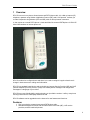
Idle State: DPH-70 is said to be in idle state when the speaker is off, LEDs are off and handset is
on Hook.
Configuration state: DPH-70 goes to configuration state to edit and verify the configuration
information.
Receive state: DPH-70 goes to this state to receive calls from other phones. In this state, phone
is always connected to Internet.
Speaker Mode: You can dial a phone number in hands free mode and listen to call progress
messages.
Handset Mode: You can lift the handset any time to listen. If the speaker is on while lifting, it is
turned off automatically.
7