1
VENICE Administration and Configuration User Guide
1.1 Overview
This user guide informs you about how to administer and configure the
VENICE server and its software.
The chapters in this user guide contain the following information:
1-2
Chapter 1
Begins with a short introduction to VENICE and
its software, followed by a note regarding the
audience this manual is written for and an explanation of the conventions used in this manual. Furthermore, it provides some important
notes that you should read as well as the system requirements to run the software on a client.
Chapter 2
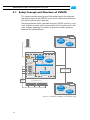
This chapter provides first some background information about the setup concept and the
structure of the VENICE server and its software.
Afterwards it is described how to prepare the
server for a usage in a network, followed by information about the main storage of the server
and the multi-device operation mode.
Chapter 3
Describes how to install the software on a client
in case you want to remotely control the
VENICE server.
Chapter 4
Provides a note about how to preconfigure the
VENICE client software and explains the general configuration settings of the software.
Chapter 5
Describes how to administer the VENICE server, for example, how to update the software on
the system and the various tools available for
an administration.
Appendix
Provides further details about the system, for
example, about the RS-422 control of the
VENICE server.
Index
This chapter facilitates the search for specific
terms.