1
Server Setup
Video Boards and Driver
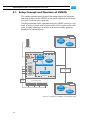
The PCI video boards and their driver provide the functionality of the
system for its usage as a video server. The PCI video board driver controls the installed DVS video boards (video channels) and thus the inand output of video and/or audio signals. Furthermore, it enables the
slave/master mode, where the respective video channel of VENICE can
either be controlled by or controls an externally connected player or recorder via RS-422.
The VENICE Server Software
The VENICE server software installed on the system provides the video
server capabilities for the locally or remotely installed VENICE client
softwares. It communicates directly with the PCI video board driver and
administrates and directs the in- and output channels (video boards) of
the system. For example, it determines whether one channel is free to
be used or already occupied and what the respective channel should do
(record/play out). It is installed as a service (demon) and will be operational shortly after the VENICE server has been started.
1
2
The VENICE Client Software
The VENICE client software is the operator’s interface to the server. It
can be found already installed on the VENICE server, ready to be used
locally. With it the operator can connect to the server (i.e. the VENICE
server software) via network and allocate one of its video channels to
control record or play-out operations. However, the VENICE client software can also be installed on any network client for a remote control of
the server. It is available for various operating systems (see section
“System Requirements” on page 1-5). After its installation, the VENICE
client software can be used the same way as the locally installed one
without limitation. By opening several instances of the VENICE client
software the operator can control several video channels of one or
more VENICE servers at the same time.
Spycer
Spycer, the innovative content management software by DVS, is required by the VENICE client software for data management purposes.
With it you will be able, for example, to select a path and/or file via a
dialog window from the user interface of the VENICE client software.
Additionally, because Spycer is installed as a separate application, it can
be used independently from the DVS software.
With Spycer you can manage any content stored on the system or a
connected storage easily. It is a software application capable of handling large amounts of video data and their corresponding metadata,
providing you with integrated browse, search and management tools
2-3
3
4
5
A
I