1
TTroubleshooting
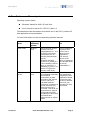
be identical or the parameters of the GEMAC interpolation circuit must be
adapted, see "GEMAC Parameter Adjustment" for more information.
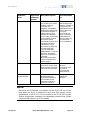
Wrong command or wrong syntax
⇒ Check the error code with the ERR? command. "Error Codes" in the
E-517 User Manual gives the complete error reference.
Wrong axis commanded
⇒ Check if the correct axis identifier is used and if the commanded axis is
that of the desired stage (axis identifier also required with single-axis
systems!)
Move commands, macros or wave generator commands provoke
errors and are ignored
⇒ The applicable control sources for the axis motion depend on the current
control mode of a piezo channel (OFFLINE or ONLINE mode, see "Control
Modes" (p. 23) for details).
In OFFLINE mode, move commands (received via interface or from a
running macro), wave generator output and trackball target settings are
ignored and may provoke an error message.
In ONLINE mode, the axis motion can be commanded by multiple sources
(see "Control Value Generation" in the E-517 User Manual for details):
move commands received via interface or from a running macro (SVA,
SVR, MOV, MVR, GOH, IMP, STE), trackball settings on the CHANNEL
SETTING screen of the E-517 display, wave generator output.
While move commands and trackball settings can be used in parallel to
command axis motion, they are not accepted when the wave generator is
running for the axis.
Macros can run in OFFLINE and ONLINE mode, but move commands from
macros are only accepted in ONLINE mode and only when the wave
generator is not running.
When the E-517 is in OFFLINE mode, the wave generator output can not
be started. If the wave generator output was started in ONLINE mode, it
remains active when switching to OFFLINE mode, but it is not used as
control value. This means that it will not cause axis motion until switching
back to ONLINE mode.
www.pi.ws
E-517 PZ214Equ Release 1.0.0
Page 65