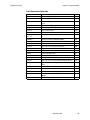
1
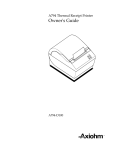
A758 Thermal Receipt and
Impact Slip Printer
Owner’s Guide
TM
A758-D100
A758 Owner’s Guide
Legal Notices
Disclaimer
Information in this document is subject to change without notice. Consult your Axiohm
sales representative for information that is applicable and current. Axiohm reserves the
right to improve products as new technology, components, software, and firmware
become available.
No part of this document may be reproduced or transmitted in any form or by any means,
electronic or mechanical, for any purpose without the express written permission of
Axiohm.
Copyright
Copyright © 1999 by AXIOHM
Ithaca, New York USA
All rights reserved
Printed in USA
Confidential, Unpublished
Property of AXIOHM
Trademarks
AXIOHM is a trademark. Other trademarks and registered trademarks are the property of
their respective holders.
Federal Communications Commission (FCC)
Radio Frequency Interference Statement
Warning
Changes or modifications to this unit not expressly approved by the party responsible for
compliance could void the user’s authority to operate the equipment.
Note
This equipment has been tested and found to comply with the limits for a Class A digital
device, pursuant to Part 15 of the FCC Rules. These limits are designed to provide
reasonable protection against harmful interference when the equipment is operated in a
commercial environment. This equipment generates, uses, and can radiate radio
frequency energy and, if not installed and used in accordance with the instruction
manual, may cause harmful interference to radio communications. Operation of this
equipment in a residential area is likely to cause harmful interference in which case the
user will be required to correct the interference at his own expense.
Information to the User
This equipment must be installed and used in strict accordance with the manufacturer's
instructions. However, there is no guarantee that interference to radio communications
will not occur in a particular commercial installation. If this equipment does cause
interference, which can be determined by turning the equipment off and on, the user is
encouraged to contact Axiohm immediately.
Axiohm is not responsible for any radio or television interference caused by unauthorized
modification of this equipment or the substitution or attachment of connecting cables and
equipment other than those specified by Axiohm. The correction of interferences caused
by such unauthorized modification, substitution or attachment will be the responsibility
of the user.
September 1999
A758 Owner’s Guide
In order to ensure compliance with the Product Safety, FCC and CE marking
requirements, you must use the power supply, power cord, and interface cable which is
sold for use with this product or which meets the following parameters:
Power Supply
UL Listed (QQGQ), Class 2 power supply with SELV (Secondary Extra Low Voltage),
non-energy hazard output, limited energy source, input rated 100-240 Vac, 1.5/0.8 A,
50/60 Hz, output rated 24 Vdc, 2.3 A.
Use of this product with a power supply other than the Axiohm power supply will
require you to test the power supply and Axiohm printer for FCC and CE mark
certification.
Communication Interface Cable
A shielded (360-degree) interface cable must be used with this product. The shield must
be connected to the frame or earth ground connection or earth ground reference at EACH
end of the cable.
Use of a cable other than described here will require that you test the cable with the
Axiohm printer and your system for FCC and CE mark certification.
Power Cord
A UL listed, detachable power cord must be used. For applications where the power
supply module may be mounted on the floor, a power cord with Type SJT marking must
be used. For applications outside the US, power cords that meet the particular country’s
certification and application requirements should be used.
Use of a power cord other than described here may result in a violation of safety
certifications that are in force in the country of use.
Industry Canada (IC)
Radio Frequency Interference Statement
This Class A digital apparatus meets all requirements of the Canadian InterferenceCausing Equipment Regulations.
Cet appareil numérique de la classe A respecte toutes les exigences du Règlement sur le matériel
brouilleur du Canada.
Voluntary Control Council for Interference (VCCI)
Radio Frequency Interference Statement
This is a Class A product based on the standard of the Voluntary Control Council for
Interference by Information Technology Equipment (VCCI). If this equipment is used in a
domestic environment, radio disturbance may arise. When such trouble occurs, the user
may be required to take corrective actions.
September 1999
A758 Owner’s Guide
Contents
Contents
Chapter 1: About the Printer.............................................................. 1
Introducing the A758 Printer ....................................................... 2
Standard Features.......................................................................... 3
Connectivity Features ............................................................ 3
Advanced Interface Design ................................................... 3
Electronics and Firmware...................................................... 3
Thermal Receipt Printer......................................................... 4
Impact Slip Printer.................................................................. 4
Options............................................................................................ 5
Connectivity Options ............................................................. 5
Thermal Receipt Printer Options.......................................... 5
Impact Slip Printer Options................................................... 5
Electronics and Firmware Options....................................... 5
Model Identification Key .............................................................. 6
Chapter 2: Setup Guide ...................................................................... 7
Unpacking the Printer ................................................................... 8
Choosing a Location ...................................................................... 9
Remove the Packing Restraints.................................................... 10
Connecting the Cables................................................................... 12
Communication Cable ........................................................... 12
Cash Drawer Cables ............................................................... 13
Power Supply Cable............................................................... 13
Loading Receipt Paper .................................................................. 14
Putting In the Ribbon Cassette..................................................... 15
Testing the Printer ......................................................................... 16
Chapter 3: Using the Printer .............................................................. 18
Printer Controls.............................................................................. 19
Changing the Receipt Paper ......................................................... 20
Replacing the Ribbon Cassette ..................................................... 21
Printing on Forms or Checks........................................................ 23
Verifying and Validating Checks ................................................ 25
Clearing Check Flip Paper Jams .................................................. 27
Testing the Printer ......................................................................... 29
Printer Configuration .................................................................... 30
Configuring the Printer.......................................................... 31
Communication Interface ...................................................... 33
Diagnostic Modes ................................................................... 33
Emulation/Software Options ............................................... 37
Hardware Options.................................................................. 37
Basic Troubleshooting ................................................................... 39
Printer Beeps ........................................................................... 40
Printer Will Not Print............................................................. 41
On-Line, Paper Status, Error LED Flashes .......................... 42
Poor Forms Print Quality....................................................... 43
Poor Receipt Print Quality..................................................... 44
Slip Station, MICR and Flip Problems ................................. 45
Knife Does Not Operate......................................................... 46
Other Serious Problems ................................................................ 47
September 1999
iii
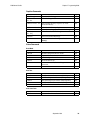
A758 Owner’s Guide
Contents
Contacting a Service Representative ........................................... 47
Returning a Printer ........................................................................ 48
Chapter 4: Printer Media & Supplies............................................... 50
Ordering Thermal Paper............................................................... 51
Thermal Paper Specifications................................................ 51
Manufacturers......................................................................... 51
Ordering Parts and Supplies ........................................................ 52
Ordering Cash Drawers......................................................... 52
Ordering Power Supply Cord and Adapters...................... 52
Ordering Communication Cables......................................... 53
Forms Specifications............................................................... 53
Check Specifications............................................................... 53
Ordering Ribbon Cassettes.................................................... 54
Ordering Extended Slip Tables............................................. 55
Ordering Documentation ...................................................... 55
Chapter 5: Technical Specifications ................................................. 56
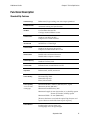
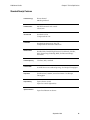
Functional Description .................................................................. 57
Standard Slip Features ........................................................... 57
Standard Receipt Features..................................................... 60
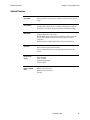
Optional Features ................................................................... 62
Reliability ........................................................................................ 63
Certifications .................................................................................. 64
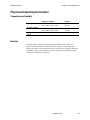
Physical and Operating Environment......................................... 65
Temperature and Humidity.................................................. 65
Electrical................................................................................... 65
Slip Media................................................................................ 66
Receipt Media.......................................................................... 66
Migration ........................................................................................ 67
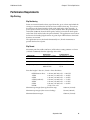
Performance Requirements .......................................................... 68
Slip Printing............................................................................. 68
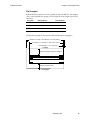
Character Format.................................................................... 70
Receipt Printing ...................................................................... 71
Interface Description ..................................................................... 76
Human Interfaces ................................................................... 76
Power Requirements .............................................................. 78
Electrical Interfaces................................................................. 78
Switch Settings ........................................................................ 79
Character Sets.......................................................................... 79
Dimensions and Weight................................................................ 88
Chapter 6: Communication Interface ............................................... 89
Communication Overview ........................................................... 90
Using DOS to Send Commands............................................ 90
Using BASIC to Send Commands ........................................ 90
RS-232C Interface........................................................................... 91
Print Speed and Timing ......................................................... 91
RS-232 Communications........................................................ 92
XON/XOFF Protocol.............................................................. 93
DTR/DSR Protocol ................................................................. 93
Connector Pin-outs ................................................................. 94
Parallel Interface ............................................................................ 96
September 1999
iv
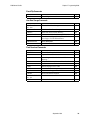
A758 Owner’s Guide
Contents
Chapter 7: Programming Guide ........................................................ 97
Command Conventions ................................................................ 98
List of Commands and Location.................................................. 99
By Command Code ................................................................ 99
By Function.............................................................................. 103
Comparison to A756...................................................................... 109
New Features .......................................................................... 109
Comparison Chart .................................................................. 111
Command Descriptions ................................................................ 112
Printer Function Commands................................................. 112
Vertical Positioning and Print Commands.......................... 121
Horizontal Positioning Commands...................................... 127
Print Characteristic Commands............................................ 134
Graphics Commands.............................................................. 146
Status Commands................................................................... 154
Bar Code Commands ............................................................. 175
Page Mode Commands.......................................................... 179
Macro Commands .................................................................. 186
MICR Commands ................................................................... 188
Check Flip Command ............................................................ 197
User Data Storage Commands.............................................. 198
Flash Download Commands................................................. 202
Index................................................................................................ 206
September 1999
v
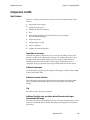
Chapter 1: About the Printer
♦ Introducing the A758 Printer
♦ Standard Features
♦ Options
♦ Model Identification Key
September 1999
1
A758 Owner’s Guide
Chapter 1: About the Printer
Introducing the A758 Printer
The A758 is an extremely fast, quiet, and reliable point-of-sale printer. It consists
of two specialized printers in one compact package: a thermal printer on top that
prints receipts, and an impact slip printer in front to print on forms and checks
that you insert. The thermal printer is optimized for ease-of-use in busy
environments. There is no ribbon or ink cartridge to change, and you load the
paper by simply dropping in a new roll. The impact printer provides the power
and flexibility necessary to print on checks or multi-part forms up to five plies, in
a wide variety of sizes and orientations.
The A758 easily fits in anywhere. It connects to any host computer that uses the
standard RS-232C interface. Other interfaces are also available. The printer’s
standard command set allows it to work with software written for Axiohm, or
other ESC/POS™ compliant printers. A variety of sensors enable the printer to
communicate its status, and the printer’s journal is kept electronically by the host
computer.
Several state-of-the-art check-handling options are also available. The Magnetic
Ink Character Recognition (MICR) option enables the printer to read the special
codes printed on checks and send this information to the host computer to verify
the check. The Check Flip option saves transaction time by making check
handling a one-step process—after reading the front of the check and printing on
the back, the printer is able to flip the check over and print on the front of the
check.
This section describes the printer’s features and options in more detail.
September 1999
2
A758 Owner’s Guide
Chapter 1: About the Printer
Standard Features
Connectivity Features
♦
Industry standard RS-232C interface for communication with the host
computer; other interfaces are available as options.
♦
Cash drawer kickout connector and software support for up to two cash
drawers.
Advanced Interface Design
♦
Sensors detect whether any of the covers are open, the paper is low in the
receipt printer, or the paper is positioned properly in the slip printer.
♦
Software-controlled audible tone for various alerts.
♦
Online Configuration Menu—the printer guides the user through its
configuration settings by printing instructions and a menu on receipt paper.
Electronics and Firmware
♦
Industry-standard command set makes the printer compatible with existing
software, yet enables new features.
♦
Remote diagnostics capability tracks important printer data.
♦
512K flash memory with 192K available for multiple logos, graphics, userdefined character set, and user data storage. The printer is also available with
1 MB or 2 MB flash memory for additional user memory.
♦
16-bit electronics architecture.
♦
Communication rate up to 115,200 baud.
♦
Flash download mode lets the user upgrade the printer’s firmware.
September 1999
3
A758 Owner’s Guide
Chapter 1: About the Printer
Thermal Receipt Printer
♦
Extremely fast and quiet thermal printhead.
♦
No ribbon or ink cartridge to change.
♦
Drop-in paper loading.
♦
Double high, double wide, bold, inverse, underlined, superscript and
subscript, italics, scalable and rotated print modes.
♦
Resident character sets: Code Pages 437 (US), 850 (Multilingual), 852 (Slavic),
858 (with Euro symbol), 860 (Portuguese), 863 (French-Canadian), and 865
(Nordic) and 866 (Cyrillic).
♦
Prints standard bar codes: Code 39, UPC-A, UPC-E, JAN8 (EAN), JAN13
(EAN), Interleaved 2 of 5, Codabar, Code 93, Code 128, and PDF-417 twodimensional code. Also prints “ladder” bar codes.
♦
Host-selectable 44 or 56 columns on 80 mm wide “POS grade” thermal
paper.
♦
8 dots/mm print resolution.
♦
Up to 130 mm/second print speed.
♦
Optional receipt cutter.
♦
Bi-directional impact printhead designed for a very long life.
♦
Snap-on ribbon cassette.
♦
Prints on forms up to five plies.
♦
Horizontal flatbed slip table with an optional extension (which is standard
with the MICR check reader option).
♦
Form insertion flexibility: insert forms in front or from the side.
♦
Form alignment sensors and LED indicator.
♦
Double wide and rotated print modes; a double strike print mode improves
contrast.
♦
Software selectable pitch: either standard (13.9 characters per inch, 66
columns) or compressed (17.1 characters per inch, 80 columns).
♦
290 lines-per-minute print speed.
♦
Optional check handling features (see “Impact Slip Printer Options” on next
page).
Impact Slip Printer
September 1999
4
A758 Owner’s Guide
Chapter 1: About the Printer
Options
Connectivity Options
♦
A standard plug-in printed circuit board allows the printer to use an RS-232C
communication interface. Optional plug-in boards are available for other
communications interfaces.
♦
Communication cables are available for the various communication
interfaces.
♦
Power supplies are available in 55 Watt or 75 Watt versions.
♦
3-pin to 6-pin power connection adapter to allow previous version power
supplies (or terminal cables) to be connected to the A758.
Thermal Receipt Printer Options
♦
The optional receipt cutter.
Impact Slip Printer Options
♦
The slip table is available in either standard or 2 extended sizes. An extended
slip table is standard with the MICR check reader and flip options.
♦
The Magnetic Ink Character Recognition (MICR) check reader is built into the
slip station. It reads checks that use standard E13B or CMC7 MICR fonts.
♦
Check Flip Option: after reading the MICR line on the front of the check and
printing on the back, the printer is able to flip the check over and print on the
face of the check.
Electronics and Firmware Options
♦
1 MB or 2 MB Expanded flash memory are available as factory
configurations.
September 1999
5
A758 Owner’s Guide
Chapter 1: About the Printer
Model Identification Key
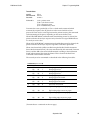
A758 Model ID Key
A 7 5 8 - X X X X
1 = no knife
5 = knife
0 = no MICR
1 = MICR
2 = MICR and check flip
5 = check flip
0 = 512K Flash memory (standard)
1 = 1MB Flash memory
2 = 2MB Flash memory
1 = standard color
The set of options installed on a particular printer can be determined by looking
at the printer's model number. The printer's model number appears on a label on
the right side of the printer. Four-digit model numbers are assigned to the
various A758 models based on the following formula:
♦
The first digit indicates the release vintage and color of the printer's case.
♦
The second digit indicates the amount of flash memory installed in the
printer.
♦
The third digit indicates whether the printer has the MICR and/or check flip
features.
♦
The fourth digit indicates whether the printer has a knife for cutting receipts.
For example, a printer with model number A758-1015 has a standard color case,
512K of flash memory, the MICR feature, and a knife for cutting receipts.
September 1999
6
Chapter 2: Setup Guide
♦ Unpacking the Printer
♦ Choosing a Location
♦ Removing the Packing Restraints
♦ Connecting the Cables
♦ Loading Receipt Paper
♦ Putting in the Ribbon Cassette
♦ Testing the Printer
September 1999
7
A758 Owner’s Guide
Chapter 2: Setup Guide
Unpacking the Printer
Save all packing materials in case you need to repack the printer. Check that the
materials shipped with the printer match.
♦
Printer enclosed in a plastic bag and foam pack
♦
Thermal receipt paper roll (inside receipt bucket)
♦
Test printout protecting the printhead (inside receipt bucket)
♦
Cardboard support for cantilever (on slip table)
♦
Foam restraint for carriage (behind front cover)
♦
Power supply with cable connecting to printer and power supply cord
connecting to power outlet (only if ordered with the printer)
♦
Ribbon cassette
♦
Installation report card (please complete this form and return to Axiohm)
♦
A758 Thermal Receipt and Impact Slip Printer: Setup Guide
♦
Communication cable, if ordered with the printer (from host computer to
printer)
To report any missing materials, or to report a printer that was damaged during
shipping, call your supplier or call an Axiohm representative at 1-(607) 274-2424.
September 1999
8
A758 Owner’s Guide
Chapter 2: Setup Guide
Choosing a Location
Receipt
Cover
280 mm
(11.0 in.)
Extended
Slip Table
178 mm
(7.0 in.)
229 mm (9.0)
264 mm (10.4 in.)
347 mm (13.7 in.)
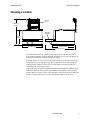
The A758 printer takes up relatively little counter space and may be set on or
near the host computer. With the RS-232C interface, you can place the printer up
to 50 feet from the host computer and power supply.
Place the printer on a level surface, and make sure there is enough room to open
the receipt cover to change the paper and to open the front cover to change the
impact printer’s ribbon cassette. Leave several inches around the printer for
connecting and accessing the cables.
If the printer has an optional Magnetic Ink Character Recognition (MICR) check
reader installed, you may need to make additional adjustments to the printer’s
location. Because devices such as CRT monitors or large metal surfaces affect the
printer's magnetic field, they can cause intermittent check reading errors.
September 1999
9
A758 Owner’s Guide
Chapter 2: Setup Guide
Remove the Packing Restraints
Front
Cover
Cardboard
Support
Carriage
Foam
Restraint
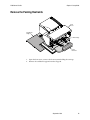
1.
Open the front cover, remove the foam restraint holding the carriage.
2.
Remove the cardboard support from the slip path.
September 1999
10
A758 Owner’s Guide
Chapter 2: Setup Guide
Receipt
Cover
Paper Roll
Supports
Test
Printout
Paper
Roll
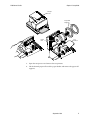
3.
Open the receipt cover and remove the test printout.
4.
Lift the thermal paper roll out of the paper bucket and remove the paper roll
supports.
September 1999
11
A758 Owner’s Guide
Chapter 2: Setup Guide
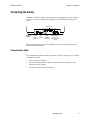
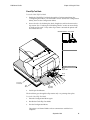
Connecting the Cables
Caution: Connect the cables to the printer before plugging in the power supply.
If power is received from the host computer, turn it off before connecting any
cables.
Strain Relief
Back of
Printer
DIP
Cash
Power
Drawer Switches Supply
Connector
Connector
Communication
Connector
(9-pin connector
shown)
Note: Depending on your printer configuration, the connector panel may vary
from the above illustration.
Communication Cable
The communication cable connects the printer to the host computer. To install the
communication cable:
1.
Turn off the host computer.
2.
Secure the communication cable to its connector under the printer in the
location previously shown.
3.
Connect the cable to the host computer.
September 1999
12
A758 Owner’s Guide
Chapter 2: Setup Guide
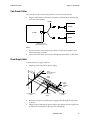
Cash Drawer Cables
The cash drawer cable connects the printer to one or two cash drawers.
1.
Plug the cable into the cash drawer connector (standard phone jack) located
at the rear of the printer.
Y-Cable
Drawer
Printer
Drawer
Printer Connector
(Standard Phone Jack)
Note:
a.
If your system has two cash drawers, attach a Y-cable to the printer’s cash
drawer connector as shown.
b.
Leave some slack in the cord to route through the strain relief at a later time.
Power Supply Cable
Connect the power supply cable last.
1.
Plug the power cord into the power supply.
To the
Communications
Connector
Strain
Relief
Power
Supply
or Adapter
Cable
Communications
Cable
Cash Drawer
Cable
Cash Drawer
Cable
2.
Route the cash drawer and the power supply cables through the stain relief
as shown.
3.
Plug the power cord into the power supply, then plug the power supply into
an outlet. The Green LED on the top cover will light up.
September 1999
13
A758 Owner’s Guide
Chapter 2: Setup Guide
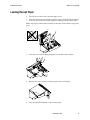
Loading Receipt Paper
1.
Tear off the end of the roll so that the edge is loose.
2.
Place the roll into the paper bucket with the paper unrolling from the bottom
of the roll, and with a few inches of paper extending over the cabinet front.
Note: Paper must unroll from the bottom of the roll to insure that the image will
print.
3.
Close the cover while holding the paper over the front of the cabinet.
4.
Remove the excess paper by tearing it against the tear-off blade.
5.
Press the Paper Feed Button to advance the paper.
September 1999
14
A758 Owner’s Guide
Chapter 2: Setup Guide
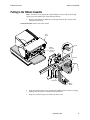
Putting In the Ribbon Cassette
Note: You must use an approved Axiohm ribbon cassette with the check flip
option to prevent jamming or other ribbon problems.
1.
Unwrap and tighten the ribbon by turning the knob on the cassette in the
direction of the arrow.
Caution: DO NOT remove the mylar shield.
Front
Cover
Knob
Ribbon
Cassette
(Shown in
Position)
Cassette
Printhead
Ribbon
Mylar
Shield
2.
Open the printer’s front cover, position the ribbon cassette onto the carriage,
making sure the ribbon is underneath the printhead.
3.
Snap the cassette into place and close the front cover.
September 1999
15
A758 Owner’s Guide
Chapter 2: Setup Guide
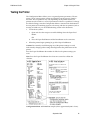
Testing the Printer
The Configuration Menu allows you to set general printer parameters. The test
prints a list of various printer settings and partially cuts the paper if a knife is
installed. The test printouts may vary depending on the printer model. To change
the default settings, enter the Configuration Menu as instructed on the bottom of
the test printout. The printout may be useful to a service representative if there is
a problem. If something appears to be wrong with the test printout (such as
missing or faded text) additional troubleshooting and diagnostic guides are
available by calling 1-(607) 274-2424.
1.
To run the test, either:
a.
Open and close the receipt cover while holding down the Paper Feed
Button,
OR,
b.
2.
Press the Paper Feed Button and the Reset Button at the same time.
When the printer begins printing let go of the Paper Feed Button.
September 1999
16
A758 Owner’s Guide
Chapter 2: Setup Guide
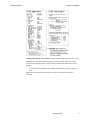
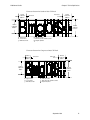
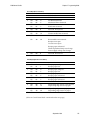
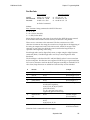
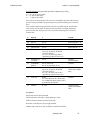
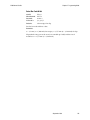
Configuration Menu and Print Test samples (shown approximately 60% of size).
Caution: Be extremely careful changing any of the printer settings to avoid
inadvertently changing other settings that might affect the performance of the
printer.
3.
Press the Paper Feed Button the number of clicks for the printer settings you
want.
Note: Press the Paper Feed Button for at least one second to validate the
selection.
September 1999
17
Chapter 3: Using the Printer
♦ Printer Controls
♦ Changing the Receipt Paper
♦ Replacing the Ribbon Cassette
♦ Printing on Forms or Checks
♦ Validating and Verifying Checks
♦ Clearing Check Flip Paper Jams
♦ Testing the Printer
♦ Printer Configuration
♦ Basic Troubleshooting
♦ Other Serious Problems
♦ Contacting a Service Representative
♦ Returning a Printer
September 1999
18
A758 Owner’s Guide
Chapter 3: Using the Printer
Printer Controls
Receipt
Cover
Receipt
Front
Cover
Slip or
Check
Paper Feed
Button
On-Line,
Paper Status,
Error LED
(Green)
Extended
Slip Table
Slip In
LED (Green)
Reset
Button
The printer has the following controls:
♦
The Paper Feed Button advances the receipt paper.
♦
The On Line, Paper Status, Error LED shows the printer status by shining or
flashing.
♦
The Slip-in LED indicates that a form is inserted properly.
♦
The Reset Button clears the printer’s memory or begins special modes.
The printer also indicates its status when it is first turned on, or after it has been
reset, by beeping. A single beep indicates the printer has successfully completed
its startup routine. But if the printer beeps in a single, double, or triple pattern at
first power on, please call your service representative.
September 1999
19
A758 Owner’s Guide
Chapter 3: Using the Printer
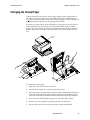
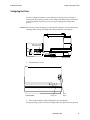
Changing the Receipt Paper
Change the paper when either a colored stripe appears on the receipt paper or
the printer’s On Line, Paper Status, Error LED slowly flashes (indicating that
15 + 10 feet of paper remains on the roll). Change the paper as soon as possible to
avoid running out of paper part way through a transaction.
If the On Line, Paper Status, Error LED blinks fast, the paper is out. Change the
paper immediately or data may be lost. The printer will not operate without
paper, but it may continue to accept data into memory from the host computer.
Because the printer cannot print any transactions, this data in memory may be
lost.
Receipt
Cover
To change the receipt paper:
1.
Open the cover and remove the used roll.
2.
Tear off the end of the new roll so that the edge is loose.
3.
Place the roll into the paper bucket with the paper unrolling from the bottom
of the roll, and with a few inches of paper extending over the cabinet front.
Paper must unroll from the bottom of the roll to insure the image will print.
4.
Close the cover while holding the paper over the front of the cabinet.
5.
Remove the excess paper by tearing it against the tear-off blade.
6.
Advance the paper if necessary by pressing the Paper Feed Button.
September 1999
20
A758 Owner’s Guide
Chapter 3: Using the Printer
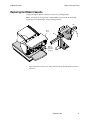
Replacing the Ribbon Cassette
Change the impact printer’s ribbon cassette if it is printing lightly.
Note: You must use an approved Axiohm ribbon cassette with the check flip
option to prevent jamming or other printing problems.
Tab
Front
Cover
Tab
Ribbon
Cassette
(Shown in
Position)
1.
Open the printer’s front cover and pinch the tabs of the old ribbon cassette to
remove it.
September 1999
21
A758 Owner’s Guide
Chapter 3: Using the Printer
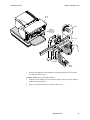
Front
Cover
Knob
Ribbon
Cassette
(Shown in
Position)
Cassette
Printhead
Ribbon
2.
Mylar
Shield
Unwrap and tighten the new ribbon by turning the knob on the cassette in
the direction of the arrow.
Caution: Do not remove the Mylar shield.
3.
Position the new ribbon cassette onto the carriage, making sure the ribbon is
underneath the printhead.
4.
Snap the cassette into place and close the front cover.
September 1999
22
A758 Owner’s Guide
Chapter 3: Using the Printer
Printing on Forms or Checks
There are several types of transactions that may require the insertion of a form or
check into the printer:
♦
Credit card transaction
♦
Multiple-part forms such as credit transactions or merchandise returns
♦
Electronic funds transfers
♦
Check printing (printing the date, payee, and amount on the check face)
♦
Check endorsement
Although the illustration on the following page shows a check being inserted into
the printer, these instructions apply to any type of form. The A758 can print on
forms up to five parts thick.
September 1999
23
A758 Owner’s Guide
Chapter 3: Using the Printer
2001
19
PAY TO THE
$
ORDER OF
DOLLARS
MEMO
¦
Check Orientation
Green
Slip-in LED
Check
Guide
First Line of
Print Guide
Slip
Table
Extended
Slip Table
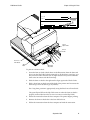
To print on a form or check:
1.
Insert the form or check (check shown in the illustration) from the front and
place it on the Slip Table with the print side up. If the form is extra long, you
may need to insert it from the side. A slight resistance may be felt when the
form comes in contact with the Form Stop.
2.
Slide the form or check to the right until it aligns against the Check Guide.
3.
Slide a short form or check toward the back of the printer until it contacts the
Form Stop (it won't be able to go any further).
For a long form, position it appropriately using the First Line of Print Guide.
The green Slip-in LED on the Slip Table turns on when the form or check is
properly inserted (the form has to cover two sensors on the Slip Table).
4.
Follow the instructions from the host computer. The printer begins printing.
5.
Remove the form or check after it has been fed back out.
6.
Follow the instructions from the host computer to finish the transaction.
September 1999
24
A758 Owner’s Guide
Chapter 3: Using the Printer
Verifying and Validating Checks
If the printer has the optional MICR check reader, checks are verified and then
validated. If the printer also has the optional check flip feature, the printer is able
to flip the check over and print on the front of the check.
Note: To ensure that checks are properly verified and validated, they must be free of
folds and wrinkles and inserted correctly into the MICR printer. Smooth a
wrinkled or folded check for best performance.
Check Orientation - Face down
ENDORSE HERE
MEMO
Green
Slip-in LED
Check
Guide
First Line of
Print Guide
Slip
Table
Extended
Slip Table
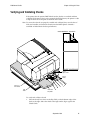
To verify and validate a check:
1.
Place the check, face down on the Slip Table, with the bottom edge of the
check to the right. Move the check to the right until it aligns against the
Check Guide.
September 1999
25
A758 Owner’s Guide
Chapter 3: Using the Printer
2.
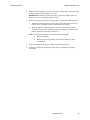
Slide the check straight forward into the printer until it stops. The green Slipin LED on the front of the printer comes on.
IMPORTANT: Hold the check to the right, against the Check Guide and
release it as soon as the printer begins to run.
3.
Follow the instructions on the host computer to complete the MICR process:
a.
When instructed by the host, the check is fed into the printer, read and
backed out to a position ready for endorsement, if desired.
b.
With the optional check-flip feature, the check is fed into the printer,
verified, fed up into the check flip mechanism, flipped, fed back into the
printer, printed on the front and released.
Note: If the terminal indicates an incorrect read of the MICR:
♦
Remove the check.
♦
Reinsert the check, ensuring instructions 1 through 3 above
are followed.
4.
Only remove the check when it is fully released by the printer.
5.
Continue to follow the instructions from the host computer to finish the
transaction.
September 1999
26
A758 Owner’s Guide
Chapter 3: Using the Printer
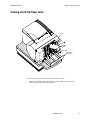
Clearing Check Flip Paper Jams
Check
Check Flip
Window Door
To clear a paper jam from the optional check flip assembly:
1.
Look in the window of the check flip assembly. If the jammed check is
visible, open the window and remove it.
September 1999
27
A758 Owner’s Guide
Chapter 3: Using the Printer
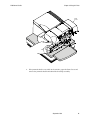
Front
Cover
2.
If the jammed check is not visible in the window, open the Front Cover and
remove the jammed check from behind the check flip assembly.
September 1999
28
A758 Owner’s Guide
Chapter 3: Using the Printer
Testing the Printer
The Configuration Menu allows you to set general printer parameters. The test
prints a list of various printer settings and partially cuts the paper if a knife is
installed. The test printouts may vary depending on the printer model. The
printout may be useful to a service representative if there is a problem. To change
the default settings, enter the Configuration Menu as instructed on the bottom of
the test printout. If something appears to be wrong with the test printout (such as
missing or faded text), see the troubleshooting section in this document.
1.
To run the test, either:
a.
Open and close the receipt cover while holding down the Paper Feed
Button.
OR
b.
2.
Press the Paper Feed Button and the Reset Button at the same time.
When the printer begins printing let go of the Paper Feed Button.
Caution: Be extremely careful changing any of the printer settings to avoid
inadvertently changing other settings that might affect the performance of the
printer.
Press the Paper Feed Button the number of clicks for the printer settings you
want.
Note: Press the Paper Feed Button for at least one second to validate the
selection.
Configuration Menu and Print Test samples (show approximately 60% of size).
September 1999
29
A758 Owner’s Guide
Chapter 3: Using the Printer
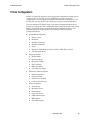
Printer Configuration
Printers are generally shipped with all appropriate configuration settings pre-set
at the factory. The only time the user should need to change the printer
configuration is if a new option is installed or the firmware is changed. It is also
possible the user may need to run certain tests using the Configuration Menu.
The user configures the printer using a convenient Configuration Menu that is
printed on receipt paper. The Configuration Menu prints instructions and setting
options interactively as the user goes through the configuration process. The
following functions and parameters can be changed with the scrolling
Configuration Menu:
♦
♦
♦
♦
Communication Interface
♦
Interface Type
♦
Baud Rate
♦
Number of Data Bits
♦
Number of Stop Bits
♦
Parity
♦
Hardware (DTR/DSR) or Software (XON/XOFF) Flow Control
♦
Data Reception Errors
Diagnostic Modes
♦
Normal Mode
♦
Datascope Mode
♦
Receipt Test Mode
♦
Slip Test Mode
♦
MICR Test Mode
♦
Check Flip Test Mode
Emulation/Software Options
♦
Printer Emulations
♦
Printer ID Mode
♦
Default Lines Per Inch
♦
Carriage Return Usage
Hardware Options
♦
Print Density
♦
Maximum Power
♦
Knife Options
♦
Paper Low Sensor
♦
Printhead Resistance
♦
MICR Option
♦
Check Flip Option
September 1999
30
A758 Owner’s Guide
Chapter 3: Using the Printer
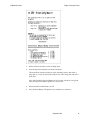
Configuring the Printer
Use the Configuration Menu to select functions or change various settings as
indicated in the preceding sections. The Configuration Menu prints instructions
and setting options interactively as the user goes through the configuration
process.
Caution: Be extremely careful changing any of the printer settings to avoid inadvertently
changing other settings that might affect the performance of the printer.
Switch 1 is shown
in the ON position
On
Off
4 3 2 1
DIP Switch
DIP Switch
1.
Set DIP Switch 1 to On.
Front of Printer
2.
Back of Printer
Front Cover
Reset
Button
Press the Reset Button while holding the Paper Feed Button.
The printer beeps, prints the current configuration, then prints the first question.
September 1999
31
A758 Owner’s Guide
Chapter 3: Using the Printer
3.
Follow all the instructions on the scrolling menu.
4.
Press the Paper Feed Button to make the selections.
The instructions indicate whether to select something with a short click, a
long click, or a series of short clicks. Indicate Yes with a long click, No with a
short click.
Press and hold the Paper Feed Button for at least one second for a long click.
Press the Paper Feed Button quickly for a short click.
5.
When finished, set DIP Switch 1 to Off.
6.
Press the Reset Button. The printer resets with the new selections.
September 1999
32
A758 Owner’s Guide
Chapter 3: Using the Printer
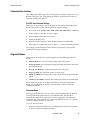
Communication Interface
The Configuration Menu gives the user the option of setting the printer to use an
RS-232C serial port. (See “Configuring the Printer” for instructions on how to
enter the Configuration Menu.)
RS-232C Serial Interface Settings
If the user sets the printer to use an RS-232C serial interface, the Configuration
Menu can be used to set the following RS-232C-specific settings:
♦
Set a baud rate of 115200, 57600, 38400, 19200, 9600, 4800, 2400, or 1200 baud
♦
Set the number of data bits to seven or eight
♦
Set the number of stop bits to one or two
♦
Enable or disable parity
♦
Set flow control to software (XON/XOFF) or Hardware (DTR/DSR)
♦
Set the printer to ignore data errors or print a “?” upon encountering an error
The settings used will depend on the software the operator is using and the
capabilities of the host computer.
Diagnostic Modes
This function allows the user to put the printer into the following diagnostic
modes:
♦
Normal Mode: this is the normal operating mode of the printer.
♦
Datascope Mode: the receipt printer prints incoming commands and data in
hexadecimal format.
♦
Receipt Test Mode: the receipt printer prints two code pages.
♦
Slip Test Mode: the slip printer prints two code pages.
♦
MICR Test Mode: the receipt printer prints all characters recognized by the
MICR.
♦
Check Flip Test Mode: the check flip mechanism will flip an inserted check.
These diagnostic modes are enabled or disabled by using the Configuration
Menu. See “Configuring the Printer,” for instructions on how to enter the
Configuration Menu.
Datascope Mode
Datascope Mode allows the user to test the printer's communications. When in
Datascope Mode the printer receives all communications, but instead of
executing the commands it prints them out on receipt paper as hexadecimal
numbers in the order received. For example, the ASCII character “A” is printed
as the hexadecimal number 41 and so on.
To run the Datascope Mode:
1.
Enter the Configuration Menu. See “Configuring the Printer for instruction
on how to enter the Configuration Menu.
September 1999
33
A758 Owner’s Guide
Chapter 3: Using the Printer
2.
After you have enabled the Datascope Mode through the Configuration
Menu, exit the Configuration Menu.
3.
Run a transaction from the host computer.
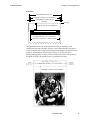
All commands and data sent from the host computer will be printed as
hexadecimal numbers as shown in the illustration.
To exit the Datascope Mode:
1.
Enter the Configuration Menu again.
2.
Disable the Datascope Mode.
3.
Exit the Configuration Menu.
The printer is in Normal Mode and can communicate with the host
computer.
Receipt Test Mode
To run the Receipt Test Mode:
1.
Enable the Receipt Test Mode through the Configuration Menu. See
“Configuring the Printer,” for instructions on how to enter the Configuration
Menu.
2.
Push Paper Feed Button and the receipt station will print two code pages.
3.
The test ends with a cut.
4.
Go to step 2 again to repeat this test.
To exit the Receipt Test Mode:
1.
Enter the Configuration Menu again.
2.
Disable the Receipt Test Mode.
3.
Exit the Configuration Menu.
The printer is in Normal Mode and can communicate with the host
computer.
Slip Test Mode
To run the Slip Test Mode:
1.
Enable the Slip Test Mode through the Configuration Menu, (See
“Configuring the Printer,” for instructions on how to enter the Configuration
Menu). Then exit the Configuration Menu.
2.
Insert a slip into the slip station.
September 1999
34
A758 Owner’s Guide
Chapter 3: Using the Printer
3.
Push the Paper Feed Button.
Two code pages will be printed.
4.
Go to step 2 again to repeat this test.
To exit the Slip Test Mode:
1.
Enter the Configuration Menu again.
2.
Disable the Slip Test Mode.
3.
Exit the Configuration Menu.
The printer is in Normal Mode and can communicate with the host
computer.
MICR Test Mode
MICR Test Mode allows the user to test whether the MICR is operating correctly.
When the printer is in this mode the MICR reads the characters on a check as
usual, but instead of transmitting the values to the software it prints them on
receipt paper.
To run the MICR Test Mode:
1.
Enter the Configuration Menu. See “Configuring the Printer,” for instructions
on how to enter the Configuration Menu.
2.
After enabling the MICR Test Mode through the Configuration Menu, exit
the Configuration Menu.
3.
Insert a check into the slip station. (See “Verifying and Validating Checks”
section.)
4.
The printer waits until a check is inserted and detected before the platen
closes and the characters are read by the MICR check reader. The decoded
data is printed on receipt paper, the platen is opened, and the test is restarted.
5.
The printed numbers should match the numbers on the check. If the MICR
check reader misreads a character, the test prints a question mark “?”. If the
MICR check reader is unable to read any characters, the test prints “NO
MICR CHARACTERS.”
To exit the MICR Test Mode:
1.
Enter the Configuration Menu again.
2.
Disable the MICR Test Mode.
3.
Exit the Configuration Menu.
The printer is in Normal Mode and can communicate with the host
computer.
September 1999
35
A758 Owner’s Guide
Chapter 3: Using the Printer
Check Flip Test Mode
To run the Check Flip Test Mode:
1.
Enable the Check Flip Test Mode through the Configuration Menu (See
“Configuring the Printer,” for instructions on how to enter the Configuration
Menu), then exit the Configuration Menu.
2.
Insert a check as if validating the check, lengthwise and face down into the
slip station. (See “Verifying and Validating Checks” section to insert check.)
A check must be used—if any other slip or form is inserted the printer will
not conduct the test.
Check Orientation - Face down
ENDORSE HERE
MEMO
Green
Slip-in LED
Check
Guide
First Line of
Print Guide
Slip
Table
3.
Extended
Slip Table
Push Paper Feed Button.
The check then goes through the flip routine only—no printing takes place.
To exit the Check Flip Test Mode:
1.
Enter the Configuration Menu again.
2.
Disable the Check Flip Test Mode.
3.
Exit the Configuration Menu.
The printer is in Normal Mode and can communicate with the host
computer.
September 1999
36
A758 Owner’s Guide
Chapter 3: Using the Printer
Emulation/Software Options
Printer Emulations
Printer emulations determine the commands that are available to the printer.
They are set by using the Configuration Menu. (See “Configuring the Printer” for
instructions on how to enter the Configuration Menu.) The available options are:
♦
A758 Native (enables all new functions)
♦
A756 Emulation (for use with legacy software)
Printer ID Mode
This switch is used to determine what Printer ID value is returned in response to
a Transmit Printer ID (1D 49 01) when the printer is in A756 Emulation Mode.
The printer can be configured to send back the ID of the A758 or the A756.
Default Lines Per Inch
This function allows the user to set the default lines per inch printed by the
thermal receipt printer to 6, 7.52 or 8.13. (See “Configuring the Printer” for
instructions on how to enter the Configuration Menu to change this setting.)
Carriage Return Usage
This function allows the printer to ignore or use the Carriage Return
(hexadecimal 0D) command depending on the application. Some applications
expect the command to be ignored while others use the command as a print
command. (See “Configuring the Printer” for instructions on how to enter the
Configuration Menu to change this setting.)
Hardware Options
Print Density
This function makes it possible to adjust the energy level of the printhead to
darken the printout. An adjustment should only be made when necessary. The
factory setting is 100%.
Warning: Choose an energy level no higher than necessary to achieve a dark
printout.
Failure to observe this rule may result in a printer service call or voiding of the
printer warranty. Consult your Axiohm technical support specialist if you have
any questions.
Maximum Power
This function makes it possible to match the printer to the wattage of the power
supply. The 55 W power supply is standard, whereas the 75 W power supply
enables the printer to optimize speed at higher dot coverage. (See “Configuring
the Printer” for instructions on how to enter the Configuration Menu to change
this setting.)
September 1999
37
A758 Owner’s Guide
Chapter 3: Using the Printer
Knife Option
This function makes it possible to set the Knife Option if it is installed in the
printer. This setting should only be changed if the option is added or removed.
Paper Low Sensor
Paper Low Sensor setting makes it possible to enable or disable the paper low
sensor for particular printer configurations.
Printhead Resistance
The printhead in the thermal receipt printer can be one of two types. The
printhead resistance setting must match the character (A or B) stamped on the
heatsink in the back of the printhead. This character is visible by removing the
top cover of the printer. Only a trained service representative may remove this
cover. Therefore, under normal use this setting should be left at the factory
default.
The printhead resistance settings are set by using the Configuration Menu. See
“Configuring the Printer” for instructions on how to enter the Configuration
Menu.
MICR Option
This function makes it possible to set the MICR Option if it is installed in the
printer. This setting should only be changed if the option is added or removed.
Check Flip Option
This function makes it possible to set the Check Flip Option if it is installed in the
printer. This setting should only be changed if the option is added or removed.
September 1999
38
A758 Owner’s Guide
Chapter 3: Using the Printer
Basic Troubleshooting
The A758 printer is a simple, generally trouble-free printer, but from time to time
minor problems may occur. For example, the power supply may be disconnected
or the thermal printhead may overheat.
The On Line, Paper Status, Error LED on the operator panel may signal that
something is wrong. The light on the front right side of the printer is used only to
indicate when a form is inserted properly. It does not indicate an error.
For some problems, the printer communicates the information to the host
computer and relies on the application to indicate what the problem is.
The information on the following pages describes some problems that you may
encounter: problems that you can easily fix, and others that you will need to
contact a service representative for.
You may be able to correct many of the conditions or problems without calling
for service. However, if a problem persists, contact a service representative. See
“Contacting a Service Representative” at the end of this chapter.
If something is wrong with the printer, take the following general steps:
♦
Cycle the power of the printer and note its behavior.
♦
Check the On Line, Paper Status, Error LED and compare its behavior to the
table below.
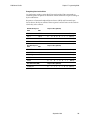
Status
LED Behavior
Power Off
Off
Firmware Download
Fast Blink
Level 0 Diagnostics (entered at
power on or in reset)
Fast Blink
Paper Low
Temperature Error
Voltage Error
Slow Blink
Cover Open (receipt, slip or flip)
Paper Out
Carriage Jam
Slip Jam
Flip Jam
Knife Jam
Fast Blink
All other states
On
♦
Test the receipt printer or slip printer by printing a sample test print as
described elsewhere in this document.
♦
Determine if the problem is with the thermal receipt printer or the impact
slip printer and refer to the tables on the following pages.
September 1999
39
A758 Owner’s Guide
Chapter 3: Using the Printer
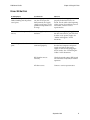
Printer Beeps
Problem/Symptom
Possible Causes
What to Do
Printer beeps in a single, double,
or triple pattern at first power
on, the On Line, Paper Status,
Error LED blinks in the same
pattern, and the printer won’t
power up.
The printer has a problem with its electronics.
Contact a service
representative.
Printer beeps during normal
operation.
The printer may be programmed to beep
during normal operation by the software
application used on the host computer.
Consult your
application
software manual.
September 1999
40
A758 Owner’s Guide
Chapter 3: Using the Printer
Printer Will Not Print
Problem/Symptom
Possible Causes
What to Do
The On Line, Paper Status, Error
LED is blinking and the printer
won’t print.
The receipt paper may be
out, the cover open, the
knife jammed, the supply
voltage out of range, or the
printhead temperature out
of range.
Check that the receipt paper is
properly loaded and covers are
closed. See the table at the beginning
of this section. For problems not user
correctable, contact a service
representative.
Printer doesn't have power (LED
not on)
Power supply may be
defective.
If the power supply is plugged in,
but does not come on, you will need
to order a new power supply. See
“Media and Supplies” in this
document.
Printer has power but doesn't
print.
Cables may not be
connected properly.
Check all cable connections. Check
that the host computer and power
supply are both on (the power
supply is turned on by plugging it
into an outlet). See “Connecting the
Cables” in this document.
DIP Switches not set
correctly.
Check the switch setting. DIP Switch
one should be off (down) for normal
operation.
All other causes.
Contact a service representative.
September 1999
41
A758 Owner’s Guide
Chapter 3: Using the Printer
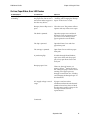
On-Line, Paper Status, Error LED Flashes
Problem/Symptom
Possible Causes
What to Do
On Line, Paper Status, Error LED Receipt paper is out. Change Change the paper immediately. See
is blinking.
the paper now. Do not run a “Loading and Changing the Receipt
transaction without paper as Paper” in the Owner’s Guide.
the data may be lost.
Receipt, front or flip cover is
open.
Close the cover. The printer will not
operate with any of the covers open.
The knife is jammed.
Open the receipt cover and check
the knife. Clear any jammed paper
you can see. Tear off any excess
paper against the tear-off blade.
The slip is jammed.
Open the Front Cover and clear
paper from path.
The carriage is jammed.
Open Front Cover and clear paper
from path.
A jam during flip.
If visible through Front Window,
open access door and clear paper
jam, if not, open Front Cover and
clear jam.
Receipt paper is low.
There are about 4.5 meters, ± 3
meters, (15 feet, ± 10 feet) of paper
left. Change the paper soon to avoid
running out of paper part way
through a transaction. See “Loading
and Changing the Receipt Paper” in
this document.
AC supply voltage is out of
range.
If paper is not low and no
conditions indicate that the thermal
printhead is too hot, then it is likely
that the power supply voltage is out
of range. Contact a service
representative.
Continued…
September 1999
42
A758 Owner’s Guide
Chapter 3: Using the Printer
On Line, Paper Status, Error LED Thermal printhead
is blinking.
temperature is out of range.
The printhead may overheat when
printing in a room where the
temperature is above the
recommended operating
temperature or when printing high
density graphics continuously,
regardless of the room temperature.
In either case, the printer will shut
off. If the temperature of the
printhead is too hot, adjust the room
temperature or move the printer to a
cooler location. If the printhead is
overheating because of printing
high density graphics continuously,
reduce the demand on the printer.
Poor Forms Print Quality
Problem/Symptom
Possible Causes
What to Do
Printer starts to print, but stops
while the form is being printed.
Communication error or
software error.
Check the interface cable. Check that
the software is working properly.
Forms print is light or spotty.
Form not inserted
incorrectly.
See “Printing on Forms or Checks” in
this document.
Impact printhead is dirty or
defective.
Contact a service representative.
Improper internal cable
connections.
Contact a service representative.
Ribbon cassette is worn.
Replace the ribbon cassette.
See “Replacing the Ribbon Cassette”
in this document.
Light print, smudging, or slip
skews.
Platen gap needs
adjustment.
Contact a service representative.
September 1999
43
A758 Owner’s Guide
Chapter 3: Using the Printer
Poor Receipt Print Quality
Problem/Symptom
Possible Causes
What to Do
Colored stripe on receipt.
Paper is low.
Change the paper.
Receipt does not come out all the
way.
Paper is jammed.
Open the receipt cover, inspect the
knife, and clear any jammed paper.
Printer starts to print, but stops
while the receipt is being
printed.
Paper is jammed.
Open the receipt cover, inspect the
knife, and clear any jammed paper.
Print is light or spotty.
Paper roll loaded
incorrectly.
Check that the paper is loaded
properly.
Thermal printhead is dirty.
Use recommended thermal receipt
paper. Clean the thermal printhead
with an alcohol pen. Do not spray the
thermal printhead with household
cleaner as this may damage it and the
electronics. The thermal printhead
does not normally require cleaning if
the recommended paper grades are
used. If non-recommended paper has
been used for an extended period of
time, cleaning the printhead with an
alcohol pen will not be of much
benefit.
Improper internal cable
connections.
Contact a service representative.
Printhead is defective.
Contact a service representative.
Vertical column of print is
missing, one side of receipt is
missing, or top or bottom half of
characters are missing.
Printhead is defective.
Contact a service representative.
Print cassette ribbon jams when
check flip option is used.
Improper ribbon cassette.
An approved Axiohm
cassette must be used with
the check flip option.
Replace cassette with a cassette
approved for the check flip option.
September 1999
44
A758 Owner’s Guide
Chapter 3: Using the Printer
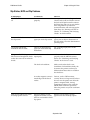
Slip Station, MICR and Flip Problems
Problem/Symptom
Possible Causes
What to Do
Slip Table LED does not come
on.
Form or check not inserted
properly.
Line up the form or check against the
Check Guide (wall) and slide it toward
the back of the printer until it contacts
the Form Stop and can't go any further.
Extra long forms may need to be
inserted from the side to disengage the
Form Stop. See “Printing on Forms or
Checks” or “Validating and Verifying
Checks” in this document.
Forms or checks skew or catch in
the slip station.
There is an obstruction or
paper jam in the slip station.
Open the front cover and check for any
paper jams or obvious obstruction in
the slip station. Clear the obstruction or
jammed paper.
The optional check flip
mechanism doesn’t work.
There is an obstruction or
paper jam in the check flip
mechanism.
See “Clearing Paper Jams” in this
document.
The check is inserted
The optional MICR (Magnetic
Ink Character Recognition) check improperly.
reader does not read or misreads
checks.
Print cassette ribbon jams when
check flip options is used.
Make sure the check is inserted
properly with the MICR characters
down. See “Validating and Verifying
Checks” in the Owner’s Guide.
The check is fraudulent.
Make sure that the check is not
fraudulent. On fraudulent checks, the
characters the printer reads may be
different from those that are visible on
the check face.
A nearby magnetic source is
interfering with the check
reader.
Devices, such as CRT monitors,
security devices or large metal surfaces
that are near the printer can affect the
printer's magnetic field, causing
intermittent reading errors when the
MICR check reader is in operation.
Move the printer away from such items
or areas.
Improper ribbon cassette.
Approved Axiohm cassette
must be used with the check
flip option.
Replace cassette with a cassette
approved for the check flip option.
September 1999
45
A758 Owner’s Guide
Chapter 3: Using the Printer
Knife Does Not Operate
Problem/Symptom
Possible Causes
What To Do
Receipt is not cut.
Paper is jammed.
Open the receipt cover, inspect the
knife, and clear any jammed paper.
The printer has a knife but
the firmware is not
configured for a knife.
Enable the knife option by
reconfiguring the printer. See
“Configuring the Printer” in this
document.
All other problems.
Contact a service representative.
September 1999
46
A758 Owner’s Guide
Chapter 3: Using the Printer
Other Serious Problems
The following problems all need to be corrected by a qualified service
representative. See the next section, “Contacting a Service Representative.”
♦
MICR check reader not operating properly
♦
Forms not feeding into the slip/forms area properly
♦
Missing dots in slip or forms printing
♦
Printer will not cycle or stop when required
♦
Illegible characters
♦
Paper will not feed
♦
Knife will not cycle or cut
♦
Platen will not open or close
♦
Printer will not communicate with the host computer
Contacting a Service Representative
For serious problems, such as the printer not printing, not communicating
with the host computer, or not turning on, contact Axiohm technical support
at 607-274-2424.
For self-maintenance organizations, a service guide, service video, parts manual,
and other service documents, can be obtained from Axiohm.
September 1999
47
A758 Owner’s Guide
Chapter 3: Using the Printer
Returning a Printer
Follow these instructions if you need to return a printer for servicing.
1.
If you are sending the printer to Axiohm for repair, call Axiohm for a Return
Material Authorization number (RMA#) at (607) 274-4777. Be prepared to
answer questions concerning shipping and billing. Request an RMA process
be sent to you, if required.
2.
Pack the printer as follows:
Receipt
Cover
Receipt
Paper
a.
Place receipt paper between the receipt cover and the printhead for
protection.
Front
Cover
Cardboard
Support
Carriage
Foam
Restraint
b.
Remove the ribbon cassette, move the carriage to the right, and place the
foam restraint between the left side of the printer and the carriage to
protect the carriage.
c.
Place the cardboard support on the Slip Table.
September 1999
48
A758 Owner’s Guide
Chapter 3: Using the Printer
d. Place the printer in the plastic bag and foam pack, place the packed
printer in the box and secure the box with packing tape.
3.
Write the RMA# on the outside of the box and send the printer to the
following address, according to the RMA process:
Axiohm
950 Danby Road
Ithaca, NY 14850
U.S.A.
RMA # 907456 (sample number for example only)
September 1999
49
Chapter 4: Printer Media & Supplies
♦ Ordering Thermal Paper
♦ Ordering Parts and Supplies
September 1999
50
A758 Owner’s Guide
Chapter 4: Media and Supplies Guide
Ordering Thermal Paper
Thermal Paper Specifications
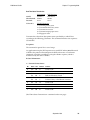
The printer requires qualified thermal paper with the following dimensions:
Width
Diameter
Length
80 mm + .2 mm - .6 mm
(3.15 + .008 in. - .024 in.)
90 mm max. (3.54 in.)
98 meters (322 ft.) 2.4 mil thick
73.5 meters (241 ft.) 3.2 mil thick
The paper must not be attached at the core. Use paper with a colored stripe at the end to
indicate that the paper is running low.
The above lengths are based on a core diameter of 22 ± .5 mm (.87 in.) outside,
11.5 ± .5 mm (.45 in.) inside.
Manufacturers
Axiohm recommends the following paper grades produced by the respective manufacturers.
There are a number of paper converters qualified to provide this paper, provided the POS rolls
are from these recommended grades.
Qualified Manufacturers
Appleton Papers, Inc. (USA)
825 E Wisconsin Ave.
Appleton, WI 54912
Phone
Paper Grade (Density)
Voice: 800-922-1729
Voice: 920-734-9841
Fax:
800-922-1712
Kanzaki Specialty Papers (USA)
20 Cummings St.
Ware, MA 01082-2002
Voice: 888-526-9254
Voice: 413-736-3216
Fax:
413-731-8864
Jujo Thermal LTD.
P.O. Box 92 FIN-27501
Kauttua, Finland
Voice: 358-38-393-2900
Fax:
358-38-393-2419
Optima T1030 (Light)
Optima T1012A (Standard)
Optima T1062A-16 (Standard)
Optima Superior (Standard)
P-300 (Light)
P-310 (Standard)
P-350 (Standard)
P-354 (Standard)
TO-260 (Standard)
TO-282 (Standard)
TO-381L (Standard)
AF50KS-E3 (Standard)
AP62KS-E3 (Standard)
Additional grades are qualified and available for special media requirements.
Axiohm can provide paper in small lots to facilitate product evaluation and testing.
To order paper rolls directly from Axiohm, use the following part numbers:
Standard Density
50 Rolls, 90mm dia.
Axiohm #A152-0034
Light Density
50 Rolls, 90mm dia.
Axiohm #A152-0035
September 1999
51
A758 Owner’s Guide
Chapter 4: Media and Supplies Guide
Ordering Parts and Supplies
Ordering Cash Drawers
Order cash drawers from the following suppliers:
Cash Drawers
Number
NCR
7052-K657
M-S Cash Drawer Corp.
EP-125 K series, EP-127, EP-102
APG Cash Drawer
Model 322
Indiana Cash Drawer
Model SLD
Ordering Power Supply Cord and Adapters
Contact your sales representative to order the power supply and power cords
listed in the table. The numbers are for Axiohm reference only. Suppliers may
use other numbers.
Item
Type
Number
Power supply (55 watt) with
attached cable to printer and U.S.
power supply cord
A758-K330
Power supply (75 watt) with
attached cable to printer and U.S.
power supply cord
A758-K331
Power supply (55 watt) attached
cable
A758-K301
Power supply (75 watt) attached
cable
A758-K302
Power supply cord (to outlet)
United States
International (no plug)
United Kingdom
S.E.V.
Australia
International (with plug)
A758-K320
A758-K321
A758-K322
A758-K323
A758-K324
A758-K326
6-pin female to 3-pin male power
adapter
A758-K303
3-pin female to 6-pin male power
adapter
A758-K304
Power supply mounting bracket
A758-K309
September 1999
52
A758 Owner’s Guide
Chapter 4: Media and Supplies Guide
Ordering Communication Cables
Contact your sales representative to order the communication cables listed in the
table. The numbers are for reference only. Suppliers may use other numbers.
Communication Cables
Length
Order Number
RS-232C 25-pin male (printer)
to 9 pin female (host)
(2 meters—6.6 ft.)
A141-0005
RS-232C 25-pin male (printer)
to 9 pin female (host)
(6 meters—19.7 ft.)
A141-0006
RS-232C 25-pin female (host)
to 9-pin female (printer)
(3 meters—9.8 ft.)
A141-0008
RS-232C 9-pin female (host)
to 9-pin female (host)
(3 meters—9.8 ft.)
A141-0007
IEEE-1284 Parallel 25-pin (male) to
25-pin (male)
(3 meters—9.8 ft.)
A141-0009
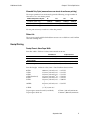
Forms Specifications
The A758 prints on single- or multiple-part forms in the slip station (up to fivepart forms). Forms and slips must meet the following requirements:
♦
Front insertion (minimum):
51 mm (2.00 inches) wide
68 mm (2.68 inches) long
♦
Side insertion (minimum):
203 mm (8.0 inches) wide
51 mm (2.0 inches) long
♦
Single-ply forms should be on paper that is greater than 15 pounds
♦
Multiple-part forms (up to five parts) should be no thicker than .40 mm
(.016 inches) and a minimum thickness of .08 mm (.003 inches).
Important: Do not use forms containing holes along the top or right edge.
♦
Forms for use with Flip Check (minimum)
51 mm (2.00 inches) wide
70 mm (2.75 inches) long
Check Specifications
Check specifications for paper are defined by American Standards ANSI X9.13
and ANSI X9.18, and International Standard ISO 1004.
♦
Minimum check size: 70 mm (2.75 in.) wide x 152 mm (6.00 in.) long
♦
Maximum check size: 95 mm (3.75 in.) wide x 222 mm (8.75 in.) long
September 1999
53
A758 Owner’s Guide
Chapter 4: Media and Supplies Guide
Ordering Ribbon Cassettes
To order ribbon cassettes, contact your sales representative or order from
Axiohm at the following address or toll free number:
Axiohm
950 Danby Road
Ithaca, NY 14850
Voice: 1 (607) 274-2424
(607) 274-2500 (Customer Services)
Stock Numbers:
A152-0004 (purple ribbon cassette—3 million character life) – Qty. 12
A152-0005 (black ribbon cassette—3 million character life) – Qty. 12
A152-0011 (purple long life ribbon cassette—5 million character life)
– Qty. 12
A152-0012 (black long life ribbon cassette—5 million character life) – Qty. 12
September 1999
54
A758 Owner’s Guide
Chapter 4: Media and Supplies Guide
Ordering Extended Slip Tables
Contact a sales representative to order slip tables. The numbers listed below are
for reference only. Suppliers may use other numbers.
Extended Slip Table (Standard)
A758-K280
Extended Slip Table (Short)
A758-K281
Ordering Documentation
Contact a sales representative to order the following documentation:
Item
A758 Owner’s Guide
A758 Service Guide
Field Service Video for A758 Printer
Number
A758-D100
A758-D200
A758-D400
September 1999
55
Chapter 5: Technical Specifications
♦ Functional Description
♦ Reliability
♦ Certifications
♦ Physical and Operating Environment
♦ Migration
♦ Performance Requirements
♦ Interface Description
♦ Dimensions and Weight
September 1999
56
A758 Owner’s Guide
Chapter 5: Techical Spcifications
Functional Description
Standard Slip Features
Print Technology
Bidirectional, logic-seeking, nine wire impact printhead
Printhead Features
Automatic homing and jam detection
Ink Means
3 or 5 million character life
Carriage mounted ribbon cassette
Print Resolution
Standard 139 DPI X 72 DPI
Compressed 171 DPI X 72 DPI
Character Cell
10 Half Dots x 7 Dots High
Print Line Width
Standard 66 characters @ 13.9 CPI
Compressed 80 characters @ 17.1 CPI
Enhanced Print
Double wide and rotated character
Double strike to improve contrast
Print Line Spacing
Standard 7.2 lines/inch
Print Line Rate
Full 40 columns at 290 LPM @ 13.9 CPI
Paper Feed
Bi-directional, 4.6 IPS, maximum
Forms Handling
Horizontal Slip Table
Retractable slip stop
Front/side insertion
Forms Capability
* See notes on the
following page.
Maximum thickness .40 mm (.016 inch) max., 5 plies
Minimum .08 mm (.003 inch)
Minimum Form Reflectivity 60%
Minimum Length: 68 mm (2.68 inches) w/o check flip option
70 mm (2.75 inches) with flip option
Minimum Width: 51 mm (2.00 inches)
[Ensures that forms cover both the optical slip detectors and
expose about one inch of the form to push in place.]
Forms Detection
Leading edge sensor at forms stop
Trailing edge sensor in right margin.
September 1999
57
A758 Owner’s Guide
Chapter 5: Techical Spcifications
Indicators
Green LED "Slip-in" light
Character Sets
PC Code Page 437
PC Code Page 850
PC Code Page 852
PC Code Page 858
PC Code Page 860
PC Code Page 863
PC Code Page 865
PC Code Page 866 resident
Additional Flash memory for user-defined characters
Graphics
139 DPI X 72 DPI bit-mapped, input as 7 and 8 dot high
unidirectional print lines.
Bar Code Fonts
UPC-A
UPC-E
JAN8
JAN13 (EAN)
Code 39
Interleaved 2 of 5
Codabar
Code 128
Code 93
Slip Forms - Recommendations
♦
The slip form should be flat and void of curls or wrinkles, especially at the
top.
1
2
Glued Portion
Paper Feed Direction
2
3
♦
Considerations for glued edges on slip paper:
1.
No glue on bottom edge.
2.
Right or top edge: Paper feeding and insertion affected by gluing method,
length of edge, and quality of glue used.
3.
Left edge or wide slip paper: Skewing may occur.
September 1999
58
A758 Owner’s Guide
Chapter 5: Techical Spcifications
MICR
Head
Slip
Sensor
Slip/LED
Sensor
Slip Side
Guide
19 mm
(0.747 in.)
8 mm
(0.315 in.)
6 mm
(0.236 in.)
Slip
Edge
Paper Feed
Direction
Paper Holes and
Low Reflection
Prohibited Areas
B
A
The Slip/LED Sensors use a reflective photo sensor.
♦
Do not use paper that has holes or is translucent at the Slip/LED Sensor
location. (See “A” in above illustration.)
♦
Do not use paper that has holes on dark areas with low reflection (less than
60% reflection) at the Slip Sensor location. (See “B” in above illustration.)
♦
Thin paper should be used between the top and bottom sheets of multi-ply
paper. Thick paper reduces the copy capability.
MICR Reader – Additional Information
♦
The check must be flat and void of curls, folds, or wrinkles (especially at the
edges). Wrinkled checks may rub against the ribbon causing them to become
ink-stained.
♦
Checks must be void of clips or staples. Paper jams, MICR read errors,
and/or MICR head damage could occur.
♦
Immediately release the check once the printer starts to feed it. Failure to
release the check could skew it, causing paper jams and MICR read errors.
September 1999
59
A758 Owner’s Guide
Chapter 5: Techical Spcifications
Standard Receipt Features
Print Technology
Direct thermal
640 dot printhead
Print Resolution
203 DPI horizontal and vertical
8 dots/mm
Character Cell
Standard 13 X 24
Compressed 10 X 24
Print Width
Standard 44 characters @ 15.6 CPI
Compressed 56 characters @ 20.3 CPI
Enhanced Print
Double Wide, Double High, Rotated, Underlined, Scalable,
Italic, Superscript, Subscript, Bold, and Reversed Image
characters
Print Line Spacing
7.52 lines/inch, standard
Print Line Rate
38.4 LPS for text at standard spacing. See Receipt Throughput
Paper Feed
Unidirectional, 130mm/second maximum. See Receipt
Throughput
Paper Sensing
Paper exhaust switch
Paper low switch (adjustable).
Operator Interface
Paper Feed Button on cabinet
September 1999
60
A758 Owner’s Guide
Chapter 5: Techical Spcifications
Character Sets
PC Code Page 437
PC Code Page 850
PC Code Page 852
PC Code Page 858
PC Code Page 860
PC Code Page 863
PC Code Page 865
PC Code Page 866 resident
Additional Flash memory for user-defined characters
Graphics
203 DPI X 203 DPI bit-mapped, input as 24 dot high print lines
Bar Code Fonts
UPC-A
UPC-E
JAN8
JAN13 (EAN)
Code 39
Interleaved 2 of 5
Codabar
Code 128
PDF-417 Two-dimensional Code
Code 93
September 1999
61
A758 Owner’s Guide
Chapter 5: Techical Spcifications
Optional Features
Paper Cutter
Rotary partial cut knife leaves 5.0 mm (0.2 inch) uncut on left
edge.
Slip Table Kits
Extends Slip Table 38 mm (1.5 inches) (shortened) or 76 mm
(3.0 inches) (standard) in front (standard on MICR and flip).
MICR Reader
Integrated into the slip station.
Reads MICR checks oriented for validation on the back of the
check, and communicates the character string to the host
computer.
Reads E13B and CMC7 MICR Fonts (Auto discriminates).
Check Flip
Error and fraud prevention feature.
Turns validated checks over for printing on the face of the
check.
Remote Power
Supply
55W standard
75W available
Auto-Ranging input
24Vdc output
Interface daughter
PCB’s
RS232, 9 pin connector
RS232, 25 pin connector
Parallel
September 1999
62
A758 Owner’s Guide
Chapter 5: Techical Spcifications
Reliability
The numbers in the table refer to the Mean Cycles Between Failure (MCBF) for
the items indicated.
Thermal Receipt Printer
45 Million Lines
Impact Slip Printer
15 Million Lines
Impact Printhead
200 Million Characters
Knife
1.5 Million Cuts
MICR Check Reader
200,000 Reads
Ribbon Cassette
3 or 5 Million Characters
Check Flip
200,000 Flips
September 1999
63
A758 Owner’s Guide
Chapter 5: Techical Spcifications
Certifications
EMI:
♦
FCC, Class A
♦
Industry Canada, Class A
♦
VCCI, Class A
♦
CE Mark, Class B
♦
Austel, Class B
Safety:
♦
UL 1950
♦
CSA 22.2 No. 950
♦
CE Mark (EN60950)
September 1999
64
A758 Owner’s Guide
Chapter 5: Techical Spcifications
Physical and Operating Environment
Temperature and Humidity
Temperature in Degrees
Operating: w/ Knife
Operating: w/o Knife
%Humidity
5C to 28C ( 41F to 82F)
10 to 90
28C to 45C ( 82F to 113F)
10 to 35
5C to 35C ( 41F to 95F)
5 to 90
35C to 50C ( 95F to 122F)
5 to 40
Storage:
-10C to 50C ( 14F to 122F)
5 to 90
Transit:
-40C to 60C (-40F to 140F)
5 to 95
Electrical
The A758 printer complies with the regulatory EMI standards and levels
indicated in the section on Certifications when tested as a stand-alone unit.
When connected to a host terminal or system, the A758 also complies with these
standards and levels, provided that the host terminal or system first complies
without the A758 printer connected.
September 1999
65
A758 Owner’s Guide
Chapter 5: Techical Spcifications
Slip Media
The A758 prints 1 to 5 part forms with the following limitations:
♦
The minimum thickness of a single part form is .08 mm (.003 inch).
♦
If present in a multi-part form, cardstock will be the bottom part.
♦
Maximum total thickness is .40 mm (.016 inch).
♦ Minimum form reflectivity is 60%
Minimum form length (feed direction) for forms inserted from the front up to the
slip stop is 68 mm (2.68 inches) w/o check flip option and 70 mm (2.75 inches)
w/Flip option. Minimum form width (print direction) is 51 mm (2.00 inches).
These minimums ensure the form covers both optical slip detectors, and expose
about one inch of the form to push in place.
The form must be at least 127 mm (5.00 inches) wide to print all 66 standard or 80
compressed columns. Large forms may be inserted from the left side and
override the slip stop. Forms over 170 mm (6.70 inches) wide will extended
outside the left side of the printer.
Receipt Media
♦
Direct thermal paper, with or without environmental coating.
♦
Paper thickness range:
51–86 µm (2.0–3.4 mil).
♦
Receipt roll width:
80 + .2 - .6 mm (3.150 + .008 - .024 inch).
♦
Receipt roll diameter:
90 mm (3.54 inch) maximum.
♦
Receipt roll capacity: *
98M (322 feet) of 61µm (2.4 mil) thick paper
73.5M (241 feet) of 81µm (3.2 mil) thick paper
♦
Roll construction:
Image side facing out.
♦
End-of-roll warning:
Stripe recommended, not required.
* Based on core diameter of:
22 ± .5 mm (.87 inch) outside,
11.5 ± .5 mm (.45 inch) inside.
September 1999
66
A758 Owner’s Guide
Chapter 5: Techical Spcifications
Migration
The A758’s standard command set allows it to work with software written for
Axiohm or other ESC/POS™ compliant printers.
The A758 supports two modes of operation: “A756 emulation” and “A758
native” modes. When the A758 is configured for A756 emulation mode through
the Configuration Menu, the printer is backward compatible to A756 slip and
receipt applications (no journal) except that receipt print resolution is increased
from 6 to 8 dots/mm. If the 6 to 8 dot/mm conversion feature is not used, this
will result in the size of graphics being reduced by 25%.
See Chapter 7: Programming Guide for a comparison to the A756.
September 1999
67
A758 Owner’s Guide
Chapter 5: Techical Spcifications
Performance Requirements
Slip Printing
Slip Positioning
Forms are inserted from the front, top-of-form first, up to a form stop behind the
carriage, or inserted from the left side and over-ride the form stop. In each case
the form must be aligned with the check guide (right edge of the slip path). A
pair of optical sensors are located (a) 11 mm (.45 inch) above the print centerline
and 25 mm (1.00 inch) from the check guide, and (b) just inside the check guide
and 37 mm (1.45 inches) below the print centerline. The application can use these
for form-in and trailing edge detection. A green slip-in LED indicates when both
detectors are covered.
The application moves the form bi-directionally in 1/72-inch increments to
position the first line of print.
Slip Format
Maximum print line width: 120.7 mm (4.752 inches) starting 3.20 mm ± 1.5 mm
(.125 inch ± .060 inch) from the right edge of the form.
Standard Font
Compressed Font
Character Cell
10 half dots x 7 dots
10 half dots x 7 dots
Character Size
7x7
7x7
Character Per Line
66 @ 13.9 CPI
80 @ 17.1 CPI
Graphics Capability
330 full dots
660 half dots
N/A
N/A
Print line height: 7 dots @ 1/72 inch + Extra Dot Rows:
0 EDR between lines:
1 EDR:
2 EDR:
3 EDR (standard):
4 EDR:
5 EDR:
N EDR:
2.47 mm (.097 inch) ±5%
2.82 mm (.111 inch) ±5%
3.18 mm (.125 inch) ±5%
3.53 mm (.139 inch) ±5%
3.88 mm (.153 inch) ±5%
4.23 mm (.167 inch) ±5%
(7+N)/72 in. ±5%
= 10.3 LPI
= 9.0 LPI
= 8.0 LPI
= 7.2 LPI
= 6.5 LPI
= 6.0 LPI
Minimum top margin (form against form stop):
16.0 mm (.63 inch)
Minimum top margin (after reverse feeding):
5.0 mm (.20 inch)
Minimum bottom margin:
15.0 mm (.59 inch)
September 1999
68
A758 Owner’s Guide
Chapter 5: Techical Spcifications
Slip Throughput
Bi-directional line speed is based on a printhead speed of 260 CPS. Throughput
(±5%) at the standard line spacing (7.2 LPI) depends on line length expressed in
characters:
Line Length
Character Density
Lines Per Minute
40 Chars.
13.9 CPI (standard)
290 LPM
52 Chars.
13.9 CPI (standard)
237 LPM
66 Chars.
13.9 CPI (standard)
195 LPM
80 Chars.
17.1 CPI (compressed)
166 LPM
Unidirectional (graphics) line speed, will be half the above throughput.
Minimum form width for full width print = 127 mm (5.00 in.)
Printable Zone, 330 Full Dots = 120.7 mm (4.752 in.)
Nominal Margins = 3.2 mm (0.125 in.)
Top Edge
Minimum with Slip Stop 16.0 mm (0.630 in.)
Minimum 15.0 mm (0.59 in.)
Trailing Edge
September 1999
69
A758 Owner’s Guide
Chapter 5: Techical Spcifications
Character Format
The A758 can place 66 standard characters, or 80 compressed characters, or 33
rotated characters, or 330 adjacent bits of graphics (660 addressable positions)
in the 121 mm (4.752 inch) wide print zone. Minimum line height is 7 dots
(.097 inch) for vertical print or graphics, and 6 dots (.083 inch) for rotated print.
E
A
C
1 3 5 7 9
D
EDR*
B
1 2 3 4 5 6 7 8 9 10
1
2
3
4
5
6
7
Double Wide
2 4 6 8 10
G
Next Line
E
C
* Extra Dot Rows
A
F
D
B
1
2
3
4
5
6
1 2 3 4 5 6 7 8 9 10
Rotated
Dimension
Standard
mm
inch
Compressed
mm
inch
Rotated
mm
inch
A
.36
.0144
.30
.0117
.36
.0144
B
.35
.0139
.35
.0139
.35
.0139
C
1.46
.0576
1.19
.0468
2.56
.1008
D
2.47
.0973
2.47
.0973
1.76
. 0695
E
1.83
.0720
1.48
.0585
3.66
.1440
F
N/A
N/A
N/A
N/A
2.11
.0834
G
.35
Max.
.014
Max.
.35
Max.
.014
Max.
.35
Max.
.014"
Max.
September 1999
70
A758 Owner’s Guide
Chapter 5: Techical Spcifications
Allowable Duty Cycle (measured over one minute of continuous printing)
The impact printhead can continuously print the following average number of
characters over a one minute period.
Ambient Temperature in degrees:
5C
20C
35C
50C
11.5 Dots/Char. avg.:
7200CH
6000CH
4800CH
3600CH
15.0 Dots/Char. avg.:
5700CH
4800CH
3900CH
3000CH
19.0 Dots/Char. avg.:
4200CH
3600CH
3000CH
2400CH
No one print wire may exceed 18% of the dots printed.
Ribbon Life
The snap-on purple and black ink ribbon cassettes are available in 3 and 5 million
character cartridge lives.
Receipt Printing
Receipt Format, 80mm Paper Width
Print line width: 576 dots @ 8 dots/mm centered on 80 mm.
Standard Font
Compressed Font
Character Cell
13 x 24 dots
10 x 24 dots
Character Per Line
44 @ 15.6 CPI
56 @ 20.3 CPI
Nominal Margins
4.25 mm (.167 inch)
5.00 mm (.200 inch)
Minimum Margins
2.00 mm (.079 inch)
2.50 mm (.098 inch)
Print line height: 24 dots @ 8 dots/mm + Extra Dot Rows between lines
0 EDR:
1 EDR:
2 EDR:
3 EDR (Standard):
4 EDR:
5 EDR:
10 EDR:
N EDR:
3.00 mm (.118 inch) ±3%
3.12 mm (.123 inch) ±3%
3.25 mm (.128 inch) ±3%
3.37 mm (.133 inch) ±3%
3.50 mm (.138 inch) ±3%
3.62 mm (.143 inch) ±3%
4.25 mm (.167 inch) ±3%
(3 + N/8) mm ±3%
=
=
=
=
=
=
8.47 LPI
8.13 LPI
7.81 LPI
7.52 LPI
7.25 LPI
7.00 LPI
= 5.98 LPI
Top margin to manual tearoff: (non-Knife)
9.75 mm (.384 inch) minimum.
Top margin to knife cut:
17.80 mm (.700 inch) minimum.
September 1999
71
A758 Owner’s Guide
Chapter 5: Techical Spcifications
Print Zone
Paper Width = 80 mm (3.15 in.)
Printable Zone, 576 Dots = 72 mm (2.835 in.)
Nominal Margins, 4 mm (0.157 in.)
Cut Edge
Cut Edge
Top Margin, 17.8 mm (.70 in.) Minimum
44 Standard Columns = 71.5 mm (2.815 in.)
56 Compressed Columns = 70 mm (2.756 in.)
The application centers 44 standard character cells (13 X 24 dots), or 56
compressed character cells (10 X 24 dots), or 576 addressable bits of graphics
across an 80 mm wide receipt. Minimum print line height is 24 dots for text or
graphics. Standard print line spacing is 27 dots (i.e. 3 extra dot rows).
When printing graphics or logos, converted from 6 dot/mm to 8 dot/mm (i.e.
designed for A756), the printable zone is expanded to 598 dots.
September 1999
72
A758 Owner’s Guide
Chapter 5: Techical Spcifications
Character Pattern for Standard 15.6 CPI Pitch
11 Dots
1.368 mm
0.054 in.
Character
Cell
Character
13 Dots
1.625 mm
0.064 in.
19 Dots
2.388 mm
0.094 in.
24 Dots
3.00 mm
0.118 in.
B - Upper Case
m - Lower Case
g - With Descender
Ö - With Ascender
$ - Both Ascender and Decsender
# - Graphic Symbol
Character Pattern for Compressed 20.3 CPI Pitch
8 Dots
.995 mm
.039 in.
Character
Character
Cell
10 Dots
1.244 mm
.049 in.
19 Dots
2.388 mm
.094 in.
24 Dots
3.00 mm
.118 in.
B - Upper Case
m - Lower Case
g - With Descender
Ö - With Ascender
$ - Both Ascender and Decsender
# - Graphic Symbol
September 1999
73
A758 Owner’s Guide
Chapter 5: Techical Spcifications
Receipt Throughput:
Maximum throughput is achieved at any dot coverage up to 25%, which includes
any amount of text. But above that, throughput is dependent on the dot coverage
and available electrical power.
25% Dot
Coverage (Max
Speed)
50% Dot
Coverage and
75 W
50% Dot
Coverage and
55 W
100% Dot
Coverage and
75 W
100% Dot
Coverage and
55 W
Dot line
period:
0.95 ms
0.95 ms
1.33 ms
2.05 ms
3.3 ms
Paper Speed:
130 mm/sec
130 mm/sec
94 mm/sec
61 mm/sec
38 mm/sec
5.1 IPS
5.1 IPS
3.7 IPS
2.4 IPS
1.5 IPS
Throughput
@ 8.13 LPI:
41.5 LPS
41.5 LPS
30.1 LPS
19.5 LPS
12.2 LPS
Throughput
@ 7.52 LPI:
38.4 LPS
38.4 LPS
27.8 LPS
18.0 LPS
11.3 LPS
Throughput
@ 5.98 LPI:
30.5 LPS
30.5 LPS
22.1 LPS
14.4 LPS
9.0 LPS
Note: Standard receipt has approximately 12% dot coverage.
A full line of text is approximately 25% dot coverage.
Graphics are approximately 40% dot coverage.
Barcodes have approximately 50% dot coverage.
A solid black line is 100% dot coverage.
In order for an application to achieve the fastest throughput it must ensure that
data arrives at the printer at least as fast as it is printed, so the printer will be able
to print each line after the preceding line, without stopping to wait for more data.
Ideally, an application will send all the data for an entire customer receipt
without pausing between characters or lines transmitted.
Allowable Duty Cycle (measured over one minute of continuous printing)
Amount of Dot Coverage
25°°C
Ambient Temperature
35°°C
50°°C
20%
100%
50%
20%
40%
50%
25%
10%
100%
20%
10%
4%
Partial Cut Knife
The "partial cut" produces a partial cut that leaves 5.0 ± 1.5 mm
(.20 ± .06 inch) paper remaining on the left edge.
September 1999
74
A758 Owner’s Guide
Chapter 5: Techical Spcifications
Receipt Paper Low:
The paper low assembly lights the On Line, Paper Status, Error LED when the
roll is almost exhausted. When the roller ball on the assembly slips into the
hollow core of the paper roll, a microswitch opens and paper low is indicated.
The customer can adjust the paper low assembly:
Paper Low Setting
Amount of POS Paper Left
Factory setting
15 ± 10 feet*
Turn screw 1 revolution
clockwise
Decrease amount left by 5 feet.
Turn screw 1 revolution
CCW
Increase amount left by 5 feet.
Turn screw all the way
down CW
Paper low is disabled.
* The above lengths are based on a core diameter of 22 ± 0.5 mm (0.87 inch)
outside, 11.5 ± 0.5 mm (0.45 inch) inside.
September 1999
75
A758 Owner’s Guide
Chapter 5: Techical Spcifications
Interface Description
Human Interfaces
♦
Receipt Paper-loading Door, on top of the cabinet. The receipt station will
not print when this door is open. See “Loading Receipt Paper”.
♦
Ribbon Cassette-loading Door, in front of the cabinet. The slip station will
not print when this door is open. See “Putting in the Ribbon Cassette”.
♦
Paper Feed Button, on top of the cabinet.
♦
Manual Reset Button, accessed by opening the front door of the printer.
♦
4 position DIP switch, mounted on the Controller PC board, accessed
through the rear connector backplate. See the Programmer’s Guide for
communication and diagnostic settings.
♦
Green Slip-in LED light, adjacent to the right edge of the slip path.
♦
Application controlled audible tone.
♦
On Line, Paper Status, Error LED.
September 1999
76
A758 Owner’s Guide
Chapter 5: Techical Spcifications
Receipt
Cover
Receipt
Front
Cover
Slip or
Check
Paper Feed
Button
On-Line,
Paper Status,
Error LED
(Green)
Extended
Slip Table
Slip In
LED (Green)
Front of
Printer
Reset
Button
Front Cover
Switch 1 is shown
in the ON position
On
Off
4 3 2 1
DIP Switch
DIP Switch
Back of Printer
Location of Human and Electrical Interfaces
September 1999
77
A758 Owner’s Guide
Chapter 5: Techical Spcifications
Power Requirements
The A758 draws 24VDC ±10% power from its standard 55W, or optional 75W,
remote supply. The A758 printer can accept 24VDC ±10% power from a host
terminal. To meet NEC Class 2 safety requirements, the host terminal must
provide a time delay fuse on the 24V input.
Print Station
Maximum Current
55 Watt Source
75 Watt Source
Slip station:
6.0A Peak
1
15 Dots/Char. Avg.
6.0A Peak
2.0A Average
2
Solid Graphics
2.7A Average
Receipt Station
6.0A Peak
25% Dot Coverage
3
50% Dot Coverage
3
9.0A Peak
2.3A Average
3.1A Average
Note 1. At rated speed of 260 CPS.
Note 2. Unidirectional printing.
Note 3. At rated speed of 130mm/second.
Electrical Interfaces
The A758 RS232 is equipped with a 9 Pin or 25 Pin male D-shell connector, which
will accept an RS-232 cable with a mating female D-shell.
The Parallel A758 is equipped with a 25-pin male D-shell connector. A one to one
shielded cable with all 25 lines present may be used to connect the printer to a
PC.
The A758 is equipped with a 3 Pin female Mini-DIN plug, which mates with the
integral shielded cable on the power supply. The power supply may be plugged
into either a 110 or 240 VAC outlet with a grounded AC cord.
The A758 RS232 has a cash drawer driver, which use a 6-contact Modular Jack
(RJ11). Up to two drawers can be driven; both from one jack with common
status.
♦
Voltage:
24V ±10%
♦
Maximum current:
2.0 Amps
♦
Pulse width:
50 to 310 msec, programmable
September 1999
78
A758 Owner’s Guide
Chapter 5: Techical Spcifications
Switch Settings
These are out-of-service tests or printer settings invoked via the 4 position DIP
switch in the back of the printer. Level 1 diagnostics is entered (or exited) by
turning switch 1 ON (or off) and resetting or power cycling the printer.
Switch Setting
Paper Feed Button
Printer Function
Switch 1 OFF
Not actuated
during reset
Printer ready for normal operation.
Actuated during
reset
Printer configuration message.
Not actuated
during reset
Enter download mode to program
Flash.
Actuated during
reset
Enter level 1 diagnostics scrolling
menu.
Switch 1 ON
Switches 2, 3
and 4
Not Used
Character Sets
These character sets are available for printing:
♦
Code Page 437 (US)
♦
Code Page 850 (Multilingual)
♦
Code Page 852 (Slavic)
♦
Code Page 858 (with Eurosymbol)
♦
Code Page 860 (Portuguese)
♦
Code Page 863 (French Canadian)
♦
Code Page 865 (Nordic)
♦
Code Page 866 (Cyrillic)
September 1999
79
A758 Owner’s Guide
Chapter 5: Techical Spcifications
Code Page 437
September 1999
80
A758 Owner’s Guide
Chapter 5: Techical Spcifications
Code Page 850
September 1999
81
A758 Owner’s Guide
Chapter 5: Techical Spcifications
Code Page 852
September 1999
82
A758 Owner’s Guide
Chapter 5: Techical Spcifications
Code Page 858
September 1999
83
A758 Owner’s Guide
Chapter 5: Techical Spcifications
Code Page 860
September 1999
84
A758 Owner’s Guide
Chapter 5: Techical Spcifications
Code Page 863
September 1999
85
A758 Owner’s Guide
Chapter 5: Techical Spcifications
Code Page 865
September 1999
86
A758 Owner’s Guide
Chapter 5: Techical Spcifications
Code Page 866
September 1999
87
A758 Owner’s Guide
Chapter 5: Techical Spcifications
Dimensions and Weight
Receipt
Cover
280 mm
(11.0 in.)
Extended
Slip Table
178 mm
(7.0 in.)
229 mm (9.0 in.)
264 mm (10.4 in.)
347 mm (13.7 in.)
Height
178 mm (7.0 inches)
Height with Cover Open
280 mm (11.0 inches)
Width
229 mm (9.0 inches)
Depth
264 mm (10.4 inches)
Depth with Extended Slip Table
347 mm (13.7 inches)
Weight
4.3 kg (9.4 lbs.), Non-MICR
4.4 kg (9.6 lbs.), MICR and
Extended Slip Table
4.9 kg (10.8 lbs.), MICR and
Check Flip
September 1999
88
Chapter 6: Communication Interface
♦ Communication Overview
♦ RS-232C Interface
♦ Parallel Interface
September 1999
89
A758 Owner’s Guide
Chapter 6: Communiction Interface
Communication Overview
In order for the printer to communicate with the host, a communication link must
be set up. The A758 printer supports either the RS-232C or the IEEE 1284 parallel
communication interfaces. Other communication interfaces may be available as
options.
The RS-232C interface has a protocol associated with it that the host must
understand and adhere to. Only when the interface parameters match and the
proper protocol is used will the host and the printer be able to communicate.
Once the communication link is established, commands can be sent to the printer.
This section describes how to send commands to the printer using DOS and
BASIC. This section does not take into account the necessary protocol, but is
meant as a general introduction to how the printer functions.
Using DOS to Send Commands
One way of getting commands to the printer is to send them directly from DOS.
For example, assuming that the printer and computer are set to the same
communications parameters, the command:
COPY CON: COM1:
sets the computer up such that the hexadecimal code corresponding to any key
that was pressed would be sent to the communication port COM1 when the
COPY mode is exited. If the printer is connected to COM1, then the data will go
to the printer.
Exit the COPY mode by typing:
CTRL Z
and then pressing the ENTER key. Once the computer knows to direct data from
print commands to the proper port, commands can be sent from any software
program.
Using BASIC to Send Commands
In BASIC, printer commands are sent as a string of characters preceded by the
LPRINT command. For example:
LPRINT CHR$(&H0A)
sends the hexadecimal number 0A to the printer, which causes the printer to
print the contents of its print buffer. Commands sent prior to 0A tell the printer
exactly how data should appear on the paper. For example:
LPRINT CHR$(&H12); "ABC"; CHR$(&H0A)
sends the hexadecimal numbers 12 41 42 43 0A to the printer. This causes the
printer to set itself to double wide mode (12), load the print buffer with “ABC”
(41 42 43), and finally, print (0A). Again, the communication link that the BASIC
program configures to must be matched to that of the printer.
September 1999
90
A758 Owner’s Guide
Chapter 6: Communiction Interface
RS-232C Interface
The RS-232C interface uses either the XON/XOFF (software) or DTR/DSR
(hardware) protocol to control the flow of information between the computer and
the printer. For XON/XOFF, a particular character is sent back and forth between
the host and the printer to regulate the communication. For DTR/DSR, changes
in the DTR/DSR signal on the RS 232 interface coordinate the information flow.
The RS-232C interface offers standard settings that are selected with the
Configuration Menu. Use of the Configuration Menu is described in
“Configuring the Printer” in this manual.
Print Speed and Timing
The fast speed of the printer requires the application to send data to the printer at
least as fast as it is printed. The application must also allow output lines to be
buffered ahead at the printer, so the printer will be able to print each line
immediately after the preceding line, without stopping to wait for more data.
Ideally, the application will send all the data for an entire receipt or slip without
pausing between characters or lines transmitted.
If the application sends data at 9600 baud and pauses between lines for as short a
time as 50 milliseconds, the printer will never be able to print at full speed.
However, if the application sends data at 19.2 K baud and does not pause
between lines, the printer will be able to print at its full speed of 2400
lines/minute. The table below shows that with a pause of 50 milliseconds after
each line, the transmit time equals or exceeds the printer process time, slowing
down the printer, regardless of the baud rate.
50ms Pause after Each Line
Characters/Line
Lines/Receipt
Transmit Time
(19.2 K Baud)
Process Time*
20
20
1.2 Seconds
0.5 Seconds
20
40
2.4 Seconds
1.0 Seconds
44
20
1.44 Seconds
0.5 Seconds
44
40
2.88 Seconds
1.0 Seconds
* Process Time is the time it would take the printer to process the data if all
transmitted data was present. (It is not the time it takes to print the receipt.)
Example: 20 characters/line, with 20 lines = 0.5 seconds process time for the
printer. It takes 1.2 seconds to send the data to the printer at 19.2K-baud speed
with a 50ms delay after each line. Thus the printer would have to wait 0.7
seconds longer to receive the data than it could process it if no delays existed and
the transmission speed were faster.
September 1999
91
A758 Owner’s Guide
Chapter 6: Communiction Interface
The next table shows that with no delay between lines, the transmit time is much
less than the process time, allowing the printer to print at full speed.
No Delay after Each Line
Characters/Line
Lines/Receipt
Transmit Time
(19.2 K Baud)
Process Time*
20
20
0.2 Seconds
0.5 Seconds
20
40
0.4 Seconds
1.0 Seconds
44
20
0.44 Seconds
0.5 Seconds
44
40
0.88 Seconds
1.0 Seconds
RS-232 Communications
The A758 offers an industry standard RS-232 serial point-to-point interface, with
options available to the user.
Options that may be set through the Configuration Menu are:
♦
The baud rate of 115200, 57600, 38400, 19200, 9600, 4800, 2400, or 1200 baud
♦
The number of data bits to seven or eight
♦
The number of stop bits to one or two
♦
Enable or disable parity
♦
The flow control to software (XON/XOFF) or Hardware (DTR/DSR)
♦
Set the printer to ignore data errors or print a “?” upon encountering an error
RS-232 Interface Timing
Receiving data, DTR/DSR or XON/XOFF selected:
[DTR MARK]
- Between power on and ready to accept data.
- In an error state.
- Remaining space in the 4K buffer falls below 256 bytes. *
[DTR SPACE]
- When ready to accept data.
- Remaining space in the 4K buffer rises above 512 bytes. **
[XON sent]
- When ready to accept data after power on.
- Remaining space in the 4K buffer rises above 512 bytes. **
[XOFF sent]
- In an error state.
- Remaining space in the 4K buffer falls below 256 bytes*
* - 10 bytes in line mode.
** - 20 bytes in line mode.
Sending data (status):
In DTR/DSR mode, data is sent only when DSR is SPACE.
In XON/XOFF mode, DSR state is ignored.
September 1999
92
A758 Owner’s Guide
Chapter 6: Communiction Interface
XON/XOFF Protocol
The XON/XOFF characters coordinate the information transfer between the
printer and the host computer. The printer sends an XON character when it is
ready to receive data and it sends an XOFF character when it cannot accept any
more data. The software on the host computer must monitor the communication
link as shown in the following flowchart in order to send data at the appropriate
times.
If XON/XOFF has been selected, the printer also toggles the DTR signal, as
described in the next section, but it does not look at the DSR signal to transmit
data.
Host Flow Control Diagram
XON character = hexadecimal 11.
XOFF character = hexadecimal 13.
DTR/DSR Protocol
The DTR signal is used to control data transmission to and from the printer. It is
driven low when the printer is ready to receive data and driven high when it
cannot accept any more data. Data is transmitted from the printer after it
confirms that the DSR signal is low.
September 1999
93
A758 Owner’s Guide
Chapter 6: Communiction Interface
Connector Pin-outs
This section describes the pin settings for the connectors on the back of the
printer.
Communication Connectors
The following illustrations show the RS-232C communication connectors and pin
assignments. The connectors are located at the rear of the printer, and are
specified as: male DB9, 9-pin or female DB-25, 25 pin D-shell, with RTS and CTS
pins connected.
9-pin DB-9 Connector
1 Not Used
DSR 6
2 RXD
RTS 7
3 TXD
CTS 8
4 DTR
Not Used 9
5 Logic Ground
Shell-Frame Ground
25-pin DB-25 Connector
Pin Numbers
Function
Function
Frame Ground & Shield 1
Transmit Data 2
Receive Data
3
RTS
4
CTS
5
DSR
6
Logic Ground
7
Not Used 8
Not Used
9
Not Used 10
Not Used 11
Not Used 12
Not Used 13
14 Not Used
15 Not Used
16 Not Used
17 Not Used
18 Not Used
19 Not Used
20 DTR
21 Not Used
22 Not Used
23 Not Used
24 Not Used
25 Not Used
September 1999
94
A758 Owner’s Guide
Chapter 6: Communiction Interface
Power Connector
With RS-232C, the printer is always remotely powered. The following illustration
shows the power cable connector and pin assignments. The power cable
connector is a 3-pin mini DIN plug and is located at the rear of the printer.
Function Pin Numbers Function
+24 Volt 2
3 Not Used
1 Ground
Shell - Shield
Cash Drawer Connector
A 6-contact modular jack (RJ11) is available to drive a cash drawer with
dedicated feedback, or up to two cash drawers without feedback. The following
illustration shows the pinouts for the cash drawer connector.
Pin 1
Pin 6
The following table shows the pinouts for the cash drawer. The connector can
support two cash drawers with a Y cable, and is located at the rear of the printer.
Pin Number
Cash Drawer Connector
1
Frame Ground
2
Drawer 1 Solenoid
3
Drawer 1 Status Switch
4
+24 Volts (to Solenoid +)
5
Drawer 2 Solenoid
6
Ground (Status Switch Return)
The maximum current supplied is 2.0 Amps, and the pulse width is
programmable from 50 to 300 milliseconds.
September 1999
95
A758 Owner’s Guide
Chapter 6: Communiction Interface
Parallel Interface
The A758 supports IEEE 1284 bi-directional parallel communications in
compatibility mode, nibble mode, and byte mode (user selectable via Level 1
diagnostics set up mode). The full name is IEEE Standard Signaling Method for a
Bi-directional Parallel Peripheral Interface for Personal Computers, IEEE Std.
1284-1994.
The Parallel A758 is equipped with a 25 Pin female D-shell connector. This
connector has the same pin-out as the industry standard PC parallel connector.
A one-to-one shielded cable with all 25 lines present may be used to connect the
printer to a PC.
Pin Numbers
Function
Function
STROBE/ 1
14 AUTOFD/ (Auto Paper Feed)
D0 (Data) 2
D1 (Data)
3
D2 (Data)
4
D3 (Data)
5
D4 (Data)
6
D5 (Data)
7
15 FAULT/ (Printer Error)
16 INIT/ (Initialize the Printer)
17 SELECTIN/ (Select Printer)
18
Ground
19 Ground
20 Ground
D6 (Data) 8
D7 (Data)
21 Ground
22 Ground
9
ACK/ (Printer Accepted Data) 10
23 Ground
BUSY (Printer Busy) 11
24 Ground
PAP_EX (Paper Exhaust) 12
25 Ground
SELECT (Printer Selected) 13
Parallel 25-Pin D-Shell
Pin 1
Strobe/
Pin 14
Auto FD
Pin 2
D0
Pin 15
Fault/
Pin 3
D1
Pin 16
Reset in/
Pin 4
D2
Pin 17
Select IN
Pin 5
D3
Pin 18
Ground
Pin 6
D4
Pin 19
Ground
Pin 7
D5
Pin 20
Ground
Pin 8
D6
Pin 21
Ground
Pin 9
D7
Pin 22
Ground
Pin 10
ACK/
Pin 23
Ground
Pin 11
Busy
Pin 24
Ground
Pin 12
Paper Exhaust
Pin 25
Ground
Pin 13
Select Out
Shell
Frame Ground
September 1999
96
Chapter 7: Programming Guide
♦ Command Conventions
♦ List of Commands and Location
By Command Code
By Function
♦ Comparison to A756
New Features
Comparison Chart
♦ Command Descriptions
Printer Function Commands
Vertical Positioning and Print Commands
Horizontal Positioning Commands
Print Characteristic Commands
Graphics Commands
Status Commands
Batch Mode
Real Time
Auto Status Back
Bar Code Commands
Page Mode Commands
Macro Commands
MICR Commands
MICR Reading
MICR Parsing
Check Flip Command
User Data Storage Commands
Flash Download Commands
September 1999
97
A758 Owner’s Guide
Chapter 7: Programming Guide
Command Conventions
The following information describes how each command is organized:
Name:
Name of command.
ASCII:
The ASCII control code.
Hexadecimal:
The Hexadecimal control code.
Decimal:
The Decimal control code.
Value:
A description of the command operands.
Range:
The upper and lower limits of the command operand.
Default:
The command operand default after printer reset.
Description:
Brief description and summary of the command.
Formulas:
Any formulas used for this command.
Exceptions:
Describes any exceptions to this command, i.e.:
incompatible commands.
Related Information:
Describes related information for this command, i.e.:
bit information.
September 1999
98
A758 Owner’s Guide
Chapter 7: Programming Guide
List of Commands and Location
Commands control all operations and functions of the printer. This includes
selecting the size and placement of characters and graphics on the receipt or the
slip and feeding and cutting the paper. Any of the commands may be used in any
combination to program a host computer to communicate with the printer
(unless otherwise noted).
Some commands listed and described here may not be implemented. They will
be identified as “not implemented”. If received, they are ignored and not sent to
the print buffer as data. Any non-legal commands are sent to the print buffer as
data.
By Command Code
All items in BOLD are new or have additional functionality when compared to
the A756.
Code (Hexadecimal)
Command
Page
09 (HT)
Horizontal Tab
127
0A (LF)
Print and Feed Paper One Line
121
0C (FF)
Print and Return to Standard Mode
179
0C (FF)
Print and Eject Slip
121
0D (CR)
Print and Carriage Return
121
10
Clear Printer
112
10 04 n
Real Time Status Transmission (DLE Sequence)
166
10 05 n
Real Time Request to Printer (GS Sequence)
169
11
Close Form
113
12
Select Double-Wide Characters
134
13
Select Single-Wide Characters
134
14 n
Feed n Print Lines
122
15 n
Feed n Dot Rows
122
16 n
Add n Extra Dot Rows
123
17
Print
123
18
Open Form
113
18
Cancel Print Data in Page Mode
179
19
Perform Full Knife Cut
113
1A
Perform Partial Knife Cut
114
1B (+ *.bmp)
Download BMP Logo
146
1B 07
Generate Tone
114
1B 0C
Print Data in Page Mode
180
1B 12
Select 90 Degree Counter-Clockwise Rotated
Print
134
1B 14 n
Set Column
127
1B 16 n
Select Pitch (Column Width)
135
1B 20 n
Set Character Right-Side Spacing
135
1B 21 n
Select Print Modes
136
1B 24 n1 n2
Set Absolute Starting Position
128
September 1999
99
A758 Owner’s Guide
Chapter 7: Programming Guide
Code (Hexadecimal)
Command
Page
1B 25 n
Select or Cancel User-Defined Character Set
137
1B 26 3 c1 c2…dn
Define User-Defined Characters
137
1B 27 m a0 a1 a2
d1 … dm
Write to User Data Storage
198
1B 2A m n1 n2
Select Bit Image Mode
146
1B 2D n
Select or Cancel Underline Mode
139
1B 32
Set Line Spacing to 1/6 Inch
124
1B 33 n
Set Line Spacing
124
d1 … dn
1B 34 m a0 a1 a2
Read from User Data Storage
198
1B 3A 30 30 30
Copy Character Set from ROM to RAM
139
1B 3C
Return Home
114
1B 3D n
Select Peripheral Device (For Multi-Drop)
114
1B 3F n
Cancel User-defined Characters
139
1B 40
Initialize Printer
115
1B 43 n
Set Slip Paper Eject Length
115
1B 44 [n] k 00
Set Horizontal Tabs
129
1B 45 n
Select or Cancel Emphasized Mode
140
1B 47
Select Double Strike (A756 Emulation)
140
1B 48
Cancel Double Strike
141
1B 49 n
Set or Cancel Italic Print
141
1B 4A n
Print and Feed Paper
124
1B 4B n
Print and Reverse Feed Paper
125
1B 4C
Select Page Mode
180
1B 4C n1 n2 d1…dn
Select Double Density Graphics
(A756 Emulation)
149
1B 52 n
Select International Character Set
141
1B 53
Select Standard Mode
181
1B 54 n
Select Print Direction in Page Mode
182
1B 55 n
Select or Cancel Unidirectional Printing Mode
142
1B 56 n
Select or Cancel 90 Degrees Clockwise Rotated
142
1B 57 n1, n2,…n8
Set Printing Area in Page Mode
183
1B 59 n1 n2 d1…dn
Select Double Density Graphics
149
1B 5B 7D
Switch to Flash Download Mode
202
1B 5C n1 n2
Set Relative Print Position
129
1B 61 n
Select Justification
131
1B 63 30 n
Select Receipt or Slip for Printing; Slip for MICR
Read
115
1B 63 31 n
Select Receipt or Slip for Setting Line Spacing
116
1B 63 33 n
Select Paper Sensors to Output Paper End
Signals (Parallel Only)
116
1B 63 34 n
Select Sensors to Stop Printing
117
1B 63 35 n
Enable or Disable Panel Buttons
117
September 1999
100
A758 Owner’s Guide
Chapter 7: Programming Guide
Code (Hexadecimal)
Command
Page
1B 63 36 n
Enable or Disable Online Switch
117
1B 64 n
Print and Feed n Lines
125
1B 65 n
Print and Reverse Feed n Lines
125
1B 66 m n
Set Slip Paper Waiting Time
118
1B 69
Perform Full Knife Cut
113
1B 6A k
Read from Non-Volatile Memory
198
1B 6D
Perform Partial Cut
114
1B 70 n p1 p2
Generate Pulse to Open Cash Drawer
118
1B 73 n1 n2 k
Write to Non-Volatile Memory (NVRAM)
198
1B 74 n
Select International Character Set
141
1B 75 0
Transmit Peripheral Device Status
155
1B 75 n
Request Alternate Status
155
1B 76
Transmit Paper Sensor Status
156
1B 77 01
Read MICR Data and Transmit
188
1B 77 46
Check Flip
197
1B 77 50
Define Parsing Format, Save in NVRAM
188
1B 77 52
Reread MICR Data
188
1B 77 70
Define Parsing Format, Do Not Save
Permanently
189
1B 7A n
Select or Cancel Parallel Printing Mode on R&J
118
1B 7B n
Select or Cancel Upside Down Printing Mode
142
1C
Select Slip Station
119
1D 00
Request Printer ID
202
1D 01
Return Segment Number Status of Flash
Memory
203
1D 02 n
Select Flash Memory Sector to Download
203
1D 03 n
Real Time Request to Printer (DLE Sequence)
169
1D 04 n
Real Time Status Transmission (GS Sequence)
166
1D 05
Real Time Printer Status Transmission
170
1D 06
Get Firmware CRC
203
1D 07
Return Microprocessor CRC
204
1D 0E
Erase the Flash Memory
204
1D 0F
Return Main Program Flash CRC
204
1D 10 n
Erase Selected Flash Sector
204
1D 11 al ah cl ch
d1…dn
Download to Active Flash Sector
205
1D 14 n
Reverse Feed n Lines
125
1D 15 n
Reverse Feed n Dots
126
1D 21 n
Select Character Size
143
1D 22 n
Select Memory Type (SRAM/Flash) Where to
Save Logos or User-Defined Fonts
199
1D 22 55 n1 n2
Flash Allocation
200
September 1999
101
A758 Owner’s Guide
Chapter 7: Programming Guide
Code (Hexadecimal)
Command
Page
1D 23 n
Select the Current Logo (Downloaded Bit
Image)
149
1D 24 nL nH
Set Absolute Vertical Print Position in Page
Mode
184
1D 2A n1 n2
d1…dn]
Define Downloaded Bit Image
150
1D 2F m
Print Downloaded Bit Image
152
1D 3A
Start or End Macro Definition
186
1D 40 n
Erase User Flash Sector
201
1D 42 n
Select or Cancel White/Black Reverse Print
Mode
144
1D 48 n
Select Printing Position for HRI Characters
175
1D 49 n
Transmit Printer ID
157
1D 49 40 n
Transmit Printer ID, Remote Diagnostics
Extension
158
1D 4C nL nH
Set Left Margin
132
1D 50 x y
Set Horizontal and Vertical Minimum Motion
Units
126
1D 56 m
Select Cut Mode and Cut Paper
119
1D 56 m n
Select Cut Mode and Cut Paper
119
1D 57 nL nH
Set Printing Area Width
133
1D 5C nL nH
Set Relative Vertical Print Position in Page
Mode
185
1D 5E r t m
Execute Macro
187
1D 61 n
Select or Cancel Automatic Status Back
171
1D 66 n
Select Pitch for HRI Characters
175
1D 68 n
Select Bar Code Height
175
1D 6B m d1…
Print Bar Code
176
1D 6B m n d1…dn
Print Bar Code
176
1D 72 n
Transmit Status
161
1D 77 n
Select Bar Code Width
178
1D FF
Reboot Printer
205
1E
Select Receipt Station
120
1F 04 n
Convert 6 Dots/mm Bitmap to 8 Dots/mm
Bitmap
153
1F 05 n
Select Superscript or Subscript Modes
145
1F 74
Print Test Form
120
September 1999
102
A758 Owner’s Guide
Chapter 7: Programming Guide
By Function
All items in BOLD are new or have additional functionality when compared to
the A756.
Printer Function Commands
Code (Hexadecimal
Command
Page
10
Clear Printer
112
11
Close Form
113
18
Open Form
113
19
Perform Full Knife Cut
113
1A
Perform Partial Knife Cut
114
1B 07
Generate Tone
114
1B 3C
Return Home
114
1B 3D
Select Peripheral Device (for Multi-Drop)
114
1B 40
Initialize Printer
115
1B 43 n
Set Slip Paper Eject Length
115
1B 63 30 n
Select Receipt or Slip for Printing; Slip for MICR
Read
115
1B 63 31 n
Select Receipt or Slip for Setting Line Spacing
116
1B 63 33 n
Select Paper Sensors to Output Paper End
Signals (Parallel Only)
116
1B 63 34 n
Select Sensors to Stop Printing
117
1B 63 35 n
Enable or Disable Panel Buttons
117
1B 63 36 n
Enable or Disable Online Switch
117
1B 66 m n
Set Slip Paper Waiting Time
118
1B 69
Perform Full Knife Cut
113
1B 6D
Perform Partial Knife Cut
114
1B 70 n p1 p2
Generate Pulse to Open Cash Drawer
118
1B 7A n
Select or Cancel Parallel Printing Mode on R&J
118
1C
Select Slip Station
119
1D 56 m
Select Cut Mode and Cut Paper
119
1D 56 m n
Select Cut Mode and Cut Paper
119
1E
Select Receipt Station
120
1F 74
Print Test Form
120
September 1999
103
A758 Owner’s Guide
Chapter 7: Programming Guide
Vertical Positioning and Print Commands
Code (Hexadecimal
Command
Page
0A
Print and Feed Paper One Line
121
0C
Print and Return to Standard Mode/Print and
Eject Slip
121
0D
Print and Carriage Return
121
14 n
Feed n Print Lines
122
15 n
Feed n Dot Rows
122
16 n
Add n Extra Dot Rows
123
17
Print
123
1B 32
Set Line Spacing to 1/6 Inch
124
1B 33 n
Set Line Spacing
124
1B 4A n
Print and Feed Paper
124
1B 4B n
Print and Reverse Feed Paper
125
1B 64 n
Print and Feed n Lines
125
1B 65 n
Print and Reverse Feed n Lines
125
1D 14 n
Reverse Feed n Lines
125
1D 15 n
Reverse Feed n Dots
126
1D 50 x y
Set Horizontal and Vertical Minimum Motion
Units
126
Horizontal Positioning Commands
Code (Hexadecimal
Command
Page
09
Horizontal Tab
127
1B 14 n
Set Column
127
1B 24 n1 n2
Set Absolute Starting Position
128
1B 44 [n] k 00
Set Horizontal Tabs
129
1B 5C n1 n2
Set Relative Print Position
129
1B 61 n
Select Justification
131
1D 4C nL nH
Set Left Margin
132
1D 57 nL nH
Set Printing Area Width
133
September 1999
104
A758 Owner’s Guide
Chapter 7: Programming Guide
Print Characteristic Commands
Code (Hexadecimal
Command
Page
12
Select Double-Wide Characters
134
13
Select Single-Wide Characters
134
1B 12
Select 90 Degree Counter-Clockwise Rotated
Print
134
1B 16 n
Select Pitch (Column Width)
135
1B 20 n
Set Character Right-Side Spacing
135
1B 21 n
Select Print Modes
136
1B 25 n
Select or Cancel User-Defined Character Set
137
1B 26 s c1 c2
d1…dn
Define User-Defined Characters
137
1B 2D n
Select or Cancel Underline Mode
139
1B 3A 30 30 30
Copy Character Set from ROM to RAM
139
1B 3F n
Cancel User-Defined Characters
139
1B 45 n
Select or Cancel Emphasized Mode
140
1B 47
Select Double Strike (A756 Emulation Mode)
140
1B 47 n
Select Double Strike (A758 Native Mode)
140
1B 48
Cancel Double Strike
141
1B 49 n
Select or Cancel Italic Print
141
1B 52 n
Select International Character Set
141
1B 55 n
Select or Cancel Unidirectional Printing Mode
142
1B 56 n
Select or Cancel 90 Degrees Clockwise Rotated
Print
142
1B 74 n
Select International Character Set
141
1B 7B n
Select or Cancel Upside Down Printing Mode
142
1D 21 n
Select Character Size
143
1D 42 n
Select or Cancel White/Black Reverse Print
Mode
144
1F 05 n
Select Superscript or Subscript Modes
145
September 1999
105
A758 Owner’s Guide
Chapter 7: Programming Guide
Graphics Commands
Code (Hexadecimal
Command
Page
1B (+*.bmp)
Download BMP Logo
146
1B 2A m n1 n2
d1…dn
Select Bit Image Mode
146
1B 4C n1 n2 d1…dn
Select Double-Density Graphics (in A756
Emulation Mode)
149
1B 59 n1 n2 d1…dn
Select Double-Density Graphics
149
1D 23 n
Select Current Logo (Downloaded Bit Image)
149
1D 2A n1 n2
d1…dn]
Define Downloaded Bit Image
150
1D 2F m
Print Downloaded Bit Image
152
1F 04 n
Convert 6 Dots/mm Bitmap to 8 Dots/mm
Bitmap
153
Code (Hexadecimal
Command
Page
1B 75 0
Transmit Peripheral Device Status
155
1B 75 n
Request Alternate Status
155
1B 76
Transmit Paper Sensor Status
156
1D 49 n
Transmit Printer ID
157
1D 49 40 n
Transmit Printer ID, Remote Diagnostics
Extension
158
1D 72 n
Transmit Status
161
Command
Page
Status Commands
Batch Mode
Real Time
Code (Hexadecimal
10 04 n
Real Time Status Transmission (DLE Sequence)
166
10 05 n
Real Time Request to Printer (GS Sequence)
169
1D 03 n
Real Time Request to Printer (DLE Sequence)
169
1D 04 n
Real Time Status Transmission (GS Sequence)
166
1D 05
Real Time Printer Status Transmission
170
Code (Hexadecimal
Command
Page
1D 61 n
Select or Cancel Auto Status Back
171
Auto Status Back
September 1999
106
A758 Owner’s Guide
Chapter 7: Programming Guide
Barcode Commands
Code (Hexadecimal
Command
Page
1D 48 n
Select Printing Position for HRI Characters
175
1D 66 n
Select Pitch for HRI Characters
175
1D 68 n
Select Bar Code Height
175
1D 6B m d1…dk 00
Print Bar Code
176
Select Bar Code Width
178
or
1D 6B m n d1…dn
1D 77 n
Page Mode Commands
Code (Hexadecimal
Command
Page
0C
Print and Return to Standard Mode/Print and
Eject Slip
179
18
Cancel Print Data in Page Mode
179
1B 0C
Print Data in Page Mode
180
1B 4C
Select Page Mode
180
1B 53
Select Standard Mode
181
1B 54 n
Select Print Direction in Page Mode
182
1B 57 n1, n2…n8]
Set printing Area in Page Mode
183
1D 24 nL nH
Set Absolute Vertical Print Position in Page
Mode
184
1D 5C nL nH
Set Relative Vertical Print Position in Page
Mode
185
Code (Hexadecimal
Command
Page
1D 3A
Start or End Macro Definition
186
1D 5E r t m
Execute Macro
187
Macro Commands
MICR Check Reader Commands
MICR Reading
Code (Hexadecimal
Command
Page
1B 77 01
Read MICR Data and Transmit
188
1B 77 52
Reread MICR Data
188
Code (Hexadecimal
Command
Page
1B 77 50
Define Parsing Format, Save in NVRAM
188
1B 77 70
Define Parsing Format, Do Not Save
Permanently
189
MICR Parsing
September 1999
107
A758 Owner’s Guide
Chapter 7: Programming Guide
Check Flip Commands
Code (Hexadecimal
Command
Page
1B 77 46
Check Flip Command
197
User Data Storage Commands
Code (Hexadecimal
Command
Page
1B 27 m addr
d1…dm
Write to User Data Storage
198
1B 34 m addr
Read from User Data Storage
198
1B 6A k
Read from Non-Volatile Memory
198
1B 73 n1 n2 k
Write to Non-Volatile Memory (NVRAM)
198
1D 22 n
Select Memory Type (SRAM/Flash) Where to
Save Logos or User-Defined Fonts
199
1D 22 55 n1 n2
Flash Allocation
200
1D 40 n
Erase User Flash Sector
201
Flash Download Commands
Code (Hexadecimal
Command
Page
1B 5B 7D
Switch Flash Download Mode
202
1D 00
Request Printer ID
202
1D 01
Return Segment Number Status of Flash
Memory
203
1D 02 n
Select Flash Memory Sector to Download
203
1D 06
Get Firmware
203
1D 07
Return Microprocessor CRC
204
1D 0E
Erase the Flash Memory
204
1D 0F
Return Main Program Flash CRC
204
1D 10 n
Erase Selected Flash Sector
204
1D 11 aL aH cL cH
d1…dn
Download to Active Flash Sector
205
1D FF
Reboot the Printer
205
September 1999
108
A758 Owner’s Guide
Chapter 7: Programming Guide
Comparison to A756
New Features
There are a number of new firmware features in the A758 Native Mode. These
include:
♦
Page Mode on the receipt
♦
Additional Code pages
♦
Additional character attributes
♦
Flip
♦
More flexible handling of User-defined Characters and Logos
(Downloadable Bit Image)
♦
Higher baud rates
♦
8 High graphics on slip
♦
Macro capabilities
♦
Additional remote diagnostics
Page Mode on the receipt
Normally the printer will print data as it is sent. In Page Mode, the data to be
printed is composed on a page before printing. This composition process gives
the application developer the ability to mix text, graphics and barcodes in
different orientations and locations. Once the page composition process is
completed, the page is printed. See the Page Mode commands in this section.
Additional Code pages
The A758 includes support for the additional Code pages: CP852, CP858, CP860,
CP863, CP865 and CP866.
Additional character attributes
The A758 includes support for additional character attributes including Bold,
Italics, Underline, Black/White Reverse Print, Superscript, Subscript, and
Scaling.
Flip
The A758 can flip a check on command.
Additional flexibility when using User-defined Characters and Logos
(Downloadable Bit Image)
The A758 can process User-defined Characters and Logos simultaneously. These
items are stored in FLASH or SRAM, depending on the application developer’s
preferences.
September 1999
109
A758 Owner’s Guide
Chapter 7: Programming Guide
Barcodes
The A758 supports printing of one-dimensional barcodes on the slip station. The
receipt station supports ladder barcodes and the addition of Code 93 and
PDF417.
FLASH Memory Allocation
The application developer has the ability to determine how the FLASH Memory
is allocated between the User Data Storage and Logos/User-defined Characters.
Higher Baud Rate
The A758 now supports serial communication rates of 57,600 and 115,200.
8 Dot High Graphics on Slip
In A758 Native Mode, the slip supports graphics that are 8 dots high. In A756
Emulation Mode, the graphics are 7 dots high.
Macro Capability
The A758 supports the ability to record and execute a series of commands called
a macro.
Additional Remote Diagnostics
The A758 supports 5 additional remote diagnostics.
1.
Number of Flash cycles
2.
Number of knife jams
3.
Numbers of cover openings
4.
Maximum thermal printhead temperature
5.
Number of slip lines printed
September 1999
110
A758 Owner’s Guide
Chapter 7: Programming Guide
Comparison Chart
The following table details the list of commands whose behavior differs from the
A756 because of the physical differences of a 6 dots/mm head (A756) versus an 8
dots/mm head (A758).
Command
Description
Difference between A756 and A758
configured in A756 Emulation Mode.
15 n
Feed n Dot Rows
This command will move the paper on the receipt
in n/203 inch steps instead of n/152 inch steps.
16 n
Add n Extra Dot Rows
The dot rows will be measured in n/203 inches
versus n/152 inches.
1B 20 n
Set Right-Side Character
Spacing
This command sets the right side spacing to “n”
horizontal motion units. By default, these units
are in terms of 1/203 inches versus 1/152 inches.
1B 24 n1 n2
Set Absolute Starting
Position
For graphics commands, the position is scaled to
best match the previous product. In text mode, the
equivalent character position is calculated.
1B 26 s c1 c2 n1 d1...nn dn]
Define User-Defined
Character Set
Since the dots on the new printhead are smaller,
user-defined characters that were used on the
previous printer will appear smaller on the new
printer.
1B 2A m n1 n2 d1...dn
Select Bit Image Mode
In A756 Emulation Mode, graphics are scaled to
best match the size of the graphic in the previous
printer.
1B 33 n
Set Line Spacing
This command uses n in terms of n/360 inches.
Since the previous product had a fundamental
step of 1/180 inch and the new product has a
fundamental step of 1/203 inch, the actual line
spacing will not exactly match the requested
spacing.
1B 4A n
Print and Feed Paper
(Same as above)
1B 59 n1 n2 d1...dn
Select Double-Density
Graphics
In A756 Emulation Mode, the printer scales the
graphics to provide the best match.
1B 5C n1 n2
Set Relative Print Position
The parameter to this command is in units of dots.
However, the command moves and aligns to
character positions. In A756 Emulation Mode, this
command calculates how many character
positions to move based on the previous product’s
character width in dots (10) versus the current
product (13).
1B 61 n
Select Justification
This command does true dot resolution alignment
for centering versus character-aligned centering.
1D 2A n1 n2 d1...dn]
Define Downloaded Bit
Image
In A756 Emulation Mode, this command scales
the incoming data to provide a best match to the
size of the image as it printed on the previous
product.
1D 2F m
Print Downloaded Bit
Image
(Same as above)
September 1999
111
A758 Owner’s Guide
Chapter 7: Programming Guide
Command Descriptions
Printer Function Commands
The printer function commands control the following basic printer functions and
are described in order of their hexadecimal codes:
♦
Station Select
♦
Platen Control
♦
Resetting the printer
♦
Cutting the paper
♦
Opening the cash drawers
Clear Printer
ASCII:
DLE
Hexadecimal: 10
Decimal:
16
Clears the print line buffer without printing and sets the printer to the following
condition:
♦
Receipt station is selected
♦
Double-Wide command (0x12) is cancelled
♦
Line Spacing, Pitch, and User-Defined Character Sets are maintained at
current selections (RAM is not affected)
♦
Single-Wide, Single-High, Non-Rotated, and Left-Aligned characters are set
♦
Printer is restarted and error status is cleared in a fault condition
♦
Printing position is set to column one
♦
Slip platen is opened
♦
Slip printhead is homed
♦
Knife is homed
Exceptions:
In printers with the Parallel interface, this command also returns paper exhaust
to the paper status line if an alternate status has been requested. A DLE
command followed by an 04 or 05 is interpreted as a “real time command”.
(See Real Time commands)
September 1999
112
A758 Owner’s Guide
Chapter 7: Programming Guide
Close Form
ASCII:
DC1
Hexadecimal: 11
Decimal:
17
Closes the feed roller and platen (forms compensation arm assembly) and
retracts the forms arm stop unconditionally. If the printer is reset or the Clear
(0x10) is received, the feed roller and platen are opened.
This command executes if the platen is already closed. This command is
processed regardless of which station is selected.
Open Form
ASCII:
CAN
Hexadecimal: 18
Decimal:
24
When the printer is in A756 Emulation Mode or in A758 (Native) non-Page
Mode, this command opens the feed roller and platen (forms compensation arm
assembly) so that a form may be inserted (default position).
This command has the same code as the Cancel Print Data in Page Mode
command, which is only executed in Page Mode.
This command executes if the platen is already open. This command is processed
regardless of which station is selected.
Perform Full Knife Cut
ASCII:
EM or ESC i
Hexadecimal: 19 or 1B 69
Decimal:
25 or 27 105
Cuts the receipt, leaving .20 inch (5 mm) of paper. This command is implemented
the same as Partial Knife Cut (1A, 1B 6D). There are two codes for this command.
Both codes perform the same function.
Line Feed is executed first if print buffer is not empty.
This command is processed regardless of which station is selected.
September 1999
113
A758 Owner’s Guide
Chapter 7: Programming Guide
Perform Partial Knife Cut
ASCII:
SUB or ESC m
Hexadecimal: 1A or 1B 6D
Decimal:
26
or 27 109
Cuts the receipt, leaving 5 mm (.20 inch) of paper. This command is implemented
the same as Full Knife Cut (19, 1B 69).
There are two codes for this command and both perform the same function.
Exceptions:
Line Feed is executed first if the buffer is not empty.
This command is processed regardless of which station is selected.
Generate Tone
ASCII:
ESC BEL
Hexadecimal: 1B 07
Decimal:
27 7
Generates an audible tone. Performed by the printer to signal certain conditions.
Return Home
ASCII:
ESC <
Hexadecimal: 1B 3C
Decimal:
27 60
Moves the impact printhead (unless already there) to the home position.
Related Information:
The printer is able to detect carriage motor jams, eliminating the need to home
the printhead after each slip transaction.
Select Peripheral Device (for Multi-Drop)
ASCII:
ESC = n
Hexadecimal: 1B 3D n
Decimal:
27 61 n
Value of n:
0 (bit 0), device not selected
1 (bit 0), device selected
Default:
1 (bit 0), device selected
Selects the device to which the host computer sends data.
Exception:
This command is ignored.
September 1999
114
A758 Owner’s Guide
Chapter 7: Programming Guide
Initialize Printer
ASCII:
ESC @
Hexadecimal: 1B 40
Decimal:
27 64
Default:
Character Pitch
Column Width
Extra Dot Rows
Character Set
Printing Position
Receipt
15.6 CPI
44 characters
2
Code Page 437
Column One
Slip
13.9 CPI
66 characters
3
Code Page 437
Column One
Clears the print line buffer and resets the printer to the default settings for the
startup configuration (refer to Default settings above.)
Single-Wide, Single-High, Non-Rotated, and Left-Aligned characters are set and
User-defined characters or logo graphics are cleared (Flash Memory is not
affected). Tabs reset to default. Receipt selection state is selected.
Exceptions:
In printers with the Parallel interface, this command also returns paper exhaust
to the paper status line if an alternate status has been requested.
Set Slip Paper Eject Length
ASCII:
ESC C n
Hexadecimal: 1B 43 n
Decimal:
27 67 n
Value of n :
0 to 255
This command is ignored.
Select Receipt or Slip for Printing; Slip for MICR Read
ASCII:
ESC c 0 n
Hexadecimal: 1B 63 30 n
Decimal:
27 99 48 n
Value of n :
Default of n :
1, 2, 3
Receipt selected
4
Slip selected
1
Selects the station for printing. When slip is selected, the printer waits (based on
the slip waiting time setting [ie: 1B 66 m n]) for the paper to be inserted. When
slip has already been selected and the selection is changed, the form is opened.
If the station has already been selected and it is re-selected, no action takes place.
Exceptions:
Receiving the command discards unprinted data in the buffer, forcing a
“beginning of line” state.
When n is out of range this command is ignored.
September 1999
115
A758 Owner’s Guide
Chapter 7: Programming Guide
Select Receipt or Slip for Setting Line Spacing
ASCII:
ESC c 1 n
Hexadecimal: 1B 63 31 n
Decimal:
27 99 49 n
Value of n:
Default of n :
1, 2, 3
Select receipt
4
Select Slip
1
Selects which station receives the effects of the following commands:
♦
Select Default Line Spacing (1B 32)
♦
Set Line Spacing (1B 33)
♦
Add n extra dot rows (16 n)
Exceptions:
This command is ignored if n is out of range.
Select Paper Sensors to Output Paper End Signals (Parallel Only)
ASCII:
ESC c 3 n
Hexadecimal: 1B 63 33 n
Decimal:
27 99 51 n
Value of n :
If either bit 0 or bit 1 is on, the paper roll near-end sensor is selected as the paper
sensor outputting paper-end signals.
If either bit 2 or bit 3 is on, the paper roll end sensor is selected as the paper
sensor outputting paper-end signals.
Bit
Position
Hex
Decimal
Function
0
Off
On
00
01
0
1
Paper roll near end sensor disabled
Paper roll near end sensor enable
1
Off
On
00
02
0
2
Paper roll near end sensor disabled
Paper roll near end sensor enabled
2
Off
On
00
04
0
4
Paper roll end sensor disabled
Paper roll end sensor enabled
3
Off
On
00
08
0
8
Paper roll end sensor disable
Paper roll end sensor enabled
4, 5,
6, 7
-
-
-
Undefined
Range of n :
1 - 255
Default:
15
Specifies the paper sensor to output a paper end signal. Multiple sensors may be
selected to signal when paper has run out. When multiple sensors have been
selected, anytime one of the sensors detects a paper end, the paper end signal is
output.
When this command is executed a sensor is switched. The paper end signal
switching is delayed depending on the receive buffer state.
September 1999
116
A758 Owner’s Guide
Chapter 7: Programming Guide
Select Sensors to Stop Printing
ASCII:
ESC c 4 n
Hexadecimal: 1B 63 34 n
Decimal:
27 99 52 n
Value of n :
Bit of n
Bit
Function
Bit 0, 1
Stop Receipt on Receipt Low
Bit 4
Stop Slip if Trailing Edge Uncovered
Bit 5
Stop Slip if Leading Edge Uncovered
Default:
0
Determines which sensor stops printing on the respective station. The command
does not affect the paper out sensor on the receipt station, which will
automatically stop the printer when the paper is depleted.
Enable or Disable Panel Buttons
ASCII:
ESC c 5 n
Hexadecimal: 1B 63 35 n
Decimal:
27 99 53 n
Value of n :
0 = Enable
1 = Disable
Default:
0 (Enable)
Enables or disables the Paper Feed Button. If the last bit is 0, the Paper Feed
Button is enabled. If the last bit is 1, the Paper Feed Button is disabled.
Related Information:
Functions that require using the Paper Feed Button (except for the Execute Macro
[10 5E] command) cannot be used when it is disabled with this command.
Enable or Disable Online Switch
ASCII:
ESC c 6 n
Hexadecimal: 1B 63 36 n
Decimal:
27 99 54 n
Value of n :
0, 1
Since the A758 does not have an Online Switch, this command is ignored.
September 1999
117
A758 Owner’s Guide
Chapter 7: Programming Guide
Set Slip Paper Waiting Time
ASCII:
ESC f m n
Hexadecimal: 1B 66 m n
Decimal:
27 102 m n
Value of m :
Value of n :
Minutes
Tenths of seconds
Sets the time (in m minutes) that the printer waits for a slip to be inserted into the
slip station. It also sets the time (n x 0.1 seconds) that the printer waits to close the
platen and start printing once the slip has been inserted. The printer reads that a
slip is inserted when the leading edge and trailing edge sensors are covered. The
LED on the slip table is lit (green) when both sensors are covered.
If a slip is not inserted in the time specified, the receipt station is selected for the
next function. If m = 0, the printer waits forever for a slip to be inserted. The
times set by this command are used only by the command, Select Receipt or Slip
for Printing, Slip for MICR Read (1B 63 30 n), with n set to 04.
Generate Pulse to Open Cash Drawer
ASCII:
ESC p n p1 p2
Hexadecimal: 1B 70 n p1 p2
Decimal:
27 112 n p1 p2
Value of n :
0, 48 = Drawer 1
1, 49 = Drawer 2
Value of p1:
Value of p2:
0 - 255
0 - 255
Sends a pulse to open the cash drawer.
Formulas:
The value for either p1 or p2 is the hexadecimal number multiplied by 2 msec to
equal the total time.
♦
On time = p1 x 2 msec
♦
Off time = p2 x 2 msec
Related Information:
The off-time is the delay before the printer performs the next operation.
Refer to cash drawer specifications for required on and off times.
Select or Cancel Parallel Printing Mode on R&J
ASCII:
ESC z n
Hexadecimal: 1B 7A n
Decimal:
27 122 n
Because there is no journal station on the printer this command is not
implemented and is ignored if received.
September 1999
118
A758 Owner’s Guide
Chapter 7: Programming Guide
Select Slip Station
ASCII:
FS
Hexadecimal: 1C
Decimal:
28
Selects the Slip Station for all functions. The receipt station is the default setting
after the printer is initialized or the Clear Printer (0x10) command is received.
Select Cut Mode and Cut Paper
ASCII:
GS V m
Hexadecimal: 1D 56 m
Decimal:
29 86 m
Value of m:
Value of n :
GS V m n
1D 56 m n
29 86 m n
Selects the mode as shown in the table
Determines cutting position only if m is 65 or 66.
M
Feed and Cut Mode
0, 48
Full cut (no extra feed). Partial cut on the A758.
1, 49
Partial cut (no extra feed).
65
Feeds paper to cutting position + (n times vertical
motion unit), and cuts the paper completely.
66
Feeds paper to cutting position + (n times vertical
motion unit), and performs a partial cut.
Range of m:
0, 48; 1, 49
65, 66 (when used with n)
Range of n:
0 - 255
Default of n:
Default of m:
0
0
Selects a mode for cutting paper and cuts the paper. There are two formats for
this command, one requiring one parameter m, the other requiring two
parameters m and n. The format is indicated by the parameter m.
Formulas:
n times the vertical motion unit is used to determine the cutting
position to which the paper is fed.
Exceptions:
If m is out of the specified range, the command is ignored.
September 1999
119
A758 Owner’s Guide
Chapter 7: Programming Guide
Select Receipt Station
ASCII:
RS
Hexadecimal: 1E
Decimal:
31
Selects the Receipt Station for all functions. The receipt station is the default
setting after the printer is initialized or the Clear Printer (0x10) command is
received.
Print Test Form
ASCII:
AX t
Hexadecimal: 1F 74
Decimal:
31 116
Prints the current printer configuration settings on the receipt.
Disabled in page mode.
Exception:
This command is available in A758 Native Mode only.
September 1999
120
A758 Owner’s Guide
Chapter 7: Programming Guide
Vertical Positioning and Print Commands
The vertical positioning and print commands control the vertical print positions
of characters on the receipt and slip.
Print and Feed Paper One Line
ASCII:
LF
Hexadecimal: 0A
Decimal:
10
Prints one line from the buffer and feeds paper one line.
Carriage Return/Line Feed pair prints and feeds only one line.
Print and Eject Slip
ASCII:
FF
Hexadecimal: 0C
Decimal:
12
Prints data from the buffer to the slip station and if the paper sensor is covered,
reverses the slip out the front of the printer far enough to be accessible to the
operator. The impact station opens the platen in all cases.
This command has the same code as the Print and Return to Standard Mode
command, which is executed only when the printer is in Page Mode. When the
printer is not in Page Mode this command executes the print and eject slip
function.
Exceptions:
This command is ignored if the receipt station is the current station.
Print and Carriage Return
ASCII:
CR
Hexadecimal: 0D
Decimal:
13
Prints one line from the buffer and feeds paper one line. The printer can be set
through the configuration menu to ignore or use this command. Some
applications expect the command to be ignored while others use it as print
command.
Related Information:
See Ignoring/Using the Carriage Return in Diagnostics for more information.
Carriage Return/ Line Feed pairs prints and feeds only one line.
September 1999
121
A758 Owner’s Guide
Chapter 7: Programming Guide
Feed n Print Lines
ASCII:
DC4 n
Hexadecimal: 14 n
Decimal:
20 n
Value of n:
The number of lines to feed at current line height setting.
Range of n :
0 – 127 A756 Emulation Mode
0 – 255 A758 Native Mode
Feeds paper n lines at the current line height without printing.
Ignored on receipt if the current line is not empty.
Feed n Dot Rows
ASCII:
NAK n
Hexadecimal: 15 n
Decimal:
21 n
Value of n:
Receipt
n/203 inch
Range of n :
0 – 127 A756 Emulation Mode
0 – 255 A758 Native Mode
Slip
n/72 inch
Feeds paper n dot rows without printing. Receipt moves n rows if the print buffer
is empty.
September 1999
122
A758 Owner’s Guide
Chapter 7: Programming Guide
Add n Extra Dot Rows
ASCII:
SYN n
Hexadecimal: 16 n
Decimal:
22 n
Value of n:
Receipt
n/203 inch
Range of n:
0 - 12
Default:
Receipt
3
Slip
n/72 inch
Slip
3
Adds n extra dot rows to the character height to increase space between print
lines or decrease number of lines per inch.
Formulas:
The following table shows the relationship between the number of lines per inch
and each extra dot row added for both the receipt and slip stations:
Receipt Station
Slip Station
Extra
Rows
Lines
Per Inch
Dot Rows
Extra
Rows
Lines Per
Inch
Dot Rows
0
8.47
24
0
10.29
7
1
8.13
25
1
9.00
8
2
7.81
26
2
8.00
9
3
7.52
27
3
7.20
10
4
7.25
28
4
6.55
11
5
7.00
29
5
6.00
12
6
6.77
30
6
5.54
13
7
6.55
31
7
5.14
14
8
6.35
32
8
4.80
15
9
6.16
33
9
4.50
16
10
5.98
34
10
4.24
17
11
5.81
35
11
4.00
18
12
5.64
36
12
3.79
19
Print
ASCII:
ETB
Hexadecimal: 17
Decimal:
23
Prints one line from the buffer and feeds paper one line. Executes LF on receipt.
Executes LF on slip if previous character was not a CR.
September 1999
123
A758 Owner’s Guide
Chapter 7: Programming Guide
Set Line Spacing to 1/6 Inch
ASCII:
ESC 2
Hexadecimal: 1B 32
Decimal:
27 50
Default:
0.13 Inch (3.33 mm)
Sets the default line spacing to 1/6 of an inch (4.25 mm).
Set Line Spacing
ASCII:
ESC 3 n
Hexadecimal: 1B 33 n
Decimal:
27 51 n
Value of n:
n/406 inches on receipt
n/144 inches in slip
Range of n:
0 – 255
Default:
Receipt .13 inch (3.37 mm or 7.52 lines per inch, 3 extra dot
rows.)
Slip
.14 inch (7.2 lines per inch, 3 extra dot rows.)
Sets the line spacing for the receipt and for the slip. For the receipt the spacing is
set to n/406 inches. For the slip, the line spacing is set to n/144 inches. The line
spacing equals the character height when n is too small.
If the Set Horizontal and Vertical Minimum Motion Units command (1D 50) is
used to change the horizontal and vertical minimum motion unit, the parameters
of this command (Set Line Spacing) will be interpreted accordingly.
Related Information:
For more information, see the description of the Set Horizontal and Vertical
Minimum Motion Units command in this document.
Print and Feed Paper
ASCII:
ESC J n
Hexadecimal: 1B 4A n
Decimal:
27 74 n
Value of n:
n/203 inches receipt
n/144 inches slip
Range of n:
0 - 255
Prints one line from the buffer and feeds the paper.
On the receipt station, the line height equals the character height when n is too
small. This does not apply to the slip station. Use n = 0 to print a line without
feeding the paper. This allows the printer to print on the last line of the slip (at
.59 inches from the trailing edge) and still retain the slip in the feed rollers for
reverse feeding the paper back out of the slip station.
Related Information:
For more information, see the description of the Set Horizontal and Vertical
Minimum Motion Units command in this document.
September 1999
124
A758 Owner’s Guide
Chapter 7: Programming Guide
Print and Reverse Feed Paper
ASCII:
ESC K n
Hexadecimal: 1B 4B n
Decimal:
27 75 n
Value of n:
Slip = n/144 of an inch
Range of n:
0 - 255
Prints one line from the buffer and reverse feeds the paper n/144 of an inch on
the slip station.
Exceptions:
The receipt station cannot be reverse fed.
Print and Feed n Lines
ASCII:
ESC d n
Hexadecimal: 1B 64 n
Decimal:
27 100 n
Value of n:
Number of lines to be printed and fed.
Range of n:
1 – 255
(0 is interpreted as 1 on the receipt station)
Prints one line from the buffer and feeds paper n lines at the current line height.
Print and Reverse Feed n Lines
ASCII:
ESC e n
Hexadecimal: 1B 65 n
Decimal:
27 101 n
Value of n:
The number of lines on the slip station to be reverse fed.
Range of n:
0 – 255
Prints one line from the buffer and reverse feeds the paper n lines on the slip
station. The receipt station cannot be reverse fed.
Reverse Feed n Lines
ASCII:
GS DC4 n
Hexadecimal: 1D 14 n
Decimal:
29 20 n
Range of n :
0 – 127 A756 Emulation Mode
0 – 255 A758 Native Mode
Reverses the paper feed in the slip station by n lines at the current spacing. The
next character feed command returns the paper feed back to the normal feed
direction. This command is ignored if slip is not the selected station. Current
spacing is not a factor.
September 1999
125
A758 Owner’s Guide
Chapter 7: Programming Guide
Reverse Feed n Dots
ASCII:
GS NAK n
Hexadecimal: 1D 15 n
Decimal:
29 21 n
Value of n:
n dots at 1/72 inch
Range of n :
0 – 127 A756 Emulation Mode
0 – 255 A758 Native Mode
Reverses the paper feed in the slip station by n dots at 1/72 inch (Axiohm 7150™
command). This command is ignored if receipt station is selected.
Set Horizontal and Vertical Minimum Motion Units
ASCII:
GS P x y
Hexadecimal: 1D 50 x y
Decimal:
29 80 x y
Value of x:
Horizontal
Value of y:
Vertical
Range of x:
0 – 255
Range of y:
0-255
Default: of x:
203
Default: of y:
203
Sets the horizontal and vertical motion units to 1/x inch and 1/y inch
respectively.
When x or y is set to 0, the default setting for that motion unit is used.
The default horizontal motion is x = 203.
September 1999
126
A758 Owner’s Guide
Chapter 7: Programming Guide
Horizontal Positioning Commands
The horizontal positioning commands control the horizontal print positions of
characters on the receipt and slip.
Horizontal Tab
ASCII:
HT
Hexadecimal: 09
Decimal:
9
Moves the print position to the next tab position set by the Set Horizontal Tab
Positions (1B 44 n1 n2 ... 00) command. The print position is reset to column one
after each line.
Tab treats the left margin as column one, therefore changes to the left margin will
move the tab positions.
When there are no tabs defined to the right of the current position, or if the next
tab is past the right margin, line feed is executed (both slip and receipt.) HT has
no effect in page mode. Printer initialization sets 32 tabs at column 9, 17, 25, …
Set Column
ASCII:
ESC DC4 n
Hexadecimal: 1B 14 n
Decimal:
27 20 n
Value of n:
Receipt
1 - 44 (Standard)
1 - 56 (Compressed)
Default of n:
1
Slip
1 - 66 (Standard)
1 - 80 (Compressed)
Prints the first character of the next print line in column n. It must be sent for
each line not printed at column one. The value of n is set to one after each line.
Exceptions:
The command cannot be used with Single- or Double-Density graphics.
September 1999
127
A758 Owner’s Guide
Chapter 7: Programming Guide
Set Absolute Starting Position
ASCII:
ESC $ n1 n2
Hexadecimal: 1B 24 n1 n2
Decimal:
27 36 n1 n2
Value of n:
Number of dots to be moved from the beginning of the line.
Value of n1:
Remainder after dividing n by 256.
Value of n2:
Integer after dividing n by 256.
The values for n1 and n2 are two bytes in low byte, high byte word orientation.
Sets the print starting position to the specified number of dots (up to the right
margin) from the beginning of the line. The print starting position is reset to the
first column after each line.
Formulas:
Determine the value of n by multiplying the column for the absolute starting
position by 10 (slip, or receipt standard pitch) or 8 (receipt compressed pitch).
The example shows how to calculate column 29 (10 dots per column) as the
absolute starting position.
28 x 10 = 280 dots (beginning of column 29)
280/256 = 1, remainder of 24
n1 = 24 n2 = 1
Related Information:
This command is also used in the graphics mode on the receipt. See Graphics
Commands in this chapter for more information.
If the Set Horizontal and Vertical Minimum Motion Units command (1D 50) is
used to change the horizontal and vertical minimum motion unit, the parameters
of this command (Set Absolute Print Position) will be interpreted accordingly.
For more information, see the description of the Set Horizontal and Vertical
Minimum Motion Units command (1D 50) in this document.
September 1999
128
A758 Owner’s Guide
Chapter 7: Programming Guide
Set Horizontal Tabs
ASCII:
ESC D [n] k NUL
Hexadecimal: 1B 44 [n] k 00
Decimal:
27 68 [n] k 0
Value of n:
Column for tab minus one.
n is always less than or equal to the current selected column
width.
Value of k:
0 - 32
Default:
Every 8 characters from column. 1 (9, 17, 25, etc.) for normal
print.
Sets up to 32 horizontal tab positions n columns from column one, but does not
move the print position. See the Horizontal Tab (09) command.
The tab positions remain unchanged if the character widths are changed after the
tabs are set. This command ends with hexadecimal 00; hexadecimal 1B 44 00
clears all tabs. Tabs assumed to be in strictly ascending order. A tab out of order
terminates the command string as if it were 00, and remaining tab values are
taken as normal data.
Formulas:
Set the tab positions in ascending order and put Hex 00 at the end.
Hex 1B 44 00 (number of tabs not specified) clears all tab positions.
Exceptions:
The tabs cannot be set higher than the column width of the current pitch.
Set Relative Print Position
ASCII:
ESC \ n1 n2
Hexadecimal: 1B 5C n1 n2
Decimal:
27 92 n1 n2
Value of n:
To Move the Relative Starting Position Right of the Current Position by n dots:
n1 =
Remainder after dividing n by 256.
n2 =
Integer after dividing n by 256.
The values for n1 and n2 are two bytes in low byte, high byte word orientation.
To Move the Relative Starting Position Left of the Current Position by n dots:
n1 =
Remainder after dividing (65,536-n) by 256
n2 =
Integer after dividing (65,536-n) by 256
The values for n1 and n2 are two bytes in low byte, high byte word orientation.
Moves the print starting position the specified number of dots either right (up to
the right margin) or left (up to the left margin) of the current position. The print
starting position is reset to the first column after each line.
(Set Relative Print Position—continued on the next page)
September 1999
129
A758 Owner’s Guide
Chapter 7: Programming Guide
Formulas:
To move to the left:
Determine the value of n by multiplying the number of columns to move left of
the current position by 10 (slip or receipt standard pitch) or 8 (receipt
compressed pitch). The example shows how to set the relative position two
columns in standard pitch (10 dots per column) to the left of the current position.
2 x 10 = 20 dots (two columns to be moved left of the current position)
65,536-20 = 65516
65,516/256 = 255, remainder of 236
n1 = 236
n2 = 255
To move to the right:
Determine the value of n by multiplying the number of columns to move right of
the current position by 10 (slip or receipt standard pitch) or 8 (receipt
compressed pitch). The example shows how to set the relative position two
columns in standard pitch (10 dots per column) to the right of the current
position.
2 x 10 = 20 dots (two columns to be moved right of the current position)
20/256 = 0, remainder of 20
n1 = 20 n2 = 0
Related Information:
If the Set Horizontal and Vertical Minimum Motion Units command (1D 50) is
used to change the horizontal and vertical minimum motion unit, the parameters
of this command (Set Relative Print Position) will be interpreted accordingly. For
more information, see the description of the Set Horizontal and Vertical
Minimum Motion Units command (1D 50) in this document.
Compatibility Information (A758 receipt vs. A756 receipt)
There is a difference in the normal behavior of this command in A758 Native
Mode as compared to the original A756. The difference exists when the
command is used to move to the left. The A756 processes the whole print string
prior to putting it in the buffer for the print head. This method of processing
allows the A756 to backup in the print string and replace characters and their
associated attributes when a “Set Relative Print Position” command instructs the
printer to move the print position to the left.
In order to improve the speed of printing, the A758 moves the data into a buffer
for the printhead when it receives it. When the “Set Relative Print Position”
command contains a move to the left, this causes the new data to overstrike the
previous data. This behavior can be used to an application’s advantage to
provide the ability to create compound characters on the receipt station.
September 1999
130
A758 Owner’s Guide
Chapter 7: Programming Guide
Select Justification
ASCII:
ESC a n
Hexadecimal: 1B 61 n
Decimal:
27 97 n
Value of n:
0, 48 = Left Aligned
1, 49 = Center Aligned
2, 50 = Right Aligned
Range of n:
0 – 2, 48-50
Default:
0 (Left aligned)
Specifies the alignment of the characters, graphics, logos, and bar codes on the
receipt station.
Exceptions:
The command is valid only when input at the beginning of a line.
September 1999
131
A758 Owner’s Guide
Chapter 7: Programming Guide
Set Left Margin
ASCII:
GS L nL nH
Hexadecimal: 1D 4C nL nH
Decimal:
29 76 nL nH
Range of nL:
0 - 255
Range of nH:
0 - 255
Default :
576 dots (the maximum printable area)
Sets the left margin of the printing area. The left margin is set to (((nH X 256) +
nL) times horizontal motion unit) inches. The horizontal motion units are set by
the Set Horizontal and Vertical Minimum Motion Units command (1D 50),
described in this manual.
The width of the printing area is set by the Set Printing Area Width command
(1D 57), which follows this command. See the Set Printing Area Width command
(1D 57) in this document for a description of that command.
If the setting exceeds the printable area, the maximum value of the printable area
is used. The maximum printable area is 576 dots. See the illustration.
Formulas:
To set the left margin to one inch at the default horizontal motion unit of 1/203
inches, send the four-byte string:
GS
L
203
0
Or, to set the left margin to two inches at the default horizontal motion unit of
1/203 units per inch, send the four-byte string:
GS
L
150
1
Where 2 inches = 406/203, and 406 = (1 X 256) + 150.
←
Printable area 576 dots→
←Left margin→
←Printing area width→
Exceptions:
The command is effective only at the beginning of a line.
This command is ignored if the line buffer is not empty, and only effects the
Receipt interface.
September 1999
132
A758 Owner’s Guide
Chapter 7: Programming Guide
Set Printing Area Width
ASCII:
GS W nL nH
Hexadecimal: 1D 57 nL nH
Decimal:
29 87 nL nH
Range of nL:
0 – 255
Range of nH:
0 - 255
Default:
576 dots (the maximum printable area)
Sets the width of the printing area. If the setting exceeds the printable area, the
maximum value of the printable area is used.
The width of the printing area is set to (((nH X 256) + nL) times horizontal motion
unit) inches. The horizontal motion units are set by the Set Horizontal and
Vertical Minimum Motion Units command (1D 50).
The width of the printing area follows the Set Left Margin command (1D 4C).
See the Set Left Margin command (1D 4C…) earlier in this document for a
description.
Formulas:
To set the width of the printing area to one inch at the default horizontal motion
unit of 1/203 inches, send the four-byte string:
GS
W
203
0
Or, to set the width of the printing area to two inches at the default horizontal
motion unit of 1/203 units per inch, send the four-byte string:
GS
W
150
1
Where 2 inches = 406/203, and 406 = (1 X 256) + 150.
←
Printable area 576 dots→
←Left margin→
←Printing area width→
Exceptions:
This command is effective only at the beginning of a line.
If the setting exceeds the printable area, the maximum value of the printable area
is used. The maximum printable area is 576 dots. See the illustration.
September 1999
133
A758 Owner’s Guide
Chapter 7: Programming Guide
Print Characteristic Commands
These commands control what the printed information looks like: selection of
character sets, definition of custom-defined characters, and setting of margins.
The commands are described in order of their hexadecimal codes
Select Double-Wide Characters
ASCII:
DC2
Hexadecimal: 12
Decimal:
18
Prints double-wide characters. The printer is reset to single-wide mode after a
line has been printed or the Clear Printer (0x10) command is received. Doublewide characters may be used in the same line with single-wide characters.
Select Single-Wide Characters
ASCII:
DC3
Hexadecimal: 13
Decimal:
19
Prints single-wide characters. Single-wide characters may be used in the same
line with double-wide characters.
Select 90 Degree Counter-Clockwise Rotated Print
ASCII:
ESC DC2
Hexadecimal: 1B 12
Decimal:
27 18
Rotates characters 90 degrees counter-clockwise. The command remains in effect
until the printer is reset or until a Clear Printer (0x10), Select or Cancel UpsideDown Print (1B 7B), or Select or Cancel Rotated Print (1B 56) command is
received.
Exceptions:
This command is valid only at the beginning of a line.
Rotated print and non-rotated print characters cannot be used together in the
same line.
Related Information:
See Summary of Rotated Printing in this chapter.
September 1999
134
A758 Owner’s Guide
Chapter 7: Programming Guide
Select Pitch (Column Width)
ASCII:
ESC SYN n
Hexadecimal: 1B 16 n
Decimal:
27 22 n
Value of n:
Default:
0 = Standard Pitch
1 = Compressed Pitch
0 (Standard pitch)
Selects the character pitch for a print line.
Formulas:
The following table provides the print characteristics for both pitches on the
receipt and slip stations.
Pitch
Receipt
Columns
Receipt
CPI
Slip
Columns
Slip
CPI
Standard
44
15.6
66
13.9
Compressed
56
20.3
80
17.1
Related Information:
See “Technical Specifications” for descriptions of character pitches (print modes).
Set Character Right-Side Spacing
ASCII:
ESC SP n
Hexadecimal: 1B 20 n
Decimal:
27 32 n
Range of n:
0 - 32
Default :
0
Sets the right side character spacing to [n x horizontal or vertical motion units].
Values for this command are set independently in Standard and Page Mode.
The units of horizontal and vertical motion are specified by the Set Horizontal
and Vertical Minimum Motion Units (1D 50…) command. Changes in the
horizontal or vertical units do not affect the current right side character spacing.
When the horizontal or vertical motion unit is changed by the Set Horizontal and
Vertical Minimum Motion Units (1D 50…) command the value must be in even
units and not less than the minimum amount of horizontal movement.
In Standard Mode the horizontal motion unit is used.
In Page Mode the horizontal or vertical motion unit differs and depends on the
starting position of the printable area. When the starting printing position is the
upper left or lower right of the printable area (set by Select Print Direction in
Page Mode, 1B 54 n) the horizontal motion unit (x) is used. When the starting
printing position is the upper right or lower left of the printable area (set by
Select Print Direction in Page Mode, 1B 54 n) the vertical motion unit (y) is used.
Exception:
This command is ignored in A756 Emulation Mode and is only valid on the
receipt station.
September 1999
135
A758 Owner’s Guide
Chapter 7: Programming Guide
Select Print Modes
ASCII:
ESC ! n
Hexadecimal: 1B 21 n
Decimal:
27 33 n
Value of n:
Pitch selection (standard, compressed, double high, or double
wide.)
Value of n
Bit
Function
0
1
1
Bit 0
Pitch
Standard Pitch
Compressed Pitch
44 Col/Line, 15.6 CPI (Rec) 56 Col/Line, 20.3 CPI (Rec)
66 Col/Line, 13.9 CPI (Slip) 80 Col/Line, 17.1 CPI (Slip)
Bit 3
Emphasized
Mode
Canceled
Set
Bit 4
Double-high
Canceled
Set
Bit 5
Double-wide Canceled
Set
Bit 7
Underlined
Mode
Set
2
Canceled
Bits 1, 2, 6 are not used.
1
Standard and compressed pitch cannot be used together in the same line.
Double-high characters cannot be used with normal characters in the same
line, nor can they be used on the slip station.
2
Default:
0 (for bits 0, 3, 4, 5, 7)
Selects the print mode: standard, compressed, double high, or double wide.
Related Information:
The bits in this command perform the same function as the standalone functions:
1B 16 n
1B 45 n
12
13
1B 2D n
Select Pitch
Emphasized
Double-wide
Single-wide
Underline
September 1999
136
A758 Owner’s Guide
Chapter 7: Programming Guide
Select or Cancel User-Defined Character Set
ASCII:
ESC % n
Hexadecimal: 1B 25 n
Decimal:
27 37 n
Value of n:
0= Code Page 437
1= User-defined (RAM character set)
2= Code Page 850
Range:
0-2
Default:
0 (Code Page 437)
Selects the character set. When an undefined RAM character is selected, the
Code Page 437 character is used. See the Printing Specification Guide for the
character sets.
Exceptions:
The character sets cannot be used together on the same line.
Define User-Defined Characters
Receipt
Slip
ASCII:
ESC & 3 c1 c2 n1 d1 ... nn dn
Hexadecimal: 1B 26 3 c1 c2 n1 d1 ... nn dn
Decimal:
27 38 3 c1 c2 n1 d1 ... nn dn
ESC & 0 c1 c2 d1 ... dn
1B 26 0 c1 c2 d1 ... dn
27 38 0 c1 c2 d1 ... dn
Defines and enters downloaded characters into RAM or Flash. The command
may be used to overwrite single characters. User-defined characters are available
until power is turned off or the Initialize Printer command (1B 40) is received.
Any invalid byte (s, c1, c2, n1) aborts the command.
User-defined character sets for both slip and receipt may be used at the same
time. The command clears bit image logo data from RAM. The illustration below
provides a sample of a character cell.
Defining User-Defined Characters for the Slip and Receipt Station
Defines and enters downloaded characters into RAM.
(Define User-Defined Characters—continued on the next page)
September 1999
137
A758 Owner’s Guide
Chapter 7: Programming Guide
Receipt Characters (1B 26 3)
Slip Characters (1B 26 0)
MSB
Top of Character
Top of Character
d1 d4
d1 d4
dn
d
10
MSB
LSB
d2 d5
Most Significant
Bit Is Not Printed
dn
d3
dn
LSB
Values and Ranges:
Receipt
c = the ASCII codes of the first (c1) and last (c2) characters respectively
c1 = Hex 20-FF (Hex 20 is always printed as a space)
c2 = Hex 20-FF (Hex 20 is always printed as a space)
To define only one character, use the same code for both c1 and c2.
n = the number of dot columns for the nth character as specified by n1 ... nn
n = 1-10 (standard pitch), 12 and less accepted but ignored
n = 1-8 (compressed pitch), 12 and less accepted but ignored
d = the column data for the nth character as specified by d1 ... dn
The number of bytes for a particular character cell is 3 x n1.
The bytes are printed down and across each cell.
Slip
c = the ASCII codes of the first (c1) and last (c2) characters respectively
c1 = Hex 20-FF (Hex 20 is always printed as a space)
c2 = Hex 20-FF (Hex 20 is always printed as a space)
To define only one character, use the same code for both c1 and c2.
d = the column data for the nth character as specified by d1 ... dn
Each character is defined by 12 bytes (only bytes 2-11 are printed.)
Each byte is one 7-dot high column (full- or half-dot column.)
Overlapped dots are not printed
The data must contain [(c2 - c1 + 1) x 12] bytes
Related Information:
See 1D 22 n (Select Memory Type Where to Save User-Defined Fonts.)
September 1999
138
A758 Owner’s Guide
Chapter 7: Programming Guide
Select or Cancel Underline Mode
ASCII:
ESC - n
Hexadecimal: 1B 2D n
Decimal:
27 45 n
Value of n:
0, 48 = Cancel underline mode
1, 49 = Select underline mode
Default of n:
0 (Cancels underline mode)
Turns underline mode on or off. Underlines cannot be printed for spaces set by
the Horizontal Tab, Set Absolute Start Position, or Set Relative Print Position
commands.
This command and the Select Print Mode(s) command (1B 21) turn underline on
and off in the same way.
Exceptions:
This command is ignored if n is out of the specified range.
This command is only available in A758 Native Mode.
Copy Character Set from ROM to RAM
ASCII:
ESC : 0 0 0
Hexadecimal: 1B 3A 30 30 30
Decimal:
27 58 48 48 48
Default:
Code Page 437
Copies characters in the active ROM set to RAM. Use this command to reinitialize the User-Defined Character Set. Code Page 437 is copied by default at
initialization.
The command is ignored if current font is the user font.
Related Information:
To modify characters in one of the character set variations, such as Rotated Print,
select one of the Rotated Print commands, copy to RAM, then use the Define
User-Defined Character Set command (1B 26).
Cancel User-Defined Characters
ASCII:
ESC ? n
Hexadecimal: 1B 3F n
Decimal:
27 63 n
Value of n:
Specified character code
Range of n:
32 - 255
Cancels the pattern defined for the character code specified by n. After the userdefined character is canceled, the corresponding pattern from Code Page 437 is
printed.
Exceptions:
This command is ignored if n is out of range or if the user-defined character is
not defined.
September 1999
139
A758 Owner’s Guide
Chapter 7: Programming Guide
Select or Cancel Emphasized Mode
ASCII:
ESC E n
Hexadecimal: 1B 45 n
Decimal:
27 69
Value of n:
0 (bit 0), not selected
1 (bit 0), selected
Range of n:
0 - 255
Default:
0 (bit 0)
Starts or stops emphasized printing on slip and receipt. In Emphasized Mode on
the slip, each line is printed twice to improve penetration of multi-part forms and
increase print contrast. The second pass is printed the same direction as the first
to ensure accuracy of the overprint. Printing speed decreases due to the second
printing pass.
Exceptions:
Only the lowest bit of n is effective.
Emphasized printing cannot be used with bit-images or downloaded bit-images.
Related Information:
This command and the Select Print Mode(s) command (1B 21) function
identically.
Select Double Strike
A756 Emulation A758 Native
ASCII:
ESC G
Hexadecimal: 1B 47
Decimal:
27 71
Value of n:
ESC G n
1B 47 n
27 71 n
0 = Off
1 = On
Turns double strike mode on for the slip station. Overprints a second pass of the
print line on the slip station to improve penetration of multi-part forms and
increase print contrast. The second pass is printed the same direction as the first
to ensure accuracy of the overprint. The printer is reset to the standard print
mode after a line has been printed or after a Clear Printer (0x10) command is
received.
Exceptions:
The settings do not apply in Page Mode. However they can be set or cleared in
Page Mode.
Double-strike printing cannot be used with bit-images or downloaded bitimages.
This command functions the same as the A756 when the printer is in A756
Emulation Mode. In Native Mode, the command takes a parameter to enable and
disable it.
Related Information:
Printer output is the same as in Emphasized Mode.
September 1999
140
A758 Owner’s Guide
Chapter 7: Programming Guide
Cancel Double Strike
ASCII:
ESC H
Hexadecimal: 1B 48
Decimal:
27 72
Turns off double strike mode on the slip station in A756 Emulation Mode.
This command is ignored in the A758 Native Mode.
This command works on both slip and receipt stations.
Select or Cancel Italic Print
ASCII:
ESC I n
Hexadecimal: 1B 49 n
Decimal:
27 73 n
Value of n:
0 = Off
1 = On
(When 0 and 1 are the Least Significant Bit, LSB)
Default:
0 (Off)
Turns Italic print mode on or off. This command is only available in A758 Native
Mode. Italic print mode is available for built-in, user-defined characters. This
command only works on the receipt station.
Exceptions:
Only the lowest bit of n is valid. This command is only valid for the receipt
station in A758 Native Mode.
Select International Character Set
ASCII:
ESC R n
Hexadecimal: 1B 52 n
Decimal:
27 82 n
Value of n:
Default:
ESC t n
1B 74 n
27 116 n
A758 Native Mode
0 = Code Page 437
1 = Code Page 850
2 = Code Page 852
3 = Code Page 860
4 = Code Page 863
5 = Code Page 865
6 = Code Page 858
7 = Code Page 866
A756 Emulation
0 = Code Page 437
1 = Code Page 850
0 (Code Page 437)
Selects the character set to be used. See Print Specifications for the character sets.
There are two codes for this command. Both codes perform the same function.
Exceptions:
The character sets cannot be used together on the same line.
Related Information:
This command may also be known as Select Character Code Table.
September 1999
141
A758 Owner’s Guide
Chapter 7: Programming Guide
Select Character Code Table
See the previous command, Select International Character Set.
Select or Cancel Unidirectional Printing Mode
ASCII:
ESC U n
Hexadecimal: 1B 55 n
Decimal:
27 85 n
Value of n:
Default:
0 = select bi-directional
1 = select unidirectional
0
Toggles between unidirectional and bi-directional printing on the slip station.
Unidirectional printing increases column alignment and provides higher quality
printing. Printing is normally bi-directional because of the faster speed.
Select or Cancel 90 Degrees Clockwise Rotated Print
ASCII:
ESC V n
Hexadecimal: 1B 56 n
Decimal:
27 86 n
Value of n:
0 = Cancel
1 = Set
Default:
0
Rotates characters 90 degrees clockwise. The command remains in effect until the
printer is reset or the Clear Printer (0x10) command is received. See Summary of
Rotated Printing in this chapter.
Select or Cancel Upside Down Printing Mode
ASCII:
ESC { n
Hexadecimal: 1B 7B n
Decimal:
27 123 n
Value of n:
0 = Cancel
1 = Set
Default:
0 (Cancel)
Prints upside-down characters. The character order is inverted in the buffer so
text is readable. The command remains in effect until the Rotated Print (1B 12)
command is received. Only bit 0 is used. Bits 1-7 are not used. See Summary of
Rotated Printing in this document for more information.
Exceptions:
The command is valid only at the beginning of a line.
The Rotated Print command (1B 12) cancels this command.
September 1999
142
A758 Owner’s Guide
Chapter 7: Programming Guide
Select Character Size
ASCII:
GS ! n
Hexadecimal: 1D 21 n
Decimal:
29 33 n
Value of n:
1 - 8 = vertical number of times normal font
1 – 8 = horizontal number of times normal font
Range of n:
00 – 07, 10 – 17, … 70 – 77
Default of n:
0
Selects the character height using bits 0 to 2 and selects the character width using
bits 4 to 7, as follows:
Character Width Selection
Hex
Decimal
Width
00
0
1 (normal)
10
16
2 (two times width)
20
32
3 (three times width)
30
48
4 (four times width)
40
64
5 (five times width)
50
80
6 (six times width)
60
96
7 (seven times width)
70
112
8 (eight times width)
Character Height Selection
Hex
Decimal
Height
00
0
1 (normal)
01
1
2 (two times height)
02
2
3 (three times height
03
3
4 (four times height)
04
4
5 (five times height)
05
5
6 (six times height)
06
6
7 (seven times height)
07
7
8 (eight times height)
This command is effective for all characters (except for HRI characters).
In Standard Mode, the vertical direction is the paper feed direction, and the
horizontal direction is perpendicular to the paper feed direction. However, when
character orientation changes in 90 degree clockwise-rotation mode, the
relationship between vertical and horizontal directions is reversed.
In Page Mode, vertical and horizontal direction are based on the character
orientation. When characters are enlarged with different sizes on one line, all the
characters on the line are aligned at the baseline.
The Select Print Mode (1B 21 n) command can also select or cancel double-width
and double-height modes. However, the setting of the last received command is
effective.
(Select Character Size—continued on the next page)
September 1999
143
A758 Owner’s Guide
Chapter 7: Programming Guide
Exceptions:
If n is out of the defined range, this command is ignored. This command is only
valid for the receipt station.
This is only available in A758 Native Mode.
Select or Cancel White/Black Reverse Print Mode
ASCII:
GS B n
Hexadecimal: 1D 42 n
Decimal:
29 66 n
Value of n:
0 = Off
1 = On
(Only the lowest bit is used.)
Range of n:
0 – 255
Default of n:
0 (Off)
Turns on White/Black reverse printing mode. This command is only available in
A758 Native Mode. In White/Black reverse printing mode, print dots and nonprint dots are reversed, which means that white characters are formed by
printing a black background. When the White/Black reverse printing mode is
selected it is also applied to character spacing which is set by Right-Side
Character Spacing (1B 20).
This command can be used with built-in characters and user-defined characters,
but does not affect the space between lines.
White/Black Reverse Print Mode does not affect bit image, downloaded bit
image, bar code, HRI characters, and spacing skipped by Horizontal Tab (09), Set
Absolute Starting Position (1B 24…), and Set Relative Print Position (1B 5C).
White/Black reverse mode has a higher priority than Underline Mode. When
Underline Mode is on and White/Black Reverse Print Mode is selected,
Underline Mode is disabled, but not canceled.
Exceptions:
This command is only valid on the receipt station.
This is only available in A758 Native Mode.
September 1999
144
A758 Owner’s Guide
Chapter 7: Programming Guide
Select Superscript or Subscript Modes
ASCII:
AX ENQ n
Hexadecimal: 1F 05 n
Decimal:
31 05 n
Value of n:
0 = Normal character size
1 = Select subscript size
2 = Select superscript size
Default:
0 (normal size)
Turns superscript or subscript modes on or off. This attribute may be combined
with other characters size settings commands ( 12, 13, 1B 21 n, 1D 21 n, …)
This command is only available on the receipt station in A758 Native Mode.
Exceptions:
This command is ignored if n is out of the specified range.
This is only available in A758 Native Mode.
Summary of Rotated Printing
The table shows the combinations of Set/Cancel Upside-Down Print, Set/Cancel
Rotated Print (clockwise), and Rotated Print (counterclockwise). Rotated CCW is
mutually exclusive with the other two commands. Unintended consequences
may result when rotated CCW is mixed with other commands.
The samples of the print show only the normal size characters. Double-wide and
double-high characters are printed in the same orientation (double-high
characters cannot be printed on the slip station). They may also be mixed on the
same line.
Upside Down
(1B 7B n)
Rotated CW
(1B 56 n)
Rotated CCW
(1B 12)
Canceled
Canceled
Cleared
Canceled
Set
X
Set
Canceled
X
Set
Set
X
X
X
Set
ABC
C
B
A
A
B
C
C
B
A
ABC
Note:
Resulting Output
The following print modes cannot be mixed on the same line:
♦
Standard and compressed pitch
♦
Vertical (normal) and rotated
♦
Right-side up and upside down
♦
Single high (normal) and double high
September 1999
145
A758 Owner’s Guide
Chapter 7: Programming Guide
Graphics Commands
These commands are used to enter and print graphics data and are described in
order of their hexadecimal codes.
Download BMP Logo
ASCII:
ESC (+*.BMP file)
Hexadecimal: 1B (+*.BMP file)
Decimal:
27 (+*.BMP file)
Value:
Maximum width =
Maximum height =
576
512
Enters a BMP file into RAM or Flash.
This command is used by sending the file data of a monochrome BMP file
preceded by a 0 x 1B. The bit map is stored in the printer in the same manner as a
down loaded bit image.
The downloaded BMP file can be printed by using the Print Downloaded Bit
Image (1D 2F m) command.
Exceptions:
BMP file images that are not monochrome are ignored. This command is only
valid for the receipt station.
This is only available in A758 Native Mode.
Related Information:
See 1D 22 n (Select Memory Type to save logos.)
Select Bit Image Mode
ASCII:
ESC * m n1 n2 d1 ... dn
Hexadecimal: 1B 2A m n1 n2 d1 ... dn
Decimal:
27 42 m n1 n2 d1 ... dn
Sets the print resolution and enters one line of graphics data into the print buffer.
Excess data is accepted but ignored. Any print command is required to print the
data, after which the printer returns to normal processing mode.
See the illustration graphic representation of the bit image.
In A756 Emulation Mode, slip graphics are only 7- bit (MSB not printed.) In A758
Native Mode, slip graphics are 8-bit.
(Select Bit Image Mode—continued on the next page)
September 1999
146
A758 Owner’s Guide
Chapter 7: Programming Guide
Values:
Receipt Station
No. of Dots (Vertical)
No. of Dots
(Horizontal)
Number of
Dots/Line
8 Dot Single Density
8 (68 DPI)
0 – 288
(101 DPI)
8 x 288
1
8 Dot Double Density
8 (68 DPI)
0 – 576
(203 DPI)
8 x 576
32
24 Dot Single Density
24 (203 DPI)
0 – 288
(101 DPI)
24 x 288
33
24 Dot Double Density
24 (203 DPI)
0 – 576
(203 DPI)
24 x 576
Value of
m
Mode
0
Slip Station
Value of m
Mode
No. of Dots**
(Vertical)
No. of Dots
(Horizontal)
Number of
Dots/Line
0
7 Dot Single Density
7 (72 DPI)
330 (69.5 DPI)
7 x 330
1*
7 Dot Double Density
7 (72 DPI)
660 (139 DPI)
7 x 660
32, 33
Not Available on Slip
In single density, one byte (7 dots) is printed in each full dot column; in double
density, one byte is printed in each half/full dot column.
*Adjacent horizontal dots (overlapping dots) are not printed on the slip.
**In A758 Native Mode. There are 8 vertical dots.
Value of n (8-Dot
Single-Density Mode)
Value of n (24-Dot
Single-Density Mode)
Value of d
n1 + (256 x n2)
3 x [n1 + (256 x n2)]
Number of Bytes of Data*
*Printed left to right (8-dot mode); Printed down then across (24-dot mode).
Formulas:
8 Dot Single Density
24 Dot Single Density
n1 + (256 x n2)
3 x [n1 + (256 x n2)]
(Select Bit Image Mode—continued on the next page)
September 1999
147
A758 Owner’s Guide
Chapter 7: Programming Guide
8-Dot Single-Density Mode—Receipt and Slip
Top of Bit Image
d1 d2 d3 d4
dn
Receipt
Slip
MSB
MSB
dn
dn
LSB
LSB
Most Significant
Bit Is Not Printed
In A756 Em lation
24-Dot Single-Density Mode—Receipt Only
Top of Bit Image
d1 d4 d7
MSB
d2 d5
dn
d3 d6
dn
LSB
September 1999
148
A758 Owner’s Guide
Chapter 7: Programming Guide
Select Double-Density Graphics
ASCII:
ESC Y n1 n2 d1 … dn
Hexadecimal: 1B 59 n1 n2 d1 ... dn
Decimal:
27 89 n1 n2 d1 ... dn
or
or
or
ESC L n1 n2 d1 ... dn
1B 4C n1 n2 d1 … dn
27 76 n1 n2 d1 ... dn
Value of n:
Value of n (8-Dot
Single Density Mode)
Value of n (24-Dot Single
Density Mode)
n1 + (256 x n2)
3 x [n1 + (256 x n2)]
Value of d
Number of Bytes of Data
(Printed Down, Then Across)
Enters one line of 7 (slip in A756 mode) or 8-dot double-density graphics into the
print buffer. Any print command is required to print the line, after which the
printer returns to normal processing mode. The number of bytes sent is
represented by the formulas in the table.
Each bit corresponds to one horizontal dot. Compare to Set Bit Image Mode (1B
2A, m=1) earlier in this document.
Exception:
1B 4C n1 n2 d1 … dn is only valid in A756 Emulation Mode.
Select the Current Logo (Downloaded Bit Image)
ASCII:
GS # n
Hexadecimal: 1D 23 n
Decimal:
29 35 n
Range of n:
0 – 255
Selects a logo to be defined or printed. The active logo n remains in use until this
command is sent again with a different logo n.
When this command precedes a logo definition, that definition is stored in Flash
Memory as logo n. If there is already a different definition in Flash Memory for
logo n, the first is inactivated and the new definition is used. The inactive
definition is not erased from Flash and continues to take up space in Flash
Memory.
When this command precedes a logo print command and n is different from the
previously active logo selected, the printer retrieves the logo definition for n from
Flash Memory and prints it. If there is no definition for logo n, then no logo is
printed.
In the case of a previously existing application that expects only one possible
logo, the printer will not receive the Select Current Logo (1D 23 n) command. In
this case, the printer assigns 0 as the active logo identifier. It automatically stores
any new logo definition in Flash Memory as logo 0, inactivating any previous
logo 0 definition. If the Flash Memory space available for logos fills up with
inactive logo 0 definitions, the firmware erases the old definitions at the next
power cycle. This is the only case in which the printer erases Flash Memory
without an application command.
In the case of a new application using multiple logos, the Select Current Logo (1D
23 n) command is used. After that, the printer no longer automatically erases the
logo definition Flash Memory page when it fills with multiple definitions. A new
application using multiple logos, writing a user-defined character set into Flash
September 1999
149
A758 Owner’s Guide
Chapter 7: Programming Guide
Memory, or both, is responsible for erasing the logo and user-defined character
set Flash Memory page when the logo area is full or before a new character set is
defined.
Exceptions:
This command is only valid for the receipt station. However, it will be processed
correctly regardless of whether the receipt station is currently selected.
Define Downloaded Bit Image
ASCII:
GS * n1 n2 d1 ... dn]
Hexadecimal: 1D 2A n1 n2 d1 ... dn]
Decimal:
29 42 n1 n2 d1 ... dn
Value of n1:
Value of n2:
Value of d:
See the following table.
See the following table.
See the following table.
Value of n1
Value of n2
Value of d
1-56 (8 x n1 = Number of
Horizontal Dot Columns)
1-64 (Number of
Vertical Bytes)*
Bytes of Data (Printed
Down Then Across)
*The number of bytes sent is represented by the following formula:
n = 8 x n1 x n2 (n1 x n2 must be less than or equal to 4608).
Enters a downloaded bit image (such as a logo) into RAM or Flash with the
number of dots specified by n1 and n2 in A756 Emulation, unless loaded into
Flash. The downloaded bit image is available until power is turned off, another
bit image is defined, or either Initialize Printer (1B 40), or Define User-Defined
Character Set (1B 26), command is received.
By default, A756 Emulation loads downloaded bit image to SRAM, while A758
Native Mode loads them to Flash.
See the illustration on the following page for a graphic representation of the
downloaded bit image.
September 1999
150
A758 Owner’s Guide
Chapter 7: Programming Guide
C olum n
O ne
R ow
O ne
Top of G raphic
C olum n
72 x 8 M ax.
d
d1 65
d2
M SB
dn
R ow 64 d
M ax. 64
dn
LSB
Exceptions:
See the illustration for the Print Downloaded Bit Image command (1D 2F) for a
representation of the bit image.
Related Information:
See 1D 22 n (Select Memory Type to store logos) and 1D 23 n (Select the Current
Logo.)
September 1999
151
A758 Owner’s Guide
Chapter 7: Programming Guide
Print Downloaded Bit Image
ASCII:
GS / m
Hexadecimal: 1D 2F m
Decimal:
29 47 m
Value and Range of m:
Value
of m
Print Mode
Vertical DPI1
Horizontal DPI*
0
1
2
3
Normal
Double Wide
Double High
Quadruple
203
203
101
101
203
101
203
101
1
Dot density measured in dots per inch
Prints a downloaded bit image in RAM or Flash on the receipt station at a density
specified by m. It is ignored if any data is in the print buffer, if the downloaded
bit image is undefined, or if the data defined exceeds one line.
See the illustration for a representation of the bit image.
Column
Top of Graphic
One
Column
72 x 8 Max.
Row
One d1 d
65
d2
MSB
dn
Row 64 d
Max. 64
dn
LSB
Related Information:
See 1D 22 n (Select Memory Type to store logos) and 1D 23 n (Select the Current
Logo.)
September 1999
152
A758 Owner’s Guide
Chapter 7: Programming Guide
Convert 6 Dots/mm Bitmap to 8 Dots/mm Bitmap
ASCII:
AX EOT n
Hexadecimal: 1F 04 n
Decimal:
31 04 n
Value:
0 = Off
1 = On
Default :
0 (Off)
Selects or cancels 6 dot/mm in A756 Emulation Mode.
When the 6 dot/mm emulation is selected, logos and graphics are expanded
horizontally and vertically to emulate their size on a 6 dot/mm printer. The
horizontal positioning commands also emulate positioning on a 6 dot/mm
printer.
Exception:
This command is available in A758 Native Mode only.
September 1999
153
A758 Owner’s Guide
Chapter 7: Programming Guide
Status Commands
Status Command Introduction
The A758 has three methods of providing status to the application. These
methods are through Batch Status Commands, Real Time Status Commands, and
Auto Status Back. An application may use one or more of these methods to
understand the current status of the printer. A brief description of each of these
methods follows.
Batch Status Commands – These commands are sent to the printer and stored in
the printer’s buffer. Once the printer has processed all the previous commands
these commands are processed and the proper status is returned to the
application. In the event a condition causes the printer to go BUSY, it stops
processing commands from the printer buffer. If a Batch Status Command
remained in the buffer during this busy condition, it would not be processed. In
fact, no Batch Commands are processed while the printer is in this state.
Real-Time Commands – These commands are sent to the printer and are NOT
stored in the printer’s buffer. Instead, they are acted on immediately (regardless
of the printer’s BUSY status) and their response (if any) is returned to the
application. This gives the application the ability to query the printer when it is in
a busy state in order to correct whatever fault has occurred.
Auto Status Back – This mechanism allows the application developer to program
the printer to automatically respond with a four byte status when certain
conditions in the printer change.
Please see the subsequent sections for a more detailed description of these status
commands. At the end of this Status Commands section is a page entitled
“Recognizing Data from the Printer”. This describes how to interpret what
command or setting (in the case of Auto Status Back) triggered a response from
the printer.
September 1999
154
A758 Owner’s Guide
Chapter 7: Programming Guide
Batch Mode
For RS-232C printers, these commands enable the printer to communicate with
the host computer following the selected handshaking protocol, either DTR/DSR
or XON/XOFF. They are stored in the printer's data buffer as they are received,
and are handled by the firmware in the order in which they are received.
When a fault occurs, the printer will go busy at the RS-232C interface and not
respond to any of the Batch Mode Printer Status commands. If the fault causing
the busy condition can be cleared, such as by loading paper, or letting the
thermal printhead cool down, the printer will resume processing the data in its
receive buffer.
Transmit Peripheral Device Status
ASCII:
ESC u 0
Hexadecimal: 1B 75 0
Decimal:
27 117 0
Bit 0
Return Value: 1 = Drawer 1 closed
0 = Drawer 1 open
Bit 1
1 = Drawer 2 closed
0 = Drawer 2 open
(Bits 2-7 are not used)
Transmits current status of the cash drawers. One byte is sent to the host
computer. In DTR/DSR protocol the printer waits for DSR = SPACE. If a drawer
is not connected, the status will indicate it is closed.
Request Alternate Status (Parallel Only)
ASCII:
ESC u n
Hexadecimal: 1B 75 n
Decimal:
27 117 n
Value and Range of n:
Value of n
Function
Description
00
Drawer 1
High = Open
Low = Closed or Not Present
01
Drawer 2
High = Open
Low = Closed or Not Present
02
Paper Low (Not Implemented.
Interpreted as Paper Out.)
High = Paper Out
Low = Paper Present
03
Paper Out (Default)
High = Paper Out
Low = Paper Present
>03
Ignored, No Change
Printer Does Not Stay BUSY
1
1
PAPER EXHAUST LINE is valid to indicate previously requested status.
This command allows the printer to inform the host when the data in the buffer
has been processed, when the IEEE 1284 interface is in unidirectional mode.
When this command is sent to the printer, the printer goes “Busy” until all data
which has been sent to the printer has been processed. The PAPER EXHAUST
line shows the status for the cash drawer or receipt paper as shown in the table.
Status information is limited to what can be sent by the dedicated lines: BUSY,
ACK, PAPER EXHAUST, and FAULT.
September 1999
155
A758 Owner’s Guide
Chapter 7: Programming Guide
Transmit Printer Status
ASCII:
ESC v
Hexadecimal: 1B 76
Decimal:
27 118
Sends status data to the host computer. The printer sends one byte to the host
computer when it is not busy or in a fault condition. In DTR/DSR protocol, the
printer waits for DSR = SPACE.
Status Byte (RS-232C)
Bit
Function
0 Signifies
1 Signifies
0
Receipt Paper
Ok
Low
1
Receipt Cover or Front Cover
Closed
Open
2
Receipt Paper
Ok
Out
3
Knife or Slip
Ok
Jam
4
Always Zero
5
Slip Leading Edge Sensor
Not Covered
Covered
6
Slip Trailing Edge Sensor
Not Covered
Covered
7
Thermal Head Temp or voltage
Ok
Out of
Range
Related Information:
See Real Time Commands, in this document for details about fault condition
reporting.
September 1999
156
A758 Owner’s Guide
Chapter 7: Programming Guide
Transmit Printer ID
ASCII
Hexadecimal
Decimal
GS I n
1D 49 n
29 73 n
Value of n
1, 49 = Printer model ID
2, 50 = Type ID
3, 51 = ROM version ID
Transmits the printer ID specified by n as follows:
N
Printer ID
Specification
ID (hexadecimal)
1, 49
Printer model ID
Axiohm A758
0x28 (A758 Native Mode)
1, 49
Printer model ID
Axiohm A756
0x26 (A756 Emulation)
2, 50
Type ID
Installed options
Refer to the table below
3, 51
ROM version ID
ROM version
0x00
4, 52
Logo Definition
Logo Definition
Refer to table below
Type ID (n=2)
Bit
Off/On
Hex
Decimal
Function
0
Off
00
0
No two-byte character code installed.
On
01
1
Two-byte character code installed.
Off
00
0
No knife installed.
On
02
2
Knife installed.
-
-
-
Undefined
1
2
3
Off
00
0
No MICR installed.
On
08
8
MICR installed.
4
Off
00
0
Not used. Fixed to Off.
5
-
-
-
Undefined
6
-
-
-
Undefined
7
Off
00
0
Not used. Fixed to Off.
Type ID (n=4)
Bit
Off/On
Hex
Decimal
Function
0
Off
00
0
No logo definition loaded by
application.
On
01
1
Logo loaded by application.
1
-
-
-
Undefined
2
-
-
-
Undefined
3
-
-
-
Undefined
4
Off
00
0
Not used. Fixed to Off.
5
-
-
-
Undefined
6
-
-
-
Undefined
7
Off
00
0
Not used. Fixed to Off.
September 1999
157
A758 Owner’s Guide
Chapter 7: Programming Guide
Transmit Printer ID, Remote Diagnostics Extension
ASCII:
GS I @ n
Hexadecimal: 1D 49 40 n
Decimal:
29 73 64 n
Values of n:
Refer to table
Range of n:
32 – 255
(not all defined but reserved)
Performs the remote diagnostic function specified by n.
Eighteen remote diagnostic items are defined: eight printer ID items and ten
printer tally items. A group of four remote diagnostic functions is assigned to
each diagnostic item. Most of the diagnostic items are maintained in non-volatile
memory (NVRAM), but some are maintained in read-only memory (ROM).
The table that follows describes the variables.
The first item group in the table includes an example of data to send and to
receive. Data sent from the host to write to NVRAM must contain all digits
required by the remote diagnostic item. All data must be ASCII. The printer
returns all ASCII data. It is preceded by the parameter n to identify the diagnostic
item and is followed by a Carriage Return (0D) to signify the end of the data.
The command performs the remote diagnostic function specified by n as
described in the following table.
Value of n
ASC
Hex
Dec
Remote Diagnostic Item
Function
Space 20
32
Serial #,
Write to NVRAM
Example, send 14 bytes to printer: GS I @ 0x20 1234567890
!
21
33
Serial #
Write to NVRAM, and print on receipt to verify
Example, send 14 bytes to printer: GS I @ ! 1234567890
This will print on receipt: Serial # written: 1234567890
“
22
34
Serial #
Not available, cannot clear Serial # item
#
23
35
Serial #
Return Serial #, preceded by n to identify
Printer returns 12 bytes in above example: #1234567890<CR>
$
24
36
Class/model #,
15 digit ASCII
Write to NVRAM
%
25
37
Class/model #
Write to NVRAM, and print on receipt to verify
‘
27
39
Class/model #
Return Class/model #, returns 17 bytes
+
2B
43
Boot firmware part
#, 12 digit ASCII
Return Boot firmware part #, returns 14 bytes
/
2F
47
Boot firmware
CRC, 4 digit ASCII
Return Boot firmware CRC, returns 6 bytes
3
33
51
Flash firmware part
#, 12 digit ASCII
Return Flash firmware part #, returns 14 bytes
7
37
55
Flash firmware
CRC, 4 digit ASCII
Return Flash firmware CRC, returns 6 bytes
10 digit ASCII
September 1999
158
A758 Owner’s Guide
Value of n
ASC
Hex
Dec
Ç
80
ü
Chapter 7: Programming Guide
Remote Diagnostic Item
Function
128
Receipt lines tally,
8 digit ASCII
numeric,
max 99,999,999
Write to NVRAM
Example, send 12 bytes to printer: GS I @ Ç00010000
To set receipt lines tally to 10,000
81
129
Receipt lines tally
Write to NVRAM, and print on receipt to verify
Example, send 12 bytes to printer: GS I @ ü00010000
This will print on receipt: Receipt tally written: 10,000
é
82
130
Receipt lines tally
Clear receipt lines tally to 0
â
83
131
Receipt lines tally
Return receipt lines tally, preceded by n to identify
Printer returns 10 bytes in above example: â00010000<CR>
ä
84
132
Knife cut tally,
8 digit ASCII
numeric,
max 99,999,999
Write to NVRAM
à
85
133
Knife cut tally
Write to NVRAM, and print on receipt to verify
å
86
134
Knife cut tally
Clear knife cut tally to 0
ç
87
135
Knife cut tally
Return knife cut tally, returns 10 bytes
ê
88
136
Slip character tally,
8 digit ASCII
numeric,
max 99,999,999
Write to NVRAM
ë
89
137
Slip character tally
Write to NVRAM, and print on receipt to verify
è
8A
138
Slip character tally
Clear slip character tally to 0
ï
8B
139
Slip character tally
Return slip character tally, returns 10 bytes
î
8C
140
MICR read tally,
8 digit ASCII
numeric, max
99,999,999
Write to NVRAM
ì
8D
141
MICR read tally
Write to NVRAM, and print on receipt to verify
Ä
8E
142
MICR read tally
Clear MICR read tally to 0
Å
8F
143
MICR read tally
Return MICR read tally, returns 10 bytes
É
90
144
Hours on tally,
8 digit ASCII
numeric,
max 99,999,999
Write to NVRAM
æ
91
145
Hours on tally
Write to NVRAM, and print on receipt to verify
Æ
92
146
Hours on tally
Clear Hours on tally to 0
ô
93
147
Hours on tally
Return Hours on tally, returns 10 bytes
ù
97
151
Boot firmware
version
Return Boot firmware version, returns 6 bytes
ú
A3
163
Flash firmware
version
Return Flash firmware version, returns 6 bytes
ñ
A4
164
Flash cycles tally,
8 digit ASCII
numeric,
max 99,999,999
Write to NVRAM
September 1999
159
A758 Owner’s Guide
Value of n
ASC
Hex
Dec
Ñ
A5
a
o
Chapter 7: Programming Guide
Remote Diagnostic Item
Function
165
Flash cycles tally
Write to NVRAM, and print on receipt to verify
A6
166
Flash cycles tally
Clear Flash cycles cut tally to 0
A7
167
Flash cycles tally
Return Flash cycles cut tally, returns 10 bytes
¿
A8
168
Knife jams tally,
8 digit ASCII
numeric,
max 99,999,999
Write to NVRAM
┌
A9
169
Knife jams tally
Write to NVRAM, and print on receipt to verify
┐
AA
170
Knife jams tally
Clear Knife jams tally to 0
½
AB
171
Knife jams tally
Return Knife jams tally, returns 10 bytes
¼
AC
172
Cover openings
tally, 8 digit ASCII
numeric,
max 99,999,999
Write to NVRAM
¡
AD
173
Cover openings
tally
Write to NVRAM, and print on receipt to verify
«
AE
174
Cover openings
tally
Clear Cover openings tally to 0
»
AF
175
Cover openings
tally
Return Cover openings tally, returns 10 bytes
█
B2
178
Max Temperature
tally
Set Max temp tally to -273
|
B3
179
Max Temperature
tally
Return Max Temperature tally, returns 10 bytes
┤
B4
180
Slip lines tally,
8 digit ASCII
numeric,
max 99,999,999
Write to NVRAM
╡
B5
181
Slip lines tally
Write to NVRAM, and print on receipt to verify
╢
B6
182
Slip lines tally
Clear Slip lines tally to 0
╖
B7
183
Slip lines tally
Return Slip Lines tally, returns 10 bytes
September 1999
160
A758 Owner’s Guide
Chapter 7: Programming Guide
Transmit Status
ASCII:
GS r n
Hexadecimal: 1D 72 n
Decimal:
29 114 n
Value of n:
1, 49 = printer status
2, 50 = cash drawer status
3, 51 = slip paper status
4, 52 = Flash Memory status
Transmits the status specified by n. This is a batch mode command which
transmits the response after all prior data in the receive buffer has been
processed. There may be a time lag between the printer receiving this command
and transmitting the response, depending on the receive buffer status.
When DTR/DSR RS232C communications handshaking control is selected, the
printer transmits the one byte response only when the host signal DSR indicates
it is ready to receive data.
When XON/XOFF RS232C communications handshaking control is selected, the
printer transmits the one byte response regardless of the host signal DSR.
When Auto Status Back (ASB) is enabled using the Enable/Disable Automatic
Status Back command (1D 61), the status transmitted by this command (Transmit
Status) and the ASB status must be differentiated according to the information
found in Recognizing Data from the Printer. This is found in the Real Time
Commands section of this document.
The status bytes to be transmitted are described in the following four tables.
Printer Status (n = 1 or n = 49)
Bit
Off/On Hex
Decimal
Status for Transmit Status
0
Off
On
00
01
0
1
Receipt paper adequate.
Receipt paper low.
1
Off
On
00
02
0
2
Receipt paper adequate.
Receipt paper low.
2
Off
On
00
04
0
4
Receipt paper present.
Receipt paper exhausted.
3
Off
On
00
08
0
8
Receipt paper present.
Receipt paper exhausted.
4
Off
00
0
Not used. Fixed to off.
5
Off
00
0
Slip leading edge sensor: paper present
On
20
32
Slip leading edge sensor: no paper.
Off
00
0
Slip trailing edge sensor: paper present
On
40
64
Slip trailing edge sensor: no paper.
Off
00
0
Not used. Fixed to off.
6
7
(Transmit Status—continued on the next page)
September 1999
161
A758 Owner’s Guide
Chapter 7: Programming Guide
Cash Drawer Status (n = 2 or n = 50)
Bit
Off/
Hex
Decimal
On
Status for Transmit Status
0
Off
On
00
01
0
1
One or both cash drawers open.
Both cash drawers closed.
1
Off
On
00
02
0
2
One or both cash drawers open.
Both cash drawers closed.
2
-
-
-
Undefined
3
-
-
-
Undefined
4
Off
00
0
Not used. Fixed to off.
5
-
-
-
Undefined
6
-
-
-
Undefined
7
Off
00
0
Not used. Fixed to off.
Slip Paper Status (n = 3 or n = 51)
Value of Byte Returned
Slip Status
0
There is no more printing space on the current slip, or the
slip paper is not selected.
1 to 8
Remaining print area on the current slip, in number of
lines, at the currently set line spacing, when the trailing
edge sensor has become uncovered.
Until the trailing edge sensor becomes uncovered the
value reported will be 6, because there are at least 6 lines
remaining.
There can be 7 or 8 lines remaining when the slip line
spacing has been set to less than 7.2 lines per inch.
Flash Memory Status (n = 4 or n = 52)
Bit
Off/On Hex
Decimal Status for Transmit Status
0
Off
00
0
Undefined. Fixed to off.
1
Off
00
0
Undefined. Fixed to off.
2
Off
On
00
04
0
4
User data storage write successful.
User data storage write failed. Specified area not
erased.
3
Off
On
00
08
0
8
Flash logo area adequate. Definition stored.
Flash logo area not adequate for recent definition.
4
Off
00
0
Not used. Fixed to off.
5
Off
On
00
20
0
32
No thermal user-defined characters written to
Flash
Thermal user-defined characters written to Flash.
6
Off
On
00
04
0
64
No impact user-defined characters written to Flash.
Impact user-defined characters written to Flash.
7
Off
00
0
Not used. Fixed to off.
Range of n:
1–4
49 - 52
Exceptions:
When n is out of the specified range, the command is ignored.
September 1999
162
A758 Owner’s Guide
Chapter 7: Programming Guide
Recognizing Data from the Printer
An application sending various Real Time and non-Real Time commands to
which the printer responds can determine which command a response belongs to
by the table below.
Responses to Transmit Peripheral Device Status (1B 75) and Transmit Paper
Sensor Status (1B 76) are non-Real Time responses and will arrive in the order in
which they were solicited.
Batch Mode Response
Response Recognized By:
ASCII
HEX
ESC u 0
1B 75 0
0
0
0
0
0
0
x
x
Binary
ESC v
1B 76
0
0
0
0
0
x
x
x
Binary
GS I n
1D 49 n
0
x
x
0
x
x
x
x
Binary
GS r n
1D 72 n
0
x
x
0
x
x
x
x
Binary
Real-Time Response
ASCII
HEX
Response Recognized By:
GS EOT n
1D 04 n
0
x
x
1
x
x
1
0
Binary
DLE EOT n
10 04 n
0
x
x
1
x
x
1
0
Binary
GS ENQ
1D 05
1
x
x
x
x
x
x
x
Binary
XON
0
0
0
1
0
0
0
1
Binary
XOFF
0
0
0
1
0
0
1
1
Binary
Auto Status Back (ASB)
Response Recognized By:
ASB Byte 1
0
x
x
1
x
x
0
0
Binary
ASB Bytes 2-4
0
x
x
0
x
x
x
x
Binary
September 1999
163
A758 Owner’s Guide
Chapter 7: Programming Guide
Real Time Commands
These commands provide an application interface to the printer even when the
printer is not handling other commands (RS-232C communication interface only):
♦
Real Time Status Transmission (GS Sequence and DLE Sequence)
♦
Real Time Request to Printer (GS Sequence and DLE Sequence)
♦
Real Time Printer Status Transmission
The Batch Mode Printer Status commands are placed in the printer’s data buffer
as they are received and handled by the firmware in the order in which they are
received. If the paper exhausts while printing data that was in the buffer ahead of
the status command, the printer goes busy at the RS-232C interface and suspends
processing the data in the buffer until paper is reloaded. This is true for all error
conditions: knife home error, slip paper jam, thermal printhead overheat, etc.
In addition, there is no way to restart the printer after a paper jam, or to cancel a
slip waiting condition when using the Wait for Slip command.
The Real Time commands are implemented in two ways to correct these
problems. Both implementations offer the same functionality; which one you
choose depends on the current usage of your application.
Preferred Implementation
For a new application the GS (1D) sequences are recommended to avoid possible
misinterpretation of a DLE (0x10) sequence as a Clear Printer (0x10 0, ASCII DLE
NUL) command.
An application using these GS (1D) sequences, does not need to distinguish for
the printer between the new real time commands and the Clear Printer
command. This implementation is ideal for an existing A756 application that
already uses the Clear Printer command or for a new application being
developed.
Alternate Implementation
The alternate implementation uses the DLE (0x10) sequences as implemented on
other printers. An application using these DLE (0x10) sequences and the original
A756 Clear Printer command (0x10) must distinguish for the printer between the
new real time commands and the Clear Printer command by adding a NUL
(0x00) to the Clear Printer command.
An application using these DLE (0x10) sequences must also send the second byte
of the sequence within 100 milliseconds of the first, to prevent the first byte being
mistaken for a Clear Printer command.
Rules for Using Real Time Commands
Three situations must be understood when using real time commands.
First, the printer executes the Real Time command upon receiving it and will
transmit status regardless of the condition of the DSR signal.
Second, the printer transmits status whenever it recognizes a Real Time Status
Transmission command sequence, even if that sequence happens to occur
naturally within the data of another command, such as graphics data.
September 1999
164
A758 Owner’s Guide
Chapter 7: Programming Guide
In this case the sequence will also be handled correctly as the graphics data it is
intended to be when the graphics command is executed from the buffer.
Third, care must be taken not to insert a Real Time command into the data
sequence of another command that consists of two or more bytes.
In this case the printer will use the real time command sequence bytes instead of
the other command’s parameter bytes when finally executing that other
command from the buffer; the other command will NOT be executed correctly.
These three situations generally preclude use of standard DOS drivers for the
serial communication ports when using real time commands.
Moving Data Through the Buffer
Another consideration is that an application should take care not to let the buffer
fill up with real time commands when the printer is busy at the RS-232C
interface. A busy condition at the RS-232C interface can be determined by bit 3 of
the response to 1D 05 or 1D 04 1 or 10 04 1. The reason for a particular busy
condition can be determined by other responses to 1D 04 n or 10 04 n.
Although the printer responds to Real Time commands when it is busy, it will
place them into the buffer behind any other data there, and flush them out in the
order in which they were received. When the printer is busy due simply to buffer
full (that is, it can’t print data as fast as it can receive it), then data continues to be
processed out of the buffer at approximately print speed and the Real Time
commands will eventually get flushed out.
When the printer is busy due to an error condition, then data stops being
processed out of the buffer until the condition clears one way or another. In
either case, but more quickly in the case of an error condition, the buffer can fill
with real time commands.
When the DLE sequences are being used, the last byte stored when the buffer fills
up could be the DLE code, with no room for the subsequent EOT or ENQ. When
this lone DLE byte is finally processed out of the buffer it will be interpreted as a
Clear Printer command.
Similarly, when the GS sequences are being used, the last byte stored when the
buffer fills up could be the GS code, with no room for the subsequent EOT or
ETX or ENQ. When this lone GS byte is finally processed out of the buffer it will
use the next byte, whatever it is, as the second byte in its GS sequence.
To guard against this situation, an application should determine the cause of a
busy condition and take appropriate action or pace further real time commands
to avoid filling the buffer. There are a minimum of 256 bytes available in the
printer’s buffer when it goes busy.
September 1999
165
A758 Owner’s Guide
Chapter 7: Programming Guide
Real Time Status Transmission
GS Sequence
ASCII:
GS EOT n
Hexadecimal: 1D 04 n
Decimal:
29 4 n
Value of n:
DLE Sequence
DLE EOT n
10 04 n
16 4 n
GS/DLE Sequence
1 = Transmit printer status
2 = Transmit RS-232C busy status
3 = Transmit error status
4 = Transmit receipt paper status
5 = Slip paper status
Transmits the selected one byte printer status specified by n in Real Time
according to the following parameters. This command includes two sequences:
GS and DLE.
Exceptions:
The command is ignored if n is out of range.
An application using the DLE sequence must send EOT within 100 milliseconds
of DLE or the printer will misinterpret the DLE and execute a Clear Printer
command. Avoid this possibility by using the 1D 04 n sequence, which is
handled exactly the same as 10 04 n.
Related Information:
1 = Transmit Printer Status
Bit
Status Hex
Decimal
Function
0
Off
00
0
Fixed to Off
1
On
02
2
Fixed to On
2
Off
On
00
04
0
4
One or both cash drawers open
Both cash drawers closed
3
Off
On
00
08
0
8
Not busy at the RS-232C interface
Printer is Busy at the RS-232C interface
4
On
10
16
Fixed to On
5
Undefined
6
Undefined
7
Off
00
0
Fixed to Off
(Real Time Status Transmission—continued on the next page)
September 1999
166
A758 Owner’s Guide
Chapter 7: Programming Guide
2 = Transmit RS-232C Busy Status
Bit
Status Hex
Decimal
Function
0
Off
00
0
Fixed to Off
1
On
02
2
Fixed to On
2
Off
00
0
Both receipt and cassette doors closed
On
04
4
Receipt or cassette door open
Off
00
0
Paper Feed Button is not pressed
On
08
8
Paper Feed Button is pressed
4
On
10
16
Fixed to On
5
Off
00
0
Printing not stopped due to paper condition
On
20
32
Printing stopped due to paper condition
Off
00
0
No error condition
On
40
64
Error condition exists in the printer
Off
00
0
Fixed to Off
3
6
7
3 = Transmit Error Status
Bit
Status
Hex
Decimal
Function
0
Off
00
0
Fixed to Off
1
On
02
2
Fixed to On
2
Off
00
0
No slip motor or flip jam
On
04
4
Slip motor or flip jam occurred
Off
00
0
No knife error
On
08
8
Knife error occurred
4
On
10
16
Fixed to On
5
Off
00
0
No unrecoverable error
On
20
32
Unrecoverable error occurred
Off
00
0
Thermal printhead temp./power supply voltage
are in range
On
40
64
Thermal printhead temp./power supply voltage
are out of range
Off
00
0
Fixed to Off
3
6
7
(Real Time Status Transmission—continued on the next page)
September 1999
167
A758 Owner’s Guide
Chapter 7: Programming Guide
4 = Transmit Receipt Paper Status
Bit
Status
Hex
Decimal
Function
0
Off
00
0
Fixed to Off
1
On
02
2
Fixed to On
2
Off
00
0
Receipt paper adequate
On
04
4
Receipt paper low
Off
00
0
Receipt paper adequate
On
08
8
Receipt paper low
4
On
10
16
Fixed to On
5
Off
00
0
Receipt paper present
On
20
32
Receipt paper exhausted
Off
00
0
Receipt paper present
On
40
64
Receipt paper exhausted
Off
00
0
Fixed to Off
3
6
7
5 = Transmit Slip Paper Status
Bit
Status
Hex
Decimal
Function
0
Off
00
0
Fixed to Off
1
On
02
2
Fixed to On
2
Off
00
0
Slip paper selected
On
04
4
Receipt paper selected
Off
00
0
Not waiting for slip
On
08
8
Waiting for slip
4
On
10
16
Fixed to On
5
Off
00
0
Slip leading edge
sensor: paper preset
On
20
32
Slip leading edge
sensor: no paper
Off
00
0
Slip trailing edge
sensor: paper preset
On
40
64
Slip trailing edge
sensor: no paper
Off
00
0
Fixed to Off
3
6
7
September 1999
168
A758 Owner’s Guide
Chapter 7: Programming Guide
Real Time Request to Printer
GS Sequence
ASCII:
GS ETX n
Hexadecimal: 1D 03 n
Decimal:
29 3 n
Value of n:
or
or
or
DLE Sequence
DLE ENQ n
10 05 n
16 5 n
1 = Recover and restart
2 = Recover and clear buffers
3 = Cancel slip waiting
The printer responds to a request from the host specified by n. This command
includes two sequences: GS and DLE. The operations performed depend on the
value of n, according to the following parameters.
n = 1:
Restarts printing from the beginning of the line where an error occurred, after
recovering from the error. Print settings that are normally preserved from line to
line, such as character height and width, are still preserved with this command.
This sequence is ignored except when the printer is busy due to an error
condition.
If the receipt is selected, this command will attempt recovery from a knife error.
Other errors associated with the receipt, such as paper out or printhead
overheating, can be recovered from only by clearing the specific condition, such
as loading paper or letting the printhead cool down.
If the slip is selected, this command will attempt recovery from a slip motor or
flip jam by re-homing the printhead and waiting for a slip to be inserted before
restarting the print. Other errors associated with the slip, such as cassette door
open, can be recovered from only by clearing the specific condition, such as
closing the cassette door.
n = 2:
Recovers from an error after clearing the receive and print buffers. Print settings
that are normally preserved from line to line, such as character height and width,
are still preserved with this command. This sequence is ignored except when the
printer is busy due to an error condition.
If the slip was selected when the error occurred, the receipt becomes selected
when the buffers are cleared. When printing on the slip is to continue, the slip
must be selected again.
The same error recovery possibilities exist as for n = 1.
n = 3:
Cancels the slip waiting status. This sequence is ignored except when the printer
is waiting for a slip to be inserted.
When slip waiting is canceled, the receive and print buffers are cleared and the
receipt is selected. When printing on the slip is to continue, the slip must be
selected again.
(Real Time Request to Printer—continued on the next page)
September 1999
169
A758 Owner’s Guide
Chapter 7: Programming Guide
Exceptions:
The command is ignored if n is out of range
An application using the DLE sequence must send ENQ within 100 milliseconds
of DLE or the printer will misinterpret the DLE and execute a Clear Printer
command. Avoid this possibility by using the 1D 03 n sequence that is handled
exactly the same as 10 05 n.
Real Time Printer Status Transmission
ASCII:
GS ENQ
Hexadecimal: 1D 05
Decimal:
29 5
Transmits one byte status of the printer in real time.
Value of Byte:
Bit
Status Hex
Decimal
Function
0
Off
00
0
Receipt paper adequate
On
01
1
Receipt paper low
Off
00
0
Receipt paper adequate
On
02
2
Receipt paper low
Off
00
0
Both receipt and cassette doors closed
On
04
4
Receipt or cassette door open
Off
00
0
Not busy at the RS-232C interface
On
08
8
Printer is busy at the RS-232C interface
Off
00
0
One or both cash drawers open
On
1
16
Both cash drawers closed
Off
00
0
Paper present at both slip sensors
On
20
32
Paper not present at one or both slip sensors
Off
00
0
No error condition
On
40
64
Error condition exists in the printer
On
80
128
Fixed to On
1
2
3
4
5
6
7
September 1999
170
A758 Owner’s Guide
Chapter 7: Programming Guide
Auto Status Back
Select or Cancel Automatic Status Back
ASCII:
GS a n
Hexadecimal: 1D 61 n
Decimal:
29 97 n
Value of n:
Status of ASB
Enables or disables automatic status back (ASB) and specifies the status items.
This command is a batch mode command; that is, it is processed after all prior
data in the receive buffer has been processed. There may be a time lag between
the printer receiving this command and changing the ASB response, depending
on the receive buffer status.
If any of the status items listed are selected, ASB is enabled and the printer
automatically transmits 4 status bytes whenever the selected status changes. If no
status is selected, ASB is disabled. All four status bytes are transmitted without
checking DSR.
If the error status is enabled, a change in the following conditions will trigger the
ASB:
♦
Cash Drawer
♦
Receipt Cover
♦
Knife Error
♦
Out-of-Range Printhead Temperature
♦
Out-of-Range Voltage
♦
Paper Exhaust Status
♦
Slip Paper
The bits of n are defined in the table.
Bit
Off/On
Hex
Decimal
Status for ASB
0
Off
On
00
01
0
1
Cash drawer status disabled.
Cash drawer status enabled.
1
Off
On
00
02
0
2
RS-232C Busy status disabled.
RS-232C Busy status enabled.
2
Off
On
00
04
0
4
Error status disabled.
Error status enabled.
3
Off
On
00
08
0
8
Receipt paper roll status disabled.
Receipt paper roll status enabled.
4
-
-
-
Undefined
5
Off
On
00
20
0
32
Slip detector, slip paper status disabled.
Slip detector, slip paper status enabled.
6
-
-
-
Undefined
7
-
-
-
Undefined
Default:
0 (ASB disabled)
(Select or Cancel Status Back—continued on the next page)
September 1999
171
A758 Owner’s Guide
Chapter 7: Programming Guide
Exceptions
If n = 0, ASB is disabled.
Related Information
When Auto Status Back (ASB) is enabled using this command, the status
transmitted by other commands and the ASB status are differentiated according
to the information found in Recognizing Data from the printer, (in the Real Time
Commands section in this chapter). The status bytes to be transmitted are
described in the following four tables.
Byte 1 =
Byte 2 =
Byte 3 =
Byte 4 =
printer information
error information
paper sensor information
paper sensor information
First Byte (Printer Information)
Bit Off/On
Hex
Decimal
Status for ASB
0
Off
00
0
Not used. Fixed to off.
1
Off
00
0
Not used. Fixed to off.
2
Off
On
00
04
0
4
One or both cash drawers open.
Both cash drawers closed.
3
Off
On
00
08
0
8
Not Busy at the RS232C interface.
Printer is Busy at the RS232C interface.
4
On
10
16
Not used. Fixed to on.
5
Off
On
00
20
0
32
Receipt cover closed.
Receipt cover open.
6
Off
On
00
40
0
64
Paper Feed Button is not pressed.
Paper Feed Button is pressed.
7
Off
00
0
Not used. Fixed to off.
(Select or Cancel Status Back—continued on the next page)
September 1999
172
A758 Owner’s Guide
Chapter 7: Programming Guide
Second Byte (Error information)
Bit Off/On Hex
Decimal
Status for ASB
0
-
-
-
Undefined
1
-
-
-
Undefined
2
Off
00
0
No Mechanical Error
On
04
4
Mechanical Error Occurred
3
Off
On
00
08
0
8
No knife error.
Knife error occurred.
4
Off
00
0
Not used. Fixed to off.
5
Off
On
00
20
0
32
No unrecoverable error.
Unrecoverable error occurred.
6
Off
00
0
No recoverable error occurred
On
40
64
Recoverable error occurred:
Receipt cover open
Cassette cover open
Receipt paper exhausted
Thermal printhead temp out of range.
Power supply voltage out of range.
7
Off
00
0
Not used. Fixed to off.
Third Byte (Paper Sensor Information)
Bit
Off/On
Hex
Decimal
Status for ASB
0
Off
On
00
01
0
1
Receipt paper adequate
Receipt paper low
1
Off
On
00
02
0
2
Receipt paper adequate
Receipt paper low
2
Off
On
00
04
0
4
Receipt paper present.
Receipt paper exhausted.
3
Off
On
00
08
0
8
Receipt paper present
Receipt paper exhausted
4
Off
00
0
Not used. Fixed to off.
5
Off
On
00
20
0
32
Slip leading edge sensor: paper present
Slip leading edge sensor: no paper
6
Off
On
00
40
0
64
Slip trailing edge sensor: paper preset
Slip trailing edge sensor: no paper.
7
Off
00
0
Not used. Fixed to off.
(Select or Cancel Status Back—continued on the next page)
September 1999
173
A758 Owner’s Guide
Chapter 7: Programming Guide
Fourth Byte (Paper Sensor Information)
Bit Off/On Hex
Decimal
Status for ASB
0
Off
00
0
Slip paper selected
On
01
1
Receipt paper selected
Off
00
0
Possible to print in slip
On
02
2
Not possible to print on slip because no
form has been inserted
2
-
-
-
Undefined
3
-
-
-
Undefined
4
Off
00
0
Not used. Fixed to off.
5
-
-
-
Undefined
6
-
-
-
Undefined
7
Off
00
0
Not used. Fixed to off.
1
September 1999
174
A758 Owner’s Guide
Chapter 7: Programming Guide
Bar Code Commands
These commands format and print bar codes and are described in order of their
hexadecimal codes.
Note: A756 firmware can be set for module widths in bar codes ranging from 2
dots to 4 dots per module (DPM) for the narrow modules. The default is 3 DPM.
A758 firmware ranges from 1 dot per module to 5 dots per module (DPM)
printed on the receipt. The default is 2 DPM.
Select Printing Position for HRI Characters
ASCII:
GS H n
Hexadecimal: 1D 48 n
Decimal:
29 72 n
Value of n:
Printing position
0 = Not printed
1 = Above the bar code
2 = Below the bar code
3 = Both above and below the bar code
Default:
0 (Not printed)
Prints HRI (Human Readable Interface) characters above or below the bar code.
Select Pitch for HRI Characters
ASCII:
GS f n
Hexadecimal: 1D 66 n
Decimal:
29 102 n
Value of n:
Pitch
0 = Standard Pitch at 15.2 CPI on receipt
1 = Compressed Pitch at 19 CPI on receipt
Default:
0 (Standard Pitch at 15.2 CPI)
Selects standard or compressed font for printing Bar Code characters.
When slip is selected as the interface, HRI is always compressed.
Select Bar Code Height
ASCII:
GS h n
Hexadecimal: 1D 68 n
Decimal:
29 104 n
Value of n:
Number of dots
Range of n:
1 - 255
Default:
162
Sets the bar code height to n dots or n/8 mm (n/203 inch) for receipt or
n/8.5 mm (n/216 inch) for slip.
September 1999
175
A758 Owner’s Guide
Chapter 7: Programming Guide
Print Bar Code
First Variation
ASCII:
GS k m d1…dk NUL
Hexadecimal: 1D 6B m d1…dk 00
Decimal:
29 107 m d1…dk 0
Second Variation
or GS k m n d1…dn
or 1D 6B m n d1…dn
or 29 107 m n d1…dn
0 = End of command.
Values:
First Variation: String terminated with NUL Character
m = 0 – 6, 10
d = 32 - 126 (see the table)
n = 1 - 255 (see the table)
Selects the bar code type and prints a bar code for the ASCII characters entered.
If the width of the bar code exceeds one line, the barcode is not printed.
There are two variations to this command. The first variation uses a NUL
character to terminate the string; the second uses a length byte at the beginning of
the string to compensate for the Code 128 bar code, which can accept a NUL
character as part of the data. With the second variation the length of byte is
specified at the beginning of the string.
Fixed-length codes can be aligned left, center, or right using the Align Positions
command (1B 61). Variable-length codes are always center aligned in A756
Emulation.
The check digit is calculated for UPC and JAN (EAN) codes if it is not sent from
the host computer. Six-character zero-suppressed UPC-E tags are generated from
full 11 or 12 characters sent from the host computer according to standard UPC-E
rules. Start/Stop characters are added for Code 39 if they are not included.
m
Bar Code
d
n, Length
0
UPC-A
48- 57 (ASCII numerals)
Fixed Length: 11, 12
1
UPC-E
48- 57
Fixed Length: 11, 12
2
JAN13 (EAN)
48- 57
Fixed Length: 12, 13
3
JAN8 (EAN)
48- 57
Fixed Length: 7, 8
4
Code 39
48- 57,
65- 90 (ASCII alphabet),
32, 36, 37, 43, 45, 46, 47 (ASCII
special characters)
d1 = dk = 42 (start/stop code is
supplied by printer if necessary)
Variable Length
5
Interleaved 2
of 5
48- 57
Variable Length
(Even Number)
6
Codabar
65- 68, start code
48- 57,
36, 43, 45, 46, 47, 58
Variable Length
10
PDF 417
1-255
Variable Length
A758 Native Mode
(Print Bar Code--continued on the next page)
September 1999
176
A758 Owner’s Guide
Chapter 7: Programming Guide
Second Variation: Length of Byte Specified at Beginning of String
m = 65 - 73, 75 (see the table)
d = 0 - 127 (see the table)
n = 1 - 255 (see the table)
The value of m selects the bar code system as described in the table. When data is
present in the print buffer, the printer processes the data following m as normal
data.
The variable d indicates the character code to be encoded into the specified bar
code system. See the table. If character code d cannot be encoded, the printer
prints the bar code data processed so far, and the following data is treated as
normal data.
m
Bar Code
d
n, Length
65
UPC-A
48- 57 (ASCII numerals)
Fixed Length: 11, 12
66
UPC-E
48- 57
Fixed Length: 11, 12
67
JAN13 (EAN)
48- 57
Fixed Length: 12, 13
68
JAN8 (EAN)
48- 57
Fixed Length: 7, 8
69
CODE 39
48- 57, 65- 90 (ASCII alphabet),
32, 36, 37, 43, 45, 46, 47 (ASCII
special characters)
d1 = dn = 42 (start/stop code is
supplied by printer if necessary)
Variable
70
Interleaved 2
of 5 (ITF)
48- 57
Variable
(Even Number)
71
CODABAR
(NW-7)
65- 68, start code
48- 57, 36, 43, 45, 46, 47, 58
Variable
72
Code 93
48- 57, 65- 90 (ASCII alphabet),
32, 36, 37, 43, 45, 46, 47 (ASCII
special characters)
d1 = dn = 42 (start/stop code is
supplied by printer if necessary)
Variable
(A758 Native Mode
only)
73
Code 128
0-105
d1 = 103-105 (must be a Start code)
d2 = 0-102 (data bytes) (Stop code is
provided by the printer)
Variable
75
PDF417
0 – 255
Variable Length
(A758 Native Mode
only)
Exceptions:
Illegal data cancels this command.
The command is valid only at the beginning of a line.
PDF 417 format cannot be printed on the slip.
Barcodes on the Slip are always right justified.
PDF417 and Code 93 are only available in A758 Native Mode.
September 1999
177
A758 Owner’s Guide
Chapter 7: Programming Guide
Select Bar Code Width
ASCII:
GS w n
Hexadecimal: 1D 77 n
Decimal:
29 119 n
Value of n:
1, 2, 3, 4, 5
Default :
3 for receipt; 2 for slip
Sets the bar code width to n dots.
Formulas:
n + 1/8 mm (n + 1/203 inch) for receipt, n + 1/5.7 mm (n + 1/144 inch) for slip.
Slip module sizing: n must be even (it is rounded up if odd) and the size of
modules is n + 1/5.7 mm (n + 1/144 inch).
September 1999
178
A758 Owner’s Guide
Chapter 7: Programming Guide
Page Mode Commands
Page Mode is one of two modes, which the A758 printer uses to operate.
Standard Mode is typical of how most printers operate by printing data as it is
received and feeding paper as the various paper feed commands are received.
Page Mode is different in that it processes or prepares the data as a “page” in
memory before it prints it. Think of this as a virtual page. The page can be any
area within certain parameters that you define. Once the printer receives the
(0x0C) command, it prints the page and returns the printer to Standard Mode.
The Select Page Mode command (1B 4C) puts the printer into Page Mode. Any
commands that are received are interpreted as Page Mode commands. Several
commands react differently when in Standard Mode and Page Mode. The
descriptions of these individual commands in this chapter indicate the
differences in how they operate in the two modes.
Limitations
Page mode is only implemented on the receipt station in A758 Native Mode only.
Print and Return to Standard Mode
ASCII:
FF
Hexadecimal: 0C
Decimal:
12
The processed data is printed and the printer returns to Standard Mode. The
developed data is deleted after being printed. This command has the same code
as the Print and Eject Slip command, which is executed when the printer is not in
Page Mode.
Exceptions:
This command is enabled only in Page Mode.
Cancel Print Data in Page Mode
ASCII:
CAN
Hexadecimal: 18
Decimal:
24
Deletes all the data to be printed in the “page” area. Any data from the
previously selected “page” area that is also part of the current data to be printed
is deleted.
This command has the same code as the Open Form command, which is
performed when the printer is not in Page Mode.
Exceptions:
This command is only used in Page Mode.
September 1999
179
A758 Owner’s Guide
Chapter 7: Programming Guide
Print Data in Page Mode
ASCII:
ESC FF
Hexadecimal: 1B 0C
Decimal:
27 12
Collectively prints all buffered data in the printing area.
After printing, the printer does not clear the buffered data and sets values for
Select Print Direction in Page Mode (1B 54 n) and Set Print Area in Page Mode
(1B 57…), and sets the position for buffering character data.
Exceptions:
This command enabled only in Page Mode.
Select Page Mode
ASCII:
ESC L
Hexadecimal: 1B 4C
Decimal:
27 76
Switches from Standard Mode to Page Mode. After printing has been completed
either by the Print and Return to Standard Mode (FF) command or Select
Standard Mode (1B 53) the printer returns to Standard Mode. The developed
data is deleted after being printed.
This command sets the position where data is buffered to the position specified
by Select Print Direction in Page Mode (1B 54) within the printing area defined
by Set Print Area in Page Mode (1B 57).
This command switches the settings for the following commands (which values
can be set independently in Standard Mode and Page Mode) to those for Page
Mode.
♦
Set Right-Side Character Spacing (1B 20)
♦
Select 1/6-Inch Line Spacing (1B 32)
♦
Set Line Spacing (1B 33)
It is possible only to set values for the following commands in Page Mode. These
commands are not executed.
♦
Select or Cancel 90 Degree Clockwise Rotation (1B 56)
♦
Select Justification (1B 61)
♦
Select or Cancel Upside-Down Printing (1B 7B).
♦
Set Left Margin (1D 4C)
♦
Set Print Area Width (1D 57)
Exceptions:
The command is enabled only when input at the beginning of a line.
The command is available only when the receipt is selected by Select Paper
(1B 63 30).
The command has no effect if Page Mode has previously been selected.
The Select Paper (1B 63 30) command can not be used in Page Mode.
In A756 Emulation Mode, (1B 4C…) is used for double density graphics.
September 1999
180
A758 Owner’s Guide
Chapter 7: Programming Guide
Select Standard Mode
ASCII:
ESC S
Hexadecimal: 1B 53
Decimal:
27 83
Switches from Page Mode to Standard Mode. In switching from Page Mode to
Standard Mode, data buffered in Page Mode are cleared, the printing area set by
Set Print Area in Page Mode (1B 57) is initialized and the print position is set to
the beginning of the line.
This command switches the settings for the following commands (the values for
these commands can be set independently in Standard Mode and Page Mode) to
those for Standard Mode:
♦
Set Right-Side Character Spacing (1B 20)
♦
Select 1/6 Inch Line Spacing (1B 32)
♦
Set Line Spacing (1B 33)
Standard Mode is automatically selected when power is turned on, the printer is
reset, or the Initialize Printer command (1B 40) is used.
Exceptions:
This command is effective only in Page Mode.
September 1999
181
A758 Owner’s Guide
Chapter 7: Programming Guide
Select Print Direction in Page Mode
ASCII:
ESC T n
Hexadecimal: 1B 54 n
Decimal:
27 84 n
Value of n:
Start position
0 = Upper left corner proceeding across page to the right (A)
1 = Lower left corner proceeding up the page (B)
2 = Lower right corner proceeding across page to the left
(upside down) (C)
3 = Upper right corner proceeding down page (D)
Selects the printing direction and start position in Page Mode. See the illustration.
The command can be sent multiple times so that several different print areas,
aligned in different print directions, can be developed in the printer’s page buffer
before being printed by the Eject Slip command (0C).
B
D
A
Default:
0 (Upper left corner proceeding across page to the right)
Exceptions:
This command is valid only in Page Mode.
This command is ignored if the value of n is out of the specified range.
September 1999
182
A758 Owner’s Guide
Chapter 7: Programming Guide
Set Printing Area in Page Mode
ASCII:
ESC W n1, n2 ...n8.]
Hexadecimal: 1B 57 n1, n2 ...n8]
Decimal:
27 87 n1,n2 ...n8]
Range:
0 - 255
Default:
n1-4 =
n5 =
n6 =
n7 =
n8 =
0
64
2
64
2
Sets the position and size of the printing area in Page Mode.
The command can be sent multiple times so that several different print areas,
aligned in different print directions, can be developed in the printer’s page buffer
before being printed by the Eject Slip command (0C).
Defaults equal an origin of 0,0 and a size of 576x576. This command is allowed in
any mode.
Formulas:
The starting position of the print area is the upper left of the area to be printed
(x0, y0). The length of the area to be printed in the y direction is set to dy inches.
The length of the area to be printed in the x direction is set to dx inches. Use the
equations to determine the Value of x0, y0, dx, and dy.
See the illustration for a graphic representation of the printing area. For more
information about the fundamental calculation pitch, see the Set Fundamental
Calculation Pitch command (1D 50).
♦
x0 = [(n1 + n2 x 256) x (horizontal direction of the fundamental calculation
pitch)]
♦
y0 = [(n3 + n4 x 256) x (vertical direction of the fundamental calculation
pitch)]
♦
dx = [(n5 + n6 x 256) x (horizontal direction of the fundamental calculation
pitch)]
♦
dy = [(n7 + n8 x 256) x (vertical direction of the fundamental calculation
pitch)]
Keep the following notes in mind for this command.
♦
The fundamental calculation pitch depends on the vertical or horizontal
direction.
♦
The maximum printable area in the x direction is 576/203 inches.
♦
The maximum printable area in the y direction is 2000/203 inches.
Exception:
This command is effective only in Page Mode.
September 1999
183
A758 Owner’s Guide
Chapter 7: Programming Guide
Set Absolute Vertical Print Position in Page Mode
ASCII:
GS $ nL nH
Hexadecimal: 1D 24 nL nH
Decimal:
29 36 nL nH
Formulas:
[(nL + nH X 256) x (vertical or horizontal motion unit)] inches.
Sets the absolute vertical print starting position for buffer character data in
Page Mode.
The vertical or horizontal motion unit for the paper roll is used and the
horizontal starting buffer position does not move.
The reference starting position is set by Select Print Direction in Page Mode
(1B 54). This sets the absolute position in the vertical direction when the starting
position is set to the upper left or lower right; and sets the absolute position in the
horizontal direction when the starting position is set to the upper right or lower
left. The horizontal and vertical motion unit are specified by the Set Horizontal
and Vertical Minimum Motion Units (1D 50) command.
The Set Horizontal and Vertical Minimum Motion Units (1D 50) command can be
used to change the horizontal and vertical motion unit. However, the value
cannot be less than the minimum horizontal movement amount, and it must be in
even units of the minimum horizontal movement amount.
Exceptions:
This command is effective only in Page Mode.
If the [(nL + nH x 256) x (vertical or horizontal motion unit)] exceeds the specified
printing area, this command is ignored.
September 1999
184
A758 Owner’s Guide
Chapter 7: Programming Guide
Set Relative Vertical Print Position in Page Mode
ASCII:
GS \ nL nH
Hexadecimal: 1D 5C nL nH
Decimal:
29 92 nL nH
Sets the relative vertical print starting position from the current position. This
command can also change the horizontal and vertical motion unit. The unit of
horizontal and vertical motion is specified by this command.
This command functions as follows, depending on the print starting position set
by Select Print Direction in Page Mode (1B 54):
1.
When the starting position is set to the upper left or lower left of the printing
area, the vertical motion unit (y) is used.
2.
When the starting position is set to the upper right or lower left of the
printing area, the horizontal motion unit (x) is used.
Value:
The value for the horizontal and vertical movement cannot be less than the
minimum horizontal movement amount, and must be in even units of the
minimum horizontal movement amount.
Formulas:
The distance from the current position is set to [(nL + nH x 256) x vertical or
horizontal motion unit] inches. The amount of movement is calculated only for
the receipt.
When pitch n is specified to the movement downward:
nL + nH x 256 = n
When pitch n is specified to the movement upward (the negative direction), use
the complement of 65536.
When pitch n is specified to the movement upward:
nL + nH x 256 – 65536 – N
Exceptions:
This command is used only in Page Mode, otherwise it is ignored.
Any setting that exceeds the specified printing area is ignored.
September 1999
185
A758 Owner’s Guide
Chapter 7: Programming Guide
Macro Commands
These commands are used to select and perform a user-defined sequence of
printer operations.
Start or End Macro Definition
ASCII:
GS :
Hexadecimal: 1D 3A
Decimal:
29 58
Starts or ends macro definition. Macro definition begins when this command is
received during normal operation and ends when this command is received
during macro definition. The macro definition is cleared, during definition of the
macro, when the Execute Macro (1D 5E) command is received.
Normal printing occurs while the macro is defined. When the power is turned on
the macro is not defined.
The defined contents of the macro are not cleared by the Initialize Printer (1B 40),
thus, the Initialize Printer (1B 40) command may be used as part of the macro
definition.
If the printer receives a second Select or Cancel Macro Definition (1D 3A)
command immediately after previously receiving a Select or Cancel Macro
Definition (1D 3A) the printer remains in the macro undefined state.
Formulas:
The contents of the macro can be defined up to 2048 bytes.
Exceptions:
If the macro definition exceeds 2048 bytes, excess data is not stored.
This command is available in A758 Native Mode only.
September 1999
186
A758 Owner’s Guide
Chapter 7: Programming Guide
Execute Macro
ASCII:
GS ^ r t m
Hexadecimal: 1D 5E r t m
Decimal:
29 94 r t m
Value of r:
Value of t:
The number of times to execute the macro.
The waiting time for executing the macro.
Executes a macro. After waiting for a specified period the LED indicators blink
and the printer waits for the Paper Feed Button to be pressed. After the button is
pressed, the printer executes the macro once. The printer repeats this operation
the number of specified times.
When the macro is executed by pressing the Paper Feed Button (m = 1), paper
cannot be fed by using the Paper Feed Button.
Formulas:
The waiting time is t x 100 msec for every macro execution.
m specifies macro executing mode when the LSB (Least significant bit) m = 0
The macro executes r times continuously at the interval specified by t when the
LSB (Least significant bit) of m = 1.
Exceptions:
If this command is received while a macro is being defined, the macro definition
is aborted and the definition is cleared.
If the macro is not defined or if r is 0, nothing is executed.
This command is available in A758 Native Mode only.
September 1999
187
A758 Owner’s Guide
Chapter 7: Programming Guide
MICR Commands
MICR Reading
These commands control the Magnetic Ink Character Recognition (MICR) check
reader, including how it parses the character strings on checks.
The section, MICR Parsing, describes how to create a parsing format and how to
create and maintain an Exceptions table.
Read MICR Data and Transmit
ASCII:
ESC w 1
Hexadecimal: 1B 77 01
Decimal:
27 119 1
Default:
All data returned
Reads and transmits the MICR data and adds a Carriage Return (0x0D). If no
parsing format is selected with either of the Define Parsing Format commands
(see below), all data will be returned, which is the default.
Reread MICR Data
ASCII:
ESC w R
Hexadecimal: 1B 77 52
Decimal:
27 119 82
Resends the previously decoded MICR data to the host.
MICR Parsing
This section describes MICR parsing in detail and includes several examples of
useful parsing variations. It also describes how to create a parsing format and
how to create and maintain an exception table.
Define Parsing Format, Save in NVRAM
ASCII:
ESC w P d1 d2 … dn 0D
Hexadecimal: 1B 77 50 d1 d2 … dn 0D
Decimal:
27 119 80 d1 d2 … dn 0D
Defines and saves parsing format. See Parsing Parameter String Options in this
document. Send with this command the parse data that is to be the default parse
string at printer power-up. If no parameters are selected, parsing is not
performed.
d1 through dn are the parse string. The string must be CR terminated. If the
string has invalid characters in it or is too long, the printer will store a null string,
and raw MICR data will be returned.
September 1999
188
A758 Owner’s Guide
Chapter 7: Programming Guide
Define Parsing Format, Do Not Save Permanently
ASCII:
ESC w p
Hexadecimal: 1B 77 70
Decimal:
27 119 112
Defines, but does not save parsing format. See Parsing Parameter String Options
in this document. Send this command as often as desired to change the previous
parse format string. The data sent with 1B 77 50 will be restored at power-up.
Exceptions:
If no parameters are selected, parsing is not performed.
Parsing Parameter String Options
Variable Length Fields
Variable Length Field Name
Selector
Comments
Transit Number
T
Full 9 digit routing/transit number
Bank Number
B
Digits 4-8 of transit number
Check Digit
D
Digit 9 of transit number
Account Number
A
Check Serial Number
C
Separate from account number
Amount
$
This field may not be present or readable
Variable Length Field Optional
Modifiers
Selector
Comments
Zero fill to length
0
ASCII zero preceding maximum
length
Maximum length
nn
1- or 2-digit ASCII number
Remove space/dash
X
Replace space/dash with 0
x
Examples of Variable Length Field Format Specifications
Account #, all characters in the field, keep spaces and dashes
A
Account #, all characters in the field, replace spaces and dashes
xA
Account #, maximum 12 characters, keep spaces and dashes
12A
Account #, always 12 characters zero filled, remove spaces and
dashes
012XA
(Parsing Parameter String Options—continued on the next page)
September 1999
189
A758 Owner’s Guide
Chapter 7: Programming Guide
Other Parameters
Error Number
E
One Digit Returned
0
Read OK
1
Read error: bad character, empty field
invalid length, check digit invalid
Status
S
Field Separator
Two Digits Returned
01
No MICR data
09
Mexican check
08
Canadian check
05
Error in transit number
07
Error in account number
04
Error in check serial number
10
Business or commercial check
11
Amount field present
00
No error
'x
Field separator preceded by a single quote, so a field
separator of the letter A would be sent as 'A (0x27 0x41).
If a Carriage Return is specified as a separator (0x27 0x0D),
a final Carriage Return must still terminate the parsing
parameter string.
Country Code
Country Code
Check Type
Un
Km
L
One Digit Returned
n
returned if US check
nothing
returned if not US check
One Digit Returned
m
returned if Canadian check
nothing
returned if not Canadian check
One Digit Returned
1
Personal check
2
Business or commercial check
Ten parameters are more than enough to specify all variable length fields with a
field separator each and other status information that may be helpful to an
application. More than 10 parameters are not recommended because they use up
space in non-volatile memory (NVRAM) available for the exception table.
The parsing parameter string is stored packed in NVRAM starting at word 10,
with the total byte length stored in the high order byte of word 10. While most
parameters take two bytes of NVRAM, the following parameters take only one
byte: B, D, E, S, L. None of the parsing examples in the following section take
more than 14 bytes (seven words) of NVRAM.
The exception table starts at word 20. If the parsing parameter string extends into
word 20, then the first exception table entry is unavailable.
September 1999
190
A758 Owner’s Guide
Chapter 7: Programming Guide
Sample Parsing Formats
The following strings show various sample formats that you can use assuming
they meet your parsing format needs. Included with the sample format is a
description of the data that is returned to the application.
ESC w p 18 A <CR>
♦ Maximum 18 characters in the account number
♦
Final Carriage Return
ESC w p 18 X A <CR>
♦ Maximum 18 characters in the account number with spaces and dashes
removed
♦
Final Carriage Return
ESC w p 18 x A <CR>
♦ Maximum 18 characters in the account number with spaces and dashes
replaced with 0
♦
Final Carriage Return
ESC w p 018 A <CR>
♦ Always 18 characters in the account number (high order zero-filled if
necessary)
♦
Final Carriage Return
ESC w p 018 X A <CR>
♦ Always 18 characters in the account number with spaces and dashes
removed
♦
Final Carriage Return
ESC w p 018 x A <CR>
♦ Always 18 characters in the account number with spaces and dashes replaced
with 0
♦
Final Carriage Return
ESC w p T 18 X A 04C <CR>
♦ All characters in the transit number
♦
All characters in the account number (up to 18) with spaces and dashes
removed
♦
Always four characters in the check number (zero-filled if check number is
only three characters long)
♦
Final Carriage Return
September 1999
191
A758 Owner’s Guide
Chapter 7: Programming Guide
ESC w p K9 X T 18 X A 04C <CR>
♦ U.S. check: all nine characters in the transit number (because there are no
dashes)
♦
Canadian check: dash in transit number removed; “9” inserted at beginning,
resulting in a fully numeric nine character transit number
♦
All characters in the account number (up to 18) with spaces and dashes
removed
♦
Always four characters in the check number (zero-filled if check number is
only three characters long)
♦
Final Carriage Return
ESC w p T '/ A '/ C '/ S <CR>
♦ All characters in the transit number
♦
Field separator: /
♦
All characters in the account number
♦
Field separator: /
♦
All characters in the check number
♦
Field separator: /
♦
Two-digit status
♦
Final Carriage Return
Notes
All parameters are ASCII characters, i.e. greater than or equal to 0x20, with the
exception of a non-ASCII character enclosed in single quotes as a field separator.
This applies both to parameter specifications sent from application to printer, and
to MICR data returned from printer to application.
Parameters are positional; their order in the parameter string is the order in
which the parsed MICR data will be returned. Unrecognized parameters will be
ignored, and processing of the parsing parameters will stop. Any data remaining
after the unrecognized parameter will be treated as normal input data.
If parameters are not defined (for example, 1B 77 50 <CR> or 1B 77 70 <CR>)
parsing is not selected. One status byte followed by all decoded MICR characters
will be returned. This is the default parsing format if no other is selected:
Status
Status Byte Value
Good read, data follows
0x00
Bad read, data follows
0x01
No check present, no data
0x02
Paper jam, no data
0x03
No MICR characters, no data
0x04
September 1999
192
A758 Owner’s Guide
Chapter 7: Programming Guide
MICR Characters
ASCII
Hexadecimal
Numerics
0...9
0x30...0x39
Unrecognized Character
?
0x3F
0x20
Space
Amount symbol
&
0x26
Dash symbol
'
0x27
“on us” symbol
(
0x28
Transit symbol
)
0x29
Once a parsing format is specified, the following values are returned:
MICR Characters
ASCII
Hexadecimal
Numerics
0...9
0x30...0x39
0x20
Space
Dash
-
0x2D
Field separator*
Country code*
*As specified in the parsing parameter string
Check Serial Number
Parsing the Check Serial Number
Most banks print the check serial number in three easily recognizable spots. The
printer firmware will look for the number in these spots, using the following
ordered algorithm. The examples use letters to represent symbols on the check:
t
Transit symbol
o
“on us” symbol
$
Amount symbol
-
Dash
c
Check serial number
x
Any other number
A number bracketed by “on us” symbols in the auxiliary “on us” field is the
check serial number.
occcccco txxxxxxxxxt xxxxxxxxo
Otherwise, a three or more digit number to the right of the rightmost “on us”
symbol, and to the left of the leftmost amount symbol if an amount field is
present, is the check serial number.
txxxxxxxxxt xxxxxxxxo cccc
txxxxxxxxxt xxxxxxxxo cccc $xxxxxx$
If both of these searches fail to produce the check serial number, extract the
whole account number field from between the rightmost transit symbol and the
rightmost “on us” symbol. A three, four, or five-digit number to the right of the
rightmost transit symbol, separated by a space or a dash from the rest of the
account number is the check serial number.
September 1999
193
A758 Owner’s Guide
Chapter 7: Programming Guide
txxxxxxxxxt cccc xxxxxxxxo
txxxxxxxxxt cccc-xxxxxxxxo
txxxxxxxxxt cccc xxxxxxxxo xx
If all of these searches fail to produce the distinct check serial number, and the
check serial number field has been specified in the parsing parameter string
options, no check serial number will be returned. If it is imbedded within the
account number field, it will be returned as part of that variable length field.
Exceptions
Some banks print the check serial number in a location that cannot be
electronically distinguished without specific exception information, although it
can be visually distinguished because it is repeated in the upper right corner of
the check. For these cases, the printer can hold up to nine exceptions for specific
banks in its non-volatile memory (NVRAM), which is accessed by the read and
write NVRAM commands. The specific bank is picked out by its transit number,
and the firmware will look in the exception table for a transit number match
before looking in the normal check serial number locations.
In this example, without an exception table entry, the firmware would always
pick the rightmost four-digit number as the check serial number following rule
two above. The bank with the three digit check serial number and the four digit
extension after the “on us” symbol would need to be exceptionally recognized:
txxxxxxxxxt ccc-xxxxxxxxxxoxxxx
txxxxxxxxxt xxx-xxxxxxxxxxocccc
In this example, without an exception table entry, the firmware would not be able
to pick out the check serial number because it is not separated from the rest of the
account number:
txxxxxxxxxt ccccxxxxxxxxxxo
In this example, without an exception table entry, the firmware would not be able
to pick out the check serial number correctly, because it is imbedded within the
rest of the account number:
txxxxxxxxxt xxx-ccc-xxxxxxxxxxo
Loading the Exception Table
The exception table begins at word 20 in NVRAM. Each entry takes five words.
There is room for eight exceptions with a sumcheck written in the last word. An
application can load local exceptions into the printer using the write NVRAM
command:
0x1B 0x73 n1 n2 k
which writes the two byte word n1:n2 to word k in NVRAM.
Exception Table Entry Format
Each exception table entry consists of five words. The first two words contain the
first eight characters of the transit number by packing the low order nibble of the
numeric transit number characters. For Canadian checks, eliminate the dash and
store the eight numerics.
The next three words are used as six individual bytes to tell the firmware how to
interpret the MICR characters that fall to the right of the rightmost transit symbol.
Each of the six bytes is positional and consists of two parts: character type and
number.
September 1999
194
A758 Owner’s Guide
Chapter 7: Programming Guide
The three high order bits of each byte mark the character type. The characters can
be marked in three ways: check serial # character, account # character, or “skip
this character or symbol.”
The five low order bits of each byte contain the number of characters of that type
to extract. Most exceptions will not need to use all six bytes; in that case clear the
unused bytes to zero.
Bits within Byte
7
6
5
4
3
2
1
0
check serial # character string
0
0
1
n
n
n
n
n
account # character string
0
1
0
n
n
n
n
n
character string to ignore
1
0
0
n
n
n
n
n
Example 1
t123456780t12349876543210o
1234 is the check serial #
9876543210 is the account #
To load the second table entry, which starts at word 25, the transit number
123456780 would be stored in the first two words of its table entry using this
string of commands:
0x1B 0x73 0x12 0x34 25
0x1B 0x73 0x56 0x78 26
After the right transit symbol are immediately the four characters of the check
serial #, followed immediately by the ten characters of the account number. These
would be bitwise encoded as:
and
0 0 1 0 0 1 0 0 (check #, four characters)
0 1 0 0 1 0 1 0 (account #, 10 characters)
then stored in the other three words of the table entry using:
0x1B 0x73 0x24 0x4A 27
0x1B 0x73 0x00 0x00 28
0x1B 0x73 0x00 0x00 29
Example 2
t22137-632t001 6042202o927540 2754 is the check serial #
6042202 is the account #
To load the third table entry, which starts at word 30, the transit number 2137632 would be stored in the first two words of its table entry using this string of
commands:
0x1B 0x73 0x22 0x13 30
0x1B 0x73 0x76 0x32 31
After the right transit symbol are four characters to skip, a seven digit account
number, two characters to skip, and finally a four digit check serial #. The final
character to skip need not be encoded. These would be bitwise encoded as:
100
010
100
001
00100
00111
00010
00100
(skip four characters)
(account #, seven characters)
(skip two characters)
(check #, four characters)
then stored in the other three words of the table entry using:
0x1B 0x73 0x84 0x47 32
0x1B 0x73 0x82 0x24 33
0x1B 0x73 0x00 0x00 34.
September 1999
195
A758 Owner’s Guide
Chapter 7: Programming Guide
Maintaining the Exception Table
Present contents of the exception table can be examined using the read NVRAM
command:
0x1B 0x6A k
which reads and returns word k in NVRAM. When the exception table is full, a
new entry can replace an older, less frequently used entry, by merely rewriting
the words for that table entry.
September 1999
196
A758 Owner’s Guide
Chapter 7: Programming Guide
Check Flip Command
Check Flip Command
ASCII:
ESC w F
Hexadecimal: 1B 77 46
Decimal:
27 119 70
Causes a check on the slip table to be fed into the printer, flipped and left with
the trailing edge of the check in the slip feed rollers. Prior to the flip, the check is
measured to see that it is of an appropriate size (see Chapter 4: Media and
Supplies, Forms Specification) to be flipped. If not, the check is fed back to the
user.
Exception:
This command is available only in A758 Native Mode.
September 1999
197
A758 Owner’s Guide
Chapter 7: Programming Guide
User Data Storage Commands
Write to User Data Storage
ASCII:
ESC ‘ m a0 a1 a2 d1 ... dm
Hexadecimal: 1B 27 m a0 a1 a2 d1 ... dm
Decimal:
27 39 m a0 a1 a2 d1 ... dm
Value of m:
0 – 255
Writes m bytes of data to the User Data Storage Flash Page at the address
specified. The printer waits for m bytes of data following the 3-byte address, addr.
If any of the memory locations addressed by this command are not currently
erased, the command is not executed.
Read from User Data Storage
ASCII:
ESC 4 m a0 a1 a2
Hexadecimal: 1B 34 m a0 a1 a2
Decimal:
27 52 m a0 a1 a2
Value of m:
0 – 255
Reads m bytes of data from the User Data Storage Flash Page at the address
specified.
Read from Non-Volatile Memory
ASCII:
ESC j k
Hexadecimal: 1B 6A k
Decimal:
27 106 k
Range of k:
20 – 63 (decimal)
Reads a two-byte word from location k in the history EEROM. The printer returns
the word at the next available opportunity.
Write to Non-Volatile Memory (NVRAM)
ASCII:
ESC s n1 n2 k
Hexadecimal: 1B 73 n1 n2 k
Decimal:
27 115 n1 n2 k
st
Value of n1 :
1 Byte
Value of n2 :
2 Byte
Range of k :
20 - 63 (decimal locations)
nd
Writes the two-byte word, n1 n2, to location k in history EEROM.
September 1999
198
A758 Owner’s Guide
Chapter 7: Programming Guide
Select Memory Type (SRAM/Flash) Where to Save Logos or User-Defined
Fonts
ASCII:
GS " n
Hexadecimal: 1D 22 n
Decimal:
29 34 n
Value of n:
48 - 51
Specifies whether to load the logos or user-defined characters to Flash Memory
or to RAM (volatile memory). The selection remains in effect until it is changed
via this command or until the power cycles.
n = 48 (ASCII n = 0)
Loads active logo to RAM only. This is used to print a special logo but not have it
take up Flash Memory. A logo defined following this command is not preserved
over a power cycle.
n = 49 (ASCII n = 1)
Loads active logo to Flash Memory. This is the default condition for logo Flash
storage. A logo defined following this command is stored in Flash Memory.
n = 50 (ASCII n = 2)
Loads user-defined characters to RAM only. This is the default condition for
user-defined character storage. Any user-defined characters defined following
this command are not preserved over a power cycle.
n = 51 (ASCII n = 3)
Loads user-defined characters to Flash Memory. An application must use this
command to store user-defined characters in Flash Memory. Any user-defined
characters defined following this command are stored in Flash Memory. A userdefined character cannot be redefined in Flash Memory. The Flash Memory page
must be erased by an application before redefining user-defined characters. For
more information, see the Erase User Flash Sector (1D 40 n) command.
September 1999
199
A758 Owner’s Guide
Chapter 7: Programming Guide
Flash Allocation
ASCII:
GS " U n1 n
Hexadecimal: 1D 22 55 n1 n2
Decimal:
29 34 85 n1 n2
Default Value of n1:
Default Value of n2:
1
1
(see below)
(see below)
n1 is the number of 64k sectors used for logos and user-defined characters.
n2 is the number of 64k sectors used for user data storage.
This command sets the allocation of Flash sectors between user data storage and
logos/user-defined characters. This allocation is saved in the EEPROM of the
printer and is therefore saved across power cycles.
n1 + n2 <= 2 (512K)
n1 + n2 <= 10 (1M)
n1 + n2 <= 18 (2M)
The A758 has been configured at the factory with 512K, 1M or 2M of Flash
memory. If n1 + n2 is greater than the maximum number of sectors available, the
command is ignored. Reissuing this command with different parameters will
erase all sectors.
Exception:
This is command is available only in A758 Native Mode
September 1999
200
A758 Owner’s Guide
Chapter 7: Programming Guide
Erase User Flash Sector
ASCII:
GS @ n
Hexadecimal: 1D 40 n
Decimal:
29 64 n
Value of n:
49 - 50
Erases a page of Flash Memory and sends a carriage return when the operation is
complete.
n = 49 (ASCII n = 1)
This command erases all sectors available for user-defined characters and
multiple logos. The page should be erased in two situations: when the logo
definition area is full and an application is attempting to define new logos, and
when an application wants to replace one user-defined character set with
another. In both cases, all logos and character set definitions are erased and must
be redefined.
n = 50 (ASCII n = 2)
This command erases all sectors available for user data storage.
Important:
While erasing Flash Memory, the printer disables all interrupts, including
communications. To provide feedback to the application, the printer responds to
the application when the erase is complete. After sending the Erase User Flash
Sector (1D 40 n) command, an application should wait for the response from the
printer before sending data. Otherwise, data will be lost. If an application is
unable to receive data, it should wait a minimum of five seconds after sending
the Erase User Flash Sector (1D 40 n) command before sending data.
September 1999
201
A758 Owner’s Guide
Chapter 7: Programming Guide
Flash Download Commands
These commands are used to load firmware into the printer.
The commands are listed in numerical order according to their hexadecimal
codes. Each command is described and the hexadecimal, decimal, and ASCII
codes are listed.
There are three ways to enter the Download Mode.
1.
Powering the printer up with DIP Switch 1 up.
2.
While the printer is running normally, use the command Switch to Flash
Download Mode, to leave normal operation and enter the Download Mode.
3.
If the Flash if found corrupted during Level 0 diagnostics the Download
Mode is automatically entered after the printer has reset.
The printer never goes directly from the Download Mode to normal printer
operation. To return to normal printer operation either the operator must turn the
power off and then on to reboot or the application must send a command to
cancel Download Mode and reboot.
Switch to Flash Download Mode
ASCII:
ESC [ }
Hexadecimal: 1B 5B 7D
Decimal:
27 91 125
Puts the printer in Flash Download Mode in preparation to receive commands
controlling the downloading of objects into Flash Memory. When this command
is received, the printer leaves normal operation and can no longer print
transactions until the Reboot the Printer command (1D FF) is received or the
printer is rebooted.
This command does not affect the current communication parameters. Once the
printer is in Flash Download Mode, this command is no longer available.
Request Printer ID
ASCII:
GS NUL
Hexadecimal: 1D 00
Decimal:
29 0
Returns ACK (06 hex) + 12 bytes ASCII string describing the Flash Memory Boot
Sector Firmware part number. Ex : 189-1234567A
September 1999
202
A758 Owner’s Guide
Chapter 7: Programming Guide
Return Segment Number Status of Flash Memory
ASCII:
GS SOH
Hexadecimal: 1D 01
Decimal:
29 1
Returns the size of the Flash used. There may be 8, 16, or 32 sectors (64K each) in
Flash Memory. This command assures that the firmware to be downloaded is the
appropriate size for Flash Memory. The value returned is the maximum sector
number that can be accepted by the Select Sector to Download (1D 02 n)
command.
Exceptions:
Available only in Download Mode.
Select Flash Memory Sector to Download
ASCII:
GS STX n
Hexadecimal: 1D 02 n
Decimal:
29 2 n
Value of n:
the Flash sector to which the next download operation applies
Range of n:
0 – 7 (512K)
0 – 15 (1 mB)
0 – 31 (2 mB)
Selects the Flash sector (nn) for which the next download operation applies. The
values of the possible sector are restricted, depending upon the Flash part type.
The printer transmits an ACK if the sector number is acceptable or an NAK if the
sector number is not acceptable. Sector numbers start at 0.
Exceptions:
Available only in Download Mode.
Get Firmware CRC
ASCII:
GS ACK
Hexadecimal: 1D 06
Decimal:
29 6
Causes the printer to calculate the CRC for the currently selected sector and
transmits the result. This is performed normally after downloading a sector to
verify that the downloaded firmware is correct. The printer also calculates the
CRC for each sector during power up and halts the program if any sector is
erroneous.
The printer transmits ACK if the calculated CRC is correct for the selected sector;
NAK if the CRC is incorrect or if no sector is selected.
September 1999
203
A758 Owner’s Guide
Chapter 7: Programming Guide
Return Microprocessor CRC
ASCII:
GS BEL
Hexadecimal: 1D 07
Decimal:
29 7
Returns the CRC calculated over the boot sector code space.
Formulas:
ACK <low byte> <high byte>
Erase the Flash Memory
ASCII:
GS SO
Hexadecimal: 1D 0E
Decimal:
29 14
Causes the entire Flash Memory (except the boot) to be erased.
The printer returns ACK if the command is successful; NAK if it is unsuccessful.
Exceptions:
Available only in Download Mode.
Return Main Program Flash CRC
ASCII:
GS SI
Hexadecimal: 1D 0F
Decimal:
29 15
Returns the CRC calculated over the Flash firmware code space. The format of
the response is ACK <low byte> <high byte>.
Erase Selected Flash Sector
ASCII:
GS DLE n
Hexadecimal: 1D 10 n
Decimal:
29 16 n
Value and Range of n:
0 – 7 = 512K bytes Flash
0 – 15 = 1M bytes Flash
0 – 31 = 2M bytes Flash
Erases the previously selected sector. The printer transmits ACK when the sector
has been erased. If the previous sector is not successfully erased, or if no sector
was selected, the printer transmits NAK.
Exceptions:
Available only in Download Mode.
September 1999
204
A758 Owner’s Guide
Chapter 7: Programming Guide
Download to Active Flash Sector
ASCII:
GS DC1 al ah cl ch d1…dn
Hexadecimal: 1D 11 al ah cl ch d1…dn
Decimal:
29 17 al ah cl ch d1…dn
Value of al
Value of ah
Value of cl
Value of ch
Value of d
= low byte of the address
= high byte of the address
= low byte of the count
= high byte of the count
= data bytes, from 1 to n
Contains a start address (ah * 256 + al) and count (ch * 256 + cl) of binary bytes to
load into the selected sector, followed by that many bytes. The start address is
relative to the start of the sector. Addresses run from 0 to 64K.
The printer may return one of several responses. ACK means that the data was
written correctly and the host should transmit the next block. NAK means that,
for some reason, the data was not written correctly. This could mean that
communications failed or that the write to Flash failed. The alternatives seem to
be to retry the block or halt loading and assume a hardware failure.
Value of n (for number of data
bytes)
Range of Address (al ah)
Range of Count (cl ch)
((ch * 256) + cl)
2000-FFFF (hexadecimal)
0001-0400 (hexadecimal)
Range: Addresses run from 0 to 64K.
Related Information:
Available only in Download Mode.
Reboot the Printer
ASCII:
GS (SPACE)
Hexadecimal: 1D FF
Decimal:
29 255
Ends the load process and reboots the printer. Before executing this command,
the printer should have firmware loaded and external switches set to the runtime
settings. Application software for downloading should prompt the user to set the
external switches and confirm before sending this command. If the downloading
was started from a diagnostic, the reboot will cause the printer to reenter
download state unless the external switches are changed.
September 1999
205
A758 Owner’s Guide
Index
Index
—A—
A758 printer
advanced interface design, 3
configuration, 34
connectivity features, 3
description, 63
dimensions, 95
documentation, 60
electronics and software, 3
introducing, 2
migration, 73
optional features, 68
ordering supplies, 56
receipt features, 66
reliability, 69
sending in for repair, 21, 52
slip features, 63
slip table, ordering, 60
standard features, 3
test the printer, 33
testing, 17
Accessories. See Supplies
Adapters
ordering, 57
Axiohm
address, 53, 59
—B—
Bar code commands, 183, 177
Bar codes
commands, 183, 177
BASIC
sending commands, 97
Beeping sound
what to do, 44
—C—
Cables
cash drawer, 14
communication, 13
connecting, 13
power supply, 14
Carriage return
usage, 41
Cash drawer
connector and pin assignments, 102
Cash drawer cables
connecting, 14
Cash drawers
ordering, 57
Changing paper
receipt paper, 23
Character pattern
standard 15.6 CPI pitch, 79
standard 20.3 CPI pitch, 79
Character set
code page 437, 87
code page 850, 88
code page 852, 89
code page 858, 90
code page 860, 91
code page 863, 92
code page 865, 93
code page 866, 94
Character sets, 86
Check flip
clearing jams, 30
commands, 205, 199
Check flip commands, 205, 199
Check flip test, 40
Checks
printing, 26
validating, 28
verifying, 28
Code Page 437, 87
Code Page 850, 88
Code Page 852, 89
Code Page 858, 90
Code Page 860, 91
Code Page 863, 92
Code Page 865, 93
Code Page 866, 94
Code pages, 86
Commands
bar code, 183, 177
check flip, 205, 199
descriptions, 120, 114
flash download, 210, 204
graphics, 154, 148
horizontal positioning, 135, 129
listing, 107, 101
macro, 194, 188
MICR, 196, 190
page mode, 187, 181
print, 129, 123
print characteristics, 142, 136
printer function, 120, 114
printer status, 162, 156
real time, 172, 166
real time,rules for using, 172, 166
realtime, moving data through the buffer, 173,
167
user data storage, 206, 200
vertical positioning, 129, 123
September 1999
206
A758 Owner’s Guide
Commands, printer function
set horizontal and vertical minimum motion
units, 134, 128
Commands, real time
alternate implementation, 172, 166
first implementation, 172, 166
real time request to printer, GS sequence, 178,
172
recognizing data from the printer, 171, 165
Commands, sending
using BASIC, 97
using DOS, 97
Communication
overview, 97
Communication cable
connecting, 13
ordering, 58
Communication interface. See RS-232C interface or
Parallel interface
Communication settings, 37
Communications
RS-232, 99
Compressed print characters, 76
Configuration menu
getting to, 35
sample printout, 19, 36
using, 35
Connecting cables
cash drawer, 14
power supply, 14
Connector
cash drawer, 102
RS-232C communication, 101
Consumables. See Paper
Contacting a service representative, 51
—D—
Data
moving through buffer, 173, 167
Datascope mode, 37
Default lines per inch, 41
Description
interface, 82, 95
Diagnostic modes, 37
check flip test, 40
datacope mode, 37
MICR test, 39
receipt test, 38
slip test, 38
Diagnostics
paper out, 46
printhead over/under temperature, 47
Dimensions, of printer, 95
Documentation
ordering, 60
DOS
sending commands, 97
DTR/DSR protocol, 100
Index
Duty cycle, 77
receipt, 81
slip, 77
—E—
Electrical, 71
Electrical interfaces, 85
Environment
operating, 71
physical, 71
—F—
Features
optional, 68
receipt, 66
Slip, 63
Flash download
commands, 210, 204
Flash download commands, 210, 204
Flashing LED
what to do, 46
Flip check
problems, 49
Format
receipt, 77
slip, 74
Forms
ordering, 58
printing, 26
printing problems, 47
specifications, 58
—G—
Graphics
commands, 154, 148
conversion, 6 to 8 dot/mm, 78
Graphics commands, 154, 148
—H—
Horizontal positioning commands, 135, 129
Human interfaces, 82
Humidity, 71
—I—
Impact slip printer, 4
options, 5
Interface
description, 82, 95
electrical, 85
human, 82
parallel, 103
timing, 99
September 1999
207
A758 Owner’s Guide
—J—
Jams
check flip, 30
checks, 30
—K—
Knife
not cutting, 50
partial cut, 81
—L—
Lines per inch
default, 41
Loading paper
receipt, 15
Locating the printer, 10
Logos
conversion, 6 to 8 dot/mm, 78
Index
Options, 5
connectivity, 5
electronics, 5
impact slip printer, 5
software, 5
thermal receipt printer, 5
Ordering
adapters, 57
cash drawers, 57
communication cable, 58
documentation, 60
paper, 56
power supply, 57
power supply cord, 57
ribbon cassettes, 59
slip table, 60
supplies, 56
Overview
communication, 97
—P—
—M—
Macro
commands, 194, 188
Macro commands, 194, 188
Maximum power, 42
Media
receipt, 72
slip, 72
MICR
commands, 196, 190
problems, 49
MICR check reader commands, 196, 190
MICR parsing, 196, 190
check serial number, parsing, 201, 195
exception table entry format, 202, 196
exception table, loading, 202, 196
exception table, maintaining, 204, 198
parameter string options, 197, 191
sample parsing formats, 199, 193
MICR test mode, 39
Migration, 73
Model
identification key, 6
Modes
check flip test, 40
datascope, 37
diagnostic, 37
MICR test, 39
receipt test, 38
slip test, 38
—O—
On-Line, paper status, error LED
Flashes, 46
signals, 43
Operating environment, 71
Optional features, 68
Packing material
repacking printer, 21, 52
Packing restraints, 11
removing, 11
Page mode
commands, 187, 181
Page mode commands, 187, 181
Paper
ordering, 56
requirements, 56
suppliers, 56
Paper low
receipt, 81
Paper out, 46
Parallel interface, 103
Parsing. See MICR parsing. See MICR parsing
Partial cut knife, 81
Performance requirements, 74
Physical environment, 71
Positioning
slip, 74
Power
maximum, 42
Power requirements, 85
Power supply cable
connecting, 14
Power supply cord
ordering, 57
Print characterisitics commands, 142, 136
Print characteristics
commands, 142, 136
Print characters
compressed, 76
rotated, 76
standard, 76
Print commands, 129, 123
Print problems
forms, 47
September 1999
208
A758 Owner’s Guide
Print speed, 98
Print test
sample printout, 19
Print timing, 98
Print zone
receipt, 78
Printer
configuration, 34
emulations, 41
location, 10
unpacking, 9
Printer beeps, 44
Printer controls, 22
Printer function commands, 120, 114
Printer not printing
what to do, 45
Printer status
commands, 162, 156
Printer status commands, 162, 156
Printhead resistance, 42
Printhead, thermal
over/under temperature, 47
Printing
checks, 26
forms, 26
receipt, 77
slip, 74
Printing problems
receipt, 48
Problems
contacting a service representative, 52
flashing LED, 46
flip check, 49
knife, 50
MICR, 49
other, 51
paper out, 46
poor forms print quality, 47
poor receipt print quality, 48
printer beeps, 44
printer not printing, 45
printhead over/under temperature, 47
slip table, 49
Protocol, RS-232C
DTR/DSR, 100
XON/XOFF, 100
Putting in
ribbon cassette, 16
—R—
Real time
commands, 172, 166
Real time commands, 172, 166
alternate implementation, 172, 166
preferred implementation, 172, 166
using, 172, 166
Index
Receipt
duty cycle, 81
format, 77
media, 72
paper low, 81
poor print quality, 48
print zone, 78
printing, 77
standard features, 66
throughput, 80
Receipt paper
changing, 23
loading, 15
Receipt test mode, 38
Reliability, 69
Removing packing restraints, 11
Repacking printer, 21, 52
Replacing ribbon cassette, 24
Requirements
performance, 74
performance, slip, 74
power, 85
Resistance
printhead, 42
Ribbon cassette
ordering, 59
putting in, 16
replacing, 24
Ribbon life, 77
Rotated print characters, 76
Rotated printing
summary, 153, 147
RS-232
communications, 99
interface timing, 99
RS-232C interface, 98
cash drawer connector, 102
communication connector, 101
settings, 37
technical specifications, 101
XON/XOFF protocol, 100
—S—
Sample printout
configuration menu, 19, 36
print test, 19
Sending commands
BASIC, 97
DOS, 97
Service representative
contacting, 51
Settings
communication, 37
RS-232C serial interface, 37
switch, 86
September 1999
209
A758 Owner’s Guide
Slip
duty cycle, 77
format, 74
media, 72
positioning, 74
printing, 74
standard features, 63
throughput, 75
Slip table
ordering, 60
problems, 49
Slip test mode, 38
Specifications
forms, 58
RS-232C interface, 101
Speed, 98
Standard print characters, 76
Supplies
forms, 58
paper, 56
ribbon cassette, 59
slip table, 60
Switch settings, 86
Index
Throughput
receipt, 80
slip, 75
Timing, 98
Troubleshooting, 43
flip check, 49
knife, 50
MICR, 49
on-line, paper status, error LED, 46
printer beeps, 44
printer not printing, 45
receipt printing problems, 48
slip station, 49
—U—
Unpacking the printer, 9
User data storage
commands, 206, 200
User data storage commands, 206, 200
Using
configuration menu, 35
Using real time commands, 172, 166
—T—
—V—
Technical specifications
RS-232C interface, 101
Temperature, 71
Testing the printer, 17, 33
Tests
testing the printer, 17, 33
Thermal paper
ordering, 56
requirements, 56
suppliers, 56
Thermal receipt printer, 4
Validating checks, 28
Verifying checks, 28
Vertical Positioning Commands, 129, 123
—W—
Weight, of printer, 95
—X—
XON/XOFF protocol, 100
September 1999
210
TM
A758-D100
189-9200246 A
© 1999 AXIOHM
Printed in U.S.A