1
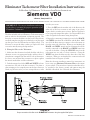
To return to tach mode, press either the START/STOP button, or the TACH/SET button one time. SHIFT LIGHT SETTING: 4. To set the shift light to come on at your desired shift point, press the TACH/SET button. The pointer will move to the current set point and the shift light LED will blink one sec- ond on, then one second off to indicate the ready to set mode. Set the shift point by pressing either the START/ STOP button or HI/LOW button to move the pointer to the desired shift point. When you reach the RPM where you want the shift light to come on, press the TACH/SET button again. Your shift point is stored in memory and the tach returns to the tach mode. 0RXQWLQJ &XS HI LOW TACH SET START STOP &DS 1XW .H\SDG 6KLIW /LJKW 6KLIW 3RLQWHU 7\SH %XOE 6HOHFWRU 6ZLWFK 6(/(&725 6:,7&+ 6(77,1*6 &</,1'(5 6(/(&7,21 &</,1'(56 ,*1,7,21 7<3( 6:,7&+ 6(77,1*6 ,*1,7,21 6:,7&+ 6(77,1* RQ 6WDQGDUG RQ RII RQ (OHFWURQLF RII RQ RII &' %R[ RQ &' 6LGH RI &RLO RII 127( 6ZLWFK LV QRQIXQFWLRQDO RQ WKLV WDFKRPHWHU Diagram B Comp Eliminator II Dimensions and Switch Settings