1
Adept Technology, Inc.
1.0
Introduction
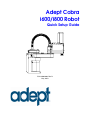
This Quick Setup Guide steps you through the installation and start-up of your Adept
Cobra i600/i800 robot.
The major steps are:
• Preparation, including Workcell Layout, Safety, and Unpacking
• Hardware Installation, including Mounting the Robot and System Cable
Connections
• Software Installation, including .NET Framework and Adept ACE
• System Start-Up, including turning on and moving the robot
During the installation and start-up process, refer also to the Adept Cobra i600/i800
Robot User’s Guide, shipped with each system, for complete information on all aspects
of your robot system.
2.0
Workcell Layout
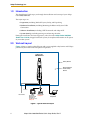
Figure 1 shows a simple workcell layout with a user-supplied safety barrier and E-Stops
provided by the Front Panel and optional T2 pendant.
Adept Cobra
i600/i800 Robot
Safety Barrier
Restricted Area
Inside Safety
Barrier
24 VDC
STOP
R
200-240 VAC
Front Panel
T2 Pendant E-Stop #1
Optional, Install
terminator if
pendant not used
PC running
Adept ACE
E-Stop #2
Figure 1. Typical Workcell Layout
2
Adept Cobra i600/i800 Robot Quick Setup Guide, Rev D