1
Adept Technology, Inc.
3.0
Safety
WARNING: Adept Technology strictly prohibits installation
or operation of an Adept robot without adequate
safeguards according to applicable local and national
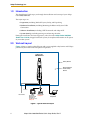
standards. See Figure 1 for a simple workcell layout.
You must read Chapter 2 in the Adept Cobra i600/i800 Robot User’s Guide for
information on topics related to safe operation of your robot system.
Refer to Connecting Customer-Supplied Safety and Power Control Equipment in
Chapter 6 of the Adept Cobra i600/i800 Robot User’s Guide. This section provides
details on connecting a user-designed E-Stop system to the XUSR connector on the robot.
4.0
Unpacking
Remove the top of the robot crate. Do not remove the bolts that attach the robot to the
pallet. Inspect your equipment against the purchase order and verify that all items are
present and that the shipment is correct and free of visible damage. If there are any
problems, contact Adept immediately.
When you are ready to mount the robot, remove the shipping bolts from the pallet, and lift
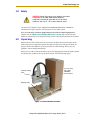
the robot by the eyebolt on the top of the inner link. See the following figure.
Accessory Box
with Cables,
CD-ROMs,
Documentation
Eyebolt for lifting
robot
Shipping Pallet
Figure 2. Cobra i600 Robot on Pallet
Adept Cobra i600/i800 Robot Quick Setup Guide, Rev D
3