1
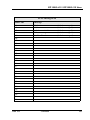
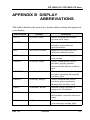
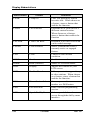
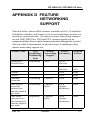
Display Abbreviations
Abbreviation
Feature
Definition
CAMP
Camp On
Calls you when busy station
becomes idle. When chosen as
a feature, stores a button that
enables the function.
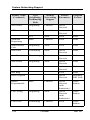
CFWD
Call Forward
Forwards all of your calls to a
different station location.
When chosen as a feature,
stores a button that enables the
function
CALLBK
I Will Call Back
Responds to a SOHVA call with
a non-verbal message.
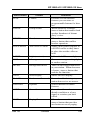
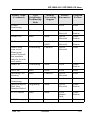
CLEAR
Clear Features
Stores a button that clears a
currently active or engaged
feature.
CLR
Clear
Cancels a call forward
condition.
CONF
Conference
Establishes a conference.
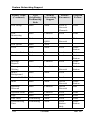
DARK
Dark (contrast)
Makes LCD screen darker.
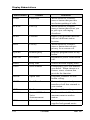
DISP
Display
Adjusts the contrast of your
LCD screen.
DND
Do Not Disturb
Makes your station appear busy
to other stations. When chosen
as a feature, stores a button that
enables the function.
DSS
Direct Station Select
Stores a personal intercom
number at a DSS button.
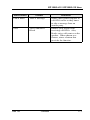
EXIT
Exit Selection
Ends a current programming
session.
EXT
Speed Dial By Name
Selects speed dial numbers to
access through the dial by name
interface.
108
Comdial
Feb ‘05