1
DP-300 Multiprotocol Fast Ethernet Print Server User’s Guide
on/steady
off
on/steady
Timer INT error
on/steady
off
flashing
LAN IO Base error
on/steady
on/steady
off
RAM error
flashing
off
off
Parallel-1 Controller error
flashing
flashing
off
Flash erase/program error
flashing
flashing
flashing
Need to reload firmware
Testing Your DP-300
The PS Admin software includes a Print Test function for confirmation of
printer cable connections and functions. That operational test can be
completed after you have installed the PS Admin software, and have
configured your DP-300 and its ports. See the Testing Your Print Server
section of the Print Server Administration User’s Guide.
Wall-Mounting the DP-300
The bottom of the DP-300’s case has a pair of wall-mount sockets, and
screws and nylon anchors are supplied, to facilitate mounting the DP-300 to
a wall or partition adjacent to your printers.
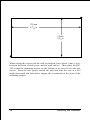
To mount the DP-300 with the front panel facing up (and the printer port
connectors facing down), set the two mounting screws at the lower-left and
upper-right corners of a rectangle as shown below (actual size):
Unpacking and Installation
9