1
DigiPoS PH-6000B
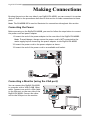
Making Connections
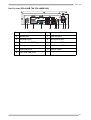
By using the ports on the rear side of your DigiPoS PH-6000B, you can connect it to various
devices. Refer to the procedures described in this section to make connections to these
ports.
Note: The PH-6000B-300 is used to illustrate the connections throughout this section.
Connecting the Power
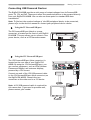
Before powering on the DigiPoS PH-6000B, you need to follow the steps below to connect
the power cord and power adapter.
1.Connect the end of the power adapter to the rear side of the DigiPoS PH-6000B.
Note: To avoid danger, always ensure the power cord is NOT connected to the
mains supply before connecting the power adapter to the DigiPoS PH-6000B.
2.Connect the power cord to the power adapter as shown.
3.Connect the end of the power cord to an available wall outlet.
24V DC
INPUT
24V
12V
+
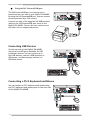
Connecting a Monitor (using the VGA port)
You can connect the DigiPoS PH-6000B
to a monitor with a VGA (D-SUB 15pin)
cable. Connect one end of a VGA cable
to the VGA port on the rear side of the
DigiPoS PH-6000B. Connect the other
end to the VGA port on the monitor.
7
24V DC
INPUT
24V
12V
+