1
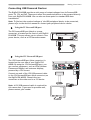
Making Connections Connecting USB Powered Devices The DigiPoS PH-6000B provides a wide range of output voltages from its PoweredUSB ports: 5V, 12V, and 24V. These ports allow the connected devices to be powered directly from your DigiPoS PH-6000B. You can also use these ports for standard USB data transmission. Note: To find out the required voltage of the USB peripheral device to be connected, please refer to the device’s manual or contact your peripheral device dealer. Using the 5V PoweredUSB port The 5V PoweredUSB port (black or orange connector) is located on the front of your DigiPoS PH-6000B. This port allows you to connect a low power device, such as a CCD barcode scanner. DigiPoS 2 5V 3 1 5V Using the 12V PoweredUSB port The 12V PoweredUSB port (blue connector) is located on the rear side of your DigiPoS PH6000B. By using the 12V PoweredUSB port, you can connect equipment, such as VFDs (Vacuum Fluorescent Display) and customer displays, powered by a 12V current. 24V DC INPUT 24V 12V + 12V Connect one end of the 12V USB powered cable to the 12V PoweredUSB port (blue connector) on the DigiPoS PH-6000B. Connect the two connectors at the other end to a 12V device. Note: A 12V USB powered cable is required for this connection. If you need to purchase one, please contact your vendor. 8