1
To install a module, follow the steps below:
Step
1.
Task
If the switch is on, save the running config, if desired (and different from the startup configuration),
with the command write memory. Then power down the S50V by unplugging it from its power
source.
Caution: Removing a module from a running S50V will crash and lock up the switch, requiring a
power cycle.
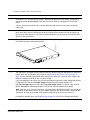
Use a #2 Phillips screwdriver to remove either a module faceplate or an existing module. Note that
these slots, when used for 10G Ethernet ports, are assigned port numbers from left to right as you
face the front of the switch. So, for clarity in programming ports, you might favor using the left-most
slot for the first 10G module.
3.
Grasping the module faceplate, remove the module from its packaging and slide it into the slot until
the module faceplate is flush with the switch.
4.
Secure the captive screws on either side of the module.
5.
The optical XFP 10-Gigabit module (Catalog # S50-01-10GE-2P) requires additional XFP transceiver
inserts, which are not included in the module kit (see Installing XFP Transceivers (optional) on
page 10 or the installation instructions that come with the transceiver). The ports in the copper CX4
module (Cat # S50-01-10GE-2C) do not require inserts.
fn00144s50V
2.
If you are installing a CX4 module, and you are connecting the ports with a cable substantially shorter
or longer than 5m, use the cx4-cable-length command to set the signal strength. Use
cx4-cable-length long for a longer cable, cx4-cable-length short for a shorter cable. See the
System Management Commands chapter in the SFTOS Command Reference for details.
Note: Take care not to connect CX4 ports to 12G stack ports in the S50V and S25P. The receptacles
and cables are the same, but they are incompatible. CX4 ports are labeled as such; stack ports are
not labeled. You can order several cable lengths of each type; they are not part of this kit.
For details on enabling ports, see Enabling Ports on page 13 or the SFTOS Configuration Guide.
S50V Quick Reference
7