1
22
MXU2 Manual
Appendix A: Security Access
Appendix A: Security Access
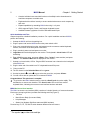
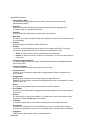
Security Access Mode
The MXU2 provides administrators with four modes of security access (set in the System Configuration
menu) in addition to the login security. These modes determine how the user’s security class (set on the
User Configuration menu) permits access to computers that are assigned channel security class
designations (set on the Channel Configuration menu).
Security classes are represented by a two digit alphanumeric designation.
' The first digit, called the level, is designated by a letter. Letters A to P are available to
represent the level. A is the highest level and P is the lowest level. As the level designation
proceeds from A towards P, security access decreases.
' The second digit, called the group, is designated by a number. Numbers 0 to 9 are available
to represent the group. 0 is the highest group designation and 9 is the lowest. As the group
designation proceeds from 0 towards 9, security access decreases.
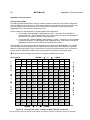
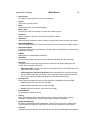
Taken together, the entire security class is represented by the designation [level group]. For example,
A0 is the highest security class and P9 is the lowest security class. As you move from left to right and
down the security class table (Figure 18) from A0 to P9, security access decreases. So a user with the
security class B5 would have broader, higher access than a user with the security class of M8.
# Users with admin privileges can access any computer regardless of the mode.
AO is highest
HIGHER
⇒
⇒
to
LOWER
A0
A1
A2
A3
A4
A5
A6
A7
A8
A9
H
I
G
H
E
R
B0
B1
B2
B3
B4
B5
B6
B7
B8
B9
C0
C1
C2
C3
C4
C5
C6
C7
C8
C9
D0
D1
D2
D3
D4
D5
D6
D7
D8
D9
E0
E1
E2
E3
E4
E5
E6
E7
E8
E9
⇓
F0
F1
F2
F3
F4
F5
F6
F7
F8
F9
G0
G1
G2
G3
G4
G5
G6
G7
G8
G9
⇓
H0
H1
H2
H3
H4
H5
H6
H7
H8
H9
to
I0
I1
I2
I3
I4
I5
I6
I7
I8
I9
⇓
J0
J1
J2
J3
J4
J5
J6
J7
J8
J9
K0
K1
K2
K3
K4
K5
K6
K7
K8
K9
L0
L1
L2
L3
L4
L5
L6
L7
L8
L9
M0
M1
M2
M3
M4
M5
M6
M7
M8
M9
N0
N1
N2
N3
N4
N5
N6
N7
N8
N9
O0
O1
O2
O3
O4
O5
O6
O7
O8
O9
P0
P1
P2
P3
P4
P5
P6
P7
P8
P9
HIGHER
⇒
to
⇓
L
O
W
E
R
Figure 18
to
⇒
LOWER
H
I
G
H
E
R
L
O
W
E
R
P9 is lowest
Security Class Table – Example of What a D5 User Can Access
Gray represents 2 Digit Level Security Access Mode & black boxes represent Level/Group Security Access Mode