1
Setting Up the Cxi and Ci Printers
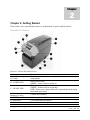
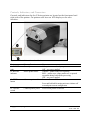
Setting up a C Series printer is an easy process. This chapter describes printer
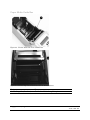
requirements, printer controls, loading thermal transfer ribbon, and loading print
media. The printer self test is also described. Be sure to follow all steps in
sequential order as listed in this User’s Guide to avoid electric shock or damage to
the C Series printer.
Printer Requirements
The C Series printer has the following operational requirements.
•
Communications
o Serial – Standard RS-232 (requires a custom cable, refer to Chapter 10)
o Parallel – Uni-directional parallel interface (requires a custom cable,
refer to Chapter 10)
o USB A Host Interface – USB cable, MSD, HID
o USB B 2.0 Device Interface – USB cable
o Ethernet 10/100 (Optional) – Standard 10Base-T interface cable
•
Auto-detectable 90-264VAC, 24VDC 150W power supply
•
Environment
•
Operating environment:
•
41ºF to 104ºF (5ºC to 40ºC)
•
20% to 85 % non-condensing R. H. (relative humidity)
•
Storage/transportation environment:
•
-4.0ºF to 122ºF (-20ºC to 50ºC)
•
5% to 95% non-condensing R. H. (relative humidity)
Copyright © 2006, Cognitive - 1.800.525.2785
14
1 0 5 - 1 6 9 - 0 3