1
66
DSView Installer/User Guide
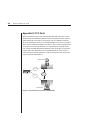
In Plain Text mode, all data is sent unencrypted to the DS appliance. When
Plain Text mode is used, any Telnet application that supports VT52, VT100,
VT100+, VT102, VT220, VT320 or ASCII terminal emulation may be used to
access the DS appliance.
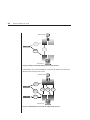
In SSL mode, all data sent to the device during the DSView Telnet session is
DES encrypted. The DS appliance supports anonymous Diffie-Hellman key
exchange. The exchange of certificates for authentication is not supported.
When SSL mode is used, only the built-in DSView Telnet application may be
used to access the DS appliance. The ports on a DS appliance have the same
security property as the device.
The security property is set in DSView and in the DS appliance from the Command Line Interface (CLI). When you initiate access to a DS appliance or port
via Telnet from DSView, DSView attempts to read the security property directly
from the DS appliance.
If the SSL property has not been enabled on the DS appliance, and DSView
receives confirmation from the DS appliance, DSView will automatically open
its built-in Telnet application and you will be prompted for a DS appliance
username and password.
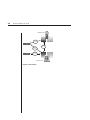
After that information has been entered, an SSL connection to the DS appliance
is established over TCP port 8192. When that connection is established, the DS
appliance validates the user’s access privileges and port availability. In this case,
the Telnet property screen in DSView for that DS appliance will automatically be
set to SSL values, even if they previously held Plain Text mode values. The
property screen will be disabled, and you will not be allowed to change any of its
values. The DSView database will be updated with the information read from
the DS appliance.
If DSView does not receive a reply from the DS appliance, it will use the security mode settings in the DSView database. In this case, the Telnet property
screen in DSView for that DS appliance will show the database values, and you
will be able to change them.
Setting the security property
The security property that is set when a DS appliance is added to the DSView
database depends on the method being used to add the device.
If the Run New Device Install wizard method is used, you are prompted to
select the security mode. It should match the DS appliance Server Security
Mode value that was set via the DS appliance CLI.