1
9 Enhance and Final-Scan the
Image
Follow the online user’s guide instructions to enhance the image
and perform a final scan.
To view the online PolaColor Insight User’s Guide:
Power Mac or Power PC
Windows 95, 98 or NT
1 Double-click PolaColor
1 Select Programs from
Insight, launching the
PolaColor Insight
program.
the Windows Start
menu.
2 Select PolaColor Insight
Help from the Help
menu.
10 Remove the Carrier
1
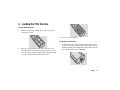
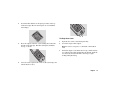
When the scan is complete, open the door and remove the
carrier. Remove the film and store it properly to protect it
from dust and fingerprints.
2
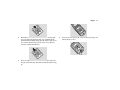
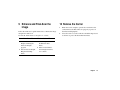
Close the carrier access door. The door should be kept closed
at all times to protect the mechanism from dust.
2 Point to Polaroid Pola-
Color Insight and select
User's Guide.
English
16