1
4 Connect the Scanner to
the Computer
The SprintScan 45i requires a SCSI host adapter in your computer. If your computer does not have an adapter, you must install
one (see page 17). If your computer is a PC-compatible with a
SCSI adapter, but the adapter is connected to a hard drive or
CD-ROM drive, installing a second adapter is recommended.
Set the scanner SCSI address
Each device connected to a SCSI host adapter must have a unique
address from 0-6. To assure a unique address for the scanner,
determine the addresses of any other SCSI devices.
Power Mac or Power PC
Windows 95, 98 or NT
1 Run the Apple System
Look at the address switch
on each SCSI device connected to your system. If
necessary, see the instructions provided with the
devices.
Profiler program, usually
on the Apple menu. If not,
it may be available from
www.apple.com/
swupdates.
2 Click Devices and
Volumes to view the SCSI
device addresses.
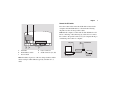
Make sure the scanner is turned off and set the address switch (b)
to a value not used by any other device.
English
6