1
7193 Owner’s Guide
Chapter 6: Commands
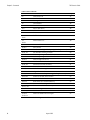
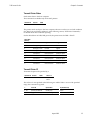
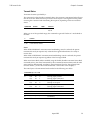
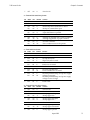
Print Characteristics Commands
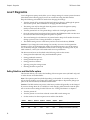
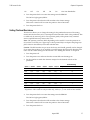
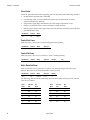
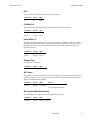
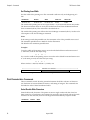
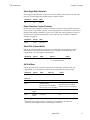
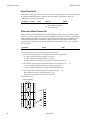
These commands control what the printed information looks like and are listed in
numerical order of their hexadecimal codes.
Print Characteristics Commands
Hexadecimal Code
Command
Page
12
Select Double-Wide Characters
56
13
Select Single-Wide Characters
57
1B 12
Rotate Characters Counter-Clockwise
57
1B 16 n
Select Pitch (Column Width)
57
1B 21 m
Set Print Mode
57
1B 25 n
Select Character Set
58
1B 26, etc.
Define User-Defined Character Set
58
1B 3A 0 0 0
Copy Character Set From ROM to RAM
59
1B 3F n
Cancel User-Defined Character
59
1B 52 n
Select Character Code Table
59
1B 56 n
Set or Cancel Rotated Characters Clockwise
59
1B 7B n
Set or Cancel Upside-Down Characters
59
1B 74 n
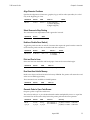
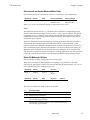
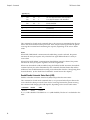
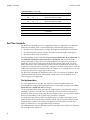
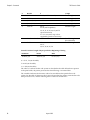
Graphics Commands
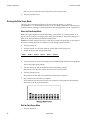
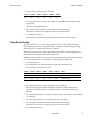
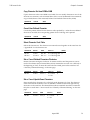
These commands print graphics data and are listed in numerical order of their
hexadecimal codes.
Graphics Commands
Hexadecimal Code
Command
Page
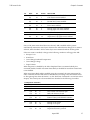
1B 24, etc.
Set Absolute Starting Position1
60
1B 2A m, etc.
Set Bit Image Mode
61
1B 4B, etc.
Single-Density Graphics
62
1B 4C, etc.
Double-Density Graphics
62
1D 2A, etc.
Define Downloaded Bit Image
63
1D 2F m
Print Downloaded Bit Image
63
1B 59, etc.
1This printer function command is also used in graphics to emulate an Epson
LQ-950™ printer to handle graphics output from word processing programs.
August 1998
45