1
7193 Owner’s Guide
Chapter 6: Commands
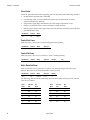
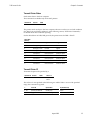
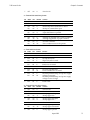
Define Downloaded Bit Image
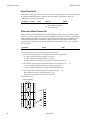
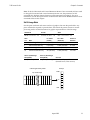
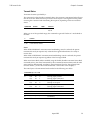
Enters a downloaded bit image (such as a logo) into RAM with the number of dots
specified by n1 and n2. It is available until power is turned off, another bit image is
defined, or either Initialize Printer (1B 40), or Define User-Defined Character Set (1B 26),
command is received.
A downloaded bit image and user-defined characters cannot be defined at the same time.
Any user-defined characters will be cleared from RAM when this command is used. See
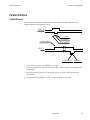
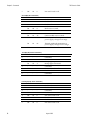
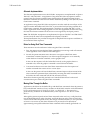
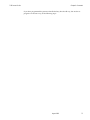
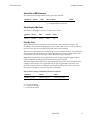
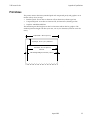
the illustration on the next page for a representation of the bit image.
Hexadecimal
Decimal
ASCII
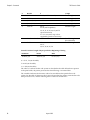
1D 2A n1 n2 d1 ... dn
29 42 n1 n2 d1 ... dn
GS * n1 n2 d1 ... dn
Value of n1
Value of n2
Value of d
1-56 (8 x n1 = Number of
Horizontal Dot Columns)
1-48 (Number of
Vertical Bytes)1
Bytes of Data (Printed
Down, Then Across)
1The number of bytes sent is represented by the following formula:
n = 8 x n1 x n2 (n1 x n2 must be less than or equal to 1344).
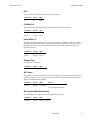
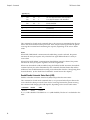
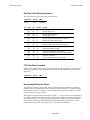
Print Downloaded Bit Image
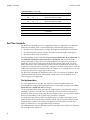
Prints the downloaded bit image in RAM at a density specified by m. It is ignored if any
data is available in the print buffer, if the downloaded bit image is undefined, or if the data
defined exceeds one line. A downloaded bit image and user-defined characters cannot be
used at the same time. See the illustration for a representation of the bit image.
Hexadecimal
Decimal
ASCII
Value of m
Print Mode
Vertical DPI1
Horizontal DPI*
1D 2F m
29 47 m
GS / m
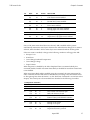
0
1
2
3
Normal
Double Wide
Double High
Quadruple
152
152
76
76
152
76
152
76
1Dot density measured in dots per inch.
Column
One
Top of Graphic
Column
56 x 8 Max.
Row
One d1 d
49
d2
MSB
dn
Row 48 d
Max. 48
dn
LSB
August 1998
63