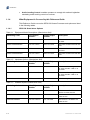
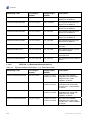
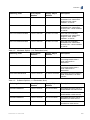
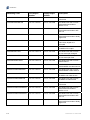
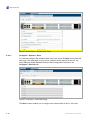
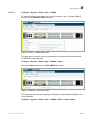
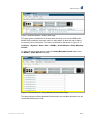
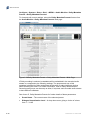
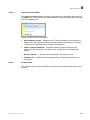
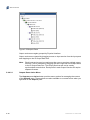
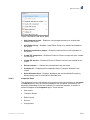
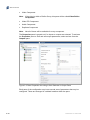
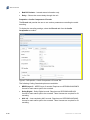
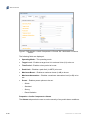
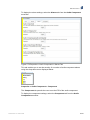
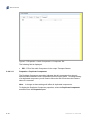
1
SPR1100 Stream Processor Software Version 6.7.x (and later) REFERENCE GUIDE 2/1553-FGC 101 1400 Uen B SPR1100 Stream Processor ENGLISH (UK) - READ THIS FIRST! ITALIANO - LEGGERE QUESTO AVVISO PER PRIMO! If you do not understand the contents of this manual. DO NOT OPERATE THIS EQUIPMENT. Also, translation into any EC official language of this manual can be made available, at your cost. Se non si capisce il contenuto del presente manuale. NON UTILIZZARE L’APPARECCHIATURA.. È anche disponibile la versione italiana di questo manuale, ma il costo è a carico dell’utente. SVENSKA - LÄS DETTA FÖRST! NEDERLANDS - LEES DIT EERST! Om Ni inte förstår informationen i denna handbok. ARBETA DÅ INTE MED DENNA UTRUSTNING. En översättning till detta språk av denna handbok kan också anskaffas, på Er bekostnad. Als u de inhoud van deze handleiding niet begrijpt. STEL DEZE APPARATUUR DAN NIET IN WERKING. U kunt tevens, op eigen kosten, een vertaling van deze handleiding krijgen. PORTUGUÊS - LEIA O TEXTO ABAIXO ANTES DE MAIS NADA! SUOMI - LUE ENNEN KÄYTTÖÄ! Se não compreende o texto deste manual. NÃO UTILIZE O EQUIPAMENTO. O utilizador poderá também obter uma tradução do manual para o português à própria custa. Jos et ymmärrä käsikirjan sisältöä. ÄLÄ KÄYTÄ LAITETTA. Käsikirja voidaan myös suomentaa asiakkaan kustannuksella. FRANÇAIS - AVANT TOUT, LISEZ CE QUI SUIT! DANSK - LÆS DETTE FØRST! Si vous ne comprenez pas les instructions contenues dans ce manuel. NE FAITES PAS FONCTIONNER CET APPAREIL. En outre, nous pouvons vous proposer, à vos frais, une version française de ce manuel. Udstyret må ikke betjenes. MEDMINDRE DE TIL FULDE FORSTÅR INDHOLDET AF DENNE HÅNDBOG. Vi kan også for Deres regning levere en dansk oversættelse af denne håndbog. DEUTSCH - LESEN SIE ZUERST DIESEN HINWEIS! ΕΛΛΗΝΙΚΑ - ∆ΙΑΒΑΣΤΕ ΠΡΩΤΑ ΑΥΤΟ! Sollte Ihnen der Inhalf dieses Handbuches nicht klar verständlich sein, dann. BEDIENEN SIE DIESE GERÄTE NICHT! Eine Übersetzung des Handbuches in diese Sprache ist gegen Berechnung lieferbar. Αν δεν καταλάβετε το περιεχόμενο αυτού του βοηθήματος/εγχειριδίου. ΜΗΝ ΛΕΙΤΟΥΡΓΗΣΕΤΕ ΑΥΤΟΝ ΤΟΝ ΕΞΟΠΛΙΣΜΟ. Επίσης, αυτό το εγχειρίδιο είναι διαθέσιμο σε μετάφραση σε αυτή τη γλώσσα και μπορείτε να το αγοράσετε. ESPAÑOL - LEA ESTE AVISO PRIMERO! Si no entiende el contenido de este manual. NO OPERE ESTE EQUIPO. Podemos asimismo suministrarle una traducción de este manual al (idioma) previo pago de una cantidad adicional que deberá abonar usted mismo. Copyright © Copyright Ericsson AB 2013. All rights reserved. Disclaimer No part of this document may be reproduced in any form without the written permission of the copyright owner. The contents of this document are subject to revision without notice due to continued progress in methodology, design and manufacturing. Ericsson shall have no liability for any error or damage of any kind resulting from the use of this document. ii 2/1553-FGC 101 1400 Uen B Contents Contents Chapter 1: Introduction This chapter identifies the equipment versions covered by this manual, describes the purpose of the equipment in a typical system and lists the available options. Chapter 2: Installing the Equipment This chapter details the preparation and installation of the equipment including important safety information. It also provides pin-out details for the external connectors. Chapter 3: Getting Started This chapter provides a guide to powering up the unit and setting up the IP address. Chapter 4: Front Panel Control This chapter describes the front panel display menus and options and details any operating procedures. Chapter 5: Web GUI Configuration This chapter provides the configuration of the unit using the Web Graphical User Interface. Chapter 6: Stream Processing and Networking This chapter describes the principles and techniques used in the design of the equipment to aid in understanding its operation and function. Chapter 7: Options, Licensing and Upgrades This chapter provides details of option cards that may be fitted to this equipment. Chapter 8: Preventive Maintenance and Fault-finding This chapter details routine maintenance tasks, servicing advice and information regarding warranty and maintenance. It also lists error and error messages that may occur and recommends the action to be taken. Annex A: Glossary Annex B: Technical Specification Annex C: Audio Coding Standards Annex D: Dolby Metadata Presets Annex E: Alarms List Annex F: Automatic Loudness Control (ALC) 2/1553-FGC 101 1400 Uen B iii Preliminary Pages Introduction This Reference Guide provides instructions and information for the installation, operation of the SPR1100 Stream Processor. This Reference Guide should be kept in a safe place for reference for the life of the equipment. It is not intended that this Reference Guide will be amended by the issue of individual pages. Any revision will be by a complete reissue. Further copies of this Reference Guide can be ordered from the address listed in Customer Services. If passing the equipment to a third party, also pass the relevant documentation. Revision History Issues of this Reference Guide are listed below: Issue Date Software Version Comments A May 2013 6.7.x Initial release. Converted from CHM Robohelp help file: 1553-FGC 101 1400 Uen A. B July 2013 6.7.x Rename Reflex. Trademarks All best endeavors have been made to acknowledge registered trademarks and trademarks used throughout this Reference Guide. Any notified omissions will be rectified in the next issue of this Reference Guide. Some trademarks may be registered in some jurisdictions but not in others. Registered trademarks and trademarks used are acknowledged below and marked with their respective symbols. However, they are not marked within the text of this Reference Guide. Registered Trademarks Dolby® Registered trademark of Dolby Laboratories Licensing Corporation. Dolby® Digital Registered trademark of Dolby Laboratories Licensing Corporation. Ethernet® Registered trademark of Xerox Corporation. Trademarks Reflex™ iv Trademark of Ericsson Television. 2/1553-FGC 101 1400 Uen B Preliminary Pages Warnings, Cautions and Notes Heed Warnings All warnings on the product and in the operating instructions should be adhered to. The manufacturer can not be held responsible for injuries or damage where warnings and cautions have been ignored or taken lightly. Read Instructions All the safety and operating instructions should be read before this product is operated. Follow Instructions All operating and use instructions should be followed. Retain Instructions The safety and operating instructions should be retained for future reference. Warning! Warnings give information which, if strictly observed, will prevent personal injury or death, or damage to property or the environment. They are highlighted for emphasis, as in this example, and are placed immediately preceding the point at which the reader requires them. Caution! Cautions give information which, if strictly followed, will prevent damage to equipment or other goods. They are highlighted for emphasis, as in this example, and are placed immediately preceding the point at which the reader requires them. Note: Notes provide supplementary information. They are highlighted for emphasis, as in this example, and are placed immediately after the relevant text. EMC Compliance This equipment is certified to the EMC requirements detailed in Annex B, Technical Specification. To maintain this certification, only use the leads supplied or if in doubt contact Customer Services. 2/1553-FGC 101 1400 Uen B v Preliminary Pages Contact Information Support Services Our primary objective is to provide first class customer care that is tailored to your specific business and operational requirements. All levels are supported by one or more service performance reviews to ensure the perfect partnership between Ericsson and your business. Warranty All Ericsson products and systems are designed and built to the highest standards and are covered under a comprehensive 12 month warranty. Levels of Continuing Ericsson Service Support For standalone equipment, then Ericsson BASIC Essential support is the value for money choice for you. BASIC provides you with year-by-year Service long after the warranty has expired. For systems support you can choose either Gold Business Critical support or Silver Business Advantage. These packages are designed to save you costs and protect your income through enlisting the help of Ericsson support specialists. Call Ericsson Sales for more details. Customer Services vi Europe, Middle East and Africa Tel: +44 (0) 23 8048 4455 Fax: +44 (0) 23 8048 4467 Email: [email protected] Americas Tel: Tel: Fax: Email: +888 671 1268 US and Canada +678 812 6255 International +678 812 6262 [email protected] Compression China Tel: Fax: Tel: Fax: Email: +86 10 8476 8676 +86 10 8476 7741 +852 2590 2388 +852 2590 9550 [email protected] Australia and New Zealand Tel: +612 (0) 9111 4027 Fax: +612 (0) 9111 4949 Email: [email protected] Internet Address www.ericsson.com Beijing Beijing Hong Kong Hong Kong 2/1553-FGC 101 1400 Uen B Preliminary Pages Technical Training Ericsson provides a wide range of training courses on the operation and maintenance of our products and on their supporting technologies. Ericsson can provide both regularly scheduled courses and training tailored to individual needs. Courses can be run either at your premises or at one of our dedicated training facilities. International Tel: +44 (0) 23 8048 4229 Fax: +44 (0) 23 8048 4161 Email: [email protected] Customer Services and Technical Training Postal Address Ericsson Unit 2 Strategic Park Comines Way Hedge End Southampton Hampshire SO30 4DA United Kingdom Return of Equipment If you need to return equipment for repair please contact your local Ericsson Customer Services Department. Please refer to the Customer Services Contact Information on Page vi You will then be directed to return the faulty equipment to a repair centre with the appropriate facilities for that equipment. A tracking number will be issued that should be used if you need to enquire about the progress of the repair. The equipment should be properly packed and the tracking number should be clearly marked on the outside of the packaging. Technical Publications If you need to contact Ericsson Technical Publications regarding this publication, e-mail: [email protected]. 2/1553-FGC 101 1400 Uen B vii Preliminary Pages BLANK viii 2/1553-FGC 101 1400 Uen B 1 Introduction Chapter 1 Contents 1.1 1.1.1 1.1.2 1.1.3 1.1.4 1.1.4.1 1.1.4.2 1.2 1.2.1 1.2.1.1 1.2.1.2 1.2.1.3 1.2.1.4 1.2.2 1.3 1.3.1 1.3.1.1 1.3.1.2 1.3.1.3 1.3.1.4 1.3.1.5 1.3.1.6 1.3.1.7 1.3.1.8 1.3.2 1.3.2.1 1.3.2.2 1.3.2.3 1.3.2.4 1.3.2.5 1.3.3 1.3.3.1 1.3.3.2 1.3.3.3 1.3.3.4 1.3.3.5 1.3.4 2/1553-FGC 101 1400 Uen B Introduction........................................................................................... 1-3 Who Should Use this Reference Guide ................................................ 1-3 Software Version .................................................................................. 1-3 New Features in this Release............................................................... 1-3 What Equipment is Covered by this Reference Guide ......................... 1-4 SPR1100 Stand-alone Options ............................................................ 1-4 SPR1100 1+1 Redundant Bundle Options ........................................... 1-6 SPR1100 Systems Overview ............................................................. 1-10 Application Overview: Broadcast Transcoding ................................... 1-10 Application #1: Channel Tiering.......................................................... 1-10 Application #2: Disaster Recovery...................................................... 1-11 Application #3: New Services ............................................................. 1-11 Application #4: Cable Architecture Evolution...................................... 1-12 Standalone and 1 + 1 Packages......................................................... 1-12 Summary of Features ......................................................................... 1-14 Video Processing................................................................................ 1-14 License Enabled Resolutions ............................................................. 1-14 Video Transcoding.............................................................................. 1-14 Video Pass Through ........................................................................... 1-15 Quantity of Video Transcodes per Module ......................................... 1-15 Number of Transport Streams ............................................................ 1-16 PiP Generation ................................................................................... 1-17 One-to-Many Transcoding.................................................................. 1-17 Output Video Duplication.................................................................... 1-18 Audio Processing................................................................................ 1-18 Audio Transcoding.............................................................................. 1-18 Quantity of Audio Transcodes per Module ......................................... 1-18 Quantity of Audio Transcodes per Video Service ............................... 1-19 Quantity of Audio Pass Through......................................................... 1-19 Output Audio Duplication.................................................................... 1-20 Data PIDs ........................................................................................... 1-20 Data Pass Through............................................................................. 1-20 Quantity of Data Pass Through .......................................................... 1-20 Output Data Duplication ..................................................................... 1-20 Subtitles.............................................................................................. 1-21 Closed Captions ................................................................................. 1-21 Service Components .......................................................................... 1-21 1-1 Introduction 1.3.5 1.3.5.1 1.3.5.2 1.3.6 1.3.6.1 1.3.7 1.3.7.1 1.3.8 1.3.8.1 1.3.9 1.4 1.5 1.6 1.6.1 1.6.2 1.6.3 1.6.4 PID Processing .................................................................................. 1-21 PID Remapping .................................................................................. 1-21 Change of Input PIDs ......................................................................... 1-21 Table Processing................................................................................ 1-22 Multiple PMTs in a PID....................................................................... 1-22 Transport Streams.............................................................................. 1-22 Unicast Input ...................................................................................... 1-22 Redundancy ....................................................................................... 1-22 Redundancy Switch Times................................................................. 1-23 SPR1100 and nCC............................................................................. 1-23 Front Panel......................................................................................... 1-24 Base Units .......................................................................................... 1-25 Rear Panels ....................................................................................... 1-26 SPR11/CHASSIS/1AC – 1U Unit with Single AC Power Supply........ 1-26 SPR11/CHASSIS/2AC – 1U Unit with Dual AC Power Supply .......... 1-26 SPR11/CHASSIS/1DC – 1U Unit with Single DC Supply .................. 1-27 SPR11/CHASSIS/2DC – 1U Unit with Dual DC Power Supply.......... 1-27 List of Figures Figure 1.1 Figure 1.2 Figure 1.3 Figure 1.4 Figure 1.5 Figure 1.6 Figure 1.7 Figure 1.8 Figure 1.9 SPR1100 Channel Tiering.................................................................. 1-11 SPR1100 Cable Architecture Evolution.............................................. 1-12 SPR1100 Standalone System............................................................ 1-13 SPR1100 1+1 Redundant System ..................................................... 1-13 SPR1100 Front Panel ........................................................................ 1-24 SPR11/CHASSIS/1AC Rear Panel – Single AC Input ....................... 1-26 SPR11/CHASSIS/2AC Rear Panel – Dual AC Inputs ........................ 1-26 SPR11/CHASSIS/1DC Rear Panel – Single DC Input....................... 1-27 SPR11/CHASSIS/2DC Rear Panel – Dual DC Inputs........................ 1-27 List of Tables Table 1.1 Equipment Model Descriptions (Stand-alone Unit) .............................. 1-4 Table 1.2 Hardware Options (Stand-alone Unit) .................................................. 1-4 Table 1.3 Software Options (Stand-alone Unit).................................................... 1-4 Table 1.4 Equipment Model Descriptions (1+1 Redundant Units) ....................... 1-6 Table 1.5 Hardware Options (1+1 Redundant Units) ........................................... 1-7 Table 1.6 Software Options (1+1 Redundant Units) ............................................ 1-7 Table 1.7 License Enabled Resolutions ............................................................. 1-14 Table 1.8 General Transcoding Permutations.................................................... 1-14 Table 1.9 SPR1100 NSTC Transcoding Permutations ...................................... 1-15 Table 1.10 SPR1100 PAL Transcoding Permutations ......................................... 1-15 Table 1.11 Mix and Match of Video Transodes in a Module ................................ 1-16 Table 1.12 Transcoded Video Options................................................................. 1-17 Table 1.13 Maximum Quantity of Audio Transcodes per Module ........................ 1-18 Table 1.14 Quantity of Audio Transcodes per Video Service............................... 1-19 Table 1.15 Redundancy Switch Times................................................................. 1-23 Table 1.16 Front Panel Controls .......................................................................... 1-24 Table 1.17 Rear Panel Connectors ...................................................................... 1-27 1-2 2/1553-FGC 101 1400 Uen B Introduction 1.1 Introduction 1.1.1 Who Should Use this Reference Guide This Reference Guide is written for operators / users of the Ericsson SPR1100 Stream Processor. It describes the unit’s functions and operation. The Reference Guide is written to assist in the installation and day-to-day care and operation of the unit. Maintenance information requiring the covers to be removed is not included. Warning! Do not remove the covers of this equipment. Hazardous voltages are present within this equipment and may be exposed if the covers are removed. Only Ericsson television trained and approved service engineers are permitted to service this equipment. Caution! Unauthorized maintenance or the use of non-approved replacements may affect the equipment specification and invalidate any warranties. 1.1.2 Software Version This Reference Guide covers the functions of software version 6.7.x and later. To verify the installed version either: Access the front panel; see Chapter 4, Front Panel Control. Access the Web Browser screens, see Chapter 5, Web GUI Configuration. This manual continues to be relevant to subsequent build versions where the functionality of the equipment has not changed. Where the build standard changes the functionality, a new issue of this manual will be provided. The appropriate number should be quoted in all correspondence with Ericsson. 1.1.3 New Features in this Release The 6.7.x release of software for the SPR1100 is delivered with the new features listed below: Reflex: enables the cost-effective creation of statmux groups by combining the video processing, statmux controller and mux into a single chassis. 2/1553-FGC 101 1400 Uen B 1-3 Introduction 1.1.4 Audio Leveling Control: enables operators to comply with national legislation mandating audio leveling control on services. What Equipment is Covered by this Reference Guide This Reference Guide covers the SPR1100 Stream Processor and options as listed in the following tables. 1.1.4.1 Table 1.1 SPR1100 Stand-alone Options Equipment Model Descriptions (Stand-alone Unit) Marketing Code Price Object Number Supply Object Number Description SPR11/CHASSIS/1AC FAZ 101 0161/1 KDU 137 733/1 SPR1100 Chassis with Single AC PSU. SPR11/CHASSIS/2AC FAZ 101 0161/2 KDU 137 733/2 SPR1100 Chassis with Dual AC PSU. SPR11/CHASSIS/1DC FAZ 101 0161/3 KDU 137 733/3 SPR1100 Chassis with Single DC PSU. SPR11/CHASSIS/2DC FAZ 101 0161/4 KDU 137 733/4 SPR1100 Chassis with Dual DC PSU. Table 1.2 Hardware Options (Stand-alone Unit) Marketing Code Price Object Number Supply Object Number Description SPR/HWO/MPM1 FAZ 101 0161/57 ROA 128 4612 SPR Media Processing Module for video & audio. 4 HD or 12 SD video SPR/UPG/HWO/MPM1 FAZ 101 0161/59 ROA 128 4613 SPR Media Processing Module for video & audio. 4 HD or 12 SD video SPR/UPG/HWO/BLNK FAZ 101 0161/11 SXA 215 3768/2 SPR Blanking Plate Table 1.3 Software Options (Stand-alone Unit) Marketing Code Price Object Number Supply Object Number Description SPR/SWO/HDMP4 FAZ 101 0161/13 FAT 102 0831 SPR license 1 HD/SD MPEG-4/2 video service SPR/SWO/HDMP2 FAZ 101 0161/14 FAT 102 0832 SPR license 1 HD/SD MPEG-2 video service SPR/SWO/SDMP4 FAZ 101 0161/15 FAT 102 0833 SPR license 1 SD MPEG-4/2 video service 1-4 2/1553-FGC 101 1400 Uen B Introduction Marketing Code Price Object Number Supply Object Number Description SPR/SWO/SDMP2 FAZ 101 0161/16 FAT 102 0834 SPR license 1 SD MPEG-2 video service SPR/SWO/PIP FAZ 101 0161/17 FAT 102 0835 SPR license 1 PiP service SPR/SWO/AUD/MP2 FAZ 101 0161/18 FAT 102 0836 SPR license 1 stereo audio transcode to MPEG-1/2 LII SPR/SWO/AUD/AAC FAZ 101 0161/19 FAT 102 0837 SPR license 1 stereo audio transcode to HE-AAC-LC SPR/SWO/AUD/AC3 FAZ 101 0161/20 FAT 102 0838 SPR license 1 stereo audio transcode to Dolby Digital AC3 SPR/SWO/AUD/AC3DEC FAZ 101 0161/95 FAT 102 0585 SPR license 1 audio Dolby Digital AC3 DECODE SPR/SWO/FEC/OUT FAZ 101 0161/96 FAT 102 1602 SPR license 1 ProMPEG FEC output SPR/SWO/ALC/C FAZ 101 0161/111 FAT 102 2443 SPR license 1 ALCv2 stereo pair Charged SPR/SWO/ALC/F FAZ 101 0161/112 FAT 102 2444 SPR license 1 ALCv2 stereo pair Free SPR/SWO/IREFLEX FAZ 101 0161/136 FAT 102 2720 SPR license 1 statmux MPTS SPR/UPG/SWO/HDMP4 FAZ 101 0161/29 FAT 102 0839 SPR license 1 HD/SD MPEG-4/2 video service SPR/UPG/SWO/HDMP2 FAZ 101 0161/30 FAT 102 0840 SPR license 1 HD/SD MPEG-2 video service SPR/UPG/SWO/SDMP4 FAZ 101 0161/31 FAT 102 0841 SPR license 1 SD MPEG-4/2 video service SPR/UPG/SWO/SDMP2 FAZ 101 0161/32 FAT 102 0842 SPR license 1 SD MPEG-2 video service SPR/UPG/SWO/PIP FAZ 101 0161/33 FAT 102 0843 SPR license 1 PiP service SPR/UPG/SWO/AUD/MP2 FAZ 101 0161/34 FAT 102 0844 SPR license 1 stereo audio transcode to MPEG-1/2 LII SPR/UPG/SWO/AUD/AAC FAZ 101 0161/35 FAT 102 0845 SPR license 1 stereo audio transcode to HE-AAC-LC SPR/UPG/SWO/AUD/AC3 FAZ 101 0161/36 FAT 102 0846 SPR license 1 stereo audio transcode to Dolby Digital AC3 SPR/UPG/SWO/AUD/AC3D EC FAZ 101 0161/76 FAT 102 1607 SPR upgrade license 1 audio Dolby Digital AC3 decode SPR/UPG/SWO/FEC/OUT FAZ 101 0161/77 FAT 102 1608 SPR upgrade license 1 ProMPEG FEC output 2/1553-FGC 101 1400 Uen B 1-5 Introduction Marketing Code Price Object Number Supply Object Number Description SPR/UPG/SWO/SD2/SD4 FAZ 101 0161/37 FAT 102 0847 SPR upgrade license from SD MPEG-2 to SD MPEG-4 SPR/UPG/SWO/SD2/HD2 FAZ 101 0161/38 FAT 102 0849 SPR upgrade license from SD MPEG-2 to HD MPEG-2 SPR/UPG/SWO/SD2/HD4 FAZ 101 0161/39 FAT 102 0850 SPR upgrade license from SD MPEG-2 to HD MPEG-4 SPR/UPG/SWO/SD4/HD2 FAZ 101 0161/40 FAT 102 0851 SPR upgrade license from SD MPEG-4 to HD MPEG-2 SPR/UPG/SWO/SD4/HD4 FAZ 101 0161/41 FAT 102 0852 SPR upgrade license from SD MPEG-4 to HD MPEG-4 SPR/UPG/SWO/HD2/HD4 FAZ 101 0161/42 FAT 102 0853 SPR upgrade license from HD MPEG-2 to HD MPEG-4 SPR/UPG/SWO/1100/1200 FAZ 101 0161/82 FAT 102 1613 SPR convert SPR1100 to SPR1200 SPR/UPG/SWO/ALC/C FAZ 101 0161/115 FAT 102 2445 SPR upgrade license 1 ALCv2 stereo pair charged SPR/UPG/SWO/ALC/F FAZ 101 0161/116 FAT 102 2446 SPR upgrade license 1 ALCv2 stereo pair free SPR/UPG/SWO/IREFLEX FAZ 101 0161/138 FAT 102 2721 SPR upgrade license 1 statmux MPTS 1.1.4.2 Table 1.4 SPR1100 1+1 Redundant Bundle Options Equipment Model Descriptions (1+1 Redundant Units) Marketing Code Price Object Number Supply Object Number Description SPR11/CHASSIS/1AC/RAS FAZ 101 0161/6 1x KDU 137 733/1 1x KDU 137 733/6 SPR1100 Active Standby Redundant Pair chassis with Single AC PSU. 6 slots available. *2 UNITS* SPR11/CHASSIS/2AC/RAS FAZ 101 0161/7 1x KDU 137 733/2 1x KDU 137 733/7 SPR1100 Active Standby Redundant Pair chassis with Dual AC PSU. 4 slots available. *2 UNITS* SPR11/CHASSIS/1DC/RAS FAZ 101 0161/8 1x KDU 137 733/3 1x KDU 137 733/8 SPR1100 Active Standby Redundant Pair chassis with Single DC PSU. 6 slots available. *2 UNITS* SPR11/CHASSIS/2DC/RAS FAZ 101 0161/9 1x KDU 137 733/4 1x KDU 137 733/9 SPR1100 Active Standby Redundant Pair chassis with Dual DC PSU. 4 slots available. *2 UNITS* 1-6 2/1553-FGC 101 1400 Uen B Introduction Marketing Code Price Object Number Supply Object Number Description SPR11/CHASSIS/1AC/RAA FAZ 101 0161/66 2x KDU 137 733/1 SPR1100 Active Standby Redundant Pair chassis with Single AC PSU. 6 slots available. *2 UNITS* SPR11/CHASSIS/2AC/RAA FAZ 101 0161/67 2x KDU 137 733/2 SPR1100 Active Standby Redundant Pair chassis with Dual AC PSU. 4 slots available. *2 UNITS* SPR11/CHASSIS/1DC/RAA FAZ 101 0161/68 2x KDU 137 733/3 SPR1100 Active Standby Redundant Pair chassis with Single DC PSU. 6 slots available. *2 UNITS* SPR11/CHASSIS/2DC/RAA FAZ 101 0161/69 2x KDU 137 733/4 SPR1100 Active Standby Redundant Pair chassis with Dual DC PSU. 4 slots available. *2 UNITS* Table 1.5 Hardware Options (1+1 Redundant Units) Marketing Code Price Object Number Supply Object Number Description SPR/HWO/MPM1/R FAZ 101 0161/58 2x ROA 128 4612 SPR Redundant Pair: Media Processing Module video + audio. 4HD/12SD *2 MODULES* SPR/UPG/HWO/MPM1/R FAZ 101 0161/60 2x ROA 128 4613 SPR Redundant Pair: Media Processing Module video + audio. 4HD/12SD *2 MODULES* SPR/UPG/HWO/BLNK/R FAZ 101 0161/12 2x SXA 215 3768/2 SPR Redundant Pair: Blanking Plate *2 BLANKS, 1 for each chassis* Table 1.6 Software Options (1+1 Redundant Units) Marketing Code Price Object Number Supply Object Number Description SPR/SWO/HDMP4/R FAZ 101 0161/21 2x FAT 102 0831 SPR Redundant Pair: license 1 HD/SD MPEG-4/2 video service SPR/SWO/HDMP2/R FAZ 101 0161/22 2x FAT 102 0832 SPR Redundant Pair: license 1 HD/SD MPEG-2 video service SPR/SWO/SDMP4/R FAZ 101 0161/23 2x FAT 102 0833 SPR Redundant Pair: license 1 SD MPEG-4/2 video service SPR/SWO/SDMP2/R FAZ 101 0161/24 2x FAT 102 0834 SPR Redundant Pair: license 1 SD MPEG-2 video service 2/1553-FGC 101 1400 Uen B 1-7 Introduction Marketing Code Price Object Number Supply Object Number Description SPR/SWO/PIP/R FAZ 101 0161/25 2x FAT 102 0835 SPR Redundant Pair: license 1 PiP service SPR/SWO/AUD/MP2/R FAZ 101 0161/26 2x FAT 102 0836 SPR Redundant Pair: license 1 stereo audio transcode to MPEG-1/2 LII SPR/SWO/AUD/AAC/R FAZ 101 0161/27 2x FAT 102 0837 SPR Redundant Pair: license 1 stereo audio transcode to HEAAC-LC SPR/SWO/AUD/AC3/R FAZ 101 0161/28 2x FAT 102 0838 SPR Redundant Pair: license 1 stereo audio transcode to Dolby Digital AC3 SPR/SWO/AUD/AC3DEC/R FAZ 101 0161/101 2x FAT 102 0585 SPR Redundant Pair: license 1 audio Dolby Digital AC3 DECODE SPR/SWO/FEC/OUT/R FAZ 101 0161/102 2x FAT 102 1602 SPR Redundant Pair: license 1 ProMPEG FEC output SPR/SWO/ALC/C/R FAZ 101 0161/113 2x FAT 102 2443 SPR Redundant Pair: license 1 ALCv2 stereo pair Charged SPR/SWO/ALC/F/R FAZ 101 0161/114 2x FAT 102 2444 SPR Redundant Pair: license 1 ALCv2 stereo pair Free SPR/SWO/IREFLEX/R FAZ 101 0161/137 2x FAT 102 2720 SPR Redundant Pair: license 1 statmux MPTS SPR/UPG/SWO/HDMP4/R FAZ 101 0161/43 2x FAT 102 0839 SPR Redundant Pair: license 1 HD/SD MPEG-4/2 video service SPR/UPG/SWO/HDMP2/R FAZ 101 0161/44 2x FAT 102 0840 SPR Redundant Pair: license 1 HD/SD MPEG-2 video service SPR/UPG/SWO/SDMP4/R FAZ 101 0161/45 2x FAT 102 0841 SPR Redundant Pair: license 1 SD MPEG-4/2 video service SPR/UPG/SWO/SDMP2/R FAZ 101 0161/46 2x FAT 102 0842 SPR Redundant Pair: license 1 SD MPEG-2 video service SPR/UPG/SWO/PIP/R FAZ 101 0161/47 2x FAT 102 0843 SPR Redundant Pair: license 1 PiP service SPR/UPG/SWO/AUD/MP2/R FAZ 101 0161/48 2x FAT 102 0844 SPR Redundant Pair: license 1 stereo audio transcode to MPEG-1/2 LII SPR/UPG/SWO/AUD/AAC/R FAZ 101 0161/49 2x FAT 102 0845 SPR Redundant Pair: license 1 stereo audio transcode to HEAAC-LC SPR/UPG/SWO/AUD/AC3/R FAZ 101 0161/50 2x FAT 102 0846 SPR Redundant Pair: license 1 stereo audio transcode to Dolby Digital AC3 1-8 2/1553-FGC 101 1400 Uen B Introduction Marketing Code Price Object Number Supply Object Number Description SPR/UPG/SWO/AUD/AC3D EC/R FAZ 101 0161/84 2x FAT 102 1607 SPR Redundant Pair: upgrade license 1 audio Dolby Digital AC3 decode SPR/UPG/SWO/FEC/OUT/R FAZ 101 0161/85 2x FAT 102 1608 SPR Redundant Pair: upgrade license 1 ProMPEG FEC output SPR/UPG/SWO/SD2/SD4/R FAZ 101 0161/51 2x FAT 102 0847 SPR Redundant Pair: upgrade license from SD MPEG-2 to SD MPEG-4 SPR/UPG/SWO/SD2/HD2/R FAZ 101 0161/52 2x FAT 102 0849 SPR Redundant Pair: upgrade license from SD MPEG-2 to HD MPEG-2 SPR/UPG/SWO/SD2/HD4/R FAZ 101 0161/53 2x FAT 102 0850 SPR Redundant Pair: upgrade license from SD MPEG-2 to HD MPEG-4 SPR/UPG/SWO/SD4/HD2/R FAZ 101 0161/54 2x FAT 102 0851 SPR Redundant Pair: upgrade license from SD MPEG-4 to HD MPEG-2 SPR/UPG/SWO/SD4/HD4/R FAZ 101 0161/55 2x FAT 102 0852 SPR Redundant Pair: upgrade license from SD MPEG-4 to HD MPEG-4 SPR/UPG/SWO/HD2/HD4/R FAZ 101 0161/56 2x FAT 102 0853 SPR Redundant Pair: upgrade license from HD MPEG-2 to HD MPEG-4 SPR/UPG/SWO/1100/1200/R FAZ 101 0161/92 1x FAT 102 1613 1x FAT 102 1615 SPR Redundant Pair: convert SPR1100 to SPR1200 SPR/UPG/SWO/RAS/RAA FAZ 101 0161/86 1x FAT 102 1617 SPR Redundant Pair: convert active-standby pair to activeactive pair SPR/UPG/SWO/RAA/RAS FAZ 101 0161/87 1x FAT 102 1618 SPR Redundant Pair: convert active-active pair to activestandby pair SPR/UPG/SWO/ALC/C/R FAZ 101 0161/117 2x FAT 102 2445 SPR Redundant Pair: license 1 ALCv2 stereo pair charged SPR/UPG/SWO/ALC/F/R FAZ 101 0161/118 2x FAT 102 2446 SPR Redundant Pair: license 1 ALCv2 stereo pair free 2x FAT 102 2720 SPR Redundant Pair: license 1 statmux MPTS SPR/UPG/SWO/IREFLEX/R 2/1553-FGC 101 1400 Uen B 1-9 Introduction 1.2 SPR1100 Systems Overview The Ericsson SPR1100 is a high-density-broadcast video processor for operators to launch additional television services to the home, manage and migrate to MPEG-4 AVC, simplify time-shift TV ingest processing, and enable cost-efficient disaster recovery sites for business continuity. Designed for video-turnaround applications requiring video and audio transcoding or bit-rate changing, the Ericsson SPR1100 supports any-to-any MPEG-2 / MPEG-4 AVC / HD / SD transcoding for up to 24 HD or 72 SD video services, up to 144 stereo audio services and can simultaneously generate Picture-in-Picture (PIP) service for all channels processed. The SPR1100 Stream Processor is suited for Telco and Cable IPTV platforms. In addition, it can serve as a high-quality bit-rate changer allowing for lower overall bit rates or VBR to CBR conversion for applications such as time-shift TV ingest. 1.2.1 Application Overview: Broadcast Transcoding The SPR1100 targets four application areas. 1.2.1.1 Application #1: Channel Tiering Operators have extensive channel line-ups, but not all channels are treated equally. Some channels are premium and drive the majority of viewing figures, whereas other channels represent the long-tail of viewing. Such channels include, for example, must-carry channels, specialist channels, etc. Presenting operators with a single product to cover this range is not viable. Premium products are too expensive for the long-tail channels, whereas nonpremium products do not offer sufficient picture quality for the main channels. The solution is a product range that enables channel tiering. In Ericsson’s case, the VPC chassis coupled with EN-series cards represents our premium offering, with a focus on picture quality and the expense of density. The SPR1100 targets the longtail channels, and focuses on density whilst making as small a compromise as possible in picture quality. 1-10 2/1553-FGC 101 1400 Uen B Introduction Figure 1.1 SPR1100 Channel Tiering 1.2.1.2 Application #2: Disaster Recovery Many operators run disaster recovery sites in case some localized issue (flooding, fire damage, power loss, adverse weather, etc.) prevents the main head-end from working. Disaster recovery sites therefore exist to temporarily take over from the main site. Such sites are run to a budget, because it does not make sense to replicate an expensive, premium head-end if the back-up head-end is only for occasional, temporary use. Hence space is at a premium (real-estate being a key method to reduce costs), and the need for premium picture quality is also reduced if this is a route for cost reduction. In such applications, the SPR1100 is a perfect offering. It can cover the entire channel line-up in only a few chassis, and offers very low cost per channel pricing. 1.2.1.3 Application #3: New Services Operators are always looking to deploy new value-added services in order to reduce user churn and remain competitive. However, such new services need to fit into existing head-end real-estate and, as ever more services are added, space becomes a constraining factor. The next service launch operators are targeting is catch-up TV, in which channels are encoded differently to the linear channel ready for recording. For example, in a cable system, linear channels might all be encoded using MPEG-2 for backward compatibility with old boxes. The catch-up service, however, can be targeted only at newer H264-capable boxes, and hence can take advantage of the better bit rate efficiency of H264. 2/1553-FGC 101 1400 Uen B 1-11 Introduction The SPR1100 is therefore ideal for such services, because it is a very spaceefficient solution to providing parallel encoding of TV services. 1.2.1.4 Application #4: Cable Architecture Evolution Cable operators evolve through different architectures as they add new services (raising bandwidth requirements) and attempt to manage cost (by reducing bandwidth consumed). Figure 1.2 below illustrates this progression, with network types shown in grey text and solution types in green text. Dense transcoding, as fulfilled by the SPR1100, is highlighted in red text. Figure 1.2 SPR1100 Cable Architecture Evolution 1.2.2 Standalone and 1 + 1 Packages The Ericsson SPR1100 is available as two main packages: A Standalone unit A bundle of two units for 1+1 automatic redundancy The unit has a number ber of reliability features including choice of single or dual power supply and hot-swap processing modules for in-field servicing and expansion. An advanced web-based user interface allows easy configuration, without the need for an external control system, which allows the Ericsson SPR1100 to be added to any existing installation needing dense video transcoding. 1-12 2/1553-FGC 101 1400 Uen B Introduction Figure 1.3 SPR1100 Standalone System A large number of services can be processed in a single unit. With the addition of a backup unit you can ensure that services remain on-air. For redundant operation, 1+1 redundant pair configuration units is recommended as an n+1 configuration for redundancy would create unacceptable service outages during redundancy switch time. The high availability configuration with a hot-standby spare running as automatic 1+1 mirrored units ensures maximum reliability and service up-time. Figure 1.4 SPR1100 1+1 Redundant System The 1+1 redundant pair units are designed as a matched pair, and will only work when they are connected together as a redundant pair. 1+1 redundant operation is controlled by the SPR1100 unit itself: it does not need or use nCompass Control by Ericsson for redundancy control. 2/1553-FGC 101 1400 Uen B 1-13 Introduction 1.3 Summary of Features 1.3.1 Video Processing 1.3.1.1 License Enabled Resolutions Software licenses and upgrade options are available from Ericsson to enable operation and transcoding at the required resolutions. Table 1.7 License Enabled Resolutions License 16:9 Resolutions 4:3 Resolutions HD MPEG-4 1080i x 1920 \ 1440 \ 1280 (@ 25 and 29.97 fps) N/A HD MPEG-2 1080pSF 1080 x 1920 (@ 23.976 fps) 720p x 1280 / 960 (@50 and 59.94 fps) SD MPEG-4 SD MPEG-2 PiP 576i x 720 / 704 / 640 / 544 / 528 / 480 / 352 (@ 25 fps and 29.97 fps) MPEG-4 MP @ L1.3 128x96, 96x96, 192x192, 144x144 (@ 25 and 29.97 fps) 1.3.1.2 Video Transcoding The SPR1100 permits a large number of transcoding permutations: Table 1.8 General Transcoding Permutations 1-14 IN OUT Includes MPEG-2 or MPEG-4 MPEG-2 or MPEG-4 Transrating & transcoding SD or HD SD or HD Up and down conversion MPTS or SPTS MPTS or SPTS Video VBR or CBR CBR only Unicast or multicast Unicast or multicast Progressive to Interlace at 720p60 SD Interlaced resolutions 2/1553-FGC 101 1400 Uen B Introduction Table 1.9 SPR1100 NSTC Transcoding Permutations Outputs INPUT NSTC i30 HD 1080i 720p 1080i 720p SD 1080PsF PIP i25 1920 i30 1440 i30 1280 i30 1280 P60 960 P60 720 i30 704 i30 640 i30 544 i30 528 i30 480 i30 352 i30 1920 P23.976 1920 x 1080i 30 N Y Y Y N N Y Y Y Y Y Y Y N Y Y Y Y 1440 (NSTC) 1280 N N Y Y Y N N N N Y Y Y Y Y Y Y Y Y Y Y Y Y Y N Y Y Y Y Y Y Y Y 1280 x 720p 60 960 (NSTC) N N N N N N N N Y Y Y Y Y Y Y Y Y Y Y Y Y Y Y Y Y Y N N Y Y Y Y Y Y Y Y 720 704 640 544 480 i30 528 (NSTC) 480 352 N N N N N N N Y Y Y Y Y Y Y Y Y Y Y Y Y Y Y Y Y Y Y Y Y N N N N N N N N N N N N N N Y Y Y Y Y Y Y Y Y Y Y Y Y Y Y Y Y Y Y Y Y Y Y Y Y Y Y Y Y Y Y Y Y Y Y Y Y Y Y Y Y Y Y Y Y Y Y Y Y N N N N N N N Y Y Y Y Y Y Y Y Y Y Y Y Y Y Y Y Y Y Y Y Y Y Y Y Y Y Y Y N N N N N N N N N N N N Y Y Y Y SD 1080PsF 23.976 Hz Any Res 1920 N x 1080PsF 23.976 192x192 144x144 128x96 i30 i30 i30 96x96 i30 Y Table 1.10 SPR1100 PAL Transcoding Permutations Outputs INPUT PAL i25 HD 1080i 720p i30 1080i 1920 i25 1440 i25 720p SD 1080PsF 1280 i25 1280 P50 960 P50 720 i25 704 i25 640 i25 544 i25 528 i25 480 i25 352 i25 1920 P23.976 PIP 192x192 144x144 128x96 i25 i25 i25 96x96 i25 1920 x 1080i 25 N Y Y Y N N Y Y Y Y Y Y Y N Y Y Y Y 1440 (PAL) 1280 N N Y Y Y N N N N Y Y Y Y Y Y Y Y Y Y Y Y Y Y N Y Y Y Y Y Y Y Y 1280 x 720p 50 960 (PAL) N N N N N N N N Y Y Y Y Y Y Y Y Y Y Y Y Y Y Y Y Y Y N N Y Y Y Y Y Y Y Y 720 704 640 544 480 i25 528 (PAL) 480 352 N N N N N N N Y Y Y Y Y Y Y Y Y Y Y Y Y Y Y Y Y Y Y Y Y N N N N N N N N N N N N N N Y Y Y Y Y Y Y Y Y Y Y Y Y Y Y Y Y Y Y Y Y Y Y Y Y Y Y Y Y Y Y Y Y Y Y Y Y Y Y Y Y Y Y Y Y Y Y Y Y N N N N N N N Y Y Y Y Y Y Y Y Y Y Y Y Y Y Y Y Y Y Y Y Y Y Y Y Y Y Y Y N N N N N N N N N N N N Y Y Y Y SD 1080PsF 23.976 Hz Any Res 1920 N x 1080PsF 23.976 Note: Y The SPR1100 is a full decode and re-encode solution, unlike some competitor products that can only achieve density by running in a rateshaping mode. However, this does mean performance of the SPR1100 is determined partly by the nature of the upstream device – if this produces a non-standard transport stream, the SPR1100 may not be able to decode it. The SPR1100 cannot transcode: 1.3.1.3 Across frame rates; 25, 29.98 and 23.976 fps. Interlaced to progressive. Video Pass Through Video Pass through is not possible on the SPR1100. 1.3.1.4 Quantity of Video Transcodes per Module The maximum number of video transcodes per module is as follows: 2/1553-FGC 101 1400 Uen B 1-15 Introduction Up to 12 SD to SD transcodes. Up to four transcodes that have an HD input and/or output. Note: The quantities listed above are only dependent on the resolution. They are independent of the codec i.e. MPEG-2 or MPEG-4. Video transcodes can be mixed and matched in a suitable module as shown in Table 1.11. Table 1.11 Mix and Match of Video Transodes in a Module Number of HD Transcodes Number of SD Transcodes 0 Up to 12 1 Up to 9 2 Up to 6 3 Up to 3 4 0 For example; the following transcoding scenarios are possible: 3 x SD MPEG-2 can be transcoded to SD MPEG-4. 3 x SD MPEG-4 can be transcoded to SD MPEG-4 1 x HD MPEG-4 can be transcoded to SD MPEG-4. 1 x HD MPEG-4 can be transcoded to HD MPEG-4. The number of SD to SD transcodes that can be carried out by a module has an additional limitation. There are four transcoding chips on each module and each chip can carry out three SD to SD transcodes but all transcodes on the chips must be the same i.e. all SD MPEG-2 to SD MPEG-4 or all SD MPEG-4 to SD MPEG-4. For example; a module can carry out the following video transcodes: 3 x SD MPEG-2 to SD MPEG-4 9 x SD MPEG-4 to SD MPEG-2 But can out carry the following transcodes: 1.3.1.5 2 x SD MPEG-2 to SD MPEG-4 10 x SD MPEG-4 to SD MPEG-2 Number of Transport Streams The current release of the SPR1100 can ingest up to 64 transport streams. This can impact SD transcoding density if all inputs are SPTS. 1-16 2/1553-FGC 101 1400 Uen B Introduction 1.3.1.6 PiP Generation One PiP can be generated for each video transcode as shown in the following examples: For up to 72 SD services, 72 PiPs can be generated. For up to 24 HD services, 24 PiPs can be generated. For up to 10 SD and 12 HD services, 22 PiPs can be generated. Notes: If a PiP is not generated for one video transcode, then this unused PiP can be used to generate 2 PiPs on another video transcode. The Pip time is aligned to the main video both have the same PTS (Presentation Time Stamp) value. 1.3.1.6.1 Creating a PiP in a SPTS A PiP is normally created in an MPTS with the main video but it is also possible to create a PiP in a new SPTS while the main video remains in a separate SPTS. Note the current software release for the SPR1100 only supports a maximum of 72 individual transport streams. Therefore when running with PiP in a separate SPTS, the number of output transport streams is limited to 36. To create a PiP in a separate SPTS: 1. Create a new PiP service. 2. Create a new TS Output Stream. 3. Drag and drop the PiP component into the new output stream. 1.3.1.7 One-to-Many Transcoding It is possible to transcode an input video multiple times to different formats and different bit rates. See Table 1.12 for examples. Table 1.12 Transcoded Video Options Input Possible Outputs MPEG-4 HD MPEG-4 HD MPEG-4 SD MPEG-4 SD different bit rate An input video stream can be duplicated by up to twice the number of modules in the chassis. A PiP can be produced with each transcoded output. Note: 2/1553-FGC 101 1400 Uen B Each transcode of the same input source counts as a different transcode, when calculating the number of transcodes possible per module. 1-17 Introduction 1.3.1.8 Output Video Duplication A transcoded video output can be duplicated to produce up to four copies. These copies are required to be sent to different MPTSs and/or different IP addresses. 1.3.2 Audio Processing 1.3.2.1 Audio Transcoding The SPR1100 can transcode between any of the formats below: MPEG-1 layer 2 MPEG-2 layer 2 Dolby Digital (AC-3) stereo Dolby Digital (AC-3) 5.1 HE-AAC stereo HE-AAC 5.1 AAC-LC stereo AAC-LC 5.1 It is possible to down-mix 5.1 to stereo, and up-mix stereo to 5.1. However, upmixing stereo to 5.1 only actually puts the stereo on the 5.1, leaving the 3.1 silent. 1.3.2.2 Quantity of Audio Transcodes per Module The maximum number of audio transcodes per module is dependent on what it transcodes from and to. The maximum number per module is shown in Table 1.13. Table 1.13 Maximum Quantity of Audio Transcodes per Module Encode to: Decode from: MP1 L2 2.0 DD (AC3) 2.0 DD (AC3) 5.1 HE-AAC-LC 2.0 HE-AAC-LC 5.1 MP1 L2 2.0 24 12 n/a 24 n/a DD (AC3) 2.0 18 12 n/a 12 n/a DD (AC3) 5.1 18 12 6 12 6 HE-AAC-LC 2.0 12 12 n/a 12 n/a HE-AAC-LC 5.1 12 12 6 12 6 The numbers above assume that all the audio transcodes on a particular module are the same. When mixing different audio transcodes, the maximum numbers should be scaled accordingly. 1-18 2/1553-FGC 101 1400 Uen B Introduction Audio transcodes are carried out on the module audio daughter card and can only be done on the same module on which the associated video is transcoded. Consequently, audio transcodes for a video service cannot be split across two or more modules. 1.3.2.3 Quantity of Audio Transcodes per Video Service Up to eight audio transcodes can be carried out per video service. The audio transcodes can be from eight different audio streams (e.g. different languages), or can all come from one audio stream. Table 1.14 Quantity of Audio Transcodes per Video Service Input Output AAC (English) AAC 180 kbps AAC 90 kbps MPEG-1 L2 200 kbps AAC (Spanish) AAC 180 kbps MPEG-1 L2 200 kbps AAC (French) MPEG-1 L2 200 kbps AAC (German) MPEG-1 L2 200 kbps AAC (Chinese) MPEG-1 L2 200 kbps One video service may have up to eight audio transcodes but the maximum number of audio transcodes per module also applies. For example, there is a maximum of 24 MPEG L2 to AAC transcodes per module and these may be utilized as follows: Three video services, each with eight MPEG-2 – AAC transcodes and the remaining services with pass through audio only. Or 1.3.2.4 Two video services, each with eight transcodes. Another two video services, each with four transcodes (making a total of 24) and the remaining services with pass through audio only. Quantity of Audio Pass Through The possible quantity of audio pass through is defined by the sum of audio and data pass through. The following pass through scenarios are possible: Up to eight audio and data components can be passed through per service. These can be all audio, all data or a mix of the two. Up to 47 audio and data components can be passed through per module. 2/1553-FGC 101 1400 Uen B 1-19 Introduction Up to 47 (x the number of modules) audio and data components can be passed through per chassis. Note: The maximum number of pass throughs per module also applies to the above scenarios. Each video service can therefore have up to eight transcoded audios and up to eight passed through components (audio and data). 1.3.2.5 Output Audio Duplication Both transcoded and passed through audio outputs can be duplicated to produce up to four copies of each. These copies are required for sending to different MPTS’s and/or different IP addresses. 1.3.3 Data PIDs 1.3.3.1 Data Pass Through The SPR1100 will pass through the following: DVB Subtitles. Teletext. Closed Captions (passed through and recaptioned). WSS. AFD (which will be corrected to reflect and aspect ratio change. EBIF. SCTE 127 VBI Private data such as interactive TV, PIDs and tables. Data PIDs are passed through and re-time aligned with the transcoded video they are associated with. 1.3.3.2 Quantity of Data Pass Through The possible quantity of audio pass through is defined by the sum of audio and data pass through. See Section 1.3.2.4 for further details. 1.3.3.3 Output Data Duplication Output data can be duplicated to produce up to four copies of each. These copies are required for sending to different MPTS’s and/or different IP addresses. 1-20 2/1553-FGC 101 1400 Uen B Introduction 1.3.3.4 Subtitles When subtitles are passed through with a video stream that is either up or down converted, the subtitle text size is not rescaled, so it appears too big or small for the new video resolution. For example: When the video is down converted (HD to SD) the subtitle text becomes smaller. When the video is up converted (SD to HD) the subtitle text becomes larger. The text position may also be incorrect. 1.3.3.5 Closed Captions Closed captions in the incoming Transport Stream will be encoded in the output stream using: 1.3.4 ATSC A/53 in MPEG-2 video. ATSC A/72 in MPEG-4 video. Service Components Each service must have one video stream and must have: 1 PiP. Up to eight transcoded audio streams, And Up to eight passed through components (which may be all audio, all data or a mix of audio and data). 1.3.5 PID Processing 1.3.5.1 PID Remapping In the default setting, the PIDs on the input service elements are carried through onto the output service. However, the PID numbers can be changed on any or all of the PIDs in a service and they are remapped accordingly in the PMT. PID remapping is always required when duplication of a service or service element is performed as copies cannot have the same PID. 1.3.5.2 Change of Input PIDs If a PID on an input service is changed, the SPR1100 cannot automatically follow the change. Within the unit, the link between the input and output service is made on the service name and not the PID number. However, the input PID is linked to the input service name, so, if the PID changes, the link to the service name is lost. 2/1553-FGC 101 1400 Uen B 1-21 Introduction 1.3.6 Table Processing The SPR1100 generates the following tables: PAT (Program Association Table). PMT (Program Map Table). SDT (Service Descriptor Table). CAT (Conditional Access Table). The SPR1100 will not pass through or process any other tables and these, including the following, will be dropped: 1.3.6.1 EIT (Event Information Table). NIT (Network Information Table). SDT (Service Description Table). Multiple PMTs in a PID The SPR1100 can support incoming MPTSs where the PMTs for the services are in one PID. 1.3.7 Transport Streams 1.3.7.1 Unicast Input An incoming unicast is detected by its IP address. If the IP address is outside the reserved multicast address range, it is treated as a unicast. 1.3.8 Redundancy The SPR1100 supports the following redundancy modes: Input source redundancy. Input port redundancy: - Active active 1+1 redundant pair or - 2 inputs adding together i.e. each receiving different streams. Output Port redundancy: - Active standby only. - No active active yet. Chassis redundancy: - 1-22 1+1 active standby. 2/1553-FGC 101 1400 Uen B Introduction 1+1 active active. PSU (when dual PSU fitted). The SPR1100 does not support the following redundancy modes: 1.3.8.1 Module level. Service Level. Redundancy Switch Times Redundancy switch times are shown in Table 1.15. Table 1.15 Redundancy Switch Times Redundancy Mode Failure Mode Switch Over Behavior Switch Time Input source Input port 0s as active active input Output port 1+1 chassis (activestandby) Manual switch 1.5 - 4 s Loss of IP input (all multicasts) 2-3s Loss of one service 2-3s Critical alarm from primary to secondary chassis across control line Primary stops streaming, & secondary starts to stream 2-3s Power loss on primary chassis * Secondary sends MGP to primary to enforce that it isn’t streaming, 7 - 10 s * then secondary starts to stream Control line between primary & secondary chassis is lost * Secondary sends MGP to primary to enforce that it isn’t streaming, 7 - 10 s * then secondary starts to stream 1.3.9 SPR1100 and nCC SPR1100 is configured via its own internal web browser. The SPR1100 GUI web page is usually opened using a web browser on a PC. However, it is also possible to open the GUI web page from within nCC and to configure the SPR1100 as normal on that web page. 2/1553-FGC 101 1400 Uen B 1-23 Introduction Note: The SPR1100 is not being configured from nCC, it can only be viewed. nCC also monitors alarms from the SPR1100 and displays them on its GUI. nCC shows which unit is active in a 1+1 SPR1100 pair. It can also force a manual redundancy switch. 1.4 Front Panel The user interface for the Front Panel consists of an alphanumeric Liquid Crystal Display, pushbuttons, and a status LED that are used to set-up, control and monitor the unit. Various menu screens can be navigated on the LCD using the pushbuttons, which allow you to select and modify key parameters and features of the unit. Full details of the front panel menus and information on the use of these controls is given in Chapter 3, Front Panel Control. Status LED LCD Edit Left Save USB Up Right Down Figure 1.5 SPR1100 Front Panel Table 1.16 Front Panel Controls Item Color Description USB Connector - This connector is for factory / service use only. Status LED Red Fault. Indicates a fault condition, e.g. a missing or faulty input signal. It should be off for correct operation, although it may be lit briefly during power up. Amber Locked / Non-Functional. Indicates that the unit is locked to a Transport Stream, but also indicates incorrect conditions or incorrect system functioning. Green Locked / Functional. Indicates that the unit is locked to a Transport Stream and also indicates correct conditions and correct system functioning. - 2-line x 40-character back-lit dot-matrix Liquid Crystal Display (LCD). LCD 1-24 2/1553-FGC 101 1400 Uen B Introduction 1.5 Item Color Description Edit - This pushbutton enables you to edit the parameters on the selected LCD menu. Press again to exit without saving any changes. Integral LED lit when functional. Save - This pushbutton enables you to save any modified parameters on the selected LCD menu. Integral LED lit when functional. Up Down Left (Back) Right (Forward) - Navigation pushbuttons for selecting relevant LCD menu or for incrementing / decrementing selected parameter values. Integral LED lit when functional. Base Units The SPR1100 Stream Processor is constructed using a screened self-ventilated modular system. The unit may be operated freestanding or mounted in a 19-inch rack. The unit is a flexible platform consisting of a base unit (or chassis) into which up to six Media Processing Modules (MPMs) can be plugged. The base unit provides Ethernet control interfaces, and Ethernet data interfaces, which are accessible at the rear panel. It also provides transport stream processing functionality. Other functionality, including transcoding, is provided by the Media Processing Modules. The base unit provides: 19 inch 1 ‘RU’ rack-mount chassis. Front panel LCD and keypad for limited control and status reporting. Front Panel tri-color LED to indicate unit health. Dual redundant Ethernet control ports. Two pairs of dual redundant Ethernet ports for data input and output. Single or dual AC power supply, depending on the model ordered. Single or dual DC power supply, depending on the model ordered. Four or six Media Processing Module slots, depending on the model ordered. Modules are ‘hot swappable’; inserted or removed while the unit is powered. 2/1553-FGC 101 1400 Uen B 1-25 Introduction 1.6 Rear Panels The paragraphs below summarize the features of the main models and show the rear panels. Details of the rear panel connectors are given in Chapter 2, Installing the Equipment. 1.6.1 SPR11/CHASSIS/1AC – 1U Unit with Single AC Power Supply This Ericsson SPR1100 model consists of a base chassis, provides a single AC power input and enables up to six Media Processing Modules to be fitted. AC Input Data Ethernet x4 Slot 2 Slot 4 Slot 6 Slot 1 Slot 3 Slot 5 Control Ethernet x2 Figure 1.6 SPR11/CHASSIS/1AC Rear Panel – Single AC Input 1.6.2 SPR11/CHASSIS/2AC – 1U Unit with Dual AC Power Supply This Ericsson SPR1100 model consists of a base chassis, provides dual AC power inputs and enables up to four Media Processing Modules to be fitted. Many broadcasting sites have two power supply chains, either from the master switchboard or, for major sites, from different points on the supply grid. As the most common cause of system failure is loss of power, feeding the chassis from two separate chains ensures reliability of supply and, therefore, continuity of service. Dual AC Inputs Data Ethernet x4 Slot 2 Slot 4 Slot 1 Slot 3 Control Ethernet x2 Figure 1.7 SPR11/CHASSIS/2AC Rear Panel – Dual AC Inputs 1-26 2/1553-FGC 101 1400 Uen B Introduction 1.6.3 SPR11/CHASSIS/1DC – 1U Unit with Single DC Supply This Ericsson SPR1100 model consists of a base chassis, provides a single DC power input and enables up to six Media Processing Modules to be fitted. Data Ethernet x4 DC Input Slot 2 Slot 4 Slot 6 Slot 1 Slot 3 Slot 5 Control Ethernet x2 Figure 1.8 SPR11/CHASSIS/1DC Rear Panel – Single DC Input 1.6.4 SPR11/CHASSIS/2DC – 1U Unit with Dual DC Power Supply This Ericsson SPR1100 model consists of a base chassis, provides a single DC input and enables up to six Media Processing Modules to be fitted. Data Ethernet x4 Dual DC Inputs Slot 2 Slot 4 Slot 1 Slot 3 Control Ethernet x2 Figure 1.9 SPR11/CHASSIS/2DC Rear Panel – Dual DC Inputs Table 1.17 Rear Panel Connectors Item Type Description AC Input CEE 22/IEC 3-pin male connector AC Power Input Connector. DC Input AMP Universal MATE-N-LOK DC Power Input Connector Data Ethernet RJ-45 (100/1000BaseT) Gigabit IP data / feed output on dual redundant connectors. Control Ethernet RJ-45 (100/1000BaseT) Gigabit IP data / feed output on dual redundant connectors. 2/1553-FGC 101 1400 Uen B 1-27 Introduction BLANK 1-28 2/1553-FGC 101 1400 Uen B 2 Installing the Equipment Chapter 2 Contents 2.1 2.1.1 2.1.2 2.1.3 2.1.4 2.1.4.1 2.1.4.2 2.1.4.3 2.2 2.2.1 2.2.2 2.3 2.3.1 2.3.2 2.3.2.1 2.3.2.2 2.3.2.3 2.3.3 2.4 2.4.1 2.4.2 2.5 2.5.1 2.5.2 2.5.2.1 2.5.2.2 2.5.3 2.6 2.6.1 2.6.2 2.6.3 2.6.4 2.6.5 2.7 2.8 2.8.1 2.8.2 2/1553-FGC 101 1400 Uen B Read This First! .................................................................................... 2-3 Handling ............................................................................................... 2-3 Installing the Equipment ....................................................................... 2-3 Lifting .................................................................................................... 2-3 Site Requirements ................................................................................ 2-3 Power Supplies..................................................................................... 2-3 Environment ......................................................................................... 2-3 Lightning Protection.............................................................................. 2-3 Preliminary Checks............................................................................... 2-4 Mechanical Inspection .......................................................................... 2-4 Moving the Equipment Safely ............................................................... 2-4 Installing the Equipment ....................................................................... 2-4 Fixing and Rack Mounting .................................................................... 2-4 Ventilation............................................................................................. 2-5 Openings in the Covers ........................................................................ 2-5 Care in Positioning ............................................................................... 2-6 Protection from Moisture ...................................................................... 2-6 Installing Cables - Safety...................................................................... 2-6 EMC Compliance Statements .............................................................. 2-7 EN 55022/CISPR22.............................................................................. 2-7 FCC ...................................................................................................... 2-7 AC Supply Operation............................................................................ 2-7 AC Power Supply ................................................................................. 2-7 AC Power Supply Cord......................................................................... 2-8 General................................................................................................. 2-8 Wire Colors........................................................................................... 2-8 Connecting the Equipment to the AC Power Supply ............................ 2-9 DC Power Operation ............................................................................ 2-9 DC Power Supply ................................................................................. 2-9 Location of the DC Input Connector ................................................... 2-10 DC Connector Details......................................................................... 2-11 Connection Cable Color Coding ......................................................... 2-11 Connecting the Unit to a DC Power Supply........................................ 2-11 Protective Earth/Technical Earth ........................................................ 2-11 Signal Connections............................................................................. 2-12 General............................................................................................... 2-12 Data Ethernet Connector.................................................................... 2-13 2-1 Installing the Equipment 2.8.3 Control Ethernet Connector................................................................ 2-13 List of Figures Figure 2.1 Figure 2.2 Figure 2.3 Figure 2.4 Figure 2.5 Figure 2.6 Figure 2.7 Recommended Rack Mount Positioning and Spacing ......................... 2-5 Air-Flow through the Equipment........................................................... 2-5 AC Power Inlet Assembly..................................................................... 2-8 Connector Block for -48 V DC Input ................................................... 2-10 Connector Block for -48 V DC Input (Without Fuse) .......................... 2-10 Position of Technical Earth................................................................. 2-12 Typical SPR1100 Rear Panel (model shown SPR11/CHASSIS/1AC) ...................................................................... 2-12 List of Tables Table 2.1 Table 2.2 Table 2.3 Table 2.4 Table 2.5 2-2 Supply Cord Wiring Colors ................................................................... 2-8 Non Standard Supply Cord Wire Colors............................................... 2-9 DC Connector Wire Colors................................................................. 2-11 Data Ethernet Connector.................................................................... 2-13 Control Ethernet Connector................................................................ 2-13 2/1553-FGC 101 1400 Uen B Installing the Equipment 2.1 Read This First! 2.1.1 Handling The equipment must be handled and installed carefully and thoughtfully to prevent safety hazards and damage. 2.1.2 Installing the Equipment Ensure the personnel designated to fit the unit have the appropriate skills and knowledge. If in any doubt, contact Ericsson Customer Services (see Preliminary Pages for contact details). Installation of the product should follow these instructions, and should only use installation accessories recommended by the manufacturers. When rack mounted, this equipment must have shelf supports as well as being fixed at the front panel. Do not use this product as a support for any other equipment. 2.1.3 Lifting In some circumstances the unit might be awkward to lift. In which case, do not attempt to lift or move it without proper assistance or equipment. If in doubt, seek assistance. 2.1.4 Site Requirements 2.1.4.1 Power Supplies See Annex B Technical Specification for a full specification. 2.1.4.2 Environment See Annex B, Technical Specification for a full specification. Do not install this product in areas of high humidity or where there is danger of water ingress. 2.1.4.3 Lightning Protection Warning! If the unit has been subject to a lightning strike or power surge which has stopped it working, disconnect the power immediately. Do not re-apply power until it has been checked for safety. If in doubt, contact Ericsson Customer Services. 2/1553-FGC 101 1400 Uen B 2-3 Installing the Equipment Where appropriate, ensure this product has an adequate level of lightning protection. Alternatively, during a lightning storm or when it is left unattended and unused for long periods of time, unplug it from the supply outlet and disconnect the output equipment. This prevents damage to the product due to lightning and power line surges. 2.2 Preliminary Checks 2.2.1 Mechanical Inspection When taking delivery of a unit check the equipment items delivered against the enclosed delivery note. Inspect the equipment for damage in transit. If in doubt, contact Ericsson Customer Services (see Preliminary Pages). Note: 2.2.2 Do not remove the covers of this equipment as doing so may invalidate any warranties, cause a safety hazard and/or affect the EMC performance. It may also invalidate any safety tests. Check with Ericsson Customer Services beforehand. Moving the Equipment Safely Do not place this product on an unstable cart, stand, bracket, or table. The product may fall, causing serious injury and serious damage to the product. Use only with a cart, stand, bracket or table recommended by Ericsson. An appliance and cart combination should be moved with care. Quick stops, excessive force, and uneven surfaces may cause the appliance and cart combination to overturn. Do not move or carry the equipment whilst it is still connected to the supply or other leads, is live, or is in operation. 2.3 Installing the Equipment 2.3.1 Fixing and Rack Mounting The equipment is designed for fixed use only and has been shipped with fixing brackets suitable for a standard 19-inch rack. When installed in a rack, it should be secured using the fixing brackets. In addition, support shelves must be used to reduce the weight on the brackets. Ensure it is firmly and safely located and it has an adequate flow of free-air. Figure 2.1 shows the recommended positioning and spacing between units to ensure good airflow when multiple units are installed in a 600 x 600 mm rack with free airflow, or an 800 x 800 mm with forced-air cooling. Slide the unit onto the chassis supports and affix to the rack by means of an M6 x 18 mm panhead screw in each corner. 2-4 2/1553-FGC 101 1400 Uen B Installing the Equipment A freestanding unit should be installed on a secure horizontal surface where it is unlikely to be knocked or its connectors and leads disturbed. Figure 2.1 Recommended Rack Mount Positioning and Spacing 2.3.2 Ventilation 2.3.2.1 Openings in the Covers Side openings in the unit, as well as side-mounted cooling fans, are provided for ventilation. They ensure reliable operation of the product and protect it from overheating. The openings of the fans must not be blocked or covered. Air is released through vents at the side of the unit. Fans are mounted on this side of the unit Figure 2.2 Air-Flow through the Equipment 2/1553-FGC 101 1400 Uen B 2-5 Installing the Equipment 2.3.2.2 Care in Positioning Cautions! The fans contained within this unit are not fitted with a dust/insect filter. Pay attention to the environment in which it is to be used. Do not install units so that the air intake of one aligns with the outlet on another. Provide baffles and adequate spacing. The equipment should never be placed near or over a radiator or other source of heat. It should not be placed in a built-in installation such as a rack unless proper ventilation is provided and the instructions have been adhered to. Allow at least 40 mm free air-space at each side of the equipment to ensure adequate cooling. Racks containing stacked equipment may need to be forced aircooled to reduce the ambient temperature within the rack. 2.3.2.3 Protection from Moisture Do not install this equipment in areas of high humidity or where there is a danger of water ingress. 2.3.3 Installing Cables - Safety Power supply cables should be routed so that they are not likely to be walked on or pinched by items placed upon or against them. Pay particular attention to cables at plugs, convenience receptacles, and the point where they exit from the appliance. Warnings! Do not run AC power cables in the same duct as signal leads. Do not move or install equipment whilst it is still attached to the mains supply. Ensure safety and ESD precautions are observed while connecting equipment. 2-6 2/1553-FGC 101 1400 Uen B Installing the Equipment 2.4 EMC Compliance Statements 2.4.1 EN 55022/CISPR22 1 This is a Class A product. In a domestic environment this product may cause radio interference in which case the User may be required to take adequate measures. 2.4.2 FCC This equipment has been tested and found to comply with the limits for a Class A digital device, pursuant to Part 15 of the FCC Rules. These limits are designed to provide reasonable protection against harmful interference when the equipment is operated in a commercial environment. This equipment generates, uses and can radiate radio frequency energy and, if not installed and used in accordance with the Reference Guide, may cause harmful interference to radio communications. Operation of this equipment in a residential area is likely to cause harmful interference in which case the User will be required to correct the interference at ones own expense. 2.5 AC Supply Operation An AC power supply is provided with models SPR11/CHASSIS/1AC and SPR11/CHASSIS/2AC. 2.5.1 AC Power Supply The equipment operates from a wide-ranging mains power supply (100-240 V AC 50/60 Hz nominal) and is designed for use in ambient air temperature in the range 0C to +50C. There are no links etc. to be altered for operation from different supply voltages. The full Technical Specification is given in Annex B, Technical Specification. Warnings! The SPR1100 Stream Processor should only be operated from the type of power source indicated on the marking label. If you are not sure of the type to your business, consult your appliance dealer or local power company. Do not overload wall outlets and extension cords as this can result in a risk of fire or electric shock. The SPR1100 Stream Processor is NOT fitted with an AC power ON/OFF switch. Ensure the supply socket outlet is installed or located near the equipment so that it is accessible. 1 The EMC information was correct at the time of manufacture. 2/1553-FGC 101 1400 Uen B 2-7 Installing the Equipment AC Mains Inlet Fuse Carrier Figure 2.3 AC Power Inlet Assembly Note: See Annex B, Technical Specification for fuse information. 2.5.2 AC Power Supply Cord 2.5.2.1 General A two-meter mains supply cord is supplied with this product. It is fitted with a molded plug suitable for the USA, UK or mainland Europe as advised at the time of ordering. Note: 2.5.2.2 The equipment is not fitted with an AC power supply ON/OFF switch. Ensure the socket-outlet supplying the equipment is installed near the equipment so that it is easily accessible. Wire Colors The wires in the supply cord are colored as shown in Table 2.1. Table 2.1 Earth: Neutral: Live: Supply Cord Wiring Colors UK (BS 1363) EUROPE (CEE 7/7) USA (NEMA 5-15P) Green-and-yellow Green-and-yellow Green Blue Blue White Brown Brown Black If the colors do not correspond with the colored markings identifying the terminals in a locally supplied plug, proceed as in Annex B. The inclusion of Table 2.2 is for reference. 2-8 2/1553-FGC 101 1400 Uen B Installing the Equipment Table 2.2 2.5.3 Non Standard Supply Cord Wire Colors Wire Color (UK) Action green-and-yellow ...must be connected to the terminal in the plug which is marked with the letter E or the safety earth symbol or colored green or green-and-yellow. blue ...must be connected to the terminal in the plug which is marked with the letter N or colored black. brown ...must be connected to the terminal in the plug which is marked with the letter L or colored red. Connecting the Equipment to the AC Power Supply As there is no mains power switch fitted to this unit, ensure the local ac power supply is switched OFF before connecting the supply cord. Connect the mains lead to the equipment and then to the local supply. 2.6 DC Power Operation A –48 V DC power supply is provided with models SPR11/CHASSIS/1DC and SPR11/CHASSIS/2DC. 2.6.1 DC Power Supply Cautions! This product should be operated only from the type of power source indicated on the marking label. If you are not sure of the type of power supply to your business, consult a qualified electrical engineer. This equipment is Class 1 and must have a protective earth. This product uses a –48 V DC power supply source (see Annex B, Technical Specification) for a full power supply specification. This equipment may be fitted with either a connector that has an integral fuse with wiring terminals (see Figure 2.4) or a dedicated 3-pin connector without a fuse (see Figure 2.5). For both types of connector, for protection of the DC wiring, a circuit breaker of maximum 16 A is recommended. For wiring DC power, a minimum wire size of 1.0 mm2 (17AWG) is recommended. This may need to be increased for longer cable runs. 2/1553-FGC 101 1400 Uen B 2-9 Installing the Equipment 2.6.2 Location of the DC Input Connector The connector is located at the right-hand rear of the equipment. Warning! The –48 V DC unit is not fitted with an ON/OFF switch. Ensure that the supply has a suitable means of isolation that is easily accessible. Failure to isolate the equipment properly may cause a safety hazard. Equipment Side — + Fuse Carrier Fuse Connector Block Connector Block —48 V 0V Supply Side Figure 2.4 Connector Block for -48 V DC Input In the connector, shown above, the equipment fuse is held in an integral fuse carrier at the DC power inlet at the rear of the unit. See Annex B, Technical Specification for DC fuse information. + Figure 2.5 Connector Block for -48 V DC Input (Without Fuse) 2-10 2/1553-FGC 101 1400 Uen B Installing the Equipment 2.6.3 DC Connector Details For connection to the –48 V input connector (shown in Figure 2.4) the following parts from AMP or Molex should be used: AMP Universal MATE-N-LOK Housing: AMP no. 1-480700-0 Female terminal (3 needed per housing): AMP no. 926901-1 Molex MLX Housing: Molex no. 50-84-1030 Female terminal (3 needed per housing): Molex no. 02-08-1002 2.6.4 Connection Cable Color Coding The DC input cable supplied with the product is color coded in accordance with the following. Table 2.3 DC Connector Wire Colors 2.6.5 Earth Green-and-yellow –48 V Blue 0V Brown Connecting the Unit to a DC Power Supply Note: This equipment is not intended for direct connection to centralized DC power systems in the USA or Canada. Connect the SPR1100 to the local DC power supply as follows. 1. Local DC Power Supply - Ensure the local DC supply is isolated. 2. SPR1100 - Ensure circuit protection of a suitable value (e.g. a fuse) is fitted to the product supply wiring. 3. Supply Cord - Connect the DC lead to the unit input connector and then to the local DC power supply. Switch on the DC power supply. 2.7 Protective Earth/Technical Earth Warnings! This unit must be correctly earthed through the molded plug supplied; if the local mains supply does not have an earth conductor do not connect the unit. Contact Ericsson Customer Services for advice. Before connecting the unit to the supply, check the supply requirements in Annex B. 2/1553-FGC 101 1400 Uen B 2-11 Installing the Equipment The terminal marked at the rear panel is a Technical Earth. Its use is recommended. This is NOT a protective earth for electric shock protection. The terminal is provided to: 1. Ensure all equipment chassis fixed within a rack are at the same technical earth potential. 2. Eliminate the migration of stray charges when connecting between equipment. To do this, connect a wire between the Technical Earth terminal and a suitable point on the rack. The Technical Earth provides a suitable connection between the equipment and the installation to give a low impedance path at normal operating frequencies. Technical Earth Figure 2.6 Position of Technical Earth 2.8 Signal Connections 2.8.1 General Caution! It is strongly recommended that the terminal marked at the rear panel of the equipment is connected to a site Technical Earth before any external connections are made and the equipment is powered. This limits the migration of stray charges. AC Input Data Ethernet (x4) Slot 2 Slot 4 Slot 6 Slot 1 Slot 3 Slot 5 Control Ethernet x2 Figure 2.7 Typical SPR1100 Rear Panel (model shown SPR11/CHASSIS/1AC) 2-12 2/1553-FGC 101 1400 Uen B Installing the Equipment 2.8.2 Data Ethernet Connector The unit has four Ethernet ports - two for data input, and two for data output and will respond to ARPs, pings and other low-level Ethernet traffic. The ports are accessible via RJ-45 connectors on the rear panel of the chassis. These are labeled Ge 1, Ge 2, Ge 3 and Ge 4. Ge 1 and Ge 2 are used for data input, while Ge 3 and Ge 4 are data output. Table 2.4 Data Ethernet Connector Item Specification Connector type RJ-45 (100/1000BaseT) Connector designation Ge 1 /2 Pin outs Pin 1 - Tx Out(+) (Unused pins are not connected) Pin 2 - TX Out (-) Ge 3 /4 Pin 3 - Rx In (+) Pin 6 - RX Out (-) 2.8.3 Control Ethernet Connector The Ethernet control ports are used to connect the equipment to a PC for access with a web browser. Both connectors share the same IP address, Ctrl 1 is the Primary control port, and is by default the active control port. Control Port Ctrl 2 should be considered as the secondary control network as it will not respond to the Control Port IP Address unless control has been passed to it either as a result of a redundancy switch, or via a user command. The active control port switches when Ctrl 1 has no link (e.g. carrier), and Ctrl 2 has the link. Table 2.5 Control Ethernet Connector Item Specification Connector type RJ-45 (100/1000BaseT) Connector designation Ctl 1/2 Pin outs Pin 1 - Tx Out(+) (Unused pins are not connected) Pin 2 - TX Out (-) Pin 3 - Rx In (+) Pin 6 - RX Out (-) 2/1553-FGC 101 1400 Uen B 2-13 Installing the Equipment BLANK 2-14 2/1553-FGC 101 1400 Uen B 3 Getting Started Chapter 3 Contents 3.1 3.2 3.3 3.4 3.5 3.6 3.7 3.8 3.9 3.10 3.11 3.12 3.12.1 3.13 3.14 3.15 3.16 3.17 Introduction........................................................................................... 3-3 How to Connect Up the Unit ................................................................. 3-3 How to Power Up the Unit .................................................................... 3-4 How to Set the Unit IP Address ............................................................ 3-4 How to Import Multiple Transport Streams/Input Services ................... 3-6 How to Create/Add a Transport Stream/Input Service ......................... 3-7 How to Create an Output Service ......................................................... 3-8 How to Set Up Reflex on an Output Transport Stream ...................... 3-11 How to Change Settings across Multiple Profiles and/or Services ..... 3-12 How to Make a Secondary Input ........................................................ 3-12 How to Configure Manual Redundancy .............................................. 3-13 How to Configure a 1+1 Redundant System ...................................... 3-14 Recommendations for 1 + 1 Redundancy .......................................... 3-15 How to Apply or Discard Configuration Changes ............................... 3-17 How to Save and Restore Your Configurations .................................. 3-19 How to Manage Your Resources........................................................ 3-20 How to Determine the State of the Unit .............................................. 3-20 How to Monitor Alarms ....................................................................... 3-21 List of Figures Figure 3.1 SPR1100 Connections ......................................................................... 3-3 Figure 3.2 Import Transport Streams Menu Option ............................................... 3-6 Figure 3.3 Import Transport Streams Pop-Up Window.......................................... 3-6 Figure 3.4 Add Transport Streams Menu Option ................................................... 3-7 Figure 3.5 Transport Streams Settings .................................................................. 3-7 Figure 3.6 Input Service and Profiles..................................................................... 3-8 Figure 3.7 Specifying an Output Service ............................................................... 3-9 Figure 3.8 Specifying Input Video Format ........................................................... 3-10 Figure 3.9 Specifying Service and Profile Properties .......................................... 3-10 Figure 3.10 Make Selected as Secondary ............................................................. 3-13 Figure 3.11 Host Input Pane showing Activate Window ........................................ 3-14 Figure 3.12 1 + 1 Redundancy Configuration ........................................................ 3-15 Figure 3.13 Property Changes Highlighted in Orange ........................................... 3-17 Figure 3.14 Changes Listed in the Information Pane ............................................ 3-18 Figure 3.15 Apply All and Discard All Buttons ....................................................... 3-18 2/1553-FGC 101 1400 Uen B 3-1 Getting Started Figure 3.16 Apply All and Discard All Buttons ....................................................... 3-18 Figure 3.17 Save Configuration to File .................................................................. 3-19 Figure 3.18 Restore Standard Configuration from File.......................................... 3-19 Figure 3.19 Allocation of Resources...................................................................... 3-20 Figure 3.20 Configuration Report .......................................................................... 3-21 Figure 3.21 Current Alarm List .............................................................................. 3-22 List of Tables Table 3.1 IP Address Restrictions ........................................................................ 3-5 3-2 2/1553-FGC 101 1400 Uen B Getting Started 3.1 Introduction Due to the number of different ways the SPR1100 can be used, it is impossible to give precise setting up instructions for every possible working scenario. This chapter, therefore, gives general guidance and principles on how to power up and set up your unit for operation and describes the more common operations you will want to perform. For details of all Front Panel menus and controls, see Chapter 4, Front Panel Control. For details of all Web Graphical User Interface (GUI) menus and controls, see Chapter 5, Web GUI Control. For more information on possible networking scenarios, see Chapter 6, Stream Processing and Networking. 3.2 How to Connect Up the Unit See Chapter 2, Installing the Equipment for all connector details. Figure 3.1 SPR1100 Connections To connect up the unit(s): 1. Connect signal input connectors Ge 1 and Ge 2 (for your input Transport Streams) to your local area network. 2/1553-FGC 101 1400 Uen B 3-3 Getting Started 2. Connect signal output connectors Ge 3 and Ge 4 (for your transcoded output Transport Streams) to your local area network. 3. Connect computer control connectors CTL 1 and CTL 2 (for Web GUI Control) to your local area network. Both connectors share the same IP address, Ctrl 1 is the Primary control port, and is by default the active control port. Control Port Ctrl 2 should be considered as the secondary control network as it will not respond to the Control Port IP Address unless control has been passed to it either as a result of a redundancy switch, or via a user command. The active control port switches when Ctrl 1 has no link (e.g. carrier), and Ctrl 2 has the link. 4. Connect AC power connector, depending on the option purchased, to the power supply. 3.3 How to Power Up the Unit To power up the unit(s): 1. With all signal and power cables connected as required, switch on the AC power supply, depending on the model, to the unit at the wall or rack outlet. 2. Wait for unit initialisation to complete (approximately 1.5 minutes, depending on the number of options fitted in the unit). Caution! This equipment should not be operated unless the cooling fans are working and there is free-air flow around the unit. Note: 3.4 The SPR1100 Stream Processor does NOT contain a power on/off switch. How to Set the Unit IP Address Setting the IP address of a unit is accomplished using the front panel menus. For a full description of these menus, see Chapter 4, Front Panel Control. To set the IP address of the unit(s): 1. On the SPR1100 front panel, press the (Forward) pushbutton until the current IP address is displayed. Press the Edit key and then use the (Up), (Down), (Forward) and (Back) keys to enter the IP address. Note: The (Forward) and (Back) keys move the cursor between characters and the (Up) and (Down) keys increase/decrease the number selected by the cursor. A key is illuminated when there is functionality available. If a key is not illuminated, pressing it will have no effect. 2. Press the Save button to store the new IP address. 3-4 2/1553-FGC 101 1400 Uen B Getting Started 3. Continue and set the subnet mask and gateway address in the same way, if required, using the front panel keys as described above to modify each parameter. IP Addresses on the unit must adhere to RFC3330 range of restrictions as listed in the following table of allocated IP addresses. Table 3.1 IP Address Restrictions Block Present Use Reference 0.0.0.0/8 This Network [RFC1700, p4] 10.0.0.0/8 Private-Use Networks [RFC1918] 14.0.0.0/8 Public-Data Networks [RFC1700, p181] 24.0.0.0/8 Cable Television Networks --- 39.0.0.0/8 Reserved but subject to allocation [RFC1797] 127.0.0.0/8 Loopback [RFC1700, p5] 128.0.0.0/16 Reserved but subject to allocation --- 169.254.0.0/16 Link Local --- 172.16.0.0/12 Private-Use Networks [RFC1918] 191.255.0.0/16 Reserved but subject to allocation --- 192.0.0.0/24 Reserved but subject to allocation --- 192.0.2.0/24 Test-Net --- 192.88.99.0/24 6 to 4 Relay Anycast [RFC3068] 192.168.0.0/16 Private-Use Networks [RFC1918] 198.18.0.0/15 Network Interconnect Unit Benchmark Testing [RFC2544] 223.255.255.0/24 Reserved but subject to allocation --- 224.0.0.0/4 Multicast [RFC3171] 240.0.0.0/4 Reserved for Future Use [RFC1700, p4] Note: 2/1553-FGC 101 1400 Uen B The control network and data networks should not conflict. It is suggested that the ranges for these networks are in the Private-Use Networks as listed in the summary Table. IP Address range 192.168.10.x (subnet 255.255.255.0) is used for internal unit communications, so should not be used for external communications. 3-5 Getting Started 3.5 How to Import Multiple Transport Streams/Input Services The unit is configured using the web browser Graphical User Interface (GUI). For details of all the GUI screens and options, see Chapter 5, Web GUI Control. If you have the details of multiple Transport Streams available as a spreadsheet (.xls) or a text file (.txt), you can quickly populate your unit with this information. See Chapter 1, Introduction for a list of the supported transcoding permutations. To import multiple Transport Streams/Input Services: 1. Navigate to the Configure > Services screen of the web GUI. 2. Right-click on the Host Inputs icon and select the Import Transport Streams option from the displayed drop-down menu. Figure 3.2 Import Transport Streams Menu Option 3. A dialog will be displayed enabling you to download a template, either as a spreadsheet (.xls) or a text file (.txt). Figure 3.3 Import Transport Streams Pop-Up Window 3-6 2/1553-FGC 101 1400 Uen B Getting Started 4. This template can be edited on your computer to incorporate the streams desired. When editing is complete, the data can be pasted back into the pop-up window. Ensure that the TAB characters are preserved in the data during this process. 5. Click the OK button to transfer the data to the Inputs panel or click Cancel to abort the operation. If the Auto Save box is checked, the SPR1100 will be updated immediately on import. 3.6 How to Create/Add a Transport Stream/Input Service In order to use the SPR1100 you will need a minimum of one Transport Stream and will need to define an Input Service and associated profiles. If you don’t have your Transport Stream details saved as a file to be downloaded (described above), you will need to set them up individually. To set up/add a Transport Stream/Input Service: 1. Navigate to the Configure > Services screen on the web GUI. 2. On the Input pane Action menu, highlight Physical Data Interface 1 and select Add Transport Stream. This will create a new input stream. Figure 3.4 Add Transport Streams Menu Option 3. Enter the IP details in the Properties pane of the Transport Stream accordion and click Apply All button. Figure 3.5 Transport Streams Settings 2/1553-FGC 101 1400 Uen B 3-7 Getting Started 4. The unit will now attempt to acquire the Transport Stream on that IP address (either multicast or unicast). It may take up to 30 s to properly acquire all services and components within the Transport Stream. 5. When acquired, the Input Service will be displayed in the Inputs pane. Click to expand the list and view the associated video, audio and data Profiles. Figure 3.6 Input Service and Profiles 3.7 How to Create an Output Service When you have set up your Input Services you will need to set up the corresponding Output Services, which may or may not contain the same Profiles. To enable you to do this quickly, the SPR1100 supports drag-and-drop operation between the Input and Output panes. To set up an Output Service: 1. From the Configure > Services screen on the web GUI, select and drag an Input Service to the Output pane. A dialog will be displayed. 3-8 2/1553-FGC 101 1400 Uen B Getting Started Figure 3.7 Specifying an Output Service 2. Enter the details of the Output Service, as required, in the Output Multicast Selection dialog. This will create an output service with the default set of profiles: a Specify whether to create a single output multicast, or a separate multicast or each service. b If you select single output multicast, by default a Reflex group is created and all the services are created within this Reflex group. The maximum number of services in a single Reflex group is 24. Uncheck the Add to a Reflex Group box if you do not want a Reflex group created. You can create the group later, if desired. c Create an output multicast for each service by entering the relevant IP settings for the output streams. d Create audio components as required. e Click the OK button to accept the new settings or click Cancel to abort the operation. 3. You can now edit the service and component Profiles using the Properties pane, described in Chapter 5 Web GUI Control. Remember that any settings that you edit in the Properties pane will not be sent to the unit and activated until you click the Apply All button. 4. Important: the input video format (HD or SD) is NOT detected automatically; therefore, you MUST manually select the correct video input format in the Input tab of the Video Reflex Component accordion. 2/1553-FGC 101 1400 Uen B 3-9 Getting Started Figure 3.8 Specifying Input Video Format 5. The service and profile properties may now be specified using the Service Properties tab on the Service accordion. Figure 3.9 Specifying Service and Profile Properties 3-10 2/1553-FGC 101 1400 Uen B Getting Started 3.8 How to Set Up Reflex on an Output Transport Stream About Reflex Reflex is the statistical multiplexing system provided by Ericsson. Reflex on the SPR1100 operates completely within the unit and does not require an external controller. A single output Transport Stream can be configured so that each service varies its bit rate dynamically according to the complexity of the video frames. Reflex works on a group of components (called a Reflex group), and monitors the bit rate demand of each component within the group on a frame-by-frame basis. It automatically adjusts the bit rate allocated to each component to ensure that the picture quality is optimized. The ability to create output Reflex groups does not depend on the whether the input service was originally part of a reflex group – both CBR video and VBR video input elementary streams can be converted to Reflex at the output. The following limitations apply: Maximum number of Reflex groups per SPR1100: 18 Maximum number of services per Reflex group: 24 Maximum number of output services across all groups: 72 (SD) OR 24 (HD). A Reflex group can use the available bit rate within a Transport Stream, or it can have a manually set bit rate. Either way, the sum of the bit rates of the components within the group cannot exceed the Reflex group bit rate Reflex does not require an external control entity for correct operation. As a tradeoff, Reflex can only control the bit rates of internally generated components. Reflex requires a valid SPR/SWO/IREFLEX license for each reflex group that is created. Creating Reflex Support You can set up a Reflex Group when you initially create the output (see section 3.7 How to Create an Output Service), or subsequently, by manually creating the Reflex group on an empty output Transport Stream and manually dragging services into it. Setting up Reflex Group Parameters Once all the components to be statistically multiplexed are added to the Reflex group, you can set up the group parameters. To set up the Reflex Group parameters: 1. In the Outputs widget, select the Reflex group you want to set up. 2. In the Properties widget, set a name for the group in the Group Name field. 2/1553-FGC 101 1400 Uen B 3-11 Getting Started 3. For seamless buffer delay, specify the Video Delay your application can tolerate. See Chapter 5, Web GUI Control for details of the Properties widget. 3.9 How to Change Settings across Multiple Profiles and/or Services This is useful when you want to change a single setting, e.g. Audio bit rate, and want it to affect some, or all, current output services. In general, changing a setting in the properties pane will apply to all entities at or below the current selection in the Outputs pane. This is best illustrated by an example. Examples: To change the audio bit rate for all your output services: 1. On the Configure > Services screen, select the IP Output Data Port in the Outputs pane. 2. Select the Audio Component accordion. Notice that the bottom of the Properties pane states how many audio components this will actually apply to. 3. Select the Encode tab and change the bit rate. 4. Click Apply All to set the bit rate across all your Output Services. A similar effect can be achieved by using Ctrl-click to select multiple entities in the Outputs pane, e.g. to change the video bit rate of all your 1280x720 profiles. 1. Expand all your services in the Outputs pane. 2. Hold Ctrl key down and highlight all the 1280x720 profiles. 3. Expand the Video Component tab in the Properties pane. 4. Select the Encode tab and set the bit rate. 5. Click Apply All to set the bit rate across all your selected profiles. 3.10 How to Make a Secondary Input This is used when you want to make one of the inputs a Secondary (backup) for a particular Primary input. This Secondary multicast input can be on the same physical data interface or on the other physical data interface. Once this has been set up then if the Primary TS fails then the Secondary will be switched into its place. Note: 3-12 This is only useful if the Secondary has exactly the same line up of services as in the Primary. 2/1553-FGC 101 1400 Uen B Getting Started To make a Secondary Input: 1. From the Configure > Services page and click the Host Inputs icon in the Inputs pane. 2. Tick the Select checkbox of the required Transport Stream. 3. Right-click on the Transport Stream to display a context menu and select the Make Selected As Secondary option. Figure 3.10 Make Selected as Secondary 3.11 How to Configure Manual Redundancy This is useful when if you want to move to your Secondary input because you are going to intentionally disrupt/remove the Primary input for planned maintenance, rerouting etc. You may also use this facility to test that your Secondary system is working correctly. Note: These actions are normally performed during a maintenance window. A manual switch between the Primary and Secondary can be selected by right clicking on the Secondary stream, and selecting Activate. Secondaries may only be activated if they contain services used in current transcode operations. Note: 2/1553-FGC 101 1400 Uen B This function takes effect immediately. The Apply All button is not required. 3-13 Getting Started Figure 3.11 Host Input Pane showing Activate Window Similarly, the Primary/Secondary roles can be swapped over by right-clicking either multicast and selecting Swap. 3.12 How to Configure a 1+1 Redundant System A 1+1 system consists of a Primary unit and a Secondary unit. Note: It is not possible to turn a Primary unit into a Secondary unit (nor vice versa). At any one time, one unit will be the Active unit and one unit will be the Passive unit In a 1 +1 Redundant System, automatic redundancy from the active to the passive unit is triggered by loss of Transport Stream lock or failure of the active unit. When a switch to the passive unit has taken place this unit will remain active even if the fault is cleared on the other unit. A manual revert is possible by right clicking on the primary stream and clicking Activate. Note: An automatic revert is not possible. To add a Secondary unit to a Standalone Configuration: 1. Create a backup of the Primary configuration settings just in case anything goes wrong. This can be done by clicking on Configure > Save-Load, then right click on the link to save the configuration. 2. Ensure that the Secondary is disconnected from the network, and apply power to the Secondary unit. 3. Configure the control IP address for the secondary unit using the front panel. 4. Connect the Secondary to the control network. Do not connect the data networks at this point. 5. Open the Web GUI for the Secondary unit and configure the remaining network settings (control, data input and data output). 6. On the Secondary Web GUI click Configure > System > Standalone 1 + 1 Redundancy. Enter the control IP address of the Primary in the Peer IP Address setting and click Apply Changes, then OK on the popup dialog. 3-14 2/1553-FGC 101 1400 Uen B Getting Started Figure 3.12 1 + 1 Redundancy Configuration 7. Open the Web GUI for the Primary unit and click Configure > System > Standalone 1 + 1 Redundancy. Enter the control IP address of the Secondary in the Peer IP Address setting, select Primary as the Unit Role and click Apply Changes, then OK on the popup dialog. 8. On the Primary unit Web GUI click Set Primary Active, then OK on the popup dialog. 9. On the Primary unit Web GUI click Manual Configuration Copy From Primary to Secondary, then OK on the popup dialog. 10. On the Primary unit Web GUI click Configure > System > MGP Support. Set MGP Mode to On, click Apply Changes, then OK on the popup dialog. 11. Wait for 60 seconds for the units to stabilize. 12. As a final check, click on the Configure on the Secondary Web GUI. The services configuration will be displayed. Compare this with the services configuration of the primary and make sure they are the same. 13. Connect the data networks to the Secondary unit. 3.12.1 Recommendations for 1 + 1 Redundancy Enable MGP It is possible for the 1 + 1 Redundancy system to have both units Active. This can happen if the control connection between the units fails. In this case the Secondary thinks the Primary has failed, and becomes Active. This could cause duplicate multicast packets on the output data network. To prevent this it is recommended that Multicast Guard Protocol (MGP) is always enabled in a 1 + 1 Redundancy system. To enable MGP, open the Web GUI and click Configure > System > MGP Support. Set MGP Mode to On, click Apply Changes, then OK on the popup dialog. 2/1553-FGC 101 1400 Uen B 3-15 Getting Started Use SNTP to Synchronize Time It is recommended that SNTP is used to ensure that the system clock on each unit reports the same time. This can be configured from the Web GUI by clicking Configure > Unit Info and setting the SNTP Server setting. Beware of Changing the Unit State (setmode) When redundancy switching is performed (either manual or automatic), the Unit State (setmode) may be changed, overriding any manual change to this configuration. If you need to manually adjust this setting it is recommended that you set the 1 + 1 Redundancy Availability setting to Unavailable on both units prior to making any change. This will prevent the 1 + 1 Redundancy system from performing an automatic redundancy switch. Resolving Configuration Mismatch Alarm The configuration mismatch alarm indicates that the configuration on the 2 units may not be identical. This alarm is triggered if a configuration change is made on one unit whilst the other unit is not contactable. It is also triggered if the pairing process is unable to work out which unit should be Active. In this situation the user should manually decide which unit has the most up to date configuration. The Last Updated value may be useful to determine this, however since communication was lost, this may not reflect the correct value for the other unit. You should check the Primary Last Updated time using the Primary Web GUI and the Secondary Last Updated time on the Secondary Web GUI. When you have decided which unit has the correct configuration, you should use the corresponding button on the GUI to copy the configuration from that unit to the other unit. This will clear the alarm. Resolving Conflicting Status Alarm This alarm indicates that the pairing process was not able to determine which unit should be active and which unit should be passive. When this alarm is raised either both units will be Active or both units will be Passive. Firstly you should resolve the Configuration Mismatch alarm (this will always accompany the Conflicting Status alarm). If both units are Passive: If there are no problems with the Primary unit, you should use the Web GUI to make the Primary unit active. Otherwise use the Web GUI to make the Secondary unit active. Repair the Primary and switch back to is as soon as possible. If both units are Active, and assuming that you have MGP enabled, MGP will decide which unit is actually broadcasting and suppress the data output of the other unit. 3-16 2/1553-FGC 101 1400 Uen B Getting Started You should determine which unit is actually broadcasting and make that the Active unit. To do this, open the Web GUI for each unit (in separate browser tabs/windows) and click Configure > System > MGP Support on each Web GUI. Observe the value of Unit Level MGP State on each unit. One of the units will show R1 On air. Use the web GUI to make this unit the Active unit. If you have just made the Secondary the Active unit, you should switch back to the Primary when it will cause the least disruption to your broadcasting services. 3.13 How to Apply or Discard Configuration Changes All modifications to a configuration initially only appear in the GUI. All changes made to Service and Profile properties are highlighted as orange text to enable you to see the changes at a glance. Figure 3.13 Property Changes Highlighted in Orange All changes you have made are listed at the bottom of the screen in the Information Pane. These entries are linked so that by clicking on them the Properties pane will also display the relevant changes. 2/1553-FGC 101 1400 Uen B 3-17 Getting Started Figure 3.14 Changes Listed in the Information Pane The unit does not accept any changes to the properties until the Apply All button is clicked. Figure 3.15 Apply All and Discard All Buttons Note: Changing the configuration may cause output glitching. This is kept to a minimum; transcoder units which do not need reconfiguration will not be interrupted. Additionally, changing the output bit rate will not cause a glitch. Clicking the Discard All button displays a confirmation dialog box and abandons any changes you have made when you confirm by clicking the Yes button. Figure 3.16 Apply All and Discard All Buttons 3-18 2/1553-FGC 101 1400 Uen B Getting Started 3.14 How to Save and Restore Your Configurations We recommend that you save your configurations regularly, as an XML file, particularly when changes have been made. This can then be used to archive your settings for Transport Streams, Services and Profiles, in order that you can upload them in the event that your settings have been changed or lost, or to quickly load another machine with an identical configuration. See Chapter 5, Web GUI Control for full details of this page. The parameters associated with each Media Processing Module slot are stored, so that if a module is removed, and then a module of the same type is plugged in to the slot, the system will attempt to apply the previous configuration for the module in that slot. To save your configuration: 1. Navigate to the Configure > Save-Load web GUI page. 2. In the Save Configuration to File section, right click on the Right Click to Save Current Configuration link. Figure 3.17 Save Configuration to File 3. Select Save target as… or similar (depending on the browser you are using) in the displayed dialog. 4. You will then be prompted for a file name and a location to save your file. To restore an XML configuration file: 1. Navigate to the Configure > Save-Load web GUI page. 2. In the Restore Standard Confirmation from File section, click on the Browse button to locate the XML file. Figure 3.18 Restore Standard Configuration from File 3. Click the Upload button to upload the file to your unit. 2/1553-FGC 101 1400 Uen B 3-19 Getting Started 4. The uploaded configuration will be actioned immediately, when completed, provided that the file is valid. In the event of an invalid file being uploaded, none of the unit settings will be changed. 3.15 How to Manage Your Resources With the number of complex transcode configurations possible with the SPR1100, it is easy to lose track of how much of the unit's resource has been used. To help manage this, a tabbed graphical display area in the Modules pane on the right-hand side of the Configure > Services screen displays the amount of resource allocated or available for the configuration. See Chapter 5, Web GUI Control for full details of this page. Figure 3.19 Allocation of Resources Three tabs are provided: Overview, Services and Details which display the allocated/available breakdown for each transcode type. By hovering over the graphics on each of the tabbed pages, further details are displayed. 3.16 How to Determine the State of the Unit When the Ericsson SPR1100 has been configured, the current state of the unit can be determined from the Configure > Config Report page. See Chapter 5, Web GUI Control for full details of this page. 3-20 2/1553-FGC 101 1400 Uen B Getting Started Figure 3.20 Configuration Report The initial view shows each component of each service. The report indicates all known data about the component, and also to which card (MPM) and encode engine the component has been allocated. The drop-down boxes towards the top of the form enable you to filter which items to view. In this way, particular components can be found rapidly and accurately, enabling stream faults to be found with ease. 3.17 How to Monitor Alarms Front Panel Summary Alarm Indicator A front panel LED on the SPR1100 unit provides a summary alarm indicator. See Chapter 1, Introduction for full details. Front Panel LCD Alarms The front panel LCD on the SPR1100 unit provides summary and detailed alarm indications. See Chapter 4, Front Panel Control for full details. Web GUI Configuration Warnings and Errors The Information pane at the bottom of the Configure > Services page displays Warnings and Errors, (and Change History) when you are trying to set up or edit your configuration. The entries here will alert you to operations that cannot be carried out or when you are attempting operations that will result in loss of service. See Chapter 5, Web GUI Control for full details of the Information pane. 2/1553-FGC 101 1400 Uen B 3-21 Getting Started Web GUI Status and Alarm Monitoring Buttons On the right-hand side of the web GUI, Status and Alarm monitoring buttons are provided: Standalone - This colored button indicates the redundancy status of the unit: either Red (FAIL) or Green (OK). When clicked, further details are displayed in a pop-up dialog. Click the OK button to close the dialog. Alarm – This colored button indicates the current alarm state: Red (CRITICAL FAILURE), Amber (ERRORS) or Green (OK). When clicked, a pop-up dialog shows details of the most recent critical alarm. Click the OK button to close the dialog. See Chapter 5, Web GUI Control for full details of the status and alarm monitoring buttons. Web GUI Alarms Page The alarms status of the SPR1100 can be monitored from the Alarms tab web page, which lists alarms as Red (Critical), Orange (Major) or Yellow (Minor). Further tabs can be selected from this top level tab, which show the Current alarms, History alarms and a facility which allows the user to Set Masks or severity levels for individual alarms. Figure 3.21 Current Alarm List See Chapter 5, Web GUI Control for full details of the Alarms tab. See Chapter 8, Preventative Maintenance and Fault-finding for a description of the fault and alarm scenarios. See Annex E, Alarm Lists for a list of the possible alarm messages. 3-22 2/1553-FGC 101 1400 Uen B 4 Front Panel Control Chapter 4 Contents 4.1 4.2 4.2.1 4.2.2 4.2.3 4.2.4 4.2.5 4.3 4.3.1 4.3.2 4.3.3 4.3.3.1 4.3.3.2 4.3.3.3 4.3.3.4 4.3.4 4.3.4.1 4.3.5 4.3.5.1 4.3.6 4.3.6.1 Introduction........................................................................................... 4-3 Using the Front Panel Controls ............................................................ 4-3 USB Connector..................................................................................... 4-3 Status LED ........................................................................................... 4-3 LCD ...................................................................................................... 4-4 Arrow Pushbuttons (Up, Down, Left, Right).......................................... 4-4 Edit and Save Pushbuttons .................................................................. 4-4 Front Panel Menus ............................................................................... 4-5 Top-Level Menu.................................................................................... 4-6 System Menu........................................................................................ 4-6 System > Remote Control .................................................................... 4-6 System > Remote Control > IP Address............................................... 4-6 System > Remote Control > Subnet Mask ........................................... 4-6 System > Remote Control > Gateway Address .................................... 4-7 System > Remote Control > Default MAC Address.............................. 4-7 System > Alarms .................................................................................. 4-7 System > Alarms > (Detail)................................................................... 4-8 System > Versions................................................................................ 4-8 System > Versions > Software Versions .............................................. 4-8 System > HW Config ............................................................................ 4-8 System > HW Config > Accept Option Slot Conf.................................. 4-9 List of Figures Figure 4.1 SPR1100 Front Panel........................................................................... 4-3 List of Tables Table 4.1 Front Panel Menus ............................................................................... 4-5 2/1553-FGC 101 1400 Uen B 4-1 Front Panel Control BLANK 4-2 2/1553-FGC 101 1400 Uen B Front Panel Control 4.1 Introduction This chapter describes the features and options provided by the Front Panel menus for controlling the SPR1100 Stream Processor locally. Note: 4.2 After powering up (see Chapter 3, Getting started), wait for initialization to complete (approximately 1.5 to 3 minutes, depending on the number of options fitted in the chassis) before attempting to use the front panel menus and controls. Using the Front Panel Controls The user interface for the Front Panel consists of an alphanumeric Liquid Crystal Display, pushbuttons, and a status LED that are used to set-up, control and monitor the unit. Various menu screens can be navigated on the LCD using the pushbuttons, which enable you to select and modify key parameters and features of the unit. Status LED LCD USB Edit Left Save Up Right Down Figure 4.1 SPR1100 Front Panel 4.2.1 USB Connector This connector is for factory / service use only. 4.2.2 Status LED This multi-colored LED provides a visual indication of the summary status of the unit. The LED can be any one of three colors: Red (Fault). Indicates a fault condition, e.g. a missing or faulty input signal, although it may be lit briefly during power up. Amber (Locked / Non-Functional) Indicates that the unit is locked to a Transport Stream, but also indicates incorrect conditions or incorrect system functioning. 2/1553-FGC 101 1400 Uen B 4-3 Front Panel Control 4.2.3 Green (Locked / Functional) Indicates that the unit is locked to a Transport Stream and also indicates correct conditions and correct system functioning. There are no active alarms or active alarms or warnings are masked. LCD A 2-line x 40-character back-lit dot-matrix Liquid Crystal Display (LCD) displays various menus and settings. The menus and setting available will vary depending on which options have been enabled through the purchase of a suitable license. See Table 4.1 for details of all menus. The SPR1100 has one main category of menu called the System Menu. 4.2.4 Arrow Pushbuttons (Up, Down, Left, Right) Four arrow pushbuttons (or keys) are used to navigate through the front panel LCD menus. Each arrow pushbutton is backlit by an integral LED when active, indicating that a further choice or action is available by pressing that pushbutton. = Up = Down 4.2.5 = Left (Back) = Right (Forward) Edit and Save Pushbuttons The Edit and Save pushbuttons (or keys) are used to modify and store user settings within the selected menu. The Edit pushbutton is backlit by an integral LED when the current menu contains an editable setting. The Save pushbutton is backlit by an integral LED when a change has been made that requires saving. To edit a user setting within the selected menu: 1. Press the Edit key. A cursor appears (flashes) on the first line of the display. 2. If a numerical value is to be entered, use the (Back) and (Forward) keys to move the cursor along the line and select each digit in turn, and use the (Up) and (Down) keys to increment or decrement the digit. 3. If a non-numerical (mode or feature) menu item is to be selected, simply change the selection using the (Up) and (Down) keys. 4. Press Save to save the new setting or press Edit to abandon the operation and return to the original setting. 4-4 2/1553-FGC 101 1400 Uen B Front Panel Control 4.3 Front Panel Menus An overview of the Front Panel menus is shown in Table 4.1. The menus and settings available will vary depending on which receiver model is being used and which options have been enabled through the purchase of a suitable license. Table 4.1 Front Panel Menus Description Top Level Menu Menu Level 2 Menu Level 3 Menu Level 4 To navigate to the next level of menus press the right arrow key. Use the up and down arrow keys to move between these menus. Use the right arrow key and then the up and down arrow keys to move between these menus. > Remote Control > IP Address Set IP parameters for Ethernet Control ports using the edit and up and down arrow keys. > Subnet Mask Set IP parameters for Ethernet Control ports using the edit and up and down arrow keys. > Gateway Address Set IP parameters for Ethernet Control ports using the edit and up and down arrow keys. > Default MAC Address Set default MAC address using the edit and up and down arrow keys. > Alarms > <critical> Lists currently active alarms beginning with critical alarms, then major, etc. Use the down arrow to see all alarms menus. > Versions > Software Version The versions list gives the overall software version and build version of the unit. > HW Config > Accept Option Slot Conf This menu allows the current hardware configuration, i.e. the MPMs fitted, to be accepted as the expected hardware configuration. To return to the top level menu press the left arrow key. > /System IP address & Service name(s) 2/1553-FGC 101 1400 Uen B 4-5 Front Panel Control 4.3.1 Top-Level Menu Shortly after power-up this menu displays the name of the unit (SPR1100) and may also display, on the line below, either the current IP Address or Service Name, if one has been set. Ericsson SPR1100 172.17.117.147 To navigate to the next level of menus press the (Forward) key. 4.3.2 System Menu The functions and sub-menus within the System menu are used to set Remote Control, Alarms, Versions and Hardware Configuration. To access and edit the System menus from the top-level menu, press the (Forward) key. The first menu displayed is the Remote Control menu, described below. 4.3.3 System > Remote Control This menu provides user settings for Remote Control. To access and edit this menu from the top-level menu, press the (Forward) key. /System | | Remote Control Press the (Back) key to return to the System main menu. 4.3.3.1 System > Remote Control > IP Address This menu enables you to view and edit the unit IP address. To access and edit this menu from the Remote Control menu, press the (Forward) key. To modify the IP address, press the Edit key. Use the (Forward) and (Back) keys to move between the digits and use the (Up) and (Down) keys to increment or decrement the numeric value. Press the Save key to save any changes or press the Edit key again to cancel. /System/ | Remote Control | 4.3.3.2 IP Address 172.17.117.147 System > Remote Control > Subnet Mask This menu enables you to view and edit the subnet mask. To access and edit this menu from the IP Address menu, press the (Down) key. 4-6 2/1553-FGC 101 1400 Uen B Front Panel Control To modify the subnet mask, press the Edit key. Use the (Forward) and (Back) keys to move between the digits and use the (Up) and (Down) keys to increment or decrement the numeric value. Press the Save key to save any changes or press the Edit key again to cancel. /System/ | Remote Control | 4.3.3.3 Subnet Mask 255.255.000.000 System > Remote Control > Gateway Address This menu enables you to view and edit the gateway address. To access and edit this menu from the Subnet Mask menu, press the (Down) key. To modify the subnet mask, press the Edit key. Use the (Forward) and (Back) keys to move between the digits and use the (Up) and (Down) keys to increment or decrement the numeric value. Press the Save key to save any changes or press the Edit key again to cancel. /System/ | Remote Control | Gateway Address 192.168.002.001 This is the last of the Remote sub-menus. Press the (Back) key to return to the Remote main menu. 4.3.3.4 System > Remote Control > Default MAC Address This menu enables you to view and edit the default MAC address. To access and edit this menu from the Gateway Address menu, press the (Down) key. To modify the default MAC address, press the Edit key. Use the (Forward) and (Back) keys to move between the digits and use the (Up) and (Down) keys to increment or decrement the numeric value. Press the Save key to save any changes or press the Edit key again to cancel. /System/ | Remote Control | Default MAC Address 00:20:aa:70:1a:c0 This is the last of the Remote sub-menus. Press the (Back) key to return to the Remote main menu. 4.3.4 System > Alarms This menu lists currently active alarms. To access and edit this menu from the System menu, press the (Forward) key. /System | | Alarms Press the (Down) key to view the current alarms. 2/1553-FGC 101 1400 Uen B 4-7 Front Panel Control 4.3.4.1 System > Alarms > (Detail) These menus enable you to view the alarms in increasing order of severity, beginning with critical alarms, then major, etc. The severity of an alarm event may be modified using the web GUI Alarms web page, see Chapter 5, Web GUI Control for details. To access these menus from the Alarms menu, press the (Down) key. /System/ Alarms | | <critical> S1 Base Unit HW Configuration Mismat To view all of the current alarms, press the (Down) key to display the next alarm detail menu. Press the (Back) key to return to the Alarms main menu. 4.3.5 System > Versions This menu enables you to view the software version and build number of the unit. To access this menu from the System menu, press the (Forward) key. /System | | Versions Press the (Down) key to view the software and build versions. 4.3.5.1 System > Versions > Software Versions This menu enables you to view the software version and build version of the unit. To access this menu from the Versions menu, press the (Forward) key. /System/ Versions | | Software Versions 6.7.0 Build 109 Press the (Back) key to return to the Versions main menu. 4.3.6 System > HW Config This menu allows the current hardware configuration, i.e. the transcoder modules fitted, to be accepted as the expected hardware configuration. To access and edit this menu from the System menu, press the (Forward) key. /System | | HW Config Press the (Down) key to view the current hardware configuration. 4-8 2/1553-FGC 101 1400 Uen B Front Panel Control 4.3.6.1 System > HW Config > Accept Option Slot Conf This mens enables you to accept the option slot configuration. To access this menu from the HW Config menu, press the (Forward) key. To modify the setting, press the Edit key. Use the (Up) and (Down) keys to toggle between the available options (true or false). Press the Save key to save any changes or press the Edit key again to cancel. /System/ HW Config | | Accept Option Slot Conf false Press the (Back) key to return to the HW Config main menu. Press the (Back) key again to return to the System menu. 2/1553-FGC 101 1400 Uen B 4-9 Front Panel Control BLANK 4-10 2/1553-FGC 101 1400 Uen B 5 Web GUI Control Chapter 5 Contents 5.1 5.1.1 5.1.2 5.1.3 5.1.4 5.1.5 5.1.6 5.1.7 5.1.8 5.1.9 5.1.10 5.1.11 5.1.12 5.2 5.2.1 5.2.2 5.3 5.3.1 5.3.2 5.3.3 5.3.3.1 5.3.3.2 5.4 5.4.1 5.4.2 5.4.3 5.4.3.1 5.4.3.2 5.4.3.3 5.4.3.4 5.4.3.5 5.4.3.6 5.4.3.7 5.4.3.8 5.4.4 5.4.4.1 2/1553-FGC 101 1400 Uen B Using the Web Graphical User Interface .............................................. 5-5 Title Bar ................................................................................................ 5-6 Standalone On-air / Off-air Button ........................................................ 5-6 Alarms/No Alarms Button ..................................................................... 5-6 About Button......................................................................................... 5-6 Tabs...................................................................................................... 5-7 Navigation Path .................................................................................... 5-7 Navigation Buttons Toolbar .................................................................. 5-8 Web Pages ........................................................................................... 5-8 Detail (Sub-Tab Web Page) Buttons .................................................... 5-8 Results Frame ...................................................................................... 5-9 Supported Actions and Features .......................................................... 5-9 Navigating the GUI Web Pages.......................................................... 5-10 Status ................................................................................................. 5-11 Status > Service Status ...................................................................... 5-11 Status > General................................................................................. 5-11 Alarms ................................................................................................ 5-13 Alarms > Current ................................................................................ 5-13 Alarms > History ................................................................................. 5-14 Alarms > Set Mask ............................................................................. 5-14 Alarms > Set Masks > Host ................................................................ 5-15 Alarms > Set Masks > Slot 1 (MPM 1)................................................ 5-15 Configure ............................................................................................ 5-16 Configure > Option Slots Status ......................................................... 5-16 Configure > Device Info ...................................................................... 5-16 Configure > System ............................................................................ 5-17 Configure > System > Slots ................................................................ 5-18 Configure > System > Network Configuration .................................... 5-25 Configure > System > Option Slots Status ......................................... 5-32 Configure > System > Base Unit ........................................................ 5-34 Configure > System > Standalone 1+1 Redundancy ......................... 5-39 Configure > System > IP Input Redundancy Switching Parameters .. 5-41 Configure > System > MGP support................................................... 5-42 Configure > System > SNMP ............................................................. 5-44 Configure > Services .......................................................................... 5-45 Inputs Pane ........................................................................................ 5-45 5-1 Web GUI Control 5.4.4.2 5.4.4.3 5.4.4.4 5.4.4.5 5.4.5 5.4.6 5.4.6.1 5.4.6.2 5.4.6.3 5.4.7 5.5 5.5.1 5.5.2 5.5.3 5.6 5.6.1 5.6.2 Outputs Pane ..................................................................................... 5-47 Properties Pane ................................................................................. 5-49 Modules Pane .................................................................................... 5-71 Information Pane ................................................................................ 5-74 Configure > Config Report ................................................................. 5-77 Configure > Save-Load ...................................................................... 5-79 Save Configuration to File .................................................................. 5-79 Restore Standard Configuration from File.......................................... 5-80 Upgrade Encoder ............................................................................... 5-80 Configure > Licenses ......................................................................... 5-80 Versions ............................................................................................. 5-81 Versions > Build ................................................................................. 5-81 Versions > Details .............................................................................. 5-83 Versions > Hardware.......................................................................... 5-84 Support............................................................................................... 5-85 Support > View Logs .......................................................................... 5-85 Support > System Files ...................................................................... 5-86 List of Figures Figure 5.1 Web Page Overview ........................................................................... 5-5 Figure 5.2 Standalone Dialog............................................................................... 5-6 Figure 5.3 Alarm Dialog ....................................................................................... 5-6 Figure 5.4 About Dialog ....................................................................................... 5-7 Figure 5.5 Tabs .................................................................................................... 5-7 Figure 5.6 Navigation Path................................................................................... 5-8 Figure 5.7 Detail Button ....................................................................................... 5-8 Figure 5.8 Results Frame..................................................................................... 5-9 Figure 5.9 Web GUI Navigation ......................................................................... 5-10 Figure 5.10 Service Status Web Page ............................................................... 5-11 Figure 5.11 Status > General Web Page ........................................................... 5-12 Figure 5.12 Alarms > Current Web Page ........................................................... 5-13 Figure 5.13 Alarm Severity Drop-down Menu .................................................... 5-13 Figure 5.14 Alarms > History Web Page............................................................ 5-14 Figure 5.15 Alarms > Set Masks Web Page ...................................................... 5-14 Figure 5.16 Set Masks > Host Web Page .......................................................... 5-15 Figure 5.17 Set Masks > Slot 1 Web Page ........................................................ 5-15 Figure 5.18 Configure > Option Slots Web Page ............................................... 5-16 Figure 5.19 Configure > Device Info Web Page................................................. 5-17 Figure 5.20 Configure > System Web Page....................................................... 5-18 Figure 5.21 System > Slots Web Page .............................................................. 5-18 Figure 5.22 Slot 1 > MPM1 Web Page............................................................... 5-19 Figure 5.23 MPM1 > Video Web Page............................................................... 5-19 Figure 5.24 Video > Alarm Masks Web Page .................................................... 5-20 Figure 5.25 MPM1 > Audio Module Page .......................................................... 5-20 Figure 5.26 Audio Module > Alarms Web Page ................................................. 5-21 Figure 5.27 Audio Module > Dolby Metadata Presets Web Page...................... 5-21 Figure 5.28 Dolby Metadata Presets > Dolby Metadata Presets 1 Web Page .. 5-22 Figure 5.29 System > Network Configuration Web Page................................... 5-25 Figure 5.30 Network Configure > Control Interface Group Web Page............... 5-26 5-2 2/1553-FGC 101 1400 Uen B Web GUI Control Figure 5.31 Figure 5.32 Figure 5.33 Figure 5.34 Figure 5.35 Figure 5.36 Figure 5.37 Figure 5.38 Figure 5.39 Figure 5.40 Figure 5.41 Figure 5.42 Figure 5.43 Figure 5.44 Figure 5.45 Figure 5.46 Figure 5.47 Figure 5.48 Figure 5.49 Figure 5.50 Figure 5.51 Figure 5.52 Figure 5.53 Figure 5.54 Figure 5.55 Figure 5.56 Figure 5.57 Figure 5.58 Figure 5.59 Figure 5.60 Figure 5.61 Figure 5.62 Figure 5.63 Figure 5.64 Figure 5.65 Figure 5.66 Figure 5.67 Figure 5.68 Figure 5.69 Figure 5.70 Figure 5.71 Figure 5.72 Figure 5.73 Figure 5.74 Figure 5.75 Figure 5.76 Figure 5.77 2/1553-FGC 101 1400 Uen B Control Interface Group > Physical Control Port 2 .......................... 5-28 Network Configure > Data Interface Group 1-2............................... 5-29 Prompt for Changing IP Redundancy Mode.................................... 5-29 Active-Active, Same Network: Data Interface Group 3-4 ................ 5-30 Active-Active, Different Network: Data Interface Group 3-4 ............ 5-31 Network Alarm Configuration Web Page......................................... 5-32 System > Option Slots Status Web Page........................................ 5-32 Option Slots Status > Option Monitor Alarms Web Page ................ 5-33 Option Slots Status > Slot 1 Web Page........................................... 5-33 System > Base Unit Web Page ....................................................... 5-35 Base Unit > Voltage Rails Status Web Page................................... 5-36 Base Unit > Advanced Web Page ................................................... 5-37 Base Unit > Build Version Web Page.............................................. 5-38 Base Unit > Alarms Web Page........................................................ 5-39 System > Standalone 1+1 Redundancy Web Page ........................ 5-40 Standalone 1+1 Redundancy > Alarms Web Page......................... 5-41 System > IP Input Redundancy Switching Parameters > Web Page................................................................................................ 5-42 System > MGP Support Web Page................................................. 5-42 MGP Support > MGP Group Web Page.......................................... 5-43 MGP Support > MGP Alarms Web Page ........................................ 5-43 Configure > System > SNMP Web Page ........................................ 5-44 Configure > Services Web Page ..................................................... 5-45 Input Pane ....................................................................................... 5-46 Input Pane Action Menu .................................................................. 5-47 Outputs Pane .................................................................................. 5-48 Output Pane Action Menu ............................................................... 5-49 Item Properties According to Item Selected in Output Pane ........... 5-50 Properties Window Showing Tabbed Levels ................................... 5-51 Properties > Action Menu (Input Selected)...................................... 5-51 Properties > Host Inputs Accordion (Input Transport Stream) ........ 5-52 Import Transport Streams Pop-Up Window .................................... 5-53 Properties > Transport Stream Accordion (Output Transport Stream) ........................................................................................... 5-53 Properties > Transport Stream Accordion > Destination 2.............. 5-55 Properties > Service Accordion (Input Transport Stream)............... 5-55 Properties > Component Accordion (Input Transport Stream) ........ 5-56 Properties > Reflex Group Accordion (Output Transport Stream)... 5-57 Properties > Service Accordion (Output Transport Stream)............ 5-58 Properties > Video Component > Input Tab.................................... 5-60 Properties > Video Component > Format Conversion Tab ............. 5-61 Properties > Video Component > Encode Tab (Reflex) .................. 5-62 Properties > Video Component > Output Tab ................................. 5-63 Properties > Video Component > Component Pane ....................... 5-64 Properties > Audio Component > Input Tab.................................... 5-65 Properties > Audio Component > Encode Tab................................ 5-66 Properties > Audio Component > Encode Tab > Automatic Loudness Control ............................................................................ 5-68 Properties > Audio Component > Alarms Tab................................. 5-69 Properties > Audio Component > Component Tab ......................... 5-70 5-3 Web GUI Control Figure 5.78 Properties > Audio Component > Duplicate Component Accordion........................................................................................ 5-71 Figure 5.79 Modules Pane ................................................................................. 5-72 Figure 5.80 Modules > Card Modules ................................................................ 5-72 Figure 5.81 Modules > Action Menu .................................................................. 5-73 Figure 5.82 Modules > Overview Pane .............................................................. 5-73 Figure 5.83 Modules > Service Pane ................................................................. 5-74 Figure 5.84 Modules > Details Pane .................................................................. 5-74 Figure 5.85 Information Pane............................................................................. 5-75 Figure 5.86 Information - Warnings.................................................................... 5-75 Figure 5.87 Information – Errors ........................................................................ 5-76 Figure 5.88 Information – Changes.................................................................... 5-76 Figure 5.89 Information – Changes Highlighted................................................. 5-77 Figure 5.90 Configure > Config Report .............................................................. 5-77 Figure 5.91 Configure > Config Report - Filtering .............................................. 5-78 Figure 5.92 Configure > Save-Load Web Page ................................................. 5-79 Figure 5.93 Save Configuration to File............................................................... 5-79 Figure 5.94 Restore Standard Configuration from File....................................... 5-80 Figure 5.95 Upgrade Encoder............................................................................ 5-80 Figure 5.96 Configure > Licenses ...................................................................... 5-81 Figure 5.97 Version > Build Web Page .............................................................. 5-82 Figure 5.98 Version > Detail Web Page............................................................. 5-83 Figure 5.99 Version > Hardware Web Page ...................................................... 5-84 Figure 5.100 Support > View Logs Web Page..................................................... 5-85 Figure 5.101 Support > System Files Web Page................................................. 5-87 List of Tables Table 5.1 Web Page Icons, Buttons and Symbols ............................................... 5-8 5-4 2/1553-FGC 101 1400 Uen B Web GUI Control 5.1 Using the Web Graphical User Interface The Ericsson SPR1100 is designed to be configured and controlled by its own web graphical user interface (GUI). To use the web GUI, the IP address assigned to the SPR1100 in the front panel system menu should be entered into the address field of the web browser. Provided that the network is correctly configured, the Status page should be automatically loaded and displayed. A number of tabbed pages corresponding to the different functions of the SPR1100 are provided. An example tabbed web page is shown in Figure 5.1. Monitoring Buttons Title Bar Tabs Navigation Path Navigation Buttons Web Pages Detail Folders Results Bar Figure 5.1 Web Page Overview 2/1553-FGC 101 1400 Uen B 5-5 Web GUI Control 5.1.1 Title Bar The header of the web page displays the Ericsson logo and the unit model number. 5.1.2 Standalone On-air / Off-air Button At the right-hand side of the title bar this colored button indicates the redundancy status of the unit: either red (FAIL) or green (OK). When clicked, further details are displayed in a pop-up dialog. Click the OK button to close the dialog. Figure 5.2 Standalone Dialog 5.1.3 Alarms/No Alarms Button This colored button indicates the current alarm state: red (CRITICAL FAILURE), amber (ERRORS) or green (OK). When clicked, a pop-up dialog shows details of the most recent critical alarm. Click the OK button to close the dialog. For detailed break down refer to Alarm Tab. Figure 5.3 Alarm Dialog 5.1.4 About Button This button, when clicked, displays an information dialog about the unit, including the software version number. Click the OK button to close the dialog. 5-6 2/1553-FGC 101 1400 Uen B Web GUI Control Figure 5.4 About Dialog 5.1.5 Tabs The web pages for control and monitoring of specific functions are accessed by selecting the appropriate function tab along the top of each web page. When you switch between tabs, the browser remembers the path for each tab. See Figure 5.9 for an overview of all the available web GUI tab pages. Figure 5.5 Tabs 5.1.6 Navigation Path The web pages are organized into a tree-like structure, like the directory on a computer. The current complete navigation path is displayed at the top of the web page, which shows the route taken to the currently displayed web page. To return to a higher level (parent) web page (folder), simply click on the relevant name link in the Navigation Path or click on the tab above. 2/1553-FGC 101 1400 Uen B 5-7 Web GUI Control Figure 5.6 Navigation Path 5.1.7 Navigation Buttons Toolbar The toolbar provides various tools/buttons, depending on the web page selected. Various icons, buttons and symbols can appear in the toolbar, depending on the web page displayed. Table 5.1 Web Page Icons, Buttons and Symbols Item Description Click on this icon to navigate one step up (to the parent folder) in the folder structure. Click on this icon to navigate back to the previous view. This icon typically appears when you are editing a single record in a table or a sub-table. Click on this button to apply the changes you have made to parameters in this web page. The result of your actions will be shown in the result window below. Click on this button to refresh the current screen. This may be useful if the screen contains read-only status parameters such as measured Bit rates. 5.1.8 Web Pages The content of the tabbed web pages (or folders) displays the unit parameters and their current values. Some parameters will be modifiable by overtyping, by selecting an option from a drop-down menu or by placing a tick in a check-box, as required. Any changes made will not be applied to the unit until the Apply Changes button is clicked in the Navigation Buttons Toolbar. 5.1.9 Detail (Sub-Tab Web Page) Buttons Some tab web GUI pages provide further detailed pages/folders. Single-click anywhere on the bar, folder icon or arrow to open the sub-tab web page. See Figure 5.9 for an overview of all the available web GUI tab pages. Figure 5.7 Detail Button 5-8 2/1553-FGC 101 1400 Uen B Web GUI Control 5.1.10 Results Frame The result frame at the bottom of the screen shows the results of command actions. success, success with warnings or error may be displayed, with further details as appropriate for more complex actions. Figure 5.8 Results Frame 5.1.11 Supported Actions and Features Drag and Drop – The web GUI supports drag and drop, for example in the Configuration > Services page, to enables you to quickly copy services and profiles. Additionally, when selecting services and profiles, the web GUI supports Shift-Click operation to enables you to select multiple adjacent items, and Ctrl-Click operation when selecting multiple non-adjacent items. Drop-Down Menus – Some web GUI pages provide drop-down menus to enables you to select from the available options. Right-Click/Context Menus – Some web GUI pages provide right-click menus for speedier configuration. Parameter Highlighting – When you modify service and profile properties, any changes you make will be highlighted as orange text. These changes will not be carried out until they are confirmed, by clicking the Apply All green button. Web Page Resizing and Collapsing – To enable you to view just the information that you need, the panes displayed on some web pages may be resized by dragging the pane boundary, or collapsed by clicking on the symbol in the pane boundary. If your monitor screen width is less than 1300 pixels, panes may be collapsed automatically. 2/1553-FGC 101 1400 Uen B 5-9 Web GUI Control 5.1.12 Navigating the GUI Web Pages Figure 5.9 shows the main tab pages and detailed (sub-tab) web pages. Figure 5.9 Web GUI Navigation 5-10 2/1553-FGC 101 1400 Uen B Web GUI Control 5.2 Status The operational status of the SPR1100 can be monitored from the Status tab web page. Further tabs can be selected from this top-level tab, which show the Service Status and General status of the unit. 5.2.1 Status > Service Status To view the service status of the unit select the Service Status tab from the Status top-level tab. Figure 5.10 Service Status Web Page This page shows the current list of outputs for the equipment. 5.2.2 Status > General To view the general status of the unit select the General tab from the Status toplevel tab. 2/1553-FGC 101 1400 Uen B 5-11 Web GUI Control Figure 5.11 Status > General Web Page The following are displayed on this web page: 5-12 IP Address – The configured IP address for the product. Network Mask – The network mask address for the product. Gateway – The gateway address for the product. Data Port IP Addresses #1 - #4 – The configured data port addresses for the product. 2/1553-FGC 101 1400 Uen B Web GUI Control 5.3 Alarms The alarms status of the SPR1100 can be monitored from the Alarms tab web page. Further tabs can be selected from this top-level tab, which show the Current alarms, History alarms and a facility which enables you to Set Masks or severity levels for individual alarms. 5.3.1 Alarms > Current To view the current alarm status of the unit select the Current tab from the Alarms top-level tab. Figure 5.12 Alarms > Current Web Page This page displays a list of alarms which are currently active on the unit and all the details of that alarm. The following color code is used: Red – Critical alarms. Orange – Major alarms. Yellow – Minor alarms. The column showing the Severity of the alarm comprises a drop down menu which enables you to change the setting. Figure 5.13 Alarm Severity Drop-down Menu This menu may be used to change the default setting of alarms which do not affect the operation being performed. Only Critical alarms cause a redundancy switch. 2/1553-FGC 101 1400 Uen B 5-13 Web GUI Control 5.3.2 Alarms > History To view the alarm history of the unit select the History tab from the Alarms toplevel tab. Figure 5.14 Alarms > History Web Page This page shows the history of alarms on the unit. There are no editable fields on this page. 5.3.3 Alarms > Set Mask To view and set alarm masks of the unit select the Set Masks tab from the Alarms top-level tab. Figure 5.15 Alarms > Set Masks Web Page 5-14 2/1553-FGC 101 1400 Uen B Web GUI Control 5.3.3.1 Alarms > Set Masks > Host To set alarm masks on the Host controller, select the Host button from the Set Masks page. Figure 5.16 Set Masks > Host Web Page This page gives a detailed list of all the alarms that may occur on the Host controller and provides a drop-down menu for each alarm to allow the user to select the severity level of that alarm. This menu is identical to that shown in Figure 5.13. 5.3.3.2 Alarms > Set Masks > Slot 1 (MPM 1) To set alarm masks on the Media Processing Module located in Slot 1, select the Slot 1 button from the Set Masks page. Figure 5.17 Set Masks > Slot 1 Web Page This page gives a detailed list of all the alarms that may occur on the MPM located in Slot 1, and provides a drop-down menu for each alarm to allow the user to select the severity level of that alarm. This menu is identical to that shown in Figure 5.13. 2/1553-FGC 101 1400 Uen B 5-15 Web GUI Control 5.4 Configure The Configure tab enables the user to view and/or configure all parameters of the Stream Processor. Further tabs can be selected from this top-level tab, for Option Slots, Device Info, System, Services, Config Report, Save-Load and Licenses. 5.4.1 Configure > Option Slots Status To view and accept the current option slot status, select the top-level Configure tab followed by the Option Slots tab. Figure 5.18 Configure > Option Slots Web Page This page gives details of the actual values and expected values for each of the option slots. Any differences will generate an Option Slot Mismatch alarm. This alarm is raised when an MPM is inserted or removed. To clear these alarms, select the true option from the Accept Option Slot Configuration drop-down menu. 5.4.2 Configure > Device Info This page displays various details about the units such as time and date, network configuration and HTTP Authentication. To view and edit these details, select the Device Info tab from the top-level Configure tab. 5-16 2/1553-FGC 101 1400 Uen B Web GUI Control Figure 5.19 Configure > Device Info Web Page The following fields, which may be edited by the user, are displayed on this page: Time and Date Pane UTC Time – Universal Time Code Time UTC Date – Universal Time Code Date SNTP Server – The address of the SNTP Server. Network Configuration/Output Mode Pane IP Address – The current IP Address. Network Mask – The current Network Mask Address. Gateway – The current Gateway Address. HTTP Authentication Pane Enable - Enable/Disable Basic Authentication via HTTP. User Name – Current user name. Password – Current user password. SNMP Trap Server Pane 5.4.3 Trap Server Destination 1-5 – Enables you to configure the Trap Server destinations and SNMP version/community. Configure > System This web page enables you to configure system-wide parameters of the unit. To view this page, select the System tab from the top-level Configure tab. 2/1553-FGC 101 1400 Uen B 5-17 Web GUI Control Figure 5.20 Configure > System Web Page 5.4.3.1 Configure > System > Slots To view and configure the modules fitted in the unit, select the Slots button from this web page. This web page is only used to configure some aspects of the unit: e.g. Alarm Masks & Dolby Metadata Presets. Most configuration is done on the Configure > Services tab. Figure 5.21 System > Slots Web Page The Slot 1 button enables you to configure the module fitted in Slot 1 of the unit. 5-18 2/1553-FGC 101 1400 Uen B Web GUI Control 5.4.3.1.1 Configure > System > Slots > Slot 1 > MPM1 To view and edit the parameters of the module located in slot 1, select the Slot 1 button from the System > Slots web page. Figure 5.22 Slot 1 > MPM1 Web Page This page gives access to a range of parameters and information associated with the Media Processing Module. Configure > System > Slots > Slot 1 > MPM1 > Video Select the Video button from the Slot > MPM1 web page. Figure 5.23 MPM1 > Video Web Page This page gives the user the capability to configure the Alarm Mask settings for the Video processor. Configure > System > Slots > Slot 1 > MPM1 > Video > Alarm masks 2/1553-FGC 101 1400 Uen B 5-19 Web GUI Control To view and edit current settings, select the Alarm Masks button from MPM1 > Video web page. Figure 5.24 Video > Alarm Masks Web Page This page gives a detailed list of all the alarms that may occur on the MPM video processor and provides a drop-down menu for each alarm to allow the user to select the severity level of that alarm. This menu is identical to that shown in Figure 5.13. Configure > System > Slots > Slot 1 > MPM1 > Audio Module Select the Audio Module button from the Slot > MPM1 web page. Figure 5.25 MPM1 > Audio Module Page This page gives the user the capability to configure the Alarm Masks and some other settings for the Audio Module. Configure > System > Slots > Slot 1 > MPM1 > Audio Module > Alarms To view and edit current settings, select the Alarms button from MPM1 > Audio Module web page. 5-20 2/1553-FGC 101 1400 Uen B Web GUI Control Figure 5.26 Audio Module > Alarms Web Page This page gives a detailed list of all the alarms that may occur on the MPM Audio Module and provides a drop-down menu for each alarm to allow the user to select the severity level of that alarm. This menu is identical to that shown in Figure 5.13. Configure > System > Slots > Slot 1 > MPM1 > Audio Module > Dolby Metadata Presets To view and edit current settings, select the Dolby Metadata Presets button from the MPM1 > Audio Module web page. Figure 5.27 Audio Module > Dolby Metadata Presets Web Page This page shows the Dolby Metadata Presets which are available and which can be viewed and edited by the user. 2/1553-FGC 101 1400 Uen B 5-21 Web GUI Control Configure > System > Slots > Slot 1 > MPM1 > Audio Module > Dolby Metadata Presets > Dolby Metadata Presets 1 To view and edit current settings, select the Dolby Metadata Presets1 button from the Audio Module > Dolby Metadata Presets1 web page. Figure 5.28 Dolby Metadata Presets > Dolby Metadata Presets 1 Web Page If Dolby encoding is selected, metatadata will be embedded in the encoded audio stream to correspond to the following settings. The purpose and use of this metadata is defined by Dolby and allows the decoder to make intelligent choices when decoding the audio. For further information, refer to Dolby documentation. Several preset groups can be setup to allow, if required, each encoded audio stream to have different metadata. See Annex D, Dolby Metadata Presets for further details of these parameters. 5-22 Preset Name – The current name of the selected preset. Dialogue Normalization Level – A drop down menu giving a choice of values from 1 – 31 dB 2/1553-FGC 101 1400 Uen B Web GUI Control Bitstream Mode – A drop-down menu enabling the selection of the bitstream mode. Line Mode Compression Profile – A drop-down menu enabling the selection of the line mode compression profile. RF Mode Compression Profile – A drop-down menu enabling the selection of the RF mode compression profile. Center Mix Level – A drop-down menu enabling the center mix level to be specified. Surround Mix Level – A drop-down menu enabling the surround mix level to be specified. Dolby Surround Mode – A drop-down menu enabling the Dolby surround mode to be specified. Audio Production Information Exists – A drop-down menu specifying whether audio production information exists. Can be set to On/Off. 2/1553-FGC 101 1400 Uen B 5-23 Web GUI Control 5-24 Mixing Level – A drop-down menu specifying the mixing level. Room type – Enables you to select the room and monitor type. Copyright Flag – A drop-down menu enabling the copyright flag to be turned On/Off. Original Bitstream Flag – A drop-down menu enabling the original bitstream flag to be set to On/Off. Enable Extended Bitstream Information – A drop-down menu enabling the extended bitstream information to be turned On/Off. Preferred Downmix Mode – A drop-down menu specifying the preferred downmix mode used. Lt/Rt Center Mix Level – A drop-down menu specifying the left/right center mix. Lt/Rt Surround Mix Level – A drop-down menu specifying the left/right surround mix. Menu as above. Lo/Ro Center Mix Level – A drop-down menu specifying the lo/ro center mix level. Lo/Ro Surround Mix Level – A drop-down menu specifying the lo/ro surround mix level. Menu as above. Dolby Surround Ex Mode – A drop-down menu specifying the Dolby Surround encoding mode. 2/1553-FGC 101 1400 Uen B Web GUI Control 5.4.3.2 A/D Converter Type – A drop-down menu specifying the analog-to-digital conversion method used. Digital Re-emphasis – A drop-down menu specifying the method of digital reemphasis used, if any. DC High-Pass Filter Enable – A drop-down menu enabling the DC high-pass filter to be set to On/Off. Bandwidth Low-Pass Filter Enable – A drop-down menu enabling the bandwidth low-pass filter to be set to On/Off. Low Frequency Effects Low-Pass Filter Enable – A drop-down menu enabling the low frequency effects low-pass filter to be set to On/Off. Surround Attenuation Enable – A drop-down menu enabling surround attenuation enable to be set to On/Off. Surround Phase Shift Enable – A drop-down menu enabling surround phase shift enable to be set to On/Off. Configure > System > Network Configuration To view and configure the network configuration, select the Network Configuration tab from the System web page. Figure 5.29 System > Network Configuration Web Page 2/1553-FGC 101 1400 Uen B 5-25 Web GUI Control The only user-editable field on this page is as follows: 5.4.3.2.1 Check duplicate IP Address – If this facility is enabled, the unit will ARP its own IP address and raise an alarm if it receives a response. Configure > System > Network Configure > Control Interface Group To view and configure the Control Interface Group, select the Control Interface Group button from the System web page. Figure 5.30 Network Configure > Control Interface Group Web Page The following user editable fields are available from this web page. 5-26 IP Redundancy Mode – Selects Active/Standby or Active-Active mode. Index – Selects the Index number. Autorevert – Enables autorevert mode on an interface group. 2/1553-FGC 101 1400 Uen B Web GUI Control Autorevert Delay – Selects autorevert delay, 0 – 255 seconds. The time taken to enable an interface to participate in redundancy after the interface link up is established. If set to 0, the switch happen immediately. Active Interface – Displays the current active interface. Line Speed – A drop-down menu specifying the line speed. Duplex Mode – Selecting Full Duplex allows bi-directional simultaneous communications. Default MAC Address – Displays the default MAC address. IP Address – Enables entry of the IP address for the control port. Subnet Mask – Enables entry of the subnet mask for the control port. Gateway Address – Enables entry of the gateway address for the control port. Physical control Port 1 Port Type – displays the port type (Ethernet). Direction – displays port input or output type. Index – displays port index number. Default MAC Address – displays port default MAC address. Link Status – displays port link status (and speed). Link-up Time – displays the time that that link has been established. Tx Packets – displays number of IP packets transmitted. Rx Packets – displays number of IP packets received. IP Address – displays port IP address. Configure > System > Network Configure > Control Interface Group > Physical Control Port 2 To edit the parameters of Port 2, select the Physical Control Port 2 button from the Control Interface Group page. The following page is displayed and contains usereditable fields similar to those shown in Figure 5.30. 2/1553-FGC 101 1400 Uen B 5-27 Web GUI Control Figure 5.31 Control Interface Group > Physical Control Port 2 5.4.3.2.2 Configure > System > Network Configure > Data Interface Group 1-2 To view and configure the Data Interface Group, select the Data Interface Group 12 button from the Network Configuration web page. 5-28 2/1553-FGC 101 1400 Uen B Web GUI Control Figure 5.32 Network Configure > Data Interface Group 1-2 See Section 5.4.3.2.1 for details of user-editable fields. 5.4.3.2.3 Configure > System > Network Configure > Data Interface Group 3-4 Data Interface Group 3-4 is the output Ethernet interface. It can operate in activestandby and active-active modes. In active-active, it can additionally operate in same network mode or different network mode. Note: Changing between these modes will require the unit to be rebooted for the change to take effect. You will be prompted for this. Figure 5.33 Prompt for Changing IP Redundancy Mode. 2/1553-FGC 101 1400 Uen B 5-29 Web GUI Control Active/Active, Same Network Figure 5.34 shows the web page settings for active-active, same network mode. Figure 5.34 Active-Active, Same Network: Data Interface Group 3-4 Active-Active, Different Network Figure 5.35 shows the web page settings for active-active, different network mode. In different network mode, the virtual IP address, network mask and gateway address must be set individually for each multicast output. The configuration of these items is thus not available on this screen, but must be set in the Services > Properties > Transport Stream pane. 5-30 2/1553-FGC 101 1400 Uen B Web GUI Control Figure 5.35 Active-Active, Different Network: Data Interface Group 3-4 5.4.3.2.4 Configure > System > Network Configure > Network Alarm Configuration To view and configure the Network Alarms, select the Network Alarm Configuration button from the Network Configuration web page. 2/1553-FGC 101 1400 Uen B 5-31 Web GUI Control Figure 5.36 Network Alarm Configuration Web Page This page displays a list of network alarms that are currently configured and all the details of those alarms. Those alarms which are currently active are colored orange. The column showing the Severity of the alarm comprises a drop down menu (similar to that shown in Figure 5.13) that enables you to change the setting. 5.4.3.3 Configure > System > Option Slots Status To view Option Slots Status, select the Option Slots Status button from the System web page. Figure 5.37 System > Option Slots Status Web Page 5.4.3.3.1 Configure > System > Option Slots Status > Option Slot Monitor Alarms To configure the Alarm Mask Settings, select the Option Slot Monitor Alarms button from the Option Slots Status web page. 5-32 2/1553-FGC 101 1400 Uen B Web GUI Control Figure 5.38 Option Slots Status > Option Monitor Alarms Web Page The column showing the Severity of the alarm comprises a drop down menu (similar to that shown in Figure 5.13) that enables you to change the setting. 5.4.3.3.2 Configure > System > Option Slots Status > Slot 1 To view the Slot 1 parameters, select the Slot 1 button from the Option Slots Status web page. Figure 5.39 Option Slots Status > Slot 1 Web Page The following fields are available on this web page: Card Name – Name of the module inserted in Slot 1. 2/1553-FGC 101 1400 Uen B 5-33 Web GUI Control Card Status – Indicates whether module has booted or not. Card Mode – Indicates the module mode. S-Number – Indicates the module S-number. Power – Indicates power status. Serial Number – Indicates module serial number. HW Version – Indicates module hardware version number. Device Lock Section 5.4.3.4 Current Key 1/2/3 – Enables entry of a key to lock the device. Configure > System > Base Unit To view and edit the base unit parameters, select the Base Unit button from the System web page. 5-34 2/1553-FGC 101 1400 Uen B Web GUI Control Figure 5.40 System > Base Unit Web Page The following fields, not all of which are user editable, are available from this page: MUX SCR Source – Allows selection of System Clock Source. Device State (setmode) – allows setting of mode to offline or online. Selection of Offline will surpress all outputs and related alarms. UTC Time – Current Universal Time Code (UTC) time. UTC Date – Current Universal Time Code (UTC) Date. SNTP Server – SNTP server IP address. Base Reflex Port – Base port on which to transmit/receive reflex messages. Alarm status – Allows the setting of the alarm default status Fans Mode – Allows the selection of Full speed or Auto. In Auto mode, fans will adjust depending on airflow required. Fan Speed Control – Configured fan speed, 1 is minimum, 7 is maximum. LCD Contrast Control – Numerical contrast control. LCD Brightness Control – Numerical brightness control. User Authentication Section Enable – Enable/disable basic authentication via HTTP. User Name/Password – entering a user name and password will restrict access to the encoder via the web server. 2/1553-FGC 101 1400 Uen B 5-35 Web GUI Control The Fan Speed Status fields give information on the current speed of each of the 5 configured fans, in revolutions per minute (rpm). The remaining buttons are described in the following sections. 5.4.3.4.1 Configure > System > Base Unit > Voltage Rails Status To view the status of the voltage rails, select the Voltage Rails Status button from the Base Unit web page. Figure 5.41 Base Unit > Voltage Rails Status Web Page 5.4.3.4.2 Configure > System > Base Unit > Advanced To view the advanced settings that apply to each module, select the Advanced button form the Base Unit web page. 5-36 2/1553-FGC 101 1400 Uen B Web GUI Control Figure 5.42 Base Unit > Advanced Web Page The following fields are displayed on this web page: Chip Id – Describes the pattern for the chip Id which is a unique identifier for that particular module. Requested Air Flow – The air flow required by each module to maintain an acceptable temperature (-5 to +5). Temperature Section 5.4.3.4.3 FPGA/PHY1/PHY2 Temperature – Shows the current temperature, warning threshold and over threshold of these facilities. Configure > System > Base Unit > Build Version To view a standard list of versions present on the module, select the Build Version button from the Base Unit web page. 2/1553-FGC 101 1400 Uen B 5-37 Web GUI Control Figure 5.43 Base Unit > Build Version Web Page The following read-only fields are available on this page: Host Controller Card Id – Unique card Identifier. Software Date – Date/time software was compiled. Software Version –Software version number. Hardware Version – Hardware version number. S Number – Displays the s-number. Serial Number – Displays the serial number. The Software/Firmware section gives details of the versions of Software and Firmware used on various components of the unit. 5.4.3.4.4 Configure > System > Base Unit > Alarms To configure the alarm masks for the base unit alarms, select the Alarms button from the Base Unit page. 5-38 2/1553-FGC 101 1400 Uen B Web GUI Control Figure 5.44 Base Unit > Alarms Web Page The column showing the Severity of the alarm comprises a drop down menu (similar to that shown in Figure 5.13) that enables you to change the setting. 5.4.3.5 Configure > System > Standalone 1+1 Redundancy To view and edit the Standalone 1+1 Redundancy parameters, select the Standalone 1+1 Redundancy button from the System web page. 2/1553-FGC 101 1400 Uen B 5-39 Web GUI Control Figure 5.45 System > Standalone 1+1 Redundancy Web Page The following fields are available on this page: Device Role – Role this unit takes in the redundancy group. Peer IP Address – Address of the peer unit within the redundancy group. ICMP Ping Period – The period between consecutive ICMP pings. RPC Ping Period – The period between consecutive RPC pings. Availability – Specifies a preference as to whether this unit should participate in the redundancy group. If a secondary backup unit is unavailable, then an automatic redundancy switch to that unit will not take place. If a primary (main) unit is unavailable then an automatic switch to the secondary unit may occur (depending on the state of the secondary unit). This is achieved through raising a critical alarm on the unavailable unit. Primary Device Section IP Address – IP address of the Primary unit. Status – Current unit status. Active indicates that all the unit’s data outputs are enabled while Passive indicates that they are disabled. Last Updated – The time at which the last configuration change was made. IMPC Ping Status – Displays whether this unit can ping its peer. RPC Ping Status – Displays whether this unit can ping its peer. Alarm Status – Status of Primary unit alarm. Secondary Device Section: 5-40 IP Address – IP address of the secondary unit. 2/1553-FGC 101 1400 Uen B Web GUI Control 5.4.3.5.1 Status – Current unit status. Active indicates that all the unit’s data outputs are enabled while Passive indicates that they are disabled. Last Updated – The time at which the last configuration change was made. Alarm Status – Status of Secondary unit alarm. License Remaining – Number of days of backup license remaining. When this reaches 0 the backup unit will go offline. Configure > System > Standalone 1+1 Redundancy > Alarms To configure the alarm masks, select the Alarms button from the Standalone 1+1 Redundancy page. Figure 5.46 Standalone 1+1 Redundancy > Alarms Web Page The column showing the Severity of the alarm comprises a drop down menu (similar to that shown in Figure 5.13) that enables you to change the setting. 5.4.3.6 Configure > System > IP Input Redundancy Switching Parameters This page gives access to an automatic redundancy switch which enables you to select whether automatic switching is enabled between redundant IP input streams. To display, select the IP Input Redundancy Switching Parameters button from the System web page. 2/1553-FGC 101 1400 Uen B 5-41 Web GUI Control Figure 5.47 System > IP Input Redundancy Switching Parameters > Web Page 5.4.3.7 Configure > System > MGP support To view and edit the MGP Support parameters, select the MGP support button from the System web page. Figure 5.48 System > MGP Support Web Page 5.4.3.7.1 Configure > System > MGP Support > MGP Group To view and edit the MGP Group parameters, select the MGP Group button from the MGP Support web page. 5-42 2/1553-FGC 101 1400 Uen B Web GUI Control Figure 5.49 MGP Support > MGP Group Web Page The following fields are available from this web page: 5.4.3.7.2 MSM Multicast Address – Destination IP address of the MSM Packets. MGP State – Current State of the MGP implementation. Configure > System > MGP Support > MGP Alarms To view list of MGP alarms, select the MGP Alarms button from the MGP Support web page. Figure 5.50 MGP Support > MGP Alarms Web Page This page displays a list of MGP alarms that are currently configured and all the details of those alarms. Those alarms which are currently active are colored orange. The column showing the Severity of the alarm comprises a drop down menu (similar to that shown in Figure 5.13) that enables you to change the setting. 2/1553-FGC 101 1400 Uen B 5-43 Web GUI Control 5.4.3.8 Configure > System > SNMP To view and edit the SNMP Parameters, select the SNMP parameters from the System web page. Figure 5.51 Configure > System > SNMP Web Page The following fields are available from this web page: Version Description – Description of the current SNMP Version. System Contact – Contact details for the system manufacturer. System Name – Current system name. System Location – Current system location. SNMP Trap Server Section 5-44 Community – Community name for all trap messages. SNMP Version – The SNMP version of the trap messages. Trap Server 1/2/3/4/5 – This field enables you to configure the trap server destinations and SNMP version/community. Trap Sequence Index – The reference number of the last alarm trap sent. 2/1553-FGC 101 1400 Uen B Web GUI Control 5.4.4 Config Trap Wait – The minimum time (in seconds) between each config change message sent. Config Event Index – The reference number of the config change trap sent. Trap Level – Controls the levels of the alarm and start traps sent from the unit. Configure > Services This whole section (5.4.4.x) needs to be updated for the SPR1100. The screenshots are not quite the same as there are no “ABR” services on the SPR1100. This web page is where most of the settings are to create and edit trancoded services. It is also where most of the encode parameters for video and audio are set. To view this page, select the Services tab from the top-level Configure tab. When this web page is selected, it takes a few moments to update the screen with the current information. The messages, Loading Schema and Loading Device Configuration will be displayed. Figure 5.52 Configure > Services Web Page The panels contained in this web page are described in the following sections. 5.4.4.1 Inputs Pane The left-hand pane of the Configure > Services Web Page displays the input Transport Streams which the SPR1100 is set up to receive. 2/1553-FGC 101 1400 Uen B 5-45 Web GUI Control Figure 5.53 Input Pane Transport Streams are grouped by Physical Interface. Each Transport Stream is defined by its IP address and port number. Multiple services can reside within each transport stream, with multiple components within each service. The tree of input streams is navigated by expanding and contracting items using the + and – buttons alongside. All entries within an item can be expanded by rightclicking on that item and selecting Expand All. Selecting an item (by clicking on it) causes the relevant properties for that item to be displayed in the Properties panel. Properties that cannot be edited will be greyed out. Transport streams may be added to a Data Interface by right-clicking on the interface entry and selecting Add transport stream. 5-46 2/1553-FGC 101 1400 Uen B Web GUI Control 5.4.4.1.1 Input Pane Action Menu The Input pane Action button provides menu options for managing the content of the Input pane, These options are also available on a context menu when you rightclick on the Input pane. Figure 5.54 Input Pane Action Menu 5.4.4.2 Add transport stream – Enables a new Transport Stream to be created and added to the Input Pane. Note that it can take several seconds for a transport stream to be recognized and its components displayed Import Transport Streams – Enables multiple Transport Streams to be imported to the Input Pane, see Figure 5.61 on page 5-53 for details of this dialog. Delete selected… – Deletes the selected item from the Input Pane. Collapse All – Collapses all the expanded lists of Transport Streams in the Input Pane. Outputs Pane The second pane from the left defines the output services that will be produced by the unit. 2/1553-FGC 101 1400 Uen B 5-47 Web GUI Control Figure 5.55 Outputs Pane Output services are again grouped by Physical Interface. Output services are created by dragging across an input service from the input pane and dropping on the IP Output Data Port. Note: 5.4.4.2.1 Each input service may be used more than once to produce multiple output services. This is achieved by dragging the same input service multiple times to the IP Output Data Port. The Output Services will not be exactly synchronized to each other. Each profile in each Output Service will require separate licenses. Outputs Pane Action Menu The Outputs pane Action button provides menu options for managing the content of the Outputs pane, These options are also available on a context menu when you right-click on the Outputs pane. 5-48 2/1553-FGC 101 1400 Uen B Web GUI Control Figure 5.56 Output Pane Action Menu 5.4.4.3 Add transport stream – Enables a new transport stream to be created and added to the output. Add Reflex Group – Enables a new Reflex Group to be created and added to the output. Duplicate selected on output – Enable the selected item to be duplicated on the output. Create PIP component – Enables a Picture-in-Picture component to be created for the output. Create PIP service – Enables a Picture-in-Picture service to be created for the output. Delete selected… – Deletes the selected item from the output. Collapse All – Collapses all the expanded lists of Transport Streams in the output. Show Allocated Card – Displays (highlights) the relevant Media Processing Module being used to transcode the selected item. Properties Pane The third pane from the left defines the properties of the items selected in the Inputs or Outputs panes. Only the relevant properties and sub-panes (accordions) are displayed, depending on the item selected. For each item selected, a number of panes will appear in the Properties pane. These include: Host Inputs Transport Stream Reflex Group Service Components 2/1553-FGC 101 1400 Uen B 5-49 Web GUI Control Video Component Note: If the video is within a Reflex Group, this pane will be called Video Reflex Component. Video PIP Component Audio Component. Duplicate Component Note: Not all of these will be available for every component. The Properties pane is grayed out if no inputs or outputs are selected. To activate the Properties pane to view and edit output parameters, select an item from the Outputs pane. Figure 5.57 Item Properties According to Item Selected in Output Pane Each pane of the configuration may have several sets of parameters that may be configured. These are arranged in a tabbed interface within the pane. 5-50 2/1553-FGC 101 1400 Uen B Web GUI Control Figure 5.58 Properties Window Showing Tabbed Levels 5.4.4.3.1 Properties Action Menu This menu is relevant only when a data interface is highlighted in the Inputs pane. Figure 5.59 Properties > Action Menu (Input Selected) Activate – Forces the selected unit to be the active or Primary unit in a 1+1 Redundant system. Swap – Swaps over the Primary and Secondary units in a 1 + 1 Redundant system. Detach Secondary – Detaches the secondary unit. 2/1553-FGC 101 1400 Uen B 5-51 Web GUI Control 5.4.4.3.2 Delete Selected – Deletes the selected item. Make Selected As Secondary – Forces the selected unit to be the slave or Secondary unit in a 1+1 Redundant system. Create Transport Stream – Enables a new Transport Stream to be created and added to the Input Pane. Properties > Host Inputs (Input) The Properties pane is grayed out if no inputs or outputs are selected. To activate the Properties pane, to view and edit input parameters, select Host Inputs from the Inputs pane. Figure 5.60 Properties > Host Inputs Accordion (Input Transport Stream) The number of parameters on the Host Inputs accordion depends on the original item selected. This accordion displays information and status about the Transport Streams at the input. They can be enabled or disabled individually. Import Transport Streams The Import Transport Streams button enables multiple Transport Streams to be configured. See Chapter 3, Getting Started for how to import Transport Streams. 5-52 2/1553-FGC 101 1400 Uen B Web GUI Control Figure 5.61 Import Transport Streams Pop-Up Window 5.4.4.3.3 Properties > Transport Stream (Output) To see details of a Transport Stream in the Outputs pane, select the Transport Stream accordion from the Properties pane. Figure 5.62 Properties > Transport Stream Accordion (Output Transport Stream) 2/1553-FGC 101 1400 Uen B 5-53 Web GUI Control The following fields are available (not all of these parameters will always be present, nor will they all be user-editable): Output – Shows whether the stream is enabled in the output. Transport Stream Id – Displays the ID of the selected Input Transport Stream. Network Name – Network name for this stream. Network ID – Numeric ID for this network. Mode – Constant Bit Rate (CRB) or Variable Bit Rate (VBR) can be selected using these check-boxes. PSI/SI Level – Program Specific Information/System Information can be selected from the drop-down menu. PMT Repetition Period – Time between repetitions of PMT table, in ms. 100 or 500 can be selected. Bit rate – Required bit rate in the stream. IP Bit rate – Bit rate of the resulting IP stream. TS Packets per IP Packet - Number of Transport Stream packets in each IP packet. IP Encapsulation – Type of IP packet in use. Destination 1/2 5-54 destIPAddress – IP Destination address. destUDPPort – Destination port for IP stream. srcIPAddresss – Source IP address contained within outgoing packets. srcMacAddress – MAC address contained within outgoing packets. srcUDPPort – Source Port of outgoing packets. ttl – Time To Live value of outgoing packets. tos – Type of Service, as defined in RFC 2474. actualSrcIPAddress – Actual IP address of output interface. actualSrcMACAddress – Actual MAc address of output interface. Enable Source – This box may be checked to enable the input source. Multicast IP Address – Displays the multicast IP address. Source Specific IP Address – Displays the source specific IP address. Source UDP Port – Displays the source User Datagram Protocol port number. 2/1553-FGC 101 1400 Uen B Web GUI Control Note: In active-active, different network mode (see section 5.4.3.2.3), you must set separate setting for the data 4 interface in Destination 2. Figure 5.63 Properties > Transport Stream Accordion > Destination 2 5.4.4.3.4 Properties > Service (Input) To see the service parameters of input Transport Streams, select the Service accordion from the Properties pane. Figure 5.64 Properties > Service Accordion (Input Transport Stream) 2/1553-FGC 101 1400 Uen B 5-55 Web GUI Control The following fields are available (not all of these parameters will always be present, nor will they all be user-editable): 5.4.4.3.5 Provider – The organization that created this service. ID – Displays the ID of the service. Type – Displays the type of service. Name – Displays the name of the service. PMT PID – The PID that holds the PMT describing this service. PCR PID – The PID that holds the PCR describing this service. PSI/SI Level – Grouping of services into channels within the Multicast. Properties > Component (Input) To view details of the individual components in an input transport stream, select the Component accordion from the Properties pane. Figure 5.65 Properties > Component Accordion (Input Transport Stream) The following fields are available (not all of these parameters will always be present, nor will they all be user-editable): 5-56 vnStream Type – Displays the type of vnStream. vnStreamSub Type – Displays the sub-type of vnStream. Coding Standard – Displays the Coding Standard. 2/1553-FGC 101 1400 Uen B Web GUI Control DVB Mode PMT Stream Type – Displays the type of Program Map Table Stream in Digital Video Broadcast mode. ATSC Mode PMT Stream Type – Displays the type of Program Map Table Stream in ASTC mode. Descriptor 5.4.4.3.6 bytefield – Displays the associated bytefield for the selected stream type. Properties > Reflex Group (Output) To see the service parameters of a Reflex Group, select the Reflex Group accordion from the Properties pane. Figure 5.66 Properties > Reflex Group Accordion (Output Transport Stream) The following fields are available (not all of these parameters will always be present, nor will they all be user-editable): Name – User-definable name that appears on the output panel list. Use max Available Bit Rate – Checked by default. This maximizes the bit rate of the Reflex group to fill the entire Transport Stream (subject to a small overhead to ensure the Transport Stream bit rate is never exceeded). An allowance is made for PSI/SI tables and audio and data components so that the Reflex group will not exceed the Transport Stream rate. Pass-through component allowances: - data: 300 kbps - audio pass-through: 400 kbps 2/1553-FGC 101 1400 Uen B 5-57 Web GUI Control Un-checking this box allows you to set a specific group rate. If you know your pass-through components are higher than the above allowance, you should manually set a lower group rate. Note: 5.4.4.3.7 If this box is unchecked and you set a Group Bit Rate manually, take care to ensure that there is enough headroom to accommodate all non-video components in the transport stream. Group Bit Rate – When the above Use Max Available Bit Rate box is unchecked, this field can be modified to set a specific group bit rate. When the Use Max Available Bit Rate box is checked, this field is not modifiable and is greyed-out, showing the bit rate that has been automatically set. Video Delay – Enables a specific video delay to be set. The range of delay that can be set depends on the output video format used (HD, SD, MPEG-2, H264). Allowing a longer delay will usually give better overall coding efficiency and thus better picture quality for a given group bit rate. The minimum bit rate (Bmin) that a video component will be allowed to drop to will depend on the delay setting and the output video format, so as to not violate the MPEG buffer models. Bmin will be calculated and set automatically. Properties > Service (Output) This pane shows the Service accordion with the Service Properties tab selected. The number of selectable accordions and the range of parameters within those accordions is dependent on the item selected in the Outputs pane. Figure 5.67 Properties > Service Accordion (Output Transport Stream) 5-58 2/1553-FGC 101 1400 Uen B Web GUI Control The following fields are available (not all of these parameters will always be present, nor will they all be user-editable): 5.4.4.3.8 Provider – The organization that created this service. Name – The name of the service. ID – Unique service ID in PMT. Type – Type of service. PMT PID – Program Map Table packet identifier. Logical Channel – Logical Channel number in PMT. PCR PID – Program Clock Reference packet identifier. Input Decoder Delay – Input decoder delay. Input PCR PID – Logical Channel number in PMT. Properties > Video Component (Output) To view and edit video component properties, select the Video Component accordion from the Properties pane. The Video Component Properties pane may display upto five tabbed panes: Input, Format Conversion, Encode, Output and Component. Properties > Video Component > Input To view and edit the input properties, select the Input tab from the Video Component accordion. The Ericsson SPR1100 will attempt to detect the input Video format according to the PSI table information in the input stream. If this is not available, or if the operator wishes to override the auto-detected setting, this screen will allow manual configuration of the video type. 2/1553-FGC 101 1400 Uen B 5-59 Web GUI Control Figure 5.68 Properties > Video Component > Input Tab The following fields are available: 5-60 Video X Alarms – This pane details video related alarms and allow the user to determine the severity of these alarms by means of the drop-down menu: Output on Video Loss – Selects the feature to be displayed if the video signal is lost. 2/1553-FGC 101 1400 Uen B Web GUI Control Properties > Video Component > Format Conversion To view and edit the format conversion properties, select the Format Conversion tab from the Video Component accordion. Figure 5.69 Properties > Video Component > Format Conversion Tab The following fields are displayed on this pane (not all of these parameters will always be present, nor will they all be user-editable): Default Aspect Ratio Conversion – The default aspect ratio of the output video if AFD is not available on the input stream or if the "Use Input AFD" checkbox is not selected.. Action on AFD lost – Action to be taken in the event that AFD is lost. AFD Sustain – The behavior of AFD on the output if AFD on the input is lost. AFD Sustain Timeout – How long to maintain AFD on the output if Off After Timeout is selected in the AFD Sustain parameter. Properties > Video Component > Encode To view and edit video component encode properties, select the Encode tab from the Video Component accordion. 2/1553-FGC 101 1400 Uen B 5-61 Web GUI Control Figure 5.70 Properties > Video Component > Encode Tab (Reflex) The following fields are available (not all of these parameters will always be present, nor will they all be user-editable): 5-62 Profile – Profile / Level of encoding format to be used. Resolution – Required output resolution. Bit rate – Bit rate of output stream to be used for this component. For components within a Reflex group, this setting has no affect. If the component is moved to be outside of a Reflex group however, this bit rate will then be used. Target Quality – Desired output quality as a percentage. Aspect Ratio – Force output aspect ratio, or follow input ratio. GOP Length - Number of frames in each GOP. GOP Structure – Type of GOP. Scene Cut Detection – Detect Scene Cuts. This should normally be selected to improve picture quality across scene changes. MCTF – Enable Motion-Compensated Temporal Filtering. Closed GOPs – Ensure that GOPs have no external references. H.264 NAL Packing – Network Abstraction Layer (NAL) packing options: - Separate NALs (MSTV Compliant) - Single NAL (Older STB compatibility) - Grouped NALs (Older STB compatibility) 2/1553-FGC 101 1400 Uen B Web GUI Control Properties > Video Component > Output To view and edit the video component output properties, select the Output tab from the Video Component accordion. Figure 5.71 Properties > Video Component > Output Tab The following fields are available (not all of these parameters will always be present, nor will they all be user-editable): Closed Captions – Type of Closed Caption data to be included. Copyright – Behavior of Copyright flag in the output stream. Original – Behavior of Original flag in the output stream AU Information Control – Enables additional information to be placed in the Adaptation Field for "Trick Mode". AR Signaling Output Control- Number of frames in each GOP. Properties > Video Component > Component To view and edit the video PID, select the Component tab from the Video Component accordion. 2/1553-FGC 101 1400 Uen B 5-63 Web GUI Control Figure 5.72 Properties > Video Component > Component Pane There is only one field available: 5.4.4.3.9 PID – Packet identifier of the Video Component in the output Transport Stream. Properties > Video Reflex Component The details of the tabs are as for the Video Component accordion, described above. 5.4.4.3.10 Properties > Audio Component The Audio Component Properties accordion has four tabbed panes: Input, Encode, Alarms and Component. Properties > Audio Component > Input The Input tab permits the user to set the input standard, the pass-through/transcode mode, and the downmix type of the audio input. It also displays the status of the current audio input. The Input format will be auto-detected by the unit, but the operator may over-ride that detection here if required. To view and edit the input settings, select the Input tab from the Audio Component accordion. 5-64 2/1553-FGC 101 1400 Uen B Web GUI Control Figure 5.73 Properties > Audio Component > Input Tab The following fields are available: Input Format– Name of the currently selected input format. Downmix Parameters Downmix Type – Only relevant for Dolby input streams. Specifies how to downmix from 5.1 to 2.0. Refer to Dolby documentation for more information Input Status Compressed Audio Locked. Downmix Active – Check this box to activate downmix. Level Left (L) – Left audio level. Level Left (R) – Right audio level. Input Buffer Level – Internal status information only. Input Bit rate – The detected input bit rate. Input Coding Mode – The detected input coding mode. Resync Count – Internal status information only. 2/1553-FGC 101 1400 Uen B 5-65 Web GUI Control Bad RC Packets – Internal status information only. Delay – Shows the current delay through the unit. Properties > Audio Component > Encode The Encode tab permits the user to set various parameters controlling the audio encoding. To display the encoding settings, select the Encode tab from the Audio Component accordion. Figure 5.74 Properties > Audio Component > Encode Tab The following Coding Standard options are available: 5-66 MPEG Layer II – MPEG Layer II encode. Requires one SPR/SWO/AUD/MP2 license for each stereo pair to be encoded. Dolby Digital – Dolby Digital encode. Requires one SPR/SWO/AUD/AC3 license for each stereo pair to be encoded. Three licenses are required for 5.1 encoding. AAC LC – Low complexity AAC encode. Requires one SPR/SWO/AUD/AAC license for each stereo pair to be encoded. Three licenses are required for 5.1 encoding. 2/1553-FGC 101 1400 Uen B Web GUI Control HE-AAC – High efficiency AAC encode (AAC with Spectral Band Replication). Requires one SPR/SWO/AUD/AAC license for each stereo pair to be encoded. Three licenses are required for 5.1 encoding The following further fields are available (not all of these parameters will always be present, nor will they all be user-editable): Bit rate – Bit rate of output audio stream. Coding Mode – Output channel mode selection (mono, stereo, or 5.1 as appropriate to the Coding Standard in use). AU Information Ctrl – Enable embedding PTS in the Adaptation Field for Trick Mode. Encapsulation – Container Format used for AAC. TNS (Temporal Noise Shaping) – Enable/disable AAC TNS tool. SBR Signaling – Method of signaling Spectral Band Replication. Advanced Lip Sync Offset – Timing advance/retard to correct audio/video synchronization. Gain – Allows a manual gain correction between +/– 6 dB (in 0.1 dB steps) to be applied to the audio output. MPEG Version – Sets whether MPEG-1 or MPEG-2 stream type is signaled in the PMT. Language – Sets the language signaled in the PMT descriptor. Automatic Loudness Control Automatic Loudness Control (ALC) is a feature available with a SPR/SWO/ALC/C (charged) or SPR/SWO/ALC/F (free) license. 2/1553-FGC 101 1400 Uen B 5-67 Web GUI Control Figure 5.75 Properties > Audio Component > Encode Tab > Automatic Loudness Control The following fields are displayed: Operating Mode – The operating mode. Target Level – Enables a target level in Loudness Units (LU) to be set. Time Period – Enables a time period to be set. Peak Limit – Enables a peak limit (in dBFS) to be set. Maximum Boost – Enables a maximum boost (in dB) to be set. Maximum Attenuation – Enables a maximum attenuation level (in dB) to be set. Preset – Enables preset options to be set: - Subtle - Standard - Strong - Reset Statistics Properties > Audio Component > Alarms The Alarms tab permits the user to set the severity of any audio alarm conditions. 5-68 2/1553-FGC 101 1400 Uen B Web GUI Control To display the alarm settings, select the Alarms tab from the Audio Component accordion. Figure 5.76 Properties > Audio Component > Alarms Tab This tab enables you to set the severity of a number of audio component alarms using the drop-down menu displayed below. Properties > Audio Component > Component The Component tab permits the user to set the PID of the audio component. To display the component settings, select the Component tab from the Audio Component accordion. 2/1553-FGC 101 1400 Uen B 5-69 Web GUI Control Figure 5.77 Properties > Audio Component > Component Tab The following field is displayed: 5.4.4.3.11 PID – PID of the audio Component in the output Transport Stream. Properties > Duplicate Component The Duplicate Component accordion indicates that this component has already been encoded elsewhere and is duplicated into this output profile. To change setting of a duplicated component you will need to follow the link to find the main instance where it is encoded. Note: A change to these settings will affect all duplicated components. To display the Duplicate Component properties, select the Duplicate Component accordion from the Properties pane. 5-70 2/1553-FGC 101 1400 Uen B Web GUI Control Figure 5.78 Properties > Audio Component > Duplicate Component Accordion 5.4.4.4 Modules Pane The column pane on the right of the web page displays allocation of resources. The pane displays the modules available and provides three sub-tabs, Overview, Services and Details. Note: 2/1553-FGC 101 1400 Uen B If your monitor screen width is less than 1300 pixels, the Monitor pane may be collapsed automatically. Double-click on any pane title to restore. 5-71 Web GUI Control Figure 5.79 Modules Pane 5.4.4.4.1 Modules > Card Modules By expanding the Card Modules icon at the top of the pane, the Media Processing Modules are displayed in the available slots of the unit. Figure 5.80 Modules > Card Modules 5-72 2/1553-FGC 101 1400 Uen B Web GUI Control 5.4.4.4.2 Modules Action Menu The Modules pane Action button provides menu options for managing the content of the Modules pane. Figure 5.81 Modules > Action Menu 5.4.4.4.3 Show Allocation –For the slots highlighted in the Modules pane, this will highlight in the output pane which services are actually being transcoded on these slot(s). Excluded selected from allocation – When selected, excludes the selected module from allocation of services, i.e. the module will not be used. If services are currently being transcoded on this module, they will be reallocated to another free module, if available. Note that the reallocation will not actually occur on the unit until Apply is pressed. Allow reallocation of all services – When selected, this allows the allocation algorithm to move existing services in order to try and free up space to allocate new services (either because new services are being added to an existing configuration or a module has been excluded). Thus, when selected, existing services may glitch briefly when the new configuration is applied. If it is not selected, existing services will not glitch, though the allocation may not be optimum. In practice, the only reason to select this is if you are having trouble getting a configuration to fit onto your unit. Modules > Overview Selecting this tab displays the amount of resource allocated or available with the configuration currently set up on the page. By hovering over the graphics, further details are displayed. Figure 5.82 Modules > Overview Pane 2/1553-FGC 101 1400 Uen B 5-73 Web GUI Control 5.4.4.4.4 Modules > Services This pane enables you to see which services are allocated, available or potentially available. To view the services, select the Services tab from the Modules pane. By hovering over the graphics, further details are displayed. Figure 5.83 Modules > Service Pane 5.4.4.4.5 Modules > Details To view more details of the available modules, select the Details tab which will show the allocated/available breakdown for each transcode type. By hovering over the graphics, further details are displayed. Figure 5.84 Modules > Details Pane 5.4.4.5 Information Pane At the bottom of the Configure > Services page is an Information pane. This page provides further sub-tabs for Warnings, Errors and Changes. 5-74 2/1553-FGC 101 1400 Uen B Web GUI Control Figure 5.85 Information Pane 5.4.4.5.1 Warnings Warnings are listed here when you make changes to a configuration and attempt to configure a system that cannot be realized with the resources that you currently have. A description of the warning is given along with an explanation of the Cause and a possible Solution for you to attempt. Warnings about your attempted changes can be ignored, by clicking the Apply Changes button, but you may lose services or profiles as a result. Figure 5.86 Information - Warnings 5.4.4.5.2 Errors Errors are listed here when you attempt to configure a service incorrectly or fail to supply sufficient data to complete your configuration. A description of the error is given along with an explanation of the Cause and a possible Solution for you to attempt. When Errors are indicated you will not be able to save the configuration by clicking the Apply Changes button. 2/1553-FGC 101 1400 Uen B 5-75 Web GUI Control Figure 5.87 Information – Errors 5.4.4.5.3 Changes Changes are listed here when you modify the configuration in the Input, Output or Properties panes. Changes are not implemented until the Apply Changes button is clicked. Figure 5.88 Information – Changes Any changes made to the configuration are highlighted in orange to enables you to spot them clearly. When the Apply Changes button is clicked they return to black. 5-76 2/1553-FGC 101 1400 Uen B Web GUI Control Figure 5.89 Information – Changes Highlighted 5.4.5 Configure > Config Report When the unit has been configured, the current state of the unit can be determined from the Config Report page. To view this page, select the Config Report tab from the main Configure page. Figure 5.90 Configure > Config Report 2/1553-FGC 101 1400 Uen B 5-77 Web GUI Control The initial view shows each component of each service. The report indicates all known data about the component, and also to which module and encode engine the component has been allocated. The report is arranged in columns: Output TS Output Service Output Component Card (MPM) Encode Engine Input Service/Code Primary Redundant Service Input Service Input TS Input Interface Drop-down boxes at the top of the report enable the user to filter which elements to view. In this way, particular components can be found rapidly and accurately, enabling stream faults to be found with ease. Figure 5.91 Configure > Config Report - Filtering 5-78 2/1553-FGC 101 1400 Uen B Web GUI Control 5.4.6 Configure > Save-Load To view this page, select the Save-Load tab from the main Configure page. Figure 5.92 Configure > Save-Load Web Page 5.4.6.1 Save Configuration to File This feature enables the current configuration to be saved as an XML file. This may then be used as a back-up to archive your configuration settings for Transport Streams, Services and Profiles entered on the web pages. You can upload them (using the Restore Configuration from File feature, described below) in the event that the settings have been changed or lost, or to quickly load another machine with an identical configuration, if required. It can also be useful to store frequent back-ups of your configuration during system setup or to send a copy of the xml file to Customer Support in the event of problems with your unit. Figure 5.93 Save Configuration to File 2/1553-FGC 101 1400 Uen B 5-79 Web GUI Control 5.4.6.2 Restore Standard Configuration from File This feature enables the configurations stored as an XML file to be uploaded to the unit. This will normally be a configuration file that has previously been saved (using the Save Configuration to File feature, described above) from this or another similar equipment. This provides a quick and simple method of restoring a unit to operation, provided that up-to-date back-ups are maintained. Figure 5.94 Restore Standard Configuration from File The uploaded configuration will be actioned immediately, when completed, provided that the file is valid. In the event of an invalid file being uploaded, none of the equipment settings will be changed. 5.4.6.3 Upgrade Encoder This feature enables new software to be uploaded to the unit. This feature should be used only under direction from Ericsson Customer Support. Figure 5.95 Upgrade Encoder 5.4.7 Configure > Licenses To view this page, select the Licenses tab from the main Configure page. This web page details all the current licenses for features and options installed on the unit and enables new licenses to be installed. The list of current licenses is color-coded: 5-80 Green – license is enabled for this feature and available to use. Red – license is disabled and the relevant feature is unavailable. This indicates that a license has expired. 2/1553-FGC 101 1400 Uen B Web GUI Control Figure 5.96 Configure > Licenses See Chapter 7, Options, Licensing and Upgrades for further instructions on obtaining and installing licensed features on your unit. 5.5 Versions Details of the unit’s components can be viewed from the Versions tab web page. Further tabs can be selected from this top-level tab, which show the Build, Detail and Hardware for the Host and Slots. 5.5.1 Versions > Build To view the build status of the unit components select the Build tab from the Versions top-level tab. 2/1553-FGC 101 1400 Uen B 5-81 Web GUI Control Figure 5.97 Version > Build Web Page The web page displays the Actual and Expected build version numbers for the different software components that are used in the Host and the Slots. Confirmation that the appropriate software has been detected is given by a Version OK message in the end column. If the software actual and expected versions are incorrect a Version Mismatch message is displayed in red. 5-82 2/1553-FGC 101 1400 Uen B Web GUI Control 5.5.2 Versions > Details To view the detail of the software components select the Details tab from the Versions top-level tab. Figure 5.98 Version > Detail Web Page This web page displays the Actual and Expected build version numbers for the unit detailed software components. Confirmation that the appropriate software has been detected is given by a Version OK message in the end column. If the software actual and expected versions are incorrect a Version Mismatch message is displayed in red. 2/1553-FGC 101 1400 Uen B 5-83 Web GUI Control 5.5.3 Versions > Hardware To view information about the hardware components select the Hardware tab from the Versions top-level tab. Figure 5.99 Version > Hardware Web Page The web page displays the Actual and Expected hardware version numbers for the different hardware components that are used in the Host and the Slots. 5-84 2/1553-FGC 101 1400 Uen B Web GUI Control 5.6 Support Various logs may be retrieved via xml files and may be viewed from the Support tab. Further tabs can be selected from the top-level tab, which show View Logs and System Files. 5.6.1 Support > View Logs To view the log files select the View Logs tab from the Support top-level tab. These log files may be useful, and may be asked for by Ericsson Customer Support, in the event of a problem with your unit. Figure 5.100 Support > View Logs Web Page 2/1553-FGC 101 1400 Uen B 5-85 Web GUI Control The following ‘main’ log files may be retrieved by right-clicking on the relevant link and selecting ‘Save target As’, Save Link target as…’, or similar: Event log since power on (messages) file. Complete event log. Event log tail. Event log formatted with tabs. Event log as tabbed CSV file. Event log as comma-separated variables. Other log files may also be retrieved from this web page, Again, right-click on the relevant link and select ‘Save target As’, Save Link target as…’, or similar: 5.6.2 HTTP server log. SNMP log. kern log. daemon log. Similar units Similar units as XML file. All encoders. All encoders as XML file. Support > System Files To view these files select the System Files tab from the Support top-level tab. These system files may be useful, and may be asked for by Ericsson Customer Support, in the event of a problem with your unit. 5-86 2/1553-FGC 101 1400 Uen B Web GUI Control Figure 5.101 Support > System Files Web Page The following system files may be retrieved by right-clicking on the relevant link and selecting ‘Save target As’, Save Link target as…’, or similar: XML Config. Details the current configuration of the unit. Message Log. Lists various events and may be required to debug any problems encountered. Versions CSV File. A list of all the version information for the unit. XSD Document. The XML Schema file used to format the XML Config file. Error List CSV File. A list of all the possible errors on the unit. 2/1553-FGC 101 1400 Uen B 5-87 Web GUI Control BLANK 5-88 2/1553-FGC 101 1400 Uen B 6 Stream Processing and Networking Chapter 6 Contents 6.1 6.1.1 6.1.2 6.1.3 6.1.4 6.1.5 6.1.6 6.1.7 6.1.8 6.2 6.2.1 6.2.1.1 6.2.1.2 6.2.1.3 6.2.1.4 6.2.1.5 6.2.2 6.2.2.1 6.2.2.2 6.2.2.3 6.2.3 6.2.3.1 6.2.3.2 6.2.3.3 6.2.3.4 6.2.4 6.2.4.1 6.2.4.2 6.2.4.3 6.2.5 6.2.5.1 6.2.5.2 6.2.5.3 6.2.6 6.3 6.3.1 6.4 2/1553-FGC 101 1400 Uen B Introduction to Transport Streams ........................................................ 6-5 IP Encapsulation of MPEG Transport Streams .................................... 6-5 Mapping of MPEG-2 TS Packets.......................................................... 6-5 MPEG Layer ......................................................................................... 6-6 RTP Layer ............................................................................................ 6-6 UDP Layer ............................................................................................ 6-7 IP Layer ................................................................................................ 6-7 Ethernet Layer ...................................................................................... 6-7 IP Overhead ......................................................................................... 6-7 SPR1100 Transport Streams ............................................................... 6-8 Overview............................................................................................... 6-8 MPEG-2 Compliancy ............................................................................ 6-8 Transport Streams ................................................................................ 6-8 TS IP Output Parameters ..................................................................... 6-8 Output Data Rate.................................................................................. 6-9 IP Port................................................................................................... 6-9 Services.............................................................................................. 6-10 Service Information Tables ................................................................. 6-10 Formation of SI ................................................................................... 6-10 Repetition Rate................................................................................... 6-10 Coded Elementary Stream ................................................................. 6-11 Supported Profiles .............................................................................. 6-11 Output Bit Rate ................................................................................... 6-11 PCR .................................................................................................... 6-11 Transport Packets .............................................................................. 6-11 Audio Output....................................................................................... 6-12 Transcoding........................................................................................ 6-12 Lip Sync.............................................................................................. 6-12 PID Assignment.................................................................................. 6-12 Transport Packets .............................................................................. 6-12 Packetized Elementary Stream (PES) Packets .................................. 6-12 Transport Packet Headers.................................................................. 6-13 Packetized Video Elementary Streams .............................................. 6-13 VBI Data on a Separate PID............................................................... 6-13 SPR1100 Redundancy ....................................................................... 6-13 Introduction to Redundancy................................................................ 6-13 IP Interface Redundancy .................................................................... 6-14 6-1 Stream Processing and Networking 6.4.1 6.4.1.1 6.4.2 6.4.3 6.4.4 6.4.5 6.4.6 6.4.6.1 6.4.6.2 6.5 6.5.1 6.5.2 6.5.3 6.5.3.1 6.5.3.2 6.5.3.3 6.5.3.4 6.5.3.5 6.5.4 6.6 6.6.1 6.6.2 6.6.3 6.6.4 6.6.5 6.6.6 6.6.7 6.6.8 6.6.9 6.7 6.7.1 6.7.2 6.7.2.1 6.7.3 6.8 6.8.1 6.8.1.1 6.9 6.9.1 6.9.2 6.10 6.11 6.11.1 Control Network Redundancy ............................................................ 6-14 Automatic Redundancy Mode ............................................................ 6-15 Data Network Redundancy ................................................................ 6-15 Same Network Mode.......................................................................... 6-16 Different Network Mode...................................................................... 6-16 Active/Active Port Mode ..................................................................... 6-16 Active/Standby Port Mode.................................................................. 6-17 Automatic Failover.............................................................................. 6-18 Automatic Revert................................................................................ 6-18 Device Redundancy ........................................................................... 6-18 Standalone (No Redundancy) ............................................................ 6-18 Dual Active ......................................................................................... 6-18 1 + 1 Redundancy .............................................................................. 6-18 Pairing Primary and Secondary Devices............................................ 6-19 Automatic Redundancy Switching...................................................... 6-20 Configuration Synchronization ........................................................... 6-20 Manual Controls ................................................................................. 6-21 Multicast Guard Protocol (MGP) ........................................................ 6-21 Transparent Addressing ..................................................................... 6-21 A Typical SPR1100 Redundant System............................................. 6-22 System Architecture ........................................................................... 6-22 Ethernet Interfaces ............................................................................. 6-23 Multicast Routing................................................................................ 6-23 Forwarding Capacity .......................................................................... 6-23 IGMP Snooping .................................................................................. 6-23 Control Network Interfaces................................................................. 6-24 MGP ................................................................................................... 6-24 Common TCP/UDP Port Numbers..................................................... 6-24 Example Addressing Scheme ............................................................ 6-25 Temperature Monitoring ..................................................................... 6-26 Host Card Monitoring ......................................................................... 6-26 Transcoder Module Monitoring........................................................... 6-26 Media Processing Modules ................................................................ 6-26 Fans ................................................................................................... 6-27 Simple Network Time Protocol (SNTP) .............................................. 6-27 Real Time Clock ................................................................................. 6-27 SNTP Time Server ............................................................................. 6-27 Simple Network Management Protocol (SNMP) ................................ 6-28 Supported Protocols........................................................................... 6-28 Operation ........................................................................................... 6-28 XPO.................................................................................................... 6-29 Clock & Timing ................................................................................... 6-29 User Configurable Parameters........................................................... 6-29 List of Figures Figure 6.1 Figure 6.2 Figure 6.3 Figure 6.4 Figure 6.5 6-2 Mapping of MPEG-2 TS Packets ......................................................... 6-5 Mapping of MPEG-2 TS Packets ......................................................... 6-6 Mapping of MPEG-2 TS Packets ......................................................... 6-7 Key – Active and Connected IP Ports ................................................ 6-14 Interface Addressing - Same Network Mode...................................... 6-16 2/1553-FGC 101 1400 Uen B Stream Processing and Networking Figure 6.6 Interface Addressing – Active/Active Port Mode ................................ 6-17 Figure 6.7 Interface Addressing – Active/Standby Port Mode ............................. 6-17 Figure 6.8 Transparent Addressing in Device Redundancy ................................ 6-21 Figure 6.9 Typical SPR1100 System Architecture............................................... 6-22 Figure 6.10 Ingress and Egress of SPR ................................................................ 6-26 List of Tables Table 6.1 Table 6.2 Table 6.3 Table 6.4 Table 6.5 Table 6.6 Table 6.7 Table 6.8 2/1553-FGC 101 1400 Uen B IP Overhead ......................................................................................... 6-8 TS IP Output Parameters ..................................................................... 6-8 Service Information Levels ................................................................. 6-10 Coded Elementary Stream Profiles .................................................... 6-11 Common TCP/UDP Port Numbers ..................................................... 6-25 Fan Speed Control Settings ............................................................... 6-27 SNMP Interface Parameters............................................................... 6-28 Clock Configurable Parameters.......................................................... 6-29 6-3 Stream Processing and Networking BLANK 6-4 2/1553-FGC 101 1400 Uen B Stream Processing and Networking 6.1 Introduction to Transport Streams 6.1.1 IP Encapsulation of MPEG Transport Streams An MPEG Transport Stream has the following format. 1 to 7 MPEG Transport Stream Packets RTP Header (optional) UDP (User Datagram Protocol) IP (Internet Protocol) Ethernet (IEEE 802) Figure 6.1 Mapping of MPEG-2 TS Packets Between one and seven MPEG transport stream packets are carried in a UDP packet. The UDP packet may optionally also contain an Real Time Protocol (RTP) header, which adds additional information such as a sequence number and a timestamp, which can help in the detection of packet loss across a network. The RTP header is 12 bytes long. The UDP header is 8 bytes long. The network layer protocol is IPV4, which adds a 20 byte header to every packet. The physical link layer is then Ethernet at either 100 Mbps or 1000 Mbps. 6.1.2 Mapping of MPEG-2 TS Packets The mapping of MPEG-2 TS packets into IP data frames is done according to the protocol stack shown in the following illustration. 2/1553-FGC 101 1400 Uen B 6-5 Stream Processing and Networking Figure 6.2 Mapping of MPEG-2 TS Packets 6.1.3 MPEG Layer The MPEG-2/DVB layer is specified in ISO/IEC IS 13818 Generic Coding of Moving Pictures and Associated Audio. The main functionality of this layer is to transform MPTS (Multi-Program Transport Streams) into a number of SPTS (SingleProgram Transport Streams). A Transport Stream carrying multiple programs is in this way split into a number of ‘mini’ Transport Streams, each carrying a single program. This ensures that the video can be passed through limited bandwidth links such as ADSL further down the transmission path. 6.1.4 RTP Layer The RTP layer is optional, and will add an 8 byte RTP header to the new packet. This header contains a sequence number and a time stamp. 6-6 2/1553-FGC 101 1400 Uen B Stream Processing and Networking 6.1.5 UDP Layer The UDP layer is according to RFC768 User Datagram Protocol. The user can control the target UDP port number for the MPEG-2 stream. A configurable number of 188 byte long MPEG-2 TS packets are mapped straight into an UDP frame with no additional overhead. The MTU for Ethernet is usually 1500 bytes. This limits the number of MPEG-2 TS packets per UDP frame to lie within 1 to 7. The following illustration shows the mapping of MPEG-2 Transport Streams into UDP packets. Figure 6.3 Mapping of MPEG-2 TS Packets 6.1.6 IP Layer The IP layer is according to RFC791 Internet Protocol Specification. The user is allowed access to the following IP header fields: IP source address, IP destination address, Time-To-Live field, Type-Of-Service field. Performing static mapping between class-D IP addresses and the corresponding Ethernet multicast MAC addresses supports limited IP Multicasting (Type 1). 6.1.7 Ethernet Layer The data link layer is Ethernet according to IEEE 802.3/802.3u (auto sensing 10/100 Mbps, Twisted Pair, RJ-45 connector). 6.1.8 IP Overhead The IP overhead calculation when mapping MPEG-2 TS packets into IP frames is shown in Table 6.1. 2/1553-FGC 101 1400 Uen B 6-7 Stream Processing and Networking Table 6.1 IP Overhead Item Overhead factor Comments MPEG-2 TS 1.0 UDP 1324/1316 = 1.006 UDP header=8 bytes IP 1344/1324 = 1.015 IP header=20 bytes Ethernet 1358/1344 = 1.010 Eth header=14 bytes Total overhead factor becomes: 1.006 x 1.015 x 1.010 = 1.031 or 3.1% overhead. Note: The number of MPEG-2 TS packets one can map down into each UDP frame is variable (between 1 and 7). Usually 7 is used for minimum overhead. This is also used in the above calculation. 6.2 SPR1100 Transport Streams 6.2.1 Overview 6.2.1.1 MPEG-2 Compliancy The encapsulated Transport Stream packets (video, audio, VBI/ANC data and PCR - 188 bytes), are fully compliant MPEG-2 Transport Streams (all relevant fields completed, continuity counters, PTS/DTS, adaptation fields etc.). 6.2.1.2 Transport Streams The system can form up to 128 output Transport Streams, with each stream mirrored on the two physical output interfaces. Transport Streams are encapsulated in either a UDP or a UDP and RTP packet. 6.2.1.3 TS IP Output Parameters The following parameters can be configured for a Transport Stream to be IP encapsulated and output. Table 6.2 6-8 TS IP Output Parameters Parameter Value Description TS packets per UDP packet 1 to 7 [Default 7] Defines the number of Transport Stream packets encapsulated in a UDP packet TS Mode CBR Constant bit rate output 2/1553-FGC 101 1400 Uen B Stream Processing and Networking Parameter Value Description Output Enable Off [Default] IP Output is disabled On IP Output is enabled if the IP destination can be resolved Dest. IP Address aaa.bbb.ccc.ddd The destination IP address Source IP Port 0 to 65335 Source IP Port number [default = 5500] Dest. IP Port 0 to 65335 Destination IP Port number [default = 5500] Type Of Service 0 to 255 [Default = 4] Time To Live [ Default = 15] TTL value for inclusion in the IP header UDP [Default] UDP encapsulation of TS packets RTP UDP/RTP encapsulation of RTP Packets RTP/FEC Column UDP/RTP encapsulation of RTP Packets with added onedimensional FEC RTP/FEC Column and Row UDP/RTP encapsulation of RTP Packets with added twodimensional FEC Parameter Value Description TS packets per UDP packet 1 to 7 [Default 7] Defines the number of Transport Stream packets encapsulated in a UDP packet Encapsulation Type 6.2.1.4 0 to 240 ToS value for inclusion in the IP header Output Data Rate The system is designed to support a maximum output data rate of 216 Mbps per Transport Stream, up to a total of 900 Mbps (nominally 1 Gbps) per chassis. The bit rate of each output Transport Stream can be individually controlled with a resolution of 1 kbps. 6.2.1.5 IP Port The IP Encapsulator within the Host Card encapsulates Transport Stream packets in either a UDP or a UDP and RTP packet before transmitting them out of the assigned Data Ethernet port(s). 2/1553-FGC 101 1400 Uen B 6-9 Stream Processing and Networking 6.2.2 Services The system is capable of forming up to 72 services divided between the output transport streams. Each service can contain a maximum of 18 elementary streams, consisting of a maximum of 8 data components, 8 audio components, one main video and one PIP video component. An elementary stream can be included in up to four services. Only one main video elementary stream can be assigned to a service, and the audio delay will be matched to the video. A PIP Video stream may also be added. Only one PCR (Program Clock Reference: A time stamp in the transport stream from which the decoder timing is derived) can be associated with a service. 6.2.2.1 Service Information Tables The Service Information (SI) tables that the system generates for each individual output Transport Stream can be selected. The following table shows the available levels. Table 6.3 Service Information Levels SI Level Description Off Elementary streams only On (PAT/PMT Only) PAT/PMT are generated On (PAT/PMT/SDT/CAT) The listed tables are generated. The CAT will be empty as Conditional Access is not supported in this release. Some users may not require ETR 290 compliance, so it is possible to set the PMT (Program Map Table) repetition rate to either 100 ms (default) or 500 ms. Note: 6.2.2.2 The Program Map Table is part of the MPEG-2 Program Specific Information (PSI) data and is mandatory for MPEG-2 compliance. Each service has a PMT which lists the component parts (elementary streams of audio, video etc.) for the various services being transmitted. Formation of SI SI packet formation and play out is the responsibility of the host card. However it is the Media Processing Module's responsibility to provide SI data fields related to the stream that it is generating. 6.2.2.3 Repetition Rate The repetition rate of SI packets must take into account the output Transport Stream rate, otherwise the jitter introduced by the multiplexing of packets to form the Transport Stream can lead to the SI repetition rate being too long. 6-10 2/1553-FGC 101 1400 Uen B Stream Processing and Networking 6.2.3 Coded Elementary Stream The compressed output streams from the module are in the form of MPEG-2 transport packets that have been encapsulated into a Transport Stream packet. 6.2.3.1 Supported Profiles The SD/HD MPMI Transcoder supports the profiles listed in Table 6.4. Table 6.4 Coded Elementary Stream Profiles 6.2.3.2 Profile Specification MPEG-2 Main profile @ Main level (MP@ML) ISO/1EC 13818 MPEG-2 Main profile @ High level (MP@HL) ISO/1EC 13818 H.264 Main @ Level 3.0 ITU-T H.264 or ISO/IEC MPEG-4 AVC H.264 High @ Level 3.0 ITU-T H.264 or ISO/IEC MPEG-4 AVC H.264 Main @ Level 4.1 ITU-T H.264 or ISO/IEC MPEG-4 AVC H.264 High @ Level 4.1 ITU-T H.264 or ISO/IEC MPEG-4 AVC Output Bit Rate The output rate of the transport packets is derived from the 27 MHz reference clock and is accurate to within 1 kbps of the configured transport bit rate. The output video bit rate of the MPM is configurable within ranges dictated by the operating mode. These ranges are listed in the MPM Feature Summary page. The configured video rate means the Transport Stream rate. The module supports bit-stuffing to maintain configured bit rate if the operating mode requires it. The output of a module never exceeds the configured bit rate (or bit rate ceiling). 6.2.3.3 PCR The MPM will insert a PCR in each video stream header. See Clock & Timing on page 6-29. 6.2.3.4 Transport Packets The MPM supports adaptation field stuffing of transport packets for the alignment of PES packets to transport packet boundaries. Valid continuity counter values are inserted into the transport packet headers. 2/1553-FGC 101 1400 Uen B 6-11 Stream Processing and Networking 6.2.4 Audio Output 6.2.4.1 Transcoding The Audio Transcoder supports transcoding at 48 kHz only. The audio output is formed of fully compliant MPEG-2 transport packets encapsulated into a Transport Stream packet. The module runs in aligned mode where there are an integer number of audio frames fitted into a PES packet, therefore a PES packet will be the start of an audio packet. The audio output rate is derived from the 27 MHz reference clock. 6.2.4.2 Lip Sync The Video Transcoder ensures that lip sync is maintained between the limits of audio leading video by 10 ms to video leading audio by 30 ms. 6.2.4.3 PID Assignment The module enables a PID to be assigned to each audio channel separately, which includes the ability to assign separate PID’s to every mono channel. The PID value is configurable. 6.2.4.3.1 Assigning PIDs If a PID has not been assigned a value (or is a value of 0) a unique PID will be allocated to that component. 6.2.4.3.2 Duplicate PIDs If a PID is given a value that is already in use, a Duplicate PID alarm is raised in the logs that identify the Transport Stream and PID. Note: 6.2.4.3.3 There is no facility to automatically re-assign duplicate PIDs to a unique value. PCR Placeholders The module enables a PCR placeholder to be put in the adaptation field of every audio PID stream. See Clock & Timing on page 6-29. 6.2.5 Transport Packets 6.2.5.1 Packetized Elementary Stream (PES) Packets The Video Encoding module supports adaptation field stuffing of transport packets for the alignment of PES packets to transport packet boundaries. PES streams carry the stream_id = 0xE0. 6-12 2/1553-FGC 101 1400 Uen B Stream Processing and Networking 6.2.5.2 Transport Packet Headers PIDs used in the transport packet headers are configurable and have valid continuity counter values inserted. 6.2.5.3 Packetized Video Elementary Streams The compressed video data is packetized within MPEG-2 PES packets which are configurable to be per picture or per GOP. 6.2.5.3.1 GOP Structure 6.2.5.3.1.1 Supported Structure Support is included for standard IBP GOP structures with between 0 and 3 B pictures. If H264 ‘Baseline’ profile is selected, no B frames are inserted irrespective of the GOP structure setting on the UI (since the H264 specification prohibits B frames in Baseline profile). 6.2.5.3.1.2 GOP Size The maximum GOP size is configurable with an upper limit of 250. 6.2.5.3.1.3 B/P-Frames The maximum number of successive B-frames (bidirectional prediction frames) in a GOP is configurable. It is possible to have up to three B-frames successively. GOPs may be forced to be closed if the appropriate checkbox is selected in the Video Component Encode tab. Irrespective of this setting, the GOP is always closed at a segment boundary. 6.2.6 VBI Data on a Separate PID The SPR1100 supports pass-through of Closed Caption data which is embedded in the input video stream. This is the only VBI supported. 6.3 SPR1100 Redundancy 6.3.1 Introduction to Redundancy The following sections describe the possible operating modes, configurations and network interconnections that may be employed in a redundant system. A combination of techniques is normally required to create a working system. The Ericsson SPR1100 is capable of providing: Source Redundancy - using input source to protect against source or network failure and ensure delivery of the Transport Stream. In the event of a source or 2/1553-FGC 101 1400 Uen B 6-13 Stream Processing and Networking network failure, the SPR1100 can be configured to gather its data from a different input source; this can be the same content as the original Transport Stream or a different Transport Stream, if required. IP Interface Redundancy - using port configuration to protect against network failure and ensure delivery of the Transport Stream. In the event of a network failure, the SPR1100 can be configured to gather its data from a different input; this can be the same content as the original Transport Stream or a different Transport Stream, if required. Device Redundancy - using a hot-standby or duplicate device to protect against device failure. If a Chassis Critical alarm is asserted, the SPR1100 can hand off all transcodes to a secondary unit using a 1+1 Redundancy Setup. The unit stores a log of events such as power-on, alarm assertion and de-assertion, etc. Every event in the log has a UTC time and date stamp attached to it to a resolution of 1 second. See A Typical SPR1100 Redundant System on page 6-22 for an example of a system using multiple redundancy modes. See Chapter 5, Web GUI Configuration for details of how to configure redundancy using the Web GUI. 6.4 IP Interface Redundancy Both the control and data interfaces provided by the SPR1100 can employ redundancy. Each must be configured correctly to ensure the delivery of the Transport Stream in the event of a network failure. The following definitions are used in the network (IP Port connectivity) diagrams in this section. Figure 6.4 Key – Active and Connected IP Ports Where: NICX= Network Interface Card Number (X) SX = Subnet Number (X) GX = Gateway Number (X) 6.4.1 Control Network Redundancy The control network is assigned to the physical Ethernet ports CTL 1 and CTL 2. CTL 1 is considered to be the primary port and CTL 2 the spare. 6-14 2/1553-FGC 101 1400 Uen B Stream Processing and Networking If both control ports have a link up, and Control Port Selection is set to Automatic Redundant, the primary port will respond to network traffic but the spare port will not. However, if the link goes down on the primary port, then the spare port will start to respond to network traffic. 6.4.1.1 Automatic Redundancy Mode In Automatic Redundancy Mode the primary port is used as default. If the primary port link fails, control passes to the secondary port. However, if the primary port link is restored then control passes back to the primary after the Auto-Revert delay period. The behavior of the system when the primary link is re-established depends on the Control Port Auto-Revert Time setting. If the Control Port Auto-Revert Time is set to 0, then the spare port remains the active control port until its link goes down. Otherwise, after the primary port has had a link present for the defined period of time, it will resume being the active control port, and the spare port will cease outputting to network traffic. 6.4.1.1.1 Auto-Revert Delay If the control port selection is Automatic, then the Auto-Revert Delay defines the period for which the primary port must have resumed a link up state before it automatically reverts to being the active port. The Auto-Revert Delay period is set in the range 0 to 999 seconds, with 2 seconds being the default value. If this is set to 0 then there is no automatic switch back to the primary port. 6.4.2 Data Network Redundancy The SPR1100 has two Ethernet data ports operating as paired outputs. These are designated Ge 3 and Ge 4. Each port may have a different IP address, MAC address, subnet mask and default gateway, providing output network redundancy. Only one port is active at any time, with the other port in Standby mode. If the Active interface should fail, the Standby interface takes over. If both ports are configured to be on the same subnet, only one port will respond to ICMP messages. The data ports can raise an alarm during abnormal operational conditions, see Chapter 8, Preventive Maintenance and Fault-finding. 2/1553-FGC 101 1400 Uen B 6-15 Stream Processing and Networking 6.4.3 Same Network Mode In a Same Network Mode (also known as a Same Subnet Mode), both interfaces are connected into the same network segments and must be isolated at the L2 level. In this mode, every multicast uses a common virtual IP address for both interfaces. Both interfaces use the same subnet mask and gateway IP address. Figure 6.5 Interface Addressing - Same Network Mode The Internet Group Management Protocol (IGMP) join is made using the physical interface. Note: 6.4.4 Redundant pairs of control interfaces only support same network mode and active/standby mode. Different Network Mode In Different Network mode, each multicast output must have a different virtual IP address on the Ge 3 and Ge 4 interfaces. The interfaces must be configured with IP addresses that are in different subnets (see the section Services >Properties > Transport Stream in Chapter 5, Web GUI Control). The subnets used for the primary and secondary network must not overlap, i.e. one must not be a superset of the other. 6.4.5 Active/Active Port Mode An Active/Active Port Mode can be applied to both input and output data interfaces. In this mode, both interfaces are either transmitting or receiving simultaneously. 6-16 2/1553-FGC 101 1400 Uen B Stream Processing and Networking Figure 6.6 Interface Addressing – Active/Active Port Mode Active/Active interfaces maintain a virtual MAC and virtual IP address at all times. Automatic failover and automatic revert features are not required on Active/Active interfaces. Note: 6.4.6 Input service redundancy can be configured on the input multicast streams even though the input interfaces are ion active/active mode. See Chapter 3, Getting Started and the section How to Make a Secondary Input. Active/Standby Port Mode An Active/Standby Port Mode can be applied to the output data interface. In this mode, devices are transmitting or receiving via one interface but not the other. The secondary interface is physically connected but not in use. Figure 6.7 Interface Addressing – Active/Standby Port Mode The virtual MAC and source IP address shall only be accessible via the active interface. Note: 2/1553-FGC 101 1400 Uen B Redundant pairs of control interfaces only support same network mode and active/standby mode. 6-17 Stream Processing and Networking 6.4.6.1 Automatic Failover Automatic failover is available in Active/Standby Port Mode. If the active interface suffers a link down failure, the standby interface takes over automatically. The standby interface remains active until either the standby interface fails or a manual switch is performed by the user. 6.4.6.2 Automatic Revert Automatic revert is an option on most devices in Active/Standby Port Mode. If the active interface suffers a link down failure, the standby interface takes over automatically if Auto failover is selected. If the formally active interface recovers, the device will wait for the configured Auto revert delay period and then revert back to the original active interface. Auto revert can be disabled. 6.5 Device Redundancy 6.5.1 Standalone (No Redundancy) In a Standalone system there is no protection against failure of the device. In the event of a device failure the output profiles will be lost and streaming will be interrupted. This configuration can only use IP Interface Redundancy, described previously, to provide protection against a network delivery failure. 6.5.2 Dual Active Dual active means two units running identical configuration and both units are active at the same time. SPR1100 does not currently support automatic mirroring of configuration hence, for dual active operation, both units must be individually configured. 6.5.3 1 + 1 Redundancy In a 1 + 1 Redundant system, an active Primary device is used to deliver the Transport Stream and Secondary device is configured as a Redundant spare or Hot standby. The configuration settings of each unit are automatically replicated to its peer. Each unit is expected to be connected to the same input and output networks. Each unit will be performing the same transcodes, however only one unit will be Active, meaning only one unit will be outputting multicast packets. 6-18 2/1553-FGC 101 1400 Uen B Stream Processing and Networking Terminology 6.5.3.1 Primary The main unit within a 1 + 1 Redundancy group. This unit is normally expected to be Active (broadcasting). Secondary The backup unit within a 1 + 1 Redundancy group. This unit is normally expected to be Passive (not broadcasting), but will go Active (start broadcasting) if the Primary unit fails. Standalone The Primary unit can also operate in a Standalone role. In this case the Primary will always be Active. Active The Active unit is the one that is currently broadcasting. There will normally be exactly one Active unit (although both units can become active under certain circumstances). In this case, the MGP protocol should suppress once of the units output. Passive The Passive unit is the unit that is performing transcodes, but not broadcasting. The unit is in a state where it is ready to take over broadcasting. Pairing Primary and Secondary Devices Pairing is the process of the units in the redundancy group checking that the configuration forms a valid redundancy group, synchronizing state and configuration. On entering the pairing process a unit signals to its peer to also enter the pairing process. The following are checked: The role of both units (the roles must be Primary or Secondary and must not be the same on both units). The IP address that the peer has configured for Peer IP Address. For a valid configuration the Peer IP Address setting on the other unit should refer to this unit's control IP address. Hardware configuration and software version numbers are also compared. If these do not match an alarm is raised, although the units continue to pair. If during the pairing process the peer unit cannot be successfully pinged for 30 seconds, then it is assumed that the peer is not available. In this case the unit will become Active. Once a successful configuration has been established, the Active unit will be determined. For this the current Active state and the previous Active state are used. If the unit has just been powered up, the current active state will be Passive. If one of the units is Active and the other is Passive then the Active unit remains Active and the Passive unit remains Passive. The configuration of the Active unit is copied to the Passive unit. If both of the units are Active then the Conflicting Status alarm is raised, and both units remain Active. A Configuration Mismatch alarm is also raised to 2/1553-FGC 101 1400 Uen B 6-19 Stream Processing and Networking indicate that the configuration of the 2 units could not be synchronized automatically. 6.5.3.2 If both of the units are Passive then the previous state is examined. - If one unit was previously Active and the other unit was previously Passive, then the previously Active unit becomes Active, the previously Passive unit remains Passive, and the configuration is copied from the previously Active unit to the previously Passive unit. - If both units were previously Active or both units were previously Passive, then the Conflicting Status alarm is raised, and both units remain Passive. A Configuration Mismatch alarm is also raised to indicate that the configuration of the 2 units could not be synchronized automatically. Automatic Redundancy Switching When the Primary is Active an automatic redundancy switch will occur when: A critical alarm is present on the Primary and no critical alarm is present on the Secondary for more than the time specified by Alarm Primary to Secondary Delay The Secondary is unable to ping the Primary for more than the time specified by Ping Primary to Secondary Delay When the Secondary has become active, it will remain active until the operator has cleared the reason for the primary failure and manually requests a revert to the Primary, i.e. there is no Auto-revert. 6.5.3.3 Configuration Synchronization When configuration changes are made to the active unit in a redundancy group they are automatically replicated to the other unit. Physical IP address settings are not replicated between units and must be set independently for each unit. Certain 1+1 redundancy settings must also be set independently on each unit and are not replicated. Note A web browser window open on the passive unit will not be automatically refreshed, hence the operator must manually refresh this. It is recommended that the Active unit web GUI is used the majority of the time, with the Passive unit web GUI only used to configure settings unique to the Passive unit. If a configuration change cannot be replicated on the peer (e.g. due to control network failure), then a Configuration Mismatch alarm will be raised on the unit on which the change was made. Once the network problem has been rectified, a manual configuration copy should be performed so that both units are correctly configured. 6-20 2/1553-FGC 101 1400 Uen B Stream Processing and Networking 6.5.3.4 Manual Controls There are a number of manual controls available. These allow configurations to be copied between units and also allow manual redundancy switches between Primary and Secondary units. The manual controls are intended to be used to resolve conflicts, e.g. configuration changes that were made when the control network connection was lost, or to allow the user to select the active unit in case the pairing process cannot. The manual control is the only way to switch from Secondary to Primary unit. 6.5.3.5 Multicast Guard Protocol (MGP) If both units become Active, they will both be broadcasting the same multicast to the downstream equipment. This can happen if the control connection between the units is lost (the Secondary thinks the Primary has failed, so goes Active). To prevent this happening, the MGP protection mechanism should be employed. It is recommended that MGP is always enabled when 1 + 1 Redundancy is in use to protect against this scenario. MGP will prevent one unit broadcasting when another MGP enabled unit is already broadcasting on the same multicast. In the scenario outlined above, MGP will prevent the Secondary broadcasting. The 1 + 1 Redundancy state of the Secondary will still be Active, however the multicast output is suppressed. 6.5.4 Transparent Addressing Transparent addressing is a method by which all intermediate node addresses are spoofed, so the client and server see each other's addresses and port configurations as if there were no intermediate nodes. Figure 6.8 Transparent Addressing in Device Redundancy In normal operation, the main device transmits and the backup device is offline. Main and backup devices will transmit using the same source and destination addresses. Duplicate address protection is provided by either MGP or VLAN control. The backup device is reconfigured on a redundancy switch. The downstream device does not need to be reconfigured on a redundancy switch. 2/1553-FGC 101 1400 Uen B 6-21 Stream Processing and Networking 6.6 A Typical SPR1100 Redundant System 6.6.1 System Architecture Figure 6.9 shows the Ericsson peripheral components that feed, or are connected to the output of the SPR1100 in a typical system. Figure 6.9 Typical SPR1100 System Architecture This system comprises the following devices using various IP interface redundancy (port configurations) and device level redundancy modes to achieve the system configuration: Receivers: - IP input redundancy - Active/Standby, same subnet interfaces. - IP output redundancy - Active/Active, same subnet interfaces. - Device redundancy - Transparent addressing in redundancy. Multicast Guard Protocol (MGP) is used as the protection method against duplicate multicasts in the network. See MGP on page 6-24 for further information. 6-22 Network: Mirrored with redundant paths isolated from each other. SPR1100: - IP input redundancy - Active/Active, same subnet interfaces, IGMP join made on physical interface address. - IP output redundancy - Active/Active, same subnet interfaces. 2/1553-FGC 101 1400 Uen B Stream Processing and Networking - Device redundancy - Standalone 1+1 redundancy, transparent addressing in redundancy. Multicast Guard Protocol (MGP) is used as the protection method against duplicate multicasts in the network. See MGP on page 6-24 for further information. 6.6.2 Ethernet Interfaces All MPEG over IP interfaces should be fixed to Gigabit line speed and full duplex on the SPR and the attached IP switch to avoid negotiation (and a potential speed or duplex change) when on-air. Interfaces to compression equipment (SPR data interfaces) should be 1000BaseT copper interfaces. MTU Ethernet size of 1500 (No jumbo frames). Active/standby output port configuration is supported and in this case a trunk connection between main/backup data switches maybe required. 6.6.3 Multicast Routing Where Multicast Routing is required, switches must support multicast routing (typical examples are PIM for any source multicast networks, and PIM-SSM for source specific multicast networks. A local RP can be configured (PIM sparse) if data switches are not interconnected (loopback interface for each data switch). Anycast RP can be configured if data switches are interconnected. Note: 6.6.4 There is an advantage on using SSM which is the allocation of less class D addresses assigned to multicast video traffic. Forwarding Capacity MPEG over IP traffic usually runs at a constant bit rate, and buffers in the switch must be able to cope with the sustained traffic level. Ethernet switches should be capable of forwarding at line rate on all interfaces simultaneously. The forwarding capacity should be calculated based on the fact that Ethernet frames are 1316 bytes length (seven 188 MPEG packets per UDP frame), i.e. Switch manufacturers often indicate a forwarding capacity based on shorter Ethernet frame sizes (normally carrying regular TCP data traffic). 6.6.5 IGMP Snooping Switches must be capable of Internet Group Management Protocol (IGMP) V2 Snooping (filtering by destination address). 2/1553-FGC 101 1400 Uen B 6-23 Stream Processing and Networking Switches must be capable of running an IGMP Querier. Typically the IGMP Querier will be the VLAN with the lowest IP address if both main/backup switches are interconnected through a trunk link (redundant data network – Active/Standby output port configuration). Switches must be capable of understanding IGMP V3 messages for SSM or ASM. IGMP V3 Snooping (filtering by source and destination address) is desirable but not mandatory. 6.6.6 Control Network Interfaces The Control Network must be separate from the TS Data Network and Output Network, MPEG multicasts must not be present on the Control Network. The Control Network may be run with or without redundant switches. When redundant switches are provided, the redundant control interfaces on the compression equipment should be used. 6.6.7 MGP Multicast Guard Protocol (MGP) is designed to protect against duplicate media multicasts. Duplicate media multicasts result in an impact to service quality. MGP relies on a Multicast Status Message (MSM) to inform a device whether a duplicate media multicast is on the network. The MSM is transmitted in addition to the media multicast by the sending device. Each MSM contains an identifier that is unique to the sending device. In addition the MSM contains a representation of source IP address(es) and media multicasts it is protecting. MSMs are transmitted on a UDP multicast that is unique to a media multicast or collection of media multicasts. Should a redundant device be required to go online it will first transmit and listen for MSMs for the services it has been configured for. By parsing a received MSM, a device can detect duplicate MSMs, since it will have a different unique identifier. This will then indicate a potential duplicate media multicasts. A simple algorithm is then executed to dictate and order of precedence between the two devices. 6.6.8 Common TCP/UDP Port Numbers Table 6.5 lists port numbers that are typically configured in a system. 6-24 2/1553-FGC 101 1400 Uen B Stream Processing and Networking Table 6.5 Common TCP/UDP Port Numbers Port TCP/UDP Description 21 TCP ftp for device upgrades 23 TCP telnet for control of ASI/SDI routers 80 TCP http for web control of devices 123 TCP NTP for time sync 123 UDP NTP for time sync 161 TCP SNMP 162 UDP SNMP traps 1235-1242 TCP Mux PSI/SI configuration 2443 TCP Peer SCS 3389 TCP Remote desktop access to the nCompass server 6400 TCP Mux configuration 6867 UDP MGP MSM source and destination ports (default) 6868 UDP PCR Exchange (Reflex V5) 6869 UDP M_MUX & M_ENC messages (Reflex V5) 6871 UDP DSM (default) 6872 UDP CSM (default) 8400 TCP Mux configuration 9000 TCP Mux configuration Variable 6.6.9 nCompass Remote nClient (uses DCOM to connect) Example Addressing Scheme Figure 6.10 shows placement of IP ingress, egress on SPR chassis. 2/1553-FGC 101 1400 Uen B 6-25 Stream Processing and Networking Figure 6.10 Ingress and Egress of SPR 6.7 Temperature Monitoring Temperatures are reported to the user in degrees Celsius (°C) and degrees Fahrenheit (°F). 6.7.1 Host Card Monitoring The die temperature of the main components on the Host card are monitored, and reported to an accuracy of ±2 °C. A host card temperature alarm threshold can be set that, if exceeded, causes a System Over Temperature Alarm to be generated. 6.7.2 Transcoder Module Monitoring Transcoder modules monitor the die temperature of their main components, and report these temperatures to an accuracy of ±2 °C. If a transcoder module reports die temperatures, it allows an alarm threshold to be defined for each temperature, which if exceeded causes an alarm to be generated. 6.7.2.1 Media Processing Modules The controlling processor monitors the core temperatures of the main components and passes this information back to the host card via the back plane for monitoring. Temperature thresholds can be set to cause a warning or an alarm. The warning level is configurable by the user, whereas the alarm level is hard coded. 6-26 2/1553-FGC 101 1400 Uen B Stream Processing and Networking 6.7.3 Fans The fans fitted to the chassis are speed controllable, and are a user configurable parameter fan speed control. Table 6.6 Fan Speed Control Settings Parameter Setting Description Fan speed control Full speed The fans run at the configured speed. Auto speed Fan speed is related to the temperatures measured in the chassis. See Chapter 8, Preventive Maintenance and Fault finding for further information. 6.8 Simple Network Time Protocol (SNTP) The unit can obtain the current time from a network time server using SNTPv4 (RFC 4330) and is capable of working with Microsoft Windows Time, (SNTP as defined in RFC 1767). 6.8.1 Real Time Clock The Host Controller card has a real time clock, which is battery powered when the chassis is unpowered, so that the time and date is maintained. This clock is designed to be accurate to ±1 minute per month. The battery is capable of powering the clock for over two years. See Clock & Timing on page 6-29. 6.8.1.1 SNTP Time Server If an SNTP Time Server is selected, and communications are established with it, then the unit uses the time obtained to correct the system’s real time clock, and the user cannot set the clock. If a time server has been configured, but it fails to respond, then an SNTP Server Failed To Respond alarm is generated. An SNTP server can be configured to update the clock and calendar or else the user can update the time and date. Any changes to the time and date are recorded in the system log. The real time clock is used to set the time and date when the unit is started, but then its own time and date is maintained, unless a change to the time and date parameters occur, when it will be updated to the new settings. The system can set or correct its system clock from information received from an SNTP Time Server. More specifically it supports SNTP V4 and also Microsoft Windows Time (W32Time), which means that it supports NTP V3. 2/1553-FGC 101 1400 Uen B 6-27 Stream Processing and Networking The user can enter the IP address of the SNTP server to be used, the default address is 000.000.000.000, which indicates to the system that no SNTP server has been defined, and therefore SNTP is disabled. If an SNTP server is defined, and it fails to respond, then an SNTP Server Timeout alarm will be raised. This alarm will be de-asserted either when an SNTP response is received, or the SNTP functionality is disabled. 6.9 Simple Network Management Protocol (SNMP) 6.9.1 Supported Protocols SNMP versions 1, 2c and 3 are supported, primarily for alarm trap handling. The General Ericsson MIB is also supported. Note: 6.9.2 The unit does not support control via SNMP, all remote control is via HTTP or HTTPS. Operation The unit’s SNMP functionality can be enabled or disabled, with up to five IP addresses assigned for any SNMP Trap message to be sent. The default is 000.000.000.000, which causes the SNMP traps to be sent to the last SNMP master. The SNMP community name can also be set. The user can control which SNMP traps are generated. The options are; Start Messages only Fail and Start Messages only All Traps Table 6.7 SNMP Interface Parameters 6-28 Parameter Description SNMP Read Community The SNMP community name for read access. default = public SNMP Location Textual description of the location of the unit SNMP Contact Name of the person responsible for this unit SNMP Trap Community The SNMP community name for read access. default = private SNMP Trap Destination The destination IP address for SNMP trap messages. Up to five destinations can be defined, but by default none are assigned SNMP Trap Alarm Level Defines what events trigger the generation of an SNMP trap 2/1553-FGC 101 1400 Uen B Stream Processing and Networking Parameter Description message. The options are: Start Messages Only, i.e. only system start up events. Fail and Start Messages only i.e. start-up events and critical alarms. All traps i.e. start-up events and all alarms and warnings. 6.10 XPO The unit supports an HTTP/HTTPS interface (see Appendix B, Technical Specification for further details) that is XPO2 (the name given to the second generation Ericsson standard for web pages and additional supporting interfaces) compliant for configuration and status monitoring. At least three simultaneous HTTP/HTTPS sessions can be supported. HTTP access can be enabled or disabled. Individual parameters can be controlled via XPO2. It does not require the complete XML configuration to be sent to change a single parameter. Note: The legacy XPO standard is not supported. The web pages provide a service orientated control menu structure. 6.11 Clock & Timing The Host Controller card has a real time clock, which is battery powered when the chassis is unpowered, so that the time and date is maintained. This clock is designed to be accurate to ±1 minute per month. The battery is capable of powering the clock for over two years. 6.11.1 User Configurable Parameters The user configurable parameters associated with the clock are defined below Table 6.8 Clock Configurable Parameters Parameter Values Description Local Time hh:mm:ss Current local time in hours minutes and seconds Local Date dd:mm:yyyy Current date in day month and year 2/1553-FGC 101 1400 Uen B 6-29 Stream Processing and Networking BLANK 6-30 2/1553-FGC 101 1400 Uen B Options, Licensing and Upgrades Chapter 7 Contents 7.1 7.2 7.2.1 7.2.2 7.2.3 7.2.4 7.2.5 7.3 7.3.1 7.3.2 7.3.3 7.3.4 7.3.5 7.4 7.4.1 7.4.2 7.4.3 7.4.4 7.5 7.6 Introduction........................................................................................... 7-3 Media Processing Module - MPM1 HD/SD Transcoder (SPR/HWO/MPM1)............................................................................... 7-3 Inputs and Outputs ............................................................................... 7-4 Loss of Video Input............................................................................... 7-4 Output Bit Rate ..................................................................................... 7-4 Program Clock Reference .................................................................... 7-4 Transport Packets ................................................................................ 7-4 Removal and Replacement of Modules................................................ 7-4 Handling Modules................................................................................. 7-5 Electrostatic Discharge......................................................................... 7-5 Installing a New Module ....................................................................... 7-6 Removing a Module.............................................................................. 7-7 Replacing (Hot-Swapping) a Module .................................................... 7-7 Obtaining New Licenses....................................................................... 7-9 Installed Licenses ................................................................................. 7-9 Verifying Which Licenses Are Present in the Unit ................................ 7-9 Ordering Additional Licenses................................................................ 7-9 Entering License Keys ........................................................................ 7-11 Installing Software and Firmware Upgrades....................................... 7-11 Installing a Patch File ......................................................................... 7-11 List of Figures Figure 7.1 Figure 7.2 Figure 7.3 Figure 7.4 Figure 7.5 Figure 7.6 Figure 7.7 Media Processing Module .................................................................... 7-3 Inserting and Withdrawing Modules ..................................................... 7-5 Modules Pane - Reallocation................................................................ 7-8 Modules Pane – Exclusion ................................................................... 7-8 Finding the Host Card Chip ID for License Generation ...................... 7-10 Finding the Option Card Chip ID for License Generation ................... 7-10 Uploading a Patch File ....................................................................... 7-12 List of Tables Table 7.1 Transcodes........................................................................................... 7-3 2/1553-FGC 101 1400 Uen B 7-1 Options, Licensing and Upgrades BLANK 7-2 2/1553-FGC 101 1400 Uen B Options, Licensing and Upgrades 7.1 Introduction This chapter describes the options that may be used with the Ericsson SPR1100 Stream Processor, and the removal/replacement of options. IT also describes the procedure to follow for obtaining licenses and how to upgrade your unit. 7.2 Media Processing Module - MPM1 HD/SD Transcoder (SPR/HWO/MPM1) The MPM1 Transcoder Card has a unique processing engine that extracts the maximum efficiency possible from the MPEG-2 and H.264 specifications. The media processing module is a single slot solution which can transcode multiple MPEG-2 and/or H.264 video streams, at both SD and HD resolutions. Audio passthrough and transcode functionality is also supported. Figure 7.1 Media Processing Module The total maximum number of transcodes per module is related to the resolution. At SD resolution, each MPM1 can perform 12 simultaneous transcodes. Each transcode involving a HD-resolution stream on input and/or output reduces the number of possible SD transcodes by 3. Table 7.1 Transcodes Maximum number of SD-to-SD transcodes Maximum number of HD transcodes 12 0 9 1 6 2 3 3 0 4 For details of the Video and Audio formats supported, see Annex B, Technical Specification. 2/1553-FGC 101 1400 Uen B 7-3 Options, Licensing and Upgrades 7.2.1 Inputs and Outputs The MPM1 has no external inputs or outputs. All data is passed into and out of the module via the internal connectors. 7.2.2 Loss of Video Input On loss of video input, the MPM1 can be configured to select one of the default test patterns or a freeze frame as the output. 7.2.3 Output Bit Rate The output rate of the transport packets is derived from the 27 MHz reference clock and is accurate to within 1 kbps of the configured transport bit rate. The output video bit rate of the MPM1 is configurable within ranges dictated by the operating mode. These ranges are listed in Annex B, Technical Specification. The Configured Video rate is also known as Transport Stream rate. The module supports bit-stuffing to maintain configured bit rate, if the operating mode requires it. The output of a module never exceeds the configured bit rate (or bit rate ceiling). 7.2.4 Program Clock Reference The MPM1 will insert a Program Clock Reference (PCR) in each video stream header. 7.2.5 Transport Packets The MPM1 supports adaptation field stuffing of transport packets for the alignment of PES packets to transport packet boundaries. Valid continuity counter values are inserted into the transport packet headers. 7.3 Removal and Replacement of Modules This section gives information relating to the handling of option modules as they are inserted/removed from the unit. 7-4 2/1553-FGC 101 1400 Uen B Options, Licensing and Upgrades 7.3.1 Handling Modules Caution! Care must be taken to when inserting or withdrawing modules to avoid damage to underside components. Modules must be kept orthogonal, i.e. at 90 degrees to the unit, to avoid catching underside components on the chassis. Figure 7.2 Inserting and Withdrawing Modules Caution! Do not plug in modules with excessive force as this may result in damage to the module connector or other components. If any significant resistance to inserting a module is felt, withdraw the module slightly and check for obstructions. 7.3.2 Electrostatic Discharge Warning! Static electricity can damage electronic components. To avoid damage, keep modules in their static-protective package until you are ready to install them. To reduce the possibility of electrostatic discharge, observe the following precautions: Where possible ensure that antistatic protection is worn (for example an earthed antistatic wrist strap, an ankle or heel strap). 2/1553-FGC 101 1400 Uen B 7-5 Options, Licensing and Upgrades 7.3.3 Handle modules carefully, holding it by its edges or its rear panel. Do not touch solder joints, pins, or exposed printed circuitry. Do not leave the modules where others can handle and possibly damage them. While the module is still in its anti-static package, touch it to an unpainted metal part of the system unit for at least two seconds. (This drains static electricity from the package and from your body.) Remove the module from its package and install it directly into your base chassis without setting it down. If it is necessary to set the module down, place it in its static-protective package. Take additional care when handling modules during cold weather, because heating reduces indoor humidity and increases static electricity. Installing a New Module A new module can be inserted when the unit is powered off or on. When inserted and powered, the unit will determine the module capabilities and make it available for configuration. Initially a default set of parameters will be in place. As long as there are licenses available for the features required, the module can then be configured and used immediately. Caution! To avoid damaging the module, always handle carefully (see section 7.3.1) and avoid electrostatic discharge (see section 7.3.2). To install a new module: 1. Remove the blanking plate from the module slot in which the new module is to be fitted. 2. Carefully remove the new module from its anti-static package, and insert it in to the base unit, slotting the module edges in to the module guides. 3. Push the module home, so that the rear panel is flush with the rear of the base unit. 4. Tighten the two captive retaining screws. 5. When the unit detects that a new module has been fitted, it will be displayed on the Modules pane of the Configure > Services web page, and an alarm will be raised. If all options are reported correctly, select the Allow reallocation of all services option from the Action drop-down menu in the Modules panel. This will accept the new hardware configuration and clear the alarm. 7-6 2/1553-FGC 101 1400 Uen B Options, Licensing and Upgrades 7.3.4 Removing a Module Caution! To avoid damaging the module, always handle carefully (see section 7.3.1) and avoid electrostatic discharge (see section 7.3.2). To remove a module: 1. Loosen the two captive screws that retain the module in the base unit. 2. Holding the captive screws, pull the module from the unit and place it in suitable anti-static packaging. 3. Fit a blanking panel in place of the removed module. 4. When the unit detects a module is no longer present, it will be displayed on the Modules pane of the Configure > Services web page, and an alarm will be raised. Select the Allow reallocation of all services option from the Action drop-down menu in the Modules panel. This will accept the new hardware configuration and clear the alarm. 7.3.5 Replacing (Hot-Swapping) a Module A module can be replaced without powering down the base unit, i.e. can be hotswapped. This will cause services to be allocated to other modules, enabling the removal of the module in question. In this way, essential maintenance can be carried out with minimum disruption. To perform a hot-swap, the modules should only be unplugged or inserted when the unit is fully booted and configured. Only ONE module should be hot-swapped at a time, to prevent problems due to inrush current, and to ensure that the host recognizes and configures the new module. If more than one module is being fitted, a wait time of approximately 10 s is recommended between inserting each module. Caution! To avoid damaging the module, always handle carefully (see section 7.3.1) and avoid electrostatic discharge (see section 7.3.2). To replace (hot-swap) a module: 1. On the Modules pane of the Configure > Services web page, select the Allow reallocation of all services option from the Action drop-down menu in the Modules panel. 2/1553-FGC 101 1400 Uen B 7-7 Options, Licensing and Upgrades Figure 7.3 Modules Pane - Reallocation 2. Change the exclusion settings for the module by selecting the module and selecting Exclude selected from allocation from the Action drop-down menu. Alternatively, right-click that module and select the same option from the displayed menu. Figure 7.4 Modules Pane – Exclusion 3. Loosen the two captive screws that retain the module in the base unit. 4. Holding the captive screws, pull the module from the unit. 5. Carefully remove the replacement module from its anti-static package, and insert it in to the base unit, slotting the module edges in to the module guides. 6. Push the module home, so that the rear panel is flush with the rear of the base chassis. 7. Tighten the two captive retaining screws. Note: If the replacement module is of the same type as the failed module, then it will be automatically configured to the same settings as the failed module. If the replacement module is of a different type then an alarm will be generated. The unit regularly monitors to verify module presence and to detect if a module has been removed or added. When a new module is inserted it will start-up and attempt to link to the host controller. When this link has been established the process of identifying the module and its capabilities begins. Once this is established, the module will be configured with the same configuration as the module that has been replaced (assuming that the replacement module has the same capabilities). 7-8 2/1553-FGC 101 1400 Uen B Options, Licensing and Upgrades 7.4 Obtaining New Licenses The functionality of the SPR1100 depends on the hardware options fitted and the software options installed. Software options are enabled or disabled by means of license keys. A license key is a string of numbers which, when downloaded to a unit, will enable a specific feature or feature set. License keys can be purchased from your local Ericsson sales representative. License keys may be installed by the user, allowing field upgrading of units to be performed simply. 7.4.1 Installed Licenses The unit comes with the option cards and licenses, which were ordered, already installed. All licenses are stored on the host. 7.4.2 Verifying Which Licenses Are Present in the Unit Access to the web pages is necessary to verify the licenses that are enabled on the unit. Navigate to Support > Licenses. This page displays a tab for each card that contains licenses. Each tab contains the marketing code, number of each license and a description of the feature enabled by the license. Note: Short term licenses are not supported. The number of licenses can be extended and new licenses ordered after the unit has been shipped. To get and upload additional licenses, proceed as follows. 7.4.3 Ordering Additional Licenses When ordering additional licenses for existing units the following information is needed: Unique Chip ID of the unit to enable licenses stored on the base chassis. To retrieve the Chip ID, go to Base Unit > Advanced tab. 2/1553-FGC 101 1400 Uen B 7-9 Options, Licensing and Upgrades Figure 7.5 Finding the Host Card Chip ID for License Generation The unique Chip ID of the option card to enable licenses stored on the card. To retrieve the Chip ID, go to Slots > Slot N > MPM1 > Advanced. The corresponding slot number MUST also be provided. Figure 7.6 Finding the Option Card Chip ID for License Generation The TOTAL FINAL number of licenses required (including licenses already enabled on the unit) needs to be provided. Based on the above information, a license key file will be generated and provided to the customer. 7-10 2/1553-FGC 101 1400 Uen B Options, Licensing and Upgrades 7.4.4 Entering License Keys The keys are saved in an XML (e.g. newlicensedetail.xml) ready to be entered onto the unit via the web page. 1. Open Support > Licenses. Click the Browse button to locate the license key file. 2. Click on the Upload button. 3. If licenses are required for both the base chassis and VCM option card then multiple files will be provided which all need to be loaded onto the specific unit. 4. Reboot the unit for the changes to take effect. Note: 7.5 The front panel CANNOT be used to upload license keys. Installing Software and Firmware Upgrades New software and firmware versions for your SPR1100 unit may be supplied, enabling you to upgrade your unit(s) to install bug fixes or add new functionality. To install a firmware upgrade: 1. Contact your Ericsson representative and specify the upgrade required plus the serial numbers of your unit(s). This may be obtained by pressing the About button at the top right-hand corner of any web GUI page to display a dialog listing details about the unit, see Error! Reference source not found.. 2. Your upgrade will be supplied as an EXE file. This is a wizard that will guide you through the installation procedure. 3. Save the file to your computer. 4. Run the EXE file (by double-clicking on it) and follow the on-screen instructions to install the upgrade. In the event of a failed upgrade, please contact Customer Support for assistance. 7.6 Installing a Patch File Software patches may be supplied for customer-specific issues, allowing you to rectify problems or add specific features. To install a patch: 1. Your patch file will be supplied as a viper file. 2. Save the file to your computer. 2/1553-FGC 101 1400 Uen B 7-11 Options, Licensing and Upgrades 3. From the web GUI, open the Configure > Save-Load page (See Chapter 5, Web Control for details of this page). Browse to the key file and then Upload the file to the unit. Figure 7.7 Uploading a Patch File 4. Reboot your unit to activate the new software/firmware. 5. From the web GUI, open the About page and check that the software/firmware version number now appears on the About dialog. In the event of a failed upgrade, please contact Customer Support for assistance. 7-12 2/1553-FGC 101 1400 Uen B Preventive Maintenance and Fault-finding Chapter 8 Contents 8.1 8.2 8.2.1 8.2.2 8.2.3 8.2.3.1 8.2.3.2 8.2.3.3 8.3 8.3.1 8.3.2 8.3.3 8.4 8.5 8.5.1 8.5.2 8.5.3 8.5.3.1 8.5.3.2 8.5.4 8.5.5 8.5.6 8.5.7 8.5.8 8.5.9 8.5.9.1 8.5.9.2 8.5.9.3 8.5.9.4 8.6 8.6.1 8.6.2 8.6.2.1 8.6.2.2 8.7 8.8 8.9 2/1553-FGC 101 1400 Uen B Introduction........................................................................................... 8-3 Preventive Maintenance ....................................................................... 8-3 Routine Inspection................................................................................ 8-3 Cleaning ............................................................................................... 8-3 Servicing............................................................................................... 8-3 Damage Requiring Service................................................................... 8-3 Replacement Parts ............................................................................... 8-4 Checks on Completion of Servicing...................................................... 8-4 Maintenance and Support .................................................................... 8-4 Introduction........................................................................................... 8-4 Warranty ............................................................................................... 8-4 Levels of Continuing Ericsson Service Support.................................... 8-4 Alarms .................................................................................................. 8-5 Fault-finding.......................................................................................... 8-6 Fault-finding Philosophy ....................................................................... 8-6 Preliminary Checks............................................................................... 8-7 Power Supply Problems/Unit Not Working ........................................... 8-8 Fuse Replacement ............................................................................... 8-8 Lithium Battery...................................................................................... 8-9 Fan(s) Not Working/Overheating.......................................................... 8-9 Cannot Access Web GUI.................................................................... 8-10 Communications (Control Port/Data Port) Alarms .............................. 8-10 Cannot Ping the SPR1100 ................................................................. 8-11 Configuration Problems ...................................................................... 8-12 MPM1 Transcoder Card Alarms ......................................................... 8-12 Alarm Handling ................................................................................... 8-12 Self-monitoring ................................................................................... 8-13 Module Responses............................................................................. 8-13 Manual Response to Alarms .............................................................. 8-13 SNMP Traps ....................................................................................... 8-13 What Is An SNMP Trap? .................................................................... 8-13 Using SNMP Traps ............................................................................. 8-14 Supported Protocols ........................................................................... 8-15 SNMP Interface Parameters............................................................... 8-15 Viewing Log Files ............................................................................... 8-15 Calling a Service Engineer ................................................................. 8-16 Disposing of This Equipment .............................................................. 8-17 8-1 Preventive Maintenance and Fault-finding List of Figures Figure 8.1 Figure 8.2 Figure 8.3 Figure 8.4 Figure 8.5 Current Alarm List ................................................................................ 8-5 Position of Fuse Carrier........................................................................ 8-9 SNMP Trap Server Specification........................................................ 8-14 SNMP Trap Levels ............................................................................. 8-14 Viewing Logs ...................................................................................... 8-16 List of Tables Table 8.1 Table 8.2 Table 8.3 Table 8.4 Table 8.5 Table 8.6 Table 8.7 Table 8.8 Table 8.9 8-2 Alarm Levels ........................................................................................ 8-6 Status LED Unlit Fault-finding .............................................................. 8-8 Fans Not Working/Overheating .......................................................... 8-10 Cannot Access Web GUI ................................................................... 8-10 Control Ports Alarms .......................................................................... 8-11 Data Ports Alarms .............................................................................. 8-11 Cannot Ping the SPR1100 ................................................................. 8-11 Configuration Problems...................................................................... 8-12 SNMP Interface Parameters .............................................................. 8-15 2/1553-FGC 101 1400 Uen B Preventive Maintenance and Fault-finding 8.1 Introduction This chapter details the schedules and instructions, where applicable, for routine inspection, cleaning and maintenance of the equipment which should be performed by an operator. It also details basic fault-finding procedures, software and firmware upgrade procedures and disposal information. 8.2 Preventive Maintenance 8.2.1 Routine Inspection Check cooling fan operation regularly. The fans are temperature controlled so may not be on if the ambient temperature is low. Refer to Technical Specification for more information. Note: 8.2.2 Failure to ensure a free flow of air around the unit may cause overheating. This condition is detected by a temperature sensor on the Host Card or an MPM and causes the alarm to be raised. See Section 8.5.3.1, for further information. Cleaning Caution! Do not use liquid cleaners or aerosol cleaners. Unplug the unit from the wall outlet before cleaning the exterior with a damp cloth. Do not use liquid cleaners or aerosol cleaners. Note: Only the exterior of the case should be cleaned. 8.2.3 Servicing 8.2.3.1 Damage Requiring Service Warning! Do not remove the covers of this equipment. Hazardous voltages are present within this equipment and may be exposed if the covers are removed. Only Ericsson trained and approved service engineers are permitted to service this equipment. Unplug the equipment from the wall outlet and refer servicing to qualified service personnel under the following conditions: 2/1553-FGC 101 1400 Uen B 8-3 Preventive Maintenance and Fault-finding 8.2.3.2 When the power supply cord or plug is damaged. If liquid has been spilled, or objects have fallen into the product. If the product has been exposed to rain or water. If the product does not operate normally by following the operating instructions. If the product has been dropped or the case has been damaged. When the product exhibits a distinct change in performance. Replacement Parts When replacement parts are required, be sure the service technician has used parts specified by the manufacturer or which have the same characteristics as the original part. Unauthorized substitutions may result in fire, electric shock or other hazards. 8.2.3.3 Checks on Completion of Servicing Upon completion of any service or repairs to this product, ask the service technician to perform electrical safety checks to determine that the product is in a safe operating condition. Also, performance and EMC checks may be required. 8.3 Maintenance and Support 8.3.1 Introduction Ericsson is a leader in the design, integration and implementation of digital broadcasting products and systems. It has a large team dedicated to keeping our customers on-air 24 hours a day, 365 days a year. With regional offices worldwide, and ultra-modern specialist service facilities in the US, UK, and Asia, Ericsson covers the world. There is a customer service centre open round the clock, every day of the year. Years of design and support experience enable it to offer a range of service options that will meet your needs at a price that makes sense. 8.3.2 Warranty All Ericsson products and systems are designed and built to the highest standards and are covered under a comprehensive 12 month warranty. 8.3.3 Levels of Continuing Ericsson Service Support For standalone equipment, then Ericsson BASIC Essential support is the value for money choice for you. BASIC provides you with year-by-year Service long after the warranty has expired. 8-4 2/1553-FGC 101 1400 Uen B Preventive Maintenance and Fault-finding For systems support you can choose either Gold Business Critical support or Silver Business Advantage. These packages are designed to save you costs and protect your income through enlisting the help of Ericsson support specialists. Call Ericsson Sales for more details. 8.4 Alarms The SPR1100 reports any detected error condition by generating an alarm event. Alarms are reported in several ways: Front panel alarm status LED – indicates the most recent and highest level alarm event. Displays red (CRITICAL FAILURE), amber (ERRORS) or green (OK). See Chapter 1, Introduction for details. Front panel LCD System > Alarms page - lists the currently active alarms. See Chapter 4, Front Panel Control for details. Web GUI No Alarm/Alarm summary Indicator – indicates the most recent and highest level alarm event. Displays red (CRITICAL FAILURE), amber (ERRORS) or green (OK). When clicked, a pop-up dialog shows details of the alarm. See Figure 8.1, and Chapter 5, Web GUI Control for details. Web GUI Alarms tab page – lists all current alarm events, provides a history of all previous alarm events and enables alarm severity modification and masking. Every alarm event type is assigned a severity level by default: masked, warning, minor, major, or critical. See Chapter 5, Web GUI Control for details. Generation of SNMP traps. Alarm level severity is set by default but may be modified by the user using the Alarms > Current tab page on the Web GUI. See Chapter 5, Web GUI Control for details. Figure 8.1 Current Alarm List 2/1553-FGC 101 1400 Uen B 8-5 Preventive Maintenance and Fault-finding Table 8.1 Alarm Levels Alarm Color Description Masked Green Any change of state of the alarm is logged, but no further action is taken. Warning Yellow Any change of state of the alarm is logged. The alarm is reported on the Alarms > Current tab page. An SNMP trap may optionally be generated for Warnings. Minor Yellow Any change of state of the alarm is logged. The alarm is reported on the Alarms > Current tab page. An SNMP trap may optionally be generated for Minor alarms. Major Orange Any change of state of the alarm is logged. The alarm is reported on the Alarms > Current tab page. An SNMP trap is generated. Critical Red Any change of state of the alarm is logged. The alarm is reported on the Alarms > Current tab page. An SNMP trap is generated. A control system will assume that the associated MPM has failed, and will perform a card level redundancy switch. Note: If alarms are masked, they will not be displayed on any of the reporting interfaces, and will not produce an SNMP trap message. The Alarms > History tab on the web GUI maintains a history of all changes of alarm states. In the event of problems with your unit, it may be worth investigating the sequence of alarms that have been generated in order to isolate the origin of the problem. See Annex E, Alarm Lists for further details of possible alarm messages. 8.5 Fault-finding 8.5.1 Fault-finding Philosophy It is the objective of this section to provide sufficient information to enable you to rectify apparent faults or else to identify the suspect module, where possible. Some basic procedures are provided to follow in the event of a suspected failure. It is assumed that fault-finding has already been performed at a system level and that other equipment units have been eliminated as the possible cause of the failure. 8-6 2/1553-FGC 101 1400 Uen B Preventive Maintenance and Fault-finding Warning! Do not remove the covers of this equipment. Hazardous voltages are present within this equipment and may be exposed if the covers are removed. Only Ericsson trained and approved service engineers are permitted to service this equipment. Caution! Do not remove the covers of this equipment. Unauthorised maintenance or the use of non-approved replacements may affect the equipment specification and invalidate any warranties. This Reference Guide does not include any maintenance information or procedures that would require the removal of covers. If the following information fails to clear the abnormal condition, call a Service Engineer or contact Customer Services using the information given in the preliminary pages of this Reference Guide. 8.5.2 Preliminary Checks Always investigate the failure symptoms fully, prior to taking remedial action. Fault diagnosis for the equipment operator is limited to the following tasks, since the operator should NOT remove the covers of the equipment: 1. Check the front panel and web GUI alarm indications to specify the nature of the fault. 2. Confirm that the equipment hardware configuration is suitable for the purpose and has been correctly installed and connected (see Chapter 2, Installing the Equipment). 3. Confirm that inappropriate operator action is not causing the problem, and that the equipment software set-up is capable of performing the task being asked of it. If the validity of the configuration, set-up or operation is in doubt, check it (see Chapter 5, Web GUI Control). 4. Check that the fans are unobstructed and working correctly. on has been fully investigated, and the symptoms are When the failure condition known, proceed with fault-finding according to the observed symptoms. If the fault persists, and cannot be rectified using the instructions given in this Reference Guide, contact Customer Services. Switch off the equipment if it becomes unusable, or to protect it from further damage. 2/1553-FGC 101 1400 Uen B 8-7 Preventive Maintenance and Fault-finding 8.5.3 Power Supply Problems/Unit Not Working If the unit Status LED is unlit, fault-find the problem as detailed in Table 8.2. Table 8.2 Status LED Unlit Fault-finding 8.5.3.1 Step Action If Result of Action is Yes… If Result of Action is No… 1 Confirm Status LED. Is the unit working but the display inactive? If the unit is clearly working normally then the front panel may be at fault. Call a Service Engineer. Proceed to next step. 2 Check Power Source. Connect a known-working piece of equipment to the power source outlet. Does it work? The problem lies within the unit or power cable. Proceed to next step. The problem lies with the power source. Check building circuit breakers, fuse boxes, etc. If problem persists, contact the electricity supplier. 3 Check Power Cable and Fuse. Unplug the power connector from the unit and try it in another piece of equipment. Does it work? The problem lies within the unit. Proceed to next step. The problem lies with either the cable itself, or with the fuse in the plug. Replace the fuse or try to substitute another cable. 4 Check PSU Module(s) and Fuse(s). Ensure the power connector is unplugged. Remove the fuse from the rear panel connector and inspect it. Has the fuse blown? Replace the fuse with one of the correct type and rating (see Annex B Technical Specification). If the PSU still does not work, unplug the power cable and call a Service Engineer. Possible problem with the PSU module. Call a Service Engineer. Fuse Replacement Fuses are held in integral fuse carriers at the AC power inlets at the rear panel. Note: Refer to Technical Specification for more information about the fuse. Warning! Before replacing the rear panel fuses, disconnect the unit from the supply. Failure to do this may expose hazardous voltages. Unplug the unit from the local supply socket. To replace the AC power fuse(s): 8-8 2/1553-FGC 101 1400 Uen B Preventive Maintenance and Fault-finding 1. Ensure the power is turned off and the power cable is disconnected from the AC power inlet(s). 2. Ease out the fuse carrier by placing a small, flat-bladed screwdriver in the notch at the top of the carrier. Caution! When replacing the power input fuses, always ensure that a fuse of the correct type and rating is fitted. Failure to do so results in inadequate protection. 3. Replace the fuse in the carrier. 4. Insert the fuse carrier back in the AC power inlet. AC Power Inlet If required, use a small flatbladed screwdriver in the notch at the top of the carrier to ease it out Fuse Carrier Figure 8.2 Position of Fuse Carrier If the replacement fuse also blows, do not continue. Disconnect the equipment and contact Customer Services for advice. 8.5.3.2 Lithium Battery The lithium battery fitted within this product is not user replaceable and as such should only be replaced by qualified service personnel. 8.5.4 Fan(s) Not Working/Overheating The fans can be disabled at low temperatures to allow the unit to quickly attain operational temperature. In the event of overheating problems, refer to Table 8.3. Note: 2/1553-FGC 101 1400 Uen B Failure to ensure a free air-flow around the unit may cause overheating. This condition is detected by a temperature sensor; it may be used to trigger an automatic alarm. 8-9 Preventive Maintenance and Fault-finding Table 8.3 Fans Not Working/Overheating 8.5.5 Step Action If Result of Action is Yes… If Result of Action is No… 1 Check Fan Rotation. Inspect the fans located at the sides of the enclosure. Are the fans rotating? Check Base Board temperature and fan. Check that the unit has been installed with sufficient space allowed for air-flow (see Chapter 2, Installing the Equipment). If the ambient air is too hot, additional cooling may be required. Possible break in the DC supply from the PSU module to the suspect fan(s). Call a Service Engineer. Cannot Access Web GUI In the event that you cannot access the SPR1100 web GUI, refer to Table 8.4. Table 8.4 Cannot Access Web GUI 8.5.6 Step Action If Result of Action is Yes… If Result of Action is No… 1 Check IP Connectivity. Ping the SPR1100 from another device on the same IP subnet using the device command prompt. Does the unit return the ping? Ensure you are using an appropriate browser. See Chapter 5, Web GUI Control for details. Proceed to next step. Check you have the correct IP address. 2 Check other SPR1100 web GUIs or websites. Does the browser access other IP addresses? There is a problem with the SPR1100. Proceed to next step. There is a problem with the computer you are using to access the network, or with the network. 3 Restart the SPR1100. Can you access the web GUI now? Check your configuration. You may need to reload a saved configuration to restore your system. Possible problem with the SPR1100. Call a Service Engineer. See Cannot Ping the SPR1100, below. Communications (Control Port/Data Port) Alarms The control ports can raise an alarm during abnormal operational conditions. 8-10 2/1553-FGC 101 1400 Uen B Preventive Maintenance and Fault-finding Table 8.5 Control Ports Alarms Alarm Description Ctrl x: Link Down No link has been established on this Ethernet Control Port. Ctrl x: Duplicate Control IP Address Detected Another device has responded to an ARP request for this Control port IP address. The data ports can raise an alarm during abnormal operational conditions. Table 8.6 Data Ports Alarms 8.5.7 Alarm Description Data x: Link Down No link has been established on this Ethernet Data Port. Data x: Duplicate IP Address Duplicate IP Address Detected; Another device has responded to an ARP request for the IP address of this port. Cannot Ping the SPR1100 ‘Pinging’ a computer is a way to check and see if a computer is on the network. Pings send a network request to a computer asking it to respond (ICMP ECHO_REQUEST). To ping a computer from a Windows/PC machine, use the MSDOS prompt and type the command: ping <IP address> A successful ‘ping’ consists of receiving back a copy of a short transmitted test message. The reply will display ‘ping statistics’ (number of packets sent and received and the time taken, in ms, to receive back those packets. In the event that you cannot ping your SPR1100 unit, refer to Table 8.7. Table 8.7 Cannot Ping the SPR1100 Step Action If Result of Action is Yes… If Result of Action is No… 1 Check Connection at back of PC. Is the network connection connected and active? Possible network or SPR1100 problem. Proceed to next step. Change port/replace cable, if necessary, and check network settings. 2 Check Connection at back of SPR1100. Is the network connection connected and active? Possible network problem. Proceed to next step. Change port/replace cable, if necessary, and check network settings. 2/1553-FGC 101 1400 Uen B 8-11 Preventive Maintenance and Fault-finding 8.5.8 Step Action If Result of Action is Yes… If Result of Action is No… 3 Check network switch operation. Is the network switch connected and active? Possible network problem. Proceed to next step. Change port/replace cable/replace network switch, if necessary, and check network settings. 4 Check network operation. Ping other devices on the same IP subnet using the device command prompt. Can you ping other devices? Network is operational. Possible SPR1100 problem. Call a Service Engineer. Possible problem with IP switch, router or network. Contact your network administrator. Configuration Problems In the event that you have configuration problems, refer to Table 8.8. Table 8.8 Configuration Problems Step Action If Result of Action is Yes… If Result of Action is No… 1 Check configuration settings. Is your configuration workable? Proceed to next step. Adjust settings, if necessary, using Configure > Services web page. Make sure to click the Apply All button after making any changes. 2 Check MPM health and allocation of resources. Have you got enough MPMs fitted and operational? Proceed to next step. Install more MPMs or try re-allocating resources and re-check using the Modules pane on the Configure > Services web page. 3 Check configuration file. Have you made any recent changes to the configuration? Upload a backup (previously saved) configuration file, or upload one from another unit performing a similar function, using the Restore Standard Configuration From File option on the Configure > Save-Load web page. If this fails to restore operation, call a Service Engineer. 8.5.9 MPM1 Transcoder Card Alarms 8.5.9.1 Alarm Handling The MPM1 Transcoder Card provides the following alarms back to the Host card: 8-12 Loss of video (from any source) 2/1553-FGC 101 1400 Uen B Preventive Maintenance and Fault-finding Loss of audio (from any source) Loss of VBI data Invalid Parameter (indicating which area video/audio/VBI/ANC data) Critical alarm (card has malfunctioned, internal log holds nature of failure) Over temperature (including a warning level as well as an critical level) All masking of alarms is handled by the Host card. 8.5.9.2 Self-monitoring The MPM1 endeavors to self monitor itself for correct operation and correct any inconsistencies it finds. This includes the resetting of malfunctioning sub-systems or the whole card if necessary. The module attempts to maintain correct operation to minimize the effects of faults. All such actions are reported through the alarms/status/logging back to the host card. 8.5.9.3 Module Responses The Host card monitors all responses back from the module and resets the module if appropriate. This includes initiating redundancy switches if this results in limiting the error period. All actions are logged by the Host card. 8.5.9.4 Manual Response to Alarms Certain alarm conditions will require manual intervention from the user. This may occasionally mean the need to know which MPM1 encoder card is performing the transcode of any particular service. To assist the user, the Ericsson SPR1100 has a Configuration Report page. This allows the user to see the mapping of services to cards. 8.6 SNMP Traps 8.6.1 What Is An SNMP Trap? This feature enables a management station to be notified of significant events (including alarm events) by sending an SNMP message to a specified IP address. If you have a large number of devices, it may be impractical to poll or request information from every device. This feature enables each ‘agent’ on the managed device to notify the manager without solicitation. It does this by sending a message known as a ‘trap’ of the event. 2/1553-FGC 101 1400 Uen B 8-13 Preventive Maintenance and Fault-finding When the SNMP trap is received, the management station displays it and the manager can choose to take an action based on the event, perhaps by polling the agent directly, or by polling other associated device agents to obtain a better understanding of the event. Trap-directed notification can result in substantial savings of network and agent resources by eliminating the need for numerous SNMP requests. 8.6.2 Using SNMP Traps SNMP functionality on the SPR1100 is enabled or disabled using the web GUI Configure > System > SNMP web page. Up to five IP addresses can be assigned for any SNMP trap message to be sent. The default is 000.000.000.000, which causes SNMP traps to be sent to the last SNMP master. See Chapter 5, Web GUI Control for details of this function. Figure 8.3 SNMP Trap Server Specification From this web page you can set other SNMP control parameters, including which SNMP traps are generated, see Figure 8.4. Figure 8.4 SNMP Trap Levels The list of currently active alarms can also be accessed via the front panel. The list of SNMP IP Addresses can also be accessed via the Config > Device Info web page. 8-14 2/1553-FGC 101 1400 Uen B Preventive Maintenance and Fault-finding 8.6.2.1 Supported Protocols SNMP versions 1, 2c and 3 are supported, primarily for alarm trap handling. The General Ericsson MIB is also supported. Note: 8.6.2.2 The unit does not support control via SNMP, all remote control is via HTTP or HTTPS. SNMP Interface Parameters Table 8.9 SNMP Interface Parameters 8.7 Parameter Description SNMP Read Community The SNMP community name for read access. default = public SNMP Location Textual description of the location of the unit SNMP Contact Name of the person responsible for this unit SNMP Trap Community The SNMP community name for read access. default = private SNMP Trap Destination The destination IP address for SNMP trap messages. Up to five destinations can be defined, but by default none are assigned SNMP Trap Alarm Level Defines what events trigger the generation of an SNMP trap message. The options are: Start Messages Only, i.e. only system start up events. Fail and Start Messages only i.e. start-up events and critical alarms and All traps i.e. start-up events and all alarms and warnings. Viewing Log Files The event log is stored on the unit Host Controller Card (HCC). A log file is generated with a file format as defined by RFC3164. When the log has filled the space allocated to it, the oldest entries in the log file are over-written. Logged events include power-on, power on self test (POST) results, warning and alarm assertions and de-assertions, user log ins and log outs. Each event has a Universal Time Code (UTC) time and date stamp appended to it, with a time resolution of one second. Any changes to the time and date are recorded in the system log. The system log can be exported as a comma separated list, so that it is easy to import it in to a spreadsheet, where it can be easily filtered or sorted. For details of the logs web page, see Chapter 5, Web GUI Control. In the event of problems with your unit, Ericsson Customer Support may request that you supply a copy of the unit logs to assist with the repair of your unit. 2/1553-FGC 101 1400 Uen B 8-15 Preventive Maintenance and Fault-finding To access the logs: 1. From the web GUI, select the Support > View Logs web page. This page provide several links to all your log files. Figure 8.5 Viewing Logs 2. Right-click on the relevant link (as requested by Ericsson Customer Support) to display a context menu and select Save Target As… or Save Link Target As…, or similar depending on the browser you are using. 3. A dialog will then be displayed prompting you for a file name and a location to store the file. Save the file to your computer. 4. Attach the file to an email and send your email to Ericsson Customer Support. 8.8 Calling a Service Engineer If you cannot resolve a problem with your equipment using the information provided in this chapter, or if you experience technical or operational difficulties, please do not hesitate to contact us to request assistance. 8-16 2/1553-FGC 101 1400 Uen B Preventive Maintenance and Fault-finding There is a lot of information you can give us that will enable us to diagnose your problem swiftly. When contacting us please provide the following: Serial number. To obtain this, click the About button on any web GUI page. Software version number. To obtain this, click the About button on any web GUI page or view the front panel System > Versions screen. Configuration, both hardware and software. To obtain a copy of your current configuration, go to the Configure > Save-Load web page and obtain an XML file. Unit logs, if relevant. To obtain these, go to the Support > View Logs web page. System architecture and environment. Description of the symptoms and what diagnosis and tests have already been attempted. Any external events that may be related as triggers of the symptoms. If so, at what local time? Wireshark IP captures, if relevant. System logs from any controlling application software, if relevant. In addition to the above, please do not forget to provide us with your contact details to enable us to get in touch with you swiftly: 8.9 Name(s). Telephone and fax numbers. Email address. Business address. Disposing of This Equipment Dispose of this equipment safely at the end of its life. Local codes and/or environmental restrictions may affect its disposal. Regulations, policies and/or environmental restrictions differ throughout the world. Contact your local jurisdiction or local authority for specific advice on disposal. See Annex B, Technical Specification for further details. 2/1553-FGC 101 1400 Uen B 8-17 Preventive Maintenance and Fault-finding BLANK 8-18 2/1553-FGC 101 1400 Uen B A Glossary Annex A The following list covers most of the abbreviations, acronyms and terms as used in Ericsson Manuals, User and Reference Guides. All terms may not be included in this Reference Guide. m Micrometer (former name - micron): a unit of length equal to one millionth (10-6) of a meter. 1000BaseT The term for the Electrical Gigabit Ethernet interface. This is the most common interface for Gigabit Ethernet. Most Gigabit-enabled PCs and equipment use this interface. 3:2 pull-down A technique used when converting film material (which operates at 24 pictures per second) to 525-line video (operating at 30 pictures per second). 4:2:0 Digital video coding method in which the color difference signals are sampled on alternate lines at half the luminance rate. 4:2:2 Digital video coding method in which the color difference signals are sampled on all lines at half the luminance rate. 422P@ML 422 Profile at Main Level: A subset of the MPEG-2 standard, which supports digital video storage (DVD etc.) and transmissions up to 50 Mbps over various mediums. Used for Contribution and Distribution applications. 5B6B 5 Binary Bits Encoded to 6 Binary Bits: Block code. ABR Adaptive Bit Rate. ADPCM Adaptive Differential Pulse Code Modulation: An advanced PCM technique that converts analogue sound into digital data and vice versa. Instead of coding an absolute measurement at each sample point, it codes the difference between samples and can dynamically switch the coding scale to compensate for variations in amplitude and frequency. ACC Authorization Control Computer. ADT Audio, Data And Teletext. AFC Automatic Frequency Control. AFS Automation File Server. AGC Automatic Gain Control. 2/1553-FGC 101 1400 Uen B A-1 Glossary A-2 AMOL I and II Automatic Measure of Line-ups I and II: Used by automated equipment to measure programme-viewing ratings. ARP Address Resolution Protocol. A protocol used to "resolve" IP addresses into underlying Ethernet MAC addresses. ASI Asynchronous Serial Interface. ASIC Application-Specific Integrated Circuit: A customized chip designed to perform a specific function. Async Asynchronous. ATM Asynchronous Transfer Mode: A connection orientated, cell based, data transport technology designed for Broadband ISDN (B-ISDN). It provides a circuit-switched bandwidth-on-demand carrier system, with the flexibility of packet switching. It offers low end-to-end delays and (negotiable on call set up) Quality of Service guarantees. Asynchronous refers to the sporadic nature of the data being transmitted. Cells are transmitted only when data is to be sent, therefore the time interval between cells varies according to the availability of data. ATSC Advanced Television Standards Committee: An organization founded in 1983 to research and develop a digital TV standard for the U.S.A. In late 1996, the FCC adopted the ATSC standard, the digital counterpart of the NTSC standard. B3ZS Bipolar with Three Zero Substitution: A method of eliminating long zero strings in a transmission. It is used to ensure a sufficient number of transitions to maintain system synchronization when the user data stream contains an insufficient number of 1s to do so. B3ZS is the North American equivalent of the European HDB3. Backward Compatibility Refers to hardware or software that is compatible with earlier versions. BAT Bouquet Association Table: Part of the service information data. The BAT provides information about bouquets. It gives the name of the bouquet and a list of associated services. baud rate The rate of transfer of digital data when the data comprises information symbols that may consist of a number of possible states. Equivalent to bit rate when the symbols only have two states (1 and 0). Measured in Baud. BER Bit Error Rate: A measure of transmission quality. The rate at which errors occur in the transmission of data bits over a link. It is generally shown as a negative exponent, (e.g., 10-7 means that 1 in 10,000,000 bits are in error). BISS Basic Interoperable Scrambling System: Non-proprietary encryption from EBU (Tech3290). Bit rate The rate of transfer of digital data when the data comprises two logic states, 1 and 0. Measured in bit/s. Block; Pixel Block An 8-row by 8-column matrix of luminance sample values, or 64 DCT coefficients (source, quantized, or de-quantized). 2/1553-FGC 101 1400 Uen B Glossary Bouquet A collection of services (TV, radio, and data, or any combination of the three) grouped and sold together, and identified in the SI as a group. A single service may be in several bouquets. B-Picture; B-Frame Bi-directionally Predictive Coded Picture/Frame: A picture that is coded using motion-compensated prediction from previous I or P frames (forward prediction) and/or future I or P frames (backward prediction). B frames are not used in any prediction. BPSK Binary Phase Shift Keying: A data modulation technique. Buffer A memory store used to provide a consistent rate of data flow. BW Bandwidth: The transmission capacity of an electronic line such as (among others) a communications network, computer bus, or broadcast link. It is expressed in bits per second, bytes per second or in Hertz (cycles per second). When expressed in Hertz, the frequency may be a greater number than the actual bits per second, because the bandwidth is the difference between the lowest and highest frequencies transmitted. High bandwidth allows fast transmission or high-volume transmission. Byte-mode Each byte is delivered separately in the ASI transport stream, with stuffing data added between the Bytes to increase the data rate to 270 Mbps. See DVB Document A010 rev. 1, Section B3.3, (ASI) Layer-2 Transport Protocol. CA Conditional Access: The technology used to control the access to viewing services to authorized subscribers through the transmission of encrypted signals and the programmable regulation of their decryption by a system such as viewing cards. CAT Conditional Access Table: Part of the MPEG-2 Program Specific Information (PSI) data. Mandatory for MPEG-2 compliance if CA is in use. C-Band The portion of the electromagnetic spectrum, which spans the frequency range of approximately 4 GHz to 6 GHz. Used by communications satellites. Preferred in tropical climates because it is not susceptible to fading. CCIR See: ITU-R. CCITT See: ITU-T. Channel a narrow range of frequencies, part of a frequency band, for the transmission of radio and television signals without interference from other channels. In the case of OFDM, a large number of carriers spaced apart at precise frequencies are allocated to a channel. Channel Coding A way of encoding data in a communications channel that adds patterns of redundancy into the transmission path in order to improve the error rate. Such methods are widely used in wireless communications. 2/1553-FGC 101 1400 Uen B A-3 Glossary A-4 Chrominance The color part of a TV picture signal, relating to the hue and saturation but not to the luminance (brightness) of the signal. In a composite-coded color system, the color information (chrominance, often referred to as chroma) is modulated onto a high frequency carrier and added to the monochrome-format video signal carrying the luminance (Y). In a component-coded color system, the two color-difference signals (R-Y)(B-Y) usually referred to as CRCB (digital) or PRPB (analogue), are used to convey color information. When CRCB (PRPB) is added to the luminance (Y), the complete picture information is conveyed as YCRCB (YPRPB). Closed Captioning A TV picture subtitling system used with 525-line analogue transmissions. CODE Create Once Distribute Everywhere. Codec The combination of an Encoder and a complementary Decoder located respectively at the input and output of a transmission path. COFDM Coded OFDM: COFDM adds forward error correction to the OFDM transmission consisting of Reed-Solomon (RS) coding followed by convolutional coding to add extra bits to the transmitted signal. This allows a large number of errors at the receive end to be corrected by convolutional (Viterbi) decoding followed by RS decoding. Composite CVBS Video Signal, 1 V pk-pk Compression Reduction in the number of bits used to represent the same information. For the purposes of a broadcast system, it is the process of reducing digital picture information by discarding redundant portions of information that are not required when reconstituting the picture to produce viewing clarity. Compression allows a higher bite-rate to be transmitted through a given bandwidth. Compression System Responsible for compressing and multiplexing the video / audio / data bitstreams, together with the authorization stream. The multiplexed data stream is then ready for transmission. C RC B Digital Color difference signals. These signals, in combination with the luminance signal (Y), define the color and brightness of each picture element (pixel) on a TV line. See: Chrominance CRC Cyclic Redundancy Check: A mathematical algorithm that computes a numerical value based on the bits in a block of data. This number is transmitted with the data and the receiver uses this information and the same algorithm to ensure the accurate delivery of data by comparing the results of algorithm and the number received. If a mismatch occurs, an error in transmission is presumed. CVBS Color Video Black Sync Signal dB Decibels: A ratio of one quantity to another using logarithmic scales to give results related to human aural or visual perception. dB is a ratio whereas dBm, for example, is an absolute value, quoted as a ratio to a fixed point of 0 dBm. 0 dBm is 1 mW at 1 kHz terminated in 600Ω. 0 dBmV is 1 mV terminated in 75Ω. 2/1553-FGC 101 1400 Uen B Glossary DCE Data Communications Equipment: Typically a modem. It establishes, maintains and terminates a session on a network but in itself is not the source (originator) or destination (end receiving unit) of signals (e.g. a computer, see DTE). A DCE device may also convert signals to comply with the transmission path (network) format. DCT Discrete Cosine Transform: A technique for expressing a waveform as a weighted sum of cosines. Raw video data is not readily compressible. DCT is not in itself a compression technique but is used to process the video data so that it is compressible by an encoder. DCT processes the picture on an 8x8-pixel block basis, converting the data from an uncompressible X Y form (as displayed by an oscilloscope) to a compressible frequency domain form (as displayed by a spectrum analyzer). Can be forward DCT or inverse DCT. DDS Direct Digital Synthesiser. Decoder The unit containing the electronic circuitry necessary to decode encrypted signals. Some Decoders are separate from the receiver but in satellite TV broadcasting, the term is often used interchangeably as a name for an Integrated Receiver Decoder (IRD). The term IRD, or IRD / Decoder, is usually associated with satellite TV broadcasting while Cable systems are based on Converters or on Set-Top Boxes / Converters. Decoding Time stamp A field that may be present in a PES packet header that indicates the time that an access unit is to be decoded in the system target Decoder. DENG Digital Electronic News Gathering DID Data Identifier. Differential Coding Method of coding using the difference between the value of a sample and a predicted value. DiffServ Differentiated Services. A mechanism used on layer 3 - e.g. the IP layer - to differentiate between traffic of various types. DiffServ is based on the ToS field and provides a mechanism for the network to give e.g. video traffic higher priority than other traffic (for example Internet traffic). DIL Dual In Line: The most common type of package for small and medium scale integrated circuits. The pins hang vertically from the two long sides of the rectangular package, spaced at intervals of 0.1 inch. DIN Deutsches Institut für Normung: German Standards Institute. Downlink The part of the satellite communications circuit that extends from the satellite to an Earth station. Downconvert The process by which the frequency of a broadcast transport stream is shifted to a lower frequency range. DPCM Differential Pulse Code Modulation: An audio digitization technique that codes the difference between samples rather than coding an absolute measurement at each sample point. 2/1553-FGC 101 1400 Uen B A-5 Glossary DSNG Digital Satellite News-Gathering. DSP Digital Signal Processor. DTE Data circuit Terminating Equipment: A communications device that originates (is the source) or is the end receiving unit (destination) of signals on a network. It is typically a terminal or computer. DTH Direct-To-Home. The term used to describe uninterrupted transmission from the satellite directly to the subscriber, that is, no intermediary cable or terrestrial network utilized. DTMF Dual-Tone MultiFrequency DVB Digital Video Broadcasting: A European project which has defined transmission standards for digital broadcasting systems using satellite (DVB-S), cable (DVB-C) and terrestrial (DVB-T) medium, created by the EP-DVB group and approved by the ITU. Specifies modulation, error correction, etc. (see EN 300 421 for satellite, EN 300 429 for cable and EN 300 744 for terrestrial). DVB SI Digital Video Broadcasting Service Information. DVB-PI DVB-Professional Interfaces: TTV Lan search shows – DVB Physical Interfaces DWDM Dense Wavelength Division Multiplexing. A mechanism to utilize existing fiber with even more bandwidth by adding extra signals using other wavelengths/colors Earth Technical Earth: Ensures that all equipment chassis within a rack are at the same potential, usually by connecting a wire between the Technical earth terminal and a suitable point on the rack. This is sometimes known as a Functional earth. Protective Earth: Used for electric shock protection. This is sometimes known as a safety earth. EBU European Broadcast Union. ECM Entitlement Control Message. EDI Ethernet Data Input EIA Electronics Industries Association (USA). EIT Event Information Table: Equipment: A component of the DVBService Information (SI) stream generated within an Encoder, containing information about events or programmes such as event name, start time, duration, etc. System: EIT (Present/Following) contains the name of the current and next event. It may include an optional descriptor (synopsis) giving brief details of content. EIT (Schedule) is used to produce a full EPG. The EIT is the only DVB-SI table, which can be encrypted. A-6 Elementary Stream A generic term for a coded bitstream, be it video, audio or other. EMC Electromagnetic Compatibility. EMM Entitlement Management Message. 2/1553-FGC 101 1400 Uen B Glossary Encryption Encoding of a transmission to prevent access without the appropriate decryption equipment and authorization. EPG Electronic Programme Guide: On-screen programme listing using thumbnail pictures and/or text. Ethernet The most widely used local area network (LAN) defined by the IEEE as the 802.3 standard. Transmission speeds vary according to the configuration. Ethernet uses copper or fiber-optic cables. ETS European Telecommunications Standard. ETSI European Telecommunications Standards Institute. FBAS German for CVBS FCC Federal Communications Commission. FDM Frequency Division Multiplex: A common communication channel for a number of signals, each with its own allotted frequency. FEC Forward Error Correction: A method of catching errors in a transmission. The data is processed through an algorithm that adds extra bits and sends these with the transmitted data. The extra bits are then used at the receiving end to check the accuracy of the transmission and correct any errors. FFT Fast Fourier Transformation: A fast algorithm for performing a discrete Fourier transform. FIFO First In, First Out: A data structure or hardware buffer from which items are taken out in the same order they were put in. Also known as a shelf from the analogy with pushing items onto one end of a shelf so that they fall off the other. A FIFO is useful for buffering a stream of data between a sender and receiver that are not synchronized - i.e. they not sending and receiving at exactly the same rate. FM Frequency Modulation: Analogue modulation procedure Footprint The area of the Earth’s surface covered by a satellite’s downlink transmission. Also (generally) the area from which the satellite can receive uplink transmissions. FTP File Transfer Protocol: A protocol used to transfer files over a TCP/IP network (Internet, UNIX, etc.). For example, after developing the HTML pages for a Web site on a local machine, they are typically uploaded to the Web server, using FTP. Unlike e-mail programs in which graphics and program files have to be attached, FTP is designed to handle binary files directly and does not add the overhead of encoding and decoding the data. G.703 The ITU-T standard which defines the physical and electrical characteristics of hierarchical digital interfaces. GOP Group of Pictures: MPEG video compression works more effectively by processing a number of video frames as a block. The Ericsson AB Encoder normally uses a 12 frame GOP; every twelfth frame is an I frame. 2/1553-FGC 101 1400 Uen B A-7 Glossary A-8 GUI Graphical User Interface: The use of pictures rather than just words to represent the input and output of a program. A program with a GUI runs under a windowing system and has a screen interface capable of displaying graphics in the form of icons, drop-down menus and a movable pointer. The on-screen information is usually controlled / manipulated by a mouse or keyboard. HDTV High Definition Television. HPA High Power Amplifier: Used in the signal path to amplify the modulated and up-converted broadcast signal for feeding to the uplink antenna. HSYNC Horizontal (line) SYNCs. HTTP HyperText Transfer Protocol. The fundamental protocol used on the Internet for transmission of WEB pages and other data between servers and PCs HU Height Unit Hub A device in a multi-point network at which branch nodes interconnect. ICAM Integrated Conditional Access Module: Embedded in the IRD and responsible for descrambling, plus packet filtering and reception. It also contains the physical interface to the subscriber’s viewing card. ICMP Internet Control Message Protocol. ICMP messages, delivered in IP packets, are used for out-of-band messages related to network operation or mis-operation IGMP Internet Group Management Protocol. IGMP is a protocol used to manage multicasts on the Internet. For a host (receiver unit) to receive a multicast, it needs to transmit IGMP "join" messages on the right format. Three versions exist. IGMPv2 is common today but IGMPv3 is the next step. IDU Indoor unit IEC International Electrotechnical Committee. IF Intermediate Frequency: Usually refers to the 70 MHz or 140 MHz output of the Modulator in cable, satellite and terrestrial transmission applications. Interframe Coding Compression coding involving consecutive frames. When consecutive frames are compared, temporal redundancy is used to remove common elements (information) and arrive at difference information. MPEG-2 uses B and P frames, but since they are individually incomplete and relate to other adjacent frames, they cannot be edited independently. Intraframe Coding Compression coding involving a single frame. Redundant information is removed on a per frame basis. All other frames are ignored. Coding of a macroblock or picture that uses information only from that macroblock or picture. Exploits spatial redundancy by using DCT to produce I frames; these are independent frames and can be edited. 2/1553-FGC 101 1400 Uen B Glossary IP Internet Protocol: The IP part of TCP/IP. IP implements the network layer (layer 3) of the protocol, which contains a network address and is used to route a message to a different network or sub-network. IP accepts packets from the layer 4 transport protocol (TCP or UDP), adds its own header to it and delivers a datagram to the layer 2 data link protocol. It may also break the packet into fragments to support the Maximum Transmission / Transfer Unit (MTU) of the network. I-picture; I-frame Intracoded Picture/Frame: A picture / frame, which is coded using purely intracoding with reference to no other field or frame information. The I frame is used as a reference for other compression methods. IPPV Impulse Pay Per View: One-time events, purchased at home (on impulse) using a prearranged SMS credit line. IRD Integrated Receiver Decoder: The Receiver with an internal MPEG Decoder, which is connected to the subscriber’s TV. The IRD is responsible for receiving and de-multiplexing all signals. The unit receives the incoming signal and if CA is active, decodes the signal when provided with a control word by the viewing card. Domestic IRDs are also known as Set-Top Units or Set-Top Boxes. IRE Institute of Radio Engineers: No longer in existence but the name lives on as a unit of video amplitude measurement. This unit is 1% of the range between blanking a peak white for a standard amplitude signal. ISDN Integrated Services Digital Network: The basic ISDN service is BRI (Basic Rate Interface), which is made up of two 64 kbps B channels and one 16 kbps D channel (2B+D). If both channels are combined into one, called bonding, the total data rate becomes 128 kbps and is four and a half times the bandwidth of a V.34 modem (28.8 kbps). The ISDN high speed service is PRI (Primary Rate Interface). It provides 23 B channels and one 64 kbps D channel (23B+D), which is equivalent to the 24 channels of a T1 line. When several channels are bonded together, high data rates can be achieved. For example, it is common to bond six channels for quality videoconferencing at 384 kbps. In Europe, PRI includes 30 B channels and one D channel, equivalent to an E1 line. ISO International Standards Organisation. ISOG Inter-union Satellite Operations Group. ITS Insertion Test Signal: A suite of analogue test signals placed on lines in the VBI. Also known as VITS. ITT Invitation To Tender. ITU-R International Telecommunications Union - Radiocommunications Study Groups (was CCIR). ITU-T International Telecommunications Union - Telecommunications Standardization Sector (was CCITT). 2/1553-FGC 101 1400 Uen B A-9 Glossary A-10 JPEG Joint Photographic Experts Group: ISO/ITU standard for compressing still images. It has a high compression capability. Using discrete cosine transform, it provides user specified compression ratios up to around 100:1 (there is a trade-off between image quality and file size). kbps 1000 bits per second. Kbit 1024 bits, usually refers to memory capacity or allocation. Ku-band The portion of the electromagnetic spectrum, which spans the frequency range of approximately 12 GHz to 14 GHz. Used by communications satellites. Preferred for DTH applications because this range of frequency is less susceptible to interference. LAN Local Area Network: A network, which provides facilities for communications within a defined building or group of buildings in close proximity. L-band The frequency band from 950 MHz to 2150 MHz, which is the normal input-frequency-range of a domestic IRD. The incoming signal from the satellite is down-converted to L-band by the LNB. LED Light Emitting Diode. LNB Low Noise Block Down-Converter: The component of a subscriber satellite transmission receiving dish which amplifies the incoming signal and down-converts it to a suitable frequency to input to the IRD (typically 950 MHz - 1600 MHz). LO Local Oscillator. lsb Least significant bit. Luminance The television signal representing brightness, or the amount of light at any point in a picture. The Y in YCRCB. LVDS Low Voltage Differential Signal: LVDS is a generic multi-purpose Interface standard for high speed / low power data transmission. It was standardized in ANSI/TIA/EIA-644-1995 Standard (aka RS644). Macroblock A 16x16-pixel area of the TV picture. Most processing within the MPEG domain takes place with macro blocks. These are converted to four 8x8 blocks using either frame DCT or field DCT. Four 8 x 8 blocks of luminance data and two (4:2:0 chrominance format), four (4:2:2) or eight (4:4:4) corresponding 8 x 8 blocks of chrominance data coming from a 16 x 16 section of the luminance component of the picture. Macroblock can be used to refer to the sample data and to the coded representation of the sample values and other data elements. Mbps Million bits per second. MCC Multiplex Control Computer: A component of a System 3000 compression system. The MCC sets up the configuration for the System 3000 Multiplexers under its control. The MCC controls both the main and backup Multiplexer for each transport stream. MCPC Multiple Channels Per Carrier. 2/1553-FGC 101 1400 Uen B Glossary MEM Multiplex Element Manager: A GUI-based control system, part of the range of Ericsson AB compression system control element products. The evolution 5000 MEM holds a model of the system hardware. Using this model, it controls the individual system elements to configure the output multiplexes from the incoming elementary streams. The MEM monitors the equipment status and controls any redundancy switching. Meta-data Meta-data is descriptive data that is "tagged" to a movie or audio clip. Meta-data is essential for the broadcaster. MMDS Multichannel Microwave Distribution System: A terrestrial microwave direct-to-home broadcast transmission system. Motion Compensation The use of motion vectors to improve the efficiency of the prediction of sample values. The prediction uses motion vectors to provide offsets into the past and/or future reference frames or fields containing previously decoded sample values that are used to form the prediction error signal. Motion Estimation The process of estimating motion vectors in the encoding process. Motion Vector A two-dimensional vector used for motion compensation that provides an offset from the coordinate position in the current picture or field to the coordinates in a reference frame or field. MP@ML Main Profile at Main Level: A subset of the MPEG-2 standard, which supports digital video storage (DVD etc.) and transmissions up to 15 Mbps over various mediums. MP@HL Main Profile at High Level: A subset of the MPEG-2 standard, which supports digital video storage (DVD etc.) and transmissions up to 80 Mbps over various mediums. MPEG Moving Pictures Experts Group: The name of the ISO/IEC working group which sets up the international standards for digital television source coding. MPEG-2 Industry standard for video and audio source coding using compression and multiplexing techniques to minimize video signal bit rate in preparation for broadcasting. Specified in ISO/IEC 13818. The standard is split into layers and profiles defining bit rates and picture resolutions. MPLS Multi-protocol Label Switching. A Quality of Service mechanism for IP networks that allow IP packets to flow along a predefined path in a network, improving the reliability and robustness of the transmission. MPM Media Processing Module. MPTS Multi-Program Transport Streams. Transport Streams that carry multiple TV/Radio services. msb Most significant bit. Msymbol/s 2/1553-FGC 101 1400 Uen B 6 (Msym/s) Mega (million) Symbols per second (10 Symbols per second). A-11 Glossary Multiplex A number of discrete data streams (typically 8 to 12), from encoders, that are compressed together in a single DVB compliant transport stream for delivery to a Modulator. Multicast An IP mechanism that allows transmission of data to multiple receivers. A multicast can also have several transmit sources simultaneously. In video applications, multicast is typically used to distribute a video signal from a central source to multiple destinations. MUSICAM Masking pattern adapted Universal Sub-band Integrated Coding And Multiplexing: An audio bit rate reduction system relying on subband coding and psychoacoustic masking. Mux Multiplexer: Transmission Multiplexer: receives EMMs from the ACC, ECMs from the BCC, video/audio data from the encoders, and the SI stream from the SIC. It then multiplexes them all into a single DVB-compliant transport stream, and delivers the signal to the uplink after modulation. The Multiplexer also contains the cipher card, which scrambles the services according to the control words supplied by the BCC. Network In the context of broadcasting: a collection of MPEG-2 transport stream multiplexes transmitted on a single delivery system, for example, all digital channels on a specific cable system. NICAM Near Instantaneously Companded Audio Multiplex: Official name is NICAM 728. Used for digital stereo sound broadcasting in the UK employing compression techniques to deliver very near CD quality audio. 728 refers to the bit rate in kbps. NIT Network Information Table: Part of the service information data. The NIT provides information about the physical organization of each transport stream multiplex, and the characteristics of the network itself (such as the actual frequencies and modulation being used). nm A-12 -9 Nanometer: a unit of length equal to one thousand millionth (10 ) of a meter. NMS Network Management System. A system used to supervise elements in an IP network. When a device reports an alarm, the alarm will be collected by the NMS and reported to the operator. NMS systems typically collect valuable statistics information about the network performance and can warn the operator early. NTSC National Television Systems Committee: The group, which developed analogue standards used in television broadcast systems in the United States. Also adopted in other countries (e.g. Mexico, Canada, Japan). This system uses 525 picture lines and a 59.97 Hz field frequency. NVOD Near Video On-Demand: Method of offering multiple showings of movies or events. The showings are timed to start at set intervals, determined by the broadcaster. Each showing of a movie or event can be sold to subscribers separately. 2/1553-FGC 101 1400 Uen B Glossary NVRAM Non-volatile Random Access Memory: Memory devices (permitting random read / write access) that do not lose their information when power is removed. Stores the default configuration parameters set by the user. ODU Outdoor Unit OFDM Orthogonal Frequency Division Multiplex: A modulation technique used for digital TV transmission in Europe, Japan and Australia; more spectrally efficient than FDM. In OFDM, data is distributed over a large number of carriers spaced apart at precise frequencies. The carriers are arranged with overlapping sidebands in such a way that the signals can be received without adjacent channel interference. OPPV Order ahead Pay Per View: An advance purchase of encrypted onetime events with an expiry date. OSD On-screen display: Messages and graphics, typically originating from the SMS, and displayed on the subscriber’s TV screen by the IRD, to inform the subscriber of problems or instruct the subscriber to contact the SMS. Packet A unit of data transmitted over a packet switching network. A packet consists of a header followed by a number of contiguous bytes from an elementary data stream. PAL Phase Alternating Line: A color TV broadcasting system where the phase of the R-Y color-difference signal is inverted on every alternate line to average out errors providing consistent color reproduction. PAT Program Association Table: Part of the MPEG-2 Program Specific Information (PSI) data and is mandatory for MPEG-2 compliance. The PAT points (maps) to the PMT. PCM Pulse Code Modulation: A process in which a signal is sampled, each sample is quantized independently of other samples, and the resulting succession of quantized values is encoded into a digital signal. PCR Program Clock Reference: A time stamp in the transport stream from which the Decoder timing is derived. PDC Program Delivery Control: A Teletext service allowing simple programming (i.e. VideoPlus) of VCR recording times. If the desired program is rescheduled, PDC updates the programming information in the VCR. Pel Picture Element: Also known as a pixel. The smallest resolvable rectangular area of an image either on a screen or stored in memory. On-screen, pixels are made up of one or more dots of color. Monochrome and grey-scale systems use one dot per pixel. For grey-scale, the pixel is energized with different intensities, creating a range from dark to light (a scale of 0-255 for an eight-bit pixel). Color systems use a red, green and blue dot per pixel, each of which is energized to different intensities, creating a range of colors perceived as the mixture of these dots. If all three dots are dark, the result is black. If all three dots are bright, the result is white. 2/1553-FGC 101 1400 Uen B A-13 Glossary A-14 PES Packetized Elementary Stream: A sequential stream of data bytes that has been converted from original elementary streams of audio and video access units and transported as packets. Each PES packet consists of a header and a payload of variable length and subject to a maximum of 64 kbytes. A time stamp is provided by the MPEG-2 systems layer to ensure correct synchronization between related elementary streams at the Decoder. PID Packet Identifier: the header on a packet in an elementary data stream, which identifies that data stream. An MPEG-2 / DVB standard. PIN Personal Identification Number: A password used to control access to programming and to set purchase limits. Each subscriber household can activate several PINs and may use them to set individual parental rating or spending limits for each family member. Pixel PIX (picture) Element: The digital representation of the smallest area of a television picture capable of being delineated by the bit-stream. See Pel for more information. pk-pk peak to peak: Measurement of a signal or waveform from its most negative point to its most positive point. PLL Phase-Locked Loop. A phase-locked loop is a control system which controls the rotation of an object by comparing its rotational position (phase) with another rotating object as in the case of a sine wave or other repeating signal. This type of control system can synchronize not only the speed, but also the angular position of two waveforms that are not derived from the same source. PMT Program Map Table: Part of the MPEG-2 Program Specific Information (PSI) data and is mandatory for MPEG-2 compliance. Each service has a PMT, which lists the component parts (elementary streams of video, audio, etc.) for the various services being transmitted. P-picture/P-frame A picture / frame produced using forward prediction. It contains predictions from either previous I frames or previous P frames. The P frame is used as a reference for future P or B frames. ppm Parts per million. PPV Pay Per View: A system of payment for viewing services based on a usage / event basis rather than on on-going subscription. Subscribers must purchase viewing rights for each PPV event that they wish to view. PPV events may be purchased as IPPV or OPPV. Program PC - A sequence of instructions for a computer. TV - A concept having a precise definition within ISO 13818-1 (MPEG-2). For a transport stream, the timebase is defined by the PCR. The use of the PCR for timing information creates a virtual channel within the stream. Programme A linking of one or more events under the control of a broadcaster. For example, football match, news, film show. In the MPEG-2 concept, the collection of elementary streams comprising the programme, have a common start and end time. A series of programmes are referred to as events. 2/1553-FGC 101 1400 Uen B Glossary PRPB Analogue Color difference signals. Refer to CRCB for an explanation. PROM Programmable Read-Only Memory: A device, which may be written once with data for permanent storage, and then read whenever required. Special types of PROM permit the erasure of all data by Ultraviolet light (EPROM) or by application of an electronic signal (EEPROM). PS Program Stream: A combination of one or more PESs with a common timebase. PSI Program Specific Information: Consists of normative data, which is necessary for the de-multiplexing of transport streams and the successful regeneration of programs (see also: SI). PSIP Program System Information Protocol: The ATSC equivalent of SI for DVB. PSK Phase Shift Keying: A method of modulating digital signals particularly suited to satellite transmission. PSR Professional Satellite Receiver: See also: IRD. PSU Power Supply Unit. QAM Quadrature Amplitude Modulation: A method of modulating digital signals, which uses combined techniques of phase modulation and amplitude modulation. It is particularly suited to cable networks. QoS Quality of Service. A common term for a set of parameters describing the quality you get from an IP network: Throughput, availability, delay, jitter and packet loss. QPSK Quadrature Phase Shift Keying: A form of phase shift keying modulation using four states. QSIF Quarter Screen Image Format. Quantise A process of converting analogue waveforms to digital information. 8-bit quantization as set out in ITU-R Rec. 601. Uses 256 levels in the range 0 – 255 to determine the analogue waveform value at any given point. The value is then converted to a digital number for processing in the digital domain. RAM Random Access Memory: A volatile storage device for digital data. Data may be written to, or read from, the device as often as required. When power is removed, the data it contains is lost. RAS Remote Authorization System: An Ericsson AB proprietary publickey encryption system used to prevent unauthorized viewing of a TV programme or programmes. Reflex™ An Ericsson AB proprietary system to provide efficient use of bandwidth by a set of encoders without sacrificing picture quality. A group bit rate is allocated to a set of Encoders and the bit rate for each Encoder is allocated according to the requirements of the picture encoding process. RF Radio Frequency. RGB Red, Green, Blue: The Chroma information in a video signal. 2/1553-FGC 101 1400 Uen B A-15 Glossary A-16 RIP2 Routing Information Protocol v2. A protocol used between network routers to exchange routing tables and information. ROM Read Only Memory: A non-volatile storage device for digital data. Data has been stored permanently in this device. No further information may be stored (written) there and the data it holds cannot be erased. Data may be read as often as required. RS Reed-Solomon coding: An error detection and correction, coding system. 16 bytes of Reed-Solomon Forward Error Correction code are appended to the packet before transmission bringing the packet length to 204 bytes. The 16 bytes are used at the receiving end to correct any errors. Up to eight corrupted bytes can be corrected. RSVP ReSerVation Protocol. A Quality-of-service oriented protocol used by network elements to reserve capacity in an IP network before a transmission takes place. RTP Real-time Transfer Protocol. A protocol designed for transmission of real-time data like video and audio over IP networks. RTP is used for most video over IP transmissions. RLC Run Length Coding: Minimization of the length of a bit-stream by replacing repeated characters with an instruction of the form ‘repeat character x y times’. SBR Spectral Band Replication. SCPC Single Channel Per Carrier. Spectral Scrambling A process (in digital transmission) used to combine a digital signal with a pseudo-random sequence, producing a randomized digital signal that conveys the original information in a form optimized for a broadcast channel. Scrambling Alteration of the characteristics of a television signal in order to prevent unauthorized reception of the information in clear form. SDI Serial Digital Interface. SDT Service Description Table: Provides information in the SI stream about the services in the system; for example, the name of the service, the service provider, etc. SDTI Serial Data Transport Interface. A mechanism that allows transmission of various types of data over an SDI signal. This may be one or more compressed video signals or other proprietary data types. The advantage of SDTI is that existing SDI transmission infrastructure can be used to transport other types of data. SELV Safety Extra Low Voltage (EN 60950). SFP Small Form-factor Pluggable module. A standardized mechanism to allow usage of various optical interfaces for Gigabit Ethernet. Several types of SFP modules exist: Single-mode fiber modules for long-distance transmission and multi-mode fiber modules for shorter distances. SFP is also known as "mini-GBIC". 2/1553-FGC 101 1400 Uen B Glossary SIP Session Initiation Protocol. A common acronym for the ongoing effort to standardize signaling over IP networks, i.e. connection set-up and tear-down. SIP makes it possible to "dial" a remote receiver of data and set-up the connection in this way. STB Set-Top Box: A box that sits on top of a television set and is the interface between the home television and the cable TV company. New technologies evolving for set-top boxes are video-on-demand, video games, educational services, database searches, and home shopping. The cable equivalent of the IRD. SFN Single Frequency Network: The SFN technique allows large geographic areas to be served with a common transmission multiplex. All transmitters in the network are synchronously modulated with the same signal and they all radiate on the same frequency. Due to the multi-path capability of the multi-carrier transmission system (COFDM), signals from several transmitters arriving at a receiving antenna may contribute constructively to the total wanted signal. The SFN technique is not only frequency efficient but also power efficient because fades in the field strength of one transmitter may be filled by another transmitter. SI Service Information: Digital information describing the delivery system, content and scheduling (timing) of broadcast data streams. DVB-SI data provides information to enable the IRD to automatically demultiplex and decode the various streams of programmes within the multiplex. Specified in ISO/IEC 13818[1]. (DVB) Single Packet Burst A burst of ASI bytes (either 188 or 204, depending on packet length) is contiguously grouped into an MPEG-2 transport stream packet. Mode Stuffing data is added between the packets to increase the data rate to 270 Mbps. See DVB Document A010 rev. 1, Section B3.3, (ASI) Layer-2 Transport Protocol. Smart Card A plastic card with a built-in microprocessor and memory used for identification, financial transactions or other authorizing data transfer. When inserted into a reader, data is transferred to and from the host machine or a central computer. It is more secure than a magnetic stripe card and it can be disabled if the wrong password is entered too many times. As a financial transaction card, it can be loaded with digital money and used in the same way as cash until the balance reaches zero. The file protocol is specific to its intended application. SMATV Satellite Mast Antenna Television: A distribution system, which provides sound and television signals to the households of a building or group of buildings, typically used to refer to an apartment block. SMPTE Society of Motion Picture and Television Engineers. 2/1553-FGC 101 1400 Uen B A-17 Glossary SMS Subscriber Management System: A system which handles the maintenance, billing, control and general supervision of subscribers to conditional access technology viewing services provided through cable and satellite broadcasting. An SMS can be an automatic (e.g. Syntellect) system where subscribers order entitlements by entering information via a telephone. Alternatively, an SMS can be a manual system, which requires subscribers to speak with an operator who then manually enters their entitlement requests. Some systems support multiple SMSs. SNG Satellite News-Gathering. SNMP Simple Network Management Protocol. SNTP Simple Network Time Protocol is an Internet protocol used to synchronize the clocks of computers to some time reference. It is a simplified version of the protocol NTP protocol which is too complicated for many systems. Spatial Redundancy Information repetition due to areas of similar luminance and/or chrominance characteristics within a single frame. Removed using DCT and Quantization (Intra-Frame Coding). A-18 SPI Synchronous Parallel Interface. Statistical Redundancy Data tables are used to assign fewer bits to the most commonly occurring events, thereby reducing the overall bit rate. Removed using Run Length Coding and Variable Length Coding. TAXI Transparent Asynchronous Tx / Rx Interface: A proprietary high speed data interface. TCP / IP Transmission Control Protocol/Internet Protocol: A set of communications protocols that may be used to connect different types of computers over networks. TDM Time Division Multiplex: One common, communications channel carrying a number of signals, each with its own allotted time slot. TDT Time and Date Table: Part of the DVB Service Information. The TDT gives information relating to the present time and date. Temporal Redundancy Information repetition due to areas of little or no movement between successive frames. Removed using motion estimation and compensation (Inter-Frame Coding). Time stamp A term that indicates the time of a specific action such as the arrival of a byte or the presentation of a presentation unit. TNS Temporal Noise Shaping. TOT Time Offset Table: This optional SI table supports the use of local offsets as well as the UTC time/date combination. The purpose of the table is to list by country the current offset from UTC and the next expected change to that offset (to track when daylight saving occurs). The offset resolution is to within 1 minute over a range of 12 hours from UTC. 2/1553-FGC 101 1400 Uen B Glossary Transport Stream A set of packetized elementary data streams and SI streams, which may comprise more than one programme, but with common synchronization and error protection. The data structure is defined in ISO/IEC 13818-1 [1] and is the basis of the ETSI Digital Video Broadcasting standards. Transport Stream Packet Header A data structure used to convey information about the transport stream payload. TS Transport Stream. TSDT Transport Stream Descriptor Table: A component of the MPEG-2 PSI data. This table describes which type of Transport stream it is in (i.e. DVB, ATSC etc.). It may also contain other descriptors. TSP Transport Stream Processor. U 44.45 mm (rack height standard). UART Universal Asynchronous Receiver Transmitter: A device providing a serial interface for transmitting and receiving data. UDP User Datagram Protocol. A protocol above the IP layer that provides port multiplexing in addition. In essence, you can transmit IP data packets to several receiving processes in the same unit/device. Unicast Point-to-point connection, i.e. the "opposite" of multicast which is one to many (or many to many). In this mode, a transmit unit sends video data direct to a unique destination address. Upconvert The process by which the frequency of a broadcast transport stream is shifted to a higher frequency range. Uplink The part of the communications satellite circuit that extends from the Earth to the satellite. UPS Uninterruptable Power Supply: A method of supplying backup power when the electrical power fails or drops to an unacceptable voltage level. Small UPS systems provide battery power for a few minutes; enough to power down the computer in an orderly manner. This is particularly important where write back cache is used. Write back cache is where modified data intended for the disk is temporarily stored in RAM and can be lost in the event of a power failure. Sophisticated systems are tied to electrical generators that can provide power for days. UPS systems typically provide surge suppression and may provide voltage regulation. UTC Universal Time Code: An internationally agreed basis for timekeeping introduced in 1972 and based on international atomic time (corresponds to Greenwich Mean Time or GMT). VCM Video Compression Module. VITC Vertical Interval Time Code. VITS Vertical Interval Test Signal: See: ITS. VLAN Virtual LAN, a network of units that behave as if they are connected to the same wire even though they may actually be physically located on different segments of a LAN. 2/1553-FGC 101 1400 Uen B A-19 Glossary A-20 VPS Video Programming System: A German precursor to PDC WSS Wide Screen Switching: Data used in wide-screen analogue services, which enables a receiver to select the appropriate picture display mode. WST World System Teletext: System B Teletext. Used in 625 line / 50 Hz television systems (ITU-R 653). XILINX A type of programmable Integrated Circuit. XLR Audio connector featuring three leads, two for signal and one for GND. XML eXtensible Markup Language. A very common self-describing textbased data format. Used for many purposes: Meta-data, configuration files, documents, etc. The readability of the format has made it very popular and is now the fundament for many types of WEB services. XPO The name given to the second generation Ericsson standard for web pages and additional supporting interfaces. Y (Luminance) Defines the brightness of a particular point on a TV line. The only signal required for black and white pictures. Y/C Broadcast video with separate color, Y (luminance) and C (Chroma) (sometimes called S-Video). YUV Y: Luminance component (Brightness), U and V: Chrominance (Color difference) 2/1553-FGC 101 1400 Uen B B Technical Specification Annex B Contents B.1 B.2 B.2.1 B.2.2 B.2.3 B.3 B.3.1 B.3.2 B.3.3 B.3.4 B.4 B.4.1 B.4.2 B.5 B.5.1 B.5.2 B.6 B.6.1 B.6.2 B.7 B.7.1 B.7.2 B.7.3 B.7.4 B.7.5 B.7.6 B.7.7 B.7.8 B.7.8.1 B.7.8.2 B.7.9 B.7.9.1 B.7.9.2 B.7.10 B.7.11 2/1553-FGC 101 1400 Uen B IP Output Transport Stream .................................................................B-3 Control Ethernet Specification ..............................................................B-3 Overview...............................................................................................B-3 IP Parameters.......................................................................................B-4 MAC Address .......................................................................................B-4 Data Ethernet Specification ..................................................................B-4 Overview...............................................................................................B-4 Data Port Parameters ...........................................................................B-5 IP Parameters.......................................................................................B-5 MAC Address .......................................................................................B-5 Media Processing Module (SPR/HWO/MPM1) ....................................B-5 Overview...............................................................................................B-5 Video Formats ......................................................................................B-6 Environmental.......................................................................................B-8 Conditions.............................................................................................B-8 Physical ................................................................................................B-8 Power Supply .......................................................................................B-9 AC Mains Input .....................................................................................B-9 DC Input .............................................................................................B-10 Compliance.........................................................................................B-10 Safety .................................................................................................B-10 EMC....................................................................................................B-11 Telecommunications...........................................................................B-11 CE Marking.........................................................................................B-11 C-Tick Mark ........................................................................................B-12 Packaging Statement .........................................................................B-12 Packaging Markings ...........................................................................B-12 Materials Declarations ........................................................................B-13 For the European Union .....................................................................B-13 For China............................................................................................B-13 Equipment Disposal............................................................................B-14 General...............................................................................................B-14 For the European Union .....................................................................B-14 Lithium Batteries.................................................................................B-14 Recycling ............................................................................................B-15 B-1 Technical Specification List of Tables Table B.1 IP Output Transport Stream ................................................................. B-3 Table B.2 Control Ethernet Connector.................................................................. B-3 Table B.3 IP Parameters (Control Port)................................................................ B-4 Table B.4 Data Ethernet Connector...................................................................... B-4 Table B.5 IP Parameters (Data Port).................................................................... B-5 Table B.6 Maximum Transcodes .......................................................................... B-6 Table B.7 Video Formats ...................................................................................... B-6 Table B.8 Environmental Conditions .................................................................... B-8 Table B.9 Physical Parameters ............................................................................ B-8 Table B.10 AC Power Supply Specification............................................................ B-9 Table B.11 DC Power Supply Specification.......................................................... B-10 B-2 2/1553-FGC 101 1400 Uen B Technical Specification B.1 IP Output Transport Stream The following parameters are controllable for each IP Output transport stream for each output port or ports depending on the redundancy mode that is selected. Table B.1 IP Output Transport Stream Parameter Description / Range Comment Source IP Address aaa.bbb.ccc.ddd Source IP address Subnet Mask aaa.bbb.ccc.ddd Source Subnet address Source UDP Port 0 to 65535 Source IP Port Number Destination IP Address aaa.bbb.ccc.ddd Destination IP address Destination UDP Port 0 to 65535 Destination IP Port Number Time To Live 0 to 240 TTL value for inclusion in the IP header Type Of Service 0 to 255 ToS value for inclusion in the IP header B.2 Control Ethernet Specification B.2.1 Overview The system has two Ethernet control ports that support IEEE 802.3 100BaseTX and 1000BaseT Ethernet protocols. The Control ports are accessible via RJ-45 connectors on the rear panel of the chassis and support IEEE 802.3u autonegotiation and parallel detection. Also, the ports support Auto-MDIX. Table B.2 Control Ethernet Connector Item Specification Connector type RJ-45 (100/1000BaseT) Connector designation Ctrl 1/2 Pin outs Pin 1 - Rx/Tx A(+) (Unused pins are not connected) Pin 2 - Rx/Tx A (-) Pin 3 - Rx/Tx B (+) Pin 4 - Rx/Tx C (+) Pin 5 - Rx/Tx C (-) Pin 6 - Rx/Tx B (-) Pin 7 - Rx/Tx D (+) Pin 8 - Rx/Tx D (-) 2/1553-FGC 101 1400 Uen B B-3 Technical Specification B.2.2 IP Parameters It is possible to configure the following IP parameters for the Control Port. Table B.3 IP Parameters (Control Port) Parameter Specification IP Address xxx.xxx.xxx.xxx (Ipv4) Network Mask xxx.xxx.xxx.xxx (Ipv4) Gateway Address xxx.xxx.xxx.xxx (Ipv4) Note: B.2.3 The front panel always provides a way of changing these settings to prevent all control interfaces being disabled. MAC Address The MAC address of each Ethernet Control port can be assigned via the Static Parameters table. B.3 Data Ethernet Specification B.3.1 Overview The Ethernet Data ports support IEEE 802.3u auto-negotiation and parallel detection. The auto-negotiation function can be disabled to force the line speed to be either 100 Mbps or 1000 Mbps. These ports support Auto-MDIX. This function can be disabled Table B.4 Data Ethernet Connector Item Specification Connector type RJ-45 (100/1000BaseT) Connector designation Ge 1/2 Pin outs Pin 1 - Rx/Tx A(+) (Unused pins are not connected) Pin 2 - Rx/Tx A (-) Ge 3/4 Pin 3 - Rx/Tx B (+) Pin 4 - Rx/Tx C (+) Pin 5 - Rx/Tx C (-) Pin 6 - Rx/Tx B (-) Pin 7 - Rx/Tx D (+) Pin 8 - Rx/Tx D (-) B-4 2/1553-FGC 101 1400 Uen B Technical Specification B.3.2 Data Port Parameters The transport streams output, via the IP Outputs, contains 188 byte long transport stream packets. The time that a port has had a link established is recorded to an accuracy of ± 1 second, and the information made available to the user. The Ethernet Data Ports always respond to ICMP Echo requests to any source IP address assigned to an output transport stream currently being transmitted on that port. The Ethernet Data Ports respond to all ARP requests There is hardware filtering of received packets (i.e. a hardware ‘firewall’) to protect the ports from malicious interference. B.3.3 IP Parameters It is possible to configure the following IP parameters for the Data Port. Table B.5 IP Parameters (Data Port) Parameter Specification IP Address xxx.xxx.xxx.xxx (Ipv4) Network Mask xxx.xxx.xxx.xxx (Ipv4) Gateway Address xxx.xxx.xxx.xxx (Ipv4) The default values for source IP address, subnet mask are those assigned to the ethernet port, or in the case of mirrored mode, those assigned to the primary IP port. B.3.4 MAC Address The MAC address of each Ethernet Control port can be assigned via the Static Parameters table. It is not possible to set the MAC addresses of each of the Ethernet Data ports to the same value. B.4 Media Processing Module (SPR/HWO/MPM1) B.4.1 Overview The Media Processing Module (MPM) is a single slot solution which can transcode multiple MPEG-2 and/or H.264 video streams, at both SD and HD resolutions. Audio passthrough and transcode functionality is also supported. The total maximum number of transcodes per module is related to the resolution. 2/1553-FGC 101 1400 Uen B B-5 Technical Specification At SD resolution, each MPM1 can perform 12 simultaneous transcodes. Each transcode involving a HD-resolution stream on input and/or output reduces the number of possible SD transcodes by 3. Table B.6 Maximum Transcodes Maximum number of SD-to-SD transcodes B.4.2 Maximum number of HD transcodes 12 0 9 1 6 2 3 3 0 4 Video Formats Table B.7 Video Formats Item Specification Profiles supported MPEG-4 AVC (H.264) Main Profile @ Level 3 to Level 4.1 (0.500 to 12.5 Mbps) MPEG-4 AVC (H.264) High Profile @ Level 4.0 to Level 4.1 (1.000 to 20.0 Mbps) MPEG-2 MP@ML Video (1.000 to 15.0 Mbps) MPEG-2 MP@HL Video (2.000 to 30.0 Mbps) SD resolutions supported 720 x 576 @ 25 Hz 704 x 576 @ 25 Hz 640 x 576 @ 25 Hz 544 x 576 @ 25 Hz 528 x 576 @ 25 Hz 480 x 576 @ 25 Hz 352 x 576 @ 25 Hz 720 x 480 @ 29.97 Hz 704 x 480 @ 29.97 Hz 640 x 480 @ 29.97 Hz 544 x 480 @ 29.97 Hz 528 x 480 @ 29.97 Hz 480 x 480 @ 29.97 Hz 352 x 480 @ 29.97 Hz HD resolutions supported 1280 x 720 @ 50 Hz 960 x 720 @ 50 Hz 1920 x 1080 @ 25 Hz B-6 2/1553-FGC 101 1400 Uen B Technical Specification Item Specification 1440 x 1080 @ 25 Hz 1280 x 1080 @ 25 Hz 1280 x 720 @ 59.94 Hz 960 x 720 @ 59.94 Hz 1920 x 1080 @ 29.97 Hz 1440 x 1080 @ 29.97 Hz 1280 x 1080 @ 29.97 Hz 1920 x 1080 @ 23.976 Hz Video PIP formats MSTV 128 x 96 @ 25 Hz 128 x 96 @ 29.97 Hz 96 x 96 @ 25 Hz 96 x 96 @ 29.97 Hz non-MSTV 192 x 192 @ 25 Hz 192 x 192 @ 29.97 Hz 144 x 144 @ 25 Hz 144 x 144 @ 29.97 Hz Audio formats Supported audio decoding and encoding modes: - MPEG-1 Layer II (32 kbps to 384 kbps) - MPEG-2 Layer II (32 kbps to 384 kbps) - Dolby Digital 2.0, 5.1 (56 kbps to 640 kbps) - MPEG-4 AAC/AAC-LC/HE-AAC (16-256kbps) Audio transcoding The MPM supports transcoding between any of the supported formats. The maximum number of simultaneous transcodes per card is summarized in Chapter 6, Stream Processing & Networking. VBI pass-through In addition to Audio and Video Transcoding, data may be passed through from Input to Output. Typically, this can include : Generic VANC carriage (SMPTE 2038) VBI in PID Teletext DVB Subtitles AFD SCTE 35 splice-point pass-through 2/1553-FGC 101 1400 Uen B The MPM supports SCTE 35 pass-through. SCTE 35 may be added to any output stream by dragging the component to the appropriate stream in the Services Configuration page. The video will have the appropriate splice-points reinserted at the right points on transcode. B-7 Technical Specification B.5 Environmental B.5.1 Conditions Table B.8 Environmental Conditions Operational Specification Temperature –10ºC to +50ºC (14ºF to 122ºF) ambient with free air-flow. It may require a 10 minute warm-up period before all clocks are within specification if the ambient temperature is less than 0ºC Humidity 0% to 95% (non-condensing) Cooling requirements Cool air input from left side of unit, exhaust from right side of unit. Handling movement Fixed (non-mobile) use only Transportation (Packaged) Temperature -40C to +70C (-40F to +158F) Humidity 0% to 95% (non-condensing) Storage Temperature -25C to +70C (-13F to +158F) Humidity 0% to 95% (non-condensing) The product requires no special handling or packaging other than normal procedures for Ericsson equipment and is suitable for lifting by one person. B.5.2 Physical Table B.9 Physical Parameters B-8 Parameter Specification Height 44.5 mm chassis Width 442.5 mm (excluding rack fixing brackets) 482.6 mm (including rack fixing brackets) Depth 550 mm (excluding rear connector clearance) Rack mounting standard 1U x 19-inch (1U 44.45 mm) Weight 7.5 kg (16.5 lbs) 2/1553-FGC 101 1400 Uen B Technical Specification B.6 Power Supply B.6.1 AC Mains Input This equipment is fitted with a wide-ranging power supply. It is suitable for supply voltages of 100-240 V AC -10% +6% at 50/60 Hz nominal. Table B.10 AC Power Supply Specification Item Specification Power distribution system Type TN ONLY (EN 60950-1 Annex V): Power distribution system which is directly earthed, the parts of the equipment required to be earthed being connected by protective earthing conductors. This equipment must NOT be used with single-phase three-wire and PE, TT or IT Type Power distribution systems. Connection to supply Pluggable Equipment Type A (EN 60950-1 para 1.2.5): Equipment which is intended for connection to the building power supply wiring via a non-industrial plug and socket-outlet or a non-industrial appliance Coupler or both. Correct mains polarity must always be observed. Do not use reversible plugs with this equipment. Class of equipment Class I Equipment (EN 60950-1 para 1.2.4): electric shock protection by basic insulation and protective earth. Rated voltage 100-240 V AC (single phase) Voltage selection Wide-ranging Rated frequency 50-60 Hz Operating Frequency 48-63 Hz Rated current 4.0 – 2.0 A Input connector CEE 22/IEC 3-pin male receptacle Fuse Fuse in live conductor in power input filter at rear of unit. Do not use reversible plugs with this equipment. Fuse type Bussmann S505 Littelfuse 215 5x20 mm time delay (T) 1500 A breaking capacity (HBC) IEC/EN 60127-2 Sheet 5 Fuse current rating 5 A 250 V T HBC Power consumption 40 – 350 W (depending on options fitted) 2/1553-FGC 101 1400 Uen B B-9 Technical Specification B.6.2 DC Input This equipment is suitable for voltages of -40 V to -60 V. Correct polarity must be observed. Table B.11 DC Power Supply Specification Item Specification Rated voltage For Connection to -48 V supplies only. (PSU input tolerance -40 V DC to -60 V DC). Correct polarity must always be observed. Rated current 9 A. DC input connector details For connection to the 48 V input connector, the following parts from AMP or Molex should be used: AMP Universal MATE-N-LOK Housing: AMP no. 1-480700-0 Female terminal (3 per housing): AMP no. 926901-1 Molex MLX Housing: Molex no. 50-84-1030 Female terminal (3 per housing): Molex no. 02-08-1002. Power consumption B.7 Compliance B.7.1 Safety 40 W – 350 W (depending on options fitted). 1 This equipment has been designed and tested to meet the requirements of the following: 1 EN 60950-1 European Information technology equipment - Safety. IEC 60950-1 International Information technology equipment - Safety. UL 60950-1 USA Information technology equipment - Safety. The version of the standards shown is that applicable at the time of manufacture. B-10 2/1553-FGC 101 1400 Uen B Technical Specification B.7.2 EMC 2 The equipment has been designed and tested to meet the following: B.7.3 EN 55022 and CISPR22 European EN 61000-3-2 3 European Electromagnetic Compatibility (EMC), Part 3 Limits; Section 2. Limits for harmonic current emissions (equipment input current 16 A per phase). EN 61000-3-33 European Electromagnetic Compatibility (EMC), Part 3. Limits; Section 3. Limitation of voltage fluctuations and flicker in low voltage supply systems for equipment with rated current 16 A. EN 55024 European Information technology equipment - Immunity characteristics - Limits and methods of measurement. FCC USA Conducted and radiated emission limits for a Class A digital device, pursuant to the Code of Federal Regulations (CFR) Title 47-Telecommunications, Part 15: Radio frequency devices, subpart B - Unintentional Radiators. International Emission Standard Limits and methods of measurement of radio frequency interference characteristics of information technology equipment - Class A. Telecommunications If certain Option Modules (telecom interfaces) are fitted, this equipment comes within the scope of the RTTE Directive, 1999/5/EC. Compliance with the applicable essential requirements of this Directive (safety and EMC) are met by conformance with the safety and EMC standards listed above. B.7.4 CE Marking The CE mark is affixed to indicate compliance with the following directives: Low Voltage Directive (LVD): Directive 2006/95/EC of 12 December 2006 on the harmonization of the laws of Member States relating to electrical equipment designed for use within certain voltage limits. Electromagnetic Compatibility (EMC) Directive: Directive 2004/108/EC of 15 December 2004 on the approximation of the laws of the Member States relating 2 3 The EMC tests were performed with the Technical Earth attached, and configured using recommended cables). Applies only to models of the Product using AC power sources. 2/1553-FGC 101 1400 Uen B B-11 Technical Specification to electromagnetic compatibility Radio and Telecommunications Terminal Equipment Directive (RTTE): Directive 1999/5/EC of 9 March 1999 on radio equipment and telecommunications terminal equipment and the mutual recognition of their conformity. (If fitted with telecom type interface modules). RoHS Directive: Directive 2011/65/EU of 8 June 2011 on the restriction of the use of certain hazardous substances in electrical and electronic equipment REACH Directive: Regulation (EC) No 1907/2006 of the European Parliament and of the Council of 18 December 2006 concerning the Registration, Evaluation, Authorization and Restriction of Chemicals (REACH), establishing a European Chemicals Agency, amending Directive 1999/45/EC and repealing Council Regulation (EEC) No 793/93 and Commission Regulation (EC) No 1488/94 as well as Council Directive 76/769/EEC and Commission Directives 91/155/EEC, 93/67/EEC, 93/105/EC and 2000/21/EC Packaging and Packaging Waste Directive: Directive 2005/20/EC of 9 March 2005 amending Directive 94/62/EC on packaging and packaging waste WEEE Directive: This directive is outside the scope of CE marking. Ericsson Television does comply with this directive. Note: B.7.5 The CE mark was first affixed to this product in 2012. C-Tick Mark The C-Tick mark is affixed to denote compliance with the Australian Radiocommunications (Compliance and Labelling – Incidental Emissions) Notice made under s.182 of Radiocommunications Act 1992. Note: B.7.6 The C-Tick mark was first affixed to this product in 2012. Packaging Statement The Stratocell or Ethafoam 220 polyethylene foam inserts can be easily recycled with other low density polyethylene (LDPE) materials. B.7.7 Packaging Markings The symbols printed on the outer carton are described below: Handle with care. This way up. B-12 2/1553-FGC 101 1400 Uen B Technical Specification Fragile. Protect from moisture. See B.7.4 for compliance with directives details. See B.7.5 for compliance details. Defines country of origin. The packaging is reusable per GB 18455-2001. This symbol guarantees that packaging with this symbol is recyclable and will be accepted by cardboard recyclers. Recyclable per GB 18455-2001. B.7.8 Materials Declarations Ericsson’s products are designed and manufactured in keeping with good environmental practise. Our component and materials selection policy prohibits the use of a range of potentially hazardous materials. In addition, we comply with relevant environmental legislation. B.7.8.1 For the European Union For products sold into the EU after 1st July 2006, we comply with the EU RoHS Directive. We also comply with the WEEE Directive. B.7.8.2 For China For product sold into China after 1st March 2007, we comply with the “Administrative Measure on the Control of Pollution by Electronic Information Products”. In the first stage of this legislation, content of six hazardous materials has to be declared together with a statement of the “Environmentally Friendly Use Period (EFUP)”: the time the product can be used in normal service life without leaking the hazardous materials. Ericsson expects the normal use environment to be in an equipment room at controlled temperatures (around 22°C) with moderate humidity (around 60%) and clean air, near sea level, not subject to vibration or shock. 2/1553-FGC 101 1400 Uen B B-13 Technical Specification Where an Ericsson product contains potentially hazardous materials, this is indicated on the product by the appropriate symbol containing the EFUP. For Ericsson products, the hazardous material content is limited to lead (Pb) in some solders. This is extremely stable in normal use and the EFUP is taken as 50 years, by comparison with the EFUP given for Digital Exchange/Switching Platform in equipment in Appendix A of “General Rule of Environment-Friendly Use Period of Electronic Information Products”. This is indicated by the product marking: 50 It is assumed that while the product is in normal use, any batteries associated with real-time clocks or battery-backed RAM will be replaced at the regular intervals. The EFUP relates only to the environmental impact of the product in normal use, it does not imply that the product will continue to be supported for 50 years. B.7.9 Equipment Disposal B.7.9.1 General Dispose of this equipment safely at the end of its life. Local codes and/or environmental restrictions may affect its disposal. Regulations, policies and/or environmental restrictions differ throughout the world. Contact your local jurisdiction or local authority for specific advice on disposal. B.7.9.2 For the European Union "This product is subject to the EU Directive 2002/96/EC on Waste Electrical and Electronic Equipment (WEEE) and should not be disposed of as unsorted municipal waste." B.7.10 Lithium Batteries The equipment uses the Dallas Semiconductor NVRAM DS1746WP which contains a Dallas DS9034PCX Power Cap Lithium battery. This cell is not a USA Environmental Protection Agency listed hazardous waste. It is fully encapsulated and should not be tampered with. B-14 2/1553-FGC 101 1400 Uen B Technical Specification B.7.11 Recycling Ericsson Recycling has a process facility that enables customers to return Old and End-of-Life Products for recycling if it is required. Ericsson provides assistance to customers and recyclers through our Ericsson Recycling Business Portal. This can be reached at: https://ebusiness.ericsson.net/. To gain access to the Recycling site, you must be set up with a unique login and password. To request the login, please contact [email protected], and include the information below: First/Last name Password request (6 numbers/characters). If you do not include this information one will be created for you. Phone Location (Country) Company Work Area (select one of the below) - Executive Management - Marketing and Sales - Planning/Engineering - Procurement/Supply - Project & Programme - Implementation - Operations and Maintenance - R&D - Other 2/1553-FGC 101 1400 Uen B B-15 Technical Specification BLANK B-16 2/1553-FGC 101 1400 Uen B C Audio Coding Standards Annex C Contents C.1 C.1.1 C.1.2 C.1.3 C.1.4 C.1.5 2/1553-FGC 101 1400 Uen B A Brief Introduction to Audio Coding Standards .................................. C-3 MPEG .................................................................................................. C-3 MPEG-1 Layer I/II................................................................................ C-3 Dolby Digital ........................................................................................ C-3 SMPTE 302M: Mapping of AES3 Data into an MPEG-2 Transport Stream ................................................................................................. C-4 Dolby E ................................................................................................ C-4 C-1 Audio Coding Standards BLANK C-2 2/1553-FGC 101 1400 Uen B Audio Coding Standards C.1 A Brief Introduction to Audio Coding Standards Where appropriate, the output Transport Stream can be made compliant with ATSC A53(E) ATSC Digital Television Standard and DVB 101-154 v1.7.7. C.1.1 MPEG The Moving Pictures Experts Group (MPEG) was formed in 1988 to generate compression techniques for audio and video. In the first version, ISO/IEC 11172-3 MPEG-1 audio, has a selection of two separate algorithms. MPEG-1 Layer I and II were implementations of the MUSICAM algorithm and MPEG-1 Layer III (mp3) was an implementation of the ASPEC algorithm. The algorithms have since been improved and extended with other versions of MPEG. C.1.2 MPEG-1 Layer I/II This algorithm is similar to MUSICAM and only really differs in the structure of the frame headers. Layer I is a restricted version of the full algorithm to allow a reduced decoder to be developed. Hence, over time as the processing power of decoders have increased by orders of magnitude, Layer I is no longer used for broadcast. The algorithm creates 3 frames of 384 samples. Each small frame is divided into sub-bands and these sub-bands can be coded for each frame or for all 3. There is limited ability to allocate bits to different bands and there is no entropy coding of the encoded samples so a relatively high bit rate is required to obtain a reasonable quality. C.1.3 Dolby Digital Dolby Digital is an algorithm from Dolby that forms part of both the ATSC and DVB standard for digital broadcasting. It is marketed under the name of Dolby Digital. The encoder includes a psychoacoustic model to improve the quality. The signal is divided into 32 multiple sub-bands, which correspond to the critical bands of the human ear. The number of bits is fixed for each sub-band but there are additional bits that can be allocated to any sub-band where encoding quality has suffered. Dolby recommends stereo signals may be coded at 192 kbps, and 5.1 at 448 kbps but other rates can be used if required. The encoders have the ability to encode stereo and equivalent modes, and will also pass through pre-compressed Dolby Digital (both stereo and multi-channel). When in Dolby Digital Pass-through mode, glitch suppression is supported, where the coding module monitors the encoded bitstream and if the framing structure is incorrect, a valid silence frame or the last good frame is inserted in its place. If this state occurs for more than a second, the encoder signals that the Dolby Digital bitstream is corrupted. 2/1553-FGC 101 1400 Uen B C-3 Audio Coding Standards C.1.4 SMPTE 302M: Mapping of AES3 Data into an MPEG-2 Transport Stream Though not specifically a coding standard, this does define a method of carrying AES3 uncompressed audio streams in an MPEG-2 transport stream. The AES stream can contain non-audio data as well as uncompressed audio. This mechanism can be used to carry Linear PCM audio, or Dolby E data. C.1.5 Dolby E Dolby E was developed by Dolby Laboratories. It allows up to 8 channels of Dolby E compressed audio to be distributed over an existing 2 channel digital infrastructure. The compression applied is less than that for consumer codecs (i.e. Dolby Digital), so is better quality and the audio can be decompressed and re-compressed several times. The Dolby E stream can also include metadata and timecode. Dolby E frame duration is either equal to or double the duration of a video frame. For interlaced formats the duration matches a video frame, but is double the frame duration for progressive formats. This facilitates easier editing of video and audio in the digital domain. Dolby E frames are generally aligned to video frames. C-4 2/1553-FGC 101 1400 Uen B D Dolby Metadata Presets Annex D Contents D.1 Dolby Metadata Presets ...................................................................... D-3 List of Tables Table D.1 Preset Parameters............................................................................... D-3 2/1553-FGC 101 1400 Uen B D-1 Dolby Metadata Presets BLANK D-2 2/1553-FGC 101 1400 Uen B Dolby Metadata Presets D.1 Dolby Metadata Presets Eight Dolby Metadata Presets can be configured. By default, presets 1 - 4 have the same configuration recommended by Ericsson. Presets 5 - 8 are by default configured to the Dolby defaults for Stereo Film, Stereo Music, Surround Film and Surround Music respectively. To configure the presets, please navigate through the GUI as follows : System Tab > Slots > Slot 1 > Audio Module > Dolby Metadata Presets Then select the desired preset number. The following table lists the alarm and failure identifiers generated within the MPM1 Transcoder Card. Note: Navigating away from the main Services Configuration page will lose any changes that have not yet been saved/applied. All of the parameters in the presets can be changed to the user’s requirements. Any of these presets can then be applied to any audio channel encoding audio in the Dolby Digital format. Table D.1 lists the parameters for each preset. Table D.1 Preset Parameters Selected Option Description Preset name Name of the preset (for user information) Dialogue normalization level Used by a decoder to determine the level of adjustment required to achieve this set level. Bitstream mode Flags the type of service in the bitstream. Line mode compression profile Alters the dynamic range for line output. RF mode compression profile This alters the dynamic range for RF output. The overall level is raised by 11 dB. Center mix level Indicates the downmix level when there is no centre speaker. This is applied to left and right channels only. Surround mix level Surround downmix level for the front left and right channels when consumer has no surround speakers. Dolby Surround mode Flags if a two channel encoded stream contains information for a Dolby Pro-logic decode (Lt/Rt) Audio production information exists This indicates whether the Mixing Level and Room Type parameters exist within the bitstream. Mixing level Indicates the acoustic sound pressure level of the dialogue level during the final audio mixing session. 2/1553-FGC 101 1400 Uen B D-3 Dolby Metadata Presets Selected Option Description Room type Type and calibration of the mixing room used for the final audio mixing session. Copyright flag Indicates if the material is copyright protected Original bitstream flag Indicates if source is the original or a copy Enable extended bitstream information Flags if additional information is available for downmixing. Preferred downmix mode Indicates if the producer would prefer a Lt/Rt or a Lo/Ro downmix. Can be over-ridden by the decoder. Lt/Rt center mix level Indicates the required level reduction of the center channel when mixed with the L& R channels for a Lt/Rt downmix. Similar to 'Center mix level'. Lt/Rt surround mix level Indicates the required level reduction of the surround channels when mixed for a Lt/Rt downmix. Similar to Surround mix level'. Lo/Ro center mix level Indicates the required level reduction of the center channel when mixed with the L& R channels for a Lo/Ro downmix. When present this replaces the value set for the 'Center mix level' Lo/Ro surround mix level Indicates the required level reduction of the center channel when mixed for Lo/Ro downmix. When present this replaces the value set for the 'Surround mix level'. Dolby Surround EX mode Flags if the stream has been encoded in 'Surround Ex'. Only used if surround channels are present. A/D converter type Indicates type of A/D conversion used. Digital de-emphasis To meet the Dolby Digital encoding algorithm specification the audio must not have pre-emphasis applied. If the input signal does have pre-emphasis applied, a de-emphasis filter must be applied prior to encoding. DC high pass filter enable Removing the DC component can lead to more efficient encoding, but there is a risk that signals that do not reach 100% PCM may exceed this after filtering and therefore must be clipped. Bandwidth low-pass filter enable Remove high frequency signals before encoding. The filter removes frequencies that would not normally be encoded. Low-frequency effects low pass filter enable Apply a 120 Hz low pass filter prior to an encode. Should only be switched off if it is known that there are no frequencies above 120 Hz. Surround attenuation enable Attenuate surround channels by 3 dB before encoding. Theatrical and consumer mixing rooms use different levels for the surround channels, and this can be used to compensate. Surround phase shift enable Apply a phase shift of 90 degrees to the surround channels. This simplifies the decode process for producing a 'Lt/Rt' downmix. D-4 2/1553-FGC 101 1400 Uen B E Alarm Lists Annex E Contents E.1 Alarms ..................................................................................................E-3 List of Tables Table E.1 Alarm and Failure Identifiers.................................................................E-3 2/1553-FGC 101 1400 Uen B E-1 Alarm Lists BLANK E-2 2/1553-FGC 101 1400 Uen B Alarm Lists E.1 Alarms The following table lists the alarm and failure identifiers generated within the SPR1100. Table E.1 Alarm and Failure Identifiers Name ID (Hex) Description Source Default Value Operation Effect Failure to take action may cause permanent damage to the unit. Please check the fans are working correctly, and that the ambient temperature is not excessive. Module Minor No effect on operation, but sort out the reason for warning. Failure to take action may cause permanent damage to the unit. Please switch off and refer to Customer Support. Module Critical No effect on operation, but if no action taken, complete failure could occur. Invalid Parameter Invalid Parameter received by the Video/Audio Module. Module Critical Depending on Parameter, could have a service impact. Video/Audio Module Error Video/Audio Module Error. Please see Video Encoder status for a more detailed description of the error. Module Critical Depending on Error, could have a service impact. Power On Self Test Failure At least one start-up test has failed. Problems may be experienced with the normal operation of the unit. Module Critical Depending on failure, could have a service impact. Over Temperature Warning Over Temperature 000C0002 Internal HW Information 000C0007 HW reported an unexpected status value. This does not effect normal operation of the unit. Module Minor No effect on operation, but sort out the reason for error. Option Card Build Version Mismatch 000C0008 The software on this option card is not an officially released version. Module Minor Unit may operate correctly but has an invalid build in. Should be replaced with a valid build as soon as possible (unless a debug build). 2/1553-FGC 101 1400 Uen B E-3 Alarm Lists Name ID (Hex) Description Source Default Value Operation Effect Video Processor Boot Failure 000C0100 At least one video processor has not booted. Video Module Critical Operational problem on particular service possible with no output. Possibly HW issue. Should try swapping cards. Video Processor Alive Count Failure 000C0101 At least one video processor has not incremented its alive count. Video Module Major Usually processor has reset due incoming corruption/discontinuity. Brief interruption. Reflex Operation Compromised 000C0102 Unexpected scenario. Some video components will be stuck at a low bit rate. Module Major This should not happen in normal operation. Unit should be rebooted to recover. If the alarm persists, contact Customer Support. Video (n) Input Lock 000C0111 No valid video found on video input. Video Module Major Service is affected – the unit cannot find any valid video or has corrupted video. However certain corruption may allow some video to be decoded. Unexpected video input format detected Video Module Major Service affected – wrong video format detected compared to configuration for this service. Too many CC errors or bad packets. Video Module Major Possibly service affected – depending on the frequency of the errors – may have interrupted video. No or bad PCR detected in input. Video Module Major Possibly service affected – depending on the frequency of the errors – may have interrupted video. No or bad SCTE35 splice pkt stream. Video Module major No effect on video – error on SCTE35 stream. Requested decode encode combination not supported. Video Module Major No output and this service. The audio module reported an unexpected status value. Audio Module Minor Should have no effect on service. Should recover. If persists contact customer service. 000C01C1 Video (n) Input Mismatch 000C0112 000C01C2 Video (n) Input Quality 000C0114 000C01C3 Video (n) Input PCR 000C0114 000C01C4 Video (n) SCTE35 000C0115 000C01C5 Video (n) Conversion 000C0116 000C01C6 Audio Module Error E-4 000C0300 2/1553-FGC 101 1400 Uen B Alarm Lists Name ID (Hex) Description Source Default Value Operation Effect Audio Module CPU loading 000C0301 The audio module CPU load is too high to support the current audio configuration. Audio Module Major Will not start audio services as configuration is incorrect. Audio DSP Failed to Boot 000C0302 The audio DSP has failed to boot. Audio Module Major Audio Services will not start and audio will fail. Option Card Build Version Mismatch The software on this option card is not an officially released version. Module Minor Unit may operate correctly but has an invalid build in. Should be replaced with a valid build as soon as possible (unless a debug build). Video Processor Boot Failure At least one video processor has not booted. Video Module Critical Operational problem on particular service possible with no output. Possibly HW issue. Should try swapping cards. Video Processor Alive Count Failure At least one video processor has not incremented its alive count. Video Module Major Usually processor has reset due incoming corruption/discontinuity. Brief interruption. Video (n) Input Lock No valid video found on video input. Video Module Major Service is affected – the unit cannot find any valid video or has corrupted video. However, certain corruption may allow some video to be decoded. Video (n) Input Mismatch Unexpected video input format detected. Video Module Major Service affected – wrong video format detected compared to configuration for this service. Video (n) Input Quality Too many CC errors or bad packets. Video Module Major Possibly service affected – depending on the frequency of the errors – may have interrupted video. Video (n) Input PCR No or bad PCR detected in input. Video Module Major Possibly service affected – depending on the frequency of the errors – may have interrupted video. Video (n) SCTE35 No or bad SCTE35 splice pkt stream. Video Module major No effect on video – error on SCTE35 stream. Video (n) Conversion Requested decode encode combination not supported Video Module Major No output and this service. 2/1553-FGC 101 1400 Uen B E-5 Alarm Lists Name Description Source Default Value Operation Effect Audio Module Error The audio module reported an unexpected status value. Audio Module Minor Should have no effect on service. Should recover. If persists contact customer service. Audio Module CPU loading The audio module CPU load is too high to support the current audio configuration. Audio Module Major Will not start audio services as configuration is incorrect. Audio DSP Failed to Boot The audio DSP has failed to boot. Audio Module Major Audio Services will not start and audio will fail. No valid audio detected on selected input. Please check source connection. Audio Module Major Service will fail because it cannot find any valid audio or has corrupted audio. However, certain corruption may allow some audio to be decoded. Incoming transport stream error. Please check source TS. Audio Module Major Service is usually affected because it has Transport Stream corruption. However, certain corruption may allow some audio to be decoded. Compressed audio not detected on input. Please check source connection and source format. Audio Module Minor Service is affected – Compressed audio format not detected in input. Please check source. CRC error in compressed input frame. Output is muted. Audio Module Minor Service is affected – Compressed audio format not correct. Please check source. Unsupported sample rate at decoder output Audio Module Minor Service is affected – Compressed audio format not correct. Please check source. Ethernet interface Ctrl 1 link down on Control network. Base Unit Major No service effect – but loss of control of unit through this interface. Ethernet interface Ctrl 1 on Control network: duplicate IP detected. Base Unit Major No service effect – but corruption/intermittent control of box through this interface. Audio (n) Input lock ID (Hex) 000C0311 000C0481 Audio (n) TS input error 000C0312 000C0482 Audio (n) Compressed audio not detected 000C0313 Audio (n) Input frame CRC failure 000C0314 Audio (n) Unsupported sample rate 000C0315 Ethernet interface Ctrl 1 link down on Control network 00000401 Ethernet interface Ctrl 1 on Control network: duplicate IP detected E-6 000C0483 000C0484 000C0485 2/1553-FGC 101 1400 Uen B Alarm Lists Name ID (Hex) Description Source Default Value Operation Effect Ethernet interface Ctrl 2 link down on Control network 00000402 Ethernet interface Ctrl 2 link down on Control network. Base Unit Major No service effect – but loss of control of box through this interface. Ethernet interface Ctrl 2 on Control network: duplicate IP detected Ethernet interface Ctrl 2 on Control network: duplicate IP detected. Base Unit Major No service effect – but corruption/intermittent control of box through this interface. Control Network Lost Control Network Lost. Base Unit Critical No service effect – but total loss of control of box through all interfaces. Virtual IP address on Control network: duplicate IP detected Virtual IP address on Control network: duplicate IP detected. Base Unit Major No service effect – but corruption/intermittent control of box. Ethernet interface Data 3 link down in Data Interface Group 3-4 Ethernet interface Data 3 link down in Data Interface Group 3-4. Base Unit Major Will affect any service on this data interface. Ethernet interface Data3 in Data Interface Group 3-4: duplicate IP detected Ethernet interface Data 3 in Data Interface Group 3-4: duplicate IP detected. Base Unit Major Possible affecting service on this interface– possible corruption/intermittent behavior. Ethernet interface Data 4 link down in Data Interface Group 3-4 Ethernet interface Data 4 link down in Data Interface Group 3-4. Base Unit Major Will affect any service on this data interface. Ethernet interface Data 4 in Data Interface Group 3-4: duplicate IP detected Ethernet interface Data 4 in Data Interface Group 3-4: duplicate IP detected. Base Unit Major Possible affecting service on this interface– possible corruption/intermittent behaviour. 2/1553-FGC 101 1400 Uen B E-7 Alarm Lists Name Description Source Default Value Operation Effect Data Interface Group 3-4: Data Output Network Lost Data Interface Group 34: Data Output Network Lost. Base Unit Critical Total loss of data on this interface. Virtual IP address on Data Interface Group 3-4: duplicate IP detected Virtual IP address on Data Interface Group 34: duplicate IP detected. Base Unit Major Possible affecting service on this interface– possible corruption/intermittent behavior. Ethernet interface Data 1 link down in Data Interface Group 1-2 Ethernet interface Data 1 link down in Data Interface Group 1-2. Base Unit Major Will affect any service on this data interface. Ethernet interface Data 1 in Data Interface Group 1-2: duplicate IP detected Ethernet interface Data 1 in Data Interface Group 1-2: duplicate IP detected. Base Unit Major Possible affecting service on this interface – possible corruption/intermittent behavior. Ethernet interface Data 2 link down in Data Interface Group 1-2 Ethernet interface Data 2 link down in Data Interface Group 1-2. Base Unit Major Will affect any service on this data interface. Ethernet interface Data 2 in Data Interface Group 1-2: duplicate IP detected Ethernet interface Data 2 in Data Interface Group 1-2: duplicate IP detected. Base Unit major Possible affecting service on this interface – possible corruption/intermittent behavior. Data Interface Group 1-2: Data Input Network Lost Data Interface Group 12: Data Input Network Lost. Base Unit Critical Total loss of data on this interface. Virtual IP address on Data Interface Group 1-2: duplicate IP detected Virtual IP address on Data Interface Group 12: duplicate IP detected. Base Unit Major Possible affecting service on this interface– possible corruption/intermittent behavior. E-8 ID (Hex) 2/1553-FGC 101 1400 Uen B Alarm Lists Name ID (Hex) Description Source Default Value Operation Effect Primary Ethernet interface not in use on Control Network Primary Ethernet interface not in use on Control Network. Base Unit Major Should not affect control if secondary being used. Primary Ethernet interface not in use on Data Interface Group 3-4 Primary Ethernet interface not in use on Data Interface Group 34. Base Unit Major Should not affect data output if secondary being used. Primary Ethernet interface not in use on Data Interface Group 1-2 Primary Ethernet interface not in use on Data Interface Group 12. Base Unit Major Should not affect data input if secondary being used. IP address not assigned to Data 1 in Interface Group 1-2 IP address not assigned to Data1 in Interface Group 1-2. Base Unit Critical IP address needs to be assigned to work correctly. IP address not assigned to Data 2 in Interface Group 1-2 IP address not assigned to Data2 in Interface Group 1-2. Base Unit Critical IP address needs to be assigned to work correctly. Source IP address not set for TS being output from Data (n) No IP address set for physical port Data (n) or user source IP address. Base Unit Major Source address not set for data interface. This should be set if source address required. Option card failed to boot The card did not boot. It may be faulty. Base Unit Critical Services on this card will not work Option Card Comms Failure in slot An option card failed to respond to the host. Base Unit Critical Option card has never or stopped communication. Services may continue if they were going but any further configuration will fail. HW Configuration Mismatch in slot The option card fitted does not match that of the expected configuration. This alarm can be cleared by accepting the config in the Option Slots menu. Base Unit Critical Should be a set up issue – once cleared will not affect operation. 2/1553-FGC 101 1400 Uen B E-9 Alarm Lists Name ID (Hex) Unrecognized Option Card in slot Description Source Default Value Operation Effect The id prom of the option could not be read correctly. Base Unit Minor Should not be seen in service. If seen card should operate but needs rectifying. Referenced Output Stream Unavailable from slot (n) 00000461 An option card is not installed in the specified slot or it cannot provide the requested output stream. Base Unit Critical Any services from this slot will fail. Fan Failure 00000441 Permanent damage may be caused by running the unit whilst the fans are not working. Base Unit Major Unit will overheat and fail if left in this condition for an extended period. Failure to take action may cause permanent damage to the unit. Please check the fans are working correctly, and that the ambient temperature is not excessive. Base Unit Minor Services will continue but the over temperature should be investigated. Failure to take action may cause permanent damage to the unit. Please switch off and refer to Customer Support. Base Unit Critical Unit has overheated and will fail if left in this condition for an extended period. Power On Self Test Failure At least one start-up test has failed. Problems amy be experienced with the normal operation of the unit. Base Unit Minor A start up test has failed. This may not affect normal operation, but should be investigated. +12 V A Failed +12 V A rail has failed. Please check supply or contact Customer Support. Base Unit Warning This may not affect normal operation, but should be investigated. +12 V B Failed +12 V A rail has failed. Please check supply or contact Customer Support Base Unit Warning This may not affect normal operation, but should be investigated. The Real-time clock has failed. The time/date will not be stored between power-ups Base Unit Minor This will not affect operation but will affect accurate logging, etc. Over Temperature Warning Over Temperature Real Time Clock E-10 00000443 0000044B 2/1553-FGC 101 1400 Uen B Alarm Lists Name ID (Hex) NTP Server Response Timeout Description Source Default Value Operation Effect The unit could not contact the NTP Server. The time/date will drift over time. Base Unit Warning Does not affect operation but date and time could be wrong with server. Internal Hardware Issue 00000449 An Internal Hardware Issue has occured. The system may not function properly. Base Unit Minor May not affect normal operation but should be investigated. Host Build Version Mismatch 0000044A Host software is not at an officially released version. Host function may not be affected. Base Unit Minor Unit may operate correctly but has an invalid build in. Should be replaced with a valid build as soon as possible (unless a debug build). Host Identity Not Programmed 0000044E The host identity could not be read correctly. Base Unit Major Unit may operate but has an internal error and should be investigated. Uncontrolled release 0000044F This combination of host and option card software is not officially supported. This may lead to unexpected behavior. Base Unit Minor Unit may operate correctly but has an invalid build in. Should be replaced with a valid build as soon as possible (unless a debug build). No identity license 00000450 This unit has not been licensed with an identity. Base Unit Critical Unit may operate but has an internal error and should be investigated. Lost Contact With Peer This unit is not able to contact its redundancy peer. Check that peer IP address is correct, control network connections are correct and that peer working correctly. Base Unit Major The output should be maintained by primary or/and secondary – MGP will stop dual streaming Unit Unavailable This unit has been configured to be Unavailable. This means it will not take part in the 1 + 1 redundancy group. Base unit Critical Service will continue but this is a severe warning that 1+1 will not operate if required. 2/1553-FGC 101 1400 Uen B E-11 Alarm Lists Name Description Source Default Value Operation Effect Configuration Mismatch The configuration settings of units in the 1 + 1 redundancy group may not match. To clear this alarm, copy the configuration settings from one unit to the other unit using buttons on the Standalone 1 + 1 Redundancy configuration settings to copy the up-to-date configuration settings to the other unit. Base Unit Major Service will continue but there is a mismatch in configuration and the action listed should be performed. Redundant Secondary Active The redundant secondary is active. This will be eroding the timed license on the secondary unit. Repair the primary and switch back to it as soon as possible. To switch back to the primary use the button on the Standalone 1 + 1 Redundancy configuration settings. Base Unit Major Service is maintained but the life of the secondary is time limited (30 days). Warnings will be given before this deadline. Version Mismatch The software version, hardware configuration or hardware version of units in the 1 + 1 redundancy group are not identical. The secondary unit will not be able to act as a redundant spare. This alarm will only be raised on a secondary unit, even though the secondary may contain the desired configuration. Base unit Major This should be a set up alarm and should be resolved before a service goes on air. License Nearly Expired The 1 + 1 redundancy backup license is close to expiring. If it expires, the secondary unit will not be able to act as a redundant spare. Contact support to renew the license. Base unit Critical Alarm to prompt action that the secondary is running out of time. E-12 ID (Hex) 2/1553-FGC 101 1400 Uen B Alarm Lists Name ID (Hex) Description Source Default Value Operation Effect License Expired The 1 + 1 redundancy backup license has expired. The secondary unit is not able to act as a redundant spare. The video data outputs of the secondary unit have been disabled. Contact support to renew the license. Base unit Critical The time limit on the secondary unit has expired and the services have been turned off. Renew license and bring primary unit back on line. Redundancy Parameters Unavailable The redundancy configuration parameters have not been configured correctly (either on this unit or the peer unit). Base Unit Major This should be a set up alarm. The units are not set up correctly for redundancy – please check. Conflicting Roles The primary and secondary Device Roles are in conflict. For a valid redundancy group there must be exactly 1 unit with Primary role an 1 unit with Secondary role. Check the Device Role setting on your primary and secondary units. Base unit Major This should be a set up alarm. The units are not set up correctly for redundancy – please check. Conflicting IP Addresses The primary and secondary IP address configurations are in conflict. Ensure that the Peer IP Address setting on each unit is correctly configured with the control IP address of its peer. Base Unit Major This should be a set up alarm. The units are not set up correctly for redundancy – please check. 2/1553-FGC 101 1400 Uen B E-13 Alarm Lists Name ID (Hex) Conflicting Status No data available for Input Transport Stream 00000501 Input Transport Stream running on Backup 00000511 0000050A - Description Source Default Value Operation Effect The Primary and Secondary Active/Passive status values are in conflict and cannot be resolved automatically. Both units are either Passive or Active. This can occur if power is lost, or the control connection between the units fails. To clear this condition use the Set Primary Active or Set Secondary Active buttons on the Standalone 1 + 1 Redundancy configuration settings. Base Unit Critical An event has occurred that probably interrupted service for a period and now the units need to be reset to a know status. Both Primary and Backup Input Transport Streams have failed. Base Unit Critical The data on both inputs have failed and will cause a loss of service. Primary Input Transport Stream has failed. Base Unit Warning A switch has occurred to back up input. The cause for this should be investigated. Failed to go online, previous online device preventing transmission. Base Unit Major Previous device is still on line and MGP has stopped this unit from going on line. 0000051A MGP Failure MGP Collision 00000492 Potential duplicate transmission detected. Base Unit Major Service should be maintained but there seems to be inconsistent messaging in the system. Needs to be investigated. MGP Spurious 00000493 Spurious MSM packet detected. Base Unit Minor Service should not be affected but an unexpected message appeared. If this continues it should be investigated. Reflex Operation Compromised 00000693 Unexpected scenario. Some video components will be stuck at a low bit rate. Base Unit Major This should not happen in normal operation. Unit should be rebooted to recover. If the alarm persists, contact Customer Support. E-14 2/1553-FGC 101 1400 Uen B F Automatic Loudness Control Annex F Contents F.1 F.1.1 F.1.2 F.2 F.2.1 F.2.2 F.2.2.1 F.2.2.2 F.2.2.3 F.2.2.4 F.3 F.4 F.4.1 F.4.2 F.4.3 F.4.4 Overview...............................................................................................F-3 The Challenge Faced Today ................................................................F-3 Corrective Measures ............................................................................F-4 Operation..............................................................................................F-5 Loudness Units.....................................................................................F-5 Configuration ........................................................................................F-6 Basic Configuration ..............................................................................F-6 Advanced Configuration .......................................................................F-7 Menu Settings.......................................................................................F-7 Status Values .......................................................................................F-8 The Audio Pipeline ...............................................................................F-9 Standards Compliance .......................................................................F-10 Measurement......................................................................................F-10 Correction ...........................................................................................F-10 Licensing ............................................................................................F-10 Further Information .............................................................................F-11 List of Figures Figure F.1 Corrective Measures ............................................................................F-4 Figure F.2 Audio Component > Encode Tab > Automatic Loudness Control ........F-6 Figure F.3 ALC Components .................................................................................F-9 2/1553-FGC 101 1400 Uen B F-1 Automatic Loudness Control BLANK F-2 2/1553-FGC 101 1400 Uen B Automatic Loudness Control F.1 Overview This Annex describes the operation of Automatic Loudness Control (ALC) in the EN81xx encoder version 7.0.100 onwards. ALC is an audio processing mode for measuring and modifying audio amplitude with the aim of changing the perceived loudness level. It uses a measurement based upon the new standards for measuring audio loudness defined in ITU-R BS.1770-2, this standard forms the measurement basis of the guidelines in EBU R128 and ATSC/A85. F.1.1 The Challenge Faced Today Loudness encompasses two issues: The first is where the loudness increases when transitioning to an interstitial / advert. Traditional peak measurement methods do not adequately measure the perceived loudness of audio and interstitials / ‘adverts’ are often produced to take advantage of this. This is addressed by the ALC algorithm. This operates dynamically, responding quickly to sudden increases in loudness and removing correction quickly once the problem has abated. The second is the disparity of loudness between different services. This results in differences in loudness when ‘surfing’ channels and a viewer having to adjust the volume whenever they change to a new channel. The long term correction algorithm (LTLC) should measure the audio input level over a longer period and gradually adjust the level towards the desired loudness level. This operates gradually to make the correction imperceptible to the listener. Setting all channels to the same level will bring them into loudness alignment. Dynamically correcting loudness issues presents a difficulty due to conflicting needs of maintaining audio quality and making the corrections imperceptible to the listener while still being effective. Performing correction in a live environment in a broadcast encoder brings its own challenges. Most current recommendations/legislation for audio loudness management describes the measurement of audio loudness in one of two different methods: The first method is to measure the loudness over the duration of the program, where the definition of a program could be a 2 hour film or a 30 second advert. The loudness of the material is measured over the entire program, this means that there could be a 30 s period in a film where the audio is very loud (i.e. an action scene with explosions); however, this could be balanced out across the entire program and would be perfectly acceptable. With an advert at a similar loudness this 30 s period has no way of being balanced out and could then violate loudness regulations / recommendations. This is a problem in live environments because the loudness for the program cannot be known ahead of time, similarly in a broadcast encoder it is not known where a program starts and ends. To be absolutely certain of compliance requires the material to be measured and adjusted offline prior to broadcast. 2/1553-FGC 101 1400 Uen B F-3 Automatic Loudness Control The second method is to sample the average loudness of a channel at regular intervals and make sure that these lie within the regulated tolerances for loudness. This is easier in a broadcast / live environment as the start and end periods of a program do not need to be known. The encoder tries to dynamically adjust the loudness to keep to the target level. The encoder settings control how dynamically the encoder responds. This is the method that is adopted by audio loudness correction systems operating in a live environment. In a broadcast / live environment there is always going to be a problem of knowing when to correct an excess of loudness and when it should be allowed because it is part of a dynamic program which is correctly formatted for the regulations when measured as a whole. F.1.2 Corrective Measures Ericsson’s Automatic Loudness Control has 3 components: 1. Measurement. 2. Short Term Audio Loudness Correction (ALC). 3. Long Term Audio Loudness Correction (LTLC). Audio Source Loudness Measure Loudness Correction ALC Peak Level Limiter Audio Encoding + LTLC Figure F.1 Corrective Measures The Measurement stage measures the loudness of the raw audio prior to encoding (and if applicable after an input decode stage). The measurement uses the algorithm defined in ITU-R BS.1770-2. It provides an Integrated Loudness Measurement; this is a long measurement using data collected since the audio channel was configured or since the statistics were last reset. It also provides a short measurement of the loudness of the last three second window. All measurements are made prior to any corrections and any encode process. F-4 2/1553-FGC 101 1400 Uen B Automatic Loudness Control The short term audio loudness correction is designed to correct spikes in loudness such as those seen during interstitials / adverts. The response of this algorithm can be controlled using the three available presets. The short term ALC algorithm will never apply gain it will only attenuate the input, this is to avoid impairing intentionally quiet sections of content, something that commonly occurs in movies. The algorithm takes a measurement of loudness over a very short window and operates quickly to correct and then remove correction once the problem has gone. If using only short term ALC mode, for this to operate correctly then the loudness of the incoming audio needs to be at approximately target level. The long term audio loudness correction is designed to adjust the long term loudness of a channel to the target level. This responds dynamically to the input and the speed of response can be configured by the time period. This setting can be used in a system to attempt to produce channels with equivalent loudness levels so when a user is changing channels they do not perceive different loudness levels. When transcoding, the measurement stage follows the decoding stage for the incoming audio. All measurements and corrections are made to uncompressed audio and are therefore independent of the choice of audio coding standards. It is worth noting that although the measurement of audio loudness is specifically defined by the standards mentioned in this document the correction is a result of the interpretation of the specific algorithm. Therefore, two different implementations that are both ITU-R BS.1770-2 compliant will not necessary produce the same corrective result. It is therefore advised that if the corrected output is to be referenced to any regional legislation that the measurement and any subsequent correction is performed offline rather than on a real-time basis. F.2 Operation F.2.1 Loudness Units LKFS The ITU has defined a new unit for the measurement of audio loudness based upon ITU-R BS.1770. This defines the designation LKFS, the unit is a perceptually weighted measurement relative to full scale. A property of this unit is a relationship to dBFS such that an increase in the level of a signal by 1 dB will cause an increase in loudness by 1 LKFS. LU The recommendation ITU-R BS.1771 defines the designation LU (Loudness Unit) which has a one to one correspondence to LKFS. 2/1553-FGC 101 1400 Uen B F-5 Automatic Loudness Control F.2.2 Configuration F.2.2.1 Basic Configuration Make sure the unit has the required number of ALC licenses, one license is required per stereo pair or part of (for details see section F.4.3 Licensing). This can be viewed on the Configuration > Licenses web page. To configure ALC from the web interface select the card in use for the audio encoding and then select the appropriate audio module and audio encode instance. On the audio encode menu select the select the Automatic Loudness Control menu, see Figure F.2 below. Figure F.2 Audio Component > Encode Tab > Automatic Loudness Control 1. Configure the operating mode. For short term only corrections select the Measure + ALC option. For short term corrections and longer term channel level adjustment select Measure + ALC + LTLC. If using Measure + ALC, then for correct operation the nominal level of the incoming audio should be approximately the same as the Target Level. 2. Set the Target Level. This should normally be the regulation prescribed loudness level. This is the desired loudness level for the long term level adjustment. The EBU recommendation as found in EBU R128 is -23 LU. The ATSC recommendation as found in ATSC/A85 is -24 LKFS. 3. Select the Time Period, this is the response time for the adjustments of the long term level correction. 20 minutes would be a suitable starting value, if the F-6 2/1553-FGC 101 1400 Uen B Automatic Loudness Control changes are too dynamic then increase this number. Remember to leave enough time after this has been changed for the response to take place as this could be quite gradual. 4. Leave all the other values on their default settings. If the algorithm is not correcting advert levels adequately then try changing the preset to strong, if the effect is too strong on adverts then set the preset to subtle. See F.2.2.3 Menu Settings for details of each menu item. F.2.2.2 Advanced Configuration The ALC algorithm fits in the audio pipeline immediately before the encode algorithm. When transcoding, the ALC operates after the decode stage. Section F.3 The Audio Pipeline describes the ALC pipeline in detail and shows the order in which adjustments are applied. To begin with, follow section F.2.2.1 Basic Configuration. The time period controls the response of the long term correction algorithm, the time period refers to the amount of time taken by the filter to achieve 2/3 of the correction needed. The speed of the correction is controlled by 2 factors, this is one of them, this value controls the response curve of the filter as the error between the current level and the desired level reduces so does the rate of change of correction so as to avoid overshoot and oscillation. The second factor is an internal rule that prevents changes occurring too quickly to avoid noticeable changes. Additional Controls The Peak Limit is a hard limit (it will clip the signal) on the maximum signal level in dB; this does not use the loudness measurements. The limiter is after the loudness measurement and correction. Maximum Boost and Maximum Attenuation, these control how much adjustment can be applied by the loudness correction algorithm. This is to prevent over adjustment which can lead to unwanted audio artifacts. F.2.2.3 Menu Settings All the corrections are based upon the measurement compared to the target level which should be configured to the local regulated loudness level. Operating Mode - the ALC operating mode: - Off - ALC is not in use. - Measure - Long and short measurements are taken and displayed in the status but no audio adjustments are made. - Measure + ALC - Measurements are taken and corrections are made for short term peak in audio that are measured 1 LU above the target level. 2/1553-FGC 101 1400 Uen B F-7 Automatic Loudness Control - Note: F.2.2.4 F-8 Measure + ALC + LTLC - Measurements are taken and corrections are made for short term peak in audio that are measured 1 LU above the target level. Corrections are also made over the longer term to adjust the channel loudness level to that of the target level. In this mode manual gain adjustment from the codec page is disabled. Target Level - The desired loudness level for the channel. This should normally be set to the level specified by local legislation for the expected audio loudness level. Timer Period - This controls the responsiveness of the long term audio loudness level correction. A smaller number will result in the audio being adjusted more dynamically. A larger value will give a slower less noticeable adjustment. If the response is increased then the level will change more frequently. This can result in reducing the dynamics of the audio material. A slower response will have less effect on the audio however if the input level changes then the audio level will take longer to adjust to the target level. This is a balance between the two factors that needs to be decided upon by the operator. Peak Limit - This controls a hard clipping limiter for the audio level. This adjustment is based on the absolute peak level measured in dBFS. The peak limiter only operates in Measure + ALC and Measure + ALC + LTLC modes. If this value is set to 0, no limiting is performed. Maximum Boost - This control determines the maximum amount of gain that the LTLC algorithm can apply. This is to prevent over adjustment which can lead to unwanted audio artifacts. Maximum Attenuation - This control determines the maximum amount of attenuation that the ALC and the LTLC algorithm can apply. This is to prevent over adjustment which can lead to unwanted audio artifacts. Preset - The available options are Subtle, Standard and Strong. This setting controls the aggressiveness of the corrections performed by the Short Term ALC algorithm. It controls how quickly the correction takes place and the strength of the correction Status Values Integrated Loudness - This is the long term measurement that shows the channel loudness since configuration or the last reset request. After running for a period of time this could be expected to show little response but will show the long average loudness for the channel. This displays the input level before any correction is applied. Short Term Loudness - This is the short term measurement that shows the loudness of the channel measured over the last 3 seconds. This displays the input level before any correction is applied. Current Adjustment - This is the current correction that the ALC and LTLC algorithms are applying to the audio. This changes slowly due to the nature of 2/1553-FGC 101 1400 Uen B Automatic Loudness Control the web interface. Internally the correction calculations are being performed every audio frame. F.3 Reset Statistics - This can be used to reset the statistics that have been collected in the audio DSP. Due to the slower update nature of the web interface the apparent change would be to the measurement of the Integrated Loudness only. The Audio Pipeline Figure F.3 shows how the different components of ALC fit together in the audio pipeline. The figure shows which user interface settings control each block. Audio Source Loudness Measure (EBU R128) Level Control Loudness Correction Peak Level Limiter Audio Output Level Manual Gain Operating Mode Gate User Interface ALC + + + Target Level Rate Limiter Low Pass Filter Max Boost Max Attn Time Period LTLC module Peak Level Correction Clip Alarm Figure F.3 ALC Components The pipeline takes, as its source, the raw audio input or output of the decode stage. The output goes to actual encode library. The (manual) Level Control stage is disabled when ALC is in operation. The Loudness Measure block performs a standards-based (EBU R128) measurement algorithm on the audio signal. The statistics collected here are then passed to the LTLC module and the ALC module. The LTLC module uses an over-damped feed-forward control loop. The LTLC module and the ALC module both calculate the necessary corrections. The rate limiter in the LTLC module prevents the adjustments from making large gain/attenuation changes too quickly. The adjustment factors, due to LTLC and ALC, are then combined and the Loudness Correction block takes in one adjustment factor so that the audio is manipulated only once. 2/1553-FGC 101 1400 Uen B F-9 Automatic Loudness Control The final stage is to pass the audio through a Peak Level Limiter to clip levels that are too high. F.4 Standards Compliance F.4.1 Measurement The measurements made follow those specified in ITU-R BS.1770-2. This defines the unit LKFS. The measurement does not perform the True Peak measurement defined in ITU-R BS.1770-2. The interface also uses the unit LU which is defined in ITU-R BS.1771. EBU R128 defines a short loudness measurement which is used as a basis for the provided Short Term measurement but due to the nature of the web interface the Short Term value cannot be updated as frequently as that defined in the EBU recommendation. ATSC Recommended Practice A/85 Annex A Section 5.1 specifies the use of ITU-R BS.1770 as a method of measuring audio loudness. The measurement has been verified against third party measurement equipment that implement an ITU-R BS.1770-2 measure. F.4.2 Correction There is no standard algorithm for correcting audio loudness problems. The algorithms used in ALC and LTLC are proprietary and copyrighted by Ericsson Television. F.4.3 Licensing ALC is a licensed feature. It requires a license for every encode instance of stereo or mono. For multichannel encoding 1 license allows for 2 channels and a license cannot be split across multiple encode instances. Examples: F-10 2.0 (Stereo) requires 1 license. 1.0 (Mono) requires 1 license. 1+1 (Dual Mono) requires 1 license. 2 x 1.0 requires 2 licenses. 5.1 counts as 6 channels and therefore requires 3 licenses. 2/1553-FGC 101 1400 Uen B Automatic Loudness Control 5.0 counts as 5 channels and therefore requires 3 licenses. For 2 5.0 services, this requires 2 encode instances and each instance requires 3 licenses. In total 6 licenses. The ALC license is in addition to any other required audio licenses. F.4.4 Further Information Recommendation ITU-R BS 1770-2 ‘Algorithms to measure audio programme loudness and true-peak audio level’ Recommendation ITU-R BS.1771, ‘Requirements for loudness and true-peak indicating meters’ EBU Working Group PLOUD http://tech.ebu.ch/loudness EBU Technical Recommendation R 128 ‘Loudness normalisation and permitted maximum level of audio signals’ EBU Tech Doc 3341 ‘Loudness Metering: ‘EBU Mode’ metering to supplement loudness normalisation in accordance with EBU R 128’ EBU Tech Doc 3342 ‘Loudness Range: A measure to supplement loudness normalisation in accordance with EBU R 128’ EBU Tech Doc 3343 ‘Practical Guidelines for Production and implementation in accordance with EBU R 128’ EBU Tech Doc 3344 ‘Practical Guidelines for Distribution of Programmes in accordance with EBU R 128’ ATSC Recommended Practice: ‘Techniques for Establishing and Maintaining Audio Loudness for Digital Television Document’ A/85:2011, 25 July 2011 2/1553-FGC 101 1400 Uen B F-11 Automatic Loudness Control BLANK F-12 2/1553-FGC 101 1400 Uen B