1
Accessing the Logical Device View
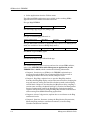
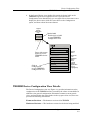
Logical Device Icon Components
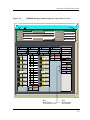
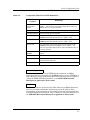
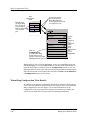
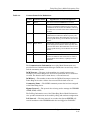
SlotNumber/Module Notes Access Label Ð Displays the number
identifying the hub slot location occupied by the TRBMIM module being
viewed. Double-clicking on this label accesses the Notes window for the
TRBMIM.
Device Label Ð IdentiÞes the TRBMIM as the type of physical device being
modeled. Double-clicking on this label accesses the TRBM Device
ConÞguration view (see page 2-8).
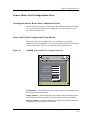
Figure 2-6.
TRBMIM Logical Device Application Icon Detail
Slot Number/Module Notes Access Label
(Double-click to access TRBMIMÕs Notes window)
Logical
Device
Icon
4
TRBMIM
Device Label
(Double-click to access TRBMIMÕs Device ConÞguration
View)
Press right mouse button to access
TRBMIMÕs device menu
Close
Navigate
Alarms
Performance
NotesÉ
Utilities
ConÞguration
Stations
Ctrl+c
Device
Menu
(Same as
Icon
Subviews
Menu)
Station Errors
Model Information
Device View
2-12
TRBMIM
Management Module Guide