1
AT-S62 Management Software Menus Interface User’s Guide
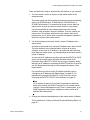
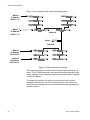
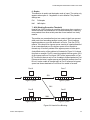
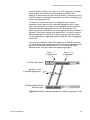
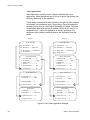
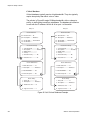
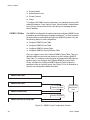
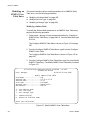
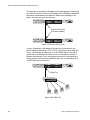
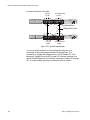
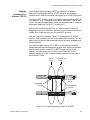
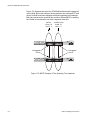
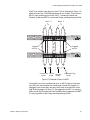
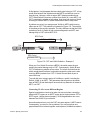
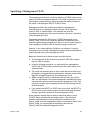
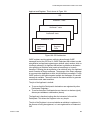
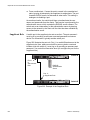
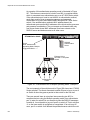
A MSTI can contain more than one VLAN. This is illustrated in Figure 173
where there are two AT-8524M switches with four VLANs. There are two
MSTIs, each containing two VLANs. MSTI 1 contains the Sales and
Presales VLANs and MSTI 2 contains the Design and Engineering VLANs.
MSTI 1
MSTI 2
AT-8524M Fast Ethernet Switch
MODE
STATUS
LINK
FAULT
MODE
MASTER
LINK
RPS
MODE
PWR
Tagged
Ports
Tagged
Ports
AT-8524M Fast Ethernet Switch
MODE
LINK
MODE
Presales Sales Design
VLAN
VLAN
VLAN
STATUS
FAULT
MASTER
LINK
RPS
MODE
PWR
Engineering
VLAN
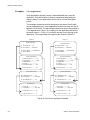
Figure 173. Multiple VLANs in a MSTI
You should note in this example that since an MSTI contains more than
one VLAN, the links between the VLAN parts is made with tagged, not
untagged, ports so that they can carry traffic from more than one virtual
LAN. Referring again to Figure 173, the tagged link in MSTI 1 is carrying
traffic for both the Presales and Sales VLANs while the tagged link in MSTI
2 is carrying traffic for the Design and Engineering VLANs.
Section IV: Spanning Tree Protocols
511