1
INSTALLATION AND PROGRAMMING
IMPORTANT! Be certain that the Distributed Audio System is fully configured and working locally. DO NOT
connect any external devices (IP232, M1XEP, Audio Control Module, etc.) until local audio operation is confirmed.
1.
2.
3.
4.
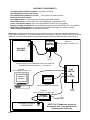
Connect the M1XEP to the M1 Control using 9 pin serial ribbon cable.
Connect the M1XEP to the LAN using a Cat5 or Cat6 network cable. (customer supplied).
Connect the Elk-IP232 to the Distributed Audio controller or adapter using a serial ribbon cable.
Connect the IP232 to the LAN using a Cat5 or Cat6 network cable. (customer supplied).
Verify the M1XEP, the LAN Switch, and the IP232 are all powered up.
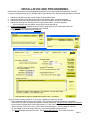
5. Configuring the IP232. Install & launch the IP232 Config Utility on a PC connected to the LAN.
- Click Search to find the IP232 connected to the network.
- Highlight the IP232 found and click Configure.
- Verify the IP232 Firmware version is 1.0.16 or later. Update the firmware if it is older.
- Enter a descriptive Device Name for the IP232. This is useful for future identification on the network.
- Select DHCP or Static, and enter an IP Address, Subnet, & Gateway. We recommend a STATIC IP Address.
- Set the Serial Port Baud rate to 19,200 (Russound), or 57,600 (Nuvo or Proficient). Handshaking is None.
- Set the Incoming TCP “Port” to 2101. This is the recommended port. It can be changed if required.
- Do not change or set the Incoming UDP Port. Leave it at the default setting of 65535.
- Click Send Settings to program the IP232. This is VERY IMPORTANT! Click Close when done.
Page 5