1
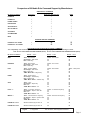
Comparison of M1Audio Rule Command Support by Manufacturer
ZONE SPECIFIC COMMANDS
M1 Audio Command
Russound *
Proficient (Speakercraft)
NUVO
POWER ON
POWER OFF
POWER TOGGLE
NEXT SOURCE
SET SOURCE TO
SET VOLUME TO
VOLUME UP
VOLUME DOWN
MUTE
NON ZONE SPECIFIC COMMANDS
POWER ON - ALL ZONES
POWER OFF - ALL ZONES
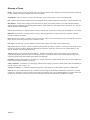
ACTIONS RESULTING FROM SOURCE CONTROL COMMANDS
The compatibility and functionality of Source commands varies greatly by source and audio Mfg as shown.
Note: Do not confuse NEXT with NEXT SOURCE (above). Do not confuse PEVIOUS with PREVIOUS SOUCE (above)
M1 Audio Command
Source - Action
Source - Action
NEXT
Tuner - Next Preset
CD Changer - Next Track
IPod - Next Song
Tuner - Next Preset
PREVIOUS
Tuner - Next Preset
CD Changer - Next Track
IPod - Next Song
Tuner - Next Preset
PLAY
Tuner - Toggles AM/FM
CD Changer - Next Track
IPod - Next Song
“SMS” Music Serv - Begin Play
Tuner - Next Preset
PAUSE
Tuner - Mutes output
CD Changer - Pauses Play
iPod - Pauses Play
“SMS” Music Server - Pauses Play
STOP
Tuner - Scan
CD Changer - Stops Play
iPod “SMS” Music Server -
PLUS “+”
Tuner - Increments frequency
CD Changer - Steps to next disc
iPod “SMS” Music Server -
Tuner - Increments frequency
MINUS “-”
Tuner - Decrements the frequency
CD Changer - Steps to previous disc
iPod “SMS” Music Server -
Tuner - Decrements frequency
FAVORITE 1 “Fav1”
Whatever Audio Equip is set to do
FAVORITE 2 “Fav2”
Whatever Audio Equip is set to do
Legend:
= Supported
Source - Action
Tuner - Next preset
= No Action, NOT Supported at this time.
Page 9