1
6. Configuring the M1XEP for Audio. The following steps are for setting up the Audio configuration of an
M1XEP which has already been in active use with the M1 and Network. NOTE: If this is a new M1XEP or new
installation, please follow the instructions that came with the M1XEP to get it initially setup and working with
the M1 and the LAN, then proceed with the Audio configuration.
-
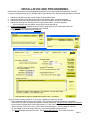
Launch the ElkRP2 Software on a locally networked PC and open the appropriate customer account.
Establish a connection with the Control using the Connection > Network method.
Select the M1XEP setup box on the accounts details screen.
Select the Audio System tab.
-
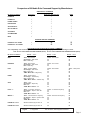
In the drop down box, choose the Audio Controller Manufactuer/Model from the available list.
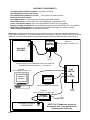
Enter an IP Address and Port for the “Audio Controller” (The Elk-IP232 connected to the Audio Controller).
Enter descriptive names for the Audio Zones and Sources. These will be used later in Rules programming.
DO NOT FORGET TO SEND all the programmed information to the M1G. Click SEND
The M1XEP will need to reboot for all the changes to take effect. It may take up to 8 minutes to reboot. Elk-RP will
be disconnected during reboot. Be patient, DO NOT attempt to re-connect until reboot is completed.
7. Once the M1XEP finishes rebooting it will attempt to connect with the IP232 attached to the audio controller.
Upon successful connection, the M1XEP and IP232 will automatically syncronize with one another. The time
required for this varies according to the Audio brand.
The next step will be to create and program some Rules into the M1 for controlling the Audio.
IMPORTANT: Audio commands are blocked while ElkRP2 is connected to the M1. The M1
and Audio Controller cannot send or receive information, and rules which contain Audio
commands cannot be tested during this time. This is because the M1XEP and Main Serial
Port resources are 100% dedicated to ElkRP2. In order to test or control Audio, the M1 must
be disconnected from ElkRP2. Allow at least 1 minute after disconnect for the M1XEP to reestablish contact with the IP232.
Page 6