1
6 Installation and Configuration examples (cont.)
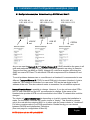
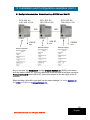
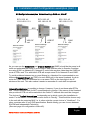
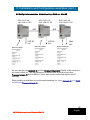
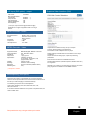
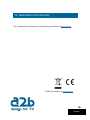
6.1 Configuration examples: Network settings COFDM out, Mux #1
ECX-200 #1
192.168.10.21
ECX-200 #2
192.168.10.22
ASI
VSB RF
out
ECX-200 #3
192.168.10.23
ASI
VSB RF
out
COFDM
out
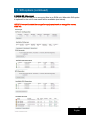
As you can see the Network ID and Original Network ID (ONID) should be the same in all
units and preferable the same ID as the Main terrestrial operator are using (in Sweden
Teracom and they use 8945 as ONID). Network ID could have another value than the
ONID but most of STB and TV with inbuilt STB will accept same ID for Network ID and
ONID.
To avoid problems between two or more Muxes in a Headend it’s recommended to use
different Transport Stream ID (TSID) for each EXM unit in the same Headend. A rule to
make the TSID easier to remember is to use same TSID as the last digits in the IP
address of the unit. This also makes it easier to remember if a unit shall be replaced.
NetworkProviderName is possible to change. However, if you do not know what STB:s
and TV sets customer use it’s NOT recommended to change. If the owner of the
Headend also provide all STB:s to all households in the Cable TV network this could be
changed.
The choice of Logical channel type is depending on in which country the installation is
made. For the Nordic countries the correct choice is ”Nordig”. This should be chosen
only in the unit with the outgoing MUX i.e. in other units the correct choice is ”Undefined”.
For other countries refer to your DVB specification. Beside Nordig you can choose
between EACEM and Independent Television.
19
(See next page for configuration of Mux #2).
English
NOTE! All three units has SW option EXM-RT.