1
4 Settings (continued)
We suggest that you consult your service provider for correct parameters for
each multiplex you want to receive.
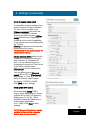
Click [Output] to continue with the output settings.
4.3.4 Output settings
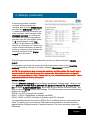
ASI mode
The output selection ASI disables all
RF modulation on the outputs and
all selected services will be
transmitted only through the ASI
output connector. ASI is a high
speed interface for digital TV
transport streams. Use this output
mode if you run IPTV out.
Under [ASI options] you can select
the output bitrate which is the same
bitrate as for IPTV out.
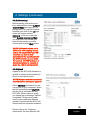
Analogue mode
The selection [Analogue] is set as
factory default as RF output .
Country specific settings can be
done by selecting [Country]. By
selecting a specific country,
transmission standard and
languages are automatically preset.
[Audio language] gives you the
choosen language if there is more
than one language in the received
signal.
[Audio level] can be adjusted
between +3 to -9 dB.
Subtitling type, subtitle priority and
subtitle charset can be selected as
well as Subtitle conversion and
Subtitle WSS.
10
English