1
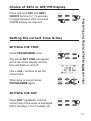
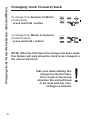
Press and hold DAY and NEXT
ON/OFF buttons for 1.5 seconds
to toggle between 24hr clock and
AM/PM display, as required.
PROGRAMME
+
DAY
NEXT/ON/OFF
-
COPY
PROGRAMME
+
DAY
NEXT/ON/OFF
-
COPY
R/S
Setting the correct Time & Day
SETTING THE TIME
Press PROGRAMME once
R/S
The words SET TIME will appear
at the top of the display and the
time will flash on and off
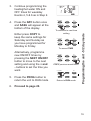
Use + and – buttons to set the
correct time
When time is correct press
PROGRAMME again.
PROGRAMME
+
DAY
NEXT/ON/OFF
-
COPY
PROGRAMME
+
DAY
NEXT/ON/OFF
-
COPY
R/S
24hr or AM/PM display & Setting the Time & Day
Choice of 24hr or AM/PM display
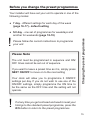
SETTING THE DAY
Press DAY repeatedly until the
correct day of the week is displayed.
MO is Monday, TU is Tuesday etc.
R/S
13