1
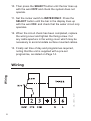
10. Then press the SELECT button until the bar lines up
with the word OFF and check the system does not
operate.
11. Set the rocker switch to WATER ONLY. Press the
SELECT button until the bar in the display lines up
with the word ON and check that the water circuit only
operates.
12. When the circuit check has been completed, replace
the wiring cover and tighten the fixing screw. Cut
any cable aperture in the wiring cover which may be
necessary to accommodate surface mounted cables.
13. Finally set time of day and programmes required,
noting that the unit is supplied with a pre-set
programme, as stated on Page 14.
102, 102E5, 102E7
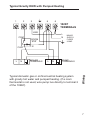
Wiring
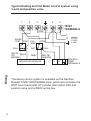
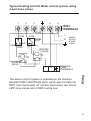
Wiring
6