1
Programming the heating & hot water
in 5/2 day mode
Programming the unit - 5/2 day mode
1.
18
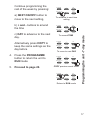
Press PROG until SET
ON TIME appears at the
top of the display and
MOTUWETHFR appears at
the bottom of the display.
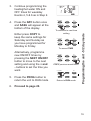
Use the + and - buttons to
set the time you would like
your heating/hot water to
first come on in the morning
(Event 1).
2.
Press NEXT ON/OFF once
only.
Use the + and - buttons to
set the time you want your
heating/hot water to go off
(Event 2).
To move to the next setting,
i.e. when you would like your
heating/hot water to come
on again (Event 3) press the
NEXT ON/OFF button again.
PROGRAMME
+
DAY
NEXT/ON/OFF
-
COPY
PROGRAMME
+
DAY
NEXT/ON/OFF
-
COPY
PROGRAMME
+
DAY
NEXT/ON/OFF
-
COPY
PROGRAMME
+
DAY
NEXT/ON/OFF
-
COPY
PROGRAMME
+
DAY
NEXT/ON/OFF
-
COPY
R/
R/
R/
R/
R/