1
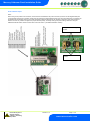
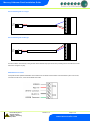
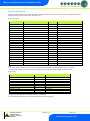
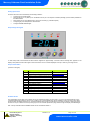
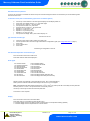
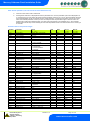
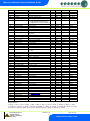
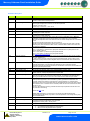
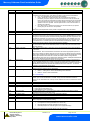
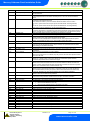
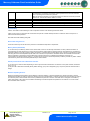
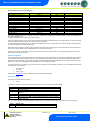
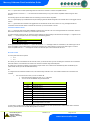
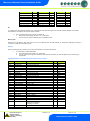
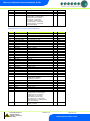
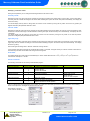
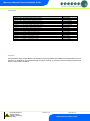
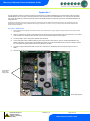
Mercury Coldroom Panel Installation Guide Mask Length 255.255.255.252 255.255.255.248 255.255.255.240 255.255.255.224 255.255.255.192 255.255.255.128 255.255.255.0 30 29 28 27 26 25 24 Mask 255.255.254.0 255.255.252.0 255.255.248.0 255.255.240.0 255.255.224.0 255.255.192.0 255.255.128.0 255.255.0.0 Length 23 22 21 20 19 18 17 16 Mask 255.254.0.0 255.252.0.0 255.248.0.0 255.240.0.0 255.224.0.0 255.192.0.0 255.128.0.0 255.0.0.0 Length 15 14 13 12 11 10 09 08 IP-r To configure the communication module for IP-r, set the three rotary switches to give each controller a unique identifier. The module should then be connected to the controller and the network. 2. nEt. From the function menu you can now select nEt Press enter and the display will show “IP-r”, press enter You can now view only the address given by the DHCP server Mercury Hub Please refer to the Mercury Hub user guide, which can be obtained from the RDM website, for information regarding connecting a controller to a network via the Mercury Hub. Viewing Apart from setting up the controller, you can also view the status of the inputs and outputs. 1. IO. View Inputs / Outputs and States a. From the function menu, select “IO”, press enter b. You can now scroll through the IO tables as set out below. The tables you view will depend on the controller type configuration. Input/Output table for Coldroom Panel with Compressor/LLV option Number I-01 I-02 I-03 I-04 I-05 I-06 I-07 I-08 I-09 I-10 I-11 I-12 I-13 I-15 I-16 I-25 O-01 O-05 O-07 O-08 O-09 O-10 O-11 O-12 O-13 IO Control Temp. Display temp Air on Probe Air off Probe Evaporator Probe Suction Line Probe Superheat Logging Probe Defrost Probe Plant Fault Case Clean Door Sensor Person Trapped External Defrost MOP Load Shedding Liquid Line Valve Defrost Control Case Fans Lights Alarm Relay Last Def. Time Last Def. Length Last Def. Ctrl Temp. Last Def. Type O-20 O-21 Door Open Time Door Open Length Range (dependant on probe type) oC ( oF ) -42 to 60 (-56.2 to 262.4) PT 1000 only -42 to 60 (-43.6 to 140) -49 to 60 (-56.2 to 140) -42 to 60 (-43.6 to 140) -42 to 60 (-43.6 to 140) -42 to 60 (-43.6 to 140) -30 to 60 (-54 to 108) -49 to 60 (-56.2 to 140) -42 to 60 (-43.6 to 140) 0 (OK), 1 (Alarm) 0 (Off), 1 (On) 0 (Closed), 1 (Open) 0 (OK), 1 (Alarm) 0 (Off), 1 (On) 0 (Off), 1 (On) 0 (Off), 1 (On) 0 (Off), 1 (On) 0 (Off), 1 (On) 0 (Off), 1 (On) 0 (Off), 1 (On) 0 (OK), 1 (Alarm) 00:00 to 23:59 00:00 to 03:00 -42 to 60 (-43.6 to 140) 0 (None), 1 (Internal), 2 (External), 3 (Network), 4 (Display), 5 (Timed) 00:00 to 23:59 00:00 to 03:00 Step 0.1 0.1 0.1 0.1 0.1 0.1 0.1 0.1 0.1 Units Deg Deg Deg Deg Deg Deg Deg Deg Deg 0.1 hh:mm hh:mm Deg hh:mm hh:mm Warning Ensure that all power is switched off before installing or maintaining this product Revision 7.1b Page 21 of 31 www.resourcedm.com