1
Embedded System Tools
Reference Manual
Embedded Development Kit
EDK 10.1, Service Pack 3
R
.
R
© Copyright 2002 – 2008 Xilinx, Inc. All Rights Reserved.
XILINX, the Xilinx logo, the Brand Window and other designated brands included herein are trademarks of Xilinx, Inc.
The PowerPC® name and logo are registered trademarks of IBM Corp., and used under license. All other trademarks are the property of their respective owners.
Disclaimer:
Xilinx is disclosing this user guide, manual, release note, and/or specification (the “Documentation”) to you solely for use in the development of designs to operate with
Xilinx hardware devices. You may not reproduce, distribute, republish, download, display, post, or transmit the Documentation in any form or by any means including,
but not limited to, electronic, mechanical, photocopying, recording, or otherwise, without the prior written consent of Xilinx. Xilinx expressly disclaims any liability
arising out of your use of the Documentation. Xilinx reserves the right, at its sole discretion, to change the Documentation without notice at any time. Xilinx assumes
no obligation to correct any errors contained in the Documentation, or to advise you of any corrections or updates. Xilinx expressly disclaims any liability in connection
with technical support or assistance that may be provided to you in connection with the Information.
THE DOCUMENTATION IS DISCLOSED TO YOU ”AS-IS” WITH NO WARRANTY OF ANY KIND. XILINX MAKES NO OTHER WARRANTIES, WHETHER
EXPRESS, IMPLIED, OR STATUTORY, REGARDING THE DOCUMENTATION, INCLUDING ANY WARRANTIES OF MERCHANTABILITY, FITNESS FOR A
PARTICULAR PURPOSE, OR NONINFRINGEMENT OF THIRD-PARTY RIGHTS. IN NO EVENT WILL XILINX BE LIABLE FOR ANY CONSEQUENTIAL,
INDIRECT, EXEMPLARY, SPECIAL, OR INCIDENTAL DAMAGES, INCLUDING ANY LOSS OF DATA OR LOST PROFITS, ARISING FROM YOUR USE OF THE
DOCUMENTATION.
Embedded System Tools Reference Manual
www.xilinx.com
EDK 10.1, Service Pack 3
R
Preface
About This Guide
Welcome to the Embedded Development Kit (EDK). This product provides you with a full
set of design tools and a wide selection of standard peripherals required to build
embedded processor systems based on the MicroBlaze™ soft processor and PowerPC®
hard processor.
This guide contains information about the embedded system tools included in EDK. These
tools, consisting of processor platform tailoring utilities, software application
development tools, a full featured debug tool chain, and device drivers and libraries, allow
you to fully exploit the power of MicroBlaze and PowerPC processors along with their
corresponding peripherals.
Guide Contents
This guide contains the following chapters:
•
Chapter 1, “Embedded System and Tools Architecture Overview”
•
Chapter 2, “Platform Generator (Platgen)”
•
Chapter 3, “Simulation Model Generator (Simgen)”
•
Chapter 4, “Library Generator (Libgen)”
•
Chapter 5, “Virtual Platform Generator (VPgen),”
•
Chapter 6, “Platform Specification Utility (PsfUtility)”
•
Chapter 7, “Version Management Tools”
•
Chapter 9, “Bitstream Initializer (BitInit)”
•
Chapter 8, “Flash Memory Programming”
•
Chapter 10, “GNU Compiler Tools”
•
Chapter 11, “GNU Debugger (GDB)”
•
Chapter 12, “Xilinx Microprocessor Debugger (XMD)”
•
Chapter 13, “System ACE File Generator (GenACE)”
•
Chapter 15, “EDK Shell”
•
Chapter 14, “Command Line (no window) Mode”
•
Appendix A, “GNU Utilities”
•
Appendix B, “Interrupt Management”
•
Appendix C, “EDK Tcl Interface”
•
Appendix D, “Glossary”
Embedded System Tools Reference Manual
EDK 10.1, Service Pack 3
www.xilinx.com
3
R
Preface: About This Guide
Additional Resources
4
•
Xilinx® website: http://www.xilinx.com
•
Xilinx Answer Browser and technical support WebCase website:
http://www.xilinx.com/support
•
Xilinx Platform Studio and EDK website:
http://www.xilinx.com/ise/embedded_design_prod/platform_studio.htm
•
Xilinx Platform Studio and EDK Document website:
http://www.xilinx.com/ise/embedded/edk_docs.htm
•
Xilinx XPS/EDK Supported IP website:
http://www.xilinx.com/ise/embedded/edk_ip.htm
•
Xilinx EDK Example website:
http://www.xilinx.com/ise/embedded/edk_examples.htm
•
Xilinx Tutorial website:
http://www.xilinx.com/support/techsup/tutorials/index.htm
•
Xilinx Data Sheets:
http://www.xilinx.com/xlnx/xweb/xil_publications_index.jsp
•
Xilinx Problem Solvers:
http://www.xilinx.com/support/troubleshoot/psolvers.htm
•
Xilinx ISE® Manuals:
http://www.xilinx.com/support/software_manuals.htm
•
Additional Xilinx Documentation:
http://www.xilinx.com/support/library.htm
•
GNU Manuals:
http://www.gnu.org/manual
www.xilinx.com
Embedded System Tools Reference Manual
EDK 10.1, Service Pack 3
R
Conventions
Conventions
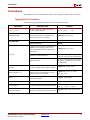
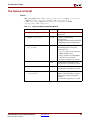
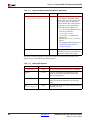
This document uses the following conventions. An example illustrates each convention.
Typographical Conventions
The following typographical conventions are used in this document:
Convention
Meaning or Use
Example
Courier font
Messages, prompts, and program files
that the system displays
speed grade: - 100
Courier bold
Literal commands that you enter in a
syntactical statement. Descriptive text
will also reflect this convention.
ngdbuild design_name
Commands that you select from a menu
File → Open
Keyboard shortcuts
Ctrl+C
Variables in a code syntax statement for
which you must supply values. Text
within descriptions will also reflect this
convention.
ngdbuild design_name
References to other manuals
Refer To the Development System
Reference Guide for more information.
Emphasis in text
If a wire is drawn so that it overlaps
the pin of a symbol, the two nets are
not connected.
<Courier Italic in angle
brackets>
Variable in a syntax statement for which
you must supply values within a Tcl file.
ngdbuild <design_name>
Square brackets
An optional entry or parameter.
However, in bus specifications, such as
bus[7:0], they are required.
ngdbuild [option_name]
design_name
A list of items from which you must
choose one or more
lowpwr ={on|off}
Vertical bar |
Separates items in a list of choices
lowpwr ={on|off}
Vertical ellipsis
Repetitive material that has been omitted
IOB #1: Name = QOUT’
IOB #2: Name = CLKIN’
Horizontal ellipsis . . .
Repetitive material that has been omitted
allow block block_name loc1 loc2 ...
locn;
Helvetica bold
Italic font
Braces
[ ]
{ }
Embedded System Tools Reference Manual
EDK 10.1, Service Pack 3
www.xilinx.com
5
R
Preface: About This Guide
Online Document
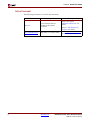
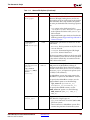
The following conventions are used in this document:
Convention
Blue text
Blue, underlined text
6
Meaning or Use
Cross-reference link to a
location in the current
document
Hyperlink to a website (URL)
www.xilinx.com
Example
Refer to the section
“Additional Resources” for
details.
Refer to “Title Formats” in
Chapter 1 for details.
Go to http://www.xilinx.com
for the latest speed files.
Embedded System Tools Reference Manual
EDK 10.1, Service Pack 3
Table of Contents
Preface: About This Guide
Guide Contents . . . . . . . . . . . . . . . . . . . . . . . . . . . . . . . . . . . . . . . . . . . . . . . . . . . . . . . . . . . . . . 3
Additional Resources . . . . . . . . . . . . . . . . . . . . . . . . . . . . . . . . . . . . . . . . . . . . . . . . . . . . . . . . 4
Conventions . . . . . . . . . . . . . . . . . . . . . . . . . . . . . . . . . . . . . . . . . . . . . . . . . . . . . . . . . . . . . . . . . 5
Typographical Conventions . . . . . . . . . . . . . . . . . . . . . . . . . . . . . . . . . . . . . . . . . . . . . . . . . 5
Online Document . . . . . . . . . . . . . . . . . . . . . . . . . . . . . . . . . . . . . . . . . . . . . . . . . . . . . . . . . . 6
Chapter 1: Embedded System and Tools Architecture Overview
About EDK . . . . . . . . . . . . . . . . . . . . . . . . . . . . . . . . . . . . . . . . . . . . . . . . . . . . . . . . . . . . . . . . . 19
Additional Resources . . . . . . . . . . . . . . . . . . . . . . . . . . . . . . . . . . . . . . . . . . . . . . . . . . . . . . . 20
Design Process Overview . . . . . . . . . . . . . . . . . . . . . . . . . . . . . . . . . . . . . . . . . . . . . . . . . . . 20
Hardware Development . . . . . . . . . . . . . . . . . . . . . . . . . . . . . . . . . . . . . . . . . . . . . . . . . . .
Software Development . . . . . . . . . . . . . . . . . . . . . . . . . . . . . . . . . . . . . . . . . . . . . . . . . . . .
Verification . . . . . . . . . . . . . . . . . . . . . . . . . . . . . . . . . . . . . . . . . . . . . . . . . . . . . . . . . . . . . .
Hardware Verification Using Simulation . . . . . . . . . . . . . . . . . . . . . . . . . . . . . . . . . . . .
Software Verification Using Debugging . . . . . . . . . . . . . . . . . . . . . . . . . . . . . . . . . . . . .
Device Configuration . . . . . . . . . . . . . . . . . . . . . . . . . . . . . . . . . . . . . . . . . . . . . . . . . . . . .
21
21
21
21
21
21
An Introduction to EDK Tools and Utilities . . . . . . . . . . . . . . . . . . . . . . . . . . . . . . . . . . 22
Xilinx Platform Studio (XPS) . . . . . . . . . . . . . . . . . . . . . . . . . . . . . . . . . . . . . . . . . . . . . . .
Xilinx Software Development Kit (SDK) . . . . . . . . . . . . . . . . . . . . . . . . . . . . . . . . . . . . .
EDK Command Line or “no window” Mode . . . . . . . . . . . . . . . . . . . . . . . . . . . . . . . . .
The Base System Builder (BSB) Wizard . . . . . . . . . . . . . . . . . . . . . . . . . . . . . . . . . . . . . .
The Create and Import Peripheral Wizard. . . . . . . . . . . . . . . . . . . . . . . . . . . . . . . . . . . .
Coprocessor Wizard . . . . . . . . . . . . . . . . . . . . . . . . . . . . . . . . . . . . . . . . . . . . . . . . . . . . . .
Platform Generator (Platgen) . . . . . . . . . . . . . . . . . . . . . . . . . . . . . . . . . . . . . . . . . . . . . . .
Library Generator (Libgen). . . . . . . . . . . . . . . . . . . . . . . . . . . . . . . . . . . . . . . . . . . . . . . . .
GNU Compiler Tools (GCC) . . . . . . . . . . . . . . . . . . . . . . . . . . . . . . . . . . . . . . . . . . . . . . .
Debug Configuration Wizard . . . . . . . . . . . . . . . . . . . . . . . . . . . . . . . . . . . . . . . . . . . . . .
Xilinx Microprocessor Debugger (XMD) . . . . . . . . . . . . . . . . . . . . . . . . . . . . . . . . . . . . .
GNU Debugger (GDB) . . . . . . . . . . . . . . . . . . . . . . . . . . . . . . . . . . . . . . . . . . . . . . . . . . . .
Simulation Model Generator (Simgen) . . . . . . . . . . . . . . . . . . . . . . . . . . . . . . . . . . . . . . .
Simulation Library Compiler (CompEDKLib) . . . . . . . . . . . . . . . . . . . . . . . . . . . . . . . .
Bus Functional Model Compiler (BFM) . . . . . . . . . . . . . . . . . . . . . . . . . . . . . . . . . . . . . .
Bitstream Initializer (Bitinit) . . . . . . . . . . . . . . . . . . . . . . . . . . . . . . . . . . . . . . . . . . . . . . . .
System ACE File Generator (GenACE) . . . . . . . . . . . . . . . . . . . . . . . . . . . . . . . . . . . . . . .
Flash Memory Programmer . . . . . . . . . . . . . . . . . . . . . . . . . . . . . . . . . . . . . . . . . . . . . . . .
Format Revision (revup) Tool and Version Management Wizard . . . . . . . . . . . . . . . .
LibXil Memory File System (LibXil MFS) . . . . . . . . . . . . . . . . . . . . . . . . . . . . . . . . . . . . .
Platform Specification Utility . . . . . . . . . . . . . . . . . . . . . . . . . . . . . . . . . . . . . . . . . . . . . . .
24
24
24
25
25
26
27
29
29
30
30
30
30
31
31
31
31
31
32
32
32
Project Creation and Management . . . . . . . . . . . . . . . . . . . . . . . . . . . . . . . . . . . . . . . . . . . 33
Controlling the EDK Flow (Advanced) . . . . . . . . . . . . . . . . . . . . . . . . . . . . . . . . . . . . . . 33
Makefiles. . . . . . . . . . . . . . . . . . . . . . . . . . . . . . . . . . . . . . . . . . . . . . . . . . . . . . . . . . . . . 33
Implementation and Download Control Files . . . . . . . . . . . . . . . . . . . . . . . . . . . . . . . . 34
Embedded System Tools Reference Manual
EDK 10.1, Service Pack 3
www.xilinx.com
7
R
Chapter 2: Platform Generator (Platgen)
Features . . . . . . . . . . . . . . . . . . . . . . . . . . . . . . . . . . . . . . . . . . . . . . . . . . . . . . . . . . . . . . . . . . . . .
Additional Resources . . . . . . . . . . . . . . . . . . . . . . . . . . . . . . . . . . . . . . . . . . . . . . . . . . . . . . .
Tool Requirements . . . . . . . . . . . . . . . . . . . . . . . . . . . . . . . . . . . . . . . . . . . . . . . . . . . . . . . . . .
Tool Usage . . . . . . . . . . . . . . . . . . . . . . . . . . . . . . . . . . . . . . . . . . . . . . . . . . . . . . . . . . . . . . . . . .
Tool Options . . . . . . . . . . . . . . . . . . . . . . . . . . . . . . . . . . . . . . . . . . . . . . . . . . . . . . . . . . . . . . . .
Load Path . . . . . . . . . . . . . . . . . . . . . . . . . . . . . . . . . . . . . . . . . . . . . . . . . . . . . . . . . . . . . . . . . . .
Output Files . . . . . . . . . . . . . . . . . . . . . . . . . . . . . . . . . . . . . . . . . . . . . . . . . . . . . . . . . . . . . . . .
HDL Directory . . . . . . . . . . . . . . . . . . . . . . . . . . . . . . . . . . . . . . . . . . . . . . . . . . . . . . . . . . .
Implementation Directory . . . . . . . . . . . . . . . . . . . . . . . . . . . . . . . . . . . . . . . . . . . . . . . . .
Synthesis Directory . . . . . . . . . . . . . . . . . . . . . . . . . . . . . . . . . . . . . . . . . . . . . . . . . . . . . . .
BMM Flow . . . . . . . . . . . . . . . . . . . . . . . . . . . . . . . . . . . . . . . . . . . . . . . . . . . . . . . . . . . . . . .
35
36
36
36
36
37
38
38
38
38
38
Synthesis Netlist Cache . . . . . . . . . . . . . . . . . . . . . . . . . . . . . . . . . . . . . . . . . . . . . . . . . . . . . 39
Chapter 3: Simulation Model Generator (Simgen)
Simgen Overview . . . . . . . . . . . . . . . . . . . . . . . . . . . . . . . . . . . . . . . . . . . . . . . . . . . . . . . . . . . 41
Additional Resources . . . . . . . . . . . . . . . . . . . . . . . . . . . . . . . . . . . . . . . . . . . . . . . . . . . . . . . 42
Simulation Libraries . . . . . . . . . . . . . . . . . . . . . . . . . . . . . . . . . . . . . . . . . . . . . . . . . . . . . . . . 42
Xilinx ISE® Libraries . . . . . . . . . . . . . . . . . . . . . . . . . . . . . . . . . . . . . . . . . . . . . . . . . . . . . .
UNISIM Library . . . . . . . . . . . . . . . . . . . . . . . . . . . . . . . . . . . . . . . . . . . . . . . . . . . . . . .
SIMPRIM Library . . . . . . . . . . . . . . . . . . . . . . . . . . . . . . . . . . . . . . . . . . . . . . . . . . . . . .
XilinxCoreLib Library . . . . . . . . . . . . . . . . . . . . . . . . . . . . . . . . . . . . . . . . . . . . . . . . . . .
Xilinx EDK Library . . . . . . . . . . . . . . . . . . . . . . . . . . . . . . . . . . . . . . . . . . . . . . . . . . . . . . .
EDK Libraries Search Order . . . . . . . . . . . . . . . . . . . . . . . . . . . . . . . . . . . . . . . . . . . . . .
42
42
42
43
43
43
CompXLib Utility . . . . . . . . . . . . . . . . . . . . . . . . . . . . . . . . . . . . . . . . . . . . . . . . . . . . . . . . . . . 44
CompEDKLib Utility. . . . . . . . . . . . . . . . . . . . . . . . . . . . . . . . . . . . . . . . . . . . . . . . . . . . . . . . 45
Usage . . . . . . . . . . . . . . . . . . . . . . . . . . . . . . . . . . . . . . . . . . . . . . . . . . . . . . . . . . . . . . . . . . .
CompEDKLib Command Line Examples . . . . . . . . . . . . . . . . . . . . . . . . . . . . . . . . . . . .
Use Case I: Launching the GUI to Compile the Xilinx and EDK Simulation Libraries . .
Use Case II: Compiling HDL Sources in the Built-In Repositories in the EDK . . . . . . . .
Use Case III: Compiling HDL Sources in Your Own Repository . . . . . . . . . . . . . . . . . .
Other Details . . . . . . . . . . . . . . . . . . . . . . . . . . . . . . . . . . . . . . . . . . . . . . . . . . . . . . . . . .
45
45
45
45
46
46
Simulation Models . . . . . . . . . . . . . . . . . . . . . . . . . . . . . . . . . . . . . . . . . . . . . . . . . . . . . . . . . . 47
Behavioral Models . . . . . . . . . . . . . . . . . . . . . . . . . . . . . . . . . . . . . . . . . . . . . . . . . . . . . . . .
Structural Models . . . . . . . . . . . . . . . . . . . . . . . . . . . . . . . . . . . . . . . . . . . . . . . . . . . . . . . . .
Timing Models . . . . . . . . . . . . . . . . . . . . . . . . . . . . . . . . . . . . . . . . . . . . . . . . . . . . . . . . . . .
Single and Mixed Language Models . . . . . . . . . . . . . . . . . . . . . . . . . . . . . . . . . . . . . . . . .
Creating Simulation Models Using XPS Batch . . . . . . . . . . . . . . . . . . . . . . . . . . . . . . . .
47
47
48
48
49
Simgen Syntax . . . . . . . . . . . . . . . . . . . . . . . . . . . . . . . . . . . . . . . . . . . . . . . . . . . . . . . . . . . . . . 50
Requirements . . . . . . . . . . . . . . . . . . . . . . . . . . . . . . . . . . . . . . . . . . . . . . . . . . . . . . . . . . . . 50
Options . . . . . . . . . . . . . . . . . . . . . . . . . . . . . . . . . . . . . . . . . . . . . . . . . . . . . . . . . . . . . . . . . 50
Output Files . . . . . . . . . . . . . . . . . . . . . . . . . . . . . . . . . . . . . . . . . . . . . . . . . . . . . . . . . . . . . . . . 52
Memory Initialization . . . . . . . . . . . . . . . . . . . . . . . . . . . . . . . . . . . . . . . . . . . . . . . . . . . . . . . 53
VHDL . . . . . . . . . . . . . . . . . . . . . . . . . . . . . . . . . . . . . . . . . . . . . . . . . . . . . . . . . . . . . . . . . . . 53
Verilog . . . . . . . . . . . . . . . . . . . . . . . . . . . . . . . . . . . . . . . . . . . . . . . . . . . . . . . . . . . . . . . . . . 53
Test Benches . . . . . . . . . . . . . . . . . . . . . . . . . . . . . . . . . . . . . . . . . . . . . . . . . . . . . . . . . . . . . . . . 53
VHDL Test Bench Example. . . . . . . . . . . . . . . . . . . . . . . . . . . . . . . . . . . . . . . . . . . . . . . 53
Verilog Test Bench Example . . . . . . . . . . . . . . . . . . . . . . . . . . . . . . . . . . . . . . . . . . . . . . 55
8
www.xilinx.com
Embedded System Tools Reference Manual
EDK 10.1, Service Pack 3
R
Simulating Your Design . . . . . . . . . . . . . . . . . . . . . . . . . . . . . . . . . . . . . . . . . . . . . . . . . . . . . 56
Restrictions . . . . . . . . . . . . . . . . . . . . . . . . . . . . . . . . . . . . . . . . . . . . . . . . . . . . . . . . . . . . . . . . . 56
Chapter 4: Library Generator (Libgen)
Overview . . . . . . . . . . . . . . . . . . . . . . . . . . . . . . . . . . . . . . . . . . . . . . . . . . . . . . . . . . . . . . . . . . .
Additional Resources . . . . . . . . . . . . . . . . . . . . . . . . . . . . . . . . . . . . . . . . . . . . . . . . . . . . . . .
Tool Usage . . . . . . . . . . . . . . . . . . . . . . . . . . . . . . . . . . . . . . . . . . . . . . . . . . . . . . . . . . . . . . . . . .
Tool Options . . . . . . . . . . . . . . . . . . . . . . . . . . . . . . . . . . . . . . . . . . . . . . . . . . . . . . . . . . . . . . . .
Load Paths . . . . . . . . . . . . . . . . . . . . . . . . . . . . . . . . . . . . . . . . . . . . . . . . . . . . . . . . . . . . . . . . . .
Unix System Load Paths . . . . . . . . . . . . . . . . . . . . . . . . . . . . . . . . . . . . . . . . . . . . . . . . . . .
PC System Load Paths . . . . . . . . . . . . . . . . . . . . . . . . . . . . . . . . . . . . . . . . . . . . . . . . . . . . .
Additional Directories . . . . . . . . . . . . . . . . . . . . . . . . . . . . . . . . . . . . . . . . . . . . . . . . . . . . .
Search Priority Mechanism . . . . . . . . . . . . . . . . . . . . . . . . . . . . . . . . . . . . . . . . . . . . . . . . .
57
58
58
58
59
60
60
60
60
Output Files . . . . . . . . . . . . . . . . . . . . . . . . . . . . . . . . . . . . . . . . . . . . . . . . . . . . . . . . . . . . . . . . 61
include Directory . . . . . . . . . . . . . . . . . . . . . . . . . . . . . . . . . . . . . . . . . . . . . . . . . . . . . . .
lib Directory . . . . . . . . . . . . . . . . . . . . . . . . . . . . . . . . . . . . . . . . . . . . . . . . . . . . . . . . . . . .
libsrc Directory . . . . . . . . . . . . . . . . . . . . . . . . . . . . . . . . . . . . . . . . . . . . . . . . . . . . . . . .
code Directory . . . . . . . . . . . . . . . . . . . . . . . . . . . . . . . . . . . . . . . . . . . . . . . . . . . . . . . . . . .
62
62
62
62
Libraries and Drivers Generation . . . . . . . . . . . . . . . . . . . . . . . . . . . . . . . . . . . . . . . . . . . . 63
Basic Philosophy . . . . . . . . . . . . . . . . . . . . . . . . . . . . . . . . . . . . . . . . . . . . . . . . . . . . . . . . . 63
MDD, MLD, and Tcl . . . . . . . . . . . . . . . . . . . . . . . . . . . . . . . . . . . . . . . . . . . . . . . . . . . . . . 63
MSS Parameters. . . . . . . . . . . . . . . . . . . . . . . . . . . . . . . . . . . . . . . . . . . . . . . . . . . . . . . . . . . . .
Drivers. . . . . . . . . . . . . . . . . . . . . . . . . . . . . . . . . . . . . . . . . . . . . . . . . . . . . . . . . . . . . . . . . . . . . .
Libraries . . . . . . . . . . . . . . . . . . . . . . . . . . . . . . . . . . . . . . . . . . . . . . . . . . . . . . . . . . . . . . . . . . . .
OS Block . . . . . . . . . . . . . . . . . . . . . . . . . . . . . . . . . . . . . . . . . . . . . . . . . . . . . . . . . . . . . . . . . . . .
Interrupts and Interrupt Controllers . . . . . . . . . . . . . . . . . . . . . . . . . . . . . . . . . . . . . . . . .
The Importance of Instantiation. . . . . . . . . . . . . . . . . . . . . . . . . . . . . . . . . . . . . . . . . . . . .
Interrupt Controller Driver Customization . . . . . . . . . . . . . . . . . . . . . . . . . . . . . . . . . . .
MicroBlaze . . . . . . . . . . . . . . . . . . . . . . . . . . . . . . . . . . . . . . . . . . . . . . . . . . . . . . . . . . .
PowerPC . . . . . . . . . . . . . . . . . . . . . . . . . . . . . . . . . . . . . . . . . . . . . . . . . . . . . . . . . . . . .
64
64
64
65
65
65
66
66
66
XMDStub Peripherals (MicroBlaze Specific) . . . . . . . . . . . . . . . . . . . . . . . . . . . . . . . . . 66
STDIN and STDOUT Peripherals . . . . . . . . . . . . . . . . . . . . . . . . . . . . . . . . . . . . . . . . . . . 66
Chapter 5: Virtual Platform Generator (VPgen)
Overview . . . . . . . . . . . . . . . . . . . . . . . . . . . . . . . . . . . . . . . . . . . . . . . . . . . . . . . . . . . . . . . . . . .
Tool Usage and Options . . . . . . . . . . . . . . . . . . . . . . . . . . . . . . . . . . . . . . . . . . . . . . . . . . . . .
Output Files . . . . . . . . . . . . . . . . . . . . . . . . . . . . . . . . . . . . . . . . . . . . . . . . . . . . . . . . . . . . . . . .
Available Models . . . . . . . . . . . . . . . . . . . . . . . . . . . . . . . . . . . . . . . . . . . . . . . . . . . . . . . . . . .
Current Restrictions . . . . . . . . . . . . . . . . . . . . . . . . . . . . . . . . . . . . . . . . . . . . . . . . . . . . . . . . .
67
67
68
68
70
Chapter 6: Platform Specification Utility (PsfUtility)
Tool Options . . . . . . . . . . . . . . . . . . . . . . . . . . . . . . . . . . . . . . . . . . . . . . . . . . . . . . . . . . . . . . . 72
MPD Creation Process Overview . . . . . . . . . . . . . . . . . . . . . . . . . . . . . . . . . . . . . . . . . . . . 73
Use Models for Automatic MPD Creation. . . . . . . . . . . . . . . . . . . . . . . . . . . . . . . . . . . . 73
Peripherals with a Single Bus Interface . . . . . . . . . . . . . . . . . . . . . . . . . . . . . . . . . . . . . . 73
Signal Naming Conventions . . . . . . . . . . . . . . . . . . . . . . . . . . . . . . . . . . . . . . . . . . . . . . 73
Embedded System Tools Reference Manual
EDK 10.1, Service Pack 3
www.xilinx.com
9
R
Invoking the PsfUtility . . . . . . . . . . . . . . . . . . . . . . . . . . . . . . . . . . . . . . . . . . . . . . . . . .
Peripherals with Multiple Bus Interfaces . . . . . . . . . . . . . . . . . . . . . . . . . . . . . . . . . . . . .
Non-Exclusive Bus Interfaces . . . . . . . . . . . . . . . . . . . . . . . . . . . . . . . . . . . . . . . . . . . . .
Exclusive Bus Interfaces . . . . . . . . . . . . . . . . . . . . . . . . . . . . . . . . . . . . . . . . . . . . . . . . .
Peripherals with TRANSPARENT Bus Interfaces . . . . . . . . . . . . . . . . . . . . . . . . . . . . .
BRAM PORTS . . . . . . . . . . . . . . . . . . . . . . . . . . . . . . . . . . . . . . . . . . . . . . . . . . . . . . . . .
Peripherals with Point-to-Point Connections . . . . . . . . . . . . . . . . . . . . . . . . . . . . . . . . .
74
74
74
74
75
75
75
DRC Checks in PsfUtility . . . . . . . . . . . . . . . . . . . . . . . . . . . . . . . . . . . . . . . . . . . . . . . . . . . 76
HDL Source Errors . . . . . . . . . . . . . . . . . . . . . . . . . . . . . . . . . . . . . . . . . . . . . . . . . . . . . . . . 76
Bus Interface Checks . . . . . . . . . . . . . . . . . . . . . . . . . . . . . . . . . . . . . . . . . . . . . . . . . . . . . . 76
Conventions for Defining HDL Peripherals . . . . . . . . . . . . . . . . . . . . . . . . . . . . . . . . . 76
Naming Conventions for Bus Interfaces . . . . . . . . . . . . . . . . . . . . . . . . . . . . . . . . . . . . . .
Naming Conventions for VHDL Generics . . . . . . . . . . . . . . . . . . . . . . . . . . . . . . . . . . . .
Reserved Parameters . . . . . . . . . . . . . . . . . . . . . . . . . . . . . . . . . . . . . . . . . . . . . . . . . . . . . .
Naming Conventions for Bus Interface Signals . . . . . . . . . . . . . . . . . . . . . . . . . . . . . . . .
Global Ports . . . . . . . . . . . . . . . . . . . . . . . . . . . . . . . . . . . . . . . . . . . . . . . . . . . . . . . . . . . . . .
Slave DCR Ports . . . . . . . . . . . . . . . . . . . . . . . . . . . . . . . . . . . . . . . . . . . . . . . . . . . . . . . . . .
Slave FSL Ports . . . . . . . . . . . . . . . . . . . . . . . . . . . . . . . . . . . . . . . . . . . . . . . . . . . . . . . . . . .
Master FSL Ports . . . . . . . . . . . . . . . . . . . . . . . . . . . . . . . . . . . . . . . . . . . . . . . . . . . . . . . . .
Slave LMB Ports . . . . . . . . . . . . . . . . . . . . . . . . . . . . . . . . . . . . . . . . . . . . . . . . . . . . . . . . . .
Master OPB Ports . . . . . . . . . . . . . . . . . . . . . . . . . . . . . . . . . . . . . . . . . . . . . . . . . . . . . . . . .
Slave OPB Ports . . . . . . . . . . . . . . . . . . . . . . . . . . . . . . . . . . . . . . . . . . . . . . . . . . . . . . . . . .
Master/Slave OPB Ports . . . . . . . . . . . . . . . . . . . . . . . . . . . . . . . . . . . . . . . . . . . . . . . . . . .
Master PLB Ports . . . . . . . . . . . . . . . . . . . . . . . . . . . . . . . . . . . . . . . . . . . . . . . . . . . . . . . . .
PLB Master Outputs . . . . . . . . . . . . . . . . . . . . . . . . . . . . . . . . . . . . . . . . . . . . . . . . . . . .
PLB Master Inputs . . . . . . . . . . . . . . . . . . . . . . . . . . . . . . . . . . . . . . . . . . . . . . . . . . . . .
Slave PLB Ports . . . . . . . . . . . . . . . . . . . . . . . . . . . . . . . . . . . . . . . . . . . . . . . . . . . . . . . . . . .
PLB Slave Outputs . . . . . . . . . . . . . . . . . . . . . . . . . . . . . . . . . . . . . . . . . . . . . . . . . . . . .
PLB Slave Inputs . . . . . . . . . . . . . . . . . . . . . . . . . . . . . . . . . . . . . . . . . . . . . . . . . . . . . . .
Master PLBV46 ports . . . . . . . . . . . . . . . . . . . . . . . . . . . . . . . . . . . . . . . . . . . . . . . . . . . . . .
PLB v4.6 Master Outputs . . . . . . . . . . . . . . . . . . . . . . . . . . . . . . . . . . . . . . . . . . . . . . . .
PLB v4.6 Master Inputs . . . . . . . . . . . . . . . . . . . . . . . . . . . . . . . . . . . . . . . . . . . . . . . . . .
Slave PLBV46 ports . . . . . . . . . . . . . . . . . . . . . . . . . . . . . . . . . . . . . . . . . . . . . . . . . . . . . . .
PLBV46 Slave Outputs . . . . . . . . . . . . . . . . . . . . . . . . . . . . . . . . . . . . . . . . . . . . . . . . . .
PLBV46 Slave Inputs . . . . . . . . . . . . . . . . . . . . . . . . . . . . . . . . . . . . . . . . . . . . . . . . . . . .
76
77
79
80
81
81
82
83
84
85
86
87
88
88
89
89
90
90
91
91
91
92
92
93
Chapter 7: Version Management Tools
Overview . . . . . . . . . . . . . . . . . . . . . . . . . . . . . . . . . . . . . . . . . . . . . . . . . . . . . . . . . . . . . . . . . . . 95
Format Revision Tool Backup and Update Processes . . . . . . . . . . . . . . . . . . . . . . . . . 95
10.1 Changes . . . . . . . . . . . . . . . . . . . . . . . . . . . . . . . . . . . . . . . . . . . . . . . . . . . . . . . . . . . . .
9.2i Changes . . . . . . . . . . . . . . . . . . . . . . . . . . . . . . . . . . . . . . . . . . . . . . . . . . . . . . . . . . . . .
Changes in 9.1i . . . . . . . . . . . . . . . . . . . . . . . . . . . . . . . . . . . . . . . . . . . . . . . . . . . . . . . . . . .
Changes in 8.2i . . . . . . . . . . . . . . . . . . . . . . . . . . . . . . . . . . . . . . . . . . . . . . . . . . . . . . . . . . .
Changes in 8.1i . . . . . . . . . . . . . . . . . . . . . . . . . . . . . . . . . . . . . . . . . . . . . . . . . . . . . . . . . . .
Changes in 7.1i . . . . . . . . . . . . . . . . . . . . . . . . . . . . . . . . . . . . . . . . . . . . . . . . . . . . . . . . . . .
Changes in 6.3i . . . . . . . . . . . . . . . . . . . . . . . . . . . . . . . . . . . . . . . . . . . . . . . . . . . . . . . . . . .
Changes in 6.2i . . . . . . . . . . . . . . . . . . . . . . . . . . . . . . . . . . . . . . . . . . . . . . . . . . . . . . . . . . .
95
95
96
96
96
96
96
97
Command Line Option for the Format Revision Tool . . . . . . . . . . . . . . . . . . . . . . . . 97
The Version Management Wizard . . . . . . . . . . . . . . . . . . . . . . . . . . . . . . . . . . . . . . . . . . . 97
10
www.xilinx.com
Embedded System Tools Reference Manual
EDK 10.1, Service Pack 3
R
Chapter 8: Flash Memory Programming
Overview . . . . . . . . . . . . . . . . . . . . . . . . . . . . . . . . . . . . . . . . . . . . . . . . . . . . . . . . . . . . . . . . . . . 99
Flash Programming from XPS and SDK . . . . . . . . . . . . . . . . . . . . . . . . . . . . . . . . . . . . . 100
Supported Flash Hardware . . . . . . . . . . . . . . . . . . . . . . . . . . . . . . . . . . . . . . . . . . . . . . . . . 100
Flash Programmer Performance . . . . . . . . . . . . . . . . . . . . . . . . . . . . . . . . . . . . . . . . . . . . 101
Customizing Flash Programming . . . . . . . . . . . . . . . . . . . . . . . . . . . . . . . . . . . . . . . . . . . 102
Manual Conversion of ELF Files to SREC for Bootloader Applications . . . . . . . . . .
Operational Characteristics and Workarounds . . . . . . . . . . . . . . . . . . . . . . . . . . . . . . .
Handling Flash Devices with Conflicting Sector Layouts . . . . . . . . . . . . . . . . . . . . . . .
Data Polling Algorithm for AMD/Fujitsu Command Set. . . . . . . . . . . . . . . . . . . . . . .
104
104
104
105
Chapter 9: Bitstream Initializer (BitInit)
Overview . . . . . . . . . . . . . . . . . . . . . . . . . . . . . . . . . . . . . . . . . . . . . . . . . . . . . . . . . . . . . . . . . . 107
Tool Usage . . . . . . . . . . . . . . . . . . . . . . . . . . . . . . . . . . . . . . . . . . . . . . . . . . . . . . . . . . . . . . . . . 107
Tool Options . . . . . . . . . . . . . . . . . . . . . . . . . . . . . . . . . . . . . . . . . . . . . . . . . . . . . . . . . . . . . . . 107
Chapter 10: GNU Compiler Tools
Overview . . . . . . . . . . . . . . . . . . . . . . . . . . . . . . . . . . . . . . . . . . . . . . . . . . . . . . . . . . . . . . . . . .
Additional Resources . . . . . . . . . . . . . . . . . . . . . . . . . . . . . . . . . . . . . . . . . . . . . . . . . . . . . .
Compiler Framework. . . . . . . . . . . . . . . . . . . . . . . . . . . . . . . . . . . . . . . . . . . . . . . . . . . . . . .
Common Compiler Usage and Options . . . . . . . . . . . . . . . . . . . . . . . . . . . . . . . . . . . . .
Usage . . . . . . . . . . . . . . . . . . . . . . . . . . . . . . . . . . . . . . . . . . . . . . . . . . . . . . . . . . . . . . . . . .
Input Files . . . . . . . . . . . . . . . . . . . . . . . . . . . . . . . . . . . . . . . . . . . . . . . . . . . . . . . . . . . . . .
Output Files . . . . . . . . . . . . . . . . . . . . . . . . . . . . . . . . . . . . . . . . . . . . . . . . . . . . . . . . . . . .
File Types and Extensions . . . . . . . . . . . . . . . . . . . . . . . . . . . . . . . . . . . . . . . . . . . . . . . .
Libraries . . . . . . . . . . . . . . . . . . . . . . . . . . . . . . . . . . . . . . . . . . . . . . . . . . . . . . . . . . . . . . . .
Language Dialect . . . . . . . . . . . . . . . . . . . . . . . . . . . . . . . . . . . . . . . . . . . . . . . . . . . . . . . .
Commonly Used Compiler Options: Quick Reference . . . . . . . . . . . . . . . . . . . . . . . .
General Options . . . . . . . . . . . . . . . . . . . . . . . . . . . . . . . . . . . . . . . . . . . . . . . . . . . . . . . . .
Library Search Options . . . . . . . . . . . . . . . . . . . . . . . . . . . . . . . . . . . . . . . . . . . . . . . . . . .
Header File Search Option . . . . . . . . . . . . . . . . . . . . . . . . . . . . . . . . . . . . . . . . . . . . . . . .
Default Search Paths . . . . . . . . . . . . . . . . . . . . . . . . . . . . . . . . . . . . . . . . . . . . . . . . . . . . .
Linker Options . . . . . . . . . . . . . . . . . . . . . . . . . . . . . . . . . . . . . . . . . . . . . . . . . . . . . . . . . .
Memory Layout . . . . . . . . . . . . . . . . . . . . . . . . . . . . . . . . . . . . . . . . . . . . . . . . . . . . . . . . .
Reserved Memory . . . . . . . . . . . . . . . . . . . . . . . . . . . . . . . . . . . . . . . . . . . . . . . . . . . . .
I/O Memory . . . . . . . . . . . . . . . . . . . . . . . . . . . . . . . . . . . . . . . . . . . . . . . . . . . . . . . . .
User and Program Memory . . . . . . . . . . . . . . . . . . . . . . . . . . . . . . . . . . . . . . . . . . . . .
Object-File Sections . . . . . . . . . . . . . . . . . . . . . . . . . . . . . . . . . . . . . . . . . . . . . . . . . . . . . .
Linker Scripts . . . . . . . . . . . . . . . . . . . . . . . . . . . . . . . . . . . . . . . . . . . . . . . . . . . . . . . . . . .
109
109
110
111
111
111
112
112
112
113
114
114
117
117
117
119
119
119
120
120
121
123
MicroBlaze Compiler Usage and Options . . . . . . . . . . . . . . . . . . . . . . . . . . . . . . . . . . . 126
MicroBlaze Compiler . . . . . . . . . . . . . . . . . . . . . . . . . . . . . . . . . . . . . . . . . . . . . . . . . . . . .
MicroBlaze Compiler Options: Quick Reference . . . . . . . . . . . . . . . . . . . . . . . . . . . . .
Processor Feature Selection Options . . . . . . . . . . . . . . . . . . . . . . . . . . . . . . . . . . . . . . . .
General Program Options . . . . . . . . . . . . . . . . . . . . . . . . . . . . . . . . . . . . . . . . . . . . . . . . .
Application Execution Modes . . . . . . . . . . . . . . . . . . . . . . . . . . . . . . . . . . . . . . . . . . . .
Position Independent Code . . . . . . . . . . . . . . . . . . . . . . . . . . . . . . . . . . . . . . . . . . . . .
MicroBlaze Application Binary Interface . . . . . . . . . . . . . . . . . . . . . . . . . . . . . . . . . . . .
MicroBlaze Assembler . . . . . . . . . . . . . . . . . . . . . . . . . . . . . . . . . . . . . . . . . . . . . . . . . . . .
MicroBlaze Linker Options . . . . . . . . . . . . . . . . . . . . . . . . . . . . . . . . . . . . . . . . . . . . . . . .
Embedded System Tools Reference Manual
EDK 10.1, Service Pack 3
www.xilinx.com
126
126
127
129
130
131
132
132
133
11
R
MicroBlaze Linker Script Sections . . . . . . . . . . . . . . . . . . . . . . . . . . . . . . . . . . . . . . . . . .
Tips for Writing or Customizing Linker Scripts . . . . . . . . . . . . . . . . . . . . . . . . . . . . . .
Startup Files . . . . . . . . . . . . . . . . . . . . . . . . . . . . . . . . . . . . . . . . . . . . . . . . . . . . . . . . . . . .
First Stage Initialization Files . . . . . . . . . . . . . . . . . . . . . . . . . . . . . . . . . . . . . . . . . . . .
Second Stage Initialization Files . . . . . . . . . . . . . . . . . . . . . . . . . . . . . . . . . . . . . . . . . .
Other files . . . . . . . . . . . . . . . . . . . . . . . . . . . . . . . . . . . . . . . . . . . . . . . . . . . . . . . . . . .
Modifying Startup Files . . . . . . . . . . . . . . . . . . . . . . . . . . . . . . . . . . . . . . . . . . . . . . . . . .
Reducing the Startup Code Size for C Programs . . . . . . . . . . . . . . . . . . . . . . . . . . . . .
Compiler Libraries . . . . . . . . . . . . . . . . . . . . . . . . . . . . . . . . . . . . . . . . . . . . . . . . . . . . . . .
Thread Safety . . . . . . . . . . . . . . . . . . . . . . . . . . . . . . . . . . . . . . . . . . . . . . . . . . . . . . . . . . .
Command Line Arguments . . . . . . . . . . . . . . . . . . . . . . . . . . . . . . . . . . . . . . . . . . . . . . .
Interrupt Handlers . . . . . . . . . . . . . . . . . . . . . . . . . . . . . . . . . . . . . . . . . . . . . . . . . . . . . . .
134
135
135
136
137
138
138
139
139
140
140
141
PowerPC Compiler Usage and Options . . . . . . . . . . . . . . . . . . . . . . . . . . . . . . . . . . . . . 142
PowerPC Compiler Options: Quick Reference . . . . . . . . . . . . . . . . . . . . . . . . . . . . . . .
PowerPC Compiler Options . . . . . . . . . . . . . . . . . . . . . . . . . . . . . . . . . . . . . . . . . . . . . . .
PowerPC Linker . . . . . . . . . . . . . . . . . . . . . . . . . . . . . . . . . . . . . . . . . . . . . . . . . . . . . . . . .
PPC Linker Script Sections . . . . . . . . . . . . . . . . . . . . . . . . . . . . . . . . . . . . . . . . . . . . . . . .
Tips for Writing or Customizing Linker Scripts . . . . . . . . . . . . . . . . . . . . . . . . . . . . . .
Startup Files . . . . . . . . . . . . . . . . . . . . . . . . . . . . . . . . . . . . . . . . . . . . . . . . . . . . . . . . . . . .
Initialization File Description . . . . . . . . . . . . . . . . . . . . . . . . . . . . . . . . . . . . . . . . . . . .
Start-up File Descriptions . . . . . . . . . . . . . . . . . . . . . . . . . . . . . . . . . . . . . . . . . . . . . . .
Other files . . . . . . . . . . . . . . . . . . . . . . . . . . . . . . . . . . . . . . . . . . . . . . . . . . . . . . . . . . .
Modifying Startup Files . . . . . . . . . . . . . . . . . . . . . . . . . . . . . . . . . . . . . . . . . . . . . . . . . .
Reducing the Startup Code Size for C Programs . . . . . . . . . . . . . . . . . . . . . . . . . . . . .
Modifying Startup Files for Bootstrapping an Application. . . . . . . . . . . . . . . . . . . . . .
Compiler Libraries . . . . . . . . . . . . . . . . . . . . . . . . . . . . . . . . . . . . . . . . . . . . . . . . . . . . . . .
Thread Safety . . . . . . . . . . . . . . . . . . . . . . . . . . . . . . . . . . . . . . . . . . . . . . . . . . . . . . . . . . .
Command Line Arguments . . . . . . . . . . . . . . . . . . . . . . . . . . . . . . . . . . . . . . . . . . . . . . .
142
142
144
144
145
146
147
147
147
148
148
149
149
149
149
Other Notes . . . . . . . . . . . . . . . . . . . . . . . . . . . . . . . . . . . . . . . . . . . . . . . . . . . . . . . . . . . . . . . . 150
C++ Code Size . . . . . . . . . . . . . . . . . . . . . . . . . . . . . . . . . . . . . . . . . . . . . . . . . . . . . . .
C++ Standard Library . . . . . . . . . . . . . . . . . . . . . . . . . . . . . . . . . . . . . . . . . . . . . . . . . .
Position Independent Code (Relocatable Code) . . . . . . . . . . . . . . . . . . . . . . . . . . . . . .
Other Switches and Features . . . . . . . . . . . . . . . . . . . . . . . . . . . . . . . . . . . . . . . . . . . .
150
150
150
150
Chapter 11: GNU Debugger (GDB)
Overview . . . . . . . . . . . . . . . . . . . . . . . . . . . . . . . . . . . . . . . . . . . . . . . . . . . . . . . . . . . . . . . . . . 151
Tool Usage . . . . . . . . . . . . . . . . . . . . . . . . . . . . . . . . . . . . . . . . . . . . . . . . . . . . . . . . . . . . . . 151
Tool Options . . . . . . . . . . . . . . . . . . . . . . . . . . . . . . . . . . . . . . . . . . . . . . . . . . . . . . . . . . . . 152
Debug Flow using GDB . . . . . . . . . . . . . . . . . . . . . . . . . . . . . . . . . . . . . . . . . . . . . . . . . . 152
Additional Resources . . . . . . . . . . . . . . . . . . . . . . . . . . . . . . . . . . . . . . . . . . . . . . . . . . . . . . 152
MicroBlaze GDB Targets . . . . . . . . . . . . . . . . . . . . . . . . . . . . . . . . . . . . . . . . . . . . . . . . . . . 152
Simulator Target . . . . . . . . . . . . . . . . . . . . . . . . . . . . . . . . . . . . . . . . . . . . . . . . . . . . . . . . . 152
Hardware Target . . . . . . . . . . . . . . . . . . . . . . . . . . . . . . . . . . . . . . . . . . . . . . . . . . . . . . . . 153
Compiling for Debugging on MicroBlaze Targets . . . . . . . . . . . . . . . . . . . . . . . . . . . . 153
PowerPC 405 Targets . . . . . . . . . . . . . . . . . . . . . . . . . . . . . . . . . . . . . . . . . . . . . . . . . . . . . . .
PowerPC 440 Targets . . . . . . . . . . . . . . . . . . . . . . . . . . . . . . . . . . . . . . . . . . . . . . . . . . . . . . .
Console Mode . . . . . . . . . . . . . . . . . . . . . . . . . . . . . . . . . . . . . . . . . . . . . . . . . . . . . . . . . . . . .
GDB Command Reference . . . . . . . . . . . . . . . . . . . . . . . . . . . . . . . . . . . . . . . . . . . . . . . . .
12
www.xilinx.com
153
154
154
155
Embedded System Tools Reference Manual
EDK 10.1, Service Pack 3
R
Chapter 12: Xilinx Microprocessor Debugger (XMD)
Additional Resources . . . . . . . . . . . . . . . . . . . . . . . . . . . . . . . . . . . . . . . . . . . . . . . . . . . . . . 158
XMD Usage . . . . . . . . . . . . . . . . . . . . . . . . . . . . . . . . . . . . . . . . . . . . . . . . . . . . . . . . . . . . . . . . 159
XMD Command Reference . . . . . . . . . . . . . . . . . . . . . . . . . . . . . . . . . . . . . . . . . . . . . . . . 160
XMD User Command Summary . . . . . . . . . . . . . . . . . . . . . . . . . . . . . . . . . . . . . . . . . . .
XMD User Commands . . . . . . . . . . . . . . . . . . . . . . . . . . . . . . . . . . . . . . . . . . . . . . . . . . .
Special Purpose Register Names . . . . . . . . . . . . . . . . . . . . . . . . . . . . . . . . . . . . . . . . . . .
MicroBlaze Special Purpose Register Names . . . . . . . . . . . . . . . . . . . . . . . . . . . . . . . .
PowerPC 405 Processor Special Purpose Register Names . . . . . . . . . . . . . . . . . . . . . .
PowerPC 440 Special Purpose Register Names. . . . . . . . . . . . . . . . . . . . . . . . . . . . . . .
Recommended XMD Flows . . . . . . . . . . . . . . . . . . . . . . . . . . . . . . . . . . . . . . . . . . . . . . .
Debugging a Program . . . . . . . . . . . . . . . . . . . . . . . . . . . . . . . . . . . . . . . . . . . . . . . . . . . .
Debugging Programs in a Multi-processor Environment . . . . . . . . . . . . . . . . . . . . . .
Running a Program in a Debug Session . . . . . . . . . . . . . . . . . . . . . . . . . . . . . . . . . . . . .
160
160
167
167
167
168
169
169
169
170
Connect Command Options . . . . . . . . . . . . . . . . . . . . . . . . . . . . . . . . . . . . . . . . . . . . . . . . 171
Usage . . . . . . . . . . . . . . . . . . . . . . . . . . . . . . . . . . . . . . . . . . . . . . . . . . . . . . . . . . . . . .
PowerPC Target . . . . . . . . . . . . . . . . . . . . . . . . . . . . . . . . . . . . . . . . . . . . . . . . . . . . . . . . .
PowerPC Hardware Connection . . . . . . . . . . . . . . . . . . . . . . . . . . . . . . . . . . . . . . . . . .
PowerPC Target Requirements . . . . . . . . . . . . . . . . . . . . . . . . . . . . . . . . . . . . . . . . . . .
Example Debug Sessions . . . . . . . . . . . . . . . . . . . . . . . . . . . . . . . . . . . . . . . . . . . . . . .
PowerPC Simulator Target . . . . . . . . . . . . . . . . . . . . . . . . . . . . . . . . . . . . . . . . . . . . . .
Running PowerPC ISS . . . . . . . . . . . . . . . . . . . . . . . . . . . . . . . . . . . . . . . . . . . . . . . . .
Example Debug Session for PowerPC ISS Target . . . . . . . . . . . . . . . . . . . . . . . . . . . . .
TLB and Cache Address Space and Access . . . . . . . . . . . . . . . . . . . . . . . . . . . . . . . . . .
Advanced PowerPC Debugging Tips . . . . . . . . . . . . . . . . . . . . . . . . . . . . . . . . . . . . . .
MicroBlaze Processor Target . . . . . . . . . . . . . . . . . . . . . . . . . . . . . . . . . . . . . . . . . . . . . .
MicroBlaze MDM Hardware Target . . . . . . . . . . . . . . . . . . . . . . . . . . . . . . . . . . . . . . .
MicroBlaze MDM Target Requirements . . . . . . . . . . . . . . . . . . . . . . . . . . . . . . . . . . . .
Example Debug Sessions . . . . . . . . . . . . . . . . . . . . . . . . . . . . . . . . . . . . . . . . . . . . . . .
MicroBlaze Stub Hardware Target . . . . . . . . . . . . . . . . . . . . . . . . . . . . . . . . . . . . . . . .
MicroBlaze Stub-JTAG Target Options . . . . . . . . . . . . . . . . . . . . . . . . . . . . . . . . . . . . .
MicroBlaze Stub-Serial Target Options . . . . . . . . . . . . . . . . . . . . . . . . . . . . . . . . . . . . .
Stub Target Requirements. . . . . . . . . . . . . . . . . . . . . . . . . . . . . . . . . . . . . . . . . . . . . . .
MicroBlaze Simulator Target . . . . . . . . . . . . . . . . . . . . . . . . . . . . . . . . . . . . . . . . . . . .
Simulator Target Requirements . . . . . . . . . . . . . . . . . . . . . . . . . . . . . . . . . . . . . . . . . .
MDM Peripheral Target . . . . . . . . . . . . . . . . . . . . . . . . . . . . . . . . . . . . . . . . . . . . . . . .
Configure Debug Session . . . . . . . . . . . . . . . . . . . . . . . . . . . . . . . . . . . . . . . . . . . . . . .
Configuring Reset for Multiprocessing Systems . . . . . . . . . . . . . . . . . . . . . . . . . . . . . .
171
171
171
174
175
179
180
181
182
183
184
184
185
186
188
188
188
191
191
192
192
193
195
XMD Internal Tcl Commands . . . . . . . . . . . . . . . . . . . . . . . . . . . . . . . . . . . . . . . . . . . . . . 196
Program Initialization Options . . . . . . . . . . . . . . . . . . . . . . . . . . . . . . . . . . . . . . . . . . . .
Register/Memory Options . . . . . . . . . . . . . . . . . . . . . . . . . . . . . . . . . . . . . . . . . . . . . . . .
Program Control Options . . . . . . . . . . . . . . . . . . . . . . . . . . . . . . . . . . . . . . . . . . . . . . . .
Program Trace/Profile Options . . . . . . . . . . . . . . . . . . . . . . . . . . . . . . . . . . . . . . . . . . . .
Miscellaneous Commands . . . . . . . . . . . . . . . . . . . . . . . . . . . . . . . . . . . . . . . . . . . . . . . .
196
197
198
199
199
Chapter 13: System ACE File Generator (GenACE)
Assumptions . . . . . . . . . . . . . . . . . . . . . . . . . . . . . . . . . . . . . . . . . . . . . . . . . . . . . . . . . . . . . . .
Tool Requirements . . . . . . . . . . . . . . . . . . . . . . . . . . . . . . . . . . . . . . . . . . . . . . . . . . . . . . . . .
GenACE Features . . . . . . . . . . . . . . . . . . . . . . . . . . . . . . . . . . . . . . . . . . . . . . . . . . . . . . . . . .
GenACE Model . . . . . . . . . . . . . . . . . . . . . . . . . . . . . . . . . . . . . . . . . . . . . . . . . . . . . . . . . . . .
Embedded System Tools Reference Manual
EDK 10.1, Service Pack 3
www.xilinx.com
201
201
202
202
13
R
The Genace.tcl Script . . . . . . . . . . . . . . . . . . . . . . . . . . . . . . . . . . . . . . . . . . . . . . . . . . . . . . . 203
Syntax . . . . . . . . . . . . . . . . . . . . . . . . . . . . . . . . . . . . . . . . . . . . . . . . . . . . . . . . . . . . . . 203
Usage . . . . . . . . . . . . . . . . . . . . . . . . . . . . . . . . . . . . . . . . . . . . . . . . . . . . . . . . . . . . . . . . . . 206
Supported Target Boards in Genace.tcl Script . . . . . . . . . . . . . . . . . . . . . . . . . . . . . . . . 206
Generating ACE Files . . . . . . . . . . . . . . . . . . . . . . . . . . . . . . . . . . . . . . . . . . . . . . . . . . . . . . 207
For Custom Boards . . . . . . . . . . . . . . . . . . . . . . . . . . . . . . . . . . . . . . . . . . . . . . . . . . . . . .
Single FPGA Device . . . . . . . . . . . . . . . . . . . . . . . . . . . . . . . . . . . . . . . . . . . . . . . . . . . . . .
Hardware and Software Configuration . . . . . . . . . . . . . . . . . . . . . . . . . . . . . . . . . . . .
Hardware and Software Partial Reconfiguration . . . . . . . . . . . . . . . . . . . . . . . . . . . . .
Hardware Only Configuration . . . . . . . . . . . . . . . . . . . . . . . . . . . . . . . . . . . . . . . . . . .
Hardware Only Partial Reconfiguration . . . . . . . . . . . . . . . . . . . . . . . . . . . . . . . . . . . .
Software Only Configuration . . . . . . . . . . . . . . . . . . . . . . . . . . . . . . . . . . . . . . . . . . . .
ACE Generation for a Single Processor in Multi-Processor System . . . . . . . . . . . . . .
Multi-Processor System Configuration. . . . . . . . . . . . . . . . . . . . . . . . . . . . . . . . . . . . . .
Multiple FPGA Devices . . . . . . . . . . . . . . . . . . . . . . . . . . . . . . . . . . . . . . . . . . . . . . . . . . .
207
207
207
208
208
208
208
208
209
209
Related Information . . . . . . . . . . . . . . . . . . . . . . . . . . . . . . . . . . . . . . . . . . . . . . . . . . . . . . . . 211
CF Device Format. . . . . . . . . . . . . . . . . . . . . . . . . . . . . . . . . . . . . . . . . . . . . . . . . . . . . . . . 211
Chapter 14: Command Line (no window) Mode
Creating a New Empty Project . . . . . . . . . . . . . . . . . . . . . . . . . . . . . . . . . . . . . . . . . . . . . .
Creating a New Project With an Existing MHS . . . . . . . . . . . . . . . . . . . . . . . . . . . . . .
Opening an Existing Project . . . . . . . . . . . . . . . . . . . . . . . . . . . . . . . . . . . . . . . . . . . . . . . .
Reading an MSS File . . . . . . . . . . . . . . . . . . . . . . . . . . . . . . . . . . . . . . . . . . . . . . . . . . . . . . .
Saving Your Project Files . . . . . . . . . . . . . . . . . . . . . . . . . . . . . . . . . . . . . . . . . . . . . . . . . . .
Setting Project Options . . . . . . . . . . . . . . . . . . . . . . . . . . . . . . . . . . . . . . . . . . . . . . . . . . . . .
Executing Flow Commands . . . . . . . . . . . . . . . . . . . . . . . . . . . . . . . . . . . . . . . . . . . . . . . . .
Reloading an MHS File . . . . . . . . . . . . . . . . . . . . . . . . . . . . . . . . . . . . . . . . . . . . . . . . . . . .
Adding a Software Application . . . . . . . . . . . . . . . . . . . . . . . . . . . . . . . . . . . . . . . . . . . . .
Deleting a Software Application. . . . . . . . . . . . . . . . . . . . . . . . . . . . . . . . . . . . . . . . . . . .
Adding a Program File to a Software Application . . . . . . . . . . . . . . . . . . . . . . . . . . .
Deleting a Program File from a Software Application . . . . . . . . . . . . . . . . . . . . . . .
Setting Options on a Software Application . . . . . . . . . . . . . . . . . . . . . . . . . . . . . . . . .
Settings on Special Software Applications . . . . . . . . . . . . . . . . . . . . . . . . . . . . . . . . . .
Restrictions . . . . . . . . . . . . . . . . . . . . . . . . . . . . . . . . . . . . . . . . . . . . . . . . . . . . . . . . . . . . . . . .
214
214
214
214
214
215
216
217
217
217
218
218
218
219
219
MSS Changes . . . . . . . . . . . . . . . . . . . . . . . . . . . . . . . . . . . . . . . . . . . . . . . . . . . . . . . . . . . 219
XMP Changes . . . . . . . . . . . . . . . . . . . . . . . . . . . . . . . . . . . . . . . . . . . . . . . . . . . . . . . . . . . 219
Chapter 15: EDK Shell
Summary . . . . . . . . . . . . . . . . . . . . . . . . . . . . . . . . . . . . . . . . . . . . . . . . . . . . . . . . . . . . . . . . . . 221
The EDK-Installed Cygwin Environment . . . . . . . . . . . . . . . . . . . . . . . . . . . . . . . . . . . 221
Requirements for Using an Existing Cygwin Environment . . . . . . . . . . . . . . . . . . . . 221
EDK Shell . . . . . . . . . . . . . . . . . . . . . . . . . . . . . . . . . . . . . . . . . . . . . . . . . . . . . . . . . . . . . . . . . 221
Using xbash . . . . . . . . . . . . . . . . . . . . . . . . . . . . . . . . . . . . . . . . . . . . . . . . . . . . . . . . . . . . . 222
The -override and -undo Options . . . . . . . . . . . . . . . . . . . . . . . . . . . . . . . . . . . . . . . . . . 222
Cygwin on Windows Vista platform . . . . . . . . . . . . . . . . . . . . . . . . . . . . . . . . . . . . . . . 222
14
www.xilinx.com
Embedded System Tools Reference Manual
EDK 10.1, Service Pack 3
R
Appendix A: GNU Utilities
General Purpose Utility for MicroBlaze and PowerPC . . . . . . . . . . . . . . . . . . . . . . 223
cpp . . . . . . . . . . . . . . . . . . . . . . . . . . . . . . . . . . . . . . . . . . . . . . . . . . . . . . . . . . . . . . . . . . . . 223
gcov . . . . . . . . . . . . . . . . . . . . . . . . . . . . . . . . . . . . . . . . . . . . . . . . . . . . . . . . . . . . . . . . . . . 223
Utilities Specific to MicroBlaze and PowerPC . . . . . . . . . . . . . . . . . . . . . . . . . . . . . . . 223
mb-addr2line . . . . . . . . . . . . . . . . . . . . . . . . . . . . . . . . . . . . . . . . . . . . . . . . . . . . . . . . . . .
mb-ar . . . . . . . . . . . . . . . . . . . . . . . . . . . . . . . . . . . . . . . . . . . . . . . . . . . . . . . . . . . . . . . . . .
mb-as . . . . . . . . . . . . . . . . . . . . . . . . . . . . . . . . . . . . . . . . . . . . . . . . . . . . . . . . . . . . . . . . . .
mb-c++ . . . . . . . . . . . . . . . . . . . . . . . . . . . . . . . . . . . . . . . . . . . . . . . . . . . . . . . . . . . . . . . . .
mb-c++filt . . . . . . . . . . . . . . . . . . . . . . . . . . . . . . . . . . . . . . . . . . . . . . . . . . . . . . . . . . . . . .
mb-g++ . . . . . . . . . . . . . . . . . . . . . . . . . . . . . . . . . . . . . . . . . . . . . . . . . . . . . . . . . . . . . . . .
mb-gasp . . . . . . . . . . . . . . . . . . . . . . . . . . . . . . . . . . . . . . . . . . . . . . . . . . . . . . . . . . . . . . . .
mb-gcc . . . . . . . . . . . . . . . . . . . . . . . . . . . . . . . . . . . . . . . . . . . . . . . . . . . . . . . . . . . . . . . . .
mb-gdb . . . . . . . . . . . . . . . . . . . . . . . . . . . . . . . . . . . . . . . . . . . . . . . . . . . . . . . . . . . . . . . . .
mb-gprof . . . . . . . . . . . . . . . . . . . . . . . . . . . . . . . . . . . . . . . . . . . . . . . . . . . . . . . . . . . . . . .
mb-ld . . . . . . . . . . . . . . . . . . . . . . . . . . . . . . . . . . . . . . . . . . . . . . . . . . . . . . . . . . . . . . . . . .
mb-nm . . . . . . . . . . . . . . . . . . . . . . . . . . . . . . . . . . . . . . . . . . . . . . . . . . . . . . . . . . . . . . . . .
mb-objcopy . . . . . . . . . . . . . . . . . . . . . . . . . . . . . . . . . . . . . . . . . . . . . . . . . . . . . . . . . . . . .
mb-objdump . . . . . . . . . . . . . . . . . . . . . . . . . . . . . . . . . . . . . . . . . . . . . . . . . . . . . . . . . . . .
mb-ranlib . . . . . . . . . . . . . . . . . . . . . . . . . . . . . . . . . . . . . . . . . . . . . . . . . . . . . . . . . . . . . . .
mb-readelf . . . . . . . . . . . . . . . . . . . . . . . . . . . . . . . . . . . . . . . . . . . . . . . . . . . . . . . . . . . . . .
mb-size . . . . . . . . . . . . . . . . . . . . . . . . . . . . . . . . . . . . . . . . . . . . . . . . . . . . . . . . . . . . . . . . .
mb-strings . . . . . . . . . . . . . . . . . . . . . . . . . . . . . . . . . . . . . . . . . . . . . . . . . . . . . . . . . . . . . .
mb-strip . . . . . . . . . . . . . . . . . . . . . . . . . . . . . . . . . . . . . . . . . . . . . . . . . . . . . . . . . . . . . . . .
223
223
223
224
224
224
224
224
224
224
224
224
224
224
225
225
225
225
225
Other Programs and Files. . . . . . . . . . . . . . . . . . . . . . . . . . . . . . . . . . . . . . . . . . . . . . . . . . . 225
Appendix B: Interrupt Management
Additional Resources . . . . . . . . . . . . . . . . . . . . . . . . . . . . . . . . . . . . . . . . . . . . . . . . . . . . . . 227
Overview of Interrupt Management in EDK . . . . . . . . . . . . . . . . . . . . . . . . . . . . . . . . 227
Steps Involved in Interrupt Management . . . . . . . . . . . . . . . . . . . . . . . . . . . . . . . . . . .
Interrupt Handling in MicroBlaze and PowerPC . . . . . . . . . . . . . . . . . . . . . . . . . . . . .
Interrupt Ports . . . . . . . . . . . . . . . . . . . . . . . . . . . . . . . . . . . . . . . . . . . . . . . . . . . . . . .
Enabling Interrupts . . . . . . . . . . . . . . . . . . . . . . . . . . . . . . . . . . . . . . . . . . . . . . . . . . . .
Connecting Interrupts . . . . . . . . . . . . . . . . . . . . . . . . . . . . . . . . . . . . . . . . . . . . . . . . . . . .
Interrupt Controller and Peripherals MHS Code Example . . . . . . . . . . . . . . . . . . . . . .
Interrupt Controller Description . . . . . . . . . . . . . . . . . . . . . . . . . . . . . . . . . . . . . . . . . .
Interrupt Service Routines (ISRs) . . . . . . . . . . . . . . . . . . . . . . . . . . . . . . . . . . . . . . . . . .
For Additional Information . . . . . . . . . . . . . . . . . . . . . . . . . . . . . . . . . . . . . . . . . . . . .
Interrupt Vector Tables . . . . . . . . . . . . . . . . . . . . . . . . . . . . . . . . . . . . . . . . . . . . . . . . . . .
MicroBlaze . . . . . . . . . . . . . . . . . . . . . . . . . . . . . . . . . . . . . . . . . . . . . . . . . . . . . . . . . .
PowerPC . . . . . . . . . . . . . . . . . . . . . . . . . . . . . . . . . . . . . . . . . . . . . . . . . . . . . . . . . . . .
227
228
228
228
228
229
229
230
230
230
230
231
Libgen Customization . . . . . . . . . . . . . . . . . . . . . . . . . . . . . . . . . . . . . . . . . . . . . . . . . . . . . . 231
Purpose of the Libgen Tool . . . . . . . . . . . . . . . . . . . . . . . . . . . . . . . . . . . . . . . . . . . . . . . . 231
Introducing xparameters.h . . . . . . . . . . . . . . . . . . . . . . . . . . . . . . . . . . . . . . . . . . . . . . . . 231
Example Systems for MicroBlaze . . . . . . . . . . . . . . . . . . . . . . . . . . . . . . . . . . . . . . . . . . . 232
MicroBlaze System Without an Interrupt Controller (Single Interrupt Signal) . . . .
Procedure . . . . . . . . . . . . . . . . . . . . . . . . . . . . . . . . . . . . . . . . . . . . . . . . . . . . . . . . . . .
Example MHS File Snippet (for an Internal Interrupt Signal) . . . . . . . . . . . . . . . . . . . .
Example MSS File Snippet . . . . . . . . . . . . . . . . . . . . . . . . . . . . . . . . . . . . . . . . . . . . . .
Example C Program . . . . . . . . . . . . . . . . . . . . . . . . . . . . . . . . . . . . . . . . . . . . . . . . . . .
Example MHS File Snippet for an External Interrupt Signal . . . . . . . . . . . . . . . . . . . .
Embedded System Tools Reference Manual
EDK 10.1, Service Pack 3
www.xilinx.com
232
232
232
233
233
234
15
R
Example MSS File Snippet . . . . . . . . . . . . . . . . . . . . . . . . . . . . . . . . . . . . . . . . . . . . . . 234
Example C Program . . . . . . . . . . . . . . . . . . . . . . . . . . . . . . . . . . . . . . . . . . . . . . . . . . . 234
MicroBlaze System With an Interrupt Controller (One or More Interrupt Signals)
Procedure . . . . . . . . . . . . . . . . . . . . . . . . . . . . . . . . . . . . . . . . . . . . . . . . . . . . . . . . . . .
MHS File Snippet Showing an INTC for a Timer and UART . . . . . . . . . . . . . . . . . . . .
Example MSS File Snippet . . . . . . . . . . . . . . . . . . . . . . . . . . . . . . . . . . . . . . . . . . . . . .
Example C Program . . . . . . . . . . . . . . . . . . . . . . . . . . . . . . . . . . . . . . . . . . . . . . . . . . .
235
235
236
236
237
Example Systems for PowerPC . . . . . . . . . . . . . . . . . . . . . . . . . . . . . . . . . . . . . . . . . . . . . 239
PowerPC System Without Interrupt Controller (Single Interrupt Signal) . . . . . . . .
Procedure . . . . . . . . . . . . . . . . . . . . . . . . . . . . . . . . . . . . . . . . . . . . . . . . . . . . . . . . . . .
Example MHS File Snippet (for an Internal Interrupt Signal) . . . . . . . . . . . . . . . . . . . .
Example MSS File Snippet . . . . . . . . . . . . . . . . . . . . . . . . . . . . . . . . . . . . . . . . . . . . . .
Example C Program . . . . . . . . . . . . . . . . . . . . . . . . . . . . . . . . . . . . . . . . . . . . . . . . . . .
Example MHS File Snippet (For External Interrupt Signal) . . . . . . . . . . . . . . . . . . . . .
Example MSS File Snippet . . . . . . . . . . . . . . . . . . . . . . . . . . . . . . . . . . . . . . . . . . . . . .
Example C Program . . . . . . . . . . . . . . . . . . . . . . . . . . . . . . . . . . . . . . . . . . . . . . . . . . .
PowerPC System With an Interrupt Controller (One or More Interrupt Signals) . .
Procedure . . . . . . . . . . . . . . . . . . . . . . . . . . . . . . . . . . . . . . . . . . . . . . . . . . . . . . . . . . .
Example MHS File Snippet . . . . . . . . . . . . . . . . . . . . . . . . . . . . . . . . . . . . . . . . . . . . . .
Example MSS File Snippet . . . . . . . . . . . . . . . . . . . . . . . . . . . . . . . . . . . . . . . . . . . . . .
Example C Program . . . . . . . . . . . . . . . . . . . . . . . . . . . . . . . . . . . . . . . . . . . . . . . . . . .
239
239
239
240
240
242
242
242
243
243
243
244
245
Appendix C: EDK Tcl Interface
Introduction . . . . . . . . . . . . . . . . . . . . . . . . . . . . . . . . . . . . . . . . . . . . . . . . . . . . . . . . . . . . . . .
Additional Resources . . . . . . . . . . . . . . . . . . . . . . . . . . . . . . . . . . . . . . . . . . . . . . . . . . . . . .
Understanding Handles . . . . . . . . . . . . . . . . . . . . . . . . . . . . . . . . . . . . . . . . . . . . . . . . . . . .
Data Structure Creation . . . . . . . . . . . . . . . . . . . . . . . . . . . . . . . . . . . . . . . . . . . . . . . . . . . .
Tcl Command Usage . . . . . . . . . . . . . . . . . . . . . . . . . . . . . . . . . . . . . . . . . . . . . . . . . . . . . . .
247
247
248
248
249
General Conventions . . . . . . . . . . . . . . . . . . . . . . . . . . . . . . . . . . . . . . . . . . . . . . . . . . . . . 249
Before You Begin . . . . . . . . . . . . . . . . . . . . . . . . . . . . . . . . . . . . . . . . . . . . . . . . . . . . . . . . 249
EDK Hardware Tcl Commands . . . . . . . . . . . . . . . . . . . . . . . . . . . . . . . . . . . . . . . . . . . . . 250
Overview . . . . . . . . . . . . . . . . . . . . . . . . . . . . . . . . . . . . . . . . . . . . . . . . . . . . . . . . . . . . . . .
Hardware Read Access APIs . . . . . . . . . . . . . . . . . . . . . . . . . . . . . . . . . . . . . . . . . . . . . .
API Summary . . . . . . . . . . . . . . . . . . . . . . . . . . . . . . . . . . . . . . . . . . . . . . . . . . . . . . . .
Hardware API Descriptions . . . . . . . . . . . . . . . . . . . . . . . . . . . . . . . . . . . . . . . . . . . . .
250
251
251
251
Tcl Example Procedures . . . . . . . . . . . . . . . . . . . . . . . . . . . . . . . . . . . . . . . . . . . . . . . . . . . . 259
Example 1 . . . . . . . . . . . . . . . . . . . . . . . . . . . . . . . . . . . . . . . . . . . . . . . . . . . . . . . . . . . . . .
Example 2 . . . . . . . . . . . . . . . . . . . . . . . . . . . . . . . . . . . . . . . . . . . . . . . . . . . . . . . . . . . . . .
Advanced Write Access APIs . . . . . . . . . . . . . . . . . . . . . . . . . . . . . . . . . . . . . . . . . . . . . .
Advance Write Access Hardware API Summary . . . . . . . . . . . . . . . . . . . . . . . . . . . . .
Advance Write Access Hardware API Descriptions . . . . . . . . . . . . . . . . . . . . . . . . . . .
259
259
260
260
261
Software Tcl Commands . . . . . . . . . . . . . . . . . . . . . . . . . . . . . . . . . . . . . . . . . . . . . . . . . . . 266
Software API Terminology Overview . . . . . . . . . . . . . . . . . . . . . . . . . . . . . . . . . . . . . .
Software Read Access APIs . . . . . . . . . . . . . . . . . . . . . . . . . . . . . . . . . . . . . . . . . . . . . . .
Software Read Access API Summary . . . . . . . . . . . . . . . . . . . . . . . . . . . . . . . . . . . . . .
Software Read Access API Descriptions . . . . . . . . . . . . . . . . . . . . . . . . . . . . . . . . . . . .
266
267
267
268
Tcl Flow During Hardware Platform Generation . . . . . . . . . . . . . . . . . . . . . . . . . . . . 276
Input Files . . . . . . . . . . . . . . . . . . . . . . . . . . . . . . . . . . . . . . . . . . . . . . . . . . . . . . . . . . . . . . 276
Tcl Procedures Called During Hardware Platform Generation . . . . . . . . . . . . . . . . . 276
Additional Keywords in the Merged Hardware Datastructure . . . . . . . . . . . . . . . 281
16
www.xilinx.com
Embedded System Tools Reference Manual
EDK 10.1, Service Pack 3
R
Tcl Flow During Software Platform Generation . . . . . . . . . . . . . . . . . . . . . . . . . . . . . 282
Input Files . . . . . . . . . . . . . . . . . . . . . . . . . . . . . . . . . . . . . . . . . . . . . . . . . . . . . . . . . . . . . . 282
Tcl Procedure Calls from Libgen . . . . . . . . . . . . . . . . . . . . . . . . . . . . . . . . . . . . . . . . . . . 282
Appendix D: Glossary
Embedded System Tools Reference Manual
EDK 10.1, Service Pack 3
www.xilinx.com
17
R
18
www.xilinx.com
Embedded System Tools Reference Manual
EDK 10.1, Service Pack 3
R
Chapter 1
Embedded System and Tools
Architecture Overview
This chapter describes the architecture of the embedded system tools and flows provided
in the Xilinx® Embedded Development Kit (EDK) for developing systems based on the
PowerPC® and MicroBlaze™ embedded processors. The chapter contains the following
sections:
•
“About EDK”
•
“Additional Resources”
•
“Design Process Overview”
•
“An Introduction to EDK Tools and Utilities”
•
“Project Creation and Management”
About EDK
The Xilinx Embedded Development Kit (EDK) provides a suite of design tools which are
based on a common framework that enable you to design a complete embedded processor
system for implementation in a Xilinx FPGA device.
EDK includes:
•
The Xilinx Platform Studio (XPS) Interface
•
The Embedded System Tools suite
•
Embedded processing Intellectual Property (IP) cores such as processors (also called
pcores) and peripherals
•
The Platform Studio SDK (Software Development Kit), based on the Eclipse opensource framework, which you can use (optionally) to develop your embedded
software application
When you install EDK, you must also install the Integrated Software Environment (ISE®),
a Xilinx development system product required to implement designs into Xilinx
programmable logic devices. EDK depends on ISE components to synthesize the
microprocessor hardware design, to map that design to an FPGA target, and to generate
and download the bitstream.
For information about ISE, refer to the ISE software documentation. For links to ISE
documentation and other useful information see “Additional Resources” in “About This
Guide”.
Note: Although ISE must be installed along with EDK, it is possible to create your entire design from
start to finish in the EDK environment.
Embedded System Tools Reference Manual
EDK 10.1, Service Pack 3
www.xilinx.com
19
R
Chapter 1: Embedded System and Tools Architecture Overview
Additional Resources
•
Platform Format Specification Reference Manual
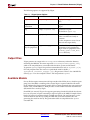
http://www.xilinx.com/ise/embedded/edk_docs.htm
•
OS and Libraries Document Collection:
http://www.xilinx.com/ise/embedded/edk_docs.htm
•
PowerPC (405 and 440) Processor Block and Users Manuals:
http://www.xilinx.com/ise/embedded/edk_docs.htm
•
BFM Simulation in Platform Studio
http://www.xilinx.com/ise/embedded/edk_docs.htm
•
Platform Studio Documentation website:
http://www.xilinx.com/ise/embedded/edk_docs.htm
Design Process Overview
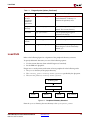
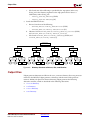
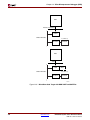
The tools provided with EDK are designed to assist in all phases of the embedded design
process, as illustrated in the following figure.
Xilinx Platform Studio (XPS)
Software
Development
Kit (SDK)
Software
Development
Hardware
Development
Verification
Device
Configuration
UG111_01_01_092905
Figure 1-1:
20
Basic Embedded Design Process Flow
www.xilinx.com
Embedded System Tools Reference Manual
EDK 10.1, Service Pack 3
R
Design Process Overview
Hardware Development
Xilinx FPGA technology allows you to customize the hardware logic in your processor
subsystem. Such customization is not possible using standard off-the-shelf
microprocessor or controller chips.
The term, “Hardware platform”, describes the flexible, embedded processing
subsystem you are creating with Xilinx technology for your application needs.
The hardware platform consists of one or more processors and peripherals connected
to the processor buses. EDK captures the hardware platform in the Microprocessor
Hardware Specification (MHS) file.
Software Development
A software platform is a collection of software drivers and, optionally, the operating
system on which to build your application. The software image created consists only
of the portions of the Xilinx library you use in your embedded design. EDK captures
the software platform in the Microprocessor Software Specification (MSS) file. You can
create multiple applications to run on the software platform.
Verification
EDK provides both hardware and software verification tools. The following subsections
describe the verification tools available for hardware and software.
Hardware Verification Using Simulation
To verify the correct functionality of your hardware platform, you can create a
simulation model and run it on an Hardware Design Language (HDL) simulator.
When simulating your system, the processor(s) execute your software programs. You
can choose to create a behavioral, structural, or timing-accurate simulation model.
Software Verification Using Debugging
The following options are available for software verification:
•
You can load your design on a supported development board and use a debugging
tool to control the target processor.
•
Alternatively, you can use an instruction set simulator or simplified system
simulation model (“virtual platform”) running on the host computer to debug your
code.
•
You can gauge the performance of your system by profiling the execution of your
code.
Device Configuration
When your hardware and software platforms are completed, you create a
configuration bitstream for the target FPGA device. For prototyping, you can
download the bitstream along with any software you require to run on your
embedded platform while connected to your host computer. For production, you store
your configuration bitstream and software in a non-volatile memory connected to the
FPGA.
Embedded System Tools Reference Manual
EDK 10.1, Service Pack 3
www.xilinx.com
21
R
Chapter 1: Embedded System and Tools Architecture Overview
An Introduction to EDK Tools and Utilities
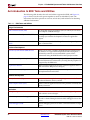
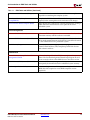
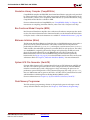
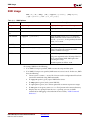
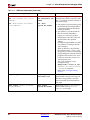
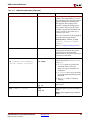
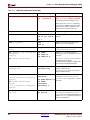
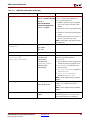
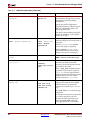
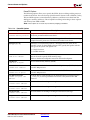
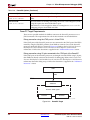
The following table describes the tools and utilities supported in EDK, and Figure 1-2,
page 28 shows how the tools operate together to create an embedded system. The
subsections that follow provide an overview of each tool, with references for obtaining
additional information.
Table 1-1:
EDK Tools and Utilities
Design Environments
Xilinx Platform Studio (XPS)
An integrated design environment (GUI) in which you can create
your complete embedded design.
Xilinx Software Development Kit (SDK)
An integrated design environment (GUI), complementary to XPS,
that helps you with the development of software application
projects.
EDK Command Line or “no window”
Mode
Allows you to run embedded design flows or change tool options
from a command line.
Hardware Development
The Base System Builder (BSB) Wizard
Allows you to create a working embedded design quickly, using
any features of a supported development board or using basic
functionality common to most embedded systems. Xilinx
recommends using the BSB Wizard for initial project creation.
The Create and Import Peripheral Wizard
Assists you in adding your own peripheral(s) to a design. Creates
associated directories and data files, ensuring that the peripheral is
recognized by the EDK tools.
Coprocessor Wizard
Helps you add a coprocessor to a CPU. (Does not apply to Virtex™2Pro or PowerPC 405 processor designs.)
Platform Generator (Platgen)
Constructs the programmable system on a chip in the form of HDL
and implementation netlist files.
Software Development
Library Generator (Libgen)
Constructs a software platform comprising a customized collection
of software libraries, drivers, and OS.
GNU Compiler Tools (GCC)
Builds a software application based on the platforms created by the
Library Generator.
Verification
Debug Configuration Wizard
Automates hardware and software platform debug configuration
tasks common to most designs.
Xilinx Microprocessor Debugger (XMD)
Opens a shell for software download and debugging. Also
provides a channel through which the GNU debugger accesses the
device.
GNU Debugger (GDB)
GUI for debugging software on either a simulation model or target
device.
22
www.xilinx.com
Embedded System Tools Reference Manual
EDK 10.1, Service Pack 3
R
An Introduction to EDK Tools and Utilities
Table 1-1:
EDK Tools and Utilities (Continued)
Simulation Model Generator (Simgen)
Generates the hardware simulation model and the compilation
script file for simulating the complete system.
Simulation Library Compiler
(CompEDKLib)
Compiles the EDK Simulation Libraries for the target simulator, as
required, before starting behavioral simulation of the design.
Bus Functional Model Compiler (BFM)
Helps simplify the verification of a custom peripheral by creating a
model of the bus environment to use in place of the actual
embedded system.
Device Configuration
Bitstream Initializer (Bitinit)
Updates an FPGA configuration bitstream to initialize the on-chip
instruction memory with the software executable.
System ACE File Generator (GenACE)
Generates a Xilinx System ACE™ configuration file based on the
FPGA configuration bitstream and software executable to be stored
in a non-volatile device in a production system.
Flash Memory Programmer
Allows you to use your target processor to program on-board
Common Flash Interface (CFI)-compliant parallel flash devices
with software and data.
Miscellaneous
Format Revision (revup) Tool and Version
Management Wizard
Updates the design files (the MHS, for example) to their current
format. The Version Management Wizard helps migrate IPs and
drivers created with an earlier EDK release to the latest version.
LibXil Memory File System (LibXil MFS)
Creates an MFS memory image on a host system that can
subsequently be downloaded to the embedded system memory.
Platform Specification Utility
Automates the generation of Microprocessor Peripheral Definition
(MPD) data files required to create EDK-compliant custom
peripherals.
Embedded System Tools Reference Manual
EDK 10.1, Service Pack 3
www.xilinx.com
23
R
Chapter 1: Embedded System and Tools Architecture Overview
Xilinx Platform Studio (XPS)
XPS provides an integrated environment for creating software and hardware specification
flows for embedded processor systems based on MicroBlaze and PowerPC processors.XPS
also provides an editor and a project management interface to create and edit source code.
XPS offers customization of tool flow configuration options and provides a graphical
system editor for connection of processors, peripherals, and buses. XPS is available on
Windows®, Solaris®, and Linux platforms. There is also a batch mode invocation of XPS
available.
From XPS, you can run all embedded system tools needed to process hardware and
software system components. You can also perform system verification within the XPS
environment.
XPS offers the following features:
•
Ability to add cores, edit core parameters, and make bus and signal connections to
generate an MHS file
•
Ability to generate and modify the MSS file
•
Support for all tools described in Table 1-1.
•
Ability to generate and view a system block diagram and/or design report
•
Multiple-user software applications support
•
Project management
•
Process and tool flow dependency management
Refer to the Xilinx Platform Studio Help for details on using the XPS GUI.
Xilinx Software Development Kit (SDK)
The Xilinx Platform Studio SDK is a complementary GUI to XPS (Xilinx Platform Studio)
and provides a development environment for software application projects. SDK is based
on the Eclipse open-source standard. Platform Studio SDK features include:
•
Feature-rich C/C++ code editor and compilation environment
•
Project management
•
Application build configuration and automatic makefile generation
•
Error navigation
•
Well integrated environment for seamless debugging and profiling of embedded
targets
•
Source code version control
For more information about SDK, see the SDK Help.
EDK Command Line or “no window” Mode
EDK includes a “no window” mode that allows you to run EDK from an Operating System
command line. See Chapter 14, “Command Line (no window) Mode,” for more
information.
24
www.xilinx.com
Embedded System Tools Reference Manual
EDK 10.1, Service Pack 3
R
An Introduction to EDK Tools and Utilities
The Base System Builder (BSB) Wizard
The Base System Builder (BSB) Wizard helps you quickly build a working system.
Some embedded design projects can be completed using the BSB Wizard alone. For more
complex projects, the BSB Wizard provides a baseline system that you can then customize
to complete your embedded design. For efficiency in project creation, Xilinx recommends
using the BSB Wizard in every scenario.
Based on the board you choose, the BSB Wizard allows you to select and configure basic
system elements such as processor type, debug interface, cache configuration, memory
type and size, and peripheral. For each option, functional default values are pre-selected in
the wizard.
If your target development is not available or not currently supported by the BSB Wizard,
you can select the Custom Board option instead of selecting a target board. Using this
option, you must specify the individual hardware devices that you expect to have on your
custom board. To run the generated system on a custom board, you must enter the FPGA
pin location constraints into the User Constraints File (UCF). If a supported target board is
selected, the BSB Wizard automatically inserts these constraints into the UCF.
When you exit the BSB Wizard, it creates the MHS and MSS files and loads them into your
XPS project. You can then further enhance the design in Xilinx Platform Studio (XPS).
The BSB Wizard also optionally generates one or more software projects. Each project
contains a sample application and linker script that can be compiled and run on the
hardware for the target development board. Each application is designed to illustrate
system aliveness and perform simple and basic testing of some of the hardware. The
contents of each test application might vary depending on the components in your system.
XPS supports multiple software projects for every hardware system, each of which
contains its own set of source files and linker script.
For detailed information on using the features provided in the BSB Wizard, see the Xilinx
Platform Studio Help.
The Create and Import Peripheral Wizard
The Create and Import Peripheral Wizard helps you create your own peripherals and
import them into EDK compliant repositories or XPS projects.
In the Create mode, the Create and Import Peripheral Wizard creates a number of files.
Some are templates that help you implement your peripheral without requiring detailed
understanding of the bus protocols, naming conventions, or the formats of special
interface files required by the EDK. By referring to the examples in the template file and
using various auxiliary design support files that are output by the wizard, you can quickly
get started designing your custom logic.
In the Import mode, this tool helps you create the interface files and directory structures
that are necessary to make your peripheral visible to the various tools in EDK. For this
mode of operation, it is assumed that you have followed the naming conventions required
by EDK. Once imported, your peripheral is available in the EDK peripherals library.
Embedded System Tools Reference Manual
EDK 10.1, Service Pack 3
www.xilinx.com
25
R
Chapter 1: Embedded System and Tools Architecture Overview
When you create or import a peripheral, EDK automatically generates the Microprocessor
Peripheral Definition (MPD) and Peripheral Analyze Order (PAO) files:
•
The MPD file defines the interface for the peripheral.
•
The PAO file tells other tools (Platgen, Simgen, for example) what HDL files are
required for compilation (synthesis or simulation) for the peripheral and in what
order.
For more information about MPD and PAO files, see the Platform Specification Format
Reference Manual. A link to the document is available in “Additional Resources,” page 20.
For detailed information on using the features provided in the Create and Import
Peripheral Wizard, see the Xilinx Platform Studio Help.
Coprocessor Wizard
The Coprocessor Wizard helps add and connect a coprocessor to a CPU. A coprocessor is a
hardware module that implements a user-defined function in the FPGA fabric and
connects to the processor through the Fast Simplex Link (FSL) interface. (This feature is not
applicable to Virtex-2Pro and PowerPC (405 or 440 designs.)
FSL channels are dedicated 32-bit, point-to-point communication interfaces implemented
using FIFOs.
For More Information
For details on the Fast Simplex Link (FSL), refer to the following documentation:
•
The MicroBlaze Processor Reference Guide
•
FSL Bus data sheet
•
FCB to FSL Bridge data sheet
For details on the APU, refer to the “PowerPC 405 APU Controller” chapter of the PowerPC
405 Block Reference Guide. A link to the document is available in the “Additional
Resources,” page 20.
For instructions on using the Coprocessor Wizard, refer to the Xilinx Platform Studio Help.
26
www.xilinx.com
Embedded System Tools Reference Manual
EDK 10.1, Service Pack 3
R
An Introduction to EDK Tools and Utilities
Platform Generator (Platgen)
Platform Generator (Platgen) compiles the high-level description of your embedded
processor system into an HDL netlist that can be implemented in a target FPGA device.
An embedded hardware platform typically consists of one or more processors and a
variety of peripherals and memory blocks, interconnected via processor buses. It also has
port connections to the outside world. Each of the processor cores (also referred to as pcores
or processor IPs) has a number of parameters that you can adjust to customize its behavior.
These parameters also define the address map of your peripherals and memories. Because
EDK lets you select from various optional features, the FPGA needs only to implement the
subset of functionality required by your application.
The hardware platform description is maintained in the MHS file, which is the principal
source file representing the hardware component of your embedded system and is stored
as ASCII text.
As shown in Figure 1-2, page 28, Platgen reads the MHS file as its primary design input.
Platgen also reads various processor core (pcore) hardware description files (MPD, PAO)
from the EDK library and any user IP repository. Platgen produces the top-level HDL
design file for the embedded system that stitches together all the instances of
parameterized pcores contained in the system. In the process, it resolves all the high-level
bus connections in the MHS into the actual signals required to interconnect the processors,
peripherals and on-chip memories. It also invokes the XST (Xilinx Synthesis Technology)
compiler to synthesize each of the instantiated pcores. (The system-level HDL netlist
produced by Platgen is used as part of the FPGA implementation process.) In addition,
Platgen generates the BRAM Memory Map (BMM) file which contains addresses of
various on-chip BRAM memories. This file is used later for initializing the BRAMs with
software. Refer to Chapter 2, “Platform Generator (Platgen),” for more information.
For more information on the MHS files, see the “Microprocessor Hardware Specification
(MHS)” chapter of the Platform Specification Format Reference Manual. “Additional
Resources,” page 20 provides a link to the document.
Embedded System Tools Reference Manual
EDK 10.1, Service Pack 3
www.xilinx.com
27
R
Chapter 1: Embedded System and Tools Architecture Overview
CompEDKLib
Processor Software
Platform (MSS)
Processor Hardware
Platform (MHS)
IP Models
ISE Models
IP Library or User Repository
EDK Software
Libraries
(BSP, MLD...)
Library
Generator
Drivers,
MDD
MPD, PAO
.a
Libraries,
OS, MLD
PCore
HDL
Platform
Generator
System and
Wrapper HDL
Simulation
Generator
system.BMM
Behavioral
HDL Model
ISE Tools
Synthesis (XST)
Application Source
.c, .h, .s
NGC
Implementation
Constraint File
(UCF)
Compiler (GCC)
.o, .a
NGDBuild
NGD
Simulation
Generator
Structural
HDL Model
MAP, PAR
NCD
Linker Script
Linker
(GCC)
system_BD.BMM
Bitstream Generator
ELF
Bitstream Initializer
system.BIT
Simulation
Generator
Timing HDL/
SDF Model
download.BIT
Simulation
Debugger
(XMD, GDB)
download.CMD
iMPACT
JTAG Cable
FPGA
Device
X10310
Figure 1-2:
28
Embedded Development Kit (EDK) Tools Architecture
www.xilinx.com
Embedded System Tools Reference Manual
EDK 10.1, Service Pack 3
R
An Introduction to EDK Tools and Utilities
Library Generator (Libgen)
Libgen configures libraries, device drivers, file systems, and interrupt handlers for the
embedded processor system, creating a “software platform.” The software platform
defines, for each processor, the drivers associated with the peripherals you include in your
hardware platform (the board support package), selected libraries, standard input and
output devices, interrupt handler routines, and other related software features. Your XPS
project further defines software applications to run on each processor, which are based on
the software platform.
XPS maintains your software platform description in the MSS file. The MSS file, which is
an editable text file, together with your software applications, are the principal source files
that represent the software component of your embedded system. Together with libraries
and drivers from the EDK installation, along with any custom libraries and drivers for
custom peripherals you provide, EDK is able to compile your applications, including
software components specified in the MSS file, into Executable Linked Format (ELF) files
that are ready to run on your processor hardware platform.
As shown in Figure 1-2, page 28, Libgen reads both the MSS and MHS as its primary
design inputs. Libgen also reads selected EDK libraries and various processor core (pcore)
software description files (Microprocessor Driver Definition (MDD) and driver code) from
the EDK library and any user IP repository.
Refer to Chapter 4, “Library Generator (Libgen)” and the Xilinx Platform Studio Help for
more information. For more information on Libraries and Device Drivers, refer to the
“Xilinx Microkernel (XMK)” section of the OS and Libraries Document Collection. A link to
the document is supplied in the “Additional Resources,” page 20.
GNU Compiler Tools (GCC)
XPS calls GNU compiler tools for compiling and linking application executables for each
processor in the system:
•
For the MicroBlaze processor, XPS runs the mb-gcc compiler.
•
For the PowerPC processor, XPS runs the powerpc-eabi-gcc compiler.
As shown in Figure 1-2, page 28, the compiler can read a set of C source and header files or
assembler source files for the targeted processor. The linker combines the compiled
applications with selected libraries and produces the executable file in ELF format. The
linker also reads a linker script, which is either the default linker script generated by the
tools or one that you have provided. Refer to Chapter 10, “GNU Compiler Tools,” for more
information. Also refer to Appendix A, “GNU Utilities” for other useful tools.
Embedded System Tools Reference Manual
EDK 10.1, Service Pack 3
www.xilinx.com
29
R
Chapter 1: Embedded System and Tools Architecture Overview
Debug Configuration Wizard
The Debug Configuration Wizard automates hardware and software platform debug
configuration tasks common to most designs.
You can instantiate a ChipScope™ core to monitor PLB (processor local bus) or any other
system-level signals. In addition, you can configure the parameters of an existing
ChipScope core for hardware debugging. You can also provide JTAG-based virtual input
and output.
To configure the software for debugging you can set the processor debug parameters.
When co-debugging is enabled for a ChipScope core, you can set up mutual triggering
between the software debugger and the hardware signals. The JTAG interface can be
configured to transport UART signals to the Xilinx Microprocessor Debugger (XMD).
For detailed information on using the features provided in the Debug Configuration
Wizard, see the Xilinx Platform Studio Help.
Xilinx Microprocessor Debugger (XMD)
You can debug your program in software using an instruction set simulator or virtual
platform, or on a board which has a Xilinx® FPGA loaded with your hardware bitstream.
As shown in Figure 1-2, page 28 the debugger utility (XMD) reads the application
executable ELF file. For debugging on a physical FPGA, XMD communicates over the
same download cable as used to configure the FPGA with a bitstream.
Refer to Chapter 12, “Xilinx Microprocessor Debugger (XMD),” for more information.
GNU Debugger (GDB)
The GNU Debugger (GDB) is a powerful yet flexible tool that provides a unified interface
for debugging and verifying MicroBlaze and PowerPC systems during various
development phases. It uses Xilinx® Microprocessor Debugger (XMD) as the underlying
engine to communicate to processor targets.
Refer to Chapter 11, “GNU Debugger (GDB)” for more information.
Simulation Model Generator (Simgen)
The Simulation Platform Generation tool (Simgen) generates and configures various
simulation models for the hardware. As shown in Figure 1-2, page 28, for generating a
behavioral model, Simgen takes an MHS file as its primary design input. For generating
structural or timing models, Simgen takes its primary design input from the post-synthesis
or post-place-and-route design database, respectively. Simgen also reads the embedded
application executable (ELF) file for each processor to initialize on-chip memory, thus
allowing the modeled processor(s) to execute their software code during simulation.
Refer to Chapter 3, “Simulation Model Generator (Simgen)” for more information.
30
www.xilinx.com
Embedded System Tools Reference Manual
EDK 10.1, Service Pack 3
R
An Introduction to EDK Tools and Utilities
Simulation Library Compiler (CompEDKLib)
CompEDKLib compiles the EDK HDL-based simulation libraries using the tools provided
by various simulator vendors. This utility can operate in both the GUI and batch modes. In
the GUI mode, it allows you to compile the Xilinx libraries (in your ISE installation) using
CompXLib and the libraries available in EDK.
For more information about CompEDKLib, see “CompEDKLib Utility” in Chapter 3. For
instructions on compiling simulation libraries, refer to the Xilinx Platform Studio Help.
Bus Functional Model Compiler (BFM)
Bus Functional Simulation simplifies the verification of hardware components that attach
to a bus. For more information on bus functional models, see the document BFM Simulation
in Platform Studio. A link to the document is available in “Additional Resources,” page 20.
Bitstream Initializer (Bitinit)
The Bitstream Initializer (Bitinit) tool initializes the on-chip BRAM memory connected to a
processor with its software information. This utility reads hardware-only bitstream
produced by the ISE tools (system.bit), and outputs a new bitstream (download.bit)
which includes the embedded application executable (ELF) for each processor. The utility
uses the BMM file, originally generated by Platgen and updated by the ISE tools with
physical placement information on each BRAM block in the FPGA. Internally, the
Bitstream Initializer tool uses the Data2MEM utility provided in ISE to update the
bitstream file. See Figure 1-2, page 28, to see how the Bitinit tool fits into the overall system
architecture. Refer to Chapter 9, “Bitstream Initializer (BitInit),” for more information.
System ACE File Generator (GenACE)
Generate Xilinx System ACE™ configuration files from an FPGA bitstream and ELF and
data files. The ACE file generated can be used to configure the FPGA, initialize BRAM,
initialize external memory with valid program or data, and bootup the processor in a
production system. EDK provides a Tool Command Language (Tcl) script, genace.tcl,
that uses XMD commands to generate ACE files. ACE files can be generated for PowerPC
and MicroBlaze with Microprocessor Debug Module (MDM) systems.
For more information see Chapter 13, “System ACE File Generator (GenACE).”
Flash Memory Programmer
The flash memory programming solution is designed to be generic and targets a wide
variety of flash hardware and layouts. See Chapter 8, “Flash Memory Programming.”
Embedded System Tools Reference Manual
EDK 10.1, Service Pack 3
www.xilinx.com
31
R
Chapter 1: Embedded System and Tools Architecture Overview
Format Revision (revup) Tool and Version Management Wizard
The Format Revision Tool (revup) updates an existing EDK project to the current version.
The revup tool performs format changes only. It does not update your design. Backups of
existing files, such as the project file (XMP), the MHS and MSS files, are performed before
the format changes are applied. Refer to Chapter 7, “Version Management Tools,” for more
information.
The Version Management Wizard appears automatically when an older project is opened
in a newer version of EDK (for example, when a project created in EDK 7.1.1 is opened in
version 8.1).
The Version management wizard is invoked after format revision has been performed. The
wizard provides information about any changes in Xilinx Processor IPs (pcores) used in
the design. If a new compatible version of an IP is available, then the wizard also prompts
you to update to the new version.
For instructions on using the Version Management Wizard, see Chapter 7, “Version
Management Tools,” and the “Version Management Wizard” topic in the Xilinx Platform
Studio Help.
LibXil Memory File System (LibXil MFS)
The LibXil Memory File System (LibXil MFS) provides the capability to manage program
memory in the form of file handles. You can create directories and have files within each
directory. The file system can be accessed from high-level C language through function
calls specific to the file system.
For more information about XilMFS, refer to the “LibXil Memory File System (MFS)”
section of the OS and Libraries Document Collection. A link to the document is supplied in
the “Additional Resources,” page 20.
Platform Specification Utility
The Platform Specification Utility (PsfUtility) enables automatic generation of
Microprocessor Peripheral Definition (MPD) files required to create an IP core compliant
with the Embedded Development Kit (EDK). Features provided by this tool can be used
with the help of the Create and Import Peripheral Wizard in Xilinx Platform Studio (XPS).
For more information, see Chapter 6, “Platform Specification Utility (PsfUtility).”
32
www.xilinx.com
Embedded System Tools Reference Manual
EDK 10.1, Service Pack 3
R
Project Creation and Management
Project Creation and Management
Project information is saved in a Xilinx Microprocessor Project (XMP) file. An XMP file
contains the locations of the MHS file, the MSS file, and the C source and header files that
must be compiled into an executable for a processor. The project also includes the FPGA
architecture family and the device type for which the hardware tool flow must be run.
Controlling the EDK Flow (Advanced)
This section contains advanced details for controlling how EDK processes your embedded
design. This information is common to both XPS and the command line “no windows”
batch processing mode.
Makefiles
You can specify your own makefile. The makefile has two parts:
•
The main makefile: <projname>.make that contains the targets and commands for
the compilation flow
•
The include makefile: <projname>_incl.make that contains the options and
settings defined in the form of macros.
You include the <projname>_incl.make in the <projname>.make file by issuing the
following make command:
include system_incl.make
The macros defined in <projname>_incl.make are then visible in <projname>.make.
XPS always writes out both makefiles. However, you can choose not to use the
<projname>.make file for your flow. Instead, you can specify your own makefile. The
makefile specified must be named differently from the two makefiles generated by XPS.
You are expected to include the <projname>_incl.make in your own makefile as well.
This way, changes you apply to any options and settings in XPS are reflected in your own
makefile. Typically, you would generate the <projname>.make file once and then copy
and modify it for your own purposes.
You must update your makefile whenever you make a significant change in your design.
The following affect makefile structure:
•
Adding, deleting, or renaming a processor
•
Adding, deleting, or renaming a software application
•
Changing the choice of implementation tool between ISE™ (Project Navigator),
Xplorer (in XPS), and Xflow (in XPS)
The ACE file generation command might be changed if you change the number of
processors in your design or if you add or delete mdm ip for MicroBlaze designs.
The XILINX_EDK_DIR macro defined in system_incl.make file changes across Linux
and Windows platforms.
Embedded System Tools Reference Manual
EDK 10.1, Service Pack 3
www.xilinx.com
33
R
Chapter 1: Embedded System and Tools Architecture Overview
Implementation and Download Control Files
If you choose to have EDK run the implementation tools using Xflow from ISE, EDK
expects a certain directory structure in the project directory. For each project, you must
provide the User Constraints File (UCF). This file resides in the data directory in the
project directory and has the name <project_name>.ucf. You must also provide an
iMPACT script file. This file resides in the etc directory and is called download.cmd. If
these files do not exist, XPS prompts you to provide these files and will not run XFlow.
To run Xilinx Implementation tools, XPS uses two more files, bitgen.ut and
fast_runtime.opt from the etc directory. However, if the two files are not present,
XPS copies the default version of these two files into that directory from the EDK
installation directory. To change options for Xilinx implementation tools, you can modify
the two files. When a new project is created, if the data and etc directories do not exist,
XPS creates these empty directories in the project directory.
34
www.xilinx.com
Embedded System Tools Reference Manual
EDK 10.1, Service Pack 3
R
Chapter 2
Platform Generator (Platgen)
The Hardware Platform Generation tool (Platgen) customizes and generates the
embedded processor system, in the form of hardware netlists (HDL) files and Electronic
Data Interchange Format (EDIF) files.
By default, Platgen synthesizes each processor IP core instance found in your embedded
hardware design using the XST compiler. Platgen also generates the system-level HDL file
that interconnects all the IP cores, to be synthesized later as part of the overall Xilinx®
Integrated Software Environment (ISE®) implementation flow.
This chapter covers the following topics:
•
“Features”
•
“Tool Requirements”
•
“Tool Usage”
•
“Tool Options”
•
“Load Path”
•
“Output Files”
•
“Synthesis Netlist Cache”
Features
The features of Platgen includes the creation of:
•
The programmable system on a chip in the form of hardware netlists (HDL and
implementation netlist files.)
•
A hardware platform using the Microprocessor Hardware Specification (MHS) file as
input.
•
Netlist files in various formats such as NGC and EDIF.
•
Support files for downstream tools and top-level HDL wrappers to allow you to add
other components to the automatically generated hardware platform.
After running Platgen, XPS spawns the Project Navigator interface for the FPGA
implementation tools to complete the hardware implementation, allowing you full control
over the implementation. At the end of the ISE flow, a bitstream is generated to configure
the FPGA. This bitstream includes initialization information for block RAM memories on
the FPGA chip. If your code or data must be placed on these memories at startup, the
Data2MEM tool in the ISE tool set updates the bitstream with code and data information
obtained from your executable files, which are generated at the end of the software
application creation and verification flow.
Embedded System Tools Reference Manual
EDK 10.1, Service Pack 3
www.xilinx.com
35
R
Chapter 2: Platform Generator (Platgen)
Additional Resources
The Platform Specification Format Reference Manual:
http://www.xilinx.com/ise/embedded/edk_docs.htm
Tool Requirements
Set up your system to use the Xilinx® Development System. Verify that your system is
properly configured. Consult the release notes and installation notes for more information.
Tool Usage
Run Platgen as follows:
platgen -p <partname> system.mhs
where:
platgen is the executable name.
-p is the option to specify a part.
<partname> is the partname.
system.mhs is the output file.
Tool Options
The following table lists the supported Platgen syntax options.
Table 2-1:
Platgen Syntax Options
Option
Command
Description
Help
-h, -help
Displays the usage menu and then exits
without running the Platgen flow.
Version
-v
Displays the version number of Platgen
and then exits without running the
Platgen flow.
Filename
-f<filename>
Reads command line arguments and
options from file.
Integration
Style
-intstyle
{ise|default}
Indicates contextual information when
invoking Xilinx applications within a
flow or project environment.
Language
-lang {verilog|vhdl}
Specifies the HDL language output.
Default: vhdl
Log output
-log <logfile[.log]>
Specifies the log file.
Default: platgen.log
36
www.xilinx.com
Embedded System Tools Reference Manual
EDK 10.1, Service Pack 3
R
Load Path
Table 2-1:
Platgen Syntax Options (Continued)
Option
Command
Description
Library Path
for user
peripherals
and driver
repositories
-lp <library_path>
Adds <library_path> to the list of IP
search directories. A library is a
collection of repository areas.
Output
directory
-od <output_dir>
Specifies the output directory path.
Part name
-p <partname>
Uses the specified part type to
implement the design.
Instance name
-ti <instname>
Specifies the top-level instance name.
Top-level
module
-tm <top_module>
Specifies the top-level module name.
Top level
-toplevel {yes|no}
Specifies if the input design represents a
whole design or a level of hierarchy.
Default: The current directory.
Default: yes
Load Path
Refer to the following figure for a depiction of the peripheral directory structure.
To specify additional directories, use one of the following options:
•
Use the current directory (from which Platgen was launched).
•
Set the EDK tool -lp option.
Platgen uses a search priority mechanism to locate peripherals in the following order:
1.
The pcores directory in the project directory.
2.
The <library_path>/<Library Name>/pcores as specified by the -lp option.
3.
The $XILINX_EDK/hw/<Library Name>/pcores.
-lp <library_path>
<Library Name>
boards
drivers
pcores
sw_services
X10066
Figure 2-1:
Peripheral Directory Structure
From the pcores directory, the root directory is the <peripheral_name>.
Embedded System Tools Reference Manual
EDK 10.1, Service Pack 3
www.xilinx.com
37
R
Chapter 2: Platform Generator (Platgen)
From the root directory, the underlying directory structure is as follows:
data/
hdl/
netlist/
Output Files
Platgen produces directories and files from the project directory in the following
underlying directory structure:
/hdl
/implementation
/synthesis
HDL Directory
The /hdl directory contains the following files:
•
system.{vhd|v} is the HDL file of the embedded processor system as defined in
the MHS, and the toplevel file for your project.
•
system_stub.{vhd|v} is the toplevel template HDL file of the instantiation of the
system. Use this file as a starting point for your own toplevel HDL file.
•
<inst>_wrapper.{vhd|v} is the HDL wrapper file for the of individual IP
components defined in the MHS.
Implementation Directory
The implementation directory contains the peripheral file, peripheral_wrapper.ngc, an
implementation netlist file.
Synthesis Directory
The synthesis directory contains the following synthesis project file:
system.[prj|scr]
BMM Flow
The EDK tools Implementation Tools flow using Data2MEM is as follows:
ngdbuild -bm <system>.bmm <system>.ngc
map
par
bitgen -bd <system>.elf
Bitgen outputs <system>_bd.bmm, which contains the physical location of block RAMs.
A block RAM Memory Map (BMM) file contains a syntactic description of how individual
block RAMs constitute a contiguous logical data space.
The <system>_bd.bmm and <system>.bit files are input to Data2MEM. Data2MEM
translates contiguous fragments of data into the proper initialization records for Virtexseries block RAMs.
38
www.xilinx.com
Embedded System Tools Reference Manual
EDK 10.1, Service Pack 3
R
Synthesis Netlist Cache
Synthesis Netlist Cache
An IP rebuild is triggered when one of the following changes occur:
•
Instance name change
•
Parameter value change
•
Core version change
•
Core is specified with the MPD CORE_STATE=DEVELOPMENT option
•
Core license change
Embedded System Tools Reference Manual
EDK 10.1, Service Pack 3
www.xilinx.com
39
R
40
Chapter 2: Platform Generator (Platgen)
www.xilinx.com
Embedded System Tools Reference Manual
EDK 10.1, Service Pack 3
R
Chapter 3
Simulation Model Generator (Simgen)
This chapter introduces the basics of Hardware Description Language (HDL) simulation
and describes the Simulation Model Generator tool, Simgen, and usage of the
CompEDKLib utility tool. It contains the following sections:
•
“Simgen Overview”
•
“Additional Resources”
•
“Simulation Libraries”
•
“CompXLib Utility”
•
“CompEDKLib Utility”
•
“Simulation Models”
•
“Simgen Syntax”
•
“Output Files”
•
“Memory Initialization”
•
“Test Benches”
•
“Simulating Your Design”
•
“Restrictions”
Simgen Overview
Simgen creates and configures various VHDL and Verilog simulation models for a
specified hardware. Simgen takes, as the input file, the Microprocessor Hardware
Specification (MHS) file, which describes the instantiations and connections of hardware
components.
Simgen is also capable of creating scripts for a specified vendor simulation tool. The scripts
compile the generated simulation models.
The hardware component is defined by the MHS file. Refer to the “Microprocessor
Hardware Specification (MHS)” chapter in the Platform Specification Format Reference
Manual for more information. The “Additional Resources” section contains a link to the
document website. For more information about simulation basics and for discussions of
behavioral, structural, and timing simulation methods, refer to the Platform Studio Online
Help.
Embedded System Tools Reference Manual
EDK 10.1, Service Pack 3
www.xilinx.com
41
R
Chapter 3: Simulation Model Generator (Simgen)
Additional Resources
•
Platform Specification Format Reference Manual
http://www.xilinx.com/ise/embedded/edk_docs.htm
•
ISE Synthesis and Simulation Design Guide
http://www.xilinx.com/support/software_manuals.htm
Simulation Libraries
EDK simulation netlists use low-level hardware primitives available in Xilinx® FPGAs.
Xilinx provides simulation models for these primitives in the libraries listed in this section.
The libraries described in the following sections are available for the Xilinx simulation
flow. The HDL code must refer to the appropriate compiled library. The HDL simulator
must map the logical library to the physical location of the compiled library.
Xilinx ISE® Libraries
Xilinx ISE Libraries can be compiled using the CompXLib utility. Refer to the “Simulating
Your Design” chapter of the Synthesis and Simulation Design Guide to learn more about
compiling and using Xilinx ISE simulation libraries. A link to the documentation website is
provided in “Additional Resources”.
Xilinx ISE provides the following libraries for simulation:
•
UNISIM Library
•
SIMPRIM Library
•
XilinxCoreLib Library
UNISIM Library
The UNISIM Library is a library of functional models used for behavioral and structural
simulation. It includes all of the Xilinx Unified Library components that are inferred by
most popular synthesis tools. The UNISIM library also includes components that are
commonly instantiated, such as I / Os and memory cells.
You can instantiate the UNISIM library components in your design (VHDL or Verilog) and
simulate them during behavioral simulation. Structural simulation models generated by
Simgen instantiate UNISIM library components.
Asynchronous components in the UNISIM library have zero delay. Synchronous
components have a unit delay to avoid race conditions. The clock-to-out delay for these is
100 ps.
SIMPRIM Library
The SIMPRIM Library is used for timing simulation. It includes all the Xilinx Primitives
Library components used by Xilinx implementation tools.
Timing simulation models generated by Simgen instantiate SIMPRIM library components.
42
www.xilinx.com
Embedded System Tools Reference Manual
EDK 10.1, Service Pack 3
R
Simulation Libraries
XilinxCoreLib Library
The Xilinx CORE Generator™ is a graphical Intellectual Property (IP) design tool for
creating high-level modules like FIR Filters, FIFOs, CAMs, and other advanced IP. You can
customize and pre-optimize modules to take advantage of the inherent architectural
features of Xilinx FPGA devices, such as block multipliers, SRLs, fast carry logic and onchip, single-port or dual-port RAM.
The CORE Generator HDL library models are used for behavioral simulation. You can
select the appropriate HDL model to integrate into your HDL design. The models do not
use library components for global signals.
Xilinx EDK Library
The EDK Library is used for behavioral simulation. It contains all the EDK IP components,
precompiled for ModelSim SE and PE or NcSim. This library eliminates the need to
recompile EDK components on a per-project basis, minimizing overall compile time. The
EDK IP components library is provided for VHDL only and may be encrypted.
The Xilinx CompEDKLib utility deploys compiled models for EDK IP components into a
common location. Unencrypted EDK IP components can be compiled using
CompEDKLib. Precompiled libraries are provided for encrypted components.
EDK Libraries Search Order
Simgen searches for pre-compiled libraries in the following two places and in this order:
1.
The simlib directory for the current project
2.
The location specified by the -E switch
For simgen to find and use a pre-compiled library in the current project, the directory
structure must conform to the following example:
<project directory>/
simlib/
mti/
mycore_v1_00_a
ncsim/
mycore_v1_00_a
Embedded System Tools Reference Manual
EDK 10.1, Service Pack 3
www.xilinx.com
43
R
Chapter 3: Simulation Model Generator (Simgen)
CompXLib Utility
Xilinx provides the CompXLib utility to compile the HDL libraries for all Xilinx-supported
simulators. CompXLib compiles the UNISIM, SIMPRIM, and XilinxCoreLib libraries for
all supported device architectures using the tools provided by the simulator vendor.
You must have an installation of the Xilinx implementation tools to compile your HDL
libraries using CompXLib.
Run CompXLib with the -help option if you need to display a brief description for the
available options:
compxlib -help
The CompXLib tool uses the following syntax:
compxlib -s <simulator> -f <family[:lib],<family[:lib],...|all>
[-l <language>]
[-o <compxlib_output_directory>]
[-w]
[-p <simulator_path>]
Note: Each simulator uses certain environment variables that you must set before invoking
CompXLib. Consult your simulator documentation to ensure that the environment is properly set up to
run your simulator.
Note: Make sure you use the -p <simulator_path> option to point to the directory where the
ModelSim executable is, if it is not in your path.
The following is an example of a command for compiling Xilinx libraries for MTI_SE:
> compxlib -s mti_se -f all -l vhdl -w -o .
This command compiles all the necessary Xilinx libraries into the current working
directory.
Refer to the “Simulating Your Design” chapter of the Synthesis and Simulation Design Guide
for additional information on using and compiling Xilinx simulation libraries. A link to the
document is supplied in “Additional Resources,” page 42.
44
www.xilinx.com
Embedded System Tools Reference Manual
EDK 10.1, Service Pack 3
R
CompEDKLib Utility
CompEDKLib Utility
Before starting behavioral simulation of your design, you must compile the EDK
Simulation Libraries for the target simulator. For this purpose, Xilinx provides the
CompEDKLib utility.
CompEDKLib compiles the EDK HDL-based simulation libraries using the tools provided
by various simulator vendors. This utility can operate in both the interface and batch
modes. In the interface mode it allows you to compile the Xilinx libraries (in your ISE
installation) using CompXLib and the libraries available in EDK. Refer to the Platform
Studio Online Help for more instructions on compiling simulation libraries.
Usage
compedklib [ -h ] [ -o output-dir-name ] [ -lp repository-dir-name ]
[ -E compedklib-output-dir-name ] [ -lib core-name ]
[ -compile_sublibs ] [ -exclude deprecated ]
-s mti_se|mti_pe|ncsim -X compxlib-output-dir-name
This tool compiles the HDL in EDK pcore libraries for simulation using the simulators
supported by the EDK. The supported simulators are: ModelSim PE/SE, NcSIM, and ISE
Simulator (ISE Simulator supported in command line mode only).
CompEDKLib Command Line Examples
Use Case I: Launching the GUI to Compile the Xilinx and EDK Simulation
Libraries
compedklib
No options are required. This launches the same GUI as when selecting the Compile
Simulation Libraries in XPS when no project is open.
Note: This is the only mode of compedklib that also compiles the Xilinx Libraries. All other modes
compile only the EDK libraries.
Use Case II: Compiling HDL Sources in the Built-In Repositories in the EDK
The most common use case is:
compedklib -o <compedklib-output-dir-name>
-X <compxlib-output-dir-name> -exclude deprecated
In this case the pcores available in the EDK install are compiled and stored in
<compedklib-output-dir-name>. The value of the -X option specifies the directory
containing the models output by compxlib, such as the unisim, simprim, and
XilinxCoreLib compiled libraries.
Pcores can be in development, active, deprecated, or obsolete state. Adding -exclude
deprecated has the effect of not compiling deprecated cores. If you have deprecated cores
in your design, do not use the -exclude deprecated option.
Embedded System Tools Reference Manual
EDK 10.1, Service Pack 3
www.xilinx.com
45
R
Chapter 3: Simulation Model Generator (Simgen)
Use Case III: Compiling HDL Sources in Your Own Repository
If you have your own repository of EDK-style pcores, you can compile them into
<compedklib-output-dir-name> as follows:
compedklib -o <compedklib-output-dir-name>
-X <compxlib-output-dir-name>
-E <compedklib-output-dir-name>
-lp <Your-Repository-Dir>
In this form, -E accounts for the possibility that some of the pcores in your repository
might need to access the compiled models generated by Use Case I because the pcores in
your repository most likely refer to HDL sources in the EDK built-in repositories.
You can limit the compilation to named cores in the repository:
compedklib -o <compedklib-output-dir-name>
-X <compxlib-output-dir-name>
-E <compedklib-output-dir-name>
-lp <Your-Repository-Dir>
-lib core1
-lib core2
In this case, the entire repository is read but only the pcores indicated by the -lib options
are compiled.
You can add the -compile_sublibs option to compile the specified pcores.
Other Details
46
•
If the simulator is not indicated, then MTI is assumed.
•
You can supply multiple -X and -E arguments. The order of arguments is important.
If you have the same pcore in two places, the first one is used.
•
Some pcores are secure in that their source code is not available. In such cases, the
repository contains the compiled models. These are copied into <compedkliboutput-dir-name>.
•
If your pcores are in your XPS project, then Use Case 2 does not apply. Simgen creates
the scripts to compile them.
•
Only VHDL is supported.
•
The execution log is available in compedklib.log.
•
Beginning in EDK 7.1, the file indicated by your MODELSIM environment variable is
not modified by CompEDKLib. However, the simulation scripts generated by Simgen
will modify the file pointed to by the MODELSIM variable.
www.xilinx.com
Embedded System Tools Reference Manual
EDK 10.1, Service Pack 3
R
Simulation Models
Simulation Models
This section describes how and when each of three FPGA simulation models are
implemented. At certain points in the design process, Simgen creates an appropriate
simulation model, as shown in Figure 3-1. Instructions for creating simulation models
using XPS Batch Mode are also included in this section.
Design
Synthesis
Design
Entry
Design
Netlist
Design
Implementation
Timing
Simulation
Structural
Simulation
Behavioral
Simulation
Implemented
Design Netlist
Functional Simulation
UG111_01_111903
Figure 3-1:
FPGA Design Simulation Stages
Behavioral Models
To create a behavioral simulation model as displayed in Figure 3-2, Simgen requires an
MHS file as input. Simgen creates a set of HDL files that model the functionality of the
design. Optionally, Simgen can generate a compile script for a specified vendor simulator.
If specified, Simgen can generate HDL files with data to initialize BRAMS associated with
any processor that exists in the design. This data is obtained from an existing Executable
Linked Format (ELF) file.
MHS
Simgen
HDL
ELF
Script
UG111_02_101705
Figure 3-2: Behavioral Simulation Model Generation
Structural Models
To create a structural simulation model as displayed in Figure 3-3, Simgen requires an
MHS file as input and associated synthesized netlist files. From these netlist files, Simgen
creates a set of HDL files that structurally model the functionality of the design.
Optionally, Simgen can generate a compile script for a specified vendor simulator.
If specified, Simgen can generate HDL files with data to initialize BRAMS associated with
any processor that exists in the design. This data is obtained from an existing ELF file.
Embedded System Tools Reference Manual
EDK 10.1, Service Pack 3
www.xilinx.com
47
R
Chapter 3: Simulation Model Generator (Simgen)
NGC
MHS
Simgen
HDL
ELF
Script
UG111_03_101705
Figure 3-3:
Structural Simulation Model Generation
Note: The EDK design flow is modular. Platgen will generate a set of netlist files that are used by
Simgen to generate structural simulation models.
Timing Models
To create a timing simulation model as displayed in Figure 3-4, Simgen requires an MHS
file as input and an associated implemented netlist file. From this netlist file, Simgen
creates an HDL file that models the design and an SDF file with appropriate timing
information for it. Optionally, Simgen can generate a compile script for a specified vendor
simulator. If specified, Simgen can generate HDL files with data to initialize BRAMS
associated with any processor that exists in the design. This data is obtained from an
existing ELF file.
NCD
MHS
Simgen
HDL
ELF
Script
UG111_04_101705
Figure 3-4:
Timing Simulation Model Generation
Single and Mixed Language Models
Simgen allows the use of mixed language components in behavioral files for simulation.
By default, Simgen takes the native language in which each component is written.
Individual components cannot be mixed language. To use this feature, a mixed language
simulator is required.
48
www.xilinx.com
Embedded System Tools Reference Manual
EDK 10.1, Service Pack 3
R
Simulation Models
Xilinx IP components are written in VHDL. If a mixed language simulator is not available,
Simgen can generate single language models by translating the HDL files that are not in
the HDL language. The resulting translated HDL files are structural files.
Structural and Timing simulation models are always single language.
Creating Simulation Models Using XPS Batch
1.
Open your project by loading your XMP file:
XPS% load xmp <filename>.xmp
2.
Set the following simulation values at the XPS prompt.
a.
Select the simulator of your choice using the following command:
XPS% xset simulator [ mti | ncs | none ]
b.
Specify the path to the Xilinx and EDK precompiled libraries using the following
commands:
XPS% xset sim_x_lib <path>
XPS% xset sim_edk_lib <path>
c.
Select the Simulation Model using the following command:
XPS% xset sim_model [ behavioral | structural | timing ]
3.
To generate the simulation model, type the following:
XPS% run simmodel
When the process finishes, HDL models are saved in the simulation directory.
4.
To open the simulator, type the following:
XPS% run sim
Embedded System Tools Reference Manual
EDK 10.1, Service Pack 3
www.xilinx.com
49
R
Chapter 3: Simulation Model Generator (Simgen)
Simgen Syntax
At the prompt, run Simgen with the MHS file and appropriate options as inputs.
For example, simgen <system_name>.mhs [options]
Requirements
Verify that your system is properly configured to run the Xilinx ISE tools. Consult the
release notes and installation notes that came with your software package for more
information.
Options
The following Simgen options are supported:
Table 3-1:
Simgen Syntax Options
Option
Command
Description
Help
-h, -help
Displays the usage menu and then quits.
Version
-v
Displays the version and then quits.
Options File
-f <filename>
Reads command line arguments and options
from file.
HDL Language
-lang [vhdl|verilog]
Specifies the HDL language: VHDL or Verilog.
Default: vhdl
Log Output
-log <logfile.log>
Specifies the log file.
Default: simgen.log
Library Directories
-lp <library_path>
Allows you to specify library directory paths.
This option can be specified more than once for
multiple library directories.
Simulation Model
Type
-m [beh|str|tim]
Allows you to select the type of simulation
models to be used. The supported simulation
model types are behavioral (beh), structural
(str) and timing (tim).
Default: beh
Mixed Language
Allows or disallows the use of mixed language
behavioral files.
-mixed [yes|no]
yes - Use native language for peripherals and
allow mixed language systems.
no - Use structural files for peripherals not
available in selected language.
Note: Only valid when -m beh is used
Default: yes
Output Directory
50
Specifies the project directory path. The default
is the current directory.
-od <output_dir>
www.xilinx.com
Embedded System Tools Reference Manual
EDK 10.1, Service Pack 3
R
Simgen Syntax
Table 3-1:
Simgen Syntax Options (Continued)
Option
Command
Description
Target Part or Family
-p <partname>
Allows you to target a specific part or family.
This option must be specified.
Processor ELF Files
-pe <proc_instance>
elf_file <elf_file>
Specifies a list of ELF files to be associated with
the processor with instance name as defined in
the MHS.
Simulator
-s [mti|ncs]
Generates compile script and helper scripts for
vendor simulators ModelSim and NcSim,
mti - ModelSim
ncs - NcSim
Source Directory
-sd <source_dir>
Specifies the source directory to search for netlist
files.
Testbench Template
-tb
Creates a testbench template file.
Use -ti and -tm to define the design under test
name and the testbench name, respectively.
Top-Level Instance
-ti <top_instance>
When a testbench template is requested, use
<top_instance> to define the instance name
of the design under test.
When design represents a submodule, use
top_instance for the top-level instance name.
Top-Level Module
When a testbench template is requested, use
top_module to define the name of the testbench.
-tm <top_module>
When the design represents a submodule, use
top_module for the top-level entity/module
name.
Top-Level
-toplevel [yes|no]
yes - Design represents a whole design.
no - Design represents a level of hierarchy
(submodule).
Default: yes
EDK Library Directory
-E <edklib_dir>
Specifies the path to the EDK simulation
libraries directory. This is the output directory of
the CompEDKLib tool.
Xilinx Library
Directory
-X <xlib_dir>
Path to the Xilinx simulation libraries (unisim,
simprim, XilinxCoreLib) directory. This is the
output directory of the CompXLib tool.
Embedded System Tools Reference Manual
EDK 10.1, Service Pack 3
www.xilinx.com
51
R
Chapter 3: Simulation Model Generator (Simgen)
Output Files
Simgen produces all simulation files in the /simulation directory, which is located
inside the /output_directory. In the /simulation directory, there is a subdirectory
for each simulation model such as:
output_directory/simulation/<sim_model>
Where <sim_model> is one of: behavioral, structural, or timing
After a successful Simgen execution, the simulation directory contains the following files:
•
peripheral_wrapper.[vhd|v]
Modular simulation files for each component. Not applicable for timing models.
•
system_name.[vhd|v]
The top-level HDL file of the design.
•
system_name.sdf
The Standard Delay Format (SDF) file with the appropriate block and net delays from
the place and route process used only for timing simulation.
•
xilinxsim.ini
Initialization file for the ISE Simulator.
•
system.prj
Project file specifying HDL source files and libraries to compile for the ISE Simulator.
52
•
<system_name>_fuse.sh
Helper script to create a simulation executable (ISE Simulator only, when Simgen does
not create a test harness).
•
<system_name>_setup.[do|sh|tcl]
Script to compile the HDL files and load the compiled simulation models in the
simulator.
•
<test_harness_name>.prj
Project file specifying HDL source and libraries to compile for the ISE Simulator
(when Simgen creates a test harness).
•
<test_harness_fuse>.sh
Helper script to create a simulation executable (ISE Simulator only, when Simgen
creates a test harness).
•
<test_harness>_setup.[do|sh|tcl]
Helper script to set up the simulator and specify signals to display in a waveform
window or tabular list window (ModelSim only).
•
<test_harness>_wave.[do|sv|tcl]
Helper script to set up simulation waveform display.
•
<test_harness>_list.do
Helper script to set up simulation tabular list display (ModelSim only).
•
<instance>_wave.[do|sv|tcl]
Helper script to set up simulation waveform display for the specified instance.
•
<instance>_list.do
Helper script to set up simulation tabular list display for the specified instance
(ModelSim Only).
www.xilinx.com
Embedded System Tools Reference Manual
EDK 10.1, Service Pack 3
R
Memory Initialization
Memory Initialization
If a design contains banks of memory for a system, the corresponding memory simulation
models can be initialized with data. You can specify a list of ELF files to associate to a given
processor instance using the -pe switch.
The compiled executable files are generated with the appropriate GNU Compiler
Collection (GCC) compiler or assembler, from corresponding C or assembly source code.
Note: Memory initialization of structural simulation models is only supported when the netlist file
has hierarchy preserved.
VHDL
For VHDL simulation models, run Simgen with the -pe option to generate a VHDL file.
This file contains a configuration for the system with all initialization values. For example:
simgen system.mhs -pe mblaze executable.elf -l vhdl ...
This command generates the VHDL system configuration in the file system_init.vhd.
This file is used along with your system to initialize memory. The BRAM blocks connected
to the mblaze processor contain the data in executable.elf.
Verilog
For Verilog simulation models, run Simgen with the -pe option to generate a Verilog file.
This file contains defparam constructs that initialize memory. For example:
simgen system.mhs -pe mblaze executable.elf -l verilog ...
This command generates the Verilog memory initialization file, system_init.v. This file
is used along with your system to initialize memory. The BRAM blocks connected to the
processor mblaze contains the data in executable.elf.
Test Benches
Simgen is capable of creating test bench templates. If you use the -tb switch, simgen will
create a test bench which will instantiate the top-level design and will create default
stimulus for clock and reset signals.
Clock stimulus is inferred from any global port which is tagged SIGIS = CLK in the MHS
file. The frequency of the clock is given by the CLK_FREQ tag. The phase of the clock is
given by the CLK_PHASE tag, which takes values from 0 to 360.
Reset stimulus is inferred for all global ports tagged SIGIS = RST in the MHS file. The
polarity of the reset signal is given by the RST_POLARITY tag. The length of the reset is
given by the RST_LENGTH tag.
For more information about the clock and reset tags, refer to the Platform Studio Online
Help.
VHDL Test Bench Example
library IEEE;
use IEEE.STD_LOGIC_1164.ALL;
library UNISIM;
use UNISIM.VCOMPONENTS.ALL;
Embedded System Tools Reference Manual
EDK 10.1, Service Pack 3
www.xilinx.com
53
R
Chapter 3: Simulation Model Generator (Simgen)
entity system_tb is
end system_tb;
architecture STRUCTURE of system_tb is
constant sys_clk_PERIOD : time := 10 ns;
constant sys_reset_LENGTH : time := 160 ns;
constant sys_clk_PHASE : time 2.5 ns;
component system is
port (
sys_clk : in std_logic;
sys_reset : in std_logic;
rx : in std_logic;
tx : out std_logic;
leds : inout std_logic_vector(0 to 3)
);
end component;
-- Internal signals
signal
signal
signal
signal
signal
leds : std_logic_vector(0 to 3);
rx : std_logic;
sys_clk : std_logic;
sys_reset : std_logic;
tx : std_logic;
begin
dut : system
port map (
sys_clk => sys_clk,
sys_reset => sys_reset,
rx => rx,
tx => tx,
leds => leds
);
-- Clock generator for sys_clk
process
begin
sys_clk <= '0';
wait for (sys_clk_PHASE);
loop
wait for (sys_clk_PERIOD/2);
sys_clk <= not sys_clk;
end loop;
end process;
-- Reset Generator for sys_reset
process
begin
sys_reset <= '0';
wait for (sys_reset_LENGTH);
sys_reset <= not sys_reset;
wait;
54
www.xilinx.com
Embedded System Tools Reference Manual
EDK 10.1, Service Pack 3
R
Test Benches
end process;
-- START USER CODE (Do not remove this line)
-- User: Put your stimulus here. Code in this
-section will not be overwritten.
-- END USER CODE (Do not remove this line)
end architecture STRUCTURE;
configuration system_tb_conf of system_tb is
for STRUCTURE
for all : system
use configuration work.system_conf;
end for;
end for;
end system_tb_conf;
You can add your own VHDL code between the lines tagged BEGIN USER CODE and END
USER CODE. The code between these lines is maintained if simulation files are created
again. Any code outside these lines will be lost if a new test bench is created.
Verilog Test Bench Example
`timescale 1 ns/10 ps
`uselib lib=unisims_ver
module system_tb
(
);
real sys_clk_PERIOD = 10;
real sys_clk_PHASE = 2.5;
real sys_reset_LENGTH = 160;
// Internal signals
reg
reg
reg
reg
reg
[0:3] leds;
rx;
sys_clk;
sys_reset;
tx;
system
dut (
.sys_clk ( sys_clk ),
.sys_reset ( sys_reset ),
.rx ( rx ),
.tx ( tx ),
.leds ( leds )
);
// Data initialization
system_conf
dut_conf();
// Clock generator for sys_clk
Embedded System Tools Reference Manual
EDK 10.1, Service Pack 3
www.xilinx.com
55
R
Chapter 3: Simulation Model Generator (Simgen)
initial
begin
sys_clk = 1'b0;
#(sys_clk_PHASE);forever
#(sys_clk_PERIOD/2)
sys_clk = ~sys_clk;
end
// Reset Generator for sys_reset
initial
begin
sys_reset = 1'b0;
#sys_clk_LENGTH sys_reset = ~sys_reset;
end
// START USER CODE (Do not remove this line)
// User: Put your stimulus here. Code in this
//
section will be not be overwritten.
// END USER CODE (Do not remove this line)
endmodule
You can add your own Verilog code between the lines tagged BEGIN USER CODE and END
USER CODE. The code between these lines is maintained if simulation files are created
again. Any code outside these lines will be lost if a new test bench is created.
Simulating Your Design
When simulating your design, there are some special considerations to keep in mind, such
as the global reset and tristate nets. Xilinx ISE Tools provide detailed information on how
to simulate your VHDL or Verilog design. Refer to the “Simulating Your Design” chapter
in the ISE Synthesis and Simulation Design Guide for more information. “Additional
Resources,” page 42 contains a link to the document.
Helper scripts generated at the test harness (or testbench) level are simulator setup scripts.
When run, the setup script performs initialization functions and displays usage
instructions for creating waveform and list (ModelSim only) windows using the waveform
and list scripts. The top-level scripts invoke instance-specific scripts. You may need to edit
hierarchical path names in the helper scripts for test harnesses not created by Simgen.
Commands in the scripts are commented or not commented to define the set of signals
displayed. Editing the top-level waveform or list scripts allows you to include or exclude
signals for an instance; editing the instance level scripts allows you to include or exclude
individual port signals. For timing simulations, only top-level ports are displayed.
Restrictions
Simgen does not provide simulation models for external memories and does not have
automated support for simulation models. External memory models must be instantiated
and connected in the simulation testbench and initialized according to the model
specifications.
56
www.xilinx.com
Embedded System Tools Reference Manual
EDK 10.1, Service Pack 3
R
Chapter 4
Library Generator (Libgen)
This chapter describes the Library Generator utility, Libgen, needed for the generation of
libraries and drivers for embedded soft processors. It also describes how you can
customize peripherals and associated drivers. This chapter contains the following sections:
•
“Overview”
•
“Additional Resources”
•
“Tool Usage”
•
“Tool Options”
•
“Load Paths”
•
“Output Files”
•
“Libraries and Drivers Generation”
•
“MSS Parameters”
•
“Drivers”
•
“Libraries”
•
“OS Block”
•
“Interrupts and Interrupt Controllers”
•
“XMDStub Peripherals (MicroBlaze Specific)”
•
“STDIN and STDOUT Peripherals”
Overview
Libgen is generally the first tool that you run to configure libraries and device drivers.
Libgen takes a Microprocessor Software Specification (MSS) file that you create. The MSS
file defines the drivers associated with peripherals, standard input and output devices,
interrupt handler routines, and other related software features. Libgen configures libraries
and drivers with this information. For further description of the MSS file format, refer to
the “Microprocessor Software Specification (MSS)” chapter in the Platform Specification
Format Reference Manual. A link to the document is supplied in the “Additional Resources”
section of this chapter.
Note: EDK includes a Format Revision tool to convert older MSS file formats to a new MSS format.
Refer to Chapter 7, “Version Management Tools,” for more information.
Embedded System Tools Reference Manual
EDK 10.1, Service Pack 3
www.xilinx.com
57
R
Chapter 4: Library Generator (Libgen)
Additional Resources
•
Platform Specification Format Reference Manual
http://www.xilinx.com/ise/embedded/edk_docs.htm
•
OS and Libraries Document Collection
http://www.xilinx.com/ise/embedded/edk_docs.htm
•
Device Driver Programmer Guide is located in the /doc/usenglish folder of your
EDK installation, file name: xilinx_drivers_guide.pdf.
Tool Usage
To run Libgen, type the following:
libgen [options] <filename>.mss
Tool Options
The following options are supported in this version.
Table 4-1:
Libgen Syntax Options
Option
58
Command
Description
Help
-h, -help
Displays the usage menu and then quits.
Version
-v
Displays the version number of Libgen
and then quits.
Log output
-log
<logfile.log>
Specifies the log file.
Architecture
family
-p <partname>
Defines the target device defined either as
architecture family or partname. Use -h to
view a list of values for the target family.
Output directory
-od <output_dir>
Specifies the output directory
output_dir. The default is the current
directory. All output files and directories
are generated in the output directory. The
input file filename.mss is taken from
the current working directory. This output
directory is also called OUTPUT_DIR, and
the directory from which Libgen is
invoked is called YOUR_PROJECT for
convenience in the documentation.
Source directory
-sd <source_dir>
Specifies the source directory
source_dir for searching the input files.
The default is the current working
directory.
www.xilinx.com
Default: libgen.log
Embedded System Tools Reference Manual
EDK 10.1, Service Pack 3
R
Load Paths
Table 4-1:
Libgen Syntax Options (Continued)
Option
Library Path for
user peripherals
and driver
repositories
Command
Description
Specifies a library containing repositories
of user peripherals, drivers, OSs, and
libraries. Libgen looks for the following:
-lp
<library_path>
•
Drivers in the directory
library_path/sub_dir/
drivers/
•
Libraries in the directory
library_path/sub_dir
/sw_services/
•
OSs in the directory
library_path/sub_dir/bsp/
Here sub_dir is a subdirectory under
library_path.
MHS file
-mhs mhsfile.mhs
Specifies the Microprocessor Hardware
Specification (MHS) file to be used for
Libgen. The following is the order Libgen
uses to search and locate mhsfile.mhs:
1.
Current working directory
(YOUR_PROJECT/).
2.
If there is no -mhs option specified, the
file name used is mssfilename.mhs.
Libraries
-lib
Use this option to copy libraries and
drivers but not to compile them.
Processor
instance-specific
Libgen run
-pe mblaze_0
This command runs Libgen for a specific
processor instance.
Load Paths
Refer to Figure 4-1 and Figure 4-2 for diagrams of the directory structure for drivers,
libraries, and Operating Systems (OSs).
-lp<library_path>
<Library Name>
boards
drivers
pcores
bsp
sw_services
X10133
Figure 4-1:
Embedded System Tools Reference Manual
EDK 10.1, Service Pack 3
Directory Structure of Peripherals, Drivers, Libraries, and OSs
www.xilinx.com
59
R
Chapter 4: Library Generator (Libgen)
Unix System Load Paths
On a UNIX system, the drivers, libraries, and BSP reside in the following locations:
•
Drivers: $XILINX_EDK/sw/Library_Name/drivers
•
Libraries: $XILINX_EDK/sw/Library_Name/sw_services
•
OSs: $XILINX_EDK/sw/BSP_Name/bsp
PC System Load Paths
On a PC, the drivers and libraries reside in the following locations:
•
Drivers: %XILINX_EDK%\sw\Library Name\drivers
•
Libraries: %XILINX_EDK%\sw\Library Name\sw_services
•
OSs: %XILINX_EDK%\sw\BSP Name\bsp
Additional Directories
To specify additional directories, use one of the following options:
•
Use the current working directory from which Libgen was launched.
•
Set the EDK tool option -lp. Libgen looks for drivers, OSs, and libraries under each of
the subdirectories of the path specified in the -lp option.
Search Priority Mechanism
Libgen uses a search priority mechanism to locate drivers and libraries, as follows:
1.
2.
Search the current working directory:
a.
Drivers: Search for drivers inside the drivers or pcores directory in the current
working directory in which you run Libgen.
b.
Libraries: Search for libraries inside the sw_services directory in the current
working directory in which you run Libgen.
c.
OS: Search for OSs inside the bsp directory in the current working directory from
which you run Libgen.
Search the repositories under the library path directory specified using the -lp option:
a.
b.
60
Drivers: Search one of the following, as specified by the -lp option:
-
library_path/Library_Name/drivers and
library_path/Library_Name/pcores (UNIX)
-
library_path\Library Name\drivers and library_path\Library
Name\pcores (PC)
Libraries: Search one of the following as specified by the -lp option. Here
library_path is the directory argument to -lp option and Library Name is a
subdirectory under library_path:
-
library_path/Library_Name/sw_services (UNIX)
-
library_path\Library Name\sw_services (PC)
www.xilinx.com
Embedded System Tools Reference Manual
EDK 10.1, Service Pack 3
R
Output Files
c.
3.
OSs: Search one of the following as specified by the -lp option. In this case,
library_path is the directory argument to the -lp option and OS Name is a
subdirectory under library_path:
-
library_path/OS_Name/bsp (UNIX)
-
library_path\OS Name\bsp (PC)
Search the EDK install area:
a.
Drivers: Search one of the following:
-
$XILINX_EDK/sw/Library_Name/drivers (UNIX)
-
%XILINX_EDK%\sw\Library Name\drivers (PC)
b.
Libraries: Search $XILINX_EDK/sw/Library_Name/sw_services (UNIX)
and %XILINX_EDK%\sw\Library Name\sw_services
c.
OSs: Search $XILINX_EDK/sw/Library_Name/bsp (UNIX) and
%XILINX_EDK%\sw\Library Name\bsp
<Library Name>
drivers
sw_services
bsp
pcores
<my_driver>
<my_library>
<my_os>
<my_driver>
src
.c files
data
.h files
MDD
src
Tcl
.c files
data
.h files
MLD
src
Tcl
.c files
data
.h files
MLD
src
Tcl
.c files
data
.h files
MDD
Tcl
X10134
Figure 4-2:
Directory Structure of Drivers, OSs, and Libraries
Output Files
Libgen generates directories and files in the YOUR_PROJECT directory. For every processor
instance in the MSS file, Libgen generates a directory with the name of the processor
instance. Within each processor instance directory, Libgen generates the following
directories and files, which are described in the following subsections:
•
include Directory
•
lib Directory
•
libsrc Directory
•
code Directory
Embedded System Tools Reference Manual
EDK 10.1, Service Pack 3
www.xilinx.com
61
R
Chapter 4: Library Generator (Libgen)
include Directory
The include directory contains C header files needed by drivers. The include file
xparameters.h is also created through Libgen in this directory. This file defines base
addresses of the peripherals in the system, #defines needed by drivers, OSs, libraries
and user programs, as well as function prototypes. The Microprocessor Driver Definition
(MDD) file for each driver specifies the definitions that must be customized for each
peripheral that uses the driver. Refer to the “Microprocessor Driver Definition (MDD)”
chapter in the Platform Specification Format Reference Manual for more information. The
Microprocessor Library Definition (MLD) file for each OS and library specifies the
definitions that you must customize. Refer to the “Microprocessor Library Definition
(MLD)” chapter in the Platform Specification Format Reference Manual for more information.
A link to the Platform Specification Format Reference Manual is supplied in the “Additional
Resources” section of this chapter.
lib Directory
The lib directory contains libc.a, libm.a, and libxil.a libraries. The libxil
library contains driver functions that the particular processor can access. For more
information about the libraries, refer to the “Xilinx Microkernel (XMK)” section of the OS
and Libraries Document Collection. A link to the document is supplied in the “Additional
Resources” section of this chapter.
libsrc Directory
The libsrc directory contains intermediate files and MAKE files needed to compile the
OSs, libraries, and drivers. The directory contains peripheral-specific driver files, BSP files
for the OS, and library files that are copied from the EDK and your driver, OS, and library
directories. Refer to the “Drivers”, “OS Block”, and “Libraries” sections of this chapter for
more information.
code Directory
The code directory is a repository for EDK executables. Libgen creates xmdstub.elf (for
MicroBlaze™ on-board debug) in this directory.
Note: Libgen removes all the above directories every time the tool is run. You must put your
sources, executables, and any other files in an area that you create.
62
www.xilinx.com
Embedded System Tools Reference Manual
EDK 10.1, Service Pack 3
R
Libraries and Drivers Generation
Libraries and Drivers Generation
Basic Philosophy
This section describes the basic philosophy for generation of libraries and drivers.
The MHS and the MSS files define a system. For each processor in the system, Libgen finds
the list of addressable peripherals. For each processor, a unique list of drivers and libraries
are built. Libgen does the following for each processor:
•
Builds the directory structure as defined in the “Output Files” section.
•
Copies the necessary source files for the drivers, OSs, and libraries into the processor
instance specific area: OUTPUT_DIR/processor_instance_name/libsrc.
•
Calls the design rule check (defined as an option in the MDD or MLD file) procedure
for each of the drivers, OSs, and libraries visible to the processor.
•
Calls the generate Tcl procedure (if defined in the Tcl file associated with an MDD
or MLD file) for each of the drivers, OSs, and libraries visible to the processor. This
generates the necessary configuration files for each of the drivers, OSs, and libraries in
the include directory of the processor.
•
Calls the post_generate Tcl procedure (if defined in the Tcl file associated with an
MDD or MLD file) for each of the drivers, OSs, and libraries visible to the processor.
•
Runs make (with targets include and libs) for the OSs, drivers, and libraries
specific to the processor. On Unix platforms (Linux and Solaris), the gmake utility is
used, while on NT platforms, make is used for compilation.
•
Calls the execs_generate Tcl procedure (if defined in the Tcl file associated with an
MDD or MLD file) for each of the drivers, OSs, and libraries visible to the processor.
MDD, MLD, and Tcl
A driver or library has two data files associated with it:
•
Data Definition File (MDD or MLD file): This file defines the configurable parameters
for the driver, OS, or library.
•
Data Generation File (Tcl): This file uses the parameters configured in the MSS file for
a driver, OS, or library to generate data. Data generated includes but is not limited to
generation of header files, C files, running DRCs for the driver, OS, or library, and
generating executables.
The Tcl file includes procedures that Libgen calls at various stages of its execution.
Various procedures in a Tcl file include:
♦
DRC
The name of DRC given in the MDD or MLD file
♦
generate
A Libgen-defined procedure that is called after files are copied
♦
post_generate
A Libgen-defined procedure that is called after generate has been called on all
drivers, OSs, and libraries
♦
execs_generate
A Libgen-defined procedure that is called after the BSPs, libraries, and drivers
have been generated
Note: The data generation (Tcl) file is not necessary for a driver, OS, or library.
Embedded System Tools Reference Manual
EDK 10.1, Service Pack 3
www.xilinx.com
63
R
Chapter 4: Library Generator (Libgen)
For more information about the Tcl procedures and MDD/MLD related parameters, refer
to the “Microprocessor Driver Definition (MDD)” and “Microprocessor Library Definition
(MLD)” chapters in the Platform Specification Format Reference Manual. A link to the
document is supplied in the “Additional Resources” section of this chapter.
MSS Parameters
For a complete description of the MSS format and all the parameters that MSS supports,
refer to the “Microprocessor Software Specification (MSS)” chapter in the Platform
Specification Format Reference Manual. A link to the document is supplied in the “Additional
Resources” section of this chapter.
Drivers
Most peripherals require software drivers. The EDK peripherals are shipped with
associated drivers, libraries and BSPs. Refer to the Device Driver Programmer Guide for more
information on driver functions. A link to the guide is supplied in the “Additional
Resources” section of this chapter.
The MSS file includes a driver block for each peripheral instance. The block contains a
reference to the driver by name (DRIVER_NAME parameter) and the driver version
(DRIVER_VER). There is no default value for these parameters.
A driver has an MDD file and/or a Tcl file associated with it. The MDD file for the driver
specifies all configurable parameters for the drivers. This is the data definition file. Each
MDD file has a corresponding Tcl file associated with it. This Tcl file generates data that
includes generation of header files, generation of C files, running DRCs for the driver, and
generating executables. Refer to the “Microprocessor Driver Definition (MDD)” and
“Microprocessor Software Specification (MSS)” chapters in the Platform Specification Format
Reference Manual. A link to the document is supplied in the “Additional Resources” section
of this chapter.
You can write your own drivers. These drivers must be in a specific directory under
YOUR_PROJECT/drivers or library_name/drivers, as shown in Figure 4-1 on
page 59. The DRIVER_NAME attribute allows you to specify any name for your drivers,
which is also the name of the driver directory. The source files and MAKE file for the driver
must be in the src/ subdirectory under the driver_name directory. The MAKE file
should have the targets include and libs. Each driver must also contain an MDD file
and a Tcl file in the data/ subdirectory. Refer to the existing EDK drivers to get an
understanding of the structure of the drivers. Refer to the “Microprocessor Driver
Definition (MDD)” chapter in the Platform Specification Format Reference Manual for details
on how to write an MDD and its corresponding Tcl file. A link to the document is supplied
in the “Additional Resources” section of this chapter.
Libraries
The MSS file now includes a library block for each library. The library block contains a
reference to the library name (LIBRARY_NAME parameter) and the library version
(LIBRARY_VER). There is no default value for these parameters. Each library is associated
with a processor instance specified using the PROCESSOR_INSTANCE parameter. The
library directory contains C source and header files and a MAKE file for the library.
The MLD file for each library specifies all configurable options for the libraries. Each MLD
file has a corresponding Tcl file associated with it. Refer to the “Microprocessor Library
64
www.xilinx.com
Embedded System Tools Reference Manual
EDK 10.1, Service Pack 3
R
OS Block
Definition (MLD)” and “Microprocessor Software Specification (MSS)” chapters in the
Platform Specification Format Reference Manual. A link to the document is supplied in the
“Additional Resources” section of this chapter.
You can write your own libraries. These libraries must be in a specific directory under
YOUR_PROJECT/sw_services or library_name/sw_services as shown in
Figure 4-1 on page 59. The LIBRARY_NAME attribute allows you to specify any name for
your libraries, which is also the name of the library directory. The source files and MAKE
file for the library must be in the src subdirectory under the library_name directory.
The MAKE file should have the targets include and libs. Each library must also contain
an MLD file and a Tcl file in the data subdirectory. Refer to the existing EDK libraries for
more information about the structure of the libraries. Refer to the “Microprocessor Library
Definition (MLD)” chapter in the Platform Specification Format Reference Manual for details
on how to write an MLD and its corresponding Tcl file. A link to the document is supplied
in the “Additional Resources” section of this chapter.
OS Block
The MSS file now includes an OS block for each processor instance. The OS block contains
a reference to the OS name (OS_NAME parameter), and the OS version (OS_VER). There is
no default value for these parameters. The bsp directory contains C source and header
files and a MAKE file for the OS.
The MLD file for each OS specifies all configurable options for the OS. Each MLD file has
a corresponding Tcl file associated with it. Refer to the “Microprocessor Library Definition
(MLD)” and “Microprocessor Software Specification (MSS)” chapters in the Platform
Specification Format Reference Manual. A link to the document is supplied in the “Additional
Resources” section of this chapter.
You can write your own OSs. These OSs must be in a specific directory under
YOUR_PROJECT/bsp or library_name/bsp as shown in Figure 4-1 on page 59. The
OS_NAME attribute allows you to specify any name for your OS, which is also the name of
the OS directory. The source files and MAKE file for the OS must be in the src
subdirectory under the os_name directory. The MAKE file should have the targets
include and libs. Each OS must also contain an MLD file and a Tcl file in the data
subdirectory. Refer to the existing EDK OSs to get an understanding of the structure of the
OSs. Refer to the “Microprocessor Library Definition (MLD)” chapter in the Platform
Specification Format Reference Manual for details on how to write an MLD and its
corresponding Tcl file. A link to the document is supplied in the “Additional Resources”
section of this chapter.
Interrupts and Interrupt Controllers
The Importance of Instantiation
An interrupt controller peripheral must be instantiated if the MHS file has multiple
interrupt ports connected. Libgen statically configures interrupts and interrupt handlers
through the Tcl file for the interrupt controller. Alternatively, you can dynamically register
interrupt handlers in your code. Interrupts for the peripherals need to be enabled in your
code.
Embedded System Tools Reference Manual
EDK 10.1, Service Pack 3
www.xilinx.com
65
R
Chapter 4: Library Generator (Libgen)
Interrupt Controller Driver Customization
In an MSS file, avoid use of the INT_HANDLER parameter for associating an interrupt
handler routine with an interrupt signal. Interrupt Handler routines can be registered
using driver API routines in the application code.
Note: For consistency in usage between MicroBlaze and PowerPC, the use of INT_HANDLER in an
MSS file is deprecated and will be obsolete after EDK version 10.1i.
MicroBlaze
For MicroBlaze, if there is only one interrupt-driven peripheral, an interrupt controller
need not be used. However, the peripheral should still have an interrupt handler routine
specified. Otherwise a default one is used.
When MicroBlaze is the processor to which the interrupt controller is connected, and when
mb-gcc is the compiler used to compile drivers, the Tcl file associated with the MicroBlaze
driver MDD designates the interrupt controller handler as the main interrupt handler.
PowerPC
For the PowerPC® processor, you are responsible for setting up the exception table. Refer
to Appendix B, “Interrupt Management,” for more information.
XMDStub Peripherals (MicroBlaze Specific)
These peripherals are used specifically for debug with the XMDStub program. For more
information about the debug program XMDStub, refer to Chapter 12, “Xilinx
Microprocessor Debugger (XMD).” The attribute XMDSTUB_PERIPHERAL is used for
denoting the debug peripheral instance. Libgen uses this attribute to generate the debug
program XMDStub.
STDIN and STDOUT Peripherals
Peripherals that handle I/O need drivers to access data. Two files, inbyte.c and
outbyte.c, are automatically generated with calls to the driver I/O functions for STDIN
and STDOUT peripherals. The driver I/O functions are specified in the MDD as the
parameters INBYTE and OUTBYTE. These inbyte and outbyte functions are used by C
library functions such as scanf and printf. The peripheral instance should be specified
as STDIN or STDOUT in the MSS file. The STDIN and STDOUT parameters are attributes of
the standalone OS. The inbyte and outbyte functions are generated only when the
STDIN and STDOUT attributes are specified in MSS file for the standalone OS. Each OS is
responsible for handling the STDIN and STDOUT functionality.
66
www.xilinx.com
Embedded System Tools Reference Manual
EDK 10.1, Service Pack 3
R
Chapter 5
Virtual Platform Generator (VPgen)
This chapter describes the deprecated virtual platform generation utility (VPgen) in XPS. It
contains the following sections:
•
“Overview”
•
“Tool Usage and Options”
•
“Output Files”
•
“Available Models”
•
“Current Restrictions”
Overview
Note: The virtual platform solution is deprecated and will be removed in a future release. Also, the
VPgen does not support the XPS cores with PLB v4.6 interfaces.
The virtual platform generator (VPgen) is a cycle-level simulation model of the hardware
system. The virtual platform can be used to debug and profile software application code
on the host machines, eliminating the need to get the actual hardware working on a
prototyping board. EDK supports virtual platforms for NT and Linux only. These models
are functionally correct only on clock edges and not between edges. Therefore, they
provide a faster solution than would performing a complete simulation in event-driven
simulators such as ModelSim and NCSim.
VPgen takes an Microprocessor Hardware Specification (MHS) file as input and generates
a binary executable for the hardware system. VPgen substitutes every component (pcore)
in the system and replaces it with the corresponding C-model of the component. VPgen
can also generate a C-model from a synthesizable HDL code source. VPgen generates a
top-level kernel, which integrates various models and provides a mechanism of
communication between them. The kernel also has a static scheduling of models of various
components on clock edges.
The generated model has an interface used by XMD to "control" the virtual platform while
executing, debugging, or profiling the software application.
Tool Usage and Options
In XPS, you can generate a virtual platform model by selecting Simulation → Generate
Virtual Platform. Once a virtual platform model is successfully generated, you can use
XMD to connect to this model and work on your software application.
You can run VPgen from the command line as follows:
% vpgen [options] system.mhs
Embedded System Tools Reference Manual
EDK 10.1, Service Pack 3
www.xilinx.com
67
R
Chapter 5: Virtual Platform Generator (VPgen)
The following options are supported by VPgen:
Table 5-1:
VPgen Syntax Options
Option
Command
Description
Help
-h, -help
Displays the usage menu and then
exits.
Display version
information
-v
Displays the version number of
VPgen.
Log
-log <logfile>.log
Specifies the log file.
The default is vpgen.log.
Architecture family
Defines the target device defined
either as architecture family or
partname.
-p <part_name>
Use the -h option to view a list of
values for the target family.
Specify library path
for your peripherals
-lp <library_path>
Specifies a library containing
repositories of user peripherals.
VPgen looks for peripherals in the
<library_path>/<sub_dir>/
pcores directory.
Output Files
VPgen generates its output in the virtualplatform directory within the directory
containing the MHS file. The main output file is virtualplatform/vpexec[.exe],
which is the compiled binary executable of the hardware system and the kernel.
To generate vpexec, VPgen also produces intermediate files such as <system>.[c|h].
For each peripheral that does not have a predefined model available, a
<peripheral_instance>_wrapper.[c|h] file generates. There is also a MAKE file
called vpgen.make that compiles all the C files and produces vpexec.
Available Models
For any IP that requires interaction with logic outside of the FPGA, that is, which has ports
going out of the MHS, a modeling of the external logic is required within the IP model
itself. Additionally, hand-written C models of IPs are more optimized than auto-generated
models. Thus, for MicroBlaze™, EDK provides a hand-written Instruction Set Simulator
(ISS) model that is used by VPgen.
From EDK 8.1i onward, VPgen also supports generating of models for blocks that do not
have any I/O ports (no ports connecting to top-level ports in the MHS). Example of these
blocks are processor accelerator blocks or DMA-type blocks. The tool generates a cycleaccurate model of such IPs by reading the HDL files associated with those IPs and
generating the model on the fly. The generated models are compiled into the vpexec
executable file.
68
www.xilinx.com
Embedded System Tools Reference Manual
EDK 10.1, Service Pack 3
R
Available Models
Models for the following IPs are provided:
Table 5-2:
IP Models Provided in EDK
IP
Supported Version/Description/Notes
bram_block
v1.00.a
fsl_v20
v1.00.b, v2.00.a
lmb_bram_if_cntlr
v1.00.a, v2.00.a
However, the functionality for the
lmb_bram_if_cntlr and the connected
bram_block are incorporated within the
MicroBlaze ISS model; consequently, both the ILMB
and DLMB of the MicroBlaze device, if used, must
connect to the same bram_block in the MHS file.
mch_opb_ddr
v1.00.a, v1.00.b, v1.00.c
mch_opb_ddr2
1.00.a, 1.01.a
mch_opb_emc
1.00.a, 1.01.a
mch_opb_sdram
v1.00.a
microblaze
v3.00.a through v6.00.a
MicroBlaze is modeled using a cycle accurate
Instruction Set Simulator (ISS).
opb_bram_if_cntlr
v1.00.a
opb_ddr
v1_00_b, v1_10_a.
opb_ddr models only a simple volatile storage
with fixed read and write latencies of 8 and 4 OPB
clock cycles respectively.
opb_emc
v1.10.b, v2.00.a.
opb_emc (and other memory models) models only
a simple volatile storage on the memory interface. It
does not model specific memory chips that
recognize command sequences or have control
registers.
opb_gpio
v3.01.b
opb_intc
v1.00.c
opb_sdram
v1.00.c, v1.00.d, v1.00.e.
opb_sdram models a volatile storage with fixed
read and write latencies of 8 and 4 OPB clock cycles
respectively.
opb_uartlite
v1.00.b
opb_timer
v1.00.b
Embedded System Tools Reference Manual
EDK 10.1, Service Pack 3
www.xilinx.com
69
R
Chapter 5: Virtual Platform Generator (VPgen)
Table 5-2:
IP Models Provided in EDK (Continued)
IP
opb_v20
Supported Version/Description/Notes
v1.10.c
The model does not support dynamic priority
arbitration.
util_bus_split
v1.00.a
util_flipflop
v1.00.a
util_reduced_logic
v1.00.a
util_vector_logic
v1.00.a
VPgen generates a real model for util_* IPs provided with EDK. For any other IP, VPgen
generates a dummy model that conforms to the interface required by the kernel but does
not perform any functionality of that IP.
Current Restrictions
In the current release, VPgen supports most designs generated by the Base System Builder
Wizard (BSB). This includes any design that contains a combination of peripherals in the
available models list. VPgen also has the ability to create cycle-accurate models for user IP
cores that do not have IO ports (a port connection to a top-level port in the MHS file).
•
VPgen creates a dummy model for any core for which there is no available model and
for which no cycle-accurate model could be generated. A dummy model does not
respond to stimulation on its ports. If access to a core occurs through the C program
for a MicroBlaze device, then the model for MicroBlaze times out.
Note: Do not stimulate a core for which there is no model available.
70
•
Only designs containing a single MicroBlaze device are supported.
•
PowerPC® processor devices and PLB buses are not supported.
www.xilinx.com
Embedded System Tools Reference Manual
EDK 10.1, Service Pack 3
R
Chapter 6
Platform Specification Utility
(PsfUtility)
This chapter describes the various features and the usage of the Platform Specification
Utility (PsfUtility) tool that enables automatic generation of Microprocessor Peripheral
Definition (MPD) files. MPD files are required to create IP peripherals that are compliant
with the Embedded Development Kit (EDK). The Create and Import Peripheral Wizard in
the Xilinx® Platform Studio (XPS) interface supports features provided by the PsfUtility
for MPD file creation (recommended).
This chapter contains the following sections:
•
“Tool Options”
•
“MPD Creation Process Overview”
•
“Use Models for Automatic MPD Creation”
•
“DRC Checks in PsfUtility”
•
“Conventions for Defining HDL Peripherals”
Embedded System Tools Reference Manual
EDK 10.1, Service Pack 3
www.xilinx.com
71
R
Chapter 6: Platform Specification Utility (PsfUtility)
Tool Options
Table 6-1:
PsfUtility Syntax Options
Option
Command
Description
Help
-h, -help
Displays the usage menu then exits
Display version
information
-v
Displays the version number
HDL file to MPD
-hdl2mpd <hdlfile>
Generate MPD from the VHDL/Ver/src/prj file.
Suboptions are:
-lang {ver|vhdl} — Specify language
-top <design> — Specify top-level entity or module name
-bus {opb|plbv46|dcr|lmb|fsl} {m|s|ms|mb1}
[<busif_name>]— Specify one or more bus interfaces for the
peripheral
-tbus <transparent_bus_name> <bram_port> —
Specify one or more transparent bus interfaces for the
peripheral
-p2pbus <busif_name> <bus_std>
{target|initiator} — Specify one or more point-topoint connections for the peripheral
-o <outfile> — Specify output filename; default is
stdout
PAO file to MPD
-pao2mpd <paofile>
Generate MPD from Peripheral Analyze Order (PAO) file.
Suboptions are:
-lang {ver|vhdl} — Specify language
-top <design> — Specify top-level entity or module name
-bus {opb|plbv46|dcr|lmb|fsl} {m|s|ms|mb1} —
Specify one or more bus interfaces for the peripheral.
-tbus <transparent_bus_name> [<busif_name>]
<bram_port> — Specify one or more transparent bus
interfaces for the peripheral
-p2pbus <busif_name> <bus_std>
{target|initiator} — Specify one or more point-topoint connections of the peripheral
-o <outfile> — Specify output filename; default is
stdout
Single IP MHS
template
-deploy_core
<corename>
<coreversion>
Generate MHS Template that instantiates a single peripheral.
Suboptions are:
-lp <library_path>— Add one or more additional IP
library search paths
-o <outfile>— Specify output filename; default is
stdout
Note:
1. Bus type mb (master that generates burst transactions) is only valid for bus standard plbv46
72
www.xilinx.com
Embedded System Tools Reference Manual
EDK 10.1, Service Pack 3
R
MPD Creation Process Overview
MPD Creation Process Overview
You can use the PsfUtility to create MPD specifications from the VHDL specification of the
core automatically. To create a peripheral and deliver it through EDK:
1.
Code the IP in VHDL or Verilog using the required naming conventions for Bus, Clock,
Reset, and Interrupt signals. These naming conventions are described in detail in
“Conventions for Defining HDL Peripherals” on page 76.
Note: Following these naming conventions enables the PsfUtility to create a correct and
complete MPD file.
2.
Create an XST (Xilinx Synthesis Technology) project file or a PAO file that lists the HDL
sources required to implement the IP. Invoke the PsfUtility by providing the XST
project file or the PAO file with additional options. For more information on invoking
the PsfUtility with different options, see the following section, “Use Models for
Automatic MPD Creation.”
Use Models for Automatic MPD Creation
You can run the PsfUtility in a variety of ways, depending on the bus standard and bus
interface types used with the peripheral and the number of bus interfaces a peripheral
contains. Bus standards and types can be one of the following:
•
OPB (on-chip peripheral bus) SLAVE
•
OPB MASTER
•
OPB MASTER_SLAVE
•
PLB (processor local bus) SLAVE
•
PLB MASTER
•
PLB MASTER_SLAVE
•
PLBV46 (processor local bus version 4.6) SLAVE
•
PLBV46 MASTER
•
DCR (design control register) SLAVE
•
LMB (local memory bus) SLAVE
•
FSL (fast simplex link) SLAVE
•
FSL MASTER
•
TRANSPARENT BUS (special case)
•
POINT TO POINT BUS (special case)
Peripherals with a Single Bus Interface
Most processor peripherals have a single bus interface. This is the simplest model for the
PsfUtility. For most such peripherals, complete MPD specifications can be obtained
without any additional attributes added to the source code.
Signal Naming Conventions
The signal names must follow the conventions specified in “Conventions for Defining
HDL Peripherals” on page 76. When there is only one bus interface, no bus identifier need
be specified for the bus signals.
Embedded System Tools Reference Manual
EDK 10.1, Service Pack 3
www.xilinx.com
73
R
Chapter 6: Platform Specification Utility (PsfUtility)
Invoking the PsfUtility
The command line for invoking PsfUtility is as follows:
psfutil -hdl2mpd <hdlfile> -lang {vhdl|ver} -top <top_entity>
-bus <busstd> <bustype> -o <mpdfile>
For example, to create an MPD specification for an OPB SLAVE peripheral such as UART,
the command is:
psfutil -hdl2mpd uart.prj -lang vhdl -top uart -bus plb s -o uart.mpd
Peripherals with Multiple Bus Interfaces
Some peripherals might have multiple associated bus interfaces. These interfaces can be
exclusive bus interfaces, non-exclusive bus interfaces, or a combination of both. All bus
interfaces on the peripheral that can be connected to the peripheral simultaneously are
exclusive interfaces. For example, an OPB Slave bus interface and a DCR Slave bus
interface are exclusive because they can be connected simultaneously.
Note: On a peripheral containing exclusive bus interfaces: a port can be connected to only one of
the exclusive bus interfaces.
Non-exclusive bus interfaces cannot be connected simultaneously.
Note: Peripherals with non-exclusive bus interfaces have ports that can be connected to more than
one of the non-exclusive interfaces. Further, non-exclusive interfaces have the same bus interface
standard. For example, an OPB Slave interface and an OPB Master/Slave interface are non-exclusive
if they are connected to the same slave ports on the peripheral.
Non-Exclusive Bus Interfaces
Signal Naming Conventions
Signal names must adhere to the conventions specified in “Conventions for Defining HDL
Peripherals” on page 76. For non-exclusive bus interfaces, bus identifiers need not be
specified.
Invoking the PsfUtility With Buses Specified in the Command Line
You can specify buses on the command line when the bus signals do not have bus identifier
prefixes. The command line for invoking the PsfUtility is as follows:
psfutil -hdl2mpd <hdlfile> -lang {vhdl|ver} -top <top_entity>
[-bus <busstd> <bustype>] -o <mpdfile>
For example, to create an MPD specification for a peripheral with a PLB slave interface and
a PLB Master/Slave interface such as gemac, the command is:
psfutil -hdl2mpd gemac.prj -lang vhdl -top gemac -bus plb s -bus plb ms
-o gemac.mpd
Exclusive Bus Interfaces
Signal Naming Conventions
Signal names must adhere to the conventions specified in “Conventions for Defining HDL
Peripherals” on page 76. Bus identifiers must be specified only when the peripheral has
more than one bus interface of the same bus standard and type.
74
www.xilinx.com
Embedded System Tools Reference Manual
EDK 10.1, Service Pack 3
R
Use Models for Automatic MPD Creation
Invoking the PsfUtility With Buses Specified in the Command Line
You can specify buses on the command line when the bus signals are not prefixed with bus
identifiers. The command line for invoking the PsfUtility is:
psfutil -hdl2mpd <hdlfile> -lang <vhdl|ver> -top <top_entity> {-bus
<busstd> <bustype>} -o <mpdfile>
For example, to create an MPD specification for a peripheral with a PLB slave interface and
a DCR Slave interface, the command is:
psfutil -hdl2mpd mem.prj -lang vhdl -top mem -bus plb s -bus dcr s -o
mem.prj
Peripherals with TRANSPARENT Bus Interfaces
Some peripherals such as BRAM controllers might have transparent bus interfaces
(BUS_STD=TRANSPARENT, BUS_TYPE = UNDEF).
BRAM PORTS
To add a transparent BRAM bus interface to your peripheral, invoke psfutil with an
additional -tbus option.
psfutil -hdl2mpd bram_ctlr.prj -lang vhdl -top bram_ctlr -bus opb s
-tbus PORTA bram_port
The BRAM ports must adhere to the signal naming conventions specified in “Conventions
for Defining HDL Peripherals” on page 76.
Peripherals with Point-to-Point Connections
Some peripherals, such as multi-channel memory controllers, might have point-to-point
connections (BUS_STD = XIL_MEMORY_CHANNEL, BUS_TYPE = TARGET).
Signal Naming Conventions
The signal names must follow conventions such that all signals belonging to the point-topoint connection start with the same bus interface name prefix, such as MCH0_*.
Invoking the PsfUtility with Point-to-Point Connections Specified in the Command
Line
You can specify point-to-point connections in the command line using the bus interface
name as a prefix to the bus signals. The command line for invoking PsfUtil is:
psfutil -hdl2mpd <hdlfile> -lang {vhdl|ver} -top <top_entity>
-p2pbus <busif_name> <bus_std> {target|initiator} -o <mpdfile>
For example, to create an MPD specification for a peripheral with an MCH0 connection, the
command is:
psfutil -hdl2mpd mch_mem.prj -lang vhdl -top mch_mem -p2pbus MCH0
XIL_MEMORY_CHANNEL TARGET -o mch_mem.mpd
Embedded System Tools Reference Manual
EDK 10.1, Service Pack 3
www.xilinx.com
75
R
Chapter 6: Platform Specification Utility (PsfUtility)
DRC Checks in PsfUtility
To enable generation of correct and complete MPD files from HDL sources, the PsfUtility
reports DRC errors. The DRC checks are listed in the following subsections in the order
they are performed.
HDL Source Errors
The PsfUtility returns a failure status if errors are found in the HDL source files.
Bus Interface Checks
Depending on what bus interface is associated with which cores, the PsfUtility does the
following for every specified bus interface:
•
Checks and reports any missing bus signals
•
Checks and reports any repeated bus signals
The PsfUtility generates an MPD file when all bus interface checks are completed.
Conventions for Defining HDL Peripherals
The top-level VHDL source file for an IP peripheral defines the interface for the design.
The VHDL source file has the following characteristics:
•
Lists ports and default connectivity for bus interfaces
•
Lists parameters (generics) and default values
•
Parameters defined in the MHS overwrite corresponding HDL source parameters
Individual peripheral documentation contains information on source file options.
Naming Conventions for Bus Interfaces
A bus interface is a grouping of related interface signals. For the automation tools to
function properly, you must adhere to the signal naming conventions and parameters
associated with a bus interface. When the signal naming conventions are correctly
specified, the following interface types are recognized automatically, and the MPD file
contains the bus interface label shown in Table 6-2.
Table 6-2:
Recognized Bus Interfaces
Description
76
Bus Label in MPD
Slave DCR interface
SDCR
Slave LMB interface
SLMB
Master OPB interface
MOPB
Master/Slave OPB interface
MSOPB
Slave OPB interface
SOPB
Master PLB interface
MPLB
Master/Slave PLB interface
MSPLB
www.xilinx.com
Embedded System Tools Reference Manual
EDK 10.1, Service Pack 3
R
Conventions for Defining HDL Peripherals
Table 6-2:
Recognized Bus Interfaces (Continued)
Description
Bus Label in MPD
Slave PLB interface
SPLB
Master PLBV46 interface
MPLB
Slave PLBV46 interface
SPLB
Master FSL interface
MFSL
Slave FSL interface
SFSL
For components that have more than one bus interface of the same type, naming
conventions must be followed so the automation tools can group the bus interfaces.
Naming Conventions for VHDL Generics
For peripherals that contain more than one of the same bus interface, a bus identifier must
be used. The bus identifier must be attached to all associated signals and generics.
Generic names must be VHDL-compliant. Additional conventions for IP peripherals are:
•
The generic must start with C_.
•
If more than one instance of a particular bus interface type is used on a peripheral, a
bus identifier <BI> must be used in the signal.
•
If a bus identifier is used for the signals associated with a port, the generics associated
with that port can optionally use <BI>.
•
If no <BI> string is used in the name, the generics associated with bus parameters are
assumed to be global. For example, C_DOPB_DWIDTH has a bus identifier of D and is
associated with the bus signals that also have a bus identifier of D. If only
C_OPB_DWIDTH is present, it is associated with all OPB buses regardless of the bus
identifier on the port signals.
Note: For the PLBV46 bus interface, the bus identifier <BI> is treated as the bus tag (bus interface
name). For example, C_SPLB0_DWIDTH has a bus identifier (tag) SPLB0 and is associated with the
bus signals that also have a bus identifier of SPLB0 as the prefix.
•
For peripherals that have only a single bus interface (which is the case for most
peripherals), the use of the bus identifier string in the signal and generic names is
optional, and the bus identifier is typically not included.
•
All generics that specify a base address must end with _BASEADDR, and all generics
that specify a high address must end with _HIGHADDR. Further, to tie these addresses
with buses, they must also follow the conventions for parameters, as listed above.
•
For peripherals with more than one bus interface type, the parameters must have the
bus standard type specified in the name. For example, parameters for an address on
the PLB bus must be specified as C_PLB_BASEADDR and C_PLB_HIGHADDR.
The Platform Generator (Platgen) expands and populates certain reserved generics
automatically. For correct operation, a bus tag must be associated with these parameters.
To have the PsfUtility infer this information automatically, all specified conventions must
be followed for reserved generics as well. This can help prevent errors when your
peripheral requires information on the platform that is generated. Table 6-3, page 78 lists
the reserved generic names.
Embedded System Tools Reference Manual
EDK 10.1, Service Pack 3
www.xilinx.com
77
R
Chapter 6: Platform Specification Utility (PsfUtility)
Table 6-3:
Automatically Expanded Reserved Generics
Parameter
78
Description
C_BUS_CONFIG
Bus Configuration of MicroBlaze™
C_FAMILY
FPGA device family
C_INSTANCE
Instance name of component
C_KIND_OF_EDGE
Vector of edge sensitive (rising/falling) of interrupt
signals
C_KIND_OF_LVL
Vector of level sensitive (high/low) of interrupt
signals
C_KIND_OF_INTR
Vector of interrupt signal sensitivity (edge/level)
C_NUM_INTR_INPUTS
Number of interrupt signals
C_<BI>OPB_NUM_MASTERS
Number of OPB masters
C_<BI>OPB_NUM_SLAVES
Number of OPB slaves
C_<BI>DCR_AWIDTH
DCR address width
C_<BI>DCR_DWIDTH
DCR data width
C_<BI>DCR_NUM_SLAVES
Number of DCR slaves
C_<BI>FSL_DWIDTH
FSL data width
C_<BI>LMB_AWIDTH
LMB address width
C_<BI>LMB_DWIDTH
LMB data width
C_<BI>LMB_NUM_SLAVES
Number of LMB slaves
C_<BI>OPB_AWIDTH
OPB address width
C_<BI>OPB_DWIDTH
OPB data width
C_<BI>PLB_AWIDTH
PLB address width
C_<BI>PLB_DWIDTH
PLB data width
C_<BI>PLB_MID_WIDTH
PLB master ID width
C_<BI>PLB_NUM_MASTERS
Number of PLB masters
C_<BI>PLB_NUM_SLAVES
Number of PLB slaves
www.xilinx.com
Embedded System Tools Reference Manual
EDK 10.1, Service Pack 3
R
Conventions for Defining HDL Peripherals
Reserved Parameters
Table 6-4 lists the parameters that Platgen populates automatically.
Table 6-4:
Reserved Parameters
Parameter
Description
C_BUS_CONFIG
Defines the bus configuration of the MicroBlaze
processor
C_FAMILY
Defines the FPGA device family
C_INSTANCE
Defines the instance name of the component
C_DCR_AWIDTH
Defines the DCR address width
C_DCR_DWIDTH
Defines the DCR data width
C_DCR_NUM_SLAVES
Defines the number of DCR slaves on the bus
C_LMB_AWIDTH
Defines the LMB address width
C_LMB_DWIDTH
Defines the LMB data width
C_LMB_NUM_SLAVES
Defines the number of LMB slaves on the bus
C_OPB_AWIDTH
Defines the OPB address width
C_OPB_DWIDTH
Defines the OPB data width
C_OPB_NUM_MASTERS
Defines the number of OPB masters on the bus
C_OPB_NUM_SLAVES
Defines the number of OPB slaves on the bus
C_PLB_AWIDTH
Defines the PLB address width
C_PLB_DWIDTH
Defines the PLB data width
C_PLB_MID_WIDTH
Defines the PLB master ID width. This is set to log2(S)
C_PLB_NUM_MASTERS
Defines the number of PLB masters on the bus
C_PLB_NUM_SLAVES
Defines the number of PLB slaves on the bus
Embedded System Tools Reference Manual
EDK 10.1, Service Pack 3
www.xilinx.com
79
R
Chapter 6: Platform Specification Utility (PsfUtility)
Naming Conventions for Bus Interface Signals
This section provides naming conventions for bus interface signal names. The conventions
are flexible to accommodate embedded processor systems that have more than one bus
interface and more than one bus interface port per component. When peripherals with
more than one bus interface port are included in a design, it is important to understand
how to use a bus identifier. (As explained previously, a bus identifier must be used for
peripherals that contain more than one of the same bus interface. The bus identifier must
be attached to all associated signals and generics.)
The names must be HDL compliant. Additional conventions for IP peripherals are:
•
The first character in the name must be alphabetic and uppercase.
•
The fixed part of the identifier for each signal must appear exactly as shown in the
applicable section below. Each section describes the required signal set for one bus
interface type.
•
If more than one instance of a particular bus interface type is used on a peripheral, the
bus identifier <BI> must be included in the signal identifier. The bus identifier can be
as simple as a single letter or as complex as a descriptive string with a trailing
underscore (_) peripheral. <BI> must be included in the port signal identifiers in the
following cases:
♦
The peripheral has more than one slave PLB port
♦
The peripheral has more than one master PLB port
♦
The peripheral has more than one slave LMB port
♦
The peripheral has more than one slave DCR port
♦
The peripheral has more than one master DCR port
♦
The peripheral has more than one slave FSL port
♦
The peripheral has more than one master FSL port
♦
The peripheral has more than one slave PLBV46 port
♦
The peripheral has more than one master PLBV46 port
♦
The peripheral has more than one OPB port of any type (master, slave, or
master/slave)
♦
The peripheral has more than one port of any type and the choice of <Mn> or
<Sln> causes ambiguity in the signal names. For example, a peripheral with both
a master OPB port and master PLB port and the same <Mn> string for both ports
requires a <BI> string to differentiate the ports because the address bus signal
would be ambiguous without <BI>
For peripherals that have only a single bus interface (which is the case for most
peripherals), the use of the bus identifier string in the signal names is optional, and the bus
identifier is typically not included.
80
www.xilinx.com
Embedded System Tools Reference Manual
EDK 10.1, Service Pack 3
R
Conventions for Defining HDL Peripherals
Global Ports
The names for the global ports of a peripheral, such as clock and reset signals, are
standardized. You can use any name for other global ports, such as the interrupt signal.
LMB - Clock and Reset
LMB_Clk
LMB_Rst
OPB - Clock and Reset
OPB_Clk
OPB_Rst
PLB - Clock and Reset
PLB_Clk
PLB_Rst
PLBV46 Slave - Clock and Reset
SPLB_Clk
SPLB_Rst
PLBV46 Master - Clock and Reset
MPLB_Clk
MPLB_Rst
Slave DCR Ports
Slave DCR ports must follow the naming conventions shown in the table below:
Table 6-5:
Slave DCR Port Naming Conventions
<Sln>
A meaningful name or acronym for the slave output. <Sln> must not
contain the string DCR (upper, lower, or mixed case), so that slave outputs
are not confused with bus outputs.
<nDCR>
A meaningful name or acronym for the slave input. The last three
characters of <nDCR> must contain the string DCR (upper, lower, or mixed
case).
<BI>
A bus identifier. Optional for peripherals with a single slave DCR port,
and required for peripherals with multiple slave DCR ports. <BI> must
not contain the string DCR (upper, lower, or mixed case). For peripherals
with multiple slave DCR ports, the <BI> strings must be unique for each
bus interface.
Note: If <BI> is present, <Sln> is optional.
Embedded System Tools Reference Manual
EDK 10.1, Service Pack 3
www.xilinx.com
81
R
Chapter 6: Platform Specification Utility (PsfUtility)
DCR Slave Outputs
For interconnection to the DCR, all slaves must provide the following outputs:
<BI><Sln>_dcrDBus : out std_logic_vector(0 to C_<BI>DCR_DWIDTH-1);
<BI><Sln>_dcrAck : out std_logic;
Examples:
Uart_dcrAck
: out std_logic;
Intc_dcrAck
: out std_logic;
Memcon_dcrAck : out std_logic;
Bus1_timer_dcrAck : out std_logic;
Bus1_timer_dcrDBus : out std_logic_vector(0 to C_<BI>DCR_DWIDTH-1);
Bus2_timer_dcrAck : out std_logic;
Bus2_timer_dcrDBus : out std_logic_vector(0 to C_<BI>DCR_DWIDTH-1);
DCR Slave Inputs
For interconnection to the DCR, all slaves must provide the following inputs:
<BI><nDCR>_ABus
<BI><nDCR>_DBus
<BI><nDCR>_Read
<BI><nDCR>_Write
:
:
:
:
in
in
in
in
std_logic_vector(0 to C_<BI>DCR_AWIDTH-1);
std_logic_vector(0 to C_<BI>DCR_DWIDTH-1);
std_logic;
std_logic;
Examples:
DCR_DBus
: in
Bus1_DCR_DBus : in
std_logic_vector(0 to C_<BI>DCR_DWIDTH-1);
std_logic_vector(0 to C_<BI>DCR_DWIDTH-1);
Slave FSL Ports
Table 6-6 contains the required Slave FSL port naming conventions:
Table 6-6:
Slave FSL Port Naming Conventions
<nFSL> or
<nFSL_S>
A meaningful name or acronym for the slave I/O. The last five characters
of <nFSL_S> must contain the string FSL_S (upper, lower, or mixed case).
<BI>
A bus identifier. Optional for peripherals with a single slave FSL port and
required for peripherals with multiple slave FSL ports. <BI> must not
contain the string FSL_S (upper, lower, or mixed case). For peripherals
with multiple slave FSL ports, the <BI> strings must be unique for each
bus interface.
FSL Slave Outputs
For interconnection to the FSL, all slaves must provide the following outputs:
<BI><nFSL_S>_Data
: out std_logic_vector(0 to C_<BI>FSL_DWIDTH-1);
<BI><nFSL_S>_Control : out std_logic;
<BI><nFSL_S>_Exists : out std_logic;
Examples:
FSL_S_Control
: out std_logic;
Memcon_FSL_S_Control : out std_logic;
Bus1_timer_FSL_S_Control: out std_logic;
Bus1_timer_FSL_S_Data: out std_logic_vector(0 to C_<BI>FSL_DWIDTH-1);
Bus2_timer_FSL_S_Control: out std_logic;
Bus2_timer_FSL_S_Data: out std_logic_vector(0 to C_<BI>FSL_DWIDTH-1);
82
www.xilinx.com
Embedded System Tools Reference Manual
EDK 10.1, Service Pack 3
R
Conventions for Defining HDL Peripherals
FSL Slave Inputs
For interconnection to the FSL, all slaves must provide the following inputs:
<BI><nFSL>_Clk
<BI><nFSL>_Rst
<BI><nFSL_S>_Clk
<BI><nFSL_S>_Read
:
:
:
:
in
in
in
in
std_logic;
std_logic;
std_logic;
std_logic;
Examples:
FSL_S_Read : in std_logic;
Bus1_FSL_S_Read : in std_logic;
Master FSL Ports
Table 6-7 lists the required Master FSL ports naming conventions:
Table 6-7:
Master FSL Port Naming Conventions
<nFSL> or
<nFSL_M>
A meaningful name or acronym for the master I/O. The last five
characters of <nFSL_M> must contain the string FSL_M (upper, lower, or
mixed case).
<BI>
A bus identifier. Optional for peripherals with a single master FSL port,
and required for peripherals with multiple master FSL ports. <BI> must
not contain the string FSL_M (upper, lower, or mixed case). For peripherals
with multiple master FSL ports, the <BI> strings must be unique for each
bus interface.
FSL Master Outputs
For interconnection to the FSL, all masters must provide the following outputs:
<BI><nFSL_M>_Full: out std_logic;
Examples:
FSL_M_Full
:out std_logic;
Memcon_FSL_M_Full: out std_logic;
FSL Master Inputs
For interconnection to the FSL, all masters must provide the following inputs:
<BI><nFSL>_Clk
: in
<BI><nFSL>_Rst
: in
<BI><nFSL_M>_Clk
: in
<BI><nFSL_M>_Data : in
<BI><nFSL_M>_Control: in
<BI><nFSL_M>_Write : in
std_logic;
std_logic;
std_logic;
std_logic_vector(0 to C_<BI>FSL_DWIDTH-1);
std_logic;
std_logic;
Examples:
FSL_M_Write
: in std_logic;
Bus1_FSL_M_Write
: in std_logic;
Bus1_timer_FSL_M_Control: out std_logic;
Bus1_timer_FSL_M_Data: out std_logic_vector(0 to C_<BI>FSL_DWIDTH-1);
Bus2_timer_FSL_M_Control: out std_logic;
Bus2_timer_FSL_M_Data: out std_logic_vector(0 to C_<BI>FSL_DWIDTH-1);
Embedded System Tools Reference Manual
EDK 10.1, Service Pack 3
www.xilinx.com
83
R
Chapter 6: Platform Specification Utility (PsfUtility)
Slave LMB Ports
Slave LMB ports must follow the naming conventions shown in the table below:
Table 6-8:
Slave LMB Port Naming Conventions
<Sln>
A meaningful name or acronym for the slave output. <Sln> must not
contain the string LMB (upper, lower, or mixed case), so that slave outputs
will not be confused with bus outputs.
<nLMB>
A meaningful name or acronym for the slave input. The last three
characters of <nLMB> must contain the string LMB (upper, lower, or mixed
case).
<BI>
Optional for peripherals with a single slave LMB port and required for
peripherals with multiple slave LMB ports. <BI> must not contain the
string LMB (upper, lower, or mixed case). For peripherals with multiple
slave LMB ports, the <BI> strings must be unique for each bus interface.
Note: If <BI> is present, <Sln> is optional.
LMB Slave Outputs
For interconnection to the LMB, all slaves must provide the following outputs:
<BI><Sln>_DBus : out std_logic_vector(0 to C_<BI>LMB_DWIDTH-1);
<BI><Sln>_Ready : out std_logic;
Examples:
D_Ready : out std_logic;
I_Ready : out std_logic;
LMB Slave Inputs
For interconnection to the LMB, all slaves must provide the following inputs:
<BI><nLMB>_ABus
: in std_logic_vector(0 to C_<BI>LMB_AWIDTH-1);
<BI><nLMB>_AddrStrobe: in std_logic;
<BI><nLMB>_BE
: in std_logic_vector(0 to C_<BI>LMB_DWIDTH/8-1);
<BI><nLMB>_Clk
: in std_logic;
<BI><nLMB>_ReadStrobe: in std_logic;
<BI><nLMB>_Rst
: in std_logic;
<BI><nLMB>_WriteDBus : in std_logic_vector(0 to C_<BI>LMB_DWIDTH-1);
<BI><nLMB>_WriteStrobe: in std_logic;
Examples:
LMB_ABus : in
DLMB_ABus : in
84
std_logic_vector(0 to C_LMB_AWIDTH-1);
std_logic_vector(0 to C_DLMB_AWIDTH-1);
www.xilinx.com
Embedded System Tools Reference Manual
EDK 10.1, Service Pack 3
R
Conventions for Defining HDL Peripherals
Master OPB Ports
The signal list shown below applies to master OPB ports that are independent of slave OPB
ports.
Master OPB ports must follow the naming conventions shown in the table below:
Table 6-9:
Master OPB Port Naming Conventions
<Mn>
A meaningful name or acronym for the master output. <Mn> must not contain
the string OPB (upper, lower, or mixed case), so that master outputs will not
be confused with bus outputs.
<nOPB>
A meaningful name or acronym for the master input. The last three characters
of <nOPB> must contain the string OPB (upper, lower, or mixed case).
<BI>
A bus identifier. Optional for peripherals with a single OPB port (of any type),
and required for peripherals with multiple OPB ports (of any type or mix of
types). <BI> must not contain the string OPB (upper, lower, or mixed case). For
peripherals with multiple OPB ports, the <BI> strings must be unique for
each bus interface.
Note: If <BI> is present, <Mn> is optional.
OPB Master Outputs
For interconnection to the OPB, all masters must provide the following outputs:
<BI><Mn>_ABus
<BI><Mn>_BE
<BI><Mn>_busLock
<BI><Mn>_DBus
<BI><Mn>_request
<BI><Mn>_RNW
<BI><Mn>_select
<BI><Mn>_seqAddr
:
:
:
:
:
:
:
:
out
out
out
out
out
out
out
out
std_logic_vector(0 to C_<BI>OPB_AWIDTH-1);
std_logic_vector(0 to C_<BI>OPB_DWIDTH/8-1);
std_logic;
std_logic_vector(0 to C_<BI>OPB_DWIDTH-1);
std_logic;
std_logic;
std_logic;
std_logic;
Examples:
IM_request
: out std_logic;
Bridge_request : out std_logic;
O2Ob_request
: out std_logic;
OPB Master Inputs
For interconnection to the OPB, all masters must provide the following inputs:
<BI><nOPB>_Clk
<BI><nOPB>_DBus
<BI><nOPB>_errAck
<BI><nOPB>_MGrant
<BI><nOPB>_retry
<BI><nOPB>_Rst
<BI><nOPB>_timeout
<BI><nOPB>_xferAck
:
:
:
:
:
:
:
:
in
in
in
in
in
in
in
in
std_logic;
std_logic_vector(0 to C_<BI>OPB_DWIDTH-1);
std_logic;
std_logic;
std_logic;
std_logic;
std_logic;
std_logic;
Examples:
IOPB_DBus
: in
OPB_DBus
: in
Bus1_OPB_DBus : in
Embedded System Tools Reference Manual
EDK 10.1, Service Pack 3
std_logic_vector(0 to C_IOPB_DWIDTH-1);
std_logic_vector(0 to C_OPB_DWIDTH-1);
std_logic_vector(0 to C_Bus1_OPB_DWIDTH-1);
www.xilinx.com
85
R
Chapter 6: Platform Specification Utility (PsfUtility)
Slave OPB Ports
The signal list shown below applies to slave OPB ports that are independent of master OPB
ports. For the signal list for peripherals that use a combined master and slave bus interface,
refer to “Master/Slave OPB Ports” on page 87.
Slave OPB ports must follow the naming conventions shown in the table below:
Table 6-10:
Slave OPB Port Naming Conventions
<Sln>
A meaningful name or acronym for the slave output. <Sln> must not
contain the string OPB (upper, lower, or mixed case), to ensure that slave
outputs are not confused with bus outputs.
<nOPB>
A meaningful name or acronym for the slave input. The last three
characters of <nOPB> must contain the string OPB (upper, lower, or mixed
case).
<BI>
A Bus Identifier. Optional for peripherals with a single OPB port, and
required for peripherals with multiple OPB ports (of any type). <BI> must
not contain the string OPB (upper, lower, or mixed case). For peripherals
with multiple OPB ports (of any type or mix of types), the <BI> strings
must be unique for each bus interface.
Note: If <BI> is present, <Sln> is optional.
OPB Slave Outputs
For interconnection to the OPB, all slaves must provide the following outputs:
<BI><Sln>_DBus
<BI><Sln>_errAck
<BI><Sln>_retry
<BI><Sln>_toutSup
<BI><Sln>_xferAck
:
:
:
:
:
out
out
out
out
out
std_logic_vector(0 to C_<BI>OPB_DWIDTH-1);
std_logic;
std_logic;
std_logic;
std_logic;
Examples:
Tmr_xferAck
Uart_xferAck
Intc_xferAck
: out std_logic;
: out std_logic;
: out std_logic;
OPB Slave Inputs
For interconnection to the OPB, all slaves must provide the following inputs:
<BI><nOPB>_ABus
<BI><nOPB>_BE
<BI><nOPB>_Clk
<BI><nOPB>_DBus
<BI><nOPB>_Rst
<BI><nOPB>_RNW
<BI><nOPB>_select
<BI><nOPB>_seqAddr
:
:
:
:
:
:
:
:
in
in
in
in
in
in
in
in
std_logic_vector(0 to C_<BI>OPB_AWIDTH-1);
std_logic_vector(0 to C_<BI>OPB_DWIDTH/8-1);
std_logic;
std_logic_vector(0 to C_<BI>OPB_DWIDTH-1);
std_logic;
std_logic;
std_logic;
std_logic;
Examples:
OPB_DBus
IOPB_DBus
Bus1_OPB_DBus
86
: in
: in
: in
std_logic_vector(0 to C_OPB_DWIDTH-1);
std_logic_vector(0 to C_IOPB_DWIDTH-1);
std_logic_vector(0 to C_Bus1_OPB_DWIDTH-1);
www.xilinx.com
Embedded System Tools Reference Manual
EDK 10.1, Service Pack 3
R
Conventions for Defining HDL Peripherals
Master/Slave OPB Ports
The signal list shown below applies to master and slave type OPB ports that attach to the
same OPB bus and share the input and output data buses. This bus interface type is
typically used when a peripheral has both master and slave functionality and when DMA
is included with the peripheral. It is useful for the master and slave to share the input and
output data buses.
Master/slave OPB ports must follow the naming conventions shown in the table below:
Table 6-11:
Master/Slave OPB Port Naming Conventions
<Mn>
A meaningful name or acronym for the master output. <Mn> must not
contain the string OPB (upper, lower, or mixed case), so that master
outputs are not confused with bus outputs.
<Sln>
A meaningful name or acronym for the slave output. To avoid confusion
between slave and bus outputs, <Sln> must not contain the string OPB
(upper, lower, or mixed case).
<nOPB>
A meaningful name or acronym for the slave input. The last three
characters of <nOPB> must contain the string OPB (upper, lower, or mixed
case).
<BI>
A bus identifier. Optional for peripherals with a single OPB port and
required for peripherals with multiple OPB ports (of any type). <BI> must
not contain the string OPB (upper, lower, or mixed case). For peripherals
with multiple OPB ports (of any type or mix of types), the <BI> strings
must be unique for each bus interface.
Note: If <BI> is present, <Sln> and <Mn> are optional.
OPB Master/Slave Outputs
For interconnection to the OPB, all master and slaves must provide the following outputs:
<BI><Sln>_ABus
<BI><Sln>_BE
<BI><Sln>_busLock
<BI><Sln>_request
<BI><Sln>_RNW
<BI><Sln>_select
<BI><Sln>_seqAddr
<BI><Sln>_DBus
<BI><Sln>_errAck
<BI><Sln>_retry
<BI><Sln>_toutSup
<BI><Sln>_xferAck
: out std_logic_vector(0 to C_<BI>OPB_AWIDTH-1);
: out std_logic_vector(0 to C_<BI>OPB_DWIDTH/8-1);
: out std_logic;
: out std_logic;
: out std_logic;
: out std_logic;
: out std_logic;
: out std_logic_vector(0 to C_<BI>OPB_DWIDTH-1);
: out std_logic;
: out std_logic;
: out std_logic;
: out std_logic;
Examples:
IM_request
: out std_logic;
Bridge_request : out std_logic;
O2Ob_request
: out std_logic;
Embedded System Tools Reference Manual
EDK 10.1, Service Pack 3
www.xilinx.com
87
R
Chapter 6: Platform Specification Utility (PsfUtility)
OPB Master/Slave Inputs
For interconnection to the OPB, all masters and slaves must provide the following inputs:
<BI><nOPB>_ABus
<BI><nOPB>_BE
<BI><nOPB>_Clk
<BI><nOPB>_DBus
<BI><nOPB>_errAck
<BI><nOPB>_MGrant
<BI><nOPB>_retry
<BI><nOPB>_RNW
<BI><nOPB>_Rst
<BI><nOPB>_select
<BI><nOPB>_seqAddr
<BI><nOPB>_timeout
<BI><nOPB>_xferAck
:
:
:
:
:
:
:
:
:
:
:
:
:
in
in
in
in
in
in
in
in
in
in
in
in
in
std_logic_vector(0 to C_<BI>OPB_AWIDTH-1);
std_logic_vector(0 to C_<BI>OPB_DWIDTH/8-1);
std_logic;
std_logic_vector(0 to C_<BI>OPB_DWIDTH-1);
std_logic;
std_logic;
std_logic;
std_logic;
std_logic;
std_logic;
std_logic;
std_logic;
std_logic;
Examples:
IOPB_DBus
: in
OPB_DBus
: in
Bus1_OPB_DBus : in
std_logic_vector(0 to C_IOPB_DWIDTH-1);
std_logic_vector(0 to C_OPB_DWIDTH-1);
std_logic_vector(0 to C_Bus1_OPB_DWIDTH-1);
Master PLB Ports
Master PLB ports must follow the naming conventions shown in the table below:
Table 6-12:
Master PLB Port Naming Conventions
<Mn>
A meaningful name or acronym for the master output. <Mn> must not
contain the string PLB (upper, lower, or mixed case), so that master
outputs are not confused with bus outputs.
<nPLB>
A meaningful name or acronym for the master input. The last three
characters of <nPLB> must contain the string PLB (upper, lower, or mixed
case).
<BI>
A bus identifier. Optional for peripherals with a single master PLB port,
and required for peripherals with multiple master PLB ports. <BI> must
not contain the string PLB (upper, lower, or mixed case). For peripherals
with multiple master PLB ports, the <BI> strings must be unique for each
bus interface.
Note: If <BI> is present, <Mn>is optional.
PLB Master Outputs
For interconnection to the PLB, all masters must provide the following outputs:
<BI><Mn>_ABus
<BI><Mn>_BE
<BI><Mn>_RNW
<BI><Mn>_abort
<BI><Mn>_busLock
<BI><Mn>_compress
<BI><Mn>_guarded
<BI><Mn>_lockErr
<BI><Mn>_MSize
<BI><Mn>_ordered
88
:
:
:
:
:
:
:
:
:
:
out
out
out
out
out
out
out
out
out
out
std_logic_vector(0 to C_<BI>PLB_AWIDTH-1);
std_logic_vector(0 to C_<BI>PLB_DWIDTH/8-1);
std_logic;
std_logic;
std_logic;
std_logic;
std_logic;
std_logic;
std_logic;
std_logic;
www.xilinx.com
Embedded System Tools Reference Manual
EDK 10.1, Service Pack 3
R
Conventions for Defining HDL Peripherals
<BI><Mn>_priority
<BI><Mn>_rdBurst
<BI><Mn>_request
<BI><Mn>_size
<BI><Mn>_type
<BI><Mn>_wrBurst
<BI><Mn>_wrDBus
:
:
:
:
:
:
:
out
out
out
out
out
out
out
std_logic_vector(0
std_logic;
std_logic;
std_logic_vector(0
std_logic_vector(0
std_logic;
std_logic_vector(0
to 1);
to 3);
to 2);
to C_<BI>PLB_DWIDTH-1);
Examples:
IM_request
: out std_logic;
Bridge_request : out std_logic;
O2Ob_request
: out std_logic;
PLB Master Inputs
For interconnection to the PLB, all masters must provide the following inputs:
<BI><nPLB>_Clk
: in std_logic;
<BI><nPLB>_Rst
: in std_logic;
<BI><nPLB>_AddrAck
: in std_logic;
<BI><nPLB>_Busy
: in std_logic;
<BI><nPLB>_Err
: in std_logic;
<BI><nPLB>_RdBTerm
: in std_logic;
<BI><nPLB>_RdDAck
: in std_logic;
: in std_logic_vector(0 to C_<BI>PLB_DWIDTH-1);
<BI><nPLB>_RdDBus
<BI><nPLB>_RdWdAddr
: in std_logic_vector(0 to 3);
<BI><nPLB>_Rearbitrate : in std_logic;
<BI><nPLB>_SSize
: in std_logic_vector(0 to 1);
<BI><nPLB>_WrBTerm
: in std_logic;
<BI><nPLB>_WrDAck
: in std_logic;
Examples:
IPLB_MBusy
: in
Bus1_PLB_MBusy : in
std_logic;
std_logic;
Slave PLB Ports
Slave PLB ports must follow the naming conventions shown in the table below:
Table 6-13:
Slave PLB Port Naming Conventions
<Sln>
A meaningful name or acronym for the slave output. <Sln> must not
contain the string PLB (upper, lower, or mixed case), so that slave outputs
are not confused with bus outputs.
<nPLB>
A meaningful name or acronym for the slave input. The last three
characters of <nPLB> must contain the string PLB (upper, lower, or mixed
case).
<BI>
A bus identifier. Optional for peripherals with a single slave PLB port and
required for peripherals with multiple slave PLB ports. <BI> must not
contain the string PLB” (upper, lower, or mixed case). For peripherals with
multiple PLB ports, the <BI> strings must be unique for each bus interface.
Note: If <BI> is present, <Sln> is optional.
Embedded System Tools Reference Manual
EDK 10.1, Service Pack 3
www.xilinx.com
89
R
Chapter 6: Platform Specification Utility (PsfUtility)
PLB Slave Outputs
For interconnection to the PLB, all slaves must provide the following outputs:
<BI><Sln>_addrAck: out std_logic;
<BI><Sln>_MErr
: out std_logic_vector(0 to C_<BI>PLB_NUM_MASTERS-1);
<BI><Sln>_MBusy : out std_logic_vector(0 to C_<BI>PLB_NUM_MASTERS-1);
<BI><Sln>_rdBTerm: out std_logic;
<BI><Sln>_rdComp : out std_logic;
<BI><Sln>_rdDAck : out std_logic;
<BI><Sln>_rdDBus : out std_logic_vector(0 to C_<BI>PLB_DWIDTH-1);
<BI><Sln>_rdWdAddr: out std_logic_vector(0 to 3);
<BI><Sln>_rearbitrate: out std_logic;
<BI><Sln>_SSize
: out std_logic(0 to 1);
<BI><Sln>_wait
: out std_logic;
<BI><Sln>_wrBTerm: out std_logic;
<BI><Sln>_wrComp : out std_logic;
<BI><Sln>_wrDAck : out std_logic;
Examples:
Tmr_addrAck : out std_logic;
Uart_addrAck : out std_logic;
Intc_addrAck : out std_logic;
PLB Slave Inputs
For interconnection to the PLB, all slaves must provide the following inputs:
<BI><nPLB>_Clk
<BI><nPLB>_Rst
<BI><nPLB>_ABus
<BI><nPLB>_BE
<BI><nPLB>_PAValid
<BI><nPLB>_RNW
<BI><nPLB>_abort
<BI><nPLB>_busLock
<BI><nPLB>_compress
<BI><nPLB>_guarded
<BI><nPLB>_lockErr
<BI><nPLB>_masterID
<BI><nPLB>_MSize
<BI><nPLB>_ordered
<BI><nPLB>_pendPri
<BI><nPLB>_pendReq
<BI>_reqpri
<BI><nPLB>_size
<BI><nPLB>_type
<BI><nPLB>_rdPrim
<BI><nPLB>_SAValid
<BI><nPLB>_wrPrim
<BI><nPLB>_wrBurst
<BI><nPLB>_wrDBus
<BI><nPLB>_rdBurst
:
:
:
:
:
:
:
:
:
:
:
:
:
:
:
:
:
:
:
:
:
:
:
:
:
in std_logic;
in std_logic;
in std_logic_vector(0 to C_<BI>PLB_AWIDTH-1);
in std_logic_vector(0 to C_<BI>PLB_DWIDTH/8-1);
in std_logic;
in std_logic;
in std_logic;
in std_logic;
in std_logic;
in std_logic;
in std_logic;
in std_logic_vector(0 to C_<BI>PLB_MID_WIDTH-1);
in std_logic_vector(0 to 1);
in std_logic;
in std_logic_vector(0 to 1);
in std_logic;
in std_logic_vector(0 to 1);
in std_logic_vector(0 to 3);
in std_logic_vector(0 to 2);
in std_logic;
in std_logic;
in std_logic;
in std_logic;
in std_logic_vector(0 to C_<BI>PLB_DWIDTH-1);
in std_logic;
Examples:
PLB_size : in
IPLB_size : in
DPLB_size : in
90
std_logic_vector(0 to 3);
std_logic_vector(0 to 3);
std_logic_vector(0 to 3);
www.xilinx.com
Embedded System Tools Reference Manual
EDK 10.1, Service Pack 3
R
Conventions for Defining HDL Peripherals
Master PLBV46 ports
Master PLBV46 ports must use the naming conventions shown in
Table 6-14:
Master PLBV46 Port Naming Conventions
<M>
Prefix for the master output
<PLB_M>
Prefix for the master input
<BI>
A bus identifier. Optional for peripherals with a
single master PLBV46 port and required for
peripherals with multiple master PLBV46 ports.
For peripherals with multiple master PLBV46 ports,
the <BI> strings must be unique for each bus
interface. Trailing underline character '_' in the <BI>
string are ignored.
PLB v4.6 Master Outputs
For interconnection to the PLB v4.6, all masters must provide the following outputs:
<BI>M_abort
<BI>M_ABus
<BI>M_UABus
<BI>M_BE
<BI>M_busLock
<BI>M_lockErr
<BI>M_MSize
<BI>M_priority
<BI>M_rdBurst
<BI>M_request
<BI>M_RNW
<BI>M_size
<BI>M_TAttribute
<BI>M_type
<BI>M_wrBurst
<BI>M_wrDBus
:
:
:
:
:
:
:
:
:
:
:
:
:
:
:
:
out
out
out
out
out
out
out
out
out
out
out
out
out
out
out
out
std_logic;
std_logic_vector(0
std_logic_vector(0
std_logic_vector(0
std_logic;
std_logic;
std_logic;
std_logic_vector(0
std_logic;
std_logic;
std_logic;
std_logic_vector(0
std_logic_vector(0
std_logic_vector(0
std_logic;
std_logic_vector(0
to C_<BI|MPLB>_AWIDTH-1);
to C_<BI|MPLB>_AWIDTH-1);
to C_<BI|MPLB>_DWIDTH/8-1);
to 1);
to 3);
to 15);
to 2);
to C_<BI|MPLB>_DWIDTH-1);
Examples:
IPLBM_request
: out std_logic;
Bridge_M_request : out std_logic;
O2Ob_M_request
: out std_logic;
PLB v4.6 Master Inputs
For interconnection to the PLBV46, all masters must provide the following inputs:
<BI>MPLB_Clk
<BI>MPLB_Rst
<BI>PLB_MBusy
<BI>PLB_MRdErr
<BI>PLB_MWrErr
<BI>PLB_MIRQ
<BI>PLB_MWrBTerm
<BI>PLB_MWrDAck
<BI>PLB_MAddrAck
<BI>PLB_MRdBTerm
<BI>PLB_MRdDAck
Embedded System Tools Reference Manual
EDK 10.1, Service Pack 3
:
:
:
:
:
:
:
:
:
:
:
in
in
in
in
in
in
in
in
in
in
in
std_logic;
std_logic;
std_logic;
std_logic;
std_logic;
std_logic;
std_logic;
std_logic;
std_logic;
std_logic;
std_logic;
www.xilinx.com
91
R
Chapter 6: Platform Specification Utility (PsfUtility)
<BI>PLB_MRdDBus
:
<BI>PLB_MRdWdAddr
:
<BI>PLB_MRearbitrate:
<BI>PLB_MSSize
:
<BI>PLB_MTimeout
:
in std_logic_vector(0 to C_<BI|MPLB>_DWIDTH-1);
in
in
in
in
std_logic_vector(0 to 3);
std_logic;
std_logic_vector(0 to 1);
std_logic;
Examples:
IPLB0_PLB_MBusy
Bus1_PLB_MBusy
: in std_logic;
: in std_logic;
Slave PLBV46 ports
Table 6-15 shows the required naming conventions for Slave PLBV46 ports:
Table 6-15:
Slave PLBV46 Port Naming Conventions
<Sl>
Prefix for the slave output
<PLB>
Prefix for the slave input
<BI>
A bus identifier. Optional for peripherals with a single slave PLBV46 port
and required for peripherals with multiple slave PLBV46 ports.
For peripherals with multiple PLBV46 ports, the <BI> strings must be
unique for each bus interface. Trailing underline character '_' in the <BI>
string are ignored.
PLBV46 Slave Outputs
For interconnection to the PLBV46, all slaves must provide the following outputs:
<BI>Sl_addrAck
<BI>Sl_MBusy
<BI>Sl_MRdErr
<BI>Sl_MWrErr
<BI>Sl_MIRQ
<BI>Sl_rdBTerm
<BI>Sl_rdComp
<BI>Sl_rdDAck
<BI>Sl_rdDBus
<BI>Sl_rdWdAddr
<BI>Sl_rearbitrate
<BI>Sl_SSize
<BI>Sl_wait
<BI>Sl_wrBTerm
<BI>Sl_wrComp
<BI>Sl_wrDAck
: out std_logic;
: out std_logic_vector(0 to C_<BI|SPLB>_NUM_MASTERS-1);
: out std_logic_vector(0 to C_<BI|SPLB>_NUM_MASTERS-1);
: out std_logic_vector(0 to C_<BI|SPLB>_NUM_MASTERS-1);
:
:
:
:
out
out
out
out
std_logic;
std_logic;
std_logic;
std_logic;
: out std_logic_vector(0 to C_<BI|SPLB>_DWIDTH-1);
:
:
:
:
:
:
:
out
out
out
out
out
out
out
std_logic_vector(0 to 3);
std_logic;
std_logic(0 to 1);
std_logic;
std_logic;
std_logic;
std_logic;
Examples:
Tmr_Sl_addrAck
Uart_Sl_addrAck
IntcSl_addrAck
92
: out std_logic;
: out std_logic;
: out std_logic;
www.xilinx.com
Embedded System Tools Reference Manual
EDK 10.1, Service Pack 3
R
Conventions for Defining HDL Peripherals
PLBV46 Slave Inputs
For interconnection to the PLBV46, all slaves must provide the following inputs:
<BI>SPLB_Clk
:
<BI>SPLB_Rst
:
<BI>PLB_ABus
:
<BI>PLB_UABus
:
<BI>PLB_BE
:
<BI>PLB_busLock
:
<BI>PLB_lockErr
:
<BI>PLB_masterID :
<BI>PLB_PAValid
:
<BI>PLB_rdPendPri :
<BI>PLB_wrPendPri :
<BI>PLB_rdPendReq :
<BI>PLB_wrPendReq :
<BI>PLB_rdBurst
:
<BI>PLB_rdPrim
:
<BI>PLB_reqPri
:
<BI>PLB_RNW
:
<BI>PLB_SAValid
:
<BI>PLB_MSize
:
<BI>PLB_size
:
<BI>PLB_TAttribute:
<BI>PLB_type
:
<BI>PLB_wrBurst
:
<BI>PLB_wrDBus
:
<BI>PLB_wrPrim
:
in
in
in
in
in
in
in
in
in
in
in
in
in
in
in
in
in
in
in
in
in
in
in
in
in
std_logic;
std_logic;
std_logic_vector(0
std_logic_vector(0
std_logic_vector(0
std_logic;
std_logic;
std_logic_vector(0
std_logic;
std_logic_vector(0
std_logic_vector(0
std_logic;
std_logic;
std_logic;
std_logic;
std_logic_vector(0
std_logic;
std_logic;
std_logic_vector(0
std_logic_vector(0
std_logic_vector(0
std_logic_vector(0
std_logic;
std_logic_vector(0
std_logic;
to C_<BI|SPLB>_AWIDTH-1);
to C_<BI|SPLB>_AWIDTH-1
to C_<BI>PLB_DWIDTH/8-1);
to C_<BI|SPLB>_MID_WIDTH-1);
to 1);
to 1);
to 1);
to
to
to
to
1);
3);
15);
2);
to C_<BI|SPLB>_DWIDTH-1);
Examples:
PLB_size
IPLB_size
DPORT0_PLB_size
Embedded System Tools Reference Manual
EDK 10.1, Service Pack 3
: in std_logic_vector(0 to 3);
: in std_logic_vector(0 to 3);
: in std_logic_vector(0 to 3);
www.xilinx.com
93
R
94
Chapter 6: Platform Specification Utility (PsfUtility)
www.xilinx.com
Embedded System Tools Reference Manual
EDK 10.1, Service Pack 3
R
Chapter 7
Version Management Tools
This chapter introduces the version management tools in XPS. It contains the following
sections:
•
“Overview”
•
“Format Revision Tool Backup and Update Processes”
•
“Command Line Option for the Format Revision Tool”
•
“The Version Management Wizard”
Overview
When you open an older project with the current version of EDK, the Format Revision Tool
automatically performs format changes to an existing EDK project and makes that project
compatible with the current version. Backups of existing files, such as Xilinx®
Microprocessor Project (XMP), Microprocessor Hardware Specification (MHS), and
Microprocessor Software Specification (MSS), are performed before the format changes are
applied. Updates to IP and drivers, if any, are handled by the Version Management Wizard,
which launches after the Format Revision Tool runs. The format revision tool does not
modify the IPs used in the MHS design; it only updates the syntax, so the project can be
opened with the new tools.
Note: For projects created in EDK 3.2 or earlier releases, automated updates are not possible; for
these, you must use the revup32to61 batch utility provided in EDK 6.1, 6.2, and 6.3.
Format Revision Tool Backup and Update Processes
The Format Revision Tool creates a backup of your files and a file name extension that
specifies the EDK release number. For example, EDK 9.2i files are saved with a .92
extension and then modified for EDK 10.1tools.
10.1 Changes
Tools are updated to reflect revision 10.1.
9.2i Changes
•
[Updates XMP] A new XMP tag, EnableResetOptimization, was added and its
value is set to 0 (false). If it is set to true, it will improve timing on the reset signal.
•
[Updates XMP] A new XMP tag, EnableParTimingError, was added and its value
is set to 0(false). If it set to 1(true), the tools will error out if timing conditions are not
met after Place and Route.
Embedded System Tools Reference Manual
EDK 10.1, Service Pack 3
www.xilinx.com
95
R
Chapter 7: Version Management Tools
Changes in 9.1i
•
[Updates XMP] Simulation libraries path are removed from the project. Simulation
library paths are now applied across all the XPS projects for the machine.
•
[Updates XMP] Stack and Heap size for custom linker scripts can no longer be
provided in the compiler settings dialog. These have to be specified in the custom
linker script. Stack and Heap size can be provided through the compiler settings
dialog for default linker scripts.
Changes in 8.2i
•
[Updates MHS] For submodule designs, the Format Revision Tool expands any I/O
ports into individual _I, _O, and _T ports. This aligns with changes to Platgen; any
buffers in the generated stub HDL are not instantiated, and the interface of the
generated HDL stays the same as that in the MHS file.
•
[Updates MHS] The Format Revision Tool changes the value of SIGIS for top-level
ports from DCMCLK to CLK. The value DCMCLK has been deprecated.
•
The preprocessor, assembler, and linker specific options for a software application are
moved and included among the Advanced Compiler Options settings; individual
options have been eliminated.
•
[Updates XMP] The synthesis tool setting is removed.
Changes in 8.1i
•
[Update MSS] The PROCINST PARAMETER is added to LIBRARY blocks, which
ensures that a given library can be configured differently across different processor
instances in the system.
•
[Updates Linkerscript] MicroBlaze™-based application linker script updates are
provided to allow the addition of new vector sections that support CRT changes.
•
[Updates Linkerscript] MicroBlaze-based application linker script updates are
provided to allow the addition of new sections that support C++.
•
[Updates Linkerscript] PowerPC®-based application linker script updates are
provided to allow the addition of new sections that support C++.
•
[No Project Updates] For MicroBlaze applications, the program start address is
changed from 0x0 to 0x50 to accommodate the change in size of xmdstub.elf.
•
[No Project Updates] For projects that use the Spartan™-3 FPGA architecture, there is
a change to bitgen.ut.
Changes in 7.1i
[Updates Linkerscript] PowerPC-based application linker script updates are provided to
allow for the addition of new sections that support GCC 3.4.1 changes.
Changes in 6.3i
[Updates MHS] The EDGE and LEVEL subproperties on top-level interrupt ports are
consolidated into the SENSITIVITY subproperty in the MHS file.
96
www.xilinx.com
Embedded System Tools Reference Manual
EDK 10.1, Service Pack 3
R
Command Line Option for the Format Revision Tool
Changes in 6.2i
•
[No Project Updates] The mb-gcc compiler option related to the hard multiplier is
removed. This is based only on FPGA architecture.
•
[Updates MSS] In the MSS file, the PROCESSOR block is split into two blocks,
PROCESSOR and OS. In conjunction with this change:
♦
The Linux and VxWorks LIBRARY blocks are renamed to reflect their new status
as OS blocks.
♦
With the introduction of the OS block, all peripherals used with Linux and
VxWorks operating systems are specified using a CONNECTED_PERIPHS
parameter, which replaces the CONNECT_TO parameter used in earlier versions.
When the Format Revision Tool runs, it collects old CONNECT_TO driver
parameter peripherals and collates them in the CONNECTED_PERIPHS
parameter of the OS block.
♦
In the MSS file PROCESSOR block, the following parameters are removed:
LEVEL, EXECUTABLE, SHIFTER, and DEFAULT_INIT.
♦
In the PROCESSOR block, the DEBUG_PERIPHERAL is renamed
XMDSTUB_PERIPHERAL.
Command Line Option for the Format Revision Tool
Run the Format Revision tool from the command line as follows:
revup system.xmp
The following option is supported:
-h (Help) – Displays the usage menu and then quits.
The Version Management Wizard
When an older project is opened for the first time with the new version of EDK, the Format
Revision Tool runs, and the Version Management Wizard opens. Some IP cores might have
been obsoleted or updated in the repository since the project was last processed, so the
wizard outlines the modifications, provides the option to automatically upgrade to the
latest backward-compatible revision or provides more information on how to upgrade to
the latest version of the core. The wizard also gives you the option to make similar updates
for drivers, if required. Backup copies of the MHS and MSS files are created before the
project is modified. You may choose to cancel the wizard at any time without modifying
the files, but, as a result, it may not be possible to run the project with the current version
of XPS.
Embedded System Tools Reference Manual
EDK 10.1, Service Pack 3
www.xilinx.com
97
R
98
Chapter 7: Version Management Tools
www.xilinx.com
Embedded System Tools Reference Manual
EDK 10.1, Service Pack 3
R
Chapter 8
Flash Memory Programming
This chapter describes the flash memory programming tools in EDK and includes the
following sections:
•
“Overview”
•
“Supported Flash Hardware”
•
“Flash Programmer Performance”
•
“Customizing Flash Programming”
Overview
Typically, you can program the following in flash:
•
Executable or bootable images of applications
•
Hardware bitstreams for your FPGA
•
File system images, data files such as sample data and algorithmic tables
The first use case is most common. When the processor in your design comes out of reset,
it starts executing code stored in block RAM at the processor reset location. Typically, block
RAM size is only a few kilobytes or so and is therefore too small to accommodate your
entire software application image. You can, therefore, store your software application
image (typically, a few megabytes-worth of data) in flash memory. A small bootloader is
then designed to fit in block RAM. The processor executes the bootloader on reset, which
copies the software application image from flash into external memory. The bootloader
then transfers control to the software application, which continues execution.
The software application you build from your project is in Executable Linked Format
(ELF). When bootloading a software application from flash, ELF images should be
converted to one of the common bootloadable image formats, such as SREC. This keeps the
bootloader simpler and smaller. EDK provides interface and command line options for
creating bootloaders in SREC format. See the Xilinx Platform Studio Help for instructions on
creating a flash bootloader and on converting ELF images to SREC.
Embedded System Tools Reference Manual
EDK 10.1, Service Pack 3
www.xilinx.com
99
R
Chapter 8: Flash Memory Programming
Flash Programming from XPS and SDK
The Xilinx® Platform Studio (XPS) and Software Development Kit (SDK) interfaces include
dialog boxes from which you can program external Common Flash Interface (CFI)
compliant parallel flash devices on your board, connected through the external memory
controller (EMC) IP cores. The programming solution is designed to be generic and targets
a wide variety of flash hardware and layouts.
The programming is achieved through the debugger connection to a processor in your
design. XPS or SDK downloads and executes a small in-system flash programming stub on
the target processor. The in-system programming stub requires a minimum of 8 KB of
memory to operate. A host Tcl script drives the in-system flash programming stub with
commands and data and completes the flash programming. The flash programming tools
do not process or interpret the image file to be programmed and routinely program the file
as-is onto flash memory. Your software and hardware application setup must infer the
contents of the file being programmed.
Supported Flash Hardware
The flash programmer uses the Common Flash Interface (CFI) to query the flash devices,
so it requires that the flash device be CFI compliant. The layout of the flash devices to form
the total memory interface width is also important. Table 8-1 lists the flash
layouts/configurations that are supported. If your flash layout does not match a
configuration in the table, then you must customize the flash programming session. Refer
to “Customizing Flash Programming” on page 102.
Table 8-1:
Supported Flash Configurations
x8 only capable device forming an 8-bit data bus
x16/x8 capable device in x8 mode forming an 8-bit data bus
x32/x8 capable device in x8 mode forming an 8-bit data bus
x16/x8 capable device in x16 mode forming a 16-bit data bus
Paired x8 only capable devices forming a 16-bit data bus
Quad x8 only capable devices forming a 32-bit data bus
Paired x16 only capable devices in x16 mode, forming a 32-bit data bus
x32 /x8 capable device in x32 mode, forming a 32-bit data bus
x32 only capable device forming a 32-bit data bus
100
www.xilinx.com
Embedded System Tools Reference Manual
EDK 10.1, Service Pack 3
R
Flash Programmer Performance
The physical layout, geometry information, and other logical information, such as
command sets, are determined using the CFI. The flash programmer can be used on flash
devices that use the CFI-defined command sets only. The CFI-defined command sets are
listed in Table 8-2.
Table 8-2:
CFI Defined Command Sets
CFI
Vendor ID
OEM Sponsor
Interface Name
1
Intel/Sharp
Intel/Sharp Extended Command Set
2
AMD/Fujitsu
AMD/Fujitsu Standard Command Set
3
Intel
Intel Standard Command Set
4
AMD/Fujitsu
AMD/Fujitsu Extended Command Set
By default, the flash programmer supports only flash devices which have a sector map that
matches what is stored in the CFI table. Some flash vendors have top-boot and bottomboot flash devices; the same common CFI table is used for both. The field that identifies the
boot topology of the current device is not part of the CFI standard. Consequently, the flash
programmer encounters issues with such flash devices.
Refer to “Customizing Flash Programming” for more information about how to work
around the boot topology identification field.
The following assumptions and behaviors apply to programming flash hardware:
•
Flash hardware is assumed to be in a reset state when programming is attempted by
the flash programming stub.
•
Flash sectors are assumed to be in an unprotected state.
The flash programming stub will not attempt to unlock or initialize the flash, and will
report an error if the flash hardware is not in a ready and unlocked state.
Note: The flash programmer does not currently support dual-die flash devices which require every
flash command to be offset with a Device Base Address (DBA) value. Examples of such dual-die
devices are the 512 Mbit density devices in the Intel StrataFlash® Embedded Memory (P30) Family
of flash memory.
Flash Programmer Performance
The following factors determine the speed at which an image can be programmed:
•
The flash programmer communicates with the in-system programming stub, via
JTAG. Consequently, the inherent bandwidth of the JTAG cable is, in most cases, the
bottleneck in programming flash.
•
When it is available on the system, it is best to use external memory as scratch
memory. This will allow the debugger to download the flash image data in one shot
without having to stream it in multiple iterations.
•
It is desirable to implement the fastest configuration possible when using the
MicroBlaze soft processor. You can improve programming speed by turning on
features such as the barrel shifter and multiplier, and by using the fast download
feature on MicroBlaze.
Embedded System Tools Reference Manual
EDK 10.1, Service Pack 3
www.xilinx.com
101
R
Chapter 8: Flash Memory Programming
Customizing Flash Programming
Hardware incompatibilities, flash command set incompatibilities, or memory size
constraints are considerations when programming flash. This section briefly describes the
the flash programming algorithm, so that, if necessary, you can plug in and replace
elements of the flow to customize it for your particular setup.
When you click on the Program Flash button in XPS or SDK, the following sequence of
events occurs:
1.
A flash_params.tcl file is written out to the etc/ folder. This contains parameters
that describe the flash programming session and is used by the flash programmer Tcl
file.
2.
XPS launches XMD with the flash programmer Tcl script, executing it with a command
such as xmd -tcl flashwriter.tcl -nx. This flash programmer host Tcl comes
from the installation. You can replace the default flashwriter.tcl with your own
driver Tcl to run when you click the Program Flash button by placing a copy of the
flashwriter.tcl file in your project root directory. XMD searches for the specified
file in your project directory before looking for it in the installation.
3.
The flash programmer Tcl script copies the flash programmer application source files
from the installation to the etc/flashwriter folder. It compiles the application
locally to execute from the scratch memory address you specified in the dialog box.
Here again, if you want to compile your own flash writer sources, you can modify
your local copy of the flashwriter.tcl script to compile your own sources instead
of those from the installation.
4.
The script downloads the flash programmer to the processor and communicates with
the flash programmer through mailboxes in memory.
In other words, it writes parameters to the memory locations corresponding to
variables in the flash programmer address space and lets the flash programmer
execute.
5.
The script waits for the flash programmer to invoke a callback function at the end of
each operation and stops the application at the callback function by setting a
breakpoint at the beginning of the function. When the flash programmer stops, the
host Tcl processes the results and continues with more commands as required.
6.
While running, the flash programmer erases only as many flash blocks as required in
which to store the image.
7.
The flashwriter allocates a streaming buffer (based on the amount of scratch pad
memory available) and iteratively stream programs the image file. The stream buffer is
allocated within the flashwriter. If there is enough scratch memory to hold the entire
image, the programming can be completed quickly.
8.
When the programming is done, the flash programmer Tcl sends an exit command to
the flash programmer and terminates the XMD session.
Here is an example set of steps to perform for a custom flow:
102
1.
Copy flashwriter.tcl from <edk_install>/data/xmd/flashwriter.tcl
to your EDK project folder.
2.
Create a sw_services directory within your EDK project (if it does not exist already).
3.
Copy the entire <edk_install>/data/xmd/flashwriter directory to the
sw_services directory.
4.
Change he following line in the flashwriter.tcl copy:
www.xilinx.com
Embedded System Tools Reference Manual
EDK 10.1, Service Pack 3
R
Customizing Flash Programming
set flashwriter_src [file join $xilinx_edk "data" "xmd" "flashwriter"
"src"]
to
set flashwriter_src [file join “.” "sw_services" "flashwriter" "src"]
Now every time you use the Program Flash Memory dialog box in XPS (or Flash
Programmer dialog box in SDK), the flash programming tools use the script and the
sources you copied into the sw_services directory. You can customize these as
required.
If you prefer to not have the GUI overwrite the etc/flash_params.tcl file, you
must run the command xmd -tcl flashwriter.tcl on the command line to use
only the values that you specify in the etc/flash_params.tcl file.
Table 8-3 lists the available parameters in the etc/flash_params.tcl file.
.
Table 8-3:
Flash Programming Parameters
Variable
Function
FLASH_FILE
A string containing the full path of the file to be
programmed
FLASH_BASEADDR
The base address of the flash memory bank
FLASH_PROG_OFFSET
The offset within the flash memory bank at which
the programming should be done
SCRATCH_BASEADDR
The base address of the scratch memory used
during programming
SCRATCH_LEN
The length of the scratch memory in bytes
XMD_CONNECT
The connect command used in XMD to connect to
the processor
PROC_INSTANCE
The instance name of the processor used for
programming
TARGET_TYPE
The type of the processor instance used for
programming: MicroBlaze™ or PowerPC® 405
processor
FLASH_BOOT_CONFIG
Refer to “Handling Flash Devices with Conflicting
Sector Layouts” on page 104
EXTRA_COMPILER_FLAGS
For MicroBlaze, specify any compiler flags
required to turn on support for hardware features.
For example, if you have the hardware multiplier
enabled, add -mno-xl-soft-mul here. Do not
set this variable for PowerPC
Embedded System Tools Reference Manual
EDK 10.1, Service Pack 3
www.xilinx.com
103
R
Chapter 8: Flash Memory Programming
Manual Conversion of ELF Files to SREC for Bootloader Applications
If you want to create some SREC images of your ELF file manually instead of using the
auto-convert feature in XPS, you can use the command line tools. For example, to create a
final software application image named myexecutable.elf, navigate in the console of
your operating system (Cygwin on Windows platforms) to the folder containing this ELF
file and type the following:
<platform>-objcopy -O srec myexecutable.elf myexecutable.srec
where <platform> is powerpc-eabi if your processor is a PowerPC 405 processor, or mb if
your processor is the MicroBlaze.
This creates an SREC file that you can then use as appropriate. The utilities mb-objcopy
and powerpc-eabi-objcopy are GNU binary utilities that ship with EDK.
For information about creating a bootloader from within the XPS GUI, see the Xilinx
Platform Studio Help.
Operational Characteristics and Workarounds
Handling Flash Devices with Conflicting Sector Layouts
As mentioned earlier, some flash vendors store a different sector map in the CFI table and
another (based on the boot topology of the flash device) in hardware. Because the boot
topology information is not standardized in CFI, the flash programmer has no way of
determining the layout of your particular flash device.
If your flash hardware has a sector layout that is different from the one specified in the CFI
table for the device, then you must create a custom flash programming flow. You must
determine whether yours is a top-boot flash or a bottom-boot flash device. In a top-boot
flash device, the smallest sectors are the last sectors in the flash. In a bottom-boot flash
device, the smallest sectors are the first sectors in the flash layout.
After you determine the flash device type, you must copy over the files to create a custom
programming flow.
•
If you have a bottom-boot flash, add the following line in your
etc/flash_params.tcl file:
set FLASH_BOOT_CONFIG BOTTOM_BOOT_FLASH
•
If you have a top-boot flash, add the following line in your
etc/flash_params.tcl file:
set FLASH_BOOT_CONFIG TOP_BOOT_FLASH
Next, run the flash programming from the command line with the following command:
xmd -tcl flashwriter.tcl
Internally, these variables cause the flash programmer to rearrange the sector map
according to the boot topology.
104
www.xilinx.com
Embedded System Tools Reference Manual
EDK 10.1, Service Pack 3
R
Customizing Flash Programming
Data Polling Algorithm for AMD/Fujitsu Command Set
The DQ7 data polling algorithm is used during erasure and programming operations on
flash hardware that supports the AMD/Fujitsu command set. Certain flash devices are
known to use a configuration register to control the behavior of the data polling DQ7 bit. It
is required that DQ7 outputs 0 during an erase operation and 1 at the end of the operation.
Similarly, DQ7 must output inverted data during programming and the actual data after
programming is done. If your flash hardware has a different configuration when using the
Program Flash Memory dialog box, then the programming could fail in obscure ways.
Refer to your flash hardware datasheet for information about how to reset the
configuration so that DQ7 behaves in this manner. Some known flash devices that offer this
configuration register feature are: AT49BV322A(T), AT49BV162A(T), and AT49BV163A(T).
Embedded System Tools Reference Manual
EDK 10.1, Service Pack 3
www.xilinx.com
105
R
106
Chapter 8: Flash Memory Programming
www.xilinx.com
Embedded System Tools Reference Manual
EDK 10.1, Service Pack 3
R
Chapter 9
Bitstream Initializer (BitInit)
This chapter describes the Bitstream Initializer (BitInit) utility. The chapter contains the
following sections.
•
“Overview”
•
“Tool Usage”
•
“Tool Options”
Overview
BitInit initializes the instruction memory of processors on the FPGA, which is stored in
block RAMs in the FPGA. This utility reads an MHS file, and invokes the Data2MEM
utility provided in ISE® to initialize the FPGA block RAMs.
Tool Usage
To invoke the BitInit tool, type the following:
% bitinit <mhsfile> [options]
Note: You must specify <mhsfile> before specifying other tool options.
Tool Options
The following options are supported in the current version of BitInit.
Table 9-1:
BitInit Syntax Options
Option
Command
Description
Display Help
-h
Displays the usage menu and then quits.
Display version
-v
Displays the version and then quits.
Input BMM file
-bm
Specifies the input BMM file which contains the
address map and the location of the instruction
memory of the processor.
Default:
implementation/<sysname>_bd.bmm
Bitstream file
-bt
Specifies the input bitstream file that does not
have its memory initialized.
Default: implementation/<sysname>.bit
Embedded System Tools Reference Manual
EDK 10.1, Service Pack 3
www.xilinx.com
107
R
Chapter 9: Bitstream Initializer (BitInit)
Table 9-1:
BitInit Syntax Options (Continued)
Option
Output bitstream file
Command
-o
Description
Specifies the name of the output file to generate
the bitstream with initialized memory.
Default: implementation/download.bit
Specify the Processor
Instance name and list
of ELF files
-pe
Specifies the name of the processor instance in
the MHS and its associate list of ELF files that
form its instruction memory. This option can be
repeated several times based on the number of
processor instances in the design.
Libraries path
-lp
Specifies the path to repository libraries. This
option can be repeated to specify multiple
libraries.
Log file name
-log
Specifies the name of the log file to capture the
log.
Default: bitinit.log
Quiet mode
-quiet
Runs the tool in quiet mode. In this mode, it
does not print status, warning, or informational
messages while running. It prints only error
messages on the console.
Note: BitInit also produces a file named data2mem.dmr, which is the log file generated during
invocation of the Data2MEM utility.
108
www.xilinx.com
Embedded System Tools Reference Manual
EDK 10.1, Service Pack 3
R
Chapter 10
GNU Compiler Tools
Overview
EDK includes the GNU compiler collection (GCC) for both the PowerPC® processor and
the MicroBlaze™ processors. The EDK GNU tools support both the C and C++ languages.
The MicroBlaze GNU tools include mb-gcc and mb-g++ compilers, mb-as assembler and
mb-ld linker. The PowerPC processor tools include powerpc-eabi-gcc and powerpceabi-g++ compilers, powerpc-eabi-as assembler and the powerpc-eabi-ld linker.
The toolchains also include the C, Math, GCC, and C++ standard libraries. The PowerPC
and MicroBlaze processor GCC tools are built out of open source GCC 4.1.1 sources.
The compiler also uses the common binary utilities (referred to as binutils), such as an
assembler, a linker, and object dump. The PowerPC and MicroBlaze compiler tools use the
GNU binutils based on GNU version 2.16 of the sources.
The concepts, options, usage, and exceptions to language and library support are
described in other sections. The rest of this chapter is organized as follows:
•
“Additional Resources”
•
“Compiler Framework”
•
“Common Compiler Usage and Options”
•
“MicroBlaze Compiler Usage and Options”
•
“PowerPC Compiler Usage and Options”
•
“Other Notes”
Additional Resources
GNU Information
•
GCC4.1.1 release feature references:
http://gcc.gnu.org/onlinedocs/gcc-4.1.1/gcc
•
Invoking the compiler for different languages:
http://gcc.gnu.org/onlinedocs/gcc-4.1.1/gcc/InvokingG_002b_002b.html#Invoking-G_002b_002b
•
GCC online manual: http://www.gnu.org/manual/manual.html
•
GNU C++ standard library:
http://gcc.gnu.org/onlinedocs/libstdc++/documentation.html
•
GNU linker scripts: http://www.gnu.org/software/binutils
Embedded System Tools Reference Manual
EDK 10.1, Service Pack 3
www.xilinx.com
109
R
Chapter 10: GNU Compiler Tools
PowerPC Information
•
IBM Book-E:
http://www.ibm.com
•
IBM PowerPC performance library: http://sourceforge.net/projects/ppcperflib
•
APU FPU documentation: http://www.xilinx.com/ise/embedded/edk_ip.htm
MicroBlaze Information
•
The MicroBlaze Processor Reference Guide:
http://www.xilinx.com/ise/embedded/edk_docs.htm
Compiler Framework
This section discusses the common features of both the MicroBlaze and PowerPC
compilers. Figure 10-1 displays the GNU tool flow.
Input C/C++ Files
cpp0
cc1
cc1plus
as
(mb-as or powerpc-eabi-as)
ld
Libraries
(mb-ld or powerpc-eabi-ld)
Output ELF File
UG111_05_101905
Figure 10-1:
110
GNU Tool Flow
www.xilinx.com
Embedded System Tools Reference Manual
EDK 10.1, Service Pack 3
R
Common Compiler Usage and Options
The GNU compiler is named mb-gcc for MicroBlaze and powerpc-eabi-gcc for
PowerPC. The GNU compiler is a wrapper that calls the following executables:
•
Pre-processor (cpp0)
This is the first pass invoked by the compiler. The pre-processor replaces all macros
with definitions as defined in the source and header files.
•
Machine and language specific compiler
This compiler works on the pre-processed code, which is the output of the first stage.
The language-specific compiler is one of the following:
♦
C Compiler (cc1)
The compiler responsible for most of the optimizations done on the input C code
and for generating assembly code.
♦
C++ Compiler (cc1plus)
The compiler responsible for most of the optimizations done on the input C++
code and for generating assembly code.
•
Assembler (mb-as for MicroBlaze and powerpc-eabi-as for PowerPC)
The assembly code has mnemonics in assembly language. The assembler converts
these to machine language. The assembler also resolves some of the labels generated
by the compiler. It creates an object file, which is passed on to the linker.
•
Linker (mb-ld for MicroBlaze and powerpc-eabi-ld for PowerPC)
Links all the object files generated by the assembler. If libraries are provided on the
command line, the linker resolves some of the undefined references in the code by
linking in some of the functions from the assembler.
Options for the executables listed above are described later in this chapter.
Note: All future references to GCC in this chapter refer to both the MicroBlaze compiler, mb-gcc,
and the PowerPC compiler, powerpc-eabi-gcc. All future references to G++ refer to the MicroBlaze
C++ compiler, mb-g++, and the PowerPC C++ compiler, powerpc-eabi-g++.
Common Compiler Usage and Options
Usage
To use the GNU Compiler, type:
Compiler_Name options files...
where Compiler_Name is powerpc-eabi-gcc or mb-gcc. To compile C++ programs,
you can use either the powerpc-eabi-g++ or the mb-g++ command.
Input Files
The compilers take one or more of the following files as input:
•
C source files
•
C++ source files
•
Assembly files
•
Object files
•
Linker scripts
Note: These files are optional. If they are not specified, the default linker script embedded in the
linker (mb-ld or powerpc-eabi-ld) is used.
Embedded System Tools Reference Manual
EDK 10.1, Service Pack 3
www.xilinx.com
111
R
Chapter 10: GNU Compiler Tools
The default extensions for each of these types are listed in Table 10-1. In addition to the files
mentioned above, the compiler implicitly refers to the libraries files libc.a, libgcc.a,
libm.a, and libxil.a. The default location for these files is the EDK installation
directory. When using the G++ compiler, libsupc++.a and libstdc++.a are also
referenced. These are the C++ language support and C++ platform libraries, respectively.
Output Files
The compiler generates the following files as output:
•
An ELF file. The default output file name is a.out on Solaris and a.exe on
Windows.
•
Assembly file, if -save-temps or -S option is used.
•
Object file, if -save-temps or -c option is used.
•
Preprocessor output, .i or .ii file, if -save-temps option is used.
File Types and Extensions
The GNU compiler determines the type of your file from the file extension. Table 10-1
illustrates the valid extensions and the corresponding file types. The GCC wrapper calls
the appropriate lower level tools by recognizing these file types.
Table 10-1:
File Extensions
Extension
File type (Dialect)
.c
C file
.C
C++ file
.cxx
C++ file
.cpp
C++ file
.c++
C++ file
.cc
C++ file
.S
Assembly file, but might have preprocessor directives
.s
Assembly file with no preprocessor directives
Libraries
Table 10-2 lists the libraries necessary for the powerpc_eabi_gcc and mb_gcc
compilers, as follows.
Table 10-2:
Libraries Used by the Compilers
Library
112
Particular
libxil.a
Contain drivers, software services (such as XilNet and XilMFS) and
initialization files developed for the EDK tools.
libc.a
Standard C libraries, including functions like strcmp and strlen.
libgcc.a
GCC low-level library containing emulation routines for floating
point and 64-bit arithmetic.
www.xilinx.com
Embedded System Tools Reference Manual
EDK 10.1, Service Pack 3
R
Common Compiler Usage and Options
Table 10-2:
Libraries Used by the Compilers (Continued)
Library
Particular
libm.a
Math Library, containing functions like cos and sine.
libsupc++.a
C++ support library with routines for exception handling, RTTI , and
others.
libstdc++.a
C++ standard platform library. Contains standard language classes,
such as those for stream I/O, file I/O, string manipulation, and
others.
All the libraries are automatically linked in by both compilers. If the standard libraries are
overridden, the search path for these libraries must be given to the compiler. The
libxil.a is modified by the Library Generator tool, Libgen, to add driver and library
routines.
Language Dialect
The GCC compiler recognizes both C and C++ dialects and generates code accordingly. By
GCC convention, it is possible to use either the GCC or the G++ compilers equivalently on
a source file. The compiler that you use and the extension of your source file determines
the dialect used on the input and output files.
When using the GCC compiler, the dialect of a program is always determined by the file
extension, as listed in Table 10-1. If a file extension shows that it is a C++ source file, the
language is set to C++. This means that if you have compile C code contained in a CC file,
even if you use the GCC compiler, it automatically mangles function names.
The primary difference between GCC and G++ is that G++ automatically sets the default
language dialect to C++ (irrespective of the file extension), and if linking, automatically
pulls in the C++ support libraries. This means that even if you compile C code in a .c file
with the G++ compiler, it will mangle names.
Name mangling is a concept unique to C++ and other languages that support overloading
of symbols. A function is said to be overloaded if the same function can perform different
actions based on the arguments passed in, and can return different return values. To
support this, C++ compilers encode the type of the function to be invoked in the function
name, avoiding multiple definitions of a function with the same name.
Be careful about name mangling if you decide to follow a mixed compilation mode, with
some source files containing C code and some others containing C++ code (or using GCC
for compiling certain files and G++ for compiling others). To prevent name mangling of a
C symbol, you can use the following construct in the symbol declaration.
#ifdef __cplusplus
extern “C” {
£endif
int foo();
int morefoo();
#ifdef __cplusplus
}
£endif
Embedded System Tools Reference Manual
EDK 10.1, Service Pack 3
www.xilinx.com
113
R
Chapter 10: GNU Compiler Tools
Make these declarations available in a header file and use them in all source files. This
causes the compiler to use the C dialect when compiling definitions or references to these
symbols.
Note: All the EDK drivers and libraries follow the conventions listed above in all the header files they
provide. You must include the necessary headers, as documented in each driver and library, when
you compile with G++. This ensures that the compiler recognizes library symbols as belonging to “C”
type.
When compiling with either variant of the compiler, to force a file to a particular dialect,
use the -x lang switch. Refer to the GCC manual on the GNU website for more
information on this switch. A link to the document is provided in the “Additional
Resources” section of this chapter.
When using the GCC compiler, libstdc++.a and libsupc++.a are not automatically
linked in. When compiling C++ programs, use the G++ variant of the compiler to make
sure all the required support libraries are linked in automatically. Adding -lstdc++ and
-lsupc++ to the GCC command are also possible options.
For more information about how to invoke the compiler for different languages, refer to
the GNU online documentation. A link to the documentation is provided in the
“Additional Resources” section of this chapter.
Commonly Used Compiler Options: Quick Reference
The summary below lists commonly used compiler options that are common to the
compilers for MicroBlaze and PowerPC.
Note: The compiler options are case sensitive.
To jump to a detailed description for a given option, click on its name.
General Options
Library Search Options
-E
-S
-c
-g
-gstabs
-On
-v
-save-temps
-o filename
-l libraryname
-L Lib Directory
-Wp,option
-Wa,option
-Wl,option
--help
-B directory
-L directory
-I directory
-l library
Header File Search Option
-I Directory Name
Linker Options
-defsym _STACK_SIZE=value
-defsym _HEAP_SIZE=value
General Options
-E
Preprocess only; do not compile, assemble and link. The preprocessed output displays on
the standard out device.
-S
Compile only; do not assemble and link. Generates a .s file.
-c
Compile and Assemble only; do not link. Generates a .o file.
114
www.xilinx.com
Embedded System Tools Reference Manual
EDK 10.1, Service Pack 3
R
Common Compiler Usage and Options
-g
This option adds DWARF2-based debugging information to the output file. The
debugging information is required by the GNU debugger, mb-gdb or powerpc-eabigdb. The debugger provides debugging at the source and the assembly level. This option
adds debugging information only when the input is a C/C++ source file.
-gstabs
Use this option for adding STABS-based debugging information on assembly (.S) files and
assembly file symbols at the source level. This is an assembler option that is provided
directly to the GNU assembler, mb-as or powerpc-eabi-as. If an assembly file is
compiled using the compiler mb-gcc or powerpc-eabi-gcc, prefix the option with
-Wa,.
-On
The GNU compiler provides optimizations at different levels. These optimization levels
apply only to the C and C++ source files.
Table 10-3:
Optimizations for Values of n
n
Optimization
0
No Optimization
1
Medium Optimization
2
Full optimization
3
Full optimization.
Attempt automatic inlining of small subprograms
S
Optimize for size
Note: Optimization levels 1 and above cause code re-arrangement. While debugging your code,
use of no optimization level is recommended. When an optimized program is debugged through gdb,
the displayed results might seem inconsistent.
-v
This option executes the compiler and all the tools underneath the compiler in verbose
mode. This option gives complete description of the options passed to all the tools. This
description is helpful in discovering the default options for each tool.
-save-temps
The GNU compiler provides a mechanism to save the intermediate files generated during
the compilation process. The compiler stores the following files:
♦
Preprocessor output –input_file_name.i for C code and
input_file_name.ii for C++ code
♦
Compiler (cc1) output in assembly format – input_file_name.s
♦
Assembler output in ELF format – input_file_name.s
The compiler saves the default output of the entire compilation as a.out.
Embedded System Tools Reference Manual
EDK 10.1, Service Pack 3
www.xilinx.com
115
R
Chapter 10: GNU Compiler Tools
-o filename
The compiler stores the default output of the compilation process in an ELF file named
a.out. You can change the default name using -o output_file_name. The output file
is created in ELF format.
-Wp,option
-Wa,option
-Wl,option
The compiler, mb-gcc or powerpc-eabi-gcc, is a wrapper around other executables such as
the preprocessor, compiler (cc1), assembler, and the linker. You can run these components
of the compiler individually or through the top level compiler.
There are certain options that are required by tools, but might not be necessary for the toplevel compiler. To run these commands, use the options listed in the following table.
Table 10-4:
Tool-Specific Options Passed to the Top-Level GCC Compiler
Option
Tool
Example
-Wp,option
Preprocessor
mb-gcc -Wp,-D -Wp, MYDEFINE ...
Signal the pre-processor to define the symbol
MYDEFINE with the -D MYDEFINE option.
-Wa,option
Assembler
powerpc-eabi-gcc -Wa,-m405 ...
Signal the assembler to target the PPC405
processor with the -m405 option.
-Wl,option
Linker
mb-gcc -Wl,-M ...
Signal the linker to produce a map file with
the -M option.
-help
Use this option with any GNU compiler to get more information about the available
options.
You can also consult the GCC manual. A link to the manual is supplied in the “Additional
Resources” section of this chapter.
-B <directory>
Add directory to the C runtime library search paths.
-L directory
Add directory to library search path.
-I directory
Add directory to header search path.
-l library
Search library for undefined symbols.
Note: The compiler prefixes “lib” to the library name indicated in this command line switch.
116
www.xilinx.com
Embedded System Tools Reference Manual
EDK 10.1, Service Pack 3
R
Common Compiler Usage and Options
Library Search Options
-l libraryname
By default, the compiler searches only the standard libraries, such as libc, libm, and libxil.
You can also create your own libraries. You can specify the name of the library and where
the compiler can find the definition of these functions. The compiler prefixes lib to the
library name that you provide.
The compiler is sensitive to the order in which you provide options, particularly the -l
command line switch. Provide this switch only after all of the sources in the command line.
For example, if you create your own library called libproject.a., you can include
functions from this library using the following command:
Compiler Source_Files -L${LIBDIR} -l project
Caution! If you supply the library flag -l library_name before the source files,
the compiler does not find the functions called from any of the sources. This is because the
compiler search is only done in one direction and it does not keep a list of available libraries.
-L Lib Directory
This option indicates the directories in which to search for the libraries. The compiler has a
default library search path, where it looks for the standard library. Using the -L option,
you can include some additional directories in the compiler search path.
Header File Search Option
-I Directory Name
This option searches for header files in the /Directory_Name directory before searching
the header files in the standard path.
Default Search Paths
The compilers, mb-gcc and powerpc-eabi-gcc, search certain paths for libraries and
header files. The search paths on the various platforms are described below.
The compilers search libraries in the following order:
1.
Directories are passed to the compiler with the -L dir_name option.
2.
Directories are passed to the compiler with the -B dir_name option.
Embedded System Tools Reference Manual
EDK 10.1, Service Pack 3
www.xilinx.com
117
R
Chapter 10: GNU Compiler Tools
3.
The compilers search the following libraries:
a. ${XILINX_EDK}/gnu/processor/platform/processor-lib/lib
b. ${XILINX_EDK}/lib/processor
Note: Processor indicates powerpc-eabi for PowerPC and microblaze for
MicroBlaze.
Header files are searched in the following order:
1.
Directories are passed to the compiler with the -I <dir_name> option.
2.
The compilers search the following header files:
a. ${XILINX_EDK}/gnu/processor/platform/lib/gcc/processor/
4.1.1/include
b. ${XILINX_EDK}/gnu/processor/platform/processor-lib/include
Initialization files are searched in the following order:
1.
Directories are passed to the compiler with the -B <dir_name> option.
2.
The compilers search ${XILINX_EDK}/gnu/processor/platform/processorlib/lib.
3.
The compilers search the following libraries:
a. $XILINX_EDK%/gnu/processor/platform/processor-lib pro/lib
b. $XILINX_EDK%/lib/processor
♦
Processor indicates powerpc-eabi for PowerPC and microblaze for MicroBlaze.
♦
processor-lib indicates powerpc-eabi for PowerPC and microblaze-xilinx-elf
for MicroBlaze.
Note: platform indicates sol for Solaris, lin for Linux, lin64 for Linux 64-bit and nt for
Windows Cygwin.
The compilers search header files in the following order:
1.
Directories are passed to the compiler with the -I dir_name option.
2.
The compilers search the following header files:
a. $XILINX_EDK%/gnu/processor/platform/lib/gcc/processor/4.1.1/
include
b. $XILINX_EDK%/gnu/processor/platform/processor-lib/include
The compilers search initialization files in the following order:
118
1.
Directories are passed to the compiler with the -B dir_name option.
2.
The compilers search $XILINX_EDK%/gnu/processor/platform/processorlib/lib.
www.xilinx.com
Embedded System Tools Reference Manual
EDK 10.1, Service Pack 3
R
Common Compiler Usage and Options
Linker Options
Linker options are as follows:
-defsym _STACK_SIZE=value
The total memory allocated for the stack can be modified using this linker option. The
variable _STACK_SIZE is the total space allocated for the stack. The _STACK_SIZE
variable is given the default value of 100 words, or 400 bytes. If your program is expected
to need more than 400 bytes for stack and heap combined, it is recommended that you
increase the value of _STACK_SIZE using this option. The value is in bytes.
In certain cases, a program might need a bigger stack. If the stack size required by the
program is greater than the stack size available, the program tries to write in other,
incorrect, sections of the program, leading to incorrect execution of the code.
Note: A minimum stack size of 16 bytes (0x0010) is required for programs linked with the Xilinx®provided C runtime (CRT) files.
-defsym _HEAP_SIZE=value
The total memory allocated for the heap can be controlled by the value given to the
variable _HEAP_SIZE. The default value of _HEAP_SIZE is zero.
Dynamic memory allocation routines use the heap. If your program uses the heap in this
fashion, then you must provide a reasonable value for _HEAP_SIZE.
For advanced users: you can generate linker scripts directly from XPS.
Memory Layout
The MicroBlaze and PowerPC processors use 32-bit logical addresses and can address any
memory in the system in the range 0x0 to 0xFFFFFFFF. This address range can be
categorized into the following types:
•
Reserved memory
•
I/O memory
Reserved Memory
Reserved memory has been defined by the hardware and software programming
environment for privileged use. This is typically true for memory containing interrupt
vector locations and operating system level routines. Table 10-5 lists the reserved memory
locations for MicroBlaze and PowerPC as defined by the processor hardware. For more
information on these memory locations, refer to the corresponding processor reference
manuals.
Embedded System Tools Reference Manual
EDK 10.1, Service Pack 3
www.xilinx.com
119
R
Chapter 10: GNU Compiler Tools
Note: In addition to these memories that are reserved for hardware use, your software environment
can reserve other memories. Refer to the manual of the particular software platform that you are
using to find out if any memory locations are deemed reserved.
Table 10-5:
Hardware Reserved Memory Locations
Default Text
Start Address
Processor Family
Reserved Memories
Reserved Purpose
MicroBlaze
0x0 - 0x4F
Reset, interrupt,
exception and other
reserved vector
locations.
0x50
PowerPC
0xFFFFFFFC - 0xFFFFFFFF
Reset vector location.
0xFFFF0000
I/O Memory
I/O memory refers to addresses used by your program to communicate with memorymapped peripherals on the processor buses. These addresses are defined as a part of your
hardware platform specification.
User and Program Memory
User and Program memory refers to all the memory that is required for your compiled
executable to run. By convention, this includes memories for storing instructions, readonly data, read-write data, program stack, and program heap. These sections can be stored
in any addressable memory in your system. By default the compiler generates code and
data starting from the address listed in Table 10-5 and occupying contiguous memory
locations. This is the most common memory layout for programs. You can modify the
starting location of your program by defining (in the linker) the symbol
_TEXT_START_ADDR for MicroBlaze and _START_ADDR for PowerPC.
In special cases, you might want to partition the various sections of your ELF file across
different memories. This is done using the linker command language (refer to the “Linker
Scripts” section of this chapter for details). The following are some situations in which you
might want to change the memory map of your executable:
♦
When partitioning large code segments across multiple smaller memories
♦
Remapping frequently executed sections to fast memories
♦
Mapping read-only segments to non-volatile flash memories
No restrictions apply to how you can partition your executable. The partitioning can be
done at the output section level, or even at the individual function and data level. The
resulting ELF can be non-contiguous, that is, there can be “holes” in the memory map. Be
sure that you do not use documented reserved locations.
Alternatively, if you are an advanced user who wants to modify the default binary data
provided by the tools for the reserved memory locations, you can always do so. In this
case, you must replace the default startup files and the memory mappings provided by the
linker.
120
www.xilinx.com
Embedded System Tools Reference Manual
EDK 10.1, Service Pack 3
R
Common Compiler Usage and Options
Object-File Sections
An executable file is created by concatenating input sections from the object files (.o files)
being linked together. The compiler, by default, creates code across standard and welldefined sections. Each section is named based on its associated meaning and purpose. The
various standard sections of the object file are displayed in the following figure.
In addition to these sections, you can also create your own custom sections and assign
them to memories of your choice.
Sectional Layout of an object or an Executable File
.text
Text Section
.rodata
Read-Only Data Section
.sdata2
Small Read-Only Data Section
.sbss2
Small Read-Only Uninitialized Data Section
.data
Read-Write Data Section
.sdata
Small Read-Write Data Section
.sbss
Small Uninitialized Data Section
.bss
Uninitialized Data Section
.heap
Program Heap Memory Section
.stack
Program Stack Memory Section
X11005
Figure 10-2:
Sectional Layout of an Object or Executable File
The reserved sections that you would not typically modify include:.init, .fini, .ctors,
.dtors, .got,.got2, and .eh_frame.
.text
This section of the object file contains executable program instructions. This section has the
x (executable), r (read-only) and i (initialized) flags. This means that this section can be
assigned to an initialized read-only memory (ROM) that is addressable from the processor
instruction bus.
.rodata
This section contains read-only data. This section has the r (read-only) and the i
(initialized) flags. Like the .text section, this section can also be assigned to an initialized,
read-only memory that is addressable from the processor data bus.
Embedded System Tools Reference Manual
EDK 10.1, Service Pack 3
www.xilinx.com
121
R
Chapter 10: GNU Compiler Tools
.sdata2
This section is similar to the .rodata section. It contains small read-only data of size less
than 8 bytes. All data in this section is accessed with reference to the read-only small data
anchor. This ensures that all the contents of this section are accessed using a single
instruction. You can change the size of the data going into this section with the -G option
to the compiler. This section has the r (read-only) and the i (initialized) flags.
.data
This section contains read-write data and has the w (read-write) and the i (initialized)
flags. It must be mapped to initialized random access memory (RAM). It cannot be
mapped to a ROM.
.sdata
This section contains small read-write data of a size less than 8 bytes. You can change the
size of the data going into this section with the -G option. All data in this section is
accessed with reference to the read-write small data anchor. This ensures that all contents
of the section can be accessed using a single instruction. This section has the w (read-write)
and the i (initialized) flags and must be mapped to initialized RAM.
.sbss2
This section contains small, read-only un-initialized data of a size less than 8 bytes. You
can change the size of the data going into this section with the -G option. This section has
the r (read) flag and can be mapped to ROM.
.sbss
This section contains small un-initialized data of a size less than 8 bytes. You can change
the size of the data going into this section with the -G option. This section has the w (readwrite) flag and must be mapped to RAM.
.bss
This section contains un-initialized data. This section has the w (read-write) flag and must
be mapped to RAM.
.heap
This section contains uninitialized data that is used as the global program heap. Dynamic
memory allocation routines allocate memory from this section. This section must be
mapped to RAM.
.stack
This section contains uninitialized data that is used as the program stack. This section must
be mapped to RAM. This section is typically laid out right after the .heap section. In some
versions of the linker, the .stack and .heap sections might appear merged together into
a section named .bss_stack.
.init
This section contains language initialization code and has the same flags as .text. It must
be mapped to initialized ROM.
122
www.xilinx.com
Embedded System Tools Reference Manual
EDK 10.1, Service Pack 3
R
Common Compiler Usage and Options
.fini
This section contains language cleanup code and has the same flags as .text. It must be
mapped to initialized ROM.
.ctors
This section contains a list of functions that must be invoked at program startup and the
same flags as .data and must be mapped to initialized RAM.
.dtors
This section contains a list of functions that must be invoked at program end, the same
flags as .data, and it must be mapped to initialized RAM.
.got2/.got
This section contains pointers to program data, the same flags as .data, and it must be
mapped to initialized RAM.
.eh_frame
This section contains frame unwind information for exception handling. It contains the
same flags as .rodata, and can be mapped to initialized ROM.
.tbss
This section holds uninitialized thread-local data that contribute to the program memory
image. This section has the same flags as .bss, and it must be mapped to RAM.
.tdata
This section holds initialized thread-local data that contribute to the program memory
image. This section must be mapped to initialized RAM.
.gcc_except_table
This section holds language specific data. This section must be mapped to initialized RAM.
.jcr
This section contains information necessary for registering compiled Java classes. The
contents are compiler-specific and used by compiler initialization functions. This section
must be mapped to initialized RAM.
.fixup
This section contains information necessary for doing fixup, such as the fixup page table,
and the fixup record table. This section must be mapped to initialized RAM.
Linker Scripts
The linker utility uses commands specified in linker scripts to divide your program on
different blocks of memories. It describes the mapping between all of the sections in all of
the input object files to output sections in the executable file. The output sections are
mapped to memories in the system.
Embedded System Tools Reference Manual
EDK 10.1, Service Pack 3
www.xilinx.com
123
R
Chapter 10: GNU Compiler Tools
You do not need a linker script if you do not want to change the default contiguous
assignment of program contents to memory. There is a default linker script provided with
the linker that knows how to place section contents contiguously.
124
www.xilinx.com
Embedded System Tools Reference Manual
EDK 10.1, Service Pack 3
R
Common Compiler Usage and Options
You can selectively modify only the starting address of your program by defining the
linker symbol _TEXT_START_ADDR on MicroBlaze, or _START_ADDR on PowerPC, as
displayed in this example:
mb-gcc <input files and flags> -Wl,-defsym -Wl,_TEXT_START_ADDR=0x100
powerpc-eabi-gcc <input files and flags> -Wl,-defsym Wl,_TEXT_START_ADDR=0x2000
mb-ld <.o files> -defsym _TEXT_START_ADDR=0x100
The choices of the default script that will be used by the linker from the
$XILINX_EDK/gnu/<processor_name>/<platform>/<processor_name>/lib/
ldscripts area are described as follows:
•
elf32<procname>.x is used by default when none of the following cases apply.
•
elf32<procname>.xn is used when the linker is invoked with the -n option.
•
elf32<procname>.xbn is used when the linker is invoked with the -N option.
•
elf32<procname>.xr is used when the linker is invoked with the -r option.
•
elf32<procname>.xu is used when the linker is invoked with the -Ur option.
where <procname> = ppc or microblaze, <processor_name> = powerpc-eabi or
microblaze, and <platform> = lin, nt or sol.
To use a linker script, provide it on the GCC command line. Use the command line option
-T <script> for the compiler, as described below:
compiler -T linker_script <Other Options and Input Files>
If the linker is executed on its own, include the linker script as follows:
linker -T linker_script <Other Options and Input Files>
This tells GCC to use your linker script in the place of the default built-in linker script.
Linker scripts can be generated for your program from within XPS and SDK.
In XPS, select Tools > Generate Linker Script.
This opens up the linker script generator utility. Mapping sections to memory is done here.
Stack and Heap size can be set, as well as the memory mapping for Stack and Heap. When
the linker script is generated, it is given as input to GCC automatically when the
corresponding application is compiled within XPS.
Linker scripts can be used to assign specific variables or functions to specific memories.
This is done through “section attributes” in the C code. Linker scripts can also be used to
assign specific object files to sections in memory. These and other features of GNU linker
scripts are explained in the GNU linker documentation, which is a part of the online
binutils manual. A link to the GNU manuals is supplied in the “Additional Resources”
on page 109.
For a specific list of input sections that are assigned by MicroBlaze and PowerPC linker
scripts, see “MicroBlaze Linker Script Sections” on page 134 and “PPC Linker Script
Sections” on page 144.
Embedded System Tools Reference Manual
EDK 10.1, Service Pack 3
www.xilinx.com
125
R
Chapter 10: GNU Compiler Tools
MicroBlaze Compiler Usage and Options
The MicroBlaze GNU compiler is derived from the standard GNU sources as Xilinx’s port of the
compiler. The features and options that are unique to the MicroBlaze compiler are described in the
sections that follow. When compiling with the MicroBlaze compiler, the pre-processor
automatically provides the definition __MICROBLAZE__. You can use this definition in any
conditional code that you have.
MicroBlaze Compiler
The mb-gcc compiler for the Xilinx MicroBlaze soft processor introduces some new
options as well as modifications to certain options supported by the GNU compiler tools.
The new and modified options are summarized in this chapter.
MicroBlaze Compiler Options: Quick Reference
Click an option name below to view its description.
126
Processor Feature Selection Options
General Program Options
-mcpu=vX.YY.Z
-mno-xl-soft-mul
-mxl-multiply-high
-mno-xl-multiply-high
-mxl-soft-mul
-mno-xl-soft-div
-mxl-soft-div
-mxl-barrel-shift
-mno-xl-barrel-shift
-mxl-pattern-compare
-mno-xl-pattern-compare
-mhard-float
-msoft-float
-msmall-divides
-mxl-gp-opt
-mno-clearbss
-mxl-stack-check
Application Execution Modes
-xl-mode-executable
-xl-mode-xmdstub
-xl-mode-bootstrap
-xl-mode-novectors
MicroBlaze Linker Options
-defsym _TEXT_START_ADDR=value
-relax
-N
www.xilinx.com
Embedded System Tools Reference Manual
EDK 10.1, Service Pack 3
R
MicroBlaze Compiler Usage and Options
Processor Feature Selection Options
-mcpu=vX.YY.Z
This option directs the compiler to generate code suited to MicroBlaze hardware version
v.X.YY.Z. To get the most optimized and correct code for a given processor, use this
switch with the hardware version of the processor.
The -mcpu switch behaves differently for different versions, as described below:
•
Pr-v3.00.a
Uses 3-stage processor pipeline mode. Does not inhibit exception causing instructions
being moved into delay slots.
•
v3.00.a and v4.00.a
Uses 3-stage processor pipeline model. Inhibits exception causing instructions from
being moved into delay slots.
•
v5.00.a and later
Uses 5-stage processor pipeline model. Does not inhibit exception causing instructions
from being moved into delay slots.
-mno-xl-soft-mul
This option permits use of hardware multiply instructions for 32-bit multiplications.
The MicroBlaze processor has an option to turn the use of hardware multiplier resources
on or off. This option should be used when the hardware multiplier option is enabled on
MicroBlaze. Using the hardware multiplier can improve the performance of your
application. The compiler automatically defines the C pre-processor definition
HAVE_HW_MUL when this switch is used. This allows you to write C or assembly code
tailored to the hardware, based on whether this feature is specified as available or not.
Refer to the MicroBlaze Processor Reference Guide for more details about the usage of the
multiplier option in MicroBlaze. A link to the document is provided in the “Additional
Resources,” page 109.
-mxl-multiply-high
MicroBlaze has an option to enable instructions that can compute the higher 32-bits of a
32x32-bit multiplication. This option tells the compiler to use these multiply high
instructions. The compiler automatically defines the C pre-processor definition
HAVE_HW_MUL_HIGH when this switch is used. This allows you to write C or assembly
code tailored to the hardware, based on whether this feature is available or not. Refer to the
MicroBlaze Processor Reference Guide for more details about the usage of the multiply high
instructions in MicroBlaze. A link to the document is provided in the “Additional
Resources,” page 109.
-mno-xl-multiply-high
Do not use multiply high instructions. This option is the default.
-mxl-soft-mul
This option tells the compiler that there is no hardware multiplier unit on MicroBlaze, so
every 32-bit multiply operation is replaced by a call to the software emulation
routine__mulsi3. This option is the default.
Embedded System Tools Reference Manual
EDK 10.1, Service Pack 3
www.xilinx.com
127
R
Chapter 10: GNU Compiler Tools
-mno-xl-soft-div
You can instantiate a hardware divide unit in MicroBlaze. When the divide unit is present,
this option tells the compiler that hardware divide instructions can be used in the program
being compiled.
This option can improve the performance of your program if it has a significant amount of
division operations. The compiler automatically defines the C pre-processor definition
HAVE_HW_DIV when this switch is used. This allows you to write C or assembly code
tailored to the hardware, based on whether this feature is specified as available or not.
Refer to the MicroBlaze Processor Reference Guide for more details about the usage of the
hardware divide option in MicroBlaze. A link to the document is provided in the
“Additional Resources” section of this chapter.
-mxl-soft-div
This option tells the compiler that there is no hardware divide unit on the target
MicroBlaze hardware.
This option is the default. The compiler replaces all 32-bit divisions with a call to the
corresponding software emulation routines (__divsi3, __udivsi3).
-mxl-barrel-shift
The MicroBlaze processor can be configured to be built with a barrel shifter. In order to use
the barrel shift feature of the processor, use the option -mxl-barrel-shift.
The default option assumes that no barrel shifter is present, and the compiler uses add and
multiply operations to shift the operands. Enabling barrel shifts can speed up your
application significantly, especially while using a floating point library. The compiler
automatically defines the C pre-processor definition HAVE_HW_BSHIFT when this switch
is used. This allows you to write C or assembly code tailored to the hardware, based on
whether or not this feature is specified as available. Refer to the MicroBlaze Processor
Reference Guide for more details about the use of the barrel shifter option in MicroBlaze. A
link to the document is provided in the “Additional Resources,” page 109.
-mno-xl-barrel-shift
This option tells the compiler not to use hardware barrel shift instructions. This option is
the default.
-mxl-pattern-compare
This option activates the use of pattern compare instructions in the compiler.
Using pattern compare instructions can speed up boolean operations in your program.
Pattern compare operations also permit operating on word-length data as opposed to bytelength data on string manipulation routines such as strcpy, strlen, and strcmp. On a
program heavily dependent on string manipulation routines, the speed increase obtained
will be significant. The compiler automatically defines the C pre-processor definition
HAVE_HW_PCMP when this switch is used. This allows you to write C or assembly code
tailored to the hardware, based on whether this feature is specified as available or not.
Refer to the MicroBlaze Processor Reference Guide for more details about the use of the
pattern compare option in MicroBlaze. A link to the document is provided in the
“Additional Resources,” page 109.
128
www.xilinx.com
Embedded System Tools Reference Manual
EDK 10.1, Service Pack 3
R
MicroBlaze Compiler Usage and Options
-mno-xl-pattern-compare
This option tells the compiler not to use pattern compare instructions. This option is the
default.
-mhard-float
This option turns on the usage of single precision floating point instructions (fadd, frsub,
fmul, and fdiv) in the compiler.
It also uses fcmp.p instructions, where p is a predicate condition such as le, ge, lt, gt,
eq, ne. These instructions are natively decoded and executed by MicroBlaze, when the
FPU is enabled in hardware. The compiler automatically defines the C pre-processor
definition HAVE_HW_FPU when this switch is used. This allows you to write C or assembly
code tailored to the hardware, based on whether this feature is specified as available or not.
Refer to the MicroBlaze Processor Reference Guide for more details about the use of the
hardware floating point unit option in MicroBlaze. A link to the document is provided in
the “Additional Resources,” page 109.
-msoft-float
This option tells the compiler to use software emulation for floating point arithmetic. This
option is the default.
-mxl-float-convert
This option turns on the usage of single precision floating point conversion instructions
(fint and flt) in the compiler. These instructions are natively decoded and executed by
MicroBlaze, when the FPU is enabled in hardware and these optional instructions are
enabled.
Refer to the MicroBlaze Processor Reference Guide for more details about the use of the
hardware floating point unit option in MicroBlaze. A link to the document is provided in
the “Additional Resources,” page 109.
-mxl-float-sqrt
This option turns on the usage of single precision floating point square root instructions
(fsqrt) in the compiler. These instructions are natively decoded and executed by
MicroBlaze, when the FPU is enabled in hardware and these optional instructions are
enabled.
Refer to the MicroBlaze Processor Reference Guide for more details about the use of the
hardware floating point unit option in MicroBlaze. A link to the document is provided in
the “Additional Resources,” page 109.
General Program Options
-msmall-divides
This option generates code optimized for small divides when no hardware divider exists.
For signed integer divisions where the numerator and denominator are between 0 and 15
inclusive, this switch provides very fast table-lookup-based divisions. This switch has no
effect when the hardware divider is enabled.
Embedded System Tools Reference Manual
EDK 10.1, Service Pack 3
www.xilinx.com
129
R
Chapter 10: GNU Compiler Tools
-mxl-gp-opt
If your program contains addresses that have non-zero bits in the most significant half (top
16 bits), then load/store operations to that address require two instructions. MicroBlaze
ABI offers two global small data areas that can contain up to 64 K bytes of data each. Any
memory location within these areas can be accessed using the small data area anchors and
a 16-bit immediate value, needing only one instruction for a load/store to the small data
area. This optimization can be turned ON with the -mxl-gp-opt command line
parameter. Variables of size lesser than a certain threshold value are stored in these areas
and can be addressed with fewer instructions. The addresses are calculated during the
linking stage.
Caution! If this option is being used, it must be provided to both the compile and the link
commands of the build process for your program. Using the switch inconsistently can lead to
compile, link, or run-time errors.
-mno-clearbss
This option is useful for compiling programs used in simulation.
According to the C language standard, uninitialized global variables are allocated in the
.bss section and are guaranteed to have the value 0 when the program starts execution.
Typically, this is achieved by the C startup files running a loop to fill the .bss section with
zero when the program starts execution. Optimizing compilers also allocates global
variables that are assigned zero in C code to the .bss section.
In a simulation environment, the above two language features can be unwanted overhead.
Some simulators automatically zero the entire memory. Even in a normal environment,
you can write C code that does not rely on global variables being zero initially. This switch
is useful for these scenarios. It causes the C startup files to not initialize the .bss section
with zeroes. It also internally forces the compiler to not allocate zero-initialized global
variables in the .bss and instead move them to the .data section. This option might
improve startup times for your application. Use this option with care and ensure either
that you do not use code that relies on global variables being initialized to zero, or that
your simulation platform performs the zeroing of memory.
-mxl-stack-check
With this option, you can check whether the stack overflows during the execution of the
program.
The compiler inserts code in the prologue of the every function, comparing the stack
pointer value with the available memory. If the stack pointer exceeds the available free
memory, the program jumps to a the subroutine _stack_overflow_exit. This
subroutine sets the value of the variable _stack_overflow_error to 1.
You can override the standard stack overflow handler by providing the function
_stack_overflow_exit in the source code, which acts as the stack overflow handler.
Application Execution Modes
-xl-mode-executable
This is the default mode used for compiling programs with mb-gcc. This option need not
be provided on the command line for mb-gcc. This uses the startup file crt0.o.
130
www.xilinx.com
Embedded System Tools Reference Manual
EDK 10.1, Service Pack 3
R
MicroBlaze Compiler Usage and Options
-xl-mode-xmdstub
The Xilinx Microprocessor Debugger (XMD) allows debugging of applications in a
software-intrusive manner. This mode is known as XMDSTUB mode. Compile programs
being debugged in such a manner with this switch. In such programs, the address
locations 0x0 to 0x800 are reserved for use by XMDStub. Using -xl-mode-xmdstub has
two effects:
•
The start address of your program is set to 0x800. You can change this address by
overriding the _TEXT_START_ADDR in the linker script or through linker options. For
more details about linker options, refer to “Linker Options,” page 119. If the start
address is defined to be less than 0x800, XMD issues an address overlap error.
•
crt1.o is used as the initialization file. The crt1.o file returns the control back to
the XMDStub when your program execution is complete.
Note: Use -xl-mode-xmdstub for designs when XMDStub is part of the bitstream. Do not use this
mode when the system is complied for No Debug or when “Hardware Debugging” is turned ON. For
more details on debugging with XMD, refer to Chapter 12, “Xilinx Microprocessor Debugger (XMD)”.
-xl-mode-bootstrap
This option is used for applications that are loaded using a bootloader. Typically, the
bootloader resides in non-volatile memory mapped to the processor reset vector. If a
normal executable is loaded by this bootloader, the application reset vector overwrites the
reset vector of the bootloader. In such a scenario, on a processor reset, the bootloader does
not execute first (it is typically required to do so) to reload this application and do other
initialization as necessary.
To prevent this, you must compile the bootloaded application with this compiler flag. On
a processor reset, control then reaches the bootloader instead of the application. Using this
switch on an application that is deployed in a scenario different from the one described
above will not work. This mode uses crt2.o as a startup file.
-xl-mode-novectors
This option is used for applications that do not require any of the MicroBlaze vectors. This
is typically used in standalone applications that do not use any of the processor’s reset,
interrupt, or exception features. Using this switch leads to smaller code size due to the
elimination of the instructions for the vectors. This mode uses crt3.o as a startup file.
Caution! Do not use more than one mode of execution on the command line. You will receive
link errors due to multiple definition of symbols if you do so.
Position Independent Code
The GNU compiler for MicroBlaze supports the -fPIC and -fpic switches. These switches
enable Position Independent Code (PIC) generation in the compiler. This feature is used by
the Linux operating system only for MicroBlaze to implement shared libraries and
relocatable executables. The scheme uses a Global Offset Table (GOT) to relocate all data
accesses in the generated code and a Procedure Linkage Table (PLT) for making function
calls into shared libraries. This is the standard convention in GNU based platforms for
generating relocatable code and for dynamically linking against shared libraries.
Embedded System Tools Reference Manual
EDK 10.1, Service Pack 3
www.xilinx.com
131
R
Chapter 10: GNU Compiler Tools
MicroBlaze Application Binary Interface
The GNU compiler for MicroBlaze uses the Application Binary Interface (ABI) defined in
the MicroBlaze Processor Reference Guide. Refer to the ABI documentation for register and
stack usage conventions as well as a description of the standard memory model used by
the compiler. A link to the document is provided in the “Additional Resources” on page
109.
MicroBlaze Assembler
The mb-as assembler for the Xilinx MicroBlaze soft processor supports the same set of
options supported by the standard GNU compiler tools. It also supports the same set of
assembler directives supported by the standard GNU assembler.
The mb-as assembler supports all the opcodes in the MicroBlaze machine instruction set,
with the exception of the imm instruction. The mb-as assembler generates imm instructions
when large immediate values are used. The assembly language programmer is never
required to write code with imm instructions. For more information on the MicroBlaze
instruction set, refer to the MicroBlaze Processor Reference Guide. A link to the document is
provided in the “Additional Resources” on page 109.
The mb-as assembler requires all MicroBlaze instructions with an immediate operand to be
specified as a constant or a label. If the instruction requires a PC-relative operand, then the
mb-as assembler computes it and includes an imm instruction if necessary. For example,
the Branch Immediate if Equal (beqi) instruction requires a PC-relative operand.
The assembly programmer should use this instruction as follows:
beqi r3, mytargetlabel
where mytargetlabel is the label of the target instruction. The mb-as assembler
computes the immediate value of the instruction as mytargetlabel - PC. If this
immediate value is greater than 16 bits, the mb-assembler automatically inserts an imm
instruction. If the value of mytargetlabel is not known at the time of compilation, the
mb-as assembler always inserts an imm instruction. Use the relax option of the linker
remove any unnecessary imm instructions.
Similarly, if an instruction needs a large constant as an operand, the assembly language
programmer should use the operand as is, without using an imm instruction. For example,
the following code adds the constant 200,000 to the contents of register r3, and stores the
results in register r4:
addi r4, r3, 200000
The mb-as assembler recognizes that this operand needs an imm instruction, and inserts
one automatically.
132
www.xilinx.com
Embedded System Tools Reference Manual
EDK 10.1, Service Pack 3
R
MicroBlaze Compiler Usage and Options
In addition to the standard MicroBlaze instruction set, the mb-as assembler also supports
some pseudo-opcodes to ease the task of assembly programming. Table 10-6 lists the
supported pseudo-opcodes.
Table 10-6:
Pseudo-Opcodes Supported by the GNU Assembler
Pseudo Opcodes
nop
Explanation
No operation. Replaced by instruction:
or R0, R0, R0
la Rd, Ra, Imm
Replaced by instruction:
addik Rd, Ra, imm; = Rd = Ra + Imm;
not Rd, Ra
Replace by instruction: xori Rd, Ra, -1
neg Rd, Ra
Replace by instruction: rsub Rd, Ra, R0
sub Rd, Ra, Rb
Replace by instruction: rsub Rd, Rb, Ra
MicroBlaze Linker Options
The mb-ld linker for the Xilinx MicroBlaze soft processor provides additional options to
those supported by the GNU compiler tools. The options are summarized in this section.
-defsym _TEXT_START_ADDR=value
By default, the text section of the output code starts with the base address 0x28 (0x800 in
XMDStub mode). This can be overridden by using the -defsym _TEXT_START_ADDR
option. If this is supplied to mb-gcc compiler, the text section of the output code starts from
the given value.
You do not have to use -defsym _TEXT_START_ADDR if you want to use the default
start address set by the compiler.
This is a linker option and should be used when you invoke the linker separately. If the
linker is being invoked as a part of the mb-gcc flow, you must use the following option:
-Wl,-defsym -Wl,_TEXT_START_ADDR=value
-relax
This is a linker option that removes all unwanted imm instructions generated by the
assembler. The assembler generates an imm instruction for every instruction where the
value of the immediate cannot be calculated during the assembler phase. Most of these
instructions do not need an imm instruction. These are removed by the linker when the
-relax command line option is provided.
This option is required only when linker is invoked on its own. When linker is invoked
through the mb-gcc compiler, this option is automatically provided to the linker.
-N
This option sets the text and data section as readable and writable. It also does not pagealign the data segment. This option is required only for MicroBlaze programs. The toplevel GCC compiler automatically includes this option, while invoking the linker, but if
you intend to invoke the linker without using GCC, use this option.
Embedded System Tools Reference Manual
EDK 10.1, Service Pack 3
www.xilinx.com
133
R
Chapter 10: GNU Compiler Tools
For more details on this option, refer to the GNU manuals online. A link to the manuals is
provided in the “Additional Resources,” page 109.
The MicroBlaze linker uses linker scripts to assign sections to memory. These are listed
below.
MicroBlaze Linker Script Sections
The table below lists the input sections that are assigned by MicroBlaze linker scripts.
Table 10-7:
Section Names and Descriptions
Section
134
Description
.vectors.reset
Reset vector code
.vectors.sw_exception
Software exception vector code
.vectors.interrupt
Hardware Interrupt vector code
.vectors.hw_exception
Hardware exception vector code
.text
Program instructions from code in functions and
global assembly statements
.rodata
Read-only variables
.sdata2
Small read-only static and global variables with initial
values
.data
Static and global variables with initial values.
Initialized to zero by the boot code.
.sdata
Small static and global variables with initial values
.sbss2
Small read-only static and global variables without
initial values. Initialized to zero by boot code.
.sbss
Small static and global variable without initial values.
Initialized to zero by the boot code
.bss
Static and global variables without initial values.
Initialized to zero by the boot code
.heap
Section of memory defined for the heap
.stack
Section of memory defined for the stack
www.xilinx.com
Embedded System Tools Reference Manual
EDK 10.1, Service Pack 3
R
MicroBlaze Compiler Usage and Options
Tips for Writing or Customizing Linker Scripts
The following points must be kept in mind when writing or customizing your own linker
script:
•
Ensure that the different vector sections are assigned to the appropriate memories as
defined by the MicroBlaze hardware.
•
Allocate space in the .bss section for stack and heap. Set the _stack variable to the
location after _STACK_SIZE locations of this area, and the _heap_start variable to
the next location after the _STACK_SIZE location. Because the stack and heap need
not be initialized for hardware as well as simulation, define the _bss_end variable
after the .bss and COMMON definitions. Note, however, that the .bss section
boundary does not include either stack or heap.
•
Ensure that the variables _SDATA_START__ , _SDATA_END__, SDATA2_START,
_SDATA2_END__, _SBSS2_START__ , _SBSS2_END__, _bss_start, _bss_end,
_sbss_start, and _sbss_end are defined to the beginning and end of the sections
sdata, sdata2, sbss2, bss, and sbss respectively.
•
ANSI C requires that all uninitialized memory be initialized to startup (not required
for stack and heap). The standard CRT that is provided assumes a single .bss section
that is initialized to zero. If there are multiple .bss sections, this CRT will not work.
You should write your own CRT that initializes all the .bss sections.
Startup Files
The compiler includes pre-compiled startup and end files in the final link command when
forming an executable. Startup files set up the language and the platform environment
before your application code executes. The following actions are typically performed by
startup files:
•
Set up any reset, interrupt, and exception vectors as required.
•
Set up stack pointer, small-data anchors, and other registers. Refer to Table 10-8,
page 136 for details.
•
Clear the BSS memory regions to zero.
•
Invoke language initialization functions, such as C++ constructors.
•
Initialize the hardware sub-system. For example, if the program is to be profiled,
initialize the profiling timers.
•
Set up arguments for the main procedure and invoke it.
Similarly, end files are used to include code that must execute after your program ends.
The following actions are typically performed by end files:
•
Invoke language cleanup functions, such as C++ destructors.
•
De-initialize the hardware sub-system. For example, if the program is being profiled,
clean up the profiling sub-system.
Embedded System Tools Reference Manual
EDK 10.1, Service Pack 3
www.xilinx.com
135
R
Chapter 10: GNU Compiler Tools
Table 10-8:
Register initialization in the C-Runtime files
Register
Value
Description
r1
_stack-16
The stack pointer register is initialized to point to
the bottom of the stack area with an initial
negative offset of 16 bytes. The 16 bytes can be
used for passing in arguments.
r2
_SDA2_BASE
_SDA2_BASE_ is the read-only small data
anchor address
r13
_SDA_BASE_
_SDA_BASE is the read-write small data anchor
address
Other
registers
Undefined
Other registers do not have defined values
The following subsections describe the initialization files used for various application
modes. This information is for advanced users who want to change or understand the
startup code of their application. For MicroBlaze, there are two distinct stages of C runtime
initialization. The first stage is primarily responsible for setting up vectors, after which it
invokes the second stage initialization. It also provides exit stubs based on the different
application modes.
First Stage Initialization Files
crt0.o
This initialization file is used for programs which are to be executed in standalone mode,
without the use of any bootloader or debugging stub such as xmdstub. This CRT
populates the reset, interrupt, exception, and hardware exception vectors and invokes the
second stage startup routine _crtinit. On returning from _crtinit, it ends the
program by infinitely looping in the _exit label.
crt1.o
This initialization file is used when the application is debugged in a software-intrusive
manner. It populates all the vectors except the breakpoint and reset vectors and transfers
control to the second-stage _crtinit startup routine. On returning from _crtinit it
returns program control back to the XMDStub, which signals to the debugger that the
program has finished.
crt2.o
This initialization file is used when the executable is loaded using a bootloader. It
populates all the vectors except the reset vector and transfers control to the second-stage
_crtinit startup routine. On returning from _crtinit, it ends the program by
infinitely looping at the _exit label. Because the reset vector is not populated, on a
processor reset, control is transferred to the bootloader, which can reload and restart the
program.
136
www.xilinx.com
Embedded System Tools Reference Manual
EDK 10.1, Service Pack 3
R
MicroBlaze Compiler Usage and Options
crt3.o
This initialization file is employed when the executable does not use any vectors and
wishes to reduce code size. It populates only the reset vector and transfers control to the
second stage _crtinit startup routine. On returning from _crtinit, it ends the
program by infinitely looping at the _exit label. Because the other vectors are not
populated, the GNU linking mechanism does not pull in any of the interrupt and exception
handling related routines, thus saving code space.
Second Stage Initialization Files
According to the C standard specification, all global and static variables must be initialized
to 0. This is a common functionality required by all the CRTs above. Another routine,
_crtinit, is invoked. The _crtinit routine initializes memory in the .bss section of
the program. The _crtinit routine is also the wrapper that invokes the main procedure.
Before invoking the main procedure, it may invoke other initialization functions. The
_crtinit routine is supplied by the startup files described below.
crtinit.o
This is the default second stage C startup file. This startup file performs the following
steps:
1.
Clears the .bss section to zero
2.
Invokes _program_init
3.
Invokes “constructor” functions (_init)
4.
Sets up the arguments for main and invokes main
5.
Invokes “destructor” functions (_fini)
6.
Invokes _program_clean and returns
pgcrtinit.o
This second stage startup file is used during profiling. This startup files performs the
following steps:
1.
Clears the .bss section to zero
2.
Invokes _program_init
3.
Invokes _profile_init to initialize the profiling library
4.
Invokes “constructor” functions (_init)
5.
Sets up the arguments for main and invokes main
6.
Invokes “destructor” functions (_fini)
7.
Invokes _profile_clean to cleanup the profiling library
8.
Invokes _program_clean and then returns
Embedded System Tools Reference Manual
EDK 10.1, Service Pack 3
www.xilinx.com
137
R
Chapter 10: GNU Compiler Tools
sim-crtinit.o
This second-stage startup file is used when the -mno-clearbss switch is used in the
compiler. This startup file performs the following steps:
1.
Invokes _program_init
2.
Invokes “constructor” functions (_init)
3.
Sets up the arguments for main and invokes main
4.
Invokes “destructor” functions (_fini)
5.
Invokes _program_clean and then returns
sim-pgcrtinit.o
This second stage startup file is used during profiling in conjunction with the -mno-clearbss
switch. This startup files performs the following steps in order:
1.
Invokes _program_init
2.
Invokes _profile_init to initialize the profiling library
3.
Invokes “constructor” functions (_init)
4.
Sets up the arguments for main and invokes main
5.
Invokes “destructor” functions (_fini)
6.
Invokes _profile_clean to cleanup the profiling library
7.
Invokes _program_clean and then returns
Other files
The compiler also uses certain standard start and end files for C++ language support.
These are crti.o, crtbegin.o, crtend.o, and crtn.o. These files are standard
compiler files that provide the content for the .init, .fini, .ctors, and .dtors sections.
Modifying Startup Files
The initialization files are distributed in both pre-compiled and source form with EDK. The
pre-compiled object files are found in the compiler library directory. Sources for the
initialization files for the MicroBlaze GNU compiler can be found in the
<XILINX_EDK>/sw/lib/microblaze/src directory, where <XILINX_EDK> is the
EDK installation area.
To fulfill a custom startup file requirement, you can take the files from the source area and
include them as a part of your application sources. Alternatively, you can assemble the files
into .o files and place them in a common area. To refer to the newly created object files
instead of the standard files, use the -B directory-name command-line option while
invoking mb-gcc. To prevent the default startup files from being used, use nostartfiles on final compile line. Note that the miscellaneous compiler standard CRT
files, such as crti.o, and crtbegin.o, are not provided with source code. They are
available in the installation to be used as is. You may need to bring them in on your final
link command.
138
www.xilinx.com
Embedded System Tools Reference Manual
EDK 10.1, Service Pack 3
R
MicroBlaze Compiler Usage and Options
Reducing the Startup Code Size for C Programs
If your application has stringent requirements on code size for C programs, you might
want to eliminate all sources of overhead. This section describes how to reduce the
overhead of invoking the C++ constructor or destructor code in a C program that does not
require that code. You might be able to save approximately 220 bytes of code space by
making the following modifications:
1.
Follow the instructions for creating a custom copy of the startup files from the
installation area, as described in the preceding sections. Specifically, copy over the
particular versions of crtn.s and xcrtinit.s that suit your application. For
example, if your application is being bootstrapped and profiled, copy crt2.s and
pg-crtinit.s from the installation area.
2.
Modify pg-crtinit.s to remove the following lines:
brlid
*/
nop
r15, __init /* Invoke language initialization functions
and
brlid
nop
r15, __fini /* Invoke language cleanup functions */
This avoids referencing the extra code usually pulled in for constructor and destructor
handling, reducing code size.
3.
Compile these files into .o files and place them in a directory of your choice, or include
them as a part of your application sources.
4.
Add the -nostartfiles switch to the compiler. Add the -B directory switch if
you have chosen to assemble the files in a particular folder.
5.
Compile your application.
If your application is executing in a different mode, then you must pick the appropriate
CRT files based on the description in “Startup Files,” page 135.
Compiler Libraries
The mb-gcc compiler requires the GNU C standard library and the GNU math library.
Precompiled versions of these libraries are shipped with EDK. The CPU driver for
MicroBlaze copies over the correct version, based on the hardware configuration of
MicroBlaze, during the execution of Libgen. To manually select the library version that you
would like to use, look in the following folder:
$XILINX_EDK/gnu/microblaze/<platform>/microblaze-xilinx-elf/lib
The filenames are encoded based on the compiler flags and configurations used to compile
the library. For example, libc_m_bs.a is the C library compiled with hardware
multiplier and barrel shifter enabled in the compiler.
Embedded System Tools Reference Manual
EDK 10.1, Service Pack 3
www.xilinx.com
139
R
Chapter 10: GNU Compiler Tools
The following table shows the current encodings used and the configuration of the library
specified by the encodings. .
Table 10-9:
Encoded Library Filenames on Compiler Flags
Encoding
Description
_bs
Configured for barrel shifter
_m
Configured for hardware multiplier
_p
Configured for pattern comparator
_mh
Configured for extended hardware mutliplier
Of special interest are the math library files (libm*.a). The C standard requires the
common math library functions (sin( )and cos( ), for example) to use doubleprecision floating point arithmetic. However, double-precision floating point arithmetic
may not be able to make full use of the optional, single-precision floating point capabilities
in available for MicroBlaze.
The Newlib math libraries have alternate versions that implement these math functions
using single-precision arithmetic. These single-precision libraries might be able to make
direct use of the MicroBlaze hardware floating point unit and could therefore perform
better. If you are sure that your application does not require standard precision, and you
would like to implement enhanced performance, you can change the version of the linkedin library manually. By default, the CPU driver copies the double-precision version
(libm_*_fpd.a) of the library into your XPS project. To get the single precision version,
you can create a custom CPU driver that copies the corresponding libm_*_fps.a library
instead. Simply copy the corresponding libm_*_fps.a file into your processor library
folder (such as microblaze_0/lib) as libm.a.
When you have copied the library that you want to use, rebuild your application software
project.
Thread Safety
The MicroBlaze C and math libraries distributed with EDK are not built to be used in a
multi-threaded environment. Common C library functions such as printf(), scanf(),
malloc(), and free() are not thread-safe and will cause unrecoverable errors in the
system at run-time. Use appropriate mutual exclusion mechanisms when using the EDK
libraries in a multi-threaded environment.
Command Line Arguments
MicroBlaze programs cannot take command-line arguments. The command-line
arguments argc and argv are initialized to 0 by the C runtime routines.
140
www.xilinx.com
Embedded System Tools Reference Manual
EDK 10.1, Service Pack 3
R
MicroBlaze Compiler Usage and Options
Interrupt Handlers
Interrupt handlers must be compiled in a different manner than normal sub-routine calls.
In addition to saving non-volatiles, interrupt handlers must save the volatile registers that
are being used. Interrupt handlers should also store the value of the machine status
register (RMSR) when an interrupt occurs.
interrupt_handler attribute
To distinguish an interrupt handler from a sub-routine, mb-gcc looks for an attribute
(interrupt_handler) in the declaration of the code. This attribute is defined as follows:
void function_name () __attribute__ ((interrupt_handler));
Note: The attribute for the interrupt handler is to be given only in the prototype and not in the
definition.
Interrupt handlers might also call other functions, which might use volatile registers. To
maintain the correct values in the volatile registers, the interrupt handler saves all the
volatiles, if the handler is a non-leaf function.
Note: Functions that have calls to other sub-routines are called non-leaf functions.
Interrupt handlers are defined in the MicroBlaze Hardware Specification (MHS) and the
MicroBlaze Software Specification (MSS) files. These definitions automatically add the
attributes to the interrupt handler functions. For more information, refer to Appendix B,
“Interrupt Management.”
The interrupt handler uses the instruction rtid for returning to the interrupted function.
save_volatiles attribute
The MicroBlaze compiler provides the attribute save_volatiles, which is similar to the
interrupt_handler attribute, but returns using rtsd instead of rtid.
This attribute saves all the volatiles for non-leaf functions and only the used volatiles in the
case of leaf functions.
void function_name () __attribute__((save_volatiles));
The following table lists the attributes with their functions.
Table 10-10:
Use of Attributes
Attributes
Functions
interrupt_handler
This attribute saves the machine status register and all the
volatiles, in addition to the non-volatile registers. rtid
returns from the interrupt handler. If the interrupt handler
function is a leaf function, only those volatiles which are
used by the function are saved.
save_volatiles
This attribute is similar to interrupt_handler, but it uses
rtsd to return to the interrupted function, instead of rtid.
Embedded System Tools Reference Manual
EDK 10.1, Service Pack 3
www.xilinx.com
141
R
Chapter 10: GNU Compiler Tools
PowerPC Compiler Usage and Options
PowerPC Compiler Options: Quick Reference
PowerPC Compiler Options
-mcpu=440
-mfpu={sp_lite, sp_full, dp_lite, dp_full, none}
-mppcperflib
-mno-clearbss
Linker Options
-defsym _START_ADDR=value
PowerPC Compiler Options
The PowerPC GNU compiler (powerpc-eabi-gcc) is built out of the sources for the
PowerPC port as distributed by GNU foundation. The compiler is customized slightly for
Xilinx purposes. The features and options that are unique to the version distributed with
EDK are described in the following sections. When compiling with the PowerPC compiler,
the pre-processor automatically provides the definition __PPC__. You can use this
definition in any conditional code that you have.
-mcpu=440
Target code for the 440 processor. This includes instruction scheduling optimizations,
enable or disable instruction workarounds, as well as usage of libraries targeted for the 440
processor.
-mfpu={sp_lite, sp_full, dp_lite, dp_full, none}
Generate hardware floating point instructions to use with the Xilinx PowerPC APU FPU
coprocessor hardware. The instructions and code output follow the floating point
specification in the PowerPC Book-E, with some exceptions tailored to the APU FPU
hardware. Book-E is available from the IBM web page. Refer to the FPU hardware
documentation for more information on the architecture. Links to Book-E and to the FPU
documentation are available in the “Additional Resources” on page 109.
The option given to -mfpu= determines which variant of the FPU hardware to target. The
variants are as follows:
sp_lite
Produces code targeted to the Single precision Lite FPU coprocessor. This version
supports only single precision hardware floating point and does not use hardware
divide and square root instructions. The compiler automatically defines the C
preprocessor definition HAVE_XFPU_SP_LITE when this option is given.
sp_full
Produces code targeted to the Single precision Full FPU coprocessor. This version
supports only single precision hardware floating point and uses hardware divide and
square root instructions. The compiler automatically defines the C preprocessor
definition HAVE_XFPU_SP_FULL when this option is given.
142
www.xilinx.com
Embedded System Tools Reference Manual
EDK 10.1, Service Pack 3
R
PowerPC Compiler Usage and Options
dp_lite
Produces code targeted to the Double precision Lite FPU coprocessor. This version
supports both single and double precision hardware floating point and does not use
hardware divide and square root instructions. The compiler automatically defines the
C preprocessor definition, HAVE_XFPU_DP_LITE, when this option is given.
dp_full
Produces code targeted to the Double precision Full FPU coprocessor. This version
supports both single and double precision hardware floating point and uses hardware
divide and square root instructions. The compiler automatically defines the C
preprocessor definition, HAVE_XFPU_DP_FULL, when this option is given.
Caution! Do not link code compiled with one variant of the -mfpu switch with code compiled
with other variants (or without the -mfpu switch). You must use the switch even when you are
only linking object files together. This allows the compiler to use the correct set of libraries and
prevent incompatibilities.
none
This option tells the compiler to use software emulation for floating point arithmetic.
This option is the default.
Refer to the latest APU FPU user guide for detailed information on how to optimize
use of the hardware floating point co-processor. A link to the guide is provided in the
“Additional Resources” on page 109.
-mppcperflib
Use PowerPC performance libraries for low-level integer and floating emulation, and
some simple string routines. These libraries are used in the place of the default emulation
routines provided by GCC and simple string routines provided by Newlib. The
performance libraries show an average of three times increase in speed on applications
that heavily use these routines. The SourceForge project web page contains more
information and detailed documentation. A link to that page is provided in the
“Additional Resources” section of this chapter.
Caution! You cannot use the performance libraries in conjunction with the -mfpu switch. They
are incompatible.
-mno-clearbss
This option is useful for compiling programs used in simulation. According to the C
language standard, uninitialized global variables are allocated in the .bss section and are
guaranteed to have the value 0 when the program starts execution. Typically, this is
achieved by the C startup files running a loop to fill the .bss section with zero when the
program starts execution. Additionally optimizing compilers will also allocate global
variables that are assigned zero in C code to the .bss section.
In a simulation environment, the two language features above can be unwanted overhead.
Some simulators automatically zero the whole memory. Even in a normal environment,
you can write C code that does not rely on global variables being zero initially. This switch
is useful for these scenarios. It causes the C startup files to not initialize the .bss section
with zeroes. It also internally forces the compiler not to allocate zero-initialized global
variables in the .bss and instead move them to the .data section. This option may
improve startup times for your application. Use this option with care. Do not use code that
relies on global variables being initialized to zero, or ensure that your simulation platform
performs the zeroing of memory.
Embedded System Tools Reference Manual
EDK 10.1, Service Pack 3
www.xilinx.com
143
R
Chapter 10: GNU Compiler Tools
PowerPC Linker
The powerpc-eabi-ld linker for the Xilinx PowerPC processor introduces a new option in
addition to those supported by the GNU compiler tools. The option is described below:
-defsym _START_ADDR=value
By default, the text section of the output code starts with the base address 0xffff0000
because this is the start address listed in the default linker script. This can be overridden by
using the above option or providing a linker script that lists the value for the start address.
You are not required to use -defsym _START_ADDR, if you want to use the default start
address set by the compiler.
This is a linker option. Use this option when you invoke the linker separately. If the linker
is being invoked as a part of the powerpc-eabi-gcc flow, use the option
-Wl,-defsym -Wl,_START_ADDR=value.
The PowerPC linker uses linker scripts to assign sections to memory. These are listed
below.
PPC Linker Script Sections
The following table lists the input sections that are assigned by PowerPC linker scripts.
Table 10-11:
Section Names and Descriptions
Section
144
Description
.boot
Processor reset vector code with initial branch to .boot0.
.boot0
Boot code.
.heap
Section of memory defined for the heap.
.stack
Section of memory defined for the stack.
.bss
Static and global variables without initial values. Is initialized
to 0 by the boot code.
.sbss
Small static and global variables without initial values.
Initialized to 0 by the boot code.
.sbss2
Small read-only static and global variables with initial values.
Initialized to zero by the boot code.
.sdata
Small static and global variables with initial values.
.data
Static and global variables with initial values. These variables
are initialized to zero by the boot code.
.sdata2
Small read-only static and global variables with initial values.
.rodata
Read-only variables.
.text
Program instructions from code in functions and global
assembly statements.
.got2
Global Offset Table (GOT). The GOT is to define a place where
position independent code can access global data.
.got1
Global Offset Table (GOT). The GOT defines a place where
position independent code can access global data.
.fixup
Fixup information, such as fixup record table.
www.xilinx.com
Embedded System Tools Reference Manual
EDK 10.1, Service Pack 3
R
PowerPC Compiler Usage and Options
Table 10-11:
Section Names and Descriptions (Continued)
Section
Description
.jcr
Compiler-specific. Used by compiler initialization functions.
.gcc_except_table
Language specific data.
.tdata
Initialized thread-local data.
.tbss
Unititialized thread-local data.
Tips for Writing or Customizing Linker Scripts
The following points must be kept in mind when writing or customizing your own linker
script:
•
The PowerPC Linker is built with default linker scripts. This script assumes a
contiguous memory starting at address 0xFFFF0000. The script defines boot.o as
the first file to be linked. The boot.o file is present in the libxil.a library, which is
created by the Libgen tool. The script defines the start address to be 0xFFFF0000. If
you wish to specify a different start address, you can convey it to the linker using
either a command line assignment or an adjustment to the linker script.
•
When writing or customizing your own linker script:
♦
Ensure that the .boot section starts at 0xFFFFFFFC. On power-up, the PowerPC
processor starts execution from the location 0xFFFFFFFC.
♦
The _end variable is defined after the .boot0 section definition. This section is a
jump to the start of the .boot0 section. The jump is defined to be 24 bits. Hence
the .boot and .boot0 sections should not be more than 24 bits apart. On the
PowerPC 440 processor, the .boot0 section has a fixed location of 0xFFFFFF00.
♦
Allocate space in the .bss section for stack and heap. Set the _stack variable to
the location after _STACK_SIZE locations of this area, and the _heap_start
variable to the next location after the _STACK_SIZE location. Because the stack
and heap need not be initialized for hardware as well as simulation, define the
_bss_end variable after the .bss and COMMON definitions. Note, however, that
the .bss section boundary does not include either stack or heap.
♦
Ensure that the variables _SDATA_START__ , _SDATA_END__, _SDATA2_START,
_SDATA2_END__, __SBSS2_START__ , _SBSS2_END__, _bss_start,
_bss_end, _sbss_start and _sbss_end are defined to the beginning and end
of the sections sdata, sdata2, sbss2, bss, and sbss, respectively.
♦
For the PowerPC® 405 processor, ensure that the .vectors section is aligned on a
64K boundary. The PowerPC 440 processor does not require any special
alignment on the .vectors section. Include this section definition only when
your program uses interrupts and/or exceptions.
♦
Each (physical) region of memory must use a separate program header. Two
discontinuous regions of memory cannot share a program header.
♦
ANSI C requires that all uninitialized memory be initialized to startup (not
required for stack and heap). The standard CRT provided assumes a single .bss
section that is initialized to zero. If there are multiple .bss sections, this CRT will
not work. You should write your own CRT that initializes all the .bss sections.
Embedded System Tools Reference Manual
EDK 10.1, Service Pack 3
www.xilinx.com
145
R
Chapter 10: GNU Compiler Tools
Startup Files
When the compiler forms an executable, it includes pre-compiled startup and end files in
the final link command. Startup files set up the language and the platform environment
before your application code can execute. The following actions are typically performed by
startup files:
•
Set up any reset, interrupt, and exception vectors as required.
•
Set up stack pointer, small-data anchors, and other registers as required.
•
Clear the BSS memory regions to zero.
•
Invoke language initialization functions such as C++ constructors.
•
Initialize the hardware sub-system. For example, if the program is to be profiled,
initialize the profiling timers.
•
Set up arguments for and invoke the main procedure.
End files are used to include code that must execute after your program is finished. The
following actions are typically performed by end files:
•
Invoke language cleanup functions, such as C++ destructors.
•
Clean up the hardware subsystem. For example, if the program is being profiled,
clean up the profiling subsystem.
Table 10-12:
Register
Register initialization in the C-Runtime files
Value
Description
r1
_stack-8
Stack pointer register initializes the bottom of the
allocated stack, offset by 16 bytes. The 16 bytes can be
used for passing in arguments.
r2
_SDA2_BASE
_SDA2_BASE_ is the read-only small data anchor
address.
r13
_SDA_BASE_
_SDA_BASE is the read-write small data anchor
address.
Other
registers
Undefined
Other registers do not have defined values.
The following subsection describes the initialization files. This information is for advanced
users who want to change or understand the startup code of their application.
146
www.xilinx.com
Embedded System Tools Reference Manual
EDK 10.1, Service Pack 3
R
PowerPC Compiler Usage and Options
Initialization File Description
The PowerPC compiler uses four different CRT files – xil-crt0.o, xil-pgcrt0.o,
xil-sim-crt0.o, and xil-sim-pgcrt0.o. The various CRT files perform the
following steps, with exceptions as described.
1.
Invoke the function _cpu_init. This function is provided by the board support
package library and contains processor architecture specific initialization.
2.
Clear the .bss memory regions to zero.
3.
Set up registers. Refer to Table 10-12, page 146 for details.
4.
Initialize the timer base register to zero.
5.
Optionally, enable the floating point unit bit in the MSR.
6.
Invoke the C++ language and constructor initialization function (_init).
7.
Invoke main.
8.
Invoke C++ language destructors (_fini).
9.
Transfer control to exit.
Start-up File Descriptions
xil-crt0.o
This is the default initialization file used for programs that are to be executed in standalone
mode, with no other special requirements. This performs all the common actions described
above.
xil-pgcrt0.o
This initialization file is used when the application is to be profiled in a software-intrusive
manner. In addition to all the common CRT actions described, it also invokes the
_profile_init routine before invoking main. This initializes the software profiling
library before your code executes. Similarly, upon exit from main, it invokes the
_profile_clean routine, which cleans up the profiling library.
xil-sim-crt0.o
This initialization file is used when the application is compiled with the -mno-clearbss
switch. It performs all the common CRT setup actions, except that it does not clear the
.bss section to zero.
xil-sim-pgcrt0.o
This initialization file is used when the application is compiled with the -mno-clearbss
switch. It performs all the common CRT setup actions, except that it does not clear the
.bss section to zero. It also invokes the _profile_init routine before invoking main.
This initializes the software profiling library before your code executes. Similarly, upon
exit from main, it invokes the _profile_clean routine, which cleans up the profiling
library.
Other files
The compiler also uses standard start and end files for C++ language support. These are
ecrti.o, crtbegin.o, crtend.o, and crtn.o. These files are standard compiler files
that provide the content for the .init, .fini, .ctors, and .dtors sections. The
PowerPC default and generated linker scripts also make boot.o a startup file. This file is
present in the standalone Board Support Package for PowerPC (405 and 440) Processors.
Embedded System Tools Reference Manual
EDK 10.1, Service Pack 3
www.xilinx.com
147
R
Chapter 10: GNU Compiler Tools
Modifying Startup Files
The initialization files are distributed in both pre-compiled and source form with EDK. The
pre-compiled object files are found in the compiler library directory. Sources for the
initialization files for the PowerPC compiler can be found in the
<XILINX_EDK>/sw/lib/ppc405/src directory, where <XILINX_EDK> is the EDK
installation area.
Any time you need a custom startup file requirement, you can take the files from the
source area and include them as a part of your application sources. Alternatively, they can
be assembled into .o files and placed in a common area. To refer to the newly created
object files instead of the standard files, use the -B directory-name command line
option while invoking powerpc-eabi-gcc. To prevent the default startup files being used,
add -nostartfiles on final compile line. Note that the compiler standard CRT files for
C++ support, such as ecrti.o and crtbegin.o, are not provided with source code.
They are available in the installation to be used as is. You might need to bring them in on
your final link command if your code uses constructors and destructors.
Reducing the Startup Code Size for C Programs
If your application has stringent requirements on code size for C programs, you can
eliminate all sources of overhead. This section documents how to remove the overhead of
invoking the C++ constructor or destructor code in a C program that does not need them.
You might be able to save approximately 500 bytes of code space by making these
modifications.
1.
Follow the instructions for creating a custom copy of the startup files from the
installation area, as described in the preceding sections. Specifically, you need to copy
over the particular version of xil-crt.s that suits your application. For example, if
your application is being profiled, copy xil-pgcrt0.s from the installation area.
Modify the CRT file to remove the following lines:
/* Call _init */
bl
_init
and
/* Invoke the language cleanup functions */
bl
_fini
This avoids referencing the extra code that is usually pulled in for constructor and
destructor handling, and reducing code size.
148
2.
Either compile these files into .o files and place them in a directory of your choice, or
include them as a part of your application sources.
3.
Add the -nostartfiles switch to the compiler. Add the -B directory switch if
you have chosen to assemble the files in a particular folder.
4.
Compile your application.
www.xilinx.com
Embedded System Tools Reference Manual
EDK 10.1, Service Pack 3
R
PowerPC Compiler Usage and Options
Modifying Startup Files for Bootstrapping an Application
If your application is going to be loaded from a bootloader, you might not want to
overwrite the bootloader’s processor reset vector with that of your application. This reexecutes the bootloader on a processor reset instead of your application. To achieve this,
your application must not bring in boot.o as a startup file. Unlike other compiler startup
files, boot.o is not explicitly linked in by the compiler. Instead, the default linker scripts
and the tools for generating the linker scripts specify boot.o as a startup file. You must
remove the STARTUP directive in such linker scripts. You must also modify the ENTRY
directive to be _start instead of _boot.
Compiler Libraries
The powerpc-eabi-gcc compiler requires the GNU C standard library and the GNU
math library.
Precompiled versions of these libraries are shipped with EDK. These libraries are located
in $XILINX_EDK/gnu/powerpc-eabi/platform/powerpc-eabi/lib.
Various subdirectories under this top level library directory contain customized versions
of the libraries for a particular configuration. For instance, the /double directory contains
the version of libraries for use with a double precision FPU, whereas the /440
subdirectory contains the version of libraries suited for use with PowerPC® 440 processor.
Thread Safety
The C and math libraries for PowerPC distributed with EDK are not built to be used in a
multi-threaded environment. Common C library functions such as printf(), scanf(),
malloc(), and free() are not thread-safe and will cause unrecoverable errors in the
system at run-time. Use appropriate mutual exclusion mechanisms when using the EDK
libraries in a multi-threaded environment.
Command Line Arguments
PowerPC programs can not take in command-line arguments. The command-line
arguments argc and argv are initialized to zero by the C runtime routines.
Embedded System Tools Reference Manual
EDK 10.1, Service Pack 3
www.xilinx.com
149
R
Chapter 10: GNU Compiler Tools
Other Notes
C++ Code Size
The GCC toolchain combined with the latest open source C++ standard library
(libstdc++-v3) might be found to generate large code and data fragments as compared
to an equivalent C program. A significant portion of this overhead comes from code and
data for exception handling and runtime type information. Some C++ applications do not
require these features. To remove the overhead and optimize for size, use the -fnoexceptions and/or the -fno-rtti switches. This is recommended only for advanced
users who know the requirements of their application and understand these language
features. Refer to the GCC manual for more specific information on available compiler
options and their impact.
C++ programs might have more intensive dynamic memory requirements (stack and heap
size) due to more complex language features and library routines.
Many of the C++ library routines can request memory to be allocated from the heap.
Review your heap and stack size requirements for C++ programs to ensure that they are
satisfied.
C++ Standard Library
The C++ standard defines the C++ standard library. A few of these platform features are
unavailable on the default Xilinx EDK software platform. For example, file I/O is
supported in only a few well-defined STDIN/STDOUT streams. Similarly, locale
functions, thread-safety, and other such features may not be supported.
Note: The C++ standard library is not built for a multi-threaded environment. Common C++ features
such as new and delete are not thread-safe. Please use caution when using the C++ standard library
in an operating system environment.
For more information on the GNU C++ standard library, refer to the documentation
available on the GNU website. A link to the documentation is provided in “Additional
Resources,” page 109.
Position Independent Code (Relocatable Code)
The MicroBlaze and PowerPC compilers support the -fPIC switch to generate position
independent code. The PowerPC compiler supports the -mrelocatable switches to
generate a slightly different form of relocatable code. While both these features are
supported in the Xilinx compiler, they are not supported by the rest of the libraries and
tools, because Xilinx EDK only provides a standalone platform. No loader or debugger can
interpret relocatable code and perform the correct relocations at runtime. These
independent code features are not supported by the Xilinx libraries, startup files, or other
tools. Third-party OS vendors could use these features as a standard in their distribution
and tools.
Other Switches and Features
Other switches and features might not be supported by the Xilinx EDK compilers and/or
platform, such as -fprofile-arcs. Some features may also be experimental in nature
(as defined by open source GCC) and may produce incorrect code if used inappropriately.
Refer to the GCC manual for more information on specific features. A link to the document
is provided in “Additional Resources,” page 109.
150
www.xilinx.com
Embedded System Tools Reference Manual
EDK 10.1, Service Pack 3
R
Chapter 11
GNU Debugger (GDB)
This chapter describes the general usage of the Xilinx® GNU debugger (GDB) for the
MicroBlaze™ processor and the PowerPC® processors. This chapter contains the
following sections:
•
“Overview”
•
“Additional Resources”
•
“MicroBlaze GDB Targets”
•
“PowerPC 405 Targets”
•
“PowerPC 440 Targets”
•
“Console Mode”
•
“GDB Command Reference”
Overview
GDB is a powerful yet flexible tool that provides a unified interface for debugging and
verifying MicroBlaze and PowerPC (405 and 440) systems during various development
phases. It uses Xilinx Microprocessor Debugger (XMD) as the underlying engine to
communicate to processor targets.
Tool Usage
MicroBlaze GDB usage:
mb-gdb <options> executable-file
PowerPC GDB usage:
powerpc-eabi-gdb <options> executable-file
Embedded System Tools Reference Manual
EDK 10.1, Service Pack 3
www.xilinx.com
151
R
Chapter 11: GNU Debugger (GDB)
Tool Options
The following options are the most common in the GNU debugger:
-command=FILE
Execute GDB commands from the specified file. Used for debugging in batch and
script mode.
-batch
Exit after processing options. Used for debugging in batch and script mode.
-nx
Do not read initialization file .gdbinit. If you have issues connecting to XMD (GDB
connects and disconnects from XMD target), launch GDB with this option or remove
the .gdbinit file.
-nw
Do not use a GUI interface.
-w
Use a GUI interface (Default).
Debug Flow using GDB
1.
Start XMD from XPS.
2.
Connect to the Processor target, located in Simulator/Hardware/Virtual Platform.
This action opens a GDB Server for the target.
3.
Start GDB from XPS.
4.
Connect to Remote GDB Server on XMD.
5.
Download the Program and Debug application.
Additional Resources
•
GNU website: http://www.gnu.org
•
Red Hat Insight webpage: http://sources.redhat.com/insight.
MicroBlaze GDB Targets
The MicroBlaze GNU Debugger and XMD tools support remote targets. Remote
debugging is done through XMD. The XMD server program can be started on a host
computer with the Simulator target or the Hardware target.
The Cycle-Accurate Instruction Set Simulator (ISS) and the Hardware interface provide
powerful debugging tools for verifying a complete MicroBlaze system. The debugger mbgdb connects to XMD using the GDB remote protocol over TCP/IP socket connection.
Simulator Target
The XMD simulator is a cycle-accurate ISS of the MicroBlaze system which presents the
simulated MicroBlaze system state to GDB.
152
www.xilinx.com
Embedded System Tools Reference Manual
EDK 10.1, Service Pack 3
R
PowerPC 405 Targets
Hardware Target
With the hardware target, XMD communicates with Microprocessor Debug Module
(mdm) debug core or an xmdstub program running on a hardware board through the
serial cable or JTAG cable, and presents the running MicroBlaze system state to GDB.
For more information about XMD, refer to Chapter 12, “Xilinx Microprocessor Debugger
(XMD).”
Compiling for Debugging on MicroBlaze Targets
To debug a program, you must generate debugging information when you compile the
program. This debugging information is stored in the object file; it describes the data type
of each variable or function and the correspondence between source line numbers and
addresses in the executable code. The mb-gcc compiler for the Xilinx MicroBlaze soft
processor includes this information when the appropriate modifier is specified.
The -g option in mb-gcc allows you to perform debugging at the source level. The
debugger mb-gcc adds appropriate information to the executable file, which helps in
debugging the code. The debugger mb-gdb provides debugging at source, assembly, and
mixed source and assembly.
Note: While initially verifying the functional correctness of a C program, do not use any mb-gcc
optimization option like -O2 or -O3 as mb-gcc does aggressive code motion optimizations which
might make debugging difficult to follow.
Note: For debugging with XMD in hardware mode using XMDStub, you must specify the mb-gcc
option -xl-mode-xmdstub. Refer to Chapter 12, “Xilinx Microprocessor Debugger (XMD)” for more
information about compiling for specific targets.
PowerPC 405 Targets
Debugging for the PowerPC 405 processor is supported by powerpc-eabi-gdb and XMD
through the GDB Remote TCP protocol. XMD supports two remote targets: PowerPC 405
Hardware and Cycle-Accurate PowerPC Instruction Set Simulator (ISS).
To connect to a PowerPC 405 target:
1.
Start XMD and connect to the board using the connect ppc command as described
in Chapter 12, “Xilinx Microprocessor Debugger (XMD).”
2.
Select Run >Connect to target from GDB.
3.
In the GDB target selection dialog box, specify the following:
4.
♦
Target: Remote/TCP
♦
Hostname: localhost
♦
Port: 1234
Click OK.
The debugger powerpc-eabi-gdb attempts to make a connection to XMD. If successful, a
message is printed in the shell window where XMD started.
At this point, the debugger is connected to XMD and controls the debugging. The GUI can
be used to debug the program and read and write memory and registers.
Embedded System Tools Reference Manual
EDK 10.1, Service Pack 3
www.xilinx.com
153
R
Chapter 11: GNU Debugger (GDB)
PowerPC 440 Targets
Debugging for the PowerPC 440 processor is supported by powerpc-eabi-gdb and XMD
through the GDB Remote TCP protocol.
XMD supports two remote targets: PowerPC 440 Hardware and Cycle-Accurate PowerPC
Instruction Set Simulator (ISS).
To connect to a PowerPC440 target:
1.
Start XMD and connect to the board using the connect ppc command as described
in Chapter 12, “Xilinx Microprocessor Debugger (XMD)”.
2.
From GDB select Run >Connect to target.
3.
In the GDB target selection dialog box, specify the following:
Target: Remote/TCP
Hostname: localhost
Port: 1234
4.
Click OK.
5.
The debugger powerpc-eabi-gdb attempts to make a connection to XMD. If successful,
a message is printed in the shell window where XMD started.
6.
Select View > Console to open the console window.
7.
On the console type:
set arch powerpc:440 to set the architecture to a PowerPC 440 processor.
At this point, the debugger is connected to XMD in PowerPC440 mode and controls the
debugging. The user interface can be used to debug the program and read and write
memory and registers.
Console Mode
To start powerpc-eabi-gdb in the console mode, type the following:
xilinx > powerpc-eabi-gdb -nw executable.elf
In the console mode, type the following two commands to connect to the board through
XMD:
(gdb) target remote localhost:1234
(gdb) load
The following text displays:
Loading section .text, size 0xfcc lma 0xffff8000
Loading section .rodata, size 0x118 lma 0xffff8fd0
Loading section .data, size 0x2f8 lma 0xffff90e8
Loading section .fixup, size 0x14 lma 0xffff93e0
Loading section .got2, size 0x20 lma 0xffff93f4
Loading section .sdata, size 0xc lma 0xffff9414
Loading section .boot0, size 0x10 lma 0xffffa430
Loading section .boot, size 0x4 lma 0xfffffffc
Start address 0xfffffffc, load size 5168
Transfer rate: 41344 bits/sec, 323 bytes/write.
(gdb) c
Continuing
For the console mode, these two commands can also be placed in the GDB startup file
gdb.ini in the current working directory.
154
www.xilinx.com
Embedded System Tools Reference Manual
EDK 10.1, Service Pack 3
R
GDB Command Reference
GDB Command Reference
For help on using mb-gdb, select Help > Help Topics in the XPS main dialog box or type
help in the console mode.
To open a console window from the GBD main dialog box, select View > Console.
For comprehensive online documentation on using GDB, refer to the GNU web site. For
information about the mb-gdb Insight GUI, refer to the Red Hat Insight webpage. Links to
these documents are provided in the “Additional Resources” section of this chapter.
Table 11-1 describes the commonly used mb-gdb console commands. The equivalent GUI
versions can be identified in the mb-gdb GUI window icons. Some of the commands, such
as info target and monitor info, might be available only in the console mode.
Table 11-1:
Commonly Used GDB Console Commands
Command
Description
load <program>
Load the program into the target
b main
Set a breakpoint in function main
c
Continue after a breakpoint
Note: Do not use the run command
l
View a listing of the program at the current point
n
Steps one line, stepping over function calls
s
Step one line, stepping into function calls
stepi
Step one assembly line
info reg
View register values
info target
View the number of instructions and cycles executed for the
built-in simulator only
p <xyz>
Print the value of xyz data
hbreak main
Set hardware breakpoint in function main
watch <gvar1>
Set Watchpoint on Global Variable gvar1.
rwatch <gvar1>
Set Read Watchpoint on Global Variable gvar1
Embedded System Tools Reference Manual
EDK 10.1, Service Pack 3
www.xilinx.com
155
R
156
Chapter 11: GNU Debugger (GDB)
www.xilinx.com
Embedded System Tools Reference Manual
EDK 10.1, Service Pack 3
R
Chapter 12
Xilinx Microprocessor Debugger (XMD)
The Xilinx® Microprocessor Debugger (XMD) is a tool that facilitates debugging programs
and verifying systems using the PowerPC® (405 or 440) processor or MicroBlaze™
microprocessors. You can use it to debug programs running on a hardware board, CycleAccurate Instruction Set Simulator (ISS).
XMD provides a Tool Command Language (Tcl) interface. This interface can be used for
command line control and debugging of the target as well as for running complex
verification test scripts to test a complete system.
XMD supports GNU Debugger (GDB) Remote TCP protocol to control debugging of a
target. Some graphical debuggers use this interface for debugging, including PowerPC
and MicroBlaze GDB (powerpc-eabi-gdb and mb-gdb) and the Platform Studio Software
Development Kit (SDK), the EDK Eclipse-based Software IDE. In either case, the debugger
connects to XMD running on the same computer or on a remote computer on the network.
XMD reads Xilinx Microprocessor Project the (XMP) system file to gather information
about the hardware system on which the program is debugged. The information is used to
perform memory range tests, determine MicroBlaze to Microprocessor Debug Module
(MDM) connectivity for faster download speeds, and perform other system actions.
This chapter contains the following sections.
•
“Additional Resources”
•
“XMD Usage”
•
“XMD Command Reference”
•
“Connect Command Options”
•
“XMD Internal Tcl Commands”
Embedded System Tools Reference Manual
EDK 10.1, Service Pack 3
www.xilinx.com
157
R
Chapter 12: Xilinx Microprocessor Debugger (XMD)
GDB and Platform Studio SDK
Manual debugger/TCL Scripts
External debugger
GDB Remote
protocol
GDB Remote Protocol Interface
XMD Socket
Interface
XMD Tcl Interface
XMD Socket Interface
Xilinx Microprocessor Debug (XMD)
MicroBlaze ISS
JTAG Interface
PowerPC/MicroBlaze on board
TCP Socket
Interface
Serial Interface
MicroBlaze XMDSTUB using
Serial Interface
PowerPC ISS/MicroBlaze UP
UG111_13_01_091905
Hardware on board
Figure 12-1:
XMD Targets
Additional Resources
•
158
PowerPC 405 Processor Documents
PowerPC 440 Processor Documentse
MicroBlaze Processor Reference Guide
IBM PowerPC ISS Reference Guide:
http://www.xilinx.com/ise/embedded/edk_docs.htm
www.xilinx.com
Embedded System Tools Reference Manual
EDK 10.1, Service Pack 3
R
XMD Usage
XMD Usage
xmd [-v] [-h] [-help] [-nx] [-ipcport [<portnum>]] [-xmp xmpfile]
[-opt <optfile>] [-tcl {{tcl_file_args}]
Table 12-1:
XMD Options
Option
Command
Description
Help
-h, -help
Displays the usage menu and then quits.
Version
-v
Displays the version and then quits.
No Initialization
file
-nx
Does not source xmd.ini file on startup.
Port Number
-ipcport [<portnum>]
Starts the XMD server at portnum. Internal
XMD commands can be issued over this TCP
Port. If [<portnum>] is not specified, a default
value, 2345 is used.
XMP File
-xmp <xmpfile>
XMP file to load
Option File
-opt <connect_option_file>
Specify the option file to use to connect to
target. The option file contains the XMD
connect command to target.
Tcl File
-tcl <tclfile> <tclarg>
XMD Tcl script to run
tclargs are arguments to the Tcl script. This Tcl
file is sourced from XMD. XMD quits after
executing the script
No other option can follow -tcl.
On startup, XMD does the following:
•
If an XMD Tcl script is specified, XMD executes the script and then quits.
•
If an XMD Tcl script is not specified, XMD starts in interactive mode. In this case, XMD
does the following:
♦
Creates source ${HOME}/.xmdrc file. You can use this configuration file to form
custom Tcl commands using XMD commands.
♦
If -ipcport option is given, opens XMD Socket server.
♦
If -xmp option is given, loads system XMP file.
♦
If -opt option is given, uses Connect option file to connect to processor target.
♦
If -nx option is not given, source xmd.ini file if present in the current directory.
♦
Displays the XMD% prompt. From the XMD Tcl prompt, you can use XMD
commands for debugging, as described in the next section, “XMD Command
Reference.”
Embedded System Tools Reference Manual
EDK 10.1, Service Pack 3
www.xilinx.com
159
R
Chapter 12: Xilinx Microprocessor Debugger (XMD)
XMD Command Reference
XMD User Command Summary
The following is a summary of XMD commands. To jump to a description for a given
command, click on its name.
xload
con
bpr
connect
stp
bpl
vpconnect
cstp
tracestart
vpio
rst
tracestop
targets
stop
stats
disconnect
rrd
profile
debugconfig
srrd
state
dow
rwr
dis
run
mrd
terminal
elf_verify
mwr
read_uart
data_verify
bps
verbose
stackcheck
watch
help
XMD User Commands
The following table displays XMD user commands and options. For a list of special register
names for MicroBlaze and PowerPC, refer to “Special Purpose Register Names”. For
connect command options, refer to “Connect Command Options”.
Table 12-2:
XMD User Commands
command [options]
Example Usage
Description
xload XMP <XMP_filename>
xload xmp
system.xmp
Loads XMP system files. XMD reads
the XMP file s to gather instruction and
data memory address maps of the
processor. This information is used to
verify the program and data
downloaded to processor memory.
connect <target_type(s)>
connect mb mdm
Connects to <target_type>. Valid
target types are: mb, ppc, and mdm. For
additional information, refer to
“Connect Command Options” on page
171.
connect ppc
160
www.xilinx.com
Embedded System Tools Reference Manual
EDK 10.1, Service Pack 3
R
XMD Command Reference
Table 12-2:
XMD User Commands (Continued)
command [options]
Example Usage
Description
vpconnect mb
Connects to MicroBlaze virtual
platform.
vpio
Starts the I/O interfaces (UART and
GPIO) for the virtual platform system.
targets
targets
targets <target_id>
targets 0
Lists information about all current
targets or changes the current target.
targets -system <sytem_id>
targets -system 1
disconnect <target id>
disconnect 0
Disconnects from the current processor
target, closes the corresponding GDB
server, and reverts to the previous
processor target, if any.
debugconfig
debugconfig step_mode
enable_interrupt
Configures the debug session for the
target. For additional information,
refer to “Configure Debug Session”.
vpconnect mb
Note: VPgen is deprecated.
vpio
Note: VPgen is deprecated.
debugconfig -step_mode
{disable_interrupt |
enable_interrupt}
debugconfig memory_datawidth_matching
{disable | enable}
debugconfig memory_datawidth_ma
tching enable
debugconfig -vpoptions {virtual
platform options}
debugconfig -reset_on_run
<options>
Embedded System Tools Reference Manual
EDK 10.1, Service Pack 3
www.xilinx.com
161
R
Table 12-2:
Chapter 12: Xilinx Microprocessor Debugger (XMD)
XMD User Commands (Continued)
command [options]
Example Usage
Description
Downloads the given Executable
Linked Format (ELF) or data file (with
the -data option) onto the memory of
the current target.
dow <filename.elf>
dow executable.elf
dow <PIC filename.elf> <Load
Address>
dow executable.elf
0x400
dow -data <Binary File Name>
<Load Address>
dow -data
system.dat 0x400
elf_verify [<filename.elf>]
elf_verify
executable.elf
Verify if the executable.elf is
downloaded correctly to the target. If
ELF file is not specified, it uses the
most recent ELF file downloaded on
the target.
data_verify <Binary filename>
<Load Address>
data_verify
system.dat 0x400
Verify if the <Binary filename> is
downloaded correctly at <Load
Address> to the target.
162
www.xilinx.com
• If no address is provided along with
the ELF file, the download address
is determined from the ELF file by
reading its headers.
• If an address is provided with the
ELF file (only for MicroBlaze
targets), it is treated as Position
Independent Code (PIC code) and
downloaded at the specified
address.
In addition, Register R20 is set to the
start address according to the PIC
code semantics.
When an ELF file is downloaded,
the command does a “reset”, stops
the processor at the reset location by
using breakpoints and loads the ELF
program to the memory. The “reset”
is done to ensure the system is in a
“known good” state.
The “reset” behavior can be
configured using
debugconfig -reset_on_run
<system | processor> <enable
| disable> command.
Refer to the “Configure Debug
Session”.
Embedded System Tools Reference Manual
EDK 10.1, Service Pack 3
R
XMD Command Reference
Table 12-2:
XMD User Commands (Continued)
command [options]
run
Example Usage
Description
Runs program from the program start
address. The command does a “reset”,
stops the processor at the reset location
by using breakpoints and loads the
ELF program data sections to the
memory. Loading the ELF program
data sections ensures that the static
variables are properly initialized and
“reset” is done so the system is in a
“known good” state.
run
The “reset” behavior can be configured
using the following command:
debugconfig -reset_on_run
<system | processor> <enable|
disable>
Refer to “Configure Debug Session”.
stackcheck
stackcheck
Gives the Stack usage information of
the program running on the current
target. The most recent ELF file
downloaded on the target is taken into
account for stack check.
con
con
con [<Execute Start Address>]
con 0x400
Continues from current PC or
optionally specified <Execute Start
Address>.
[-block [-timeout <In Secs>]]
stp <number of instructions>
• If -block option is specified, the
command returns when the
Processor stops on breakpoint or
watchpoint.
• A -timeout value can be specified
to prevent indefinite blocking of the
command.
• The -block option is useful in
scripting.
stp
stp 10
cstp <number of cycles>
cstp
cstp 10
Steps through the specified number of
instructions.
Steps through the specified number of
cycles.
Note: This is supported only on ISS/VP
targets.
Embedded System Tools Reference Manual
EDK 10.1, Service Pack 3
www.xilinx.com
163
R
Table 12-2:
Chapter 12: Xilinx Microprocessor Debugger (XMD)
XMD User Commands (Continued)
command [options]
rst [-processor]
Example Usage
Description
rst
Resets the system.
rst - processor
If the -processor option is specified,
the current processor target is reset.
If the processor is not in a “Running”
state (use the state command), then
the processor will be stopped at the
processor reset location on reset.
stop
stop
Stops the target.
rrd [<reg_num>]
rrd
Reads all registers or reads reg_num
register
rrd r1 (or) rrd R1
rrd 1
srrd [<reg_name>]
srrd
srrd pc
Reads special purpose registers or
reads <reg_name> register
rwr <reg num | reg name> |<Hex
value>
rwr pc 0x400
Registers writes from a <reg_num>,
<reg_name> or <hex_value>
mrd <address> [<num of words|half
words|bytes>
mrd 0x400
Reads <num> memory locations
starting at address. Defaults to a word
(w) read.
mrd 0x400 10
{w|h|b}]]
mrd 0x400 10 h
mrd <Global Variable Name>
mrd_var <Global Variable Name>
<filename.elf>
mrd global_var1
executable.elf
mwr <address> <values>
mwr 0x400
0x12345678
[<num of words/half words/bytes>
{w|h|b}]
mwr <Global Variable Name>
<values>
[<num of words/half words/bytes>
{w|h|b}]
bps {<address>|<function name>}
{sw | hw}
164
If <Global Variable Name> name is
specified, reads memory
corresponding to global variable in the
previously downloaded ELF file.
Reads memory corresponding to
global variable in the
<filename.elf> or in a previously
downloaded ELF file.
Writes to num memory locations
starting at <address> or <Global
mwr 0x400 0x1234 1 h Variable Name>. Defaults to a word
(w) write.
mwr 0x400
{0x12345678
0x87654321} 2
bps 0x400
bps main hw
www.xilinx.com
Sets a software or hardware breakpoint
at <address> or start of <function
name>. The last downloaded ELF file is
used for function lookup. Defaults to
software breakpoint.
Embedded System Tools Reference Manual
EDK 10.1, Service Pack 3
R
XMD Command Reference
Table 12-2:
XMD User Commands (Continued)
command [options]
Example Usage
Description
watch {r | w} <address> [<data>] watch r 0x400 0x1234 Sets a read or write watchpoint at
watch r 0x40X 0x12X4 address. If the value compares to
data, stop the processor.
watch r
• Address and Data can be specified
0b01000000XXXX
in hex “0x” format or binary “0b”
0b00010010XXXX0100
format.
watch r 0x40X
• Don’t care values are specified using
X.
• Addresses can be only of contiguous
range.
• Default value of data is 0xXXXXXXXX.
That is, it matches any value.
Note: For PowerPC, only absolute values
are supported.
bpr {all|<bp id>|<address>|
<function>}
bpr 0x400
Removes Breakpoint/Watchpoint.
bpr main
bpr all
bpl
bpl
Lists Breakpoints/Watchpoints.
tracestart [<pc_trace_filename>]
tracestart
pctrace.txt
Starts collecting instruction and
function trace information to
<filename>.
[-function_name
<func_trace_filename>]
tracestart
pctrace.txt <function_name>
fntrace.txt
tracestart
• Trace collection can be stopped and
started any time the program runs.
• <filename> is specified on first
tracestart only.
• <pc_trace_filename > defaults to
isstrace.out.
• <func_trace_filename >
defaults to fntrace.out.
Note: This is supported only on ISS/VP
targets.
tracestop [done]
tracestop
tracestop done
Stops collecting trace information.
Option done signifies the end of
tracing.
Note: This is supported only on ISS/VP
targets.
stats [<filename>]
stats trace.txt
stats
Embedded System Tools Reference Manual
EDK 10.1, Service Pack 3
www.xilinx.com
Displays execution statistics for the ISS
and VP target. The filename is the
trace output from trace collection.
165
R
Table 12-2:
Chapter 12: Xilinx Microprocessor Debugger (XMD)
XMD User Commands (Continued)
command [options]
profile [-o <GMON Output
filename>]
Example Usage
profile -o
gproff.out
Description
Writes Profile output file, which can be
interpreted by mb-gprof or powerpceabi-gprof to generate profiling
information.
Specify the profile configuration
sampling frequency in Hz, Histogram
Bin size, and Memory address for
collecting profile data.
For details about Profiling using XPS,
search on “Profiling” in the Platform
Studio Online Help.
state [<target_id>]
state
state -system <system_id>
state <target id>
state -system
<system id>
When no target id is specified, the
command displays the current state of
all targets.
When a <target_id> is specified,
state of that target is displayed.
When -system <system_id> is
specified the current state of all the
targets in the system is displayed.
dis [<address in hex>] [<num
words>]
dis 0x400 10
terminal [-jtag_uart_server]
[<port_no>]
terminal
Disassemble instruction.
Note: Supported on MicroBlaze target.
terminal
-jtag_uart_server
4321
JTAG-based hyperterminal to
communicate with mdm UART
interface. The UART interface should
be enabled in the mdm.
If the -jtag_uart_server option is
specified, a TCP server is opened at
<port_no>. Use any hyperterminal
utility to communicate with opb_mdm
UART interface over TCP sockets.
Default value for port_no is 4321.
read_uart [start | stop] [TCL
read_uart start
Channel ID]
read_uart stop
read_uart start
$channel_id
The read_uart start command
redirects the output from the MDM
UART interface to an optionally
specified TCL channel ([TCL Channel
ID]).
The read_uart stop command stops
redirection.
A TCL channel represents an open file
or a socket connection. The TCL
channel should be opened prior to
using the read_uart command,
using appropriate TCL commands.
166
www.xilinx.com
Embedded System Tools Reference Manual
EDK 10.1, Service Pack 3
R
XMD Command Reference
Table 12-2:
XMD User Commands (Continued)
command [options]
Example Usage
Description
verbose [level]
verbose
Toggles verbose mode ON/OFF. In
verbose mode, XMD prints debug
information.
help [options]
help
Lists all commands.
help init
help connect
help connect mb
Special Purpose Register Names
MicroBlaze Special Purpose Register Names
The following special register names are valid for MicroBlaze processors:
pc
msr
ear
esr
fsr
btr
pvr0
pvr1
pvr2
pvr3
pvr4
pvr5
pvr6
pvr7
pvr8
pvr9
pvr10
pvr11
edr
pid
zpr
tlbx
tlbsx
For additional information, descriptions, and usage of MicroBlaze special register names,
refer to the “Special Purpose Registers” section of the “MicroBlaze Architecture” chapter in
the MicroBlaze Processor Reference Guide. A link to the document is supplied in the
“Additional Resources” section of this chapter.
Note: When MicroBlaze is debugged in XMDStub mode, only PC and MSR registers are
accessible.
PowerPC 405 Processor Special Purpose Register Names
The following table lists the special register names that are valid for PowerPC 405
processors:
Table 12-3:
Special Register Names for PowerPC 405 Processors
ccr0
f2
f18
iac4
cr
f3
f19
iccr
sprg5
ctr
f4
f20
icdbdr
sprg6
dac1
f5
f21
lr
sprg7
dac2
f6
f22
msr
srr0
dbcr0
f7
f23
pc
srr1
dbcr1
f8
f24
pid
srr2
Embedded System Tools Reference Manual
EDK 10.1, Service Pack 3
www.xilinx.com
167
R
Chapter 12: Xilinx Microprocessor Debugger (XMD)
Table 12-3:
Special Register Names for PowerPC 405 Processors (Continued)
dbsr
f9
f25
pit
srr3
dccr
f10
f26
pvr
su0r
dcwr
f11
f27
sgr
tbl
dear
f12
f28
sler
tbu
dvc1
f13
f29
sprg0
tcr
dvc2
f14
f30
sprg1
tsr
esr
f15
iac1
sprg2
usprg0
evpr
f16
iac2
sprg3
xer
f0
f17
iac3
sprg4
zpr
f1
Note: XMD always uses 64-bit notation to represent the Floating Point Registers (f0-f31). In the
case of a Single Precision floating point unit, the 32-bit Single Precision value is extended to a 64-bit
value.
For additional information about PowerPC 405 processor special register names, refer to
the PowerPC 405 Processor Block Reference Guide. A link to the document is supplied in the
“Additional Resources” section.
PowerPC 440 Special Purpose Register Names
The following table lists the special register names that are valid for PowerPC 440
processors:
Table 12-4:
168
PowerPC 440 Special Purpose REgister Names
pc
msr
cr
lr
ctr
xer
fpscr
pvr
sprg0
sprg1
sprg2 s
prg3
srr0
srr1
tbl
tbu
icdbdr
esr
dear
ivpr
tsr
tcr
dec
csrr0
csrr1
dbsr
dbcr0
iac1
iac2
dac1
dac2
pir
rstcfg
mmucr
pid
ccr1
dbdr
ccr0
dbcr1
dvc1
dvc2
iac3
iac4
dbcr2
sprg4
sprg5
sprg6
sprg7
decar
usprg0
ivor0
ivor1
ivor2
ivor3
ivor4
ivor5
ivor6
ivor7
ivor8
ivor9
ivor10
ivor11
ivor12
ivor13
ivor14
ivor15
inv0
inv1
inv2
inv3
itv0
itv1
itv2
itv3
dnv0
dnv1
dnv2
dnv3
dtv0
dtv1
dtv2
dtv3
dvlim
ivlim
www.xilinx.com
Embedded System Tools Reference Manual
EDK 10.1, Service Pack 3
R
XMD Command Reference
Table 12-4:
PowerPC 440 Special Purpose REgister Names (Continued)
dcdbtrl
dcdbtrh
icdbtrl
icdbtrh
mcsr
mcsrr0
mcsrr1
f0
f1
f2
f3
f4
f5
f6
f7
f8
f9
f10
f11
f12
f13
f14
f15
f16
f17
f18
f19
f20
f21
f22
f23
f24
f25
f26
f27
f28
f29
f30
f31
Note: XMD always uses 64-bit notation to represent the Floating Point Registers (f0-f31). In the
case of a Single Precision floating point unit, the 32-bit Single Precision value is extended to a 64-bit
value.
For additional information about PowerPC440 processor special register names, refer to
the “Register Set Summary” section of the PowerPC 440 Processor Block Reference Guide. A
link to the document is supplied in the “Additional Resources” section.
Recommended XMD Flows
The following are the recommended steps in XMD for debugging a program and
debugging programs in a multi-processor environment, and running a program in a debug
session.
Debugging a Program
To debug a program:
1.
Connect to the processor.
2.
Download the .ELF file.
3.
Set the required Breakpoints and Watchpoints.
4.
Start the processor execution using the con command or step through the program
using the stp command.
5.
Use the state command to check the processor status.
6.
Use stop command to stop the processor if needed.
7.
When the processor is stopped, read and write registers and memory.
8.
To re-run the program, use the run command.
Debugging Programs in a Multi-processor Environment
For debugging programs in a multi-processor environment:
1.
Connect to processor1.
2.
Use the debugconfig command to configure the reset behavior, which depends on
your system architecture. Refer to the“Configure Debug Session” on page 193.
3.
Download the .ELF file.
4.
Set the required Breakpoints and Watchpoints.
Embedded System Tools Reference Manual
EDK 10.1, Service Pack 3
www.xilinx.com
169
R
Chapter 12: Xilinx Microprocessor Debugger (XMD)
5.
Start the processor execution using the con command or step through the program
using the stp command.
6.
Connect to processor2.
7.
Use the debugconfig command to configure the reset behavior, which depends on
your system architecture. Refer to the“Configure Debug Session” on page 193.
8.
Download the .ELF file.
9.
Set the required Breakpoints and Watchpoints.
10. Start the processor execution using the con command or step through the program
using the stp command.
11. Use the targets command to list the targets in the system. Each target is associated
with a <target id>; an asterisk (*) marks the active target.
12. Use targets <target id> to switch between targets.
13. Use the state command to check the processor status.
14. Use the stop command to stop the processor.
15. When the processor is stopped, read and write the registers and memory.
16. To re-run the program use the run command.
Running a Program in a Debug Session
170
1.
Connect to the processor.
2.
Download the .ELF file.
3.
Set the Breakpoint at the <exit> function.
4.
Start the processor execution using the con command.
5.
Use the state command to check the processor status.
6.
Use the stop command to stop the processor.
7.
When the processor is stopped, read and write the registers and memory.
8.
To re-run the program use the run command.
www.xilinx.com
Embedded System Tools Reference Manual
EDK 10.1, Service Pack 3
R
Connect Command Options
Connect Command Options
XMD can debug programs on different targets (Processor, Virtual Platform, or Peripheral).
To communicate with a target, XMD connects to the target. A unique target ID is assigned
to each target after connection. When connecting to a Processor or Virtual Platform target,
gdbserver starts, enabling communication with GDB or Platform Studio SDK.
Usage
connect {mb | ppc | mdm} <Connection_Type> [Options]
Table 12-5:
Connect Command Options
Option
Description
ppc
Connects to PowerPC processor
mb
Connects to MicroBlaze processor
mdm
Connects to opb_mdm peripheral
<Connection_Type>
Connection method, target dependent
[Options]
Connection options
The following sections describe connect options for different targets.
PowerPC Target
Xilinx Virtex devices can contain one or two PowerPC (405 and 440) processor cores. XMD
can connect to these PowerPC targets over a JTAG connection on the board. XMD also
communicates over a TCP socket interface to an IBM PowerPC Instruction Set Simulator.
Use the connect ppc command to connect to the PowerPC target and start a remote GDB
server. When XMD is connected to the PowerPC target, powerpc-eabi-gdb or Platform
Studio SDK can connect to the processor target through XMD, and debugging can proceed.
Note: XMD does not support Virtual Addressing. Debugging is only supported for Programs running
in Real Mode.
PowerPC Hardware Connection
When connecting to a PowerPC hardware target, XMD automatically detects the JTAG
chain, and the PowerPC processor type and processors in the system, and connects to the
first processor. You can override or provide information using the following options.
Usage
connect ppc hw [-cable <JTAG Cable options>] {[-configdevice <JTAG chain
options>]} [-debugdevice <PowerPC options>]
Embedded System Tools Reference Manual
EDK 10.1, Service Pack 3
www.xilinx.com
171
R
Chapter 12: Xilinx Microprocessor Debugger (XMD)
JTAG Cable Options
The following options allow you to specify the Xilinx JTAG cable used to connect to target.
Table 12-6:
JTAG Cable Options
Option
Description
Valid cable types are:
type <cable_type>
•
•
•
•
xilinx_parallel3
xilinx_parallel4
xilinx_platformusb
xilinx_svffile
In the case of xilinx_svffile, the JTAG commands
are written into a file specified by the fname option.
port <port name>
Valid arguments for port are: lpt1, lpt2, ....usb21, usb22, ..
fname <filename.svf>
The filename for creating the Serial Vector Format (SVF)
file.
frequency
<cable speed in Hz>
Specify the cable clock speed in Hertz.
Valid Cables speeds are:
• For Parallel 4: 5000000 (default), 2500000, 200000
• For Platform USB: 24000000, 12000000, 6000000
(default), 3000000, 1500000, 750000
JTAG Chain Options
The following options allow you to specify device information of Non-Xilinx devices in the
JTAG chain. Refer to “Example Showing Special JTAG Chain Setup for Non-Xilinx
Devices” on page 179.
Table 12-7:
172
JTAG Chain Options
Option
Description
devicenr <device position>
The position of the device in the JTAG chain. The
device position number starts from 1.
partname <device name>
The name of the device.
irlength <length of the
JTAG Instruction Register>
The length of the IR register of the device. This
information can be found in the device BSDL file.
idcode <device idcode>
JTAG ID code of the device.
jtagport <cpu>
Specifies if the PowerPC JTAG pins are
connected directly to FPGA user IO pins.
www.xilinx.com
Embedded System Tools Reference Manual
EDK 10.1, Service Pack 3
R
Connect Command Options
PowerPC Options
The following options allow you to specify the FPGA device to debug and the processor
number in the device. You can also map special PowerPC features such as ISOCM, Caches,
TLB, and DCR registers to unused memory addresses, and then access them from the
debugger as memory addresses. This is helpful for reading and writing to these registers
and memory from GDB or XMD.
Note: These options do not create any real memory mapping in hardware.
Table 12-8:
PowerPC Options
Option
Description
devicenr
<PowerPC device position>
The position in the JTAG chain of the Virtex device containing the PowerPC.
The device position number starts from 1.
cpunr <CPU Number>
The PowerPC Processor number to be debugged in a Virtex device containing
multiple PowerPC processors. The Processor number starts from 1.
fputype [sp | dp]
XMD does not automatically look for a Floating Point Unit (FPU) in the
PowerPC system. To force XMD to detect a FPU, specify this option with the
FPU type in the system. The options are:
sp = Single Precision
dp = Double Precision
romemstartadr
<ROM start address>
The start address of Read-Only Memory.
This can be used to specify flash memory range.
XMD sets hardware breakpoints instead of software breakpoints.
romemsize
<ROM Size in Bytes>
The size of Read-Only Memory (ROM).
isocmstartadr
<ISOCM start address>
The start address for the Instruction Side On-Chip Memory (ISOCM). Only for
PowerPC 405 processor.
isocmsize
<ISOCM size in Bytes>
The size of the ISBRAM memory connected to the ISOCM interface. Only for
PowerPC 405 processor.
isocmdcrstartadr
<ISOCM (in Bytes) DCR
address>
C_ISOCM_DCR_BASEADDR parameter on PowerPC. Only for PowerPC 405
The DCR address corresponding to the ISOCM interface specified using the
processor.
icachestartadr
<I-Cache start address>
The start address for reading or writing the instruction cache contents.
dcachestartadr
<D-Cache start address>
The start address for reading or writing the data cache contents.
itagstartadr
<I-Cache start address>
The start address for reading or writing the instruction cache tags.
dtagstartadr
<D-Cache start address>
The start address for reading or writing the data cache tags.
Embedded System Tools Reference Manual
EDK 10.1, Service Pack 3
www.xilinx.com
173
R
Table 12-8:
Chapter 12: Xilinx Microprocessor Debugger (XMD)
PowerPC Options (Continued)
Option
Description
tlbstartadr
<TLB start address>
The start address for reading and writing the Translation Look-aside Buffer
(TLB).
dcrstartadr
<DCR start address>
The start address for reading and writing the Device Control Registers (DCR).
Using this option, the entire DCR address space
(210 addresses) can be mapped to addresses starting from dcrstartadr for
debugging purposes from XMD and GDB.
PowerPC Target Requirements
There are two possible methods for XMD to connect to the PowerPC processors over a
JTAG connection. The requirements for each of these methods are described below.
Debug connection using the JTAG port of a Virtex FPGA
If the JTAG ports of the PowerPC processors are connected to the JTAG port of the FPGA
internally using the JTAGPPC primitive, then XMD can connect to any of the PowerPC
processors inside the FPGA, as shown in Figure 12-2. Refer to the PowerPC 405 Processor
Block Reference Guide and the PowerPC 440 Processor Block Reference Guide for more
information. A link to the document is supplied in the “Additional Resources”section.
Debug connection using I/O pins connected to the JTAG port of the PowerPC
If the JTAG ports of the PowerPC processors are brought out of the FPGA using I/O pins,
then XMD can directly connect to the PowerPC for debugging. Refer to the PowerPC 405
Processor Block Reference Guide and the PowerPC 440 Processor Block Reference Guide for more
information about this debug setup. A link to the document is supplied in the “Additional
Resources” section.
XMD
JTAG
FPGA
JTAG PPC
PowerPC JTAG signals
PowerPC
PowerPC
UG111_13_02_072407
Figure 12-2:
174
www.xilinx.com
PowerPC Target
Embedded System Tools Reference Manual
EDK 10.1, Service Pack 3
R
Connect Command Options
Example Debug Sessions
Example Using a PowerPC 405 Target
This example demonstrates a simple debug session with a PowerPC 405 target. Basic
XMD-based commands are used after connecting to the PowerPC target using the
connect ppc hw command.
At the end of the session, powerpc-eabi-gdb is connected to XMD using the GDB remote
target. Refer to Chapter 11, “GNU Debugger (GDB),” for more information about
connecting GDB to XMD.
XMD% connect ppc hw
JTAG chain configuration
-------------------------------------------------Device
ID Code
IR Length
Part Name
1
0a001093
8
System_ACE
2
f5059093
16
XCF32P
3
01e58093
10
XC4VFX12
4
49608093
8
xc95144xl
PowerPC405 Processor Configuration
------------------------------------Version.............................0x20011430
User ID.............................0x00000000
No of PC Breakpoints................4
No of Read Addr/Data Watchpoints....1
No of Write Addr/Data Watchpoints...1
User Defined Address Map to access Special PowerPC Features using XMD:
I-Cache (Data)........0x70000000 - 0x70003fff
I-Cache (TAG).........0x70004000 - 0x70007fff
D-Cache (Data)........0x78000000 - 0x78003fff
D-Cache (TAG).........0x78004000 - 0x78007fff
DCR...................0x78004000 - 0x78004fff
TLB...................0x70004000 - 0x70007fff
Connected to “ppc” target. id = 0
Starting GDB server for “ppc” target (id = 0) at TCP port no 1234
XMD% rrd
r0: ef0009f8
r8: 51c6832a
r16: 00000804
r24: 32a08800
r1: 00000003
r9: a2c94315
r17: 00000408
r25: 31504400
r2: fe008380
r10: 00000003
r18: f7c7dfcd
r26: 82020922
r3: fd004340
r11: 00000003
r19: fbcbefce
r27: 41010611
r4: 0007a120
r12: 51c6832a
r20: 0040080d
r28: fe0006f0
r5: 000b5210
r13: a2c94315
r21: 0080040e
r29: fd0009f0
r6: 51c6832a
r14: 45401007
r22: c1200004
r30: 00000003
r7: a2c94315
r15: 8a80200b
r23: c2100008
r31: 00000003
pc: ffff0700
msr: 00000000
XMD% srrd
pc: ffff0700
msr: 00000000
cr: 00000000
lr: ef0009f8
ctr: ffffffff
xer: c000007f
pvr: 20010820
sprg0: ffffe204
sprg1: ffffe204
sprg2: ffffe204
sprg3: ffffe204
srr0: ffff0700
srr1: 00000000
tbl: a06ea671
tbu: 00000010 icdbdr: 55000000
esr: 88000000
dear: 00000000
evpr: ffff0000
tsr: fc000000
tcr: 00000000
pit: 00000000
srr2: 00000000
srr3: 00000000
dbsr: 00000300
dbcr0: 81000000
iac1: ffffe204
iac2: ffffe204
dac1: ffffe204
dac2: ffffe204
dccr: 00000000
iccr: 00000000
zpr: 00000000
pid: 00000000
sgr: ffffffff
dcwr: 00000000
ccr0: 00700000
dbcr1: 00000000
dvc1: ffffe204
dvc2: ffffe204
iac3: ffffe204
iac4: ffffe204
sler: 00000000
sprg4: ffffe204
Embedded System Tools Reference Manual
EDK 10.1, Service Pack 3
www.xilinx.com
175
R
Chapter 12: Xilinx Microprocessor Debugger (XMD)
sprg5: ffffe204
sprg6: ffffe204
usprg0: ffffe204
XMD% rst
Sending System Reset
Target reset successfully
XMD% rwr 0 0xAAAAAAAA
XMD% rwr 1 0x0
XMD% rwr 2 0x0
XMD% rrd
r0: aaaaaaaa
r8: 51c6832a
r1: 00000000
r9: a2c94315
r2: 00000000
r10: 00000003
r3: fd004340
r11: 00000003
r4: 0007a120
r12: 51c6832a
r5: 000b5210
r13: a2c94315
r6: 51c6832a
r14: 45401007
r7: a2c94315
r15: 8a80200b
pc: fffffffc
msr: 00000000
XMD% mrd 0xFFFFFFFC
FFFFFFFC:
4BFFFC74
XMD% stp
fffffc70:
XMD% stp
fffffc74:
XMD% mrd 0xFFFFC000 5
FFFFC000:
00000000
FFFFC004:
00000000
FFFFC008:
00000000
FFFFC00C:
00000000
FFFFC010:
00000000
XMD% mwr 0xFFFFC004 0xabcd1234 2
XMD% mwr 0xFFFFC010 0xa5a50000
XMD% mrd 0xFFFFC000 5
FFFFC000:
00000000
FFFFC004:
ABCD1234
FFFFC008:
ABCD1234
FFFFC00C:
00000000
FFFFC010:
A5A50000
XMD%
XMD%
176
www.xilinx.com
sprg7: ffffe204
r16:
r17:
r18:
r19:
r20:
r21:
r22:
r23:
00000804
00000408
f7c7dfcd
fbcbefce
0040080d
0080040e
c1200004
c2100008
su0r: 00000000
r24:
r25:
r26:
r27:
r28:
r29:
r30:
r31:
32a08800
31504400
82020922
41010611
fe0006f0
fd0009f0
00000003
00000003
Embedded System Tools Reference Manual
EDK 10.1, Service Pack 3
R
Connect Command Options
Example Connecting to PowerPC440 Target
To connect to the PowerPC 440 target use the connect ppc hw command.
XMD automatically detects the processor type and connects to the PowerPC 440 processor.
Use powerpc-eabi-gdb to debug software program remotely. Refer to Chapter 11, “GNU
Debugger (GDB),” for more information about connecting the GNU Debugger to XMD.
XMD% connect ppc hw
JTAG chain configuration
-------------------------------------------------Device
ID Code
IR Length
Part Name
1
f5059093
16
XCF32P
2
f5059093
16
XCF32P
3
59608093
8
xc95144xl
4
0a001093
8
System_ACE
5
032c6093
10
XC5VFX70T_U
PowerPC440 Processor Configuration
------------------------------------Version.............................0x7ff21910
User ID.............................0x00f00000
No of PC Breakpoints................4
No of Read Addr/Data Watchpoints....1
No of Write Addr/Data Watchpoints...1
User Defined Address Map to access Special PowerPC Features using XMD:
I-Cache (Data)........0x70000000 - 0x70007fff
I-Cache (TAG).........0x70008000 - 0x7000ffff
D-Cache (Data)........0x78000000 - 0x78007fff
D-Cache (TAG).........0x78008000 - 0x7800ffff
DCR...................0x78020000 - 0x78020fff
TLB...................0x70020000 - 0x70023fff
Connected to "ppc" target. id = 0
Starting GDB server for "ppc" target (id = 0) at TCP port no 1234
XMD% targets
-----------------------------------------------System(0) - Hardware System on FPGA(Device 5) Targets:
-----------------------------------------------Target(0) - PowerPC440(1) Hardware Debug Target*
XMD%
Embedded System Tools Reference Manual
EDK 10.1, Service Pack 3
www.xilinx.com
177
R
Chapter 12: Xilinx Microprocessor Debugger (XMD)
Example with a Program Running in ISOCM Memory and Accessing DCR
Registers
This example demonstrates a simple debug session with a program running on ISOCM
memory of the PowerPC 405 target. The ISOCM address parameters can be specified
during the connect command. If the XMP file is loaded, XMD infers the ISOCM address
parameters of the system from the MHS file.
Note: In a Virtex-4 device, ISOCM memory is readable. This enables better debugging of a program
running from ISOCM memory. In a Virtex-II Pro device, ISOCM memory is not readable.
XMD% connect ppc hw -debugdevice \
isocmstartadr 0xFFFFE000 isocmsize 8192 isocmdcrstartadr 0x15 \
dcrstartadr 0xab000000
JTAG chain configuration
-------------------------------------------------Device
ID Code
IR Length
Part Name
1
0a001093
8
System_ACE
2
f5059093
16
XCF32P
3
01e58093
10
XC4VFX12
4
49608093
8
xc95144xl
PowerPC405 Processor Configuration
------------------------------------Version.............................0x20011430
User ID.............................0x00000000
No of PC Breakpoints................4
No of Read Addr/Data Watchpoints....1
No of Write Addr/Data Watchpoints...1
ISOCM...............................0xffffe000 - 0xffffffff
User Defined Address Map to access Special PowerPC Features using XMD:
I-Cache (Data)........0x70000000 - 0x70003fff
I-Cache (TAG).........0x70004000 - 0x70007fff
D-Cache (Data)........0x78000000 - 0x78003fff
D-Cache (TAG).........0x78004000 - 0x78007fff
DCR...................0xab000000 - 0xab000fff
TLB...................0x70004000 - 0x70007fff
XMD% stp
ffffe21c:
XMD% stp
ffffe220:
XMD% bps 0xFFFFE218
Setting breakpoint at 0xffffe218
XMD% con
Processor started. Type “stop” to stop processor
RUNNING>
8
Processor stopped at PC: 0xffffe218
XMD%
XMD% mrd 0xab000060 8
AB000060:
00000000
AB000064:
00000000
AB000068:
FF000000 <--- DCR register : ISARC
AB00006c:
81000000 <--- DCR register : ISCNTL
AB000070:
00000000
AB000074:
00000000
AB000078:
FE000000 <--- DCR register : DSARC
AB00007c:
81000000 <--- DCR register : DSCNTL
XMD%
178
www.xilinx.com
Embedded System Tools Reference Manual
EDK 10.1, Service Pack 3
R
Connect Command Options
Example Showing Special JTAG Chain Setup for Non-Xilinx Devices
This example demonstrates the use of the -configdevice option to specify the JTAG
chain on the board, if XMD is unable to automatically detect the JTAG chain. Automatic
detection in XMD might fail for non-Xilinx devices on the board for which the JTAG
IRLengths are not known. The JTAG (Boundary Scan) IRLength information is usually
available in Boundary-Scan Description Language (BSDL) files provided by device
vendors. For these “unknown” devices, IRLength is the only critical information needed
and the other fields such as partname and idcode are optional.
The options used in the following example are:
•
Xilinx Parallel cable (III or IV) connection is done over the LPT1 parallel port.
•
The two devices in the JTAG chain are explicitly specified.
•
The IRLength, partname, and idcode of the PROM are specified.
•
The debugdevice option explicitly specifies to XMD that the FPGA device of
interest is the second device in the JTAG chain.
In Virtex devices it is also explicitly specified that the connection is for the first
PowerPC processor, if there is more than one.
XMD% connect ppc hw -cable type xilinx_parallel port LPT1 -configdevice
devicenr 1 partname PROM_XC18V04 irlength 8 idcode 0x05026093 configdevice devicenr 2 partname XC2VP4 irlength 10 idcode 0x0123e093 debugdevice devicenr 2 cpunr 1
Adding Non-Xilinx Devices
XMD reads device information from ${XILINX_EDK}/data/xmd/devicetable.lst.
To add support for a device in XMD:
1.
Add the Device ID Code, Instruction Register Length, and Name information to the
devicetable.lst file.
2.
Close XMD (if open) and restart. XMD automatically discovers the Device in the JTAG
chain.
PowerPC Simulator Target
XMD can connect to one or more PowerPC ISS targets through socket connection. Use the
connect ppc sim command to start the PowerPC ISS on localhost, connect to it and
start a remote GDB server. You can also use connect ppc sim to connect to a PowerPC
ISS running on localhost or other machine. When XMD is connected to the PowerPC target,
powerpc-eabi-gdb can connect to the target through XMD and debugging can proceed.
Embedded System Tools Reference Manual
EDK 10.1, Service Pack 3
www.xilinx.com
179
R
Chapter 12: Xilinx Microprocessor Debugger (XMD)
Running PowerPC ISS
XMD starts the ISS with a default configuration.
•
The ISS executable file is located in the
${XILINX_EDK}/third_party/bin/<platform>/ directory.
•
The PowerPC 405 configuration file used is
${XILINX_EDK}/third_party/data/iss405.icf.
•
The PowerPC440 configuration file used is
${XILINX_EDK}/third_party/data/iss440.icf.
You can run ISS with different configuration options and XMD can connect to the ISS
target. Refer to the IBM Instruction Set Simulator User Guide for more details. A link to the
document is supplied in “Additional Resources” section.
The following are the default configurations for ISS.
•
Two local memory banks.
•
Connect to XMD Debugger.
•
Debugger port at 6470...6490.
•
Data cache size of 16 K.
•
Instruction cache size of 16 K.
•
Non-deterministic multiply cycles.
•
Processor clock period and timer clock period of 5 ns (200 MHz).
Table 12-9:
Name
Local Memory Banks
Start Address
Length
Speed
Mem0
0x0
0x80000
0
Mem1
0xfff80000
0x80000
0
The following figure illustrates a PowerPC ISS Target.
XMD
TCP/IP Socket
Connection
PowerPC
Cycle_Accurate
ISS
ISS4405/440.icf
X10928
Figure 12-3:
180
www.xilinx.com
PowerPC ISS Target
Embedded System Tools Reference Manual
EDK 10.1, Service Pack 3
R
Connect Command Options
Usage:
connect ppc sim [-debugdevice proctype <ppc440 | ppc405>][-icf
<Configuration File>] [-ipcport IP:<port>]
Table 12-10:
PowerPC ISS Options
Option
Description
-debugdevice proctype Specifies the options for PowerPC processor types:
ppc405 = PowerPC 405 processor
ppc440 = PowerPC 440 processor.
If this option is not specified, the processor type defaults to
ppc405.
<ppc405 | ppc440>
-icf
<configuration file>
-ipcport <port>
Uses the given ISS Configuration file instead of the default
configuration file. You can customize the PowerPC ISS
features such as cache size, memory address map, and
memory latency.
Specifies the IP address and debug port of PowerPC ISS
that you have started. XMD does not spawn a ISS, you
must start the ISS.
Example Debug Session for PowerPC ISS Target
XMD% connect ppc sim
Instruction Set Simulator (ISS)
PPC405,
Version 1.9 (1.76)
(c) 1998, 2005 IBM Corporation
Waiting to connect to controlling interface (port=6470,
protocol=tcp)....
[XMD] Connected to PowerPC Sim
Controling interface connected....
Connected to PowerPC target. id = 0
Starting GDB server for target (id = 0) at TCP port no 1234
XMD% dow dhry2.elf
XMD% bps 0xffff09d0
XMD% tracestart trace.out
XMD% con
Processor started. Type “stop” to stop processor
RUNNING>
XMD% tracestop
XMD% tracestart
XMD% con
Processor started. Type “stop” to stop processor
RUNNING>
XMD% tracestop done
XMD% stats trace.out
Program Stats ::
Instructions : 197491
Loads :
20296
Stores :
19273
Multiplications :
3124
Branches :
27262
Branches taken :
20985
Returns : 2070
Embedded System Tools Reference Manual
EDK 10.1, Service Pack 3
www.xilinx.com
181
R
Chapter 12: Xilinx Microprocessor Debugger (XMD)
TLB and Cache Address Space and Access
The XMD sets up address space for you to access TLB entries and Cache entries. These
address spaces can be specified with tlbstartadr, icachestartadr, and
dcachestartadr as options to the connection command. If the TLB and Cache address
space is not specified, XMD uses a default unused address space for this purpose. When
connected, these address spaces are displayed in the XMD console. For example:
I-Cache (Data)........0x70000000
I-Cache (TAG).........0x70008000
D-Cache (Data)........0x78000000
D-Cache (TAG).........0x78008000
DCR...................0x78020000
TLB...................0x70020000
-
0x70007fff
0x7000ffff
0x78007fff
0x7800ffff
0x78020fff
0x70023fff
TLB Access
Each TLB entry is represented by a 4-word entry. The following table shows the 4-word
entries available for PPC405 and PPC440.
Table 12-11:
PPC405 and PPC440 TLB Entries
Word
PPC405
PPC440
1
PID
PID
2
TLBHI
TLB Word0 (excluding PID)
3
TLBLO
TLB Word1
4
Padded with 0’s
TLB Word2
The total 64 TLB entries can be read from (or written to) the 256 words starting from the
TLB starting address.
Cache Access
The cache entries are mapped to the address space in a way-by-way manner. Using the
provided example, if the cache line size is 32 byte and each way has 16 sets, then
0x70000000~0x700001FF is mapped to I-Cache way 0 and 0x70000200~0x700003FF is
mapped to I-Cache way 1.
Cache Tag Access
The cache tag address space contains the tag information of the cache entries for the
corresponding cache address space. In the provided example, the tag information for ICache entry at 0x70000100 is available at 0x70008100 and the tag information for the DCache entry at 0x78000600 is available at 0x78008600.
PPC405 uses one word to store the tag of one cache line and PPC440 uses two words (first
word is tag low and second word is tag high) to store the tag of one cache line. For more
information on how to translate the tag bits, refer to the icread and dcread instructions in
the respective PowerPC405 User Manual or PowerPC440 User Manual. A link to these
documents can be found in “Additional Resources” on page 158. Because the cacheline size
is 32 bytes, the tag values repeat within the same cacheline.
182
www.xilinx.com
Embedded System Tools Reference Manual
EDK 10.1, Service Pack 3
R
Connect Command Options
Advanced PowerPC Debugging Tips
Support for Running Programs from ISOCM and ICACHE
There are restrictions on debugging programs from PowerPC 405 ISOCM memory (on
Virtex-II Pro device) and instruction caches (ICACHEs). One such restriction is that you
cannot use software breakpoints. In such cases, XMD can automatically set hardware
breakpoints if the address ranges for the ISOCM or ICACHEs are provided as options to
the connect command in XMD. In this case of ICACHE, this is only necessary if you try to
run programs completely from the ICACHE by locking its contents in ICACHE.
For more information, refer to the “Xilinx Platform Studio Help”.
The previously mentioned special features of the PowerPC can be accessed from XMD by
specifying the appropriate options to the connect command in the XMD console.
Debugging Setup for Third-Party Debug Tools
To use third-party debug tools such as Wind River SingleStep and Green Hills Multi, Xilinx
recommends that you bring the JTAG signals of the PowerPC out of the FPGA as User IO
to appropriate debug connectors on the hardware board. Apart from the JTAG signals, TCK,
TMS, TDI, and TDO, you must also bring the DBGC405DEBUGHALT and C405JTGTDOEN signals
out of the FPGA as User IO. In the case of multiple PowerPC processors, Xilinx
recommends that you chain the PowerPC JTAG signals inside the FPGA. For more
information about connecting the PowerPC JTAG port to FPGA User IO, refer to the JTAG
port sections of the PowerPC 405 Processor Block Reference Guide, and the PowerPC 440
Processor Block Reference Guide. A link to the document is supplied in the “Additional
Resources”section.
Note: DO NOT use the JTAGPowerPC module while bringing the PowerPC JTAG signals out as
User IO.
Embedded System Tools Reference Manual
EDK 10.1, Service Pack 3
www.xilinx.com
183
R
Chapter 12: Xilinx Microprocessor Debugger (XMD)
MicroBlaze Processor Target
XMD can connect through JTAG to one or more MicroBlaze processors using the
mdm/opb_mdm peripheral. XMD can communicate with a ROM monitor such as
XMDStub through a JTAG or serial interface. You can also debug programs using built-in
cycle-accurate MicroBlaze ISS. The following sections describe the options for these
targets.
MicroBlaze MDM Hardware Target
Use the command connect mb mdm to connect to the MDM target and start the remote
GDB server. The MDM target supports non-intrusive debugging using hardware
breakpoints and hardware single-step, without the need for a ROM monitor.
XMD
JTAG
UART
OPB/PLBv46 Bus
Multiple MicroBlaze
Processors
MDM
MicroBlaze Debug Signals
MicroBlaze
MicroBlaze
X10843
Figure 12-4:
MicroBlaze MDM Target
When no option is specified to the connect mb mdm, XMD automatically detects the JTAG
cable and chain and the FPGA device containing the MicroBlaze-MDM system. If XMD is
unable to automatically detect the JTAG chain or the FPGA device, you can explicitly
specify them using the following options:
Usage:
connect mb hw [-cable <JTAG Cable options>] {[-configdevice <JTAG
chain options>]} [-debugdevice <MicroBlaze options>]
JTAG Cable Options and JTAG Chain Options
For JTAG cable and chain option descriptions, refer to Table 12-6, JTAG Cable Options
on page 172, and Table 12-7, JTAG Chain Options on page 172, respectively.
184
www.xilinx.com
Embedded System Tools Reference Manual
EDK 10.1, Service Pack 3
R
Connect Command Options
MicroBlaze Options
The following table describes MicroBlaze options.
Table 12-12:
MicroBlaze Options
Option
Description
devicenr
<MicroBlaze device position>
The position in the JTAG chain of the FPGA device
containing the MicroBlaze processor. The device
position number starts from 1.
cpunr <CPU Number>
The specific MicroBlaze processor number to be
debugged in an FPGA containing multiple MicroBlaze
processors connected to opb_mdm. The processor
number starts from 1.
romemstartadr
<ROM start address>
The start address of Read-Only Memory.
romemsize
<ROM Size in Bytes>
The size of Read-Only Memory.
tlbstartadr
The start address for reading and writing the
Translation Look-aside Buffer (TLB).
<TLB start address>
Use this to specify flash memory range. XMD sets
hardware breakpoints instead of software breakpoints.
MicroBlaze MDM Target Requirements
1.
To use the hardware debug features on MicroBlaze, such as hardware breakpoints and
hardware debug control functions like stopping and stepping, MicroBlaze’s hardware
debug port must be connected to the MDM.
2.
To use the UART functionality in the MDM target, you must set the C_USE_UART
parameter while instantiating the MDM core in a system.
Note: Unlike the MicroBlaze stub target, programs should be compiled in executable mode and
NOT in XMDStub mode while using the MDM target. Consequently, you do not need to specify a
XMDSTUB_PERIPHERAL for compiling the XMDStub.
Embedded System Tools Reference Manual
EDK 10.1, Service Pack 3
www.xilinx.com
185
R
Chapter 12: Xilinx Microprocessor Debugger (XMD)
Example Debug Sessions
Example Using a MicroBlaze MDM Target
This example demonstrates a simple debug session with a MicroBlaze MDM target. Basic
XMD-based commands are used after connecting to the MDM target using the connect
mb mdm command. At the end of the session, mb-gdb connects to XMD using the GDB
remote target. Refer to Chapter 11, “GNU Debugger (GDB),” for more information about
connecting GDB to XMD.
XMD% connect mb mdm
JTAG chain configuration
-------------------------------------------------Device
ID Code
IR Length
Part Name
1
0a001093
8
System_ACE
2
f5059093
16
XCF32P
3
01e58093
10
XC4VFX12
4
49608093
8
xc95144xl
MicroBlaze Processor Configuration:
------------------------------------Version............................7.00.a
Optimisation.......................Performance
Interconnect.......................PLBv46
No of PC Breakpoints...............3
No of Read Addr/Data Watchpoints...1
No of Write Addr/Data Watchpoints..1
Exceptions Support................off
FPU Support.......................off
Hard Divider Support...............off
Hard Multiplier Support............on - (Mul32)
Barrel Shifter Support.............off
MSR clr/set Instruction Support....on
Compare Instruction Support........on
PVR Supported......................on
PVR Configuration Type.............Base
Connected to MDM UART Target
Connected to “mb” target. id = 0
Starting GDB server for “mb” target (id = 0) at TCP port no 1234
XMD% rrd
r0: 00000000
r8: 00000000
r16: 00000000
r24: 00000000
r1: 00000510
r9: 00000000
r17: 00000000
r25: 00000000
r2: 00000140
r10: 00000000
r18: 00000000
r26: 00000000
r3: a5a5a5a5
r11: 00000000
r19: 00000000
r27: 00000000
r4: 00000000
r12: 00000000
r20: 00000000
r28: 00000000
r5: 00000000
r13: 00000140
r21: 00000000
r29: 00000000
r6: 00000000
r14: 00000000
r22: 00000000
r30: 00000000
r7: 00000000
r15: 00000064
r23: 00000000
r31: 00000000
pc: 00000070
msr: 00000004
<--- Launching GDB from XMD% console --->
XMD% start mb-gdb microblaze_0/code/executable.elf
XMD%
<--- From GDB, a connection is made to XMD and debugging is done from
the GDB GUI --->
XMD: Accepted a new GDB connection from 127.0.0.1 on port 3791
XMD%
XMD: GDB Closed connection
XMD% stp
186
www.xilinx.com
Embedded System Tools Reference Manual
EDK 10.1, Service Pack 3
R
Connect Command Options
BREAKPOINT at
114:
F1440003 sbi
r10, r4, 3
XMD% dis 0x114 10
114:
F1440003 sbi
r10, r4, 3
118:
E0E30004 lbui
r7, r3, 4
11C:
E1030005 lbui
r8, r3, 5
120:
F0E40004 sbi
r7, r4, 4
124:
F1040005 sbi
r8, r4, 5
128:
B800FFCC bri
-52
12C:
B6110000 rtsd
r17, 0
130:
80000000 Or
r0, r0, r0
134:
B62E0000 rtid
r14, 0
138:
80000000 Or
r0, r0, r0
XMD% dow microblaze_0/code/executable.elf
XMD% con
Info:Processor started. Type “stop” to stop processor
RUNNING> stop
XMD% Info:User Interrupt, Processor Stopped at 0x0000010c
XMD% con
Info:Processor started. Type “stop” to stop processor
RUNNING> rrd pc
pc : 0x000000f4 <--- With the MDM, the current PC of MicroBlaze can be
read while the program is running
RUNNING> rrd pc
pc : 0x00000110 <--- Note: the PC is constantly changing, as the
program is running
RUNNING> stop
Info:Processor started. Type “stop” to stop processor
XMD% rrd
r0: 00000000
r8: 00000065
r16: 00000000
r24: 00000000
r1: 00000548
r9: 0000006c
r17: 00000000
r25: 00000000
r2: 00000190
r10: 0000006c
r18: 00000000
r26: 00000000
r3: 0000014c
r11: 00000000
r19: 00000000
r27: 00000000
r4: 00000500
r12: 00000000
r20: 00000000
r28: 00000000
r5: 24242424
r13: 00000190
r21: 00000000
r29: 00000000
r6: 0000c204
r14: 00000000
r22: 00000000
r30: 00000000
r7: 00000068
r15: 0000005c
r23: 00000000
r31: 00000000
pc: 0000010c
msr: 00000000
XMD% bps 0x100
Setting breakpoint at 0x00000100
XMD% bps 0x11c hw
Setting breakpoint at 0x0000011c
XMD% bpl
SW BP: addr = 0x00000100, instr = 0xe1230002 <-- Software Breakpoint
HW BP: BP_ID
0 : addr = 0x0000011c
<--- Hardware Breakpoint
XMD% con
Info:Processor started. Type “stop” to stop processor
RUNNING>
Processor stopped at PC: 0x00000100
Info:Processor stopped. Type “start” to start processor
XMD% con
Info:Processor started. Type “stop” to stop processor
RUNNING>
Info:Processor started. Type “stop” to stop processor
Embedded System Tools Reference Manual
EDK 10.1, Service Pack 3
www.xilinx.com
187
R
Chapter 12: Xilinx Microprocessor Debugger (XMD)
MicroBlaze Stub Hardware Target
Connect to a MicroBlaze target using the XMDStub (a ROM monitor running on the target)
and start a GDB server for the target. XMD connects to XMDStub through a JTAG or Serial
interface. The default option connects using a JTAG interface.
MicroBlaze Stub-JTAG Target Options
Usage
connect mb stub -comm jtag [-cable {<JTAG Cable options>}] [configdevice <{JTAG chain options>}] [-debugdevice {<MicroBlaze
options>}]
JTAG Cable Options and JTAG Chain Options
For JTAG cable and chain option descriptions, refer to Table 12-6, JTAG Cable Options
on page 172 and Table 12-7, JTAG Chain Options on page 172, respectively.
MicroBlaze Options
Table 12-13:
MicroBlaze Options
Option
Description
devicenr
<MicroBlaze device position>
The position in the JTAG chain of the FPGA
device containing MicroBlaze.
MicroBlaze Stub-Serial Target Options
Usage
connect mb stub -comm serial {<Serial Communication options>}
188
www.xilinx.com
Embedded System Tools Reference Manual
EDK 10.1, Service Pack 3
R
Connect Command Options
Serial Communication Options
The following options can be used to specify the MicroBlaze stub-serial target.
Table 12-14:
MicroBlaze Stub-Serial Target Options
Option
Description
-port <serial port>
Specifies the serial port to which the remote hardware
is connected when XMD communication is over the
serial cable.
The default serial ports are:
• /dev/ttyS0 on Linux
• Com1 on Windows
-baud
<serial port baud rate>
Specifies the serial port baud rate in bits per second
(bps). The default value is 19200 bps.
-timeout
<timeout in secs>
Timeout period while waiting for a reply from
XMDStub for XMD commands.
Note: User Program outputs: if the program has any I/O functions such as print() or putnum()
that write output onto the UART or MDM UART, it is printed on the console/terminal where XMD was
started. Refer to Chapter 4, “Library Generator (Libgen),” for more information about libraries and I/O
functions.
Embedded System Tools Reference Manual
EDK 10.1, Service Pack 3
www.xilinx.com
189
R
Chapter 12: Xilinx Microprocessor Debugger (XMD)
XMD
RS-232 (Serial Cable)
Uartlite
OPB/PLBv46 Bus
Local Memory
MicroBlaze
xmdstub
XMD
JTAG
UART
OPB/PLBv46 Bus
MDM
Local Memory
MicroBlaze
xmdstub
X10844
Figure 12-5:
190
MicroBlaze Stub Target with MDM UART and UARTlite
www.xilinx.com
Embedded System Tools Reference Manual
EDK 10.1, Service Pack 3
R
Connect Command Options
Stub Target Requirements
To debug programs on the hardware board using XMD, the following requirements must
be met:
•
XMD uses a JTAG or serial connection to communicate with XMDStub on the board.
Therefore, an mdm or a UART designated as XMDSTUB_PERIPHERAL in the MSS file is
necessary on the target MicroBlaze system.
Platform Generator can create a system that includes a mdm or a UART, if specified in
its MHS file. The JTAG cables supported with the XMDStub mode are Xilinx Parallel
Cable and Platform USB Cable.
•
XMDStub on the board uses the mdm or UART to communicate with the host
computer. Therefore, it must be configured to use the opb_mdm or UART in the
MicroBlaze system.
The Library Generator (Libgen) can configure the XMDStub to use the
XMDSTUB_PERIPHERAL in the system. Libgen generates an XMDStub configured for the
XMDSTUB_PERIPHERAL and puts it in code/xmdstub.elf as specified by the XMDStub
attribute in the MSS file. For more information, refer to Chapter 4, “Library Generator
(Libgen).”
•
The XMDStub executable must be included in the MicroBlaze local memory at system
startup.
Data2MEM can populate the MicroBlaze memory with XMDStub. Libgen generates a
Data2MEM script file that can be used to populate the BRAM contents of a bitstream
containing a MicroBlaze system. It uses the executable specified in DEFAULT_INIT.
•
For any program that must be downloaded on the board for debugging, the program
start address must be higher than 0x800 and the program must be linked with the
startup code in crt1.o.
mb-gcc can compile programs satisfying the above two conditions when it is run with
the option -xl-mode-xmdstub.
Note: For source level debugging, programs should also be compiled with the -g option. While
initially verifying the functional correctness of a C program, it is advisable to not use any mb-gcc
optimization option such as -O2 or -O3, as mb-gcc performs aggressive code motion optimizations
which might make debugging difficult to follow.
MicroBlaze Simulator Target
You can use mb-gdb and XMD to debug programs on the cycle-accurate simulator built in
to XMD.
Usage
connect mb sim [-memsize <size>]
MicroBlaze Simulator Option
Table 12-15:
MicroBlaze Simulator Option
Option
memsize <size>
Embedded System Tools Reference Manual
EDK 10.1, Service Pack 3
Description
The width of the memory address bus allocated in the
simulator. Programs can access the memory range from
0 to (2size)-1. The default memory size is 64 kB.
www.xilinx.com
191
R
Chapter 12: Xilinx Microprocessor Debugger (XMD)
Simulator Target Requirements
To debug programs on the Cycle-Accurate Instruction Set Simulator using XMD, you must
compile programs for debugging and link them with the startup code in crt0.o.
mb-gcc can compile programs with debugging information when it is run with the option
-g, and by default, mb-gcc links crt0.o with all programs. The explicit option is -xlmode-executable.
The program memory size must not exceed 64 kB and must begin at address 0. The
program must be stored in the first 64 kB of memory.
Note: XMD with a simulator target does not support the simulation of OPB peripherals.
MDM Peripheral Target
You can connect to the mdm peripheral and use the UART interface for debugging and
collecting information from the system.
Usage
connect mdm -uart
MDM Target Requirements
To use the UART functionality in the MDM target, you must set the C_USE_UART parameter
while instantiating the mdm in a system.
UART input can also be provided from the host to the program running on MicroBlaze
using the xuart w <byte> command. You can use the terminal command to open a
hyperteminal-like interface to read and write from the UART interface. The read_uart
command provides interface to write to STDIO or to file.
192
www.xilinx.com
Embedded System Tools Reference Manual
EDK 10.1, Service Pack 3
R
Connect Command Options
Configure Debug Session
Configure the debug session for a target using the debugconfig command. You can
configure the behavior of instruction stepping and memory access method of the
debugger.
Usage
debugconfig [-step_mode {disable_interrupt | enable_interrupt}]
[-memory_datawidth_matching {disable | enable}][-vpoptions {virtual
platform options}][-reset_on_run {<system> | <processor>}
{enable | disable}]
Table 12-16:
Debug Config Options
Option
Description
No Option
Lists the current debug configuration for the current
session.
-step_mode
Configures how XMD handles Instruction Stepping.
{disable_interrupt |
enable_interrupt}
disable_interrupt is the default mode. The
interrupts are disabled during Step.
enable_interrupt enables interrupts during Step.
If an interrupt occurs during Step, the interrupt is
handled by the registered interrupt handler of the
program.
Configures how XMD handles Memory Read/Write.
By default, the data width matching is set to enable.
-memory_datawidth
_matching
{disable | enable}
All data width (byte, half, and word) accesses are
handled using the appropriate data width access
method. This method is especially useful for memory
controllers and flash memory, where the datawidth
access should be strictly followed.
When data width matching is set to disable, XMD
uses the best possible method, such as word access.
-reset_on_run
{<system>|<processor}
{enable | disable}
Configures how XMD handles Reset on program
execution. A reset brings the system to a known
consistent state for program execution. This ensures
correct program execution without any side effects
from a previous program run. By default, XMD
performs system reset on run (on program download
or program run).
• To enable different reset types, specify:
debugconfig -reset_on_run processor
enable
debugconfig -reset_on_run system
enable
• To disable reset, specify:
debugconfig -reset_on_run disable
Embedded System Tools Reference Manual
EDK 10.1, Service Pack 3
www.xilinx.com
193
R
Chapter 12: Xilinx Microprocessor Debugger (XMD)
Configuring Instruction Step
XMD supports two Instruction Step modes. You can use the debugconfig command to
select between the modes. The two modes are:
•
Instruction step with Interrupts disabled:
This is the default mode. In this mode the interrupts are disabled.
•
Instruction step with Interrupts enabled:
In this mode the interrupts are enabled during step operation. XMD sets a hardware
breakpoint at the next instruction and executes the processor.
If an interrupt occurs, it is handled by the registered interrupt handler. The program
stops at the next instruction.
Note: The instruction memory of the program should be connected to the processor d-side
interface.
.XMD% debugconfig
Debug Configuration for Target 0
--------------------------------Step Mode.................... Interrupt Disabled
Memory Data Width Matching... Disabled
XMD% debugconfig -step_mode enable_interrupt
XMD% debugconfig
Debug Configuration for Target 0
--------------------------------Step Mode.................... Interrupt Enabled
Memory Data Width Matching... Disabled
Configuring Memory Access
XMD supports handling different memory data width accesses. The supported data
widths are Word (32 bits), Half Word (16 bits), and Byte (8 bits). By default, XMD uses
appropriate data width accesses when performing memory read/write operations. You
can use the debugconfig command to configure XMD to match the data width of
memory operation. This is usually necessary for accessing Flash devices of different data
widths.
XMD% debugconfig
Debug Configuration for Target 0
--------------------------------Step Mode.................... Interrupt Disabled
Memory Data Width Matching... Enabled
XMD% debugconfig -memory_datawidth_matching disable
XMD% debugconfig
Debug Configuration for Target 0
--------------------------------Step Mode.................... Interrupt Disabled
Memory Data Width Matching... Disabled
194
www.xilinx.com
Embedded System Tools Reference Manual
EDK 10.1, Service Pack 3
R
Connect Command Options
Configuring Reset for Multiprocessing Systems
By default, XMD performs a system reset upon download of a program to a processor. This
behavior ensures a clean processor state before running the program. However, in
multiprocessing systems, downloading and running programs to the various processors
happens in sequence.
Depending upon the system architecture, a system reset performed during download of a
program could cause programs downloaded to other processors, earlier in the sequence, to
get reset. This may or may not be desirable; consequently, use the debugconfig
command to disable system reset and or enable processor reset only on the various
processors.
The following are example use cases:
Example 1: One master processor and multiple slave processors
In this scenario, the program on the master processor gets downloaded and run first,
followed by the other processors. In this case, the user wants to enable system reset on
download to the master processor and only a processor reset (or no reset) on the other
processors.
Example 2. Peer processors
In this case, the download sequence could be arbitrary and the user wants to enable only
processor reset (or no reset) at both the processors. This will ensure that downloading a
program to one of the peer processors, does not affect the system state for the other peers.
Refer the proc_sys_reset IP module documentation for more information on how the
reset connectivity and sequencing works through this module.
Embedded System Tools Reference Manual
EDK 10.1, Service Pack 3
www.xilinx.com
195
R
Chapter 12: Xilinx Microprocessor Debugger (XMD)
XMD Internal Tcl Commands
In the Tcl interface mode, XMD starts a Tcl shell augmented with XMD commands. All
XMD Tcl commands start with x, and you can list them from XMD by typing x?.
Xilinx recommends using the Tcl wrappers for these internal commands as described in
Table 12-1 on page 159. The Tcl wrappers print the output of most of these commands and
provide more options. While the Tcl wrappers are backward-compatible, the x<name>
commands will be deprecated in a future EDK release.
Program Initialization Options
Table 12-17:
Program Initialization Option
Option
Description
xload_sysfile <XMP System File>
Loads the XMP file
xrut [Session ID]
Authenticates the XMD session when communicating over
XMD sockets interface. The session ID is first assigned and
subsequent call returns the session ID.
xconnect <target> {mb|ppc|mdm}
<connect type> {options}
Connects to Processor or Peripheral target. Valid target types
are mb, ppc, and mdm.
Refer to “Connect Command Options” for more information on
options.
xvpconnect mb
Connects to the MicroBlaze VP target.
xdisconnect <target id>
Disconnects from the target.
xtargets -listSysID
Provides system and target information in the current XMD
session.
xtargets -system <system_ID> [-print]
[-listTgtID}
xtargets -target <target_ID> {-print
| -prop}
xdebugconfig <target id>
[-step_mode <Step Type>]
[-memory_datawidth_matching {disable
| enable}]
[-vpoptions {virtual platform options}]
[-reset_on_run
{<system> | <processor>}
{enable | disable}]
196
• -listSysID returns a list of existing systems.
• -system <system_ID> provides information on the
specified system.
♦ -print prints the different targets in the system
♦ -listTgtID returns a list of existing targets in the
system.
• -target <target_ID> provides information on the
specified target. The options:
♦ -print prints the target information
♦ -prop returns the target properties
Configures the Debug session for the target. For additional
information, refer to the “Configure Debug Session”.
www.xilinx.com
Embedded System Tools Reference Manual
EDK 10.1, Service Pack 3
R
XMD Internal Tcl Commands
Register/Memory Options
Table 12-18:
Register/Memory Options
Option
xrmem <target id> <address> {<num of
bytes|half|word>} {b | h | w}
xrmem <target id> -var <Global
Variable Name>
xwmem <target id> <address> {<num of
bytes>|half|word} {b | h | w} <value
list>
Description
Reads <num> of memory locations from the specified memory
address. Defaults to byte (b) read. Returns a list of data values.
The data type depends on the data-width of memory access.
Writes <num> data value from the specified memory address.
Defaults to byte (b) write.
xwmem <target id> -var <Global
Variable Name> <value list>
xrreg <target id> [reg]
Reads all registers or only register number <reg>.
xwreg <target id> [reg] [value]
Writes a 32-bit value into register number <reg>.
xdownload <target id> <filename>
[load address]
-data option, onto the memory of the current target.
xdownload <target id> -data
<filename> <load address>
If no address is provided along with ELF file, the download
address is determined from the ELF file headers.
Downloads the given ELF or data file, using the
Otherwise, it is treated as Position Independent Code (PIC
code) and downloaded at the specified address and Register
R20 is set to the start address according to the PIC code
semantics.
XMD does not perform Bounds checking, with the exception of
preventing writes into the XMDStub area (address 0x0 to
0x800).
xelf_verify <target id>
[<filename>.elf]
Verifies if the <filename>.elf is downloaded correctly to
memory.
If <filename>.elf is not specified, verifies the last
downloaded ELF file to target.
xdata_verify <target id> <Binary
filename> <load address>
Verifies if the <Binary filename> was downloaded correctly
at <load address> memory.
xstack_check <target id>
Gives the stack usage information of the program running on
the current target. The most recent ELF file downloaded on the
target is taken into account for stack check.
xdisassemble <inst>
Disassembles and displays one 32-bit instruction.
Embedded System Tools Reference Manual
EDK 10.1, Service Pack 3
www.xilinx.com
197
R
Chapter 12: Xilinx Microprocessor Debugger (XMD)
Program Control Options
Table 12-19:
Program Control Options
Option
Description
xcontinue <target id> [<Execute Start
Continues from current PC or optionally specified
Address>] [-block]
<Execute Start Address>.
If -block option is specified, the command returns
when the Processor stops on breakpoint or watchpoint.
The -block option is useful in scripting.
xrun <target id>
Runs program from the program start address.
xstop <target id>
Stops the program execution.
xcycle_step <target id> [cycles]
Cycle steps through one clock cycle of PowerPC ISS. If
cycles is specified, then step cycles number of clock
cycles.a
xstep <target id>
Single steps one MicroBlaze instruction. If the PC is at
an IMM instruction, the next instruction also runs.
During a single step, interrupts are disabled by keeping
the BIP flag set. Use xcontinue with breakpoints to
enable interrupts while debugging.
xreset <target id> [reset type]
Resets target. Optionally, provide target-specific reset
types such as the signals mentioned in Table 12-20 on
page 199.
xstate <target id>
Returns the processor target state; running or stopped.
xbreakpoint <target id>
{addr | function name} {sw | hw}
Sets a breakpoint at the given address or start of
function.
Note: Breakpoints on instructions immediately
following an IMM instruction can lead to undefined
results for an XMDStub target.
xwatch <target id> {r | w} <address> [<data
value>]
xremove <target id>
{<addr> | <function name> | <bp id> | all}
xlist <target id>
Sets read/write watchpoints at a given <address>
and, optionally, check for <data value>. If <data
value> is not specified, watchpoints match any value.
The address and value can be specified in hex or binary
format.
Removes one or more breakpoints/watchpoints.
Lists all of the breakpoint addresses.
a.This command is for Simulator targets only.
198
www.xilinx.com
Embedded System Tools Reference Manual
EDK 10.1, Service Pack 3
R
XMD Internal Tcl Commands
Table 12-20:
XMD MicroBlaze Hardware Target Signals
Signal Name (Value)
Description
Processor Break (0x20)
Raises the Brk signal on MicroBlaze using the JTAG UART Ext_Brk signal. It
sets the Break-in-Progress (BIP) flag on MicroBlaze and jumps to address
0x18.
Non-maskable Break (0x10)
Similar to the Break signal, but works even while the BIP flag is already set.
Refer the MicroBlaze Processor Reference Guide for more information about the
BIP flag. A link to the document is supplied in the “Additional Resources”.
Resets the entire system by sending an OPB Rst using the JTAG UART
System Reset (0x40)
Debug_SYS_Rst signal.
Resets MicroBlaze using the JTAG UART Debug_Rst signal.
Processor Reset (0x80)
Program Trace/Profile Options
Table 12-21:
Program Trace/Profile Options
Option
Description
xstats <target id> {options}
Displays the simulation statistics for the current
session. Use the reset option to reset the
simulation statistics.a
xtracestart <target id>
Starts collecting trace information.
xtracestop <target id>
Stops collecting trace information.(a)
xprofile <target id> [-o <GMON Output File>]
Generates profile output that can be read by
mb-gprof or powerpc-eabi-gprof.
xprofile <target id>
-config [sampling_freq_hw <value>] [binsize
<value>] [profile_mem <start addr>]
Specify the profile configuration sampling
frequency in Hz, Histogram bin size, and memory
address for collecting profile data.
a. This command is for ISS/Virtual Platform targets only. VPgen is deprecated.
Miscellaneous Commands
Table 12-22:
Miscellaneous Commands
Command
xuart [r|w|s] [<data>]
Description
Performs one of three UART operations on the MDM UART if it is
enabled. This command is valid only for the MDM target.
xuart r reads byte from the MDM UART.
xuart w <data> writes byte onto the MDM UART.
xuart s reads the status of MDM UART.
xverbose
Toggles verbose mode on and off. Dumps debugging information
from XMD.
xhelp
Lists the XMD commands.
Embedded System Tools Reference Manual
EDK 10.1, Service Pack 3
www.xilinx.com
199
R
200
Chapter 12: Xilinx Microprocessor Debugger (XMD)
www.xilinx.com
Embedded System Tools Reference Manual
EDK 10.1, Service Pack 3
R
Chapter 13
System ACE File Generator (GenACE)
This chapter describes the steps to generate Xilinx® System ACE™ configuration files
from an FPGA bitstream and Executable Linked Format (ELF) data files. The ACE file
generated can be used to configure the FPGA, initialize BRAM, initialize external memory
with valid program or data, and bootup the processor in a production system. EDK
provides a Tool Command Language (Tcl) script, genace.tcl, which uses Xilinx
Microprocessor Debug (XMD) commands to generate ACE files. ACE files can be
generated for PowerPC® processor and MicroBlaze™ with Microprocessor Debug Module
(MDM) systems.
This chapter contains the following sections:
•
“Assumptions”
•
“Tool Requirements”
•
“GenACE Features”
•
“GenACE Model”
•
“The Genace.tcl Script”
•
“Generating ACE Files”
•
“Related Information”
Assumptions
This chapter assumes that you:
•
Are familiar with debugging programs using XMD and with using XMD commands.
•
Are familiar with general hardware and software system models in EDK.
•
Have a basic understanding of Tcl scripts.
Tool Requirements
Generating an ACE file requires the following tools:
•
genace.tcl
•
xmd
•
iMPACT (from ISE®)
Embedded System Tools Reference Manual
EDK 10.1, Service Pack 3
www.xilinx.com
201
R
Chapter 13: System ACE File Generator (GenACE)
GenACE Features
GenACE has the following features:
•
Supports PowerPC (405 and 440) processor and MicroBlaze with MDM targets.
•
Generates ACE files from hardware (Bitstream) and software (ELF and data) files.
•
Initializes external memories on PowerPC (405 and 440) processor and MicroBlaze
systems.
•
Supports multi-processor systems.
•
Supports single and multiple FPGA device systems.
GenACE Model
The System ACE files generated support the System ACE CF family of configuration
solutions. System ACE CF configures devices using Boundary-Scan (JTAG) instructions
and a Boundary-Scan Chain. System ACE CF is a two-chip solution that requires the
System ACE CF controller, and either a CompactFlash card or one-inch Microdrive disk
drive technology as the storage medium. The System ACE file is generated from a Serial
Vector Format (SVF) file. An SVF file is a text file containing both programming
instructions and configuration data to perform JTAG operations.
XMD and iMPACT generate SVF files for software and hardware system files respectively.
The set of JTAG instructions and data used to communicate with the JTAG chain on board
is an SVF file. It includes the instructions and data to perform operations such as
configuring FPGA using iMPACT, connecting to the processor target, downloading the
program, and running the program from XMD are captured in an SVF file format. The SVF
file is then converted to an ACE file and written to the storage medium. These operations
are performed by the System ACE controller to achieve the determined operation.
The following is the sequence of operations using iMPACT and XMD for a simple
hardware and software configuration that gets translated into an ACE file.
1.
Download the bitstream using iMPACT. The bitstream, download.bit, contains
system configuration and bootloop code.
2.
Bring the device out of reset, causing the Done pin to go high. This starts the Processor
system.
3.
Connect to the Processor using XMD.
4.
Download multiple data files to BRAM or External memory.
5.
Download multiple executable files to BRAM or External memory. The PC points to
the start location of the last downloaded ELF file.
6.
Continue execution from the PC instruction address.
The flow for generating System ACE files is bit → svf, elf → svf, binary data → svf and
svf → ace file.
The following section describes the options available in the Genace.tcl script.
202
www.xilinx.com
Embedded System Tools Reference Manual
EDK 10.1, Service Pack 3
R
The Genace.tcl Script
The Genace.tcl Script
Syntax
xmd -tcl genace.tcl [-opt <genace_options_file>]|[-jprog {true|false}]
[-target <target_type> {ppc_hw|mdm}][-hw <bitstream_file>]
[-elf <elf_files>][-data <data_files> <load_address>][-board
<board_type>][-ace <ACE_file>]
Table 13-1:
genace.tcl Script Command Options
Options
Default
Description
-opt <genace_options_file>
none
GenACE options are read from the
options file.
-jprog {true|false}
false
Clear the existing FPGA
configuration.
This option should not be specified if
performing runtime configuration.
-target <target_type>
{ppc_hw|mdm}
ppc_hw
Target to use in the system for
downloading ELF or Data file.
Target types are:
• ppc_hw to connect to a PowerPC
(405 and 440) system
• mdm to connects to a MicroBlaze
system. This assumes the
presence of mdm in the system.
-hw <bitstream_file>
none
The bitstream file for the system.
If an SVF file is specified, it is used.
-elf <list_of_Elf_Files>
none
List of ELF files to download.
If an SVF file is specified, it is used.
-data <data_file>
<load_address>
none
List of data/binary file and its load
address. The load address can be in
decimal or hex format (0x prefix
needed).
If an SVF file is specified, it is used.
Embedded System Tools Reference Manual
EDK 10.1, Service Pack 3
www.xilinx.com
203
R
Chapter 13: System ACE File Generator (GenACE)
Table 13-1:
genace.tcl Script Command Options (Continued)
Options
Default
-board <board_type>
{user|supported_board_list}
none
Description
This identifies the JTAG chain on the
board (Devices, IR length, Debug
device, and so on). The options are
given with respect to the System
ACE controller. The script contains
the options for some pre-defined
boards. Board type options are:
• user for user-specific board. You
must also specify the configdevice and
-debugdevice option in the
Options file.
Refer to the genace.opt file for
details.
• For Supported board type refer to
“Supported Target Boards in
Genace.tcl Script”.
none
-ace <ACE_file>
The output ACE file. The file prefix
should not match any of input files
(bitstream, elf, data files) prefix.
The options can be specified in an options file and passed to the GenACE script. The
options syntax is described in the following table.
Table 13-2:
Genace File Options
Options
# <Some Text>
-jprog
204
Default
Description
none
The line starting with # is treated as a comment.
false
Clear the existing FPGA configuration. This
option should not be specified if performing
runtime configuration.
-ace <ACE_file>
none
The output ACE file. The file prefix should not
match any input file (bitstream, elf, data files)
prefix.
-hw
<bitstream_file>
none
The bitstream file for the system. If an SVF file is
specified, it is used.
www.xilinx.com
Embedded System Tools Reference Manual
EDK 10.1, Service Pack 3
R
The Genace.tcl Script
Table 13-2:
Genace File Options (Continued)
Options
-board
<board_type>
Default
Description
none
This identifies the JTAG chain on the board
(Devices, IR length, Debug device, and so on).
The options are given with respect to the System
ACE controller. The script contains the options
for some pre-defined boards. Board type options
are:
• user option, after which must be the
-configdevice and -debugdevice option
in the Options file. Refer to the genace.opt
file for details.
• Supported board types which are listed in the
following section“Supported Target Boards in
Genace.tcl Script” .
-configdevice
(only for
-user board type)
none
Configuration parameters for the device on the
JTAG chain:
•
•
•
•
devicenr: Device position on the JTAG chain
idcode: ID code
irlength: Instruction Register (IR) length
partname: Name of the device
The device position is relative to the System ACE
device and these JTAG devices must be specified
in the order in which they are connected in the
JTAG chain on the board.
-debugdevice
<XMD debug device
options>
[cpu_version
<version>][mdm_v
ersion
<version>]
MB v7 and
MDM v1
The device containing either PowerPC (405 or
440) processor or MicroBlaze to debug or
configure in the JTAG chain. Specify the device
position on the chain, the devicenr, number of
processors, cpunr, and processor options (such
as OCM, Cache addresses).
For MicroBlaze system, the script assumes the
MicroBlaze v7 processor and MDM v1 versions.
To specify other MicroBlaze versions, use the
“cpu_version” option as in the following:
cpu_version {microblaze_v5 |
microblaze_v6 | microblaze_v7}
To specify other MDM versions, use the
“mdm_version” option as in the following:
mdm_version {mdm_v2 | mdm_v3 |
mdm_v1}
-target
<target_type>
ppc_hw
Target to use in the system for downloading
ELF/Data file. Target types are:
• ppc_hw to connect to a PowerPC (405 ot 440)
processor system
• mdm to connect to a MicroBlaze system. This
assumes the presence of mdm in the system.
Embedded System Tools Reference Manual
EDK 10.1, Service Pack 3
www.xilinx.com
205
R
Chapter 13: System ACE File Generator (GenACE)
Table 13-2:
Genace File Options (Continued)
Options
Default
Description
-elf
<list_of_Elf_
Files>
none
List of ELF files to download. If an SVF file is
specified, it is used.
-data
<data_file>
<load_address>
none
List of data/binary file and its load address. The
load address can be in decimal or hex format (0x
prefix needed).
If an SVF file is specified, it is used.
-start_address
<processor run
address>
If ELF files
specified, the
Start Address
of the last
ELF file: else
none.
Specify the address at which to start processor
execution. This is useful when a data file is being
loaded and processor should execute from load
address.
Usage
xmd -tcl genace.tcl -jprog -target mdm -hw
<implementation/download.bit> -elf executable1.elf executable2.svf
-data image.bin 0xfe000000 -board ml401 -ace system.ace
Preferred genace.opt file:
-jprog
-hw implementation/download.bit
-ace system.ace
-board ml505
-target mdm
-elf executable1.elf executable2.svf
-data image.bin 0xfe000000
Supported Target Boards in Genace.tcl Script
The Tcl script supports the following boards:
206
•
Memec 2VP4/7 FG456: Board type - memec. This board has the following devices in
the JTAG chain: XC18V04 → XC18V04 → XC2VP4/7
•
ML300: Board type is ml300. This board has the following device in the JTAG chain:
XC2VP7.
•
ML310: Board type is ml310. This board has the following device in the JTAG chain:
XC2VP30.
•
MicroBlaze Demo Board: Board type is mbdemo. This board has the following device in
the JTAG chain: XC2V1000.
•
ML401: Board type is ml401. This board has the following devices in the JTAG chain:
XCF32P → XC4VLX25 → XC95144XL.
•
ML401 with V4LX25 ES: Board type is ml401_es. This board has the following devices
in the JTAG chain: XCF32P → XC4VLX25-ES → XC95144XL.
•
ML402: Board type is ml402. This board has the following devices in the JTAG chain:
XCF32P → XC4VSX35 → XC95144XL.
www.xilinx.com
Embedded System Tools Reference Manual
EDK 10.1, Service Pack 3
R
Generating ACE Files
•
ML403: Board type is ml403. This board has the following devices in the JTAG chain:
XCF32P → XC4VFX12 → XC95144XL.
•
ML405: Board type is ml405. This board has the following devices in the JTAG
chain:XCF32P -> XC4VFX20 -> XC95144XL
•
ML410: Board type is ml410. This board has the following device in the JTAG chain:
XC4FX60
•
ML411: Board type is ml411. This board has the following device in the JTAG chain:
XC4FX100
•
ML501: Board type is ml501. This board has the following device in the JTAG chain:
XC5vLX50
•
ML505: Board type is ml505. This board has the following device in the JTAG chain:
XC5vLX50T
•
ML506: Board type is ml506. This board has the following device in the JTAG chain:
XC5vSX50T
•
ML507: Board type is ml507. This board has the following device in the JTAG chain:
XC5VFX70T
For a custom board, use the -configdevice option to specify the JTAG chain and use an
OPT file.
Generating ACE Files
System ACE files can be generated for the scenarios in the following subsections. An
example OPT file is given for each. Specify the use of the OPT file as follows:
xmd -tcl genace.tcl -opt genace.opt
For Custom Boards
If your board is not listed in the “Supported Target Boards in Genace.tcl Script”, the JTAG
Chain configuration of the board can be specified using the -configdevice option. The
options file in this case would be:
-jprog
-hw implementation/download.bit
-ace system.ace
-board user <= Note: The Board type is user
-configdevice devicenr 1 idcode 0x1266093 irlength 14 partname XC2VP20
devicenr 2 idcode 0x1266093 irlength 14 partname XC2VP20 <= Note: The
JTAG Chain is specified here
-target ppc_hw
-elf executable.elf
Single FPGA Device
Hardware and Software Configuration
-jprog
-hw implementation/download.bit
-ace system.ace
-board ml501
-target mdm
-elf executable1.elf executable2.elf
Embedded System Tools Reference Manual
EDK 10.1, Service Pack 3
www.xilinx.com
207
R
Chapter 13: System ACE File Generator (GenACE)
Hardware and Software Partial Reconfiguration
-hw implementation/download.bit
-ace system.ace
-board ml501
-target mdm
-elf executable1.elf executable2.elf
Hardware Only Configuration
-jprog
-hw implementation/download.bit
-ace system.ace
-board ml401
Hardware Only Partial Reconfiguration
-hw implementation/download.bit
-ace system.ace
-board ml501
Software Only Configuration
-jprog
-ace system.ace
-board ml501
-target mdm
-elf executable1.elf
ACE Generation for a Single Processor in Multi-Processor System
Many of the Virtex™ contain two PowerPC processors (405 and 440) or the system might
contain multiple MicroBlaze processors. To generate an ACE file for a single processor use
-debugdevice option. Use cpunr to specify the processor instance.
In the example we assume a configuration with two PowerPC processors and ACE file is
generated for processor number two. The options file for this configuration is:
-jprog
-hw implementation/download.bit
-ace system.ace
-board user
-configdevice devicenr 1 idcode 0x1266093 irlength 14 partname XC2VP20
-debugdevice devicenr 1 cpunr 2 <= Note: The cpunr is 2
-target ppc_hw
-elf executable1.elf executable2.elf
208
www.xilinx.com
Embedded System Tools Reference Manual
EDK 10.1, Service Pack 3
R
Generating ACE Files
Multi-Processor System Configuration
The assumed configuration is with two PowerPC processors and a MicroBlaze processor,
each loaded with a single ELF file. The board configuration is specified in the options file.
-jprog
-hw implementation/download.bit
-ace system.ace
-board user
-configdevice devicenr 1 idcode 0x1266093 irlength 14 partname XC2VP20
# Options for PowerPC Processor 1 - Target Type, ELF files & Data files
-debugdevice devicenr 1 cpunr 1
-target ppc_hw
-elf executable1.elf
# Options for PowerPC Processor 2 - Target Type, ELF files & Data files
-debugdevice devicenr 1 cpunr 2
-target ppc_hw
-elf executable2.elf
# Options for MicroBlaze Processor - Target Type, ELF files & Data files
-debugdevice devicenr 1 cpunr 1
-target mdm
-elf executable3.elf
Note: When multi-processors are specified in an OPT file, processor-specific options such as target
type, ELF/data files should follow -debugdevice option for that processor. The cpunr of the
processor is inferred from -debugdevice option.
Multiple FPGA Devices
The assumed configuration is with with two FPGA devices, each with a single processor
and a single ELF file. The configuration of the board is specified in the options file.
This configuration requires multiple steps to generate the ACE file.
1.
Generate an SVF file for the first FPGA device. The options file contains the following:
-jprog
-target ppc_hw
-hw implementation/download.bit
-elf executable1.elf
-ace fpga1.ace
-board user
-configdevice devicenr 1 idcode 0x123e093 irlength 10 partname XC2VP4
-configdevice devicenr 2 idcode 0x123e093 irlength 10 partname XC2VP4
-debugdevice devicenr 1 cpunr 1
This generates the file fpga1.svf.
2.
Generate an SVF file for the second FPGA device. The options file contains the
following:
-jprog
-target ppc_hw
-hw implementation/download.bit
-elf executable2.elf
-ace fpga2.ace
-board user
-configdevice devicenr 1 idcode 0x123e093 irlength 10 partname XC2VP4
-configdevice devicenr 2 idcode 0x123e093 irlength 10 partname XC2VP4
-debugdevice devicenr 2 cpunr 1 <= Note: The change in Devicenr
This generates the file fpga2.svf.
Embedded System Tools Reference Manual
EDK 10.1, Service Pack 3
www.xilinx.com
209
R
Chapter 13: System ACE File Generator (GenACE)
3.
Concatenate the files in the following order: fpga1.svf and fpga2.svf to
final_system.svf.
4.
Generate the ACE file by calling impact -batch svf2ace.scr.
Use the following SCR file:
svf2ace -wtck -d -i final_system.svf -o final_system.ace
quit
On some boards; for example, the ML561, the FPGA DONE pins are all connected together.
For these boards, the FPGAs on the board must be configured with the hardware bitstream
at the same time, followed by software configuration. The following are the steps to
generate the ACE file for such an configuration. This procedure uses an ML561 board as an
example only:
To generate an SVF file for hardware configuration for all FPGAs.
1.
Create a SCR file (impact_download.scr) with the following contents and invoke the
impact -batch impact_download.scr command.
setMode -cf
setPreference -pref KeepSVF:True
addCollection -name Temp
addDesign -version 0 -name config0
addDeviceChain -index 0
setCurrentDeviceChain -index 0
setCurrentCollection -collection Temp
setCurrentDesign -version 0
addDevice -position 1 -file "ML561_FPGA1_Download.bit"
addDevice -position 2 -file "ML561_FPGA2_Download.bit"
addDevice -position 3 -file "ML561_FPGA3_Download.bit"
generate
quit
This generates the SVF file, config0.svf.
2.
Generate an SVF file for the software on the first FPGA device. The options file
contains the following:
-jprog
-ace fpga1_sw.ace
-board user
-configdevice devicenr 1 idcode 0x22a96093 irlength 10 partname
xc5vlx50t
-configdevice devicenr 2 idcode 0x22a96093 irlength 10 partname
xc5vlx50t
-configdevice devicenr 3 idcode 0x22a96093 irlength 10 partname
xc5vlx50t
-debugdevice devicenr 1 cpunr 1
-target mdm
-elf executable1.elf
This generates the SVF file, fpga1_sw.svf.
3.
Generate an SVF file for the software on the second FPGA device. The options file
contains the following:
-jprog
-ace fpga2_sw.ace
-board user
-configdevice devicenr 1 idcode 0x22a96093 irlength 10
partname xc5vlx50t
210
www.xilinx.com
Embedded System Tools Reference Manual
EDK 10.1, Service Pack 3
R
Related Information
-configdevice devicenr 2 idcode 0x22a96093 irlength 10
partname xc5vlx50t
-configdevice devicenr 3 idcode 0x22a96093 irlength 10
partname xc5vlx50t
-debugdevice devicenr 2 cpunr 1
-target mdm
-elf executable2.elf
This generates the SVF file, fpga2_sw.svf.
4.
Generate an SVF file for the software on the third FPGA device. The options file
contains the following:
-jprog
-ace fpga3_sw.ace
-board user
-configdevice devicenr 1 idcode 0x22a96093 irlength 10
partname xc5vlx50t
-configdevice devicenr 2 idcode 0x22a96093 irlength 10
partname xc5vlx50t
-configdevice devicenr 3 idcode 0x22a96093 irlength 10
partname xc5vlx50t
-debugdevice devicenr 3 cpunr 1
-target mdm
-elf executable3.elf
This generates the SVF file, fpga3_sw.svf.
5.
Concatenate the files in the following order: config0.svf, fpga1_sw.svf,
fpga2_sw.svf, and fpga3_sw.svf to final_system.svf.
6.
Generate the ACE file by calling impact -batch svf2ace.scr. Use the following
SCR file:
svf2ace -wtck -d -i final_system.svf -o final_system.ace
quit
Related Information
CF Device Format
To have the System ACE controller read the CF device, do the following:
1.
Format the CF device as FAT16.
2.
Create a Xilinx.sys file in the root/ directory. This file contains the directory
structure to use by the ACE controller. Copy the generated ACE file to the appropriate
directory. For more information refer to the “iMPACT” section of the ISE Help.
Embedded System Tools Reference Manual
EDK 10.1, Service Pack 3
www.xilinx.com
211
R
212
Chapter 13: System ACE File Generator (GenACE)
www.xilinx.com
Embedded System Tools Reference Manual
EDK 10.1, Service Pack 3
R
Chapter 14
Command Line (no window) Mode
To invoke the XPS command line or “no window” mode, type the command xps -nw at the
prompt in the EDK shell. This will be the EDK Cygwin shell for a Windows
Platform/UNIX shell, with appropriate environment variables set up for UNIX-based
platforms. From the command line, you can generate the Microprocessor Software
Specification (MSS) file and MAKE files and run the complete project flow in batch mode.
You can also create an XMP project file or load a Xilinx® Microprocessor Project (XMP) file
that was created by the XPS GUI.
When invoking the batch mode for XPS, you can specify a Tcl script along with the -scr
option. XPS sources the Tcl script and then provides a command prompt. You can also
provide an existing XMP file as input to XPS. XPS loads the project before presenting the
command prompt.
XPS batch provides the ability to query the EDK design database; Tcl commands are
available for this purpose.
This chapter includes the following sections:
•
“Creating a New Empty Project”
•
“Creating a New Project With an Existing MHS”
•
“Opening an Existing Project”
•
“Reading an MSS File”
•
“Saving Your Project Files”
•
“Setting Project Options”
•
“Executing Flow Commands”
•
“Reloading an MHS File”
•
“Adding a Software Application”
•
“Deleting a Software Application”
•
“Adding a Program File to a Software Application”
•
“Deleting a Program File from a Software Application”
•
“Setting Options on a Software Application”
•
“Settings on Special Software Applications”
•
“Restrictions”
Embedded System Tools Reference Manual
EDK 10.1, Service Pack 3
www.xilinx.com
213
R
Chapter 14: Command Line (no window) Mode
Creating a New Empty Project
To create a new project with no components, use the command:
xload new <basename>.xmp
XPS creates a project with an empty Microprocessor Hardware Specification (MHS) file
and also creates the corresponding MSS file. All of the files have same base name as the
XMP file. If XPS finds an existing project in the directory with same base name, then the
XMP file is overwritten. However, if an MHS or MSS file with same name is found, then
they are read in as part of the new project.
Creating a New Project With an Existing MHS
To create a new project, use the command:
xload mhs <basename>.mhs
XPS reads in the MHS file and creates the new project. The project name is the same as the
MHS base name. All of the files generated have the same name as MHS. After reading in
the MHS file, XPS also assigns various default drivers to each of the peripheral instances,
if a driver is known and available to XPS.
Opening an Existing Project
If you already have an XMP project file, you can load that file using the command:
xload xmp <basename>.xmp
XPS reads in the XMP file. XPS takes the name of the MSS file from the XMP file, if
specified. Otherwise, it assumes that these files are based on the XMP file name. If the XMP
file does not refer to an MSS file, but the file exists in the project directory, XPS reads that
MSS file. If the file does not exist, then XPS creates a new MSS file.
Reading an MSS File
To read an MSS file, use the command:
xload mss <filename>
If you do not specify <filename>, it is assumed to be the MSS file associated with this
project. Loading an MSS file overrides any earlier settings. For example, if you specify a
new driver for a peripheral instance in the MSS file, the old driver for that peripheral is
overridden.
Saving Your Project Files
To save MSS, XMP, and MAKE files for your project, use the command:
save [mss|xmp|make|proj]
Command save proj saves the XMP and MSS files. To save the makefile, use the save
make command explicitly.
214
www.xilinx.com
Embedded System Tools Reference Manual
EDK 10.1, Service Pack 3
R
Setting Project Options
Setting Project Options
You can set various project options and other fields in XPS using the xset command. You
can also display the current value of those fields by using xget commands. The xget
command also returns the result as a Tcl string result, which can be saved into a Tcl
variable. The options taken by the xget and xset commands are shown in Table 14-1.
xset option <value>
xget option
Table 14-1:
xset and xget Command Options
Option Name
Description
arch
Set the target device architecture.
dev
Set the target part name.
package
Set the package of the target device.
speedgrade
Set the speedgrade of the target device.
searchpath <dirs>
Set the Search Path as a semicolon-separated list
of directories.
hier [top|sub]
Set the design hierarchy.
topinst <instname>
Set the name by which the processor design is
instantiated (if submodule).
hdl [vhdl|verilog]
Set the HDL language to be used.
sim_model
[structural|behavioral
|timing]
Set the current simulation mode.
simulator
[mti|ncsim|none]
Set the simulator for which you want simulation
scripts generated
sim_x_lib
sim_edk_lib
Set the simulation library paths. These paths are
not stored in XMP but in the registry that you
specify. For details, refer to Chapter 3,
“Simulation Model Generator (Simgen).”
usercmd1
Set the user command 1.
usercmd2
Set the user command 2.
user_make_file
<directory path>
Specify a path to the make file. This file should
not be same as the MAKE file generated by XPS.
ucf_file
Specify a path to the User Constraints File (UCF)
to be used for implementation tools.
fpga_imp_mode [0 | 1]
Specify implementation tool to be used: 0 =
xflow 1 = Xplorer
swapps
Get a list of software applications. This option
can not be used with xset command.
mix_lang_sim [true|false]
Specify if the available simulator tool can
support both VHDL and Verilog.
Embedded System Tools Reference Manual
EDK 10.1, Service Pack 3
www.xilinx.com
215
R
Chapter 14: Command Line (no window) Mode
Table 14-1:
xset and xget Command Options (Continued)
Option Name
Description
gen_sim_tb [true|false]
Generate test bench for simulation models.
enable_par_timing_error
[ 0 | 1]
When set to 1, enables PAR timing error.
enable_reset_optimization
[ 0 | 1]
When set to 1, improves timing on reset signal.
Note: This option is deprecated.
Executing Flow Commands
You can run various flow tools using the run command with appropriate options. XPS
creates a MAKE file for the project and runs that MAKE file with the appropriate target.
XPS generates the MAKE file every time the run command is executed. Valid options for
the run command are shown in Table 14-2.
run <option>
Table 14-2:
run Command Options
Option Name
216
Description
netlist
Generate the netlist.
bits
Run Xilinx Implementation tools flow and generate
the bitstream.
libs
Generate the software libraries.
bsp
Generate the VxWorks Board Support Package (BSP)
for the given PowerPC® system.
program
Compile your program into Executable Linked
Format (ELF) files.
init_bram
Update the bitstream with BRAM initialization
information.
ace
Generate the SystemACE file after the BIT file is
updated with BRAM information.
simmodel
Generate the simulation models without running the
simulator.
sim
Generate the simulation models and run the
simulator.
vp
Generate the virtual platform.
download
Download the bitstream onto the FPGA.
netlistclean
Delete the NGC/EDN netlist.
bitsclean
Delete the BIT, NCD, and BMM files in the
implementation directory.
hwclean
Delete the implementation directory.
libsclean
Delete the software libraries.
www.xilinx.com
Embedded System Tools Reference Manual
EDK 10.1, Service Pack 3
R
Reloading an MHS File
Table 14-2:
run Command Options (Continued)
Option Name
Description
programclean
Delete the ELF files.
swclean
Calls libsclean and programclean.
simclean
Delete the simulation directory.
Delete the virtualplatform directory.
vpclean
Note: VPgen has been deprecated in the current release.
clean
Delete the all tool-generated files and directories.
resync
Update any MHS file changes into the memory.
assign_default_drivers
Assign default drivers to all peripherals in the MHS
file and save to MSS file.
exporttopn
Note: This functionality has been removed from GUI and
importtopm
will be removed from "xps -nw" in future release. It is
recommended to discontinue its use.
Reloading an MHS File
All EDK design files refer to MHS files. Any changes in MHS files have impact on other
design files. If there are any changes in the MHS file after you loaded the design, use the
command:
run resync
This causes XPS to re-read MHS, MSS, and XMP files.
Adding a Software Application
You can add new software application projects in an XPS batch using the xadd_swapp
command. When adding a new software application, you must specify a name for that
application and a processor instance on which that application runs. By default, XPS
assumes that the ELF file related to a new software application is created at
<swapp_name>/bin/<swapp_name>.elf. This can be changed once the application
has been created.
xadd_swapp <swapp_name> <proc_inst>
Deleting a Software Application
An existing software application can be deleted from project in the XPS batch using the
xdel_swapp command. You must specify the name of the software application that you
want to delete.
xdel_swapp <swapp_name>
Embedded System Tools Reference Manual
EDK 10.1, Service Pack 3
www.xilinx.com
217
R
Chapter 14: Command Line (no window) Mode
Adding a Program File to a Software Application
You can add any program file (C source or header files) to an existing software application
using the xadd_swapp_progfile command. The name of the software application to
which the file must be added and the location of the program file must be specified. XPS
automatically adds it as a source or header based on the extension of the file.
xadd_swapp_progfile <swapp_name> <filename>
Deleting a Program File from a Software Application
You can delete any program file (C source or header file) associated with an existing
software application using the xdel_swapp_progfile command. The name of the
software application and the program file location needs to be specified.
xdel_swapp_progfile <swapp_name> <filename>
Setting Options on a Software Application
You can set various software application options and other fields in XPS using the
xset_swapp_prop_value command. You can also display the current value of those
fields using the xget_swapp_prop_value command. The xget_swapp_prop_value
command also returns the result as a Tcl string result. The various options taken by the two
commands are shown in Table 14-3.
xset_swapp_prop_value <swapp_name> <option_name> <value>
xget_swapp_prop_value <swapp_name> <option_name>
Table 14-3:
xset_ and xget_ Command Options
Option Name
218
Description
sources
Displays a list of sources. For adding sources, use the
xadd_swapp_progfile command.
headers
Displays a list of headers. For adding header files, use
the xadd_swapp_progfile command.
executable
The path to the executable (ELF) file.
procinst
The processor instance associated with this software
application.
compileroptlevel
Specify the compiler optimization level. Values are 0
to 3.
globptropt [ true|false ]
Specify whether to perform Global Pointer
Optimization. Value can be true or false.
debugsym
The debug symbol setting. Value can be from none to
two corresponding none, -g, and -gstabs options.
searchlibs
The library search path option (-L).
searchincl
The include search path option (-I).
lflags
The libraries to link (-l).
progstart
The program start address.
www.xilinx.com
Embedded System Tools Reference Manual
EDK 10.1, Service Pack 3
R
Settings on Special Software Applications
Table 14-3:
xset_ and xget_ Command Options (Continued)
Option Name
Description
stacksize
The stack size
heapsize
The heap size <size>
linkerscript
The linker script (-Wl, -T Wl,<linker_script_file>)
progccflags
All other compiler options that cannot be set using
the above options
init_bram
Specify if ELF file should be used for BRAM
initialization
mode
Specify if the ELF should be compiled in XMDStub
mode (MicroBlaze™ only) or executable mode.
Settings on Special Software Applications
For every processor instance, there is a bootloop application provided by default in XPS.
For MicroBlaze™ instances, there is also an XMDStub application provided by XPS. The
only setting available on these special software applications is to “Mark for BRAM
Initialization.” You can use the xset_swapp_prop_value. XPS “no window” mode will
recognize <procinst>_bootloop and <procinst>_xmdstub as special software
application names. For example, if the processor instance is “mymblaze,” then XPS
recognizes mymblaze_bootloop and mymblaze_xmdstub as software applications.
You can set the init_bram option on this application.
XPS% xset_swapp_prop_value mymblaze_bootloop init_bram true
XPS% xset_swapp_prop_value mymblaze_xmdstub init_bram false
This assumes that there is no software application by the same name. If there is an
application with same name, you will not be able to change the settings using the XPS Tcl
interface. Therefore, in XPS “no window” mode, you should not create an application with
name <procinst>_bootloop or <procinst>_xmdstub. This limitation is valid only
for XPS “no window” mode and does not apply if you are using the GUI interface.
Restrictions
MSS Changes
XPS-batch supports limited MSS editing. If you want to make any changes in the MSS file,
you must hand edit the file, make the changes, and then run the xload mss command to
load the changes into XPS. You do not have to close the project. You can save the MSS file,
edit it, and then re-load it into the project with the xload mss command.
XMP Changes
Xilinx recommends that you do not edit the XMP file manually. XPS-batch supports
changing of project options through commands. It also supports adding source and header
files to a processor and setting any compiler options. Any other changes must be done
from XPS.
Embedded System Tools Reference Manual
EDK 10.1, Service Pack 3
www.xilinx.com
219
R
220
Chapter 14: Command Line (no window) Mode
www.xilinx.com
Embedded System Tools Reference Manual
EDK 10.1, Service Pack 3
R
Chapter 15
EDK Shell
This chapter introduces the EDK Cygwin-based shell. It contains the following sections:
•
“Summary”
•
“EDK Shell”
Summary
The Xilinx® Embedded Development Kit (EDK) includes a few GNU-based tools such as
the compiler, the debugger, and the make utility. For the NT platform, these require a UNIX
emulation shell; the Red Hat Cygwin™ shell and utilities are provided as part of the EDK
installation.
The EDK-Installed Cygwin Environment
Xilinx EDK installs a Cygwin environment under %XILINX_EDK%\cygwin.
Requirements for Using an Existing Cygwin Environment
You can also use your existing Cygwin environment. Pre-existing Cygwin environments
must conform to the following requirements:
•
The Cygwin revision level must be 1.5.17 (May 2005) or later.
•
The make utility (make.exe) must be available.
If your pre-existing Cygwin environment meets these requirements, it is used. If your
existing Cygwin environment does not conform to these standards, you must use the EDK
Shell. Error messages and warnings may be displayed based on state of the existing
Cygwin installation.
EDK Shell
The EDK Shell is a Linux environment emulation mechanism based on Cygwin. It is used
to run EDK tools and other bin utilities with a Linux look and feel on the Windows
platform. To invoke the shell from the Windows Start menu, select Start → Programs →
Xilinx ISE Design Suite 10.1 →EDK→Accessories → Launch EDK Shell. This launches
the xbash utility, which is located at %XILINX_EDK%\bin\nt\xbash.exe.
The xbash utility requires that the %XILINX% environment variable be set prior to
initialization.
Embedded System Tools Reference Manual
EDK 10.1, Service Pack 3
www.xilinx.com
221
R
Chapter 15: EDK Shell
Using xbash
To find usage information about xbash, use the xbash -help command.
Usage:
xbash [-c <COMMAND>] [-override] [-undo]
-c <COMMAND>
Run <COMMAND> on the Xilinx EDK Cygwin Shell
-override
Override local Cygwin installation, and use the EDK
Cygwin version
-undo
Undo the effect of the -override option
-help
Print this help menu
When using an existing Cygwin installation on the computer, the specifications in the
Cygwin Requirements section need to be met. If not, you will be prompted to upgrade to a
newer version of Cygwin, or to install the required tools. In the event that a Cygwin
version upgrade is necessary, you may choose to use the EDK Cygwin by using the
-override and -undo options.
The -override and -undo Options
If Cygwin version on your machine is older than the minimum requirement of 1.5.17, you
can use the xbash -override option. If the installed Cygwin version is at the minimum
required version, this option has no effect.
Note: This option is intended to be used once only, and must be executed from the Windows/DOS
command prompt. Subsequent invocations of the xbash command or the EDK shell do not require
this option.
Note: Use this option with caution because it changes the existing Cygwin setup on your computer.
Using this option upgrades only essential Cygwin tools and DLLs on your computer; it does not
upgrade all the tools.
If you prefer to revert this change and restore the original state of the Cygwin setup, use
xbash -undo.
Cygwin on Windows Vista platform
For EDK to work correctly on the Windows Vista platform it is necessary for any existing
Cygwin installations to be valid, and to be installed with the right permissions. Be aware of
the following permission requirements:
222
•
Any existing Cygwin installations must allow execute permissions for all users on the
machine.
•
If Cygwin is installed on the local machine by a user with Administrator privileges,
and if this Cygwin installation is invalid, it will be necessary for a user with
Administrator privileges to correct the Cygwin installation; it will not be possible for
a user with lesser privileges to correct the situation.
www.xilinx.com
Embedded System Tools Reference Manual
EDK 10.1, Service Pack 3
R
Appendix A
GNU Utilities
This appendix describes the GNU utilities available for use with EDK. It contains the
following sections:
•
“General Purpose Utility for MicroBlaze and PowerPC”
•
“Utilities Specific to MicroBlaze and PowerPC”
•
“Other Programs and Files”
General Purpose Utility for MicroBlaze and PowerPC
cpp
Pre-processor for C and C++ utilities. The preprocessor is automatically invoked by GCC
(GNU Compiler Collection) and implements directives such as file-include and define.
gcov
This is a program used in conjunction with GCC to profile and analyze test coverage of
programs. It can also be used with the gprof profiling program.
Utilities Specific to MicroBlaze and PowerPC
Utilities specific to MicroBlaze™ have the prefix “mb-,” as shown in the following
program names. The PowerPC® versions of the programs are prefixed with “powerpceabi.”
mb-addr2line
This program uses debugging information in the executable to translate a program address
into a corresponding line number and file name.
mb-ar
This program creates, modifies, and extracts files from archives. An archive is a file that
contains one or more other files, typically object files for libraries.
mb-as
This is the assembler program.
Embedded System Tools Reference Manual
EDK 10.1, Service Pack 3
www.xilinx.com
223
R
Appendix A: GNU Utilities
mb-c++
This is the same cross compiler as mb-gcc, invoked with the programming language set to
C++. This is the same as mb-g++.
mb-c++filt
This program performs name demangling for C++ and Java function names in assembly
listings.
mb-g++
This is the same cross compiler as mb-gcc, invoked with the programming language set to
C++. This is the same as mb-c++.
mb-gasp
This is the macro preprocessor for the assembler program.
mb-gcc
This is the cross compiler for C and C++ programs. It automatically identifies the
programming language used based on the file extension.
mb-gdb
This is the debugger for programs.
mb-gprof
This is a profiling program that allows you to analyze how much time is spent in each part
of your program. It is useful for optimizing run time.
mb-ld
This is the linker program. It combines library and object files, performing any relocation
necessary, and generates an executable file.
mb-nm
This program lists the symbols in an object file.
mb-objcopy
This program translates the contents of an object file from one format to another.
mb-objdump
This program displays information about an object file. This is very useful in debugging
programs, and is typically used to verify that the correct utilities and data are in the correct
memory location.
224
www.xilinx.com
Embedded System Tools Reference Manual
EDK 10.1, Service Pack 3
R
Other Programs and Files
mb-ranlib
This program creates an index for an archive file, and adds this index to the archive file
itself. This allows the linker to speed up the process of linking to the library represented by
the archive.
mb-readelf
This program displays information about an Executable Linked Format (ELF) file.
mb-size
This program lists the size of each section in the object file. This is useful to determine the
static memory requirements for utilities and data.
mb-strings
This is a useful program for determining the contents of binary files. It lists the strings of
printable characters in an object file.
mb-strip
This program removes all symbols from object files. It can be used to reduce the size of the
file, and to prevent others from viewing the symbolic information in the file.
Other Programs and Files
The following Tcl and Tk shells are invoked by various front-end programs:
•
cygitclsh30
•
cygitkwish30
•
cygtclsh80
•
cygwish80
•
tix4180
Embedded System Tools Reference Manual
EDK 10.1, Service Pack 3
www.xilinx.com
225
R
226
Appendix A: GNU Utilities
www.xilinx.com
Embedded System Tools Reference Manual
EDK 10.1, Service Pack 3
R
Appendix B
Interrupt Management
This appendix describes interrupt handling and the role of Libgen in MicroBlaze™ and
PowerPC®. The following sections are included:
•
“Additional Resources”
•
“Overview of Interrupt Management in EDK”
•
“Libgen Customization”
•
“Example Systems for MicroBlaze”
•
“Example Systems for PowerPC”
Note: The Board Support Package (BSP) handles some interrupt management functions. For
information on these, refer to the “Standalone Board Support Package” document in the OS and
Libraries Document Collection. A link to the collection is supplied in the “Additional Resources”
section below.
Additional Resources
•
Platform Specification Format Reference Manual:
http://www.xilinx.com/ise/embedded/edk_docs.htm
•
PowerPC Processor Reference Guide:
http://www.xilinx.com/ise/embedded/edk_docs.htm
•
OS and Libraries Document Collection:
http://www.xilinx.com/ise/embedded/edk_docs.htm
•
Using and Creating Interrupt-Based Systems Application Note:
http://direct.xilinx.com/bvdocs/appnotes/xapp778.pdf
•
Xilinx Device Drivers document in the EDK installation:
/doc/usenglish/xilinx_drivers.htm
Overview of Interrupt Management in EDK
Steps Involved in Interrupt Management
Interrupt management requires you to:
•
Write interrupt handler routines or Interrupt Service Routines (ISRs) for peripherals.
•
Register the ISRs in the interrupt vector table.
•
Enable the interrupts in the processor and interrupt controller.
•
Set up the Microprocessor Hardware Specification (MHS) and Microprocessor
Software Specification (MSS) files appropriately.
Embedded System Tools Reference Manual
EDK 10.1, Service Pack 3
www.xilinx.com
227
R
Appendix B: Interrupt Management
For more information and examples, refer to the Application Note: “Using and Creating
Interrupt-Based Systems”. A link to the Application Note is supplied in the “Additional
Resources” section of this appendix.
Interrupt Handling in MicroBlaze and PowerPC
Interrupt Ports
MicroBlaze has one interrupt port; the PowerPC has critical and a non-critical interrupt
ports.
Enabling Interrupts
•
For Microblaze: use the function microblaze_enable_interrupts to enable
interrupts.
•
For PowerPC: use the function XExc_mEnableExceptions to enable interrupts.
Refer to the “Standalone Board Support Package” document in the OS and Libraries
Document Collection. A link to the collection is supplied in the “Additional Resources”
section of this appendix.
If using an embedded OS, refer to its specific document for functions related to enabling
interrupts.
Connecting Interrupts
An interrupt peripheral is any component that sends a signal (the interrupt) to an interrupt
port on the processor and which causes the processor to pause its program to service the
interrupt.
An interrupt controller is not required if there is a single interrupt peripheral or if there is
an external interrupt pin.
Note: If the single peripheral can generate multiple interrupts, an interrupt controller is required.
To connect more than one interrupt to the processor's interrupt port, you must use an
interrupt controller. Xilinx provides two interrupt controllers: DCR and XPS. Both allow
up to 32 interrupts. The controllers manage multiple interrupts through a simple
prioritization scheme, as shown in the following figure.
Priority 1
interrupt
MicroBlaze or
PowerPC Processor
Peripheral 1
Priority 2
interrupt
Priority 3
interrupt
Interrupt Signal
Peripheral 2
Peripheral 3
Interrupt
Controller
Priority 4
interrupt
Peripheral 4
UG111_13_052206
Figure B-1:
228
Interrupt Controller and Peripherals (Example)
www.xilinx.com
Embedded System Tools Reference Manual
EDK 10.1, Service Pack 3
R
Overview of Interrupt Management in EDK
Interrupt Controller and Peripherals MHS Code Example
The section of MHS code corresponding to Figure B-1 would be:
BEGIN xps_intc
parameter INSTANCE = myintc
parameter HW_VER = 1.00.c
parameter C_BASEADDR = 0xFFFF1000
parameter C_HIGHADDR = 0xFFFF10FF
bus_interface SPLB = plb_bus
port Irq = interrupt
port Intr = Priority4_interrupt & Priority3_interrupt &
Priority2_interrupt & Priority1_interrupt
END
## MicroBlaze example
BEGIN microblaze
:
:
port INTERRUPT = interrupt
:
END
## PPC example
BEGIN ppc405
:
:
port EICC405EXTINPUTIRQ = interrupt
:
END
Interrupt Controller Description
You must connect the interrupt signal from the interrupt peripheral to the interrupt input
of the processor. In the MHS code example above, the interrupt peripheral is the XPS
Interrupt Controller, and the interrupt signal is coming from port IRQ. The order of
priority for each interrupt signal managed by the Interrupt Controller is defined by the
lowest priority signal first. See, for example, the interrupt controller Intr port entry in the
MHS file Interrupt Controller code.
If you are connecting an external signal to the processor interrupt port, the external port in
the MHS will be similar to the following:
PORT Interrupt_In = interrupt, DIR = IN, LEVEL = LOW, SIGIS = INTERRUPT
For specific information about MHS syntax, refer to the “Microprocessor Hardware
Specification” chapter in the Platform Specification Format Reference Manual. A link to the
document is supplied in “Additional Resources,” page 227.
When interrupt management is accomplished using an interrupt controller peripheral, the
following restrictions apply:
•
The priorities associated with the interrupt sources connected to the interrupt
controller peripheral are fixed when you define them in the MHS file. They cannot be
changed in your code.
•
There cannot be any gaps in the range of interrupt priority sources defined in the
MHS file. For example, in the MHS file snippet, a definition such as the following
would not be acceptable:
port Intr = Priority4_interrupt & 0x0 & Priority2_interrupt ...
Embedded System Tools Reference Manual
EDK 10.1, Service Pack 3
www.xilinx.com
229
R
Appendix B: Interrupt Management
Interrupt Service Routines (ISRs)
Upon encountering an interrupt, the processor must call an Interrupt Service Routine
(ISR), also known as an “interrupt handler” or “exception handler,” to manage the
interrupt. You create ISRs as a C function in the form of void func (void *) for any
custom peripheral that generates an interrupt. The ISR for the MicroBlaze and PowerPC
are registered with microblaze_register_handler and XExc_RegisterHandler,
respectively. When using the DCR or XPS Interrupt Controllers, the ISR for the interrupt
peripheral is registered with the XIntc_RegisterHandler function.
For Additional Information
Refer to the “Standalone Board Support Package” document in the OS and Libraries
Document Collection for more information about register handler functions. A link to the
collection is supplied in “Additional Resources,” page 227.
If using an embedded OS, please refer to its specific document for functions related to
enabling interrupts.
For more information on the functions associated with the interrupt controller, refer to the
interrupt controller software driver document. A link to the document is supplied in
“Additional Resources,” page 227.
Interrupt Vector Tables
The following subsections describe the interrupt vector tables for Microblaze and
PowerPC processors.
MicroBlaze
Upon interrupt, the MicroBlaze processor jumps to address 0x10, the location of the main
ISR. This main ISR jumps to the ISR of the actual interrupt source. The Interrupt Controller
ISR manages ISRs for each of the connected 32 interrupts.
Table B-1:
MicroBlaze Interrupt Handling Mechanism
0x10
Main ISR Address
*
Individual ISR 1
*
Individual ISR 2
.
.
.
*
Individual ISR 32
After jumping to address 0x10 to find the main ISR, the processor jumps to the main ISR
address, which contains the routine that determines which of the individual ISRs should
be executed. Then the processor jumps to the address of the individual ISR and executes
the routine programmed at that location.
230
www.xilinx.com
Embedded System Tools Reference Manual
EDK 10.1, Service Pack 3
R
Libgen Customization
PowerPC
The PowerPC processor initiates interrupt handling differently from MicroBlaze, but the
process, once started, is very similar.
For a detailed description of interrupt handling for PowerPC processors, see the
“Exceptions and Interrupts” chapter of the PowerPC Processor Reference Guide. A link to the
document is supplied in “Additional Resources,” page 227 .
Libgen Customization
Purpose of the Libgen Tool
The Libgen tool generates the hardware system address map, which defines the base and
high addresses for each peripheral connected to the processor. It also generates interrupt
priorities for each peripheral connected to an interrupt controller peripheral. The
information is generated in the header file xparameters.h. Based on the MSS file, Libgen
performs the following interrupt management tasks:
•
Registers an ISR with the interrupt vector table for MicroBlaze.
•
If an interrupt controller peripheral is used, generates the vector table for the interrupt
controller peripheral.
•
Registers ISRs for each peripheral interrupt signal connected to the interrupt
controller peripheral in the vector table, if defined in the MSS file.
Introducing xparameters.h
The xparameters.h file defines the hardware system used by the software. The file
includes an address map of the hardware system, which includes the base and high
addresses for each peripheral connected to a processor. The tool uses the following naming
conventions for generating base and high addresses:
XPAR_<PERIPHERAL_INSTANCE_NAME>_BASE_ADDR
XPAR_<PERIPHERAL_INSTANCE_NAME>_HIGH_ADDR
The interrupt controller driver uses the definitions in xparameters.h to establish the
priorities and the maximum number of interrupt sources in a hardware system. Libgen
generates priorities for each interrupt signal as #defines in xparameters.h, using the
following naming conventions:
XPAR_<INTC_INSTANCE_NAME>_<PERIHPERAL_INSTANCE_NAME>_
<PERIPHERAL_INTERRUPT_SIGNAL_NAME>_INTR
XPAR_<PERIHPERAL_INSTANCE_NAME>_<PERIPHERAL_INTERRUPT_SIGNAL_NAME>
_MASK
For example, the priority 1 interrupt is defined as:
XPAR_XPS_INTC_0_PERIPHERAL_1_PRIORITY_1_INTERRUPT_INTR
XPAR_PERIPHERAL_1_PRIORITY_1_INTERRUPT_MASK
in xparameters.h, where xps_intc_0 is the instance name of the interrupt controller
peripheral.
Embedded System Tools Reference Manual
EDK 10.1, Service Pack 3
www.xilinx.com
231
R
Appendix B: Interrupt Management
Libgen also generates XPAR_<INTC_INSTANCE_NAME>_MAX_NUM_INTR_INPUTS to
define the total number of interrupting sources connected to the interrupt controller
peripheral, as shown in Figure B-1 on page 228. The INTR definitions define the
identification of the interrupting sources and should be in the range of:
XPAR_<INTC_INSTANCE_NAME>_MAX_NUM_INTR_INPUTS - 1
with 0 being the highest priority interrupt.
Example Systems for MicroBlaze
MicroBlaze System Without an Interrupt Controller (Single Interrupt
Signal)
An interrupt controller is not required if:
•
There is a single interrupting peripheral
•
There is an external interrupting pin
Note: If the single peripheral can generate multiple interrupts, an interrupt controller is required.
Procedure
To set up a system without an interrupt controller, that is, a system that handles only one
level-sensitive interrupt signal, you must:
1.
In XPS, with the ports filter selected in the System Assembly View, connect the
interrupt signal for the peripheral, or the external interrupt signal to the interrupt
input of the MicroBlaze processor.
2.
Write the interrupt handler routine for the signal. The base address of the peripheral
instance is accessed as XPAR_<INSTANCE_NAME>_BASEADDR.
3.
In your software application, the ISR is registered to the processor through the generic
interrupt controller driver called intc. There are both low level and high level drivers.
For more information on the interrupt controller driver, refer to the interrupt controller
software driver document. A link to the document is supplied in “Additional
Resources,” page 227.
Examples on using some of the interrupt controller's functions can be found in Xilinx
Application Note 778: “Using and Creating Interrupt-Based Systems”. A link to the
Application Note is supplied in “Additional Resources,” page 227.
4.
Libgen and mb-gcc are executed. For details on this process, see “Libgen
Customization” on page 231.
Example MHS File Snippet (for an Internal Interrupt Signal)
BEGIN xps_timer
parameter INSTANCE = mytimer
parameter HW_VER = 1.00.b
parameter C_BASEADDR = 0xFFFF0000
parameter C_HIGHADDR = 0xFFFF00ff
bus_interface SPLB = plb_bus
port Interrupt = interrupt
port CaptureTrig0 = net_gnd
END
232
www.xilinx.com
Embedded System Tools Reference Manual
EDK 10.1, Service Pack 3
R
Example Systems for MicroBlaze
begin microblaze
parameter INSTANCE = mblaze
parameter HW_VER = 7.00.a
bus_interface DPLB = PLB_bus
bus_interface DLMB = d_lmb
bus_interface ILMB = i_lmb
port INTERRUPT = interrupt
end
Example MSS File Snippet
BEGIN DRIVER
parameter HW_INSTANCE = mytimer
parameter DRIVER_NAME = tmrctr
parameter DRIVER_VER = 1.00.b
parameter INT_HANDLER = timer_int_handler, INT_PORT = Interrupt
END
Example C Program
#include <xtmrctr_l.h>
#include <xgpio_l.h>
#include <xparameters.h>
/* Global variables: count is the count displayed using the
* LEDs, and timer_count is the interrupt frequency.
*/
unsigned int count = 1; /* default count */
unsigned int timer_count = 1; /* default timer_count */
/* timer interrupt service routine */
void timer_int_handler(void * baseaddr_p) {
unsigned int csr;
unsigned int gpio_data;
/* Read timer 0 CSR to see if it raised the interrupt */
csr = XTmrCtr_mGetControlStatusReg(baseaddr_p, 0);
if (csr & XTC_CSR_INT_OCCURED_MASK) {
/* Increment the count */
if ((count <<= 1) > 8) {
count = 1;
}
/* Write value to gpio. 0 means light up, hence count is negated */
gpio_data = ~count;
XGpio_mSetDataReg(XPAR_MYGPIO_BASEADDR, gpio_data);
/* Clear the timer interrupt */
XTmrCtr_mSetControlStatusReg(baseaddr_p, 0, csr);
}
}
void
main() {
Embedded System Tools Reference Manual
EDK 10.1, Service Pack 3
www.xilinx.com
233
R
Appendix B: Interrupt Management
unsigned int gpio_data;
/* Enable microblaze interrupts */
microblaze_enable_interrupts();
/* Set the gpio as output on high 3 bits (LEDs)*/
XGpio_mSetDataDirection(XPAR_MYGPIO_BASEADDR, 0x00);
/* set the number of cycles the timer counts before interrupting */
XTmrCtr_mSetLoadReg(XPAR_MYTIMER_BASEADDR, 0,
(timer_count*timer_count+1) * 1000000);
/* reset the timers, and clear interrupts */
XTmrCtr_mSetControlStatusReg(XPAR_MYTIMER_BASEADDR, 0,
XTC_CSR_INT_OCCURED_MASK | XTC_CSR_LOAD_MASK );
/* start the timers */
XTmrCtr_mSetControlStatusReg(XPAR_MYTIMER_BASEADDR, 0,
XTC_CSR_ENABLE_TMR_MASK | XTC_CSR_ENABLE_INT_MASK |
XTC_CSR_AUTO_RELOAD_MASK | XTC_CSR_DOWN_COUNT_MASK);
/* Wait for interrupts to occur */
while (1)
;
}
Example MHS File Snippet for an External Interrupt Signal
PORT interrupt_in1 = interrupt_in1, DIR = IN, LEVEL = LOW, SIGIS =
INTERRUPT
begin microblaze
parameter INSTANCE = mblaze
parameter HW_VER = 7.00.a
bus_interface DPlB = plb_bus
bus_interface DLMB = d_lmb
bus_interface ILMB = i_lmb
port INTERRUPT = interrupt_in1
end
Example MSS File Snippet
PARAMETER int_handler = global_int_handler, int_port = interrupt_in1
Example C Program
#include <xparameters.h>
/* global interrupt service routine */
void global_int_handler(void * arg) {
/* Handle the global interrupts here */
}
void
main() {
234
www.xilinx.com
Embedded System Tools Reference Manual
EDK 10.1, Service Pack 3
R
Example Systems for MicroBlaze
/* Enable microblaze interrupts */
microblaze_enable_interrupts();
/* Wait for interrupts to occur */
while (1)
;
}
MicroBlaze System With an Interrupt Controller (One or More Interrupt Signals)
An Interrupt Controller peripheral (INTC) must be present if two or more interrupts might
be generated at the same time. When an interrupt is generated, the interrupt handler for
the INTC, XIntc_DeviceInterruptHandler, is called. This function accesses the
interrupt controller to find the highest priority device that generated an interrupt. The
priority level is determined via the vector table that Libgen creates automatically. Upon
return from the peripheral interrupt handler, the INTC acknowledges the interrupt and
handles any remaining interrupts in order of priority.
Procedure
To set up a system with one or more interrupting devices and an interrupt controller, you
must complete the following steps:
1.
In XPS, with the ports filter selected in the System Assembly View, assign the interrupt
signals for all the peripherals to the interrupt port (Intr in most cases) of the interrupt
controller.
The interrupt signal output of INTC is then connected to the interrupt input of the
MicroBlaze processor.
Libgen creates an interrupt mask and interrupt ID for each interrupt signal (see
“Libgen Customization” on page 231).
2.
Write the interrupt handler functions for each interruptible peripheral.
3.
In your software application, the UART ISR is registered to the processor through the
generic interrupt controller driver called intc. There are both low level and high level
drivers. For more information on the interrupt controller driver, refer to the interrupt
controller software driver document. A link to the list is supplied in the “Additional
Resources” section of this appendix.
Examples on using some of the interrupt controller's functions can be found in Xilinx
Application Note 778: “Using and Creating Interrupt-Based Systems”. A link to the
Application Note is supplied in the “Additional Resources” section of this appendix.
Note: Do not give the INTC interrupt signal an INT_HANDLER keyword. If the INT_HANDLER
keyword is not present for a particular peripheral, a default dummy interrupt handler is used.
4.
Run Libgen and mb-gcc.For details on this process, see “Libgen Customization” on
page 231.
Embedded System Tools Reference Manual
EDK 10.1, Service Pack 3
www.xilinx.com
235
R
Appendix B: Interrupt Management
MHS File Snippet Showing an INTC for a Timer and UART
BEGIN xps_timer
parameter INSTANCE = mytimer
parameter HW_VER = 1.00.b
parameter C_BASEADDR = 0xFFFF0000
parameter C_HIGHADDR = 0xFFFF00ff
bus_interface SPLB = plb_bus
port Interrupt = timer1
port CaptureTrig0 = net_gnd
END
BEGIN plb_uartlite
parameter INSTANCE = myuart
parameter HW_VER = 1.00.b
parameter C_BASEADDR = 0xFFFF8000
parameter C_HIGHADDR = 0xFFFF80FF
parameter C_DATA_BITS = 8
parameter C_CLK_FREQ
= 30000000
parameter C_BAUDRATE
= 19200
parameter C_USE_PARITY = 0
bus_interface SOPB = plb_bus
port RX = rx
port TX = tx
port Interrupt = uart1
END
BEGIN plb_intc
parameter INSTANCE = myintc
parameter HW_VER = 1.00.c
parameter C_BASEADDR = 0xFFFF1000
parameter C_HIGHADDR = 0xFFFF10ff
bus_interface SOPB = plb_bus
port Irq = interrupt
port Intr = timer1 & uart1
END
begin microblaze
parameter INSTANCE = mblaze
parameter HW_VER = 7.00.a
bus_interface DOPB = plb_bus
bus_interface DLMB = d_lmb
bus_interface ILMB = i_lmb
port INTERRUPT = interrupt
end
Example MSS File Snippet
BEGIN DRIVER
parameter HW_INSTANCE = mytimer
parameter DRIVER_NAME = tmrctr
parameter DRIVER_VER = 1.00.b
parameter INT_HANDLER = timer_int_handler, INT_PORT = Interrupt
END
BEGIN DRIVER
parameter HW_INSTANCE = myuart
parameter DRIVER_NAME = uartlite
parameter DRIVER_VER = 1.00.b
236
www.xilinx.com
Embedded System Tools Reference Manual
EDK 10.1, Service Pack 3
R
Example Systems for MicroBlaze
END
Example C Program
#include
#include
#include
#include
#include
<xtmrctr_l.h>
<xuartlite_l.h>
<xintc_l.h>
<xgpio_l.h>
<xparameters.h>
/* Global variables: count is the count displayed using the
* LEDs, and timer_count is the interrupt frequency.
*/
unsigned int count = 1; /* default count */
unsigned int timer_count = 1; /* default timer_count */
/* uartlite interrupt service routine */
void uart_int_handler(void *baseaddr_p) {
char c;
/* till uart FIFOs are empty */
while (!XUartLite_mIsReceiveEmpty(XPAR_MYUART_BASEADDR)) {
/* read a character */
c = XUartLite_RecvByte(XPAR_MYUART_BASEADDR);
/* if the character is between "0" and "9" */
if ((c>47) && (c<58)) {
timer_count = c-48;
/* print character on hyperterminal (STDOUT) */
putnum(timer_count);
/* Set timer with new value of timer_count */
XTmrCtr_mSetLoadReg(XPAR_MYTIMER_BASEADDR, 0, (timer_count*tim
er_count+1) * 1000000);
}
}
}
/* timer interrupt service routine */
void timer_int_handler(void * baseaddr_p) {
unsigned int csr;
unsigned int gpio_data;
/* Read timer 0 CSR to see if it raised the interrupt */
csr = XTmrCtr_mGetControlStatusReg(XPAR_MYTIMER_BASEADDR, 0);
if (csr & XTC_CSR_INT_OCCURED_MASK) {
/* Increment the count */
if ((count <<= 1) > 8) {
count = 1;
}
/* Write value to gpio. 0 means light up, hence count is negated */
gpio_data = ~count;
XGpio_mSetDataReg(XPAR_MYGPIO_BASEADDR, gpio_data);
/* Clear the timer interrupt */
Embedded System Tools Reference Manual
EDK 10.1, Service Pack 3
www.xilinx.com
237
R
Appendix B: Interrupt Management
XTmrCtr_mSetControlStatusReg(XPAR_MYTIMER_BASEADDR, 0, csr);
}
}
void
main() {
unsigned int gpio_data;
/* Enable microblaze interrupts */
microblaze_enable_interrupts();
/* Connect uart interrupt handler that will be called when an interrupt
* for the uart occurs
*/
XIntc_RegisterHandler(XPAR_MYINTC_BASEADDR,
XPAR_MYINTC_MYUART_INTERRUPT_INTR,
(XInterruptHandler)uart_int_handler,
(void *)XPAR_MYUART_BASEADDR);
/* Start the interrupt controller */
XIntc_mMasterEnable(XPAR_MYINTC_BASEADDR);
/* Set the gpio as output on high 3 bits (LEDs)*/
XGpio_mSetDataDirection(XPAR_MYGPIO_BASEADDR, 0x00);
/* set the number of cycles the timer counts before interrupting */
XTmrCtr_mSetLoadReg(XPAR_MYTIMER_BASEADDR, 0,
(timer_count*timer_count+1) * 1000000);
/* reset the timers, and clear interrupts */
XTmrCtr_mSetControlStatusReg(XPAR_MYTIMER_BASEADDR, 0,
XTC_CSR_INT_OCCURED_MASK | XTC_CSR_LOAD_MASK );
/* Enable timer and uart interrupts in the interrupt controller */
XIntc_mEnableIntr(XPAR_MYINTC_BASEADDR, XPAR_MYTIMER_INTERRUPT_MASK
| XPAR_MYUART_INTERRUPT_MASK);
/* Enable Uartlite interrupt */
XUartLite_mEnableIntr(XPAR_MYUART_BASEADDR);
/* start the timers */
XTmrCtr_mSetControlStatusReg(XPAR_MYTIMER_BASEADDR, 0,
XTC_CSR_ENABLE_TMR_MASK | XTC_CSR_ENABLE_INT_MASK |
XTC_CSR_AUTO_RELOAD_MASK | XTC_CSR_DOWN_COUNT_MASK);
/* Wait for interrupts to occur */
while (1)
;
}
238
www.xilinx.com
Embedded System Tools Reference Manual
EDK 10.1, Service Pack 3
R
Example Systems for PowerPC
Example Systems for PowerPC
PowerPC System Without Interrupt Controller (Single Interrupt Signal)
An interrupt controller is not required if:
•
There is a single interrupting peripheral or an external interrupting pin.
•
Its interrupt signal is level-sensitive.
Note: If a single peripheral can generate multiple interrupts, an interrupt controller is required.
Procedure
To set up a system without an interrupt controller, that is, a system that handles only one
level-sensitive interrupt signal:
1.
In XPS, with the ports filter selected in the System Assembly View, connect the
interrupt signal for the peripheral, or the external interrupt signal, to one of the
interrupt inputs of the PowerPC. The interrupt inputs can be critical or non-critical.
Libgen creates a definition in xparameters.h. See “Libgen Customization” on page
231 for more information.
2.
Write the interrupt handler routine for the signal. The base address of the peripheral
instance is accessed as XPAR_<PERIPHERAL_INSTANCE_NAME>_BASEADDR.
3.
In your software application, the ISR is registered to the processor through the generic
interrupt controller driver called intc. There are both low level and high level drivers.
For more information on the interrupt controller driver, refer to the interrupt controller
software driver document. A link to the list is supplied in “Additional Resources,”
page 227.
Examples on using some of the interrupt controller's functions can be found in Xilinx
Application Note 778: “Using and Creating Interrupt-Based Systems”. A link to the
Application Note is supplied in “Additional Resources,” page 227 .
4.
Run Libgen and powerpc-eabi-gcc. For details on this process, see “Libgen
Customization” on page 231.
Example MHS File Snippet (for an Internal Interrupt Signal)
BEGIN xps_timer
parameter INSTANCE = mytimer
parameter HW_VER = 1.00.b
parameter C_BASEADDR = 0xFFFF0000
parameter C_HIGHADDR = 0xFFFF00ff
bus_interface SPLB = plb_bus
port Interrupt = interrupt
port CaptureTrig0 = net_gnd
END
BEGIN ppc405_virtex4
PARAMETER INSTANCE = ppc405_0
PARAMETER HW_VER = 2.00.a
BUS_INTERFACE JTAGPPC = jtagppc_0_0
BUS_INTERFACE IPLB0 = myplb
BUS_INTERFACE DPLB0 = myplb
PORT IPLB_0_PLB_Clk = sys_clk_s
Embedded System Tools Reference Manual
EDK 10.1, Service Pack 3
www.xilinx.com
239
R
Appendix B: Interrupt Management
PORT C405RSTCHIPRESETREQ = C405RSTCHIPRESETREQ
PORT C405RSTCORERESETREQ = C405RSTCORERESETREQ
PORT C405RSTSYSRESETREQ = C405RSTSYSRESETREQ
PORT RSTC405RESETCHIP = RSTC405RESETCHIP
PORT RSTC405RESETCORE = RSTC405RESETCORE
PORT RSTC405RESETSYS = RSTC405RESETSYS
PORT CPMC405CLOCK = sys_clk_s
PORT EICC405EXTINPUTIRQ = interrupt
END
Example MSS File Snippet
BEGIN DRIVER
parameter HW_INSTANCE = mytimer
parameter DRIVER_NAME = tmrctr
parameter DRIVER_VER = 1.00.b
parameter INT_HANDLER = timer_int_handler, INT_PORT = Interrupt
END
Example C Program
/********************************************************************
*
Copyright (c) 2001 Xilinx, Inc. All rights reserved.
*
Xilinx, Inc.
*
*
* This program uses the timer and gpio to demonstrate interrupt
handling.
* The timer is set to interrupt regularly. The frequency is set in the
code.
* Every time there is an interrupt from the timer,
* a rotating display of LEDs on the board is updated.
*
* The LEDs and switches are in these bit positions:
* LSB 0: gpio_io<3>
* LSB 1: gpio_io<2>
* LSB 2: gpio_io<1>
* LSB 3: gpio_io<0>
**********************************************************************
/
/* This is the list of files that must be included to access the
peripherals:
* xtmrctr.h - to access the timer
* xgpio_l.h - to access the general purpose I/O
* xparameters.h - General purpose definitions. Must always be included
*
when any drivers/print routines are accessed. This defines
*
addresses of all peripherals, declares the interrupt service
*
routines, etc.
*/
#include <xtmrctr_l.h>
#include <xgpio_l.h>
#include <xparameters.h>
#include <xexception_l.h>
/* Global variables: count is the count displayed using the
* LEDs, and timer_count is the interrupt frequency.
*/
unsigned int count = 1; /* default count */
240
www.xilinx.com
Embedded System Tools Reference Manual
EDK 10.1, Service Pack 3
R
Example Systems for PowerPC
unsigned int timer_count = 1; /* default timer_count */
/*
* Interrupt service routine for the timer. It has been declared as an
ISR in
* the mss file using the attribute INT_HANDLER. The ISR can be written
as a normal C routine.
* The peripheral can be accessed using XPAR_<peripheral name in the mhs
file>_BASEADDR
* as the base address.
*/
void timer_int_handler(void * baseaddr_p) {
int baseaddr = (int)baseaddr_p;
unsigned int csr;
unsigned int gpio_data;
int baseaddr = (int) baseaddr_p;
/* Read timer 0 CSR to see if it raised the interrupt */
csr = XTmrCtr_mGetControlStatusReg(baseaddr, 0);
if (csr & XTC_CSR_INT_OCCURED_MASK) {
/* Shift the count */
if ((count <<= 1) > 16) {
count = 1;
}
XGpio_mSetDataReg(XPAR_MYGPIO_BASEADDR, ~count);
/* Clear the timer interrupt */
XTmrCtr_mSetControlStatusReg(XPAR_MYTIMER_BASEADDR, 0, csr);
}
}
void
main() {
int i, j;
/* Initialize exception handling */
XExc_Init();
/* Register external interrupt handler */
XExc_RegisterHandler(XEXC_ID_NON_CRITICAL_INT,
(XExceptionHandler)timer_int_handler, (void *)XPAR_MYTIMER_BASEADDR);
/* Set the gpio as output on high 4 bits (LEDs)*/
XGpio_mSetDataDirection(XPAR_MYGPIO_BASEADDR, 0x00);
/* set the number of cycles the timer counts before interrupting */
XTmrCtr_mSetLoadReg(XPAR_MYTIMER_BASEADDR, 0,
(timer_count*timer_count+1) * 8000000);
/* reset the timers, and clear interrupts */
XTmrCtr_mSetControlStatusReg(XPAR_MYTIMER_BASEADDR, 0,
XTC_CSR_INT_OCCURED_MASK | XTC_CSR_LOAD_MASK );
/* start the timers */
Embedded System Tools Reference Manual
EDK 10.1, Service Pack 3
www.xilinx.com
241
R
Appendix B: Interrupt Management
XTmrCtr_mSetControlStatusReg(XPAR_MYTIMER_BASEADDR, 0,
XTC_CSR_ENABLE_TMR_MASK | XTC_CSR_ENABLE_INT_MASK |
XTC_CSR_AUTO_RELOAD_MASK | XTC_CSR_DOWN_COUNT_MASK);
/* Enable PPC non-critical interrupts */
XExc_mEnableExceptions(XEXC_NON_CRITICAL);
/* Wait for interrupts to occur */
while (1)
;
}
Example MHS File Snippet (For External Interrupt Signal)
PORT interrupt_in1 = interrupt_in1, DIR = IN, LEVEL = LOW, SIGIS =
INTERRUPT
BEGIN ppc405_virtex4
PARAMETER INSTANCE = ppc405_0
PARAMETER HW_VER = 2.00.a
BUS_INTERFACE JTAGPPC = jtagppc_0_0
BUS_INTERFACE IPLB0 = myplb
BUS_INTERFACE DPLB0 = myplb
PORT IPLB_0_PLB_Clk = sys_clk_s
PORT DPLB_0_PLB_Clk = sys_clk_s
PORT C405RSTCHIPRESETREQ = C405RSTCHIPRESETREQ
PORT C405RSTCORERESETREQ = C405RSTCORERESETREQ
PORT C405RSTSYSRESETREQ = C405RSTSYSRESETREQ
PORT RSTC405RESETCHIP = RSTC405RESETCHIP
PORT RSTC405RESETCORE = RSTC405RESETCORE
PORT RSTC405RESETSYS = RSTC405RESETSYS
PORT CPMC405CLOCK = sys_clk_s
PORT EICC405EXTINPUTIRQ = interrupt_in1
END
Example MSS File Snippet
PARAMETER int_handler = global_int_handler, int_port = interrupt_in1
Example C Program
#include <xparameters.h>
/* global interrupt service routine */
void global_int_handler(void * arg) {
/* Handle the global interrupts here */
}
void
main() {
/* Initialize exception handling */
XExc_Init();
/* Register external interrupt handler */
XExc_RegisterHandler(XEXC_ID_NON_CRITICAL_INT,
(XExceptionHandler)global_int_handler, (void *)0);
/* Enable PPC non-critical interrupts */
XExc_mEnableExceptions(XEXC_NON_CRITICAL);
/* Wait for interrupts to occur */
while (1)
;
}
242
www.xilinx.com
Embedded System Tools Reference Manual
EDK 10.1, Service Pack 3
R
Example Systems for PowerPC
PowerPC System With an Interrupt Controller (One or More Interrupt
Signals)
An Interrupt Controller peripheral (INTC) should be present if more than one interrupt can
be generated. When an interrupt is generated, the interrupt handler for the Interrupt
Controller, XIntc_DeviceInterruptHandler, is called. This function accesses the
interrupt controller to find the highest priority device that generated an interrupt. The
priority level is determined via the exception table that Libgen creates automatically. On
return from the peripheral interrupt handler, the intc interrupt handler
acknowledges the interrupt and handles any remaining interrupts in order of priority.
Procedure
To set up a system with one or more interrupting devices and an interrupt controller, you
must:
1.
In XPS, with the ports filter selected in the System Assembly View, assign the interrupt
signals for all peripherals to the Intr port of the interrupt controller. The interrupt
signal output of INTC is then connected to one of the interrupt inputs of the PowerPC
processor. The interrupt inputs can be either critical or non-critical.
Libgen creates a definition in xparameters.h for
XPAR_<INTC_INSTANCE_NAME>_BASEADDR, which is mapped to the base address
of each peripheral specified in your program. Libgen also creates an interrupt mask
and interrupt ID for each interrupt signal. This can be used to enable or disable
interrupts. For more information, see “Libgen Customization” on page 231.
2.
Write the interrupt handler functions for each interruptible peripheral.
3.
Using your software application, the UART ISR is registered to the processor through
the generic interrupt controller driver called intc. There are both low level and high
level drivers. For more information on the interrupt controller driver, refer to the
interrupt controller software driver document. A link to the list is supplied in
“Additional Resources,” page 227.
Examples on using some of the interrupt controller's functions can be found in Xilinx
Application Note 778, Using and Creating Interrupt-Based Systems. A link to the
application note is supplied in the “Additional Resources,” page 227.
Note: Do not give the INTC interrupt signal an INT_HANDLER keyword. If the INT_HANDLER
keyword is not present for a particular peripheral, a default dummy interrupt handler is used.
4.
Run Libgen and mb-gcc. For details on this process, see “Libgen Customization” on
page 231.
Example MHS File Snippet
BEGIN xps_timer
parameter INSTANCE = mytimer
parameter HW_VER = 1.00.b
parameter C_BASEADDR = 0xFFFF0000
parameter C_HIGHADDR = 0xFFFF00ff
bus_interface SPLB = plb_bus
port Interrupt = timer1
port CaptureTrig0 = net_gnd
END
BEGIN opb_uartlite
parameter INSTANCE = myuart
Embedded System Tools Reference Manual
EDK 10.1, Service Pack 3
www.xilinx.com
243
R
Appendix B: Interrupt Management
parameter HW_VER = 1.00.b
parameter C_BASEADDR = 0xFFFF8000
parameter C_HIGHADDR = 0xFFFF80FF
parameter C_DATA_BITS = 8
parameter C_CLK_FREQ
= 30000000
parameter C_BAUDRATE
= 19200
parameter C_USE_PARITY = 0
bus_interface SOPB = opb_bus
port RX = rx
port TX = tx
port Interrupt = uart1
END
BEGIN plb_intc
parameter INSTANCE = myintc
parameter HW_VER = 1.00.c
parameter C_BASEADDR = 0xFFFF1000
parameter C_HIGHADDR = 0xFFFF10ff
bus_interface SPLB = plb_bus
port Irq = interrupt
port Intr = timer1 & uart1
END
BEGIN ppc405_virtex4
PARAMETER INSTANCE = ppc405_0
PARAMETER HW_VER = 2.00.a
BUS_INTERFACE JTAGPPC = jtagppc_0_0
BUS_INTERFACE IPLB0 = myplb
BUS_INTERFACE DPLB0 = myplb
PORT IPLB_0_PLB_Clk = sys_clk_s
PORT DPLB_0_PLB_Clk = sys_clk_s
PORT C405RSTCHIPRESETREQ = C405RSTCHIPRESETREQ
PORT C405RSTCORERESETREQ = C405RSTCORERESETREQ
PORT C405RSTSYSRESETREQ = C405RSTSYSRESETREQ
PORT RSTC405RESETCHIP = RSTC405RESETCHIP
PORT RSTC405RESETCORE = RSTC405RESETCORE
PORT RSTC405RESETSYS = RSTC405RESETSYS
PORT CPMC405CLOCK = sys_clk_s
PORT EICC405EXTINPUTIRQ = interrupt
END
Example MSS File Snippet
BEGIN DRIVER
parameter HW_INSTANCE = mytimer
parameter DRIVER_NAME = tmrctr
parameter DRIVER_VER = 1.00.b
parameter INT_HANDLER = timer_int_handler, INT_PORT = Interrupt
END
BEGIN DRIVER
parameter HW_INSTANCE = myuart
parameter DRIVER_NAME = uartlite
parameter DRIVER_VER = 1.00.b
END
244
www.xilinx.com
Embedded System Tools Reference Manual
EDK 10.1, Service Pack 3
R
Example Systems for PowerPC
Example C Program
#include
#include
#include
#include
#include
<xtmrctr_l.h>
<xuartlite_l.h>
<xintc_l.h>
<xgpio_l.h>
<xparameters.h>
/* Global variables: count is the count displayed using the
* LEDs, and timer_count is the interrupt frequency.*/
unsigned int count = 1; /* default count */
unsigned int timer_count = 1; /* default timer_count */
/* uartlite interrupt service routine */
void uart_int_handler(void *baseaddr_p) {
char c;
/* till uart FIFOs are empty */
while (!XUartLite_mIsReceiveEmpty(XPAR_MYUART_BASEADDR)) {
/* read a character */
c = XUartLite_RecvByte(XPAR_MYUART_BASEADDR);
/* if the character is between "0" and "9" */
if ((c>47) && (c<58)) {
timer_count = c-48;
/* print character on hyperterminal (STDOUT) */
putnum(timer_count);
/* Set timer with new value of timer_count */
XTmrCtr_mSetLoadReg(XPAR_MYTIMER_BASEADDR, 0, (timer_count*tim
er_count+1) * 1000000);
}
}
}
/* timer interrupt service routine */
void timer_int_handler(void * baseaddr_p) {
unsigned int csr;
unsigned int gpio_data;
int baseaddr = (int) baseaddr_p;
/* Read timer 0 CSR to see if it raised the interrupt */
csr = XTmrCtr_mGetControlStatusReg(baseaddr, 0);
if (csr & XTC_CSR_INT_OCCURED_MASK) {
/* Increment the count */
if ((count <<= 1) > 8) {
count = 1;
}
/* Write value to gpio. 0 means light up, hence count is negated */
gpio_data = ~count;
XGpio_mSetDataReg(XPAR_MYGPIO_BASEADDR, gpio_data);
/* Clear the timer interrupt */
XTmrCtr_mSetControlStatusReg(XPAR_MYTIMER_BASEADDR, 0, csr);
Embedded System Tools Reference Manual
EDK 10.1, Service Pack 3
www.xilinx.com
245
R
Appendix B: Interrupt Management
}
}
void
main() {
unsigned int gpio_data;
/* Initialize exception handling */
XExc_Init();
/* Register external interrupt handler */
XExc_RegisterHandler(XEXC_ID_NON_CRITICAL_INT,
(XExceptionHandler)XIntc_DeviceInterruptHandler, (void
*)XPAR_MYINTC_DEVICE_ID);
/* Connect uart interrupt handler that will be called when an interrupt
* for the uart occurs
*/
XIntc_RegisterHandler(XPAR_MYINTC_BASEADDR,
XPAR_MYINTC_MYUART_INTERRUPT_INTR,
(XInterruptHandler)uart_int_handler,
(void *)XPAR_MYUART_BASEADDR);
/* Start the interrupt controller */
XIntc_mMasterEnable(XPAR_MYINTC_BASEADDR);
/* Set the gpio as output on high 3 bits (LEDs)*/
XGpio_mSetDataDirection(XPAR_MYGPIO_BASEADDR, 0x00);
/* set the number of cycles the timer counts before interrupting */
XTmrCtr_mSetLoadReg(XPAR_MYTIMER_BASEADDR, 0,
(timer_count*timer_count+1) * 1000000);
/* reset the timers, and clear interrupts */
XTmrCtr_mSetControlStatusReg(XPAR_MYTIMER_BASEADDR, 0,
XTC_CSR_INT_OCCURED_MASK | XTC_CSR_LOAD_MASK );
/* Enable timer and uart interrupts in the interrupt controller */
XIntc_mEnableIntr(XPAR_MYINTC_BASEADDR, XPAR_MYTIMER_INTERRUPT_MASK
| XPAR_MYUART_INTERRUPT_MASK);
/* Enable Uartlite interrupt */
XUartLite_mEnableIntr(XPAR_MYUART_BASEADDR);
/* start the timers */
XTmrCtr_mSetControlStatusReg(XPAR_MYTIMER_BASEADDR, 0,
XTC_CSR_ENABLE_TMR_MASK | XTC_CSR_ENABLE_INT_MASK |
XTC_CSR_AUTO_RELOAD_MASK | XTC_CSR_DOWN_COUNT_MASK);
/* Enable PPC non-critical interrupts */
XExc_mEnableExceptions(XEXC_NON_CRITICAL);
/* Wait for interrupts to occur */
while (1)
;
}
246
www.xilinx.com
Embedded System Tools Reference Manual
EDK 10.1, Service Pack 3
R
Appendix C
EDK Tcl Interface
This appendix describes the various Tool Command Language (Tcl) Application Program
Interfaces (APIs) available in EDK tools and methods for accessing information from EDK
tools using Tcl APIs.
This appendix contains the following sections:
•
“Introduction”
•
“Additional Resources”
•
“Understanding Handles”
•
“Data Structure Creation”
•
“Tcl Command Usage”
•
“EDK Hardware Tcl Commands”
•
“Tcl Example Procedures”
•
“Advanced Write Access APIs”
•
“Software Tcl Commands”
•
“Tcl Flow During Hardware Platform Generation”
•
“Additional Keywords in the Merged Hardware Datastructure”
•
“Tcl Flow During Software Platform Generation”
Introduction
Each time EDK tools run, they build a runtime data structure of your design. The data
structure contains information about user design files, such as Microprocessor Hardware
Specification (MHS) and Microprocessor Software Specification (MSS), or library data files,
such as Microprocessor Peripheral Definition (MPD), Microprocessor Driver Definition
(MDD), and Microprocessor library Definition (MLD). Access to the data structure is given
as Tcl APIs. Based on design requirements, IP, driver, library, and OS writers that provide
the corresponding data files can access the data structure information to add some extra
steps in the tools processing. EDK tools also use Tool Command Language (Tcl) to perform
various Design Rule Checks (DRCs), and to update the design data structure in a limited
manner.
Additional Resources
•
Platform Specification Format Reference Manual:
http://www.xilinx.com/ise/embedded/edk_docs.htm
Embedded System Tools Reference Manual
EDK 10.1, Service Pack 3
www.xilinx.com
247
R
Appendix C: EDK Tcl Interface
Understanding Handles
The tools provide access points into the data structure through a set of API functions. Each
API function requires an argument in the form of system information, which is called a
handle.
For example, an IP defined in the Microprocessor Hardware Specification (MHS) file or a
driver defined in the Microprocessor Software Specification (MSS) file could serve as a
handle. Handles can be of various types, based on the kind of data to which they are
providing access. Data types include instance names, driver names, hardware parameters,
or hardware ports. From a given handle, you can get information associated with that
handle, or you can get other, associated handles.
Data Structure Creation
EDK tools provide access to two basic types of run-time information:
•
The original design and library datafile data structure:
•
The original data structure provides access only to the information present in various
data files. You can get a handle to such files as the MHS, MSS, MPD, MDD, and MLD.
These handles allow you to query the contents of the files with which they are
associated.
•
The merged data structure:
•
When EDK tools run, the information in the design files (MHS or MSS) is combined
with the corresponding information from library files (MPD or MDD / MLD) to
create merged data structures: hardware merged datastructure (also referred to as the
hardware merged object) and software merged datastructure (also referred to as the
software merged object). During the process of creating the merged data structure, the
tools also analyze various design characteristics (such as connectivity or address
mapping), and that information is also stored in the merged data structures. A
merged data structure provides an easy way to access this analyzed information. For
example, an instance of an IP in the MHS file is merged with its corresponding MPD.
Using the merged instances, complete information can be obtained from one handle;
it is not necessary to access the IP instance and MPD handles separately.
MHS
MPD
Merged
DataStructure
X10582
Figure C-1:
248
Merged Hardware Data Structure Creation
www.xilinx.com
Embedded System Tools Reference Manual
EDK 10.1, Service Pack 3
R
Tcl Command Usage
Tcl Command Usage
General Conventions
There are two kinds of Tcl APIs, which differ based on the type of data they return. Tcl APIs
return either:
•
A handle or a list of handles to some objects.
•
A value or a list of values.
The common rules followed in all Tcl APIs are:
•
An API returns a NULL handle when an expected handle to another object is not
found.
•
An API returns an empty string when a value is either empty or that value cannot be
determined.
Before You Begin
When you use XPS in non-GUI mode (xps –nw), you must first initialize the internal tool
database (the runtime datastructure) by loading the project with the xload command:
xload <filetype><filename>.{MHS/MSS/XMP}
Refer to Chapter 14, “Command Line (no window) Mode” for more detail regarding
xload.
To gain access to either the MHS Handle or the merged MHS Handle, use one of the
following commands after loading the project:
XPS% set original_mhs_handle [xget_handle mhs]
or
XPS% set merged_mhs_handle [xget_handle merged_mhs]
The following section provides the nomenclature of the EDK Hardware Tcl commands in
more detail.
Embedded System Tools Reference Manual
EDK 10.1, Service Pack 3
www.xilinx.com
249
R
Appendix C: EDK Tcl Interface
EDK Hardware Tcl Commands
Overview
This section provides a list of Tcl APIs available in the EDK hardware data structure. The
description of these commands uses certain terms, which are defined in the following
subsections.
Original MHS Handle (original_mhs_handle)
The handle that points to the MHS information only. This handle does not contain any
MPD information. If an IP parameter has not been specified in the MHS, this handle does
not contain that parameter.
Merged MHS Handle (merged_mhs_handle)
The handle that points to both the MHS and MPD information. A hardware
datastructure/merged object is formed when the tools merge the MHS and MPD
information.
Note: Various Tcl procedures are also called within batch tools such as Platgen, Libgen, and
Simgen. Handles provided through batch tools always refer to the merged MHS handle. You do not
have access to the original MHS handle from the batch tools. The original MHS handle is needed only
when you must modify the design using the provided APIs so that the generated MHS design file can
be updated.
Original IP Instance Handle (original_IP_handle)
A handle to an IP instance obtained from the original MHS handle that contains
information present only in the MHS file.
Merged IP Instance Handle (merged_IP_handle)
Refers to the IP handle obtained from the merged MHS handle. The merged IP instance
handle contains both MHS and MPD information.
Note: Batch tools such as Platgen provide access to the merged IP instance handle only and not
the original IP instance handle. Consequently, the various property handles (the parameter and port
handles, for example) are merged handles and not the original handles.
250
www.xilinx.com
Embedded System Tools Reference Manual
EDK 10.1, Service Pack 3
R
EDK Hardware Tcl Commands
Hardware Read Access APIs
The following sections contain a summary table and descriptions of defined hardware
read access APIs. To go to the API descriptions, which are provided in the following
section, click on a summary link.
API Summary
Table C-1:
Hardware API Summary
xget_hw_busif_value <handle> <busif_name>
xget_hw_bus_slave_addrpairs <merged_bus_handle>
xget_hw_busif_handle <handle> <busif_name>
xget_hw_connected_busifs_handle <merged_mhs_handle> <businst_name> <busif_type>
xget_hw_connected_ports_handle <merged_mhs_handle> <connector_name> <port_type>
xget_hw_ioif_handle <handle> <ioif_name>
xget_hw_ioif_value <handle> <ioif_name>
xget_hw_ipinst_handle <mhs_handle> <ipinst_name>
xget_hw_mpd_handle <ipinst_handle>
xget_hw_name <handle>
xget_hw_option_handle <handle> <option_name>
xget_hw_option_value <handle> <option_name>
xget_hw_parameter_handle <handle> <parameter_name>
xget_hw_parameter_value <handle> <parameter_name>
xget_hw_pcore_dir_from_mpd <mpd_handle>
xget_hw_pcore_dir <ipinst_handle>
xget_hw_port_connectors_list <ipinst_handle> <portName>
xget_hw_parent_handle <handle>
xget_hw_port_connectors_list <ipinst_handle> <portName>
xget_hw_port_handle <handle> <port_name>
xget_hw_port_value <handle> <port_name>
xget_hw_proj_setting <prop_name>
xget_hw_proc_slave_periphs <merged_proc_handle>
xget_hw_subproperty_handle <property_handle> <subprop_name>
xget_hw_subproperty_value <property_handle> <subprop_name>
xget_hw_value <handle>
Hardware API Descriptions
xget_hw_busif_handle <handle> <busif_name>
Description
Returns a handle to the associated bus interface.
Arguments
<handle> is the handle to the MPD, original IP instance, or merged
IP instance.
<busif_name> is the name of the bus interface whose handle is
required. If <busif_name> is specified as an asterisk (*), the API
returns a list of bus interface handles. To access an individual bus
interface handle, you can iterate over the list in Tcl.
Embedded System Tools Reference Manual
EDK 10.1, Service Pack 3
www.xilinx.com
251
R
Appendix C: EDK Tcl Interface
xget_hw_busif_value <handle> <busif_name>
Description
Returns the value of the specified bus interface. The value is typically the
instance name of the bus to which the bus interface is connected. For a
transparent bus interface, the value is the connector (which is not a bus
instance name.)
Arguments
<handle> the handle to the MPD, original IP instance or merged IP
instance.
<busif_name> is the name of the bus interface whose value is
required.
xget_hw_bus_slave_addrpairs <merged_bus_handle>
Description
Returns a list of slave addresses associated with the specified bus
handle. The returned value is a list of integers where:
• The first value is the base address of any connected peripherals.
• The second value is the associated high address.
• The following values are paired base and high addresses of other
peripherals.
Arguments
<merged_bus_handle> is a handle to a merged IP instance pointing
to a bus instance.
xget_hw_connected_busifs_handle <merged_mhs_handle>
<businst_name> <busif_type>
Description
Returns a list of handles to bus interfaces that are connected to a
specified bus.
Arguments
<merged_mhs_handle> is a handle to the merged MHS.
<businst_name> is the name of the connected bus instance.
<busif_type> is one of the following: MASTER, SLAVE, TARGET,
INITIATOR, ALL.
252
www.xilinx.com
Embedded System Tools Reference Manual
EDK 10.1, Service Pack 3
R
EDK Hardware Tcl Commands
xget_hw_connected_ports_handle <merged_mhs_handle>
<connector_name> <port_type>
Description
Returns a list of handles to ports associated with a specified
connector. The valid handle type is the merged MHS.
Arguments
<merged_mhs_handle> is the handle to the merged MHS.
<connector_name> is the name of the connector.
<port_type> is source, sink, or all.
This API returns a list of handles to ports based on the
<port_type>, where:
• source is a list of ports that are driving the given signal.
• sink is a list of ports that are being driven by the given signal.
• all is a list of all ports connected to the given signal.
xget_hw_ioif_handle <handle> <ioif_name>
Description
Returns the handle to an I/O interface associated with the handle.
Arguments
<handle> is the handle to an MPD or a merged IP instance.
Note: If an original IP instance handle is provided, this API returns a NULL.
<ioif_name> is the name of the I/O interface whose handle is
required. If <ioif_name> is specified as an asterisk (*), the API
returns a list of I/O interface handles. To access an individual I/O
interface handle, you can iterate over the list in Tcl.
xget_hw_ioif_value <handle> <ioif_name>
Description
Returns the value of the I/O interface. The value is specified in the
MPD file and cannot be overwritten in MHS.
Arguments
<handle> is the handle to an MPD or a merged IP instance.
<ioif_name> is the name of the I/O interface whose value is
required.
Embedded System Tools Reference Manual
EDK 10.1, Service Pack 3
www.xilinx.com
253
R
Appendix C: EDK Tcl Interface
xget_hw_ipinst_handle <mhs_handle> <ipinst_name>
Description
Arguments
Returns the handle of the specified IP instance.
<mhs_handle> is the handle to either an original MHS or a merged
MHS.
<ipinst_name> is the name of the IP instance whose handle is
required. If <ipinstf_name> is specified as an asterisk (*), the API
returns a list of IP instance handles. To access an individual IP instance
handle, you can iterate over the list in Tcl.
xget_hw_mpd_handle <ipinst_handle>
Description
Returns a handle to the MPD object associated with the specified IP
instance.
Arguments
<ipinst_handle> is a handle to the merged IP instance.
xget_hw_name <handle>
Description
Returns the name of the specified handle.
Arguments
<handle> is of specified type.
If <handle> is of type IP instance, its name is the instance name of
that IP. For example, if the handle refers to an instance of MicroBlaze
called mymb in the MHS file, the value the API returns is mymb.
Similarly, to get the name of a parameter from a parameter handle,
you can use the same command.
xget_hw_option_handle <handle> <option_name>
Description
Returns a handle to the associated option.
Arguments
<handle> is the associated option.
<option_name> is the name of the option whose value is required.
If specified as an asterisk (*), the API returns a list of option handles.
To access an individual option handle, you can iterate over the list in
Tcl.
254
www.xilinx.com
Embedded System Tools Reference Manual
EDK 10.1, Service Pack 3
R
EDK Hardware Tcl Commands
xget_hw_option_value <handle> <option_name>
Description
Returns the value of the option. The value is specified in the MPD file
and cannot be overwritten in MHS
Arguments
<handle> the handle to an MPD or a merged IP instance.
<option_name> is the name of the option whose value is required.
xget_hw_parameter_handle <handle> <parameter_name>
Description
Returns the handle to an associated parameter
Arguments
<handle> is the handle to the MPD, original IP instance, or merged
IP instance.
<parameter_name> is the name of the associated parameter whose
handle is required. If <parameter_name> is specified as an asterisk
(*), a list of parameter handles is returned. To access an individual
parameter handle, you can iterate over the list in Tcl.
xget_hw_parameter_value <handle> <parameter_name>
Description
Returns the value of the specified parameter
Arguments
<handle> is the handle to the MPD, original IP instance, or merged
IP instance.
<parameter_name> is the name of the associated parameter whose
value is required.
Embedded System Tools Reference Manual
EDK 10.1, Service Pack 3
www.xilinx.com
255
R
Appendix C: EDK Tcl Interface
xget_hw_parent_handle <handle>
Description
Returns the handle to the parent of the specified handle. The type of
parent handle is determined by the specified handle type. If the
specified handle is a merged handle, the parent obtained through this
API will also be a merged handle.
Arguments
<handle> is one of the following:
•
PARAMETER, the parent is the MPD, IP instance, or the merged IP
instance object.
•
PORT, the parent is the MPD, IP instance, the merged IP instance,
or the MHS object.
•
BUS_INTERFACE, the parent is the MPD, IP instance, or the
merged IP instance object.
•
IO_INTERFACE, the parent is the MPD or the merged IP instance
object.
•
OPTION, the parent is the MPD or the merged IP instance object.
•
IPINST, the parent is the MHS or the merged MHS object.
For MHS or MPD, the parent is a NULL handle.
xget_hw_pcore_dir_from_mpd <mpd_handle>
Description
Returns the pcore directory path for the MPD.
Arguments
<mpd_handle> is the handle to the MPD.
xget_hw_pcore_dir <ipinst_handle>
Description
Returns the pcore directory for the given IP instance.
Arguments
<ipinst_handle> is the handle to the IP instance.
xget_hw_port_connectors_list <ipinst_handle> <portName>
Description
If the value (connector) of the port is within an & separated list, this
API splits that list and returns a list of strings (connector names).
Arguments
<ipinst_handle> is the handle to the IP instance (merged or
original).
<portName> is the name of the port whose connectors are needed.
256
www.xilinx.com
Embedded System Tools Reference Manual
EDK 10.1, Service Pack 3
R
EDK Hardware Tcl Commands
xget_hw_port_handle <handle> <port_name>
Description
Returns the handle to a port associated with the handle. If a handle is
of type MHS, the returned handle points to a global port of the given
name.
Arguments
<handle> is the handle to the MPD, original IP instance, merged IP
instance, original MHS or merged MHS.
<port_name> is the name of the port whose handle is required.
If <port_name> is specified as an asterisk (*), a list of port handles is
returned. To access an individual port handle, you can iterate over the
list in Tcl.
If a handle is of type MHS (original or merged), the returned handle
points to a global port with the given name.
xget_hw_port_value <handle> <port_name>
Description
Returns the value of the specified port. The value of a port is the
signal name connected to that port.
Arguments
<handle> is the handle to the MPD, original IP instance, merged IP
instance, original MHS or merged MHS.
<port_name> is the name of the port whose value is required.
xget_hw_proj_setting <prop_name>
Description
Returns the value of the property specified by prop_name.
Arguments
<prop_name> is the name of the property whose value is needed.
Options are: fpga_family, fpga_partname, fpga_device,
fpga_package, fpga_speedgrade
xget_hw_proc_slave_periphs <merged_proc_handle>
Description
Returns a list of handles to slaves that can be addressed by the specified
processor
Arguments
<merged_proc_handle> is a handle to the merged IP instance,
pointing to a processor instance. This returned list includes slaves that
are not directly connected to the processor, but are accessed across a busto-bus bridge (for example, opb2plb_bridge).
The input handle must be an IP instance handle to a processor instance
which can be obtained from the merged MHS only, not from the original
MHS.
Embedded System Tools Reference Manual
EDK 10.1, Service Pack 3
www.xilinx.com
257
R
Appendix C: EDK Tcl Interface
xget_hw_subproperty_handle <property_handle> <subprop_name>
Description
Returns the handle to a subproperty associated with the specified
<property_handle>.
Arguments
<property_handle> is a handle to one of the following: PARAMETER,
PORT, BUS_INTERFACE, IO_INTERFACE, or OPTION.
<subprop_name> is the name of the subproperty whose handle is
required. For a list of sub-properties, please refer to “Microprossessor
Peripheral Definition” “Microprocessor Peripheral Definition (MPD)”
in the Platform Specification Format Reference Manual and“Additional
Keywords in the Merged Hardware Datastructure” on page 281.
xget_hw_subproperty_value <property_handle> <subprop_name>
Description
Returns the value of a specified subproperty.
Arguments
<property_handle> is one of the following: PARAMETER, PORT,
BUS_INTERFACE, IO_INTERFACE, or OPTION.
<subprop_name> is the name of the subproperty whose value is
required. For a list of sub-properties, please refer to “Microprocessor
Peripheral Definition (MPD)” in the Platform Specification Format
Reference Manual and“Additional Keywords in the Merged Hardware
Datastructure” on page 281
xget_hw_value <handle>
Description
Gets the value associated with the specified handle.
Arguments
<handle> is of specified type.
If <handle> is of type IP instance, its value is the IP module name. For
example, if the handle refers to the MicroBlaze™ instance in the MHS
file, the value the API returns is the name of the IP, that is, microblaze.
Similarly, to get the value of a parameter from a parameter handle, you
can use the same command.
258
www.xilinx.com
Embedded System Tools Reference Manual
EDK 10.1, Service Pack 3
R
Tcl Example Procedures
Tcl Example Procedures
The following are example Tcl procedures that use some of the hardware API Tcl
commands.
Example 1
This procedure explains how to get a list of IPs of a particular IPTYPE. Each IP provided in
the EDK repository has a corresponding IP type specified by the IPTYPE option, in the
MPD file. The merged_mhs_instance has the information from both the MHS file and
the MPD file. The process for getting a list of IPs of a particular IPTYPE is:
1.
Using the merged_mhs_handle, get a list of all IPs.
2.
Iterate over this list and for each IP, get the value of the OPTION IPTYPE and compare
it with the given IP type.
The following code snippet illustrates how to get the IPTYPE of specific IPs.
## Procedure to get a list of IPs of a particular IPTYPE
proc xget_ipinst_handle_list_for_iptype {merged_mhs_handle iptype}
{
##Get a list of all IPs
set ipinst_list [xget_hw_ipinst_handle $merged_mhs_handle “*”]
set ret_list “”
foreach ipinst $ipinst_list {
## Get the value of the IPTYPE Option.
set curiptype [xget_hw_option_value $ipinst “IPTYPE”]
##if curiptype matches the given iptype, then add it to
## the
list that this proc returns.
if {[string compare -nocase $curiptype $iptype] == 0}{
lappend ret_list $ipinst
}
}
return $ret_list
}
Example 2
The following procedure explains how to get the list of cores that are memory controllers in
a design. Memory controller cores have the tag, ADDR_TYPE = MEMORY, in their address
parameter.
## Procedure to get a list of memory controllers in a design.
proc xget_hw_memory_controller_handles { merged_mhs } {
set ret_list “”
# Gets all MhsInsts in the system
set mhsinsts [xget_hw_ipinst_handle $merged_mhs “*” ]
# Loop through each MhsInst and determine if it has
#"ADDR_TYPE = MEMORY” in the parameters.
foreach mhsinst $mhsinsts {
# Gets all parameters of the IP
set params [xget_hw_parameter_handle $mhsinst “*”]
# Loop through each param and find tag “ADDR_TYPE = MEMORY”
Embedded System Tools Reference Manual
EDK 10.1, Service Pack 3
www.xilinx.com
259
R
Appendix C: EDK Tcl Interface
foreach param $params {
if {$param == 0} {
continue
} elseif {$param == “”} {
continue
}
set addrTypeValue [xget_hw_subproperty_value $param”ADDR_TYPE”]
# Found tag! Add MhsInst to list and break to go to next MhsInst
if {[string compare -nocase $addrTypeValue “MEMORY”] == 0} {
lappend ret_list $mhsinst
break
}
}
}
return $ret_list
}
Advanced Write Access APIs
Advance Write Access APIs modify the MHS object in memory. These commands operate
on the original MHS handle and handles obtained from the MHS handle.
Advance Write Access Hardware API Summary
The following table provides a summary of the Advance Write Access APIs. To go to the
API descriptions, which are provided in the following section, click on a summary link.
Table C-2:
Hardware Advanced Write Access APIs
Add Commands
xadd_hw_hdl_srcfile <ipinst_handle> <fileuse> <filename> <hdllang>
xadd_hw_ipinst_busif <ipinst_handle> <busif_name> <busif_value>
xadd_hw_ipinst_port <ipinst_handle> <port_name> <connector_name>
xadd_hw_ipinst <mhs_handle> <inst_name> <ip_name> <hw_ver>
xadd_hw_ipinst_parameter <ipinst_handle> <param_name> <param_value>
xadd_hw_subproperty <prop_handle> <subprop_name> <subprop_value>
xadd_hw_toplevel_port <mhs_handle> <port_name> <connector_name> <direction>
Delete Commands
xdel_hw_ipinst <mhs_handle> <inst_name>
xdel_hw_ipinst_busif <ipinst_handle> <busif_name>
xdel_hw_ipinst_port <ipinst_handle> <port_name>
xdel_hw_ipinst_parameter <ipinst_handle> <param_name>
xdel_hw_subproperty <prop_handle> <subprop_name>
xdel_hw_toplevel_port <mhs_handle> <port_name>
260
www.xilinx.com
Embedded System Tools Reference Manual
EDK 10.1, Service Pack 3
R
Tcl Example Procedures
Advance Write Access Hardware API Descriptions
Add Commands
xadd_hw_hdl_srcfile <ipinst_handle> <fileuse>
<filename> <hdllang>
Adds HDL files on the fly to the PAO. This API should only be used in
batch tools like platgen/simgen and not in xps batch as a design entry
mechanism.
Description
When adding VHDL files, those files are expected to be an instancespecific customization and, consequently are added to a logical library
called <instname>_<wrapper>_<hwver>.
VHDL files must be generated in the
<projdir>/hdl/elaborate/<instname>_<wrapper>_<hwver>
directory.
While Verilog does not use libraries, the files must still be generated in
the specified directory structure and location.
Arguments
<ipinst_handle> is the handle of the IP instance.
<fileuse> is {lib|synlib|simlib}.
<filename> is the specified filename.
<hdllang> is {vhdl|verilog}.
Example
xadd_hw_hdl_srcfile $ipinst_handle “lib”
“xps_central_dma.vhd” “vhdl”
xadd_hw_ipinst_busif <ipinst_handle> <busif_name>
<busif_value>
Description
Creates and adds a bus interface specified by <busif_name> and
<busif_value> to the IP instance specified by the
<ipinst_handle>. This API returns a handle to the newly created
bus interface, if successful, and NULL otherwise.
Arguments
<ipinst_handle> is the handle to the IP instance to which the bus
interface has to be added.
<busif_name> is the name of the bus interface.
<busif_value> is the value of the bus interface.
Example
Connect the ILMB bus interface from MicroBlaze to the ilmb_0 bus:
xadd_hw_ipinst_busif $mb_handle “ILMB” “ilmb_0”
Embedded System Tools Reference Manual
EDK 10.1, Service Pack 3
www.xilinx.com
261
R
Appendix C: EDK Tcl Interface
xadd_hw_ipinst <mhs_handle> <inst_name> <ip_name>
<hw_ver>
Description
Adds a new MHS instance to the MHS specified by <mhs_handle>.
Returns a handle to the newly created instance if successful, and NULL
otherwise.
Arguments
<mhs_handle> is the handle to the MHS in which this mhs instance
has to be added.
<inst_name> is the instance name of the IP instance that needs to be
added.
<ip_name> is the name of the IP that needs to be added.
<hw_ver> is the version of the IP that needs to be added.
Example
Add a Microblaze v7.00.a IP with the instance name “mblaze” to the
MHS:
xadd_hw_ipinst $mhs_handle “mblaze” “microblaze”
“7.00.a”
xadd_hw_ipinst_port <ipinst_handle> <port_name>
<connector_name>
Description
Creates and adds a port specified by <port_name> and
<connector_name> to the IP instance specified by the
<ipinst_handle>.
This API returns a handle to the newly created port, if successful, and
NULL otherwise.
Arguments
<inst_handle> is the handle to the IP instance to which the port has
to be added.
<port_name> is the name of the port.
<connector_name> is the name of the connector.
Example
Add a clock port on a MicroBlaze instance and connect it to the
sys_clk_s signal:
xadd_hw_ipinst_port $mb_handle “Clk” “sys_clk_s”
262
www.xilinx.com
Embedded System Tools Reference Manual
EDK 10.1, Service Pack 3
R
Tcl Example Procedures
xadd_hw_ipinst_parameter <ipinst_handle> <param_name>
<param_value>
Description
Creates and adds a parameter specified by <param_name> and
<param_value> to the IP instance specified by the
<ipinst_handle>. This API returns a handle to the newly created
parameter, if successful, and NULL otherwise.
Arguments
<ipinst_handle> is the handle to the IP instance to which the
parameter is to be added.
<param_name> is the name of the parameter.
<param_value> is the parameter value.
Example
Add the C_DEBUG_ENABLED parameter to a MicroBlaze instance and set
its value to 1:
xadd_hw_ipinst_parameter $mb_handle “C_DEBUG_ENABLED” “1”
xadd_hw_subproperty <prop_handle> <subprop_name>
<subprop_value>
Description
Adds a subproperty to a property (parameter, port or bus interface).
Arguments
<prop_handle> is a handle to the parameter, port or bus interface.
<subprop_name> is the name of the sub-property.
<subprop_value> is the value of the sub-property. For a list of subproperties, refer to “Microprocessor Peripheral Definition (MPD)” in
the Platform Specification Format Reference Manual and“Additional
Keywords in the Merged Hardware Datastructure” on page 281.
Example
Add DIR to a port:
xadd_hw_subproperty $port_handle “DIR” “I”
Embedded System Tools Reference Manual
EDK 10.1, Service Pack 3
www.xilinx.com
263
R
Appendix C: EDK Tcl Interface
xadd_hw_toplevel_port <mhs_handle> <port_name>
<connector_name> <direction>
Description
Adds a new top-level port to the MHS specified by <mhs_handle>.
Returns a handle to the newly created port if successful, and NULL
otherwise.
Arguments
<mhs_handle> is the handle to the MHS in which this top-level port
has to be added.
<port_name> is the name of the port that needs to be added.
<connector_name> is the name of the connector.
<direction> is the direction of the port (I, O, or IO).
Example
Add a top-level input port “sys_clk_pin” with connector
“dcm_clk_s”:
xadd_hw_toplevel_port $mhs_handle “sys_clk_pin”
“dcm_clk_s” “I”
Delete Commands
xdel_hw_ipinst <mhs_handle> <inst_name>
Description
deletes the IP instance with a specified instance name.
Arguments
<mhs_handle> is the handle to the original MHS.
<inst_name> is the name of the instance to be deleted.
Example
Delete an instance called mymb:
xdel_hw_ipinst $mhs_handle “mymb”
xdel_hw_ipinst_busif <ipinst_handle> <busif_name>
Description
Deletes a specified bus interface on an IP instance handle.
Arguments
<ipinst_handle> is the handle of the IP instance.
<busif_name> is the name of the bus interface that is to be deleted.
Example
Delete the ILMB bus interface from a MicroBlaze instance:
xdel_hw_ipinst_busif $mb_handle “ILMB”
264
www.xilinx.com
Embedded System Tools Reference Manual
EDK 10.1, Service Pack 3
R
Tcl Example Procedures
xdel_hw_ipinst_port <ipinst_handle> <port_name>
Description
Deletes a specified port on an IP instance handle.
Arguments
<ipinst_handle> is the handle of the IP instance.
<port_name> is the name of the port to be deleted.
Example
Delete a Clk port on a given MicroBlaze instance:
xdel_hw_ipinst_port $mb_handle “Clk”
xdel_hw_ipinst_parameter <ipinst_handle> <param_name>
Description
Deletes a specified parameter on an IP instance handle.
Arguments
<ipinst_handle> is a handle to the IP instance.
<param_name> is the name of the parameter to be deleted.
Example
Delete the C_DEBUG_ENABLED parameter from a MicroBlaze instance:
xdel_hw_ipinst_parameter $mb_handle “C_DEBUG_ENABLED”
xdel_hw_subproperty <prop_handle> <subprop_name>
Description
Deletes a specified subproperty from a property handle
Arguments
<prop_handle> is a handle to a parameter, port, or bus interface.
<subprop_name> is the name of the subproperty.
Example
Delete SIGIS subproperty from a given port:
xdel_hw_subproperty $port_handle “SIGIS”
xdel_hw_toplevel_port <mhs_handle> <port_name>
Description
Deletes a top-level port with the specified name.
Arguments
<mhs_handle> is the handle to the original MHS.
<port_name> is the name of the port to be deleted.
Example
Delete a top-level port called sys_clk_pin:
xdel_hw_toplevel_port $mhs_handle “sys_clk_pin”
Embedded System Tools Reference Manual
EDK 10.1, Service Pack 3
www.xilinx.com
265
R
Appendix C: EDK Tcl Interface
Software Tcl Commands
This section provides an overview of the terms used in EDK software Tcl APIs and lists the
Tcl software APIs that are available.
Software API Terminology Overview
The following table contains brief descriptions of the terms used in the software Tcl APIs.
Table C-3:
266
Software API Terms
Original MSS
The handle that points to the MSS information only. This
handle does not contain any information about the MDD
or MLD information. If a driver or library parameter has
not been overwritten in the MSS, this handle will not
contain that parameter.
Merged MSS
The handle that points to the information containing both
the MSS and MDD or MLD. This data structure object is
formed by merging the MDD or MLD information with
the MSS information.
Original Processor Instance
The processor handle obtained from the original MSS.
This handle contains information present only in the MSS.
Merged Processor
The processor handle obtained from merged MSS. This
handle contains MDD information and other connectivity
information, such as the list of merged drivers accessible
from the processor, the list of merged libraries accessible
from the processor and the merged OS instance assigned
to this processor. This handle is available after Libgen is
run.
Original Driver Instance
Handle
The driver handle obtained from the original MSS. This
handle contains information present only in the MSS.
Merged Driver
A driver that has an associated list of peripherals that use
it and all the parameter values merged. The merged
driver has connectivity information that is provided by
the merged processor object.
Original OS Instance
Handle
The OS handle obtained from the original MSS. This
handle contains information present only in the MSS.
Merged OS Handle
The OS handle obtained from the merged MSS. This
handle contains MLD information also.
Original Library Instance
The library handle obtained from the original MSS. This
handle contains information present only in the MSS.
Merged Library
The library handle obtained from the merged MSS. This
handle contains MLD information also.
www.xilinx.com
Embedded System Tools Reference Manual
EDK 10.1, Service Pack 3
R
Software Tcl Commands
Software Read Access APIs
This section lists the software Read Access APIs. The following is a summary of the APIs
which you can click on to go to the API description. The descriptions follow the summary
list.
Software Read Access API Summary
Table C-4:
Software Read Access APIs
xget_sw_array_handle <handle> <array_name>
xget_libgen_proc_handle
xget_sw_array_element_handle <handle> <element_name>
xget_sw_driver_handle <mss_handle> <driver_name>
xget_sw_driver_handle_for_ipinst <merged_processor_handle> <ipinst_name>
xget_sw_function_handle <handle> <function_name>
xget_sw_ipinst_handle <handle> <ipinst_name>
xget_sw_ipinst_handle_from_processor <ipinst_name> <merged_processor_handle>
xget_sw_iplist_for_driver <merged_driver_handle>
xget_sw_interface_handle <handle> <interface_name>
xget_sw_library_handle <mss_handle> <library_name>
xget_sw_mdd_handle <handle>
xget_sw_mld_handle <handle>
xget_sw_name <handle>
xget_sw_parameter_handle <handle> <parameter_name>
xget_sw_parameter_value <handle> <parameter_name>
xget_sw_os_handle <mss_handle> <os_name>
xget_sw_option_handle <handle> <option_name>
xget_sw_option_value <handle> <option_name>
xget_sw_parent_handle <handle>
xget_sw_processor_handle <mss_handle> <processor_name>
xget_sw_property_handle <handle> <property_name>
xget_sw_subproperty_handle <property_handle> <subprop_name>
xget_sw_property_value <handle> <property_name>
xget_sw_subproperty_value <property_handle> <subprop_name>
Embedded System Tools Reference Manual
EDK 10.1, Service Pack 3
www.xilinx.com
267
R
Appendix C: EDK Tcl Interface
Software Read Access API Descriptions
xget_libgen_proc_handle
Description
Returns the handle to the merged processor for which Libgen is
currently being run. This API is available only when Libgen is run
Arguments
none
Example
In a driver Tcl file, get the merged processor instance for which the Libgen
algorithm is run:
set proc_handle [xget_libgen_proc_handle]
xget_sw_array_handle <handle> <array_name>
Description
Returns the handle to the array associated with the handle.
Arguments
<handle> is of specified type. Valid handle types are MDD, MLD, MSS,
merged MSS, original driver instance, merged driver, original processor
instance, merged processor, original OS instance, merged OS, original
library instance, or merged library.
<array_name> is the name of the array required. If specified as an
asterisk (*), the API returns a list of array handles. To access an
individual array handle, iterate over the list in Tcl
Example
To get a list of array handles associated with an MSS handle:
set array_handle [xget_sw_array_handle $mss_handle *]
xget_sw_array_element_handle <handle> <element_name>
Description
Returns the handle to the array element associated with the handle
Arguments
<handle> is of specified type. Valid handle types are array or array
instance
<element_name> is array element required. If specified as an asterisk
(*), the API returns a list of element handles.To access an individual
element handle, iterate over the list in Tcl.
Example
268
set elem_handle [xget_sw_array_element_handle $array_handle
“myelement”]
www.xilinx.com
Embedded System Tools Reference Manual
EDK 10.1, Service Pack 3
R
Software Tcl Commands
xget_sw_driver_handle <mss_handle> <driver_name>
Description
Returns the handle to the driver with the <driver_name> associated
with the specified <mss_handle>.
Arguments
<driver_name> is the name of the required driver
<mss_handle> is the handle to the MSS file
Example
set drv_handle [xget_sw_driver_handle $mss_handle
“<driver_name>”]
xget_sw_driver_handle_for_ipinst
<merged_processor_handle> <ipinst_name>
Description
Returns a handle to the merged driver object assigned to the IP instance
specified by <ipinst_name>. A merged driver object is a driver that
has an associated list of peripherals and parameter values that use the
merged driver. The merged driver contains connectivity information
that is provided by the merged processor object.
Arguments
<merged_processor_handle> is a merged processor object that is
available only when Libgen is run and is obtained by using the
xget_libgen_proc_handle API.
<ipinst_name> is the IP instance whose merged driver information is
required.
Example
Obtain a driver for the IP of a particular IP source connected to the
Interrupt controller:
set sw_proc_handle [xget_libgen_proc_handle]
set ip_driver [xget_sw_driver_handle_for_ipinst
$sw_proc_handle $ip_name]
Note: This example is from the intc driver Tcl file
xget_sw_function_handle <handle> <function_name>
Description
Returns the handle to the function associated with the handle
specified by <function_name>.
Arguments
<handle> is an interface handle
<function_name> is the name of the required function. If specified
as an asterisk (*), the API returns a list of function handles. To access
an individual function handle, iterate over the list in Tcl.
Example
Embedded System Tools Reference Manual
EDK 10.1, Service Pack 3
set func_handle [xget_sw_function_handle $swif_handle
“<function_name>”]
www.xilinx.com
269
R
Appendix C: EDK Tcl Interface
xget_sw_ipinst_handle <handle> <ipinst_name>
Description
API returns the handle to the IP instance specified by the
<ipinst_name>.
Arguments
<handle> is a merged processor instance.
<ipinst_name> is the name of the IP instance
Example
set ipinst [xget_sw_ipinst_handle $mpi_handle “<ipname>”]
xget_sw_iplist_for_driver <merged_driver_handle>
Description
Returns a list of handles to peripherals that are assigned to the driver
associated with the <merged_driver_handle>.
Arguments
<merged_driver_handle> is available only when Libgen is run,
and obtained by using the xget_sw_driver_handle_for_ipinst
API.
Example
Get the list of all peripherals that use the driver uartlite using the
uart_driver_handle:
set periphs [xget_sw_iplist_for_driver
$uart_driver_handle]
xget_sw_ipinst_handle_from_processor <ipinst_name>
<merged_processor_handle>
Description
Returns the handle to an IP instance associated with a merged
processor handle.
Arguments
<ipinst_name> is the IP instance associated with the merged
processor handle.
<merged_processor_handle> is the name of the merged processor
and is obtained by the xget_libgen_proc_handle API.
Example
Get the handle to an instance named my_plb_ethernet:
set sw_proc_handle [xget_libgen_proc_handle]
set inst_handle [xget_sw_ipinst_handle_from_processor
$sw_proc_handle “my_plb_ethernet”]
270
www.xilinx.com
Embedded System Tools Reference Manual
EDK 10.1, Service Pack 3
R
Software Tcl Commands
xget_sw_interface_handle <handle> <interface_name>
Description
Arguments
Returns the handle to the interface associated with the handle specified by
<interface_name>.
<handle> is an interface handle. Valid handle types are: MDD, MLD,
original driver instance, merged driver, original processor instance,
merged processor, original OS instance, merged OS, original library
instance, or merged library.
<interface_name> is the required interface. If specified as an asterisk (*),
the API returns a list of interface handles. To access an individual interface
handle, you can iterate over the list in Tcl
Example
set swif_handle [xget_sw_interface_handle $mld_handle
“<interface_name>”]
xget_sw_library_handle <mss_handle> <library_name>
Description
Returns the handle to the library with the <library_name> associated
with the specified <mss_handle>
Arguments
<library_name> is the name of the required library.
<mss_handle> is the handle to the MSS file.
Example
set lib_handle [xget_sw_library_handle $mss_handle
“<library_name>”]
xget_sw_mdd_handle <handle>
Description
Returns a handle to the MDD object associated with the given driver
or processor instance.
Arguments
<handle> is of specified type. Types can be original driver instance,
original processor instance, merged driver, or merged processor.
Example
set mdd_handle [xget_sw_mdd_handle $drv_handle]
xget_sw_mld_handle <handle>
Description
Returns a handle to the MLD object associated with the given OS or
library instance
Arguments
<handle> is of specified type. Valid types are original OS instance,
original library instance, merged OS, or merged library.
Example
set mld_handle [xget_sw_mld_handle $os_handle]
Embedded System Tools Reference Manual
EDK 10.1, Service Pack 3
www.xilinx.com
271
R
Appendix C: EDK Tcl Interface
xget_sw_name <handle>
Description
Arguments
Example
Returns the name of the specified handle. For an OS instance named
standalone in the MSS file, the name returned by the API is
standalone. Similarly, to get the name of a parameter from a
parameter handle, you can use the same command.
<handle> is of specified type.
Get the OS instance and its name:
set os_name [xget_sw_name $os_handle]
xget_sw_parameter_handle <handle> <parameter_name>
Description
Arguments
Returns the handle to a parameter associated with the handle.
<handle> is of specified type.
Valid handle types are: MDD, MLD, MSS, merged MSS, original driver
instance, merged driver, original processor instance, merged
processor, original OS instance, merged OS, original library instance,
or merged library
Note: Based on the handle type, the returned parameter is either original or
merged.
<parameter_name> is the required parameter. If specified as an
asterisk (*), the API returns a list of parameter handles. To access an
individual parameter handle, you can iterate over the list in Tcl.
Example
Get the handle for a PARAMETER named stdin in the MSS file of an
OS instance, obtained from the os_handle:
set stdin_handle [xget_sw_parameter_handle $os_handle]
xget_sw_parameter_value <handle> <parameter_name>
Description
Returns the value of the specified parameter.
Arguments
<handle> is of specified type.
<parameter_name> is the specified parameter.
Example
PARAMETER named stdin in the MSS file of an OS instance that is
assigned uart0, the value returned by the API is UART 0, as specified
in the MSS file:
set stdin_value [xget_sw_parameter_value $os_handle]
272
www.xilinx.com
Embedded System Tools Reference Manual
EDK 10.1, Service Pack 3
R
Software Tcl Commands
xget_sw_option_handle <handle> <option_name>
Description
Arguments
Returns the handle to an option associated with the handle.
<handle> is of specified type. Valid handle types are: MDD, MLD,
original driver instance, merged driver, original processor instance,
merged processor, original OS instance, merged OS, original library
instance, or merged library.
<option_name> is the name of the option required. If specified as an
asterisk (*), the API returns a list of option handles. To access an
individual option handle, iterate over the list in Tcl
Example
Get a handle on an option named DRC in the MLD file of an OS instance
which is assigned standalone_drc, where the option handle is
obtained from the os_handle:
set drc_handle [xget_sw_option_handle $os_handle]
xget_sw_option_value <handle> <option_name>
Description
Returns the value of a specified <option_name> that is associated to
the <handle>
Arguments
<handle> is of specified type
<option_name> is a specified software option
Get the value of a drc option in the MLD file of an OS instance that is
assigned standalone_drc. The value is obtained from the
os_handle:
Example
set drc_value [xget_sw_option_value $os_handle]
xget_sw_os_handle <mss_handle> <os_name>
Description
Arguments
Returns the handle to the OS with the <os_name> associated with the
specified <mss_handle>
<os_name> is the name of the required OS
<mss_handle> is the handle to the MSS file
Example
set os_handle [xget_sw_os_handle $mss_handle “<os_name>”]
Embedded System Tools Reference Manual
EDK 10.1, Service Pack 3
www.xilinx.com
273
R
Appendix C: EDK Tcl Interface
xget_sw_parent_handle <handle>
Description
Returns the handle for the parent of the specified handle.
Arguments
<handle> is of specified type. The parent handle type depends on the
type of the handle specified. If the specified handle is a merged handle,
the parent obtained through this API will also be a merged handle. The
option per handle type are:
• PARAMETER, the parent is one of the following: MDD, MLD, processor
instance, driver instance, OS instance, library instance or the merged
processor instance, merged driver instance, merged OS instance, or
merged library instance object.
• ARRAY, the parent is one of the following: MDD, MLD, driver
instance, processor instance, OS instance, library instance or one of
the merged instances (processor instance, OS instance, library
instance, driver instance), or the MSS object.
• ELEMENT, the parent is the array object.
• INTERFACE, the parent could be the MDD, MLD, driver instance,
processor instance, OS instance, library instance or one of the merged
instances (processor instance, OS instance, library instance, driver
instance).
• FUNCTION, the parent is the interface object.
• OPTION, the parent could be one of the following: the MDD or MLD
driver instance, the processor instance, the OS instance, the library
instance; or one of the merged instances (processor instance, OS
instance, library instance, driver instance).
• DRVINST, the parent is either the MSS or the merged MSS object.
• PROCINST, the parent is either the MSS or the merged MSS object.
• OSINST, the parent is either the MSS or the merged MSS object.
• LIBINST, the parent is either the MSS or the merged MSS object.
• MSS, MDD, or MLD, the parent is a NULL handle.
Example
To get the parent of a parameter:
set parent_handle [xget_sw_parent_handle $param_handle]
xget_sw_processor_handle <mss_handle> <processor_name>
Description
Returns the handle to the processor with the <processor_name>
associated with the specified <mss_handle>.
Arguments
<processor_name> is the name of the processor associated with the
specified <mss_handle>.
<mss_handle> is the name of the MSS file.
Example
274
set proc_handle [xget_sw_processor_handle $mss_handle
“<processor_name”>]
www.xilinx.com
Embedded System Tools Reference Manual
EDK 10.1, Service Pack 3
R
Software Tcl Commands
xget_sw_property_handle <handle> <property_name>
Description
Returns the handle to a property specified by the <property_name>
associated with the handle. Valid handle types are: interface, array, or
function.
Arguments
<handle> is of specified type. Valid handle types are: interface, array, or
function
<property_name> is the name of the property. If specified as an asterisk
(*), the API returns a list of property handles. To access an individual
property handle, iterate over the list in Tcl
Example
set prop_handle [xget_sw_property_handle $swif_handle
“HEADER”]
xget_sw_property_value <handle> <property_name>
Description
Returns the value of the specified property
Arguments
<handle> is of specified type
<property_name> is of specified property
Example
set prop_val [xget_sw_property_value $swif_handle
“HEADER”]
xget_sw_subproperty_handle <property_handle> <subprop_name>
Description
Returns the handle to a subproperty associated with the specified
<property_handle>
Arguments
<property_handle> is the name of the property. Valid options are:
PARAMETER, ARRAY, ELEMENT, FUNCTION, PROPERTY,
INTERFACE, or OPTION.
<subprop_name> is the name of the subproperty.
Example
set subprop_handle [xget_sw_subproperty_handle
$prop_handle “<subprop_name>”]
xget_sw_subproperty_value <property_handle> <subprop_name>
Description
Returns the value of a specified subproperty
Arguments
<property_handle> is the name of the property
<subprop_name> is the name of the subproperty
Example
Embedded System Tools Reference Manual
EDK 10.1, Service Pack 3
set subprop_value [xget_sw_subproperty_handle $prop_handle
“<subprop_name>”]
www.xilinx.com
275
R
Appendix C: EDK Tcl Interface
xget_sw_value <handle>
Description
Returns the value associated with the specified handle: a handle of type
PARAMETER, has a value of that parameter.
Arguments
<handle> is of specified type.
Example
Get the value of a PARAMETER called stdin in the MSS file of an OS
instance that is assigned UART 0: the value returned by the API of
uart0:
set stdin_value [xget_sw_value $stdin_param_handle]
Tcl Flow During Hardware Platform Generation
Input Files
Platgen, Simgen, Libgen and other tools that create the hardware platform work with the
MHS design file and the IP data files (MPD). Internally, the tools create the system view
based on these files. Each of the IP in the design has an MPD associated with it. Optionally,
it can have an associated Tcl file. Tcl files can contain DRC procedures, procedures to
automate calculation of parameters, or they can perform other tasks. The Tcl files that are
used during the hardware platform generation are present in the individual cores'
directory along with the MPD files. For Xilinx supplied cores, the Tcl files are in the <EDK
install area>/hw/XilinxProcessorIPLib/pcores/<corename>/data/
directory.
Tcl Procedures Called During Hardware Platform Generation
Platgen (and many EDK batch tools, such as Libgen, Simgen, and Bitinit) run a few
predefined Tcl procedures related to each IP to perform DRCs and to compute values of
certain parameters on the IP. For information on the Tcl file for a given IP, see the Platform
Format Specification Reference Manual. A link to the document is supplied in “Additional
Resources,” page 247.
This section lists what the Tcl procedures are and how they can be called for user IP. Tcl
procedures can be classified based on:
•
•
The action performed in that Tcl procedure.
♦
DRC
These procedures perform DRCs on the system but do not modify the state of the
system itself. The return code provided by these procedures is captured by
Platgen. Hence, if there is any error status returned by a DRC procedure, Platgen
captures the error and stops execution at an appropriate time.
♦
UPDATE
These procedures assume the system to be in a correct state and query the design
data structure using Tcl APIs to compute the values of certain parameters. The
tool uses the string these procedures return to update the design with the Tclcomputed value.
The stage during hardware platform creation at which they are invoked.
♦
276
IPLEVEL
These procedures are invoked early in processing performed within the tools.
www.xilinx.com
Embedded System Tools Reference Manual
EDK 10.1, Service Pack 3
R
Tcl Flow During Hardware Platform Generation
These procedures assume that no design analysis has been performed and,
therefore, none of the system-level information is available.
♦
SYSLEVEL
These procedures are invoked later in processing, when the tool has performed
some system-level analysis of the design and has updated certain parameters. For
a list of such parameters, refer to the “Reserved Parameters” section of Chapter 6,
“Platform Specification Utility (PsfUtility).” Also note that some parameters may
be updated by Tcl procedures of IPs. Such parameters are governed solely by IP
Tcl and are therefore not listed in the MPD documentation.
Each Tcl procedure takes one argument. The argument is a handle of a certain type
in the data structure. The handle type depends on the object type with which the
Tcl procedure is associated. Tcl procedures associated with parameters are
provided with a handle to that parameter as an argument.
Tcl procedures associated with the IP itself are provided with a handle to a
particular instance of the IP used in the design as an argument. The following is a
list of the Tcl procedures that can be called for an IP instance.
Note: The MPD tag name that specifies the Tcl procedure name indicates the category to
which the Tcl procedure belongs.
Each of the following tags is a name-value pair in the MPD file, where the value
specifies the Tcl procedure associated with that tag. You must ensure that such a
Tcl procedure exists in the Tcl file for that IP.
•
Tool-specific Tcl calls
♦
You can specify calls specific to either Platgen or Simgen.
Order of Execution for Tcl Procedures in the MPD
The Tcl procedures specified in the MPD are executed in the following order during
hardware platform generation:
1.
IPLEVEL_UPDATE_VALUE_PROC (on parameters)
2.
IPLEVEL_DRC_PROC (on parameters)
3.
IPLEVEL_DRC_PROC (on the IP, specified on options)
4.
SYSLEVEL_UPDATE_VALUE_PROC (on parameters)
5.
SYSLEVEL_UPDATE_PROC (on the IP, specified on options)
6.
SYSLEVEL_DRC_PROC (on parameters)
7.
SYSLEVEL_DRC_PROC (on the IP, specified on options)
Embedded System Tools Reference Manual
EDK 10.1, Service Pack 3
www.xilinx.com
277
R
Appendix C: EDK Tcl Interface
UPDATE Procedure for a Parameter Before System Level Analysis
You can use the parameter subproperty IPLEVEL_UPDATE_VALUE_PROC to specify the
Tcl procedure that computes the parameter value, based on other parameters on the same
IP. The input handle associates with the parameter object of a particular instance of that IP.
## MPD snippet
PARAMETER C_PARAM1 = 4, …,
PARAMETER C_PARAM2 = 0, ..., IPLEVEL_UPDATE_VALUE_PROC = update_param2
## Tcl computes value based on other parameters on the IP
## Argument param_handle points to C_PARAM2 because the Tcl is
## associated with C_PARAM2
proc update_param2 {param_handle} {
set retval 0;
set mhsinst [xget_hw_parent_handle $param_handle]
set param1val [xget_hw_param_value $mhsinst “C_PARAM1”]
if {$param1val >= 4} {
set retval 1;
}
return $retval
}
DRC Procedure for a Parameter Before System Level Analysis
You can use the parameter subproperty IPLEVEL_DRC_PROC to specify the Tcl procedure
that performs DRCs specific to that parameter. These DRCs should be independent of
other PARAMETER values on that IP.
For example, this DRC can be used to ensure that only valid values are specified for that
parameter. The input handle is a handle to the parameter object for a particular instance of
that IP.
## MPD snippet
PARAMETER C_PARAM1 = 0, ..., IPLEVEL_DRC_PROC = drc_param1
## Tcl snippet
## Argument param_handle points to C_PARAM1 since the Tcl is
## associated with C_PARAM1
proc drc_param1 {param_handle} {
set param1val [xget_hw_value $param_handle
if {$param1val >= 5} {
error “C_PARAM1 value should be less 5”
return 1;
} else {
return 0;
}
}
278
www.xilinx.com
Embedded System Tools Reference Manual
EDK 10.1, Service Pack 3
R
Tcl Flow During Hardware Platform Generation
DRC Procedure for the IP Before System Level Analysis
You can use the OPTION IPLEVEL_DRC_PROC to specify the Tcl procedure that performs
this DRC. The procedure should be used to perform DRCs at IPLEVEL (for example,
consistency between two parameter values). The DRCs performed here should be
independent of how that IP has been used in the system (MHS) and should only use
parameter, bus interface, and port settings used on that IP. The input handle is a handle to
an instance of the IP.
## MPD Snippet
OPTION IPLEVEL_DRC_PROC = iplevel_drc
BUS_INTERFACE BUS = SPLB, BUS_STD = PLB, BUS_TYPE = SLAVE
PORT MYPORT = “”, DIR = I
## Tcl snippet
proc iplevel_drc {ipinst_handle} {
set splb_handle [xget_hw_busif_handle $ipinst_handle “SPLB”]
set splb_conn [xget_hw_value $splb_handle]
set myport_handle [xget_hw_port_handle “MYPORT”]
set myport_conn [xget_hw_value $myport_handle]
if {$splb_conn == “” || $myport_conn == “”} {
error “Either busif SPLB or port MYPORT must be connected in the
design”
return 1;
}
else {
return 0;
}
}
UPDATE Procedure for a Parameter After System Level Analysis
You can use the parameter subproperty SYSLEVEL_UPDATE_VALUE_PROC to specify the
Tcl procedure that computes the parameter value, based on other parameters of the same
IP. The input handle is a handle to the parameter object of a particular instance of that IP.
Note that when this procedure is called, system level parameters computed by Platgen (for
example, C_NUM_MASTERS on a bus) are already updated with the correct values.
## MPD snippet
PARAMETER C_PARAM1 = 5, ..., SYSLEVEL_UPDATE_VALUE_PROC =
sysupdate_param1
## Tcl snippet
proc sysupdate_param1 {param_handle} {
set retval [somehow_compute_param1]
return $reetval;
}
Embedded System Tools Reference Manual
EDK 10.1, Service Pack 3
www.xilinx.com
279
R
Appendix C: EDK Tcl Interface
UPDATE Procedure for the IP Instance After System-Level Analysis
You can use the OPTION SYSLEVEL_UPDATE_PROC to perform certain actions associated
with a specific IP. Note that this procedure is associated with the complete IP and not with
a specific parameter, so it cannot be used to update the value of a specific parameter. For
example, you can use this procedure to copy certain files associated with the IP in a
particular directory. The input handle is a handle to an instance of the IP.
## MPD Snippet
OPTION SYSLEVEL_UPDATE_PROC = syslevel_update_proc
## Tcl snippet
Proc myip_syslevel_update_proc {ipinst_handle} {
## do something
return 0;
}
DRC Procedure for a Parameter After System Level Analysis
Use the tag SYSLEVEL_DRC_PROC to specify Tcl procedure that performs DRC on the
complete IP, based on how the IP has been used in the system. Input is a handle to the
parameter object of a particular instance of that IP.
PARAMETER C_MYPARAM = 5, ..., SYSLEVEL_DRC_PROC = sysdrc_myparam
DRC Procedure for the IP After System Level Analysis
Use the OPTION SYSLEVEL_DRC_PROC to specify the Tcl procedure that performs DRC
after Platgen updates system level information. The input handle is a handle to an instance
of the IP. For example, if this particular IP has been instantiated, the procedure can check to
limit the number of instances of this IP, check that this IP is always used in conjunction
with another IP, or check that this IP is never used along with another IP.
## MPD Snippet
OPTION SYSLEVEL_DRC_PROC = syslevel_drc
BUS_INTERFACE BUS = SPLB, BUS_STD = PLB, BUS_TYPE = SLAVE
PORT MYPORT = “”, DIR = O
## Tcl snippet
proc syslevel_drc {ipinst_handle} {
set myport_conn [xget_hw_port_value $ipinst_handle “MYPORT”]
set mhs_handle [xget_hw_parent_handle $ipinst_handle]
set sink_ports [xget_hw_connected_ports_handle $mhs_handle
$myport_conn “SINK”]
if {[llength $sink_ports] > 5} {
error “MYPORT should not drive more than 5 signals”
return 1;
}
else {
return 0;
}
}
Platgen-specific Call
The OPTION PLATGEN_SYSLEVEL_UPDATE_PROC is called after all the common Tcl
procedures have been invoked. If you want certain actions to occur only when Platgen
runs and not when other tools run, this procedure can be used.
## MPD Snippet
OPTION PLATGEN_SYSLEVEL_UPDATE_PROC = platgen_syslevel_update
280
www.xilinx.com
Embedded System Tools Reference Manual
EDK 10.1, Service Pack 3
R
Additional Keywords in the Merged Hardware Datastructure
Simgen-specific Call
The OPTION SIMGEN_SYSLEVEL_UPDATE_PROC is called after all the common Tcl
procedures have been invoked. If you want certain actions to occur when Simgen runs and
not when other tools run, this procedure can be used.
## MPD Snippet
OPTION SIMGEN_SYSLEVEL_UPDATE_PROC = simgen_syslevel_update
Additional Keywords in the Merged Hardware Datastructure
There are some keywords (sub-properties) that are optionally created on parameters,
ports, and bus interfaces in the merged hardware datastructure. These are used internally
by tools and can also be used by Tcl, for DRCs. These additional keywords are described as
follows:
•
MHS_VALUE : When the merged object is created, it combines information from both
MHS and MPD. The default value is present in the MPD. However, these properties
can be overridden in the MHS. The tools have conditions when some values are autocomputed and that auto-computed value will override the values in MHS also. The
original value specified in MHS is consequently stored in the MHS_VALUE subproperty.
•
MPD_VALUE : When the merged object is created, it combines information from both
MHS and MPD. The default value is present in the MPD. However, these properties
can be overridden in the MHS. The tools have conditions when some values are autocomputed and that auto-computed value will override the values in MHS also. The
value specified in MPD is consequently stored in the MPD_VALUE sub-property.
•
CLK_FREQ_HZ: The frequency of every clock port in the merged hardware
datastructure, if available, is stored in a sub-property called CLK_FREQ_HZ on that
port. This is an internal sub-property and the frequency value is always in Hz.
•
RESOLVED_ISVALID: If a parameter, port, or bus interface has the sub-property
ISVALID defined in the MPD, then the tools evaluate the expression to true (1) or
false (0) and store the value in an internal sub-property called RESOLVED_ISVALID
on that property.
•
RESOLVED_BUS: If a port or parameter in an IP has a colon separated list of buses
(specified in the BUS tag) that it can be associated with in the MPD file, the tools
analyze the connectivity of that IP and determine to which of those buses the IP is
connected, and store the name of that bus interface in the RESOLVED_BUS tag.
Embedded System Tools Reference Manual
EDK 10.1, Service Pack 3
www.xilinx.com
281
R
Appendix C: EDK Tcl Interface
Tcl Flow During Software Platform Generation
Driver and library configuration occurs via a data definition file (MDD or MLD) and a
corresponding data generation (Tcl) file. The Tcl file has procedures defined within. Each of
these procedures can use both software and hardware access commands. The Tcl
procedures run as part of the Libgen automated software generation. The following
sections explain the interaction of Libgen and the various Tcl procedures for a driver or
library. The Tcl procedures can access the system data structure through handles. For more
information, refer to “Understanding Handles” on page 248.
Input Files
Libgen works with the input files (MSS or MHS) and the data files (MPD, MDD, MLD, or
Tcl) of IPs, drivers, OSs, processors, and libraries. It creates the system view based on these
files. Each of the drivers, OSs, processors, and libraries defined in the MSS file have an
MDD or MLD file and a Tcl file associated with them. The Tcl file contains procedures for
generating the right configuration of drivers and libraries based on input in the MSS file.
The Tcl files that are used during the software platform generation are present in the
individual drivers' directory along with the MDD files. For Xilinx supplied cores, the files
are located in the
<EDK install area>/sw/XilinxProcessorIPLib/drivers/<driver_name>/data/
directory.
Tcl Procedure Calls from Libgen
When the Libgen tool runs, it calls the following Tcl procedures for each of the drivers, OSs,
processors, and libraries in the MSS file in the following order:
•
DRC: The name of the DRC procedure is given as an OPTION in the MDD or MLD file.
This is the procedure that Libgen invokes for a driver, OS, processor, or library. For
example, for a driver, the MDD and Tcl have the following constructs defining the
DRC procedure:
MDD/MLD
OPTION DRC = mydrc
Tcl
procedure mydrc {driver_handle}
…
}
•
{
generate: During the generate Tcl procedure, Libgen calls for all drivers, OSs,
processors, and libraries present in the MSS file after the relevant driver, OS,
processor, and library files are copied and their corresponding DRC procedures have
been run. Each driver, OS, processor, and library defines this procedure in its Tcl file.
The procedure is called from Libgen with the corresponding driver, OS, processor, or
library handle.
For example, a Tcl file for a driver would have the following construct defining the
generate procedure:
procedure generate {driver_handle} {
...
}
•
282
post_generate: During the post_generate Tcl procedure, Libgen calls for all
drivers, OSs, processors, and libraries present in the MSS file after the generate Tcl
procedure is called. Each driver, OS, processor, and library defines this procedure in
its Tcl file. The procedure is called from Libgen with the corresponding driver, OS,
processor, or library handle.
www.xilinx.com
Embedded System Tools Reference Manual
EDK 10.1, Service Pack 3
R
Tcl Flow During Software Platform Generation
For example, a Tcl file for a driver would have the following construct defining the
post_generate procedure:
procedure post_generate {driver_handle} {
...
}
•
execs_generate: A Tcl procedure that Libgen calls for all drivers, OSs, processors,
and libraries present in the MSS file after the post_generate Tcl procedure is called.
Each driver, OS, processor, and library defines this procedure in its Tcl file. The
procedure is called from Libgen with the corresponding driver, processor, or library
handle. For example, a Tcl file for a driver would have the following construct
defining the execs_generate procedure:
procedure execs_generate {driver_handle} {
...
}
A driver, OS, or library writer can use the read-only software access commands and the
hardware access commands in any of the Tcl procedures (drc, generate,
post_generate, or execs_generate) to access the system data structure.
Embedded System Tools Reference Manual
EDK 10.1, Service Pack 3
www.xilinx.com
283
R
284
Appendix C: EDK Tcl Interface
www.xilinx.com
Embedded System Tools Reference Manual
EDK 10.1, Service Pack 3
R
Appendix D
Glossary
B
BBD file
Black Box Definition file. The BBD file lists the netlist files used by a
peripheral.
BFL
Bus Functional Language.
BFM
Bus Functional Model.
BIT File
Xilinx® Integrated Software Environment (ISE®) Bitstream file.
BitInit
The Bitstream Initializer tool. It initializes the instruction memory of
processors on the FPGA and stores the instruction memory in
BlockRAMs in the FPGA.
block RAM
A block of random access memory built into a device, as distinguished
from distributed, LUT based random access memory.
BMM file
Block Memory Map file. A Block Memory Map file is a text file that has
syntactic descriptions of how individual Block RAMs constitute a
contiguous logical data space. Data2MEM uses BMM files to direct the
translation of data into the proper initialization form. Since a BMM file
is a text file, it is directly editable.
BSB
Base System Builder. A wizard for creating a complete EDK design.
BSB is also the file type used in the BSB Wizard.
Embedded System Tools Reference Manual
EDK 10.1, Service Pack 3
www.xilinx.com
285
R
Appendix D: Glossary
BSP
See Standalone BSP.
C
CFI
Common Flash Interface
D
DCM
Digital Clock Manager
DCR
Device Control Register.
DLMB
Data-side Local Memory Bus. See also: LMB
DMA
Direct Memory Access.
DOPB
Data-side On-chip Peripheral Bus. See also: OPB
DRC
Design Rule Check.
E
EDIF file
Electronic Data Interchange Format file. An industry standard file
format for specifying a design netlist.
EDK
Embedded Development Kit.
ELF file
Executable Linked Format file.
EMC
Enclosure Management Controller.
286
www.xilinx.com
Embedded System Tools Reference Manual
EDK 10.1, Service Pack 3
R
EST
Embedded System Tools.
F
FATfs (XilFATfs)
LibXil FATFile System. The XilFATfs file system access library
provides read/write access to files stored on a Xilinx® SystemACE
CompactFlash or IBM microdrive device.
FPGA
Field Programmable Gate Array.
FSL
MicroBlaze Fast Simplex Link. Unidirectional point-to-point data
streaming interfaces ideal for hardware acceleration. The MicroBlaze
processor has FSL interfaces directly to the processor.
G
GDB
GNU Debugger.
GPIO
General Purpose Input and Output. A 32-bit peripheral that attaches
to the on-chip peripheral bus.
H
Hardware Platform
Xilinx FPGA technology allows you to customize the hardware logic
in your processor subsystem. Such customization is not possible using
standard off-the-shelf microprocessor or controller chips. Hardware
platform is a term that describes the flexible, embedded processing
subsystem you are creating with Xilinx technology for your
application needs.
HDL
Hardware Description Language.
Embedded System Tools Reference Manual
EDK 10.1, Service Pack 3
www.xilinx.com
287
R
Appendix D: Glossary
I
IBA
Integrated Bus Analyzer.
IDE
Integrated Design Environment.
ILA
Integrated Logic Analyzer.
ILMB
Instruction-side Local Memory Bus. See also: LMB
IOPB
Instruction-side On-chip Peripheral Bus. See also: OPB
IPIC
Intellectual Property Interconnect.
IPIF
Intellectual Property Interface.
ISA
Instruction Set Architecture. The ISA describes how aspects of the
processor (including the instruction set, registers, interrupts,
exceptions, and addresses) are visible to the programmer.
ISC
Interrupt Source Controller.
ISS
Instruction Set Simulator.
J
JTAG
Joint Test Action Group.
L
Libgen
Library Generator sub-component of the Xilinx® Platform Studio™
technology.
288
www.xilinx.com
Embedded System Tools Reference Manual
EDK 10.1, Service Pack 3
R
LibXil Standard C Libraries
EDK libraries and device drivers provide standard C library functions,
as well as functions to access peripherals. Libgen automatically
configures the EDK libraries for every project based on the MSS file.
LibXil File
A module that provides block access to files and devices. The LibXil
File module provides standard routines such as open, close, read, and
write.
LibXil Net
The network library for embedded processors.
LibXil Profile
A software intrusive profile library that generates call graph and
histogram information of any program running on a board.
LMB
Local Memory Bus. A low latency synchronous bus primarily used to
access on-chip block RAM. The MicroBlaze processor contains an
instruction LMB bus and a data LMB bus.
M
MDD file
Microprocessor Driver Description file.
MDM
Microprocessor Debug Module.
MFS
LibXil Memory File System. The MFS provides user capability to
manage program memory in the form of file handles.
MHS file
Microprocessor Hardware Specification file. The MHS file defines the
configuration of the embedded processor system including
buses,peripherals, processors, connectivity, and address space.
MLD file
Microprocessor Library Definition file.
MPD file
Microprocessor Peripheral Definition file. The MPD file contains all of
the available ports and hardware parameters for a peripheral.
Embedded System Tools Reference Manual
EDK 10.1, Service Pack 3
www.xilinx.com
289
R
Appendix D: Glossary
MSS file
Microprocessor Software Specification file.
MVS file
Microprocessor Verification Specification file.
N
NCF file
Netlist Constraints file.
NGC file
The NGC file is a netlist file that contains both logical design data and
constraints. This file replaces both EDIF and NCF files.
NGD file
Native Generic Database file. The NGD file is a netlist file that
represents the entire design.
NGO File
A Xilinx-specific format binary file containing a logical description of
the design in terms of its original components and hierarchy.
NPL File
Xilinx® Integrated Software Environment (ISE®) Project Navigator
project file.
O
OCM
On Chip Memory.
OPB
On-chip Peripheral Bus.
P
PACE
Pinout and Area Constraints Editor.
PAO file
Peripheral Analyze Order file. The PAO file defines the ordered list of
HDL files needed for synthesis and simulation.
290
www.xilinx.com
Embedded System Tools Reference Manual
EDK 10.1, Service Pack 3
R
PBD file
Processor Block Diagram file.
Platgen
Hardware Platform Generator sub-component of the Platform Studio
technology.
PLB
Processor Local Bus.
PROM
Programmable ROM.
PSF
Platform Specification Format. The specification for the set of data
files that drive the EDK tools.
S
SDF file
Standard Data Format file. A data format that uses fields of fixed
length to transfer data between multiple programs.
SDK
Software Development Kit.
Simgen
The Simulation Generator sub-component of the Platform Studio
technology.
Software Platform
A software platform is a collection of software drivers and, optionally,
the operating system on which to build your application. Because of
the fluid nature of the hardware platform and the rich Xilinx and
Xilinx third-party partner support, you may create several software
platforms for each of your hardware platforms.
SPI
Serial Peripheral Interface.
Standalone BSP
Standalone Board Support Package. A set of software modules that
access processor-specific functions. The Standalone BSP is designed
for use when an application accesses board or processor features
directly (without an intervening OS layer).
Embedded System Tools Reference Manual
EDK 10.1, Service Pack 3
www.xilinx.com
291
R
Appendix D: Glossary
SVF File
Serial Vector Format file.
U
UART
Universal Asynchronous Receiver-Transmitter.
UCF
User Constraints File.
V
VHDL
VHSIC Hardware Description Language.
VP
Virtual Platform.
VPgen
The Virtual Platform Generator sub-component of the Platform Studio
technology.
X
XBD File
Xilinx® Board Definition file.
XCL
Xilinx® CacheLink. A high performance external memory cache
interface available on the MicroBlaze processor.
Xilkernel
The Xilinx® Embedded Kernel, shipped with EDK. A small, extremely
modular and configurable RTOS for the Xilinx embedded software
platform.
XMD
Xilinx® Microprocessor Debugger.
292
www.xilinx.com
Embedded System Tools Reference Manual
EDK 10.1, Service Pack 3
R
XMK
Xilinx® Microkernel. The entity representing the collective software
system comprising the standard C libraries, Xilkernel, Standalone BSP,
LibXil Net, LibXil MFS, LibXil File, and LibXil Drivers.
XMP File
Xilinx® Microprocessor Project file. This is the top-level project file for
an EDK design.
XPS
Xilinx Platform Studio. The GUI environment in which you can
develop your embedded design.
XST
Xilinx® Synthesis Technology.
Z
ZBT
Zero Bus Turnaround™.
Embedded System Tools Reference Manual
EDK 10.1, Service Pack 3
www.xilinx.com
293
R
294
Appendix D: Glossary
www.xilinx.com
Embedded System Tools Reference Manual
EDK 10.1, Service Pack 3