1
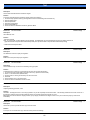
7045
Solution
CAUSE: M501 (paper feed) failed.
SOLUTION: Replace M501 (p/n 55HA-5090).
Note: The motor may check good in 47 mode, however when the motor gets hot, it fails.
Solution ID
TAUS0628336EN*
Solution Usage
2
Solution Usage
1
Solution Usage
22
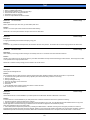
Description
Developer on copies.
Solution
CAUSE: HV2 (transfer) failed.
SOLUTION: To check HV2, perform the following:
1. Access the 36 mode (power the machine ON while folding down on the 3 and 6 keys).
2. Select HV adjustment.
3. Press the NEXT button until TRANSFER occurs.
4. Record the TRANSFER value, then set to 1.
5. Power OFF/ON and make copy.
6. If there is no change in copy quality then replace HV2 (p/n 55GA84020).
7. Reset TRANSFER to the original setting.
Solution ID
TAUS0640291EN*
Description
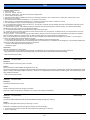
How to reset the Developer counter.
Solution
To reset the developer counter, perform the following:
1. Access the 47 mode.
2 Enter code 95.
3. Press Start/Stop.
4. Power the copier OFF/ON.
Solution ID
TAUS0656768EN*
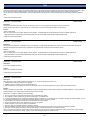
Description
What Konica Minolta print drivers will come bundled with Microsoft ® Windows Vista™ and what is the release schedule for Vista™-compatible drivers?
Solution
Please refer to the Windows Vista™ Hardware Compatibility List for Printers & Scanners and the attached PDFs.
For EFI legacy products that will not receive a Vista™-specific driver, refer to the following statement:
"The previous drivers ( System 5/5e-8/8e ) will not work on 64-bit Vista™. However, these drivers will work on the 32-bit version of Windows Vista™with
minor issues."
Known issue : Borders and frames around icons and panes within the driver UI may not show up correctly.
Notes
:
1. Ifa previous driver was Microsoft ® Windows XP WHQL certified, Microsoft ® also honors the digital signature (CAT file) on Windows Vista™.
2.To view a PDF, Adobe Reader ® must be installed. Adobe Reader ® can be downloaded for free from the Adobe ® web site at:
http://www.adobe.com/products/acrobat/readstep2.html
Solution ID
TAUS0657724EN*
Solution Usage
1
Description
How to access the Konica Minolta FTP site.
Solution
The Konica Minolta FTP site is no longer accessible. The content of this site has been transferred to the Drivers/System Code/Firmware/EPROMs selection
on each individual's SSD Home page. Enter a Product Group, and a Product and select Go to get a complete list of Drivers, System Code, Firmware,
EPROMs, Utilities, and Support Documentation. In addition there arelinks to download Firmware, EPROMs, Utilities, and Support Documentation for related
accessories.
Solution ID
TAUS0700453EN*
Solution Usage
78
Description
Copyright 2007, Konica Minolta Business Solutions U.S.A., Inc.
September 2007
3