1
3-4
Cleaning & Maintenance
Other Printer Cleaning Tasks
Other Printer Cleaning Tasks
General
Exposed areas of the machine may become soiled with ink during printing.
The cleaning methods described below let you continue printing without affecting the
printed media or the machine.
" switch off the main power (before turning off the main power, press the
When carrying out any cleaning other than cleaning using cleaning sticks,
[POWER] key to switch off the sub power.)
Never lubricate the mechanisms.
Never clean with solvents (such as benzine or thinners).
Never touch the printing heads or allow the printing heads to come in contact
with anything except ink.
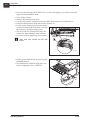
Cleaning the Printer Body
• Use a cloth moistened with water then wrung well, and wipe gently to clean all sur-
faces.
• Wipe the operating panel and LCD display gently with a clean, soft cloth.
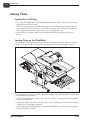
# transfer to the rollers and on every subsequent plate!
Do NOT put wet plates back in the printer. This will cause the image to
T11120
Operating Manual
1036