1
SmartPanel Configuration and Installation Guide
Page 17
What input source selection does from the installer’s perspective
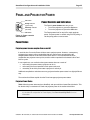
The projector (and any external switcher) is controlled with the four selection buttons.
When a selection button is pressed, the Panel:
x sends a command to the projector, telling it to switch inputs;
x opens and closes selection relays on the Panel to control third-party switchers5; and
x brightens the appropriate Legend to show the new selection.
This section explains how these behaviors are configured.
Mapping Projector Inputs
Input mapping is the process of configuring the Panel to send the projector particular input
source selection commands when selection buttons are pressed.
For a discussion of coordinating input mapping with selection relays controlling external
switchers, see the end of this section (a complete treatment is found in Selection Relays).
Why inputs must be mapped
The command sent when a selection button is pushed must be configured because there is no
fixed relationship between the Panel’s selection buttons and the projector’s inputs.
We could have made selection button one always switch the projector Video, and selection
button two correspond to RGB, but this was a bad idea.
This is true because:
x different projectors have different numbers and different types of inputs, not to mention
different conventions on how sources are labeled and selected;
x the large SmartPanel Modules are designed to be arranged in any order, while the
selection buttons occupy fixed locations on the Panel;
x every installation has different input source devices to switch between; and
x several selectable sources may use the same input at the projector, and be switched by a
third-party switcher.
How to map inputs
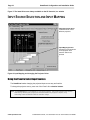
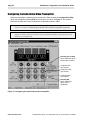
The Configuration Utility allows you to specify which of a projector’s inputs is switched to when
each selection button is pressed.
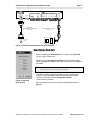
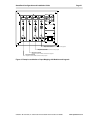
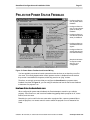
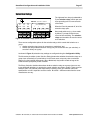
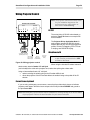
As shown in Figure 6, each selection button is graphically associated with a projector input. The
input associated with, or mapped to, a particular selection button is shown in the box called out
for that button. The input displayed for each selection button is the one the projector is instructed
to switch to when that button is pressed.
5
The Audio Follow Video Preamplifier provides is configurable to provide 4x1 composite video or
2x1 S-Video switching . See Video Switching with the Audio Follow Video Preamplifier.
© 2002-8 SP Controls, Inc. 930 Linden Avenue South San Francisco CA 94080
www.spcontrols.com