1
Page 38
SmartPanel Configuration and Installation Guide
Configuring the Audio Follow Video Preamplifier
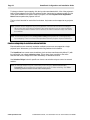
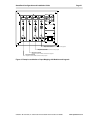
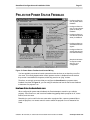
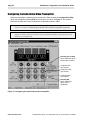
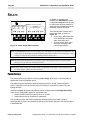
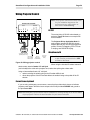
When the Preamplifier is installed and connected to the Panel chassis, the Configuration Utility
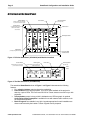
tab for the Preamplifier (labeled AFVP) becomes active, as shown in Figure 17. The sections
that follow describe each of the Preamplifier’s configuration options in detail.
Note: You can connect the SmartPanel to the Preamplifier without removing power from the
chassis. For details see Attaching the Audio Follow Video Preamplifier (optional)
Note: The audio output stage of the Preamplifier is buffered with an op-amp that should be
capable of driving a line up to 100 feet. If you exceed that distance, you may have to use
additional line amplification.
Defeating the Pre-Amp
When enabled the AFVP
behaves like a switcher
Configures Gain
(per channel)
Configures Treble
(per channel)
Configures Bass
(per channel)
Defeating EQ
When enabled the
AFVP does no
equalization
Figure 17: Configuring the Audio Follow Video Preamplifier
www.spcontrols.com
© 2002-8 SP Controls, Inc. 930 Linden Ave. So. San Francisco CA 94080